



Skip to content
  • Home
  • Aktuell
  • Tags
  • 0 Ungelesen 0
  • Kategorien
  • Unreplied
  • Beliebt
  • GitHub
  • Docu
  • Hilfe
Skins
  • Light
  • Brite
  • Cerulean
  • Cosmo
  • Flatly
  • Journal
  • Litera
  • Lumen
  • Lux
  • Materia
  • Minty
  • Morph
  • Pulse
  • Sandstone
  • Simplex
  • Sketchy
  • Spacelab
  • United
  • Yeti
  • Zephyr
  • Dark
  • Cyborg
  • Darkly
  • Quartz
  • Slate
  • Solar
  • Superhero
  • Vapor

  • Standard: (Kein Skin)
  • Kein Skin
Einklappen
ioBroker Logo

Community Forum

donate donate
  1. ioBroker Community Home
  2. Deutsch
  3. Error/Bug
  4. [gelöst] ioB 120% Auslastung und no connection to database

NEWS

  • Neuer Blogbeitrag: Monatsrückblick - Dezember 2025 🎄
    BluefoxB
    Bluefox
    11
    1
    355

  • Weihnachtsangebot 2025! 🎄
    BluefoxB
    Bluefox
    24
    1
    1.6k

  • UPDATE 31.10.: Amazon Alexa - ioBroker Skill läuft aus ?
    apollon77A
    apollon77
    48
    3
    9.5k

[gelöst] ioB 120% Auslastung und no connection to database

Geplant Angeheftet Gesperrt Verschoben Error/Bug
53 Beiträge 5 Kommentatoren 4.8k Aufrufe 5 Watching
  • Älteste zuerst
  • Neuste zuerst
  • Meiste Stimmen
Antworten
  • In einem neuen Thema antworten
Anmelden zum Antworten
Dieses Thema wurde gelöscht. Nur Nutzer mit entsprechenden Rechten können es sehen.
  • K Kueppert

    @thomas-braun arbeite wieder mit dem User, nicht mehr mit root. Werd ich ab sofort so handhaben :+1:
    Reboot tut gut...hab ich auch gerade gemacht. Mal schauen was passiert...

    :(

    login as: thorsten
    thorsten@192.168.10.13's password:
    Linux ioBroker2 4.19.0-20-amd64 #1 SMP Debian 4.19.235-1 (2022-03-17) x86_64
    
    The programs included with the Debian GNU/Linux system are free software;
    the exact distribution terms for each program are described in the
    individual files in /usr/share/doc/*/copyright.
    
    Debian GNU/Linux comes with ABSOLUTELY NO WARRANTY, to the extent
    permitted by applicable law.
    Last login: Fri Apr 22 12:28:43 2022 from 192.168.1.42
    thorsten@ioBroker2:~$ iob status
    Server Cannot start inMem-objects on port 9001: Failed to lock DB file "/opt/iobroker/iobroker-data/objects.jsonl"!


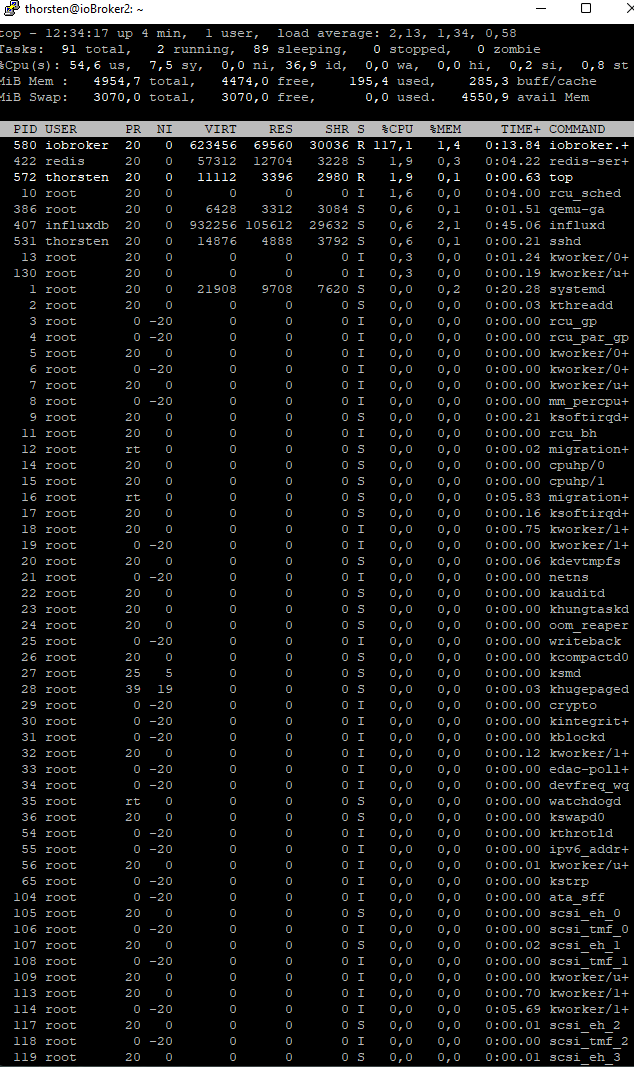
    Ausgabe TOP:
    278d9276-d3ec-4f1d-a96c-1b0500a8d983-image.png

    apollon77A Offline
    apollon77A Offline
    apollon77
    schrieb am zuletzt editiert von
    #18

    @kueppert Frage zum Top: Da läuft auch ein Redis server??? Wird scheinbar nicht genutzt

    Ansonsten bitte mal iobroker stoppen und wirklich sicherstellen das er aus ist und ggf rozesse killen und dann bitte mal neu "iob status"

    Beitrag hat geholfen? Votet rechts unten im Beitrag :-) https://paypal.me/Apollon77 / https://github.com/sponsors/Apollon77

    • Debug-Log für Instanz einschalten? Admin -> Instanzen -> Expertenmodus -> Instanz aufklappen - Loglevel ändern
    • Logfiles auf Platte /opt/iobroker/log/… nutzen, Admin schneidet Zeilen ab
    K 1 Antwort Letzte Antwort
    0
    • Thomas BraunT Thomas Braun

      @kueppert sagte in ioBroker mit 120% Auslastung und no connection to database:

      lsof /opt/iobroker/iobroker-data/objects.jsonl

      Mit

      sudo lsof /opt/iobroker/iobroker-data/objects.jsonl
      

      sollte was kommen.

      K Offline
      K Offline
      Kueppert
      schrieb am zuletzt editiert von
      #19

      @thomas-braun

      thorsten@ioBroker2:~$ sudo lsof /opt/iobroker/iobroker-data/objects.jsonl
      [sudo] Passwort für thorsten:
      COMMAND   PID     USER   FD   TYPE DEVICE SIZE/OFF    NODE NAME
      iobroker. 874 iobroker   19u   REG    8,1 51272289 1451506 /opt/iobroker/iobroker-data/objects.jsonl
      

      UDM Pro, Intel NUC - ioBroker in Proxmox-VM, PiHole+Grafana&Influx+TasmoAdmin in LXCs, Raspberry Pi3 (als CCU), Zigbee-Stick Sonoff, Synology DS918+

      Thomas BraunT 1 Antwort Letzte Antwort
      0
      • apollon77A apollon77

        @kueppert Frage zum Top: Da läuft auch ein Redis server??? Wird scheinbar nicht genutzt

        Ansonsten bitte mal iobroker stoppen und wirklich sicherstellen das er aus ist und ggf rozesse killen und dann bitte mal neu "iob status"

        K Offline
        K Offline
        Kueppert
        schrieb am zuletzt editiert von
        #20

        @apollon77 für meine Begriffe (command spuckt nix aus) läuft da nix sonst?

        thorsten@ioBroker2:~$ iobroker stop
        thorsten@ioBroker2:~$ ps auxww|grep io
        root        12  0.0  0.0      0     0 ?        S    12:30   0:00 [migration/0]
        root        16  0.6  0.0      0     0 ?        S    12:30   0:05 [migration/1]
        message+   377  0.1  0.0   8980  4168 ?        Ss   12:31   0:01 /usr/bin/dbus-daemon --system --address=systemd: --nofork --nopidfile --systemd-activation --syslog-only
        thorsten   914  0.0  0.0   6084   892 pts/0    S+   12:45   0:00 grep io
        thorsten@ioBroker2:~$
        

        den Redis-Server hab ich bewusst nie selbst installiert manuell...

        UDM Pro, Intel NUC - ioBroker in Proxmox-VM, PiHole+Grafana&Influx+TasmoAdmin in LXCs, Raspberry Pi3 (als CCU), Zigbee-Stick Sonoff, Synology DS918+

        apollon77A 1 Antwort Letzte Antwort
        0
        • K Kueppert

          @apollon77 für meine Begriffe (command spuckt nix aus) läuft da nix sonst?

          thorsten@ioBroker2:~$ iobroker stop
          thorsten@ioBroker2:~$ ps auxww|grep io
          root        12  0.0  0.0      0     0 ?        S    12:30   0:00 [migration/0]
          root        16  0.6  0.0      0     0 ?        S    12:30   0:05 [migration/1]
          message+   377  0.1  0.0   8980  4168 ?        Ss   12:31   0:01 /usr/bin/dbus-daemon --system --address=systemd: --nofork --nopidfile --systemd-activation --syslog-only
          thorsten   914  0.0  0.0   6084   892 pts/0    S+   12:45   0:00 grep io
          thorsten@ioBroker2:~$
          

          den Redis-Server hab ich bewusst nie selbst installiert manuell...

          apollon77A Offline
          apollon77A Offline
          apollon77
          schrieb am zuletzt editiert von
          #21

          @kueppert Und was sagt "iob status" jetzt?

          Beitrag hat geholfen? Votet rechts unten im Beitrag :-) https://paypal.me/Apollon77 / https://github.com/sponsors/Apollon77

          • Debug-Log für Instanz einschalten? Admin -> Instanzen -> Expertenmodus -> Instanz aufklappen - Loglevel ändern
          • Logfiles auf Platte /opt/iobroker/log/… nutzen, Admin schneidet Zeilen ab
          K 1 Antwort Letzte Antwort
          0
          • apollon77A apollon77

            @kueppert Und was sagt "iob status" jetzt?

            K Offline
            K Offline
            Kueppert
            schrieb am zuletzt editiert von
            #22

            @apollon77

            thorsten@ioBroker2:~$ iob status
            No connection to databases possible ...
            thorsten@ioBroker2:~$
            

            UDM Pro, Intel NUC - ioBroker in Proxmox-VM, PiHole+Grafana&Influx+TasmoAdmin in LXCs, Raspberry Pi3 (als CCU), Zigbee-Stick Sonoff, Synology DS918+

            apollon77A 1 Antwort Letzte Antwort
            0
            • K Kueppert

              @thomas-braun

              thorsten@ioBroker2:~$ sudo lsof /opt/iobroker/iobroker-data/objects.jsonl
              [sudo] Passwort für thorsten:
              COMMAND   PID     USER   FD   TYPE DEVICE SIZE/OFF    NODE NAME
              iobroker. 874 iobroker   19u   REG    8,1 51272289 1451506 /opt/iobroker/iobroker-data/objects.jsonl
              
              Thomas BraunT Online
              Thomas BraunT Online
              Thomas Braun
              Most Active
              schrieb am zuletzt editiert von
              #23

              @kueppert

              Der Hinweis von @apollon77 ist richtig. Wenn redis nicht (mehr) genutzt wird, weg damit.

              apt policy redis
              

              Ggf. deinstallieren.

              sudo apt remove redis
              

              Linux-Werkzeugkasten:
              https://forum.iobroker.net/topic/42952/der-kleine-iobroker-linux-werkzeugkasten
              NodeJS Fixer Skript:
              https://forum.iobroker.net/topic/68035/iob-node-fix-skript
              iob_diag: curl -sLf -o diag.sh https://iobroker.net/diag.sh && bash diag.sh

              K 1 Antwort Letzte Antwort
              0
              • K Kueppert

                @apollon77

                thorsten@ioBroker2:~$ iob status
                No connection to databases possible ...
                thorsten@ioBroker2:~$
                
                apollon77A Offline
                apollon77A Offline
                apollon77
                schrieb am zuletzt editiert von
                #24

                @kueppert Ok, dann ändere bitte mal im iobroker.json die beiden

                    "connectTimeout": 2000,
                

                zu 30000

                dann?

                Beitrag hat geholfen? Votet rechts unten im Beitrag :-) https://paypal.me/Apollon77 / https://github.com/sponsors/Apollon77

                • Debug-Log für Instanz einschalten? Admin -> Instanzen -> Expertenmodus -> Instanz aufklappen - Loglevel ändern
                • Logfiles auf Platte /opt/iobroker/log/… nutzen, Admin schneidet Zeilen ab
                K 1 Antwort Letzte Antwort
                0
                • Thomas BraunT Thomas Braun

                  @kueppert

                  Der Hinweis von @apollon77 ist richtig. Wenn redis nicht (mehr) genutzt wird, weg damit.

                  apt policy redis
                  

                  Ggf. deinstallieren.

                  sudo apt remove redis
                  
                  K Offline
                  K Offline
                  Kueppert
                  schrieb am zuletzt editiert von
                  #25

                  @thomas-braun

                  thorsten@ioBroker2:~$ apt policy redis
                  redis:
                    Installiert:           (keine)
                    Installationskandidat: 5:5.0.14-1+deb10u2
                    Versionstabelle:
                       5:5.0.14-1+deb10u2 500
                          500 http://ftp.de.debian.org/debian buster/main amd64 Packages
                          500 http://security.debian.org/debian-security buster/updates/main amd64 Packages
                  thorsten@ioBroker2:~$
                  

                  hab noch nicht deinstalliert - steht aber auch da wär nix installiert?

                  UDM Pro, Intel NUC - ioBroker in Proxmox-VM, PiHole+Grafana&Influx+TasmoAdmin in LXCs, Raspberry Pi3 (als CCU), Zigbee-Stick Sonoff, Synology DS918+

                  Thomas BraunT 1 Antwort Letzte Antwort
                  0
                  • K Kueppert

                    @thomas-braun

                    thorsten@ioBroker2:~$ apt policy redis
                    redis:
                      Installiert:           (keine)
                      Installationskandidat: 5:5.0.14-1+deb10u2
                      Versionstabelle:
                         5:5.0.14-1+deb10u2 500
                            500 http://ftp.de.debian.org/debian buster/main amd64 Packages
                            500 http://security.debian.org/debian-security buster/updates/main amd64 Packages
                    thorsten@ioBroker2:~$
                    

                    hab noch nicht deinstalliert - steht aber auch da wär nix installiert?

                    Thomas BraunT Online
                    Thomas BraunT Online
                    Thomas Braun
                    Most Active
                    schrieb am zuletzt editiert von
                    #26

                    @kueppert sagte in ioBroker mit 120% Auslastung und no connection to database:

                    hab noch nicht deinstalliert - steht aber auch da wär nix installiert?

                    In deinem top sieht man mit PID 422 einen redis-server Prozess.

                    systemctl status redis-server
                    

                    Linux-Werkzeugkasten:
                    https://forum.iobroker.net/topic/42952/der-kleine-iobroker-linux-werkzeugkasten
                    NodeJS Fixer Skript:
                    https://forum.iobroker.net/topic/68035/iob-node-fix-skript
                    iob_diag: curl -sLf -o diag.sh https://iobroker.net/diag.sh && bash diag.sh

                    K 1 Antwort Letzte Antwort
                    0
                    • apollon77A apollon77

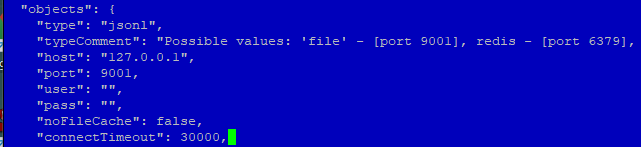
                      @kueppert Ok, dann ändere bitte mal im iobroker.json die beiden

                          "connectTimeout": 2000,
                      

                      zu 30000

                      dann?

                      K Offline
                      K Offline
                      Kueppert
                      schrieb am zuletzt editiert von
                      #27

                      @apollon77 hab nur ein connection-timeout gefunden?
                      4fbbf738-9379-486e-b7bf-17a9f1deb787-image.png

                      thorsten@ioBroker2:~$ iob status
                      iobroker is not running on this host.
                      
                      
                      Objects type: jsonl
                      States  type: jsonl
                      

                      UDM Pro, Intel NUC - ioBroker in Proxmox-VM, PiHole+Grafana&Influx+TasmoAdmin in LXCs, Raspberry Pi3 (als CCU), Zigbee-Stick Sonoff, Synology DS918+

                      apollon77A 1 Antwort Letzte Antwort
                      0
                      • Thomas BraunT Thomas Braun

                        @kueppert sagte in ioBroker mit 120% Auslastung und no connection to database:

                        hab noch nicht deinstalliert - steht aber auch da wär nix installiert?

                        In deinem top sieht man mit PID 422 einen redis-server Prozess.

                        systemctl status redis-server
                        
                        K Offline
                        K Offline
                        Kueppert
                        schrieb am zuletzt editiert von
                        #28

                        @thomas-braun sagte in ioBroker mit 120% Auslastung und no connection to database:

                        systemctl status redis-server

                        thorsten@ioBroker2:~$ systemctl status redis-server
                        ● redis-server.service - Advanced key-value store
                           Loaded: loaded (/lib/systemd/system/redis-server.service; enabled; vendor pre
                           Active: active (running) since Fri 2022-04-22 12:31:07 CEST; 23min ago
                             Docs: http://redis.io/documentation,
                                   man:redis-server(1)
                          Process: 383 ExecStart=/usr/bin/redis-server /etc/redis/redis.conf (code=exite
                         Main PID: 422 (redis-server)
                            Tasks: 4 (limit: 4915)
                           Memory: 15.3M
                           CGroup: /system.slice/redis-server.service
                                   └─422 /usr/bin/redis-server 127.0.0.1:6379
                        lines 1-11/11 (END)
                        

                        soll ich den Befehl zum deinstallieren nun ausführen? Redis nutze ich nicht

                        UDM Pro, Intel NUC - ioBroker in Proxmox-VM, PiHole+Grafana&Influx+TasmoAdmin in LXCs, Raspberry Pi3 (als CCU), Zigbee-Stick Sonoff, Synology DS918+

                        Thomas BraunT 2 Antworten Letzte Antwort
                        0
                        • K Kueppert

                          @apollon77 hab nur ein connection-timeout gefunden?

                          4fbbf738-9379-486e-b7bf-17a9f1deb787-image.png

                          thorsten@ioBroker2:~$ iob status
                          iobroker is not running on this host.
                          
                          
                          Objects type: jsonl
                          States  type: jsonl
                          
                          apollon77A Offline
                          apollon77A Offline
                          apollon77
                          schrieb am zuletzt editiert von
                          #29

                          @kueppert Ok, heisst das die Standard 5s nicht reichen das er die Files lesen kann ... da sist komisch ...

                          Aber ok ...

                          iob list instances ?

                          Beitrag hat geholfen? Votet rechts unten im Beitrag :-) https://paypal.me/Apollon77 / https://github.com/sponsors/Apollon77

                          • Debug-Log für Instanz einschalten? Admin -> Instanzen -> Expertenmodus -> Instanz aufklappen - Loglevel ändern
                          • Logfiles auf Platte /opt/iobroker/log/… nutzen, Admin schneidet Zeilen ab
                          K 1 Antwort Letzte Antwort
                          0
                          • K Kueppert

                            @thomas-braun sagte in ioBroker mit 120% Auslastung und no connection to database:

                            systemctl status redis-server

                            thorsten@ioBroker2:~$ systemctl status redis-server
                            ● redis-server.service - Advanced key-value store
                               Loaded: loaded (/lib/systemd/system/redis-server.service; enabled; vendor pre
                               Active: active (running) since Fri 2022-04-22 12:31:07 CEST; 23min ago
                                 Docs: http://redis.io/documentation,
                                       man:redis-server(1)
                              Process: 383 ExecStart=/usr/bin/redis-server /etc/redis/redis.conf (code=exite
                             Main PID: 422 (redis-server)
                                Tasks: 4 (limit: 4915)
                               Memory: 15.3M
                               CGroup: /system.slice/redis-server.service
                                       └─422 /usr/bin/redis-server 127.0.0.1:6379
                            lines 1-11/11 (END)
                            

                            soll ich den Befehl zum deinstallieren nun ausführen? Redis nutze ich nicht

                            Thomas BraunT Online
                            Thomas BraunT Online
                            Thomas Braun
                            Most Active
                            schrieb am zuletzt editiert von
                            #30

                            @kueppert

                            Bitte das Fenster des Terminals mal größer machen. Da fehlt rechts Text.

                            sudo systemctl stop redis-server
                            sudo systemctl disable redis-server
                            

                            Linux-Werkzeugkasten:
                            https://forum.iobroker.net/topic/42952/der-kleine-iobroker-linux-werkzeugkasten
                            NodeJS Fixer Skript:
                            https://forum.iobroker.net/topic/68035/iob-node-fix-skript
                            iob_diag: curl -sLf -o diag.sh https://iobroker.net/diag.sh && bash diag.sh

                            K 1 Antwort Letzte Antwort
                            0
                            • K Kueppert

                              @thomas-braun sagte in ioBroker mit 120% Auslastung und no connection to database:

                              systemctl status redis-server

                              thorsten@ioBroker2:~$ systemctl status redis-server
                              ● redis-server.service - Advanced key-value store
                                 Loaded: loaded (/lib/systemd/system/redis-server.service; enabled; vendor pre
                                 Active: active (running) since Fri 2022-04-22 12:31:07 CEST; 23min ago
                                   Docs: http://redis.io/documentation,
                                         man:redis-server(1)
                                Process: 383 ExecStart=/usr/bin/redis-server /etc/redis/redis.conf (code=exite
                               Main PID: 422 (redis-server)
                                  Tasks: 4 (limit: 4915)
                                 Memory: 15.3M
                                 CGroup: /system.slice/redis-server.service
                                         └─422 /usr/bin/redis-server 127.0.0.1:6379
                              lines 1-11/11 (END)
                              

                              soll ich den Befehl zum deinstallieren nun ausführen? Redis nutze ich nicht

                              Thomas BraunT Online
                              Thomas BraunT Online
                              Thomas Braun
                              Most Active
                              schrieb am zuletzt editiert von
                              #31

                              @kueppert

                              apt policy redis*
                              

                              Da ist vermutlich das Paket redis-server installiert.

                              Linux-Werkzeugkasten:
                              https://forum.iobroker.net/topic/42952/der-kleine-iobroker-linux-werkzeugkasten
                              NodeJS Fixer Skript:
                              https://forum.iobroker.net/topic/68035/iob-node-fix-skript
                              iob_diag: curl -sLf -o diag.sh https://iobroker.net/diag.sh && bash diag.sh

                              1 Antwort Letzte Antwort
                              0
                              • apollon77A apollon77

                                @kueppert Ok, heisst das die Standard 5s nicht reichen das er die Files lesen kann ... da sist komisch ...

                                Aber ok ...

                                iob list instances ?

                                K Offline
                                K Offline
                                Kueppert
                                schrieb am zuletzt editiert von
                                #32

                                @apollon77 sagte in ioBroker mit 120% Auslastung und no connection to database:

                                iob list instances

                                thorsten@ioBroker2:~$ iob list instances
                                  system.adapter.admin.0                  : admin                 : ioBroker2                                -  enabled, port: 8081, bind: 0.0.0.0, run as: admin
                                  system.adapter.alarm.0                  : alarm                 : ioBroker2                                -  enabled
                                  system.adapter.alexa2.0                 : alexa2                : ioBroker2                                -  enabled
                                  system.adapter.alias-manager.0          : alias-manager         : ioBroker2                                -  enabled
                                  system.adapter.backitup.0               : backitup              : ioBroker2                                -  enabled
                                  system.adapter.daswetter.0              : daswetter             : ioBroker2                                -  enabled
                                  system.adapter.denon.0                  : denon                 : ioBroker2                                -  enabled
                                  system.adapter.discovery.0              : discovery             : ioBroker2                                -  enabled
                                  system.adapter.echarts.0                : echarts               : ioBroker2                                -  enabled
                                  system.adapter.email.0                  : email                 : ioBroker2                                -  enabled
                                  system.adapter.flot.0                   : flot                  : ioBroker2                                -  enabled
                                  system.adapter.fully-tablet-control.0   : fully-tablet-control  : ioBroker2                                -  enabled
                                  system.adapter.harmony.0                : harmony               : ioBroker2                                -  enabled
                                  system.adapter.history.0                : history               : ioBroker2                                -  enabled
                                  system.adapter.hm-rega.0                : hm-rega               : ioBroker2                                -  enabled
                                  system.adapter.hm-rpc.0                 : hm-rpc                : ioBroker2                                -  enabled, port: 0
                                  system.adapter.hm-rpc.1                 : hm-rpc                : ioBroker2                                -  enabled, port: 0
                                  system.adapter.hue.0                    : hue                   : ioBroker2                                -  enabled, port: 80
                                  system.adapter.ical.0                   : ical                  : ioBroker2                                -  enabled
                                  system.adapter.ical.1                   : ical                  : ioBroker2                                -  enabled
                                  system.adapter.icons-mfd-png.0          : icons-mfd-png         : ioBroker2                                -  enabled
                                  system.adapter.icons-ultimate-png.0     : icons-ultimate-png    : ioBroker2                                -  enabled
                                  system.adapter.influxdb.0               : influxdb              : ioBroker2                                -  enabled, port: 8086
                                  system.adapter.info.0                   : info                  : ioBroker2                                -  enabled
                                  system.adapter.iot.0                    : iot                   : ioBroker2                                -  enabled
                                  system.adapter.iqontrol.0               : iqontrol              : ioBroker2                                -  enabled
                                  system.adapter.javascript.0             : javascript            : ioBroker2                                -  enabled
                                  system.adapter.logparser.0              : logparser             : ioBroker2                                -  enabled
                                  system.adapter.nut.0                    : nut                   : ioBroker2                                -  enabled
                                  system.adapter.pi-hole.0                : pi-hole               : ioBroker2                                -  enabled
                                  system.adapter.ping.0                   : ping                  : ioBroker2                                - disabled
                                  system.adapter.pollenflug.0             : pollenflug            : ioBroker2                                -  enabled
                                  system.adapter.proxmox.0                : proxmox               : ioBroker2                                -  enabled, port: 8006
                                  system.adapter.scenes.0                 : scenes                : ioBroker2                                -  enabled
                                  system.adapter.shelly.0                 : shelly                : ioBroker2                                -  enabled, port: 1882, bind: 0.0.0.0
                                  system.adapter.simple-api.0             : simple-api            : ioBroker2                                -  enabled, port: 8087, bind: 0.0.0.0, run as: admin
                                  system.adapter.smartcontrol.0           : smartcontrol          : ioBroker2                                -  enabled
                                  system.adapter.snmp.0                   : snmp                  : ioBroker2                                -  enabled
                                  system.adapter.socketio.0               : socketio              : ioBroker2                                -  enabled, port: 8084, bind: 192.168.10.13, run as: admin
                                  system.adapter.sonoff.0                 : sonoff                : ioBroker2                                -  enabled, port: 1883, bind: 0.0.0.0
                                  system.adapter.synology.0               : synology              : ioBroker2                                -  enabled, port: 5001
                                  system.adapter.tankerkoenig.0           : tankerkoenig          : ioBroker2                                -  enabled
                                  system.adapter.telegram.0               : telegram              : ioBroker2                                -  enabled, port: 8443, bind: 0.0.0.0
                                  system.adapter.text2command.0           : text2command          : ioBroker2                                -  enabled
                                  system.adapter.tr-064.0                 : tr-064                : ioBroker2                                -  enabled
                                  system.adapter.trashschedule.0          : trashschedule         : ioBroker2                                -  enabled
                                  system.adapter.unifi.0                  : unifi                 : ioBroker2                                -  enabled
                                  system.adapter.vis-bars.0               : vis-bars              : ioBroker2                                -  enabled
                                  system.adapter.vis-canvas-gauges.0      : vis-canvas-gauges     : ioBroker2                                -  enabled
                                  system.adapter.vis-colorpicker.0        : vis-colorpicker       : ioBroker2                                -  enabled
                                  system.adapter.vis-fancyswitch.0        : vis-fancyswitch       : ioBroker2                                -  enabled
                                  system.adapter.vis-history.0            : vis-history           : ioBroker2                                -  enabled
                                  system.adapter.vis-hqwidgets.0          : vis-hqwidgets         : ioBroker2                                -  enabled
                                  system.adapter.vis-jqui-mfd.0           : vis-jqui-mfd          : ioBroker2                                -  enabled
                                  system.adapter.vis-justgage.0           : vis-justgage          : ioBroker2                                -  enabled
                                  system.adapter.vis-materialdesign.0     : vis-materialdesign    : ioBroker2                                -  enabled
                                  system.adapter.vis-players.0            : vis-players           : ioBroker2                                -  enabled
                                  system.adapter.vis-timeandweather.0     : vis-timeandweather    : ioBroker2                                -  enabled
                                  system.adapter.vis-weather.0            : vis-weather           : ioBroker2                                -  enabled
                                  system.adapter.vis.0                    : vis                   : ioBroker2                                -  enabled
                                  system.adapter.web-speedy.0             : web-speedy            : ioBroker2                                -  enabled
                                  system.adapter.web.0                    : web                   : ioBroker2                                -  enabled, port: 8082, bind: 192.168.10.13, run as: admin
                                  system.adapter.whatsapp-cmb.0           : whatsapp-cmb          : ioBroker2                                -  enabled
                                  system.adapter.wled.0                   : wled                  : ioBroker2                                -  enabled
                                  system.adapter.yeelight-2.0             : yeelight-2            : ioBroker2                                -  enabled
                                  system.adapter.zigbee.0                 : zigbee                : ioBroker2                                -  enabled, port: /dev/serial/by-id/usb-Silicon_Labs_CP2102N_USB_to_UART_Bridge_Controller_9271b043fa93eb11969ca85b3d98b6d1-if00-port0
                                
                                + instance is alive


                                UDM Pro, Intel NUC - ioBroker in Proxmox-VM, PiHole+Grafana&Influx+TasmoAdmin in LXCs, Raspberry Pi3 (als CCU), Zigbee-Stick Sonoff, Synology DS918+

                                1 Antwort Letzte Antwort
                                0
                                • Thomas BraunT Thomas Braun

                                  @kueppert

                                  Bitte das Fenster des Terminals mal größer machen. Da fehlt rechts Text.

                                  sudo systemctl stop redis-server
                                  sudo systemctl disable redis-server
                                  
                                  K Offline
                                  K Offline
                                  Kueppert
                                  schrieb am zuletzt editiert von
                                  #33

                                  @thomas-braun

                                  thorsten@ioBroker2:~$ systemctl status redis-server
                                  ● redis-server.service - Advanced key-value store
                                     Loaded: loaded (/lib/systemd/system/redis-server.service; enabled; vendor preset: enabled)
                                     Active: active (running) since Fri 2022-04-22 12:31:07 CEST; 30min ago
                                       Docs: http://redis.io/documentation,
                                             man:redis-server(1)
                                    Process: 383 ExecStart=/usr/bin/redis-server /etc/redis/redis.conf (code=exited, status=0/SUCCESS)
                                   Main PID: 422 (redis-server)
                                      Tasks: 4 (limit: 4915)
                                     Memory: 15.3M
                                     CGroup: /system.slice/redis-server.service
                                             └─422 /usr/bin/redis-server 127.0.0.1:6379
                                  thorsten@ioBroker2:~$
                                  

                                  services deaktiviert:

                                  thorsten@ioBroker2:~$ sudo systemctl stop redis-server
                                  [sudo] Passwort für thorsten:
                                  thorsten@ioBroker2:~$ sudo systemctl disable redis-server
                                  Synchronizing state of redis-server.service with SysV service script with /lib/systemd/systemd-sysv-install.
                                  Executing: /lib/systemd/systemd-sysv-install disable redis-server
                                  Removed /etc/systemd/system/redis.service.
                                  Removed /etc/systemd/system/multi-user.target.wants/redis-server.service.
                                  thorsten@ioBroker2:~$
                                  
                                  thorsten@ioBroker2:~$ apt policy redis*
                                  redis-redisearch-doc:
                                    Installiert:           (keine)
                                    Installationskandidat: 1:1.2.1-4
                                    Versionstabelle:
                                       1:1.2.1-4 500
                                          500 http://ftp.de.debian.org/debian buster/main amd64 Packages
                                  redis-redisearch:
                                    Installiert:           (keine)
                                    Installationskandidat: 1:1.2.1-4
                                    Versionstabelle:
                                       1:1.2.1-4 500
                                          500 http://ftp.de.debian.org/debian buster/main amd64 Packages
                                  redis:
                                    Installiert:           (keine)
                                    Installationskandidat: 5:5.0.14-1+deb10u2
                                    Versionstabelle:
                                       5:5.0.14-1+deb10u2 500
                                          500 http://ftp.de.debian.org/debian buster/main amd64 Packages
                                          500 http://security.debian.org/debian-security buster/updates/main amd64 Packages
                                  redis-sentinel:
                                    Installiert:           (keine)
                                    Installationskandidat: 5:5.0.14-1+deb10u2
                                    Versionstabelle:
                                       5:5.0.14-1+deb10u2 500
                                          500 http://ftp.de.debian.org/debian buster/main amd64 Packages
                                          500 http://security.debian.org/debian-security buster/updates/main amd64 Packages
                                  redis-tools:
                                    Installiert:           5:5.0.14-1+deb10u2
                                    Installationskandidat: 5:5.0.14-1+deb10u2
                                    Versionstabelle:
                                   *** 5:5.0.14-1+deb10u2 500
                                          500 http://ftp.de.debian.org/debian buster/main amd64 Packages
                                          500 http://security.debian.org/debian-security buster/updates/main amd64 Packages
                                          100 /var/lib/dpkg/status
                                  redis-server:
                                    Installiert:           5:5.0.14-1+deb10u2
                                    Installationskandidat: 5:5.0.14-1+deb10u2
                                    Versionstabelle:
                                   *** 5:5.0.14-1+deb10u2 500
                                          500 http://ftp.de.debian.org/debian buster/main amd64 Packages
                                          500 http://security.debian.org/debian-security buster/updates/main amd64 Packages
                                          100 /var/lib/dpkg/status
                                  thorsten@ioBroker2:~$


                                  UDM Pro, Intel NUC - ioBroker in Proxmox-VM, PiHole+Grafana&Influx+TasmoAdmin in LXCs, Raspberry Pi3 (als CCU), Zigbee-Stick Sonoff, Synology DS918+

                                  Thomas BraunT 1 Antwort Letzte Antwort
                                  0
                                  • apollon77A Offline
                                    apollon77A Offline
                                    apollon77
                                    schrieb am zuletzt editiert von apollon77
                                    #34

                                    Ok, aaaalso aus Erfahrung der Vergangenheit kann so ein "120% Themen" nur passieren wenn irgendein adapter amok läuft und es war meistens nie der Controller.

                                    Der Strukturierte Ansatz wäre daher jetzt Alle Adapter zu deaktivieren ausser Admin und iobroker zu starten. Dann zu schauen wie es dem System geht. Wenn alles ok dann einen adapter nach dem Anderen Aktivieren um zu schauen wann es losgeht ... ggf den dann wieder zu beenden und so weiter. Bis der Übeltäter gefunden ist.

                                    Die aandere Variante ist das System mit den Adaptern zu starten die es eigentlich nicht sein können ... so sparst Du dir ein paar schleifen :-)

                                    Die die immer Kandidaten sind sind javascript und alles wo viele Geräte dran hängen.

                                    Ne Alternative ist ins Log zu schauen von dem wo er jetzt zuletzt lief obdu da offensichtlich irgendwas siehst was amok läuft.

                                    Beitrag hat geholfen? Votet rechts unten im Beitrag :-) https://paypal.me/Apollon77 / https://github.com/sponsors/Apollon77

                                    • Debug-Log für Instanz einschalten? Admin -> Instanzen -> Expertenmodus -> Instanz aufklappen - Loglevel ändern
                                    • Logfiles auf Platte /opt/iobroker/log/… nutzen, Admin schneidet Zeilen ab
                                    K 1 Antwort Letzte Antwort
                                    0
                                    • K Kueppert

                                      @thomas-braun

                                      thorsten@ioBroker2:~$ systemctl status redis-server
                                      ● redis-server.service - Advanced key-value store
                                         Loaded: loaded (/lib/systemd/system/redis-server.service; enabled; vendor preset: enabled)
                                         Active: active (running) since Fri 2022-04-22 12:31:07 CEST; 30min ago
                                           Docs: http://redis.io/documentation,
                                                 man:redis-server(1)
                                        Process: 383 ExecStart=/usr/bin/redis-server /etc/redis/redis.conf (code=exited, status=0/SUCCESS)
                                       Main PID: 422 (redis-server)
                                          Tasks: 4 (limit: 4915)
                                         Memory: 15.3M
                                         CGroup: /system.slice/redis-server.service
                                                 └─422 /usr/bin/redis-server 127.0.0.1:6379
                                      thorsten@ioBroker2:~$
                                      

                                      services deaktiviert:

                                      thorsten@ioBroker2:~$ sudo systemctl stop redis-server
                                      [sudo] Passwort für thorsten:
                                      thorsten@ioBroker2:~$ sudo systemctl disable redis-server
                                      Synchronizing state of redis-server.service with SysV service script with /lib/systemd/systemd-sysv-install.
                                      Executing: /lib/systemd/systemd-sysv-install disable redis-server
                                      Removed /etc/systemd/system/redis.service.
                                      Removed /etc/systemd/system/multi-user.target.wants/redis-server.service.
                                      thorsten@ioBroker2:~$
                                      
                                      thorsten@ioBroker2:~$ apt policy redis*
                                      redis-redisearch-doc:
                                        Installiert:           (keine)
                                        Installationskandidat: 1:1.2.1-4
                                        Versionstabelle:
                                           1:1.2.1-4 500
                                              500 http://ftp.de.debian.org/debian buster/main amd64 Packages
                                      redis-redisearch:
                                        Installiert:           (keine)
                                        Installationskandidat: 1:1.2.1-4
                                        Versionstabelle:
                                           1:1.2.1-4 500
                                              500 http://ftp.de.debian.org/debian buster/main amd64 Packages
                                      redis:
                                        Installiert:           (keine)
                                        Installationskandidat: 5:5.0.14-1+deb10u2
                                        Versionstabelle:
                                           5:5.0.14-1+deb10u2 500
                                              500 http://ftp.de.debian.org/debian buster/main amd64 Packages
                                              500 http://security.debian.org/debian-security buster/updates/main amd64 Packages
                                      redis-sentinel:
                                        Installiert:           (keine)
                                        Installationskandidat: 5:5.0.14-1+deb10u2
                                        Versionstabelle:
                                           5:5.0.14-1+deb10u2 500
                                              500 http://ftp.de.debian.org/debian buster/main amd64 Packages
                                              500 http://security.debian.org/debian-security buster/updates/main amd64 Packages
                                      redis-tools:
                                        Installiert:           5:5.0.14-1+deb10u2
                                        Installationskandidat: 5:5.0.14-1+deb10u2
                                        Versionstabelle:
                                       *** 5:5.0.14-1+deb10u2 500
                                              500 http://ftp.de.debian.org/debian buster/main amd64 Packages
                                              500 http://security.debian.org/debian-security buster/updates/main amd64 Packages
                                              100 /var/lib/dpkg/status
                                      redis-server:
                                        Installiert:           5:5.0.14-1+deb10u2
                                        Installationskandidat: 5:5.0.14-1+deb10u2
                                        Versionstabelle:
                                       *** 5:5.0.14-1+deb10u2 500
                                              500 http://ftp.de.debian.org/debian buster/main amd64 Packages
                                              500 http://security.debian.org/debian-security buster/updates/main amd64 Packages
                                              100 /var/lib/dpkg/status
                                      thorsten@ioBroker2:~$
                                      
                                      
                                      Thomas BraunT Online
                                      Thomas BraunT Online
                                      Thomas Braun
                                      Most Active
                                      schrieb am zuletzt editiert von
                                      #35

                                      @kueppert sagte in ioBroker mit 120% Auslastung und no connection to database:

                                      Siehste, redis-tools und redis-server sind installiert.
                                      Wenn das nicht genutzt wird: Raus damit!

                                      Linux-Werkzeugkasten:
                                      https://forum.iobroker.net/topic/42952/der-kleine-iobroker-linux-werkzeugkasten
                                      NodeJS Fixer Skript:
                                      https://forum.iobroker.net/topic/68035/iob-node-fix-skript
                                      iob_diag: curl -sLf -o diag.sh https://iobroker.net/diag.sh && bash diag.sh

                                      K 1 Antwort Letzte Antwort
                                      0
                                      • apollon77A apollon77

                                        Ok, aaaalso aus Erfahrung der Vergangenheit kann so ein "120% Themen" nur passieren wenn irgendein adapter amok läuft und es war meistens nie der Controller.

                                        Der Strukturierte Ansatz wäre daher jetzt Alle Adapter zu deaktivieren ausser Admin und iobroker zu starten. Dann zu schauen wie es dem System geht. Wenn alles ok dann einen adapter nach dem Anderen Aktivieren um zu schauen wann es losgeht ... ggf den dann wieder zu beenden und so weiter. Bis der Übeltäter gefunden ist.

                                        Die aandere Variante ist das System mit den Adaptern zu starten die es eigentlich nicht sein können ... so sparst Du dir ein paar schleifen :-)

                                        Die die immer Kandidaten sind sind javascript und alles wo viele Geräte dran hängen.

                                        Ne Alternative ist ins Log zu schauen von dem wo er jetzt zuletzt lief obdu da offensichtlich irgendwas siehst was amok läuft.

                                        K Offline
                                        K Offline
                                        Kueppert
                                        schrieb am zuletzt editiert von
                                        #36

                                        @apollon77 alles klar, dann mach ich das mal so...soll ich vorher, ohne den iob zu starten, ggf den js-controller updaten?

                                        Was mich auch wundert, ist, dass obwohl top keine Auslastung anzeigt, die Auslastung der VM im Proxmox bei 30% liegt? Und die Abfragen in der VM dauern, was iob betrifft, echt lang. So kenne ich das (bisher) garnicht aus der Vergangenheit :face_with_rolling_eyes:

                                        UDM Pro, Intel NUC - ioBroker in Proxmox-VM, PiHole+Grafana&Influx+TasmoAdmin in LXCs, Raspberry Pi3 (als CCU), Zigbee-Stick Sonoff, Synology DS918+

                                        apollon77A 1 Antwort Letzte Antwort
                                        0
                                        • Thomas BraunT Thomas Braun

                                          @kueppert sagte in ioBroker mit 120% Auslastung und no connection to database:

                                          Siehste, redis-tools und redis-server sind installiert.
                                          Wenn das nicht genutzt wird: Raus damit!

                                          K Offline
                                          K Offline
                                          Kueppert
                                          schrieb am zuletzt editiert von
                                          #37

                                          @thomas-braun
                                          der will nicht :

                                          thorsten@ioBroker2:~$ sudo apt remove redis
                                          Paketlisten werden gelesen... Fertig
                                          Abhängigkeitsbaum wird aufgebaut.
                                          Statusinformationen werden eingelesen.... Fertig
                                          Paket »redis« ist nicht installiert, wird also auch nicht entfernt.
                                          Die folgenden Pakete wurden automatisch installiert und werden nicht mehr benötigt:
                                            linux-image-4.19.0-16-amd64 linux-image-4.19.0-17-amd64 linux-image-4.19.0-18-amd64
                                          Verwenden Sie »sudo apt autoremove«, um sie zu entfernen.
                                          0 aktualisiert, 0 neu installiert, 0 zu entfernen und 0 nicht aktualisiert.
                                          thorsten@ioBroker2:~$


                                          UDM Pro, Intel NUC - ioBroker in Proxmox-VM, PiHole+Grafana&Influx+TasmoAdmin in LXCs, Raspberry Pi3 (als CCU), Zigbee-Stick Sonoff, Synology DS918+

                                          Thomas BraunT apollon77A 2 Antworten Letzte Antwort
                                          0
                                          Antworten
                                          • In einem neuen Thema antworten
                                          Anmelden zum Antworten
                                          • Älteste zuerst
                                          • Neuste zuerst
                                          • Meiste Stimmen


                                          Support us

                                          ioBroker
                                          Community Adapters
                                          Donate

                                          327

                                          Online

                                          32.5k

                                          Benutzer

                                          81.8k

                                          Themen

                                          1.3m

                                          Beiträge
                                          Community
                                          Impressum | Datenschutz-Bestimmungen | Nutzungsbedingungen | Einwilligungseinstellungen
                                          ioBroker Community 2014-2025
                                          logo
                                          • Anmelden

                                          • Du hast noch kein Konto? Registrieren

                                          • Anmelden oder registrieren, um zu suchen
                                          • Erster Beitrag
                                            Letzter Beitrag
                                          0
                                          • Home
                                          • Aktuell
                                          • Tags
                                          • Ungelesen 0
                                          • Kategorien
                                          • Unreplied
                                          • Beliebt
                                          • GitHub
                                          • Docu
                                          • Hilfe