




[gelöst] ioB 120% Auslastung und no connection to database
-
@thomas-braun ausgeführt und ein apt dist-upgrade hinterher:
Source ist auch gerade gezogen (vorher!! vor apt update):

OK:1 http://security.debian.org/debian-security buster/updates InRelease OK:2 http://ftp.de.debian.org/debian buster InRelease Holen:3 http://ftp.de.debian.org/debian buster-updates InRelease [51,9 kB] OK:4 https://deb.nodesource.com/node_12.x buster InRelease Holen:5 https://repos.influxdata.com/debian buster InRelease [4.737 B] OK:6 https://deb.nodesource.com/node_14.x buster InRelease Holen:7 https://repos.influxdata.com/debian buster/stable amd64 Packages [1.266 B] Es wurden 57,9 kB in 15 s geholt (3.797 B/s). Paketlisten werden gelesen... Fertig Abhängigkeitsbaum wird aufgebaut. Statusinformationen werden eingelesen.... Fertig Aktualisierung für 33 Pakete verfügbar. Führen Sie »apt list --upgradable« aus, um sie anzuzeigen. root@ioBroker2:~# apt disp-upgrade E: Ungültige Operation disp-upgrade root@ioBroker2:~# apt dist-upgrade Paketlisten werden gelesen... Fertig Abhängigkeitsbaum wird aufgebaut. Statusinformationen werden eingelesen.... Fertig Paketaktualisierung (Upgrade) wird berechnet... Fertig Die folgenden Pakete wurden automatisch installiert und werden nicht mehr benötigt: linux-image-4.19.0-16-amd64 linux-image-4.19.0-17-amd64 Verwenden Sie »apt autoremove«, um sie zu entfernen. Die folgenden NEUEN Pakete werden installiert: linux-image-4.19.0-20-amd64 Die folgenden Pakete werden aktualisiert (Upgrade): base-files gzip icu-devtools libc-bin libc-dev-bin libc-l10n libc6 libc6-dev libcups2 libgmp10 libicu-dev libicu63 liblzma5 libmariadb3 libssl1.1 libtiff5 libxml2 linux-image-amd64 linux-libc-dev locales mariadb-client-10.3 mariadb-client-core-10.3 mariadb-common openssl publicsuffix rsyslog tzdata vim-common vim-tiny xxd xz-utils zlib1g zlib1g-dev 33 aktualisiert, 1 neu installiert, 0 zu entfernen und 0 nicht aktualisiert. Es müssen 93,1 MB an Archiven heruntergeladen werden. Nach dieser Operation werden 270 MB Plattenplatz zusätzlich benutzt. Möchten Sie fortfahren? [J/n] j Holen:1 http://security.debian.org/debian-security buster/updates/main amd64 gzip amd64 1.9-3+deb10u1 [128 kB] Holen:2 http://ftp.de.debian.org/debian buster/main amd64 base-files amd64 10.3+deb10u12 [69,9 kB] Holen:3 http://security.debian.org/debian-security buster/updates/main amd64 zlib1g-dev amd64 1:1.2.11.dfsg-1+deb10u1 [210 kB] Holen:4 http://ftp.de.debian.org/debian buster/main amd64 libc6-dev amd64 2.28-10+deb10u1 [2.692 kB] Holen:5 http://security.debian.org/debian-security buster/updates/main amd64 zlib1g amd64 1:1.2.11.dfsg-1+deb10u1 [90,8 kB] Holen:6 http://security.debian.org/debian-security buster/updates/main amd64 liblzma5 amd64 5.2.4-1+deb10u1 [153 kB] Holen:7 http://security.debian.org/debian-security buster/updates/main amd64 xz-utils amd64 5.2.4-1+deb10u1 [183 kB] Holen:8 http://security.debian.org/debian-security buster/updates/main amd64 libtiff5 amd64 4.1.0+git191117-2~deb10u4 [271 kB] Holen:9 http://ftp.de.debian.org/debian buster/main amd64 libc-dev-bin amd64 2.28-10+deb10u1 [276 kB] Holen:10 http://ftp.de.debian.org/debian buster/main amd64 linux-libc-dev amd64 4.19.235-1 [1.510 kB] Holen:11 http://ftp.de.debian.org/debian buster/main amd64 libc6 amd64 2.28-10+deb10u1 [2.863 kB] Holen:12 http://ftp.de.debian.org/debian buster/main amd64 libc-bin amd64 2.28-10+deb10u1 [795 kB] Holen:13 http://ftp.de.debian.org/debian buster/main amd64 rsyslog amd64 8.1901.0-1+deb10u1 [658 kB] Holen:14 http://ftp.de.debian.org/debian buster/main amd64 libgmp10 amd64 2:6.1.2+dfsg-4+deb10u1 [251 kB] Holen:15 http://ftp.de.debian.org/debian buster-updates/main amd64 tzdata all 2021a-0+deb10u4 [266 kB] Holen:16 http://ftp.de.debian.org/debian buster/main amd64 vim-tiny amd64 2:8.1.0875-5+deb10u2 [628 kB] Holen:17 http://ftp.de.debian.org/debian buster/main amd64 xxd amd64 2:8.1.0875-5+deb10u2 [140 kB] Holen:18 http://ftp.de.debian.org/debian buster/main amd64 vim-common all 2:8.1.0875-5+deb10u2 [195 kB] Holen:19 http://ftp.de.debian.org/debian buster/main amd64 libc-l10n all 2.28-10+deb10u1 [847 kB] Holen:20 http://ftp.de.debian.org/debian buster/main amd64 locales all 2.28-10+deb10u1 [4.057 kB] Holen:21 http://ftp.de.debian.org/debian buster/main amd64 libicu-dev amd64 63.1-6+deb10u3 [9.183 kB] Holen:22 http://ftp.de.debian.org/debian buster/main amd64 icu-devtools amd64 63.1-6+deb10u3 [189 kB] Holen:23 http://ftp.de.debian.org/debian buster/main amd64 libicu63 amd64 63.1-6+deb10u3 [8.293 kB] Holen:24 http://ftp.de.debian.org/debian buster/main amd64 libcups2 amd64 2.2.10-6+deb10u5 [325 kB] Holen:25 http://ftp.de.debian.org/debian buster/main amd64 mariadb-common all 1:10.3.34-0+deb10u1 [33,0 kB] Holen:26 http://ftp.de.debian.org/debian buster/main amd64 libmariadb3 amd64 1:10.3.34-0+deb10u1 [173 kB] Holen:27 http://ftp.de.debian.org/debian buster/main amd64 libssl1.1 amd64 1.1.1n-0+deb10u1 [1.551 kB] Holen:28 http://ftp.de.debian.org/debian buster/main amd64 libxml2 amd64 2.9.4+dfsg1-7+deb10u3 [689 kB] Holen:29 http://ftp.de.debian.org/debian buster/main amd64 linux-image-4.19.0-20-amd64 amd64 4.19.235-1 [48,5 MB] Holen:30 http://ftp.de.debian.org/debian buster/main amd64 linux-image-amd64 amd64 4.19+105+deb10u15 [8.648 B] Holen:31 http://ftp.de.debian.org/debian buster/main amd64 mariadb-client-core-10.3 amd64 1:10.3.34-0+deb10u1 [5.767 kB] Holen:32 http://ftp.de.debian.org/debian buster/main amd64 mariadb-client-10.3 amd64 1:10.3.34-0+deb10u1 [1.144 kB] Holen:33 http://ftp.de.debian.org/debian buster/main amd64 openssl amd64 1.1.1n-0+deb10u1 [858 kB] Holen:34 http://ftp.de.debian.org/debian buster/main amd64 publicsuffix all 20211109.1735-0+deb10u1 [125 kB] Es wurden 93,1 MB in 28 s geholt (3.276 kB/s). Changelogs werden gelesen... Fertig Extrahiere Vorlagen aus Paketen: 100% Vorkonfiguration der Pakete ... (Lese Datenbank ... 65337 Dateien und Verzeichnisse sind derzeit installiert.) Vorbereitung zum Entpacken von .../base-files_10.3+deb10u12_amd64.deb ... Entpacken von base-files (10.3+deb10u12) über (10.3+deb10u11) ... base-files (10.3+deb10u12) wird eingerichtet ... Neue Version der Konfigurationsdatei /etc/debian_version wird installiert ... (Lese Datenbank ... 65337 Dateien und Verzeichnisse sind derzeit installiert.) Vorbereitung zum Entpacken von .../gzip_1.9-3+deb10u1_amd64.deb ... Entpacken von gzip (1.9-3+deb10u1) über (1.9-3) ... gzip (1.9-3+deb10u1) wird eingerichtet ... (Lese Datenbank ... 65337 Dateien und Verzeichnisse sind derzeit installiert.) Vorbereitung zum Entpacken von .../libc6-dev_2.28-10+deb10u1_amd64.deb ... Entpacken von libc6-dev:amd64 (2.28-10+deb10u1) über (2.28-10) ... Vorbereitung zum Entpacken von .../libc-dev-bin_2.28-10+deb10u1_amd64.deb ... Entpacken von libc-dev-bin (2.28-10+deb10u1) über (2.28-10) ... Vorbereitung zum Entpacken von .../linux-libc-dev_4.19.235-1_amd64.deb ... Entpacken von linux-libc-dev:amd64 (4.19.235-1) über (4.19.232-1) ... Vorbereitung zum Entpacken von .../libc6_2.28-10+deb10u1_amd64.deb ... Entpacken von libc6:amd64 (2.28-10+deb10u1) über (2.28-10) ... libc6:amd64 (2.28-10+deb10u1) wird eingerichtet ... (Lese Datenbank ... 65337 Dateien und Verzeichnisse sind derzeit installiert.) Vorbereitung zum Entpacken von .../libc-bin_2.28-10+deb10u1_amd64.deb ... Entpacken von libc-bin (2.28-10+deb10u1) über (2.28-10) ... libc-bin (2.28-10+deb10u1) wird eingerichtet ... (Lese Datenbank ... 65337 Dateien und Verzeichnisse sind derzeit installiert.) Vorbereitung zum Entpacken von .../zlib1g-dev_1%3a1.2.11.dfsg-1+deb10u1_amd64.deb ... Entpacken von zlib1g-dev:amd64 (1:1.2.11.dfsg-1+deb10u1) über (1:1.2.11.dfsg-1) ... Vorbereitung zum Entpacken von .../zlib1g_1%3a1.2.11.dfsg-1+deb10u1_amd64.deb ... Entpacken von zlib1g:amd64 (1:1.2.11.dfsg-1+deb10u1) über (1:1.2.11.dfsg-1) ... zlib1g:amd64 (1:1.2.11.dfsg-1+deb10u1) wird eingerichtet ... (Lese Datenbank ... 65337 Dateien und Verzeichnisse sind derzeit installiert.) Vorbereitung zum Entpacken von .../rsyslog_8.1901.0-1+deb10u1_amd64.deb ... Entpacken von rsyslog (8.1901.0-1+deb10u1) über (8.1901.0-1) ... Vorbereitung zum Entpacken von .../liblzma5_5.2.4-1+deb10u1_amd64.deb ... Entpacken von liblzma5:amd64 (5.2.4-1+deb10u1) über (5.2.4-1) ... liblzma5:amd64 (5.2.4-1+deb10u1) wird eingerichtet ... (Lese Datenbank ... 65337 Dateien und Verzeichnisse sind derzeit installiert.) Vorbereitung zum Entpacken von .../libgmp10_2%3a6.1.2+dfsg-4+deb10u1_amd64.deb ... Entpacken von libgmp10:amd64 (2:6.1.2+dfsg-4+deb10u1) über (2:6.1.2+dfsg-4) ... libgmp10:amd64 (2:6.1.2+dfsg-4+deb10u1) wird eingerichtet ... (Lese Datenbank ... 65337 Dateien und Verzeichnisse sind derzeit installiert.) Vorbereitung zum Entpacken von .../00-tzdata_2021a-0+deb10u4_all.deb ... Entpacken von tzdata (2021a-0+deb10u4) über (2021a-0+deb10u3) ... Vorbereitung zum Entpacken von .../01-vim-tiny_2%3a8.1.0875-5+deb10u2_amd64.deb ... Entpacken von vim-tiny (2:8.1.0875-5+deb10u2) über (2:8.1.0875-5) ... Vorbereitung zum Entpacken von .../02-xxd_2%3a8.1.0875-5+deb10u2_amd64.deb ... Entpacken von xxd (2:8.1.0875-5+deb10u2) über (2:8.1.0875-5) ... Vorbereitung zum Entpacken von .../03-vim-common_2%3a8.1.0875-5+deb10u2_all.deb ... Entpacken von vim-common (2:8.1.0875-5+deb10u2) über (2:8.1.0875-5) ... Vorbereitung zum Entpacken von .../04-libc-l10n_2.28-10+deb10u1_all.deb ... Entpacken von libc-l10n (2.28-10+deb10u1) über (2.28-10) ... Vorbereitung zum Entpacken von .../05-locales_2.28-10+deb10u1_all.deb ... Entpacken von locales (2.28-10+deb10u1) über (2.28-10) ... Vorbereitung zum Entpacken von .../06-xz-utils_5.2.4-1+deb10u1_amd64.deb ... Entpacken von xz-utils (5.2.4-1+deb10u1) über (5.2.4-1) ... Vorbereitung zum Entpacken von .../07-libicu-dev_63.1-6+deb10u3_amd64.deb ... Entpacken von libicu-dev:amd64 (63.1-6+deb10u3) über (63.1-6+deb10u2) ... Vorbereitung zum Entpacken von .../08-icu-devtools_63.1-6+deb10u3_amd64.deb ... Entpacken von icu-devtools (63.1-6+deb10u3) über (63.1-6+deb10u2) ... Vorbereitung zum Entpacken von .../09-libicu63_63.1-6+deb10u3_amd64.deb ... Entpacken von libicu63:amd64 (63.1-6+deb10u3) über (63.1-6+deb10u2) ... Vorbereitung zum Entpacken von .../10-libcups2_2.2.10-6+deb10u5_amd64.deb ... Entpacken von libcups2:amd64 (2.2.10-6+deb10u5) über (2.2.10-6+deb10u4) ... Vorbereitung zum Entpacken von .../11-mariadb-common_1%3a10.3.34-0+deb10u1_all.deb ... Entpacken von mariadb-common (1:10.3.34-0+deb10u1) über (1:10.3.31-0+deb10u1) ... Vorbereitung zum Entpacken von .../12-libmariadb3_1%3a10.3.34-0+deb10u1_amd64.deb ... Entpacken von libmariadb3:amd64 (1:10.3.34-0+deb10u1) über (1:10.3.31-0+deb10u1) ... Vorbereitung zum Entpacken von .../13-libssl1.1_1.1.1n-0+deb10u1_amd64.deb ... Entpacken von libssl1.1:amd64 (1.1.1n-0+deb10u1) über (1.1.1d-0+deb10u8) ... Vorbereitung zum Entpacken von .../14-libtiff5_4.1.0+git191117-2~deb10u4_amd64.deb ... Entpacken von libtiff5:amd64 (4.1.0+git191117-2~deb10u4) über (4.1.0+git191117-2~deb10u3) ... Vorbereitung zum Entpacken von .../15-libxml2_2.9.4+dfsg1-7+deb10u3_amd64.deb ... Entpacken von libxml2:amd64 (2.9.4+dfsg1-7+deb10u3) über (2.9.4+dfsg1-7+deb10u2) ... Vormals nicht ausgewähltes Paket linux-image-4.19.0-20-amd64 wird gewählt. Vorbereitung zum Entpacken von .../16-linux-image-4.19.0-20-amd64_4.19.235-1_amd64.deb ... Entpacken von linux-image-4.19.0-20-amd64 (4.19.235-1) ... Vorbereitung zum Entpacken von .../17-linux-image-amd64_4.19+105+deb10u15_amd64.deb ... Entpacken von linux-image-amd64 (4.19+105+deb10u15) über (4.19+105+deb10u14) ... Vorbereitung zum Entpacken von .../18-mariadb-client-core-10.3_1%3a10.3.34-0+deb10u1_amd64.deb ... Entpacken von mariadb-client-core-10.3 (1:10.3.34-0+deb10u1) über (1:10.3.31-0+deb10u1) ... Vorbereitung zum Entpacken von .../19-mariadb-client-10.3_1%3a10.3.34-0+deb10u1_amd64.deb ... Entpacken von mariadb-client-10.3 (1:10.3.34-0+deb10u1) über (1:10.3.31-0+deb10u1) ... Vorbereitung zum Entpacken von .../20-openssl_1.1.1n-0+deb10u1_amd64.deb ... Entpacken von openssl (1.1.1n-0+deb10u1) über (1.1.1d-0+deb10u8) ... Vorbereitung zum Entpacken von .../21-publicsuffix_20211109.1735-0+deb10u1_all.deb ... Entpacken von publicsuffix (20211109.1735-0+deb10u1) über (20190415.1030-1) ... libc-l10n (2.28-10+deb10u1) wird eingerichtet ... libssl1.1:amd64 (1.1.1n-0+deb10u1) wird eingerichtet ... rsyslog (8.1901.0-1+deb10u1) wird eingerichtet ... linux-libc-dev:amd64 (4.19.235-1) wird eingerichtet ... locales (2.28-10+deb10u1) wird eingerichtet ... Generating locales (this might take a while)... de_DE.UTF-8... done Generation complete. libicu63:amd64 (63.1-6+deb10u3) wird eingerichtet ... xxd (2:8.1.0875-5+deb10u2) wird eingerichtet ... tzdata (2021a-0+deb10u4) wird eingerichtet ... Current default time zone: 'Europe/Berlin' Local time is now: Fri Apr 22 11:41:45 CEST 2022. Universal Time is now: Fri Apr 22 09:41:45 UTC 2022. Run 'dpkg-reconfigure tzdata' if you wish to change it. mariadb-common (1:10.3.34-0+deb10u1) wird eingerichtet ... linux-image-4.19.0-20-amd64 (4.19.235-1) wird eingerichtet ... I: /vmlinuz.old is now a symlink to boot/vmlinuz-4.19.0-19-amd64 I: /initrd.img.old is now a symlink to boot/initrd.img-4.19.0-19-amd64 I: /vmlinuz is now a symlink to boot/vmlinuz-4.19.0-20-amd64 I: /initrd.img is now a symlink to boot/initrd.img-4.19.0-20-amd64 /etc/kernel/postinst.d/initramfs-tools: update-initramfs: Generating /boot/initrd.img-4.19.0-20-amd64 /etc/kernel/postinst.d/zz-update-grub: GRUB-Konfigurationsdatei wird erstellt … Linux-Abbild gefunden: /boot/vmlinuz-4.19.0-20-amd64 initrd-Abbild gefunden: /boot/initrd.img-4.19.0-20-amd64 Linux-Abbild gefunden: /boot/vmlinuz-4.19.0-19-amd64 initrd-Abbild gefunden: /boot/initrd.img-4.19.0-19-amd64 Linux-Abbild gefunden: /boot/vmlinuz-4.19.0-18-amd64 initrd-Abbild gefunden: /boot/initrd.img-4.19.0-18-amd64 Linux-Abbild gefunden: /boot/vmlinuz-4.19.0-17-amd64 initrd-Abbild gefunden: /boot/initrd.img-4.19.0-17-amd64 Linux-Abbild gefunden: /boot/vmlinuz-4.19.0-16-amd64 initrd-Abbild gefunden: /boot/initrd.img-4.19.0-16-amd64 erledigt vim-common (2:8.1.0875-5+deb10u2) wird eingerichtet ... xz-utils (5.2.4-1+deb10u1) wird eingerichtet ... icu-devtools (63.1-6+deb10u3) wird eingerichtet ... libmariadb3:amd64 (1:10.3.34-0+deb10u1) wird eingerichtet ... libcups2:amd64 (2.2.10-6+deb10u5) wird eingerichtet ... mariadb-client-core-10.3 (1:10.3.34-0+deb10u1) wird eingerichtet ... libtiff5:amd64 (4.1.0+git191117-2~deb10u4) wird eingerichtet ... libc-dev-bin (2.28-10+deb10u1) wird eingerichtet ... openssl (1.1.1n-0+deb10u1) wird eingerichtet ... publicsuffix (20211109.1735-0+deb10u1) wird eingerichtet ... libxml2:amd64 (2.9.4+dfsg1-7+deb10u3) wird eingerichtet ... vim-tiny (2:8.1.0875-5+deb10u2) wird eingerichtet ... linux-image-amd64 (4.19+105+deb10u15) wird eingerichtet ... mariadb-client-10.3 (1:10.3.34-0+deb10u1) wird eingerichtet ... libc6-dev:amd64 (2.28-10+deb10u1) wird eingerichtet ... libicu-dev:amd64 (63.1-6+deb10u3) wird eingerichtet ... zlib1g-dev:amd64 (1:1.2.11.dfsg-1+deb10u1) wird eingerichtet ... Trigger für hicolor-icon-theme (0.17-2) werden verarbeitet ... Trigger für libc-bin (2.28-10+deb10u1) werden verarbeitet ... Trigger für systemd (241-7~deb10u8) werden verarbeitet ... Trigger für man-db (2.8.5-2) werden verarbeitet ... Trigger für mime-support (3.62) werden verarbeitet ...@apollon77 und hier noch die Größe der jsonl-Dateien:
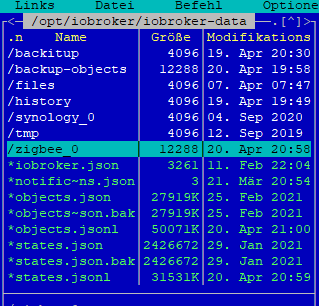
noch kurz meinen User getestet und wollte die Repos von ioBroker (läuft nicht) anschauen:
thorsten@ioBroker2:~$ groups
thorsten cdrom floppy sudo audio dip video plugdev netdev
thorsten@ioBroker2:~$ iobroker repo list
No connection to databases possible ...
:(
ioBroker hab ich noch nicht gestartet. Neustart auch keinen gemacht, weil iob im Autostart ist...Nicht als root hantieren!
Nach einem kernel und glibc Update ist unbedingt ein Neustart des Gesamtsystems zu machen!
-
Nicht als root hantieren!
Nach einem kernel und glibc Update ist unbedingt ein Neustart des Gesamtsystems zu machen!
@thomas-braun arbeite wieder mit dem User, nicht mehr mit root. Werd ich ab sofort so handhaben

Reboot tut gut...hab ich auch gerade gemacht. Mal schauen was passiert...:(
login as: thorsten
thorsten@192.168.10.13's password:
Linux ioBroker2 4.19.0-20-amd64 #1 SMP Debian 4.19.235-1 (2022-03-17) x86_64

The programs included with the Debian GNU/Linux system are free software;
the exact distribution terms for each program are described in the
individual files in /usr/share/doc/*/copyright.

Debian GNU/Linux comes with ABSOLUTELY NO WARRANTY, to the extent
permitted by applicable law.
Last login: Fri Apr 22 12:28:43 2022 from 192.168.1.42
thorsten@ioBroker2:~$ iob status
Server Cannot start inMem-objects on port 9001: Failed to lock DB file "/opt/iobroker/iobroker-data/objects.jsonl"!
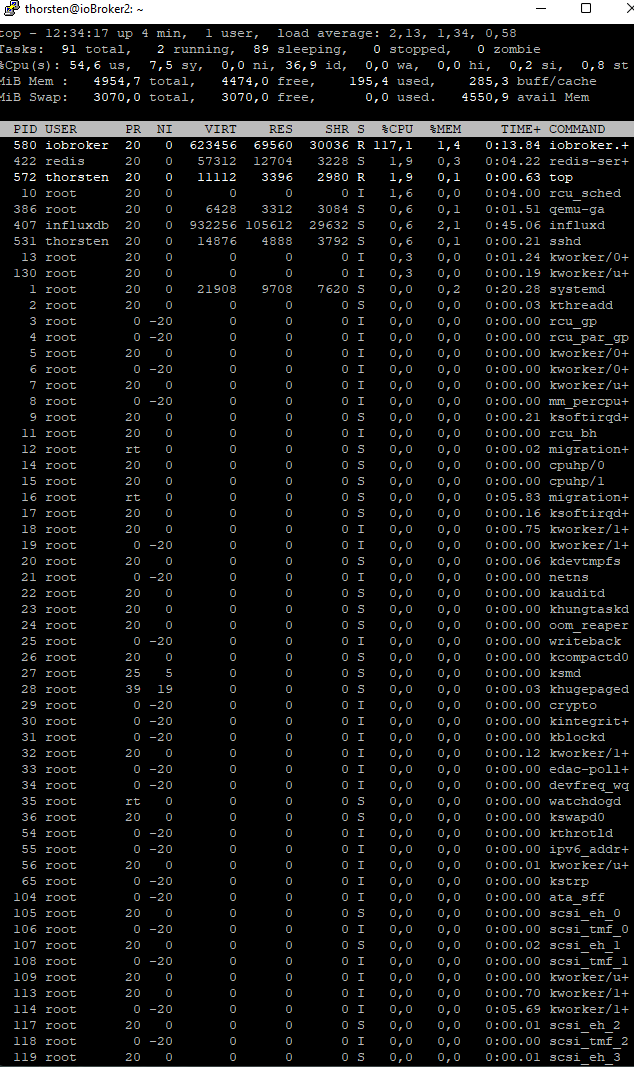
Ausgabe TOP:
UDM Pro, Intel NUC - ioBroker in Proxmox-VM, PiHole+Grafana&Influx+TasmoAdmin in LXCs, Raspberry Pi3 (als CCU), Zigbee-Stick Sonoff, Synology DS918+
-
@thomas-braun arbeite wieder mit dem User, nicht mehr mit root. Werd ich ab sofort so handhaben
Reboot tut gut...hab ich auch gerade gemacht. Mal schauen was passiert...:(
login as: thorsten
thorsten@192.168.10.13's password:
Linux ioBroker2 4.19.0-20-amd64 #1 SMP Debian 4.19.235-1 (2022-03-17) x86_64

The programs included with the Debian GNU/Linux system are free software;
the exact distribution terms for each program are described in the
individual files in /usr/share/doc/*/copyright.

Debian GNU/Linux comes with ABSOLUTELY NO WARRANTY, to the extent
permitted by applicable law.
Last login: Fri Apr 22 12:28:43 2022 from 192.168.1.42
thorsten@ioBroker2:~$ iob status
Server Cannot start inMem-objects on port 9001: Failed to lock DB file "/opt/iobroker/iobroker-data/objects.jsonl"!
Ausgabe TOP:
@kueppert sagte in ioBroker mit 120% Auslastung und no connection to database:
/opt/iobroker/iobroker-data/objects.jsonl
lsof /opt/iobroker/iobroker-data/objects.jsonl -
Also die jsonl. Files sind jetzt nicht riesig ...
Bitte poste mal den Inhalt deiner /opt/iobroker/iobroker-data/iobroker.json
{ "system": { "memoryLimitMB": 0, "hostname": "", "statisticsInterval": 15000, "checkDiskInterval": 300000 }, "multihostService": { "enabled": false, "secure": true, "password": "xxxxxxxxxxxxxxxxxx", "persist": false }, "network": { "IPv4": true, "IPv6": true, "bindAddress": null, "useSystemNpm": true }, "objects": { "type": "jsonl", "typeComment": "Possible values: 'file' - [port 9001], redis - [port 6379], "host": "127.0.0.1", "port": 9001, "user": "", "pass": "", "noFileCache": false, "connectTimeout": 2000, "options": { "auth_pass": null, "enableReadyCheck": true, "host": "0.0.0.0", "port": 9001, "db": 0, "family": 0, "password": null, "autoResubscribe": false, "connectionName": "host.ioBroker2", "retry_max_delay": 5000 }, "maxQueue": 1000, "dataDir": "../../iobroker-data/" }, "states": { "type": "jsonl", "typeComment": "Possible values: 'file' - [port 9000], 'redis' - [port 6379] "host": "127.0.0.1", "port": 9000, "maxQueue": 1000, "writeFileInterval": 300000, "options": { "auth_pass": null, "enableReadyCheck": true, "host": "0.0.0.0", "port": 9000, "db": 0, "family": 0, "password": null, "autoResubscribe": false, "connectionName": "host.ioBroker2", "retry_max_delay": 5000 }, "dataDir": "../../iobroker-data/" }, "log": { "level": "warn", "maxDays": 7, "noStdout": true, "transport": { "file1": { "type": "file", "enabled": true, "filename": "log/iobroker", "fileext": ".log", "maxsize": null, "maxFiles": null, "maxSize": null, "level": "" }, "syslog1": { "type": "syslog", "enabled": true, "host": "192.168.10.10", "host_comment": "The host running syslogd, defaults to localhost.", "port": "520", "port_comment": "The port on the host that syslog is running on, default "pid_comment": "PID of the process that log messages are coming from (De "protocol": "udp4", "protocol_comment": "The network protocol to log over (e.g. tcp4, udp4, "path_comment": "The path to the syslog dgram socket (i.e. /dev/log or / "facility_comment": "Syslog facility to use (Default: local0).", "localhost": "iobroker", "localhost_comment": "Host to indicate that log messages are coming from "sysLogType": "5424", "sysLogType_comment": "The type of the syslog protocol to use (Default: "app_name_comment": "The name of the application (Default: process.title "eol_comment": "The end of line character to be added to the end of the "level": "warn", "facility": "", "app_name": "process.title" } } }, "dataDir": "../../iobroker-data/", "plugins": null }{ "system": { "memoryLimitMB": 0, "hostname": "", "statisticsInterval": 15000, "checkDiskInterval": 300000 }, "multihostService": { "enabled": false, "secure": true, "password": "xxxxxxxxxxxxxxxxxxxx", "persist": false }, "network": { "IPv4": true, "IPv6": true, "bindAddress": null, "useSystemNpm": true }, "objects": { "type": "jsonl", "typeComment": "Possible values: 'file' - [port 9001], redis - [port 6379], "host": "127.0.0.1", "port": 9001, "user": "", "pass": "", "noFileCache": false, "connectTimeout": 2000, "options": { "auth_pass": null, "enableReadyCheck": true, "host": "0.0.0.0", "port": 9001, "db": 0, "family": 0, "password": null, "autoResubscribe": false, "connectionName": "host.ioBroker2", "retry_max_delay": 5000 }, "maxQueue": 1000, "dataDir": "../../iobroker-data/" }, "states": { "type": "jsonl", "typeComment": "Possible values: 'file' - [port 9000], 'redis' - [port 6379] "host": "127.0.0.1", "port": 9000, "maxQueue": 1000, "writeFileInterval": 300000, "options": { "auth_pass": null, "enableReadyCheck": true, "host": "0.0.0.0", "port": 9000, "db": 0, "family": 0, "password": null, "autoResubscribe": false, "connectionName": "host.ioBroker2", "retry_max_delay": 5000 }, "dataDir": "../../iobroker-data/" }, "log": { "level": "warn", "maxDays": 7, "noStdout": true, "transport": { "file1": { "type": "file", "enabled": true, "filename": "log/iobroker", "fileext": ".log", "maxsize": null, "maxFiles": null, "maxSize": null, "level": "" }, "syslog1": { "type": "syslog", "enabled": true, "host": "192.168.10.10", "host_comment": "The host running syslogd, defaults to localhost.", "port": "520", "port_comment": "The port on the host that syslog is running on, default "pid_comment": "PID of the process that log messages are coming from (De "protocol": "udp4", "protocol_comment": "The network protocol to log over (e.g. tcp4, udp4, "path_comment": "The path to the syslog dgram socket (i.e. /dev/log or / "facility_comment": "Syslog facility to use (Default: local0).", "localhost": "iobroker", "localhost_comment": "Host to indicate that log messages are coming from "sysLogType": "5424", "sysLogType_comment": "The type of the syslog protocol to use (Default: "app_name_comment": "The name of the application (Default: process.title "eol_comment": "The end of line character to be added to the end of the "level": "warn", "facility": "", "app_name": "process.title" } } }, "dataDir": "../../iobroker-data/", "plugins": null } -
Systemdata Bitte Ausfüllen Hardwaresystem: NUC Arbeitsspeicher: 5GB Festplattenart: SSD Betriebssystem: Ubuntu Node-Version: 10.x.x Nodejs-Version: 10.x.x NPM-Version: 6.x.x Installationsart: Manuell Image genutzt: Nein Hallo @apollon77
weiterführung meines Problems von hier: https://forum.iobroker.net/topic/52208/js-controller-4-0-jetzt-im-beta-latest/726?_=1650617962136INFOS inkl. Fehlermeldungen nach frischem Backup-Restore:
thorsten@ioBroker2:~$ which nodejs node npm && nodejs -v && node -v && npm -v
/usr/bin/nodejs
/usr/bin/node
/usr/bin/npm
v14.19.1
v14.19.1
6.14.16
thorsten@ioBroker2:~$ iob status
 Cannot load "variables": Connection is closed.
 Cannot initialize database scripts: Cannot load "variables" into objects database: Connection is closed.
Server Cannot start inMem-objects on port 9001: Failed to lock DB file "/opt/iobroker/iobroker-data/objects.jsonl"!
thorsten@ioBroker2:~$ iob -v
4.0.21
thorsten@ioBroker2:~$ df -h
Dateisystem    Größe Benutzt Verf. Verw% Eingehängt auf
udev            2,5G       0  2,5G    0% /dev
tmpfs           496M    6,7M  489M    2% /run
/dev/sda1        29G     15G   13G   54% /
tmpfs           2,5G       0  2,5G    0% /dev/shm
tmpfs           5,0M       0  5,0M    0% /run/lock
tmpfs           2,5G       0  2,5G    0% /sys/fs/cgroup
tmpfs           496M       0  496M    0% /run/user/1000
root@ioBroker2:~# iobroker stop root@ioBroker2:~# iobroker fix library: loaded Library version=2022-02-10 ========================================================================== Welcome to the ioBroker installation fixer! Script version: 2022-02-13 ========================================================================== ========================================================================== Installing prerequisites (1/3) ========================================================================== Holen:1 http://security.debian.org/debian-security buster/updates InRelease [65,4 kB] Holen:2 http://ftp.de.debian.org/debian buster InRelease [122 kB] Holen:3 http://ftp.de.debian.org/debian buster-updates InRelease [51,9 kB] Holen:4 https://repos.influxdata.com/ubuntu bionic InRelease [4.737 B] Holen:5 https://deb.nodesource.com/node_12.x buster InRelease [4.584 B] OK:6 https://deb.nodesource.com/node_14.x buster InRelease Holen:7 http://security.debian.org/debian-security buster/updates/main Sources [232 kB] Holen:8 http://security.debian.org/debian-security buster/updates/main amd64 Packages [318 kB] Holen:9 http://security.debian.org/debian-security buster/updates/main Translation-en [173 kB] Holen:10 http://ftp.de.debian.org/debian buster/main Sources [7.843 kB] Holen:11 http://ftp.de.debian.org/debian buster/main amd64 Packages [7.911 kB] Holen:12 http://ftp.de.debian.org/debian buster/main Translation-en [5.969 kB] Holen:13 https://repos.influxdata.com/ubuntu bionic/stable amd64 Packages [1.266 B] Holen:14 http://ftp.de.debian.org/debian buster-updates/main Sources.diff/Index [10,6 kB] Holen:15 http://ftp.de.debian.org/debian buster-updates/main amd64 Packages.diff/Index [10,6 kB] Holen:16 http://ftp.de.debian.org/debian buster-updates/main Sources 2022-03-26-2012.00.pdiff [186 B] Holen:16 http://ftp.de.debian.org/debian buster-updates/main Sources 2022-03-26-2012.00.pdiff [186 B] Holen:17 http://ftp.de.debian.org/debian buster-updates/main amd64 Packages 2022-03-26-2012.00.pdiff [168 B] Holen:17 http://ftp.de.debian.org/debian buster-updates/main amd64 Packages 2022-03-26-2012.00.pdiff [168 B] Holen:18 https://deb.nodesource.com/node_12.x buster/main amd64 Packages [774 B] Es wurden 22,7 MB in 1 min 47 s geholt (213 kB/s). Paketlisten werden gelesen... Fertig N: Für das Depot »http://ftp.de.debian.org/debian buster InRelease« wurde der »Version«-Wert von »10.11« in »10.12« geändert. Installed gcc-c++ Installed cmake ========================================================================== Checking ioBroker user and directory permissions (2/3) ========================================================================== Created /etc/sudoers.d/iobroker Fixing directory permissions... ========================================================================== Checking autostart (3/3) ========================================================================== Enabling autostart... Autostart enabled! ========================================================================== Your installation was fixed successfully Run iobroker start to start ioBroker again! ==========================================================================@kueppert
wo ist hier ein BUG von ioBroker? -
@kueppert sagte in ioBroker mit 120% Auslastung und no connection to database:
/opt/iobroker/iobroker-data/objects.jsonl
lsof /opt/iobroker/iobroker-data/objects.jsonl@thomas-braun da passiert nix:
thorsten@ioBroker2:~$ lsof /opt/iobroker/iobroker-data/objects.jsonl
thorsten@ioBroker2:~$
UDM Pro, Intel NUC - ioBroker in Proxmox-VM, PiHole+Grafana&Influx+TasmoAdmin in LXCs, Raspberry Pi3 (als CCU), Zigbee-Stick Sonoff, Synology DS918+
-
@thomas-braun da passiert nix:
thorsten@ioBroker2:~$ lsof /opt/iobroker/iobroker-data/objects.jsonl thorsten@ioBroker2:~$@kueppert sagte in ioBroker mit 120% Auslastung und no connection to database:
lsof /opt/iobroker/iobroker-data/objects.jsonl
Mit
sudo lsof /opt/iobroker/iobroker-data/objects.jsonlsollte was kommen.
-
@thomas-braun arbeite wieder mit dem User, nicht mehr mit root. Werd ich ab sofort so handhaben
Reboot tut gut...hab ich auch gerade gemacht. Mal schauen was passiert...:(
login as: thorsten
thorsten@192.168.10.13's password:
Linux ioBroker2 4.19.0-20-amd64 #1 SMP Debian 4.19.235-1 (2022-03-17) x86_64

The programs included with the Debian GNU/Linux system are free software;
the exact distribution terms for each program are described in the
individual files in /usr/share/doc/*/copyright.

Debian GNU/Linux comes with ABSOLUTELY NO WARRANTY, to the extent
permitted by applicable law.
Last login: Fri Apr 22 12:28:43 2022 from 192.168.1.42
thorsten@ioBroker2:~$ iob status
Server Cannot start inMem-objects on port 9001: Failed to lock DB file "/opt/iobroker/iobroker-data/objects.jsonl"!
Ausgabe TOP:
-
@kueppert sagte in ioBroker mit 120% Auslastung und no connection to database:
lsof /opt/iobroker/iobroker-data/objects.jsonl
Mit
sudo lsof /opt/iobroker/iobroker-data/objects.jsonlsollte was kommen.
thorsten@ioBroker2:~$ sudo lsof /opt/iobroker/iobroker-data/objects.jsonl
[sudo] Passwort für thorsten:
COMMAND   PID     USER   FD   TYPE DEVICE SIZE/OFF    NODE NAME
iobroker. 874 iobroker   19u   REG    8,1 51272289 1451506 /opt/iobroker/iobroker-data/objects.jsonl
UDM Pro, Intel NUC - ioBroker in Proxmox-VM, PiHole+Grafana&Influx+TasmoAdmin in LXCs, Raspberry Pi3 (als CCU), Zigbee-Stick Sonoff, Synology DS918+
-
@kueppert Frage zum Top: Da läuft auch ein Redis server??? Wird scheinbar nicht genutzt
Ansonsten bitte mal iobroker stoppen und wirklich sicherstellen das er aus ist und ggf rozesse killen und dann bitte mal neu "iob status"
@apollon77 für meine Begriffe (command spuckt nix aus) läuft da nix sonst?
thorsten@ioBroker2:~$ iobroker stop
thorsten@ioBroker2:~$ ps auxww|grep io
root        12  0.0  0.0      0     0 ?        S    12:30   0:00 [migration/0]
root        16  0.6  0.0      0     0 ?        S    12:30   0:05 [migration/1]
message+   377  0.1  0.0   8980  4168 ?        Ss   12:31   0:01 /usr/bin/dbus-daemon --system --address=systemd: --nofork --nopidfile --systemd-activation --syslog-only
thorsten   914  0.0  0.0   6084   892 pts/0    S+   12:45   0:00 grep io
thorsten@ioBroker2:~$
den Redis-Server hab ich bewusst nie selbst installiert manuell...
UDM Pro, Intel NUC - ioBroker in Proxmox-VM, PiHole+Grafana&Influx+TasmoAdmin in LXCs, Raspberry Pi3 (als CCU), Zigbee-Stick Sonoff, Synology DS918+
-
@apollon77 für meine Begriffe (command spuckt nix aus) läuft da nix sonst?
thorsten@ioBroker2:~$ iobroker stop
thorsten@ioBroker2:~$ ps auxww|grep io
root        12  0.0  0.0      0     0 ?        S    12:30   0:00 [migration/0]
root        16  0.6  0.0      0     0 ?        S    12:30   0:05 [migration/1]
message+   377  0.1  0.0   8980  4168 ?        Ss   12:31   0:01 /usr/bin/dbus-daemon --system --address=systemd: --nofork --nopidfile --systemd-activation --syslog-only
thorsten   914  0.0  0.0   6084   892 pts/0    S+   12:45   0:00 grep io
thorsten@ioBroker2:~$
den Redis-Server hab ich bewusst nie selbst installiert manuell...
-
thorsten@ioBroker2:~$ iob status
No connection to databases possible ...
thorsten@ioBroker2:~$
UDM Pro, Intel NUC - ioBroker in Proxmox-VM, PiHole+Grafana&Influx+TasmoAdmin in LXCs, Raspberry Pi3 (als CCU), Zigbee-Stick Sonoff, Synology DS918+
-
thorsten@ioBroker2:~$ sudo lsof /opt/iobroker/iobroker-data/objects.jsonl [sudo] Passwort für thorsten: COMMAND PID USER FD TYPE DEVICE SIZE/OFF NODE NAME iobroker. 874 iobroker 19u REG 8,1 51272289 1451506 /opt/iobroker/iobroker-data/objects.jsonlDer Hinweis von @apollon77 ist richtig. Wenn redis nicht (mehr) genutzt wird, weg damit.
apt policy redisGgf. deinstallieren.
sudo apt remove redis -
thorsten@ioBroker2:~$ iob status No connection to databases possible ... thorsten@ioBroker2:~$ -
Der Hinweis von @apollon77 ist richtig. Wenn redis nicht (mehr) genutzt wird, weg damit.
apt policy redisGgf. deinstallieren.
sudo apt remove redisthorsten@ioBroker2:~$ apt policy redis redis: Installiert: (keine) Installationskandidat: 5:5.0.14-1+deb10u2 Versionstabelle: 5:5.0.14-1+deb10u2 500 500 http://ftp.de.debian.org/debian buster/main amd64 Packages 500 http://security.debian.org/debian-security buster/updates/main amd64 Packages thorsten@ioBroker2:~$hab noch nicht deinstalliert - steht aber auch da wär nix installiert?
UDM Pro, Intel NUC - ioBroker in Proxmox-VM, PiHole+Grafana&Influx+TasmoAdmin in LXCs, Raspberry Pi3 (als CCU), Zigbee-Stick Sonoff, Synology DS918+
-
thorsten@ioBroker2:~$ apt policy redis
redis:
  Installiert:           (keine)
  Installationskandidat: 5:5.0.14-1+deb10u2
  Versionstabelle:
     5:5.0.14-1+deb10u2 500
        500 http://ftp.de.debian.org/debian buster/main amd64 Packages
        500 http://security.debian.org/debian-security buster/updates/main amd64 Packages
thorsten@ioBroker2:~$
hab noch nicht deinstalliert - steht aber auch da wär nix installiert?
@kueppert sagte in ioBroker mit 120% Auslastung und no connection to database:
hab noch nicht deinstalliert - steht aber auch da wär nix installiert?
In deinem top sieht man mit PID 422 einen redis-server Prozess.
systemctl status redis-server -
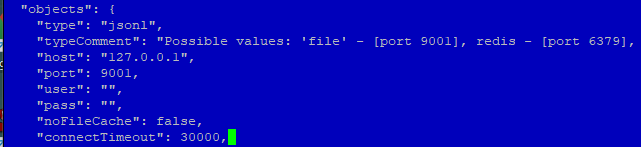
@kueppert Ok, dann ändere bitte mal im iobroker.json die beiden
"connectTimeout": 2000,zu 30000
dann?
@apollon77 hab nur ein connection-timeout gefunden?
thorsten@ioBroker2:~$ iob status
iobroker is not running on this host.


Objects type: jsonl
States  type: jsonl
UDM Pro, Intel NUC - ioBroker in Proxmox-VM, PiHole+Grafana&Influx+TasmoAdmin in LXCs, Raspberry Pi3 (als CCU), Zigbee-Stick Sonoff, Synology DS918+
-
@kueppert sagte in ioBroker mit 120% Auslastung und no connection to database:
hab noch nicht deinstalliert - steht aber auch da wär nix installiert?
In deinem top sieht man mit PID 422 einen redis-server Prozess.
systemctl status redis-server@thomas-braun sagte in ioBroker mit 120% Auslastung und no connection to database:
systemctl status redis-server
thorsten@ioBroker2:~$ systemctl status redis-server
● redis-server.service - Advanced key-value store
   Loaded: loaded (/lib/systemd/system/redis-server.service; enabled; vendor pre
   Active: active (running) since Fri 2022-04-22 12:31:07 CEST; 23min ago
     Docs: http://redis.io/documentation,
           man:redis-server(1)
  Process: 383 ExecStart=/usr/bin/redis-server /etc/redis/redis.conf (code=exite
 Main PID: 422 (redis-server)
    Tasks: 4 (limit: 4915)
   Memory: 15.3M
   CGroup: /system.slice/redis-server.service
           └─422 /usr/bin/redis-server 127.0.0.1:6379
lines 1-11/11 (END)
soll ich den Befehl zum deinstallieren nun ausführen? Redis nutze ich nicht
UDM Pro, Intel NUC - ioBroker in Proxmox-VM, PiHole+Grafana&Influx+TasmoAdmin in LXCs, Raspberry Pi3 (als CCU), Zigbee-Stick Sonoff, Synology DS918+
-
@apollon77 hab nur ein connection-timeout gefunden?
thorsten@ioBroker2:~$ iob status
iobroker is not running on this host.


Objects type: jsonl
States  type: jsonl


Hey! Du scheinst an dieser Unterhaltung interessiert zu sein, hast aber noch kein Konto.
Hast du es satt, bei jedem Besuch durch die gleichen Beiträge zu scrollen? Wenn du dich für ein Konto anmeldest, kommst du immer genau dorthin zurück, wo du zuvor warst, und kannst dich über neue Antworten benachrichtigen lassen (entweder per E-Mail oder Push-Benachrichtigung). Du kannst auch Lesezeichen speichern und Beiträge positiv bewerten, um anderen Community-Mitgliedern deine Wertschätzung zu zeigen.
Mit deinem Input könnte dieser Beitrag noch besser werden 💗
Registrieren AnmeldenSupport us
384
Online33.0k
Benutzer83.5k
Themen1.3m
Beiträge