Weiter zum Inhalt
  • Home
  • Aktuell
  • Tags
  • 0 Ungelesen 0
  • Kategorien
  • Unreplied
  • Beliebt
  • GitHub
  • Docu
  • Hilfe
Skins
  • Hell
  • Brite
  • Cerulean
  • Cosmo
  • Flatly
  • Journal
  • Litera
  • Lumen
  • Lux
  • Materia
  • Minty
  • Morph
  • Pulse
  • Sandstone
  • Simplex
  • Sketchy
  • Spacelab
  • United
  • Yeti
  • Zephyr
  • Dunkel
  • Cyborg
  • Darkly
  • Quartz
  • Slate
  • Solar
  • Superhero
  • Vapor

  • Standard: (Kein Skin)
  • Kein Skin
Einklappen
ioBroker Logo

Community Forum

donate donate
  1. ioBroker Community Home
  2. Deutsch
  3. ioBroker Allgemein
  4. Adapter lassen sich nicht installieren + Problem Backitup

NEWS

  • Neues YouTube-Video: Visualisierung im Devices-Adapter
    BluefoxB
    Bluefox
    11
    1
    249

  • Neuer ioBroker-Blog online: Monatsrückblick März/April 2026
    BluefoxB
    Bluefox
    8
    1
    1.8k

  • Verwendung von KI bitte immer deutlich kennzeichnen
    HomoranH
    Homoran
    11
    1
    770

Adapter lassen sich nicht installieren + Problem Backitup

Geplant Angeheftet Gesperrt Verschoben ioBroker Allgemein
48 Beiträge 3 Kommentatoren 4.4k Aufrufe 3 Beobachtet
  • Älteste zuerst
  • Neuste zuerst
  • Meiste Stimmen
Antworten
  • In einem neuen Thema antworten
Anmelden zum Antworten
Dieses Thema wurde gelöscht. Nur Nutzer mit entsprechenden Rechten können es sehen.
  • S Soukai

    @thomas-braun

    iobroker@iobroker-pi:~ $ iobroker add adaptername
    host.iobroker-pi Unknown packetName adaptername. Please install packages from outside the repository using npm!
    iobroker@iobroker-pi:~ $ iobroker add ble
    NPM version: 6.14.16
    Installing iobroker.ble@0.12.0... (System call)
    host.iobroker-pi Cannot install iobroker.ble@0.12.0: 1
    
    
    crunchipC Abwesend
    crunchipC Abwesend
    crunchip
    Forum Testing Most Active Developer
    schrieb am zuletzt editiert von
    #15

    @soukai adaptername musst du schon ersetzen mit dem jeweiligen Adapter

    umgestiegen von Proxmox auf Unraid

    S 1 Antwort Letzte Antwort
    0
    • crunchipC crunchip

      @soukai adaptername musst du schon ersetzen mit dem jeweiligen Adapter

      S Offline
      S Offline
      Soukai
      schrieb am zuletzt editiert von Soukai
      #16

      @crunchip hab ich drunter gemacht

      crunchipC Thomas BraunT 2 Antworten Letzte Antwort
      0
      • S Soukai

        @crunchip hab ich drunter gemacht

        crunchipC Abwesend
        crunchipC Abwesend
        crunchip
        Forum Testing Most Active Developer
        schrieb am zuletzt editiert von
        #17

        @soukai kann es vllt sein, das etwas mit deiner Repo List nicht stimmt

        umgestiegen von Proxmox auf Unraid

        1 Antwort Letzte Antwort
        0
        • S Soukai

          @crunchip hab ich drunter gemacht

          Thomas BraunT Online
          Thomas BraunT Online
          Thomas Braun
          Most Active
          schrieb am zuletzt editiert von
          #18

          @soukai

          iobroker repo list
          iobroker update -i
          

          Linux-Werkzeugkasten:
          https://forum.iobroker.net/topic/42952/der-kleine-iobroker-linux-werkzeugkasten
          NodeJS Fixer Skript:
          https://forum.iobroker.net/topic/68035/iob-node-fix-skript
          iob_diag: curl -sLf -o diag.sh https://iobroker.net/diag.sh && bash diag.sh

          S 1 Antwort Letzte Antwort
          0
          • Thomas BraunT Thomas Braun

            @soukai

            iobroker repo list
            iobroker update -i
            
            S Offline
            S Offline
            Soukai
            schrieb am zuletzt editiert von
            #19

            @thomas-braun @crunchip
            Danke nochmal für eure Zeit.

            iobroker@iobroker-pi:~ $ iobroker repo list
            stable        : http://download.iobroker.net/sources-dist.json
            beta          : http://download.iobroker.net/sources-dist-latest.json
            
            Active repo(s): stable
            iobroker@iobroker-pi:~ $ iobroker update -i
            Used repository: stable
            Adapter    "admin"        : 5.3.4    , installed 5.3.4
            Adapter    "alexa2"       : 3.11.2   , installed 3.11.2
            Adapter    "backitup"     : 2.3.3    , installed 2.3.3
            Adapter    "daswetter"    : 3.0.9    , installed 3.0.9
            Adapter    "discovery"    : 2.8.0    , installed 2.8.0
            Adapter    "fb-checkpresence": 1.1.13, installed 1.1.13
            Adapter    "flot"         : 1.10.7   , installed 1.10.7
            Adapter    "fritzdect"    : 2.2.3    , installed 2.2.3
            Adapter    "habpanel"     : 0.5.0    , installed 0.5.0
            Adapter    "ham"          : 4.0.2    , installed 4.0.2
            Adapter    "history"      : 1.10.5   , installed 1.10.5
            Adapter    "info"         : 1.9.8    , installed 1.9.8
            Adapter    "javascript"   : 5.2.21   , installed 5.2.21
            Controller "js-controller": 4.0.21   , installed 4.0.21
            Adapter    "mihome"       : 1.3.7    , installed 1.3.7
            Adapter    "openweathermap": 0.1.0   , installed 0.1.0
            Adapter    "ping"         : 1.5.3    , installed 1.5.3
            Adapter    "rpi2"         : 1.3.2    , installed 1.3.2
            Adapter    "samsung"      : 0.2.9    , installed 0.2.9
            Adapter    "scenes"       : 2.3.9    , installed 2.3.9
            Adapter    "simple-api"   : 2.6.2    , installed 2.6.4
            Adapter    "socketio"     : 4.1.4    , installed 4.1.5
            Adapter    "sonoff"       : 2.4.7    , installed 2.4.7
            Adapter    "telegram"     : 1.11.1   , installed 1.11.1
            Adapter    "tuya"         : 3.6.15   , installed 3.6.15
            Adapter    "web"          : 4.2.0    , installed 4.2.0
            Adapter    "wifilight"    : 1.1.0    , installed 1.1.0
            Adapter    "windows-control": 0.1.5  , installed 0.1.5
            Adapter    "wled"         : 0.6.3    , installed 0.6.3
            Adapter    "ws"           : 1.2.0    , installed 1.2.0
            Adapter    "yeelight-2"   : 1.1.2    , installed 1.1.2
            
            crunchipC 1 Antwort Letzte Antwort
            0
            • S Soukai

              @thomas-braun @crunchip
              Danke nochmal für eure Zeit.

              iobroker@iobroker-pi:~ $ iobroker repo list
              stable        : http://download.iobroker.net/sources-dist.json
              beta          : http://download.iobroker.net/sources-dist-latest.json
              
              Active repo(s): stable
              iobroker@iobroker-pi:~ $ iobroker update -i
              Used repository: stable
              Adapter    "admin"        : 5.3.4    , installed 5.3.4
              Adapter    "alexa2"       : 3.11.2   , installed 3.11.2
              Adapter    "backitup"     : 2.3.3    , installed 2.3.3
              Adapter    "daswetter"    : 3.0.9    , installed 3.0.9
              Adapter    "discovery"    : 2.8.0    , installed 2.8.0
              Adapter    "fb-checkpresence": 1.1.13, installed 1.1.13
              Adapter    "flot"         : 1.10.7   , installed 1.10.7
              Adapter    "fritzdect"    : 2.2.3    , installed 2.2.3
              Adapter    "habpanel"     : 0.5.0    , installed 0.5.0
              Adapter    "ham"          : 4.0.2    , installed 4.0.2
              Adapter    "history"      : 1.10.5   , installed 1.10.5
              Adapter    "info"         : 1.9.8    , installed 1.9.8
              Adapter    "javascript"   : 5.2.21   , installed 5.2.21
              Controller "js-controller": 4.0.21   , installed 4.0.21
              Adapter    "mihome"       : 1.3.7    , installed 1.3.7
              Adapter    "openweathermap": 0.1.0   , installed 0.1.0
              Adapter    "ping"         : 1.5.3    , installed 1.5.3
              Adapter    "rpi2"         : 1.3.2    , installed 1.3.2
              Adapter    "samsung"      : 0.2.9    , installed 0.2.9
              Adapter    "scenes"       : 2.3.9    , installed 2.3.9
              Adapter    "simple-api"   : 2.6.2    , installed 2.6.4
              Adapter    "socketio"     : 4.1.4    , installed 4.1.5
              Adapter    "sonoff"       : 2.4.7    , installed 2.4.7
              Adapter    "telegram"     : 1.11.1   , installed 1.11.1
              Adapter    "tuya"         : 3.6.15   , installed 3.6.15
              Adapter    "web"          : 4.2.0    , installed 4.2.0
              Adapter    "wifilight"    : 1.1.0    , installed 1.1.0
              Adapter    "windows-control": 0.1.5  , installed 0.1.5
              Adapter    "wled"         : 0.6.3    , installed 0.6.3
              Adapter    "ws"           : 1.2.0    , installed 1.2.0
              Adapter    "yeelight-2"   : 1.1.2    , installed 1.1.2
              
              crunchipC Abwesend
              crunchipC Abwesend
              crunchip
              Forum Testing Most Active Developer
              schrieb am zuletzt editiert von crunchip
              #20

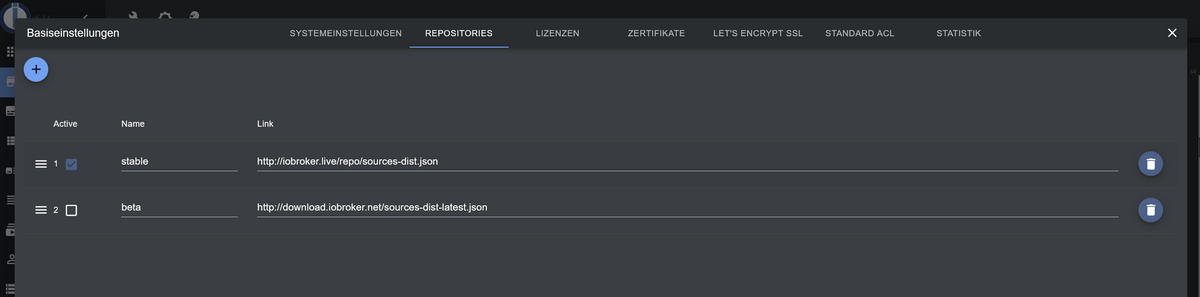
              @soukai probier mal die Adapter Installation mit dem live Repo.
              Stable

              http://iobroker.live/repo/sources-dist.json
              

              umgestiegen von Proxmox auf Unraid

              1 Antwort Letzte Antwort
              0
              • S Offline
                S Offline
                Soukai
                schrieb am zuletzt editiert von
                #21

                @crunchip said in Adapter lassen sich nicht installieren + Problem Backitup:

                http://iobroker.live/repo/sources-dist.json

                Ändere ich das hier in der ersten zeile?
                36419ca4-7f0f-4c0e-aa3f-0c63ebd95c7b-grafik.png

                Hab ich benutzt, neugestartet und nochmal einen adapter installieren lassen. Komme leider aufs gleiche ergebnis

                crunchipC 1 Antwort Letzte Antwort
                0
                • S Soukai

                  @crunchip said in Adapter lassen sich nicht installieren + Problem Backitup:

                  http://iobroker.live/repo/sources-dist.json

                  Ändere ich das hier in der ersten zeile?

                  36419ca4-7f0f-4c0e-aa3f-0c63ebd95c7b-grafik.png

                  Hab ich benutzt, neugestartet und nochmal einen adapter installieren lassen. Komme leider aufs gleiche ergebnis

                  crunchipC Abwesend
                  crunchipC Abwesend
                  crunchip
                  Forum Testing Most Active Developer
                  schrieb am zuletzt editiert von crunchip
                  #22

                  @soukai könntest mal versuchen, läuft aber ne weile bis alles fertig ist

                  iob upload all
                  

                  Und danach noch mal versuchen einen adapter zu installieren ggf davor noch ein

                  iob fix
                  

                  umgestiegen von Proxmox auf Unraid

                  S 1 Antwort Letzte Antwort
                  0
                  • crunchipC crunchip

                    @soukai könntest mal versuchen, läuft aber ne weile bis alles fertig ist

                    iob upload all
                    

                    Und danach noch mal versuchen einen adapter zu installieren ggf davor noch ein

                    iob fix
                    
                    S Offline
                    S Offline
                    Soukai
                    schrieb am zuletzt editiert von Soukai
                    #23

                    @crunchip
                    gesagt, getan... leider war das auch nicht die Medizin für mein Problem...

                    $ iobroker add bring --host iobroker-pi
                    
                    NPM version: 6.14.16
                    
                    Installing iobroker.bring@1.7.13... (System call)
                    
                    host.iobroker-pi Cannot install iobroker.bring@1.7.13: 1
                    
                    ERROR: Process exited with code 25
                    
                    crunchipC Thomas BraunT 2 Antworten Letzte Antwort
                    0
                    • S Soukai

                      @crunchip
                      gesagt, getan... leider war das auch nicht die Medizin für mein Problem...

                      $ iobroker add bring --host iobroker-pi
                      
                      NPM version: 6.14.16
                      
                      Installing iobroker.bring@1.7.13... (System call)
                      
                      host.iobroker-pi Cannot install iobroker.bring@1.7.13: 1
                      
                      ERROR: Process exited with code 25
                      
                      crunchipC Abwesend
                      crunchipC Abwesend
                      crunchip
                      Forum Testing Most Active Developer
                      schrieb am zuletzt editiert von
                      #24

                      @soukai dann gehen mir leider die Ideen aus

                      umgestiegen von Proxmox auf Unraid

                      1 Antwort Letzte Antwort
                      0
                      • S Soukai

                        @crunchip
                        gesagt, getan... leider war das auch nicht die Medizin für mein Problem...

                        $ iobroker add bring --host iobroker-pi
                        
                        NPM version: 6.14.16
                        
                        Installing iobroker.bring@1.7.13... (System call)
                        
                        host.iobroker-pi Cannot install iobroker.bring@1.7.13: 1
                        
                        ERROR: Process exited with code 25
                        
                        Thomas BraunT Online
                        Thomas BraunT Online
                        Thomas Braun
                        Most Active
                        schrieb am zuletzt editiert von
                        #25

                        @soukai
                        Stell mal das Repo auf Beta um.
                        Und dann

                        iobroker update -i
                        

                        Linux-Werkzeugkasten:
                        https://forum.iobroker.net/topic/42952/der-kleine-iobroker-linux-werkzeugkasten
                        NodeJS Fixer Skript:
                        https://forum.iobroker.net/topic/68035/iob-node-fix-skript
                        iob_diag: curl -sLf -o diag.sh https://iobroker.net/diag.sh && bash diag.sh

                        1 Antwort Letzte Antwort
                        0
                        • S Soukai

                          @thomas-braun

                          iobroker@iobroker-pi:~ $ iobroker add adaptername
                          host.iobroker-pi Unknown packetName adaptername. Please install packages from outside the repository using npm!
                          iobroker@iobroker-pi:~ $ iobroker add ble
                          NPM version: 6.14.16
                          Installing iobroker.ble@0.12.0... (System call)
                          host.iobroker-pi Cannot install iobroker.ble@0.12.0: 1
                          
                          
                          crunchipC Abwesend
                          crunchipC Abwesend
                          crunchip
                          Forum Testing Most Active Developer
                          schrieb am zuletzt editiert von
                          #26

                          @soukai probier mal so, ob da mehr angezeigt wird

                          iobroker add ble --debug
                          

                          umgestiegen von Proxmox auf Unraid

                          S 1 Antwort Letzte Antwort
                          0
                          • crunchipC crunchip

                            @soukai probier mal so, ob da mehr angezeigt wird

                            iobroker add ble --debug
                            
                            S Offline
                            S Offline
                            Soukai
                            schrieb am zuletzt editiert von Soukai
                            #27

                            @crunchip

                            iobroker@iobroker-pi:~ $ iobroker add ble --debug
                            NPM version: 6.14.16
                            Installing iobroker.ble@0.12.0... (System call)
                            npm ERR! code ENOTSUP
                            npm ERR! notsup Unsupported engine for blink@5.0.1: wanted: {"node":">=0.10.28 <                                     0.12"} (current: {"node":"14.19.1","npm":"6.14.16"})
                            npm ERR! notsup Not compatible with your version of node/npm: blink@5.0.1
                            npm ERR! notsup Not compatible with your version of node/npm: blink@5.0.1
                            npm ERR! notsup Required: {"node":">=0.10.28 <0.12"}
                            npm ERR! notsup Actual:   {"npm":"6.14.16","node":"14.19.1"}
                            
                            npm ERR! A complete log of this run can be found in:
                            npm ERR!     /home/iobroker/.npm/_logs/2022-04-08T22_04_38_078Z-debug.log
                            host.iobroker-pi Cannot install iobroker.ble@0.12.0: 1


                            uff... hab grad mal geschaut was blink ist. Vor einem Monaten habe ich rumprobiert per Homebridge adapter auf eine Blink kamera zuzugreifen und musste module hinzufügen. Seitdem hatte ich nichts mehr installiert. Das war wohl das falsche blink modul... Kann das mein Problem sein? Wie lösch das ? Npm uninstall <package> lässt er nicht zu...

                            npm uninstall blink@5.0.1
                            npm WARN saveError ENOENT: no such file or directory, open '/home/iobroker/package.json'
                            npm WARN enoent ENOENT: no such file or directory, open '/home/iobroker/package.json'
                            npm WARN iobroker No description
                            npm WARN iobroker No repository field.
                            npm WARN iobroker No README data
                            npm WARN iobroker No license field.
                            
                            
                            Thomas BraunT crunchipC 2 Antworten Letzte Antwort
                            0
                            • S Soukai

                              @crunchip

                              iobroker@iobroker-pi:~ $ iobroker add ble --debug
                              NPM version: 6.14.16
                              Installing iobroker.ble@0.12.0... (System call)
                              npm ERR! code ENOTSUP
                              npm ERR! notsup Unsupported engine for blink@5.0.1: wanted: {"node":">=0.10.28 <                                     0.12"} (current: {"node":"14.19.1","npm":"6.14.16"})
                              npm ERR! notsup Not compatible with your version of node/npm: blink@5.0.1
                              npm ERR! notsup Not compatible with your version of node/npm: blink@5.0.1
                              npm ERR! notsup Required: {"node":">=0.10.28 <0.12"}
                              npm ERR! notsup Actual:   {"npm":"6.14.16","node":"14.19.1"}
                              
                              npm ERR! A complete log of this run can be found in:
                              npm ERR!     /home/iobroker/.npm/_logs/2022-04-08T22_04_38_078Z-debug.log
                              host.iobroker-pi Cannot install iobroker.ble@0.12.0: 1


                              uff... hab grad mal geschaut was blink ist. Vor einem Monaten habe ich rumprobiert per Homebridge adapter auf eine Blink kamera zuzugreifen und musste module hinzufügen. Seitdem hatte ich nichts mehr installiert. Das war wohl das falsche blink modul... Kann das mein Problem sein? Wie lösch das ? Npm uninstall <package> lässt er nicht zu...

                              npm uninstall blink@5.0.1
                              npm WARN saveError ENOENT: no such file or directory, open '/home/iobroker/package.json'
                              npm WARN enoent ENOENT: no such file or directory, open '/home/iobroker/package.json'
                              npm WARN iobroker No description
                              npm WARN iobroker No repository field.
                              npm WARN iobroker No README data
                              npm WARN iobroker No license field.
                              
                              
                              Thomas BraunT Online
                              Thomas BraunT Online
                              Thomas Braun
                              Most Active
                              schrieb am zuletzt editiert von Thomas Braun
                              #28

                              @soukai

                              Du stehst um falschen Verzeichnis.

                              cd /opt/iobroker
                              npm uninstall blink
                              

                              Oder hast du das im javaskript-Adapter drin?

                              Linux-Werkzeugkasten:
                              https://forum.iobroker.net/topic/42952/der-kleine-iobroker-linux-werkzeugkasten
                              NodeJS Fixer Skript:
                              https://forum.iobroker.net/topic/68035/iob-node-fix-skript
                              iob_diag: curl -sLf -o diag.sh https://iobroker.net/diag.sh && bash diag.sh

                              1 Antwort Letzte Antwort
                              0
                              • S Soukai

                                @crunchip

                                iobroker@iobroker-pi:~ $ iobroker add ble --debug
                                NPM version: 6.14.16
                                Installing iobroker.ble@0.12.0... (System call)
                                npm ERR! code ENOTSUP
                                npm ERR! notsup Unsupported engine for blink@5.0.1: wanted: {"node":">=0.10.28 <                                     0.12"} (current: {"node":"14.19.1","npm":"6.14.16"})
                                npm ERR! notsup Not compatible with your version of node/npm: blink@5.0.1
                                npm ERR! notsup Not compatible with your version of node/npm: blink@5.0.1
                                npm ERR! notsup Required: {"node":">=0.10.28 <0.12"}
                                npm ERR! notsup Actual:   {"npm":"6.14.16","node":"14.19.1"}
                                
                                npm ERR! A complete log of this run can be found in:
                                npm ERR!     /home/iobroker/.npm/_logs/2022-04-08T22_04_38_078Z-debug.log
                                host.iobroker-pi Cannot install iobroker.ble@0.12.0: 1


                                uff... hab grad mal geschaut was blink ist. Vor einem Monaten habe ich rumprobiert per Homebridge adapter auf eine Blink kamera zuzugreifen und musste module hinzufügen. Seitdem hatte ich nichts mehr installiert. Das war wohl das falsche blink modul... Kann das mein Problem sein? Wie lösch das ? Npm uninstall <package> lässt er nicht zu...

                                npm uninstall blink@5.0.1
                                npm WARN saveError ENOENT: no such file or directory, open '/home/iobroker/package.json'
                                npm WARN enoent ENOENT: no such file or directory, open '/home/iobroker/package.json'
                                npm WARN iobroker No description
                                npm WARN iobroker No repository field.
                                npm WARN iobroker No README data
                                npm WARN iobroker No license field.
                                
                                
                                crunchipC Abwesend
                                crunchipC Abwesend
                                crunchip
                                Forum Testing Most Active Developer
                                schrieb am zuletzt editiert von
                                #29

                                @soukai sagte in Adapter lassen sich nicht installieren + Problem Backitup:

                                Kann das mein Problem sein

                                so wie es aussieht, ja

                                umgestiegen von Proxmox auf Unraid

                                S 1 Antwort Letzte Antwort
                                0
                                • crunchipC crunchip

                                  @soukai sagte in Adapter lassen sich nicht installieren + Problem Backitup:

                                  Kann das mein Problem sein

                                  so wie es aussieht, ja

                                  S Offline
                                  S Offline
                                  Soukai
                                  schrieb am zuletzt editiert von Soukai
                                  #30

                                  @Thomas-Braun @crunchip

                                  ohne

                                  iobroker@iobroker-pi:~ $ cd /opt/iobroker
                                  
                                  iobroker@iobroker-pi:~ $ npm uninstall blink
                                  npm WARN saveError ENOENT: no such file or directory, open '/home/iobroker/package.json'
                                  npm WARN enoent ENOENT: no such file or directory, open '/home/iobroker/package.json'
                                  npm WARN iobroker No description
                                  npm WARN iobroker No repository field.
                                  npm WARN iobroker No README data
                                  npm WARN iobroker No license field.
                                  
                                  audited 57 packages in 2.792s
                                  
                                  1 package is looking for funding
                                    run `npm fund` for details
                                  
                                  found 0 vulnerabilities


                                  mit kommt:

                                  iobroker@iobroker-pi:~ $ cd /opt/iobroker
                                  iobroker@iobroker-pi:/opt/iobroker $ npm uninstall blink
                                  npm ERR! code ENOTSUP
                                  npm ERR! notsup Unsupported engine for blink@5.0.1: wanted: {"node":">=0.10.28 <0.12"} (current: {"node":"14.19.1","npm":"6.14.16"})
                                  npm ERR! notsup Not compatible with your version of node/npm: blink@5.0.1
                                  npm ERR! notsup Not compatible with your version of node/npm: blink@5.0.1
                                  npm ERR! notsup Required: {"node":">=0.10.28 <0.12"}
                                  npm ERR! notsup Actual:   {"npm":"6.14.16","node":"14.19.1"}
                                  
                                  npm ERR! A complete log of this run can be found in:
                                  npm ERR!     /home/iobroker/.npm/_logs/2022-04-08T22_29_47_488Z-debug.log
                                  
                                  
                                  crunchipC Thomas BraunT 2 Antworten Letzte Antwort
                                  0
                                  • S Soukai

                                    @Thomas-Braun @crunchip

                                    ohne

                                    iobroker@iobroker-pi:~ $ cd /opt/iobroker
                                    
                                    iobroker@iobroker-pi:~ $ npm uninstall blink
                                    npm WARN saveError ENOENT: no such file or directory, open '/home/iobroker/package.json'
                                    npm WARN enoent ENOENT: no such file or directory, open '/home/iobroker/package.json'
                                    npm WARN iobroker No description
                                    npm WARN iobroker No repository field.
                                    npm WARN iobroker No README data
                                    npm WARN iobroker No license field.
                                    
                                    audited 57 packages in 2.792s
                                    
                                    1 package is looking for funding
                                      run `npm fund` for details
                                    
                                    found 0 vulnerabilities


                                    mit kommt:

                                    iobroker@iobroker-pi:~ $ cd /opt/iobroker
                                    iobroker@iobroker-pi:/opt/iobroker $ npm uninstall blink
                                    npm ERR! code ENOTSUP
                                    npm ERR! notsup Unsupported engine for blink@5.0.1: wanted: {"node":">=0.10.28 <0.12"} (current: {"node":"14.19.1","npm":"6.14.16"})
                                    npm ERR! notsup Not compatible with your version of node/npm: blink@5.0.1
                                    npm ERR! notsup Not compatible with your version of node/npm: blink@5.0.1
                                    npm ERR! notsup Required: {"node":">=0.10.28 <0.12"}
                                    npm ERR! notsup Actual:   {"npm":"6.14.16","node":"14.19.1"}
                                    
                                    npm ERR! A complete log of this run can be found in:
                                    npm ERR!     /home/iobroker/.npm/_logs/2022-04-08T22_29_47_488Z-debug.log
                                    
                                    
                                    crunchipC Abwesend
                                    crunchipC Abwesend
                                    crunchip
                                    Forum Testing Most Active Developer
                                    schrieb am zuletzt editiert von
                                    #31

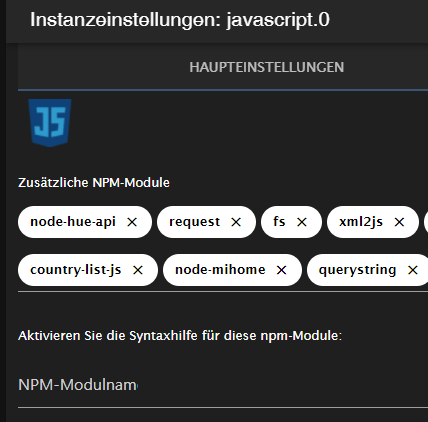
                                    @soukai den Adapter hast du gelöscht?
                                    hast du da noch was davon drin?
                                    80927fe5-626e-4955-87fa-93160129e66e-image.png

                                    umgestiegen von Proxmox auf Unraid

                                    S 2 Antworten Letzte Antwort
                                    0
                                    • S Soukai

                                      @Thomas-Braun @crunchip

                                      ohne

                                      iobroker@iobroker-pi:~ $ cd /opt/iobroker
                                      
                                      iobroker@iobroker-pi:~ $ npm uninstall blink
                                      npm WARN saveError ENOENT: no such file or directory, open '/home/iobroker/package.json'
                                      npm WARN enoent ENOENT: no such file or directory, open '/home/iobroker/package.json'
                                      npm WARN iobroker No description
                                      npm WARN iobroker No repository field.
                                      npm WARN iobroker No README data
                                      npm WARN iobroker No license field.
                                      
                                      audited 57 packages in 2.792s
                                      
                                      1 package is looking for funding
                                        run `npm fund` for details
                                      
                                      found 0 vulnerabilities


                                      mit kommt:

                                      iobroker@iobroker-pi:~ $ cd /opt/iobroker
                                      iobroker@iobroker-pi:/opt/iobroker $ npm uninstall blink
                                      npm ERR! code ENOTSUP
                                      npm ERR! notsup Unsupported engine for blink@5.0.1: wanted: {"node":">=0.10.28 <0.12"} (current: {"node":"14.19.1","npm":"6.14.16"})
                                      npm ERR! notsup Not compatible with your version of node/npm: blink@5.0.1
                                      npm ERR! notsup Not compatible with your version of node/npm: blink@5.0.1
                                      npm ERR! notsup Required: {"node":">=0.10.28 <0.12"}
                                      npm ERR! notsup Actual:   {"npm":"6.14.16","node":"14.19.1"}
                                      
                                      npm ERR! A complete log of this run can be found in:
                                      npm ERR!     /home/iobroker/.npm/_logs/2022-04-08T22_29_47_488Z-debug.log
                                      
                                      
                                      Thomas BraunT Online
                                      Thomas BraunT Online
                                      Thomas Braun
                                      Most Active
                                      schrieb am zuletzt editiert von
                                      #32

                                      @soukai

                                      npm ls blink
                                      

                                      Linux-Werkzeugkasten:
                                      https://forum.iobroker.net/topic/42952/der-kleine-iobroker-linux-werkzeugkasten
                                      NodeJS Fixer Skript:
                                      https://forum.iobroker.net/topic/68035/iob-node-fix-skript
                                      iob_diag: curl -sLf -o diag.sh https://iobroker.net/diag.sh && bash diag.sh

                                      1 Antwort Letzte Antwort
                                      0
                                      • crunchipC crunchip

                                        @soukai den Adapter hast du gelöscht?
                                        hast du da noch was davon drin?
                                        80927fe5-626e-4955-87fa-93160129e66e-image.png

                                        S Offline
                                        S Offline
                                        Soukai
                                        schrieb am zuletzt editiert von Soukai
                                        #33

                                        @crunchip

                                        den Adapter "Homebridge Zubehör Manager" / HAM hab ich kurz darauf gelöscht, da ichs nich zum laufen bekommen hatte. Dort hatte ich die Module drin. Davor hatte ich die Module aus der Zeile entfernt.

                                        @Thomas-Braun

                                        iobroker@iobroker-pi:~ $ npm ls blink
                                        /home/iobroker
                                        └── (empty)

                                        
                                        
                                        S 1 Antwort Letzte Antwort
                                        0
                                        • crunchipC crunchip

                                          @soukai den Adapter hast du gelöscht?
                                          hast du da noch was davon drin?
                                          80927fe5-626e-4955-87fa-93160129e66e-image.png

                                          S Offline
                                          S Offline
                                          Soukai
                                          schrieb am zuletzt editiert von
                                          #34

                                          @crunchip
                                          Javascript sieht so bei mir aus
                                          ba232c4c-33ee-423c-bfda-616bb51e8e85-grafik.png

                                          1 Antwort Letzte Antwort
                                          0

                                          Hey! Du scheinst an dieser Unterhaltung interessiert zu sein, hast aber noch kein Konto.

                                          Hast du es satt, bei jedem Besuch durch die gleichen Beiträge zu scrollen? Wenn du dich für ein Konto anmeldest, kommst du immer genau dorthin zurück, wo du zuvor warst, und kannst dich über neue Antworten benachrichtigen lassen (entweder per E-Mail oder Push-Benachrichtigung). Du kannst auch Lesezeichen speichern und Beiträge positiv bewerten, um anderen Community-Mitgliedern deine Wertschätzung zu zeigen.

                                          Mit deinem Input könnte dieser Beitrag noch besser werden 💗

                                          Registrieren Anmelden
                                          Antworten
                                          • In einem neuen Thema antworten
                                          Anmelden zum Antworten
                                          • Älteste zuerst
                                          • Neuste zuerst
                                          • Meiste Stimmen


                                          Support us

                                          ioBroker
                                          Community Adapters
                                          Donate
                                          FAQ Cloud / IOT
                                          HowTo: Node.js-Update
                                          HowTo: Backup/Restore
                                          Downloads
                                          BLOG

                                          492

                                          Online

                                          32.9k

                                          Benutzer

                                          83.0k

                                          Themen

                                          1.3m

                                          Beiträge
                                          Community
                                          Impressum | Datenschutz-Bestimmungen | Nutzungsbedingungen | Einwilligungseinstellungen
                                          ioBroker Community 2014-2025
                                          logo
                                          • Anmelden

                                          • Du hast noch kein Konto? Registrieren

                                          • Anmelden oder registrieren, um zu suchen
                                          • Erster Beitrag
                                            Letzter Beitrag
                                          0
                                          • Home
                                          • Aktuell
                                          • Tags
                                          • Ungelesen 0
                                          • Kategorien
                                          • Unreplied
                                          • Beliebt
                                          • GitHub
                                          • Docu
                                          • Hilfe