



Skip to content
  • Home
  • Aktuell
  • Tags
  • 0 Ungelesen 0
  • Kategorien
  • Unreplied
  • Beliebt
  • GitHub
  • Docu
  • Hilfe
Skins
  • Light
  • Brite
  • Cerulean
  • Cosmo
  • Flatly
  • Journal
  • Litera
  • Lumen
  • Lux
  • Materia
  • Minty
  • Morph
  • Pulse
  • Sandstone
  • Simplex
  • Sketchy
  • Spacelab
  • United
  • Yeti
  • Zephyr
  • Dark
  • Cyborg
  • Darkly
  • Quartz
  • Slate
  • Solar
  • Superhero
  • Vapor

  • Standard: (Kein Skin)
  • Kein Skin
Einklappen
ioBroker Logo

Community Forum

donate donate
  1. ioBroker Community Home
  2. Deutsch
  3. Off Topic
  4. Txt mit "echo" beschreiben klappt nicht

NEWS

  • Jahresrückblick 2025 – unser neuer Blogbeitrag ist online! ✨
    BluefoxB
    Bluefox
    17
    1
    3.1k

  • Neuer Blogbeitrag: Monatsrückblick - Dezember 2025 🎄
    BluefoxB
    Bluefox
    13
    1
    1.1k

  • Weihnachtsangebot 2025! 🎄
    BluefoxB
    Bluefox
    25
    1
    2.4k

Txt mit "echo" beschreiben klappt nicht

Geplant Angeheftet Gesperrt Verschoben Off Topic
3 Beiträge 2 Kommentatoren 132 Aufrufe 2 Watching
  • Älteste zuerst
  • Neuste zuerst
  • Meiste Stimmen
Antworten
  • In einem neuen Thema antworten
Anmelden zum Antworten
Dieses Thema wurde gelöscht. Nur Nutzer mit entsprechenden Rechten können es sehen.
  • David G.D Online
    David G.D Online
    David G.
    schrieb am zuletzt editiert von
    #1

    Hallo,

    nach langem probieren habe ich es geschafft, (offline) aus iobroker heraus aus html heraus PDFs zu schreiben und per Mail zu versenden.

    Nun scheitere ich am erstellen der html Datei.
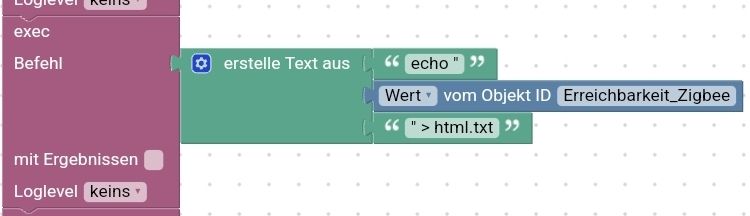
    Erstelle diese mit folgendem Blockly:
    Screenshot_20220319-223441_Chrome.jpg

    Doch leider scheinen im html Zeichen zu sein die den echo Befehl stören.
    Wenn ich den exec mit Ergebnissen ausführe, erhalte ich nur die ersten Zeichen vom html Code.
    Wenn ich den Befehl in der Konsole direkt eingebe, kommt, dass er die Datei nicht gefunden hat.

    Wenn ich anstatt des HTML irgend was anderes einfüge (egal ob im Blockly oder manuell) klappt alles.

    Anbei ein exemplarische HTML Code:

    <table style="width: 100%;"> <tbody> <tr> <td><b><font size="3">Gerät</td><td ALIGN="CENTER" width=100%><b><font size="3">IP</b></td></font> <td ALIGN="CENTER"><b><font size="3">Empfang</td><td><b><font size="3">An/Aus</td></b></font> </tr><tr> <td colspan="4"> <hr> </dt> </tr><tr><td>steckdose_kuehltruhe</td><td><font size="1">&nbsp<a href="http://192.168.99.71">192.168.99.71</a></td> <td ALIGN="CENTER"><font size="3"><b><font color=red>●</font> </td><td ALIGN="CENTER"><font size="3"><b><font color=green>●</font></td></tr><tr><td>steckdose_sofa</td><td><font size="1">&nbsp<a href="http://192.168.99.64">192.168.99.64</a></td> <td ALIGN="CENTER"><font size="3"><b><font color=red>●</font> </td><td ALIGN="CENTER"><font size="3"><b><font color=green>●</font></td></tr><tr><td>steckdose_esszimmer</td><td><font size="1">&nbsp<a href="http://192.168.99.65">192.168.99.65</a></td> <td ALIGN="CENTER"><font size="3"><b><font color=green>●</font> </td><td ALIGN="CENTER"><font size="3"><b><font color=green>●</font></td></tr><tr><td>steckdose_flur_oben</td><td><font size="1">&nbsp<a href="http://192.168.99.67">192.168.99.67</a></td> <td ALIGN="CENTER"><font size="3"><b><font color=green>●</font> </td><td ALIGN="CENTER"><font size="3"><b><font color=green>●</font></td></tr><tr><td>steckdose_flur_unten</td><td><font size="1">&nbsp<a href="http://192.168.99.68">192.168.99.68</a></td> <td ALIGN="CENTER"><font size="3"><b><font color=green>●</font> </td><td ALIGN="CENTER"><font size="3"><b><font color=green>●</font></td></tr><tr><td>steckdose_heizung</td><td><font size="1">&nbsp<a href="http://192.168.99.70">192.168.99.70</a></td> <td ALIGN="CENTER"><font size="3"><b><font color=green>●</font> </td><td ALIGN="CENTER"><font size="3"><b><font color=green>●</font></td></tr><tr><td>steckdose_kueche</td><td><font size="1">&nbsp<a href="http://192.168.99.66">192.168.99.66</a></td> <td ALIGN="CENTER"><font size="3"><b><font color=green>●</font> </td><td ALIGN="CENTER"><font size="3"><b><font color=green>●</font></td></tr><tr><td>steckdose_licht_fernseher</td><td><font size="1">&nbsp<a href="http://192.168.99.69">192.168.99.69</a></td> <td ALIGN="CENTER"><font size="3"><b><font color=green>●</font> </td><td ALIGN="CENTER"><font size="3"><b><font color=green>●</font></td></tr><tr><td>steckdose_licht_kuechenzeile</td><td><font size="1">&nbsp<a href="http://192.168.99.73">192.168.99.73</a></td> <td ALIGN="CENTER"><font size="3"><b><font color=green>●</font> </td><td ALIGN="CENTER"><font size="3"><b><font color=green>●</font></td></tr></tbody> </table>
    

    Bekomme ich den irgendwie anders in eine txt bzw. html geschrieben?

    Zeigt eure Lovelace-Visualisierung klick
    (Auch ideal um sich Anregungen zu holen)

    Meine Tabellen für eure Visualisierung klick

    AsgothianA 1 Antwort Letzte Antwort
    0
    • David G.D David G.

      Hallo,

      nach langem probieren habe ich es geschafft, (offline) aus iobroker heraus aus html heraus PDFs zu schreiben und per Mail zu versenden.

      Nun scheitere ich am erstellen der html Datei.
      Erstelle diese mit folgendem Blockly:
      Screenshot_20220319-223441_Chrome.jpg

      Doch leider scheinen im html Zeichen zu sein die den echo Befehl stören.
      Wenn ich den exec mit Ergebnissen ausführe, erhalte ich nur die ersten Zeichen vom html Code.
      Wenn ich den Befehl in der Konsole direkt eingebe, kommt, dass er die Datei nicht gefunden hat.

      Wenn ich anstatt des HTML irgend was anderes einfüge (egal ob im Blockly oder manuell) klappt alles.

      Anbei ein exemplarische HTML Code:

      <table style="width: 100%;"> <tbody> <tr> <td><b><font size="3">Gerät</td><td ALIGN="CENTER" width=100%><b><font size="3">IP</b></td></font> <td ALIGN="CENTER"><b><font size="3">Empfang</td><td><b><font size="3">An/Aus</td></b></font> </tr><tr> <td colspan="4"> <hr> </dt> </tr><tr><td>steckdose_kuehltruhe</td><td><font size="1">&nbsp<a href="http://192.168.99.71">192.168.99.71</a></td> <td ALIGN="CENTER"><font size="3"><b><font color=red>●</font> </td><td ALIGN="CENTER"><font size="3"><b><font color=green>●</font></td></tr><tr><td>steckdose_sofa</td><td><font size="1">&nbsp<a href="http://192.168.99.64">192.168.99.64</a></td> <td ALIGN="CENTER"><font size="3"><b><font color=red>●</font> </td><td ALIGN="CENTER"><font size="3"><b><font color=green>●</font></td></tr><tr><td>steckdose_esszimmer</td><td><font size="1">&nbsp<a href="http://192.168.99.65">192.168.99.65</a></td> <td ALIGN="CENTER"><font size="3"><b><font color=green>●</font> </td><td ALIGN="CENTER"><font size="3"><b><font color=green>●</font></td></tr><tr><td>steckdose_flur_oben</td><td><font size="1">&nbsp<a href="http://192.168.99.67">192.168.99.67</a></td> <td ALIGN="CENTER"><font size="3"><b><font color=green>●</font> </td><td ALIGN="CENTER"><font size="3"><b><font color=green>●</font></td></tr><tr><td>steckdose_flur_unten</td><td><font size="1">&nbsp<a href="http://192.168.99.68">192.168.99.68</a></td> <td ALIGN="CENTER"><font size="3"><b><font color=green>●</font> </td><td ALIGN="CENTER"><font size="3"><b><font color=green>●</font></td></tr><tr><td>steckdose_heizung</td><td><font size="1">&nbsp<a href="http://192.168.99.70">192.168.99.70</a></td> <td ALIGN="CENTER"><font size="3"><b><font color=green>●</font> </td><td ALIGN="CENTER"><font size="3"><b><font color=green>●</font></td></tr><tr><td>steckdose_kueche</td><td><font size="1">&nbsp<a href="http://192.168.99.66">192.168.99.66</a></td> <td ALIGN="CENTER"><font size="3"><b><font color=green>●</font> </td><td ALIGN="CENTER"><font size="3"><b><font color=green>●</font></td></tr><tr><td>steckdose_licht_fernseher</td><td><font size="1">&nbsp<a href="http://192.168.99.69">192.168.99.69</a></td> <td ALIGN="CENTER"><font size="3"><b><font color=green>●</font> </td><td ALIGN="CENTER"><font size="3"><b><font color=green>●</font></td></tr><tr><td>steckdose_licht_kuechenzeile</td><td><font size="1">&nbsp<a href="http://192.168.99.73">192.168.99.73</a></td> <td ALIGN="CENTER"><font size="3"><b><font color=green>●</font> </td><td ALIGN="CENTER"><font size="3"><b><font color=green>●</font></td></tr></tbody> </table>
      

      Bekomme ich den irgendwie anders in eine txt bzw. html geschrieben?

      AsgothianA Offline
      AsgothianA Offline
      Asgothian
      Developer
      schrieb am zuletzt editiert von
      #2

      @david-g Versuch mal statt des " ein ' zu benutzen. Dann sollte es gehen.

      A.

      ioBroker auf RPi4 - Hardware soweit wie möglich via Zigbee.
      "Shit don't work" ist keine Fehlermeldung, sondern ein Fluch.

      David G.D 1 Antwort Letzte Antwort
      1
      • AsgothianA Asgothian

        @david-g Versuch mal statt des " ein ' zu benutzen. Dann sollte es gehen.

        A.

        David G.D Online
        David G.D Online
        David G.
        schrieb am zuletzt editiert von
        #3

        @asgothian

        Danke, das war es.
        Klappt.

        Falls es wen interessiert.
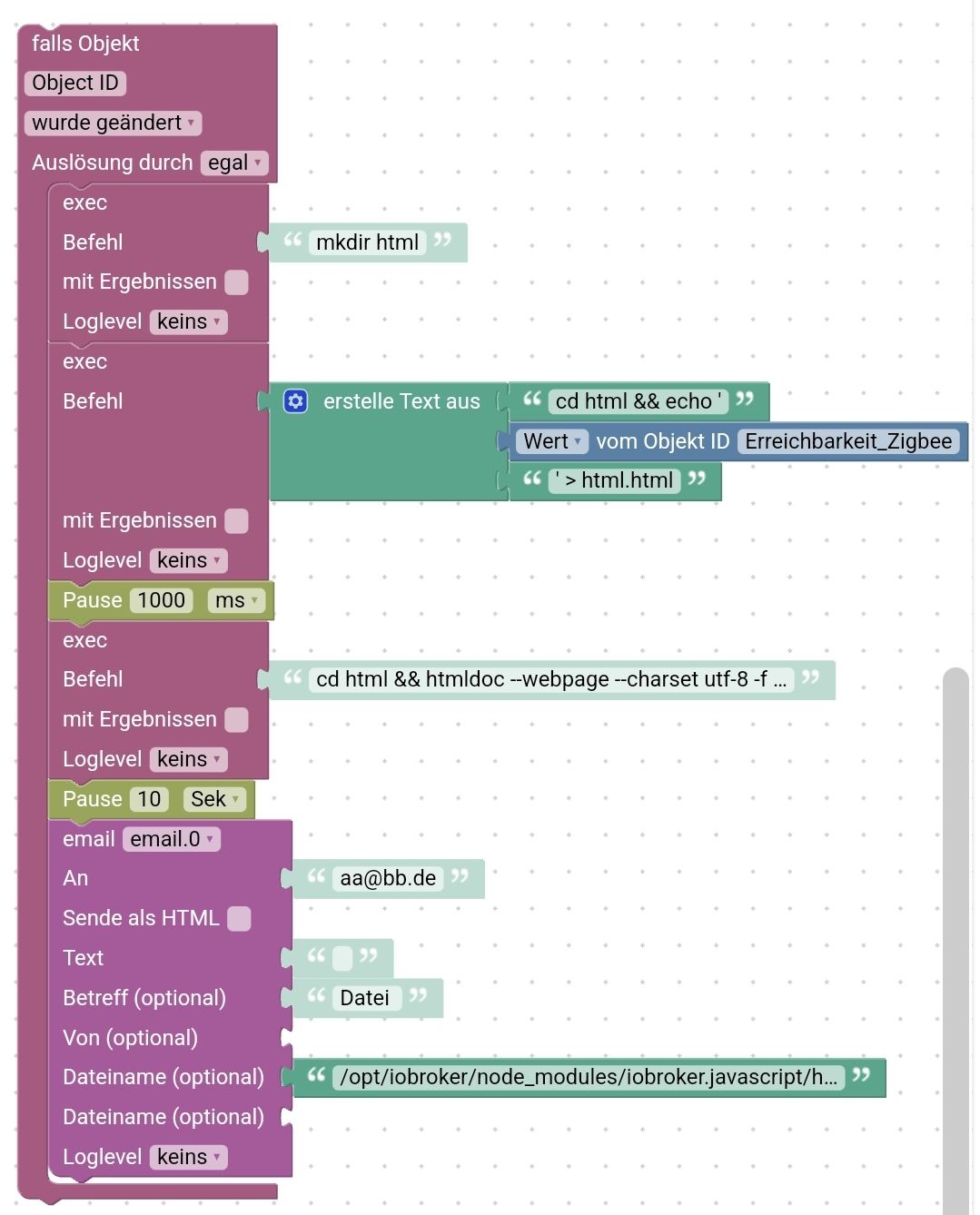
        Das PDF wird von htmldoc generiert. Hat eine GUI und ist ebenfalls per Kommandozeile zu steuern.

        Hier das Skript. Poste ich die Tage nach weiterem testen aber aicu nochmal seperat.
        Keine Ahnung, ob das auch leichter geht....

        Screenshot_20220319-230632_Chrome.jpg

        <block xmlns="https://developers.google.com/blockly/xml" type="on" id="zzjUIJ}hlTOm2/`Do|l9" x="63" y="662">
         <field name="OID">Object ID</field>
         <field name="CONDITION">ne</field>
         <field name="ACK_CONDITION"></field>
         <statement name="STATEMENT">
           <block type="exec" id="t$6XxW#SG#kl~QH::L2#">
             <mutation xmlns="http://www.w3.org/1999/xhtml" with_statement="false"></mutation>
             <field name="WITH_STATEMENT">FALSE</field>
             <field name="LOG"></field>
             <value name="COMMAND">
               <shadow type="text" id="T}`mA#z~l$|ZRbu@bx|t">
                 <field name="TEXT">mkdir html</field>
               </shadow>
             </value>
             <next>
               <block type="exec" id="KOuKx?FCQU:Ug)OBAO~w">
                 <mutation xmlns="http://www.w3.org/1999/xhtml" with_statement="false"></mutation>
                 <field name="WITH_STATEMENT">FALSE</field>
                 <field name="LOG"></field>
                 <value name="COMMAND">
                   <shadow type="text" id="uf~~cgN[.(.1M]xcvTu8">
                     <field name="TEXT">text</field>
                   </shadow>
                   <block type="text_join" id="KM+Dg)QXt}.9^OzDP_z9">
                     <mutation items="3"></mutation>
                     <value name="ADD0">
                       <block type="text" id="-u2L#v2]?W`BZFd{~|T0">
                         <field name="TEXT">cd html &amp;&amp; echo '</field>
                       </block>
                     </value>
                     <value name="ADD1">
                       <block type="get_value" id="w`w|w%`mmvOS6a~kU.i=">
                         <field name="ATTR">val</field>
                         <field name="OID">0_userdata.0.VIS.Tabellen.Erreichbarkeit_Zigbee</field>
                       </block>
                     </value>
                     <value name="ADD2">
                       <block type="text" id="r}k1T$#6REAK^FQdqEFI">
                         <field name="TEXT">' &gt; html.html</field>
                       </block>
                     </value>
                   </block>
                 </value>
                 <next>
                   <block type="timeouts_wait" id="0Zxd8R[M|OT7HOzgwbiz">
                     <field name="DELAY">1000</field>
                     <field name="UNIT">ms</field>
                     <next>
                       <block type="exec" id="BwlhyCgG$q[DKeuVJ2z7">
                         <mutation xmlns="http://www.w3.org/1999/xhtml" with_statement="false"></mutation>
                         <field name="WITH_STATEMENT">FALSE</field>
                         <field name="LOG"></field>
                         <value name="COMMAND">
                           <shadow type="text" id="DP(Fe#n5WCIygq{y[;sP">
                             <field name="TEXT">cd html &amp;&amp; htmldoc --webpage --charset utf-8 -f output.pdf html.html</field>
                           </shadow>
                         </value>
                         <next>
                           <block type="timeouts_wait" id="o[fb5V30Z0{IBHi(4]H8">
                             <field name="DELAY">10</field>
                             <field name="UNIT">sec</field>
                             <next>
                               <block type="email" id="x06cJTVcrT#+!?S:.4cL">
                                 <field name="INSTANCE">.0</field>
                                 <field name="IS_HTML">FALSE</field>
                                 <field name="LOG"></field>
                                 <value name="TO">
                                   <shadow type="text" id="[5UH..{${FT+4}CYgvMt">
                                     <field name="TEXT">aa@bb.de</field>
                                   </shadow>
                                 </value>
                                 <value name="TEXT">
                                   <shadow type="text" id="n;@2lDPgDM.uzC!3qF}o">
                                     <field name="TEXT"></field>
                                   </shadow>
                                 </value>
                                 <value name="SUBJECT">
                                   <shadow type="text" id="M!j`S?c^.9c|f#r)`[4C">
                                     <field name="TEXT">Datei </field>
                                   </shadow>
                                 </value>
                                 <value name="FILE_1">
                                   <block type="text" id="W4wG^?K6i2gXP8.9|!=3">
                                     <field name="TEXT">/opt/iobroker/node_modules/iobroker.javascript/html/output.pdf</field>
                                   </block>
                                 </value>
                               </block>
                             </next>
                           </block>
                         </next>
                       </block>
                     </next>
                   </block>
                 </next>
               </block>
             </next>
           </block>
         </statement>
        </block>
        

        Zeigt eure Lovelace-Visualisierung klick
        (Auch ideal um sich Anregungen zu holen)

        Meine Tabellen für eure Visualisierung klick

        1 Antwort Letzte Antwort
        0
        Antworten
        • In einem neuen Thema antworten
        Anmelden zum Antworten
        • Älteste zuerst
        • Neuste zuerst
        • Meiste Stimmen


        Support us

        ioBroker
        Community Adapters
        Donate

        780

        Online

        32.7k

        Benutzer

        82.3k

        Themen

        1.3m

        Beiträge
        Community
        Impressum | Datenschutz-Bestimmungen | Nutzungsbedingungen | Einwilligungseinstellungen
        ioBroker Community 2014-2025
        logo
        • Anmelden

        • Du hast noch kein Konto? Registrieren

        • Anmelden oder registrieren, um zu suchen
        • Erster Beitrag
          Letzter Beitrag
        0
        • Home
        • Aktuell
        • Tags
        • Ungelesen 0
        • Kategorien
        • Unreplied
        • Beliebt
        • GitHub
        • Docu
        • Hilfe
