




Zigbee und LED-Trading Unterputz Schalt Aktoren 16A
-
Hallo Zusammen,
Zigbee Adapter V1.6.6 ist installiert, ich nutze ein Zigbee LAN/USB/WLAN Gateway CC2652P von @dimaiv
https://forum.iobroker.net/topic/48312/verkaufe-zigbee-lan-usb-wlan-gateway-cc2652pNodejs/node 14.19.0
npm 6.14.16Folgender Paring Log-File:
Error: Device 0x0c4314fffe9e5719 "ON/OFF -M" not described in statesMapping.. undefined
Error: Device 0x0c4314fffe9e5719 "ON/OFF -M" not described in statesMapping.. undefined
Error: Device 0x0c4314fffe9e5719 "ON/OFF -M" not described in statesMapping.. undefined
Error: Device 0x0c4314fffe9e5719 "ON/OFF -M" not described in statesMapping.. undefined
Error: Device 0x0c4314fffe9e5719 "ON/OFF -M" not described in statesMapping.. undefined
Error: Device 0x0c4314fffe9e5719 "ON/OFF -M" not described in statesMapping.. undefined
Pairing time left
Error: Device 0x0c4314fffe9e5719 "ON/OFF -M" not described in statesMapping.. undefined
Error: Device 0x0c4314fffe9e5719 "ON/OFF -M" not described in statesMapping.. undefined
Pairing time left: 1
Pairing time left: 2
Pairing time left: 3
Pairing time left: 4
Pairing time left: 5
Pairing time left: 6
Pairing time left: 7
Pairing time left: 8
Pairing time left: 9
Pairing time left: 10
Pairing time left: 11
Pairing time left: 12
Pairing time left: 13
Pairing time left: 14
Pairing time left: 15
Pairing time left: 16
Pairing time left: 17
Pairing time left: 18
Pairing time left: 19
Pairing time left: 20
Pairing time left: 21
Pairing time left: 22
Pairing time left: 23
Pairing time left: 24
Pairing time left: 25
Pairing time left: 26
Pairing time left: 27
Pairing time left: 28
Pairing time left: 29
Pairing time left: 30
Pairing time left: 31
Pairing time left: 32
Pairing time left: 33
Pairing time left: 34
Pairing time left: 35
Pairing time left: 36
Pairing time left: 37
Pairing time left: 38
Pairing time left: 39
Pairing time left: 40
Pairing time left: 41
Pairing time left: 42
Pairing time left: 43
Pairing time left: 44
Pairing time left: 45
Pairing time left: 46
Pairing time left: 47
Pairing time left: 48
Pairing time left: 49
Error: Device 0x0c4314fffe9e5719 "ON/OFF -M" not described in statesMapping.. undefined
New device joined '0x0c4314fffe9e5719' model ON/OFF -M
Interview successful: [object Object]
Error: Device 0x0c4314fffe9e5719 "ON/OFF -M" not described in statesMapping.. undefined
Error: Device 0x0c4314fffe9e5719 "ON/OFF -M" not described in statesMapping.. undefined
Error: Device 0x0c4314fffe9e5719 "ON/OFF -M" not described in statesMapping.. undefined
Error: Device 0x0c4314fffe9e5719 "ON/OFF -M" not described in statesMapping.. undefined
Error: Device 0x0c4314fffe9e5719 "ON/OFF -M" not described in statesMapping.. undefined
Error: Device 0x0c4314fffe9e5719 "ON/OFF -M" not described in statesMapping.. undefined
Error: Device 0x0c4314fffe9e5719 "ON/OFF -M" not described in statesMapping.. undefined
Error: Device 0x0c4314fffe9e5719 "ON/OFF -M" not described in statesMapping.. undefined
Error: Device 0x0c4314fffe9e5719 "ON/OFF -M" not described in statesMapping.. undefined
Error: Device 0x0c4314fffe9e5719 "ON/OFF -M" not described in statesMapping.. undefined
Error: Device 0x0c4314fffe9e5719 "ON/OFF -M" not described in statesMapping.. undefined
Error: Device 0x0c4314fffe9e5719 "ON/OFF -M" not described in statesMapping.. undefined
Pairing time left: 50
Error: Device 0x0c4314fffe9e5719 "ON/OFF -M" not described in statesMapping.. undefined
Error: Device 0x0c4314fffe9e5719 "ON/OFF -M" not described in statesMapping.. undefined
Error: Device 0x0c4314fffe9e5719 "ON/OFF -M" not described in statesMapping.. undefined
Error: Device 0x0c4314fffe9e5719 "ON/OFF -M" not described in statesMapping.. undefined
Error: Device 0x0c4314fffe9e5719 "ON/OFF -M" not described in statesMapping.. undefined
Error: Device 0x0c4314fffe9e5719 "ON/OFF -M" not described in statesMapping.. undefined
Pairing time left: 51
Device '0x0c4314fffe9e5719' announced itself
Interview started: 0x0c4314fffe9e5719
Pairing time left: 52
Pairing time left: 53
Pairing time left: 54
Pairing time left: 55
Pairing time left: 56
Pairing time left: 57
Pairing time left: 58
Pairing time left: 59
Pairing time left: 60
Pairing started
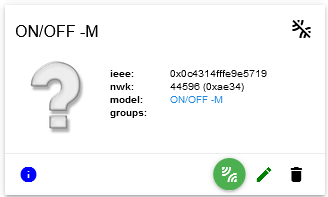
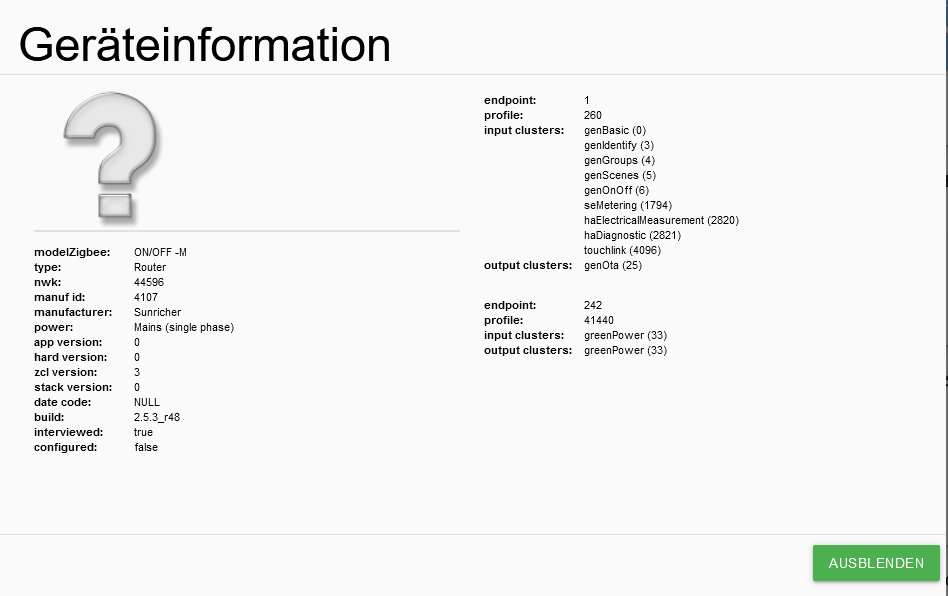
es handelt sich um den Unterputz Schalt Aktor für 16A Steckdosen (UP-SA-9127P)
https://www.led-trading.de/zigbee-unterputz-schalter-steuergeraet-controller-230v-16a
@arteck
@Asgothian
ich habe andere Threads schon gefunden, mir sagen die Fehlermeldungen nur bedingt was, aber ich glaube, der Aktor ist nicht richtig im Adapter angelegt?Wenn ich noch was liefern soll/kann, helfe ich gerne.
Ich habe dann noch einen anderen Schaltaktor für Licht-Schalter von LED Trading (Artikelnummer: UP-SA-9127S)
https://www.led-trading.de/ZigBee-Einbaudose-Unterputz-Schaltaktor-Steuergeraet-Controller-ZigBee-30-fuer-Schalterda klappt das Pairing ohne Probleme
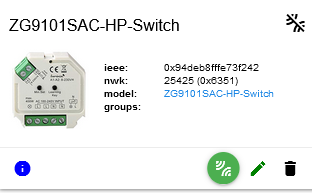
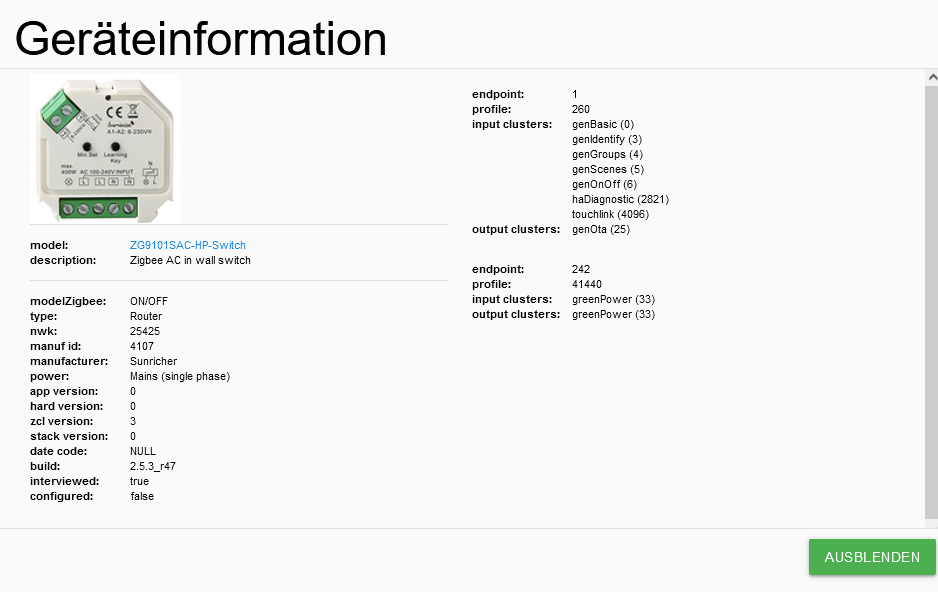
Was kann ich machen?
Danke für jede Unterstützung
Marcus -
Hallo Zusammen,
Zigbee Adapter V1.6.6 ist installiert, ich nutze ein Zigbee LAN/USB/WLAN Gateway CC2652P von @dimaiv
https://forum.iobroker.net/topic/48312/verkaufe-zigbee-lan-usb-wlan-gateway-cc2652pNodejs/node 14.19.0
npm 6.14.16Folgender Paring Log-File:
Error: Device 0x0c4314fffe9e5719 "ON/OFF -M" not described in statesMapping.. undefined
Error: Device 0x0c4314fffe9e5719 "ON/OFF -M" not described in statesMapping.. undefined
Error: Device 0x0c4314fffe9e5719 "ON/OFF -M" not described in statesMapping.. undefined
Error: Device 0x0c4314fffe9e5719 "ON/OFF -M" not described in statesMapping.. undefined
Error: Device 0x0c4314fffe9e5719 "ON/OFF -M" not described in statesMapping.. undefined
Error: Device 0x0c4314fffe9e5719 "ON/OFF -M" not described in statesMapping.. undefined
Pairing time left
Error: Device 0x0c4314fffe9e5719 "ON/OFF -M" not described in statesMapping.. undefined
Error: Device 0x0c4314fffe9e5719 "ON/OFF -M" not described in statesMapping.. undefined
Pairing time left: 1
Pairing time left: 2
Pairing time left: 3
Pairing time left: 4
Pairing time left: 5
Pairing time left: 6
Pairing time left: 7
Pairing time left: 8
Pairing time left: 9
Pairing time left: 10
Pairing time left: 11
Pairing time left: 12
Pairing time left: 13
Pairing time left: 14
Pairing time left: 15
Pairing time left: 16
Pairing time left: 17
Pairing time left: 18
Pairing time left: 19
Pairing time left: 20
Pairing time left: 21
Pairing time left: 22
Pairing time left: 23
Pairing time left: 24
Pairing time left: 25
Pairing time left: 26
Pairing time left: 27
Pairing time left: 28
Pairing time left: 29
Pairing time left: 30
Pairing time left: 31
Pairing time left: 32
Pairing time left: 33
Pairing time left: 34
Pairing time left: 35
Pairing time left: 36
Pairing time left: 37
Pairing time left: 38
Pairing time left: 39
Pairing time left: 40
Pairing time left: 41
Pairing time left: 42
Pairing time left: 43
Pairing time left: 44
Pairing time left: 45
Pairing time left: 46
Pairing time left: 47
Pairing time left: 48
Pairing time left: 49
Error: Device 0x0c4314fffe9e5719 "ON/OFF -M" not described in statesMapping.. undefined
New device joined '0x0c4314fffe9e5719' model ON/OFF -M
Interview successful: [object Object]
Error: Device 0x0c4314fffe9e5719 "ON/OFF -M" not described in statesMapping.. undefined
Error: Device 0x0c4314fffe9e5719 "ON/OFF -M" not described in statesMapping.. undefined
Error: Device 0x0c4314fffe9e5719 "ON/OFF -M" not described in statesMapping.. undefined
Error: Device 0x0c4314fffe9e5719 "ON/OFF -M" not described in statesMapping.. undefined
Error: Device 0x0c4314fffe9e5719 "ON/OFF -M" not described in statesMapping.. undefined
Error: Device 0x0c4314fffe9e5719 "ON/OFF -M" not described in statesMapping.. undefined
Error: Device 0x0c4314fffe9e5719 "ON/OFF -M" not described in statesMapping.. undefined
Error: Device 0x0c4314fffe9e5719 "ON/OFF -M" not described in statesMapping.. undefined
Error: Device 0x0c4314fffe9e5719 "ON/OFF -M" not described in statesMapping.. undefined
Error: Device 0x0c4314fffe9e5719 "ON/OFF -M" not described in statesMapping.. undefined
Error: Device 0x0c4314fffe9e5719 "ON/OFF -M" not described in statesMapping.. undefined
Error: Device 0x0c4314fffe9e5719 "ON/OFF -M" not described in statesMapping.. undefined
Pairing time left: 50
Error: Device 0x0c4314fffe9e5719 "ON/OFF -M" not described in statesMapping.. undefined
Error: Device 0x0c4314fffe9e5719 "ON/OFF -M" not described in statesMapping.. undefined
Error: Device 0x0c4314fffe9e5719 "ON/OFF -M" not described in statesMapping.. undefined
Error: Device 0x0c4314fffe9e5719 "ON/OFF -M" not described in statesMapping.. undefined
Error: Device 0x0c4314fffe9e5719 "ON/OFF -M" not described in statesMapping.. undefined
Error: Device 0x0c4314fffe9e5719 "ON/OFF -M" not described in statesMapping.. undefined
Pairing time left: 51
Device '0x0c4314fffe9e5719' announced itself
Interview started: 0x0c4314fffe9e5719
Pairing time left: 52
Pairing time left: 53
Pairing time left: 54
Pairing time left: 55
Pairing time left: 56
Pairing time left: 57
Pairing time left: 58
Pairing time left: 59
Pairing time left: 60
Pairing started
es handelt sich um den Unterputz Schalt Aktor für 16A Steckdosen (UP-SA-9127P)
https://www.led-trading.de/zigbee-unterputz-schalter-steuergeraet-controller-230v-16a
@arteck
@Asgothian
ich habe andere Threads schon gefunden, mir sagen die Fehlermeldungen nur bedingt was, aber ich glaube, der Aktor ist nicht richtig im Adapter angelegt?Wenn ich noch was liefern soll/kann, helfe ich gerne.
Ich habe dann noch einen anderen Schaltaktor für Licht-Schalter von LED Trading (Artikelnummer: UP-SA-9127S)
https://www.led-trading.de/ZigBee-Einbaudose-Unterputz-Schaltaktor-Steuergeraet-Controller-ZigBee-30-fuer-Schalterda klappt das Pairing ohne Probleme
Was kann ich machen?
Danke für jede Unterstützung
Marcus -
- Zigbee adapter v. 1.6.12 installieren (unstable)
- Zigbee adapter v 1.6.15 installieren (GitHub)
A.
@asgothian
wenn ich z.b. die 1.6.15 von Github installiere - dann als zusätzliche Instanz?
Oder was muss ich machen? -
@asgothian
wenn ich z.b. die 1.6.15 von Github installiere - dann als zusätzliche Instanz?
Oder was muss ich machen?@mguenther sagte in Zigbee und LED-Trading Unterputz Schalt Aktoren 16A:
@asgothian
wenn ich z.b. die 1.6.15 von Github installiere - dann als zusätzliche Instanz?
Oder was muss ich machen?Einfach laufende Adapter updaten. Fertig.
-
@mguenther sagte in Zigbee und LED-Trading Unterputz Schalt Aktoren 16A:
@asgothian
wenn ich z.b. die 1.6.15 von Github installiere - dann als zusätzliche Instanz?
Oder was muss ich machen?Einfach laufende Adapter updaten. Fertig.
@dimaiv sagte in Zigbee und LED-Trading Unterputz Schalt Aktoren 16A:
@mguenther sagte in Zigbee und LED-Trading Unterputz Schalt Aktoren 16A:
@asgothian
wenn ich z.b. die 1.6.15 von Github installiere - dann als zusätzliche Instanz?
Oder was muss ich machen?Einfach laufende Adapter updaten. Fertig.
äh - wie?
ich habe die Repositiy auf beta (http://download.iobroker.net/sources-dist-latest.json) umgestellt. Da zeigt er mir beim Adapter die 1.6.14 als mögliche Version an. Ich gehe mal davon aus, dass die auch funktioniert, aber ich komme über die Oberfläche weder auf die 1.6.12, noch auf die 1.6.15...edit - ich war zu blöd... 1.6.14 wird gerade installiert...
-
@dimaiv sagte in Zigbee und LED-Trading Unterputz Schalt Aktoren 16A:
@mguenther sagte in Zigbee und LED-Trading Unterputz Schalt Aktoren 16A:
@asgothian
wenn ich z.b. die 1.6.15 von Github installiere - dann als zusätzliche Instanz?
Oder was muss ich machen?Einfach laufende Adapter updaten. Fertig.
äh - wie?
ich habe die Repositiy auf beta (http://download.iobroker.net/sources-dist-latest.json) umgestellt. Da zeigt er mir beim Adapter die 1.6.14 als mögliche Version an. Ich gehe mal davon aus, dass die auch funktioniert, aber ich komme über die Oberfläche weder auf die 1.6.12, noch auf die 1.6.15...edit - ich war zu blöd... 1.6.14 wird gerade installiert...
@mguenther 1.6.14 ist auch gut.
-
@mguenther 1.6.14 ist auch gut.
also, einen Aktor bekomme ich gepaired, anbei der Logfile:
Pairing time left
Pairing time left: 1
Pairing time left: 2
Pairing time left: 3
Pairing time left: 4
Pairing time left: 5
Pairing time left: 6
Pairing time left: 7
Pairing time left: 8
Pairing time left: 9
Pairing time left: 10
Pairing time left: 11
Pairing time left: 12
Pairing time left: 13
Pairing time left: 14
Pairing time left: 15
Pairing time left: 16
Pairing time left: 17
Pairing time left: 18
Pairing time left: 19
Pairing time left: 20
Pairing time left: 21
Pairing time left: 22
Pairing time left: 23
Pairing time left: 24
Pairing time left: 25
Pairing time left: 26
Pairing time left: 27
Pairing time left: 28
Pairing time left: 29
Pairing time left: 30
Pairing time left: 31
Pairing time left: 32
Pairing time left: 33
Pairing time left: 34
Pairing time left: 35
Pairing time left: 36
Pairing time left: 37
Pairing time left: 38
Pairing time left: 39
Pairing time left: 40
Pairing time left: 41
Pairing time left: 42
Pairing time left: 43
Pairing time left: 44
Pairing time left: 45
Pairing time left: 46
Interview successful: [object Object]
Pairing time left: 47
New device joined '0x0c4314fffe9e5719' model ON/OFF -M
Device '0x0c4314fffe9e5719' announced itself
Interview started: 0x0c4314fffe9e5719
Pairing time left: 48
Pairing time left: 49
Pairing time left: 50
Pairing time left: 51
Pairing time left: 52
Pairing time left: 53
Pairing time left: 54
Pairing time left: 55
Pairing time left: 56
Pairing time left: 57
Pairing time left: 58
Pairing time left: 59
Pairing time left: 60
Pairing started
aber - ich sehe in der Übersicht nur:
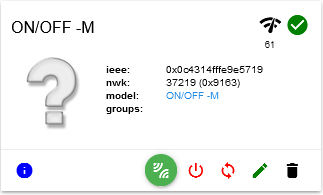
bzw.
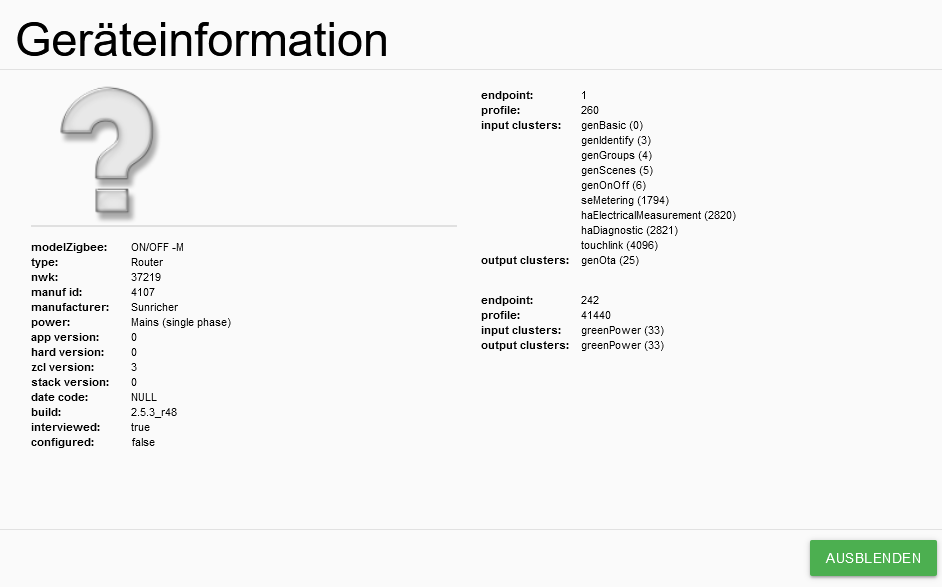
auch unter den Objekten sehe ich "nur":

bei einem 2.Aktor kommt erst eine Fehlermeldung, dann paired er, aber das Ergebnis ist bei dem 1. Aktor
Pairing time left Pairing time left: 1 Pairing time left: 2 Pairing time left: 3 Pairing time left: 4 Pairing time left: 5 Pairing time left: 6 Pairing time left: 7 Pairing time left: 8 Pairing time left: 9 Pairing time left: 10 Pairing time left: 11 Pairing time left: 12 Pairing time left: 13 Pairing time left: 14 Pairing time left: 15 Pairing time left: 16 Pairing time left: 17 Pairing time left: 18 Pairing time left: 19 Pairing time left: 20 Pairing time left: 21 Pairing time left: 22 Pairing time left: 23 Pairing time left: 24 Pairing time left: 25 Pairing time left: 26 Pairing time left: 27 Pairing time left: 28 Pairing time left: 29 Pairing time left: 30 Pairing time left: 31 Pairing time left: 32 Pairing time left: 33 Pairing time left: 34 Pairing time left: 35 Pairing time left: 36 Pairing time left: 37 Pairing time left: 38 Pairing time left: 39 Pairing time left: 40 Pairing time left: 41 Pairing time left: 42 Pairing time left: 43 Pairing time left: 44 Pairing time left: 45 Pairing time left: 46 Pairing time left: 47 Pairing time left: 48 Pairing time left: 49 Pairing time left: 50 Pairing time left: 51 Pairing time left: 52 Pairing time left: 53 Pairing time left: 54 Pairing time left: 55 Pairing time left: 56 New device joined '0x0c4314fffea33114' model ON/OFF -M Interview successful: [object Object] Pairing time left: 57 Error: Device 0x0c4314fffea33114 "ON/OFF -M" not described in statesMapping.. undefined Pairing time left: 58 Device '0x0c4314fffea33114' announced itself Pairing time left: 59 Interview started: 0x0c4314fffea33114 Pairing time left: 60 Pairing started -
nur weil das ding genau so aussieht heisst es nicht dass das gleiche drinne ist...
hab PR gestellt.. wird aber dauern..der heisst anders
ON/OFF -Mund der ist noch nicht drin
bist du linux affin dann kannst du es dir temporär selber fixen..
-
nur weil das ding genau so aussieht heisst es nicht dass das gleiche drinne ist...
hab PR gestellt.. wird aber dauern..der heisst anders
ON/OFF -Mund der ist noch nicht drin
bist du linux affin dann kannst du es dir temporär selber fixen..
@arteck sagte in Zigbee und LED-Trading Unterputz Schalt Aktoren 16A:
bist du linux affin dann kannst du es dir temporär selber fixen..
@arteck
nicht wirklich... :(
aber - gibt es ne Anleitung, wie sowas eingerichtet werden kann?braucht ihr noch andere Infos?
-
@arteck sagte in Zigbee und LED-Trading Unterputz Schalt Aktoren 16A:
bist du linux affin dann kannst du es dir temporär selber fixen..
@arteck
nicht wirklich... :(
aber - gibt es ne Anleitung, wie sowas eingerichtet werden kann?braucht ihr noch andere Infos?
@mguenther ich kann dir ein Datei vorbereiten, den du nur in deiner System ersetzen muss. Schaffst du das?
-
@mguenther ich kann dir ein Datei vorbereiten, den du nur in deiner System ersetzen muss. Schaffst du das?
-
@dimaiv
glaube schon :)
erste Idee wäre mittels ftp?
wenn keine Berechtigung vorhanden, müsste ich sie als sudo von Stelle 1 an Stelle 2 kopieren. - ich hätte dazu den Befehl "cp" genommen, aber bin für alle Hinweise offen...Zigbee Instanz stoppen!
Datei runterladen und entpacken, dann in folgenden Verzeichnis kopieren (existierende ersetzen):
"/opt/iobroker/node_modules/zigbee-herdsman-converters/devices/"
Zigbee Instanz starten.
-
Zigbee Instanz stoppen!
Datei runterladen und entpacken, dann in folgenden Verzeichnis kopieren (existierende ersetzen):
"/opt/iobroker/node_modules/zigbee-herdsman-converters/devices/"
Zigbee Instanz starten.


Hey! Du scheinst an dieser Unterhaltung interessiert zu sein, hast aber noch kein Konto.
Hast du es satt, bei jedem Besuch durch die gleichen Beiträge zu scrollen? Wenn du dich für ein Konto anmeldest, kommst du immer genau dorthin zurück, wo du zuvor warst, und kannst dich über neue Antworten benachrichtigen lassen (entweder per E-Mail oder Push-Benachrichtigung). Du kannst auch Lesezeichen speichern und Beiträge positiv bewerten, um anderen Community-Mitgliedern deine Wertschätzung zu zeigen.
Mit deinem Input könnte dieser Beitrag noch besser werden 💗
Registrieren AnmeldenSupport us
501
Online33.0k
Benutzer83.6k
Themen1.3m
Beiträge