




Master und Slave klappt nicht.
-
@achim55 sagte in Master und Slave klappt nicht.:
Beim durcharbeiten kamen aber noch fragen auf, die nicht beschrieben sind.
Du weisst doch:
bei Fragen fragen!Dann kann man auch die Anleitung ggf. noch anpassen
-
Geht nicht mittlerweile so auch ?
Auf dem Master mit
iobroker multihost enableund auf dem Slave:
iobroker multihost connectWenn ich das durchlaufen lasse kommt die Frage:
This host appears to be a Master or a Single host system. Is this correct? [Y/n]:Type of objects DB [(f)ile, (r)edis, ...], default [file]: f Host / Unix Socket of objects DB(file), default[127.0.0.1]: Port of objects DB(file), default[9001]: Type of states DB [(f)file, (r)edis, ...], default [file]: r Host / Unix Socket of states DB (redis), default[127.0.0.1]: 0.0.0.0 Port of states DB (redis), default[6379]: Data directory (file), default[../../iobroker-data/]: /opt/iobroker/iobroker-data/ Host name of this machine [debian]: This host appears to be a Master or a Single host system. Is this correct? [Y/n]: -
Geht nicht mittlerweile so auch ?
Auf dem Master mit
iobroker multihost enableund auf dem Slave:
iobroker multihost connect@achim55 sagte in Master und Slave klappt nicht.:
Geht nicht mittlerweile so auch ?
Sollte.
Aber dann sieht man nicht wenn etwas nicht korrekt ist.
Ich mache es immer amnuell, da weiss man was man hat ;-)@achim55 sagte in Master und Slave klappt nicht.:
Wenn ich das durchlaufen lasse kommt die Frage:
This host appears to be a Master or a Single host system. Is this correct? [Y/n]:Was läuft wo durch?
Wenn auf dem Master, wo ist deine Frage dazu? -
Wenn ich das durchlaufen lasse kommt die Frage:
This host appears to be a Master or a Single host system. Is this correct? [Y/n]:Type of objects DB [(f)ile, (r)edis, ...], default [file]: f Host / Unix Socket of objects DB(file), default[127.0.0.1]: Port of objects DB(file), default[9001]: Type of states DB [(f)file, (r)edis, ...], default [file]: r Host / Unix Socket of states DB (redis), default[127.0.0.1]: 0.0.0.0 Port of states DB (redis), default[6379]: Data directory (file), default[../../iobroker-data/]: /opt/iobroker/iobroker-data/ Host name of this machine [debian]: This host appears to be a Master or a Single host system. Is this correct? [Y/n]: -
@achim55 sagte in Master und Slave klappt nicht.:
ich habe mich an die Vorlage gehalten:
https://www.iobroker.net/#de/documentation/config/multihost.mdDie Anleitung funktioniert einwandfrei.
Habe dies nach dieser schon x mal gemacht.Dein Screenshot unter #1 zeigt diese Anleitung aber nicht.
Und warum redis.
Irgendwo stand mal, dass 99% der user redis nicht brauchen. -
@achim55
War zu schnell mit ENTER :-)
Habe ich mit Y bestätigt.Jetzt kommt die Frage :
Do you want to migrate objects and states from "file/redis" to "file/redis" [y/N]:Was soll ich da machen ?
@achim55 sagte in Master und Slave klappt nicht.:
Was soll ich da machen ?
erst mal keine Nacherzählung von Teilinformationen, sondern den Konsolenoutput im Zusammenhang als Text in Code-Tags posten.
Vielleicht kann ich dann etwas damit anfangen.
Wie gesagt, arbeite ich manuell -
als ich vor ca. 2Jahren damit anfing hatte ich einen Raspberry. Dann folgte ein NUC.
Auf dem NUC Iobrocker blank installiert und die Datensicherung vom Raspberry eingespielt.
Da kam wohl irgendwie redis mit rein :-(@achim55 sagte in Master und Slave klappt nicht.:
die Datensicherung vom Raspberry eingespielt.
Da kam wohl irgendwie redis mit reinda mag dann die Kofiguration mit drin gewesen sein, aber die Datenbank muss separat installiert werden.
So out of the box hätte das gar nicht laufen dürfen -
@achim55 sagte in Master und Slave klappt nicht.:
Was soll ich da machen ?
erst mal keine Nacherzählung von Teilinformationen, sondern den Konsolenoutput im Zusammenhang als Text in Code-Tags posten.
Vielleicht kann ich dann etwas damit anfangen.
Wie gesagt, arbeite ich manuell@homoran
okay :-)root@debian:~# iobroker setup custom Current configuration: - Objects database: - Type: file - Host/Unix Socket: 127.0.0.1 - Port: 9001 - States database: - Type: redis - Host/Unix Socket: 127.0.0.1 - Port: 6379 - Data Directory: ../../iobroker-data/ Type of objects DB [(f)ile, (r)edis, ...], default [file]: f Host / Unix Socket of objects DB(file), default[127.0.0.1]: Port of objects DB(file), default[9001]: Type of states DB [(f)file, (r)edis, ...], default [file]: r Host / Unix Socket of states DB (redis), default[127.0.0.1]: 0.0.0.0 Port of states DB (redis), default[6379]: Data directory (file), default[../../iobroker-data/]: /opt/iobroker/iobroker-data/ Host name of this machine [debian]: This host appears to be a Master or a Single host system. Is this correct? [Y/n]: y Do you want to migrate objects and states from "file/redis" to "file/redis" [y/N]: -
@achim55 sagte in Master und Slave klappt nicht.:
die Datensicherung vom Raspberry eingespielt.
Da kam wohl irgendwie redis mit reinda mag dann die Kofiguration mit drin gewesen sein, aber die Datenbank muss separat installiert werden.
So out of the box hätte das gar nicht laufen dürfen -
Wenn ich die Installation von ioBroker installer auf dem Raspberry starte kommen Meldungen mit warning.
Der Iobroker läuft aber trotz dessen. Ist das okay so ?pi@raspberrypiSlave:~ $ curl -sLf https://deb.nodesource.com/setup_12.x | sudo -E bash - ## Installing the NodeSource Node.js 12.x repo... ## Populating apt-get cache... + apt-get update Get:1 http://archive.raspberrypi.org/debian bullseye InRelease [23.5 kB] Get:2 http://raspbian.raspberrypi.org/raspbian bullseye InRelease [15.0 kB] Get:3 http://raspbian.raspberrypi.org/raspbian bullseye/main armhf Packages [13.2 MB] Get:4 http://archive.raspberrypi.org/debian bullseye/main armhf Packages [246 kB] Fetched 13.5 MB in 8s (1,622 kB/s) Reading package lists... Done N: Repository 'http://archive.raspberrypi.org/debian bullseye InRelease' changed its 'Suite' value from 'unstable' to 'stable' ## Confirming "bullseye" is supported... + curl -sLf -o /dev/null 'https://deb.nodesource.com/node_12.x/dists/bullseye/Release' ## Adding the NodeSource signing key to your keyring... + curl -s https://deb.nodesource.com/gpgkey/nodesource.gpg.key | gpg --dearmor | tee /usr/share/keyrings/nodesource.gpg >/dev/null ## Creating apt sources list file for the NodeSource Node.js 12.x repo... + echo 'deb [signed-by=/usr/share/keyrings/nodesource.gpg] https://deb.nodesource.com/node_12.x bullseye main' > /etc/apt/sources.list.d/nodesource.list + echo 'deb-src [signed-by=/usr/share/keyrings/nodesource.gpg] https://deb.nodesource.com/node_12.x bullseye main' >> /etc/apt/sources.list.d/nodesource.list ## Running `apt-get update` for you... + apt-get update Hit:1 http://raspbian.raspberrypi.org/raspbian bullseye InRelease Hit:2 http://archive.raspberrypi.org/debian bullseye InRelease Get:3 https://deb.nodesource.com/node_12.x bullseye InRelease [4,586 B] Get:4 https://deb.nodesource.com/node_12.x bullseye/main armhf Packages [777 B] Fetched 5,363 B in 1s (5,258 B/s) Reading package lists... Done ## Run `sudo apt-get install -y nodejs` to install Node.js 12.x and npm ## You may also need development tools to build native addons: sudo apt-get install gcc g++ make ## To install the Yarn package manager, run: curl -sL https://dl.yarnpkg.com/debian/pubkey.gpg | gpg --dearmor | sudo tee /usr/share/keyrings/yarnkey.gpg >/dev/null echo "deb [signed-by=/usr/share/keyrings/yarnkey.gpg] https://dl.yarnpkg.com/debian stable main" | sudo tee /etc/apt/sources.list.d/yarn.list sudo apt-get update && sudo apt-get install yarn pi@raspberrypiSlave:~ $ sudo apt-get install -y nodejs Reading package lists... Done Building dependency tree... Done Reading state information... Done The following NEW packages will be installed: nodejs 0 upgraded, 1 newly installed, 0 to remove and 44 not upgraded. Need to get 15.9 MB of archives. After this operation, 86.0 MB of additional disk space will be used. Get:1 https://deb.nodesource.com/node_12.x bullseye/main armhf nodejs armhf 12.22.9-deb-1nodesource1 [15.9 MB] Fetched 15.9 MB in 3s (4,939 kB/s) Selecting previously unselected package nodejs. (Reading database ... 40796 files and directories currently installed.) Preparing to unpack .../nodejs_12.22.9-deb-1nodesource1_armhf.deb ... Unpacking nodejs (12.22.9-deb-1nodesource1) ... Setting up nodejs (12.22.9-deb-1nodesource1) ... Processing triggers for man-db (2.9.4-2) ... pi@raspberrypiSlave:~ $ curl -sLf https://iobroker.net/install.sh | bash - library: loaded Library version=2021-12-27 ========================================================================== Welcome to the ioBroker installer! Installer version: 2021-12-27 You might need to enter your password a couple of times. ========================================================================== ========================================================================== Installing prerequisites (1/4) ========================================================================== Hit:1 http://archive.raspberrypi.org/debian bullseye InRelease Hit:2 http://raspbian.raspberrypi.org/raspbian bullseye InRelease Hit:3 https://deb.nodesource.com/node_12.x bullseye InRelease Reading package lists... Done Changing npm registry to https://registry.npmjs.org Installed acl Installed gcc-c++ Installed libavahi-compat-libdnssd-dev Installed libudev-dev Installed libpam0g-dev Installed git Installed libcairo2-dev Installed libpango1.0-dev Installed libjpeg-dev Installed libgif-dev Installed librsvg2-dev Installed python-dev Installed cmake ========================================================================== Creating ioBroker user and directory (2/4) ========================================================================== User iobroker created Created /etc/sudoers.d/iobroker Directory /opt/iobroker created ========================================================================== Installing ioBroker (3/4) ========================================================================== In file included from ../../nan/nan.h:58, from ../src/main.cpp:3: /home/pi/.cache/node-gyp/12.22.9/include/node/node.h:736:7: warning: cast between incompatible function types from ‘void (*)(v8::Local<v8::Object>)’ to ‘node::addon_register_func’ {aka ‘void (*)(v8::Local<v8::Object>, v8::Local<v8::Value>, void*)’} [-Wcast-function-type] 736 | (node::addon_register_func) (regfunc), \ | ^~~~~~~~~~~~~~~~~~~~~~~~~~~~~~~~~~~~~ /home/pi/.cache/node-gyp/12.22.9/include/node/node.h:770:3: note: in expansion of macro ‘NODE_MODULE_X’ 770 | NODE_MODULE_X(modname, regfunc, NULL, 0) // NOLINT (readability/null_usage) | ^~~~~~~~~~~~~ ../src/main.cpp:42:1: note: in expansion of macro ‘NODE_MODULE’ 42 | NODE_MODULE(diskusage, Init) | ^~~~~~~~~~~ In file included from ../../nan/nan.h:58, from ../src/unix_dgram.cc:5: /home/pi/.cache/node-gyp/12.22.9/include/node/node.h:736:7: warning: cast between incompatible function types from ‘void (*)(v8::Local<v8::Object>)’ to ‘node::addon_register_func’ {aka ‘void (*)(v8::Local<v8::Object>, v8::Local<v8::Value>, void*)’} [-Wcast-function-type] 736 | (node::addon_register_func) (regfunc), \ | ^~~~~~~~~~~~~~~~~~~~~~~~~~~~~~~~~~~~~ /home/pi/.cache/node-gyp/12.22.9/include/node/node.h:770:3: note: in expansion of macro ‘NODE_MODULE_X’ 770 | NODE_MODULE_X(modname, regfunc, NULL, 0) // NOLINT (readability/null_usage) | ^~~~~~~~~~~~~ ../src/unix_dgram.cc:404:1: note: in expansion of macro ‘NODE_MODULE’ 404 | NODE_MODULE(unix_dgram, Initialize) | ^~~~~~~~~~~ ../src/serialport.cpp: In function ‘Nan::NAN_METHOD_RETURN_TYPE Open(Nan::NAN_METHOD_ARGS_TYPE)’: ../src/serialport.cpp:78:51: warning: cast between incompatible function types from ‘void (*)(uv_work_t*)’ {aka ‘void (*)(uv_work_s*)’} to ‘uv_after_work_cb’ {aka ‘void (*)(uv_work_s*, int)’} [-Wcast-function-type] 78 | uv_queue_work(uv_default_loop(), req, EIO_Open, (uv_after_work_cb)EIO_AfterOpen); | ^~~~~~~~~~~~~~~~~~~~~~~~~~~~~~~ ../src/serialport.cpp: In function ‘Nan::NAN_METHOD_RETURN_TYPE Update(Nan::NAN_METHOD_ARGS_TYPE)’: ../src/serialport.cpp:135:53: warning: cast between incompatible function types from ‘void (*)(uv_work_t*)’ {aka ‘void (*)(uv_work_s*)’} to ‘uv_after_work_cb’ {aka ‘void (*)(uv_work_s*, int)’} [-Wcast-function-type] 135 | uv_queue_work(uv_default_loop(), req, EIO_Update, (uv_after_work_cb)EIO_AfterUpdate); | ^~~~~~~~~~~~~~~~~~~~~~~~~~~~~~~~~ ../src/serialport.cpp: In function ‘Nan::NAN_METHOD_RETURN_TYPE Close(Nan::NAN_METHOD_ARGS_TYPE)’: ../src/serialport.cpp:175:52: warning: cast between incompatible function types from ‘void (*)(uv_work_t*)’ {aka ‘void (*)(uv_work_s*)’} to ‘uv_after_work_cb’ {aka ‘void (*)(uv_work_s*, int)’} [-Wcast-function-type] 175 | uv_queue_work(uv_default_loop(), req, EIO_Close, (uv_after_work_cb)EIO_AfterClose); | ^~~~~~~~~~~~~~~~~~~~~~~~~~~~~~~~ ../src/serialport.cpp: In function ‘Nan::NAN_METHOD_RETURN_TYPE Flush(Nan::NAN_METHOD_ARGS_TYPE)’: ../src/serialport.cpp:215:52: warning: cast between incompatible function types from ‘void (*)(uv_work_t*)’ {aka ‘void (*)(uv_work_s*)’} to ‘uv_after_work_cb’ {aka ‘void (*)(uv_work_s*, int)’} [-Wcast-function-type] 215 | uv_queue_work(uv_default_loop(), req, EIO_Flush, (uv_after_work_cb)EIO_AfterFlush); | ^~~~~~~~~~~~~~~~~~~~~~~~~~~~~~~~ ../src/serialport.cpp: In function ‘Nan::NAN_METHOD_RETURN_TYPE Set(Nan::NAN_METHOD_ARGS_TYPE)’: ../src/serialport.cpp:271:50: warning: cast between incompatible function types from ‘void (*)(uv_work_t*)’ {aka ‘void (*)(uv_work_s*)’} to ‘uv_after_work_cb’ {aka ‘void (*)(uv_work_s*, int)’} [-Wcast-function-type] 271 | uv_queue_work(uv_default_loop(), req, EIO_Set, (uv_after_work_cb)EIO_AfterSet); | ^~~~~~~~~~~~~~~~~~~~~~~~~~~~~~ ../src/serialport.cpp: In function ‘Nan::NAN_METHOD_RETURN_TYPE Get(Nan::NAN_METHOD_ARGS_TYPE)’: ../src/serialport.cpp:316:50: warning: cast between incompatible function types from ‘void (*)(uv_work_t*)’ {aka ‘void (*)(uv_work_s*)’} to ‘uv_after_work_cb’ {aka ‘void (*)(uv_work_s*, int)’} [-Wcast-function-type] 316 | uv_queue_work(uv_default_loop(), req, EIO_Get, (uv_after_work_cb)EIO_AfterGet); | ^~~~~~~~~~~~~~~~~~~~~~~~~~~~~~ ../src/serialport.cpp: In function ‘Nan::NAN_METHOD_RETURN_TYPE GetBaudRate(Nan::NAN_METHOD_ARGS_TYPE)’: ../src/serialport.cpp:366:58: warning: cast between incompatible function types from ‘void (*)(uv_work_t*)’ {aka ‘void (*)(uv_work_s*)’} to ‘uv_after_work_cb’ {aka ‘void (*)(uv_work_s*, int)’} [-Wcast-function-type] 366 | uv_queue_work(uv_default_loop(), req, EIO_GetBaudRate, (uv_after_work_cb)EIO_AfterGetBaudRate); | ^~~~~~~~~~~~~~~~~~~~~~~~~~~~~~~~~~~~~~ ../src/serialport.cpp: In function ‘Nan::NAN_METHOD_RETURN_TYPE Drain(Nan::NAN_METHOD_ARGS_TYPE)’: ../src/serialport.cpp:412:52: warning: cast between incompatible function types from ‘void (*)(uv_work_t*)’ {aka ‘void (*)(uv_work_s*)’} to ‘uv_after_work_cb’ {aka ‘void (*)(uv_work_s*, int)’} [-Wcast-function-type] 412 | uv_queue_work(uv_default_loop(), req, EIO_Drain, (uv_after_work_cb)EIO_AfterDrain); | ^~~~~~~~~~~~~~~~~~~~~~~~~~~~~~~~ ../src/serialport.cpp: At global scope: ../src/serialport.cpp:433:28: warning: unnecessary parentheses in declaration of ‘ToParityEnum’ [-Wparentheses] 433 | SerialPortParity NAN_INLINE(ToParityEnum(const v8::Local<v8::String>& v8str)) { | ^ ../src/serialport.cpp:452:30: warning: unnecessary parentheses in declaration of ‘ToStopBitEnum’ [-Wparentheses] 452 | SerialPortStopBits NAN_INLINE(ToStopBitEnum(double stopBits)) { | ^ In file included from ../../../nan/nan.h:58, from ../src/./serialport.h:13, from ../src/serialport.cpp:1: /home/pi/.cache/node-gyp/12.22.9/include/node/node.h:736:7: warning: cast between incompatible function types from ‘void (*)(Nan::ADDON_REGISTER_FUNCTION_ARGS_TYPE)’ {aka ‘void (*)(v8::Local<v8::Object>)’} to ‘node::addon_register_func’ {aka ‘void (*)(v8::Local<v8::Object>, v8::Local<v8::Value>, void*)’} [-Wcast-function-type] 736 | (node::addon_register_func) (regfunc), \ | ^~~~~~~~~~~~~~~~~~~~~~~~~~~~~~~~~~~~~ /home/pi/.cache/node-gyp/12.22.9/include/node/node.h:770:3: note: in expansion of macro ‘NODE_MODULE_X’ 770 | NODE_MODULE_X(modname, regfunc, NULL, 0) // NOLINT (readability/null_usage) | ^~~~~~~~~~~~~ ../src/serialport.cpp:486:1: note: in expansion of macro ‘NODE_MODULE’ 486 | NODE_MODULE(serialport, init); | ^~~~~~~~~~~ ../src/serialport_unix.cpp: In function ‘int setup(int, OpenBaton*)’: ../src/serialport_unix.cpp:179:82: warning: ‘%s’ directive output may be truncated writing up to 1023 bytes into a region of size 1005 [-Wformat-truncation=] 179 | snprintf(data->errorString, sizeof(data->errorString), "Error %s Cannot open %s", strerror(errno), data->path); | ^~ ../src/serialport_unix.cpp:179:13: note: ‘snprintf’ output 20 or more bytes (assuming 1043) into a destination of size 1024 179 | snprintf(data->errorString, sizeof(data->errorString), "Error %s Cannot open %s", strerror(errno), data->path); | ~~~~~~~~^~~~~~~~~~~~~~~~~~~~~~~~~~~~~~~~~~~~~~~~~~~~~~~~~~~~~~~~~~~~~~~~~~~~~~~~~~~~~~~~~~~~~~~~~~~~~~~~~~~~~~ ../src/serialport_unix.cpp: In function ‘void EIO_Open(uv_work_t*)’: ../src/serialport_unix.cpp:89:84: warning: ‘%s’ directive output may be truncated writing up to 1023 bytes into a region of size 1003 [-Wformat-truncation=] 89 | snprintf(data->errorString, sizeof(data->errorString), "Error: %s, cannot open %s", strerror(errno), data->path); | ^~ ../src/serialport_unix.cpp:89:13: note: ‘snprintf’ output 22 or more bytes (assuming 1045) into a destination of size 1024 89 | snprintf(data->errorString, sizeof(data->errorString), "Error: %s, cannot open %s", strerror(errno), data->path); | ~~~~~~~~^~~~~~~~~~~~~~~~~~~~~~~~~~~~~~~~~~~~~~~~~~~~~~~~~~~~~~~~~~~~~~~~~~~~~~~~~~~~~~~~~~~~~~~~~~~~~~~~~~~~~~~~ ATTENTION: Error reporting via Sentry will be activated on next start of ioBroker ioBroker wants to make sure to deliver the most stable smart home system. To allow this we decided to implement an automatic error and crash reporting solution into the js-controller and also into adapters. THIS REPORTING WILL BE ENABLED WITH THE NEXT START OF YOUR IOBROKER! For any error that leads to the crash of the js-controller or one of the relevant adapters the error details are send to a server. For the js-controller and core adapters this server is located and operated in germany. For community adapters please check the Github Readme of the affected adapter for details which Sentry server is used. If you want to disable the error reporting you can use the command 'iobroker plugin disable sentry' This command will also make sure that no adapter that runs on this host will send crash reporting data to sentry. -
Wenn ich die Installation von ioBroker installer auf dem Raspberry starte kommen Meldungen mit warning.
Der Iobroker läuft aber trotz dessen. Ist das okay so ?pi@raspberrypiSlave:~ $ curl -sLf https://deb.nodesource.com/setup_12.x | sudo -E bash - ## Installing the NodeSource Node.js 12.x repo... ## Populating apt-get cache... + apt-get update Get:1 http://archive.raspberrypi.org/debian bullseye InRelease [23.5 kB] Get:2 http://raspbian.raspberrypi.org/raspbian bullseye InRelease [15.0 kB] Get:3 http://raspbian.raspberrypi.org/raspbian bullseye/main armhf Packages [13.2 MB] Get:4 http://archive.raspberrypi.org/debian bullseye/main armhf Packages [246 kB] Fetched 13.5 MB in 8s (1,622 kB/s) Reading package lists... Done N: Repository 'http://archive.raspberrypi.org/debian bullseye InRelease' changed its 'Suite' value from 'unstable' to 'stable' ## Confirming "bullseye" is supported... + curl -sLf -o /dev/null 'https://deb.nodesource.com/node_12.x/dists/bullseye/Release' ## Adding the NodeSource signing key to your keyring... + curl -s https://deb.nodesource.com/gpgkey/nodesource.gpg.key | gpg --dearmor | tee /usr/share/keyrings/nodesource.gpg >/dev/null ## Creating apt sources list file for the NodeSource Node.js 12.x repo... + echo 'deb [signed-by=/usr/share/keyrings/nodesource.gpg] https://deb.nodesource.com/node_12.x bullseye main' > /etc/apt/sources.list.d/nodesource.list + echo 'deb-src [signed-by=/usr/share/keyrings/nodesource.gpg] https://deb.nodesource.com/node_12.x bullseye main' >> /etc/apt/sources.list.d/nodesource.list ## Running `apt-get update` for you... + apt-get update Hit:1 http://raspbian.raspberrypi.org/raspbian bullseye InRelease Hit:2 http://archive.raspberrypi.org/debian bullseye InRelease Get:3 https://deb.nodesource.com/node_12.x bullseye InRelease [4,586 B] Get:4 https://deb.nodesource.com/node_12.x bullseye/main armhf Packages [777 B] Fetched 5,363 B in 1s (5,258 B/s) Reading package lists... Done ## Run `sudo apt-get install -y nodejs` to install Node.js 12.x and npm ## You may also need development tools to build native addons: sudo apt-get install gcc g++ make ## To install the Yarn package manager, run: curl -sL https://dl.yarnpkg.com/debian/pubkey.gpg | gpg --dearmor | sudo tee /usr/share/keyrings/yarnkey.gpg >/dev/null echo "deb [signed-by=/usr/share/keyrings/yarnkey.gpg] https://dl.yarnpkg.com/debian stable main" | sudo tee /etc/apt/sources.list.d/yarn.list sudo apt-get update && sudo apt-get install yarn pi@raspberrypiSlave:~ $ sudo apt-get install -y nodejs Reading package lists... Done Building dependency tree... Done Reading state information... Done The following NEW packages will be installed: nodejs 0 upgraded, 1 newly installed, 0 to remove and 44 not upgraded. Need to get 15.9 MB of archives. After this operation, 86.0 MB of additional disk space will be used. Get:1 https://deb.nodesource.com/node_12.x bullseye/main armhf nodejs armhf 12.22.9-deb-1nodesource1 [15.9 MB] Fetched 15.9 MB in 3s (4,939 kB/s) Selecting previously unselected package nodejs. (Reading database ... 40796 files and directories currently installed.) Preparing to unpack .../nodejs_12.22.9-deb-1nodesource1_armhf.deb ... Unpacking nodejs (12.22.9-deb-1nodesource1) ... Setting up nodejs (12.22.9-deb-1nodesource1) ... Processing triggers for man-db (2.9.4-2) ... pi@raspberrypiSlave:~ $ curl -sLf https://iobroker.net/install.sh | bash - library: loaded Library version=2021-12-27 ========================================================================== Welcome to the ioBroker installer! Installer version: 2021-12-27 You might need to enter your password a couple of times. ========================================================================== ========================================================================== Installing prerequisites (1/4) ========================================================================== Hit:1 http://archive.raspberrypi.org/debian bullseye InRelease Hit:2 http://raspbian.raspberrypi.org/raspbian bullseye InRelease Hit:3 https://deb.nodesource.com/node_12.x bullseye InRelease Reading package lists... Done Changing npm registry to https://registry.npmjs.org Installed acl Installed gcc-c++ Installed libavahi-compat-libdnssd-dev Installed libudev-dev Installed libpam0g-dev Installed git Installed libcairo2-dev Installed libpango1.0-dev Installed libjpeg-dev Installed libgif-dev Installed librsvg2-dev Installed python-dev Installed cmake ========================================================================== Creating ioBroker user and directory (2/4) ========================================================================== User iobroker created Created /etc/sudoers.d/iobroker Directory /opt/iobroker created ========================================================================== Installing ioBroker (3/4) ========================================================================== In file included from ../../nan/nan.h:58, from ../src/main.cpp:3: /home/pi/.cache/node-gyp/12.22.9/include/node/node.h:736:7: warning: cast between incompatible function types from ‘void (*)(v8::Local<v8::Object>)’ to ‘node::addon_register_func’ {aka ‘void (*)(v8::Local<v8::Object>, v8::Local<v8::Value>, void*)’} [-Wcast-function-type] 736 | (node::addon_register_func) (regfunc), \ | ^~~~~~~~~~~~~~~~~~~~~~~~~~~~~~~~~~~~~ /home/pi/.cache/node-gyp/12.22.9/include/node/node.h:770:3: note: in expansion of macro ‘NODE_MODULE_X’ 770 | NODE_MODULE_X(modname, regfunc, NULL, 0) // NOLINT (readability/null_usage) | ^~~~~~~~~~~~~ ../src/main.cpp:42:1: note: in expansion of macro ‘NODE_MODULE’ 42 | NODE_MODULE(diskusage, Init) | ^~~~~~~~~~~ In file included from ../../nan/nan.h:58, from ../src/unix_dgram.cc:5: /home/pi/.cache/node-gyp/12.22.9/include/node/node.h:736:7: warning: cast between incompatible function types from ‘void (*)(v8::Local<v8::Object>)’ to ‘node::addon_register_func’ {aka ‘void (*)(v8::Local<v8::Object>, v8::Local<v8::Value>, void*)’} [-Wcast-function-type] 736 | (node::addon_register_func) (regfunc), \ | ^~~~~~~~~~~~~~~~~~~~~~~~~~~~~~~~~~~~~ /home/pi/.cache/node-gyp/12.22.9/include/node/node.h:770:3: note: in expansion of macro ‘NODE_MODULE_X’ 770 | NODE_MODULE_X(modname, regfunc, NULL, 0) // NOLINT (readability/null_usage) | ^~~~~~~~~~~~~ ../src/unix_dgram.cc:404:1: note: in expansion of macro ‘NODE_MODULE’ 404 | NODE_MODULE(unix_dgram, Initialize) | ^~~~~~~~~~~ ../src/serialport.cpp: In function ‘Nan::NAN_METHOD_RETURN_TYPE Open(Nan::NAN_METHOD_ARGS_TYPE)’: ../src/serialport.cpp:78:51: warning: cast between incompatible function types from ‘void (*)(uv_work_t*)’ {aka ‘void (*)(uv_work_s*)’} to ‘uv_after_work_cb’ {aka ‘void (*)(uv_work_s*, int)’} [-Wcast-function-type] 78 | uv_queue_work(uv_default_loop(), req, EIO_Open, (uv_after_work_cb)EIO_AfterOpen); | ^~~~~~~~~~~~~~~~~~~~~~~~~~~~~~~ ../src/serialport.cpp: In function ‘Nan::NAN_METHOD_RETURN_TYPE Update(Nan::NAN_METHOD_ARGS_TYPE)’: ../src/serialport.cpp:135:53: warning: cast between incompatible function types from ‘void (*)(uv_work_t*)’ {aka ‘void (*)(uv_work_s*)’} to ‘uv_after_work_cb’ {aka ‘void (*)(uv_work_s*, int)’} [-Wcast-function-type] 135 | uv_queue_work(uv_default_loop(), req, EIO_Update, (uv_after_work_cb)EIO_AfterUpdate); | ^~~~~~~~~~~~~~~~~~~~~~~~~~~~~~~~~ ../src/serialport.cpp: In function ‘Nan::NAN_METHOD_RETURN_TYPE Close(Nan::NAN_METHOD_ARGS_TYPE)’: ../src/serialport.cpp:175:52: warning: cast between incompatible function types from ‘void (*)(uv_work_t*)’ {aka ‘void (*)(uv_work_s*)’} to ‘uv_after_work_cb’ {aka ‘void (*)(uv_work_s*, int)’} [-Wcast-function-type] 175 | uv_queue_work(uv_default_loop(), req, EIO_Close, (uv_after_work_cb)EIO_AfterClose); | ^~~~~~~~~~~~~~~~~~~~~~~~~~~~~~~~ ../src/serialport.cpp: In function ‘Nan::NAN_METHOD_RETURN_TYPE Flush(Nan::NAN_METHOD_ARGS_TYPE)’: ../src/serialport.cpp:215:52: warning: cast between incompatible function types from ‘void (*)(uv_work_t*)’ {aka ‘void (*)(uv_work_s*)’} to ‘uv_after_work_cb’ {aka ‘void (*)(uv_work_s*, int)’} [-Wcast-function-type] 215 | uv_queue_work(uv_default_loop(), req, EIO_Flush, (uv_after_work_cb)EIO_AfterFlush); | ^~~~~~~~~~~~~~~~~~~~~~~~~~~~~~~~ ../src/serialport.cpp: In function ‘Nan::NAN_METHOD_RETURN_TYPE Set(Nan::NAN_METHOD_ARGS_TYPE)’: ../src/serialport.cpp:271:50: warning: cast between incompatible function types from ‘void (*)(uv_work_t*)’ {aka ‘void (*)(uv_work_s*)’} to ‘uv_after_work_cb’ {aka ‘void (*)(uv_work_s*, int)’} [-Wcast-function-type] 271 | uv_queue_work(uv_default_loop(), req, EIO_Set, (uv_after_work_cb)EIO_AfterSet); | ^~~~~~~~~~~~~~~~~~~~~~~~~~~~~~ ../src/serialport.cpp: In function ‘Nan::NAN_METHOD_RETURN_TYPE Get(Nan::NAN_METHOD_ARGS_TYPE)’: ../src/serialport.cpp:316:50: warning: cast between incompatible function types from ‘void (*)(uv_work_t*)’ {aka ‘void (*)(uv_work_s*)’} to ‘uv_after_work_cb’ {aka ‘void (*)(uv_work_s*, int)’} [-Wcast-function-type] 316 | uv_queue_work(uv_default_loop(), req, EIO_Get, (uv_after_work_cb)EIO_AfterGet); | ^~~~~~~~~~~~~~~~~~~~~~~~~~~~~~ ../src/serialport.cpp: In function ‘Nan::NAN_METHOD_RETURN_TYPE GetBaudRate(Nan::NAN_METHOD_ARGS_TYPE)’: ../src/serialport.cpp:366:58: warning: cast between incompatible function types from ‘void (*)(uv_work_t*)’ {aka ‘void (*)(uv_work_s*)’} to ‘uv_after_work_cb’ {aka ‘void (*)(uv_work_s*, int)’} [-Wcast-function-type] 366 | uv_queue_work(uv_default_loop(), req, EIO_GetBaudRate, (uv_after_work_cb)EIO_AfterGetBaudRate); | ^~~~~~~~~~~~~~~~~~~~~~~~~~~~~~~~~~~~~~ ../src/serialport.cpp: In function ‘Nan::NAN_METHOD_RETURN_TYPE Drain(Nan::NAN_METHOD_ARGS_TYPE)’: ../src/serialport.cpp:412:52: warning: cast between incompatible function types from ‘void (*)(uv_work_t*)’ {aka ‘void (*)(uv_work_s*)’} to ‘uv_after_work_cb’ {aka ‘void (*)(uv_work_s*, int)’} [-Wcast-function-type] 412 | uv_queue_work(uv_default_loop(), req, EIO_Drain, (uv_after_work_cb)EIO_AfterDrain); | ^~~~~~~~~~~~~~~~~~~~~~~~~~~~~~~~ ../src/serialport.cpp: At global scope: ../src/serialport.cpp:433:28: warning: unnecessary parentheses in declaration of ‘ToParityEnum’ [-Wparentheses] 433 | SerialPortParity NAN_INLINE(ToParityEnum(const v8::Local<v8::String>& v8str)) { | ^ ../src/serialport.cpp:452:30: warning: unnecessary parentheses in declaration of ‘ToStopBitEnum’ [-Wparentheses] 452 | SerialPortStopBits NAN_INLINE(ToStopBitEnum(double stopBits)) { | ^ In file included from ../../../nan/nan.h:58, from ../src/./serialport.h:13, from ../src/serialport.cpp:1: /home/pi/.cache/node-gyp/12.22.9/include/node/node.h:736:7: warning: cast between incompatible function types from ‘void (*)(Nan::ADDON_REGISTER_FUNCTION_ARGS_TYPE)’ {aka ‘void (*)(v8::Local<v8::Object>)’} to ‘node::addon_register_func’ {aka ‘void (*)(v8::Local<v8::Object>, v8::Local<v8::Value>, void*)’} [-Wcast-function-type] 736 | (node::addon_register_func) (regfunc), \ | ^~~~~~~~~~~~~~~~~~~~~~~~~~~~~~~~~~~~~ /home/pi/.cache/node-gyp/12.22.9/include/node/node.h:770:3: note: in expansion of macro ‘NODE_MODULE_X’ 770 | NODE_MODULE_X(modname, regfunc, NULL, 0) // NOLINT (readability/null_usage) | ^~~~~~~~~~~~~ ../src/serialport.cpp:486:1: note: in expansion of macro ‘NODE_MODULE’ 486 | NODE_MODULE(serialport, init); | ^~~~~~~~~~~ ../src/serialport_unix.cpp: In function ‘int setup(int, OpenBaton*)’: ../src/serialport_unix.cpp:179:82: warning: ‘%s’ directive output may be truncated writing up to 1023 bytes into a region of size 1005 [-Wformat-truncation=] 179 | snprintf(data->errorString, sizeof(data->errorString), "Error %s Cannot open %s", strerror(errno), data->path); | ^~ ../src/serialport_unix.cpp:179:13: note: ‘snprintf’ output 20 or more bytes (assuming 1043) into a destination of size 1024 179 | snprintf(data->errorString, sizeof(data->errorString), "Error %s Cannot open %s", strerror(errno), data->path); | ~~~~~~~~^~~~~~~~~~~~~~~~~~~~~~~~~~~~~~~~~~~~~~~~~~~~~~~~~~~~~~~~~~~~~~~~~~~~~~~~~~~~~~~~~~~~~~~~~~~~~~~~~~~~~~ ../src/serialport_unix.cpp: In function ‘void EIO_Open(uv_work_t*)’: ../src/serialport_unix.cpp:89:84: warning: ‘%s’ directive output may be truncated writing up to 1023 bytes into a region of size 1003 [-Wformat-truncation=] 89 | snprintf(data->errorString, sizeof(data->errorString), "Error: %s, cannot open %s", strerror(errno), data->path); | ^~ ../src/serialport_unix.cpp:89:13: note: ‘snprintf’ output 22 or more bytes (assuming 1045) into a destination of size 1024 89 | snprintf(data->errorString, sizeof(data->errorString), "Error: %s, cannot open %s", strerror(errno), data->path); | ~~~~~~~~^~~~~~~~~~~~~~~~~~~~~~~~~~~~~~~~~~~~~~~~~~~~~~~~~~~~~~~~~~~~~~~~~~~~~~~~~~~~~~~~~~~~~~~~~~~~~~~~~~~~~~~~ ATTENTION: Error reporting via Sentry will be activated on next start of ioBroker ioBroker wants to make sure to deliver the most stable smart home system. To allow this we decided to implement an automatic error and crash reporting solution into the js-controller and also into adapters. THIS REPORTING WILL BE ENABLED WITH THE NEXT START OF YOUR IOBROKER! For any error that leads to the crash of the js-controller or one of the relevant adapters the error details are send to a server. For the js-controller and core adapters this server is located and operated in germany. For community adapters please check the Github Readme of the affected adapter for details which Sentry server is used. If you want to disable the error reporting you can use the command 'iobroker plugin disable sentry' This command will also make sure that no adapter that runs on this host will send crash reporting data to sentry.@achim55 sagte in Master und Slave klappt nicht.:
Der Iobroker läuft aber trotz dessen. Ist das okay so ?
wenn der ioB trotzdem läuft ist alles ok. Da sind ein paar WARN aber kein ERROR
Aber was genau machst du denn jetzt mit redis auf dem Master?
Ich kenne diese Meldung nicht@achim55 sagte in Master und Slave klappt nicht.:
Do you want to migrate objects and states from "file/redis" to "file/redis" [y/N]:
Vorgabe ist ja auch Nein
Was ist denn hiermit?
@homoran sagte in Master und Slave klappt nicht.:
da mag dann die Konfiguration mit drin gewesen sein, aber die Datenbank muss separat installiert werden.
So out of the box hätte das gar nicht laufen dürfenHast du redis.db nachinstalliert?
Wenn ja, was zwar auf einem NUC unnötig ist, aber nicht stört, dann kannst du es a) auf file stellen, oder b) für den Slave freigeben.BTW: Wie läuft ioB auf dem NUC - da hast du auch noch nichts zu geschrieben?
hoffentlich nativ -
@achim55 sagte in Master und Slave klappt nicht.:
Der Iobroker läuft aber trotz dessen. Ist das okay so ?
wenn der ioB trotzdem läuft ist alles ok. Da sind ein paar WARN aber kein ERROR
Aber was genau machst du denn jetzt mit redis auf dem Master?
Ich kenne diese Meldung nicht@achim55 sagte in Master und Slave klappt nicht.:
Do you want to migrate objects and states from "file/redis" to "file/redis" [y/N]:
Vorgabe ist ja auch Nein
Was ist denn hiermit?
@homoran sagte in Master und Slave klappt nicht.:
da mag dann die Konfiguration mit drin gewesen sein, aber die Datenbank muss separat installiert werden.
So out of the box hätte das gar nicht laufen dürfenHast du redis.db nachinstalliert?
Wenn ja, was zwar auf einem NUC unnötig ist, aber nicht stört, dann kannst du es a) auf file stellen, oder b) für den Slave freigeben.BTW: Wie läuft ioB auf dem NUC - da hast du auch noch nichts zu geschrieben?
hoffentlich nativmhhh.... ich habe das Backup vom Raspberry auf dem NUC eingelesen. Da meckerte er beim starten und ich installiere Redis.
Wie kann ich den auf file migrieren ?Auf dem NUC läuft der ioB mit allen Instanzen schon etwas über ein Jahr ohne Probleme.
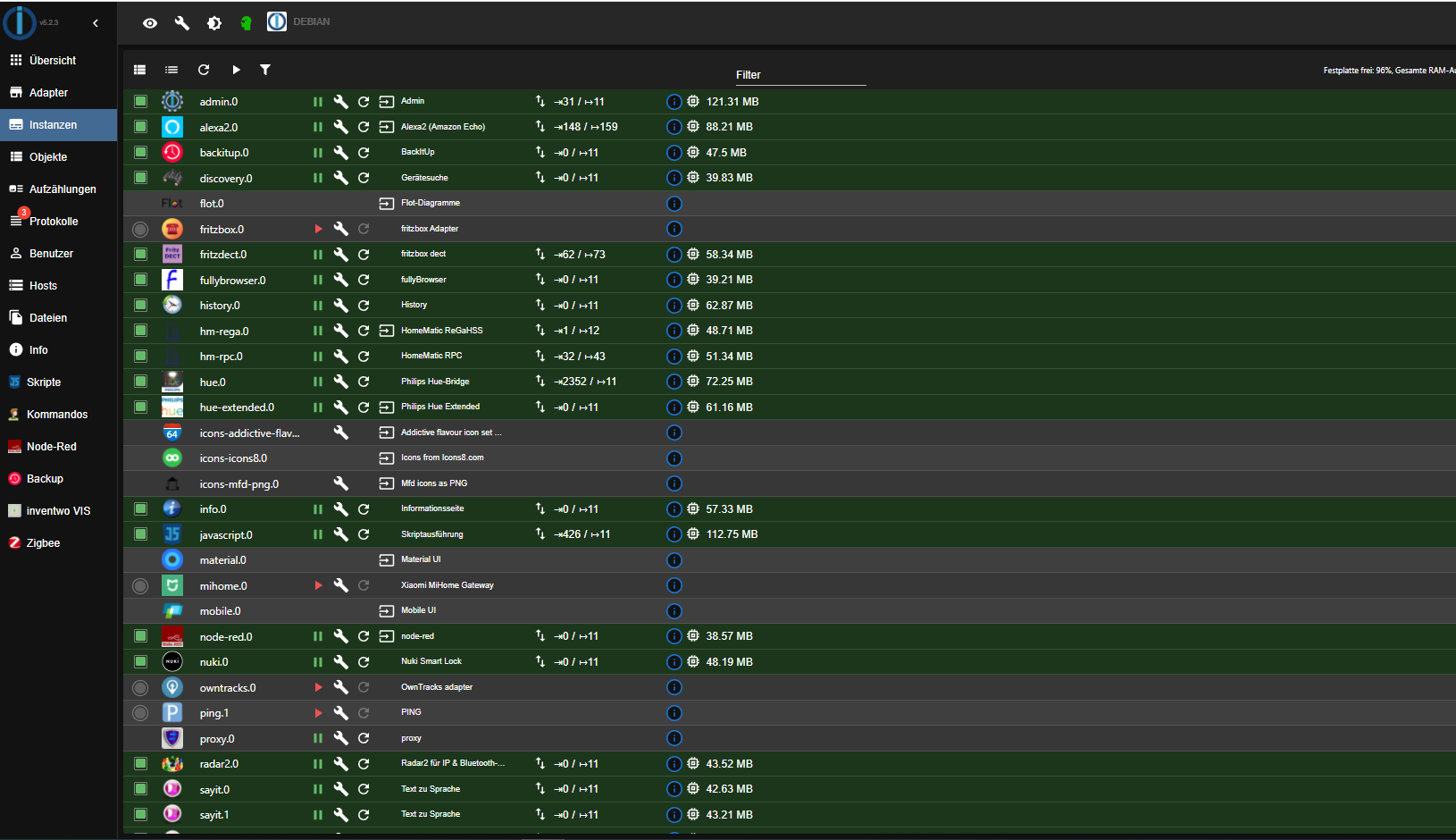
-
mhhh.... ich habe das Backup vom Raspberry auf dem NUC eingelesen. Da meckerte er beim starten und ich installiere Redis.
Wie kann ich den auf file migrieren ?Auf dem NUC läuft der ioB mit allen Instanzen schon etwas über ein Jahr ohne Probleme.
ich habe jetzt die Installation auf dem Slave am laufen.
Kann jedoch nichts mit der Frage anfangen.
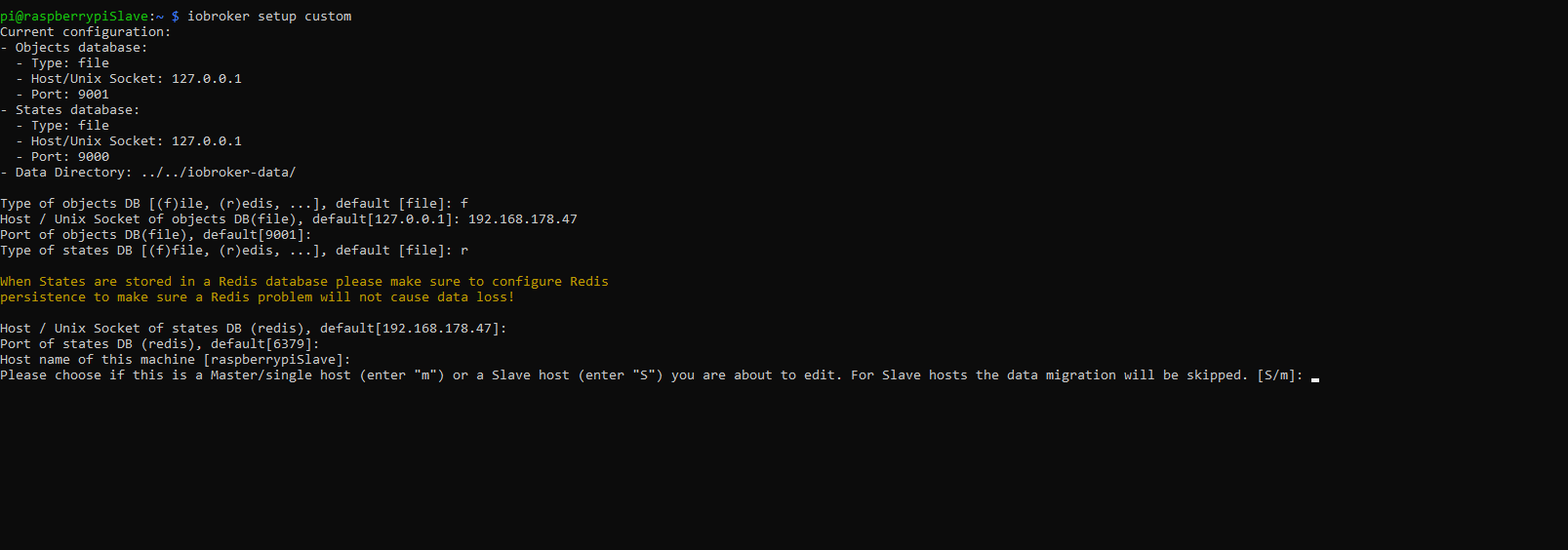
Please choose if this is a Master/single host (enter "m") or a Slave host (enter "S") you are about to edit. For Slave hosts the data migration will be skipped. [S/m]:pi@raspberrypiSlave:~ $ iobroker setup custom Current configuration: - Objects database: - Type: file - Host/Unix Socket: 127.0.0.1 - Port: 9001 - States database: - Type: file - Host/Unix Socket: 127.0.0.1 - Port: 9000 - Data Directory: ../../iobroker-data/ Type of objects DB [(f)ile, (r)edis, ...], default [file]: f Host / Unix Socket of objects DB(file), default[127.0.0.1]: 192.168.178.47 Port of objects DB(file), default[9001]: Type of states DB [(f)file, (r)edis, ...], default [file]: r When States are stored in a Redis database please make sure to configure Redis persistence to make sure a Redis problem will not cause data loss! Host / Unix Socket of states DB (redis), default[192.168.178.47]: Port of states DB (redis), default[6379]: Host name of this machine [raspberrypiSlave]: Please choose if this is a Master/single host (enter "m") or a Slave host (enter "S") you are about to edit. For Slave hosts the data migration will be skipped. [S/m]: -
ich habe jetzt die Installation auf dem Slave am laufen.
Kann jedoch nichts mit der Frage anfangen.
Please choose if this is a Master/single host (enter "m") or a Slave host (enter "S") you are about to edit. For Slave hosts the data migration will be skipped. [S/m]:pi@raspberrypiSlave:~ $ iobroker setup custom Current configuration: - Objects database: - Type: file - Host/Unix Socket: 127.0.0.1 - Port: 9001 - States database: - Type: file - Host/Unix Socket: 127.0.0.1 - Port: 9000 - Data Directory: ../../iobroker-data/ Type of objects DB [(f)ile, (r)edis, ...], default [file]: f Host / Unix Socket of objects DB(file), default[127.0.0.1]: 192.168.178.47 Port of objects DB(file), default[9001]: Type of states DB [(f)file, (r)edis, ...], default [file]: r When States are stored in a Redis database please make sure to configure Redis persistence to make sure a Redis problem will not cause data loss! Host / Unix Socket of states DB (redis), default[192.168.178.47]: Port of states DB (redis), default[6379]: Host name of this machine [raspberrypiSlave]: Please choose if this is a Master/single host (enter "m") or a Slave host (enter "S") you are about to edit. For Slave hosts the data migration will be skipped. [S/m]:Der Master ist fertig
Enter secret phrase for connection: Repeat secret phrase for connection: Changing objects server to accept connections on all IP addresses. Please check the binding of redis service. By default it is only local: http://download.redis.io/redis-stable/redis.conft this host)! Change "bind 127.0.0.1" to "bind 0.0.0.0" or to others. Please restart ioBroker for the changes to take effect: "iobroker restart"y not running please start befeore trying to discover this host. Important: Multihost discovery works with UDP packets. Make sure they are routed correctly in your network. If you use Docker you also need to configure this correctly. Multihost discovery will be automatically deactivated after 15 minutes. If you want to activate it permanently use the --persist flag Multihost discovery server: enabled Discovery authentication: enabled Persistent activation: disabled Objects: file on 0.0.0.0 States: redis on 0.0.0.0 root@debian:~# -
Der Master ist fertig
Enter secret phrase for connection: Repeat secret phrase for connection: Changing objects server to accept connections on all IP addresses. Please check the binding of redis service. By default it is only local: http://download.redis.io/redis-stable/redis.conft this host)! Change "bind 127.0.0.1" to "bind 0.0.0.0" or to others. Please restart ioBroker for the changes to take effect: "iobroker restart"y not running please start befeore trying to discover this host. Important: Multihost discovery works with UDP packets. Make sure they are routed correctly in your network. If you use Docker you also need to configure this correctly. Multihost discovery will be automatically deactivated after 15 minutes. If you want to activate it permanently use the --persist flag Multihost discovery server: enabled Discovery authentication: enabled Persistent activation: disabled Objects: file on 0.0.0.0 States: redis on 0.0.0.0 root@debian:~#root ?
redis ?
bist du nach der Anleitung vorgegangen ?
wo sind die Screenshots der einzelnen Teile ? -
root ?
redis ?
bist du nach der Anleitung vorgegangen ?
wo sind die Screenshots der einzelnen Teile ?@bahnuhr
Ja bin ich. die Frage taucht nicht auf in der Anleitung.
Please choose if this is a Master/single host (enter "m") or a Slave host (enter "S") you are about to edit. For Slave hosts the data migration will be skipped. [S/m]:Welche welche Teile meinst Du ?
-
@bahnuhr
Ja bin ich. die Frage taucht nicht auf in der Anleitung.
Please choose if this is a Master/single host (enter "m") or a Slave host (enter "S") you are about to edit. For Slave hosts the data migration will be skipped. [S/m]:Welche welche Teile meinst Du ?
-
Ich bin jetzt etwas verwirrt :-) Die Screenshots sind doch weiter oben.
Ich bin nach der Anleitung vorgegangen. Jedoch kommt in der Anleitung nicht die Frage beim installieren auf dem Slave:
Please choose if this is a Master/single host (enter "m") or a Slave host (enter "S") you are about to edit. For Slave hosts the data migration will be skipped. [S/m]:Was soll ich da jetzt eingeben ?
-
mhhh.... ich habe das Backup vom Raspberry auf dem NUC eingelesen. Da meckerte er beim starten und ich installiere Redis.
Wie kann ich den auf file migrieren ?Auf dem NUC läuft der ioB mit allen Instanzen schon etwas über ein Jahr ohne Probleme.
@achim55 sagte in Master und Slave klappt nicht.:
ich installiere Redis.
Aha, dann passt das jetzt.
@achim55 sagte in Master und Slave klappt nicht.:
Wie kann ich den auf file migrieren ?
über
iobroker setup customauf file stellen@achim55 sagte in Master und Slave klappt nicht.:
Auf dem NUC läuft der ioB mit allen Instanzen schon etwas über ein Jahr ohne Probleme.
dann lass es, aber du musst in der redis.conf dann auch Redis für den Slave freigeben
@achim55 sagte in Master und Slave klappt nicht.:
When States are stored in a Redis database please make sure to configure Redis persistence to make sure a Redis problem will not cause data loss!
@achim55 sagte in Master und Slave klappt nicht.:
Please choose if this is a Master/single host (enter "m") or a Slave host (enter "S") you are about to edit. For Slave hosts the data migration will be skipped. [S/m]:
Wo bist du denn da drauf?
Das ist doch der slave, oder?kein Support per PN! - Fragen im Forum stellen - Benutzt das Voting rechts unten im Beitrag wenn er euch geholfen hat.
Das Forum freut sich über eine Spende. Benutzt dazu den Spendenbutton oben rechts. Danke!
der Installationsfixer: curl -fsL https://iobroker.net/fix.sh | bash - -
@achim55 sagte in Master und Slave klappt nicht.:
ich installiere Redis.
Aha, dann passt das jetzt.
@achim55 sagte in Master und Slave klappt nicht.:
Wie kann ich den auf file migrieren ?
über
iobroker setup customauf file stellen@achim55 sagte in Master und Slave klappt nicht.:
Auf dem NUC läuft der ioB mit allen Instanzen schon etwas über ein Jahr ohne Probleme.
dann lass es, aber du musst in der redis.conf dann auch Redis für den Slave freigeben
@achim55 sagte in Master und Slave klappt nicht.:
When States are stored in a Redis database please make sure to configure Redis persistence to make sure a Redis problem will not cause data loss!
@achim55 sagte in Master und Slave klappt nicht.:
Please choose if this is a Master/single host (enter "m") or a Slave host (enter "S") you are about to edit. For Slave hosts the data migration will be skipped. [S/m]:
Wo bist du denn da drauf?
Das ist doch der slave, oder?

Hey! Du scheinst an dieser Unterhaltung interessiert zu sein, hast aber noch kein Konto.
Hast du es satt, bei jedem Besuch durch die gleichen Beiträge zu scrollen? Wenn du dich für ein Konto anmeldest, kommst du immer genau dorthin zurück, wo du zuvor warst, und kannst dich über neue Antworten benachrichtigen lassen (entweder per E-Mail oder Push-Benachrichtigung). Du kannst auch Lesezeichen speichern und Beiträge positiv bewerten, um anderen Community-Mitgliedern deine Wertschätzung zu zeigen.
Mit deinem Input könnte dieser Beitrag noch besser werden 💗
Registrieren Anmelden414
Online33.0k
Benutzer83.6k
Themen1.3m
Beiträge