




GELÖST-Backitup auf Raspi verbindet sich nicht mit Synology
-
@da_woody @Homoran Ich habe den Nutzer komplett neu angelegt, im übrigen nach dieser Anleitung und damit hatte es bei der Ersteinrichtung vor einiger Zeit auch einmalig funktioniert: Smart Home Backup
Wie gesagt, Benutzer (inkl. Passwort) und der Ordner Backups wurden komplett neu angelegt. Kann auch gerne nochmal alles löschen und nochmal neu anlegen

Das Passwort besteht aus 8 Zeichen: Groß- und Kleinbuchstaben, Zahlen und Bindestrichen als Sonderzeichen. Habe das extra so gewählt, da ich gelesen habe, dass zu lange Passwörter mit einigen Sonderzeichen ebenfalls Probleme bereiten.
@gdow1895 sagte in Backitup auf Raspi verbindet sich nicht mit Synology:
Ich habe den Nutzer komplett neu angelegt, im übrigen nach dieser Anleitung
Dann müsste ich dich jetzt an den Ersteller des Videos verweisen.
@gdow1895 sagte in Backitup auf Raspi verbindet sich nicht mit Synology:
und Bindestrichen als Sonderzeichen.
kann Probleme machen
-
@glasfaser sagte in Backitup auf Raspi verbindet sich nicht mit Synology:
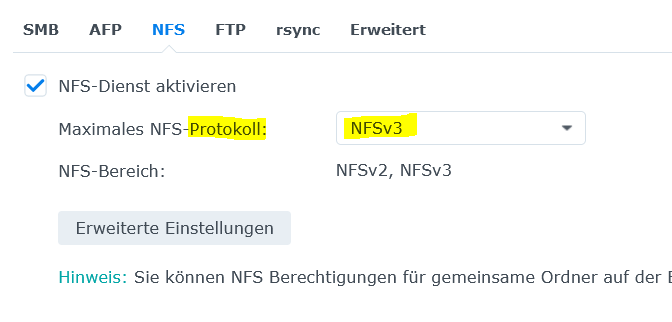
zu NFS , das Protokoll :
ich bin der Meinung wir sollten jetzt nicht auch noch das Protokoll wechseln.
NFS hat noch mehr Stolperfallen -
@glasfaser
Showmount-Befehl:pi@raspberrypi4-iob:~ $ showmount -e 192.168.178.56 clnt_create: RPC: Unable to receivePing Befehl (auf den NAS) läuft durch:
ping -c 5 192.168.178.56 PING 192.168.178.56 (192.168.178.56): 56 data bytes 64 bytes from 192.168.178.56: icmp_seq=0 ttl=64 time=35.723 ms 64 bytes from 192.168.178.56: icmp_seq=1 ttl=64 time=17.589 ms 64 bytes from 192.168.178.56: icmp_seq=2 ttl=64 time=17.079 ms 64 bytes from 192.168.178.56: icmp_seq=3 ttl=64 time=17.721 ms 64 bytes from 192.168.178.56: icmp_seq=4 ttl=64 time=15.767 ms --- 192.168.178.56 ping statistics --- 5 packets transmitted, 5 packets received, 0.0% packet loss@Thomas-Braun Passwort habe ich jetzt auf Zahlen und Buchstaben geändert, ohne Sonderzeichen. Ergebnis ist das gleiche.
@gdow1895 sagte in Backitup auf Raspi verbindet sich nicht mit Synology:
Ping Befehl (auf den NAS) läuft durch:
auch der Pfad zur Freigabe über den WIN-Dateiexplorer?
-
@gdow1895 sagte in Backitup auf Raspi verbindet sich nicht mit Synology:
Ping Befehl (auf den NAS) läuft durch:
auch der Pfad zur Freigabe über den WIN-Dateiexplorer?
-
@glasfaser Habe ich nicht zur Auswahl, auch nicht in den erweiterten Einstellungen
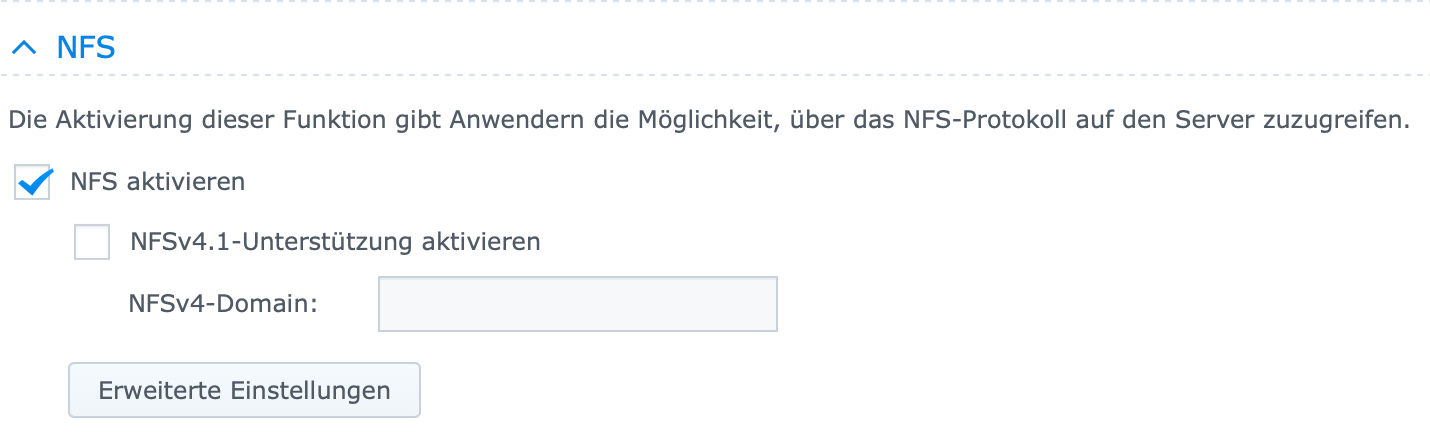
-
@homoran Ich bin mir jetzt nicht ganz sicher was du meinst, aber ich kann über den Finder (MacBook-User) auf den Ordner zugreifen.
@gdow1895 sagte in Backitup auf Raspi verbindet sich nicht mit Synology:
aber ich kann über den Finder (MacBook-User) auf den Ordner zugreifen
das meinte ich
und da gibst du dann in etwa ein:
192.168.17856/Backup/ioBroker?
Musst du Passwort und user eingeben? -
@glasfaser Hier nochmal der Log
2021-12-27 16:15:43.426 - info: host.raspberrypi4-iob stopInstance system.adapter.backitup.0 (force=false, process=true) 2021-12-27 16:15:43.473 - info: backitup.0 (29372) Got terminate signal TERMINATE_YOURSELF 2021-12-27 16:15:43.474 - info: host.raspberrypi4-iob stopInstance system.adapter.backitup.0 send kill signal 2021-12-27 16:15:43.475 - info: backitup.0 (29372) cleaned everything up... 2021-12-27 16:15:43.477 - info: backitup.0 (29372) terminating 2021-12-27 16:15:43.479 - debug: backitup.0 (29372) Plugin sentry destroyed 2021-12-27 16:15:43.480 - info: backitup.0 (29372) Terminated (ADAPTER_REQUESTED_TERMINATION): Without reason 2021-12-27 16:15:44.065 - info: host.raspberrypi4-iob instance system.adapter.backitup.0 terminated with code 11 (ADAPTER_REQUESTED_TERMINATION) 2021-12-27 16:15:46.546 - info: host.raspberrypi4-iob instance system.adapter.backitup.0 started with pid 5018 2021-12-27 16:15:47.701 - debug: backitup.0 (5018) Redis Objects: Use Redis connection: 127.0.0.1:9001 2021-12-27 16:15:47.742 - debug: backitup.0 (5018) Objects client ready ... initialize now 2021-12-27 16:15:47.749 - debug: backitup.0 (5018) Objects create System PubSub Client 2021-12-27 16:15:47.752 - debug: backitup.0 (5018) Objects create User PubSub Client 2021-12-27 16:15:47.754 - debug: backitup.0 (5018) Objects client initialize lua scripts 2021-12-27 16:15:47.786 - debug: backitup.0 (5018) Objects connected to redis: 127.0.0.1:9001 2021-12-27 16:15:47.796 - debug: backitup.0 (5018) objectDB connected 2021-12-27 16:15:47.799 - debug: backitup.0 (5018) Redis States: Use Redis connection: 127.0.0.1:9000 2021-12-27 16:15:47.807 - debug: backitup.0 (5018) States create System PubSub Client 2021-12-27 16:15:47.809 - debug: backitup.0 (5018) States create User PubSub Client 2021-12-27 16:15:47.817 - debug: backitup.0 (5018) States connected to redis: 127.0.0.1:9000 2021-12-27 16:15:47.818 - debug: backitup.0 (5018) statesDB connected 2021-12-27 16:15:48.123 - debug: backitup.0 (5018) Plugin sentry Initialize Plugin (enabled=true) 2021-12-27 16:15:48.372 - info: backitup.0 (5018) starting. Version 2.2.2 in /opt/iobroker/node_modules/iobroker.backitup, node: v14.18.2, js-controller: 3.3.22 2021-12-27 16:15:48.651 - debug: backitup.0 (5018) Backitup has recognized a linux system 2021-12-27 16:15:48.684 - info: backitup.0 (5018) [iobroker] backup was activated at 02:40 every 1 day(s) 2021-12-27 16:15:48.788 - debug: backitup.0 (5018) [iobroker] 10 40 02 */1 * * 2021-12-27 16:15:48.788 - info: backitup.0 (5018) [ccu] backup was activated at 01:30 every 3 day(s) 2021-12-27 16:15:48.800 - debug: backitup.0 (5018) [ccu] 10 30 01 */3 * * 2021-12-27 16:15:48.811 - debug: backitup.0 (5018) noserverino option: false 2021-12-27 16:15:48.812 - debug: backitup.0 (5018) cifs-mount command: "sudo mount -t cifs -o username=backupuser,password=****,rw,file_mode=0777,dir_mode=0777,vers=3.0 //192.168.178.56Backups/ioBroker /opt/iobroker/backups" 2021-12-27 16:15:55.110 - debug: backitup.0 (5018) first mount attempt with smb option failed. try next mount attempt without smb option ... 2021-12-27 16:15:55.111 - debug: backitup.0 (5018) cifs-mount command: "sudo mount -t cifs -o username=backupuser,password=****,rw,file_mode=0777,dir_mode=0777 //192.168.178.56Backups/ioBroker /opt/iobroker/backups" 2021-12-27 16:16:01.358 - error: backitup.0 (5018) Error: Command failed: sudo mount -t cifs -o username=backupuser,password=****,rw,file_mode=0777,dir_mode=0777 //192.168.178.56/Backups/ioBroker /opt/iobroker/backups Unable to find suitable address. 2021-12-27 16:16:03.372 - debug: backitup.0 (5018) detect backup file 1 from cifs: iobroker_2021_12_11-19_52_28_backupiobroker.tar.gz 2021-12-27 16:16:03.373 - debug: backitup.0 (5018) detect backup file 2 from cifs: iobroker_2021_12_11-23_48_27_backupiobroker.tar.gz 2021-12-27 16:16:03.374 - debug: backitup.0 (5018) detect backup file 3 from cifs: iobroker_2021_12_12-02_40_10_backupiobroker.tar.gz 2021-12-27 16:16:03.374 - debug: backitup.0 (5018) detect backup file 4 from cifs: iobroker_2021_12_13-02_40_10_backupiobroker.tar.gz 2021-12-27 16:16:03.375 - debug: backitup.0 (5018) detect backup file 5 from cifs: iobroker_2021_12_14-02_40_10_backupiobroker.tar.gz 2021-12-27 16:16:03.375 - debug: backitup.0 (5018) detect backup file 6 from cifs: iobroker_2021_12_15-02_40_10_backupiobroker.tar.gz 2021-12-27 16:16:03.376 - debug: backitup.0 (5018) detect backup file 7 from cifs: iobroker_2021_12_16-02_40_10_backupiobroker.tar.gz 2021-12-27 16:16:03.376 - debug: backitup.0 (5018) detect backup file 8 from cifs: iobroker_2021_12_17-02_40_10_backupiobroker.tar.gz 2021-12-27 16:16:03.377 - debug: backitup.0 (5018) detect backup file 9 from cifs: iobroker_2021_12_18-02_40_10_backupiobroker.tar.gz 2021-12-27 16:16:03.377 - debug: backitup.0 (5018) detect backup file 10 from cifs: iobroker_2021_12_19-02_40_10_backupiobroker.tar.gz 2021-12-27 16:16:03.378 - debug: backitup.0 (5018) detect backup file 11 from cifs: iobroker_2021_12_20-02_40_10_backupiobroker.tar.gz 2021-12-27 16:16:03.378 - debug: backitup.0 (5018) detect backup file 12 from cifs: iobroker_2021_12_21-02_40_10_backupiobroker.tar.gz 2021-12-27 16:16:03.379 - debug: backitup.0 (5018) detect backup file 13 from cifs: iobroker_2021_12_22-02_40_10_backupiobroker.tar.gz 2021-12-27 16:16:03.379 - debug: backitup.0 (5018) detect backup file 14 from cifs: iobroker_2021_12_23-02_40_10_backupiobroker.tar.gz 2021-12-27 16:16:03.380 - debug: backitup.0 (5018) detect backup file 15 from cifs: iobroker_2021_12_24-02_40_10_backupiobroker.tar.gz 2021-12-27 16:16:03.380 - debug: backitup.0 (5018) detect backup file 16 from cifs: iobroker_2021_12_25-02_40_10_backupiobroker.tar.gz 2021-12-27 16:16:03.380 - debug: backitup.0 (5018) detect backup file 17 from cifs: iobroker_2021_12_26-02_40_10_backupiobroker.tar.gz 2021-12-27 16:16:03.381 - debug: backitup.0 (5018) detect backup file 18 from cifs: iobroker_2021_12_26-16_20_21_backupiobroker.tar.gz 2021-12-27 16:16:03.381 - debug: backitup.0 (5018) detect backup file 19 from cifs: iobroker_2021_12_26-16_22_08_backupiobroker.tar.gz 2021-12-27 16:16:03.382 - debug: backitup.0 (5018) detect backup file 20 from cifs: iobroker_2021_12_26-18_35_28_backupiobroker.tar.gz 2021-12-27 16:16:03.382 - debug: backitup.0 (5018) detect backup file 21 from cifs: iobroker_2021_12_26-19_10_03_backupiobroker.tar.gz 2021-12-27 16:16:03.383 - debug: backitup.0 (5018) detect backup file 22 from cifs: iobroker_2021_12_27-09_08_15_backupiobroker.tar.gz 2021-12-27 16:16:03.383 - debug: backitup.0 (5018) detect backup file 23 from cifs: iobroker_2021_12_27-11_20_25_backupiobroker.tar.gz 2021-12-27 16:16:03.385 - debug: backitup.0 (5018) detect last backup file: iobroker_2021_12_27-11_20_25_backupiobroker.tar.gz -
@glasfaser Hier nochmal der Log
2021-12-27 16:15:43.426 - info: host.raspberrypi4-iob stopInstance system.adapter.backitup.0 (force=false, process=true) 2021-12-27 16:15:43.473 - info: backitup.0 (29372) Got terminate signal TERMINATE_YOURSELF 2021-12-27 16:15:43.474 - info: host.raspberrypi4-iob stopInstance system.adapter.backitup.0 send kill signal 2021-12-27 16:15:43.475 - info: backitup.0 (29372) cleaned everything up... 2021-12-27 16:15:43.477 - info: backitup.0 (29372) terminating 2021-12-27 16:15:43.479 - debug: backitup.0 (29372) Plugin sentry destroyed 2021-12-27 16:15:43.480 - info: backitup.0 (29372) Terminated (ADAPTER_REQUESTED_TERMINATION): Without reason 2021-12-27 16:15:44.065 - info: host.raspberrypi4-iob instance system.adapter.backitup.0 terminated with code 11 (ADAPTER_REQUESTED_TERMINATION) 2021-12-27 16:15:46.546 - info: host.raspberrypi4-iob instance system.adapter.backitup.0 started with pid 5018 2021-12-27 16:15:47.701 - debug: backitup.0 (5018) Redis Objects: Use Redis connection: 127.0.0.1:9001 2021-12-27 16:15:47.742 - debug: backitup.0 (5018) Objects client ready ... initialize now 2021-12-27 16:15:47.749 - debug: backitup.0 (5018) Objects create System PubSub Client 2021-12-27 16:15:47.752 - debug: backitup.0 (5018) Objects create User PubSub Client 2021-12-27 16:15:47.754 - debug: backitup.0 (5018) Objects client initialize lua scripts 2021-12-27 16:15:47.786 - debug: backitup.0 (5018) Objects connected to redis: 127.0.0.1:9001 2021-12-27 16:15:47.796 - debug: backitup.0 (5018) objectDB connected 2021-12-27 16:15:47.799 - debug: backitup.0 (5018) Redis States: Use Redis connection: 127.0.0.1:9000 2021-12-27 16:15:47.807 - debug: backitup.0 (5018) States create System PubSub Client 2021-12-27 16:15:47.809 - debug: backitup.0 (5018) States create User PubSub Client 2021-12-27 16:15:47.817 - debug: backitup.0 (5018) States connected to redis: 127.0.0.1:9000 2021-12-27 16:15:47.818 - debug: backitup.0 (5018) statesDB connected 2021-12-27 16:15:48.123 - debug: backitup.0 (5018) Plugin sentry Initialize Plugin (enabled=true) 2021-12-27 16:15:48.372 - info: backitup.0 (5018) starting. Version 2.2.2 in /opt/iobroker/node_modules/iobroker.backitup, node: v14.18.2, js-controller: 3.3.22 2021-12-27 16:15:48.651 - debug: backitup.0 (5018) Backitup has recognized a linux system 2021-12-27 16:15:48.684 - info: backitup.0 (5018) [iobroker] backup was activated at 02:40 every 1 day(s) 2021-12-27 16:15:48.788 - debug: backitup.0 (5018) [iobroker] 10 40 02 */1 * * 2021-12-27 16:15:48.788 - info: backitup.0 (5018) [ccu] backup was activated at 01:30 every 3 day(s) 2021-12-27 16:15:48.800 - debug: backitup.0 (5018) [ccu] 10 30 01 */3 * * 2021-12-27 16:15:48.811 - debug: backitup.0 (5018) noserverino option: false 2021-12-27 16:15:48.812 - debug: backitup.0 (5018) cifs-mount command: "sudo mount -t cifs -o username=backupuser,password=****,rw,file_mode=0777,dir_mode=0777,vers=3.0 //192.168.178.56Backups/ioBroker /opt/iobroker/backups" 2021-12-27 16:15:55.110 - debug: backitup.0 (5018) first mount attempt with smb option failed. try next mount attempt without smb option ... 2021-12-27 16:15:55.111 - debug: backitup.0 (5018) cifs-mount command: "sudo mount -t cifs -o username=backupuser,password=****,rw,file_mode=0777,dir_mode=0777 //192.168.178.56Backups/ioBroker /opt/iobroker/backups" 2021-12-27 16:16:01.358 - error: backitup.0 (5018) Error: Command failed: sudo mount -t cifs -o username=backupuser,password=****,rw,file_mode=0777,dir_mode=0777 //192.168.178.56/Backups/ioBroker /opt/iobroker/backups Unable to find suitable address. 2021-12-27 16:16:03.372 - debug: backitup.0 (5018) detect backup file 1 from cifs: iobroker_2021_12_11-19_52_28_backupiobroker.tar.gz 2021-12-27 16:16:03.373 - debug: backitup.0 (5018) detect backup file 2 from cifs: iobroker_2021_12_11-23_48_27_backupiobroker.tar.gz 2021-12-27 16:16:03.374 - debug: backitup.0 (5018) detect backup file 3 from cifs: iobroker_2021_12_12-02_40_10_backupiobroker.tar.gz 2021-12-27 16:16:03.374 - debug: backitup.0 (5018) detect backup file 4 from cifs: iobroker_2021_12_13-02_40_10_backupiobroker.tar.gz 2021-12-27 16:16:03.375 - debug: backitup.0 (5018) detect backup file 5 from cifs: iobroker_2021_12_14-02_40_10_backupiobroker.tar.gz 2021-12-27 16:16:03.375 - debug: backitup.0 (5018) detect backup file 6 from cifs: iobroker_2021_12_15-02_40_10_backupiobroker.tar.gz 2021-12-27 16:16:03.376 - debug: backitup.0 (5018) detect backup file 7 from cifs: iobroker_2021_12_16-02_40_10_backupiobroker.tar.gz 2021-12-27 16:16:03.376 - debug: backitup.0 (5018) detect backup file 8 from cifs: iobroker_2021_12_17-02_40_10_backupiobroker.tar.gz 2021-12-27 16:16:03.377 - debug: backitup.0 (5018) detect backup file 9 from cifs: iobroker_2021_12_18-02_40_10_backupiobroker.tar.gz 2021-12-27 16:16:03.377 - debug: backitup.0 (5018) detect backup file 10 from cifs: iobroker_2021_12_19-02_40_10_backupiobroker.tar.gz 2021-12-27 16:16:03.378 - debug: backitup.0 (5018) detect backup file 11 from cifs: iobroker_2021_12_20-02_40_10_backupiobroker.tar.gz 2021-12-27 16:16:03.378 - debug: backitup.0 (5018) detect backup file 12 from cifs: iobroker_2021_12_21-02_40_10_backupiobroker.tar.gz 2021-12-27 16:16:03.379 - debug: backitup.0 (5018) detect backup file 13 from cifs: iobroker_2021_12_22-02_40_10_backupiobroker.tar.gz 2021-12-27 16:16:03.379 - debug: backitup.0 (5018) detect backup file 14 from cifs: iobroker_2021_12_23-02_40_10_backupiobroker.tar.gz 2021-12-27 16:16:03.380 - debug: backitup.0 (5018) detect backup file 15 from cifs: iobroker_2021_12_24-02_40_10_backupiobroker.tar.gz 2021-12-27 16:16:03.380 - debug: backitup.0 (5018) detect backup file 16 from cifs: iobroker_2021_12_25-02_40_10_backupiobroker.tar.gz 2021-12-27 16:16:03.380 - debug: backitup.0 (5018) detect backup file 17 from cifs: iobroker_2021_12_26-02_40_10_backupiobroker.tar.gz 2021-12-27 16:16:03.381 - debug: backitup.0 (5018) detect backup file 18 from cifs: iobroker_2021_12_26-16_20_21_backupiobroker.tar.gz 2021-12-27 16:16:03.381 - debug: backitup.0 (5018) detect backup file 19 from cifs: iobroker_2021_12_26-16_22_08_backupiobroker.tar.gz 2021-12-27 16:16:03.382 - debug: backitup.0 (5018) detect backup file 20 from cifs: iobroker_2021_12_26-18_35_28_backupiobroker.tar.gz 2021-12-27 16:16:03.382 - debug: backitup.0 (5018) detect backup file 21 from cifs: iobroker_2021_12_26-19_10_03_backupiobroker.tar.gz 2021-12-27 16:16:03.383 - debug: backitup.0 (5018) detect backup file 22 from cifs: iobroker_2021_12_27-09_08_15_backupiobroker.tar.gz 2021-12-27 16:16:03.383 - debug: backitup.0 (5018) detect backup file 23 from cifs: iobroker_2021_12_27-11_20_25_backupiobroker.tar.gz 2021-12-27 16:16:03.385 - debug: backitup.0 (5018) detect last backup file: iobroker_2021_12_27-11_20_25_backupiobroker.tar.gz -
@glasfaser Hier nochmal der Log
2021-12-27 16:15:43.426 - info: host.raspberrypi4-iob stopInstance system.adapter.backitup.0 (force=false, process=true) 2021-12-27 16:15:43.473 - info: backitup.0 (29372) Got terminate signal TERMINATE_YOURSELF 2021-12-27 16:15:43.474 - info: host.raspberrypi4-iob stopInstance system.adapter.backitup.0 send kill signal 2021-12-27 16:15:43.475 - info: backitup.0 (29372) cleaned everything up... 2021-12-27 16:15:43.477 - info: backitup.0 (29372) terminating 2021-12-27 16:15:43.479 - debug: backitup.0 (29372) Plugin sentry destroyed 2021-12-27 16:15:43.480 - info: backitup.0 (29372) Terminated (ADAPTER_REQUESTED_TERMINATION): Without reason 2021-12-27 16:15:44.065 - info: host.raspberrypi4-iob instance system.adapter.backitup.0 terminated with code 11 (ADAPTER_REQUESTED_TERMINATION) 2021-12-27 16:15:46.546 - info: host.raspberrypi4-iob instance system.adapter.backitup.0 started with pid 5018 2021-12-27 16:15:47.701 - debug: backitup.0 (5018) Redis Objects: Use Redis connection: 127.0.0.1:9001 2021-12-27 16:15:47.742 - debug: backitup.0 (5018) Objects client ready ... initialize now 2021-12-27 16:15:47.749 - debug: backitup.0 (5018) Objects create System PubSub Client 2021-12-27 16:15:47.752 - debug: backitup.0 (5018) Objects create User PubSub Client 2021-12-27 16:15:47.754 - debug: backitup.0 (5018) Objects client initialize lua scripts 2021-12-27 16:15:47.786 - debug: backitup.0 (5018) Objects connected to redis: 127.0.0.1:9001 2021-12-27 16:15:47.796 - debug: backitup.0 (5018) objectDB connected 2021-12-27 16:15:47.799 - debug: backitup.0 (5018) Redis States: Use Redis connection: 127.0.0.1:9000 2021-12-27 16:15:47.807 - debug: backitup.0 (5018) States create System PubSub Client 2021-12-27 16:15:47.809 - debug: backitup.0 (5018) States create User PubSub Client 2021-12-27 16:15:47.817 - debug: backitup.0 (5018) States connected to redis: 127.0.0.1:9000 2021-12-27 16:15:47.818 - debug: backitup.0 (5018) statesDB connected 2021-12-27 16:15:48.123 - debug: backitup.0 (5018) Plugin sentry Initialize Plugin (enabled=true) 2021-12-27 16:15:48.372 - info: backitup.0 (5018) starting. Version 2.2.2 in /opt/iobroker/node_modules/iobroker.backitup, node: v14.18.2, js-controller: 3.3.22 2021-12-27 16:15:48.651 - debug: backitup.0 (5018) Backitup has recognized a linux system 2021-12-27 16:15:48.684 - info: backitup.0 (5018) [iobroker] backup was activated at 02:40 every 1 day(s) 2021-12-27 16:15:48.788 - debug: backitup.0 (5018) [iobroker] 10 40 02 */1 * * 2021-12-27 16:15:48.788 - info: backitup.0 (5018) [ccu] backup was activated at 01:30 every 3 day(s) 2021-12-27 16:15:48.800 - debug: backitup.0 (5018) [ccu] 10 30 01 */3 * * 2021-12-27 16:15:48.811 - debug: backitup.0 (5018) noserverino option: false 2021-12-27 16:15:48.812 - debug: backitup.0 (5018) cifs-mount command: "sudo mount -t cifs -o username=backupuser,password=****,rw,file_mode=0777,dir_mode=0777,vers=3.0 //192.168.178.56Backups/ioBroker /opt/iobroker/backups" 2021-12-27 16:15:55.110 - debug: backitup.0 (5018) first mount attempt with smb option failed. try next mount attempt without smb option ... 2021-12-27 16:15:55.111 - debug: backitup.0 (5018) cifs-mount command: "sudo mount -t cifs -o username=backupuser,password=****,rw,file_mode=0777,dir_mode=0777 //192.168.178.56Backups/ioBroker /opt/iobroker/backups" 2021-12-27 16:16:01.358 - error: backitup.0 (5018) Error: Command failed: sudo mount -t cifs -o username=backupuser,password=****,rw,file_mode=0777,dir_mode=0777 //192.168.178.56/Backups/ioBroker /opt/iobroker/backups Unable to find suitable address. 2021-12-27 16:16:03.372 - debug: backitup.0 (5018) detect backup file 1 from cifs: iobroker_2021_12_11-19_52_28_backupiobroker.tar.gz 2021-12-27 16:16:03.373 - debug: backitup.0 (5018) detect backup file 2 from cifs: iobroker_2021_12_11-23_48_27_backupiobroker.tar.gz 2021-12-27 16:16:03.374 - debug: backitup.0 (5018) detect backup file 3 from cifs: iobroker_2021_12_12-02_40_10_backupiobroker.tar.gz 2021-12-27 16:16:03.374 - debug: backitup.0 (5018) detect backup file 4 from cifs: iobroker_2021_12_13-02_40_10_backupiobroker.tar.gz 2021-12-27 16:16:03.375 - debug: backitup.0 (5018) detect backup file 5 from cifs: iobroker_2021_12_14-02_40_10_backupiobroker.tar.gz 2021-12-27 16:16:03.375 - debug: backitup.0 (5018) detect backup file 6 from cifs: iobroker_2021_12_15-02_40_10_backupiobroker.tar.gz 2021-12-27 16:16:03.376 - debug: backitup.0 (5018) detect backup file 7 from cifs: iobroker_2021_12_16-02_40_10_backupiobroker.tar.gz 2021-12-27 16:16:03.376 - debug: backitup.0 (5018) detect backup file 8 from cifs: iobroker_2021_12_17-02_40_10_backupiobroker.tar.gz 2021-12-27 16:16:03.377 - debug: backitup.0 (5018) detect backup file 9 from cifs: iobroker_2021_12_18-02_40_10_backupiobroker.tar.gz 2021-12-27 16:16:03.377 - debug: backitup.0 (5018) detect backup file 10 from cifs: iobroker_2021_12_19-02_40_10_backupiobroker.tar.gz 2021-12-27 16:16:03.378 - debug: backitup.0 (5018) detect backup file 11 from cifs: iobroker_2021_12_20-02_40_10_backupiobroker.tar.gz 2021-12-27 16:16:03.378 - debug: backitup.0 (5018) detect backup file 12 from cifs: iobroker_2021_12_21-02_40_10_backupiobroker.tar.gz 2021-12-27 16:16:03.379 - debug: backitup.0 (5018) detect backup file 13 from cifs: iobroker_2021_12_22-02_40_10_backupiobroker.tar.gz 2021-12-27 16:16:03.379 - debug: backitup.0 (5018) detect backup file 14 from cifs: iobroker_2021_12_23-02_40_10_backupiobroker.tar.gz 2021-12-27 16:16:03.380 - debug: backitup.0 (5018) detect backup file 15 from cifs: iobroker_2021_12_24-02_40_10_backupiobroker.tar.gz 2021-12-27 16:16:03.380 - debug: backitup.0 (5018) detect backup file 16 from cifs: iobroker_2021_12_25-02_40_10_backupiobroker.tar.gz 2021-12-27 16:16:03.380 - debug: backitup.0 (5018) detect backup file 17 from cifs: iobroker_2021_12_26-02_40_10_backupiobroker.tar.gz 2021-12-27 16:16:03.381 - debug: backitup.0 (5018) detect backup file 18 from cifs: iobroker_2021_12_26-16_20_21_backupiobroker.tar.gz 2021-12-27 16:16:03.381 - debug: backitup.0 (5018) detect backup file 19 from cifs: iobroker_2021_12_26-16_22_08_backupiobroker.tar.gz 2021-12-27 16:16:03.382 - debug: backitup.0 (5018) detect backup file 20 from cifs: iobroker_2021_12_26-18_35_28_backupiobroker.tar.gz 2021-12-27 16:16:03.382 - debug: backitup.0 (5018) detect backup file 21 from cifs: iobroker_2021_12_26-19_10_03_backupiobroker.tar.gz 2021-12-27 16:16:03.383 - debug: backitup.0 (5018) detect backup file 22 from cifs: iobroker_2021_12_27-09_08_15_backupiobroker.tar.gz 2021-12-27 16:16:03.383 - debug: backitup.0 (5018) detect backup file 23 from cifs: iobroker_2021_12_27-11_20_25_backupiobroker.tar.gz 2021-12-27 16:16:03.385 - debug: backitup.0 (5018) detect last backup file: iobroker_2021_12_27-11_20_25_backupiobroker.tar.gzmich stört:
@gdow1895 sagte in Backitup auf Raspi verbindet sich nicht mit Synology:
first mount attempt with smb option failed. try next mount attempt without smb option ...
-
@gdow1895 sagte in Backitup auf Raspi verbindet sich nicht mit Synology:
aber ich kann über den Finder (MacBook-User) auf den Ordner zugreifen
das meinte ich
und da gibst du dann in etwa ein:
192.168.17856/Backup/ioBroker?
Musst du Passwort und user eingeben? -
@homoran Wird halt ganz normal im Netzwerk angezeigt und dann muss ich mich mit einem Benutzer anmelden. Siehe "Verbunden als "Guido""
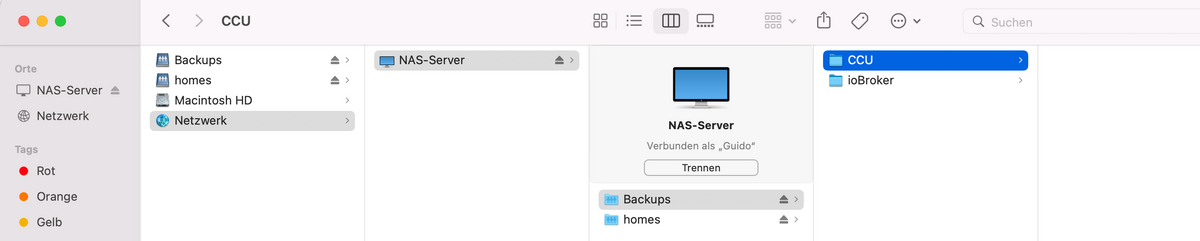
@gdow1895 sagte in Backitup auf Raspi verbindet sich nicht mit Synology:
dann muss ich mich mit einem Benutzer anmelden. Siehe "Verbunden als "Guido""
und klappt das auch als backupuser?
-
@gdow1895 sagte in Backitup auf Raspi verbindet sich nicht mit Synology:
dann muss ich mich mit einem Benutzer anmelden. Siehe "Verbunden als "Guido""
und klappt das auch als backupuser?
@homoran sagte in Backitup auf Raspi verbindet sich nicht mit Synology:
@gdow1895 sagte in Backitup auf Raspi verbindet sich nicht mit Synology:
dann muss ich mich mit einem Benutzer anmelden. Siehe "Verbunden als "Guido""
und klappt das auch als backupuser?
Ja, klappt auch mit dem backupuser...
-
@homoran sagte in Backitup auf Raspi verbindet sich nicht mit Synology:
@gdow1895 sagte in Backitup auf Raspi verbindet sich nicht mit Synology:
dann muss ich mich mit einem Benutzer anmelden. Siehe "Verbunden als "Guido""
und klappt das auch als backupuser?
Ja, klappt auch mit dem backupuser...
@gdow1895 sagte in Backitup auf Raspi verbindet sich nicht mit Synology:
Ja, klappt auch mit dem backupuser...
dann dürfte synoseitig alles i.O. sein und wir müssen uns auf den Raspi konzentrieren
hast du da mal einfach rebootet?
-
@glasfaser Hier nochmal der Log
2021-12-27 16:15:43.426 - info: host.raspberrypi4-iob stopInstance system.adapter.backitup.0 (force=false, process=true) 2021-12-27 16:15:43.473 - info: backitup.0 (29372) Got terminate signal TERMINATE_YOURSELF 2021-12-27 16:15:43.474 - info: host.raspberrypi4-iob stopInstance system.adapter.backitup.0 send kill signal 2021-12-27 16:15:43.475 - info: backitup.0 (29372) cleaned everything up... 2021-12-27 16:15:43.477 - info: backitup.0 (29372) terminating 2021-12-27 16:15:43.479 - debug: backitup.0 (29372) Plugin sentry destroyed 2021-12-27 16:15:43.480 - info: backitup.0 (29372) Terminated (ADAPTER_REQUESTED_TERMINATION): Without reason 2021-12-27 16:15:44.065 - info: host.raspberrypi4-iob instance system.adapter.backitup.0 terminated with code 11 (ADAPTER_REQUESTED_TERMINATION) 2021-12-27 16:15:46.546 - info: host.raspberrypi4-iob instance system.adapter.backitup.0 started with pid 5018 2021-12-27 16:15:47.701 - debug: backitup.0 (5018) Redis Objects: Use Redis connection: 127.0.0.1:9001 2021-12-27 16:15:47.742 - debug: backitup.0 (5018) Objects client ready ... initialize now 2021-12-27 16:15:47.749 - debug: backitup.0 (5018) Objects create System PubSub Client 2021-12-27 16:15:47.752 - debug: backitup.0 (5018) Objects create User PubSub Client 2021-12-27 16:15:47.754 - debug: backitup.0 (5018) Objects client initialize lua scripts 2021-12-27 16:15:47.786 - debug: backitup.0 (5018) Objects connected to redis: 127.0.0.1:9001 2021-12-27 16:15:47.796 - debug: backitup.0 (5018) objectDB connected 2021-12-27 16:15:47.799 - debug: backitup.0 (5018) Redis States: Use Redis connection: 127.0.0.1:9000 2021-12-27 16:15:47.807 - debug: backitup.0 (5018) States create System PubSub Client 2021-12-27 16:15:47.809 - debug: backitup.0 (5018) States create User PubSub Client 2021-12-27 16:15:47.817 - debug: backitup.0 (5018) States connected to redis: 127.0.0.1:9000 2021-12-27 16:15:47.818 - debug: backitup.0 (5018) statesDB connected 2021-12-27 16:15:48.123 - debug: backitup.0 (5018) Plugin sentry Initialize Plugin (enabled=true) 2021-12-27 16:15:48.372 - info: backitup.0 (5018) starting. Version 2.2.2 in /opt/iobroker/node_modules/iobroker.backitup, node: v14.18.2, js-controller: 3.3.22 2021-12-27 16:15:48.651 - debug: backitup.0 (5018) Backitup has recognized a linux system 2021-12-27 16:15:48.684 - info: backitup.0 (5018) [iobroker] backup was activated at 02:40 every 1 day(s) 2021-12-27 16:15:48.788 - debug: backitup.0 (5018) [iobroker] 10 40 02 */1 * * 2021-12-27 16:15:48.788 - info: backitup.0 (5018) [ccu] backup was activated at 01:30 every 3 day(s) 2021-12-27 16:15:48.800 - debug: backitup.0 (5018) [ccu] 10 30 01 */3 * * 2021-12-27 16:15:48.811 - debug: backitup.0 (5018) noserverino option: false 2021-12-27 16:15:48.812 - debug: backitup.0 (5018) cifs-mount command: "sudo mount -t cifs -o username=backupuser,password=****,rw,file_mode=0777,dir_mode=0777,vers=3.0 //192.168.178.56Backups/ioBroker /opt/iobroker/backups" 2021-12-27 16:15:55.110 - debug: backitup.0 (5018) first mount attempt with smb option failed. try next mount attempt without smb option ... 2021-12-27 16:15:55.111 - debug: backitup.0 (5018) cifs-mount command: "sudo mount -t cifs -o username=backupuser,password=****,rw,file_mode=0777,dir_mode=0777 //192.168.178.56Backups/ioBroker /opt/iobroker/backups" 2021-12-27 16:16:01.358 - error: backitup.0 (5018) Error: Command failed: sudo mount -t cifs -o username=backupuser,password=****,rw,file_mode=0777,dir_mode=0777 //192.168.178.56/Backups/ioBroker /opt/iobroker/backups Unable to find suitable address. 2021-12-27 16:16:03.372 - debug: backitup.0 (5018) detect backup file 1 from cifs: iobroker_2021_12_11-19_52_28_backupiobroker.tar.gz 2021-12-27 16:16:03.373 - debug: backitup.0 (5018) detect backup file 2 from cifs: iobroker_2021_12_11-23_48_27_backupiobroker.tar.gz 2021-12-27 16:16:03.374 - debug: backitup.0 (5018) detect backup file 3 from cifs: iobroker_2021_12_12-02_40_10_backupiobroker.tar.gz 2021-12-27 16:16:03.374 - debug: backitup.0 (5018) detect backup file 4 from cifs: iobroker_2021_12_13-02_40_10_backupiobroker.tar.gz 2021-12-27 16:16:03.375 - debug: backitup.0 (5018) detect backup file 5 from cifs: iobroker_2021_12_14-02_40_10_backupiobroker.tar.gz 2021-12-27 16:16:03.375 - debug: backitup.0 (5018) detect backup file 6 from cifs: iobroker_2021_12_15-02_40_10_backupiobroker.tar.gz 2021-12-27 16:16:03.376 - debug: backitup.0 (5018) detect backup file 7 from cifs: iobroker_2021_12_16-02_40_10_backupiobroker.tar.gz 2021-12-27 16:16:03.376 - debug: backitup.0 (5018) detect backup file 8 from cifs: iobroker_2021_12_17-02_40_10_backupiobroker.tar.gz 2021-12-27 16:16:03.377 - debug: backitup.0 (5018) detect backup file 9 from cifs: iobroker_2021_12_18-02_40_10_backupiobroker.tar.gz 2021-12-27 16:16:03.377 - debug: backitup.0 (5018) detect backup file 10 from cifs: iobroker_2021_12_19-02_40_10_backupiobroker.tar.gz 2021-12-27 16:16:03.378 - debug: backitup.0 (5018) detect backup file 11 from cifs: iobroker_2021_12_20-02_40_10_backupiobroker.tar.gz 2021-12-27 16:16:03.378 - debug: backitup.0 (5018) detect backup file 12 from cifs: iobroker_2021_12_21-02_40_10_backupiobroker.tar.gz 2021-12-27 16:16:03.379 - debug: backitup.0 (5018) detect backup file 13 from cifs: iobroker_2021_12_22-02_40_10_backupiobroker.tar.gz 2021-12-27 16:16:03.379 - debug: backitup.0 (5018) detect backup file 14 from cifs: iobroker_2021_12_23-02_40_10_backupiobroker.tar.gz 2021-12-27 16:16:03.380 - debug: backitup.0 (5018) detect backup file 15 from cifs: iobroker_2021_12_24-02_40_10_backupiobroker.tar.gz 2021-12-27 16:16:03.380 - debug: backitup.0 (5018) detect backup file 16 from cifs: iobroker_2021_12_25-02_40_10_backupiobroker.tar.gz 2021-12-27 16:16:03.380 - debug: backitup.0 (5018) detect backup file 17 from cifs: iobroker_2021_12_26-02_40_10_backupiobroker.tar.gz 2021-12-27 16:16:03.381 - debug: backitup.0 (5018) detect backup file 18 from cifs: iobroker_2021_12_26-16_20_21_backupiobroker.tar.gz 2021-12-27 16:16:03.381 - debug: backitup.0 (5018) detect backup file 19 from cifs: iobroker_2021_12_26-16_22_08_backupiobroker.tar.gz 2021-12-27 16:16:03.382 - debug: backitup.0 (5018) detect backup file 20 from cifs: iobroker_2021_12_26-18_35_28_backupiobroker.tar.gz 2021-12-27 16:16:03.382 - debug: backitup.0 (5018) detect backup file 21 from cifs: iobroker_2021_12_26-19_10_03_backupiobroker.tar.gz 2021-12-27 16:16:03.383 - debug: backitup.0 (5018) detect backup file 22 from cifs: iobroker_2021_12_27-09_08_15_backupiobroker.tar.gz 2021-12-27 16:16:03.383 - debug: backitup.0 (5018) detect backup file 23 from cifs: iobroker_2021_12_27-11_20_25_backupiobroker.tar.gz 2021-12-27 16:16:03.385 - debug: backitup.0 (5018) detect last backup file: iobroker_2021_12_27-11_20_25_backupiobroker.tar.gz,vers=3.0 //192.168.178.56Backups/ioBroker /opt/iobroker/backups"
Die frage wäre warum ist der Pfad direkt nach der IP ohne / dahinter ... ich kann es nicht simulieren
Synology 918+ 16GB - ioBroker in Docker v9 , VISO auf Trekstor Primebook C13 13,3" , Hikvision Domkameras mit Surveillance Station .. CCU RaspberryMatic in Synology VM .. Zigbee CC2538+CC2592 .. Sonoff .. KNX .. Modbus ..
-
@gdow1895 sagte in Backitup auf Raspi verbindet sich nicht mit Synology:
Ja, klappt auch mit dem backupuser...
dann dürfte synoseitig alles i.O. sein und wir müssen uns auf den Raspi konzentrieren
hast du da mal einfach rebootet?
-
@homoran sagte in Backitup auf Raspi verbindet sich nicht mit Synology:
@gdow1895 sagte in Backitup auf Raspi verbindet sich nicht mit Synology:
dann muss ich mich mit einem Benutzer anmelden. Siehe "Verbunden als "Guido""
und klappt das auch als backupuser?
Ja, klappt auch mit dem backupuser...
Hab's jetzt nicht alles gelesen, aber die cifs-utils sind schon installiert, oder?
sudo apt update apt policy cifs-utils -
,vers=3.0 //192.168.178.56Backups/ioBroker /opt/iobroker/backups"
Die frage wäre warum ist der Pfad direkt nach der IP ohne / dahinter ... ich kann es nicht simulieren
@glasfaser sagte in Backitup auf Raspi verbindet sich nicht mit Synology:
Die frage wäre warum ist der Pfad direkt nach der IP ohne / dahinter
Mist! Hab ich nicht gesehen
Ich nutze allerdings den Hostnamen der Syno, aber auch keinen
/dahinter in der Konfig und auch keinen vor dem Pfad -
Hab's jetzt nicht alles gelesen, aber die cifs-utils sind schon installiert, oder?
sudo apt update apt policy cifs-utils@thomas-braun sagte in Backitup auf Raspi verbindet sich nicht mit Synology:
Hab's jetzt nicht alles gelesen, aber die cifs-utils sind schon installiert, oder?
haben wir zumindest nicht geprüft
-
@glasfaser sagte in Backitup auf Raspi verbindet sich nicht mit Synology:
Die frage wäre warum ist der Pfad direkt nach der IP ohne / dahinter
Mist! Hab ich nicht gesehen
Ich nutze allerdings den Hostnamen der Syno, aber auch keinen
/dahinter in der Konfig und auch keinen vor dem Pfad@homoran CIFS-Utils sind installiert
pi@raspberrypi4-iob:~ $ sudo apt-get install cifs-utils
Paketlisten werden gelesen... Fertig
Abhängigkeitsbaum wird aufgebaut.
Statusinformationen werden eingelesen.... Fertig
cifs-utils ist schon die neueste Version (2:6.8-2).
0 aktualisiert, 0 neu installiert, 0 zu entfernen und 1 nicht aktualisiert.
Im Adapter hat der Pfad kein führendes "/". Ist aber auch egal ob mit oder ohne. Es kommt immer das gleiche Ergebnis raus. Selbst wenn ich "volume1/" voranstelle.
-
@homoran CIFS-Utils sind installiert
pi@raspberrypi4-iob:~ $ sudo apt-get install cifs-utils
Paketlisten werden gelesen... Fertig
Abhängigkeitsbaum wird aufgebaut.
Statusinformationen werden eingelesen.... Fertig
cifs-utils ist schon die neueste Version (2:6.8-2).
0 aktualisiert, 0 neu installiert, 0 zu entfernen und 1 nicht aktualisiert.
Im Adapter hat der Pfad kein führendes "/". Ist aber auch egal ob mit oder ohne. Es kommt immer das gleiche Ergebnis raus. Selbst wenn ich "volume1/" voranstelle.
Ich möchte aber nicht den Installationsvorgang sehen, sondern die Ausgaben auf die obigen beiden Befehle.


Hey! Du scheinst an dieser Unterhaltung interessiert zu sein, hast aber noch kein Konto.
Hast du es satt, bei jedem Besuch durch die gleichen Beiträge zu scrollen? Wenn du dich für ein Konto anmeldest, kommst du immer genau dorthin zurück, wo du zuvor warst, und kannst dich über neue Antworten benachrichtigen lassen (entweder per E-Mail oder Push-Benachrichtigung). Du kannst auch Lesezeichen speichern und Beiträge positiv bewerten, um anderen Community-Mitgliedern deine Wertschätzung zu zeigen.
Mit deinem Input könnte dieser Beitrag noch besser werden 💗
Registrieren Anmelden456
Online33.0k
Benutzer83.6k
Themen1.3m
Beiträge