




Broker->BackItUp FTP->Synology
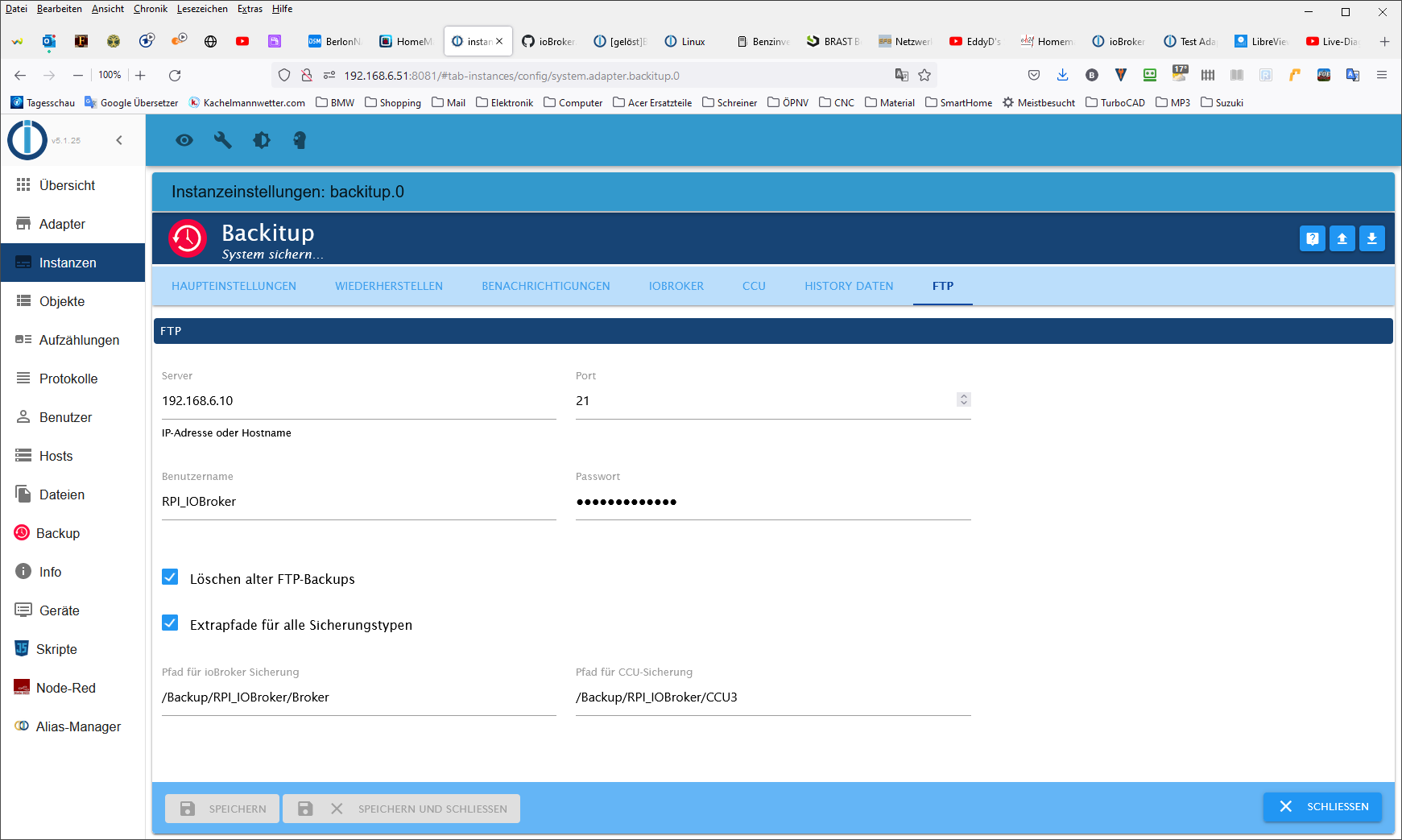
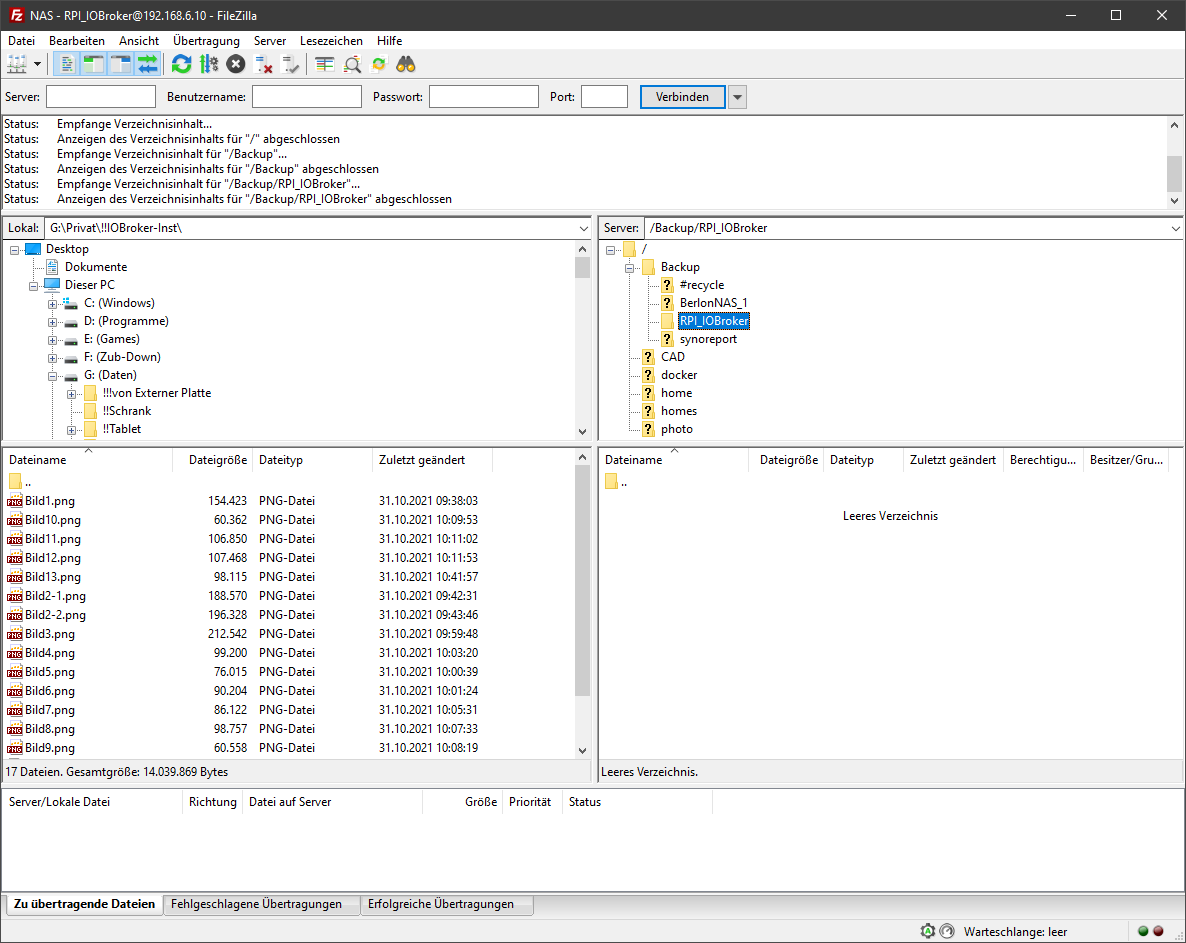
-
Mach das über NFS oder SMB. Nicht über FTP.
@thomas-braun
cifs ist installiertHier mal cifs.
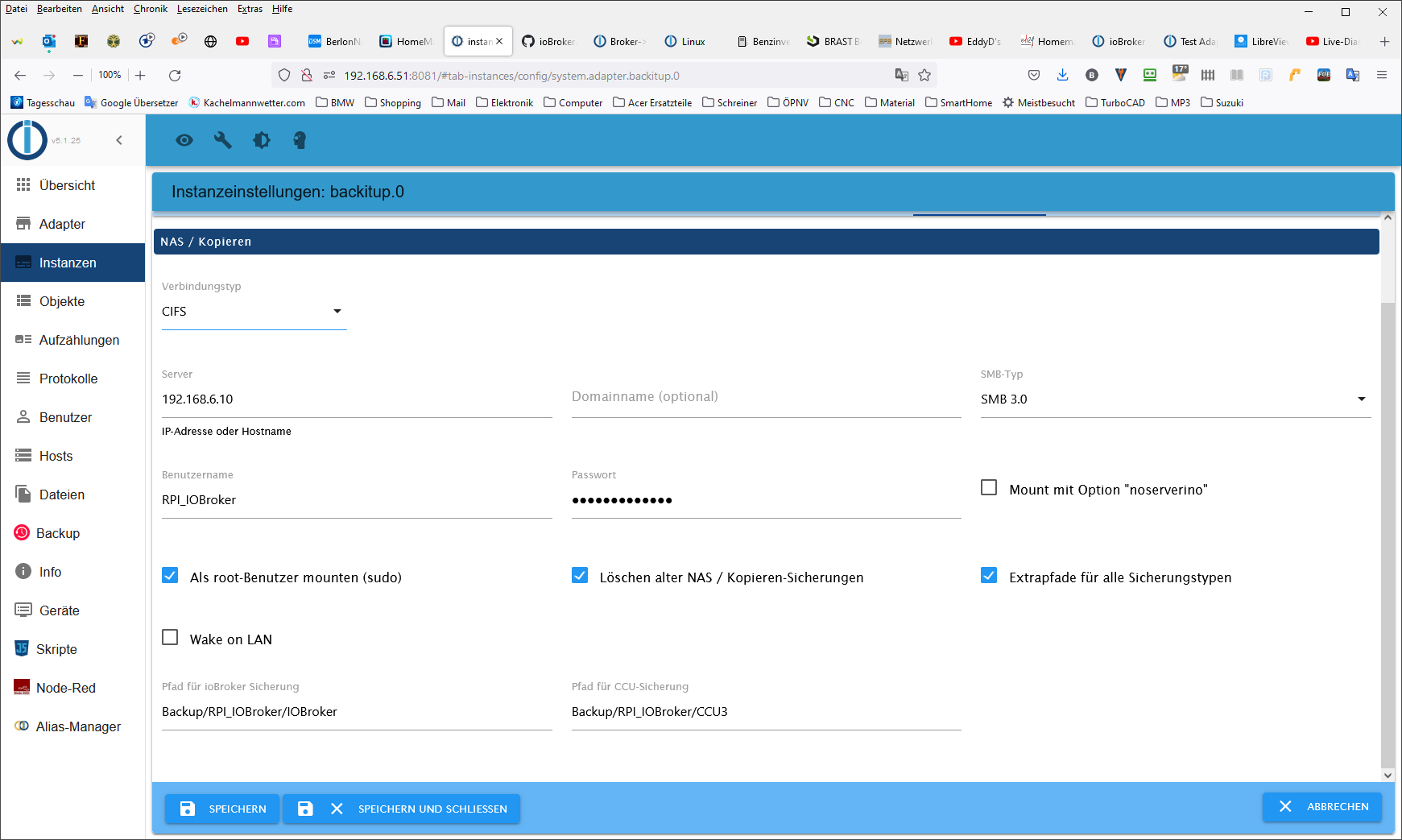
Started iobroker ...
[DEBUG] [mount] start with {"mountType":"CIFS","type":"storage","source":"local","mount":"//192.168.6.10","debugging":true,"fileDir":"/opt/iobroker/node_modules/iobroker.backitup","wakeOnLAN":false,"macAd":"20:DE:20:DE:20:DE","wolTime":"25","smb":"vers=3.0","sudo":true,"cifsDomain":"","clientInodes":false,"deleteOldBackup":true,"ownDir":true,"dir":"Backup/RPI_IOBroker/IOBroker","dirMinimal":"Backup/RPI_IOBroker/IOBroker","user":"RPI_IOBroker","pass":"****"}
[DEBUG] [mount] - noserverino option: false
[DEBUG] [mount] - cifs-mount command: "sudo mount -t cifs -o username=RPI_IOBroker,password=****,rw,file_mode=0777,dir_mode=0777,vers=3.0 //192.168.6.10/Backup/RPI_IOBroker/IOBroker /opt/iobroker/backups"
[DEBUG] [mount] - first mount attempt with smb option failed. try next mount attempt without smb option ...
[DEBUG] [mount] - cifs-mount command: "sudo mount -t cifs -o username=RPI_IOBroker,password=****,rw,file_mode=0777,dir_mode=0777 //192.168.6.10/Backup/RPI_IOBroker/IOBroker /opt/iobroker/backups"
[ERROR] [mount] - [undefined Error: Command failed: sudo mount -t cifs -o username=RPI_IOBroker,password=****,rw,file_mode=0777,dir_mode=0777 //192.168.6.10/Backup/RPI_IOBroker/IOBroker /opt/iobroker/backups
mount error: cifs filesystem not supported by the system
mount error(19): No such device
Refer to the mount.cifs(8) manual page (e.g. man mount.cifs)

[ERROR] [mount] - [IGNORED] Error: Command failed: sudo mount -t cifs -o username=RPI_IOBroker,password=****,rw,file_mode=0777,dir_mode=0777 //192.168.6.10/Backup/RPI_IOBroker/IOBroker /opt/iobroker/backups
mount error: cifs filesystem not supported by the system
mount error(19): No such device
Refer to the mount.cifs(8) manual page (e.g. man mount.cifs)
oder NFS.
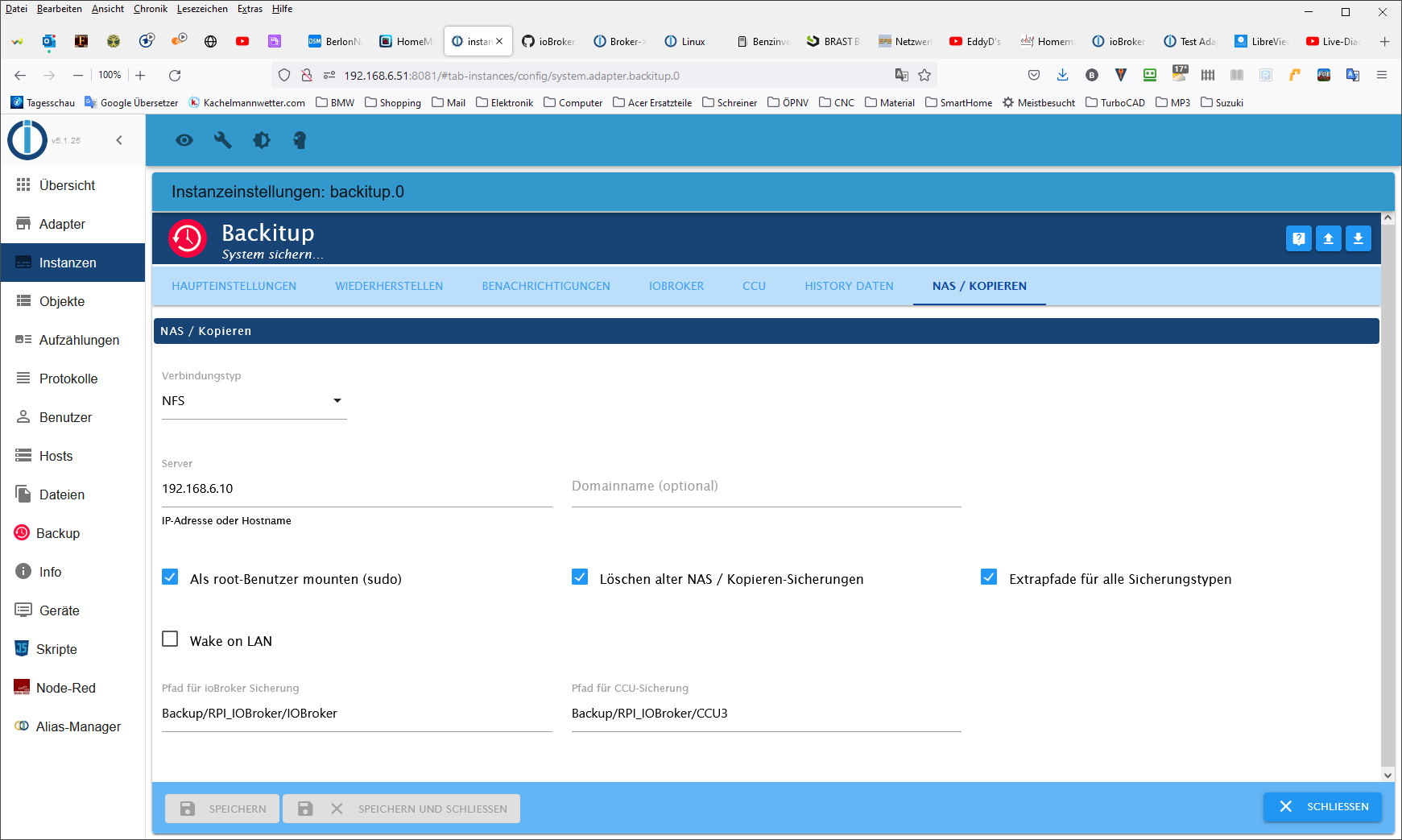
Started iobroker ... [DEBUG] [mount] start with {"mountType":"NFS","type":"storage","source":"local","mount":"192.168.6.10","debugging":true,"fileDir":"/opt/iobroker/node_modules/iobroker.backitup","wakeOnLAN":false,"macAd":"20:DE:20:DE:20:DE","wolTime":"25","smb":"vers=3.0","sudo":true,"cifsDomain":"","clientInodes":false,"deleteOldBackup":true,"ownDir":true,"dir":"Backup/RPI_IOBroker/IOBroker","dirMinimal":"Backup/RPI_IOBroker/IOBroker","user":"RPI_IOBroker","pass":"****"} [DEBUG] [mount] - nfs-mount command: "sudo mount 192.168.6.10:/Backup/RPI_IOBroker/IOBroker /opt/iobroker/backups" [ERROR] [mount] - [undefined mount.nfs: access denied by server while mounting 192.168.6.10:/Backup/RPI_IOBroker/IOBroker [ERROR] [mount] - [IGNORED] Error: Command failed: sudo mount 192.168.6.10:/Backup/RPI_IOBroker/IOBroker /opt/iobroker/backups mount.nfs: access denied by server while mounting 192.168.6.10:/Backup/RPI_IOBroker/IOBroker -
@thomas-braun
cifs ist installiertHier mal cifs.
Started iobroker ...
[DEBUG] [mount] start with {"mountType":"CIFS","type":"storage","source":"local","mount":"//192.168.6.10","debugging":true,"fileDir":"/opt/iobroker/node_modules/iobroker.backitup","wakeOnLAN":false,"macAd":"20:DE:20:DE:20:DE","wolTime":"25","smb":"vers=3.0","sudo":true,"cifsDomain":"","clientInodes":false,"deleteOldBackup":true,"ownDir":true,"dir":"Backup/RPI_IOBroker/IOBroker","dirMinimal":"Backup/RPI_IOBroker/IOBroker","user":"RPI_IOBroker","pass":"****"}
[DEBUG] [mount] - noserverino option: false
[DEBUG] [mount] - cifs-mount command: "sudo mount -t cifs -o username=RPI_IOBroker,password=****,rw,file_mode=0777,dir_mode=0777,vers=3.0 //192.168.6.10/Backup/RPI_IOBroker/IOBroker /opt/iobroker/backups"
[DEBUG] [mount] - first mount attempt with smb option failed. try next mount attempt without smb option ...
[DEBUG] [mount] - cifs-mount command: "sudo mount -t cifs -o username=RPI_IOBroker,password=****,rw,file_mode=0777,dir_mode=0777 //192.168.6.10/Backup/RPI_IOBroker/IOBroker /opt/iobroker/backups"
[ERROR] [mount] - [undefined Error: Command failed: sudo mount -t cifs -o username=RPI_IOBroker,password=****,rw,file_mode=0777,dir_mode=0777 //192.168.6.10/Backup/RPI_IOBroker/IOBroker /opt/iobroker/backups
mount error: cifs filesystem not supported by the system
mount error(19): No such device
Refer to the mount.cifs(8) manual page (e.g. man mount.cifs)

[ERROR] [mount] - [IGNORED] Error: Command failed: sudo mount -t cifs -o username=RPI_IOBroker,password=****,rw,file_mode=0777,dir_mode=0777 //192.168.6.10/Backup/RPI_IOBroker/IOBroker /opt/iobroker/backups
mount error: cifs filesystem not supported by the system
mount error(19): No such device
Refer to the mount.cifs(8) manual page (e.g. man mount.cifs)
oder NFS.
Started iobroker ... [DEBUG] [mount] start with {"mountType":"NFS","type":"storage","source":"local","mount":"192.168.6.10","debugging":true,"fileDir":"/opt/iobroker/node_modules/iobroker.backitup","wakeOnLAN":false,"macAd":"20:DE:20:DE:20:DE","wolTime":"25","smb":"vers=3.0","sudo":true,"cifsDomain":"","clientInodes":false,"deleteOldBackup":true,"ownDir":true,"dir":"Backup/RPI_IOBroker/IOBroker","dirMinimal":"Backup/RPI_IOBroker/IOBroker","user":"RPI_IOBroker","pass":"****"} [DEBUG] [mount] - nfs-mount command: "sudo mount 192.168.6.10:/Backup/RPI_IOBroker/IOBroker /opt/iobroker/backups" [ERROR] [mount] - [undefined mount.nfs: access denied by server while mounting 192.168.6.10:/Backup/RPI_IOBroker/IOBroker [ERROR] [mount] - [IGNORED] Error: Command failed: sudo mount 192.168.6.10:/Backup/RPI_IOBroker/IOBroker /opt/iobroker/backups mount.nfs: access denied by server while mounting 192.168.6.10:/Backup/RPI_IOBroker/IOBroker@berlon sagte in Broker->BackItUp FTP->Synology:
mount error: cifs filesystem not supported by the system
Da fehlen die cifs-utils, würde ich mal sagen.
apt policy cifs-utils -
@berlon sagte in Broker->BackItUp FTP->Synology:
mount error: cifs filesystem not supported by the system
Da fehlen die cifs-utils, würde ich mal sagen.
apt policy cifs-utils@thomas-braun sagte in Broker->BackItUp FTP->Synology:
Da fehlen die cifs-utils, würde ich mal sagen.
er behauptet:
@berlon sagte in Broker->BackItUp FTP->Synology:
cifs ist installiert
-
@thomas-braun sagte in Broker->BackItUp FTP->Synology:
Da fehlen die cifs-utils, würde ich mal sagen.
er behauptet:
@berlon sagte in Broker->BackItUp FTP->Synology:
cifs ist installiert
-
pi@raspberrypi:~ $ apt policy cifs-utils cifs-utils: Installiert: 2:6.8-2 Installationskandidat: 2:6.8-2 Versionstabelle: *** 2:6.8-2 500 500 http://raspbian.raspberrypi.org/raspbian buster/main armhf Packages 100 /var/lib/dpkg/statusdanach auch neu gestartet?
@berlon dann bitte die Freigabe auf der Syno zeigen
-
@berlon das wäre die nächste Frage gewesen ;-)
Nein, ich meine die Freigabe (= gemeinsame Ordner)
-
@berlon das wäre die nächste Frage gewesen ;-)
Nein, ich meine die Freigabe (= gemeinsame Ordner)
-
@berlon enäää
Das sind ja schon wieder die Berechtigungen.
ich meine die Daten zur Freigabe -
@berlon enäää
Das sind ja schon wieder die Berechtigungen.
ich meine die Daten zur Freigabe -
@berlon Fast!
jetzt noch Backup anklicken und Berabeiten anzeigen
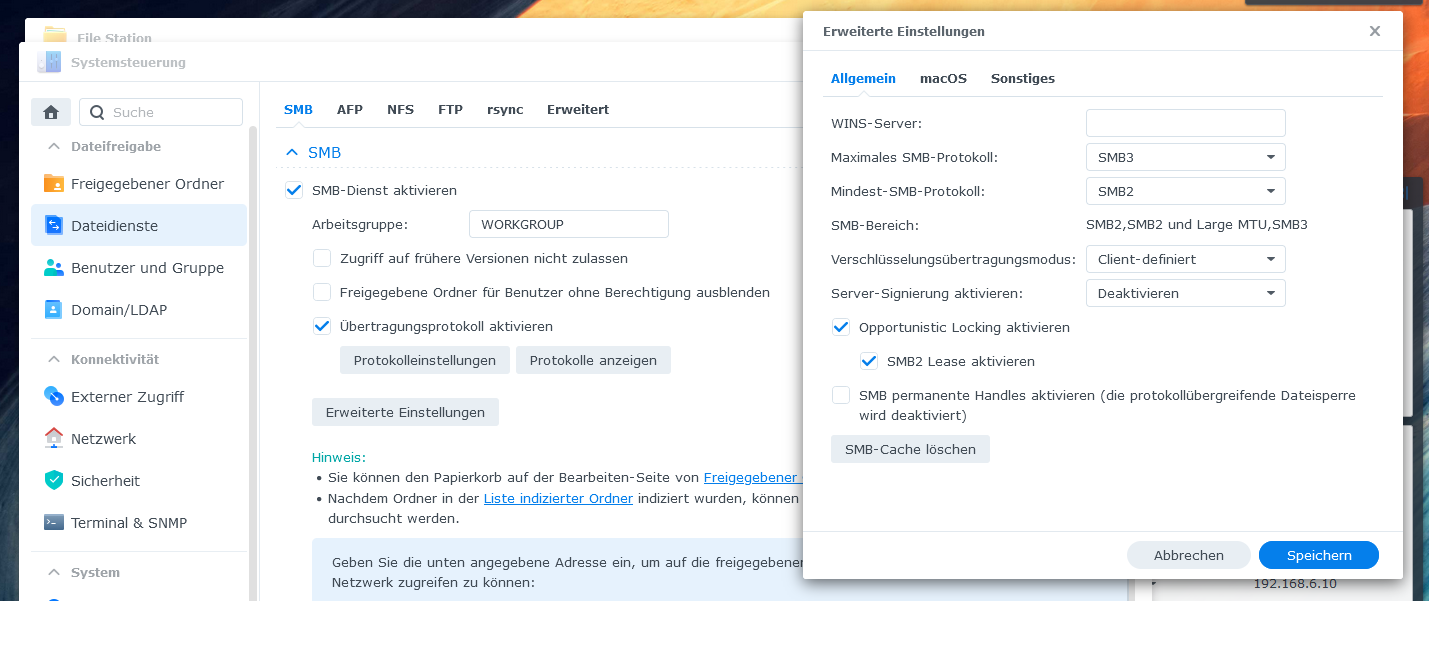
Und wenn du da schon in der Systemsteuerung drin bist, bitte auch überprüfen ob unter Dateidienste auch Samba aktiviert ist
-
@berlon Fast!
jetzt noch Backup anklicken und Berabeiten anzeigen
Und wenn du da schon in der Systemsteuerung drin bist, bitte auch überprüfen ob unter Dateidienste auch Samba aktiviert ist
-
@berlon Gut!
und darin befinden sich die Strukturen, die du im Adapter angegeben hast? -
@homoran
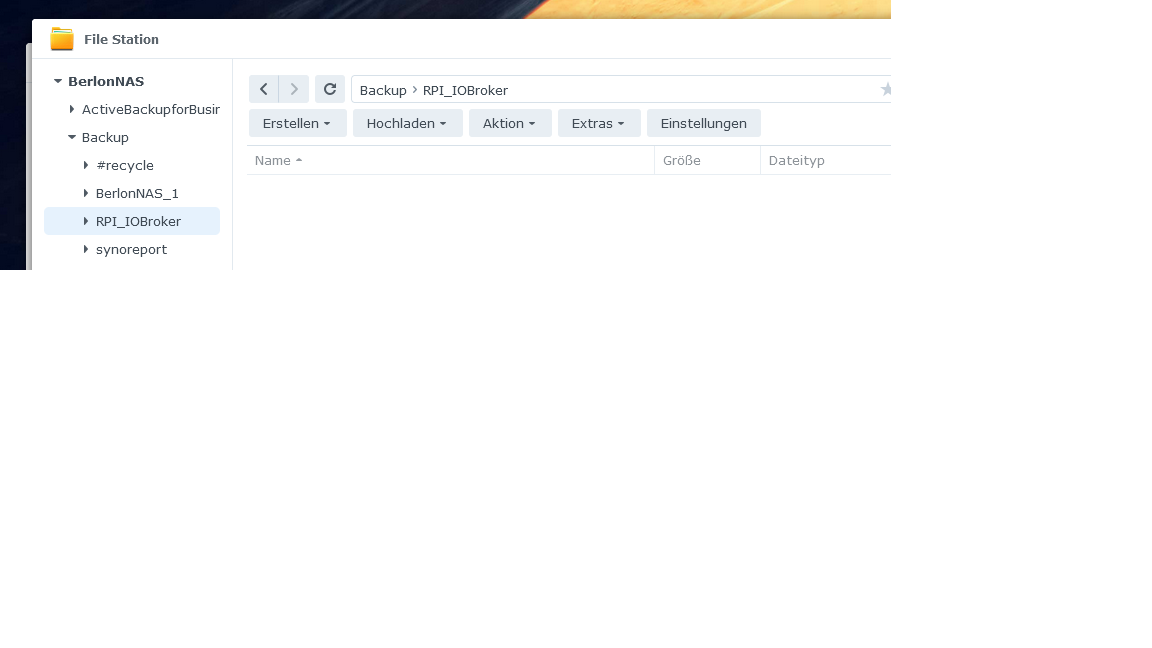
Ich denke mal....Müssen die zusätzlichen Ordner (IOBroker und CCU3) schon vorhanden sein oder legt BackItUp diese an??
@berlon sagte in Broker->BackItUp FTP->Synology:
@homoran
Ich denke mal....ich habe deine Screenshots gelöscht, da waren private Daten zu sehen
Bitte nochmal (sauber zugeschnitten) einstellen -
@berlon sagte in Broker->BackItUp FTP->Synology:
@homoran
Ich denke mal....ich habe deine Screenshots gelöscht, da waren private Daten zu sehen
Bitte nochmal (sauber zugeschnitten) einstellen -
@homoran
nochmal zugeschnitten.
Müssen die zusätzlichen Ordner (IOBroker und CCU3) schon vorhanden sein oder legt BackItUp diese an??
@berlon sagte in Broker->BackItUp FTP->Synology:
Müssen die zusätzlichen Ordner (IOBroker und CCU3) schon vorhanden sein oder legt BackItUp diese an??
deswegen ja meine Frage.
Die müssen angelegt sein.Aber dass der Adapter sagt, dass das System kein CIFS unterstützt, du aber die cifs-utils auf dem Pi installiert hast, könnte das System auch die Syno sein.
Ist hier Samba aktiviert? -
@berlon sagte in Broker->BackItUp FTP->Synology:
Müssen die zusätzlichen Ordner (IOBroker und CCU3) schon vorhanden sein oder legt BackItUp diese an??
deswegen ja meine Frage.
Die müssen angelegt sein.Aber dass der Adapter sagt, dass das System kein CIFS unterstützt, du aber die cifs-utils auf dem Pi installiert hast, könnte das System auch die Syno sein.
Ist hier Samba aktiviert? -
@berlon sieht alles jetzt gut aus.
Bitte nochmal versuchen ein Backup zu starten
-
@homoran
die fehlenden Ordner habe ich erstellt, aber BackItUp beendet seine Arbeit nicht mehr. Der blaue Balken läuft immer weiter.
Post mal das besher erstellte Log. Auf der Syno sind bisher noch keine Dateien aufgetaucht.Started iobroker ... [DEBUG] [mount] start with {"mountType":"CIFS","type":"storage","source":"local","mount":"//192.168.6.10","debugging":true,"fileDir":"/opt/iobroker/node_modules/iobroker.backitup","wakeOnLAN":false,"macAd":"20:DE:20:DE:20:DE","wolTime":"25","smb":"vers=3.0","sudo":true,"cifsDomain":"","clientInodes":false,"deleteOldBackup":true,"ownDir":true,"dir":"Backup/RPI_IOBroker/IOBroker","dirMinimal":"Backup/RPI_IOBroker/IOBroker","user":"RPI_IOBroker","pass":"****"} [DEBUG] [mount] - noserverino option: false [DEBUG] [mount] - cifs-mount command: "sudo mount -t cifs -o username=RPI_IOBroker,password=****,rw,file_mode=0777,dir_mode=0777,vers=3.0 //192.168.6.10/Backup/RPI_IOBroker/IOBroker /opt/iobroker/backups" [DEBUG] [mount] - first mount attempt with smb option failed. try next mount attempt without smb option ... [DEBUG] [mount] - cifs-mount command: "sudo mount -t cifs -o username=RPI_IOBroker,password=****,rw,file_mode=0777,dir_mode=0777 //192.168.6.10/Backup/RPI_IOBroker/IOBroker /opt/iobroker/backups" [ERROR] [mount] - [undefined Error: Command failed: sudo mount -t cifs -o username=RPI_IOBroker,password=****,rw,file_mode=0777,dir_mode=0777 //192.168.6.10/Backup/RPI_IOBroker/IOBroker /opt/iobroker/backups mount error: cifs filesystem not supported by the system mount error(19): No such device Refer to the mount.cifs(8) manual page (e.g. man mount.cifs) [ERROR] [mount] - [IGNORED] Error: Command failed: sudo mount -t cifs -o username=RPI_IOBroker,password=****,rw,file_mode=0777,dir_mode=0777 //192.168.6.10/Backup/RPI_IOBroker/IOBroker /opt/iobroker/backups mount error: cifs filesystem not supported by the system mount error(19): No such device Refer to the mount.cifs(8) manual page (e.g. man mount.cifs) [DEBUG] [iobroker] start with {"type":"creator","time":"02:00","debugging":true,"everyXDays":"1","deleteBackupAfter":0,"cifs":{"enabled":true,"mountType":"CIFS","type":"storage","source":"local","mount":"//192.168.6.10","debugging":true,"fileDir":"/opt/iobroker/node_modules/iobroker.backitup","wakeOnLAN":false,"macAd":"20:DE:20:DE:20:DE","wolTime":"25","smb":"vers=3.0","sudo":true,"cifsDomain":"","clientInodes":false,"deleteOldBackup":true,"ownDir":true,"dir":"/Backup/RPI_IOBroker/IOBroker","dirMinimal":"Backup/RPI_IOBroker/IOBroker","user":"RPI_IOBroker","pass":"****","context":{"fileNames":[],"errors":{"mount":"Error: Command failed: sudo mount -t cifs -o username=RPI_IOBroker,password=****,rw,file_mode=0777,dir_mode=0777 //192.168.6.10/Backup/RPI_IOBroker/IOBroker /opt/iobroker/backups\nmount error: cifs filesystem not supported by the system\nmount error(19): No such device\nRefer to the mount.cifs(8) manual page (e.g. man mount.cifs)\n"},"done":[],"types":[]},"adapter":null},"dir":"/opt/iobroker","historyDB":{"enabled":true,"type":"creator","ftp":{"enabled":false,"type":"storage","source":"local","host":"192.168.6.10","debugging":true,"deleteOldBackup":true,"ownDir":true,"dir":"/Backup/RPI_IOBroker/Broker","dirMinimal":"/Backup/RPI_IOBroker/Broker","user":"RPI_IOBroker","pass":"****","port":"21"},"cifs":{"enabled":true,"mountType":"CIFS","type":"storage","source":"local","mount":"192.168.6.10","debugging":true,"fileDir":"/opt/iobroker/node_modules/iobroker.backitup","wakeOnLAN":false,"macAd":"20:DE:20:DE:20:DE","wolTime":"25","smb":"vers=3.0","sudo":true,"cifsDomain":"","clientInodes":false,"deleteOldBackup":true,"ownDir":true,"dir":"Backup/RPI_IOBroker/IOBroker","dirMinimal":"Backup/RPI_IOBroker/IOBroker","user":"RPI_IOBroker","pass":"****"},"dropbox":{"enabled":false,"type":"storage","source":"local","debugging":true,"deleteOldBackup":false,"accessToken":"****","ownDir":false,"dir":"/backupDir","dirMinimal":"/backupDir/iobroker"},"webdav":{"enabled":false,"type":"storage","source":"local","debugging":true,"deleteOldBackup":false,"username":"username","pass":"****","url":"https://example.com/remote.php/dav/files/username/","ownDir":false,"dir":"/backupDir","dirMinimal":"/backupDir/iobroker"},"googledrive":{"enabled":false,"type":"storage","source":"local","debugging":true,"deleteOldBackup":false,"accessJson":"****","ownDir":false,"dir":"/backupDir","dirMinimal":"/backupDir/iobroker"},"path":""},"historyHTML":{"enabled":true,"type":"message","entriesNumber":"500","systemLang":"de"},"historyJSON":{"enabled":true,"type":"message","entriesNumber":"500","systemLang":"de"},"telegram":{"enabled":true,"notificationsType":"Telegram","type":"message","instance":"","SilentNotice":false,"NoticeType":"longTelegramNotice","User":"none","onlyError":false,"telegramWaiting":0,"hostName":"","systemLang":"de"},"email":{"enabled":true,"notificationsType":"Telegram","type":"message","instance":"","NoticeType":"longEmailNotice","emailReceiver":"xxx@xxx.com","emailSender":"xxx@xxx.com","onlyError":false,"emailWaiting":0,"hostName":"","systemLang":"de"},"pushover":{"enabled":true,"notificationsType":"Telegram","type":"message","instance":"","SilentNotice":false,"NoticeType":"longPushoverNotice","deviceID":"","onlyError":false,"pushoverWaiting":0,"hostName":"","systemLang":"de"},"whatsapp":{"enabled":true,"notificationsType":"Telegram","type":"message","instance":"","NoticeType":"longWhatsappNotice","onlyError":false,"whatsappWaiting":0,"hostName":"","systemLang":"de"},"backupDir":"/opt/iobroker/backups"} [DEBUG] [iobroker] - host.raspberrypi 9522 states saved [DEBUG] [iobroker] - host.raspberrypi 11459 objects saved [DEBUG] [iobroker] - Backup created: /opt/iobroker/backups/iobroker_2021_10_31-18_16_13_backupiobroker.tar.gz [DEBUG] [iobroker] - done [DEBUG] [historyDB] - compress from historyDB started ... [ERROR] [historyDB] - [IGNORED] Backitup cannot found source "undefined" for compress! [DEBUG] [cifs] - done [DEBUG] [cifs] start with {"mountType":"CIFS","type":"storage","source":"local","mount":"//192.168.6.10","debugging":true,"fileDir":"/opt/iobroker/node_modules/iobroker.backitup","wakeOnLAN":false,"macAd":"20:DE:20:DE:20:DE","wolTime":"25","smb":"vers=3.0","sudo":true,"cifsDomain":"","clientInodes":false,"deleteOldBackup":true,"ownDir":true,"dir":"/Backup/RPI_IOBroker/IOBroker","dirMinimal":"Backup/RPI_IOBroker/IOBroker","user":"RPI_IOBroker","pass":"****","backupDir":"/opt/iobroker/backups","deleteBackupAfter":0} [ERROR] [clean] - Backup files not deleted from /opt/iobroker/backups because some errors. [DEBUG] [clean] - done [DEBUG] [telegram] - done [DEBUG] [telegram] start with {"type":"creator","time":"02:00","debugging":true,"everyXDays":"1","deleteBackupAfter":0,"cifs":{"enabled":true,"mountType":"CIFS","type":"storage","source":"local","mount":"//192.168.6.10","debugging":true,"fileDir":"/opt/iobroker/node_modules/iobroker.backitup","wakeOnLAN":false,"macAd":"20:DE:20:DE:20:DE","wolTime":"25","smb":"vers=3.0","sudo":true,"cifsDomain":"","clientInodes":false,"deleteOldBackup":true,"ownDir":true,"dir":"/Backup/RPI_IOBroker/IOBroker","dirMinimal":"Backup/RPI_IOBroker/IOBroker","user":"RPI_IOBroker","pass":"****","context":{"fileNames":["/opt/iobroker/backups/iobroker_2021_10_31-18_16_13_backupiobroker.tar.gz","/opt/iobroker/backups/historyDB_2021_10_31-18_16_24_backupiobroker.tar.gz"],"errors":{"mount":"Error: Command failed: sudo mount -t cifs -o username=RPI_IOBroker,password=****,rw,file_mode=0777,dir_mode=0777 //192.168.6.10/Backup/RPI_IOBroker/IOBroker /opt/iobroker/backups\nmount error: cifs filesystem not supported by the system\nmount error(19): No such device\nRefer to the mount.cifs(8) manual page (e.g. man mount.cifs)\n","historyDB":"Backitup cannot found source \"undefined\" for compress!"},"done":["iobroker"],"types":["iobroker"]},"adapter":null},"dir":"/opt/iobroker","historyDB":{"enabled":true,"type":"creator","ftp":{"enabled":false,"type":"storage","source":"local","host":"192.168.6.10","debugging":true,"deleteOldBackup":true,"ownDir":true,"dir":"/Backup/RPI_IOBroker/Broker","dirMinimal":"/Backup/RPI_IOBroker/Broker","user":"RPI_IOBroker","pass":"****","port":"21"},"cifs":{"enabled":true,"mountType":"CIFS","type":"storage","source":"local","mount":"192.168.6.10","debugging":true,"fileDir":"/opt/iobroker/node_modules/iobroker.backitup","wakeOnLAN":false,"macAd":"20:DE:20:DE:20:DE","wolTime":"25","smb":"vers=3.0","sudo":true,"cifsDomain":"","clientInodes":false,"deleteOldBackup":true,"ownDir":true,"dir":"Backup/RPI_IOBroker/IOBroker","dirMinimal":"Backup/RPI_IOBroker/IOBroker","user":"RPI_IOBroker","pass":"****"},"dropbox":{"enabled":false,"type":"storage","source":"local","debugging":true,"deleteOldBackup":false,"accessToken":"****","ownDir":false,"dir":"/backupDir","dirMinimal":"/backupDir/iobroker"},"webdav":{"enabled":false,"type":"storage","source":"local","debugging":true,"deleteOldBackup":false,"username":"username","pass":"****","url":"https://example.com/remote.php/dav/files/username/","ownDir":false,"dir":"/backupDir","dirMinimal":"/backupDir/iobroker"},"googledrive":{"enabled":false,"type":"storage","source":"local","debugging":true,"deleteOldBackup":false,"accessJson":"****","ownDir":false,"dir":"/backupDir","dirMinimal":"/backupDir/iobroker"},"path":""},"historyHTML":{"enabled":true,"type":"message","entriesNumber":"500","systemLang":"de"},"historyJSON":{"enabled":true,"type":"message","entriesNumber":"500","systemLang":"de"},"telegram":{"enabled":true,"notificationsType":"Telegram","type":"message","instance":"","SilentNotice":false,"NoticeType":"longTelegramNotice","User":"none","onlyError":false,"telegramWaiting":0,"hostName":"","systemLang":"de","time":"31. Oktober 2021 um 18:16 Uhr"},"email":{"enabled":true,"notificationsType":"Telegram","type":"message","instance":"","NoticeType":"longEmailNotice","emailReceiver":"xxx@xxx.com","emailSender":"xxx@xxx.com","onlyError":false,"emailWaiting":0,"hostName":"","systemLang":"de"},"pushover":{"enabled":true,"notificationsType":"Telegram","type":"message","instance":"","SilentNotice":false,"NoticeType":"longPushoverNotice","deviceID":"","onlyError":false,"pushoverWaiting":0,"hostName":"","systemLang":"de"},"whatsapp":{"enabled":true,"notificationsType":"Telegram","type":"message","instance":"","NoticeType":"longWhatsappNotice","onlyError":false,"whatsappWaiting":0,"hostName":"","systemLang":"de"},"backupDir":"/opt/iobroker/backups"} [DEBUG] [historyHTML] - new history html values created [DEBUG] [historyHTML] - done [DEBUG] [historyJSON] - new history json values created [DEBUG] [historyJSON] - done [DEBUG] [historyHTML] start with {"type":"creator","time":"02:00","debugging":true,"everyXDays":"1","deleteBackupAfter":0,"cifs":{"enabled":true,"mountType":"CIFS","type":"storage","source":"local","mount":"//192.168.6.10","debugging":true,"fileDir":"/opt/iobroker/node_modules/iobroker.backitup","wakeOnLAN":false,"macAd":"20:DE:20:DE:20:DE","wolTime":"25","smb":"vers=3.0","sudo":true,"cifsDomain":"","clientInodes":false,"deleteOldBackup":true,"ownDir":true,"dir":"/Backup/RPI_IOBroker/IOBroker","dirMinimal":"Backup/RPI_IOBroker/IOBroker","user":"RPI_IOBroker","pass":"****","context":{"fileNames":["/opt/iobroker/backups/iobroker_2021_10_31-18_16_13_backupiobroker.tar.gz","/opt/iobroker/backups/historyDB_2021_10_31-18_16_24_backupiobroker.tar.gz"],"errors":{"mount":"Error: Command failed: sudo mount -t cifs -o username=RPI_IOBroker,password=****,rw,file_mode=0777,dir_mode=0777 //192.168.6.10/Backup/RPI_IOBroker/IOBroker /opt/iobroker/backups\nmount error: cifs filesystem not supported by the system\nmount error(19): No such device\nRefer to the mount.cifs(8) manual page (e.g. man mount.cifs)\n","historyDB":"Backitup cannot found source \"undefined\" for compress!"},"done":["iobroker"],"types":["iobroker"]},"adapter":null},"dir":"/opt/iobroker","historyDB":{"enabled":true,"type":"creator","ftp":{"enabled":false,"type":"storage","source":"local","host":"192.168.6.10","debugging":true,"deleteOldBackup":true,"ownDir":true,"dir":"/Backup/RPI_IOBroker/Broker","dirMinimal":"/Backup/RPI_IOBroker/Broker","user":"RPI_IOBroker","pass":"****","port":"21"},"cifs":{"enabled":true,"mountType":"CIFS","type":"storage","source":"local","mount":"192.168.6.10","debugging":true,"fileDir":"/opt/iobroker/node_modules/iobroker.backitup","wakeOnLAN":false,"macAd":"20:DE:20:DE:20:DE","wolTime":"25","smb":"vers=3.0","sudo":true,"cifsDomain":"","clientInodes":false,"deleteOldBackup":true,"ownDir":true,"dir":"Backup/RPI_IOBroker/IOBroker","dirMinimal":"Backup/RPI_IOBroker/IOBroker","user":"RPI_IOBroker","pass":"****"},"dropbox":{"enabled":false,"type":"storage","source":"local","debugging":true,"deleteOldBackup":false,"accessToken":"****","ownDir":false,"dir":"/backupDir","dirMinimal":"/backupDir/iobroker"},"webdav":{"enabled":false,"type":"storage","source":"local","debugging":true,"deleteOldBackup":false,"username":"username","pass":"****","url":"https://example.com/remote.php/dav/files/username/","ownDir":false,"dir":"/backupDir","dirMinimal":"/backupDir/iobroker"},"googledrive":{"enabled":false,"type":"storage","source":"local","debugging":true,"deleteOldBackup":false,"accessJson":"****","ownDir":false,"dir":"/backupDir","dirMinimal":"/backupDir/iobroker"},"path":""},"historyHTML":{"enabled":true,"type":"message","entriesNumber":"500","systemLang":"de","time":"31. Oktober 2021 um 18:16 Uhr"},"historyJSON":{"enabled":true,"type":"message","entriesNumber":"500","systemLang":"de"},"telegram":{"enabled":true,"notificationsType":"Telegram","type":"message","instance":"","SilentNotice":false,"NoticeType":"longTelegramNotice","User":"none","onlyError":false,"telegramWaiting":0,"hostName":"","systemLang":"de"},"email":{"enabled":true,"notificationsType":"Telegram","type":"message","instance":"","NoticeType":"longEmailNotice","emailReceiver":"xxx@xxx.com","emailSender":"xxx@xxx.com","onlyError":false,"emailWaiting":0,"hostName":"","systemLang":"de"},"pushover":{"enabled":true,"notificationsType":"Telegram","type":"message","instance":"","SilentNotice":false,"NoticeType":"longPushoverNotice","deviceID":"","onlyError":false,"pushoverWaiting":0,"hostName":"","systemLang":"de"},"whatsapp":{"enabled":true,"notificationsType":"Telegram","type":"message","instance":"","NoticeType":"longWhatsappNotice","onlyError":false,"whatsappWaiting":0,"hostName":"","systemLang":"de"},"backupDir":"/opt/iobroker/backups"} [DEBUG] [historyJSON] start with {"type":"creator","time":"02:00","debugging":true,"everyXDays":"1","deleteBackupAfter":0,"cifs":{"enabled":true,"mountType":"CIFS","type":"storage","source":"local","mount":"//192.168.6.10","debugging":true,"fileDir":"/opt/iobroker/node_modules/iobroker.backitup","wakeOnLAN":false,"macAd":"20:DE:20:DE:20:DE","wolTime":"25","smb":"vers=3.0","sudo":true,"cifsDomain":"","clientInodes":false,"deleteOldBackup":true,"ownDir":true,"dir":"/Backup/RPI_IOBroker/IOBroker","dirMinimal":"Backup/RPI_IOBroker/IOBroker","user":"RPI_IOBroker","pass":"****","context":{"fileNames":["/opt/iobroker/backups/iobroker_2021_10_31-18_16_13_backupiobroker.tar.gz","/opt/iobroker/backups/historyDB_2021_10_31-18_16_24_backupiobroker.tar.gz"],"errors":{"mount":"Error: Command failed: sudo mount -t cifs -o username=RPI_IOBroker,password=****,rw,file_mode=0777,dir_mode=0777 //192.168.6.10/Backup/RPI_IOBroker/IOBroker /opt/iobroker/backups\nmount error: cifs filesystem not supported by the system\nmount error(19): No such device\nRefer to the mount.cifs(8) manual page (e.g. man mount.cifs)\n","historyDB":"Backitup cannot found source \"undefined\" for compress!"},"done":["iobroker"],"types":["iobroker"]},"adapter":null},"dir":"/opt/iobroker","historyDB":{"enabled":true,"type":"creator","ftp":{"enabled":false,"type":"storage","source":"local","host":"192.168.6.10","debugging":true,"deleteOldBackup":true,"ownDir":true,"dir":"/Backup/RPI_IOBroker/Broker","dirMinimal":"/Backup/RPI_IOBroker/Broker","user":"RPI_IOBroker","pass":"****","port":"21"},"cifs":{"enabled":true,"mountType":"CIFS","type":"storage","source":"local","mount":"192.168.6.10","debugging":true,"fileDir":"/opt/iobroker/node_modules/iobroker.backitup","wakeOnLAN":false,"macAd":"20:DE:20:DE:20:DE","wolTime":"25","smb":"vers=3.0","sudo":true,"cifsDomain":"","clientInodes":false,"deleteOldBackup":true,"ownDir":true,"dir":"Backup/RPI_IOBroker/IOBroker","dirMinimal":"Backup/RPI_IOBroker/IOBroker","user":"RPI_IOBroker","pass":"****"},"dropbox":{"enabled":false,"type":"storage","source":"local","debugging":true,"deleteOldBackup":false,"accessToken":"****","ownDir":false,"dir":"/backupDir","dirMinimal":"/backupDir/iobroker"},"webdav":{"enabled":false,"type":"storage","source":"local","debugging":true,"deleteOldBackup":false,"username":"username","pass":"****","url":"https://example.com/remote.php/dav/files/username/","ownDir":false,"dir":"/backupDir","dirMinimal":"/backupDir/iobroker"},"googledrive":{"enabled":false,"type":"storage","source":"local","debugging":true,"deleteOldBackup":false,"accessJson":"****","ownDir":false,"dir":"/backupDir","dirMinimal":"/backupDir/iobroker"},"path":""},"historyHTML":{"enabled":true,"type":"message","entriesNumber":"500","systemLang":"de"},"historyJSON":{"enabled":true,"type":"message","entriesNumber":"500","systemLang":"de","time":"31. Oktober 2021 um 18:16 Uhr"},"telegram":{"enabled":true,"notificationsType":"Telegram","type":"message","instance":"","SilentNotice":false,"NoticeType":"longTelegramNotice","User":"none","onlyError":false,"telegramWaiting":0,"hostName":"","systemLang":"de"},"email":{"enabled":true,"notificationsType":"Telegram","type":"message","instance":"","NoticeType":"longEmailNotice","emailReceiver":"xxx@xxx.com","emailSender":"xxx@xxx.com","onlyError":false,"emailWaiting":0,"hostName":"","systemLang":"de"},"pushover":{"enabled":true,"notificationsType":"Telegram","type":"message","instance":"","SilentNotice":false,"NoticeType":"longPushoverNotice","deviceID":"","onlyError":false,"pushoverWaiting":0,"hostName":"","systemLang":"de"},"whatsapp":{"enabled":true,"notificationsType":"Telegram","type":"message","instance":"","NoticeType":"longWhatsappNotice","onlyError":false,"whatsappWaiting":0,"hostName":"","systemLang":"de"},"backupDir":"/opt/iobroker/backups"} [DEBUG] [umount] start with {"mountType":"CIFS","type":"storage","source":"local","mount":"//192.168.6.10","debugging":true,"fileDir":"/opt/iobroker/node_modules/iobroker.backitup","wakeOnLAN":false,"macAd":"20:DE:20:DE:20:DE","wolTime":"25","smb":"vers=3.0","sudo":true,"cifsDomain":"","clientInodes":false,"deleteOldBackup":true,"ownDir":true,"dir":"/Backup/RPI_IOBroker/IOBroker","dirMinimal":"Backup/RPI_IOBroker/IOBroker","user":"RPI_IOBroker","pass":"****","backupDir":"/opt/iobroker/backups"}

Hey! Du scheinst an dieser Unterhaltung interessiert zu sein, hast aber noch kein Konto.
Hast du es satt, bei jedem Besuch durch die gleichen Beiträge zu scrollen? Wenn du dich für ein Konto anmeldest, kommst du immer genau dorthin zurück, wo du zuvor warst, und kannst dich über neue Antworten benachrichtigen lassen (entweder per E-Mail oder Push-Benachrichtigung). Du kannst auch Lesezeichen speichern und Beiträge positiv bewerten, um anderen Community-Mitgliedern deine Wertschätzung zu zeigen.
Mit deinem Input könnte dieser Beitrag noch besser werden 💗
Registrieren Anmelden455
Online33.0k
Benutzer83.6k
Themen1.3m
Beiträge