Skip to content
  • Home
  • Aktuell
  • Tags
  • 0 Ungelesen 0
  • Kategorien
  • Unreplied
  • Beliebt
  • GitHub
  • Docu
  • Hilfe
Skins
  • Light
  • Brite
  • Cerulean
  • Cosmo
  • Flatly
  • Journal
  • Litera
  • Lumen
  • Lux
  • Materia
  • Minty
  • Morph
  • Pulse
  • Sandstone
  • Simplex
  • Sketchy
  • Spacelab
  • United
  • Yeti
  • Zephyr
  • Dark
  • Cyborg
  • Darkly
  • Quartz
  • Slate
  • Solar
  • Superhero
  • Vapor

  • Standard: (Kein Skin)
  • Kein Skin
Einklappen
ioBroker Logo

Community Forum

donate donate
  1. ioBroker Community Home
  2. Deutsch
  3. Error/Bug
  4. Zigbee Backup Fehlermeldung
NEWS

  • Monatsrückblick Januar/Februar 2026 ist online!
    BluefoxB
    Bluefox
    17
    1
    534

  • Jahresrückblick 2025 – unser neuer Blogbeitrag ist online! ✨
    BluefoxB
    Bluefox
    17
    1
    5.4k

  • Neuer Blogbeitrag: Monatsrückblick - Dezember 2025 🎄
    BluefoxB
    Bluefox
    13
    1
    1.4k

Zigbee Backup Fehlermeldung

Geplant Angeheftet Gesperrt Verschoben Error/Bug
26 Beiträge 2 Kommentatoren 1.8k Aufrufe 1 Watching
  • Älteste zuerst
  • Neuste zuerst
  • Meiste Stimmen
Antworten
  • In einem neuen Thema antworten
Anmelden zum Antworten
Dieses Thema wurde gelöscht. Nur Nutzer mit entsprechenden Rechten können es sehen.
  • frankthegreatF frankthegreat

    @thomas-braun Hab mal umgestellt auf SMB 3.0.
    Leider noch der gleiche Fehler.

    Thomas BraunT Online
    Thomas BraunT Online
    Thomas Braun
    Most Active
    schrieb am zuletzt editiert von
    #6

    @frankthegreat

    Ist das direkt über das fritz.nas? Das muss mit der Option 'noserverino' gemounted werden.

    Linux-Werkzeugkasten:
    https://forum.iobroker.net/topic/42952/der-kleine-iobroker-linux-werkzeugkasten
    NodeJS Fixer Skript:
    https://forum.iobroker.net/topic/68035/iob-node-fix-skript
    iob_diag: curl -sLf -o diag.sh https://iobroker.net/diag.sh && bash diag.sh

    frankthegreatF 1 Antwort Letzte Antwort
    0
    • Thomas BraunT Thomas Braun

      @frankthegreat

      Ist das direkt über das fritz.nas? Das muss mit der Option 'noserverino' gemounted werden.

      frankthegreatF Offline
      frankthegreatF Offline
      frankthegreat
      schrieb am zuletzt editiert von
      #7

      @thomas-braun OK, noserverino eingeschaltet, leider keine Besserung.

      	2021-10-18 12:19:43.011	debug	sendTo "restore" to system.adapter.admin.0 from system.adapter.backitup.0
      backitup.0
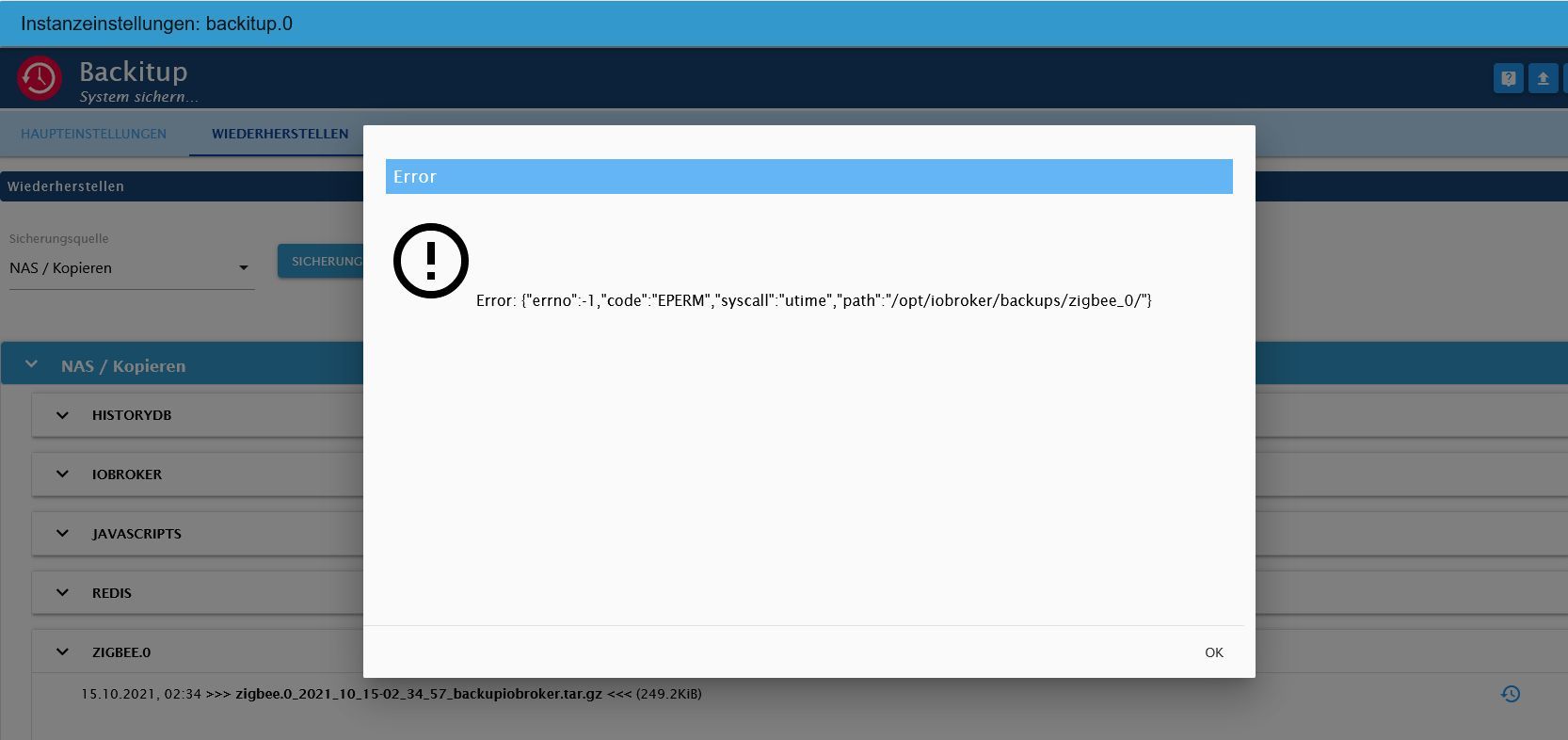
      	2021-10-18 12:19:43.010	error	[zigbee] Error: EPERM: operation not permitted, utime '/opt/iobroker/backups/zigbee_0/'
      backitup.0
      	2021-10-18 12:19:43.009	error	[zigbee] Zigbee Restore not completed
      backitup.0
      	2021-10-18 12:19:39.843	debug	[zigbee] zigbee tmp directory created: /opt/iobroker/backups/zigbee_0
      backitup.0
      	2021-10-18 12:19:39.834	debug	[zigbee] Filename for Restore: /opt/iobroker/backups/zigbee.0_2021_10_15-02_34_57_backupiobroker.tar.gz
      backitup.0
      	2021-10-18 12:19:39.833	debug	[zigbee] Start Zigbee Restore ...
      backitup.0
      	2021-10-18 12:19:31.575	debug	sendTo "list" to system.adapter.admin.0 from system.adapter.backitup.0
      backitup.0
      	2021-10-18 12:19:29.527	debug	mount successfully completed
      backitup.0
      	2021-10-18 12:19:29.386	debug	Backup list be read ...
      backitup.0
      	2021-10-18 12:19:29.359	debug	cifs-mount command: "sudo mount -t cifs -o username=Backup_Anna,password=****,noserverino,rw,file_mode=0777,dir_mode=0777,vers=3.0 //192.168.181.1/fritz.nas/My_Passport/Backup_Anna /opt/iobroker/backups"
      backitup.0
      	2021-10-18 12:19:29.358	debug	noserverino option: true
      backitup.0
      	2021-10-18 12:19:14.459	debug	umount successfully completed
      backitup.0
      	2021-10-18 12:19:12.365	debug	mount activ... umount in 2 Seconds!!
      backitup.0
      	2021-10-18 12:19:04.645	debug	detect last backup file: iobroker_2021_10_18-12_17_34_backupiobroker.tar.gz
      backitup.0
      	2021-10-18 12:19:04.642	debug	detect backup file 8 from cifs: iobroker_2021_10_18-12_17_34_backupiobroker.tar.gz
      backitup.0
      	2021-10-18 12:19:04.641	debug	detect backup file 7 from cifs: iobroker_2021_10_18-11_50_37_backupiobroker.tar.gz
      backitup.0
      	2021-10-18 12:19:04.640	debug	detect backup file 6 from cifs: iobroker_2021_10_18-11_42_57_backupiobroker.tar.gz
      backitup.0
      	2021-10-18 12:19:04.639	debug	detect backup file 5 from cifs: iobroker_2021_10_17-20_02_08_backupiobroker.tar.gz
      backitup.0
      	2021-10-18 12:19:04.638	debug	detect backup file 4 from cifs: iobroker_2021_10_17-19_59_25_backupiobroker.tar.gz
      backitup.0
      	2021-10-18 12:19:04.637	debug	detect backup file 3 from cifs: iobroker_2021_10_17-17_56_34_backupiobroker.tar.gz
      backitup.0
      	2021-10-18 12:19:04.636	debug	detect backup file 2 from cifs: iobroker_2021_10_17-17_54_23_backupiobroker.tar.gz
      backitup.0
      	2021-10-18 12:19:04.634	debug	detect backup file 1 from cifs: iobroker_2021_10_15-02_03_27_backupiobroker.tar.gz
      backitup.0
      	2021-10-18 12:19:02.581	debug	mount successfully completed
      backitup.0
      	2021-10-18 12:19:02.446	debug	cifs-mount command: "sudo mount -t cifs -o username=Backup_Anna,password=****,noserverino,rw,file_mode=0777,dir_mode=0777,vers=3.0 //192.168.181.1/fritz.nas/My_Passport/Backup_Anna /opt/iobroker/backups"
      backitup.0
      	2021-10-18 12:19:02.445	debug	noserverino option: true
      backitup.0
      	2021-10-18 12:19:02.352	info	[iobroker] backup was activated at 02:00 every 7 day(s)
      backitup.0
      	2021-10-18 12:19:02.265	info	starting. Version 2.1.17 in /opt/iobroker/node_modules/iobroker.backitup, node: v14.18.1, js-controller: 3.3.18
      backitup.0
      	2021-10-18 12:19:01.584	debug	Plugin sentry Initialize Plugin (enabled=true)
      
      Thomas BraunT 1 Antwort Letzte Antwort
      0
      • frankthegreatF frankthegreat

        @thomas-braun OK, noserverino eingeschaltet, leider keine Besserung.

        	2021-10-18 12:19:43.011	debug	sendTo "restore" to system.adapter.admin.0 from system.adapter.backitup.0
        backitup.0
        	2021-10-18 12:19:43.010	error	[zigbee] Error: EPERM: operation not permitted, utime '/opt/iobroker/backups/zigbee_0/'
        backitup.0
        	2021-10-18 12:19:43.009	error	[zigbee] Zigbee Restore not completed
        backitup.0
        	2021-10-18 12:19:39.843	debug	[zigbee] zigbee tmp directory created: /opt/iobroker/backups/zigbee_0
        backitup.0
        	2021-10-18 12:19:39.834	debug	[zigbee] Filename for Restore: /opt/iobroker/backups/zigbee.0_2021_10_15-02_34_57_backupiobroker.tar.gz
        backitup.0
        	2021-10-18 12:19:39.833	debug	[zigbee] Start Zigbee Restore ...
        backitup.0
        	2021-10-18 12:19:31.575	debug	sendTo "list" to system.adapter.admin.0 from system.adapter.backitup.0
        backitup.0
        	2021-10-18 12:19:29.527	debug	mount successfully completed
        backitup.0
        	2021-10-18 12:19:29.386	debug	Backup list be read ...
        backitup.0
        	2021-10-18 12:19:29.359	debug	cifs-mount command: "sudo mount -t cifs -o username=Backup_Anna,password=****,noserverino,rw,file_mode=0777,dir_mode=0777,vers=3.0 //192.168.181.1/fritz.nas/My_Passport/Backup_Anna /opt/iobroker/backups"
        backitup.0
        	2021-10-18 12:19:29.358	debug	noserverino option: true
        backitup.0
        	2021-10-18 12:19:14.459	debug	umount successfully completed
        backitup.0
        	2021-10-18 12:19:12.365	debug	mount activ... umount in 2 Seconds!!
        backitup.0
        	2021-10-18 12:19:04.645	debug	detect last backup file: iobroker_2021_10_18-12_17_34_backupiobroker.tar.gz
        backitup.0
        	2021-10-18 12:19:04.642	debug	detect backup file 8 from cifs: iobroker_2021_10_18-12_17_34_backupiobroker.tar.gz
        backitup.0
        	2021-10-18 12:19:04.641	debug	detect backup file 7 from cifs: iobroker_2021_10_18-11_50_37_backupiobroker.tar.gz
        backitup.0
        	2021-10-18 12:19:04.640	debug	detect backup file 6 from cifs: iobroker_2021_10_18-11_42_57_backupiobroker.tar.gz
        backitup.0
        	2021-10-18 12:19:04.639	debug	detect backup file 5 from cifs: iobroker_2021_10_17-20_02_08_backupiobroker.tar.gz
        backitup.0
        	2021-10-18 12:19:04.638	debug	detect backup file 4 from cifs: iobroker_2021_10_17-19_59_25_backupiobroker.tar.gz
        backitup.0
        	2021-10-18 12:19:04.637	debug	detect backup file 3 from cifs: iobroker_2021_10_17-17_56_34_backupiobroker.tar.gz
        backitup.0
        	2021-10-18 12:19:04.636	debug	detect backup file 2 from cifs: iobroker_2021_10_17-17_54_23_backupiobroker.tar.gz
        backitup.0
        	2021-10-18 12:19:04.634	debug	detect backup file 1 from cifs: iobroker_2021_10_15-02_03_27_backupiobroker.tar.gz
        backitup.0
        	2021-10-18 12:19:02.581	debug	mount successfully completed
        backitup.0
        	2021-10-18 12:19:02.446	debug	cifs-mount command: "sudo mount -t cifs -o username=Backup_Anna,password=****,noserverino,rw,file_mode=0777,dir_mode=0777,vers=3.0 //192.168.181.1/fritz.nas/My_Passport/Backup_Anna /opt/iobroker/backups"
        backitup.0
        	2021-10-18 12:19:02.445	debug	noserverino option: true
        backitup.0
        	2021-10-18 12:19:02.352	info	[iobroker] backup was activated at 02:00 every 7 day(s)
        backitup.0
        	2021-10-18 12:19:02.265	info	starting. Version 2.1.17 in /opt/iobroker/node_modules/iobroker.backitup, node: v14.18.1, js-controller: 3.3.18
        backitup.0
        	2021-10-18 12:19:01.584	debug	Plugin sentry Initialize Plugin (enabled=true)
        
        Thomas BraunT Online
        Thomas BraunT Online
        Thomas Braun
        Most Active
        schrieb am zuletzt editiert von
        #8

        @frankthegreat

        Wem gehört denn der ganze Kram in /opt/iobroker/backups wenn das gemountet ist?

        Linux-Werkzeugkasten:
        https://forum.iobroker.net/topic/42952/der-kleine-iobroker-linux-werkzeugkasten
        NodeJS Fixer Skript:
        https://forum.iobroker.net/topic/68035/iob-node-fix-skript
        iob_diag: curl -sLf -o diag.sh https://iobroker.net/diag.sh && bash diag.sh

        frankthegreatF 1 Antwort Letzte Antwort
        0
        • Thomas BraunT Thomas Braun

          @frankthegreat

          Wem gehört denn der ganze Kram in /opt/iobroker/backups wenn das gemountet ist?

          frankthegreatF Offline
          frankthegreatF Offline
          frankthegreat
          schrieb am zuletzt editiert von
          #9

          @thomas-braun Jetzt bin ich überfordert...welcher Kram???
          Ich hab testweise auch mal lokal Backups gemacht.

          Kann das Zigbee aber auch von dort nicht herstellen. Kommt der gleiche Fehler.

          Thomas BraunT 1 Antwort Letzte Antwort
          0
          • frankthegreatF frankthegreat

            @thomas-braun Jetzt bin ich überfordert...welcher Kram???
            Ich hab testweise auch mal lokal Backups gemacht.

            Kann das Zigbee aber auch von dort nicht herstellen. Kommt der gleiche Fehler.

            Thomas BraunT Online
            Thomas BraunT Online
            Thomas Braun
            Most Active
            schrieb am zuletzt editiert von Thomas Braun
            #10

            @frankthegreat

            Wenn es gemountet ist:

            ls -la /opt/iobroker/backups/zigbee_0/
            

            Und wenn die Freigabe nicht gemountet ist:

            ls -la /opt/iobroker/backups/
            

            Das Verzeichnis müsste dann leer sein.

            Linux-Werkzeugkasten:
            https://forum.iobroker.net/topic/42952/der-kleine-iobroker-linux-werkzeugkasten
            NodeJS Fixer Skript:
            https://forum.iobroker.net/topic/68035/iob-node-fix-skript
            iob_diag: curl -sLf -o diag.sh https://iobroker.net/diag.sh && bash diag.sh

            frankthegreatF 1 Antwort Letzte Antwort
            0
            • Thomas BraunT Thomas Braun

              @frankthegreat

              Wenn es gemountet ist:

              ls -la /opt/iobroker/backups/zigbee_0/
              

              Und wenn die Freigabe nicht gemountet ist:

              ls -la /opt/iobroker/backups/
              

              Das Verzeichnis müsste dann leer sein.

              frankthegreatF Offline
              frankthegreatF Offline
              frankthegreat
              schrieb am zuletzt editiert von
              #11

              @thomas-braun Da kommt folgendes raus:

              pi@raspberrypi:~ $ ls -la /opt/iobroker/backups/zigbee_0/
              insgesamt 0
              drwxrwxrwx 2 root root 0 Okt 17 19:10 .
              drwxrwxrwx 2 root root 0 Okt 18 12:17 ..
              pi@raspberrypi:~ $ ls -la /opt/iobroker/backups/
              insgesamt 24149
              drwxrwxrwx  2 root     root           0 Okt 18 12:17 .
              drwxrwxr-x+ 7 iobroker iobroker    4096 Okt 17 19:43 ..
              -rwxrwxrwx  1 root     root     2168397 Okt 17 17:59 historyDB_2021_10_15-02_31_17_backupiobroker.tar.gz
              -rwxrwxrwx  1 root     root          86 Okt 17 17:56 historyDB_2021_10_17-17_56_41_backupiobroker.tar.gz
              -rwxrwxrwx  1 root     root     2168594 Okt 17 20:02 historyDB_2021_10_17-20_02_16_backupiobroker.tar.gz
              -rwxrwxrwx  1 root     root     2168594 Okt 18 11:43 historyDB_2021_10_18-11_43_05_backupiobroker.tar.gz
              -rwxrwxrwx  1 root     root     2168594 Okt 18 11:50 historyDB_2021_10_18-11_50_45_backupiobroker.tar.gz
              -rwxrwxrwx  1 root     root     2168594 Okt 18 12:17 historyDB_2021_10_18-12_17_45_backupiobroker.tar.gz
              -rwxrwxrwx  1 root     root     4461478 Okt 17 17:59 iobroker_2021_10_15-02_03_27_backupiobroker.tar.gz
              -rwxrwxrwx  1 root     root     3591634 Okt 17 17:54 iobroker_2021_10_17-17_54_23_backupiobroker.tar.gz
              -rwxrwxrwx  1 root     root     3591770 Okt 17 17:56 iobroker_2021_10_17-17_56_34_backupiobroker.tar.gz
              -rwxrwxrwx  1 root     root     4229270 Okt 17 19:59 iobroker_2021_10_17-19_59_25_backupiobroker.tar.gz
              -rwxrwxrwx  1 root     root     4229271 Okt 17 20:02 iobroker_2021_10_17-20_02_08_backupiobroker.tar.gz
              -rwxrwxrwx  1 root     root     4229251 Okt 18 11:43 iobroker_2021_10_18-11_42_57_backupiobroker.tar.gz
              -rwxrwxrwx  1 root     root     4229219 Okt 18 11:50 iobroker_2021_10_18-11_50_37_backupiobroker.tar.gz
              -rwxrwxrwx  1 root     root     4229277 Okt 18 12:17 iobroker_2021_10_18-12_17_34_backupiobroker.tar.gz
              -rwxrwxrwx  1 root     root        9122 Okt 17 17:56 javascripts_2021_10_17-17_56_42_backupiobroker.tar.gz
              -rwxrwxrwx  1 root     root         210 Okt 17 17:59 redis_2021_10_15-02_31_17_backupiobroker.tar.gz
              drwxrwxrwx  2 root     root           0 Okt 17 19:59 redistmp
              drwxrwxrwx  2 root     root           0 Okt 17 19:10 zigbee_0
              -rwxrwxrwx  1 root     root      255152 Okt 17 17:59 zigbee.0_2021_10_15-02_34_57_backupiobroker.tar.gz
              pi@raspberrypi:~ $
              
              
              Thomas BraunT 1 Antwort Letzte Antwort
              0
              • frankthegreatF frankthegreat

                @thomas-braun Da kommt folgendes raus:

                pi@raspberrypi:~ $ ls -la /opt/iobroker/backups/zigbee_0/
                insgesamt 0
                drwxrwxrwx 2 root root 0 Okt 17 19:10 .
                drwxrwxrwx 2 root root 0 Okt 18 12:17 ..
                pi@raspberrypi:~ $ ls -la /opt/iobroker/backups/
                insgesamt 24149
                drwxrwxrwx  2 root     root           0 Okt 18 12:17 .
                drwxrwxr-x+ 7 iobroker iobroker    4096 Okt 17 19:43 ..
                -rwxrwxrwx  1 root     root     2168397 Okt 17 17:59 historyDB_2021_10_15-02_31_17_backupiobroker.tar.gz
                -rwxrwxrwx  1 root     root          86 Okt 17 17:56 historyDB_2021_10_17-17_56_41_backupiobroker.tar.gz
                -rwxrwxrwx  1 root     root     2168594 Okt 17 20:02 historyDB_2021_10_17-20_02_16_backupiobroker.tar.gz
                -rwxrwxrwx  1 root     root     2168594 Okt 18 11:43 historyDB_2021_10_18-11_43_05_backupiobroker.tar.gz
                -rwxrwxrwx  1 root     root     2168594 Okt 18 11:50 historyDB_2021_10_18-11_50_45_backupiobroker.tar.gz
                -rwxrwxrwx  1 root     root     2168594 Okt 18 12:17 historyDB_2021_10_18-12_17_45_backupiobroker.tar.gz
                -rwxrwxrwx  1 root     root     4461478 Okt 17 17:59 iobroker_2021_10_15-02_03_27_backupiobroker.tar.gz
                -rwxrwxrwx  1 root     root     3591634 Okt 17 17:54 iobroker_2021_10_17-17_54_23_backupiobroker.tar.gz
                -rwxrwxrwx  1 root     root     3591770 Okt 17 17:56 iobroker_2021_10_17-17_56_34_backupiobroker.tar.gz
                -rwxrwxrwx  1 root     root     4229270 Okt 17 19:59 iobroker_2021_10_17-19_59_25_backupiobroker.tar.gz
                -rwxrwxrwx  1 root     root     4229271 Okt 17 20:02 iobroker_2021_10_17-20_02_08_backupiobroker.tar.gz
                -rwxrwxrwx  1 root     root     4229251 Okt 18 11:43 iobroker_2021_10_18-11_42_57_backupiobroker.tar.gz
                -rwxrwxrwx  1 root     root     4229219 Okt 18 11:50 iobroker_2021_10_18-11_50_37_backupiobroker.tar.gz
                -rwxrwxrwx  1 root     root     4229277 Okt 18 12:17 iobroker_2021_10_18-12_17_34_backupiobroker.tar.gz
                -rwxrwxrwx  1 root     root        9122 Okt 17 17:56 javascripts_2021_10_17-17_56_42_backupiobroker.tar.gz
                -rwxrwxrwx  1 root     root         210 Okt 17 17:59 redis_2021_10_15-02_31_17_backupiobroker.tar.gz
                drwxrwxrwx  2 root     root           0 Okt 17 19:59 redistmp
                drwxrwxrwx  2 root     root           0 Okt 17 19:10 zigbee_0
                -rwxrwxrwx  1 root     root      255152 Okt 17 17:59 zigbee.0_2021_10_15-02_34_57_backupiobroker.tar.gz
                pi@raspberrypi:~ $
                
                
                Thomas BraunT Online
                Thomas BraunT Online
                Thomas Braun
                Most Active
                schrieb am zuletzt editiert von Thomas Braun
                #12

                @frankthegreat sagte in Zigbee Backup Fehlermeldung:

                /opt/iobroker/backups/

                muss leer sein, wenn die Freigabe nicht gemountet ist.
                Ein Mountpunkt fungiert als Scharnier mit den Freigaben, wenn da schon was liegt knirscht das, wenn da drüber gemountet wird.

                Linux-Werkzeugkasten:
                https://forum.iobroker.net/topic/42952/der-kleine-iobroker-linux-werkzeugkasten
                NodeJS Fixer Skript:
                https://forum.iobroker.net/topic/68035/iob-node-fix-skript
                iob_diag: curl -sLf -o diag.sh https://iobroker.net/diag.sh && bash diag.sh

                frankthegreatF 1 Antwort Letzte Antwort
                0
                • Thomas BraunT Thomas Braun

                  @frankthegreat sagte in Zigbee Backup Fehlermeldung:

                  /opt/iobroker/backups/

                  muss leer sein, wenn die Freigabe nicht gemountet ist.
                  Ein Mountpunkt fungiert als Scharnier mit den Freigaben, wenn da schon was liegt knirscht das, wenn da drüber gemountet wird.

                  frankthegreatF Offline
                  frankthegreatF Offline
                  frankthegreat
                  schrieb am zuletzt editiert von
                  #13

                  @thomas-braun Soll ich die lokalen Backups mal alle löschen?

                  Sorry für die Fragerei, steig da noch nicht so recht durch :anguished:

                  Thomas BraunT 1 Antwort Letzte Antwort
                  0
                  • frankthegreatF frankthegreat

                    @thomas-braun Soll ich die lokalen Backups mal alle löschen?

                    Sorry für die Fragerei, steig da noch nicht so recht durch :anguished:

                    Thomas BraunT Online
                    Thomas BraunT Online
                    Thomas Braun
                    Most Active
                    schrieb am zuletzt editiert von Thomas Braun
                    #14

                    @frankthegreat

                    Wenn du sicher bist, das deine Backups sicher auf dem NAS liegen kannst bzw. solltest du das Verzeichnis /opt/iobroker/backups leeren. Natürlich nicht wenn die Freigabe gerade gemountet ist, dann würdest du die Dateien dort löschen.

                    Mit dem Mounten von entfernten Datei-Systemen kannst du dir das vorstellen wie einen Eisenbahnwagen. Der wird einfach (mitsamt Passagieren/Daten) an der vorgesehenen Stelle angekoppelt, setzt allerdings voraus das da nicht schon ein Waggon mit Passagieren (Daten) die Kupplung blockiert.

                    Linux-Werkzeugkasten:
                    https://forum.iobroker.net/topic/42952/der-kleine-iobroker-linux-werkzeugkasten
                    NodeJS Fixer Skript:
                    https://forum.iobroker.net/topic/68035/iob-node-fix-skript
                    iob_diag: curl -sLf -o diag.sh https://iobroker.net/diag.sh && bash diag.sh

                    frankthegreatF 1 Antwort Letzte Antwort
                    0
                    • Thomas BraunT Thomas Braun

                      @frankthegreat

                      Wenn du sicher bist, das deine Backups sicher auf dem NAS liegen kannst bzw. solltest du das Verzeichnis /opt/iobroker/backups leeren. Natürlich nicht wenn die Freigabe gerade gemountet ist, dann würdest du die Dateien dort löschen.

                      Mit dem Mounten von entfernten Datei-Systemen kannst du dir das vorstellen wie einen Eisenbahnwagen. Der wird einfach (mitsamt Passagieren/Daten) an der vorgesehenen Stelle angekoppelt, setzt allerdings voraus das da nicht schon ein Waggon mit Passagieren (Daten) die Kupplung blockiert.

                      frankthegreatF Offline
                      frankthegreatF Offline
                      frankthegreat
                      schrieb am zuletzt editiert von
                      #15

                      @thomas-braun Trotz dem leeren der lokale Backups, will er immerzu von dort die Backups ziehen und nicht vom NAS.
                      Hat garantiert was mit dem mounten zu tun...so is ja auch deine Vermutung.

                      Aber wie bekomme ich Backitup jetzt dazu, das er das Backup vom NAS zieht?

                      Thomas BraunT 1 Antwort Letzte Antwort
                      0
                      • frankthegreatF frankthegreat

                        @thomas-braun Trotz dem leeren der lokale Backups, will er immerzu von dort die Backups ziehen und nicht vom NAS.
                        Hat garantiert was mit dem mounten zu tun...so is ja auch deine Vermutung.

                        Aber wie bekomme ich Backitup jetzt dazu, das er das Backup vom NAS zieht?

                        Thomas BraunT Online
                        Thomas BraunT Online
                        Thomas Braun
                        Most Active
                        schrieb am zuletzt editiert von
                        #16

                        @frankthegreat sagte in Zigbee Backup Fehlermeldung:

                        will er immerzu von dort die Backups ziehen

                        Das ist ja auch richtig, das Backup greift immer auf den Pfad /opt/iobroker/backups zu. Wo die Daten physisch liegen ist da irrelevant, das wird über den mount vom Betriebssytem geregelt.

                        Linux-Werkzeugkasten:
                        https://forum.iobroker.net/topic/42952/der-kleine-iobroker-linux-werkzeugkasten
                        NodeJS Fixer Skript:
                        https://forum.iobroker.net/topic/68035/iob-node-fix-skript
                        iob_diag: curl -sLf -o diag.sh https://iobroker.net/diag.sh && bash diag.sh

                        frankthegreatF 1 Antwort Letzte Antwort
                        0
                        • Thomas BraunT Thomas Braun

                          @frankthegreat sagte in Zigbee Backup Fehlermeldung:

                          will er immerzu von dort die Backups ziehen

                          Das ist ja auch richtig, das Backup greift immer auf den Pfad /opt/iobroker/backups zu. Wo die Daten physisch liegen ist da irrelevant, das wird über den mount vom Betriebssytem geregelt.

                          frankthegreatF Offline
                          frankthegreatF Offline
                          frankthegreat
                          schrieb am zuletzt editiert von
                          #17

                          @thomas-braun
                          OK, das hab ich jetzt denk ich verstanden :innocent:
                          Aber gibt's jetzt eine Möglichkeit, das Zigbee Backup wieder einzuspielen?

                          Die Fehlermeldung ist immer die gleiche, egal was ich einstelle und das ioBroker Backup hat er ohne Probleme eingespielt.
                          Das wundert mich schon ein bisschen :slightly_frowning_face:

                          1 Antwort Letzte Antwort
                          0
                          • Thomas BraunT Online
                            Thomas BraunT Online
                            Thomas Braun
                            Most Active
                            schrieb am zuletzt editiert von
                            #18

                            @frankthegreat

                            iobroker stop
                            iobroker fix
                            iobroker start
                            

                            Linux-Werkzeugkasten:
                            https://forum.iobroker.net/topic/42952/der-kleine-iobroker-linux-werkzeugkasten
                            NodeJS Fixer Skript:
                            https://forum.iobroker.net/topic/68035/iob-node-fix-skript
                            iob_diag: curl -sLf -o diag.sh https://iobroker.net/diag.sh && bash diag.sh

                            1 Antwort Letzte Antwort
                            0
                            • frankthegreatF Offline
                              frankthegreatF Offline
                              frankthegreat
                              schrieb am zuletzt editiert von
                              #19

                              @thomas-braun OK, gemacht.
                              Fehler is noch der gleiche.

                              Was kann ich noch machen?

                              Thomas BraunT 1 Antwort Letzte Antwort
                              0
                              • frankthegreatF frankthegreat

                                @thomas-braun OK, gemacht.
                                Fehler is noch der gleiche.

                                Was kann ich noch machen?

                                Thomas BraunT Online
                                Thomas BraunT Online
                                Thomas Braun
                                Most Active
                                schrieb am zuletzt editiert von
                                #20

                                @frankthegreat

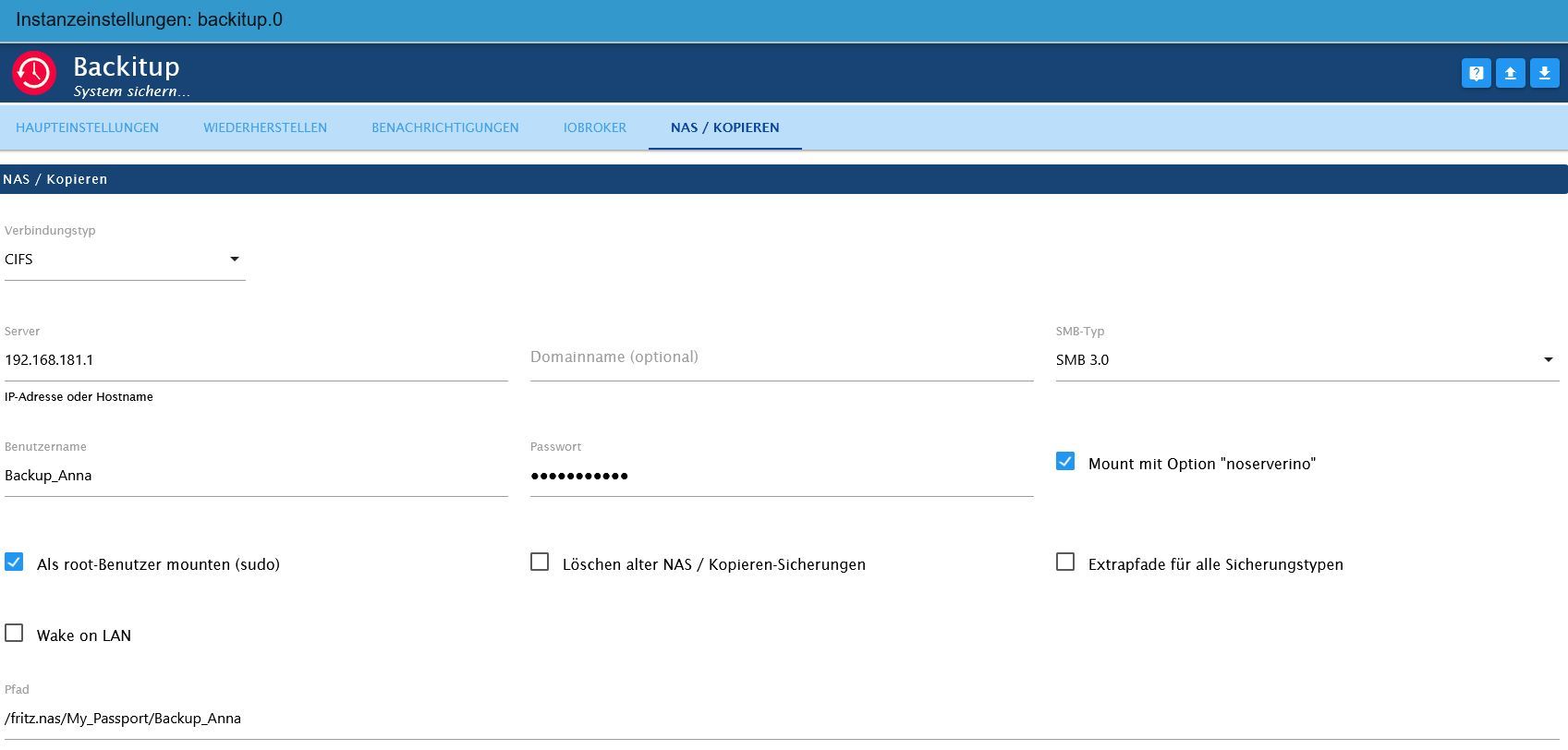
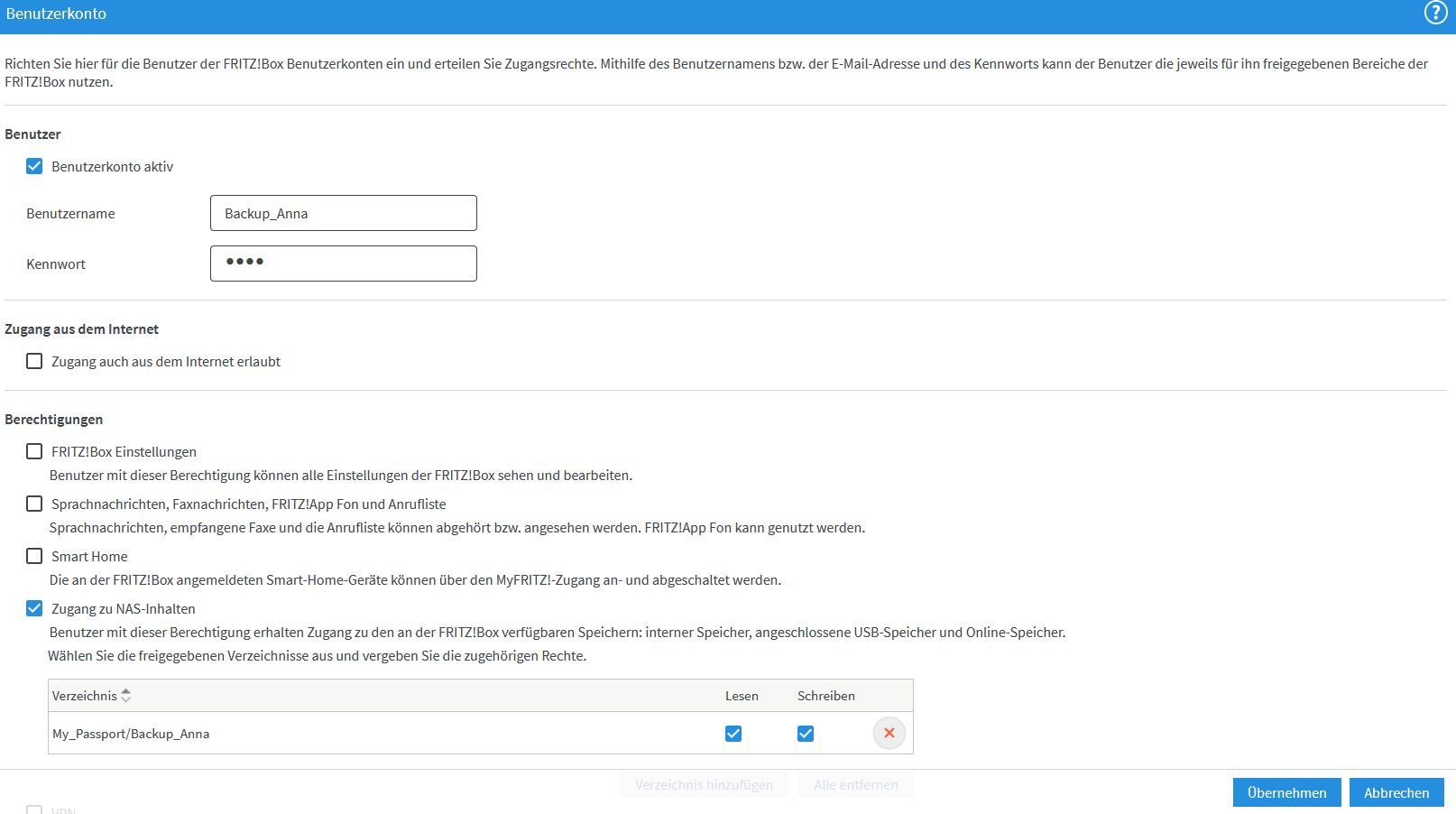
                                Zeig mal deine Einstellungen aus dem Adapter / Reiter 'NAS/Kopieren' und die aus dem NAS bezüglich der Freigaben.

                                Linux-Werkzeugkasten:
                                https://forum.iobroker.net/topic/42952/der-kleine-iobroker-linux-werkzeugkasten
                                NodeJS Fixer Skript:
                                https://forum.iobroker.net/topic/68035/iob-node-fix-skript
                                iob_diag: curl -sLf -o diag.sh https://iobroker.net/diag.sh && bash diag.sh

                                frankthegreatF 1 Antwort Letzte Antwort
                                0
                                • Thomas BraunT Thomas Braun

                                  @frankthegreat

                                  Zeig mal deine Einstellungen aus dem Adapter / Reiter 'NAS/Kopieren' und die aus dem NAS bezüglich der Freigaben.

                                  frankthegreatF Offline
                                  frankthegreatF Offline
                                  frankthegreat
                                  schrieb am zuletzt editiert von
                                  #21

                                  @thomas-braun

                                  Meinst du diese:

                                  NAS.jpg

                                  Benutzer.jpg

                                  Thomas BraunT 1 Antwort Letzte Antwort
                                  0
                                  • frankthegreatF frankthegreat

                                    @thomas-braun

                                    Meinst du diese:

                                    NAS.jpg

                                    Benutzer.jpg

                                    Thomas BraunT Online
                                    Thomas BraunT Online
                                    Thomas Braun
                                    Most Active
                                    schrieb am zuletzt editiert von
                                    #22

                                    @frankthegreat

                                    Eigentlich soweit i. O.
                                    Firmware auf der FritzBox?
                                    smb-Typ auf 3.1.1. setzen.

                                    Linux-Werkzeugkasten:
                                    https://forum.iobroker.net/topic/42952/der-kleine-iobroker-linux-werkzeugkasten
                                    NodeJS Fixer Skript:
                                    https://forum.iobroker.net/topic/68035/iob-node-fix-skript
                                    iob_diag: curl -sLf -o diag.sh https://iobroker.net/diag.sh && bash diag.sh

                                    frankthegreatF 1 Antwort Letzte Antwort
                                    0
                                    • Thomas BraunT Thomas Braun

                                      @frankthegreat

                                      Eigentlich soweit i. O.
                                      Firmware auf der FritzBox?
                                      smb-Typ auf 3.1.1. setzen.

                                      frankthegreatF Offline
                                      frankthegreatF Offline
                                      frankthegreat
                                      schrieb am zuletzt editiert von
                                      #23

                                      @thomas-braun FB Firmware ist die aktuelle: 7.28
                                      smb-Typ auf 3.1.1 gesetzt

                                      Fehler noch da.

                                      Thomas BraunT 1 Antwort Letzte Antwort
                                      0
                                      • frankthegreatF frankthegreat

                                        @thomas-braun FB Firmware ist die aktuelle: 7.28
                                        smb-Typ auf 3.1.1 gesetzt

                                        Fehler noch da.

                                        Thomas BraunT Online
                                        Thomas BraunT Online
                                        Thomas Braun
                                        Most Active
                                        schrieb am zuletzt editiert von
                                        #24

                                        @frankthegreat
                                        Möglich das die Backups von 'vor der Umstellung' auf noserverino falsche Rechte haben.

                                        Mounte die Freigabe mal und schaue per

                                        ls -la /opt/iobroker/backups
                                        

                                        währenddessen wem die Dateien gehören.

                                        Linux-Werkzeugkasten:
                                        https://forum.iobroker.net/topic/42952/der-kleine-iobroker-linux-werkzeugkasten
                                        NodeJS Fixer Skript:
                                        https://forum.iobroker.net/topic/68035/iob-node-fix-skript
                                        iob_diag: curl -sLf -o diag.sh https://iobroker.net/diag.sh && bash diag.sh

                                        frankthegreatF 1 Antwort Letzte Antwort
                                        0
                                        • Thomas BraunT Thomas Braun

                                          @frankthegreat
                                          Möglich das die Backups von 'vor der Umstellung' auf noserverino falsche Rechte haben.

                                          Mounte die Freigabe mal und schaue per

                                          ls -la /opt/iobroker/backups
                                          

                                          währenddessen wem die Dateien gehören.

                                          frankthegreatF Offline
                                          frankthegreatF Offline
                                          frankthegreat
                                          schrieb am zuletzt editiert von
                                          #25

                                          @thomas-braun

                                          pi@raspberrypi:~ $ ls -la /opt/iobroker/backups
                                          insgesamt 4
                                          drwxrwxrwx  2 root     root           0 Okt 18 19:13 .
                                          drwxrwxr-x+ 7 iobroker iobroker    4096 Okt 18 18:38 ..
                                          -rwxrwxrwx  1 root     root     4229182 Okt 18 18:08 iobroker_2021_10_18-18_08_40_backupiobroker.tar.gz
                                          -rwxrwxrwx  1 root     root     4229506 Okt 18 19:13 iobroker_2021_10_18-19_13_03_backupiobroker.tar.gz
                                          drwxrwxrwx  2 root     root           0 Okt 18 18:10 zigbee_0
                                          -rwxrwxrwx  1 root     root      255152 Okt 18 18:10 zigbee.0_2021_10_15-02_34_57_backupiobroker.tar.gz
                                          -rwxrwxrwx  1 root     root          87 Okt 18 18:08 zigbee.0_2021_10_18-18_08_49_backupiobroker.tar.gz
                                          -rwxrwxrwx  1 root     root          84 Okt 18 19:13 zigbee.0_2021_10_18-19_13_12_backupiobroker.tar.gz
                                          pi@raspberrypi:~ $

                                          
                                          
                                          Thomas BraunT 1 Antwort Letzte Antwort
                                          0
                                          Antworten
                                          • In einem neuen Thema antworten
                                          Anmelden zum Antworten
                                          • Älteste zuerst
                                          • Neuste zuerst
                                          • Meiste Stimmen


                                          Support us

                                          ioBroker
                                          Community Adapters
                                          Donate

                                          601

                                          Online

                                          32.7k

                                          Benutzer

                                          82.5k

                                          Themen

                                          1.3m

                                          Beiträge
                                          Community
                                          Impressum | Datenschutz-Bestimmungen | Nutzungsbedingungen | Einwilligungseinstellungen
                                          ioBroker Community 2014-2025
                                          logo
                                          • Anmelden

                                          • Du hast noch kein Konto? Registrieren

                                          • Anmelden oder registrieren, um zu suchen
                                          • Erster Beitrag
                                            Letzter Beitrag
                                          0
                                          • Home
                                          • Aktuell
                                          • Tags
                                          • Ungelesen 0
                                          • Kategorien
                                          • Unreplied
                                          • Beliebt
                                          • GitHub
                                          • Docu
                                          • Hilfe