




influxDB ist neuerdings gelb (gelöst)
-
Seit kurzem funktionieren meine Grafana Visualisierungen nicht mehr. Ursache ist der gelbe influxdb Adapter. Verbunden mit Host und Lebenszeichen sind grün, verbunden mit gerät ist rot. Influx über die Konsole aufgrufen meldet:Failed to connect to http://localhost:8086: Get http://localhost:8086/ping: dial tcp [::1]:8086: connect: connection refused
Please check your connection settings and ensure 'influxd' is running.
Konsole: sudo systemctl restart influxdb ergibt
Job for influxdb.service failed because the control process exited with error code.
See "systemctl status influxdb.service" and "journalctl -xe" for details.
Dort steht: Unit influxdb.servicesystemctl.service could not be found.
Unit status.service could not be found.
Als Linux Anfänger bin ich ratlos. Wie kann ich das beheben?RasPi 4 4GB bookworm
nodejs v20.19.4
npm 10.8.2
Objects type: jsonl
States type: redis
js-controller: 7.0.6
admin: 7.6.17
javascript: 8.9.2 -
Seit kurzem funktionieren meine Grafana Visualisierungen nicht mehr. Ursache ist der gelbe influxdb Adapter. Verbunden mit Host und Lebenszeichen sind grün, verbunden mit gerät ist rot. Influx über die Konsole aufgrufen meldet:Failed to connect to http://localhost:8086: Get http://localhost:8086/ping: dial tcp [::1]:8086: connect: connection refused
Please check your connection settings and ensure 'influxd' is running.
Konsole: sudo systemctl restart influxdb ergibt
Job for influxdb.service failed because the control process exited with error code.
See "systemctl status influxdb.service" and "journalctl -xe" for details.
Dort steht: Unit influxdb.servicesystemctl.service could not be found.
Unit status.service could not be found.
Als Linux Anfänger bin ich ratlos. Wie kann ich das beheben?apt policy influxdb -
Seit kurzem funktionieren meine Grafana Visualisierungen nicht mehr. Ursache ist der gelbe influxdb Adapter. Verbunden mit Host und Lebenszeichen sind grün, verbunden mit gerät ist rot. Influx über die Konsole aufgrufen meldet:Failed to connect to http://localhost:8086: Get http://localhost:8086/ping: dial tcp [::1]:8086: connect: connection refused
Please check your connection settings and ensure 'influxd' is running.
Konsole: sudo systemctl restart influxdb ergibt
Job for influxdb.service failed because the control process exited with error code.
See "systemctl status influxdb.service" and "journalctl -xe" for details.
Dort steht: Unit influxdb.servicesystemctl.service could not be found.
Unit status.service could not be found.
Als Linux Anfänger bin ich ratlos. Wie kann ich das beheben?@maximinus sagte in influxDB ist neuerdings gelb:
journalctl -xe
weist dich vermutlich auf ein Permission denied hin, Änderungen der Influx ab V1.8.7
-
apt policy influxdb@thomas-braun
Leider sagt mir das nichts:
apt policy influxdbinfluxdb: Installiert: 1.8.9-1 Installationskandidat: 1.8.9-1 Versionstabelle: *** 1.8.9-1 500 500 https://repos.influxdata.com/debian buster/stable armhf Packages 100 /var/lib/dpkg/status 1.6.4-1+deb10u1 500 500 http://raspbian.raspberrypi.org/raspbian buster/main armhf Packages -
@maximinus sagte in influxDB ist neuerdings gelb:
journalctl -xe
weist dich vermutlich auf ein Permission denied hin, Änderungen der Influx ab V1.8.7
Und das leider auch nichts: ```
Aug 22 14:41:33 raspberrypi4-ioB influxd-systemd-start.sh[1515]: ts=2021-08-22T12:41:33.494111Z lvl=info msg="Opened shard" log_id=0W7Tw7A0000 service=store trace_id=0W7Tw7Al000 op_name=tsdb_open index_version=inmem path=/var/lib/influxdb/data/solpiplog2/autogen/37 duration=40.538ms
Aug 22 14:41:33 raspberrypi4-ioB influxd-systemd-start.sh[1515]: ts=2021-08-22T12:41:33.514307Z lvl=info msg="Opened shard" log_id=0W7Tw7A0000 service=store trace_id=0W7Tw7Al000 op_name=tsdb_open index_version=inmem path=/var/lib/influxdb/data/solpiplog2/autogen/46 duration=53.536ms
Aug 22 14:41:34 raspberrypi4-ioB influxd-systemd-start.sh[1515]: ts=2021-08-22T12:41:34.838455Z lvl=info msg="Reading file" log_id=0W7Tw7A0000 engine=tsm1 service=cacheloader path=/var/lib/influxdb/wal/iobroker/global/169/_00138.wal size=10485873
Aug 22 14:41:36 raspberrypi4-ioB influxd-systemd-start.sh[1515]: ts=2021-08-22T12:41:36.515378Z lvl=info msg="Reading file" log_id=0W7Tw7A0000 engine=tsm1 service=cacheloader path=/var/lib/influxdb/wal/_internal/monitor/174/_00017.wal size=10528669
Da mir nicht bewusst ist etwas verändert zu haben kann ich diesen Effekt nicht verstehen. Ich möchte die bisherigen Daten nicht verlieren. Kann ich den Adapter neu installieren oder bring t das nichts?RasPi 4 4GB bookworm
nodejs v20.19.4
npm 10.8.2
Objects type: jsonl
States type: redis
js-controller: 7.0.6
admin: 7.6.17
javascript: 8.9.2 -
Und das leider auch nichts: ```
Aug 22 14:41:33 raspberrypi4-ioB influxd-systemd-start.sh[1515]: ts=2021-08-22T12:41:33.494111Z lvl=info msg="Opened shard" log_id=0W7Tw7A0000 service=store trace_id=0W7Tw7Al000 op_name=tsdb_open index_version=inmem path=/var/lib/influxdb/data/solpiplog2/autogen/37 duration=40.538ms
Aug 22 14:41:33 raspberrypi4-ioB influxd-systemd-start.sh[1515]: ts=2021-08-22T12:41:33.514307Z lvl=info msg="Opened shard" log_id=0W7Tw7A0000 service=store trace_id=0W7Tw7Al000 op_name=tsdb_open index_version=inmem path=/var/lib/influxdb/data/solpiplog2/autogen/46 duration=53.536ms
Aug 22 14:41:34 raspberrypi4-ioB influxd-systemd-start.sh[1515]: ts=2021-08-22T12:41:34.838455Z lvl=info msg="Reading file" log_id=0W7Tw7A0000 engine=tsm1 service=cacheloader path=/var/lib/influxdb/wal/iobroker/global/169/_00138.wal size=10485873
Aug 22 14:41:36 raspberrypi4-ioB influxd-systemd-start.sh[1515]: ts=2021-08-22T12:41:36.515378Z lvl=info msg="Reading file" log_id=0W7Tw7A0000 engine=tsm1 service=cacheloader path=/var/lib/influxdb/wal/_internal/monitor/174/_00017.wal size=10528669
Da mir nicht bewusst ist etwas verändert zu haben kann ich diesen Effekt nicht verstehen. Ich möchte die bisherigen Daten nicht verlieren. Kann ich den Adapter neu installieren oder bring t das nichts?Bitte CodeTags für Konsolenoutput verwenden.
Und bitte die Suchfunktion benutzen, das ist ein bekanntes 'Problem' mit aktuellen Versionen von influxdb. -
Bitte CodeTags für Konsolenoutput verwenden.
Und bitte die Suchfunktion benutzen, das ist ein bekanntes 'Problem' mit aktuellen Versionen von influxdb.@thomas-braun said in influxDB ist neuerdings gelb:
Suchfunktion benutzen, das ist ein bekanntes 'Problem' mit aktuellen Versionen von influxdb
Ich suche seit heute morgen -nachdem die Visualisierung nicht mehr funktionierte- nach einer Lösung, bin aber bisher nach Eingabe der Fehlermeldung auf keine von mir nachvollziehbare Antwort gestoßen. Wie müsste ein Suchbegriff lauten um auf eine Anleitung zu kommen?
RasPi 4 4GB bookworm
nodejs v20.19.4
npm 10.8.2
Objects type: jsonl
States type: redis
js-controller: 7.0.6
admin: 7.6.17
javascript: 8.9.2 -
@thomas-braun said in influxDB ist neuerdings gelb:
Suchfunktion benutzen, das ist ein bekanntes 'Problem' mit aktuellen Versionen von influxdb
Ich suche seit heute morgen -nachdem die Visualisierung nicht mehr funktionierte- nach einer Lösung, bin aber bisher nach Eingabe der Fehlermeldung auf keine von mir nachvollziehbare Antwort gestoßen. Wie müsste ein Suchbegriff lauten um auf eine Anleitung zu kommen?
systemctl status influxdb -
systemctl status influxdb@thomas-braun said in influxDB ist neuerdings gelb:
systemctl status influxdb
Das kommt dabei heraus, ich kann es aber nicht interpretieren```
* influxdb.service - InfluxDB is an open-source, distributed, time series database Loaded: loaded (/lib/systemd/system/influxdb.service; enabled; vendor preset: enabled) Active: activating (start) since Sun 2021-08-22 15:20:58 CEST; 7s ago Docs: https://docs.influxdata.com/influxdb/ Cntrl PID: 18228 (influxd-systemd) Tasks: 13 (limit: 4915) CGroup: /system.slice/influxdb.service |-18228 /bin/bash -e /usr/lib/influxdb/scripts/influxd-systemd-start.sh |-18229 /usr/bin/influxd -config /etc/influxdb/influxdb.conf `-18283 curl -k -s -o /dev/null http://localhost:8086/health -w %{http_code} Aug 22 15:20:59 raspberrypi4-ioB influxd-systemd-start.sh[18228]: ts=2021-08-22T13:20:59.412304Z lvl=info msg="Opened shard" log_id=0W7WBXL0000 service=store trace_id=0W7WBXLW000 op_name=tsdb_open index_version=inmem path=/var/lib/influxdb/data/solpiplog2/autogen/28 duration=45.168ms Aug 22 15:20:59 raspberrypi4-ioB influxd-systemd-start.sh[18228]: ts=2021-08-22T13:20:59.414070Z lvl=info msg="Opened file" log_id=0W7WBXL0000 engine=tsm1 service=filestore path=/var/lib/influxdb/data/solpiplog2/autogen/4/000000004-000000002.tsm id=0 duration=0.283ms Aug 22 15:20:59 raspberrypi4-ioB influxd-systemd-start.sh[18228]: ts=2021-08-22T13:20:59.443304Z lvl=info msg="Opened shard" log_id=0W7WBXL0000 service=store trace_id=0W7WBXLW000 op_name=tsdb_open index_version=inmem path=/var/lib/influxdb/data/solpiplog2/autogen/37 duration=37.496ms Aug 22 15:20:59 raspberrypi4-ioB influxd-systemd-start.sh[18228]: ts=2021-08-22T13:20:59.444777Z lvl=info msg="Opened file" log_id=0W7WBXL0000 engine=tsm1 service=filestore path=/var/lib/influxdb/data/solpiplog2/autogen/46/000000004-000000002.tsm id=0 duration=0.271ms Aug 22 15:20:59 raspberrypi4-ioB influxd-systemd-start.sh[18228]: ts=2021-08-22T13:20:59.466256Z lvl=info msg="Opened shard" log_id=0W7WBXL0000 service=store trace_id=0W7WBXLW000 op_name=tsdb_open index_version=inmem path=/var/lib/influxdb/data/solpiplog2/autogen/4 duration=53.811ms Aug 22 15:20:59 raspberrypi4-ioB influxd-systemd-start.sh[18228]: ts=2021-08-22T13:20:59.483407Z lvl=info msg="Opened shard" log_id=0W7WBXL0000 service=store trace_id=0W7WBXLW000 op_name=tsdb_open index_version=inmem path=/var/lib/influxdb/data/solpiplog2/autogen/46 duration=39.980ms Aug 22 15:21:00 raspberrypi4-ioB influxd-systemd-start.sh[18228]: ts=2021-08-22T13:21:00.927541Z lvl=info msg="Reading file" log_id=0W7WBXL0000 engine=tsm1 service=cacheloader path=/var/lib/influxdb/wal/iobroker/global/169/_00138.wal size=10485873 Aug 22 15:21:02 raspberrypi4-ioB influxd-systemd-start.sh[18228]: ts=2021-08-22T13:21:02.645334Z lvl=info msg="Reading file" log_id=0W7WBXL0000 engine=tsm1 service=cacheloader path=/var/lib/influxdb/wal/_internal/monitor/174/_00017.wal size=10528669 Aug 22 15:21:02 raspberrypi4-ioB influxd-systemd-start.sh[18228]: ts=2021-08-22T13:21:02.688366Z lvl=info msg="Reading file" log_id=0W7WBXL0000 engine=tsm1 service=cacheloader path=/var/lib/influxdb/wal/iobroker/global/169/_00139.wal size=10165177 Aug 22 15:21:04 raspberrypi4-ioB influxd-systemd-start.sh[18228]: ts=2021-08-22T13:21:04.462827Z lvl=info msg="Opened shard" log_id=0W7WBXL0000 service=store trace_id=0W7WBXLW000 op_name=tsdb_open index_version=inmem path=/var/lib/influxdb/data/iobroker/global/169 duration=5386.520ms -
Und das leider auch nichts: ```
Aug 22 14:41:33 raspberrypi4-ioB influxd-systemd-start.sh[1515]: ts=2021-08-22T12:41:33.494111Z lvl=info msg="Opened shard" log_id=0W7Tw7A0000 service=store trace_id=0W7Tw7Al000 op_name=tsdb_open index_version=inmem path=/var/lib/influxdb/data/solpiplog2/autogen/37 duration=40.538ms
Aug 22 14:41:33 raspberrypi4-ioB influxd-systemd-start.sh[1515]: ts=2021-08-22T12:41:33.514307Z lvl=info msg="Opened shard" log_id=0W7Tw7A0000 service=store trace_id=0W7Tw7Al000 op_name=tsdb_open index_version=inmem path=/var/lib/influxdb/data/solpiplog2/autogen/46 duration=53.536ms
Aug 22 14:41:34 raspberrypi4-ioB influxd-systemd-start.sh[1515]: ts=2021-08-22T12:41:34.838455Z lvl=info msg="Reading file" log_id=0W7Tw7A0000 engine=tsm1 service=cacheloader path=/var/lib/influxdb/wal/iobroker/global/169/_00138.wal size=10485873
Aug 22 14:41:36 raspberrypi4-ioB influxd-systemd-start.sh[1515]: ts=2021-08-22T12:41:36.515378Z lvl=info msg="Reading file" log_id=0W7Tw7A0000 engine=tsm1 service=cacheloader path=/var/lib/influxdb/wal/_internal/monitor/174/_00017.wal size=10528669
Da mir nicht bewusst ist etwas verändert zu haben kann ich diesen Effekt nicht verstehen. Ich möchte die bisherigen Daten nicht verlieren. Kann ich den Adapter neu installieren oder bring t das nichts?@maximinus das ist die gesamte Ausgabe?
-
@thomas-braun said in influxDB ist neuerdings gelb:
Suchfunktion benutzen, das ist ein bekanntes 'Problem' mit aktuellen Versionen von influxdb
Ich suche seit heute morgen -nachdem die Visualisierung nicht mehr funktionierte- nach einer Lösung, bin aber bisher nach Eingabe der Fehlermeldung auf keine von mir nachvollziehbare Antwort gestoßen. Wie müsste ein Suchbegriff lauten um auf eine Anleitung zu kommen?
@maximinus sagte in influxDB ist neuerdings gelb:
Ich suche seit heute morgen -nachdem die Visualisierung nicht mehr funktionierte- nach einer Lösung, bin aber bisher nach Eingabe der Fehlermeldung auf keine von mir nachvollziehbare Antwort gestoßen. Wie müsste ein Suchbegriff lauten um auf eine Anleitung zu kommen?
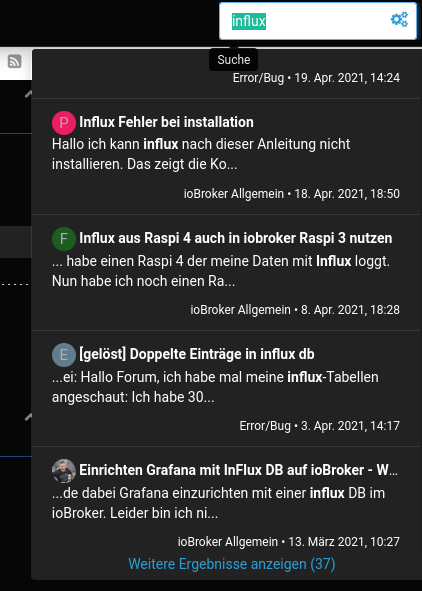
-
@maximinus das ist die gesamte Ausgabe?
@crunchip said in influxDB ist neuerdings gelb:
@maximinus das ist die gesamte Ausgabe?
Ja insgesamt 21 Zeilen. Hier noch einmal
* influxdb.service - InfluxDB is an open-source, distributed, time series database
   Loaded: loaded (/lib/systemd/system/influxdb.service; enabled; vendor preset: enabled)
   Active: activating (start) since Sun 2021-08-22 16:50:33 CEST; 5s ago
     Docs: https://docs.influxdata.com/influxdb/
Cntrl PID: 23520 (influxd-systemd)
    Tasks: 13 (limit: 4915)
   CGroup: /system.slice/influxdb.service
           |-23520 /bin/bash -e /usr/lib/influxdb/scripts/influxd-systemd-start.sh
           |-23521 /usr/bin/influxd -config /etc/influxdb/influxdb.conf
           `-23568 sleep 1

Aug 22 16:50:34 raspberrypi4-ioB influxd-systemd-start.sh[23520]: ts=2021-08-22T14:50:34.378626Z lvl=info msg="Opened file" log_id=0W7aJaRW000 engine=tsm1 service=filestore path=/var/lib/influxdb/data/solpiplog/autogen/45/000000005-000000002.tsm id=0 duration=0.250ms
Aug 22 16:50:34 raspberrypi4-ioB influxd-systemd-start.sh[23520]: ts=2021-08-22T14:50:34.411602Z lvl=info msg="Opened shard" log_id=0W7aJaRW000 service=store trace_id=0W7aJaSW000 op_name=tsdb_open index_version=inmem path=/var/lib/influxdb/data/solpiplog/autogen/36 duration=42.225ms
Aug 22 16:50:34 raspberrypi4-ioB influxd-systemd-start.sh[23520]: ts=2021-08-22T14:50:34.413054Z lvl=info msg="Opened file" log_id=0W7aJaRW000 engine=tsm1 service=filestore path=/var/lib/influxdb/data/solpiplog/autogen/55/000000001-000000001.tsm id=0 duration=0.234ms
Aug 22 16:50:34 raspberrypi4-ioB influxd-systemd-start.sh[23520]: ts=2021-08-22T14:50:34.419196Z lvl=info msg="Opened shard" log_id=0W7aJaRW000 service=store trace_id=0W7aJaSW000 op_name=tsdb_open index_version=inmem path=/var/lib/influxdb/data/solpiplog/autogen/45 duration=41.971ms
Aug 22 16:50:34 raspberrypi4-ioB influxd-systemd-start.sh[23520]: ts=2021-08-22T14:50:34.422938Z lvl=info msg="Opened file" log_id=0W7aJaRW000 engine=tsm1 service=filestore path=/var/lib/influxdb/data/solpiplog/autogen/9/000000005-000000002.tsm id=0 duration=2.417ms
Aug 22 16:50:34 raspberrypi4-ioB influxd-systemd-start.sh[23520]: ts=2021-08-22T14:50:34.464027Z lvl=info msg="Opened shard" log_id=0W7aJaRW000 service=store trace_id=0W7aJaSW000 op_name=tsdb_open index_version=inmem path=/var/lib/influxdb/data/solpiplog/autogen/55 duration=52.278ms
Aug 22 16:50:34 raspberrypi4-ioB influxd-systemd-start.sh[23520]: ts=2021-08-22T14:50:34.471207Z lvl=info msg="Opened shard" log_id=0W7aJaRW000 service=store trace_id=0W7aJaSW000 op_name=tsdb_open index_version=inmem path=/var/lib/influxdb/data/solpiplog/autogen/9 duration=51.790ms
Aug 22 16:50:35 raspberrypi4-ioB influxd-systemd-start.sh[23520]: ts=2021-08-22T14:50:35.901806Z lvl=info msg="Reading file" log_id=0W7aJaRW000 engine=tsm1 service=cacheloader path=/var/lib/influxdb/wal/iobroker/global/169/_00138.wal size=10485873
Aug 22 16:50:37 raspberrypi4-ioB influxd-systemd-start.sh[23520]: ts=2021-08-22T14:50:37.452173Z lvl=info msg="Reading file" log_id=0W7aJaRW000 engine=tsm1 service=cacheloader path=/var/lib/influxdb/wal/_internal/monitor/174/_00017.wal size=10528669
Aug 22 16:50:37 raspberrypi4-ioB influxd-systemd-start.sh[23520]: ts=2021-08-22T14:50:37.627657Z lvl=info msg="Reading file" log_id=0W7aJaRW000 engine=tsm1 service=cacheloader path=/var/lib/influxdb/wal/iobroker/global/169/_00139.wal size=10165177
RasPi 4 4GB bookworm
nodejs v20.19.4
npm 10.8.2
Objects type: jsonl
States type: redis
js-controller: 7.0.6
admin: 7.6.17
javascript: 8.9.2 -
@crunchip said in influxDB ist neuerdings gelb:
@maximinus das ist die gesamte Ausgabe?
Ja insgesamt 21 Zeilen. Hier noch einmal
* influxdb.service - InfluxDB is an open-source, distributed, time series database Loaded: loaded (/lib/systemd/system/influxdb.service; enabled; vendor preset: enabled) Active: activating (start) since Sun 2021-08-22 16:50:33 CEST; 5s ago Docs: https://docs.influxdata.com/influxdb/ Cntrl PID: 23520 (influxd-systemd) Tasks: 13 (limit: 4915) CGroup: /system.slice/influxdb.service |-23520 /bin/bash -e /usr/lib/influxdb/scripts/influxd-systemd-start.sh |-23521 /usr/bin/influxd -config /etc/influxdb/influxdb.conf `-23568 sleep 1 Aug 22 16:50:34 raspberrypi4-ioB influxd-systemd-start.sh[23520]: ts=2021-08-22T14:50:34.378626Z lvl=info msg="Opened file" log_id=0W7aJaRW000 engine=tsm1 service=filestore path=/var/lib/influxdb/data/solpiplog/autogen/45/000000005-000000002.tsm id=0 duration=0.250ms Aug 22 16:50:34 raspberrypi4-ioB influxd-systemd-start.sh[23520]: ts=2021-08-22T14:50:34.411602Z lvl=info msg="Opened shard" log_id=0W7aJaRW000 service=store trace_id=0W7aJaSW000 op_name=tsdb_open index_version=inmem path=/var/lib/influxdb/data/solpiplog/autogen/36 duration=42.225ms Aug 22 16:50:34 raspberrypi4-ioB influxd-systemd-start.sh[23520]: ts=2021-08-22T14:50:34.413054Z lvl=info msg="Opened file" log_id=0W7aJaRW000 engine=tsm1 service=filestore path=/var/lib/influxdb/data/solpiplog/autogen/55/000000001-000000001.tsm id=0 duration=0.234ms Aug 22 16:50:34 raspberrypi4-ioB influxd-systemd-start.sh[23520]: ts=2021-08-22T14:50:34.419196Z lvl=info msg="Opened shard" log_id=0W7aJaRW000 service=store trace_id=0W7aJaSW000 op_name=tsdb_open index_version=inmem path=/var/lib/influxdb/data/solpiplog/autogen/45 duration=41.971ms Aug 22 16:50:34 raspberrypi4-ioB influxd-systemd-start.sh[23520]: ts=2021-08-22T14:50:34.422938Z lvl=info msg="Opened file" log_id=0W7aJaRW000 engine=tsm1 service=filestore path=/var/lib/influxdb/data/solpiplog/autogen/9/000000005-000000002.tsm id=0 duration=2.417ms Aug 22 16:50:34 raspberrypi4-ioB influxd-systemd-start.sh[23520]: ts=2021-08-22T14:50:34.464027Z lvl=info msg="Opened shard" log_id=0W7aJaRW000 service=store trace_id=0W7aJaSW000 op_name=tsdb_open index_version=inmem path=/var/lib/influxdb/data/solpiplog/autogen/55 duration=52.278ms Aug 22 16:50:34 raspberrypi4-ioB influxd-systemd-start.sh[23520]: ts=2021-08-22T14:50:34.471207Z lvl=info msg="Opened shard" log_id=0W7aJaRW000 service=store trace_id=0W7aJaSW000 op_name=tsdb_open index_version=inmem path=/var/lib/influxdb/data/solpiplog/autogen/9 duration=51.790ms Aug 22 16:50:35 raspberrypi4-ioB influxd-systemd-start.sh[23520]: ts=2021-08-22T14:50:35.901806Z lvl=info msg="Reading file" log_id=0W7aJaRW000 engine=tsm1 service=cacheloader path=/var/lib/influxdb/wal/iobroker/global/169/_00138.wal size=10485873 Aug 22 16:50:37 raspberrypi4-ioB influxd-systemd-start.sh[23520]: ts=2021-08-22T14:50:37.452173Z lvl=info msg="Reading file" log_id=0W7aJaRW000 engine=tsm1 service=cacheloader path=/var/lib/influxdb/wal/_internal/monitor/174/_00017.wal size=10528669 Aug 22 16:50:37 raspberrypi4-ioB influxd-systemd-start.sh[23520]: ts=2021-08-22T14:50:37.627657Z lvl=info msg="Reading file" log_id=0W7aJaRW000 engine=tsm1 service=cacheloader path=/var/lib/influxdb/wal/iobroker/global/169/_00139.wal size=10165177@maximinus sagte in influxDB ist neuerdings gelb:
Active: activating (start)
aktiviert, aber nicht gestartet
-
@maximinus sagte in influxDB ist neuerdings gelb:
Active: activating (start)
aktiviert, aber nicht gestartet
-
@maximinus sleep 1 auf 10: Wie geht das? Habe das gleiche Problem.
-
@maximinus sleep 1 auf 10: Wie geht das? Habe das gleiche Problem.



Hey! Du scheinst an dieser Unterhaltung interessiert zu sein, hast aber noch kein Konto.
Hast du es satt, bei jedem Besuch durch die gleichen Beiträge zu scrollen? Wenn du dich für ein Konto anmeldest, kommst du immer genau dorthin zurück, wo du zuvor warst, und kannst dich über neue Antworten benachrichtigen lassen (entweder per E-Mail oder Push-Benachrichtigung). Du kannst auch Lesezeichen speichern und Beiträge positiv bewerten, um anderen Community-Mitgliedern deine Wertschätzung zu zeigen.
Mit deinem Input könnte dieser Beitrag noch besser werden 💗
Registrieren Anmelden201
Online33.0k
Benutzer83.6k
Themen1.3m
Beiträge