Weiter zum Inhalt
  • Home
  • Aktuell
  • Tags
  • 0 Ungelesen 0
  • Kategorien
  • Unreplied
  • Beliebt
  • GitHub
  • Docu
  • Hilfe
Skins
  • Hell
  • Brite
  • Cerulean
  • Cosmo
  • Flatly
  • Journal
  • Litera
  • Lumen
  • Lux
  • Materia
  • Minty
  • Morph
  • Pulse
  • Sandstone
  • Simplex
  • Sketchy
  • Spacelab
  • United
  • Yeti
  • Zephyr
  • Dunkel
  • Cyborg
  • Darkly
  • Quartz
  • Slate
  • Solar
  • Superhero
  • Vapor

  • Standard: (Kein Skin)
  • Kein Skin
Einklappen
ioBroker Logo

Community Forum

donate donate
  1. ioBroker Community Home
  2. Deutsch
  3. Tester
  4. jarvis v2.2.0 - just another remarkable vis
NEWS

  • Neuer ioBroker-Blog online: Monatsrückblick März/April 2026
    BluefoxB
    Bluefox
    7
    1
    286

  • Verwendung von KI bitte immer deutlich kennzeichnen
    HomoranH
    Homoran
    9
    1
    265

  • Monatsrückblick Januar/Februar 2026 ist online!
    BluefoxB
    Bluefox
    18
    1
    911

jarvis v2.2.0 - just another remarkable vis
Geplant Angeheftet Gesperrt Verschoben Tester
jarvismaterialmaterial uimaterialdesignvisvisualisierungvisualization
6.1k Beiträge 316 Kommentatoren 4.3m Aufrufe 273 Beobachtet
  • Älteste zuerst
  • Neuste zuerst
  • Meiste Stimmen
Antworten
  • In einem neuen Thema antworten
Anmelden zum Antworten
Dieses Thema wurde gelöscht. Nur Nutzer mit entsprechenden Rechten können es sehen.
  • M MCU

    @ceel Ändere mal das Script, wie es oben steht.

    C Offline
    C Offline
    Ceel
    schrieb am zuletzt editiert von
    #4814

    @mcu
    habe ich schon gemacht
    kein Bild

    M 1 Antwort Letzte Antwort
    0
    • C Ceel

      @mcu
      habe ich schon gemacht
      kein Bild

      M Offline
      M Offline
      MCU
      schrieb am zuletzt editiert von
      #4815

      @ceel

      var jarvisNotify = {};
      //Beispiele
      jarvisNotify.title = "Es hat geklingelt";
      // "<b>Dies ist BOLD</b>"
      let httpAdr = getState('synology.0.SurveillanceStation.cameras.Eingang.linkMjpegHttpPath').val;
      httpAdr = httpAdr.replace('"',"'");
      httpAdr = httpAdr.replace('"',"'");
      jarvisNotify.message= '<iFrame src="'+ httpAdr  +'" height="350" width="350" scroll=true after height="400"></iFrame>';
      
      jarvisNotify.state = "unread";          //Damit bleibt die Benachrichtigung auch nach POPUP ungelesen und wird oben angezeigt mit der Zahl
      jarvisNotify.criticality = "none";      // error,warning,info,success
      jarvisNotify.display ="popup";          //drawer,snackbar,popup, none für focusTab
      jarvisNotify.autoHideDuration = 180000;  //5000ms -> 5 Sekunden
      jarvisNotify.snackbarOrigin = {};       //"snackbarOrigin": { "horizontal": "...", "vertical": "" }, 
                                              // optional, applies when display is snackbar, { horizontal: 'center' | 'left' | 'right', vertical: 'bottom' | 'top' }
      jarvisNotify.icon = "bell-ring-outline"; //mdi Iconify
      jarvisNotify.iconColor = "#5D5DED";
      jarvisNotify.backgroundColor = "black";
      jarvisNotify.fontColor = "white";
      jarvisNotify.focusTab = ""; //focus a certain tab
      setState('jarvis.0.addNotification',JSON.stringify(jarvisNotify));
      

      So und kein Bild?

      NUC i7 64GB mit Proxmox ---- Jarvis Infos Aktualisierungen der Doku auf Instagram verfolgen -> mcuiobroker Instagram
      Wenn Euch mein Vorschlag geholfen hat, bitte rechts "^" klicken.

      C 1 Antwort Letzte Antwort
      0
      • M MCU

        @ceel

        var jarvisNotify = {};
        //Beispiele
        jarvisNotify.title = "Es hat geklingelt";
        // "<b>Dies ist BOLD</b>"
        let httpAdr = getState('synology.0.SurveillanceStation.cameras.Eingang.linkMjpegHttpPath').val;
        httpAdr = httpAdr.replace('"',"'");
        httpAdr = httpAdr.replace('"',"'");
        jarvisNotify.message= '<iFrame src="'+ httpAdr  +'" height="350" width="350" scroll=true after height="400"></iFrame>';
        
        jarvisNotify.state = "unread";          //Damit bleibt die Benachrichtigung auch nach POPUP ungelesen und wird oben angezeigt mit der Zahl
        jarvisNotify.criticality = "none";      // error,warning,info,success
        jarvisNotify.display ="popup";          //drawer,snackbar,popup, none für focusTab
        jarvisNotify.autoHideDuration = 180000;  //5000ms -> 5 Sekunden
        jarvisNotify.snackbarOrigin = {};       //"snackbarOrigin": { "horizontal": "...", "vertical": "" }, 
                                                // optional, applies when display is snackbar, { horizontal: 'center' | 'left' | 'right', vertical: 'bottom' | 'top' }
        jarvisNotify.icon = "bell-ring-outline"; //mdi Iconify
        jarvisNotify.iconColor = "#5D5DED";
        jarvisNotify.backgroundColor = "black";
        jarvisNotify.fontColor = "white";
        jarvisNotify.focusTab = ""; //focus a certain tab
        setState('jarvis.0.addNotification',JSON.stringify(jarvisNotify));
        

        So und kein Bild?

        C Offline
        C Offline
        Ceel
        schrieb am zuletzt editiert von Ceel
        #4816

        @mcu genau
        kein Bild

        M 1 Antwort Letzte Antwort
        0
        • C Ceel

          @mcu genau
          kein Bild

          M Offline
          M Offline
          MCU
          schrieb am zuletzt editiert von MCU
          #4817

          @ceel Mal so?

          var jarvisNotify = {};
          //Beispiele
          jarvisNotify.title = "Es hat geklingelt";
          // "<b>Dies ist BOLD</b>"
          let httpAdr = getState('synology.0.SurveillanceStation.cameras.Eingang.linkMjpegHttpPath').val;
          httpAdr = httpAdr.replace('"',"'");
          httpAdr = httpAdr.replace('"',"'");
          jarvisNotify.message= '<iFrame src='+ String(httpAdr) +' height="350" width="350" scroll=true after height="400"></iFrame>';
          
          jarvisNotify.state = "unread";          //Damit bleibt die Benachrichtigung auch nach POPUP ungelesen und wird oben angezeigt mit der Zahl
          jarvisNotify.criticality = "none";      // error,warning,info,success
          jarvisNotify.display ="popup";          //drawer,snackbar,popup, none für focusTab
          jarvisNotify.autoHideDuration = 180000;  //5000ms -> 5 Sekunden
          jarvisNotify.snackbarOrigin = {};       //"snackbarOrigin": { "horizontal": "...", "vertical": "" }, 
                                                  // optional, applies when display is snackbar, { horizontal: 'center' | 'left' | 'right', vertical: 'bottom' | 'top' }
          jarvisNotify.icon = "bell-ring-outline"; //mdi Iconify
          jarvisNotify.iconColor = "#5D5DED";
          jarvisNotify.backgroundColor = "black";
          jarvisNotify.fontColor = "white";
          jarvisNotify.focusTab = ""; //focus a certain tab
          setState('jarvis.0.addNotification',JSON.stringify(jarvisNotify));
          

          Evtl auch mal die beiden replace-Zeilen // rausnehmen

          NUC i7 64GB mit Proxmox ---- Jarvis Infos Aktualisierungen der Doku auf Instagram verfolgen -> mcuiobroker Instagram
          Wenn Euch mein Vorschlag geholfen hat, bitte rechts "^" klicken.

          C 1 Antwort Letzte Antwort
          0
          • M MCU

            @ceel Mal so?

            var jarvisNotify = {};
            //Beispiele
            jarvisNotify.title = "Es hat geklingelt";
            // "<b>Dies ist BOLD</b>"
            let httpAdr = getState('synology.0.SurveillanceStation.cameras.Eingang.linkMjpegHttpPath').val;
            httpAdr = httpAdr.replace('"',"'");
            httpAdr = httpAdr.replace('"',"'");
            jarvisNotify.message= '<iFrame src='+ String(httpAdr) +' height="350" width="350" scroll=true after height="400"></iFrame>';
            
            jarvisNotify.state = "unread";          //Damit bleibt die Benachrichtigung auch nach POPUP ungelesen und wird oben angezeigt mit der Zahl
            jarvisNotify.criticality = "none";      // error,warning,info,success
            jarvisNotify.display ="popup";          //drawer,snackbar,popup, none für focusTab
            jarvisNotify.autoHideDuration = 180000;  //5000ms -> 5 Sekunden
            jarvisNotify.snackbarOrigin = {};       //"snackbarOrigin": { "horizontal": "...", "vertical": "" }, 
                                                    // optional, applies when display is snackbar, { horizontal: 'center' | 'left' | 'right', vertical: 'bottom' | 'top' }
            jarvisNotify.icon = "bell-ring-outline"; //mdi Iconify
            jarvisNotify.iconColor = "#5D5DED";
            jarvisNotify.backgroundColor = "black";
            jarvisNotify.fontColor = "white";
            jarvisNotify.focusTab = ""; //focus a certain tab
            setState('jarvis.0.addNotification',JSON.stringify(jarvisNotify));
            

            Evtl auch mal die beiden replace-Zeilen // rausnehmen

            C Offline
            C Offline
            Ceel
            schrieb am zuletzt editiert von
            #4818

            @mcu

            keine Veränderung

            Vielleicht liegt es am iframe

            M 1 Antwort Letzte Antwort
            0
            • C Ceel

              @mcu

              keine Veränderung

              Vielleicht liegt es am iframe

              M Offline
              M Offline
              MCU
              schrieb am zuletzt editiert von MCU
              #4819

              @ceel Nein, bei mit funktioniert es ja. Das hat mit den " Anführungstrichen zu tun.
              Lass dir mal die message anzeigen mit console.log(jarvisNotify.message).

              jarvisNotify.message= '<iFrame src='+ String(httpAdr) +' height="350" width="350"></iFrame>';
              console.log(jarvisNotify.message);
              

              NUC i7 64GB mit Proxmox ---- Jarvis Infos Aktualisierungen der Doku auf Instagram verfolgen -> mcuiobroker Instagram
              Wenn Euch mein Vorschlag geholfen hat, bitte rechts "^" klicken.

              C 1 Antwort Letzte Antwort
              0
              • M MCU

                @ceel Nein, bei mit funktioniert es ja. Das hat mit den " Anführungstrichen zu tun.
                Lass dir mal die message anzeigen mit console.log(jarvisNotify.message).

                jarvisNotify.message= '<iFrame src='+ String(httpAdr) +' height="350" width="350"></iFrame>';
                console.log(jarvisNotify.message);
                
                C Offline
                C Offline
                Ceel
                schrieb am zuletzt editiert von
                #4820

                @mcu said in jarvis v2.2.0 - just another remarkable vis:

                console.log(jarvisNotify.message);

                javascript.0 (20559) script.js.common.Listen.Popup_Klingel: <iFrame src=http://192.168.178.3:5000/webapi/entry.cgi?api=SYNO.SurveillanceStation.Stream.VideoStreaming&version=1&method=Stream&format=mjpeg&cameraId=2&StmKey='XXXXXXXXXXXXXXXXX6124b531' height="350" width="350" scroll=true after height="400"></iFrame>

                M 1 Antwort Letzte Antwort
                0
                • C Ceel

                  @mcu said in jarvis v2.2.0 - just another remarkable vis:

                  console.log(jarvisNotify.message);

                  javascript.0 (20559) script.js.common.Listen.Popup_Klingel: <iFrame src=http://192.168.178.3:5000/webapi/entry.cgi?api=SYNO.SurveillanceStation.Stream.VideoStreaming&version=1&method=Stream&format=mjpeg&cameraId=2&StmKey='XXXXXXXXXXXXXXXXX6124b531' height="350" width="350" scroll=true after height="400"></iFrame>

                  M Offline
                  M Offline
                  MCU
                  schrieb am zuletzt editiert von
                  #4821

                  @ceel Mal so.

                  jarvisNotify.message= '<iFrame src="'+ String(httpAdr) +'" height="350" width="350"></iFrame>';
                  

                  NUC i7 64GB mit Proxmox ---- Jarvis Infos Aktualisierungen der Doku auf Instagram verfolgen -> mcuiobroker Instagram
                  Wenn Euch mein Vorschlag geholfen hat, bitte rechts "^" klicken.

                  C 1 Antwort Letzte Antwort
                  0
                  • M MCU

                    @ceel Mal so.

                    jarvisNotify.message= '<iFrame src="'+ String(httpAdr) +'" height="350" width="350"></iFrame>';
                    
                    C Offline
                    C Offline
                    Ceel
                    schrieb am zuletzt editiert von Ceel
                    #4822

                    @mcu said in jarvis v2.2.0 - just another remarkable vis:

                    jarvisNotify.message= '<iFrame src="'+ String(httpAdr) +'" height="350" width="350"></iFrame>';

                    javascript.0 (20559) script.js.common.Listen.Popup_Klingel: <iFrame src="http://192.168.178.3:5000/webapi/entry.cgi?api=SYNO.SurveillanceStation.Stream.VideoStreaming&version=1&method=Stream&format=mjpeg&cameraId=2&StmKey='84bbf39ba575XXXXXXXX86124b531'" height="350" width="350" scroll=true after height="400"></iFrame>

                    M 1 Antwort Letzte Antwort
                    0
                    • C Ceel

                      @mcu said in jarvis v2.2.0 - just another remarkable vis:

                      jarvisNotify.message= '<iFrame src="'+ String(httpAdr) +'" height="350" width="350"></iFrame>';

                      javascript.0 (20559) script.js.common.Listen.Popup_Klingel: <iFrame src="http://192.168.178.3:5000/webapi/entry.cgi?api=SYNO.SurveillanceStation.Stream.VideoStreaming&version=1&method=Stream&format=mjpeg&cameraId=2&StmKey='84bbf39ba575XXXXXXXX86124b531'" height="350" width="350" scroll=true after height="400"></iFrame>

                      M Offline
                      M Offline
                      MCU
                      schrieb am zuletzt editiert von MCU
                      #4823

                      @ceel Und jetzt sollte ein Bild da sein?

                       scroll=true after height="400" -> das kann raus, war nur ein Test für mich
                      

                      NUC i7 64GB mit Proxmox ---- Jarvis Infos Aktualisierungen der Doku auf Instagram verfolgen -> mcuiobroker Instagram
                      Wenn Euch mein Vorschlag geholfen hat, bitte rechts "^" klicken.

                      C 1 Antwort Letzte Antwort
                      0
                      • M MCU

                        @ceel Und jetzt sollte ein Bild da sein?

                         scroll=true after height="400" -> das kann raus, war nur ein Test für mich
                        
                        C Offline
                        C Offline
                        Ceel
                        schrieb am zuletzt editiert von Ceel
                        #4824

                        @mcu

                        javascript.0 (20559) script.js.common.Listen.Popup_Klingel: <iFrame src="http://192.168.178.3:5000/webapi/entry.cgi?api=SYNO.SurveillanceStation.Stream.VideoStreaming&version=1&method=Stream&format=mjpeg&cameraId=2&StmKey='84bbf39bXXXX6aa86124b531'" height="350" width="350"></iFrame>
                        

                        immer noch schwarz

                        M 1 Antwort Letzte Antwort
                        0
                        • C Ceel

                          @mcu

                          javascript.0 (20559) script.js.common.Listen.Popup_Klingel: <iFrame src="http://192.168.178.3:5000/webapi/entry.cgi?api=SYNO.SurveillanceStation.Stream.VideoStreaming&version=1&method=Stream&format=mjpeg&cameraId=2&StmKey='84bbf39bXXXX6aa86124b531'" height="350" width="350"></iFrame>
                          

                          immer noch schwarz

                          M Offline
                          M Offline
                          MCU
                          schrieb am zuletzt editiert von
                          #4825

                          @ceel Das war doch eben anders?

                          StmKey='84bbf39ba575XXXXXXXX86124b531'"
                          

                          NUC i7 64GB mit Proxmox ---- Jarvis Infos Aktualisierungen der Doku auf Instagram verfolgen -> mcuiobroker Instagram
                          Wenn Euch mein Vorschlag geholfen hat, bitte rechts "^" klicken.

                          C 1 Antwort Letzte Antwort
                          0
                          • M MCU

                            @ceel Das war doch eben anders?

                            StmKey='84bbf39ba575XXXXXXXX86124b531'"
                            
                            C Offline
                            C Offline
                            Ceel
                            schrieb am zuletzt editiert von
                            #4826

                            @mcu
                            ja hatte testweise das:
                            httpAdr = httpAdr.replace('"',"'");
                            httpAdr = httpAdr.replace('"',"'");
                            rausgenommen

                            ist jetzt wieder drinnen

                            M 2 Antworten Letzte Antwort
                            0
                            • C Ceel

                              @mcu
                              ja hatte testweise das:
                              httpAdr = httpAdr.replace('"',"'");
                              httpAdr = httpAdr.replace('"',"'");
                              rausgenommen

                              ist jetzt wieder drinnen

                              M Offline
                              M Offline
                              MCU
                              schrieb am zuletzt editiert von MCU
                              #4827

                              @ceel Das was mir noch einfällt, wäre ein Kopieren des Bildes auf ein festes Bild (http://192.168.178.xxx:8082/vis.0/Bild.jpg) bevor man es mit iFrame darstellt. Du kannst es ja mit einem normalen Bild von einem http-Server testen.

                              Ist ioBroker auch auf 192.168.178.3?
                              Hier ein Beispiel:

                              var Speicher_Verzeichnis= "/opt/iobroker/iobroker-data/files/vis/img/";
                              var url = getState('synology.0.SurveillanceStation.cameras.Eingang.linkMjpegHttpPath').val;
                              request(url, {encoding:'binary'}, function(error, response, body) {
                                                 fs.writeFile(Speicher_Verzeichnis  + 'Anruferbild.jpg', body, 'binary', function (err) {
                                                 if(err) log('Fehler!');
                                                 const bild1 = fs.readFileSync(Speicher_Verzeichnis + 'Anruferbild.jpg');
                                                       writeFile('vis.0','/Anruferbild.jpg', bild1,function (err) {
                                                 if(err) log('Fehler!');});
                                                 })});  
                              
                              
                              var jarvisNotify = {};
                              //Beispiele
                              jarvisNotify.title = "Es hat geklingelt";
                              // "<b>Dies ist BOLD</b>"
                              //let httpAdr = getState('synology.0.SurveillanceStation.cameras.Eingang.linkMjpegHttpPath').val;
                              //httpAdr = httpAdr.replace('"',"'");
                              //httpAdr = httpAdr.replace('"',"'");
                              jarvisNotify.message= '<iFrame src="http://192.168.178.3:8082/vis.0/Anruferbild.jpg" height="350" width="350"></iFrame>';
                               
                              jarvisNotify.state = "unread";          //Damit bleibt die Benachrichtigung auch nach POPUP ungelesen und wird oben angezeigt mit der Zahl
                              jarvisNotify.criticality = "none";      // error,warning,info,success
                              jarvisNotify.display ="popup";          //drawer,snackbar,popup, none für focusTab
                              jarvisNotify.autoHideDuration = 180000;  //5000ms -> 5 Sekunden
                              jarvisNotify.snackbarOrigin = {};       //"snackbarOrigin": { "horizontal": "...", "vertical": "" }, 
                                                                      // optional, applies when display is snackbar, { horizontal: 'center' | 'left' | 'right', vertical: 'bottom' | 'top' }
                              jarvisNotify.icon = "bell-ring-outline"; //mdi Iconify
                              jarvisNotify.iconColor = "#5D5DED";
                              jarvisNotify.backgroundColor = "black";
                              jarvisNotify.fontColor = "white";
                              jarvisNotify.focusTab = ""; //focus a certain tab
                              setState('jarvis.0.addNotification',JSON.stringify(jarvisNotify));


                              NUC i7 64GB mit Proxmox ---- Jarvis Infos Aktualisierungen der Doku auf Instagram verfolgen -> mcuiobroker Instagram
                              Wenn Euch mein Vorschlag geholfen hat, bitte rechts "^" klicken.

                              1 Antwort Letzte Antwort
                              0
                              • C Ceel

                                @mcu
                                ja hatte testweise das:
                                httpAdr = httpAdr.replace('"',"'");
                                httpAdr = httpAdr.replace('"',"'");
                                rausgenommen

                                ist jetzt wieder drinnen

                                M Offline
                                M Offline
                                MCU
                                schrieb am zuletzt editiert von MCU
                                #4828

                                @ceel
                                Man kann nochmal die alte Variante testen mit

                                httpAdr = httpAdr.replace('"',"%22");
                                httpAdr = httpAdr.replace('"',"%22");
                                

                                https://www.synology-forum.de/threads/mjpeg-stream-und-jpeg-snapshot-ueber-web-api-abfragen.84259/
                                https://de.wikipedia.org/wiki/URL-Encoding

                                Bei dem Link aus deinem State kann es auch ein Video sein?

                                <video id="player" height="360" width="640" controls preload="none" autoplay>
                                    <source src="http://192.168.178.3:5000/webapi/entry.cgi?api=SYNO.SurveillanceStation.Stream.VideoStreaming&version=1&method=Stream&format=mjpeg&cameraId=2&StmKey=%2284bbf39bXXXX6aa86124b531%22" type="application/x-mpegURL" />
                                </video>
                                

                                https://www.w3schools.com/html/html5_video.asp

                                NUC i7 64GB mit Proxmox ---- Jarvis Infos Aktualisierungen der Doku auf Instagram verfolgen -> mcuiobroker Instagram
                                Wenn Euch mein Vorschlag geholfen hat, bitte rechts "^" klicken.

                                C 1 Antwort Letzte Antwort
                                0
                                • M MCU

                                  @ceel
                                  Man kann nochmal die alte Variante testen mit

                                  httpAdr = httpAdr.replace('"',"%22");
                                  httpAdr = httpAdr.replace('"',"%22");
                                  

                                  https://www.synology-forum.de/threads/mjpeg-stream-und-jpeg-snapshot-ueber-web-api-abfragen.84259/
                                  https://de.wikipedia.org/wiki/URL-Encoding

                                  Bei dem Link aus deinem State kann es auch ein Video sein?

                                  <video id="player" height="360" width="640" controls preload="none" autoplay>
                                      <source src="http://192.168.178.3:5000/webapi/entry.cgi?api=SYNO.SurveillanceStation.Stream.VideoStreaming&version=1&method=Stream&format=mjpeg&cameraId=2&StmKey=%2284bbf39bXXXX6aa86124b531%22" type="application/x-mpegURL" />
                                  </video>
                                  

                                  https://www.w3schools.com/html/html5_video.asp

                                  C Offline
                                  C Offline
                                  Ceel
                                  schrieb am zuletzt editiert von Ceel
                                  #4829

                                  @mcu
                                  httpAdr = httpAdr.replace('"',"%22");
                                  httpAdr = httpAdr.replace('"',"%22");
                                  hat tatsächlich funktioniert

                                  Das mit dem Video hat nicht funktioniert!

                                  jetzt habe ich aber das Problem mit der Größe des Popups
                                  popup.png

                                  1 Antwort Letzte Antwort
                                  0
                                  • M Offline
                                    M Offline
                                    MCU
                                    schrieb am zuletzt editiert von MCU
                                    #4830

                                    @ceel Stell mal width auf 100% und height auf auto.

                                    width="100% height="auto"
                                    oder
                                    width="90%" height="auto"
                                    

                                    NUC i7 64GB mit Proxmox ---- Jarvis Infos Aktualisierungen der Doku auf Instagram verfolgen -> mcuiobroker Instagram
                                    Wenn Euch mein Vorschlag geholfen hat, bitte rechts "^" klicken.

                                    C 1 Antwort Letzte Antwort
                                    0
                                    • M MCU

                                      @ceel Stell mal width auf 100% und height auf auto.

                                      width="100% height="auto"
                                      oder
                                      width="90%" height="auto"
                                      
                                      C Offline
                                      C Offline
                                      Ceel
                                      schrieb am zuletzt editiert von Ceel
                                      #4831

                                      @mcu said in jarvis v2.2.0 - just another remarkable vis:

                                      width="90%" height="auto"

                                      dann ist das Bild und das Popup noch kleiner

                                      100% hatte ich auch schon getestet
                                      genauso wie ohne width und height
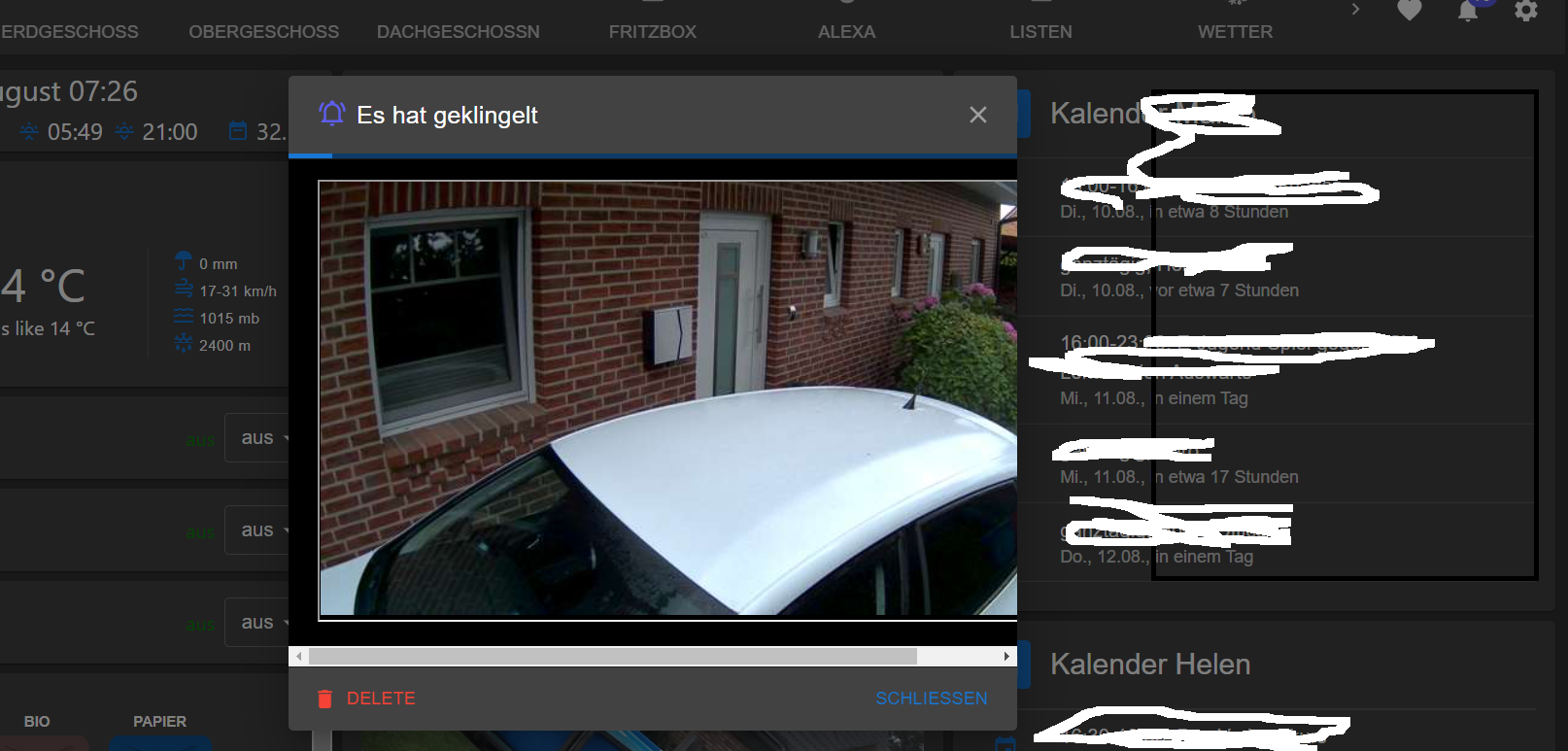
                                      M 1 Antwort Letzte Antwort
                                      0
                                      • C Ceel

                                        @mcu said in jarvis v2.2.0 - just another remarkable vis:

                                        width="90%" height="auto"

                                        dann ist das Bild und das Popup noch kleiner

                                        100% hatte ich auch schon getestet
                                        genauso wie ohne width und height

                                        M Offline
                                        M Offline
                                        MCU
                                        schrieb am zuletzt editiert von
                                        #4832

                                        @ceel Was möchtest du denn erreichen? Das Bild ist doch jetzt da?

                                        NUC i7 64GB mit Proxmox ---- Jarvis Infos Aktualisierungen der Doku auf Instagram verfolgen -> mcuiobroker Instagram
                                        Wenn Euch mein Vorschlag geholfen hat, bitte rechts "^" klicken.

                                        C 1 Antwort Letzte Antwort
                                        0
                                        • M MCU

                                          @ceel Was möchtest du denn erreichen? Das Bild ist doch jetzt da?

                                          C Offline
                                          C Offline
                                          Ceel
                                          schrieb am zuletzt editiert von
                                          #4833

                                          @MCU ja das bild ist da.
                                          nur das Popup Fenster ist zu klein
                                          nicht breit genug

                                          M 1 Antwort Letzte Antwort
                                          0

                                          Hey! Du scheinst an dieser Unterhaltung interessiert zu sein, hast aber noch kein Konto.

                                          Hast du es satt, bei jedem Besuch durch die gleichen Beiträge zu scrollen? Wenn du dich für ein Konto anmeldest, kommst du immer genau dorthin zurück, wo du zuvor warst, und kannst dich über neue Antworten benachrichtigen lassen (entweder per E-Mail oder Push-Benachrichtigung). Du kannst auch Lesezeichen speichern und Beiträge positiv bewerten, um anderen Community-Mitgliedern deine Wertschätzung zu zeigen.

                                          Mit deinem Input könnte dieser Beitrag noch besser werden 💗

                                          Registrieren Anmelden
                                          Antworten
                                          • In einem neuen Thema antworten
                                          Anmelden zum Antworten
                                          • Älteste zuerst
                                          • Neuste zuerst
                                          • Meiste Stimmen


                                          Support us

                                          ioBroker
                                          Community Adapters
                                          Donate

                                          596

                                          Online

                                          32.8k

                                          Benutzer

                                          82.8k

                                          Themen

                                          1.3m

                                          Beiträge
                                          Community
                                          Impressum | Datenschutz-Bestimmungen | Nutzungsbedingungen | Einwilligungseinstellungen
                                          ioBroker Community 2014-2025
                                          logo
                                          • Anmelden

                                          • Du hast noch kein Konto? Registrieren

                                          • Anmelden oder registrieren, um zu suchen
                                          • Erster Beitrag
                                            Letzter Beitrag
                                          0
                                          • Home
                                          • Aktuell
                                          • Tags
                                          • Ungelesen 0
                                          • Kategorien
                                          • Unreplied
                                          • Beliebt
                                          • GitHub
                                          • Docu
                                          • Hilfe