




Wasserzähler (Funk 868) auslesen.
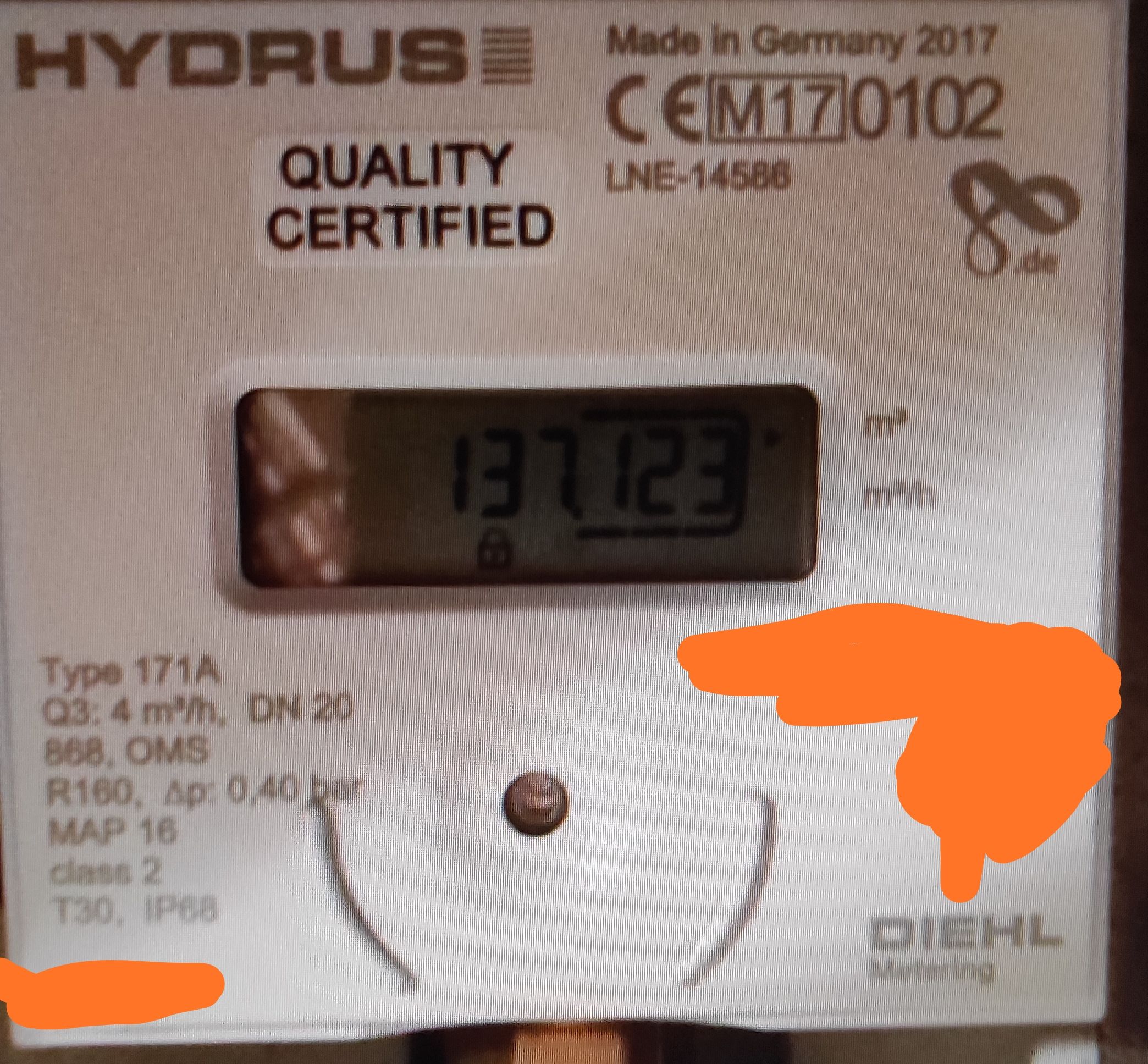
-
Leute, sorry, ich muss nochmal nerven.
System, wieder neu aufgesetzt (endlich wieder auf eine SSD), alles genau nach Anleitung gemacht bzw. meine Settings.
Leider kommen wieder keine Daten. Junge Junge, ist das zickig!Wieso sind keine meters konfiguriert?
pi@raspberrypi:~ $ sudo systemctl stop wmbusmeters.service
pi@raspberrypi:~ $ wmbusmeters auto:t1
Started auto cul on /dev/ttyACM0 listening on t1
No meters configured. Printing id:s of all telegrams heard!
Config ist genau wie beim letzten Mal!
Und ich habe seit dem eine sehr hohe CPU Auslastung.Und Status sieht auch gut aus:
pi@raspberrypi:~ $ systemctl status wmbusmeters ● wmbusmeters.service - "wmbusmeters service" Loaded: loaded (/lib/systemd/system/wmbusmeters.service; enabled; vendor preset: enabled) Active: inactive (dead) since Mon 2021-06-21 12:30:05 CEST; 16min ago Docs: https://github.com/weetmuts/wmbusmeters man:wmbusmeters(1) Process: 541 ExecStartPre=/bin/mkdir -p /var/log/wmbusmeters/meter_readings (code=exited, status=0/SUCCESS) Process: 555 ExecStartPre=/bin/chown -R wmbusmeters:wmbusmeters /var/log/wmbusmeters (code=exited, status=0/SUCCESS) Process: 563 ExecStartPre=/bin/mkdir -p /run/wmbusmeters (code=exited, status=0/SUCCESS) Process: 571 ExecStartPre=/bin/chown -R wmbusmeters:wmbusmeters /run/wmbusmeters (code=exited, status=0/SUCCESS) Process: 576 ExecStart=/usr/sbin/wmbusmetersd /run/wmbusmeters/wmbusmeters.pid (code=exited, status=0/SUCCESS) Main PID: 578 (code=exited, status=0/SUCCESS) Jun 20 21:56:17 raspberrypi systemd[1]: Starting "wmbusmeters service"... Jun 20 21:56:17 raspberrypi wmbusmetersd[576]: (wmbusmeters) started /run/wmbusmeters/wmbusmeters.pid Jun 20 21:56:17 raspberrypi systemd[1]: Started "wmbusmeters service". Jun 21 12:30:05 raspberrypi systemd[1]: Stopping "wmbusmeters service"... Jun 21 12:30:05 raspberrypi systemd[1]: wmbusmeters.service: Succeeded. Jun 21 12:30:05 raspberrypi systemd[1]: Stopped "wmbusmeters service". -
Leute, sorry, ich muss nochmal nerven.
System, wieder neu aufgesetzt (endlich wieder auf eine SSD), alles genau nach Anleitung gemacht bzw. meine Settings.
Leider kommen wieder keine Daten. Junge Junge, ist das zickig!Wieso sind keine meters konfiguriert?
pi@raspberrypi:~ $ sudo systemctl stop wmbusmeters.service
pi@raspberrypi:~ $ wmbusmeters auto:t1
Started auto cul on /dev/ttyACM0 listening on t1
No meters configured. Printing id:s of all telegrams heard!
Config ist genau wie beim letzten Mal!
Und ich habe seit dem eine sehr hohe CPU Auslastung.Und Status sieht auch gut aus:
pi@raspberrypi:~ $ systemctl status wmbusmeters ● wmbusmeters.service - "wmbusmeters service" Loaded: loaded (/lib/systemd/system/wmbusmeters.service; enabled; vendor preset: enabled) Active: inactive (dead) since Mon 2021-06-21 12:30:05 CEST; 16min ago Docs: https://github.com/weetmuts/wmbusmeters man:wmbusmeters(1) Process: 541 ExecStartPre=/bin/mkdir -p /var/log/wmbusmeters/meter_readings (code=exited, status=0/SUCCESS) Process: 555 ExecStartPre=/bin/chown -R wmbusmeters:wmbusmeters /var/log/wmbusmeters (code=exited, status=0/SUCCESS) Process: 563 ExecStartPre=/bin/mkdir -p /run/wmbusmeters (code=exited, status=0/SUCCESS) Process: 571 ExecStartPre=/bin/chown -R wmbusmeters:wmbusmeters /run/wmbusmeters (code=exited, status=0/SUCCESS) Process: 576 ExecStart=/usr/sbin/wmbusmetersd /run/wmbusmeters/wmbusmeters.pid (code=exited, status=0/SUCCESS) Main PID: 578 (code=exited, status=0/SUCCESS) Jun 20 21:56:17 raspberrypi systemd[1]: Starting "wmbusmeters service"... Jun 20 21:56:17 raspberrypi wmbusmetersd[576]: (wmbusmeters) started /run/wmbusmeters/wmbusmeters.pid Jun 20 21:56:17 raspberrypi systemd[1]: Started "wmbusmeters service". Jun 21 12:30:05 raspberrypi systemd[1]: Stopping "wmbusmeters service"... Jun 21 12:30:05 raspberrypi systemd[1]: wmbusmeters.service: Succeeded. Jun 21 12:30:05 raspberrypi systemd[1]: Stopped "wmbusmeters service".@hg6806 wie gehst du vor bei der Installation?
Hier mal mein Weg wenn ich neu installiere.
sudo apt install librtlsdr-dev
git clone https://github.com/weetmuts/wmbusmeters.git
cd wmbusmeters
make && make test
sudo make install
sudo systemctl daemon-reload
Wenn ich die beiden Config´s bereits erstellt hatte (die speichere ich mir lokal nochmal ab) dann muss ich nur noch den Inhalt in diese beiden Dateien kopieren.
sudo nano /etc/wmbusmeters.conf
sudo nano /etc/wmbusmeters.d/meinWasserzaehler
Danach nur noch den Dienst starten und nicht noch
wmbusmeters auto:t1ausführensudo systemctl start wmbusmeters sudo systemctl enable wmbusmeters -
@hg6806 wie gehst du vor bei der Installation?
Hier mal mein Weg wenn ich neu installiere.
sudo apt install librtlsdr-dev
git clone https://github.com/weetmuts/wmbusmeters.git
cd wmbusmeters
make && make test
sudo make install
sudo systemctl daemon-reload
Wenn ich die beiden Config´s bereits erstellt hatte (die speichere ich mir lokal nochmal ab) dann muss ich nur noch den Inhalt in diese beiden Dateien kopieren.
sudo nano /etc/wmbusmeters.conf
sudo nano /etc/wmbusmeters.d/meinWasserzaehler
Danach nur noch den Dienst starten und nicht noch
wmbusmeters auto:t1ausführensudo systemctl start wmbusmeters sudo systemctl enable wmbusmetersKeine Ahnung wo es schon wieder hängt.
Ich hatte wmbusmeters erst deinstalliert über:sudo systemctl stop wmbusmeters cd wmbusmeters sudo make uninstalldann:
pi@raspberrypi:~ $ git clone https://github.com/weetmuts/wmbusmeters.git
fatal: Zielpfad 'wmbusmeters' existiert bereits und ist kein leeres Verzeichnis.
pi@raspberrypi:~ $ sudo git clone https://github.com/weetmuts/wmbusmeters.git
fatal: Zielpfad 'wmbusmeters' existiert bereits und ist kein leeres Verzeichnis.
pi@raspberrypi:~ $ cd wmbusmeters
pi@raspberrypi:~/wmbusmeters $ make && make test
Building 1.3.0-23-g08b9153
Building 1.3.0-23-g08b9153
OK: test internals
OK: Test C1 meters
OK json: Test T1 meters
OK fields: Test T1 meters
OK json: Test S1 meters
OK fields: Test S1 meters
OK: Test meter with unknown driver
OK json: Test naughty non-compliant apator162 meters
OK fields: Test naughty non-compliant apator162 meters
OK json: Test Izars meters
OK: Test listen to all izars
OK: Test aes encrypted telegrams
OK: Test that failed decryption warning only prints once.
OK: Test shell invocation
OK: Test shell in config file
OK: Test that normal meterfiles are written
OK: Test that meterfiles with name-id are written
OK: Test that meterfiles with id are written
OK: Test that meterfiles with timestamps are written
OK: Test that meterfiles with timestamps are written
OK: Test normal config files with C1 meters
OK: Test logfile
OK: Test single meter conf file matches any id
OK: Test listen and print any meter heard in logfile
OK: Test listen and print any meter heard on stdout
OK: Test detection of drivers for all telegrams
OK: Test listen to wildcard * id
OK: Test listen to wildcard suffix 8856* id
OK: Test listen to two comma separted ids
OK: Test listen to three comma separted ids
OK: Test listen with negated ids
OK: Test listen with wrong driver and wildcard
OK: Test conversions of units
OK: Test selected fields
OK: Test oneshot
OK: Test wrong keys
OK: Test config4 with added conversions
OK: Test that listen to t1+c1 works with meters transmitting using t1+c1
OK: Test that listen to t1+c1 works with meters transmitting using t1+c1
OK: Test that setting supercom587 to c1 fails
OK: Test additional json from cmdline
OK: Test additional shell envs from cmdline
OK: Test additional json from wmbusmeters.conf and from meter file
OK: Test rtlwmbus starting background script to produce telegrams
OK: Reading binary telegram from stdin
OK: Reading binary telegram from file
OK: Reading rtlwmbus formatted telegrams from stdin
OK: Reading rtlwmbus formatted telegrams from file
OK: Reading rtl433 formatted telegrams from stdin
OK: Reading rtl433 formatted telegrams from file
OK: Test ok serial rawtty telegram on stdin
OK: Test bad serial rawtty telegram with interspersed noise, on stdin
OK: Test duplicates are ignored
OK: Test duplicates are left alone
OK: Test match on dll id
OK: Test match on tpl id
OK: Test log timestamps
Slower tests...
OK: reading all stdin before closing down
RUNNING Test alarms ...
STDERR---------------------------------
[ALARM DeviceInactivity] 4 seconds of inactivity resetting simulations/simulatio                                                                                                             n_alarm.txt simulation (timeout 4s expected mon-sun(00-23) now 2021-06-22 22:17)
(wmbus) successfully reset wmbus device
STDOUT---------------------------------
TMP/OUTPUT-----------------------------
METER =={"media":"cold water","meter":"multical21","name":"Water","id":"76348799                                                                                                             ","total_m3":6.408,"target_m3":6.408,"max_flow_m3h":0,"flow_temperature_c":127,"                                                                                                             external_temperature_c":19,"current_status":"DRY","time_dry":"22-31 days","time_                                                                                                             reversed":"","time_leaking":"","time_bursting":"","timestamp":"2021-06-22T20:17:                                                                                                             46Z"}==
METER =={"media":"cold water","meter":"multical21","name":"Water","id":"76348799                                                                                                             ","total_m3":6.408,"target_m3":6.408,"max_flow_m3h":0,"flow_temperature_c":127,"                                                                                                             external_temperature_c":19,"current_status":"DRY","time_dry":"22-31 days","time_                                                                                                             reversed":"","time_leaking":"","time_bursting":"","timestamp":"2021-06-22T20:17:                                                                                                             52Z"}==
TMP/ALARM------------------------------
ALARM_SHELL DeviceInactivity [ALARM DeviceInactivity] 4 seconds of inactivity re                                                                                                             setting simulations/simulation_alarm.txt simulation (timeout 4s expected mon-sun                                                                                                             (00-23) now 2021-06-22 22:17)
---------------------------------------
OK: Test alarms
All tests ok!
pi@raspberrypi:~/wmbusmeters $ sudo nano /etc/wmbusmeters.conf
pi@raspberrypi:~/wmbusmeters $ sudo nano /etc/wmbusmeters.d/meinWasserzaehler
pi@raspberrypi:~/wmbusmeters $ cd /etc/wmbusmeters.d
-bash: cd: /etc/wmbusmeters.d: Datei oder Verzeichnis nicht gefunden
pi@raspberrypi:~/wmbusmeters $ cd
pi@raspberrypi:~ $ cd etc
-bash: cd: etc: Datei oder Verzeichnis nicht gefunden
pi@raspberrypi:~ $ cd 7etc
-bash: cd: 7etc: Datei oder Verzeichnis nicht gefunden
pi@raspberrypi:~ $ cd /etc
pi@raspberrypi:/etc $ makedir wmbusmeters.d
-bash: makedir: Kommando nicht gefunden.
pi@raspberrypi:/etc $ mkdir wmbusmeters.d
mkdir: das Verzeichnis „wmbusmeters.d“ kann nicht angelegt werden: Keine Berecht                                                                                                             igung
pi@raspberrypi:/etc $ sudo mkdir wmbusmeters.d
pi@raspberrypi:/etc $ sudo nano /etc/wmbusmeters.d/meinWasserzaehler
pi@raspberrypi:/etc $ sudo systemctl start wmbusmeters
Warning: The unit file, source configuration file or drop-ins of wmbusmeters.ser                                                                                                             vice changed on disk. Run 'systemctl daemon-reload' to reload units.
Job for wmbusmeters.service failed because the control process exited with error                                                                                                              code.
See "systemctl status wmbusmeters.service" and "journalctl -xe" for details.
pi@raspberrypi:/etc $ systemctl status wmbusmeters.service
Warning: The unit file, source configuration file or drop-ins of wmbusmeters.service changed on disk. Run 'systemctl daemon-reload' to reload units.
● wmbusmeters.service - "wmbusmeters service"
   Loaded: loaded (/lib/systemd/system/wmbusmeters.service; enabled; vendor preset: enabled)
   Active: failed (Result: exit-code) since Tue 2021-06-22 22:27:35 CEST; 30s ago
     Docs: https://github.com/weetmuts/wmbusmeters
           man:wmbusmeters(1)
  Process: 27860 ExecStartPre=/bin/mkdir -p /var/log/wmbusmeters/meter_readings (code=exited, status=217/USER)
  Process: 27861 ExecStartPre=/bin/chown -R wmbusmeters:wmbusmeters /var/log/wmbusmeters (code=exited, status=217/USER)

Jun 22 22:27:34 raspberrypi systemd[1]: wmbusmeters.service: Failed with result 'exit-code'.
Jun 22 22:27:34 raspberrypi systemd[1]: Failed to start "wmbusmeters service".
Jun 22 22:27:35 raspberrypi systemd[1]: wmbusmeters.service: Service RestartSec=1s expired, scheduling restart.
Jun 22 22:27:35 raspberrypi systemd[1]: wmbusmeters.service: Scheduled restart job, restart counter is at 3.
Jun 22 22:27:35 raspberrypi systemd[1]: Stopped "wmbusmeters service".
Jun 22 22:27:35 raspberrypi systemd[1]: wmbusmeters.service: Start request repeated too quickly.
Jun 22 22:27:35 raspberrypi systemd[1]: wmbusmeters.service: Failed with result 'exit-code'.
Jun 22 22:27:35 raspberrypi systemd[1]: Failed to start "wmbusmeters service".
pi@raspberrypi:/etc $ sudo systemctl daemon-reload
pi@raspberrypi:/etc $ systemctl status wmbusmeters.service
● wmbusmeters.service
   Loaded: not-found (Reason: Unit wmbusmeters.service not found.)
   Active: failed (Result: exit-code) since Tue 2021-06-22 22:27:35 CEST; 1min 13s ago

Jun 22 22:27:34 raspberrypi systemd[1]: wmbusmeters.service: Failed with result 'exit-code'.
Jun 22 22:27:34 raspberrypi systemd[1]: Failed to start "wmbusmeters service".
Jun 22 22:27:35 raspberrypi systemd[1]: wmbusmeters.service: Service RestartSec=1s expired, scheduling restart.
Jun 22 22:27:35 raspberrypi systemd[1]: wmbusmeters.service: Scheduled restart job, restart counter is at 3.
Jun 22 22:27:35 raspberrypi systemd[1]: Stopped "wmbusmeters service".
Jun 22 22:27:35 raspberrypi systemd[1]: wmbusmeters.service: Start request repeated too quickly.
Jun 22 22:27:35 raspberrypi systemd[1]: wmbusmeters.service: Failed with result 'exit-code'.
Jun 22 22:27:35 raspberrypi systemd[1]: Failed to start "wmbusmeters service".
pi@raspberrypi:/etc $ sudo systemctl start wmbusmeters
Failed to start wmbusmeters.service: Unit wmbusmeters.service not found.
pi@raspberrypi:/etc $
Irgendwie fehlt der service.
-
Keine Ahnung wo es schon wieder hängt.
Ich hatte wmbusmeters erst deinstalliert über:sudo systemctl stop wmbusmeters cd wmbusmeters sudo make uninstalldann:
pi@raspberrypi:~ $ git clone https://github.com/weetmuts/wmbusmeters.git
fatal: Zielpfad 'wmbusmeters' existiert bereits und ist kein leeres Verzeichnis.
pi@raspberrypi:~ $ sudo git clone https://github.com/weetmuts/wmbusmeters.git
fatal: Zielpfad 'wmbusmeters' existiert bereits und ist kein leeres Verzeichnis.
pi@raspberrypi:~ $ cd wmbusmeters
pi@raspberrypi:~/wmbusmeters $ make && make test
Building 1.3.0-23-g08b9153
Building 1.3.0-23-g08b9153
OK: test internals
OK: Test C1 meters
OK json: Test T1 meters
OK fields: Test T1 meters
OK json: Test S1 meters
OK fields: Test S1 meters
OK: Test meter with unknown driver
OK json: Test naughty non-compliant apator162 meters
OK fields: Test naughty non-compliant apator162 meters
OK json: Test Izars meters
OK: Test listen to all izars
OK: Test aes encrypted telegrams
OK: Test that failed decryption warning only prints once.
OK: Test shell invocation
OK: Test shell in config file
OK: Test that normal meterfiles are written
OK: Test that meterfiles with name-id are written
OK: Test that meterfiles with id are written
OK: Test that meterfiles with timestamps are written
OK: Test that meterfiles with timestamps are written
OK: Test normal config files with C1 meters
OK: Test logfile
OK: Test single meter conf file matches any id
OK: Test listen and print any meter heard in logfile
OK: Test listen and print any meter heard on stdout
OK: Test detection of drivers for all telegrams
OK: Test listen to wildcard * id
OK: Test listen to wildcard suffix 8856* id
OK: Test listen to two comma separted ids
OK: Test listen to three comma separted ids
OK: Test listen with negated ids
OK: Test listen with wrong driver and wildcard
OK: Test conversions of units
OK: Test selected fields
OK: Test oneshot
OK: Test wrong keys
OK: Test config4 with added conversions
OK: Test that listen to t1+c1 works with meters transmitting using t1+c1
OK: Test that listen to t1+c1 works with meters transmitting using t1+c1
OK: Test that setting supercom587 to c1 fails
OK: Test additional json from cmdline
OK: Test additional shell envs from cmdline
OK: Test additional json from wmbusmeters.conf and from meter file
OK: Test rtlwmbus starting background script to produce telegrams
OK: Reading binary telegram from stdin
OK: Reading binary telegram from file
OK: Reading rtlwmbus formatted telegrams from stdin
OK: Reading rtlwmbus formatted telegrams from file
OK: Reading rtl433 formatted telegrams from stdin
OK: Reading rtl433 formatted telegrams from file
OK: Test ok serial rawtty telegram on stdin
OK: Test bad serial rawtty telegram with interspersed noise, on stdin
OK: Test duplicates are ignored
OK: Test duplicates are left alone
OK: Test match on dll id
OK: Test match on tpl id
OK: Test log timestamps
Slower tests...
OK: reading all stdin before closing down
RUNNING Test alarms ...
STDERR---------------------------------
[ALARM DeviceInactivity] 4 seconds of inactivity resetting simulations/simulatio                                                                                                             n_alarm.txt simulation (timeout 4s expected mon-sun(00-23) now 2021-06-22 22:17)
(wmbus) successfully reset wmbus device
STDOUT---------------------------------
TMP/OUTPUT-----------------------------
METER =={"media":"cold water","meter":"multical21","name":"Water","id":"76348799                                                                                                             ","total_m3":6.408,"target_m3":6.408,"max_flow_m3h":0,"flow_temperature_c":127,"                                                                                                             external_temperature_c":19,"current_status":"DRY","time_dry":"22-31 days","time_                                                                                                             reversed":"","time_leaking":"","time_bursting":"","timestamp":"2021-06-22T20:17:                                                                                                             46Z"}==
METER =={"media":"cold water","meter":"multical21","name":"Water","id":"76348799                                                                                                             ","total_m3":6.408,"target_m3":6.408,"max_flow_m3h":0,"flow_temperature_c":127,"                                                                                                             external_temperature_c":19,"current_status":"DRY","time_dry":"22-31 days","time_                                                                                                             reversed":"","time_leaking":"","time_bursting":"","timestamp":"2021-06-22T20:17:                                                                                                             52Z"}==
TMP/ALARM------------------------------
ALARM_SHELL DeviceInactivity [ALARM DeviceInactivity] 4 seconds of inactivity re                                                                                                             setting simulations/simulation_alarm.txt simulation (timeout 4s expected mon-sun                                                                                                             (00-23) now 2021-06-22 22:17)
---------------------------------------
OK: Test alarms
All tests ok!
pi@raspberrypi:~/wmbusmeters $ sudo nano /etc/wmbusmeters.conf
pi@raspberrypi:~/wmbusmeters $ sudo nano /etc/wmbusmeters.d/meinWasserzaehler
pi@raspberrypi:~/wmbusmeters $ cd /etc/wmbusmeters.d
-bash: cd: /etc/wmbusmeters.d: Datei oder Verzeichnis nicht gefunden
pi@raspberrypi:~/wmbusmeters $ cd
pi@raspberrypi:~ $ cd etc
-bash: cd: etc: Datei oder Verzeichnis nicht gefunden
pi@raspberrypi:~ $ cd 7etc
-bash: cd: 7etc: Datei oder Verzeichnis nicht gefunden
pi@raspberrypi:~ $ cd /etc
pi@raspberrypi:/etc $ makedir wmbusmeters.d
-bash: makedir: Kommando nicht gefunden.
pi@raspberrypi:/etc $ mkdir wmbusmeters.d
mkdir: das Verzeichnis „wmbusmeters.d“ kann nicht angelegt werden: Keine Berecht                                                                                                             igung
pi@raspberrypi:/etc $ sudo mkdir wmbusmeters.d
pi@raspberrypi:/etc $ sudo nano /etc/wmbusmeters.d/meinWasserzaehler
pi@raspberrypi:/etc $ sudo systemctl start wmbusmeters
Warning: The unit file, source configuration file or drop-ins of wmbusmeters.ser                                                                                                             vice changed on disk. Run 'systemctl daemon-reload' to reload units.
Job for wmbusmeters.service failed because the control process exited with error                                                                                                              code.
See "systemctl status wmbusmeters.service" and "journalctl -xe" for details.
pi@raspberrypi:/etc $ systemctl status wmbusmeters.service
Warning: The unit file, source configuration file or drop-ins of wmbusmeters.service changed on disk. Run 'systemctl daemon-reload' to reload units.
● wmbusmeters.service - "wmbusmeters service"
   Loaded: loaded (/lib/systemd/system/wmbusmeters.service; enabled; vendor preset: enabled)
   Active: failed (Result: exit-code) since Tue 2021-06-22 22:27:35 CEST; 30s ago
     Docs: https://github.com/weetmuts/wmbusmeters
           man:wmbusmeters(1)
  Process: 27860 ExecStartPre=/bin/mkdir -p /var/log/wmbusmeters/meter_readings (code=exited, status=217/USER)
  Process: 27861 ExecStartPre=/bin/chown -R wmbusmeters:wmbusmeters /var/log/wmbusmeters (code=exited, status=217/USER)

Jun 22 22:27:34 raspberrypi systemd[1]: wmbusmeters.service: Failed with result 'exit-code'.
Jun 22 22:27:34 raspberrypi systemd[1]: Failed to start "wmbusmeters service".
Jun 22 22:27:35 raspberrypi systemd[1]: wmbusmeters.service: Service RestartSec=1s expired, scheduling restart.
Jun 22 22:27:35 raspberrypi systemd[1]: wmbusmeters.service: Scheduled restart job, restart counter is at 3.
Jun 22 22:27:35 raspberrypi systemd[1]: Stopped "wmbusmeters service".
Jun 22 22:27:35 raspberrypi systemd[1]: wmbusmeters.service: Start request repeated too quickly.
Jun 22 22:27:35 raspberrypi systemd[1]: wmbusmeters.service: Failed with result 'exit-code'.
Jun 22 22:27:35 raspberrypi systemd[1]: Failed to start "wmbusmeters service".
pi@raspberrypi:/etc $ sudo systemctl daemon-reload
pi@raspberrypi:/etc $ systemctl status wmbusmeters.service
● wmbusmeters.service
   Loaded: not-found (Reason: Unit wmbusmeters.service not found.)
   Active: failed (Result: exit-code) since Tue 2021-06-22 22:27:35 CEST; 1min 13s ago

Jun 22 22:27:34 raspberrypi systemd[1]: wmbusmeters.service: Failed with result 'exit-code'.
Jun 22 22:27:34 raspberrypi systemd[1]: Failed to start "wmbusmeters service".
Jun 22 22:27:35 raspberrypi systemd[1]: wmbusmeters.service: Service RestartSec=1s expired, scheduling restart.
Jun 22 22:27:35 raspberrypi systemd[1]: wmbusmeters.service: Scheduled restart job, restart counter is at 3.
Jun 22 22:27:35 raspberrypi systemd[1]: Stopped "wmbusmeters service".
Jun 22 22:27:35 raspberrypi systemd[1]: wmbusmeters.service: Start request repeated too quickly.
Jun 22 22:27:35 raspberrypi systemd[1]: wmbusmeters.service: Failed with result 'exit-code'.
Jun 22 22:27:35 raspberrypi systemd[1]: Failed to start "wmbusmeters service".
pi@raspberrypi:/etc $ sudo systemctl start wmbusmeters
Failed to start wmbusmeters.service: Unit wmbusmeters.service not found.
pi@raspberrypi:/etc $
Irgendwie fehlt der service.
@hg6806 ja, du warst zu schnell, du hast vergessen es zu installieren.
Nachmake && make testfehlt der Befehlsudo make installDa aber wohl noch was im Verzeichnis liegt, würde ich die Daten nochmal holen.
Also so:
sudo systemctl stop wmbusmeters
cd wmbusmeters
git pull https://github.com/weetmuts/wmbusmeters.git
sudo make clean
sudo make install
sudo systemctl daemon-reload
danach legst deine configs an und startest den Dienst, wo wie du es eh vorgehabt hattest.
-
@hg6806 ja, du warst zu schnell, du hast vergessen es zu installieren.
Nachmake && make testfehlt der Befehlsudo make installDa aber wohl noch was im Verzeichnis liegt, würde ich die Daten nochmal holen.
Also so:
sudo systemctl stop wmbusmeters
cd wmbusmeters
git pull https://github.com/weetmuts/wmbusmeters.git
sudo make clean
sudo make install
sudo systemctl daemon-reload
danach legst deine configs an und startest den Dienst, wo wie du es eh vorgehabt hattest.
@michi_pi
Danke, habe ich so gemacht, wirft jedoch noch immer den Fehler aus:pi@raspberrypi:/etc $ sudo systemctl stop wmbusmeters pi@raspberrypi:/etc $ cd wmbusmeters -bash: cd: wmbusmeters: Datei oder Verzeichnis nicht gefunden pi@raspberrypi:/etc $ cd pi@raspberrypi:~ $ cd wmbusmeters pi@raspberrypi:~/wmbusmeters $ git pull https://github.com/weetmuts/wmbusmeters.git Von https://github.com/weetmuts/wmbusmeters * branch HEAD -> FETCH_HEAD Bereits aktuell. pi@raspberrypi:~/wmbusmeters $ sudo make clean Building 1.3.0-23-g08b9153 rm -rf build/* build_arm/* build_debug/* build_arm_debug/* *~ pi@raspberrypi:~/wmbusmeters $ sudo make install Building 1.3.0-23-g08b9153 g++ -Os -fPIC -std=c++11 -Wall -Werror=format-security -Ibuild src/aes.cc -c -E > build/aes.o.src g++ -Os -fPIC -std=c++11 -Wall -Werror=format-security -Ibuild src/aes.cc -MMD -c -o build/aes.o g++ -Os -fPIC -std=c++11 -Wall -Werror=format-sec ....................... pi@raspberrypi:~/wmbusmeters $ sudo systemctl daemon-reload pi@raspberrypi:~/wmbusmeters $ sudo nano /etc/wmbusmeters.d/meinWasserzaehler pi@raspberrypi:~/wmbusmeters $ sudo nano /etc/wmbusmeters.conf pi@raspberrypi:~/wmbusmeters $ sudo systemctl start wmbusmeters pi@raspberrypi:~/wmbusmeters $ sudo systemctl enable wmbusmeters pi@raspberrypi:~/wmbusmeters $ systemctl status wmbusmeters.service ● wmbusmeters.service - "wmbusmeters service" Loaded: loaded (/lib/systemd/system/wmbusmeters.service; enabled; vendor preset: enabled) Active: failed (Result: protocol) since Wed 2021-06-23 14:14:04 CEST; 33s ago Docs: https://github.com/weetmuts/wmbusmeters man:wmbusmeters(1) Jun 23 14:14:04 raspberrypi systemd[1]: wmbusmeters.service: Service RestartSec=1s expired, scheduling restart. Jun 23 14:14:04 raspberrypi systemd[1]: wmbusmeters.service: Scheduled restart job, restart counter is at 3. Jun 23 14:14:04 raspberrypi systemd[1]: Stopped "wmbusmeters service". Jun 23 14:14:04 raspberrypi systemd[1]: wmbusmeters.service: Start request repeated too quickly. Jun 23 14:14:04 raspberrypi systemd[1]: wmbusmeters.service: Failed with result 'protocol'. Jun 23 14:14:04 raspberrypi systemd[1]: Failed to start "wmbusmeters service". pi@raspberrypi:~/wmbusmeters $ -
@michi_pi
Danke, habe ich so gemacht, wirft jedoch noch immer den Fehler aus:pi@raspberrypi:/etc $ sudo systemctl stop wmbusmeters pi@raspberrypi:/etc $ cd wmbusmeters -bash: cd: wmbusmeters: Datei oder Verzeichnis nicht gefunden pi@raspberrypi:/etc $ cd pi@raspberrypi:~ $ cd wmbusmeters pi@raspberrypi:~/wmbusmeters $ git pull https://github.com/weetmuts/wmbusmeters.git Von https://github.com/weetmuts/wmbusmeters * branch HEAD -> FETCH_HEAD Bereits aktuell. pi@raspberrypi:~/wmbusmeters $ sudo make clean Building 1.3.0-23-g08b9153 rm -rf build/* build_arm/* build_debug/* build_arm_debug/* *~ pi@raspberrypi:~/wmbusmeters $ sudo make install Building 1.3.0-23-g08b9153 g++ -Os -fPIC -std=c++11 -Wall -Werror=format-security -Ibuild src/aes.cc -c -E > build/aes.o.src g++ -Os -fPIC -std=c++11 -Wall -Werror=format-security -Ibuild src/aes.cc -MMD -c -o build/aes.o g++ -Os -fPIC -std=c++11 -Wall -Werror=format-sec ....................... pi@raspberrypi:~/wmbusmeters $ sudo systemctl daemon-reload pi@raspberrypi:~/wmbusmeters $ sudo nano /etc/wmbusmeters.d/meinWasserzaehler pi@raspberrypi:~/wmbusmeters $ sudo nano /etc/wmbusmeters.conf pi@raspberrypi:~/wmbusmeters $ sudo systemctl start wmbusmeters pi@raspberrypi:~/wmbusmeters $ sudo systemctl enable wmbusmeters pi@raspberrypi:~/wmbusmeters $ systemctl status wmbusmeters.service ● wmbusmeters.service - "wmbusmeters service" Loaded: loaded (/lib/systemd/system/wmbusmeters.service; enabled; vendor preset: enabled) Active: failed (Result: protocol) since Wed 2021-06-23 14:14:04 CEST; 33s ago Docs: https://github.com/weetmuts/wmbusmeters man:wmbusmeters(1) Jun 23 14:14:04 raspberrypi systemd[1]: wmbusmeters.service: Service RestartSec=1s expired, scheduling restart. Jun 23 14:14:04 raspberrypi systemd[1]: wmbusmeters.service: Scheduled restart job, restart counter is at 3. Jun 23 14:14:04 raspberrypi systemd[1]: Stopped "wmbusmeters service". Jun 23 14:14:04 raspberrypi systemd[1]: wmbusmeters.service: Start request repeated too quickly. Jun 23 14:14:04 raspberrypi systemd[1]: wmbusmeters.service: Failed with result 'protocol'. Jun 23 14:14:04 raspberrypi systemd[1]: Failed to start "wmbusmeters service". pi@raspberrypi:~/wmbusmeters $ -
@michi_pi
Ja, gerade mal Reboot gemacht.
Danach noch immer das Problem:pi@raspberrypi:~ $ sudo systemctl start wmbusmeters Job for wmbusmeters.service failed because the service did not take the steps required by its unit configuration. See "systemctl status wmbusmeters.service" and "journalctl -xe" for details. pi@raspberrypi:~ $ sudo systemctl enable wmbusmeters pi@raspberrypi:~ $ pi@raspberrypi:~ $ systemctl status wmbusmeters.service ● wmbusmeters.service - "wmbusmeters service" Loaded: loaded (/lib/systemd/system/wmbusmeters.service; enabled; vendor preset: enabled) Active: failed (Result: exit-code) since Wed 2021-06-23 15:17:55 CEST; 15s ago Docs: https://github.com/weetmuts/wmbusmeters man:wmbusmeters(1) Main PID: 6031 (code=exited, status=1/FAILURE) Jun 23 15:17:55 raspberrypi systemd[1]: wmbusmeters.service: Service RestartSec=1s expired, scheduling restart. Jun 23 15:17:55 raspberrypi systemd[1]: wmbusmeters.service: Scheduled restart job, restart counter is at 3. Jun 23 15:17:55 raspberrypi systemd[1]: Stopped "wmbusmeters service". Jun 23 15:17:55 raspberrypi systemd[1]: wmbusmeters.service: Start request repeated too quickly. Jun 23 15:17:55 raspberrypi systemd[1]: wmbusmeters.service: Failed with result 'exit-code'. Jun 23 15:17:55 raspberrypi systemd[1]: Failed to start "wmbusmeters service". pi@raspberrypi:~ $ systemctl status wmbusmeters ● wmbusmeters.service - "wmbusmeters service" Loaded: loaded (/lib/systemd/system/wmbusmeters.service; enabled; vendor preset: enabled) Active: failed (Result: exit-code) since Wed 2021-06-23 15:17:55 CEST; 25s ago Docs: https://github.com/weetmuts/wmbusmeters man:wmbusmeters(1) Main PID: 6031 (code=exited, status=1/FAILURE) Jun 23 15:17:55 raspberrypi systemd[1]: wmbusmeters.service: Service RestartSec=1s expired, scheduling restart. Jun 23 15:17:55 raspberrypi systemd[1]: wmbusmeters.service: Scheduled restart job, restart counter is at 3. Jun 23 15:17:55 raspberrypi systemd[1]: Stopped "wmbusmeters service". Jun 23 15:17:55 raspberrypi systemd[1]: wmbusmeters.service: Start request repeated too quickly. Jun 23 15:17:55 raspberrypi systemd[1]: wmbusmeters.service: Failed with result 'exit-code'. Jun 23 15:17:55 raspberrypi systemd[1]: Failed to start "wmbusmeters service". pi@raspberrypi:~ $An welcher Stelle der Installation sollte man generell ein Reboot machen?
-
@michi_pi
Ja, gerade mal Reboot gemacht.
Danach noch immer das Problem:pi@raspberrypi:~ $ sudo systemctl start wmbusmeters Job for wmbusmeters.service failed because the service did not take the steps required by its unit configuration. See "systemctl status wmbusmeters.service" and "journalctl -xe" for details. pi@raspberrypi:~ $ sudo systemctl enable wmbusmeters pi@raspberrypi:~ $ pi@raspberrypi:~ $ systemctl status wmbusmeters.service ● wmbusmeters.service - "wmbusmeters service" Loaded: loaded (/lib/systemd/system/wmbusmeters.service; enabled; vendor preset: enabled) Active: failed (Result: exit-code) since Wed 2021-06-23 15:17:55 CEST; 15s ago Docs: https://github.com/weetmuts/wmbusmeters man:wmbusmeters(1) Main PID: 6031 (code=exited, status=1/FAILURE) Jun 23 15:17:55 raspberrypi systemd[1]: wmbusmeters.service: Service RestartSec=1s expired, scheduling restart. Jun 23 15:17:55 raspberrypi systemd[1]: wmbusmeters.service: Scheduled restart job, restart counter is at 3. Jun 23 15:17:55 raspberrypi systemd[1]: Stopped "wmbusmeters service". Jun 23 15:17:55 raspberrypi systemd[1]: wmbusmeters.service: Start request repeated too quickly. Jun 23 15:17:55 raspberrypi systemd[1]: wmbusmeters.service: Failed with result 'exit-code'. Jun 23 15:17:55 raspberrypi systemd[1]: Failed to start "wmbusmeters service". pi@raspberrypi:~ $ systemctl status wmbusmeters ● wmbusmeters.service - "wmbusmeters service" Loaded: loaded (/lib/systemd/system/wmbusmeters.service; enabled; vendor preset: enabled) Active: failed (Result: exit-code) since Wed 2021-06-23 15:17:55 CEST; 25s ago Docs: https://github.com/weetmuts/wmbusmeters man:wmbusmeters(1) Main PID: 6031 (code=exited, status=1/FAILURE) Jun 23 15:17:55 raspberrypi systemd[1]: wmbusmeters.service: Service RestartSec=1s expired, scheduling restart. Jun 23 15:17:55 raspberrypi systemd[1]: wmbusmeters.service: Scheduled restart job, restart counter is at 3. Jun 23 15:17:55 raspberrypi systemd[1]: Stopped "wmbusmeters service". Jun 23 15:17:55 raspberrypi systemd[1]: wmbusmeters.service: Start request repeated too quickly. Jun 23 15:17:55 raspberrypi systemd[1]: wmbusmeters.service: Failed with result 'exit-code'. Jun 23 15:17:55 raspberrypi systemd[1]: Failed to start "wmbusmeters service". pi@raspberrypi:~ $An welcher Stelle der Installation sollte man generell ein Reboot machen?
-
@michi_pi sagte in Wasserzähler (Funk 868) auslesen.:
tail -f /var/log/wmbusmeters/wmbusmeters.log
pi@raspberrypi:~ $ tail -f /var/log/wmbusmeters/wmbusmeters.log tail: '/var/log/wmbusmeters/wmbusmeters.log' kann nicht zum Lesen geöffnet werden: Datei oder Verzeichnis nicht gefunden tail: Keine Dateien mehr übrig -
Also irgendwie fehlt noch immer der Service:
pi@raspberrypi:~/wmbusmeters $ systemctl status wmbusmeters Unit wmbusmeters.service could not be found. pi@raspberrypi:~/wmbusmeters $ sudo make install Building 1.3.0-23-g08b9153 binaries: installed /usr/bin/wmbusmeters and /usr/sbin/wmbusmetersd man page: installed /usr/share/man/man1/wmbusmeters.1.gz group: added wmbusmeters user: added wmbusmeters user: added wmbusmeters to dialout group user: added wmbusmeters to uucp group user: added wmbusmeters to plugdev group log: created /var/log/wmbusmeters/meter_readings logrotate: created /etc/logrotate.d/wmbusmeters conf file: created /etc/wmbusmeters.conf conf dir: created /etc/wmbusmeters.d diff: /root/old.wmbusmeters.service.backup: Datei oder Verzeichnis nicht gefunde n systemd: updated /lib/systemd/system/wmbusmeters.service You need to reload systemd configuration! Please do: sudo systemctl daemon-reload pi@raspberrypi:~/wmbusmeters $ sudo systemctl stop wmbusmeters Failed to stop wmbusmeters.service: Unit wmbusmeters.service not loaded. pi@raspberrypi:~/wmbusmeters $ git pull https://github.com/weetmuts/wmbusmeters. git Von https://github.com/weetmuts/wmbusmeters * branch HEAD -> FETCH_HEAD Bereits aktuell. pi@raspberrypi:~/wmbusmeters $ sudo make clean Building 1.3.0-23-g08b9153 rm -rf build/* build_arm/* build_debug/* build_arm_debug/* *~ pi@raspberrypi:~/wmbusmeters $ sudo make install Building 1.3.0-23-g08b9153 g++ -Os -fPIC -std=c++11 -Wall -Werror=format-security -Ibuild src/aes.cc -c -E > build/aes.o.src g++ -Os -fPIC -std=c++11 -Wall -Werror=format-security -Ibuild src/aes.cc -MMD - c -o build/aes.o g++ -Os -fPIC -std=c++11 -Wall -Werror=format-security -Ibuild src/aescmac.cc -c -E > build/aescmac.o.src g++ -Os -fPIC -std=c++11 -Wall -Werror=format-security -Ibuild src/aescmac.cc -M MD -c -o build/aescmac.o g++ -Os -fPIC -std=c++11 -Wall -Werror=format-security -Ibuild src/bus.cc -c -E > build/bus.o.src g++ -Os -fPIC -std=c++11 -Wall -Werror=format-security -Ibuild src/bus.cc -MMD - c -o build/bus.o ....... g++ -o build/wmbusmeters build/aes.o build/aescmac.o build/bus.o build/cmdline.o build/config.o build/dvparser.o build/mbus_rawtty.o build/meters.o build/manufacturer_specificities.o build/printer.o build/rtlsdr.o build/serial.o build/shell.o build/sha256.o build/threads.o build/util.o build/units.o build/wmbus.o build/meter_auto.o build/meter_unknown.o build/meter_amiplus.o build/wmbus_amb8465.o build/wmbus_im871a.o build/wmbus_cul.o build/wmbus_rtlwmbus.o build/wmbus_rtl433.o build/wmbus_simulator.o build/wmbus_rawtty.o build/wmbus_rc1180.o build/wmbus_utils.o build/meter_apator08.o build/meter_apator162.o build/meter_cma12w.o build/meter_compact5.o build/meter_dme_07.o build/meter_ebzwmbe.o build/meter_ehzp.o build/meter_esyswm.o build/meter_elf.o build/meter_em24.o build/meter_emerlin868.o build/meter_ev200.o build/meter_evo868.o build/meter_eurisii.o build/meter_fhkvdataiii.o build/meter_fhkvdataiv.o build/meter_flowiq2200.o build/meter_hydrus.o build/meter_hydrocalm3.o build/meter_hydrodigit.o build/meter_ei6500.o build/meter_iperl.o build/meter_izar.o build/meter_izar3.o build/meter_lansendw.o build/meter_lansensm.o build/meter_lansenth.o build/meter_lansenpu.o build/meter_lse_07_17.o build/meter_mkradio3.o build/meter_mkradio4.o build/meter_multical21.o build/meter_multical302.o build/meter_multical403.o build/meter_multical603.o build/meter_multical803.o build/meter_omnipower.o build/meter_piigth.o build/meter_q400.o build/meter_qcaloric.o build/meter_rfmamb.o build/meter_rfmtx1.o build/meter_sharky.o build/meter_supercom587.o build/meter_sontex868.o build/meter_topaseskr.o build/meter_tsd2.o build/meter_ultrimis.o build/meter_vario451.o build/meter_waterstarm.o build/meter_whe46x.o build/meter_whe5x.o build/meter_sensostar.o build/meter_gransystems_ccx01.o build/meter_lse_08.o build/meter_weh_07.o build/main.o -lrtlsdr -lusb-1.0 -lpthread binaries: installed /usr/bin/wmbusmeters and /usr/sbin/wmbusmetersd man page: installed /usr/share/man/man1/wmbusmeters.1.gz group: wmbusmeters unmodified user: wmbusmeters unmodified user: wmbusmeters already added to dialout user: wmbusmeters already added to uucp user: wmbusmeters already added to plugdev conf file: /etc/logrotate.d/wmbusmeters unchanged conf file: /etc/wmbusmeters.conf unchanged conf dir: /etc/wmbusmeters.d unchanged systemd: backing up /lib/systemd/system/wmbusmeters.service to here: /root/old.wmbusmeters.service.backup systemd: no changes to /lib/systemd/system/wmbusmeters.service pi@raspberrypi:~/wmbusmeters $ sudo systemctl daemon-reload pi@raspberrypi:~/wmbusmeters $ sudo nano /etc/wmbusmeters.conf pi@raspberrypi:~/wmbusmeters $ sudo nano /etc/wmbusmeters.d/meinWasserzaehler pi@raspberrypi:~/wmbusmeters $ sudo systemctl start wmbusmeters pi@raspberrypi:~/wmbusmeters $ sudo systemctl enable wmbusmeters pi@raspberrypi:~/wmbusmeters $ systemctl status wmbusmeters.service ● wmbusmeters.service - "wmbusmeters service" Loaded: loaded (/lib/systemd/system/wmbusmeters.service; enabled; vendor preset: enabled) Active: failed (Result: exit-code) since Thu 2021-06-24 17:34:32 CEST; 58s ago Docs: https://github.com/weetmuts/wmbusmeters man:wmbusmeters(1) Main PID: 1110 (code=exited, status=1/FAILURE) Jun 24 17:34:32 raspberrypi systemd[1]: wmbusmeters.service: Service RestartSec=1s expired, scheduling restart. Jun 24 17:34:32 raspberrypi systemd[1]: wmbusmeters.service: Scheduled restart job, restart counter is at 3. Jun 24 17:34:32 raspberrypi systemd[1]: Stopped "wmbusmeters service". Jun 24 17:34:32 raspberrypi systemd[1]: wmbusmeters.service: Start request repeated too quickly. Jun 24 17:34:32 raspberrypi systemd[1]: wmbusmeters.service: Failed with result 'exit-code'. Jun 24 17:34:32 raspberrypi systemd[1]: Failed to start "wmbusmeters service". pi@raspberrypi:~/wmbusmeters $ -
OK, habe soweit alles installieren können, jedoch bekomme ich schon wieder keine Daten und bin am Verzweifeln!
Ich hatte mir die letzten Configs gespeichert, aber irgendwie will es nicht.
Hier die Ausgaben:
pi@raspberrypi:/etc/wmbusmeters.d $ ls -l /dev/serial/by-id
insgesamt 0
lrwxrwxrwx 1 root root 13 Jun 17 18:40 usb-1a86_USB_Serial-if00-port0 -> ../../ttyUSB2
lrwxrwxrwx 1 root root 13 Jun 17 18:40 usb-SHA_CUL868-if00 -> ../../ttyACM0
lrwxrwxrwx 1 root root 13 Jun 17 18:40 usb-Silicon_Labs_CP2104_USB_to_UART_Bridge_Controller_01304FAA-if00-port0 -> ../../ttyUSB0
lrwxrwxrwx 1 root root 13 Jun 17 18:40 usb-Silicon_Labs_CP2104_USB_to_UART_Bridge_Controller_01304FAE-if00-port0 -> ../../ttyUSB1
pi@raspberrypi:/etc/wmbusmeters.d $ sudo nano ./meinwasserzaehler
name=meinwasserzaehler
type=iperl:t1
id=2xxxxxxx6
key=2xxxxxxxxxxxxxxx2
pi@raspberrypi:/etc/wmbusmeters.d $ sudo nano /etc/wmbusmeters.conf
loglevel=normal
device=auto:t1
logtelegrams=true
format=json
logfile=/var/log/wmbusmeters/wmbusmeters.log
shell=/usr/bin/mosquitto_pub -h 192.168.178.18 -p 1883 -u user -P password -t wmbusmeters/21200936/Gesamt -m "$METER_TOTAL_M3"
shell=/usr/bin/mosquitto_pub -h 192.168.178.18 -p 1883 -u user -P password -t wmbusmeters/21200936/RSSI -m "$METER_RSSI_DBM"
pi@raspberrypi:/etc/wmbusmeters.d $ wmbusmeters auto:t1 No wmbus device detected, waiting for a device to be plugged in. Notice! Other wmbusmeters (pid 17064) is running and it might hog any wmbus devices. No meters configured. Printing id:s of all telegrams heard! ^Cpi@raspberrypi:/etc/wmbusmeters.d sudo killall -HUP wmbusmeters pi@raspberrypi:/etc/wmbusmeters.d $ sudo killall -HUP wmbusmetersd wmbusmetersd: Kein Prozess gefunden pi@raspberrypi:/etc/wmbusmeters.d $ sudo wmbusmeters auto:t1 No wmbus device detected, waiting for a device to be plugged in. Notice! Other wmbusmeters (pid 17064) is running and it might hog any wmbus devices. No meters configured. Printing id:s of all telegrams heard!Hat das was damit zu tun, dass der CUL jetzt an ACM0 hängt?
@hg6806 sagte in Wasserzähler (Funk 868) auslesen.:
name=meinwasserzaehler
type=iperl:t1
id=2xxxxxxx6
key=2xxxxxxxxxxxxxxx2lösche mal das ":t1" hier raus. Denke das ist das Problem.
danach
sudo systemctl daemon-reload
sudo systemctl start wmbusmeters
Edit: bzw. kannst du die komplette Zeile löschen
type=iperl:t1wird in der neuen Version automatisch erkannt. -
So, ich wollte nochmal Rückmeldung geben.
Es läuft endlich wieder.Es lag 1. an dem ":t1". Habe auch das komplette "type:iperl:t1" rausgelöscht.
Status war danach komplett successfull, jedoch kamen trotzdem keine Daten über MQTT.
In der Config hatte komischerweise die beiden Shell-Befehle für MQTT gefehlt, obwohl ich die reinkopiert hatte. -
So, ich wollte nochmal Rückmeldung geben.
Es läuft endlich wieder.Es lag 1. an dem ":t1". Habe auch das komplette "type:iperl:t1" rausgelöscht.
Status war danach komplett successfull, jedoch kamen trotzdem keine Daten über MQTT.
In der Config hatte komischerweise die beiden Shell-Befehle für MQTT gefehlt, obwohl ich die reinkopiert hatte.ich habe auch seit 2021 den Hydrus 171a mit der 868 Funk Schnittstelle.
Wasserverbrauch lässt sich dort aber auch ganz einfach über den Kabel abgreifen.
Hierzu reicht ein ESP8266 mit dem Eingang am 10K Pullup Wiederstand.Die weiße Leitung liefert bei mir einen Impuls pro 10l Wasser mit einer Wellenlänge von 125ms.
Dies lässt sich locker über einen Counterzähler des ESP´s8266 erfassen und mit dem Betriebsstundenzähler hochrechnen. -
Über die Suchfunktion des Forums konnte ich leider nichts finden.
Meine Suche im Internet war auch nicht von Erfolg gekrönt :-(Daher die Frage...
Wo kann man denn einen solchen Zähler von Diehl Hydrus 171A/B käuflich erwerben???Meinetwegen auch über Chat-Funktion, falls eine offene Antwort im Forum als Werbung angesehen würde.
-
@csr
Hast du es mittlerweile geschafft deine Kampstrup Wasserzähler per Funk auszulesen?
-
@csr
Hast du es mittlerweile geschafft deine Kampstrup Wasserzähler per Funk auszulesen?
@saeft_2003
Ja, halbherzig, es läuft für mich soweit ausreichend, bin aber für eine Weiterempfehlung noch nicht zufrieden damit.Aber das wurde hier in dem Thread ja schon besprochen dachte ich. ... muss mir mal Zeit nehmen und nochmal alles lesen.
Mit wmbusmeters und Mosquitto.
-
@csr
Hast du es mittlerweile geschafft deine Kampstrup Wasserzähler per Funk auszulesen?
@saeft_2003 sagte in Wasserzähler (Funk 868) auslesen.:
@csr
Hast du es mittlerweile geschafft deine Kampstrup Wasserzähler per Funk auszulesen?
Halĺo!
ich habe seit kurzem eine Kampstrupzähler. Auslesung via wmbus M
mit dem Adapter von lvogt. Es gibt hier im Forum dazu einen Beitrag.
Wmbus adapter -
@saeft_2003 sagte in Wasserzähler (Funk 868) auslesen.:
@csr
Hast du es mittlerweile geschafft deine Kampstrup Wasserzähler per Funk auszulesen?
Halĺo!
ich habe seit kurzem eine Kampstrupzähler. Auslesung via wmbus M
mit dem Adapter von lvogt. Es gibt hier im Forum dazu einen Beitrag.
Wmbus adapter@sonnenschein klingt interessant, bei mir funktioniert zwar wmbusmeter ohne probleme. aber werde den adapter auch mal testen.
-
~~Es scheint, als wäre nicht jeder Versorger so nett und rückt den Schlüssel raus. Trotz Argument der "Leckage-Erkennung" wurde ich direkt abgeschmettert. Solch sensible Informationen gebe man nicht preis ~~
Nach mehrmaligem Nachhaken wurde wohl doch erkannt, dass ich ein Anrecht auf den Key habe ;-) -
@oxident Mein Versorger will den Schlüssel auch nicht rausrücken, wie war denn deine Begründung, dass du ein Anrecht drauf hast?
Das Problem ist, dass bei Verkauf des Objektes du den Zähler weiterhin auslesen könntest.
Wie ungeheuerlich! :-)
Auf jeden Fall wäre das dann wohl datenschutztechnisch ein Problem.Bei den Stadtwerken musste ich dann eine Vereinbarung unterschreiben u.a. mit folgendem Wortlaut:
"„..verpflichtet sich der o.g. Eigentümer, bei einem Eigentümerwechsel (wie z.B. Verkauf,
Schenkung) innerhalb der Eichzeit von 12 Jahren (ab Zählereinbau)
den Restbuchwert des Zählers sowie die Montage des neuen Funkzählers zu zahlen.“
"
So ein Zähler ist übrigens richtig teuer, aber so schnell wird die Hütte nicht verkauft.Geh doch einfach damit mal auf deinen Versorger zu.




Hey! Du scheinst an dieser Unterhaltung interessiert zu sein, hast aber noch kein Konto.
Hast du es satt, bei jedem Besuch durch die gleichen Beiträge zu scrollen? Wenn du dich für ein Konto anmeldest, kommst du immer genau dorthin zurück, wo du zuvor warst, und kannst dich über neue Antworten benachrichtigen lassen (entweder per E-Mail oder Push-Benachrichtigung). Du kannst auch Lesezeichen speichern und Beiträge positiv bewerten, um anderen Community-Mitgliedern deine Wertschätzung zu zeigen.
Mit deinem Input könnte dieser Beitrag noch besser werden 💗
Registrieren Anmelden447
Online33.0k
Benutzer83.7k
Themen1.3m
Beiträge