




Tuya Adapter synced nicht
-
Hallo Zusammen... Wollte mich nochmals kurz erkundigen - ob es mittlerweile im Bereich beim sync. mit der aktuellen Tuya App und dem Tuya Adapter bereits neue Erfolge gibt ? Oder funzt es immer nur noch mit dem Android Simulator und der "alten" Tuya App ?? Musste bei einem Tuya Schalter einen Reset durchführen, und nun bekomme ich Ihn ja nicht mehr über meine Tuya App (iOS) in den ioBroker... und die frickelei mit der Android App ist mir zu umständlich.... ;-)
...konnte ich helfen ? Dann würde ich mich über ein Voting freuen ! (rechts unten)...
-
Hallo Zusammen... Wollte mich nochmals kurz erkundigen - ob es mittlerweile im Bereich beim sync. mit der aktuellen Tuya App und dem Tuya Adapter bereits neue Erfolge gibt ? Oder funzt es immer nur noch mit dem Android Simulator und der "alten" Tuya App ?? Musste bei einem Tuya Schalter einen Reset durchführen, und nun bekomme ich Ihn ja nicht mehr über meine Tuya App (iOS) in den ioBroker... und die frickelei mit der Android App ist mir zu umständlich.... ;-)
@MartinK Die Verschlüsselung in aktuellen Versionen der App ist immer noch aktiv.
-
@MartinK Die Verschlüsselung in aktuellen Versionen der App ist immer noch aktiv.
@Thomas-Braun Ah, alles klar... Dann werde ich die Tuya / Chinadosen mal so langsam ausmustern ;-)
-
@oneill2612 was genau kommt denn wenn du den Sync versuchst? Ein Fehler? Passiert nix? Was steht im iobroker log?
@apollon77 Hallo und Hut ab für die geleistete Arbeit.
Ich habe eine Frage bezüglich bestimmter CN-Schalter Typ BSEED
https://templates.blakadder.com/unsupported/bseed-switch-plug.html
Bei diesen Schaltern ist ein WR4 Modul anstelle des ESP verbaut. Hat das irgendwelche Auswirkungen auf die Arbeitsweise des Adapters? Wenn ich die IP im IOBROKER manuell eintrage bekomme ich den Adapter zwar Grün, kann jedoch keinen Status aktualisieren oder bedienen ...
Im Einstellfenster wird angezeigt:
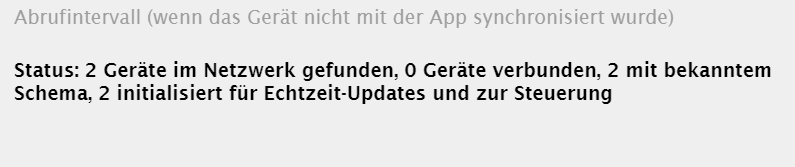
Über die sync-Funktion bleibt der Adapter Gelb.Update ...
Ich habe nach längerer Suche eine Lösung für meine Schalter gefunden. Da waren 2 wichtige Zeilen in einem anderen Thread bzgl. Tuya.
In den Eigenschaften des über Proxy eingelesenen aber nicht verbindungsfähigem Schalter, in den RAW unter -native- die Version(3.3) und IP-Adresse(im eigenen Netz) händisch nachtragen. Bei der "Version" aber die Übernahme nach dem speichern kontrollieren - die ist bei mir immer einmal rausgeflogen.
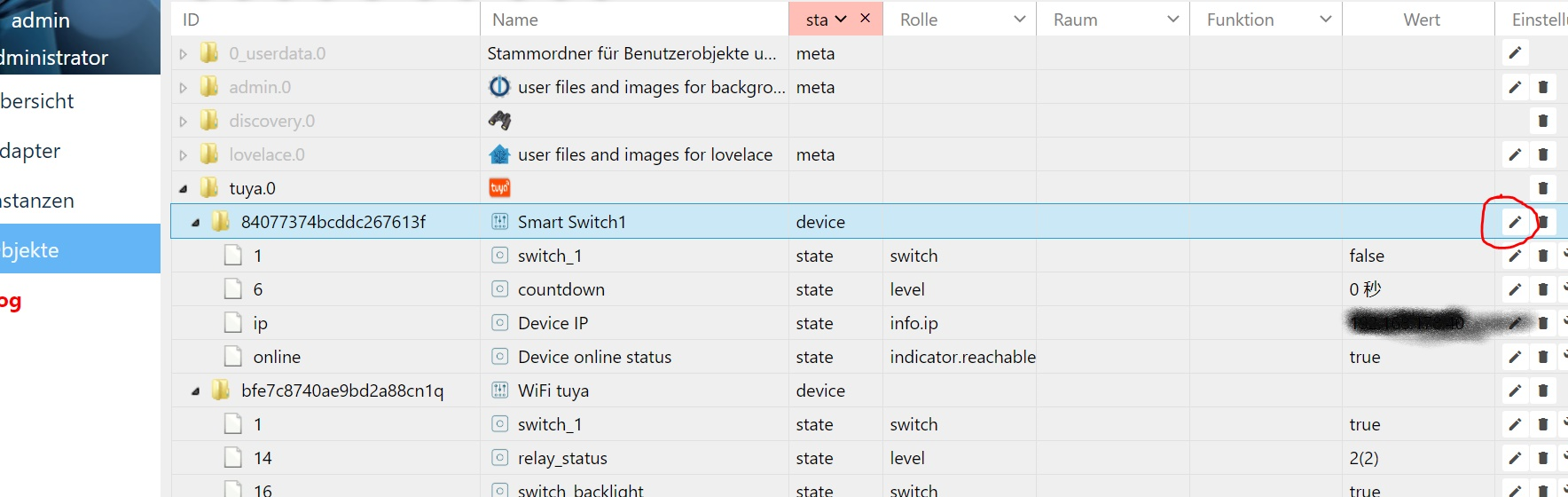
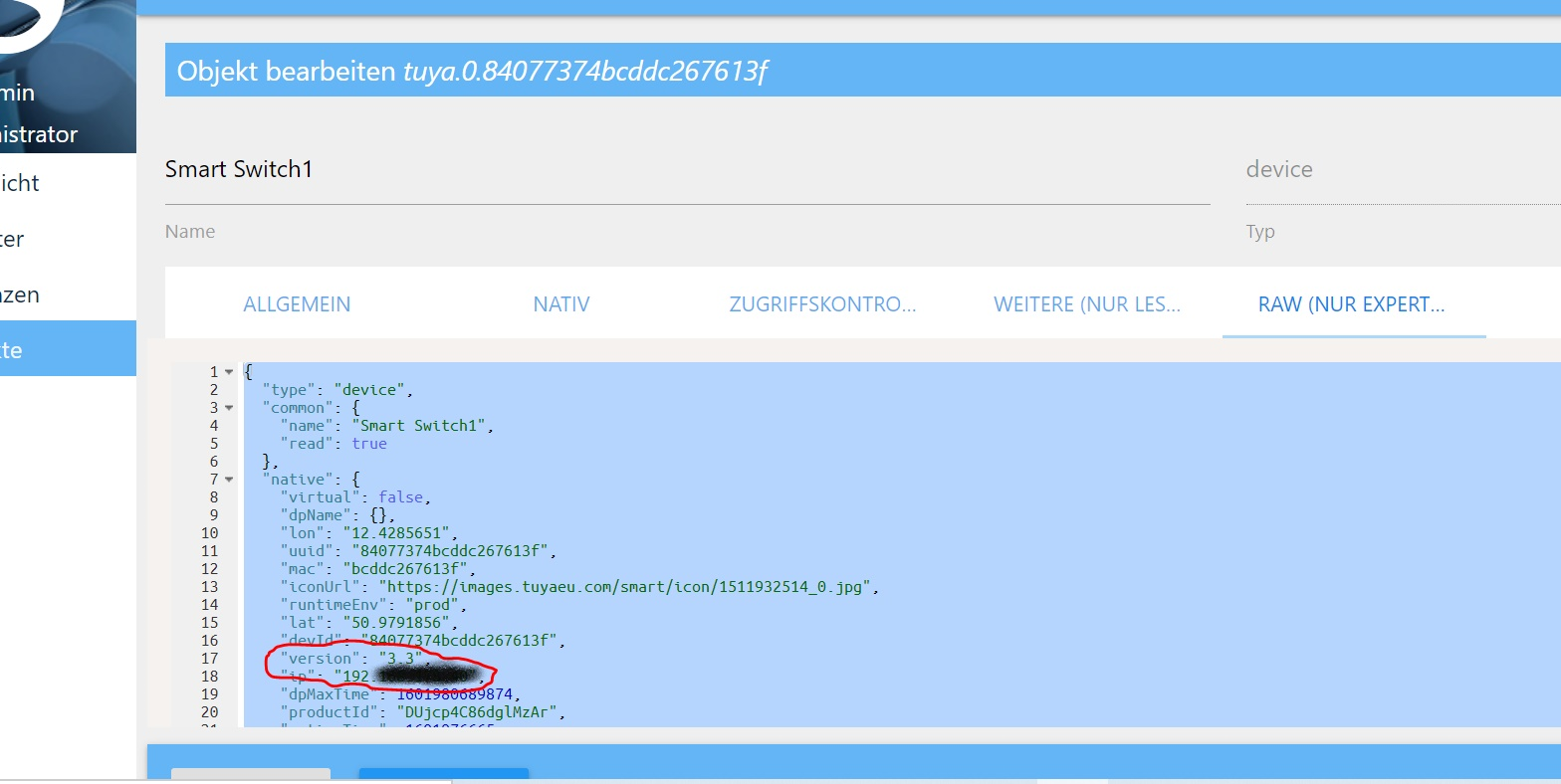
Gruß Tom
-
Wer noch Probleme hat die Tuya-Geräte in den Adapter zu bekommen.
Nehmt die Elesion App, mit der geht es noch.@gerdan said in Tuya Adapter synced nicht:
Elesion
Hallo Gerdan,
ich habe gerade Deine Nachricht zu dem Tuya Adapter und der Initialisierung / Synchronisierung mit der Elesion App.
Ich erhalte immer die Nachricht, dass meine Elesion App nicht kompatibel sei.
Das Device ist ein iPhone.
Hast Du die Einrichtung mit einem android phone vorgenommen? -
@gerdan said in Tuya Adapter synced nicht:
Elesion
Hallo Gerdan,
ich habe gerade Deine Nachricht zu dem Tuya Adapter und der Initialisierung / Synchronisierung mit der Elesion App.
Ich erhalte immer die Nachricht, dass meine Elesion App nicht kompatibel sei.
Das Device ist ein iPhone.
Hast Du die Einrichtung mit einem android phone vorgenommen? -
Habe den Taster ausgetauscht, klappt so wie es sein soll!!!!!
Habe das nächste Problem mit einem Tuya PIR, den habe ich heute bekommen und sofort angelernt, er ist im Tuya Adapter sichtbar, aber keine Änderungen bei Bewegung sichtbar. Der PIR sendet Signale zur SmartLife APP, Bewegungen werden erkannt.
MichaelIch habe ein paar Fenster Sensoren die über Tuya eingebunden sind. Als Auslöser für Steuerung via Blockly etc waren die so nicht zu gebrauchen. Über den Alexa Adapter haben sie aber recht zuverlässig signalisiert.
Deshalb lasse ich Alexa pro Sensor einen virtuellen Schalter in iobroker bedienen der dann den Zustand dauerhaft bzw bis zum nächsten Signal speichert.
Das klappt bei mir ganz gut und ohne riesige Verzögerung (so etwa 3 bis 5 Sekunden)
-
Liebe Community,
Ich hoffe ihr könnt mir weiterhelfen. Hab alles wie hier angegeben versucht und schaffe es einfach nicht die Syncverbindung herzustellen.
Sobald ich den Proxy im Adapter starte erhalte ich einen SSL-Proxy Error.2021-02-21 13:39:11.410 - info: host.RaspPi instance system.adapter.tuya.0 started with pid 29941 2021-02-21 13:39:12.672 - debug: tuya.0 (29941) Redis Objects: Use Redis connection: 127.0.0.1:9001 2021-02-21 13:39:12.719 - debug: tuya.0 (29941) Objects client ready ... initialize now 2021-02-21 13:39:12.722 - debug: tuya.0 (29941) Objects create System PubSub Client 2021-02-21 13:39:12.724 - debug: tuya.0 (29941) Objects create User PubSub Client 2021-02-21 13:39:12.725 - debug: tuya.0 (29941) Objects client initialize lua scripts 2021-02-21 13:39:12.754 - debug: tuya.0 (29941) Objects connected to redis: 127.0.0.1:9001 2021-02-21 13:39:12.764 - debug: tuya.0 (29941) objectDB connected 2021-02-21 13:39:12.767 - debug: tuya.0 (29941) Redis States: Use Redis connection: 127.0.0.1:9000 2021-02-21 13:39:12.775 - debug: tuya.0 (29941) States create System PubSub Client 2021-02-21 13:39:12.776 - debug: tuya.0 (29941) States create User PubSub Client 2021-02-21 13:39:12.784 - debug: tuya.0 (29941) States connected to redis: 127.0.0.1:9000 2021-02-21 13:39:12.786 - debug: tuya.0 (29941) statesDB connected 2021-02-21 13:39:13.004 - debug: tuya.0 (29941) Plugin sentry Initialize Plugin (enabled=true) 2021-02-21 13:39:13.220 - info: tuya.0 (29941) starting. Version 3.5.2 in /opt/iobroker/node_modules/iobroker.tuya, node: v12.20.2, js-controller: 3.2.16 2021-02-21 13:39:13.303 - debug: tuya.0 (29941) init 1 known devices 2021-02-21 13:39:13.310 - debug: tuya.0 (29941) bfa2f7e4a6cadcac89x65g: Create device objects if not exist 2021-02-21 13:39:13.313 - debug: tuya.0 (29941) bfa2f7e4a6cadcac89x65g: Objects [{"type":"boolean","read":true,"write":true,"name":"switch_1","id":1,"role":"switch"},{"type":"number","unit":"s","max":86400,"read":true,"write":true,"name":"countdown_1","id":9,"role":"level"}] 2021-02-21 13:39:13.348 - debug: tuya.0 (29941) connected set to false 2021-02-21 13:39:13.421 - info: tuya.0 (29941) bfa2f7e4a6cadcac89x65g Init with IP=192.168.0.105, Key=undefined, Version=3.2 2021-02-21 13:39:13.426 - info: tuya.0 (29941) bfa2f7e4a6cadcac89x65g: No local encryption key available, get data using polling, controlling of device NOT possibe. Please sync with App! 2021-02-21 13:39:13.426 - info: tuya.0 (29941) Existing devices initialized 2021-02-21 13:39:13.433 - info: tuya.0 (29941) Listen for local Tuya devices on port 6666 2021-02-21 13:39:13.434 - info: tuya.0 (29941) Listen for encrypted local Tuya devices on port 6667 2021-02-21 13:39:13.541 - debug: tuya.0 (29941) bfa2f7e4a6cadcac89x65g: Connected to device 2021-02-21 13:39:13.560 - debug: tuya.0 (29941) bfa2f7e4a6cadcac89x65g: Error from device (0): App still open on your mobile phone? json obj data unvalid 2021-02-21 13:39:13.561 - debug: tuya.0 (29941) bfa2f7e4a6cadcac89x65g: Received data: {"1":null,"2":null,"3":null,"101":null,"102":null,"103":null} 2021-02-21 13:39:13.562 - debug: tuya.0 (29941) bfa2f7e4a6cadcac89x65g: Ignore invalid data (Counter: 1) 2021-02-21 13:39:13.570 - debug: tuya.0 (29941) stateChange tuya.0.bfa2f7e4a6cadcac89x65g.online {"val":true,"ack":true,"ts":1613911153551,"q":0,"from":"system.adapter.tuya.0","user":"system.user.admin","lc":1613911153551} 2021-02-21 13:39:13.571 - debug: tuya.0 (29941) stateChange tuya.0.info.connection {"val":true,"ack":true,"ts":1613911153552,"q":0,"from":"system.adapter.tuya.0","user":"system.user.admin","lc":1613911153552} 2021-02-21 13:39:13.573 - debug: tuya.0 (29941) connected set to true 2021-02-21 13:39:17.642 - debug: tuya.0 (29941) Discovered device: 192.168.0.105:49153 - U��{"ip":"192.168.0.105","gwId":"bfa2f7e4a6cadcac89x65g","active":2,"ablilty":0,"encrypt":true,"productKey":"Mi2j4AwtJN1mtker","version":"3.2"}��� �U 2021-02-21 13:39:20.962 - debug: tuya.0 (29941) Message: {"command":"getDeviceInfo","message":null,"from":"system.adapter.admin.0","callback":{"message":null,"id":1157,"ack":false,"time":1613911160959},"_id":32598972} 2021-02-21 13:39:20.964 - debug: tuya.0 (29941) sendTo "getDeviceInfo" to system.adapter.admin.0 from system.adapter.tuya.0 2021-02-21 13:39:22.641 - debug: tuya.0 (29941) Discovered device: 192.168.0.105:49153 - U��{"ip":"192.168.0.105","gwId":"bfa2f7e4a6cadcac89x65g","active":2,"ablilty":0,"encrypt":true,"productKey":"Mi2j4AwtJN1mtker","version":"3.2"}��� �U 2021-02-21 13:39:26.399 - debug: tuya.0 (29941) Message: {"command":"startProxy","message":{"proxyPort":"8888","proxyWebPort":"8889"},"from":"system.adapter.admin.0","callback":{"message":{"proxyPort":"8888","proxyWebPort":"8889"},"id":1158,"ack":false,"time":1613911166397},"_id":32598973} 2021-02-21 13:39:26.401 - debug: tuya.0 (29941) Use first network interface (192.168.0.110) 2021-02-21 13:39:26.442 - info: tuya.0 (29941) SSL-Proxy ready to receive requests 2021-02-21 13:39:26.682 - debug: tuya.0 (29941) sendTo "startProxy" to system.adapter.admin.0 from system.adapter.tuya.0 2021-02-21 13:39:26.696 - debug: tuya.0 (29941) Message: {"command":"getProxyResult","message":null,"from":"system.adapter.admin.0","callback":{"message":null,"id":1159,"ack":false,"time":1613911166694},"_id":32598974} 2021-02-21 13:39:27.641 - debug: tuya.0 (29941) Discovered device: 192.168.0.105:49153 - U��{"ip":"192.168.0.105","gwId":"bfa2f7e4a6cadcac89x65g","active":2,"ablilty":0,"encrypt":true,"productKey":"Mi2j4AwtJN1mtker","version":"3.2"}��� �U 2021-02-21 13:39:32.643 - debug: tuya.0 (29941) Discovered device: 192.168.0.105:49153 - U��{"ip":"192.168.0.105","gwId":"bfa2f7e4a6cadcac89x65g","active":2,"ablilty":0,"encrypt":true,"productKey":"Mi2j4AwtJN1mtker","version":"3.2"}��� �U 2021-02-21 13:39:36.789 - error: tuya.0 (29941) SSL-Proxy ERROR: Error: socket hang up 2021-02-21 13:39:36.795 - error: tuya.0 (29941) Error: socket hang up at connResetException (internal/errors.js:609:14) at TLSSocket.onSocketClose (_tls_wrap.js:1063:23) at TLSSocket.emit (events.js:326:22) at TLSSocket.EventEmitter.emit (domain.js:483:12) at net.js:675:12 at Socket.done (_tls_wrap.js:568:7) at Object.onceWrapper (events.js:421:26) at Socket.emit (events.js:314:20) at Socket.EventEmitter.emit (domain.js:483:12) at TCP. (net.js:675:12) 2021-02-21 13:39:37.135 - error: tuya.0 (29941) SSL-Proxy ERROR: Error: socket hang up 2021-02-21 13:39:37.139 - error: tuya.0 (29941) Error: socket hang up at connResetException (internal/errors.js:609:14) at TLSSocket.onSocketClose (_tls_wrap.js:1063:23) at TLSSocket.emit (events.js:326:22) at TLSSocket.EventEmitter.emit (domain.js:483:12) at net.js:675:12 at Socket.done (_tls_wrap.js:568:7) at Object.onceWrapper (events.js:421:26) at Socket.emit (events.js:314:20) at Socket.EventEmitter.emit (domain.js:483:12) at TCP. (net.js:675:12) 2021-02-21 13:39:37.141 - error: tuya.0 (29941) SSL-Proxy ERROR: Error: socket hang up 2021-02-21 13:39:37.143 - error: tuya.0 (29941) Error: socket hang up at connResetException (internal/errors.js:609:14) at TLSSocket.onSocketClose (_tls_wrap.js:1063:23) at TLSSocket.emit (events.js:326:22) at TLSSocket.EventEmitter.emit (domain.js:483:12) at net.js:675:12 at Socket.done (_tls_wrap.js:568:7) at Object.onceWrapper (events.js:421:26) at Socket.emit (events.js:314:20) at Socket.EventEmitter.emit (domain.js:483:12) at TCP. (net.js:675:12) 2021-02-21 13:39:37.325 - error: tuya.0 (29941) SSL-Proxy ERROR: Error: 3070121632:error:14209102:SSL routines:tls_early_post_process_client_hello:unsupported protocol:../deps/openssl/openssl/ssl/statem/statem_srvr.c:1686: 2021-02-21 13:39:37.326 - error: tuya.0 (29941) Error: 3070121632:error:14209102:SSL routines:tls_early_post_process_client_hello:unsupported protocol:../deps/openssl/openssl/ssl/statem/statem_srvr.c:1686: 2021-02-21 13:39:37.495 - error: tuya.0 (29941) SSL-Proxy ERROR: Error: socket hang up 2021-02-21 13:39:37.499 - error: tuya.0 (29941) Error: socket hang upHerzlichen Dank
Martin -
Liebe Community,
Ich hoffe ihr könnt mir weiterhelfen. Hab alles wie hier angegeben versucht und schaffe es einfach nicht die Syncverbindung herzustellen.
Sobald ich den Proxy im Adapter starte erhalte ich einen SSL-Proxy Error.2021-02-21 13:39:11.410 - info: host.RaspPi instance system.adapter.tuya.0 started with pid 29941 2021-02-21 13:39:12.672 - debug: tuya.0 (29941) Redis Objects: Use Redis connection: 127.0.0.1:9001 2021-02-21 13:39:12.719 - debug: tuya.0 (29941) Objects client ready ... initialize now 2021-02-21 13:39:12.722 - debug: tuya.0 (29941) Objects create System PubSub Client 2021-02-21 13:39:12.724 - debug: tuya.0 (29941) Objects create User PubSub Client 2021-02-21 13:39:12.725 - debug: tuya.0 (29941) Objects client initialize lua scripts 2021-02-21 13:39:12.754 - debug: tuya.0 (29941) Objects connected to redis: 127.0.0.1:9001 2021-02-21 13:39:12.764 - debug: tuya.0 (29941) objectDB connected 2021-02-21 13:39:12.767 - debug: tuya.0 (29941) Redis States: Use Redis connection: 127.0.0.1:9000 2021-02-21 13:39:12.775 - debug: tuya.0 (29941) States create System PubSub Client 2021-02-21 13:39:12.776 - debug: tuya.0 (29941) States create User PubSub Client 2021-02-21 13:39:12.784 - debug: tuya.0 (29941) States connected to redis: 127.0.0.1:9000 2021-02-21 13:39:12.786 - debug: tuya.0 (29941) statesDB connected 2021-02-21 13:39:13.004 - debug: tuya.0 (29941) Plugin sentry Initialize Plugin (enabled=true) 2021-02-21 13:39:13.220 - info: tuya.0 (29941) starting. Version 3.5.2 in /opt/iobroker/node_modules/iobroker.tuya, node: v12.20.2, js-controller: 3.2.16 2021-02-21 13:39:13.303 - debug: tuya.0 (29941) init 1 known devices 2021-02-21 13:39:13.310 - debug: tuya.0 (29941) bfa2f7e4a6cadcac89x65g: Create device objects if not exist 2021-02-21 13:39:13.313 - debug: tuya.0 (29941) bfa2f7e4a6cadcac89x65g: Objects [{"type":"boolean","read":true,"write":true,"name":"switch_1","id":1,"role":"switch"},{"type":"number","unit":"s","max":86400,"read":true,"write":true,"name":"countdown_1","id":9,"role":"level"}] 2021-02-21 13:39:13.348 - debug: tuya.0 (29941) connected set to false 2021-02-21 13:39:13.421 - info: tuya.0 (29941) bfa2f7e4a6cadcac89x65g Init with IP=192.168.0.105, Key=undefined, Version=3.2 2021-02-21 13:39:13.426 - info: tuya.0 (29941) bfa2f7e4a6cadcac89x65g: No local encryption key available, get data using polling, controlling of device NOT possibe. Please sync with App! 2021-02-21 13:39:13.426 - info: tuya.0 (29941) Existing devices initialized 2021-02-21 13:39:13.433 - info: tuya.0 (29941) Listen for local Tuya devices on port 6666 2021-02-21 13:39:13.434 - info: tuya.0 (29941) Listen for encrypted local Tuya devices on port 6667 2021-02-21 13:39:13.541 - debug: tuya.0 (29941) bfa2f7e4a6cadcac89x65g: Connected to device 2021-02-21 13:39:13.560 - debug: tuya.0 (29941) bfa2f7e4a6cadcac89x65g: Error from device (0): App still open on your mobile phone? json obj data unvalid 2021-02-21 13:39:13.561 - debug: tuya.0 (29941) bfa2f7e4a6cadcac89x65g: Received data: {"1":null,"2":null,"3":null,"101":null,"102":null,"103":null} 2021-02-21 13:39:13.562 - debug: tuya.0 (29941) bfa2f7e4a6cadcac89x65g: Ignore invalid data (Counter: 1) 2021-02-21 13:39:13.570 - debug: tuya.0 (29941) stateChange tuya.0.bfa2f7e4a6cadcac89x65g.online {"val":true,"ack":true,"ts":1613911153551,"q":0,"from":"system.adapter.tuya.0","user":"system.user.admin","lc":1613911153551} 2021-02-21 13:39:13.571 - debug: tuya.0 (29941) stateChange tuya.0.info.connection {"val":true,"ack":true,"ts":1613911153552,"q":0,"from":"system.adapter.tuya.0","user":"system.user.admin","lc":1613911153552} 2021-02-21 13:39:13.573 - debug: tuya.0 (29941) connected set to true 2021-02-21 13:39:17.642 - debug: tuya.0 (29941) Discovered device: 192.168.0.105:49153 - U��{"ip":"192.168.0.105","gwId":"bfa2f7e4a6cadcac89x65g","active":2,"ablilty":0,"encrypt":true,"productKey":"Mi2j4AwtJN1mtker","version":"3.2"}��� �U 2021-02-21 13:39:20.962 - debug: tuya.0 (29941) Message: {"command":"getDeviceInfo","message":null,"from":"system.adapter.admin.0","callback":{"message":null,"id":1157,"ack":false,"time":1613911160959},"_id":32598972} 2021-02-21 13:39:20.964 - debug: tuya.0 (29941) sendTo "getDeviceInfo" to system.adapter.admin.0 from system.adapter.tuya.0 2021-02-21 13:39:22.641 - debug: tuya.0 (29941) Discovered device: 192.168.0.105:49153 - U��{"ip":"192.168.0.105","gwId":"bfa2f7e4a6cadcac89x65g","active":2,"ablilty":0,"encrypt":true,"productKey":"Mi2j4AwtJN1mtker","version":"3.2"}��� �U 2021-02-21 13:39:26.399 - debug: tuya.0 (29941) Message: {"command":"startProxy","message":{"proxyPort":"8888","proxyWebPort":"8889"},"from":"system.adapter.admin.0","callback":{"message":{"proxyPort":"8888","proxyWebPort":"8889"},"id":1158,"ack":false,"time":1613911166397},"_id":32598973} 2021-02-21 13:39:26.401 - debug: tuya.0 (29941) Use first network interface (192.168.0.110) 2021-02-21 13:39:26.442 - info: tuya.0 (29941) SSL-Proxy ready to receive requests 2021-02-21 13:39:26.682 - debug: tuya.0 (29941) sendTo "startProxy" to system.adapter.admin.0 from system.adapter.tuya.0 2021-02-21 13:39:26.696 - debug: tuya.0 (29941) Message: {"command":"getProxyResult","message":null,"from":"system.adapter.admin.0","callback":{"message":null,"id":1159,"ack":false,"time":1613911166694},"_id":32598974} 2021-02-21 13:39:27.641 - debug: tuya.0 (29941) Discovered device: 192.168.0.105:49153 - U��{"ip":"192.168.0.105","gwId":"bfa2f7e4a6cadcac89x65g","active":2,"ablilty":0,"encrypt":true,"productKey":"Mi2j4AwtJN1mtker","version":"3.2"}��� �U 2021-02-21 13:39:32.643 - debug: tuya.0 (29941) Discovered device: 192.168.0.105:49153 - U��{"ip":"192.168.0.105","gwId":"bfa2f7e4a6cadcac89x65g","active":2,"ablilty":0,"encrypt":true,"productKey":"Mi2j4AwtJN1mtker","version":"3.2"}��� �U 2021-02-21 13:39:36.789 - error: tuya.0 (29941) SSL-Proxy ERROR: Error: socket hang up 2021-02-21 13:39:36.795 - error: tuya.0 (29941) Error: socket hang up at connResetException (internal/errors.js:609:14) at TLSSocket.onSocketClose (_tls_wrap.js:1063:23) at TLSSocket.emit (events.js:326:22) at TLSSocket.EventEmitter.emit (domain.js:483:12) at net.js:675:12 at Socket.done (_tls_wrap.js:568:7) at Object.onceWrapper (events.js:421:26) at Socket.emit (events.js:314:20) at Socket.EventEmitter.emit (domain.js:483:12) at TCP. (net.js:675:12) 2021-02-21 13:39:37.135 - error: tuya.0 (29941) SSL-Proxy ERROR: Error: socket hang up 2021-02-21 13:39:37.139 - error: tuya.0 (29941) Error: socket hang up at connResetException (internal/errors.js:609:14) at TLSSocket.onSocketClose (_tls_wrap.js:1063:23) at TLSSocket.emit (events.js:326:22) at TLSSocket.EventEmitter.emit (domain.js:483:12) at net.js:675:12 at Socket.done (_tls_wrap.js:568:7) at Object.onceWrapper (events.js:421:26) at Socket.emit (events.js:314:20) at Socket.EventEmitter.emit (domain.js:483:12) at TCP. (net.js:675:12) 2021-02-21 13:39:37.141 - error: tuya.0 (29941) SSL-Proxy ERROR: Error: socket hang up 2021-02-21 13:39:37.143 - error: tuya.0 (29941) Error: socket hang up at connResetException (internal/errors.js:609:14) at TLSSocket.onSocketClose (_tls_wrap.js:1063:23) at TLSSocket.emit (events.js:326:22) at TLSSocket.EventEmitter.emit (domain.js:483:12) at net.js:675:12 at Socket.done (_tls_wrap.js:568:7) at Object.onceWrapper (events.js:421:26) at Socket.emit (events.js:314:20) at Socket.EventEmitter.emit (domain.js:483:12) at TCP. (net.js:675:12) 2021-02-21 13:39:37.325 - error: tuya.0 (29941) SSL-Proxy ERROR: Error: 3070121632:error:14209102:SSL routines:tls_early_post_process_client_hello:unsupported protocol:../deps/openssl/openssl/ssl/statem/statem_srvr.c:1686: 2021-02-21 13:39:37.326 - error: tuya.0 (29941) Error: 3070121632:error:14209102:SSL routines:tls_early_post_process_client_hello:unsupported protocol:../deps/openssl/openssl/ssl/statem/statem_srvr.c:1686: 2021-02-21 13:39:37.495 - error: tuya.0 (29941) SSL-Proxy ERROR: Error: socket hang up 2021-02-21 13:39:37.499 - error: tuya.0 (29941) Error: socket hang upHerzlichen Dank
Martin -
@apollon77
Herzlichen Dank,
Habs bisher mit iOS mit den unterschidlichsten Apps versucht. Am besten geagiert der Proxy auf die TuyaSmart App (Version 3.245.5)Jetzt auch nochmal mit dem Android Emulator und der Tuya Smart Life App (Version 3.12.6) versucht und bin einen Schritt weiter gekommen. Jetzt muss ich mein Gerät nur auf das andere Konto bringen.
-
@apollon77
Herzlichen Dank,
Habs bisher mit iOS mit den unterschidlichsten Apps versucht. Am besten geagiert der Proxy auf die TuyaSmart App (Version 3.245.5)Jetzt auch nochmal mit dem Android Emulator und der Tuya Smart Life App (Version 3.12.6) versucht und bin einen Schritt weiter gekommen. Jetzt muss ich mein Gerät nur auf das andere Konto bringen.
-
@bloop naja das es nur mit einer alten tuya App geht und damit auf iOS gar nicht stand ja im admin und in der Doku.
@apollon77
Ich muss mich entschuldigen und zugeben das ich nicht alle 180 Beiträge gelesen habe.
Erst nach meinem Post ist mir der Tip mit dem Android Emulator noch als Lösung aufgefallen.Für die Zukunft erst Lesen dann Fragen... auch wenn noch so viel im Post steht.
Adapter läuft jetzt Proxy hat auch funktioniert. Gerät habe ich in der Objekts Liste.
Nun werden aber die Zustände nicht synchronisiert.Ich lese mal weiter ^^




Hey! Du scheinst an dieser Unterhaltung interessiert zu sein, hast aber noch kein Konto.
Hast du es satt, bei jedem Besuch durch die gleichen Beiträge zu scrollen? Wenn du dich für ein Konto anmeldest, kommst du immer genau dorthin zurück, wo du zuvor warst, und kannst dich über neue Antworten benachrichtigen lassen (entweder per E-Mail oder Push-Benachrichtigung). Du kannst auch Lesezeichen speichern und Beiträge positiv bewerten, um anderen Community-Mitgliedern deine Wertschätzung zu zeigen.
Mit deinem Input könnte dieser Beitrag noch besser werden 💗
Registrieren Anmelden420
Online33.0k
Benutzer83.7k
Themen1.3m
Beiträge