




Adapter für probe request monitoring
-
so…
nach langem Kampf hat der WLAN Stick verloren und ist nun als WLAN0 eingetragen...
iwconfig:
! ````
iwconfig
wlan0 unassociated Nickname:"wifi@realtek"
Mode:Managed Frequency=2.412 GHz Access Point: Not-Associated
Sensitivity:0/0
Retry:off RTS thr:off Fragment thr:off
Encryption key:off
Power Management:off
Link Quality:0 Signal level:0 Noise level:0
Rx invalid nwid:0 Rx invalid crypt:0 Rx invalid frag:0
Tx excessive retries:0 Invalid misc:0 Missed beacon:0! lo no wireless extensions.
! mon0 IEEE 802.11bgn Mode:Monitor Tx-Power=12 dBm
Retry short limit:7 RTS thr:off Fragment thr:off
Power Management:offeth0 no wireless extensions./wifi@realtek
iw dev:

>! ````
# iw dev
phy#0
	Interface mon0
		ifindex 4
		wdev 0x2
		addr 00:00:00:00:00:00
		type monitor
	Interface wlan0
		ifindex 3
		wdev 0x1
		addr xx:xx:xx:xx:xx:xx
		type managed
Leider bekomme ich den Adapter jetzt nicht mehr installiert:
! ````
npm install https://github.com/DerKorb/ioBroker.probemon/tarball/master --production --prefix "/opt/iobroker"
npm WARN addRemoteGit Error: not found: git
npm WARN addRemoteGit at getNotFoundError (/usr/lib/node_modules/npm/node_modules/which/which.js:14:12)
npm WARN addRemoteGit at F (/usr/lib/node_modules/npm/node_modules/which/which.js:69:19)
npm WARN addRemoteGit at E (/usr/lib/node_modules/npm/node_modules/which/which.js:81:29)
npm WARN addRemoteGit at /usr/lib/node_modules/npm/node_modules/which/which.js:90:16
npm WARN addRemoteGit at /usr/lib/node_modules/npm/node_modules/which/node_modules/isexe/index.js:44:5
npm WARN addRemoteGit at /usr/lib/node_modules/npm/node_modules/which/node_modules/isexe/access.js:8:5
npm WARN addRemoteGit at FSReqWrap.oncomplete (fs.js:82:15)
npm WARN addRemoteGit git+https://github.com/mranney/node_pcap.git resetting remote /root/.npm/_git-remotes/https-github-com-mranney-node-pcap-git-72c55299 because of error: { [Error: not found: git] code: 'ENOGIT' }
npm ERR! git clone --template=/root/.npm/_git-remotes/_templates --mirror https://github.com/mranney/node_pcap.git /root/.npm/_git-remotes/https-github-com-mranney-node-pcap-git-72c55299: undefined
npm ERR! git clone --template=/root/.npm/_git-remotes/_templates --mirror https://github.com/mranney/node_pcap.git /root/.npm/_git-remotes/https-github-com-mranney-node-pcap-git-72c55299: undefined
npm ERR! Linux 4.4.33-v7+
npm ERR! argv "/usr/bin/nodejs" "/usr/bin/npm" "install" "https://github.com/DerKorb/ioBroker.probemon/tarball/master" "--production" "--prefix" "/opt/iobroker"
npm ERR! node v4.6.2
npm ERR! npm v2.15.11
npm ERR! code ENOGIT! npm ERR! not found: git
npm ERR!
npm ERR! Failed using git.
npm ERR! This is most likely not a problem with npm itself.
npm ERR! Please check if you have git installed and in your PATH.
! npm ERR! Please include the following file with any support request:
npm ERR! /opt/iobroker/npm-debug.logRaspberry Pi 3, Rasbian, neuste Version des Kernels:uname -a
Linux rasp31 4.4.33-v7+ #928 SMP Sat Nov 19 19:39:23 GMT 2016 armv7l GNU/Linux
****WLAN Stick Treiber:****

Wird man normalerweise nicht benötigen. Bei mir lag durch den Boot vom USB-Stick ein Sonderfall vor.

Das Installationsskript unter [https://www.raspberrypi.org/forums/view … p?p=462982](https://www.raspberrypi.org/forums/viewtopic.php?p=462982) hat mir geholfen, den Stick einzurichten:
wget https://dl.dropboxusercontent.com/u/80256631/install-wifi.tar.gz
tar xzf install-wifi.tar.gz` > Use command ./install-wifi -h for details on how you can use it to download or update the wifi driver. This script will automatically determine the wifi you are using and search for the correct driver to download for the kernel version you are using. The script can also install wifi drivers for wifi modules using 8192eu, 8812au, mt7610 or mt7612 drivers. ` -
Würde gerne testen, bei mir läuft iobroker auf einen NUC in einer VM unter Debian.
Welche Einstellungen muss ich dann vornehmen?
Habe keinen Plan ob ich das in der VM auch machen muss :oops: `
Es gibt wohl Lösungen, bei denen Du einem USB Stick vom Host einer VM zuweisen kannst.
Temporär kannst Du das über die vmware Konsole machen. Wirklcih nur temporär, da die Konsole sonst dauerhaft laufen müsste.
Mit Konsole meine ich das Zusatzprogramm, mit dem Du den Bildschirm einer VM aufrufen kannst.
Dort kann man dann dem aufgerufenen Rechner ein USB-Gerät zuweosen, welches an dem Rechner steckt, von dem die Konsole aufgerufen wird.
Ich nutze das manchmal für VMs unter Windows 10, wenn ich für irgendeine Software einen VM Stick benötige.
-
Der nächste Schritt…
ich habe auf Grund der Fehlermeldung in meinem Post oben nun
apt-get install gitausgeführt und dann erneut versucht den probe-Adapter zu installieren.
Nun hängt es an der nächsten Stelle (Fehlermeldungen bei der Installation):
! ````
$ ./iobroker url "https://github.com/DerKorb/ioBroker.probemon"
install https://github.com/DerKorb/ioBroker.probemon/tarball/master
npm install https://github.com/DerKorb/ioBroker.probemon/tarball/master --production --prefix "/opt/iobroker" (System call)
../pcap_binding.cc:2:23: fatal error: pcap/pcap.h: Datei oder Verzeichnis nicht gefunden #include <pcap pcap.h="">
^
compilation terminated.
! make: *** [Release/obj.target/pcap_binding/pcap_binding.o] Error 1
gypERR! build error
gypERR!
stack Error:makefailed with exit code: 2
gyp
ERR!
stack
at ChildProcess.onExit (/usr/lib/node_modules/npm/node_modules/node-gyp/lib/build.js:276:23)
gyp
ERR!stack at emitTwo (events.js:87:13)gyp
ERR!
stack
at ChildProcess.emit (events.js:172:7)gyp
ERR!
stack at Process.ChildProcess._handle.onexit (internal/child_process.js:211:12)
gypERR! System
Linux 4.4.33-v7+
gyp
ERR! command
"/usr/bin/nodejs" "/usr/lib/node_modules/npm/node_modules/node-gyp/bin/node-gyp.js" "rebuild"gyp
ERR!
cwd
/opt/iobroker/node_modules/iobroker.probemon/node_modules/pcapgyp
ERR!
node -v
v4.6.2gyp ERR! node-gyp -v v3.4.0
gyp ERR! not ok! npm
ERR! Linux 4.4.33-v7+
npm ERR! argv "/usr/bin/nodejs" "/usr/bin/npm" "install" "https://github.com/DerKorb/ioBroker.probemon/tarball/master" "--production" "--prefix" "/opt/iobroker"npm ERR! node v4.6.2
npm ERR! npm v2.15.11
npm
ERR! code ELIFECYCLE
npm ERR! pcap@2.0.0 install:node-gyp rebuild! npm ERR! Exit status 1npm
ERR! npm ERR! Failed at the pcap@2.0.0 install script 'node-gyp rebuild'.
npm ERR! This is most likely a problem with the pcap package,
npm ERR! not with npm itself.
npm ERR! Tell the author that this fails on your system:
npm ERR!
node-gyp rebuildnpm ERR! You can get information on how to open an issue for this project with:
npm ERR! npm bugs pcap
npm ERR! Or if that isn't available, you can get their info via:
npm ERR!
npm ERR! npm owner ls pcap
npm ERR!
There is likely additional logging output above.
! npm ERR! Please include the following file with any support request:npm ERR! /npm-debug.log
! ERROR: host.rasp31 Cannot install https://github.com/DerKorb/ioBroker.probemon/tarball/master: 1
ERROR: process exited with code 25</pcap>[EDIT] Ich versuche es zu verstehen. Sieht so aus als könnte das pcap Module nicht installiert werden [https://github.com/mranney/node_pcap](https://github.com/mranney/node_pcap) -
Nach:
apt-get install libpcap-devKonnte ich jetzt den Adapter installieren. :-)
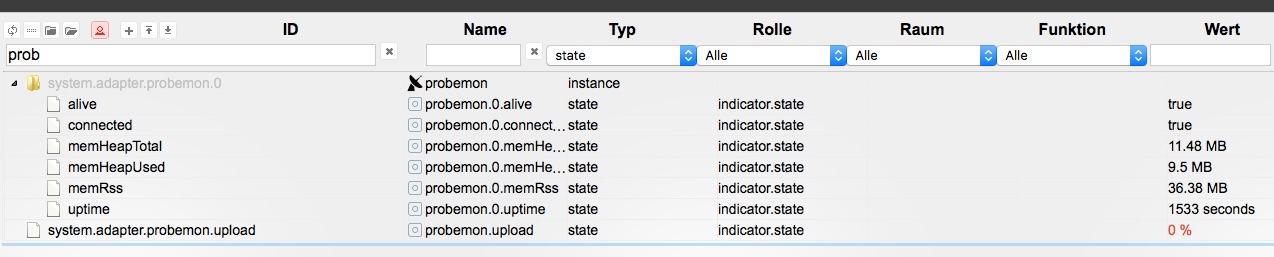
Es werden allerdings keine Datenpunkte für die gemonitorten Geräte angelegt. :?:
Interfaces:
# iw dev
phy#0
	Interface mon0
		ifindex 4
		wdev 0x2
		addr 00:00:00:00:00:00
		type monitor
	Interface wlan0
		ifindex 3
		wdev 0x1
		addr ec:08:6b:xx:xx:xx
		type managed
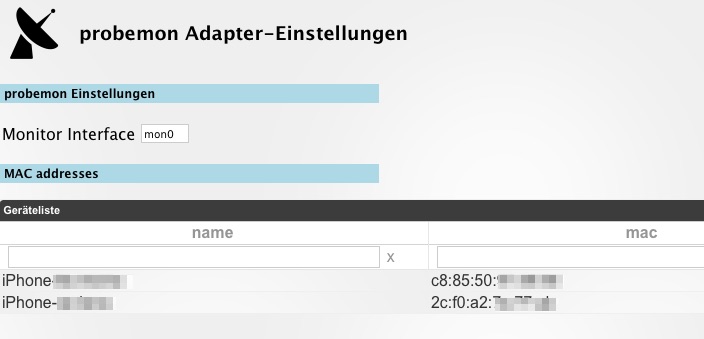
Einstellungen des dapters:
-
stell sicher, dass der adapter log level auf debug gestellt ist (expertenmodus bei instances).
Der Adapter sollte beim starten "creating pcap session" loggen.
Wenn das nicht passiert, geht schon sehr früh was schief.
Was du machen kannst um bessere Fehlerinfos zu bekommen ist per ssh auf dem Server OS
node /opt/iobroker/node_modules/iobroker.probemon/main.jsausführen. Das sollte dann einen Fehler ausspucken.
-
Debug hatte ich eingestellt.
"creating pcap session" kommt.
Anbei der entsprechende Log:
! ````
host. 2016-11-28 19:05:07.156 debug redis mget 2 2
host. 2016-11-28 19:05:07.150 debug redis publish io.system.adapter.probemon.0.uptime {"val":2,"ack":true,"ts":1480356307150,"q":0,"from":"system.adapter.probemon.0","lc":1480356307150}
host. 2016-11-28 19:05:07.148 debug redis publish io.system.adapter.probemon.0.memHeapUsed {"val":10.32,"ack":true,"ts":1480356307148,"q":0,"from":"system.adapter.probemon.0","lc":1480356307148}
host. 2016-11-28 19:05:07.147 debug redis publish io.system.adapter.probemon.0.memHeapTotal {"val":17.26,"ack":true,"ts":1480356307147,"q":0,"from":"system.adapter.probemon.0","lc":1480356307147}
host. 2016-11-28 19:05:07.146 debug redis publish io.system.adapter.probemon.0.memRss {"val":27.85,"ack":true,"ts":1480356307145,"q":0,"from":"system.adapter.probemon.0","lc":1480356307145}
host. 2016-11-28 19:05:07.144 debug redis publish io.system.adapter.probemon.0.connected {"val":true,"ack":true,"ts":1480356307142,"q":0,"from":"system.adapter.probemon.0","lc":1480356307142}
host. 2016-11-28 19:05:07.141 debug redis publish io.system.adapter.probemon.0.alive {"val":true,"ack":true,"ts":1480356307141,"q":0,"from":"system.adapter.probemon.0","lc":1480356307141}
host. 2016-11-28 19:05:07.137 debug redis keys 2 .logging
host. 2016-11-28 19:05:07.133 debug redis psubscribe io.probemon.0.
probemon.0 2016-11-28 19:05:07.061 info creating pcap session
probemon.0 2016-11-28 19:05:07.054 info starting. Version 0.5.0 in /opt/iobroker/node_modules/iobroker.probemon, node: v4.6.2
host. 2016-11-28 19:05:07.033 debug redis get system.adapter.probemon.0.alive ok: {"val":false,"ack":true,"ts":1480356303002,"q":0,"from":"system.host.rasp31","lc":1480356302907}
host. 2016-11-28 19:05:07.017 info States connected to redis 172.16.130.210:6379
probemon.0 2016-11-28 19:05:06.992 debug statesDB connected
probemon.0 2016-11-28 19:05:06.959 debug objectDB connected
host.rasp31 2016-11-28 19:05:05.443 info instance system.adapter.probemon.0 started with pid 28155
host.rasp31 2016-11-28 19:05:03.000 info instance system.adapter.probemon.0 terminated with code 0 (OK)
host.rasp31 2016-11-28 19:05:02.901 info stopInstance system.adapter.probemon.0 killing pid 15480
host.rasp31 2016-11-28 19:05:02.900 info stopInstance system.adapter.probemon.0
probemon.0 2016-11-28 19:05:02.909 info terminating
probemon.0 2016-11-28 19:05:02.904 info cleaned everything up...
host.rasp31 2016-11-28 19:05:02.891 info object change system.adapter.probemon.0nach:node /opt/iobroker/node_modules/iobroker.probemon/main.js
kommt keine Ausgabe. Nur der Prompt.

Dann habe ich den Adapter noch einmal gelöscht und wieder eingerichtet (ohen Debug direkt nach der Neueinrichtung):

>! ````
probemon.0	2016-11-28 20:02:22.100	info	creating pcap session
probemon.0	2016-11-28 20:02:22.091	info	starting. Version 0.5.0 in /opt/iobroker/node_modules/iobroker.probemon, node: v4.6.2
host.	2016-11-28 20:02:22.037	info	States connected to redis 172.16.130.210:6379
iobroker	2016-11-28 20:02:20.432	info	exit 0
iobroker	2016-11-28 20:02:20.430	info	host.rasp31 object system.adapter.probemon.0 created
host.rasp31	2016-11-28 20:02:20.429	info	instance system.adapter.probemon.0 started with pid 1314
host.rasp31	2016-11-28 20:02:20.414	info	object change system.adapter.probemon.0
iobroker	2016-11-28 20:02:20.381	info	host.rasp31 object system.adapter.probemon.0.alive created
iobroker	2016-11-28 20:02:20.350	info	host.rasp31 object system.adapter.probemon.0.connected created
iobroker	2016-11-28 20:02:20.319	info	host.rasp31 object system.adapter.probemon.0.memHeapUsed created
iobroker	2016-11-28 20:02:20.288	info	host.rasp31 object system.adapter.probemon.0.memHeapTotal created
iobroker	2016-11-28 20:02:20.257	info	host.rasp31 object system.adapter.probemon.0.memRss created
iobroker	2016-11-28 20:02:20.220	info	host.rasp31 object system.adapter.probemon.0.uptime created
iobroker	2016-11-28 20:02:20.187	info	host.rasp31 object system.adapter.probemon.upload created
iobroker	2016-11-28 20:02:20.170	info	host.rasp31 create instance probemon
iobroker	2016-11-28 20:02:18.385	info	add probemon
iobroker	2016-11-28 20:01:36.940	info	exit 0
Datenpunkte für die zu überwachenden Geräte wurden zu keinem Zeitpunkt angelegt.
-
wenn die meldung kommt heißt es immerhin schon mal, dass der adapter generell läuft. Dann stimmt was mit dem mac addressen abgleich nicht oder du bekommst die probe-requests nicht.
Hast du Zugangsdaten fürs Wlan angelegt? Wenn der Stick in keinem Netzwerk ist geht es nicht vermute ich.
Ich hab den Adapter vorhin überarbeitet, probier mal die neuste Version.
-
wenn die meldung kommt heißt es immerhin schon mal, dass der adapter generell läuft. Dann stimmt was mit dem mac addressen abgleich nicht oder du bekommst die probe-requests nicht. `
Die MAC-Adressen werden mit Doppelpunkt eingegeben? ba<emoji seq="1f1e9-1f1ea">
 </emoji>fe:ba<emoji seq="1f1e9-1f1ea"></emoji>fe ?
Hat mon0 bei Dir auch die Adresse 00:00:00:00:00:00 ?
# iw dev phy#0 Interface mon0 ifindex 4 wdev 0x2 addr 00:00:00:00:00:00 type monitor ...Hast du Zugangsdaten fürs Wlan angelegt? Wenn der Stick in keinem Netzwerk ist geht es nicht vermute ich. `
Nein. Habe ich nicht. Ich hatte den Adapter so verstanden, das auf de WLAN Schittstelle gelauscht wird.
Die Geräte, die ich damit sehen könnte, sind ja auch nicht unbedingt in meinem WLAN eingebucht.
Sonst hättest Du in der ersten Version ja nicht hunderte Geräte sehen können.
Morgen melde ich den Stick mal in meinem WLAN an.
Ich hab den Adapter vorhin überarbeitet, probier mal die neuste Version. `
Installiert. Die Datenpunkte der Geräte werden weiterhin nicht angelegt.
Dafür gibt es jetzt einen Datenpunkt probemon.0.nsamode.raw_proberequest ;-)
Allerdings auch ohne Wert.
-
mac addressen mit doppelpunkt und kleinbuchstaben.
Hab gerade noch mal gepusht, war noch ein bug drin.
Ich vermute, dass du den Stick einwählen musst oder zumindest nen Hotspot aufmachen, da kenn ich mich auch nicht wirklich aus. Würde aber auch die nuller mac erklären.
Die raw_proberequests sind drin damit du alles Geräte tracken kannst.
Würde ich gerne noch als bool option in die config setzen, muss mal nachlesen wie das geht.
-
Version installiert.
Doppelpunkt und Kleinbuchstaben…passt.
Kann das sein, dass sich die Versionsnummern der letzten drei versionen nicht geändert haben (0.0.3)?
Wird bei Dir bei iwd dev unter mon0 keine 00:00:00:00:00:00 Mac-Adresse angezeigt?
Wenn nein, welche denn? Die vom WLAN-Stick?
-
Wird der Adapter noch weiterentwickelt?
Würde den gerne einsetzen.
Gruß
-
Schade!
Aber Danke für die Info!
-
Gibt es denn ne andere Möglichkeit mein Vorhaben umzusetzen?


Hey! Du scheinst an dieser Unterhaltung interessiert zu sein, hast aber noch kein Konto.
Hast du es satt, bei jedem Besuch durch die gleichen Beiträge zu scrollen? Wenn du dich für ein Konto anmeldest, kommst du immer genau dorthin zurück, wo du zuvor warst, und kannst dich über neue Antworten benachrichtigen lassen (entweder per E-Mail oder Push-Benachrichtigung). Du kannst auch Lesezeichen speichern und Beiträge positiv bewerten, um anderen Community-Mitgliedern deine Wertschätzung zu zeigen.
Mit deinem Input könnte dieser Beitrag noch besser werden 💗
Registrieren AnmeldenSupport us
436
Online33.0k
Benutzer83.5k
Themen1.3m
Beiträge