



Skip to content
  • Home
  • Aktuell
  • Tags
  • 0 Ungelesen 0
  • Kategorien
  • Unreplied
  • Beliebt
  • GitHub
  • Docu
  • Hilfe
Skins
  • Light
  • Brite
  • Cerulean
  • Cosmo
  • Flatly
  • Journal
  • Litera
  • Lumen
  • Lux
  • Materia
  • Minty
  • Morph
  • Pulse
  • Sandstone
  • Simplex
  • Sketchy
  • Spacelab
  • United
  • Yeti
  • Zephyr
  • Dark
  • Cyborg
  • Darkly
  • Quartz
  • Slate
  • Solar
  • Superhero
  • Vapor

  • Standard: (Kein Skin)
  • Kein Skin
Einklappen
ioBroker Logo

Community Forum

donate donate
  1. ioBroker Community Home
  2. Deutsch
  3. Skripten / Logik
  4. JavaScript
  5. Suche anwesensheits skript

NEWS

  • UPDATE 31.10.: Amazon Alexa - ioBroker Skill läuft aus ?
    apollon77A
    apollon77
    48
    3
    8.9k

  • Monatsrückblick – September 2025
    BluefoxB
    Bluefox
    13
    1
    2.3k

  • Neues Video "KI im Smart Home" - ioBroker plus n8n
    BluefoxB
    Bluefox
    16
    1
    3.6k

Suche anwesensheits skript

Geplant Angeheftet Gesperrt Verschoben JavaScript
111 Beiträge 8 Kommentatoren 9.8k Aufrufe 7 Watching
  • Älteste zuerst
  • Neuste zuerst
  • Meiste Stimmen
Antworten
  • In einem neuen Thema antworten
Anmelden zum Antworten
Dieses Thema wurde gelöscht. Nur Nutzer mit entsprechenden Rechten können es sehen.
  • J Jan1

    @denjo sagte in Suche anwesensheits skript:

    npm install iobroker.tr-064@4.2.1 --loglevel error --prefix "/opt/iobroker" (System call)

    Das Loglevel ist auf error gestellt, also nur ne Info für Dich wie der geloggt wird, mehr ist das nicht ;)

    Was läuft denn für ne FW auf der Fritz? Da gabs mal eine, die nervig bei der WLAN Geschichte war.

    D Offline
    D Offline
    denjo
    schrieb am zuletzt editiert von
    #33

    @Jan1 7.21 und ich bin immer noch true wobei ich seit 10 min kein wlan an habe.
    und in der fritzbox steht das
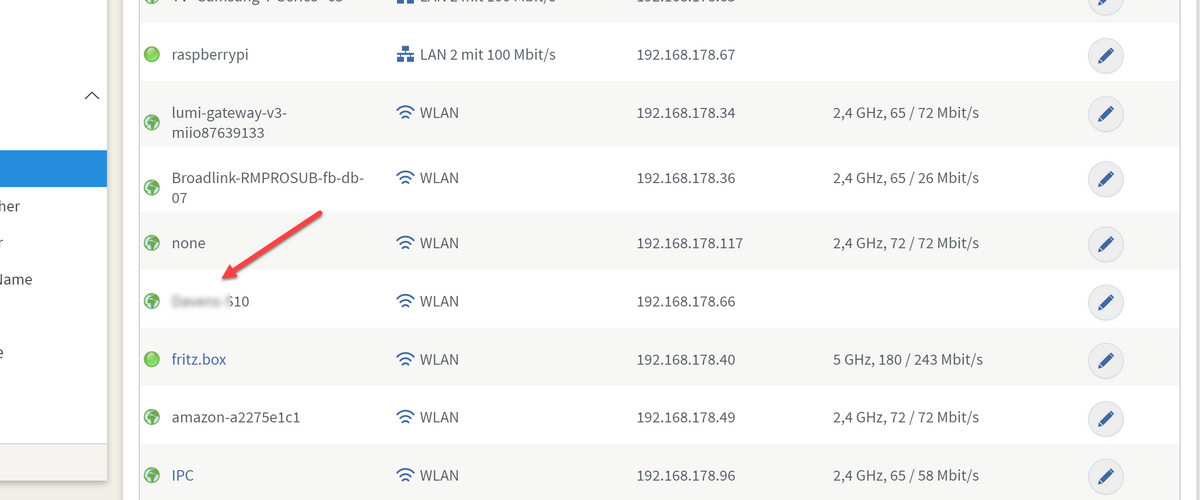
    08-12-_2020_13-34-52.png

    J 1 Antwort Letzte Antwort
    0
    • D denjo

      @Jan1 7.21 und ich bin immer noch true wobei ich seit 10 min kein wlan an habe.
      und in der fritzbox steht das

      08-12-_2020_13-34-52.png

      J Offline
      J Offline
      Jan1
      schrieb am zuletzt editiert von
      #34

      @denjo
      Ich bin gerade nicht zu Hause, aber in den Einstellungen des TR-064 gibts eine Option, die die Erkennung anders realisiert. Hast die angehakt?
      7.21 ist doch ne Labor oder? Wenn schon Labor, dann wäre 7.24 aktuell.

      Falls es mit dem TR-064 nicht klappt, versuchs mal mit dem Radar2, der macht das etwas anders und bei der Erkennung etwas schneller.

      D 1 Antwort Letzte Antwort
      0
      • J Jan1

        @denjo
        Ich bin gerade nicht zu Hause, aber in den Einstellungen des TR-064 gibts eine Option, die die Erkennung anders realisiert. Hast die angehakt?
        7.21 ist doch ne Labor oder? Wenn schon Labor, dann wäre 7.24 aktuell.

        Falls es mit dem TR-064 nicht klappt, versuchs mal mit dem Radar2, der macht das etwas anders und bei der Erkennung etwas schneller.

        D Offline
        D Offline
        denjo
        schrieb am zuletzt editiert von
        #35

        @Jan1 nur das kann man einstellen

        08-12-_2020_13-45-40.png

        J 1 Antwort Letzte Antwort
        0
        • D denjo

          @Jan1 nur das kann man einstellen

          08-12-_2020_13-45-40.png

          J Offline
          J Offline
          Jan1
          schrieb am zuletzt editiert von
          #36

          @denjo
          Ja und bei MDNS fehlt der Haken.
          Schau doch mal was da dabei steht ;)

          D 1 Antwort Letzte Antwort
          0
          • J Jan1

            @denjo
            Ja und bei MDNS fehlt der Haken.
            Schau doch mal was da dabei steht ;)

            D Offline
            D Offline
            denjo
            schrieb am zuletzt editiert von
            #37

            @Jan1 keine veränderung und bei radar dauert es auch ewig, und nein 7.21 ist die aktuellste FW der fritz

            Albert KA 1 Antwort Letzte Antwort
            0
            • Thomas BraunT Thomas Braun

              @denjo Ja, ganz normal aus der Liste der Adapter.

              latest:	4.2.1 for 24 days
              stable:	4.2.1 for 24 days
              
              D Offline
              D Offline
              denjo
              schrieb am zuletzt editiert von
              #38

              @Thomas-Braun so also ich habe es jetzt mal beobachtet in der fritzbox. wenn ich offline gehe dann steht zwar das ich nicht mehr verbunden bin aber ich gehe erst viel später in untere offline liste

              Thomas BraunT 1 Antwort Letzte Antwort
              0
              • D denjo

                @Thomas-Braun so also ich habe es jetzt mal beobachtet in der fritzbox. wenn ich offline gehe dann steht zwar das ich nicht mehr verbunden bin aber ich gehe erst viel später in untere offline liste

                Thomas BraunT Online
                Thomas BraunT Online
                Thomas Braun
                Most Active
                schrieb am zuletzt editiert von
                #39

                @denjo
                Ja, das meinte ich ja mit der längeren Verzögerung.

                Linux-Werkzeugkasten:
                https://forum.iobroker.net/topic/42952/der-kleine-iobroker-linux-werkzeugkasten
                NodeJS Fixer Skript:
                https://forum.iobroker.net/topic/68035/iob-node-fix-skript
                iob_diag: curl -sLf -o diag.sh https://iobroker.net/diag.sh && bash diag.sh

                1 Antwort Letzte Antwort
                0
                • D denjo

                  @Jan1 keine veränderung und bei radar dauert es auch ewig, und nein 7.21 ist die aktuellste FW der fritz

                  Albert KA Offline
                  Albert KA Offline
                  Albert K
                  schrieb am zuletzt editiert von
                  #40

                  @denjo

                  hast denn jetzt mal einen ping auf die fritzbox gemacht? Nur um auszuschließen dass du keine Netzwerk Latenz hast?

                  D 1 Antwort Letzte Antwort
                  0
                  • Albert KA Albert K

                    @denjo

                    hast denn jetzt mal einen ping auf die fritzbox gemacht? Nur um auszuschließen dass du keine Netzwerk Latenz hast?

                    D Offline
                    D Offline
                    denjo
                    schrieb am zuletzt editiert von
                    #41

                    @Albert-K weiß gar nicht wie man sowas macht

                    A Albert KA 2 Antworten Letzte Antwort
                    0
                    • D denjo

                      @Albert-K weiß gar nicht wie man sowas macht

                      A Online
                      A Online
                      Ahnungsbefreit
                      schrieb am zuletzt editiert von
                      #42

                      @denjo So:

                      root@ioBVM-produktiv:~# ping fritz.box
                      PING fritz.box(fritz.box (2003:de:7713:9500:cece:1eff:feb1:b770)) 56 data bytes
                      64 bytes from fritz.box (2003:de:7713:9500:cece:1eff:feb1:b770): icmp_seq=1 ttl=64 time=0.700 ms
                      64 bytes from fritz.box (2003:de:7713:9500:cece:1eff:feb1:b770): icmp_seq=2 ttl=64 time=1.25 ms
                      64 bytes from fritz.box (2003:de:7713:9500:cece:1eff:feb1:b770): icmp_seq=3 ttl=64 time=1.37 ms
                      64 bytes from fritz.box (2003:de:7713:9500:cece:1eff:feb1:b770): icmp_seq=4 ttl=64 time=1.15 ms
                      64 bytes from fritz.box (2003:de:7713:9500:cece:1eff:feb1:b770): icmp_seq=5 ttl=64 time=1.30 ms
                      64 bytes from fritz.box (2003:de:7713:9500:cece:1eff:feb1:b770): icmp_seq=6 ttl=64 time=1.31 ms
                      64 bytes from fritz.box (2003:de:7713:9500:cece:1eff:feb1:b770): icmp_seq=7 ttl=64 time=0.992 ms
                      64 bytes from fritz.box (2003:de:7713:9500:cece:1eff:feb1:b770): icmp_seq=8 ttl=64 time=1.34 ms
                      64 bytes from fritz.box (2003:de:7713:9500:cece:1eff:feb1:b770): icmp_seq=9 ttl=64 time=1.31 ms
                      ^C
                      --- fritz.box ping statistics ---
                      9 packets transmitted, 9 received, 0% packet loss, time 21ms
                      rtt min/avg/max/mdev = 0.700/1.191/1.368/0.205 ms


                      Wenn meine Antwort hilfreich war, dürft Ihr das gerne durch einen "Upvote" (der kleine "^" unten rechts) zum Ausdruck bringen.

                      1 Antwort Letzte Antwort
                      0
                      • D denjo

                        @Albert-K weiß gar nicht wie man sowas macht

                        Albert KA Offline
                        Albert KA Offline
                        Albert K
                        schrieb am zuletzt editiert von
                        #43

                        @denjo

                        am Command prompt einfach eingeben: ping <IP_der_Fritzbox>

                        zum abbrechen Strg-C

                        D 1 Antwort Letzte Antwort
                        0
                        • Albert KA Albert K

                          @denjo

                          am Command prompt einfach eingeben: ping <IP_der_Fritzbox>

                          zum abbrechen Strg-C

                          D Offline
                          D Offline
                          denjo
                          schrieb am zuletzt editiert von
                          #44

                          @Albert-K

                          pi@raspberrypi:~ $ ping fritz.box
                          PING fritz.box (192.168.178.1) 56(84) bytes of data.
                          64 bytes from fritz.box (192.168.178.1): icmp_seq=1 ttl=64 time=0.499 ms
                          64 bytes from fritz.box (192.168.178.1): icmp_seq=2 ttl=64 time=0.468 ms
                          64 bytes from fritz.box (192.168.178.1): icmp_seq=3 ttl=64 time=0.558 ms
                          64 bytes from fritz.box (192.168.178.1): icmp_seq=4 ttl=64 time=0.513 ms
                          64 bytes from fritz.box (192.168.178.1): icmp_seq=5 ttl=64 time=0.432 ms
                          64 bytes from fritz.box (192.168.178.1): icmp_seq=6 ttl=64 time=0.486 ms
                          64 bytes from fritz.box (192.168.178.1): icmp_seq=7 ttl=64 time=0.521 ms
                          64 bytes from fritz.box (192.168.178.1): icmp_seq=8 ttl=64 time=0.479 ms
                          64 bytes from fritz.box (192.168.178.1): icmp_seq=9 ttl=64 time=0.486 ms
                          64 bytes from fritz.box (192.168.178.1): icmp_seq=10 ttl=64 time=0.510 ms
                          64 bytes from fritz.box (192.168.178.1): icmp_seq=11 ttl=64 time=0.515 ms
                          64 bytes from fritz.box (192.168.178.1): icmp_seq=12 ttl=64 time=0.587 ms
                          64 bytes from fritz.box (192.168.178.1): icmp_seq=13 ttl=64 time=1.64 ms
                          ^C
                          --- fritz.box ping statistics ---
                          13 packets transmitted, 13 received, 0% packet loss, time 492ms
                          rtt min/avg/max/mdev = 0.432/0.591/1.640/0.306 ms
                          
                          
                          Albert KA 1 Antwort Letzte Antwort
                          0
                          • D denjo

                            @Albert-K

                            pi@raspberrypi:~ $ ping fritz.box
                            PING fritz.box (192.168.178.1) 56(84) bytes of data.
                            64 bytes from fritz.box (192.168.178.1): icmp_seq=1 ttl=64 time=0.499 ms
                            64 bytes from fritz.box (192.168.178.1): icmp_seq=2 ttl=64 time=0.468 ms
                            64 bytes from fritz.box (192.168.178.1): icmp_seq=3 ttl=64 time=0.558 ms
                            64 bytes from fritz.box (192.168.178.1): icmp_seq=4 ttl=64 time=0.513 ms
                            64 bytes from fritz.box (192.168.178.1): icmp_seq=5 ttl=64 time=0.432 ms
                            64 bytes from fritz.box (192.168.178.1): icmp_seq=6 ttl=64 time=0.486 ms
                            64 bytes from fritz.box (192.168.178.1): icmp_seq=7 ttl=64 time=0.521 ms
                            64 bytes from fritz.box (192.168.178.1): icmp_seq=8 ttl=64 time=0.479 ms
                            64 bytes from fritz.box (192.168.178.1): icmp_seq=9 ttl=64 time=0.486 ms
                            64 bytes from fritz.box (192.168.178.1): icmp_seq=10 ttl=64 time=0.510 ms
                            64 bytes from fritz.box (192.168.178.1): icmp_seq=11 ttl=64 time=0.515 ms
                            64 bytes from fritz.box (192.168.178.1): icmp_seq=12 ttl=64 time=0.587 ms
                            64 bytes from fritz.box (192.168.178.1): icmp_seq=13 ttl=64 time=1.64 ms
                            ^C
                            --- fritz.box ping statistics ---
                            13 packets transmitted, 13 received, 0% packet loss, time 492ms
                            rtt min/avg/max/mdev = 0.432/0.591/1.640/0.306 ms
                            
                            
                            Albert KA Offline
                            Albert KA Offline
                            Albert K
                            schrieb am zuletzt editiert von
                            #45

                            @denjo

                            Lass es mal länger laufen, so etwa eine Minute

                            D 1 Antwort Letzte Antwort
                            0
                            • Albert KA Albert K

                              @denjo

                              Lass es mal länger laufen, so etwa eine Minute

                              D Offline
                              D Offline
                              denjo
                              schrieb am zuletzt editiert von
                              #46

                              @Albert-K

                              pi@raspberrypi:~ $ ping fritz.box
                              PING fritz.box (192.168.178.1) 56(84) bytes of data.
                              64 bytes from fritz.box (192.168.178.1): icmp_seq=1 ttl=64 time=0.476 ms
                              64 bytes from fritz.box (192.168.178.1): icmp_seq=2 ttl=64 time=0.602 ms
                              64 bytes from fritz.box (192.168.178.1): icmp_seq=3 ttl=64 time=0.530 ms
                              64 bytes from fritz.box (192.168.178.1): icmp_seq=4 ttl=64 time=0.571 ms
                              64 bytes from fritz.box (192.168.178.1): icmp_seq=5 ttl=64 time=0.588 ms
                              64 bytes from fritz.box (192.168.178.1): icmp_seq=6 ttl=64 time=0.591 ms
                              64 bytes from fritz.box (192.168.178.1): icmp_seq=7 ttl=64 time=0.421 ms
                              64 bytes from fritz.box (192.168.178.1): icmp_seq=8 ttl=64 time=0.553 ms
                              64 bytes from fritz.box (192.168.178.1): icmp_seq=9 ttl=64 time=0.616 ms
                              64 bytes from fritz.box (192.168.178.1): icmp_seq=10 ttl=64 time=0.425 ms
                              64 bytes from fritz.box (192.168.178.1): icmp_seq=11 ttl=64 time=0.440 ms
                              64 bytes from fritz.box (192.168.178.1): icmp_seq=12 ttl=64 time=0.568 ms
                              64 bytes from fritz.box (192.168.178.1): icmp_seq=13 ttl=64 time=0.509 ms
                              64 bytes from fritz.box (192.168.178.1): icmp_seq=14 ttl=64 time=0.448 ms
                              64 bytes from fritz.box (192.168.178.1): icmp_seq=15 ttl=64 time=0.555 ms
                              64 bytes from fritz.box (192.168.178.1): icmp_seq=16 ttl=64 time=0.597 ms
                              64 bytes from fritz.box (192.168.178.1): icmp_seq=17 ttl=64 time=0.576 ms
                              64 bytes from fritz.box (192.168.178.1): icmp_seq=18 ttl=64 time=0.558 ms
                              64 bytes from fritz.box (192.168.178.1): icmp_seq=19 ttl=64 time=0.573 ms
                              64 bytes from fritz.box (192.168.178.1): icmp_seq=20 ttl=64 time=0.541 ms
                              64 bytes from fritz.box (192.168.178.1): icmp_seq=21 ttl=64 time=0.587 ms
                              64 bytes from fritz.box (192.168.178.1): icmp_seq=22 ttl=64 time=0.354 ms
                              64 bytes from fritz.box (192.168.178.1): icmp_seq=23 ttl=64 time=0.622 ms
                              64 bytes from fritz.box (192.168.178.1): icmp_seq=24 ttl=64 time=0.556 ms
                              64 bytes from fritz.box (192.168.178.1): icmp_seq=25 ttl=64 time=1.30 ms
                              64 bytes from fritz.box (192.168.178.1): icmp_seq=26 ttl=64 time=0.546 ms
                              64 bytes from fritz.box (192.168.178.1): icmp_seq=27 ttl=64 time=0.576 ms
                              64 bytes from fritz.box (192.168.178.1): icmp_seq=28 ttl=64 time=0.565 ms
                              64 bytes from fritz.box (192.168.178.1): icmp_seq=29 ttl=64 time=0.539 ms
                              64 bytes from fritz.box (192.168.178.1): icmp_seq=30 ttl=64 time=0.474 ms
                              64 bytes from fritz.box (192.168.178.1): icmp_seq=31 ttl=64 time=0.600 ms
                              64 bytes from fritz.box (192.168.178.1): icmp_seq=32 ttl=64 time=0.579 ms
                              64 bytes from fritz.box (192.168.178.1): icmp_seq=33 ttl=64 time=0.438 ms
                              64 bytes from fritz.box (192.168.178.1): icmp_seq=34 ttl=64 time=0.615 ms
                              64 bytes from fritz.box (192.168.178.1): icmp_seq=35 ttl=64 time=0.557 ms
                              64 bytes from fritz.box (192.168.178.1): icmp_seq=36 ttl=64 time=0.633 ms
                              64 bytes from fritz.box (192.168.178.1): icmp_seq=37 ttl=64 time=0.604 ms
                              64 bytes from fritz.box (192.168.178.1): icmp_seq=38 ttl=64 time=0.616 ms
                              64 bytes from fritz.box (192.168.178.1): icmp_seq=39 ttl=64 time=0.549 ms
                              64 bytes from fritz.box (192.168.178.1): icmp_seq=40 ttl=64 time=0.724 ms
                              64 bytes from fritz.box (192.168.178.1): icmp_seq=41 ttl=64 time=0.419 ms
                              64 bytes from fritz.box (192.168.178.1): icmp_seq=42 ttl=64 time=0.624 ms
                              64 bytes from fritz.box (192.168.178.1): icmp_seq=43 ttl=64 time=0.604 ms
                              64 bytes from fritz.box (192.168.178.1): icmp_seq=44 ttl=64 time=0.550 ms
                              64 bytes from fritz.box (192.168.178.1): icmp_seq=45 ttl=64 time=0.714 ms
                              64 bytes from fritz.box (192.168.178.1): icmp_seq=46 ttl=64 time=0.543 ms
                              64 bytes from fritz.box (192.168.178.1): icmp_seq=47 ttl=64 time=0.647 ms
                              64 bytes from fritz.box (192.168.178.1): icmp_seq=48 ttl=64 time=0.721 ms
                              64 bytes from fritz.box (192.168.178.1): icmp_seq=49 ttl=64 time=0.540 ms
                              64 bytes from fritz.box (192.168.178.1): icmp_seq=50 ttl=64 time=0.635 ms
                              64 bytes from fritz.box (192.168.178.1): icmp_seq=51 ttl=64 time=0.508 ms
                              64 bytes from fritz.box (192.168.178.1): icmp_seq=52 ttl=64 time=0.602 ms
                              64 bytes from fritz.box (192.168.178.1): icmp_seq=53 ttl=64 time=0.643 ms
                              64 bytes from fritz.box (192.168.178.1): icmp_seq=54 ttl=64 time=0.530 ms
                              64 bytes from fritz.box (192.168.178.1): icmp_seq=55 ttl=64 time=0.510 ms
                              64 bytes from fritz.box (192.168.178.1): icmp_seq=56 ttl=64 time=0.390 ms
                              64 bytes from fritz.box (192.168.178.1): icmp_seq=57 ttl=64 time=1.20 ms
                              64 bytes from fritz.box (192.168.178.1): icmp_seq=58 ttl=64 time=0.610 ms
                              64 bytes from fritz.box (192.168.178.1): icmp_seq=59 ttl=64 time=0.580 ms
                              64 bytes from fritz.box (192.168.178.1): icmp_seq=60 ttl=64 time=0.633 ms
                              64 bytes from fritz.box (192.168.178.1): icmp_seq=61 ttl=64 time=0.629 ms
                              64 bytes from fritz.box (192.168.178.1): icmp_seq=62 ttl=64 time=0.627 ms
                              64 bytes from fritz.box (192.168.178.1): icmp_seq=63 ttl=64 time=0.711 ms
                              64 bytes from fritz.box (192.168.178.1): icmp_seq=64 ttl=64 time=0.616 ms
                              64 bytes from fritz.box (192.168.178.1): icmp_seq=65 ttl=64 time=0.533 ms
                              64 bytes from fritz.box (192.168.178.1): icmp_seq=66 ttl=64 time=0.633 ms
                              64 bytes from fritz.box (192.168.178.1): icmp_seq=67 ttl=64 time=0.608 ms
                              ^C
                              --- fritz.box ping statistics ---
                              67 packets transmitted, 67 received, 0% packet loss, time 708ms
                              rtt min/avg/max/mdev = 0.354/0.587/1.303/0.139 ms
                              pi@raspberrypi:~ $
                              
                              
                              Albert KA 1 Antwort Letzte Antwort
                              0
                              • D denjo

                                @Albert-K

                                pi@raspberrypi:~ $ ping fritz.box
                                PING fritz.box (192.168.178.1) 56(84) bytes of data.
                                64 bytes from fritz.box (192.168.178.1): icmp_seq=1 ttl=64 time=0.476 ms
                                64 bytes from fritz.box (192.168.178.1): icmp_seq=2 ttl=64 time=0.602 ms
                                64 bytes from fritz.box (192.168.178.1): icmp_seq=3 ttl=64 time=0.530 ms
                                64 bytes from fritz.box (192.168.178.1): icmp_seq=4 ttl=64 time=0.571 ms
                                64 bytes from fritz.box (192.168.178.1): icmp_seq=5 ttl=64 time=0.588 ms
                                64 bytes from fritz.box (192.168.178.1): icmp_seq=6 ttl=64 time=0.591 ms
                                64 bytes from fritz.box (192.168.178.1): icmp_seq=7 ttl=64 time=0.421 ms
                                64 bytes from fritz.box (192.168.178.1): icmp_seq=8 ttl=64 time=0.553 ms
                                64 bytes from fritz.box (192.168.178.1): icmp_seq=9 ttl=64 time=0.616 ms
                                64 bytes from fritz.box (192.168.178.1): icmp_seq=10 ttl=64 time=0.425 ms
                                64 bytes from fritz.box (192.168.178.1): icmp_seq=11 ttl=64 time=0.440 ms
                                64 bytes from fritz.box (192.168.178.1): icmp_seq=12 ttl=64 time=0.568 ms
                                64 bytes from fritz.box (192.168.178.1): icmp_seq=13 ttl=64 time=0.509 ms
                                64 bytes from fritz.box (192.168.178.1): icmp_seq=14 ttl=64 time=0.448 ms
                                64 bytes from fritz.box (192.168.178.1): icmp_seq=15 ttl=64 time=0.555 ms
                                64 bytes from fritz.box (192.168.178.1): icmp_seq=16 ttl=64 time=0.597 ms
                                64 bytes from fritz.box (192.168.178.1): icmp_seq=17 ttl=64 time=0.576 ms
                                64 bytes from fritz.box (192.168.178.1): icmp_seq=18 ttl=64 time=0.558 ms
                                64 bytes from fritz.box (192.168.178.1): icmp_seq=19 ttl=64 time=0.573 ms
                                64 bytes from fritz.box (192.168.178.1): icmp_seq=20 ttl=64 time=0.541 ms
                                64 bytes from fritz.box (192.168.178.1): icmp_seq=21 ttl=64 time=0.587 ms
                                64 bytes from fritz.box (192.168.178.1): icmp_seq=22 ttl=64 time=0.354 ms
                                64 bytes from fritz.box (192.168.178.1): icmp_seq=23 ttl=64 time=0.622 ms
                                64 bytes from fritz.box (192.168.178.1): icmp_seq=24 ttl=64 time=0.556 ms
                                64 bytes from fritz.box (192.168.178.1): icmp_seq=25 ttl=64 time=1.30 ms
                                64 bytes from fritz.box (192.168.178.1): icmp_seq=26 ttl=64 time=0.546 ms
                                64 bytes from fritz.box (192.168.178.1): icmp_seq=27 ttl=64 time=0.576 ms
                                64 bytes from fritz.box (192.168.178.1): icmp_seq=28 ttl=64 time=0.565 ms
                                64 bytes from fritz.box (192.168.178.1): icmp_seq=29 ttl=64 time=0.539 ms
                                64 bytes from fritz.box (192.168.178.1): icmp_seq=30 ttl=64 time=0.474 ms
                                64 bytes from fritz.box (192.168.178.1): icmp_seq=31 ttl=64 time=0.600 ms
                                64 bytes from fritz.box (192.168.178.1): icmp_seq=32 ttl=64 time=0.579 ms
                                64 bytes from fritz.box (192.168.178.1): icmp_seq=33 ttl=64 time=0.438 ms
                                64 bytes from fritz.box (192.168.178.1): icmp_seq=34 ttl=64 time=0.615 ms
                                64 bytes from fritz.box (192.168.178.1): icmp_seq=35 ttl=64 time=0.557 ms
                                64 bytes from fritz.box (192.168.178.1): icmp_seq=36 ttl=64 time=0.633 ms
                                64 bytes from fritz.box (192.168.178.1): icmp_seq=37 ttl=64 time=0.604 ms
                                64 bytes from fritz.box (192.168.178.1): icmp_seq=38 ttl=64 time=0.616 ms
                                64 bytes from fritz.box (192.168.178.1): icmp_seq=39 ttl=64 time=0.549 ms
                                64 bytes from fritz.box (192.168.178.1): icmp_seq=40 ttl=64 time=0.724 ms
                                64 bytes from fritz.box (192.168.178.1): icmp_seq=41 ttl=64 time=0.419 ms
                                64 bytes from fritz.box (192.168.178.1): icmp_seq=42 ttl=64 time=0.624 ms
                                64 bytes from fritz.box (192.168.178.1): icmp_seq=43 ttl=64 time=0.604 ms
                                64 bytes from fritz.box (192.168.178.1): icmp_seq=44 ttl=64 time=0.550 ms
                                64 bytes from fritz.box (192.168.178.1): icmp_seq=45 ttl=64 time=0.714 ms
                                64 bytes from fritz.box (192.168.178.1): icmp_seq=46 ttl=64 time=0.543 ms
                                64 bytes from fritz.box (192.168.178.1): icmp_seq=47 ttl=64 time=0.647 ms
                                64 bytes from fritz.box (192.168.178.1): icmp_seq=48 ttl=64 time=0.721 ms
                                64 bytes from fritz.box (192.168.178.1): icmp_seq=49 ttl=64 time=0.540 ms
                                64 bytes from fritz.box (192.168.178.1): icmp_seq=50 ttl=64 time=0.635 ms
                                64 bytes from fritz.box (192.168.178.1): icmp_seq=51 ttl=64 time=0.508 ms
                                64 bytes from fritz.box (192.168.178.1): icmp_seq=52 ttl=64 time=0.602 ms
                                64 bytes from fritz.box (192.168.178.1): icmp_seq=53 ttl=64 time=0.643 ms
                                64 bytes from fritz.box (192.168.178.1): icmp_seq=54 ttl=64 time=0.530 ms
                                64 bytes from fritz.box (192.168.178.1): icmp_seq=55 ttl=64 time=0.510 ms
                                64 bytes from fritz.box (192.168.178.1): icmp_seq=56 ttl=64 time=0.390 ms
                                64 bytes from fritz.box (192.168.178.1): icmp_seq=57 ttl=64 time=1.20 ms
                                64 bytes from fritz.box (192.168.178.1): icmp_seq=58 ttl=64 time=0.610 ms
                                64 bytes from fritz.box (192.168.178.1): icmp_seq=59 ttl=64 time=0.580 ms
                                64 bytes from fritz.box (192.168.178.1): icmp_seq=60 ttl=64 time=0.633 ms
                                64 bytes from fritz.box (192.168.178.1): icmp_seq=61 ttl=64 time=0.629 ms
                                64 bytes from fritz.box (192.168.178.1): icmp_seq=62 ttl=64 time=0.627 ms
                                64 bytes from fritz.box (192.168.178.1): icmp_seq=63 ttl=64 time=0.711 ms
                                64 bytes from fritz.box (192.168.178.1): icmp_seq=64 ttl=64 time=0.616 ms
                                64 bytes from fritz.box (192.168.178.1): icmp_seq=65 ttl=64 time=0.533 ms
                                64 bytes from fritz.box (192.168.178.1): icmp_seq=66 ttl=64 time=0.633 ms
                                64 bytes from fritz.box (192.168.178.1): icmp_seq=67 ttl=64 time=0.608 ms
                                ^C
                                --- fritz.box ping statistics ---
                                67 packets transmitted, 67 received, 0% packet loss, time 708ms
                                rtt min/avg/max/mdev = 0.354/0.587/1.303/0.139 ms
                                pi@raspberrypi:~ $
                                
                                
                                Albert KA Offline
                                Albert KA Offline
                                Albert K
                                schrieb am zuletzt editiert von
                                #47

                                @denjo

                                sieht ok aus.

                                Und der Poll Intervall im TR064 Adapter ist auf wieviel Sekunden gestellt?

                                D 2 Antworten Letzte Antwort
                                0
                                • Albert KA Albert K

                                  @denjo

                                  sieht ok aus.

                                  Und der Poll Intervall im TR064 Adapter ist auf wieviel Sekunden gestellt?

                                  D Offline
                                  D Offline
                                  denjo
                                  schrieb am zuletzt editiert von
                                  #48

                                  @Albert-K 10 sekunden, kann es sein das meine fritzbox überlastet ist mit den ganzen wlan geräten. habe durch iobroker usw in den letzten jahren halt echt viele.
                                  habe gerade 34 geräte online und fritzbox 7580

                                  Albert KA 1 Antwort Letzte Antwort
                                  0
                                  • Albert KA Albert K

                                    @denjo

                                    sieht ok aus.

                                    Und der Poll Intervall im TR064 Adapter ist auf wieviel Sekunden gestellt?

                                    D Offline
                                    D Offline
                                    denjo
                                    schrieb am zuletzt editiert von
                                    #49

                                    @Albert-K oder der raspi 4 zu wenig ram 2GB ???

                                    Albert KA 1 Antwort Letzte Antwort
                                    0
                                    • D denjo

                                      @Albert-K 10 sekunden, kann es sein das meine fritzbox überlastet ist mit den ganzen wlan geräten. habe durch iobroker usw in den letzten jahren halt echt viele.
                                      habe gerade 34 geräte online und fritzbox 7580

                                      Albert KA Offline
                                      Albert KA Offline
                                      Albert K
                                      schrieb am zuletzt editiert von
                                      #50

                                      @denjo

                                      Glaube ich nicht. Ich habe etwa 70 Smart Home Geräte und noch fast keine Probleme.

                                      Wo allerdings ein von AVM bestätigtes Problem besteht ist die Auslastung bei bestimmten Anzeigen. ZB die Auflistung aller Netzwerk Geräte, speziell wenn viele davon dhcp nutzen. Dort sollte öfter mal ganz unten nach der Liste der Button "Entfernen" geklickt werden.

                                      Meine 7490 war dadurch so lahm dass sie gar nicht mehr reagiert hat. Das hatte dann auch Auswirkungen auf meinen iobroker.

                                      D 1 Antwort Letzte Antwort
                                      0
                                      • Albert KA Albert K

                                        @denjo

                                        Glaube ich nicht. Ich habe etwa 70 Smart Home Geräte und noch fast keine Probleme.

                                        Wo allerdings ein von AVM bestätigtes Problem besteht ist die Auslastung bei bestimmten Anzeigen. ZB die Auflistung aller Netzwerk Geräte, speziell wenn viele davon dhcp nutzen. Dort sollte öfter mal ganz unten nach der Liste der Button "Entfernen" geklickt werden.

                                        Meine 7490 war dadurch so lahm dass sie gar nicht mehr reagiert hat. Das hatte dann auch Auswirkungen auf meinen iobroker.

                                        D Offline
                                        D Offline
                                        denjo
                                        schrieb am zuletzt editiert von
                                        #51

                                        @Albert-K okay werde es heut abend mal weiter probieren. Danke erst mal

                                        1 Antwort Letzte Antwort
                                        0
                                        • D denjo

                                          @Albert-K oder der raspi 4 zu wenig ram 2GB ???

                                          Albert KA Offline
                                          Albert KA Offline
                                          Albert K
                                          schrieb am zuletzt editiert von
                                          #52

                                          @denjo

                                          Es gibt eine nette App für android "RasPi Check". Damit kannst Du die Auslastung sehen und SSH Befehle absetzen.

                                          Ich habe einen Raspi 4/4GB, etwa 30 Adapter. CPU Auslastung etwa30 bis 40%, RAM unter 50%. Mit einem 2GB Raspi könnte es also u.U schon knapp werden.


                                          1 Antwort Letzte Antwort
                                          0
                                          Antworten
                                          • In einem neuen Thema antworten
                                          Anmelden zum Antworten
                                          • Älteste zuerst
                                          • Neuste zuerst
                                          • Meiste Stimmen


                                          Support us

                                          ioBroker
                                          Community Adapters
                                          Donate

                                          815

                                          Online

                                          32.5k

                                          Benutzer

                                          81.6k

                                          Themen

                                          1.3m

                                          Beiträge
                                          Community
                                          Impressum | Datenschutz-Bestimmungen | Nutzungsbedingungen | Einwilligungseinstellungen
                                          ioBroker Community 2014-2025
                                          logo
                                          • Anmelden

                                          • Du hast noch kein Konto? Registrieren

                                          • Anmelden oder registrieren, um zu suchen
                                          • Erster Beitrag
                                            Letzter Beitrag
                                          0
                                          • Home
                                          • Aktuell
                                          • Tags
                                          • Ungelesen 0
                                          • Kategorien
                                          • Unreplied
                                          • Beliebt
                                          • GitHub
                                          • Docu
                                          • Hilfe