




Zigbee Adapter Problem nach Update
-
@Thomas-Braun
Über die CL genau das gleiche:C:\iobroker_NUC\SHome>iobroker install zigbee@1.2.1 NPM version: 6.14.6 npm install iobroker.zigbee@1.2.1 --loglevel error (System call) gyp ERR! UNCAUGHT EXCEPTION gyp ERR! stack TypeError: tar.extract is not a function gyp ERR! stack at Request.<anonymous> (C:\iobroker_NUC\SHome\nodejs\node_modules\npm\node_modules\node-gyp\lib\install.js:199:22) gyp ERR! stack at Request.emit (events.js:327:22) gyp ERR! stack at Request.onRequestResponse (C:\iobroker_NUC\SHome\nodejs\node_modules\npm\node_modules\request\request.js:1066:10) gyp ERR! stack at ClientRequest.emit (events.js:315:20) gyp ERR! stack at HTTPParser.parserOnIncomingClient [as onIncoming] (_http_client.js:596:27) gyp ERR! stack at HTTPParser.parserOnHeadersComplete (_http_common.js:119:17) gyp ERR! stack at TLSSocket.socketOnData (_http_client.js:469:22) gyp ERR! stack at TLSSocket.emit (events.js:315:20) gyp ERR! stack at addChunk (_stream_readable.js:295:12) gyp ERR! stack at readableAddChunk (_stream_readable.js:271:9) gyp ERR! System Windows_NT 10.0.19041 gyp ERR! command "C:\\iobroker_NUC\\SHome\\nodejs\\node.exe" "C:\\iobroker_NUC\\SHome\\nodejs\\node_modules\\npm\\node_modules\\node-gyp\\bin\\node-gyp.js" "rebuild" gyp ERR! cwd C:\iobroker_NUC\SHome\node_modules\zigbee-herdsman\node_modules\@serialport\bindings gyp ERR! node -v v12.18.3 gyp ERR! node-gyp -v v5.1.0 gyp ERR! This is a bug in `node-gyp`. gyp ERR! Try to update node-gyp and file an Issue if it does not help: gyp ERR! <https://github.com/nodejs/node-gyp/issues> npm ERR! code ELIFECYCLE npm ERR! errno 7 npm ERR! @serialport/bindings@9.0.2 install: `prebuild-install --tag-prefix @serialport/bindings@ || node-gyp rebuild` npm ERR! Exit status 7 npm ERR! npm ERR! Failed at the @serialport/bindings@9.0.2 install script. npm ERR! This is probably not a problem with npm. There is likely additional logging output above. npm ERR! A complete log of this run can be found in: npm ERR! C:\iobroker_NUC\SHome\env\npm-cache\_logs\2020-10-26T15_29_55_202Z-debug.log host.DESKTOP-24U17KH(SHome) Cannot install iobroker.zigbee@1.2.1: 7@DocGame
In das Installationsverzeichnis wechseln (Keine Ahnung von Windows...)
und den npm cache löschen:npm cache clear --force -
@Thomas-Braun
Über die CL genau das gleiche:C:\iobroker_NUC\SHome>iobroker install zigbee@1.2.1 NPM version: 6.14.6 npm install iobroker.zigbee@1.2.1 --loglevel error (System call) gyp ERR! UNCAUGHT EXCEPTION gyp ERR! stack TypeError: tar.extract is not a function gyp ERR! stack at Request.<anonymous> (C:\iobroker_NUC\SHome\nodejs\node_modules\npm\node_modules\node-gyp\lib\install.js:199:22) gyp ERR! stack at Request.emit (events.js:327:22) gyp ERR! stack at Request.onRequestResponse (C:\iobroker_NUC\SHome\nodejs\node_modules\npm\node_modules\request\request.js:1066:10) gyp ERR! stack at ClientRequest.emit (events.js:315:20) gyp ERR! stack at HTTPParser.parserOnIncomingClient [as onIncoming] (_http_client.js:596:27) gyp ERR! stack at HTTPParser.parserOnHeadersComplete (_http_common.js:119:17) gyp ERR! stack at TLSSocket.socketOnData (_http_client.js:469:22) gyp ERR! stack at TLSSocket.emit (events.js:315:20) gyp ERR! stack at addChunk (_stream_readable.js:295:12) gyp ERR! stack at readableAddChunk (_stream_readable.js:271:9) gyp ERR! System Windows_NT 10.0.19041 gyp ERR! command "C:\\iobroker_NUC\\SHome\\nodejs\\node.exe" "C:\\iobroker_NUC\\SHome\\nodejs\\node_modules\\npm\\node_modules\\node-gyp\\bin\\node-gyp.js" "rebuild" gyp ERR! cwd C:\iobroker_NUC\SHome\node_modules\zigbee-herdsman\node_modules\@serialport\bindings gyp ERR! node -v v12.18.3 gyp ERR! node-gyp -v v5.1.0 gyp ERR! This is a bug in `node-gyp`. gyp ERR! Try to update node-gyp and file an Issue if it does not help: gyp ERR! <https://github.com/nodejs/node-gyp/issues> npm ERR! code ELIFECYCLE npm ERR! errno 7 npm ERR! @serialport/bindings@9.0.2 install: `prebuild-install --tag-prefix @serialport/bindings@ || node-gyp rebuild` npm ERR! Exit status 7 npm ERR! npm ERR! Failed at the @serialport/bindings@9.0.2 install script. npm ERR! This is probably not a problem with npm. There is likely additional logging output above. npm ERR! A complete log of this run can be found in: npm ERR! C:\iobroker_NUC\SHome\env\npm-cache\_logs\2020-10-26T15_29_55_202Z-debug.log host.DESKTOP-24U17KH(SHome) Cannot install iobroker.zigbee@1.2.1: 7@DocGame sagte in Zigbee Adapter Problem nach Update:
node -v v12.18.3
Oben schreibst du node 10. Was denn nun?
-
@DocGame
In das Installationsverzeichnis wechseln (Keine Ahnung von Windows...)
und den npm cache löschen:npm cache clear --forceDie Info oben habe ich korrigiert...
Leider kommt nach dem "npm cache clear --force" und dem
"iobroker update
iobroker upgrade
iobroker install zigbee@1.2.1"
genau das selbe.
Hier der ausführiche log "C:\iobroker_NUC\SHome\env\npm-cache_logs\2020-10-26t15_34_18_692z-debug.log":
2020-10-26T15_34_18_692Z-debug.log -
@DocGame
In das Installationsverzeichnis wechseln (Keine Ahnung von Windows...)
und den npm cache löschen:npm cache clear --force@Thomas-Braun
Fällt dir auch nichts mehr ein ? -
@Thomas-Braun
Fällt dir auch nichts mehr ein ?Wie bekomme ich denn die alte Instasllation des Adapters komplett weg?
Unter Adapter steht nicht installiert.
In den Instanzen habe ich ihn gelöscht.
Ordner zogbee.0 im iobroker-data verzeichnis gelöscht.
zigbee.admin in files gelöscht.Es klappt trotzdem nicht mit der Adapter Neuinstallation.
-
Wie bekomme ich denn die alte Instasllation des Adapters komplett weg?
Unter Adapter steht nicht installiert.
In den Instanzen habe ich ihn gelöscht.
Ordner zogbee.0 im iobroker-data verzeichnis gelöscht.
zigbee.admin in files gelöscht.Es klappt trotzdem nicht mit der Adapter Neuinstallation.
-
@Thomas-Braun sagte in Zigbee Adapter Problem nach Update:
iobroker del zigbee
ich bin verzweifelt....sonst hätte ich das nicht versucht. Hier hängt wirklich alles dran (Vielleicht auch ein Fehler....)
Hier der CL Log:C:\iobroker_NUC\SHome>iobroker del zigbee Delete adapter "zigbee" host.DESKTOP-24U17KH(SHome) Counted 1 instances of zigbee host.DESKTOP-24U17KH(SHome) Counted 1 meta of zigbee host.DESKTOP-24U17KH(SHome) Counted 1 adapter for zigbee host.DESKTOP-24U17KH(SHome) Counted 35 devices of zigbee host.DESKTOP-24U17KH(SHome) Counted 1 channels of zigbee host.DESKTOP-24U17KH(SHome) Counted 365 states of zigbee host.DESKTOP-24U17KH(SHome) Counted 14 states of system.adapter.zigbee host.DESKTOP-24U17KH(SHome) Counted 260 states (io.zigbee.*) from states host.DESKTOP-24U17KH(SHome) Counted 12 states (system.adapter.zigbee.*) from states host.DESKTOP-24U17KH(SHome) file zigbee.admin deleted host.DESKTOP-24U17KH(SHome) object zigbee.admin deleted host.DESKTOP-24U17KH(SHome) Deleting 418 object(s). host.DESKTOP-24U17KH(SHome): Only 400 objects left to be deleted. Cannot write files: C:\iobroker_NUC\SHome\iobroker-data\files\zigbee.admin\_data.json: ENOENT: no such file or directory, open 'C:\iobroker_NUC\SHome\iobroker-data\files\zigbee.admin\_data.json' host.DESKTOP-24U17KH(SHome): Only 200 objects left to be deleted. host.DESKTOP-24U17KH(SHome) Deleting 272 state(s). host.DESKTOP-24U17KH(SHome): Only 200 states left to be deleted. Error deleting adapter zigbee from disk: Error: Cannot find module 'iobroker.zigbee/io-package.json' Require stack: - C:\iobroker_NUC\SHome\node_modules\iobroker.js-controller\lib\setup\setupInstall.js - C:\iobroker_NUC\SHome\node_modules\iobroker.js-controller\lib\setup.js - C:\iobroker_NUC\SHome\node_modules\iobroker.js-controller\iobroker.js You might have to delete it yourself!und hier der neuinstallationsversuch:
$ ./iobroker add zigbee --host DESKTOP-24U17KH(SHome) NPM version: 6.14.6 npm install iobroker.zigbee@1.2.1 --loglevel error (System call) gyp ERR! UNCAUGHT EXCEPTION gyp ERR! stack TypeError: tar.extract is not a functiongyp ERR! stack at Request.<anonymous> (C:\iobroker_NUC\SHome\nodejs\node_modules\npm\node_modules\node-gyp\lib\install.js:199:22)gyp ERR! stack at Request.emit (events.js:327:22)gyp ERR! stack at Request.onRequestResponse (C:\iobroker_NUC\SHome\nodejs\node_modules\npm\node_modules\request\request.js:1066:10)gyp ERR! stack at ClientRequest.emit (events.js:315:20)gyp ERR! stack at HTTPParser.parserOnIncomingClient [as onIncoming] (_http_client.js:596:27)gyp ERR! stack at HTTPParser.parserOnHeadersComplete (_http_common.js:119:17)gyp ERR! stack at TLSSocket.socketOnData (_http_client.js:469:22)gyp ERR! stack at TLSSocket.emit (events.js:315:20)gyp ERR! stack at addChunk (_stream_readable.js:295:12)gyp ERR! stack at readableAddChunk (_stream_readable.js:271:9) gyp ERR! System Windows_NT 10.0.19041gyp ERR! command "C:\\iobroker_NUC\\SHome\\nodejs\\node.exe" "C:\\iobroker_NUC\\SHome\\nodejs\\node_modules\\npm\\node_modules\\node-gyp\\bin\\node-gyp.js" "rebuild"gyp ERR! cwd C:\iobroker_NUC\SHome\node_modules\zigbee-herdsman\node_modules\@serialport\bindingsgyp ERR! node -v v12.18.3gyp ERR! node-gyp -v v5.1.0gyp ERR! This is a bug in `node-gyp`.gyp ERR! Try to update node-gyp and file an Issue if it does not help:gyp ERR! <https://github.com/nodejs/node-gyp/issues> npm ERR! code ELIFECYCLEnpm ERR! errno 7 npm ERR! @serialport/bindings@9.0.2 install: `prebuild-install --tag-prefix @serialport/bindings@ || node-gyp rebuild`npm ERR! Exit status 7npm ERR! npm ERR! Failed at the @serialport/bindings@9.0.2 install script.npm ERR! This is probably not a problem with npm. There is likely additional logging output above. npm ERR! A complete log of this run can be found in:npm ERR! C:\iobroker_NUC\SHome\env\npm-cache\_logs\2020-10-26T17_07_58_405Z-debug.log ERROR: host.DESKTOP-24U17KH(SHome) Cannot install iobroker.zigbee@1.2.1: 7 ERROR: process exited with code 25 -
@Thomas-Braun sagte in Zigbee Adapter Problem nach Update:
iobroker del zigbee
ich bin verzweifelt....sonst hätte ich das nicht versucht. Hier hängt wirklich alles dran (Vielleicht auch ein Fehler....)
Hier der CL Log:C:\iobroker_NUC\SHome>iobroker del zigbee Delete adapter "zigbee" host.DESKTOP-24U17KH(SHome) Counted 1 instances of zigbee host.DESKTOP-24U17KH(SHome) Counted 1 meta of zigbee host.DESKTOP-24U17KH(SHome) Counted 1 adapter for zigbee host.DESKTOP-24U17KH(SHome) Counted 35 devices of zigbee host.DESKTOP-24U17KH(SHome) Counted 1 channels of zigbee host.DESKTOP-24U17KH(SHome) Counted 365 states of zigbee host.DESKTOP-24U17KH(SHome) Counted 14 states of system.adapter.zigbee host.DESKTOP-24U17KH(SHome) Counted 260 states (io.zigbee.*) from states host.DESKTOP-24U17KH(SHome) Counted 12 states (system.adapter.zigbee.*) from states host.DESKTOP-24U17KH(SHome) file zigbee.admin deleted host.DESKTOP-24U17KH(SHome) object zigbee.admin deleted host.DESKTOP-24U17KH(SHome) Deleting 418 object(s). host.DESKTOP-24U17KH(SHome): Only 400 objects left to be deleted. Cannot write files: C:\iobroker_NUC\SHome\iobroker-data\files\zigbee.admin\_data.json: ENOENT: no such file or directory, open 'C:\iobroker_NUC\SHome\iobroker-data\files\zigbee.admin\_data.json' host.DESKTOP-24U17KH(SHome): Only 200 objects left to be deleted. host.DESKTOP-24U17KH(SHome) Deleting 272 state(s). host.DESKTOP-24U17KH(SHome): Only 200 states left to be deleted. Error deleting adapter zigbee from disk: Error: Cannot find module 'iobroker.zigbee/io-package.json' Require stack: - C:\iobroker_NUC\SHome\node_modules\iobroker.js-controller\lib\setup\setupInstall.js - C:\iobroker_NUC\SHome\node_modules\iobroker.js-controller\lib\setup.js - C:\iobroker_NUC\SHome\node_modules\iobroker.js-controller\iobroker.js You might have to delete it yourself!und hier der neuinstallationsversuch:
$ ./iobroker add zigbee --host DESKTOP-24U17KH(SHome) NPM version: 6.14.6 npm install iobroker.zigbee@1.2.1 --loglevel error (System call) gyp ERR! UNCAUGHT EXCEPTION gyp ERR! stack TypeError: tar.extract is not a functiongyp ERR! stack at Request.<anonymous> (C:\iobroker_NUC\SHome\nodejs\node_modules\npm\node_modules\node-gyp\lib\install.js:199:22)gyp ERR! stack at Request.emit (events.js:327:22)gyp ERR! stack at Request.onRequestResponse (C:\iobroker_NUC\SHome\nodejs\node_modules\npm\node_modules\request\request.js:1066:10)gyp ERR! stack at ClientRequest.emit (events.js:315:20)gyp ERR! stack at HTTPParser.parserOnIncomingClient [as onIncoming] (_http_client.js:596:27)gyp ERR! stack at HTTPParser.parserOnHeadersComplete (_http_common.js:119:17)gyp ERR! stack at TLSSocket.socketOnData (_http_client.js:469:22)gyp ERR! stack at TLSSocket.emit (events.js:315:20)gyp ERR! stack at addChunk (_stream_readable.js:295:12)gyp ERR! stack at readableAddChunk (_stream_readable.js:271:9) gyp ERR! System Windows_NT 10.0.19041gyp ERR! command "C:\\iobroker_NUC\\SHome\\nodejs\\node.exe" "C:\\iobroker_NUC\\SHome\\nodejs\\node_modules\\npm\\node_modules\\node-gyp\\bin\\node-gyp.js" "rebuild"gyp ERR! cwd C:\iobroker_NUC\SHome\node_modules\zigbee-herdsman\node_modules\@serialport\bindingsgyp ERR! node -v v12.18.3gyp ERR! node-gyp -v v5.1.0gyp ERR! This is a bug in `node-gyp`.gyp ERR! Try to update node-gyp and file an Issue if it does not help:gyp ERR! <https://github.com/nodejs/node-gyp/issues> npm ERR! code ELIFECYCLEnpm ERR! errno 7 npm ERR! @serialport/bindings@9.0.2 install: `prebuild-install --tag-prefix @serialport/bindings@ || node-gyp rebuild`npm ERR! Exit status 7npm ERR! npm ERR! Failed at the @serialport/bindings@9.0.2 install script.npm ERR! This is probably not a problem with npm. There is likely additional logging output above. npm ERR! A complete log of this run can be found in:npm ERR! C:\iobroker_NUC\SHome\env\npm-cache\_logs\2020-10-26T17_07_58_405Z-debug.log ERROR: host.DESKTOP-24U17KH(SHome) Cannot install iobroker.zigbee@1.2.1: 7 ERROR: process exited with code 25@DocGame sagte in Zigbee Adapter Problem nach Update:
Ich bin raus, Windows ist mir auch zu fremd.
Google wirft das raus, ist allerdings Linux-lastig:https://github.com/nodejs/node-gyp/issues/1871
I think this is normally a sign of mixed installs - one version is trying to use code from another - or an install that didn't properly overwrite an older install (there was a bug a while back with npm that caused this exact error because upgrading npm didn't wipe out older files and directories, leaving a jumbled mess).
Clean out your global npm installs, it's going to be /usr/local/lib/node_modules or /usr/lib/node_modules - npm config get prefix shows you the first part of this and it'll depend on how Node was installed on your machine. Just blow that whole directory away because you're going to reinstall anyway. There may be global commands you installed with npm install -g which will be dangling symlinks to subdirectories of that directory, look in the bin with the same root, so /usr/local/bin/ or /usr/bin and look for symlinks that have node_modules in them and get rid of them. If you care about the things you installed globall, take not of them so you can reinstall later.
Remove node, nodejs, npm, node-gyp from your system package manager (apt, dnf, yum, apk, etc.). Full purge, leave nothing, these cause too much chaos with the way npm handles dependencies.
Install Node from somewhere other than your package manager, I recommend using the NodeSource distributions: https://github.com/nodesource/distributions for servers but the Snap (maintained by me) https://snapcraft.io/node for development systems (I can't understate how nice it is to have the latest version of my chosen release line without asking for it on my dev machine). You could also take a more manual approach such as https://gist.github.com/rvagg/742f811be491a49ba0b9 -
@Thomas-Braun sagte in Zigbee Adapter Problem nach Update:
iobroker del zigbee
ich bin verzweifelt....sonst hätte ich das nicht versucht. Hier hängt wirklich alles dran (Vielleicht auch ein Fehler....)
Hier der CL Log:C:\iobroker_NUC\SHome>iobroker del zigbee Delete adapter "zigbee" host.DESKTOP-24U17KH(SHome) Counted 1 instances of zigbee host.DESKTOP-24U17KH(SHome) Counted 1 meta of zigbee host.DESKTOP-24U17KH(SHome) Counted 1 adapter for zigbee host.DESKTOP-24U17KH(SHome) Counted 35 devices of zigbee host.DESKTOP-24U17KH(SHome) Counted 1 channels of zigbee host.DESKTOP-24U17KH(SHome) Counted 365 states of zigbee host.DESKTOP-24U17KH(SHome) Counted 14 states of system.adapter.zigbee host.DESKTOP-24U17KH(SHome) Counted 260 states (io.zigbee.*) from states host.DESKTOP-24U17KH(SHome) Counted 12 states (system.adapter.zigbee.*) from states host.DESKTOP-24U17KH(SHome) file zigbee.admin deleted host.DESKTOP-24U17KH(SHome) object zigbee.admin deleted host.DESKTOP-24U17KH(SHome) Deleting 418 object(s). host.DESKTOP-24U17KH(SHome): Only 400 objects left to be deleted. Cannot write files: C:\iobroker_NUC\SHome\iobroker-data\files\zigbee.admin\_data.json: ENOENT: no such file or directory, open 'C:\iobroker_NUC\SHome\iobroker-data\files\zigbee.admin\_data.json' host.DESKTOP-24U17KH(SHome): Only 200 objects left to be deleted. host.DESKTOP-24U17KH(SHome) Deleting 272 state(s). host.DESKTOP-24U17KH(SHome): Only 200 states left to be deleted. Error deleting adapter zigbee from disk: Error: Cannot find module 'iobroker.zigbee/io-package.json' Require stack: - C:\iobroker_NUC\SHome\node_modules\iobroker.js-controller\lib\setup\setupInstall.js - C:\iobroker_NUC\SHome\node_modules\iobroker.js-controller\lib\setup.js - C:\iobroker_NUC\SHome\node_modules\iobroker.js-controller\iobroker.js You might have to delete it yourself!und hier der neuinstallationsversuch:
$ ./iobroker add zigbee --host DESKTOP-24U17KH(SHome) NPM version: 6.14.6 npm install iobroker.zigbee@1.2.1 --loglevel error (System call) gyp ERR! UNCAUGHT EXCEPTION gyp ERR! stack TypeError: tar.extract is not a functiongyp ERR! stack at Request.<anonymous> (C:\iobroker_NUC\SHome\nodejs\node_modules\npm\node_modules\node-gyp\lib\install.js:199:22)gyp ERR! stack at Request.emit (events.js:327:22)gyp ERR! stack at Request.onRequestResponse (C:\iobroker_NUC\SHome\nodejs\node_modules\npm\node_modules\request\request.js:1066:10)gyp ERR! stack at ClientRequest.emit (events.js:315:20)gyp ERR! stack at HTTPParser.parserOnIncomingClient [as onIncoming] (_http_client.js:596:27)gyp ERR! stack at HTTPParser.parserOnHeadersComplete (_http_common.js:119:17)gyp ERR! stack at TLSSocket.socketOnData (_http_client.js:469:22)gyp ERR! stack at TLSSocket.emit (events.js:315:20)gyp ERR! stack at addChunk (_stream_readable.js:295:12)gyp ERR! stack at readableAddChunk (_stream_readable.js:271:9) gyp ERR! System Windows_NT 10.0.19041gyp ERR! command "C:\\iobroker_NUC\\SHome\\nodejs\\node.exe" "C:\\iobroker_NUC\\SHome\\nodejs\\node_modules\\npm\\node_modules\\node-gyp\\bin\\node-gyp.js" "rebuild"gyp ERR! cwd C:\iobroker_NUC\SHome\node_modules\zigbee-herdsman\node_modules\@serialport\bindingsgyp ERR! node -v v12.18.3gyp ERR! node-gyp -v v5.1.0gyp ERR! This is a bug in `node-gyp`.gyp ERR! Try to update node-gyp and file an Issue if it does not help:gyp ERR! <https://github.com/nodejs/node-gyp/issues> npm ERR! code ELIFECYCLEnpm ERR! errno 7 npm ERR! @serialport/bindings@9.0.2 install: `prebuild-install --tag-prefix @serialport/bindings@ || node-gyp rebuild`npm ERR! Exit status 7npm ERR! npm ERR! Failed at the @serialport/bindings@9.0.2 install script.npm ERR! This is probably not a problem with npm. There is likely additional logging output above. npm ERR! A complete log of this run can be found in:npm ERR! C:\iobroker_NUC\SHome\env\npm-cache\_logs\2020-10-26T17_07_58_405Z-debug.log ERROR: host.DESKTOP-24U17KH(SHome) Cannot install iobroker.zigbee@1.2.1: 7 ERROR: process exited with code 25@DocGame
Verifiziere doch bitte mal das genau eine nodejs und node version auf dem System vorhanden sind. Das gleiche mit npm.Auch die Frage - führst du den Befehl wirklich in dem Verzeichnis aus, in dem sich zum ioBroker auch die node_modules befinden ?
A
-
@DocGame
Verifiziere doch bitte mal das genau eine nodejs und node version auf dem System vorhanden sind. Das gleiche mit npm.Auch die Frage - führst du den Befehl wirklich in dem Verzeichnis aus, in dem sich zum ioBroker auch die node_modules befinden ?
A
@Asgothian
in meiner panik habe ich über den installer noch eine Instanz installiert wie kann ich die wieder löschen? -
@DocGame
Verifiziere doch bitte mal das genau eine nodejs und node version auf dem System vorhanden sind. Das gleiche mit npm.Auch die Frage - führst du den Befehl wirklich in dem Verzeichnis aus, in dem sich zum ioBroker auch die node_modules befinden ?
A
@Asgothian
Erkennst du hierauf was?
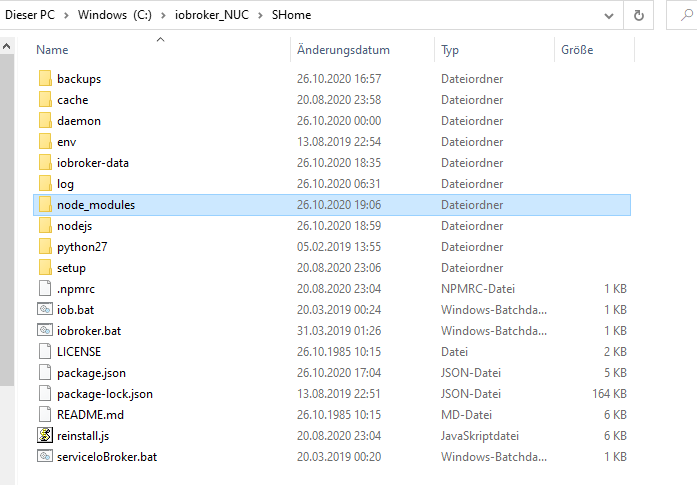
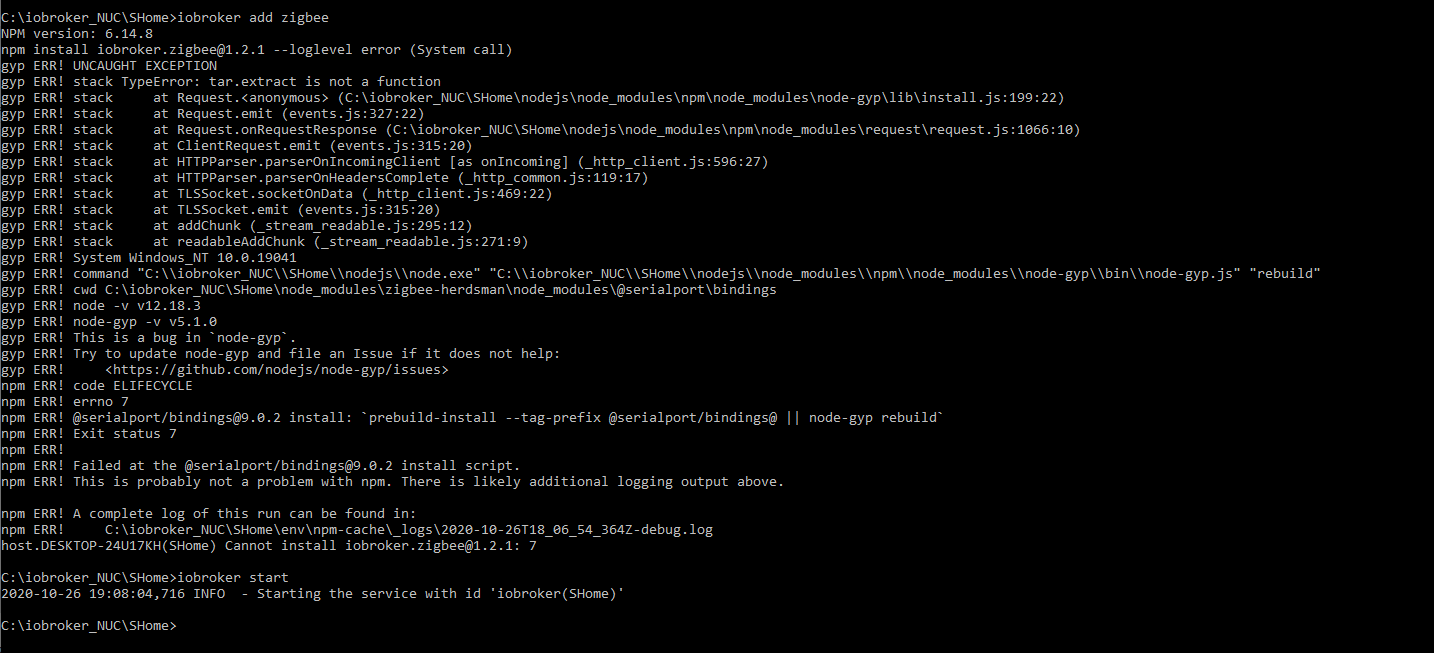
In der Info steht folgendes:
Plattform: Windows
Betriebssystem: win32
Die Architektur: x64
CPUs: 6
Geschwindigkeit: 2208 MHz
Modell: Intel(R) Core(TM) i5-9500T CPU @ 2.20GHz
RAM: 7.8 GB
System-Betriebszeit: 00:00:00
Node.js: v12.18.3
NPM: 6.14.8
Adapter-Anzahl: 308
Datenträgergröße: 237.5 GiB
Datenträger verfügbar: 155.6 GiB
Betriebszeit: 00:07:22
Aktive Instanzen: 36Alle Anderen Adapter sind grün.
Wo finde ich Infos zu Node? -
@Asgothian
Erkennst du hierauf was?
In der Info steht folgendes:
Plattform: Windows
Betriebssystem: win32
Die Architektur: x64
CPUs: 6
Geschwindigkeit: 2208 MHz
Modell: Intel(R) Core(TM) i5-9500T CPU @ 2.20GHz
RAM: 7.8 GB
System-Betriebszeit: 00:00:00
Node.js: v12.18.3
NPM: 6.14.8
Adapter-Anzahl: 308
Datenträgergröße: 237.5 GiB
Datenträger verfügbar: 155.6 GiB
Betriebszeit: 00:07:22
Aktive Instanzen: 36Alle Anderen Adapter sind grün.
Wo finde ich Infos zu Node? -
Wenn ich ein Backup einspiele(Iobroker und Zigbee) ist zwar die Instanz da (rot) aber unter Adapter steht keine installierte Instanz.
-
Wenn ich ein Backup einspiele(Iobroker und Zigbee) ist zwar die Instanz da (rot) aber unter Adapter steht keine installierte Instanz.
den iobroker über den Windowsinstaller. Aber erst vorhin, das wird nichts mit dem Problem zu tun haben. Will die Neue später nur wieder loswerden.
Ich habe woanders gelesen, dass ich node-gyp installieren soll.
Dann kommt folgende Meldung:C:\iobroker_NUC\SHome>npm install -g node-gyp npm WARN deprecated request@2.88.2: request has been deprecated, see https://github.com/request/request/issues/3142 npm WARN deprecated har-validator@5.1.5: this library is no longer supported C:\iobroker_NUC\SHome\env\npm\node-gyp -> C:\iobroker_NUC\SHome\env\npm\node_modules\node-gyp\bin\node-gyp.js + node-gyp@7.1.2 added 96 packages from 66 contributors in 6.297s -
den iobroker über den Windowsinstaller. Aber erst vorhin, das wird nichts mit dem Problem zu tun haben. Will die Neue später nur wieder loswerden.
Ich habe woanders gelesen, dass ich node-gyp installieren soll.
Dann kommt folgende Meldung:C:\iobroker_NUC\SHome>npm install -g node-gyp npm WARN deprecated request@2.88.2: request has been deprecated, see https://github.com/request/request/issues/3142 npm WARN deprecated har-validator@5.1.5: this library is no longer supported C:\iobroker_NUC\SHome\env\npm\node-gyp -> C:\iobroker_NUC\SHome\env\npm\node_modules\node-gyp\bin\node-gyp.js + node-gyp@7.1.2 added 96 packages from 66 contributors in 6.297s -
@Asgothian
Ja sowohl über den Backup-Adapter, als auch das exportieren der Scripts und das sichern des iobroker-data Verzeichnisses@DocGame Windows 10 ? Dann installier dir doch mal nach der Anleitung die hier ist einen Docker container mit iobroker. Der läuft unabhängig von dem was du bei Windows installiert hast.
https://github.com/buanet/docker-iobroker
dann kannst du erst einmal den/die installierten iobroker stoppen, zur Not über den Taskmanager, und schaust ob du das ganze im Docker zum Laufen bekommst. Wenn es läuft kannst du das im Windows installierte loeschen und dann schauen ob du mit dem Docker Zeugs weiter machen willst oder nochmal nativ unter Windows installierst.
A.
-
@DocGame Windows 10 ? Dann installier dir doch mal nach der Anleitung die hier ist einen Docker container mit iobroker. Der läuft unabhängig von dem was du bei Windows installiert hast.
https://github.com/buanet/docker-iobroker
dann kannst du erst einmal den/die installierten iobroker stoppen, zur Not über den Taskmanager, und schaust ob du das ganze im Docker zum Laufen bekommst. Wenn es läuft kannst du das im Windows installierte loeschen und dann schauen ob du mit dem Docker Zeugs weiter machen willst oder nochmal nativ unter Windows installierst.
A.
@Asgothian Oh je... auf die schnelle blick ich das nicht.
Zu allem Unglück ist jetzt gerade meine Frau gekommen und steht schreiend im dunkeln Flur.
Muss mal Kerzen suchen und sie beruhigen. Vielleicht kommt ja noch ein Tip (der entscheidende und hoffentlich einfache) bis ich wieder vor dem PC sitze. -
@Asgothian Oh je... auf die schnelle blick ich das nicht.
Zu allem Unglück ist jetzt gerade meine Frau gekommen und steht schreiend im dunkeln Flur.
Muss mal Kerzen suchen und sie beruhigen. Vielleicht kommt ja noch ein Tip (der entscheidende und hoffentlich einfache) bis ich wieder vor dem PC sitze. -
@DocGame ich schau mal ob ich eine step by step Anleitung zur Installation finde. Es gibt eine.
A.
@Asgothian Habe jetzt auch noch auf Node.js v12.19.0 upgedatet. Es ist nach wie vor das gleiche....alles ist grün nur Zigbee nicht. Nach den 2 Updates mit dem Backup-Adapter ist zwar die Instanz da, da aber bei Adapter nichts ist bringt das natürlich wenig. Ich werde morgen einen halben Tag Urlaub machen und versuchen das ganze neu aufzusetzen. Wie bekomme ich die bestehenden 2 Instanzen vom iobroker am besten restlos entfernt damit sich nicht poch ein Dienst wo versteckt oder der Port ins Nirwana umgeleitet wird?


Hey! Du scheinst an dieser Unterhaltung interessiert zu sein, hast aber noch kein Konto.
Hast du es satt, bei jedem Besuch durch die gleichen Beiträge zu scrollen? Wenn du dich für ein Konto anmeldest, kommst du immer genau dorthin zurück, wo du zuvor warst, und kannst dich über neue Antworten benachrichtigen lassen (entweder per E-Mail oder Push-Benachrichtigung). Du kannst auch Lesezeichen speichern und Beiträge positiv bewerten, um anderen Community-Mitgliedern deine Wertschätzung zu zeigen.
Mit deinem Input könnte dieser Beitrag noch besser werden 💗
Registrieren AnmeldenSupport us
237
Online33.0k
Benutzer83.6k
Themen1.3m
Beiträge