




Synology Adapter Error / Keine Daten
-
@Glasfaser
Per Aufruf im Browser ist die Syno aber genau so erreichbar. Nur mit dem Adapter nicht.
Woran kann das liegen?
Grüße, EckartS@EckartS sagte in Synology Adapter Error / Keine Daten:
Per Aufruf im Browser ist die Syno aber genau so erreichbar.
Per Browser ist was anderes !
Nur mit dem Adapter nicht.
Woran kann das liegen?
An deinem Docker .. an deinen Einstellungen ....
-
@EckartS Bitte Adapter auf debug stellen, logfile anschauen, analysieren.
Oder hier posten. :-)und vielleicht noch die Einstellungen hier als screenshot posten.
Hier der Log des Syno-Adapters auf Debug:
synology.0	2020-08-11 16:31:30.560	error	(23406) *** ERROR : src: *sendPolling syno[dsm][getPollingData] code: EHOSTUNREACH message: connect EHOSTUNREACH 192.168.10.2:5000
synology.0	2020-08-11 16:31:30.559	debug	(23406) * No response, read next.
synology.0	2020-08-11 16:31:27.556	debug	(23406) * Get info from (firstPoll) api: DSM method: getPollingData params: {}
synology.0	2020-08-11 16:31:27.556	debug	(23406) * sendPolling. namePolling = firstPoll | iteration = 0 | typeof poll = object | poll = {"api":"dsm","method":"getPollingData","params":{}}
synology.0	2020-08-11 16:31:27.555	debug	(23406) -----------------------------------------------------------------------------------------------------
synology.0	2020-08-11 16:31:27.555	error	(23406) *** ERROR : src: *sendPolling syno[dsm][getPollingData] code: EHOSTUNREACH message: connect EHOSTUNREACH 192.168.10.2:5000
synology.0	2020-08-11 16:31:27.554	debug	(23406) * No response, read next.
synology.0	2020-08-11 16:31:24.551	debug	(23406) * Get info from (firstPoll) api: DSM method: getPollingData params: {}
synology.0	2020-08-11 16:31:24.551	debug	(23406) * sendPolling. namePolling = firstPoll | iteration = 0 | typeof poll = object | poll = {"api":"dsm","method":"getPollingData","params":{}}
synology.0	2020-08-11 16:31:24.548	debug	(23406) -----------------------------------------------------------------------------------------------------
synology.0	2020-08-11 16:31:24.548	error	(23406) *** ERROR : src: *sendPolling syno[dsm][getPollingData] code: EHOSTUNREACH message: connect EHOSTUNREACH 192.168.10.2:5000
synology.0	2020-08-11 16:31:24.548	debug	(23406) * No response, read next.
synology.0	2020-08-11 16:31:21.543	debug	(23406) * Get info from (firstPoll) api: DSM method: getPollingData params: {}
synology.0	2020-08-11 16:31:21.542	debug	(23406) * sendPolling. namePolling = firstPoll | iteration = 0 | typeof poll = object | poll = {"api":"dsm","method":"getPollingData","params":{}}
synology.0	2020-08-11 16:31:21.542	debug	(23406) -----------------------------------------------------------------------------------------------------
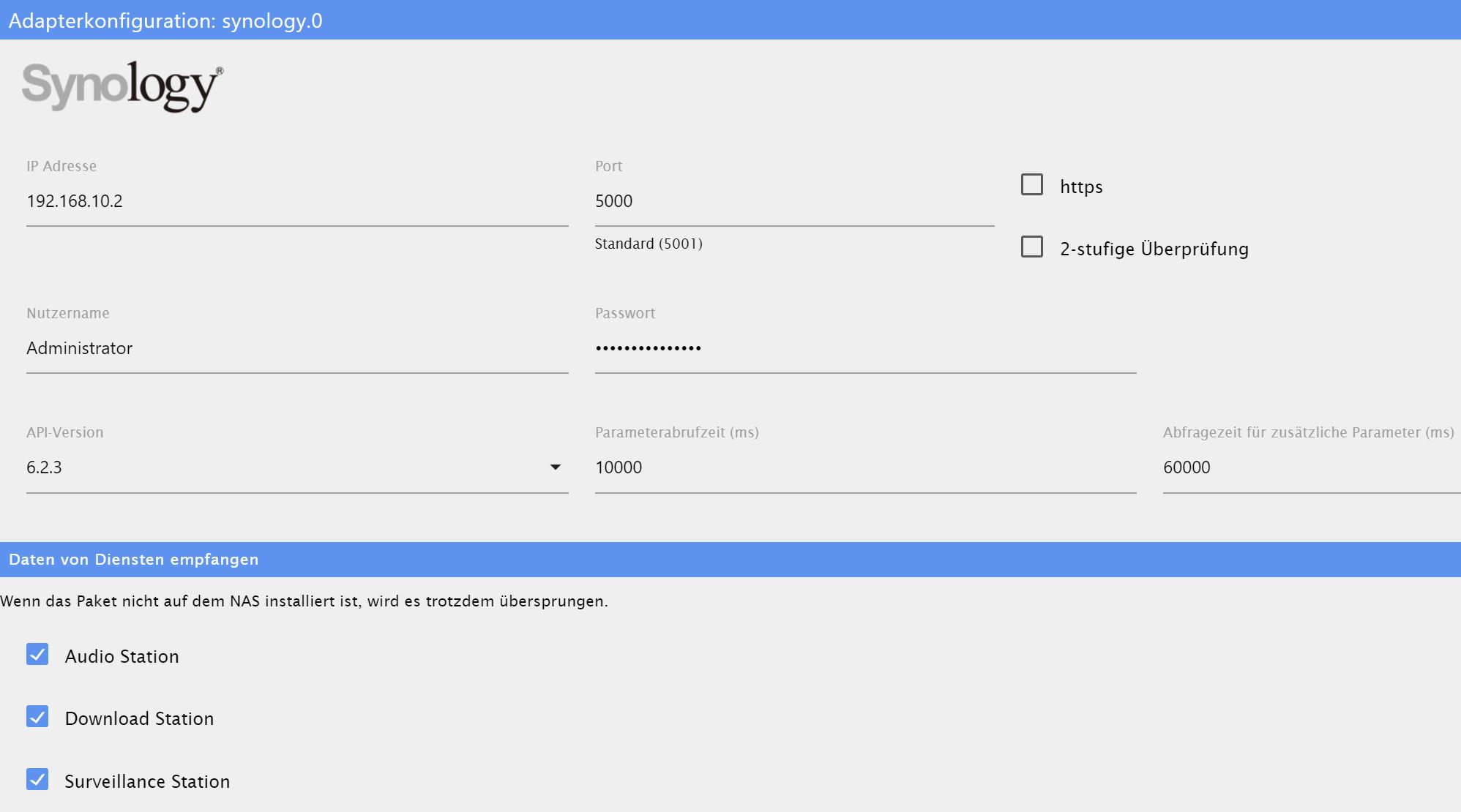
und hier die Einstellungen als Screenshot:
Und hier noch die Docker-Einstellungen (nach der Anleitung von buanet mit Portainer installiert)
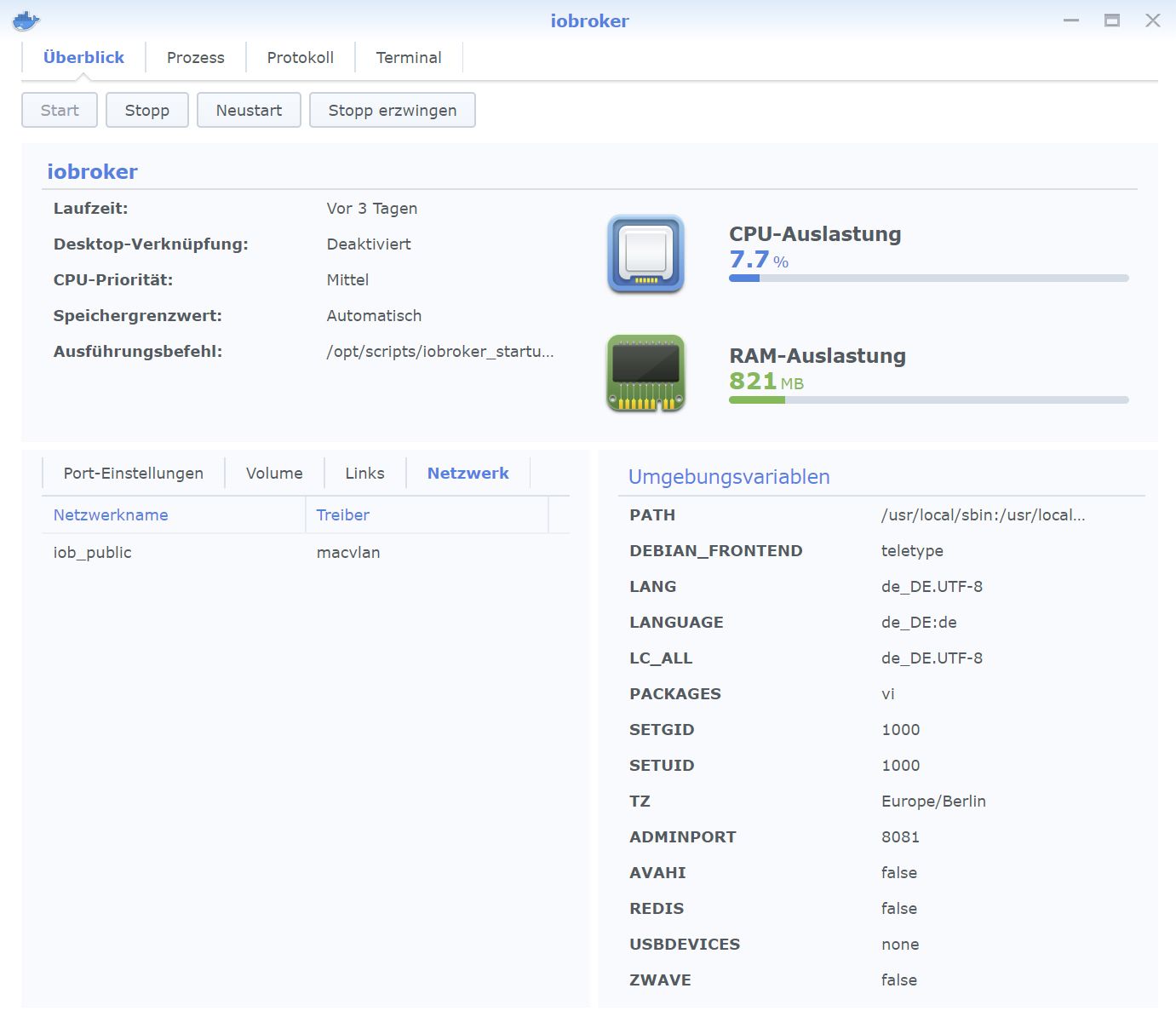
Fällt euch da irgendetwas ungerades auf?
Grüße, EckartS -
Hier der Log des Syno-Adapters auf Debug:
synology.0	2020-08-11 16:31:30.560	error	(23406) *** ERROR : src: *sendPolling syno[dsm][getPollingData] code: EHOSTUNREACH message: connect EHOSTUNREACH 192.168.10.2:5000
synology.0	2020-08-11 16:31:30.559	debug	(23406) * No response, read next.
synology.0	2020-08-11 16:31:27.556	debug	(23406) * Get info from (firstPoll) api: DSM method: getPollingData params: {}
synology.0	2020-08-11 16:31:27.556	debug	(23406) * sendPolling. namePolling = firstPoll | iteration = 0 | typeof poll = object | poll = {"api":"dsm","method":"getPollingData","params":{}}
synology.0	2020-08-11 16:31:27.555	debug	(23406) -----------------------------------------------------------------------------------------------------
synology.0	2020-08-11 16:31:27.555	error	(23406) *** ERROR : src: *sendPolling syno[dsm][getPollingData] code: EHOSTUNREACH message: connect EHOSTUNREACH 192.168.10.2:5000
synology.0	2020-08-11 16:31:27.554	debug	(23406) * No response, read next.
synology.0	2020-08-11 16:31:24.551	debug	(23406) * Get info from (firstPoll) api: DSM method: getPollingData params: {}
synology.0	2020-08-11 16:31:24.551	debug	(23406) * sendPolling. namePolling = firstPoll | iteration = 0 | typeof poll = object | poll = {"api":"dsm","method":"getPollingData","params":{}}
synology.0	2020-08-11 16:31:24.548	debug	(23406) -----------------------------------------------------------------------------------------------------
synology.0	2020-08-11 16:31:24.548	error	(23406) *** ERROR : src: *sendPolling syno[dsm][getPollingData] code: EHOSTUNREACH message: connect EHOSTUNREACH 192.168.10.2:5000
synology.0	2020-08-11 16:31:24.548	debug	(23406) * No response, read next.
synology.0	2020-08-11 16:31:21.543	debug	(23406) * Get info from (firstPoll) api: DSM method: getPollingData params: {}
synology.0	2020-08-11 16:31:21.542	debug	(23406) * sendPolling. namePolling = firstPoll | iteration = 0 | typeof poll = object | poll = {"api":"dsm","method":"getPollingData","params":{}}
synology.0	2020-08-11 16:31:21.542	debug	(23406) -----------------------------------------------------------------------------------------------------
und hier die Einstellungen als Screenshot:
Und hier noch die Docker-Einstellungen (nach der Anleitung von buanet mit Portainer installiert)
Fällt euch da irgendetwas ungerades auf?
Grüße, EckartS@EckartS unten hast du Port 5001, hier Port 5000 konfiguriert, was für einen nutzt du denn nun?
Auch im Docker die Porteinstellungen gemacht?
Dein iobroker kommt nicht auf die Syno auf den Port, das sagt das log. -
Hier der Log des Syno-Adapters auf Debug:
synology.0	2020-08-11 16:31:30.560	error	(23406) *** ERROR : src: *sendPolling syno[dsm][getPollingData] code: EHOSTUNREACH message: connect EHOSTUNREACH 192.168.10.2:5000
synology.0	2020-08-11 16:31:30.559	debug	(23406) * No response, read next.
synology.0	2020-08-11 16:31:27.556	debug	(23406) * Get info from (firstPoll) api: DSM method: getPollingData params: {}
synology.0	2020-08-11 16:31:27.556	debug	(23406) * sendPolling. namePolling = firstPoll | iteration = 0 | typeof poll = object | poll = {"api":"dsm","method":"getPollingData","params":{}}
synology.0	2020-08-11 16:31:27.555	debug	(23406) -----------------------------------------------------------------------------------------------------
synology.0	2020-08-11 16:31:27.555	error	(23406) *** ERROR : src: *sendPolling syno[dsm][getPollingData] code: EHOSTUNREACH message: connect EHOSTUNREACH 192.168.10.2:5000
synology.0	2020-08-11 16:31:27.554	debug	(23406) * No response, read next.
synology.0	2020-08-11 16:31:24.551	debug	(23406) * Get info from (firstPoll) api: DSM method: getPollingData params: {}
synology.0	2020-08-11 16:31:24.551	debug	(23406) * sendPolling. namePolling = firstPoll | iteration = 0 | typeof poll = object | poll = {"api":"dsm","method":"getPollingData","params":{}}
synology.0	2020-08-11 16:31:24.548	debug	(23406) -----------------------------------------------------------------------------------------------------
synology.0	2020-08-11 16:31:24.548	error	(23406) *** ERROR : src: *sendPolling syno[dsm][getPollingData] code: EHOSTUNREACH message: connect EHOSTUNREACH 192.168.10.2:5000
synology.0	2020-08-11 16:31:24.548	debug	(23406) * No response, read next.
synology.0	2020-08-11 16:31:21.543	debug	(23406) * Get info from (firstPoll) api: DSM method: getPollingData params: {}
synology.0	2020-08-11 16:31:21.542	debug	(23406) * sendPolling. namePolling = firstPoll | iteration = 0 | typeof poll = object | poll = {"api":"dsm","method":"getPollingData","params":{}}
synology.0	2020-08-11 16:31:21.542	debug	(23406) -----------------------------------------------------------------------------------------------------
und hier die Einstellungen als Screenshot:
Und hier noch die Docker-Einstellungen (nach der Anleitung von buanet mit Portainer installiert)
Fällt euch da irgendetwas ungerades auf?
Grüße, EckartS@EckartS sagte in Synology Adapter Error / Keine Daten:
Fällt euch da irgendetwas ungerades auf?
code: EHOSTUNREACH message: connect EHOSTUNREACH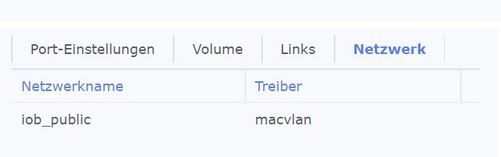
macvlan
Bin im Host Betrieb , deshalb kann ich wenig dazu sagen , kenne deshalb diese Einstellungen nicht !
Wurde der Port weitergeleitert ...
EDIT :
@ilovegym

-
@EckartS unten hast du Port 5001, hier Port 5000 konfiguriert, was für einen nutzt du denn nun?
Auch im Docker die Porteinstellungen gemacht?
Dein iobroker kommt nicht auf die Syno auf den Port, das sagt das log.Porteinstellungen sind im ioBroker-Container nicht zu finden:
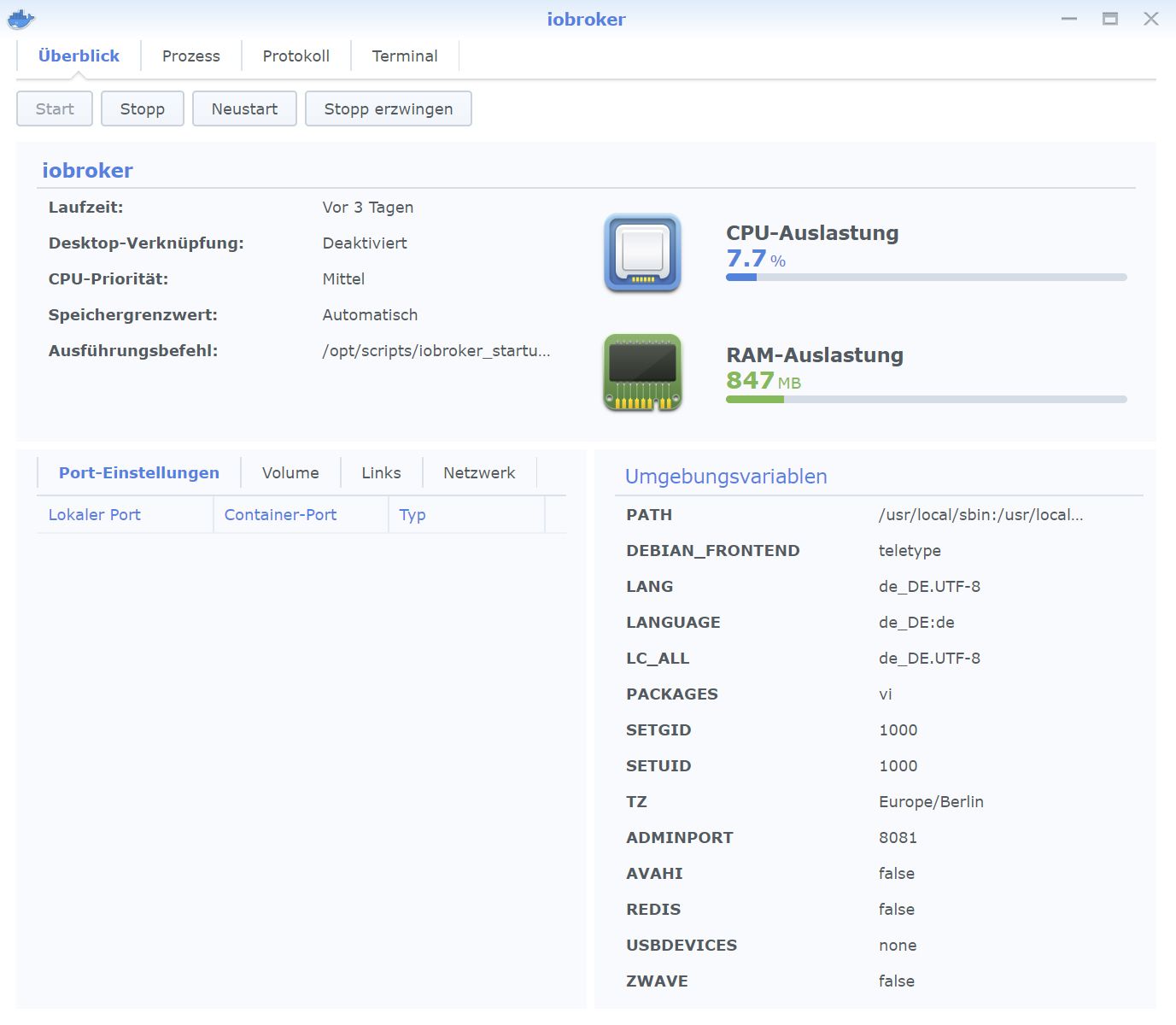
Im Portainer-Container verweist der lokale Port 8000 auf den Container-Port 9000 (tcp).Was müsste ich da denn einstellen? Ich will ja von ioBroker auf den Syno-Port, nicht umgekehrt, wenn ich das richtig sehe.
Grüße, EckartS
-
Porteinstellungen sind im ioBroker-Container nicht zu finden:
Im Portainer-Container verweist der lokale Port 8000 auf den Container-Port 9000 (tcp).Was müsste ich da denn einstellen? Ich will ja von ioBroker auf den Syno-Port, nicht umgekehrt, wenn ich das richtig sehe.
Grüße, EckartS
-
Container stoppen , Bearbeiten .... Port ...
Jenachdem welchen Port du jetzt nutzen willst5000 5000
5001 5001eintragen .
@Glasfaser
Das geht nicht:
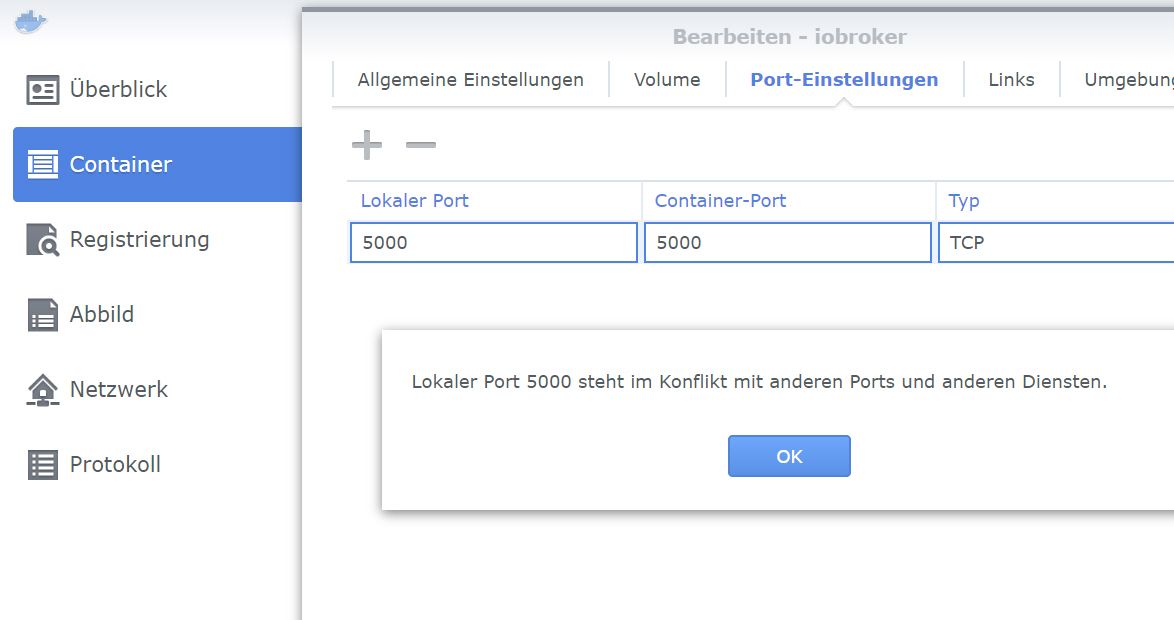
Grüße, EckartS -
@Glasfaser
Das geht nicht:
Grüße, EckartS@EckartS sagte in Synology Adapter Error / Keine Daten:
Das geht nicht:
War nur ein Vorschlag ...
Wie oben schon erwähnt , arbeite ich nicht mit macvlan.Warte mal , vielleicht kann dir ein anderer helfen , der das Macvlan nutzt .
Synology 918+ 16GB - ioBroker in Docker v9 , VISO auf Trekstor Primebook C13 13,3" , Hikvision Domkameras mit Surveillance Station .. CCU RaspberryMatic in Synology VM .. Zigbee CC2538+CC2592 .. Sonoff .. KNX .. Modbus ..
-
@Glasfaser
Das geht nicht:
Grüße, EckartS -
@EckartS sagte in Synology Adapter Error / Keine Daten:
Das geht nicht:
Versuch unterschiedliche Ports!
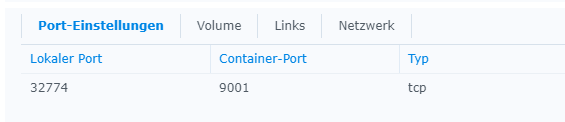
-
@Glasfaser
Das geht nicht:
Grüße, EckartS@EckartS Hi
rein von der Logik her, kann es nicht gehen, da auf der Synology ja der 5000/5001 schon belegt ist.
Du nimmst am besten den Lokalen Port von der Syno ( also 5000 oder 5001 ) und legst den auf den Container-Port 5050 oder so ( je nachdem, was du da noch so hast.. 8081 etc dürfte vom iobroker belegt sein..) -
@EckartS sagte in Synology Adapter Error / Keine Daten:
Das geht nicht:
War nur ein Vorschlag ...
Wie oben schon erwähnt , arbeite ich nicht mit macvlan.Warte mal , vielleicht kann dir ein anderer helfen , der das Macvlan nutzt .
@Glasfaser sagte in Synology Adapter Error / Keine Daten:
Warte mal , vielleicht kann dir ein anderer helfen , der das Macvlan nutzt .
ich habe den Adapter eben mal installiert. (läuft)
Ich nutze macvlan.
Da erreiche ich iobroker

Das ist das macvlan (das ist auch ausgewählt)
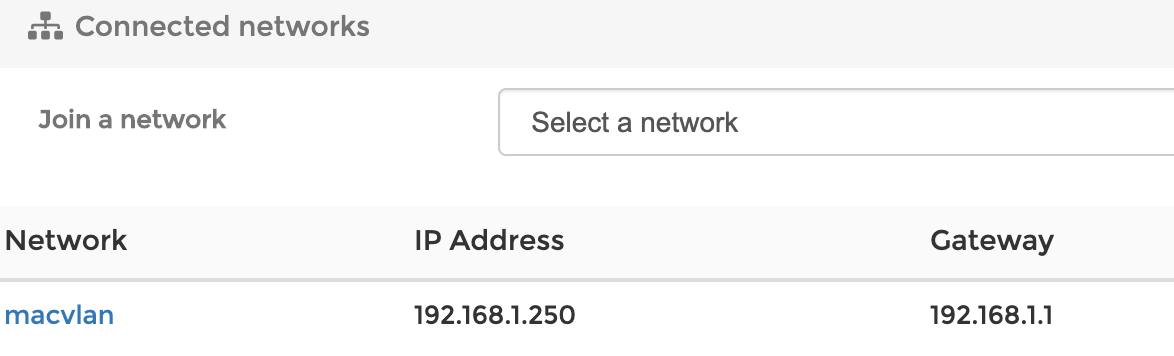
Ich habe zwei Netzwerkkabel an meiner SYNO + macvlan

Der Adapter läuft bei mir über die IP eines phys. Anschlusses (Netzwerkkabel)
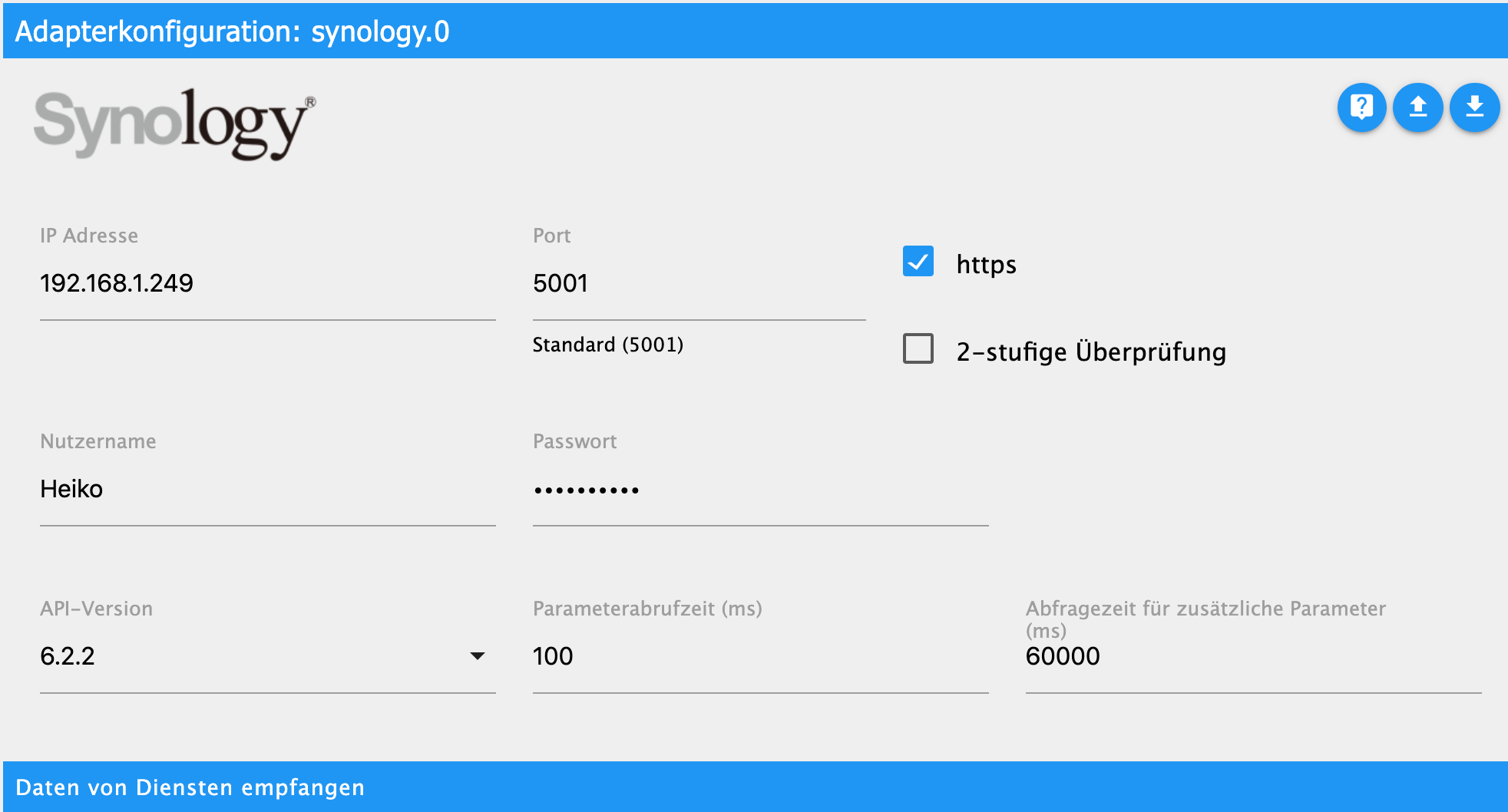

alles da...
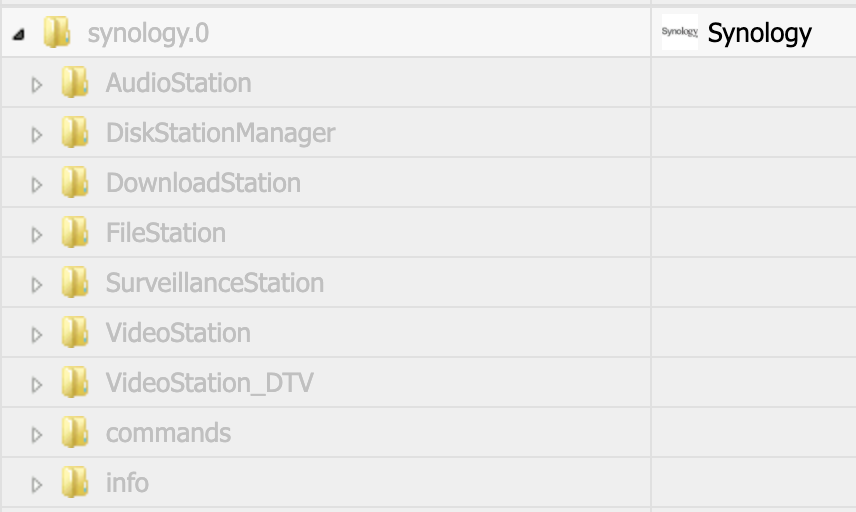
EDIT: 5000 ist http und 5001 https
5000 ohne Haken bei https geht auch
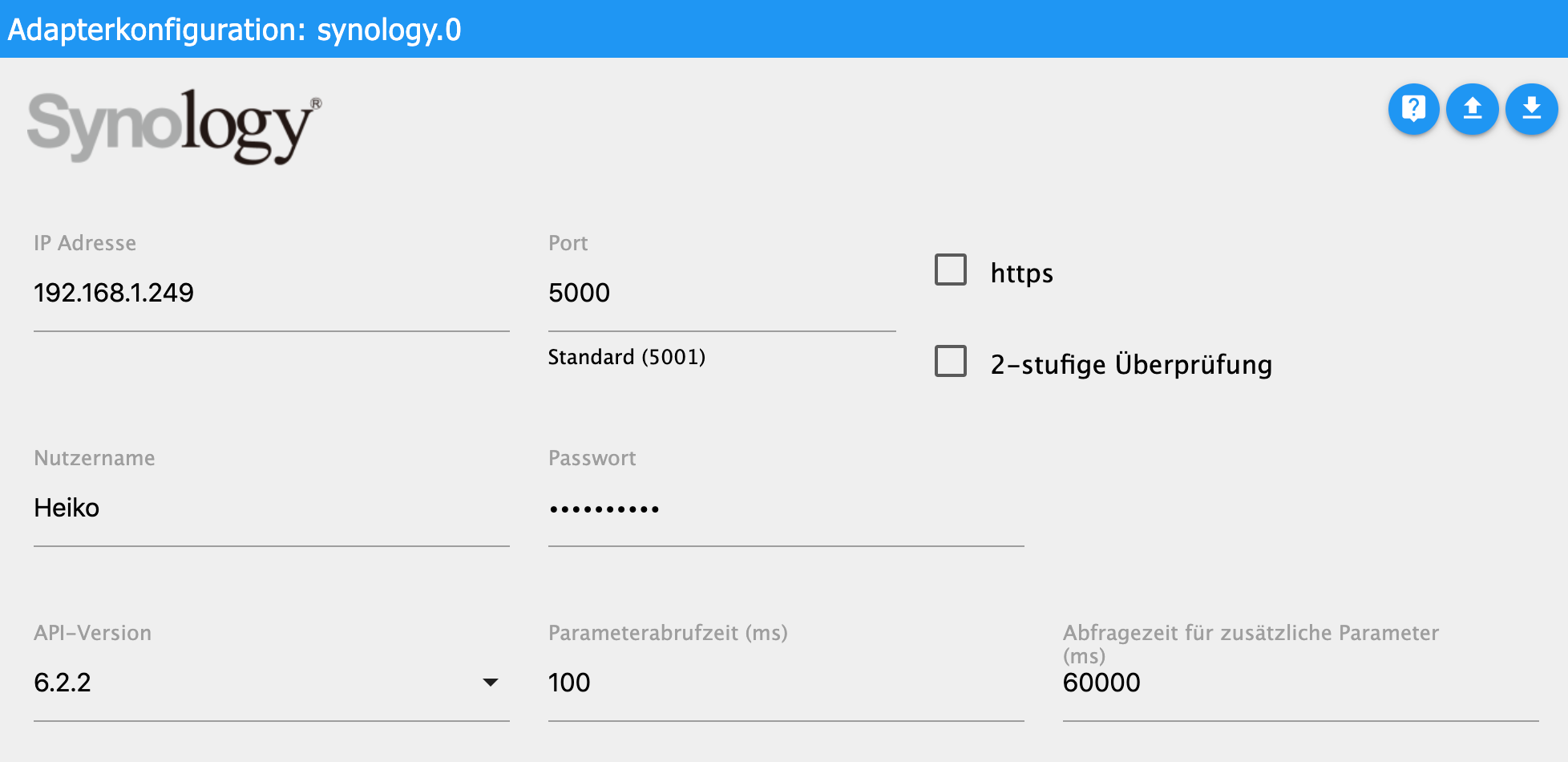
EDIT2: Du musst auch schauen welche(n) Netzwerkanschluss Du für mcvlan konfiguriert hast, eth0 oder eth1. usw...
Bei mir geht in der Adapterkonfig nur die 192.168.1.249 (das ist bei mir eth1), über eth0 habe ich die macvlan Konfig
-
@EckartS Hi
rein von der Logik her, kann es nicht gehen, da auf der Synology ja der 5000/5001 schon belegt ist.
Du nimmst am besten den Lokalen Port von der Syno ( also 5000 oder 5001 ) und legst den auf den Container-Port 5050 oder so ( je nachdem, was du da noch so hast.. 8081 etc dürfte vom iobroker belegt sein..)@ilovegym
Den lokalen Port der Syno (5000) kann ich nicht umlegen. Dann kommt die o. g. Fehlermeldung: Port schon belegt.
@dslraser
Entscheidend scheint zu sein, dass du zwei physische LAN-Anschlüsse hast.
Ich habe an der kleinen DS218+ aber nur einen LAN-Anschluss.
Über den ist die Syno selbst /DSM errreichbar mit http://192.168.10.2:5000
Und ioBroker mit http://192.168.10.13:8081/
Und da komme ich partout nicht vom Syno-Adapter in iobroker auf die Syno.synology.0 2020-08-12 00:44:28.692 error (2841) *** ERROR : src: *sendPolling syno[dsm][getPollingData] code: EHOSTUNREACH message: connect EHOSTUNREACH 192.168.10.2:5002 synology.0 2020-08-12 00:44:28.691 debug (2841) * No response, read next.Habt ihr noch Ideen?
Grüße, EckartS -
@ilovegym
Den lokalen Port der Syno (5000) kann ich nicht umlegen. Dann kommt die o. g. Fehlermeldung: Port schon belegt.
@dslraser
Entscheidend scheint zu sein, dass du zwei physische LAN-Anschlüsse hast.
Ich habe an der kleinen DS218+ aber nur einen LAN-Anschluss.
Über den ist die Syno selbst /DSM errreichbar mit http://192.168.10.2:5000
Und ioBroker mit http://192.168.10.13:8081/
Und da komme ich partout nicht vom Syno-Adapter in iobroker auf die Syno.synology.0 2020-08-12 00:44:28.692 error (2841) *** ERROR : src: *sendPolling syno[dsm][getPollingData] code: EHOSTUNREACH message: connect EHOSTUNREACH 192.168.10.2:5002 synology.0 2020-08-12 00:44:28.691 debug (2841) * No response, read next.Habt ihr noch Ideen?
Grüße, EckartS -
@EckartS sagte in Synology Adapter Error / Keine Daten:
EHOSTUNREACH 192.168.10.2:5002
... ist der Port jetzt 5002 , ist das richtig !?
Hier noch etwas ... vielleicht kannst du das gebrauchen : Link Text
Der Link war jedenfalls nützlich. Da steht, dass Docker-Container auf der Syno ihren Host aus Sicherheitsgründen nicht direkt, sondern nur mit der IP 172.17.0.1 erreichen können.
Diese IP lässt sich aus dem ioBroker-Terminal auch anpingen. Leider aber komme ich mit dieser IP und Port 5000 in den Adapter-Einstellungen auch nicht weiter: Keine Verbindung, gelb, Connection TimeOut
Debug-Log:synology.0 2020-08-12 12:44:14.422 debug (9997) * Get info from (firstPoll) api: DSM method: getPollingData params: {} synology.0 2020-08-12 12:44:14.421 debug (9997) * sendPolling. namePolling = firstPoll | iteration = 0 | typeof poll = object | poll = {"api":"dsm","method":"getPollingData","params":{}} synology.0 2020-08-12 12:44:14.421 debug (9997) ----------------------------------------------------------------------------------------------------- synology.0 2020-08-12 12:44:14.420 error (9997) *** ERROR : src: *sendPolling syno[dsm][getPollingData] code: ETIMEDOUT message: connect ETIMEDOUT 172.17.0.1:5000 synology.0 2020-08-12 12:44:14.419 debug (9997) * No response, read next. mihome-vacuum.0 2020-08-12 12:44:04.415 info (556) connecting, this can take up to 10 minutes ... mihome-vacuum.0 2020-08-12 12:43:44.643 info (556) connecting, this can take up to 10 minutes ... mihome-vacuum.0 2020-08-12 12:43:24.398 info (556) connecting, this can take up to 10 minutes ... synology.0 2020-08-12 12:43:18.034 debug (9997) system.adapter.admin.0: logging false mihome-vacuum.0 2020-08-12 12:43:04.398 info (556) connecting, this can take up to 10 minutes ... mihome-vacuum.0 2020-08-12 12:42:24.397 info (556) connecting, this can take up to 10 minutes ... synology.0 2020-08-12 12:42:07.111 debug (9997) * Get info from (firstPoll) api: DSM method: getPollingData params: {} synology.0 2020-08-12 12:42:07.111 debug (9997) * sendPolling. namePolling = firstPoll | iteration = 0 | typeof poll = object | poll = {"api":"dsm","method":"getPollingData","params":{}} synology.0 2020-08-12 12:42:07.110 debug (9997) ----------------------------------------------------------------------------------------------------- synology.0 2020-08-12 12:42:04.918 info (9997) starting. Version 0.1.18 in /opt/iobroker/node_modules/iobroker.synology, node: v10.20.1, js-controller: 3.1.4 mihome-vacuum.0 2020-08-12 12:42:04.397 info (556) connecting, this can take up to 10 minutes ... synology.0 2020-08-12 12:42:03.782 debug (9997) Plugin sentry Initialize Plugin (enabled=true) synology.0 2020-08-12 12:42:01.839 debug (9997) statesDB connected synology.0 2020-08-12 12:42:01.831 debug (9997) States connected to redis: 127.0.0.1:9000 synology.0 2020-08-12 12:42:01.802 debug (9997) States create System PubSub Client synology.0 2020-08-12 12:42:01.800 debug (9997) States create User PubSub Client synology.0 2020-08-12 12:42:01.783 debug (9997) Redis States: Use Redis connection: 127.0.0.1:9000 synology.0 2020-08-12 12:42:01.781 debug (9997) objectDB connected synology.0 2020-08-12 12:42:01.774 debug (9997) Objects connected to redis: 127.0.0.1:9001 synology.0 2020-08-12 12:42:01.749 debug (9997) Objects client initialize lua scripts synology.0 2020-08-12 12:42:01.748 debug (9997) Objects create User PubSub Client synology.0 2020-08-12 12:42:01.747 debug (9997) Objects create System PubSub Client synology.0 2020-08-12 12:42:01.743 debug (9997) Objects client ready ... initialize now synology.0 2020-08-12 12:42:01.706 debug (9997) Redis Objects: Use Redis connection: 127.0.0.1:9001 host.iobroker 2020-08-12 12:41:59.486 info instance system.adapter.synology.0 started with pid 9997 host.iobroker 2020-08-12 12:41:59.415 info "system.adapter.synology.0" enabledFällt euch im Log noch etwas auf, das auf andere Einstellungsnotwendigkeiten hindeutet? Wo würdet ihr noch suchen?
Gibt es hier jemanden, bei dem meine Konfiguration - ioBroker auf Syno + Syno-Adapter - funktioniert?Grüße und besten Dank für all die Hinweise bisher, EckartS
-
Der Link war jedenfalls nützlich. Da steht, dass Docker-Container auf der Syno ihren Host aus Sicherheitsgründen nicht direkt, sondern nur mit der IP 172.17.0.1 erreichen können.
Diese IP lässt sich aus dem ioBroker-Terminal auch anpingen. Leider aber komme ich mit dieser IP und Port 5000 in den Adapter-Einstellungen auch nicht weiter: Keine Verbindung, gelb, Connection TimeOut
Debug-Log:synology.0 2020-08-12 12:44:14.422 debug (9997) * Get info from (firstPoll) api: DSM method: getPollingData params: {} synology.0 2020-08-12 12:44:14.421 debug (9997) * sendPolling. namePolling = firstPoll | iteration = 0 | typeof poll = object | poll = {"api":"dsm","method":"getPollingData","params":{}} synology.0 2020-08-12 12:44:14.421 debug (9997) ----------------------------------------------------------------------------------------------------- synology.0 2020-08-12 12:44:14.420 error (9997) *** ERROR : src: *sendPolling syno[dsm][getPollingData] code: ETIMEDOUT message: connect ETIMEDOUT 172.17.0.1:5000 synology.0 2020-08-12 12:44:14.419 debug (9997) * No response, read next. mihome-vacuum.0 2020-08-12 12:44:04.415 info (556) connecting, this can take up to 10 minutes ... mihome-vacuum.0 2020-08-12 12:43:44.643 info (556) connecting, this can take up to 10 minutes ... mihome-vacuum.0 2020-08-12 12:43:24.398 info (556) connecting, this can take up to 10 minutes ... synology.0 2020-08-12 12:43:18.034 debug (9997) system.adapter.admin.0: logging false mihome-vacuum.0 2020-08-12 12:43:04.398 info (556) connecting, this can take up to 10 minutes ... mihome-vacuum.0 2020-08-12 12:42:24.397 info (556) connecting, this can take up to 10 minutes ... synology.0 2020-08-12 12:42:07.111 debug (9997) * Get info from (firstPoll) api: DSM method: getPollingData params: {} synology.0 2020-08-12 12:42:07.111 debug (9997) * sendPolling. namePolling = firstPoll | iteration = 0 | typeof poll = object | poll = {"api":"dsm","method":"getPollingData","params":{}} synology.0 2020-08-12 12:42:07.110 debug (9997) ----------------------------------------------------------------------------------------------------- synology.0 2020-08-12 12:42:04.918 info (9997) starting. Version 0.1.18 in /opt/iobroker/node_modules/iobroker.synology, node: v10.20.1, js-controller: 3.1.4 mihome-vacuum.0 2020-08-12 12:42:04.397 info (556) connecting, this can take up to 10 minutes ... synology.0 2020-08-12 12:42:03.782 debug (9997) Plugin sentry Initialize Plugin (enabled=true) synology.0 2020-08-12 12:42:01.839 debug (9997) statesDB connected synology.0 2020-08-12 12:42:01.831 debug (9997) States connected to redis: 127.0.0.1:9000 synology.0 2020-08-12 12:42:01.802 debug (9997) States create System PubSub Client synology.0 2020-08-12 12:42:01.800 debug (9997) States create User PubSub Client synology.0 2020-08-12 12:42:01.783 debug (9997) Redis States: Use Redis connection: 127.0.0.1:9000 synology.0 2020-08-12 12:42:01.781 debug (9997) objectDB connected synology.0 2020-08-12 12:42:01.774 debug (9997) Objects connected to redis: 127.0.0.1:9001 synology.0 2020-08-12 12:42:01.749 debug (9997) Objects client initialize lua scripts synology.0 2020-08-12 12:42:01.748 debug (9997) Objects create User PubSub Client synology.0 2020-08-12 12:42:01.747 debug (9997) Objects create System PubSub Client synology.0 2020-08-12 12:42:01.743 debug (9997) Objects client ready ... initialize now synology.0 2020-08-12 12:42:01.706 debug (9997) Redis Objects: Use Redis connection: 127.0.0.1:9001 host.iobroker 2020-08-12 12:41:59.486 info instance system.adapter.synology.0 started with pid 9997 host.iobroker 2020-08-12 12:41:59.415 info "system.adapter.synology.0" enabledFällt euch im Log noch etwas auf, das auf andere Einstellungsnotwendigkeiten hindeutet? Wo würdet ihr noch suchen?
Gibt es hier jemanden, bei dem meine Konfiguration - ioBroker auf Syno + Syno-Adapter - funktioniert?Grüße und besten Dank für all die Hinweise bisher, EckartS
-
@Glasfaser
Danke für den Link. Das hat einiges geklärt.Zusammenfassung:
- Mit MACVLAN kann ioBroker im Docker-Container die Host Syno aus Sicherheitsgründen grundsätzlich nicht erreichen
- Das lässt sich auf Synos mit 2 LAN-Ports umgehen
- Auf einer Syno mit nur einem LAN-Port mit Gebastel wohl auch, aber die Lösungen übersteigen meine Fähigkeiten und bergen womöglich auch Risiken, die ich nicht abschätzen kann.
Fazit: ich lasse es bleiben. Kein Syno-Adapter in meiner ioBroker-Installation.
Es sei denn, es findet sich hier jemand, der das zuwege gebracht hat und versichert, dass es stabil und ohne Nebenwirkungen läuft.Viele Grüße,
EckartS





Hey! Du scheinst an dieser Unterhaltung interessiert zu sein, hast aber noch kein Konto.
Hast du es satt, bei jedem Besuch durch die gleichen Beiträge zu scrollen? Wenn du dich für ein Konto anmeldest, kommst du immer genau dorthin zurück, wo du zuvor warst, und kannst dich über neue Antworten benachrichtigen lassen (entweder per E-Mail oder Push-Benachrichtigung). Du kannst auch Lesezeichen speichern und Beiträge positiv bewerten, um anderen Community-Mitgliedern deine Wertschätzung zu zeigen.
Mit deinem Input könnte dieser Beitrag noch besser werden 💗
Registrieren AnmeldenSupport us
290
Online33.0k
Benutzer83.6k
Themen1.3m
Beiträge