



Skip to content
  • Home
  • Aktuell
  • Tags
  • 0 Ungelesen 0
  • Kategorien
  • Unreplied
  • Beliebt
  • GitHub
  • Docu
  • Hilfe
Skins
  • Light
  • Brite
  • Cerulean
  • Cosmo
  • Flatly
  • Journal
  • Litera
  • Lumen
  • Lux
  • Materia
  • Minty
  • Morph
  • Pulse
  • Sandstone
  • Simplex
  • Sketchy
  • Spacelab
  • United
  • Yeti
  • Zephyr
  • Dark
  • Cyborg
  • Darkly
  • Quartz
  • Slate
  • Solar
  • Superhero
  • Vapor

  • Standard: (Kein Skin)
  • Kein Skin
Einklappen
ioBroker Logo

Community Forum

donate donate
  1. ioBroker Community Home
  2. Deutsch
  3. ioBroker Allgemein
  4. Updates 10.07.2016

NEWS

  • UPDATE 31.10.: Amazon Alexa - ioBroker Skill läuft aus ?
    apollon77A
    apollon77
    48
    3
    8.8k

  • Monatsrückblick – September 2025
    BluefoxB
    Bluefox
    13
    1
    2.2k

  • Neues Video "KI im Smart Home" - ioBroker plus n8n
    BluefoxB
    Bluefox
    16
    1
    3.2k

Updates 10.07.2016

Geplant Angeheftet Gesperrt Verschoben ioBroker Allgemein
42 Beiträge 13 Kommentatoren 8.2k Aufrufe
  • Älteste zuerst
  • Neuste zuerst
  • Meiste Stimmen
Antworten
  • In einem neuen Thema antworten
Anmelden zum Antworten
Dieses Thema wurde gelöscht. Nur Nutzer mit entsprechenden Rechten können es sehen.
  • HomoranH Nicht stören
    HomoranH Nicht stören
    Homoran
    Global Moderator Administrators
    schrieb am zuletzt editiert von
    #6

    @pix:

    Danke! Freue mich aufs Karten Widget `
    Lässt sich über das GitHub Icon installieren.

    Gruß

    Rainer

    kein Support per PN! - Fragen im Forum stellen - es gibt fast nichts, was nicht auch für andere interessant ist.

    Benutzt das Voting rechts unten im Beitrag wenn er euch geholfen hat.

    der Installationsfixer: curl -fsL https://iobroker.net/fix.sh | bash -

    1 Antwort Letzte Antwort
    0
    • R Offline
      R Offline
      rascal
      schrieb am zuletzt editiert von
      #7

      @Bluefox:

      @rascal:

      wäre echt cool wenn man vor solchen "Außergewöhnlichen Updates" irgendeine Meldung bekommt :( `
      Zum Beispiel?

      Als Tooltip wird gesagt, was da alles neues kommt.

      Es gibt aber nichts außergewöhnliches. Es muss einfach genauso funktionieren.

      Nur neue Features müssen erscheinen. `
      Naja, anscheinend ist es bei diesem Update nicht damit getan aufs Knöpfchen zu drücken, man muss über die command line dieses update ausführen, dass meine ich mit außergewöhnlich. War keine Kritik oder so, dass Update auch keine Hexerei, wenn man weiß, dass man es eben dieses Mal "manuell" machen muss. Naja, muss mir angewöhnen vor einem Update auf das forum zu schauen

      Gesendet von meinem HUAWEI CRR-L09 mit Tapatalk

      1 Antwort Letzte Antwort
      0
      • HomoranH Nicht stören
        HomoranH Nicht stören
        Homoran
        Global Moderator Administrators
        schrieb am zuletzt editiert von
        #8

        @rascal:

        man muss über die command line dieses update ausführen, `
        Das weiss ich nicht.

        Vielleicht hätte man nur zuerst den Controller updaten müssen.

        Ich hatte über den Admin nach Updates gesuchtund dann zuerst den Admin aktualisiert. Der kam dann nicht wieder. Dann musste ich über die Konsole ran. Ein alleiniges updaten des Admin hatte nicht geholfen. Dies hatte ich zuerst versucht, falls etwas da mit Update schiefgegangen sein sollte. Leider habe auch ich kein npm cache clean gemacht, falls der Download korrupt war.

        Dann habe ich der Einfachheit halber alles auf einmal upgegradet.

        Gruß

        Rainer

        kein Support per PN! - Fragen im Forum stellen - es gibt fast nichts, was nicht auch für andere interessant ist.

        Benutzt das Voting rechts unten im Beitrag wenn er euch geholfen hat.

        der Installationsfixer: curl -fsL https://iobroker.net/fix.sh | bash -

        1 Antwort Letzte Antwort
        0
        • R Offline
          R Offline
          rascal
          schrieb am zuletzt editiert von
          #9

          Das gleiche hier

          Gesendet von meinem HUAWEI CRR-L09 mit Tapatalk

          1 Antwort Letzte Antwort
          0
          • nieIPN Offline
            nieIPN Offline
            nieIP
            schrieb am zuletzt editiert von
            #10

            Hallo

            gleiches Problem

            die 4 Zeilen aus dem ersten Beitrag haben geholfen.

            1 Antwort Letzte Antwort
            0
            • HomoranH Nicht stören
              HomoranH Nicht stören
              Homoran
              Global Moderator Administrators
              schrieb am zuletzt editiert von
              #11

              Ich war mir nicht mehr sicher ob "HOSTS" grün eingefärbt war.

              Bin noch auf meine vorbereitete Installation auf dem cubietruck gegangen.

              Ja, es war grün!
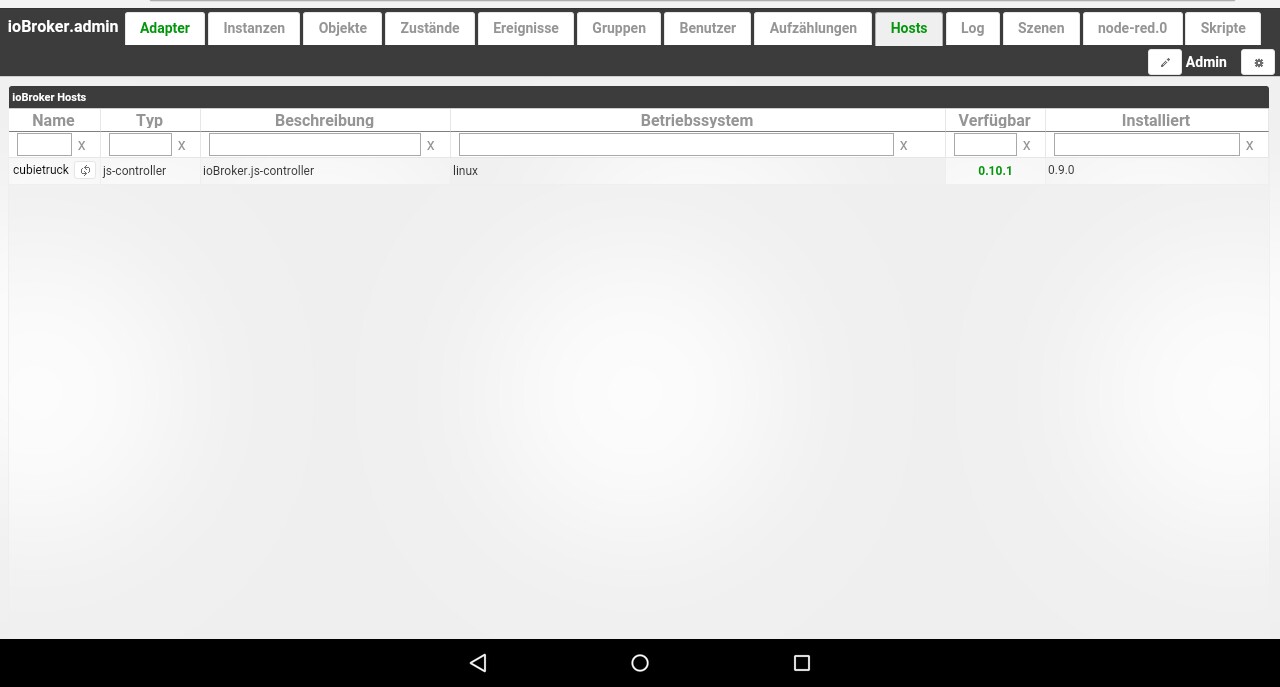
              144_img_20160710_223719_730.jpg
              Aber wie um alles in der Welt wird der Controller über den Admin upgedatet? Da ist der Button nicht mehr da.

              Gruß

              Rainer

              kein Support per PN! - Fragen im Forum stellen - es gibt fast nichts, was nicht auch für andere interessant ist.

              Benutzt das Voting rechts unten im Beitrag wenn er euch geholfen hat.

              der Installationsfixer: curl -fsL https://iobroker.net/fix.sh | bash -

              1 Antwort Letzte Antwort
              0
              • paul53P Offline
                paul53P Offline
                paul53
                schrieb am zuletzt editiert von
                #12

                @Homoran:

                Aber wie um alles in der Welt wird der Controller über den Admin upgedatet? `
                Einfach rechts von 0.9.0 klicken und schon legt er los :o

                Bitte verzichtet auf Chat-Nachrichten, denn die Handhabung ist grauenhaft !
                Produktiv: RPi 2 mit S.USV, HM-MOD-RPI und SLC-USB-Stick mit root fs

                1 Antwort Letzte Antwort
                0
                • V Offline
                  V Offline
                  vore
                  schrieb am zuletzt editiert von
                  #13

                  Mein komplettes System ist nach dem Update tot :-(

                  Sorry, war gestern Abend etwas genervt. Habe das Update soweit gemeistert (lief alles wieder einwandfrei) und dann ein Image von der SD-Karte gezogen (hatte ich schon länger nicht mehr).

                  Danach die Karte in den Cubietruck zurück und neu gestartet. Danach kam IOBroker nicht mehr hoch. Die Webseite war nicht mehr zu erreichen, es gab nur den JS-Controller Prozess im System. Sonst nichts. Habe dann noch rumgebastelt und danach ging gar nichts mehr. Ich ziehe heute Abend das Image von gestern auf die Karte zurück und melde mich bei Bedarf.

                  Gruß vore

                  1 Antwort Letzte Antwort
                  0
                  • P Offline
                    P Offline
                    pix
                    schrieb am zuletzt editiert von
                    #14

                    Hast du nicht mehr Informationen? So kann dir keiner helfen.

                    Gesendet mit Tapatalk

                    ioBroker auf Ubuntu in Proxmox (früher Mac mini (bis OS X 10.12.6 Sierra), VIS via iOS; angeschlossen: Homematic CCU2, Homepilot 1, ConBee II, einige Wemos, Sonos, Unifi CK+Protect, Homekit, Homebridge; KEIN blockly! Github-Profil

                    1 Antwort Letzte Antwort
                    0
                    • D Offline
                      D Offline
                      dtp
                      schrieb am zuletzt editiert von
                      #15

                      Hallo Rainer,

                      vielen Dank für die Info zum Workaraound. Nachdem ich nach dem Update auf ioBroker.admin 1.2.6 nicht mehr auf das Web-Interface kam, stieg in mir gestern Abend während des EM-Finales doch eine leichte Unruhe auf, die eher weniger mit Ronaldos Verletzung zu tun hatte. Glücklicherweise gibt's ja das Forum. ;) Jetzt läuft wieder "alles" rund.

                      Gruß,

                      Thorsten

                      ioBroker im Docker-Container auf Synology DiskStation DS718+, HomeMatic IP über CCU3, IKEA Dirigera inkl. Matter, Apple Homekit, Amazon Alexa.

                      1 Antwort Letzte Antwort
                      0
                      • K Offline
                        K Offline
                        ktsalti
                        schrieb am zuletzt editiert von
                        #16

                        Hi,

                        ich komme auch nicht mehr auf die adminoberfläche und bei den Befehlen eine Fehlermeldung :(

                        ` > pi@raspberrypi:~ $ cd /opt/iobroker

                        pi@raspberrypi:/opt/iobroker $ iobroker stop

                        iobroker controller daemon is not running

                        pi@raspberrypi:/opt/iobroker $ npm install iobroker.js-controller

                        npm ERR! Linux 4.4.13-v7+

                        npm ERR! argv "/usr/local/bin/node" "/usr/local/bin/npm" "install" "iobroker.js-controller"

                        npm ERR! node v0.12.6

                        npm ERR! npm v2.11.2

                        npm ERR! path /opt/iobroker/node_modules/.bin/iobroker

                        npm ERR! code EACCES

                        npm ERR! errno -13

                        npm ERR! Error: EACCES, unlink '/opt/iobroker/node_modules/.bin/iobroker'

                        npm ERR! at Error (native)

                        npm ERR! { [Error: EACCES, unlink '/opt/iobroker/node_modules/.bin/iobroker']

                        npm ERR! errno: -13,

                        npm ERR! code: 'EACCES',

                        npm ERR! path: '/opt/iobroker/node_modules/.bin/iobroker' }

                        npm ERR!

                        npm ERR! Please try running this command again as root/Administrator.

                        npm ERR! error rolling back Error: EACCES, unlink '/opt/iobroker/node_modules/.bin/iobroker'

                        npm ERR! error rolling back at Error (native)

                        npm ERR! error rolling back { [Error: EACCES, unlink '/opt/iobroker/node_modules/.bin/iobroker']

                        npm ERR! error rolling back errno: -13,

                        npm ERR! error rolling back code: 'EACCES',

                        npm ERR! error rolling back path: '/opt/iobroker/node_modules/.bin/iobroker' }

                        npm ERR! Please include the following file with any support request:

                        npm ERR! /opt/iobroker/npm-debug.log

                        pi@raspberrypi:/opt/iobroker $ iobroker start

                        Starting iobroker controller daemon…

                        iobroker controller daemon failed to start: Failed to write pidfile (EACCES)

                        Error: Failed to write pidfile (EACCES) `

                        was nun? :(

                        1 Antwort Letzte Antwort
                        0
                        • HomoranH Nicht stören
                          HomoranH Nicht stören
                          Homoran
                          Global Moderator Administrators
                          schrieb am zuletzt editiert von
                          #17

                          @ktsalti:

                          was nun? `
                          Als root einloggen!

                          Und nochmal von vorne.

                          Gruß

                          Rainer

                          kein Support per PN! - Fragen im Forum stellen - es gibt fast nichts, was nicht auch für andere interessant ist.

                          Benutzt das Voting rechts unten im Beitrag wenn er euch geholfen hat.

                          der Installationsfixer: curl -fsL https://iobroker.net/fix.sh | bash -

                          1 Antwort Letzte Antwort
                          0
                          • paul53P Offline
                            paul53P Offline
                            paul53
                            schrieb am zuletzt editiert von
                            #18

                            @ktsalti:

                            pi@raspberrypi:/opt/iobroker $ iobroker stop

                            iobroker controller daemon is not running `
                            Das hatte ich auch als user "root". Mit

                            ./iobroker stop
                            

                            wurde iobroker gestoppt. Offenbar ist das Skript im Suchpfad nicht identisch mit dem im Verzeichnis "/opt/iobroker".

                            Bitte verzichtet auf Chat-Nachrichten, denn die Handhabung ist grauenhaft !
                            Produktiv: RPi 2 mit S.USV, HM-MOD-RPI und SLC-USB-Stick mit root fs

                            1 Antwort Letzte Antwort
                            0
                            • HomoranH Nicht stören
                              HomoranH Nicht stören
                              Homoran
                              Global Moderator Administrators
                              schrieb am zuletzt editiert von
                              #19

                              Natürlich,

                              Zu dem Zeitpunkt lief ioBroker eben nicht. Kommt manchmal vor :(

                              Das war für mich nicht das Problem, sondern:@ktsalti:

                              EACCES `

                              Weiterhin ist auch noch eine alte nodejs Version aktiv.

                              Da es auch noch Wheezy ist geht es auch nicht so einfach auf nodejs 4.xx upzudaten.

                              derAuge hat dazu mal einen Workaround geschrieben.

                              Gruß

                              Rainer

                              kein Support per PN! - Fragen im Forum stellen - es gibt fast nichts, was nicht auch für andere interessant ist.

                              Benutzt das Voting rechts unten im Beitrag wenn er euch geholfen hat.

                              der Installationsfixer: curl -fsL https://iobroker.net/fix.sh | bash -

                              1 Antwort Letzte Antwort
                              0
                              • D Offline
                                D Offline
                                dwm
                                schrieb am zuletzt editiert von
                                #20

                                Ich scheine da auch Probleme mit dem Update zu haben …

                                root@penguin:/opt/iobroker# npm cache clean
                                root@penguin:/opt/iobroker# npm install iobroker.js-controller
                                \
                                > iobroker.js-controller@0.10.1 install /opt/iobroker/node_modules/iobroker.js-controller
                                > node lib/setup.js setup first
                                
                                fs.js:549
                                  return binding.open(pathModule._makeLong(path), stringToFlags(flags), mode);
                                                 ^
                                
                                Error: EACCES: permission denied, open '/opt/iobroker/node_modules/iobroker.js-controller/lib/setup/../../../../killall.sh'
                                    at Error (native)
                                    at Object.fs.openSync (fs.js:549:18)
                                    at Object.fs.writeFileSync (fs.js:1156:15)
                                    at Setup.setup (/opt/iobroker/node_modules/iobroker.js-controller/lib/setup/setupSetup.js:213:24)
                                    at /opt/iobroker/node_modules/iobroker.js-controller/lib/setup.js:513:23
                                    at Object. <anonymous>(/opt/iobroker/node_modules/iobroker.js-controller/lib/setup.js:534:11)
                                    at Module._compile (module.js:410:26)
                                    at Object.Module._extensions..js (module.js:417:10)
                                    at Module.load (module.js:344:32)
                                    at Function.Module._load (module.js:301:12)
                                npm ERR! Linux 4.4.0-28-generic
                                npm ERR! argv "/usr/bin/nodejs" "/usr/local/bin/npm" "install" "iobroker.js-controller"
                                npm ERR! node v4.2.6
                                npm ERR! npm  v2.15.8
                                npm ERR! code ELIFECYCLE
                                
                                npm ERR! iobroker.js-controller@0.10.1 install: `node lib/setup.js setup first`
                                npm ERR! Exit status 1
                                npm ERR!
                                npm ERR! Failed at the iobroker.js-controller@0.10.1 install script 'node lib/setup.js setup first'.
                                npm ERR! This is most likely a problem with the iobroker.js-controller package,
                                npm ERR! not with npm itself.
                                npm ERR! Tell the author that this fails on your system:
                                npm ERR!     node lib/setup.js setup first
                                npm ERR! You can get information on how to open an issue for this project with:
                                npm ERR!     npm bugs iobroker.js-controller
                                npm ERR! Or if that isn't available, you can get their info via:
                                npm ERR!
                                npm ERR!     npm owner ls iobroker.js-controller
                                npm ERR! There is likely additional logging output above.
                                
                                npm ERR! Please include the following file with any support request:
                                npm ERR!     /opt/iobroker/npm-debug.log
                                root@penguin:/opt/iobroker#</anonymous> 
                                

                                Läuft auf Ubuntu 16.04 LTS …

                                "Er ist tot, Jim" :)

                                Habt Ihr evt. eine Idee, wieso der controller nicht installiert?

                                1000x

                                Werner

                                1 Antwort Letzte Antwort
                                0
                                • HomoranH Nicht stören
                                  HomoranH Nicht stören
                                  Homoran
                                  Global Moderator Administrators
                                  schrieb am zuletzt editiert von
                                  #21

                                  @dwm:

                                  Habt Ihr evt. eine Idee, wieso der controller nicht installiert? `
                                  @dwm:

                                  EACCES: permission denied, open '/opt/iobroker/node_modules/iobroker.js-controller/lib/setup/../../../../killall.sh' `

                                  hast du vorher

                                  iobroker stop
                                  

                                  gemacht?

                                  Sonst weiss ich ausser dem dummen reboot auch nichts

                                  Gruß

                                  Rainer

                                  kein Support per PN! - Fragen im Forum stellen - es gibt fast nichts, was nicht auch für andere interessant ist.

                                  Benutzt das Voting rechts unten im Beitrag wenn er euch geholfen hat.

                                  der Installationsfixer: curl -fsL https://iobroker.net/fix.sh | bash -

                                  1 Antwort Letzte Antwort
                                  0
                                  • BluefoxB Offline
                                    BluefoxB Offline
                                    Bluefox
                                    schrieb am zuletzt editiert von
                                    #22

                                    @dwm:

                                    Ich scheine da auch Probleme mit dem Update zu haben …

                                    root@penguin:/opt/iobroker# npm cache clean
                                    root@penguin:/opt/iobroker# npm install iobroker.js-controller
                                    \
                                    > iobroker.js-controller@0.10.1 install /opt/iobroker/node_modules/iobroker.js-controller
                                    > node lib/setup.js setup first
                                    
                                    fs.js:549
                                      return binding.open(pathModule._makeLong(path), stringToFlags(flags), mode);
                                                     ^
                                    
                                    Error: EACCES: permission denied, open '/opt/iobroker/node_modules/iobroker.js-controller/lib/setup/../../../../killall.sh'
                                        at Error (native)
                                        at Object.fs.openSync (fs.js:549:18)
                                        at Object.fs.writeFileSync (fs.js:1156:15)
                                        at Setup.setup (/opt/iobroker/node_modules/iobroker.js-controller/lib/setup/setupSetup.js:213:24)
                                        at /opt/iobroker/node_modules/iobroker.js-controller/lib/setup.js:513:23
                                        at Object. <anonymous>(/opt/iobroker/node_modules/iobroker.js-controller/lib/setup.js:534:11)
                                        at Module._compile (module.js:410:26)
                                        at Object.Module._extensions..js (module.js:417:10)
                                        at Module.load (module.js:344:32)
                                        at Function.Module._load (module.js:301:12)
                                    npm ERR! Linux 4.4.0-28-generic
                                    npm ERR! argv "/usr/bin/nodejs" "/usr/local/bin/npm" "install" "iobroker.js-controller"
                                    npm ERR! node v4.2.6
                                    npm ERR! npm  v2.15.8
                                    npm ERR! code ELIFECYCLE
                                    
                                    npm ERR! iobroker.js-controller@0.10.1 install: `node lib/setup.js setup first`
                                    npm ERR! Exit status 1
                                    npm ERR!
                                    npm ERR! Failed at the iobroker.js-controller@0.10.1 install script 'node lib/setup.js setup first'.
                                    npm ERR! This is most likely a problem with the iobroker.js-controller package,
                                    npm ERR! not with npm itself.
                                    npm ERR! Tell the author that this fails on your system:
                                    npm ERR!     node lib/setup.js setup first
                                    npm ERR! You can get information on how to open an issue for this project with:
                                    npm ERR!     npm bugs iobroker.js-controller
                                    npm ERR! Or if that isn't available, you can get their info via:
                                    npm ERR!
                                    npm ERR!     npm owner ls iobroker.js-controller
                                    npm ERR! There is likely additional logging output above.
                                    
                                    npm ERR! Please include the following file with any support request:
                                    npm ERR!     /opt/iobroker/npm-debug.log
                                    root@penguin:/opt/iobroker#</anonymous> 
                                    

                                    Läuft auf Ubuntu 16.04 LTS …

                                    "Er ist tot, Jim" :)

                                    Habt Ihr evt. eine Idee, wieso der controller nicht installiert?

                                    1000x

                                    Werner `
                                    Kannst du

                                    cd /opt/iobroker
                                    sudo iobroker stop
                                    sudo chmod 777 * -R
                                    sudo npm install iobroker.js-controller --production
                                    sudo iobroker start


                                    ausführen?

                                    1 Antwort Letzte Antwort
                                    0
                                    • D Offline
                                      D Offline
                                      dwm
                                      schrieb am zuletzt editiert von
                                      #23

                                      das hats getan …

                                      Jetzt klappts auch mit dem 1.2.6er admin! :D

                                      Erst mal herzlichen Dank!

                                      Jetzt nur mal um das auch zu verstehen ...

                                      • Zugriffsrechte vermurkst? Wie kann das sein? Sollte "root" nicht alles überbügeln können? Ich hab beobachtet dass manche module auf 755 standen, aber nicht als Problem gesehen.

                                      • was macht --production?

                                      Ich hatte das auch probiert mit

                                      iobroker stop
                                      iobroker update
                                      iobroker upgrade
                                      iobroker start


                                      … was aber auch nicht geklappt hatte. Na ja, läuft ja wieder!

                                      Nochmals merci

                                      Werner

                                      1 Antwort Letzte Antwort
                                      0
                                      • BluefoxB Offline
                                        BluefoxB Offline
                                        Bluefox
                                        schrieb am zuletzt editiert von
                                        #24

                                        > Zugriffsrechte vermurkst?
                                        ioBroker lief aber nicht als root und konnte auf die Dateien nicht zugreifen.

                                        "–production" installiert keine "Test"-Pakete und nur das was fürs Laufen gebraucht wird.

                                        1 Antwort Letzte Antwort
                                        0
                                        • K Offline
                                          K Offline
                                          ktsalti
                                          schrieb am zuletzt editiert von
                                          #25

                                          @Bluefox:

                                          Kannst du

                                          cd /opt/iobroker
                                          sudo iobroker stop
                                          sudo chmod 777 * -R
                                          sudo npm install iobroker.js-controller --production
                                          sudo iobroker start


                                          ausführen? `

                                          Hi,

                                          habe ich jetzt auch probiert, bekomme jetzt aber folgende Fehlermeldung

                                          root@raspberrypi:/opt/iobroker# sudo iobroker start
                                          Starting iobroker controller daemon...
                                          /home/pi/node_modules/iobroker.js-controller/node_modules/daemonize2/lib/daemonize.js:136
                                                      throw new Error(msg.error);
                                                            ^
                                          Error: /home/pi/node_modules/iobroker.js-controller/node_modules/socket.io/node_modules/socket.io-adapter/node_modules/socket.io-parser/node_modules/json3/lib/json3.js:379
                                          });
                                           ^
                                          SyntaxError: Unexpected token )
                                              at exports.runInThisContext (vm.js:73:16)
                                              at Module._compile (module.js:443:25)
                                              at Object.Module._extensions..js (module.js:478:10)
                                              at Module.load (module.js:355:32)
                                              at Function.Module._load (module.js:310:12)
                                              at Module.require (module.js:365:17)
                                              at require (module.js:384:17)
                                              at Object. <anonymous>(/home/pi/node_modules/iobroker.js-controller/node_modules/socket.io/node_modules/socket.io-adapter/node_modules/socket.io-parser/index.js:7:12)
                                              at Module._compile (module.js:460:26)
                                              at Object.Module._extensions..js (module.js:478:10)
                                              at ChildProcess. <anonymous>(/home/pi/node_modules/iobroker.js-controller/node_modules/daemonize2/lib/daemonize.js:136:19)
                                              at ChildProcess.emit (events.js:110:17)
                                              at handleMessage (child_process.js:324:10)
                                              at Pipe.channel.onread (child_process.js:352:11)</anonymous></anonymous> 
                                          

                                          Was ist jetzt noch falsch? Vor dem Update lief alles ohne Probleme.. zumindest nicht das ich welche germerkt hätte :)


                                          1 Antwort Letzte Antwort
                                          0
                                          Antworten
                                          • In einem neuen Thema antworten
                                          Anmelden zum Antworten
                                          • Älteste zuerst
                                          • Neuste zuerst
                                          • Meiste Stimmen


                                          Support us

                                          ioBroker
                                          Community Adapters
                                          Donate
                                          FAQ Cloud / IOT
                                          HowTo: Node.js-Update
                                          HowTo: Backup/Restore
                                          Downloads
                                          BLOG

                                          885

                                          Online

                                          32.4k

                                          Benutzer

                                          81.5k

                                          Themen

                                          1.3m

                                          Beiträge
                                          Community
                                          Impressum | Datenschutz-Bestimmungen | Nutzungsbedingungen | Einwilligungseinstellungen
                                          ioBroker Community 2014-2025
                                          logo
                                          • Anmelden

                                          • Du hast noch kein Konto? Registrieren

                                          • Anmelden oder registrieren, um zu suchen
                                          • Erster Beitrag
                                            Letzter Beitrag
                                          0
                                          • Home
                                          • Aktuell
                                          • Tags
                                          • Ungelesen 0
                                          • Kategorien
                                          • Unreplied
                                          • Beliebt
                                          • GitHub
                                          • Docu
                                          • Hilfe