




Adapter rpc läuft nicht
-
Hallo zusammen,
nach dem Einstieg in Homematic vor kurzem und ersten Versuchen mit ccu.io und dashui bin ich nun zu iobroker gekommen. Zunächst testweise auf einem Windows Laptop installiert (hat alles funktioniert), bin ich jetzt auf die Installation auf einem Raspberry umgestiegen.
Leider bekomme ich nach der Installation von iobroker bei der Einrichtung des Adapters hm-rpc einen Fehler. Das Log sagt folgendes:
raspberrypi 2015-11-12 22:09:52 info host.raspberrypi Restart adapter system.adapter.hm-rpc.0 because enabled
raspberrypi 2015-11-12 22:09:52 error host.raspberrypi instance system.adapter.hm-rpc.0 terminated with code 6 (uncaught exception)
hm-rpc.0 2015-11-12 22:09:52 error Error: connect EHOSTUNREACH 192.168.178.25:2001 at Object.exports._errnoException (util.js:874:11) at exports._exceptionWithHostPort (util.js:897:20) at TCPConnectWrap.afterConnect [as onc
hm-rpc.0 2015-11-12 22:09:52 error uncaught exception: connect EHOSTUNREACH 192.168.178.25:2001
hm-rpc.0 2015-11-12 22:09:49 error hm-rpc.0 Error: not connected
hm-rpc.0 2015-11-12 22:09:49 info hm-rpc.0 binrpc -> 192.168.178.25:2001 init ["xmlrpc_bin://192.168.178.56:2001","hm-rpc.0"]
hm-rpc.0 2015-11-12 22:09:49 info hm-rpc.0 binrpc server is trying to listen on 192.168.178.56:2001
hm-rpc.0 2015-11-12 22:09:49 info hm-rpc.0 starting. Version 0.5.2 in /opt/iobroker/node_modules/iobroker.hm-rpc
raspberrypi 2015-11-12 22:09:45 info host.raspberrypi instance system.adapter.hm-rpc.0 started with pid 971
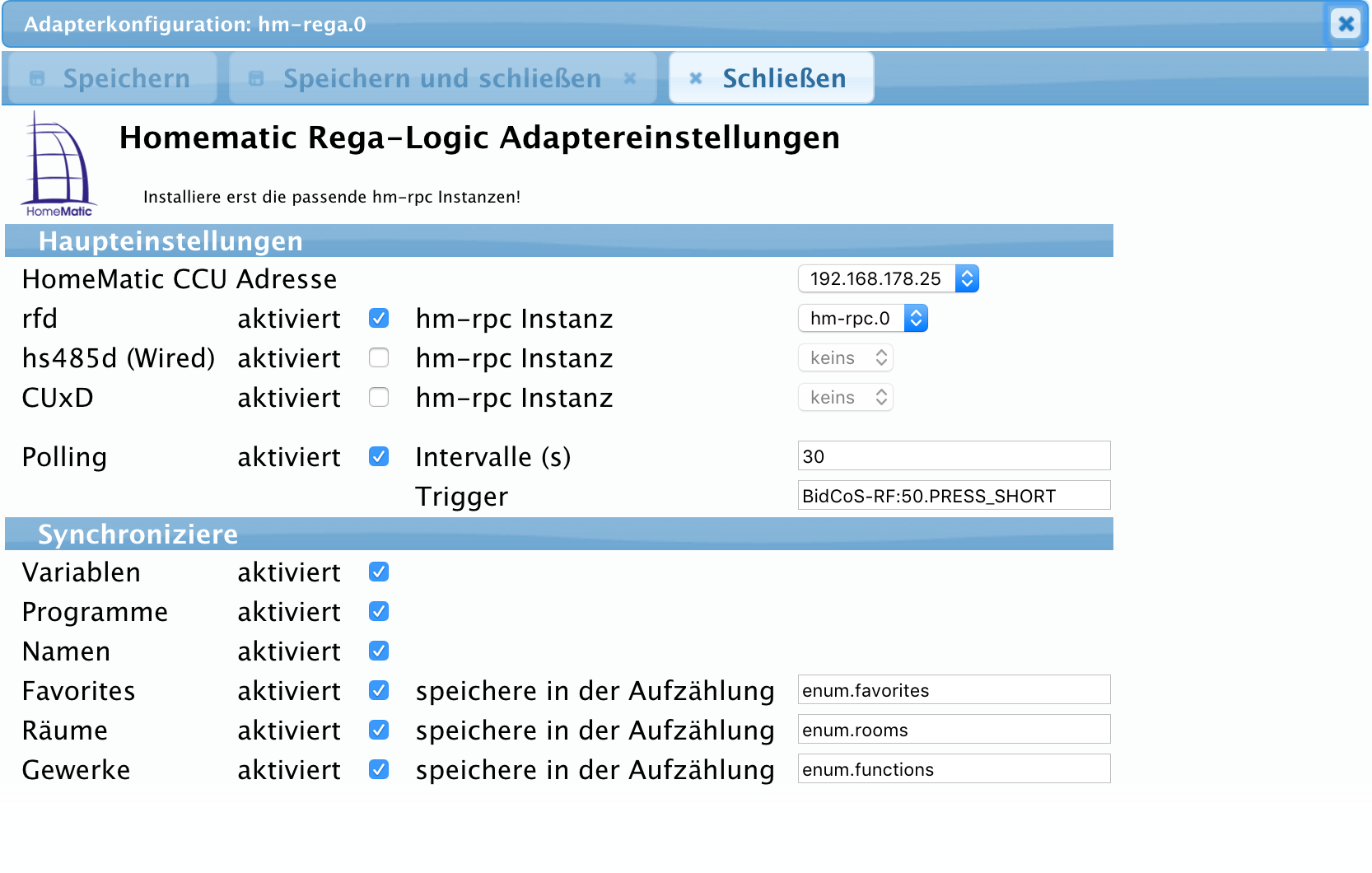
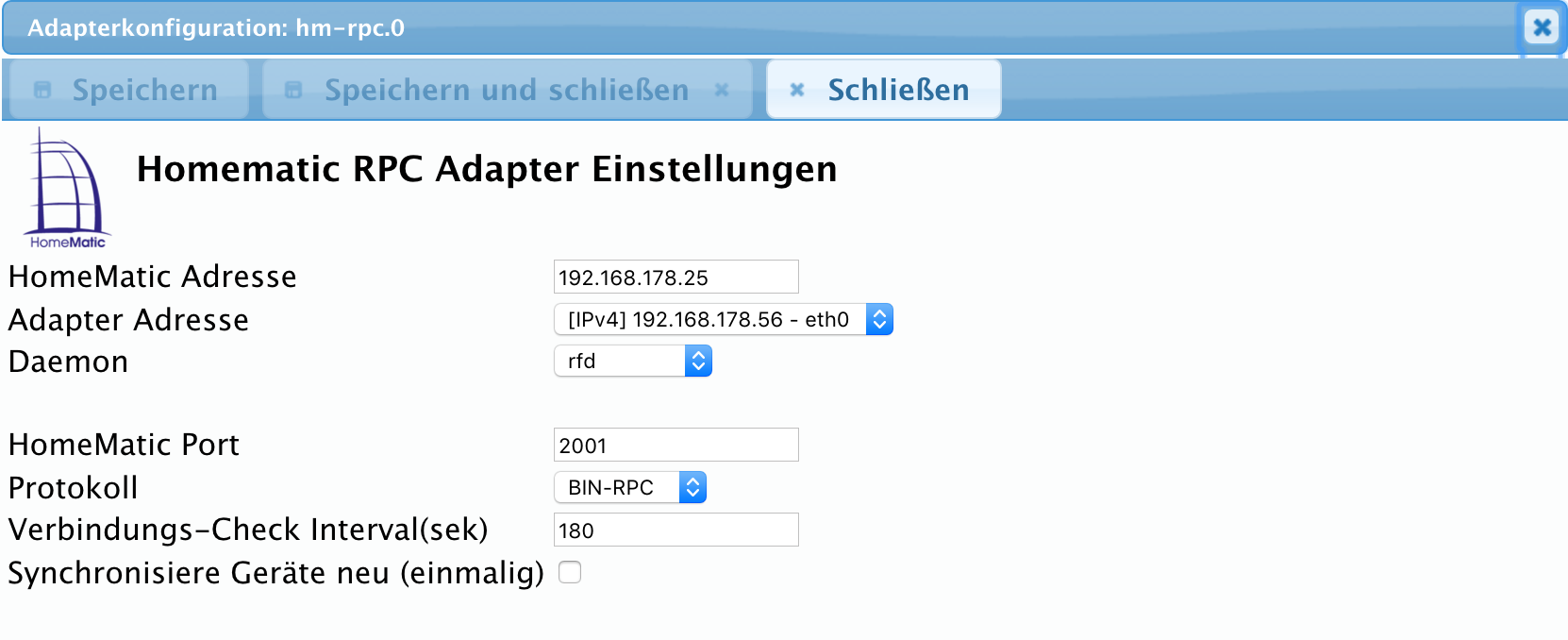
Die Adapter rega und rpc habe ich eingerichtet wie auf den Screenshots zu sehen. Habt ihr ein Idee?
VG
barni
882_bildschirmfoto_2015-11-12_um_22.23.22.png
882_bildschirmfoto_2015-11-12_um_22.23.04.png -
Kein Problem, wenn du damit das Problem gefunden hast
hat sich der Post doch schon rentiert.
Und du hast ihn so ausführlich gemacht, das du auch Hilfe bekommen hättest
wenn du ihn NICHT selbst gefunden hättest.
Ich hab mal die Stelle im LOG markiert, die dich auf die falsche IP hingewiesen hätte:
EHOSTUNREACH bedeutet das er den Zielhost 192.168.178.25 nicht erreichen konnte…
raspberrypi 2015-11-12 22:09:52 error host.raspberrypi instance system.adapter.hm-rpc.0 terminated with code 6 (uncaught exception)
hm-rpc.0 2015-11-12 22:09:52 error Error: connect EHOSTUNREACH 192.168.178.25:2001 at Object.exports._errnoException (util.js:874:11) at exports._exceptionWithHostPort (util.js:897:20) at TCPConnectWrap.afterConnect [as onc
hm-rpc.0 2015-11-12 22:09:52 error uncaught exception: connect EHOSTUNREACH 192.168.178.25:2001
hm-rpc.0 2015-11-12 22:09:49 error hm-rpc.0 Error: not connected
hm-rpc.0 2015-11-12 22:09:49 info hm-rpc.0 binrpc -> 192.168.178.25:2001 init ["xmlrpc_bin://192.168.178.56:2001","hm-rpc.0"] `
-
Hi
Ich hatte gerade gehofft mein Problem hier gelöst zu finden, da meine Logs ähnlich aussehen:
bananapi	2010-01-01 01:32:39	info	host.bananapi Restart adapter system.adapter.hm-rpc.0 because enabled
bananapi	2010-01-01 01:32:39	error	host.bananapi instance system.adapter.hm-rpc.0 terminated with code 6 (uncaught exception)
bananapi	2010-01-01 01:32:39	info	host.bananapi Restart adapter system.adapter.hm-rpc.1 because enabled
bananapi	2010-01-01 01:32:39	error	host.bananapi instance system.adapter.hm-rpc.1 terminated with code 6 (uncaught exception)
hm-rpc.0	2010-01-01 01:32:39	error	Error: connect EHOSTUNREACH at exports._errnoException (util.js:746:11) at TCPConnectWrap.afterConnect [as oncomplete] (net.js:1010:19)
hm-rpc.0	2010-01-01 01:32:39	error	uncaught exception: connect EHOSTUNREACH
hm-rpc.1	2010-01-01 01:32:39	error	Error: connect EHOSTUNREACH at exports._errnoException (util.js:746:11) at TCPConnectWrap.afterConnect [as oncomplete] (net.js:1010:19)
hm-rpc.1	2010-01-01 01:32:39	error	uncaught exception: connect EHOSTUNREACH
hm-rpc.0	2010-01-01 01:32:37	error	hm-rpc.0 Error: not connected
hm-rpc.0	2010-01-01 01:32:37	info	hm-rpc.0 binrpc -> 192.168.111.160:2001 init ["xmlrpc_bin://192.168.111.174:2001","hm-rpc.0"]
hm-rpc.0	2010-01-01 01:32:37	info	hm-rpc.0 binrpc server is trying to listen on 192.168.111.174:2001
hm-rpc.0	2010-01-01 01:32:37	info	hm-rpc.0 starting. Version 0.5.2 in /opt/iobroker/node_modules/iobroker.hm-rpc
hm-rpc.1	2010-01-01 01:32:36	error	hm-rpc.1 Error: not connected
hm-rpc.1	2010-01-01 01:32:36	info	hm-rpc.1 binrpc -> 192.168.111.160:8701 init ["xmlrpc_bin://192.168.111.174:8701","hm-rpc.1"]
hm-rpc.1	2010-01-01 01:32:36	info	hm-rpc.1 binrpc server is trying to listen on 192.168.111.174:8701
hm-rpc.1	2010-01-01 01:32:36	info	hm-rpc.1 starting. Version 0.5.2 in /opt/iobroker/node_modules/iobroker.hm-rpc
bananapi	2010-01-01 01:32:31	info	host.bananapi instance system.adapter.hm-rpc.0 started with pid 3300
bananapi	2010-01-01 01:32:31	info	host.bananapi instance system.adapter.hm-rpc.1 started with pid 3299
bananapi	2010-01-01 01:32:00	info	host.bananapi Restart adapter system.adapter.hm-rpc.0 because enabled
bananapi	2010-01-01 01:32:00	error	host.bananapi instance system.adapter.hm-rpc.0 terminated with code 6 (uncaught exception)
bananapi	2010-01-01 01:32:00	info	host.bananapi Restart adapter system.adapter.hm-rpc.1 because enabled
bananapi	2010-01-01 01:32:00	error	host.bananapi instance system.adapter.hm-rpc.1 terminated with code 6 (uncaught exception)
bananapi	2010-01-01 01:32:00	info	host.bananapi instance system.adapter.hm-rpc.0 started with pid 3272
hm-rpc.1	2010-01-01 01:32:00	error	Error: connect EHOSTUNREACH at exports._errnoException (util.js:746:11) at TCPConnectWrap.afterConnect [as oncomplete] (net.js:1010:19)
hm-rpc.1	2010-01-01 01:32:00	error	uncaught exception: connect EHOSTUNREACH
hm-rpc.0	2010-01-01 01:32:00	error	Error: connect EHOSTUNREACH at exports._errnoException (util.js:746:11) at TCPConnectWrap.afterConnect [as oncomplete] (net.js:1010:19)
hm-rpc.0	2010-01-01 01:32:00	error	uncaught exception: connect EHOSTUNREACH
hm-rpc.0	2010-01-01 01:31:59	error	hm-rpc.0 Error: not connected
hm-rpc.0	2010-01-01 01:31:59	info	hm-rpc.0 binrpc -> 192.168.111.160:2001 init ["xmlrpc_bin://192.168.111.174:2001","hm-rpc.0"]
hm-rpc.0	2010-01-01 01:31:59	info	hm-rpc.0 binrpc server is trying to listen on 192.168.111.174:2001
hm-rpc.0	2010-01-01 01:31:58	info	hm-rpc.0 starting. Version 0.5.2 in /opt/iobroker/node_modules/iobroker.hm-rpc
hm-rpc.1	2010-01-01 01:31:58	error	hm-rpc.1 Error: not connected
Die 192.168.111.160 ist aber richtig und die CCU funktoniert, ist also erreichbar.
Wie kann ich denn den Fehler eingrenzen? Habe auch schon die HM-Adapter deinsalliert und wieder installiert. Hat nicht geholfen.
Gruss Ralf
-
Hi
Ich hatte gerade gehofft mein Problem hier gelöst zu finden, da meine Logs ähnlich aussehen:
bananapi	2010-01-01 01:32:39	info	host.bananapi Restart adapter system.adapter.hm-rpc.0 because enabled
bananapi	2010-01-01 01:32:39	error	host.bananapi instance system.adapter.hm-rpc.0 terminated with code 6 (uncaught exception)
bananapi	2010-01-01 01:32:39	info	host.bananapi Restart adapter system.adapter.hm-rpc.1 because enabled
bananapi	2010-01-01 01:32:39	error	host.bananapi instance system.adapter.hm-rpc.1 terminated with code 6 (uncaught exception)
hm-rpc.0	2010-01-01 01:32:39	error	Error: connect EHOSTUNREACH at exports._errnoException (util.js:746:11) at TCPConnectWrap.afterConnect [as oncomplete] (net.js:1010:19)
hm-rpc.0	2010-01-01 01:32:39	error	uncaught exception: connect EHOSTUNREACH
hm-rpc.1	2010-01-01 01:32:39	error	Error: connect EHOSTUNREACH at exports._errnoException (util.js:746:11) at TCPConnectWrap.afterConnect [as oncomplete] (net.js:1010:19)
hm-rpc.1	2010-01-01 01:32:39	error	uncaught exception: connect EHOSTUNREACH
hm-rpc.0	2010-01-01 01:32:37	error	hm-rpc.0 Error: not connected
hm-rpc.0	2010-01-01 01:32:37	info	hm-rpc.0 binrpc -> 192.168.111.160:2001 init ["xmlrpc_bin://192.168.111.174:2001","hm-rpc.0"]
hm-rpc.0	2010-01-01 01:32:37	info	hm-rpc.0 binrpc server is trying to listen on 192.168.111.174:2001
hm-rpc.0	2010-01-01 01:32:37	info	hm-rpc.0 starting. Version 0.5.2 in /opt/iobroker/node_modules/iobroker.hm-rpc
hm-rpc.1	2010-01-01 01:32:36	error	hm-rpc.1 Error: not connected
hm-rpc.1	2010-01-01 01:32:36	info	hm-rpc.1 binrpc -> 192.168.111.160:8701 init ["xmlrpc_bin://192.168.111.174:8701","hm-rpc.1"]
hm-rpc.1	2010-01-01 01:32:36	info	hm-rpc.1 binrpc server is trying to listen on 192.168.111.174:8701
hm-rpc.1	2010-01-01 01:32:36	info	hm-rpc.1 starting. Version 0.5.2 in /opt/iobroker/node_modules/iobroker.hm-rpc
bananapi	2010-01-01 01:32:31	info	host.bananapi instance system.adapter.hm-rpc.0 started with pid 3300
bananapi	2010-01-01 01:32:31	info	host.bananapi instance system.adapter.hm-rpc.1 started with pid 3299
bananapi	2010-01-01 01:32:00	info	host.bananapi Restart adapter system.adapter.hm-rpc.0 because enabled
bananapi	2010-01-01 01:32:00	error	host.bananapi instance system.adapter.hm-rpc.0 terminated with code 6 (uncaught exception)
bananapi	2010-01-01 01:32:00	info	host.bananapi Restart adapter system.adapter.hm-rpc.1 because enabled
bananapi	2010-01-01 01:32:00	error	host.bananapi instance system.adapter.hm-rpc.1 terminated with code 6 (uncaught exception)
bananapi	2010-01-01 01:32:00	info	host.bananapi instance system.adapter.hm-rpc.0 started with pid 3272
hm-rpc.1	2010-01-01 01:32:00	error	Error: connect EHOSTUNREACH at exports._errnoException (util.js:746:11) at TCPConnectWrap.afterConnect [as oncomplete] (net.js:1010:19)
hm-rpc.1	2010-01-01 01:32:00	error	uncaught exception: connect EHOSTUNREACH
hm-rpc.0	2010-01-01 01:32:00	error	Error: connect EHOSTUNREACH at exports._errnoException (util.js:746:11) at TCPConnectWrap.afterConnect [as oncomplete] (net.js:1010:19)
hm-rpc.0	2010-01-01 01:32:00	error	uncaught exception: connect EHOSTUNREACH
hm-rpc.0	2010-01-01 01:31:59	error	hm-rpc.0 Error: not connected
hm-rpc.0	2010-01-01 01:31:59	info	hm-rpc.0 binrpc -> 192.168.111.160:2001 init ["xmlrpc_bin://192.168.111.174:2001","hm-rpc.0"]
hm-rpc.0	2010-01-01 01:31:59	info	hm-rpc.0 binrpc server is trying to listen on 192.168.111.174:2001
hm-rpc.0	2010-01-01 01:31:58	info	hm-rpc.0 starting. Version 0.5.2 in /opt/iobroker/node_modules/iobroker.hm-rpc
hm-rpc.1	2010-01-01 01:31:58	error	hm-rpc.1 Error: not connected
Die 192.168.111.160 ist aber richtig und die CCU funktoniert, ist also erreichbar.
Wie kann ich denn den Fehler eingrenzen? Habe auch schon die HM-Adapter deinsalliert und wieder installiert. Hat nicht geholfen.
Gruss Ralf `
Ist Port 8701 auch richtig?Versuche erst mit einem Adapter.
Ist die IP von ioBroker 192.168.111.174 richtig?
Kannst du von ioBroker die IP 192.168.111.160 pingen?
-
Hallo Bluefox
Danke, dass Du Dich meldest.
Zu Deinen Fragen:
` > Ist Port 8701 auch richtig?Versuche erst mit einem Adapter.
Ist die IP von ioBroker 192.168.111.174 richtig?
Kannst du von ioBroker die IP 192.168.111.160 pingen? `
Zur IP und zum Ping der CCU:
wlan0     Link encap:Ethernet  HWaddr 80:1f:02:97:4e:8f
          inet addr:192.168.111.174  Bcast:192.168.111.255  Mask:255.255.255.0
          inet6 addr: fe80::821f:2ff:fe97:4e8f/64 Scope:Link
          UP BROADCAST RUNNING MULTICAST  MTU:1500  Metric:1
          RX packets:156398 errors:0 dropped:93572 overruns:0 frame:0
          TX packets:147382 errors:0 dropped:2 overruns:0 carrier:0
          collisions:0 txqueuelen:1000
          RX bytes:21178958 (20.1 MiB)  TX bytes:29671162 (28.2 MiB)

root@bananapi:~# ping 192.168.111.160
PING 192.168.111.160 (192.168.111.160) 56(84) bytes of data.
64 bytes from 192.168.111.160: icmp_req=1 ttl=64 time=7.35 ms
64 bytes from 192.168.111.160: icmp_req=2 ttl=64 time=6.56 ms
64 bytes from 192.168.111.160: icmp_req=3 ttl=64 time=6.72 ms
^C
--- 192.168.111.160 ping statistics ---
3 packets transmitted, 3 received, 0% packet loss, time 2005ms
rtt min/avg/max/mdev = 6.565/6.880/7.353/0.340 ms
Stimmt also.
Zum Port 8071: Wo wird der eingestellt?
Versuche erst mit einem Adapter.? Versteh ich nicht:
Was soll ich mit einem Adapter versuchen?
Noch vergessen: Ich habe inzwischen den Bananapi rebootet.
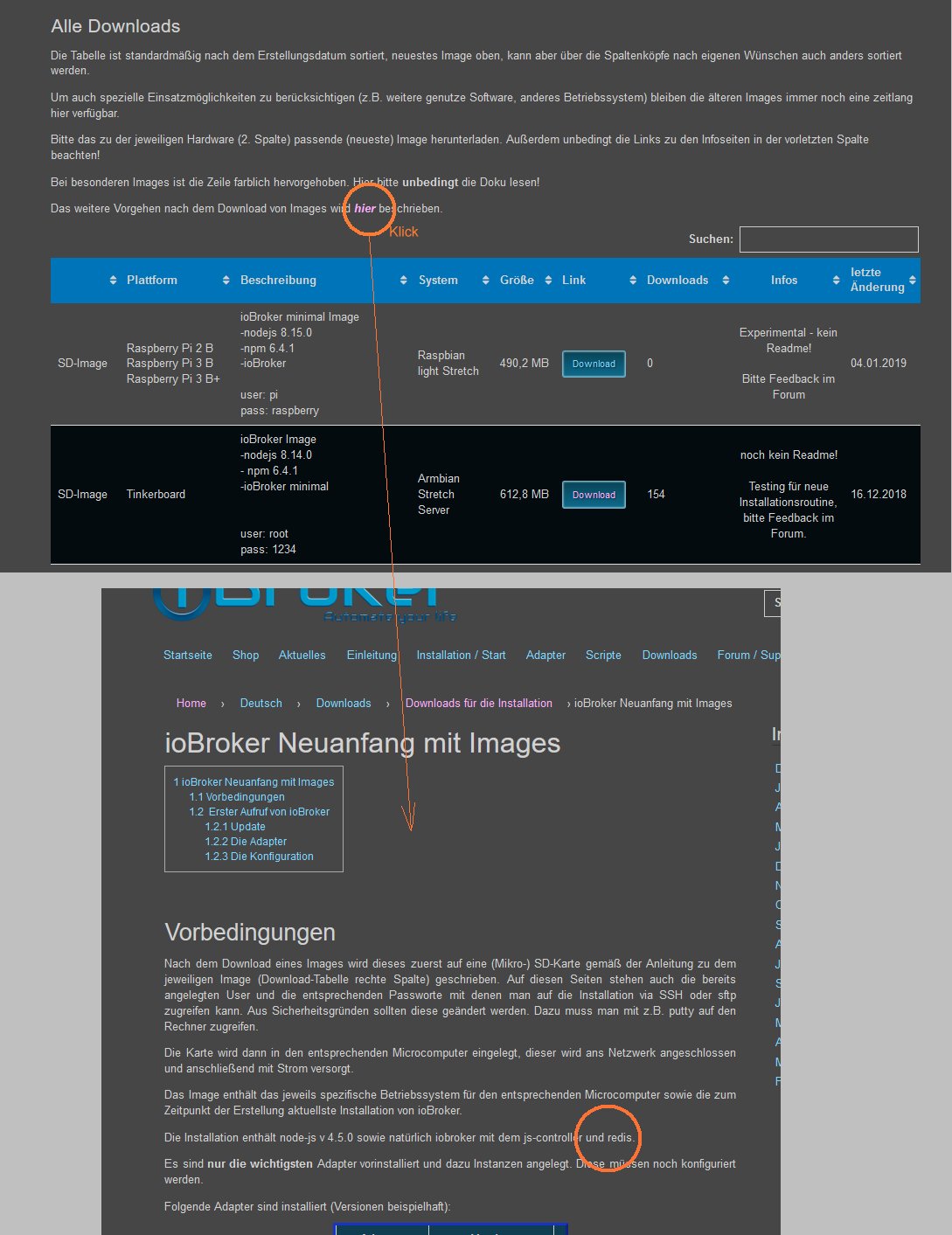
Jetzt hab ich (erstmal) keine Fehler mehr in den Logs, aber IOBroker erkennt dafür auch keine Änderungen von Systemvariablen mehr:
Gruss Ralf
-
Hallo Bluefox
Ergänzend zu meiner Antwort oben, habe ich nochmal bei den Firewalleinstellungen der CCU nachgesehen: Dort steht alles auf Vollzugriff und die Maske auf 192.168.111.0/32.
Sollte doch korrekt so sein, oder?
Ich konnte inzwischen folgendes Verhalten nachvollziehen:
Wenn ich den Bananapi reboote, und danach in die Logs schaue, dann habe ich o.g. Fehlermeldungen.
Wenn ich danach hm-rega und die beiden hm-rpc (einer ist für CUxD) disable und nacheinander wieder einschalte; dann sind die Fehler weg, aber dafür kommen Änderungen an Systemariablen nicht mehr durch.
Wie man oben sieht, reagiert IOBroker nicht mehr auf geänderte Werte. Ergo laufen auch meine Scripte nicht.
Kann man aus dem Verhalten auf den Fehler schliessen?
Gruss Ralf
-
Noch ein Nachtrag:
Ich habe nun in einem grösseren Abstand noch die hm-rpc Adapter einen nach dem anderen gestartet.
Bis jetzt scheint es (noch) zu funktionieren.
Aber das kann ja nicht die Lösung sein. Der Bananapi muss doch nach einem Reboot den IOBroker ohne Workarounds starten können…
Gruss Ralf
Hey! Du scheinst an dieser Unterhaltung interessiert zu sein, hast aber noch kein Konto.
Hast du es satt, bei jedem Besuch durch die gleichen Beiträge zu scrollen? Wenn du dich für ein Konto anmeldest, kommst du immer genau dorthin zurück, wo du zuvor warst, und kannst dich über neue Antworten benachrichtigen lassen (entweder per E-Mail oder Push-Benachrichtigung). Du kannst auch Lesezeichen speichern und Beiträge positiv bewerten, um anderen Community-Mitgliedern deine Wertschätzung zu zeigen.
Mit deinem Input könnte dieser Beitrag noch besser werden 💗
Registrieren AnmeldenSupport us
369
Online33.0k
Benutzende83.7k
Themen1.3m
Beiträge