Skip to content
  • Home
  • Aktuell
  • Tags
  • 0 Ungelesen 0
  • Kategorien
  • Unreplied
  • Beliebt
  • GitHub
  • Docu
  • Hilfe
Skins
  • Light
  • Brite
  • Cerulean
  • Cosmo
  • Flatly
  • Journal
  • Litera
  • Lumen
  • Lux
  • Materia
  • Minty
  • Morph
  • Pulse
  • Sandstone
  • Simplex
  • Sketchy
  • Spacelab
  • United
  • Yeti
  • Zephyr
  • Dark
  • Cyborg
  • Darkly
  • Quartz
  • Slate
  • Solar
  • Superhero
  • Vapor

  • Standard: (Kein Skin)
  • Kein Skin
Einklappen
ioBroker Logo

Community Forum

donate donate
  1. ioBroker Community Home
  2. Deutsch
  3. Visualisierung
  4. Wie aus einem HTML-Widget ein neues Widget machen?

NEWS

  • Weihnachtsangebot 2025! 🎄
    BluefoxB
    Bluefox
    23
    1
    1.3k

  • UPDATE 31.10.: Amazon Alexa - ioBroker Skill läuft aus ?
    apollon77A
    apollon77
    48
    3
    9.3k

  • Monatsrückblick – September 2025
    BluefoxB
    Bluefox
    14
    1
    2.5k

Wie aus einem HTML-Widget ein neues Widget machen?

Geplant Angeheftet Gesperrt Verschoben Visualisierung
79 Beiträge 5 Kommentatoren 17.5k Aufrufe 1 Watching
  • Älteste zuerst
  • Neuste zuerst
  • Meiste Stimmen
Antworten
  • In einem neuen Thema antworten
Anmelden zum Antworten
Dieses Thema wurde gelöscht. Nur Nutzer mit entsprechenden Rechten können es sehen.
  • C Offline
    C Offline
    Communicate
    schrieb am zuletzt editiert von
    #23

    Danke, das ";" wars :-)

    Was genau hast Du denn verändert? Ich habe die Datei jetzt nochmal gedownloaded (du hast es doch in deinem Post vom Anfang geändert, oder?)

    und eingespielt - kann aber keine Veränderung erkennen :roll:

    1 Antwort Letzte Antwort
    0
    • BluefoxB Offline
      BluefoxB Offline
      Bluefox
      schrieb am zuletzt editiert von
      #24

      @Communicate:

      Danke, das ";" wars :-)

      Was genau hast Du denn verändert? Ich habe die Datei jetzt nochmal gedownloaded (du hast es doch in deinem Post vom Anfang geändert, oder?)

      und eingespielt - kann aber keine Veränderung erkennen :roll: `
      Schau bitte den Spoiler im meinem vorletztem Post. (Das hier ist letzte :) )
      48_widget.gif

      1 Antwort Letzte Antwort
      0
      • C Offline
        C Offline
        Communicate
        schrieb am zuletzt editiert von
        #25

        Oh wie cool :-) Danke schön :P

        1 Antwort Letzte Antwort
        0
        • C Offline
          C Offline
          Communicate
          schrieb am zuletzt editiert von
          #26

          Hab gerade noch ein bisschen rumprobiert.

          Mittlerweile kann ich sogar ein Navigations-Widget daraus machen.

          Aber, was leider nicht mehr geht ist der Farbeffekt bei Hover/Klick. Es wird jetzt

          nur noch das linke viereck ausgefüllt. Hast Du eine Idee, woran das liegen könnte?

          Gruß

          Dominic

          1 Antwort Letzte Antwort
          0
          • C Offline
            C Offline
            Communicate
            schrieb am zuletzt editiert von
            #27

            So, jetzt habe ich fast alles was ich brauche implementiert.

            Was nicht geht ist:

            1. Der Hovereffekt ist nur noch auf das kleine viereck beschränkt.

            2. Er schreibt mir keinen True / False Wert in die bei Object-ID zugeordnete Variable :-(

            Hier nochmal der gesamte Code:

            1 Antwort Letzte Antwort
            0
            • C Offline
              C Offline
              Communicate
              schrieb am zuletzt editiert von
              #28

              … ich bekomme es einfach nicht hin :-(

              kann ich irgendwie debuggen, woran mein Versuch mit den true/false scheitert ?

              Gruß

              Dominic
              2858_screenshot__300__li.jpg

              1 Antwort Letzte Antwort
              0
              • BluefoxB Offline
                BluefoxB Offline
                Bluefox
                schrieb am zuletzt editiert von
                #29

                Ich sehe nicht mal die Stelle, wo du versuchst true/false rein zuschreiben.

                Debuggen kann mann indirekt. Indem man console.log('Debug text') einbaut oder du kannst

                debugger;
                

                Zeile reinschreiben und dann hält Javascript an dieser Stelle an und du kannst die Werte anschauen.

                Ich habe bis jetzt folgendes hinbekommen:

                comminicate.html

                style.css

                ! @font-face { font-family: 'CF'; src: url('Cicle Fina.ttf'); } ! .communicate-var_nav { background: #e2e1f4; width: 100%; height: 100%; display: inline-flex; } ! .communicate-link_bg { background:#7A56A0; color:white; z-index:2; } ! .communicate-link_title { position: relative; z-index:3; color:#7A56A0; height:100%; } ! .communicate-link_title:hover { left: 0; width:10px; font-weight: bold; background: #E01B6A; -webkit-transition: all 0.3s ease-in-out; -moz-transition: all 0.3s ease-in-out; -o-transition: all 0.3s ease-in-out; -ms-transition: all 0.3s ease-in-out; transition: all 0.3s ease-in-out; } ! .communicate-link_bg, .communicate-img { -webkit-transition:all .5s ease-in-out; -moz-transition:all .5s ease-in-out; -o-transition:all .5s ease-in-out; -ms-transition:all .5s ease-in-out; transition:all .5s ease-in-out; height: 100%; } .communicate-link_bg:hover, .communicate-img:hover{ -webkit-transition: all 0.3s ease-in-out; -moz-transition: all 0.3s ease-in-out; -o-transition: all 0.3s ease-in-out; -ms-transition: all 0.3s ease-in-out; transition: all 0.3s ease-in-out; } ! .communicate-link_bg:hover { width:100%; background: #E01B6A; background: blue; } ! .communicate-img:hover{ -webkit-transform:rotate(360deg); -moz-transform:rotate(360deg); -o-transform:rotate(360deg); -ms-transform:rotate(360deg); transform:rotate(360deg); } .communicate-p { font-family: CF; position: absolute; left: 0.7em; } !

                Es geht nur Große-Änderung nicht.

                Ich denke, dass steuern von Größen ist über ziehen besser als per Einstellung. Findest du nicht?

                1 Antwort Letzte Antwort
                0
                • C Offline
                  C Offline
                  Communicate
                  schrieb am zuletzt editiert von
                  #30

                  > Ich denke, dass steuern von Größen ist über ziehen besser als per Einstellung. Findest du nicht?
                  da hast Du recht. Ich lerne ja noch :-)

                  > Ich sehe nicht mal die Stelle, wo du versuchst true/false rein zuschreiben.
                  HIer:

                  ! ioBroker.vis communicate Widget-Set
                  ! version: "0.0.1"
                  ! Copyright 10.2015-2016 Communicatenick@communicate-online.de
                  ! -->

                  aber wahrscheinlich ist das absolut falsch, oder?
                  999_solarlog_versionen.jpg

                  1 Antwort Letzte Antwort
                  0
                  • C Offline
                    C Offline
                    Communicate
                    schrieb am zuletzt editiert von
                    #31

                    wenn ich jetzt nochmal auf meinen Code schaue, denke ich, dass ich zwei DIV Container mit der WID habe, geht das überhaupt?

                    Ich habe versucht mir die min/max (das ist doch true und false oder?) aus andernen Widgets zu kopieren, weiss aber nicht ob ich

                    a) alle relevanten Anweisungen habe und

                    b) die Anweisungen korrekt eingebaut habe (wahrschienlich eher nicht).

                    Magst Du noch mal schauen :roll:

                    1 Antwort Letzte Antwort
                    0
                    • C Offline
                      C Offline
                      Communicate
                      schrieb am zuletzt editiert von
                      #32

                      so, ein true oder false setzen bei checkbox klick geht jetzt:

                      515_bildschirmfoto_2015-10-20_um_20.46.13.png

                      ! ioBroker.vis communicate Widget-Set
                      ! version: "0.0.1"
                      ! Copyright 10.2015-2016 Communicatenick@communicate-online.de
                      ! -->

                      Daraus ergeben sich aber zwei neue Fragen:

                      1. wie kann ich statt der checkbox die gesamte Fläche als "ereignis" bei klick nutzen

                      2. wie ändere ich den bool Wert auf einen String? (also das bei Klick zum beispiel Test ABC und TEST BCD rauskommt?)

                      1 Antwort Letzte Antwort
                      0
                      • BluefoxB Offline
                        BluefoxB Offline
                        Bluefox
                        schrieb am zuletzt editiert von
                        #33

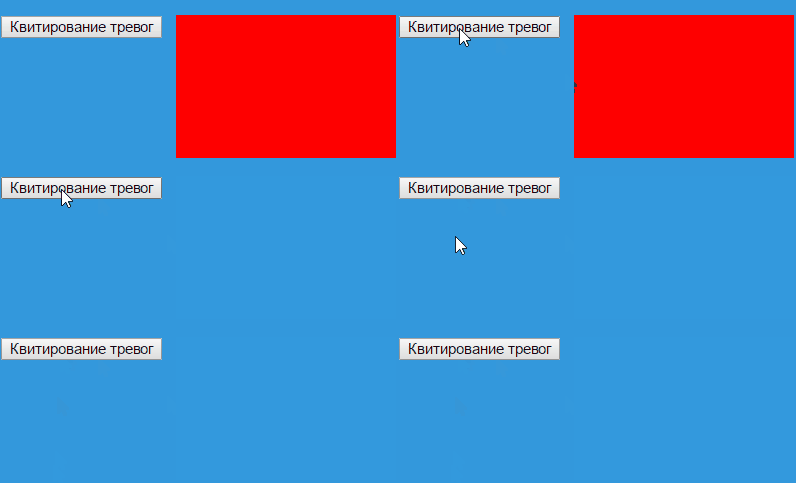
                        48_click.gif

                        1 Antwort Letzte Antwort
                        0
                        • C Offline
                          C Offline
                          Communicate
                          schrieb am zuletzt editiert von
                          #34

                          Hi,

                          vielen lieben Dank .´-> da wäre ich ja im leben nicht drauf gekommen :roll:

                          Einen Schönheitsfehler hat das ganze leider noch:

                          Im True-Fall wird das größere Viereck einfach transparent.

                          1 Antwort Letzte Antwort
                          0
                          • BluefoxB Offline
                            BluefoxB Offline
                            Bluefox
                            schrieb am zuletzt editiert von
                            #35

                            Kann sein, das bei dir View Hintergrund einfach weiß ist?
                            48_click.gif

                            1 Antwort Letzte Antwort
                            0
                            • C Offline
                              C Offline
                              Communicate
                              schrieb am zuletzt editiert von
                              #36

                              Hallo,

                              das sieht gut aus - danke!

                              Jetzt muss ich nur noch den Code verstehen :-)

                              Wie hast Du denn die Betitelung (z.B. Extrasteuerung) hinbekommen?

                              Gruß

                              Dominic

                              1 Antwort Letzte Antwort
                              0
                              • BluefoxB Offline
                                BluefoxB Offline
                                Bluefox
                                schrieb am zuletzt editiert von
                                #37

                                @Communicate:

                                Hallo,

                                das sieht gut aus - danke!

                                Jetzt muss ich nur noch den Code verstehen :-)

                                Wie hast Du denn die Betitelung (z.B. Extrasteuerung) hinbekommen?

                                Gruß

                                Dominic `
                                Das ist schon in basic.html übersetzt: https://github.com/ioBroker/ioBroker.vi … .html#L160

                                1 Antwort Letzte Antwort
                                0
                                • BluefoxB Offline
                                  BluefoxB Offline
                                  Bluefox
                                  schrieb am zuletzt editiert von
                                  #38

                                  Und hast du verstanden? :) Geht es weiter?

                                  1 Antwort Letzte Antwort
                                  0
                                  • C Offline
                                    C Offline
                                    Communicate
                                    schrieb am zuletzt editiert von
                                    #39

                                    > Ich denke, dass steuern von Größen ist über ziehen besser als per Einstellung. Findest du nicht?

                                    Kannst Du mir kurz erklären, wie Du das gemacht hast? Ich hab das bei einem neuen Widget probiert, nachzustellen, aber es klappt nicht.

                                    Ich habe in styles.css als width und height jeweils 100% angegeben.

                                    Muss ich in der communicate.html dann noch was ändern?

                                    1 Antwort Letzte Antwort
                                    0
                                    • C Offline
                                      C Offline
                                      Communicate
                                      schrieb am zuletzt editiert von
                                      #40

                                      So sieht es aktuell coding mäßig aus:

                                      html

                                      css

                                      ! ````
                                      @font-face {
                                      font-family: 'IC';
                                      src: url('icomoon.ttf');
                                      ! }
                                      ! .communicate-var_nav {
                                      background: #e2e1f4;
                                      width: 100%;
                                      height: 100%;
                                      display: inline-flex;
                                      }
                                      ! .communicate-link_bg {
                                      background:#7A56A0;
                                      color:white;
                                      z-index:2;
                                      }
                                      ! .communicate-link_title {
                                      position: relative;
                                      z-index:3;

                                      height:100%;
                                      

                                      }

                                      ! .communicate-link_title:hover {
                                      left: 0;
                                      width:10px;
                                      font-weight: bold;
                                      background: #E01B6A;
                                      -webkit-transition: all 0.3s ease-in-out;
                                      -moz-transition: all 0.3s ease-in-out;
                                      -o-transition: all 0.3s ease-in-out;
                                      -ms-transition: all 0.3s ease-in-out;
                                      transition: all 0.3s ease-in-out;
                                      }
                                      ! .communicate-link_bg, .communicate-img {
                                      -webkit-transition:all .5s ease-in-out;
                                      -moz-transition:all .5s ease-in-out;
                                      -o-transition:all .5s ease-in-out;
                                      -ms-transition:all .5s ease-in-out;
                                      transition:all .5s ease-in-out;
                                      height: 100%;
                                      }
                                      .communicate-link_bg:hover, .communicate-img:hover{
                                      -webkit-transition: all 0.3s ease-in-out;
                                      -moz-transition: all 0.3s ease-in-out;
                                      -o-transition: all 0.3s ease-in-out;
                                      -ms-transition: all 0.3s ease-in-out;
                                      transition: all 0.3s ease-in-out;
                                      }
                                      ! .communicate-link_bg:hover {
                                      width:100%;
                                      background: #E01B6A;
                                      background: blue;
                                      }
                                      ! .communicate-img:hover{
                                      -webkit-transform:rotate(360deg);
                                      -moz-transform:rotate(360deg);
                                      -o-transform:rotate(360deg);
                                      -ms-transform:rotate(360deg);
                                      transform:rotate(360deg);
                                      }
                                      .communicate-p {

                                      position: absolute;
                                      left: 0.7em;
                                      

                                      }

                                      ! .communicate-p1 {
                                      font-size: 13px;
                                      margin: 0;
                                      padding: 0;
                                      line-height: 40px;
                                      color: #fff;
                                      text-shadow: 0 -1px 0 rgba(0,0,0,1);
                                      border-bottom: 1px solid rgba(0,0,0,0.3);
                                      box-shadow: 0 1px 1px rgba(255,255,255,0.2);
                                      letter-spacing: 1px;
                                      }
                                      ! .communicate-notification_box {
                                      width: 100%;
                                      height: 100%;
                                      margin: 0 auto;
                                      border-radius: 5px;
                                      background: rgba(0,0,0,0.55);
                                      border: 1px solid rgba(0,0,0,0.2);
                                      text-align: center;
                                      box-shadow: 0 0 5px rgba(0,0,0,0.5), 0 2px 2px rgba(0,0,0,0.1);}
                                      ! .communicate-p2 {
                                      font-size: 13px;
                                      margin: 0;
                                      padding: 0;
                                      line-height: 20px;
                                      color: #fff;
                                      text-shadow: 0 -1px 0 rgba(0,0,0,1);
                                      letter-spacing: 1px;
                                      }

                                      1 Antwort Letzte Antwort
                                      0
                                      • C Offline
                                        C Offline
                                        Communicate
                                        schrieb am zuletzt editiert von
                                        #41

                                        … und dann hab ich da noch eine ganz andere Frage:

                                        ich würde gerne bei dem button nummer 3 (siehe code oben) ein Dialogfeld mit slider einbauen (im gleichen design wie der button).

                                        Gibt es irgendwo eine Beschreibung wie ich vorgehen sollte?

                                        1 Antwort Letzte Antwort
                                        0
                                        • BluefoxB Offline
                                          BluefoxB Offline
                                          Bluefox
                                          schrieb am zuletzt editiert von
                                          #42

                                          Irgendwie so:

                                          ! ````
                                          @font-face {
                                          font-family: 'IC';
                                          src: url('icomoon.ttf');
                                          ! }
                                          ! .communicate-var_nav {
                                          background: #e2e1f4;
                                          width: 100%;
                                          height: 100%;
                                          display: inline-flex;
                                          }
                                          ! .communicate-link_bg {
                                          background:#7A56A0;
                                          color:white;
                                          z-index:2;
                                          }
                                          ! .communicate-link_title {
                                          position: relative;
                                          z-index:3;
                                          ! height:100%;
                                          }
                                          ! .communicate-link_title:hover {
                                          left: 0;
                                          width:10px;
                                          font-weight: bold;
                                          background: #E01B6A;
                                          -webkit-transition: all 0.3s ease-in-out;
                                          -moz-transition: all 0.3s ease-in-out;
                                          -o-transition: all 0.3s ease-in-out;
                                          -ms-transition: all 0.3s ease-in-out;
                                          transition: all 0.3s ease-in-out;
                                          }
                                          ! .communicate-link_bg, .communicate-img {
                                          -webkit-transition:all .5s ease-in-out;
                                          -moz-transition:all .5s ease-in-out;
                                          -o-transition:all .5s ease-in-out;
                                          -ms-transition:all .5s ease-in-out;
                                          transition:all .5s ease-in-out;
                                          height: 100%;
                                          }
                                          .communicate-link_bg:hover, .communicate-img:hover{
                                          -webkit-transition: all 0.3s ease-in-out;
                                          -moz-transition: all 0.3s ease-in-out;
                                          -o-transition: all 0.3s ease-in-out;
                                          -ms-transition: all 0.3s ease-in-out;
                                          transition: all 0.3s ease-in-out;
                                          }
                                          ! .communicate-link_bg:hover {
                                          width:100%;
                                          background: #E01B6A;
                                          background: blue;
                                          }
                                          ! .communicate-img:hover{
                                          -webkit-transform:rotate(360deg);
                                          -moz-transform:rotate(360deg);
                                          -o-transform:rotate(360deg);
                                          -ms-transform:rotate(360deg);
                                          transform:rotate(360deg);
                                          }
                                          .communicate-p {
                                          ! position: absolute;
                                          left: 0.7em;
                                          }
                                          ! .communicate-p1 {
                                          font-size: 13px;
                                          margin: 0;
                                          padding: 0;
                                          line-height: 40px;
                                          color: #fff;
                                          text-shadow: 0 -1px 0 rgba(0,0,0,1);
                                          border-bottom: 1px solid rgba(0,0,0,0.3);
                                          box-shadow: 0 1px 1px rgba(255,255,255,0.2);
                                          letter-spacing: 1px;
                                          }
                                          ! .communicate-notification_box {
                                          width: calc(100% - 4px);
                                          height: calc(100% - 4px);
                                          margin: 0 auto;
                                          border-radius: 5px;
                                          background: rgba(0,0,0,0.55);
                                          border: 1px solid rgba(0,0,0,0.2);
                                          text-align: center;
                                          box-shadow: 0 0 5px rgba(0,0,0,0.5), 0 2px 2px rgba(0,0,0,0.1);
                                          }
                                          ! .communicate-p2 {
                                          font-size: 13px;
                                          margin: 0;
                                          padding: 0;
                                          line-height: 20px;
                                          color: #fff;
                                          text-shadow: 0 -1px 0 rgba(0,0,0,1);
                                          letter-spacing: 1px;
                                          }
                                          ! .communicate-dialog {
                                          width: 100px;
                                          height: 50px;
                                          position: absolute;
                                          z-index: 999;
                                          border-radius: 5px;
                                          background: rgba(0,0,0,0.55);
                                          border: 1px solid rgba(0,0,0,0.2);
                                          text-align: center;
                                          box-shadow: 0 0 5px rgba(0,0,0,0.5), 0 2px 2px rgba(0,0,0,0.1);
                                          }

                                          [48_img_001.png](/assets/uploads/files/48_img_001.png)
                                          1 Antwort Letzte Antwort
                                          0
                                          Antworten
                                          • In einem neuen Thema antworten
                                          Anmelden zum Antworten
                                          • Älteste zuerst
                                          • Neuste zuerst
                                          • Meiste Stimmen


                                          Support us

                                          ioBroker
                                          Community Adapters
                                          Donate

                                          738

                                          Online

                                          32.5k

                                          Benutzer

                                          81.7k

                                          Themen

                                          1.3m

                                          Beiträge
                                          Community
                                          Impressum | Datenschutz-Bestimmungen | Nutzungsbedingungen | Einwilligungseinstellungen
                                          ioBroker Community 2014-2025
                                          logo
                                          • Anmelden

                                          • Du hast noch kein Konto? Registrieren

                                          • Anmelden oder registrieren, um zu suchen
                                          • Erster Beitrag
                                            Letzter Beitrag
                                          0
                                          • Home
                                          • Aktuell
                                          • Tags
                                          • Ungelesen 0
                                          • Kategorien
                                          • Unreplied
                                          • Beliebt
                                          • GitHub
                                          • Docu
                                          • Hilfe