



Skip to content
  • Home
  • Aktuell
  • Tags
  • 0 Ungelesen 0
  • Kategorien
  • Unreplied
  • Beliebt
  • GitHub
  • Docu
  • Hilfe
Skins
  • Light
  • Brite
  • Cerulean
  • Cosmo
  • Flatly
  • Journal
  • Litera
  • Lumen
  • Lux
  • Materia
  • Minty
  • Morph
  • Pulse
  • Sandstone
  • Simplex
  • Sketchy
  • Spacelab
  • United
  • Yeti
  • Zephyr
  • Dark
  • Cyborg
  • Darkly
  • Quartz
  • Slate
  • Solar
  • Superhero
  • Vapor

  • Standard: (Kein Skin)
  • Kein Skin
Einklappen
ioBroker Logo

Community Forum

donate donate
  1. ioBroker Community Home
  2. Deutsch
  3. Skripten / Logik
  4. Node-Red mit Alexa - Dimmer

NEWS

  • UPDATE 31.10.: Amazon Alexa - ioBroker Skill läuft aus ?
    apollon77A
    apollon77
    48
    3
    8.8k

  • Monatsrückblick – September 2025
    BluefoxB
    Bluefox
    13
    1
    2.2k

  • Neues Video "KI im Smart Home" - ioBroker plus n8n
    BluefoxB
    Bluefox
    16
    1
    3.2k

Node-Red mit Alexa - Dimmer

Geplant Angeheftet Gesperrt Verschoben Skripten / Logik
39 Beiträge 5 Kommentatoren 8.2k Aufrufe 1 Watching
  • Älteste zuerst
  • Neuste zuerst
  • Meiste Stimmen
Antworten
  • In einem neuen Thema antworten
Anmelden zum Antworten
Dieses Thema wurde gelöscht. Nur Nutzer mit entsprechenden Rechten können es sehen.
  • R Offline
    R Offline
    rewenode
    schrieb am zuletzt editiert von
    #19

    Da gibt es doch einen hue-state. Was will der denn für Werte haben ?

    Trag doch mal manuell welche ein und poste, wie die aussehen müssen.

    1 Antwort Letzte Antwort
    0
    • D Offline
      D Offline
      dondon4002
      schrieb am zuletzt editiert von
      #20

      Den Hue Adapter würde ich nicht nutzen wenn du eh Node-Red nutzt denn da gibt's ja das HueMagic

      und dieses ist Flexibel, es nimmt RGB oder HEX entgegen.. aber leider gibt Alexa nur HSB/HSL Werte als HUE (Hue: 0, Saturation: 1, Brightness:1) für Rot zum Beispiel. Man müsste also einen Converter von HSB/HSL zu HEX oder RGB haben.

      derzeit Steuer ich Rot / Blau / Weiss so.. was echt nicht toll ist.

      if ((msg['command']) == 'SetColorRequest') {
        if ((msg['payload']['hue']) == '0' && (msg['payload']['saturation']) == '1') {
          msg['payload']['hex'] = '#ff0000';
        } else if ((msg['payload']['hue']) == '240') {
          msg['payload']['hex'] = '#3366ff';
        } else if ((msg['payload']['hue']) == '0' && (msg['payload']['saturation']) == '0') {
          msg['payload']['hex'] = '#ffffff';
        }
        msg['payload']['brightness'] = '100';
        msg['payload']['saturation'] = '100';
        return msg;
      } else {
      }
      
      
      1 Antwort Letzte Antwort
      0
      • R Offline
        R Offline
        rewenode
        schrieb am zuletzt editiert von
        #21

        Ich kenne mich da leider nicht gut aus.

        Aber sollte sowas nicht hilfreich sein?

        https://www.npmjs.com/package/node-red- … or-convert

        ` > This node converts between different color representations, it can convert between the following systems.

        RGB - Red, Green, Blue

        HSL - Hue, Saturation, Level

        HSV - Hue, Saturation, Value (brightnes)

        CSS - CSS color names `

        1 Antwort Letzte Antwort
        0
        • D Offline
          D Offline
          dondon4002
          schrieb am zuletzt editiert von
          #22

          Ja den habe ich ausprobiert aber irgendwie klappt es damit nicht so richtig. vielleicht mache ich es auch falsch.. Am Ende wäre es aber der richtige Converter dafür. HSV Array-> RGB als Array

          Man müsste dann aber schauen das man vorher Saturation und Brightness noch *100 nimmt..

          1 Antwort Letzte Antwort
          0
          • R Offline
            R Offline
            rewenode
            schrieb am zuletzt editiert von
            #23

            @dondon4002:

            …Ja den habe ich ausprobiert aber irgendwie klappt es damit nicht so richtig.... `

            Gut ist immer, wenn man ein Beispiel zeigen kann, wie es sein soll.

            So nach dem Motto:

            Für gelb müssen folgende states folgende Werte bekommen…

            @dondon4002:

            Man müsste dann aber schauen das man vorher Saturation und Brightness noch *100 nimmt.. `

            Versuch doch mal die Werte per Hand bei den States zu setzen und schau, ob die Hue reagiert wie sie soll. Wenn das geht, sollte man das auch per flow hinbekommen;-)

            1 Antwort Letzte Antwort
            0
            • D Offline
              D Offline
              dondon4002
              schrieb am zuletzt editiert von
              #24

              Also irgendwas passt nicht :-(

              11834_35b18fc5-c690-4195-a782-5a48ee7c4877.jpg

              if ((msg['command']) == 'SetColorRequest') {
                msg['payload']['hsv'] = [(msg['payload']['hue']), (msg['payload']['saturation']) * 100, (msg['payload']['brightness']) * 100];
                return msg;
              } else {
              }


              Ausgabe Alexa und Blocky:

              {"hue":0,"saturation":1,"brightness":1,"hsv":[0,100,100]}
              

              Ausgabe Converter (HSV to RGB)

              [3,3,3]
              
              1 Antwort Letzte Antwort
              0
              • R Offline
                R Offline
                rewenode
                schrieb am zuletzt editiert von
                #25

                Also wenn ich dich recht verstehe, soll zb. die Alexa Ausgabe so konvertiert werden. oder wie?

                sollte rot sein.

                {"hue":0,"saturation":1,"brightness":1,"hsv":[0,100,100]}
                

                so aussehen:

                ist immer noch rot, nur rgb

                {"hue":0,"saturation":1,"brightness":1,"rgb":[255,0,0]}
                

                oder verstehe ich das falsch?

                1 Antwort Letzte Antwort
                0
                • D Offline
                  D Offline
                  dondon4002
                  schrieb am zuletzt editiert von
                  #26

                  Alexa wirft bei "Alexa Schalte Test auf ROT" dies aus:

                  "hue":0,"saturation":1,"brightness":1
                  

                  dies schiebe ich in den Blocky und mache ein Array daraus damit dies kommt:

                  "hsv":[0,100,100]
                  

                  Der Converter macht aber nun ein RGB Array und zwar so:

                  [3,3,3]
                  

                  Es müsste aber für den HUE Adapter so kommen:

                  RGB [255,0,0]
                  
                  1 Antwort Letzte Antwort
                  0
                  • R Offline
                    R Offline
                    rewenode
                    schrieb am zuletzt editiert von
                    #27

                    Ich hoffe, ich habe richtig kapiert.

                    Das sollte auch ohne Blockly problemlos gehen:

                    hier der flow:

                    ! ````
                    [
                    {
                    "id": "26dc88fe.708c5",
                    "type": "inject",
                    "z": "ca47e1d4.9f532",
                    "name": "Alexa Schalte Test auf ROT",
                    "topic": "",
                    "payload": "{"hue":0,"saturation":1,"brightness":1}",
                    "payloadType": "json",
                    "repeat": "",
                    "crontab": "",
                    "once": false,
                    "onceDelay": 0.1,
                    "x": 230,
                    "y": 140,
                    "wires": [
                    [
                    "ad83b521.77c65",
                    "7eb1492e.f3b3d8"
                    ]
                    ]
                    },
                    {
                    "id": "86870acf.2656c",
                    "type": "color-convert",
                    "z": "ca47e1d4.9f532",
                    "input": "hsv",
                    "output": "rgb",
                    "outputType": "array",
                    "x": 190,
                    "y": 300,
                    "wires": [
                    [
                    "a57a950f.248af8"
                    ]
                    ]
                    },
                    {
                    "id": "ad83b521.77c65",
                    "type": "change",
                    "z": "ca47e1d4.9f532",
                    "name": "{"hue":0,"saturation":1,"brightness":1} to [h,s,v]",
                    "rules": [
                    {
                    "t": "set",
                    "p": "payload",
                    "pt": "msg",
                    "to": "[\t payload.hue,\t payload.saturation * 100,\t payload.brightness * 100\t]",
                    "tot": "jsonata"
                    }
                    ],
                    "action": "",
                    "property": "",
                    "from": "",
                    "to": "",
                    "reg": false,
                    "x": 300,
                    "y": 220,
                    "wires": [
                    [
                    "86870acf.2656c",
                    "a4ad7796.ecdb8"
                    ]
                    ]
                    },
                    {
                    "id": "ccb4443d.a17ce8",
                    "type": "comment",
                    "z": "ca47e1d4.9f532",
                    "name": "msg.payload ={"hue":0,"saturation":1,"brightness":1}",
                    "info": "",
                    "x": 940,
                    "y": 140,
                    "wires": []
                    },
                    {
                    "id": "3e66cbf2.9da13c",
                    "type": "comment",
                    "z": "ca47e1d4.9f532",
                    "name": "direct convert to rgb[r,g,b]",
                    "info": "",
                    "x": 830,
                    "y": 300,
                    "wires": []
                    },
                    {
                    "id": "bd23336d.d791e8",
                    "type": "comment",
                    "z": "ca47e1d4.9f532",
                    "name": "object hsv[h,s,v]",
                    "info": "",
                    "x": 800,
                    "y": 220,
                    "wires": []
                    },
                    {
                    "id": "a57a950f.248af8",
                    "type": "debug",
                    "z": "ca47e1d4.9f532",
                    "name": "rgb[r,g,b]",
                    "active": true,
                    "tosidebar": true,
                    "console": false,
                    "tostatus": false,
                    "complete": "payload",
                    "x": 600,
                    "y": 300,
                    "wires": []
                    },
                    {
                    "id": "7eb1492e.f3b3d8",
                    "type": "debug",
                    "z": "ca47e1d4.9f532",
                    "name": "{"hue":0,"saturation":1,"brightness":1}",
                    "active": true,
                    "tosidebar": true,
                    "console": false,
                    "tostatus": false,
                    "complete": "payload",
                    "x": 550,
                    "y": 140,
                    "wires": []
                    },
                    {
                    "id": "a4ad7796.ecdb8",
                    "type": "debug",
                    "z": "ca47e1d4.9f532",
                    "name": "hsv[h,s,v]",
                    "active": true,
                    "tosidebar": true,
                    "console": false,
                    "tostatus": false,
                    "complete": "payload",
                    "x": 600,
                    "y": 220,
                    "wires": []
                    }
                    ]
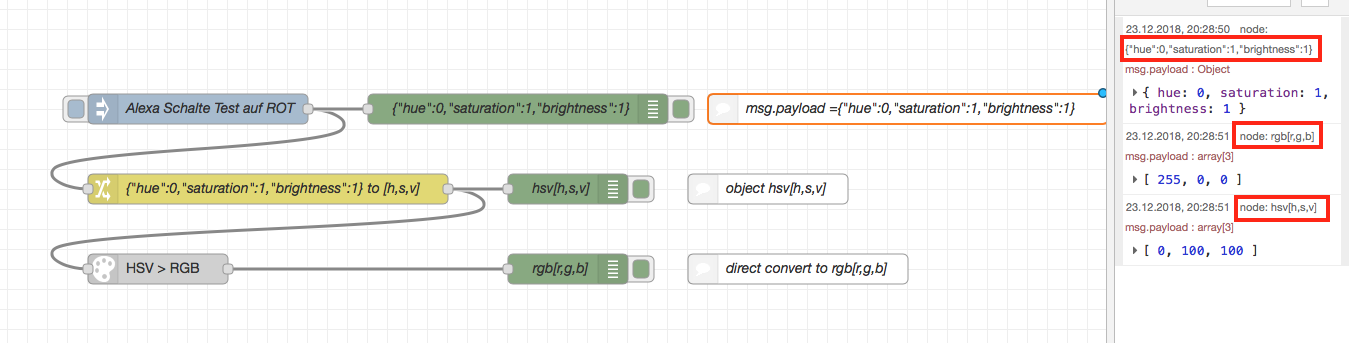
                    
                     ![3999_bild_1.png](/assets/uploads/files/3999_bild_1.png) 
                    
                    Am Eingang bekommt das Teil ein Oblect````
                    {"hue":0,"saturation":1,"brightness":1}
                    

                    Am Ausgang hast du ein Array````
                    [r,g,b]

                    Wenn das lieber ein Object sein soll, der Form:````
                    {"rgb": [r,g,b]}
                    ````ist eine minimale Änderung nötig.
                    1 Antwort Letzte Antwort
                    0
                    • D Offline
                      D Offline
                      dondon4002
                      schrieb am zuletzt editiert von
                      #28

                      Perfekt :D dann hab ich nur den Converter falsch benutzt :D :D danach noch nen Change to msg.payload.rgb und Alexa schaltet das ganze :-) Danke dir

                      1 Antwort Letzte Antwort
                      0
                      • R Offline
                        R Offline
                        rewenode
                        schrieb am zuletzt editiert von
                        #29

                        @dondon4002:

                        … Change to msg.payload.rgb `

                        Exakt so :D falls nötig

                        1 Antwort Letzte Antwort
                        0
                        • D Offline
                          D Offline
                          dondon4002
                          schrieb am zuletzt editiert von
                          #30

                          Für alle die dann noch Bedarf daran haben :-)

                          Ich mache es am Ende doch per Blockly denn es kommen ja noch Abfragen wie TurnOnRequest, TunOffRequest und was Alexa noch alles so bietet.

                          ! ````
                          [
                          {
                          "id": "6a18e5be.c9abdc",
                          "type": "Blockly",
                          "z": "9433ac39.c5756",
                          "language": "en",
                          "func": "if ((msg['command']) == 'SetColorRequest') {\n msg['payload'] = [(msg['payload']['hue']), (msg['payload']['saturation']) * 100, (msg['payload']['brightness']) * 100];\n return [msg, null];\n} else if ((msg['command']) == 'TurnOffRequest') {\n msg['payload'] = false;\n return [null, msg];\n} else if ((msg['command']) == 'TurnOnRequest') {\n msg['payload'] = true;\n return [null, msg];\n}\n",
                          "workspaceXml": "<xml xmlns="&quot;http://www.w3.org/1999/xhtml\&quot;"><block id="&quot;OegDmw1SSX]D=Pa(8G75&quot;" type="&quot;controls_if&quot;" x="&quot;-2037&quot;" y="&quot;-387&quot;"><mutation elseif="&quot;2&quot;"></mutation><value name="&quot;IF0&quot;"><block id="&quot;GconiS<value name="&quot;IF0&quot;"ihVrBvHEiKZu&quot;" type="&quot;logic_compare&quot;"><field name="&quot;OP&quot;">EQ</field><value name="&quot;A&quot;"><block id="&quot;qfEv5p}Q.6(4bAAhVY)t&quot;" type="&quot;node_object_get&quot;"><mutation action="&quot;GET&quot;"></mutation><field name="&quot;action&quot;">GET</field><value name="&quot;object&quot;"><shadow id="&quot;8Rf40:s+-(Iix/~rpXuB&quot;" type="&quot;node_msg&quot;"></shadow></value><value name="&quot;field_name&quot;"><shadow id="&quot;3K$0p{%[oP^XO:,{IhsI&quot;" type="&quot;text&quot;"><field name="&quot;TEXT&quot;">command</field></shadow></value></block></value><value name="&quot;B&quot;"><block id="&quot;Gu~Z4BXhmh4D%LOE{4s-&quot;" type="&quot;text&quot;"><field name="&quot;TEXT&quot;">SetColorRequest</field></block></value></block></value><statement name="&quot;DO0&quot;"><block id="&quot;Wz6Dr1k2)tZbJ[+?V+j{&quot;" type="&quot;node_object_set&quot;"><value name="&quot;object_field&quot;"><shadow id="&quot;N7nV^CQPdk8cxV}?9mWX&quot;" type="&quot;node_msg&quot;"></shadow></value><value name="&quot;field_name&quot;"><shadow id="&quot;cZ6WgGkQ{3ya8z~VBE3\&quot;" type="\&quot;text\&quot;"><field name="\&quot;TEXT\&quot;">payload</field></shadow></value><value name="\&quot;value_field\&quot;"><shadow id="\&quot;sk?O05P5ma_5vqc{!#)&quot;" type="&quot;text&quot;"></shadow><block id="&quot;Md|@A(]N!kq$=b3)[SH!&quot;" type="&quot;lists_create_with&quot;"><mutation items="&quot;3&quot;"></mutation><value name="&quot;ADD0&quot;"><block id="&quot;tu7-Qe3u+zsXsItw[,yY&quot;" type="&quot;node_object_get&quot;"><mutation action="&quot;GET&quot;"></mutation><field name="&quot;action&quot;">GET</field><value name="&quot;object&quot;"><shadow id="&quot;4WDpncvt3q4gpN@S@MfM&quot;" type="&quot;node_msg&quot;"></shadow></value><value name="&quot;field_name&quot;"><shadow id="&quot;@d+[0zA[c(D{jmlYd^%O&quot;" type="&quot;text&quot;"><field name="&quot;TEXT&quot;">payload.hue</field></shadow></value></block></value><value name="&quot;ADD1&quot;"><block id="&quot;!Q#d8F/fCDqPNsm,6Z+&quot;" type="&quot;math_arithmetic&quot;"><field name="&quot;OP&quot;">MULTIPLY</field><value name="&quot;A&quot;"><shadow id="&quot;bNOGt$4!S%VQ?:vfS1V.&quot;" type="&quot;math_number&quot;"><field name="&quot;NUM&quot;">1</field></shadow><block id="&quot;cl:38kKKmak%V3E!m2}T&quot;" type="&quot;node_object_get&quot;"><mutation action="&quot;GET&quot;"></mutation><field name="&quot;action&quot;">GET</field><value name="&quot;object&quot;"><shadow id="&quot;8+vu8BKKc)fZo;rSk0[D&quot;" type="&quot;node_msg&quot;"></shadow></value><value name="&quot;field_name&quot;"><shadow id="&quot;FzE=$C.cumV)e3g*!;0\&quot;" type="\&quot;text\&quot;"><field name="\&quot;TEXT\&quot;">payload.saturation</field></shadow></value></block></value><value name="\&quot;B\&quot;"><shadow id="\&quot;p$RJ=}@6=xX[Ekbiqfn^\&quot;" type="\&quot;math_number\&quot;"><field name="\&quot;NUM\&quot;">100</field></shadow></value></block></value><value name="\&quot;ADD2\&quot;"><block id="\&quot;K[@!p?t]Y]0YY,I]]Y=3\&quot;" type="\&quot;math_arithmetic\&quot;"><field name="\&quot;OP\&quot;">MULTIPLY</field><value name="\&quot;A\&quot;"><shadow id="\&quot;12luhGJPp}BppnOnCd]t\&quot;" type="\&quot;math_number\&quot;"><field name="\&quot;NUM\&quot;">1</field></shadow><block id="\&quot;hu/B]c6@]lE@cn^qMa!I\&quot;" type="\&quot;node_object_get\&quot;"><mutation action="\&quot;GET\&quot;"></mutation><field name="\&quot;action\&quot;">GET</field><value name="\&quot;object\&quot;"><shadow id="\&quot;$2{@U|#45m9O#sYMG_HL\&quot;" type="\&quot;node_msg\&quot;"></shadow></value><value name="\&quot;field_name\&quot;"><shadow id="\&quot;9q^k;%a@6pz!wwSL[S\&quot;" type="\&quot;text\&quot;"><field name="\&quot;TEXT\&quot;">payload.brightness</field></shadow></value></block></value><value name="\&quot;B\&quot;"><shadow id="\&quot;H7P5:v+4jC%4eNSZg1b3\&quot;" type="\&quot;math_number\&quot;"><field name="\&quot;NUM\&quot;">100</field></shadow></value></block></value></block></value><next><block id="\&quot;dj6-iR8:4O-+v*!D~,M-\&quot;" type="\&quot;node_return_message\&quot;"><field name="\&quot;OUTPUT_NR\&quot;">1</field><value name="\&quot;MESSAGE_INPUT\&quot;"><shadow id="\&quot;!e8R2#N8Jdu(EAVQ{|&quot;" type="&quot;node_msg&quot;"></shadow></value></block></next></block></statement><value name="&quot;IF1&quot;"><block id="&quot;Gt#y.gqIL,qm)]{hhHC&quot;" type="&quot;logic_compare&quot;"><field name="&quot;OP&quot;">EQ</field><value name="&quot;A&quot;"><block id="&quot;N6$q19G#S0_xYH%PxSEI&quot;" type="&quot;node_object_get&quot;"><mutation action="&quot;GET&quot;"></mutation><field name="&quot;action&quot;">GET</field><value name="&quot;object&quot;"><shadow id="&quot;x(P(iAF[acHUJa%K1WW0&quot;" type="&quot;node_msg&quot;"></shadow></value><value name="&quot;field_name&quot;"><shadow id="&quot;401Ct:?6f$=h/.@%JFf=&quot;" type="&quot;text&quot;"><field name="&quot;TEXT&quot;">command</field></shadow></value></block></value><value name="&quot;B&quot;"><block id="&quot;E:%o.01_qWbolte})n[}&quot;" type="&quot;text&quot;"><field name="&quot;TEXT&quot;">TurnOffRequest</field></block></value></block></value><statement name="&quot;DO1&quot;"><block id="&quot;6=mvJ%:D4qf|CDFfAg[z&quot;" type="&quot;node_object_set&quot;"><value name="&quot;object_field&quot;"><shadow id="&quot;ABbAcS^Mj_]u:G0bmbxl&quot;" type="&quot;node_msg&quot;"></shadow></value><value name="&quot;field_name&quot;"><shadow id="&quot;to=(u!-hoz(ZB|X@F7;&quot;" type="&quot;text&quot;"><field name="&quot;TEXT&quot;">payload</field></shadow></value><value name="&quot;value_field&quot;"><shadow id="&quot;6?#earD4R8~?M5_1Y1va&quot;" type="&quot;text&quot;"></shadow><block id="&quot;gSN[vp0Vp@iiKOCKXZxO&quot;" type="&quot;logic_boolean&quot;"><field name="&quot;BOOL&quot;">FALSE</field></block></value><next><block id="&quot;8Lt@[lrf:,v#bz#My!,~&quot;" type="&quot;node_return_message&quot;"><field name="&quot;OUTPUT_NR&quot;">2</field><value name="&quot;MESSAGE_INPUT&quot;"><shadow id="&quot;ac^):!N/SuXK+m#l6G{e&quot;" type="&quot;node_msg&quot;"></shadow></value></block></next></block></statement><value name="&quot;IF2&quot;"><block id="&quot;:%iB^77hKA%5#Y]m3(KI&quot;" type="&quot;logic_compare&quot;"><field name="&quot;OP&quot;">EQ</field><value name="&quot;A&quot;"><block id="&quot;bZZ%2UXkY4qB_Fmae68&quot;" type="&quot;node_object_get&quot;"><mutation action="&quot;GET&quot;"></mutation><field name="&quot;action&quot;">GET</field><value name="&quot;object&quot;"><shadow id="&quot;O;dMHWtpMY{zN1](^WQa&quot;" type="&quot;node_msg&quot;"></shadow></value><value name="&quot;field_name&quot;"><shadow id="&quot;C0O}w0bo=c,,_#.[I9Gf&quot;" type="&quot;text&quot;"><field name="&quot;TEXT&quot;">command</field></shadow></value></block></value><value name="&quot;B&quot;"><block id="&quot;e5e|,AqRBMdDQ|~s?uv9&quot;" type="&quot;text&quot;"><field name="&quot;TEXT&quot;">TurnOnRequest</field></block></value></block></value><statement name="&quot;DO2&quot;"><block id="&quot;|DY5/yaj[#aVyjA:qNS&quot;" type="&quot;node_object_set&quot;"><value name="&quot;object_field&quot;"><shadow id="&quot;ee@E0k_unaE#!Ss=xdAB&quot;" type="&quot;node_msg&quot;"></shadow></value><value name="&quot;field_name&quot;"><shadow id="&quot;h]@6ikfpmr#ni-9FWDmN&quot;" type="&quot;text&quot;"><field name="&quot;TEXT&quot;">payload</field></shadow></value><value name="&quot;value_field&quot;"><shadow id="&quot;6?#earD4R8~?M5_1Y1va&quot;" type="&quot;text&quot;"></shadow><block id="&quot;c3@@`D0S$O}J_N]-B5lf&quot;" type="&quot;logic_boolean&quot;"><field name="&quot;BOOL&quot;">TRUE</field></block></value><next><block id="&quot;%R}_.z4(NfAy?#=Gv44&quot;" type="&quot;node_return_message&quot;"><field name="&quot;OUTPUT_NR&quot;">2</field><value name="&quot;MESSAGE_INPUT&quot;"><shadow id="&quot;}z$f11Tsy#/HuS(JG_Z&quot;" type="&quot;node_msg&quot;"></shadow></value></block></next></block></statement></block></xml>",
                          "outputs": 2,
                          "name": "",
                          "x": 390,
                          "y": 1320,
                          "wires": [
                          [
                          "aeec5dac.065a9"
                          ],
                          [
                          "7bd5f7d8.5e0f58"
                          ]
                          ]
                          },
                          {
                          "id": "7bd5f7d8.5e0f58",
                          "type": "hue-light",
                          "z": "9433ac39.c5756",
                          "name": "Lampe_Buero_LedStrip",
                          "bridge": "d5d520c8.c3118",
                          "lightid": "9",
                          "colornamer": true,
                          "x": 960,
                          "y": 1330,
                          "wires": [
                          []
                          ]
                          },
                          {
                          "id": "8259bb25.207dc8",
                          "type": "alexa-home",
                          "z": "9433ac39.c5756",
                          "conf": "b91f3657.228818",
                          "device": "43026",
                          "acknoledge": true,
                          "name": "Test",
                          "topic": "",
                          "x": 240,
                          "y": 1320,
                          "wires": [
                          [
                          "6a18e5be.c9abdc"
                          ]
                          ]
                          },
                          {
                          "id": "aeec5dac.065a9",
                          "type": "color-convert",
                          "z": "9433ac39.c5756",
                          "input": "hsv",
                          "output": "rgb",
                          "outputType": "array",
                          "x": 570,
                          "y": 1290,
                          "wires": [
                          [
                          "84d8358e.688908"
                          ]
                          ]
                          },
                          {
                          "id": "84d8358e.688908",
                          "type": "change",
                          "z": "9433ac39.c5756",
                          "name": "-> Converter ->",
                          "rules": [
                          {
                          "t": "move",
                          "p": "payload",
                          "pt": "msg",
                          "to": "payload.rgb",
                          "tot": "msg"
                          }
                          ],
                          "action": "",
                          "property": "",
                          "from": "",
                          "to": "",
                          "reg": false,
                          "x": 740,
                          "y": 1290,
                          "wires": [
                          [
                          "7bd5f7d8.5e0f58"
                          ]
                          ]
                          },
                          {
                          "id": "d5d520c8.c3118",
                          "type": "hue-bridge",
                          "z": "",
                          "name": "Philips hue",
                          "bridge": "1.2.3.103",
                          "key": "*****",
                          "interval": "1000"
                          },
                          {
                          "id": "b91f3657.228818",
                          "type": "alexa-home-conf",
                          "z": "",
                          "username": "
                          "
                          }
                          ]


                          if ((msg['command']) == 'SetColorRequest') {
                          msg['payload'] = [(msg['payload']['hue']), (msg['payload']['saturation']) * 100, (msg['payload']['brightness']) * 100];
                          return [msg, null];
                          } else if ((msg['command']) == 'TurnOffRequest') {
                          msg['payload'] = false;
                          return [null, msg];
                          } else if ((msg['command']) == 'TurnOnRequest') {
                          msg['payload'] = true;
                          return [null, msg];
                          }

                          1 Antwort Letzte Antwort
                          0
                          • R Offline
                            R Offline
                            rewenode
                            schrieb am zuletzt editiert von
                            #31

                            Nur zu, im Prinzip weist du ja jetzt wie es geht ;-)

                            1 Antwort Letzte Antwort
                            0
                            • B Offline
                              B Offline
                              Blackeye
                              schrieb am zuletzt editiert von
                              #32

                              Hi,

                              ich habe ein Problem mit der Range des Dimmers. Der Dimmer möchte 0-100 und Alexa 0-1.

                              Hier ist mein "Flow" der HomeKit Dimmer kommt da anschl. auch noch dran….

                              [{"id":"40e9814d.216b7","type":"change","z":"e742a326.057cb","name":"","rules":[{"t":"change","p":"payload","pt":"msg","from":"off","fromt":"str","to":"0","tot":"num"},{"t":"change","p":"payload","pt":"msg","from":"on","fromt":"str","to":"100","tot":"num"},{"t":"set","p":"payload","pt":"msg","to":"bri","tot":"msg"}],"action":"","property":"","from":"","to":"","reg":false,"x":507.4999694824219,"y":218.33334922790527,"wires":[["286a0677.93840a"]]}]
                              
                              1 Antwort Letzte Antwort
                              0
                              • R Offline
                                R Offline
                                rewenode
                                schrieb am zuletzt editiert von
                                #33

                                @Blackeye:

                                ich habe ein Problem mit der Range des Dimmers. Der Dimmer möchte 0-100 und Alexa 0-1. `

                                Was heisst Alexa 0-1 ? Alexa liefert dir einen Wert von 0-1 und der soll nach 0-100 umgesetzt werden?

                                1 Antwort Letzte Antwort
                                0
                                • B Offline
                                  B Offline
                                  Blackeye
                                  schrieb am zuletzt editiert von
                                  #34

                                  Hi,

                                  genau so…..

                                  1 Antwort Letzte Antwort
                                  0
                                  • R Offline
                                    R Offline
                                    rewenode
                                    schrieb am zuletzt editiert von
                                    #35

                                    @Blackeye:

                                    Hi,

                                    genau so….. `

                                    Na wie wäre es, wenn du den von Alexa kommenden Wert 0-1 einfach mit 100 multiplizierst ?

                                    1 Antwort Letzte Antwort
                                    0
                                    • B Offline
                                      B Offline
                                      Blackeye
                                      schrieb am zuletzt editiert von
                                      #36

                                      Hi,

                                      ja auf die Idee bin ich auch gekommen, finde nur nirgendwo wie ich das mache.

                                      Gruß

                                      Lars

                                      1 Antwort Letzte Antwort
                                      0
                                      • R Offline
                                        R Offline
                                        rewenode
                                        schrieb am zuletzt editiert von
                                        #37

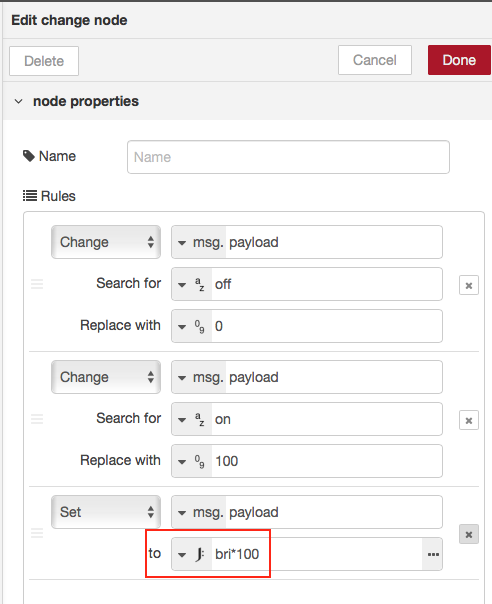
                                        Sollte so gehen:

                                        3999_bri.png

                                        1 Antwort Letzte Antwort
                                        0
                                        • F Offline
                                          F Offline
                                          Frank_y
                                          schrieb am zuletzt editiert von
                                          #38

                                          Range-node (Standard)

                                          1 Antwort Letzte Antwort
                                          0
                                          Antworten
                                          • In einem neuen Thema antworten
                                          Anmelden zum Antworten
                                          • Älteste zuerst
                                          • Neuste zuerst
                                          • Meiste Stimmen


                                          Support us

                                          ioBroker
                                          Community Adapters
                                          Donate

                                          900

                                          Online

                                          32.4k

                                          Benutzer

                                          81.5k

                                          Themen

                                          1.3m

                                          Beiträge
                                          Community
                                          Impressum | Datenschutz-Bestimmungen | Nutzungsbedingungen | Einwilligungseinstellungen
                                          ioBroker Community 2014-2025
                                          logo
                                          • Anmelden

                                          • Du hast noch kein Konto? Registrieren

                                          • Anmelden oder registrieren, um zu suchen
                                          • Erster Beitrag
                                            Letzter Beitrag
                                          0
                                          • Home
                                          • Aktuell
                                          • Tags
                                          • Ungelesen 0
                                          • Kategorien
                                          • Unreplied
                                          • Beliebt
                                          • GitHub
                                          • Docu
                                          • Hilfe