




IKEA Tradfri Adapter Fehler bei Installation [GELÖST]
-
wo finde ich das? wird das auch irgendwo gespeichert? Das läuft ja in dem INstall Fenster durch und ist dann weg - oder wie kommt man da nachträglich ran?
-
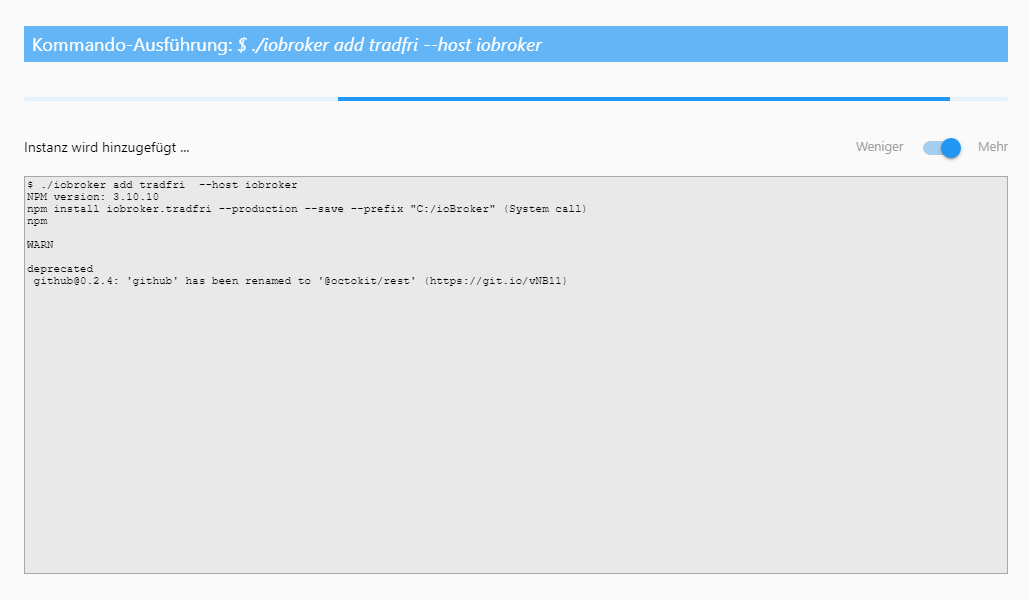
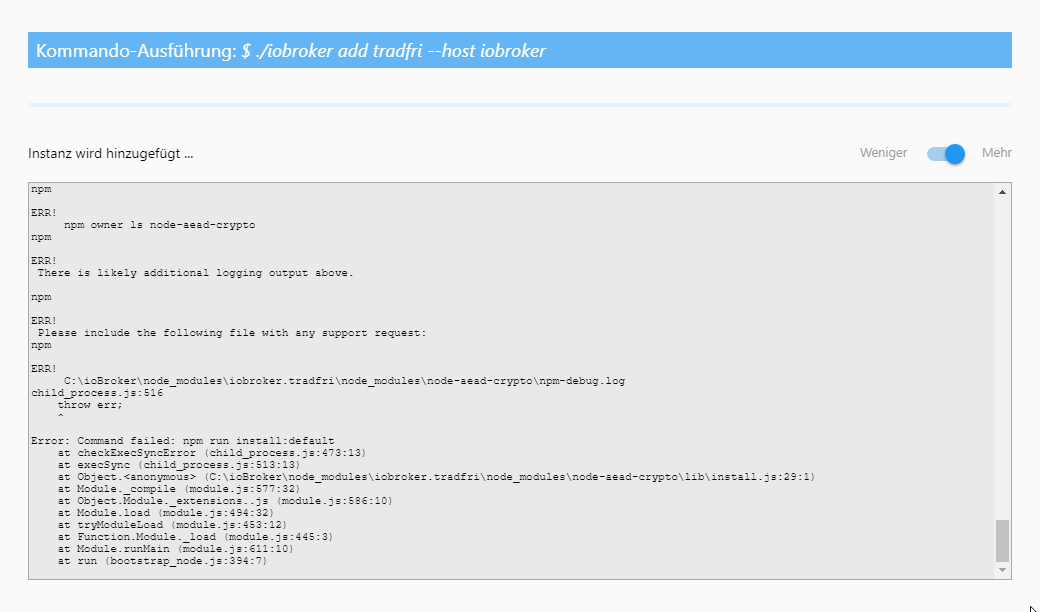
Tja, da ich nicht weiß wie es geht und auch keine Antwort bekomme (wie auf das meiste was ich hier frage :( ) Hier zwei Screenshouts.
-
bei mir das gleiche Problem.
Gruß
Uwe
-
bin wieder zurück auf 1.4.0.
Damit klappts.
-
-
wo finde ich das? wird das auch irgendwo gespeichert? Das läuft ja in dem INstall Fenster durch und ist dann weg - oder wie kommt man da nachträglich ran? `
Man könnte zb meine Signatur lesen …... und natürlich antworten wir absichtlich nicht mehr nur um dich zu ärgern ... (Achja: war ironisch gemeint und nicht ernst, nur für den Fall das das nicht rauskam ;-) )
Gesendet vom Handy ...
-
also ich wollte 1.5.4 installieren
-
Kann es sein das der IKEA Tradfri Adapter nicht mehr ordnungsgemäß installiert wird. `
Schneller Test meinerseits zeigt dass es eigentlich gehen müsste (auch auf Windows):
D:\tradfritest>npm i iobroker.tradfri > node-aead-crypto@2.0.0 install D:\tradfritest\node_modules\node-aead-crypto > node lib/install.js running default installation script > node-aead-crypto@2.0.0 install:default D:\tradfritest\node_modules\node-aead-c rypto > node-pre-gyp install --fallback-to-build node-pre-gyp WARN Using needle for node-pre-gyp https download node-pre-gyp WARN Tried to download(404): https://github.com/AlCalzone/node-aead -crypto/releases/download/v2.0.0/node-v57-win32-x64.tar.gz node-pre-gyp WARN Pre-built binaries not found for node-aead-crypto@2.0.0 and no de@8.7.0 (node-v57 ABI, unknown) (falling back to source compile with node-gyp) Die Projekte in dieser Projektmappe werden nacheinander erstellt. Um eine parall ele Erstellung zu ermöglichen, müssen Sie den Schalter "/m" hinzufügen. node-aes-ccm.cc node-aes-gcm.cc addon.cc win_delay_load_hook.cc Creating library D:\tradfritest\node_modules\node-aead-crypto\build\Releas e\node_aead_crypto.lib and object D:\tradfritest\node_modules\node-aead-crypt o\build\Release\node_aead_crypto.exp Generating code Finished generating code node_aead_crypto.vcxproj -> D:\tradfritest\node_modules\node-aead-crypto\buil d\Release\\node_aead_crypto.node node_aead_crypto.vcxproj -> D:\tradfritest\node_modules\node-aead-crypto\buil d\Release\node_aead_crypto.pdb (Full PDB) Copying D:\tradfritest\node_modules\node-aead-crypto\build\Release\/node_aead _crypto.node to D:/tradfritest/node_modules/node-aead-crypto/build/Release/no de-v57-win32-x64\node_aead_crypto.node 1 Datei(en) kopiert. npm WARN saveError ENOENT: no such file or directory, open 'D:\tradfritest\packa ge.json' npm notice created a lockfile as package-lock.json. You should commit this file. npm WARN enoent ENOENT: no such file or directory, open 'D:\tradfritest\package. json' npm WARN tradfritest No description npm WARN tradfritest No repository field. npm WARN tradfritest No README data npm WARN tradfritest No license field. + iobroker.tradfri@1.5.4 added 85 packages from 48 contributors in 23.548s ?─────────────────────────────────────? │ │ │ Update available 5.4.2 → 6.4.1 │ │ Run npm i -g npm to update │ │ │ ?─────────────────────────────────────? D:\tradfritest>node > require("node-aead-crypto") { ccm: { encrypt: [Function], decrypt: [Function] }, gcm: { encrypt: [Function], decrypt: [Function] } } > -
So, ich habe es eben noch einmal probiert. Ebenfalls mit 1.5.4 unter Windows10pro
Hier der entsprechende Log dazu
$ ./iobroker add tradfri  --host iobroker
NPM version: 3.10.10
npm install iobroker.tradfri --production --save --prefix "C:/ioBroker" (System call)
npm

WARN

deprecated
 github@0.2.4: 'github' has been renamed to '@octokit/rest' (https://git.io/vNB11)
node-pre-gyp

WARN

Using needle for node-pre-gyp https download

node-pre-gyp WARN Tried to download(404): https://github.com/AlCalzone/node-aead-crypto/releases/download/v2.0.0/node-v48-win32-ia32.tar.gz node-pre-gyp WARN Pre-built binaries not found for node-aead-crypto@2.0.0 and node@6.14.4 (node-v48 ABI, unknown) (falling back to source compile with node-gyp)

gyp

ERR!

configure error

gyp

ERR!

stack
 Error: Can't find Python executable "python", you can set the PYTHON env variable.
gyp

ERR!

stack
     at failNoPython (C:\Program Files\nodejs\node_modules\npm\node_modules\node-gyp\lib\configure.js:449:14)
gyp

ERR!

stack
     at C:\Program Files\nodejs\node_modules\npm\node_modules\node-gyp\lib\configure.js:404:11
gyp

ERR!

stack
     at C:\Program Files\nodejs\node_modules\npm\node_modules\graceful-fs\polyfills.js:264:29
gyp

ERR!

stack
     at FSReqWrap.oncomplete (fs.js:123:15)
gyp

ERR!

System
 Windows_NT 10.0.17763
gyp

ERR!

command
 "C:\\Program Files\\nodejs\\node.exe" "C:\\Program Files\\nodejs\\node_modules\\npm\\node_modules\\node-gyp\\bin\\node-gyp.js" "configure" "--fallback-to-build" "--module=C:\\ioBroker\\node_modules\\iobroker.tradfri\\node_modules\\node-aead-crypto\\build\\Release\\node-v48-win32-ia32\\node_aead_crypto.node" "--module_name=node_aead_crypto" "--module_path=C:\\ioBroker\\node_modules\\iobroker.tradfri\\node_modules\\node-aead-crypto\\build\\Release\\node-v48-win32-ia32" "--napi_version=3" "--node_abi_napi=napi" "--napi_build_version=0" "--node_napi_label=node-v48"
gyp

ERR!

cwd
 C:\ioBroker\node_modules\iobroker.tradfri\node_modules\node-aead-crypto
gyp

ERR!

node -v
 v6.14.4
gyp

ERR!

node-gyp -v
 v3.4.0
gyp

ERR!

not ok

node-pre-gyp

ERR!

build error

node-pre-gyp

ERR!

stack
 Error: Failed to execute 'node-gyp.cmd configure --fallback-to-build --module=C:\ioBroker\node_modules\iobroker.tradfri\node_modules\node-aead-crypto\build\Release\node-v48-win32-ia32\node_aead_crypto.node --module_name=node_aead_crypto --module_path=C:\ioBroker\node_modules\iobroker.tradfri\node_modules\node-aead-crypto\build\Release\node-v48-win32-ia32 --napi_version=3 --node_abi_napi=napi --napi_build_version=0 --node_napi_label=node-v48' (1)
node-pre-gyp

ERR!

stack
     at ChildProcess. <anonymous>(C:\ioBroker\node_modules\iobroker.tradfri\node_modules\node-aead-crypto\node_modules\node-pre-gyp\lib\util\compile.js:83:29)
node-pre-gyp

ERR!

stack
     at emitTwo (events.js:106:13)
node-pre-gyp

ERR!

stack
     at ChildProcess.emit (events.js:191:7)
node-pre-gyp

ERR!

stack
     at maybeClose (internal/child_process.js:920:16)
node-pre-gyp

ERR!

stack
     at Process.ChildProcess._handle.onexit (internal/child_process.js:230:5)
node-pre-gyp

ERR!

System
 Windows_NT 10.0.17763
node-pre-gyp

ERR!

command
 "C:\\Program Files\\nodejs\\node.exe" "C:\\ioBroker\\node_modules\\iobroker.tradfri\\node_modules\\node-aead-crypto\\node_modules\\node-pre-gyp\\bin\\node-pre-gyp" "install" "--fallback-to-build"
node-pre-gyp

ERR!

cwd
 C:\ioBroker\node_modules\iobroker.tradfri\node_modules\node-aead-crypto
node-pre-gyp

ERR!

node -v
 v6.14.4
node-pre-gyp

ERR!

node-pre-gyp -v
 v0.11.0
node-pre-gyp

ERR!

not ok

npm

ERR!
 Windows_NT 10.0.17763
npm

ERR!

argv
 "C:\\Program Files\\nodejs\\node.exe" "C:\\Program Files\\nodejs\\node_modules\\npm\\bin\\npm-cli.js" "run" "install:default"
npm

ERR!

node
 v6.14.4
npm

ERR!

npm
 v3.10.10
npm

ERR!

code
 ELIFECYCLE
npm

ERR!
 node-aead-crypto@2.0.0 install:default: `node-pre-gyp install --fallback-to-build`
npm

ERR!
 Exit status 1
npm

ERR!

npm

ERR!
 Failed at the node-aead-crypto@2.0.0 install:default script 'node-pre-gyp install --fallback-to-build'.
npm

ERR!
 Make sure you have the latest version of node.js and npm installed.
npm

ERR!
 If you do, this is most likely a problem with the node-aead-crypto package,
npm

ERR!
 not with npm itself.
npm

ERR!
 Tell the author that this fails on your system:
npm

ERR!
     node-pre-gyp install --fallback-to-build
npm

ERR!
 You can get information on how to open an issue for this project with:
npm

ERR!
     npm bugs node-aead-crypto
npm

ERR!
 Or if that isn't available, you can get their info via:
npm

ERR!
     npm owner ls node-aead-crypto
npm

ERR!
 There is likely additional logging output above.

npm

ERR!
 Please include the following file with any support request:
npm

ERR!
     C:\ioBroker\node_modules\iobroker.tradfri\node_modules\node-aead-crypto\npm-debug.log
child_process.js:516
    throw err;
    ^

Error: Command failed: npm run install:default
    at checkExecSyncError (child_process.js:473:13)
    at execSync (child_process.js:513:13)
    at Object. <anonymous>(C:\ioBroker\node_modules\iobroker.tradfri\node_modules\node-aead-crypto\lib\install.js:29:1)
    at Module._compile (module.js:577:32)
    at Object.Module._extensions..js (module.js:586:10)
    at Module.load (module.js:494:32)
    at tryModuleLoad (module.js:453:12)
    at Function.Module._load (module.js:445:3)
    at Module.runMain (module.js:611:10)
    at run (bootstrap_node.js:394:7)

npm

WARN

optional
 SKIPPING OPTIONAL DEPENDENCY: node-aead-crypto@2.0.0 (node_modules\iobroker.tradfri\node_modules\node-aead-crypto):
npm

WARN

optional
 SKIPPING OPTIONAL DEPENDENCY: node-aead-crypto@2.0.0 install: `node lib/install.js`
npm

WARN

optional
 SKIPPING OPTIONAL DEPENDENCY: Exit status 1
host.iobroker install adapter tradfri
got C:/ioBroker/node_modules/iobroker.tradfri/admin
upload [20] tradfri.admin C:/ioBroker/node_modules/iobroker.tradfri/admin/tradfri.png tradfri.png image/png
upload [19] tradfri.admin C:/ioBroker/node_modules/iobroker.tradfri/admin/style.css style.css text/css
upload [18] tradfri.admin C:/ioBroker/node_modules/iobroker.tradfri/admin/index.html index.html text/html
upload [17] tradfri.admin C:/ioBroker/node_modules/iobroker.tradfri/admin/icons/remote_dimmer.png icons/remote_dimmer.png image/png
upload [16] tradfri.admin C:/ioBroker/node_modules/iobroker.tradfri/admin/icons/remote.png icons/remote.png image/png
upload [15] tradfri.admin C:/ioBroker/node_modules/iobroker.tradfri/admin/icons/plug.png icons/plug.png image/png
upload [14] tradfri.admin C:/ioBroker/node_modules/iobroker.tradfri/admin/icons/panel_ws.png icons/panel_ws.png image/png
upload [13] tradfri.admin C:/ioBroker/node_modules/iobroker.tradfri/admin/icons/panel.png icons/panel.png image/png
upload [12] tradfri.admin C:/ioBroker/node_modules/iobroker.tradfri/admin/icons/motion_sensor.png icons/motion_sensor.png image/png
upload [11] tradfri.admin C:/ioBroker/node_modules/iobroker.tradfri/admin/icons/gu10_ws.png icons/gu10_ws.png image/png
upload [10] tradfri.admin C:/ioBroker/node_modules/iobroker.tradfri/admin/icons/gu10_2700k.png icons/gu10_2700k.png image/png
upload [9] tradfri.admin C:/ioBroker/node_modules/iobroker.tradfri/admin/icons/gu10.png icons/gu10.png image/png
upload [8] tradfri.admin C:/ioBroker/node_modules/iobroker.tradfri/admin/icons/gateway.png icons/gateway.png image/png
upload [7] tradfri.admin C:/ioBroker/node_modules/iobroker.tradfri/admin/icons/door_ws.png icons/door_ws.png image/png
upload [6] tradfri.admin C:/ioBroker/node_modules/iobroker.tradfri/admin/icons/bulb_ws.png icons/bulb_ws.png image/png
upload [5] tradfri.admin C:/ioBroker/node_modules/iobroker.tradfri/admin/icons/bulb_rgb.png icons/bulb_rgb.png image/png
upload [4] tradfri.admin C:/ioBroker/node_modules/iobroker.tradfri/admin/icons/bulb_2700k.png icons/bulb_2700k.png image/png
upload [3] tradfri.admin C:/ioBroker/node_modules/iobroker.tradfri/admin/icons/bulb.png icons/bulb.png image/png
upload [2] tradfri.admin C:/ioBroker/node_modules/iobroker.tradfri/admin/build/vendor.bundle.js build/vendor.bundle.js application/javascript
upload [1] tradfri.admin C:/ioBroker/node_modules/iobroker.tradfri/admin/build/runtime.bundle.js build/runtime.bundle.js application/javascript
upload [0] tradfri.admin C:/ioBroker/node_modules/iobroker.tradfri/admin/build/main.bundle.js build/main.bundle.js application/javascript
host.iobroker object system.adapter.tradfri created
host.iobroker create instance tradfri
host.iobroker object tradfri.0.info.connection created
host.iobroker object tradfri.0.info created
host.iobroker object system.adapter.tradfri.0.outputCount created
host.iobroker object system.adapter.tradfri.0.inputCount created
host.iobroker object system.adapter.tradfri.0.uptime created
host.iobroker object system.adapter.tradfri.0.memRss created
host.iobroker object system.adapter.tradfri.0.memHeapTotal created
host.iobroker object system.adapter.tradfri.0.memHeapUsed created
host.iobroker object system.adapter.tradfri.0.connected created
host.iobroker object system.adapter.tradfri.0.alive created
host.iobroker object system.adapter.tradfri.0 created
process exited with code 0</anonymous></anonymous>
Und hier das log NACH der Installation des Adapters
host.iobroker 2018-11-26 11:04:18.541 info Restart adapter system.adapter.tradfri.0 because enabled host.iobroker 2018-11-26 11:04:18.541 error instance system.adapter.tradfri.0 terminated with code 1 () host.iobroker 2018-11-26 11:04:18.541 error Caught by controller[0]: at require (internal/module.js:20:19) host.iobroker 2018-11-26 11:04:18.541 error Caught by controller[0]: at Function.Module._load (module.js:445:3) host.iobroker 2018-11-26 11:04:18.541 error Caught by controller[0]: at tryModuleLoad (module.js:453:12) host.iobroker 2018-11-26 11:04:18.541 error Caught by controller[0]: at Module.load (module.js:494:32) host.iobroker 2018-11-26 11:04:18.541 error Caught by controller[0]: at Object.Module._extensions..js (module.js:586:10) host.iobroker 2018-11-26 11:04:18.540 error Caught by controller[0]: at Module._compile (module.js:577:32) host.iobroker 2018-11-26 11:04:18.540 error Caught by controller[0]: at Object. <anonymous>(C:\ioBroker\node_modules\iobroker.tradfri\node_modules\node-dtls-client\build\lib\AEADCrypto.js:54:47) host.iobroker 2018-11-26 11:04:18.540 error Caught by controller[0]: at require (internal/module.js:20:19) host.iobroker 2018-11-26 11:04:18.540 error Caught by controller[0]: at Function.Module._load (module.js:424:25) host.iobroker 2018-11-26 11:04:18.539 error Caught by controller[0]: at Function.Module._resolveFilename (module.js:476:15) host.iobroker 2018-11-26 11:04:18.539 error Caught by controller[0]: Error: Cannot find module 'node-aead-crypto' host.iobroker 2018-11-26 11:04:18.539 error Caught by controller[0]: host.iobroker 2018-11-26 11:04:18.539 error Caught by controller[0]: ^ host.iobroker 2018-11-26 11:04:18.538 error Caught by controller[0]: throw err; host.iobroker 2018-11-26 11:04:18.538 error Caught by controller[0]: module.js:478 host.iobroker 2018-11-26 11:04:16.906 info instance system.adapter.tradfri.0 started with pid 4764 host.iobroker 2018-11-26 11:03:46.871 info Restart adapter system.adapter.tradfri.0 because enabled host.iobroker 2018-11-26 11:03:46.871 error instance system.adapter.tradfri.0 terminated with code 1 () Caught 2018-11-26 11:03:46.871 error by controller[0]: at require (internal/module.js:20:19) Caught 2018-11-26 11:03:46.871 error by controller[0]: at Function.Module._load (module.js:445:3) Caught 2018-11-26 11:03:46.871 error by controller[0]: at tryModuleLoad (module.js:453:12) Caught 2018-11-26 11:03:46.871 error by controller[0]: at Module.load (module.js:494:32) Caught 2018-11-26 11:03:46.871 error by controller[0]: at Object.Module._extensions..js (module.js:586:10) Caught 2018-11-26 11:03:46.871 error by controller[0]: at Module._compile (module.js:577:32) Caught 2018-11-26 11:03:46.871 error by controller[0]: at Object. <anonymous>(C:\ioBroker\node_modules\iobroker.tradfri\node_modules\node-dtls-client\build\lib\AEADCrypto.js:54:47) Caught 2018-11-26 11:03:46.871 error by controller[0]: at require (internal/module.js:20:19) Caught 2018-11-26 11:03:46.871 error by controller[0]: at Function.Module._load (module.js:424:25) Caught 2018-11-26 11:03:46.871 error by controller[0]: at Function.Module._resolveFilename (module.js:476:15) Caught 2018-11-26 11:03:46.871 error by controller[0]: Error: Cannot find module 'node-aead-crypto' Caught 2018-11-26 11:03:46.871 error by controller[0]: Caught 2018-11-26 11:03:46.871 error by controller[0]: ^ Caught 2018-11-26 11:03:46.871 error by controller[0]: throw err; Caught 2018-11-26 11:03:46.871 error by controller[0]: module.js:478 host.iobroker 2018-11-26 11:03:45.611 info instance system.adapter.tradfri.0 started with pid 5124 host.iobroker 2018-11-26 11:03:45.587 info "system.adapter.tradfri.0" enabled host.iobroker 2018-11-26 11:03:45.586 info object change system.adapter.tradfri.0 host.iobroker 2018-11-26 11:03:39.673 info object change system.adapter.tradfri.0 host.iobroker 2018-11-26 11:03:22.376 info object change system.adapter.tradfri.0 host.iobroker 2018-11-26 11:00:55.847 info instance system.adapter.tankerkoenig.0 terminated with code 0 (OK)</anonymous></anonymous> -
Dachte ich mir schon:
> Can't find Python executable "python", you can set the PYTHON env variable.Öffne eine Kommandozeile mit Admin-Rechten (Windows-Taste drücken, "cmd" eingeben, STRG+SHIFT+ENTER drücken, Dialog bestätigen) und gebe folgendes ein:
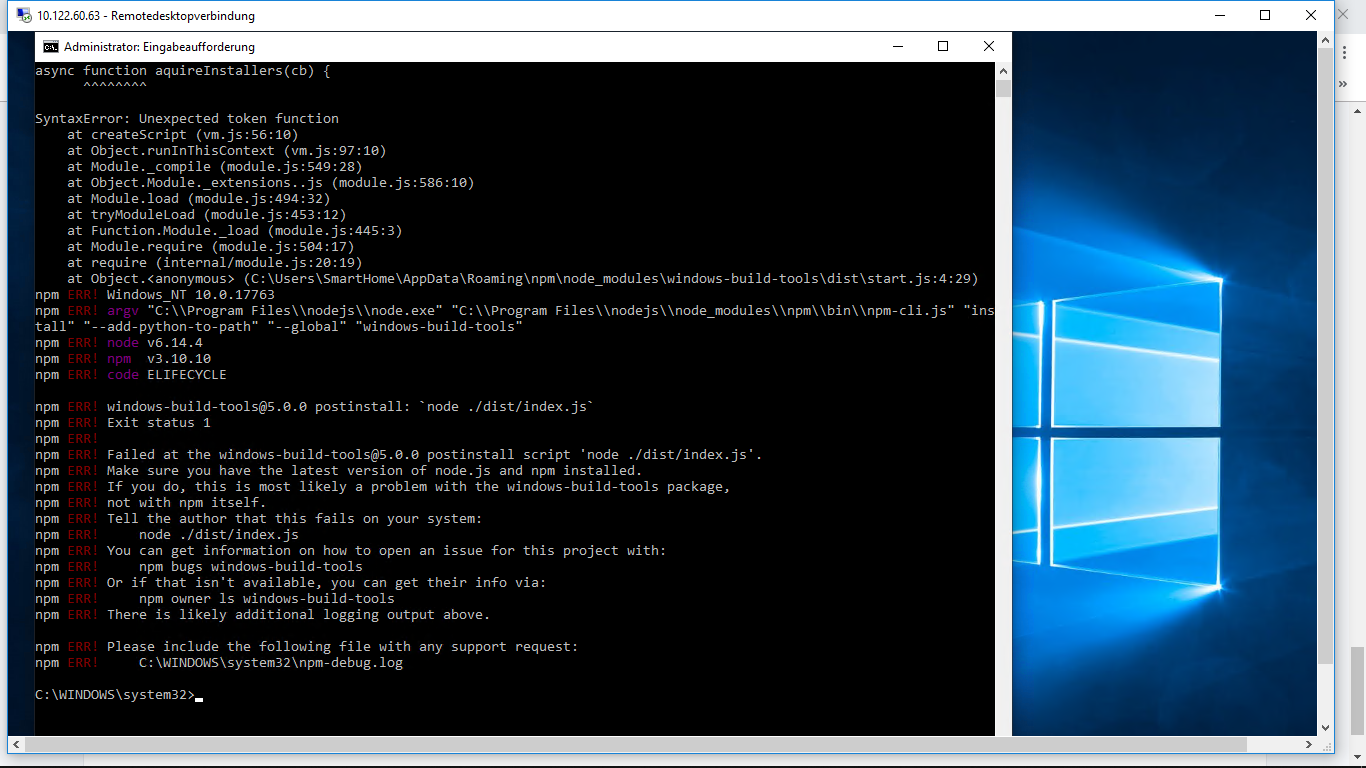
npm install --add-python-to-path --global windows-build-toolsDas dauert eine Weile, danach die Installation nochmals versuchen.
-
Muss man den Dienst dafür stoppen? Ich habe nämlich die folgenden Fehler angezeigt bekommen.
-
Hat nicht funktioniert
host.iobroker 2018-11-26 21:25:26.880 info Do not restart adapter system.adapter.tradfri.0 because disabled or deleted host.iobroker 2018-11-26 21:25:26.880 error instance system.adapter.tradfri.0 terminated with code 1 () Caught 2018-11-26 21:25:26.880 error by controller[0]: at require (internal/module.js:20:19) Caught 2018-11-26 21:25:26.880 error by controller[0]: at Function.Module._load (module.js:445:3) Caught 2018-11-26 21:25:26.880 error by controller[0]: at tryModuleLoad (module.js:453:12) Caught 2018-11-26 21:25:26.880 error by controller[0]: at Module.load (module.js:494:32) Caught 2018-11-26 21:25:26.880 error by controller[0]: at Object.Module._extensions..js (module.js:586:10) Caught 2018-11-26 21:25:26.880 error by controller[0]: at Module._compile (module.js:577:32) Caught 2018-11-26 21:25:26.880 error by controller[0]: at Object. <anonymous>(C:\ioBroker\node_modules\iobroker.tradfri\node_modules\node-dtls-client\build\lib\AEADCrypto.js:54:47) Caught 2018-11-26 21:25:26.880 error by controller[0]: at require (internal/module.js:20:19) Caught 2018-11-26 21:25:26.880 error by controller[0]: at Function.Module._load (module.js:424:25) Caught 2018-11-26 21:25:26.880 error by controller[0]: at Function.Module._resolveFilename (module.js:476:15) Caught 2018-11-26 21:25:26.880 error by controller[0]: Error: Cannot find module 'node-aead-crypto' Caught 2018-11-26 21:25:26.880 error by controller[0]: Caught 2018-11-26 21:25:26.880 error by controller[0]: ^ Caught 2018-11-26 21:25:26.880 error by controller[0]: throw err; Caught 2018-11-26 21:25:26.880 error by controller[0]: module.js:478 host.iobroker 2018-11-26 21:25:19.193 info object change system.adapter.tradfri.0 host.iobroker 2018-11-26 21:24:56.130 info Restart adapter system.adapter.tradfri.0 because enabled</anonymous> -
Ich fürchte du kommst an einem Update von NodeJS nicht vorbeiDa hätte ich ja kein Problem damit, es wird aber hier auf der iobroker Homepage explizit die 6.xx Version von nodes für ein Windows basierendes System empfohlen.
Sind mit einem 8er nodes evtl. andere Probleme zu erwarten? Wenn nicht, mache ich mal ein updaten. Da kommt es jetzt auch nicht mehr drauf an - bei dem was ich die letzten Tag alles schon hin und her installiert und probiert habe. :roll: :roll: :roll:
-
Die Dokumentation ist leider nicht mehr ganz aktuell - es wird an einer Neuauflage gearbeitet. Mit Node 8 kannst du eigentlich nix falsch machen - Node 10 hat noch einige inkompatible Adapter.
Nach Neuinstallation von Node ist noch zu beachten, dass einige Module neu kompiliert werden müssen.
Das kann durch Ausführen von "npm rebuild" im ioBroker-Ordner geschehen.
-
So, ich habe jetzt man nodesjs 8.13.0 installiert, deinen npm-install aufruf von oben gestartet und nun steht das Fenster der Eingabeaufforderung seit ca. 1,5 Stunden so da. Mit anderen Worten, es tut sich jetzt nichts mehr. Die exe Datei von Phyton liegt in dem angegebenen Verzeichnis. Muss ich die per Hand ausführen? - oder sollte das eigentlich die Install Routine machen? Ich habe auch schon den iobroker Dienst gestoppt, aber mehr tut sich da dann auch nicht.
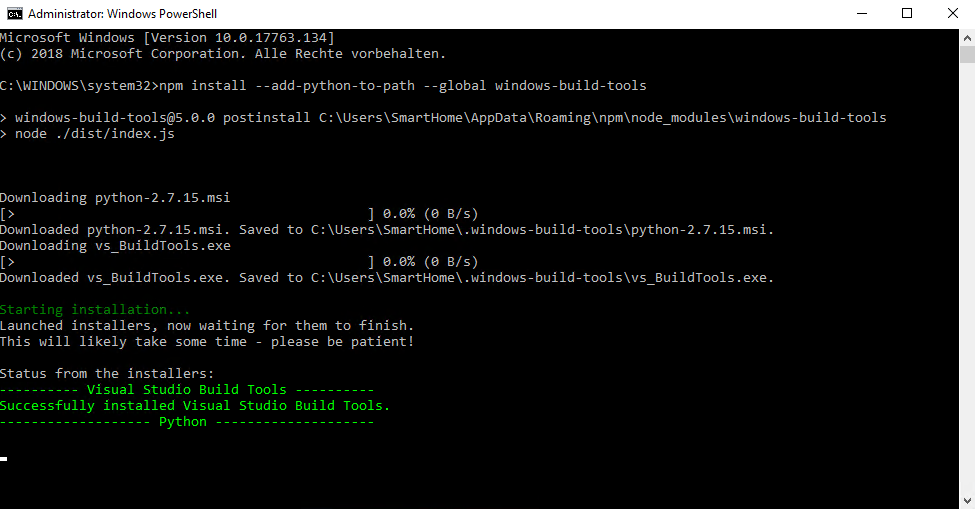
So ich habe es nun abgebrochen und von Hand aus der Windows Ebene neu gestartet. Da wurde mir aber kein Install angeboten sondern nur ein Repair. Offensichtlich ist bei der automatischen Installation etwas schief gegangen. Also habe ich das Repair ausgeführt und anschließend das Rebuild durchlaufen lassen…...
..... und siehe da ...... es geht immer noch nicht. Macht es ggf. Sinn Phyton auf Windows Ebene nochmal zu deinstallieren und neu zu installieren? Oder muss das zwingend aus der Eingabeaufforderung mit Admin Rechten heraus gemacht werden?
host.iobroker	2018-11-27 10:45:18.189	info	Restart adapter system.adapter.tradfri.0 because enabled
host.iobroker	2018-11-27 10:45:18.189	error	instance system.adapter.tradfri.0 terminated with code 1 ()
Caught	2018-11-27 10:45:18.189	error	by controller[0]: at Function.Module._load (module.js:498:3)
Caught	2018-11-27 10:45:18.189	error	by controller[0]: at tryModuleLoad (module.js:506:12)
Caught	2018-11-27 10:45:18.189	error	by controller[0]: at Module.load (module.js:566:32)
Caught	2018-11-27 10:45:18.189	error	by controller[0]: at Object.Module._extensions..js (module.js:664:10)
Caught	2018-11-27 10:45:18.189	error	by controller[0]: at Module._compile (module.js:653:30)
Caught	2018-11-27 10:45:18.189	error	by controller[0]: at Object. <anonymous>(C:\ioBroker\node_modules\iobroker.tradfri\node_modules\node-dtls-client\build\lib\AEADCrypto.js:54:47)
Caught	2018-11-27 10:45:18.189	error	by controller[0]: at require (internal/module.js:11:18)
Caught	2018-11-27 10:45:18.189	error	by controller[0]: at Module.require (module.js:597:17)
Caught	2018-11-27 10:45:18.189	error	by controller[0]: at Function.Module._load (module.js:475:25)
Caught	2018-11-27 10:45:18.189	error	by controller[0]: at Function.Module._resolveFilename (module.js:548:15)
Caught	2018-11-27 10:45:18.189	error	by controller[0]: Error: Cannot find module 'node-aead-crypto'
Caught	2018-11-27 10:45:18.189	error	by controller[0]:
Caught	2018-11-27 10:45:18.189	error	by controller[0]: ^
Caught	2018-11-27 10:45:18.189	error	by controller[0]: throw err;
Caught	2018-11-27 10:45:18.189	error	by controller[0]: module.js:550
host.iobroker	2018-11-27 10:45:15.485	info	instance system.adapter.tradfri.0 started with pid 6244
host.iobroker	2018-11-27 10:45:15.470	info	"system.adapter.tradfri.0" enabled
host.iobroker	2018-11-27 10:45:15.470	info	object change system.adapter.tradfri.0</anonymous>
iobroker 2018-11-27 10:37:17.930 info exit 0 iobroker 2018-11-27 10:37:17.914 info host.iobroker object system.adapter.tradfri.0 created host.iobroker 2018-11-27 10:37:17.883 info object change system.adapter.tradfri.0 iobroker 2018-11-27 10:37:17.805 info host.iobroker object system.adapter.tradfri.0.alive created iobroker 2018-11-27 10:37:17.758 info host.iobroker object system.adapter.tradfri.0.connected created iobroker 2018-11-27 10:37:17.711 info host.iobroker object system.adapter.tradfri.0.memHeapUsed created iobroker 2018-11-27 10:37:17.664 info host.iobroker object system.adapter.tradfri.0.memHeapTotal created iobroker 2018-11-27 10:37:17.633 info host.iobroker object system.adapter.tradfri.0.memRss created iobroker 2018-11-27 10:37:17.555 info host.iobroker object system.adapter.tradfri.0.uptime created iobroker 2018-11-27 10:37:17.508 info host.iobroker object system.adapter.tradfri.0.inputCount created iobroker 2018-11-27 10:37:17.461 info host.iobroker object system.adapter.tradfri.0.outputCount created iobroker 2018-11-27 10:37:17.414 info host.iobroker object tradfri.0.info created iobroker 2018-11-27 10:37:17.383 info host.iobroker object tradfri.0.info.connection created iobroker 2018-11-27 10:37:17.367 info host.iobroker create instance tradfri iobroker 2018-11-27 10:37:17.336 info host.iobroker object system.adapter.tradfri created iobroker 2018-11-27 10:37:17.195 info upload [0] tradfri.admin C:/ioBroker/node_modules/iobroker.tradfri/admin/build/main.bundle.js build/main.bundle.js application/javascript iobroker 2018-11-27 10:37:17.117 info upload [1] tradfri.admin C:/ioBroker/node_modules/iobroker.tradfri/admin/build/runtime.bundle.js build/runtime.bundle.js application/javascript iobroker 2018-11-27 10:37:17.023 info upload [2] tradfri.admin C:/ioBroker/node_modules/iobroker.tradfri/admin/build/vendor.bundle.js build/vendor.bundle.js application/javascript iobroker 2018-11-27 10:37:16.961 info upload [3] tradfri.admin C:/ioBroker/node_modules/iobroker.tradfri/admin/icons/bulb.png icons/bulb.png image/png iobroker 2018-11-27 10:37:16.867 info upload [4] tradfri.admin C:/ioBroker/node_modules/iobroker.tradfri/admin/icons/bulb_2700k.png icons/bulb_2700k.png image/png iobroker 2018-11-27 10:37:16.789 info upload [5] tradfri.admin C:/ioBroker/node_modules/iobroker.tradfri/admin/icons/bulb_rgb.png icons/bulb_rgb.png image/png iobroker 2018-11-27 10:37:16.711 info upload [6] tradfri.admin C:/ioBroker/node_modules/iobroker.tradfri/admin/icons/bulb_ws.png icons/bulb_ws.png image/png iobroker 2018-11-27 10:37:16.648 info upload [7] tradfri.admin C:/ioBroker/node_modules/iobroker.tradfri/admin/icons/door_ws.png icons/door_ws.png image/png iobroker 2018-11-27 10:37:16.570 info upload [8] tradfri.admin C:/ioBroker/node_modules/iobroker.tradfri/admin/icons/gateway.png icons/gateway.png image/png iobroker 2018-11-27 10:37:16.492 info upload [9] tradfri.admin C:/ioBroker/node_modules/iobroker.tradfri/admin/icons/gu10.png icons/gu10.png image/png iobroker 2018-11-27 10:37:16.414 info upload [10] tradfri.admin C:/ioBroker/node_modules/iobroker.tradfri/admin/icons/gu10_2700k.png icons/gu10_2700k.png image/png iobroker 2018-11-27 10:37:16.336 info upload [11] tradfri.admin C:/ioBroker/node_modules/iobroker.tradfri/admin/icons/gu10_ws.png icons/gu10_ws.png image/png iobroker 2018-11-27 10:37:16.273 info upload [12] tradfri.admin C:/ioBroker/node_modules/iobroker.tradfri/admin/icons/motion_sensor.png icons/motion_sensor.png image/png iobroker 2018-11-27 10:37:16.195 info upload [13] tradfri.admin C:/ioBroker/node_modules/iobroker.tradfri/admin/icons/panel.png icons/panel.png image/png iobroker 2018-11-27 10:37:16.117 info upload [14] tradfri.admin C:/ioBroker/node_modules/iobroker.tradfri/admin/icons/panel_ws.png icons/panel_ws.png image/png iobroker 2018-11-27 10:37:16.039 info upload [15] tradfri.admin C:/ioBroker/node_modules/iobroker.tradfri/admin/icons/plug.png icons/plug.png image/png iobroker 2018-11-27 10:37:15.961 info upload [16] tradfri.admin C:/ioBroker/node_modules/iobroker.tradfri/admin/icons/remote.png icons/remote.png image/png iobroker 2018-11-27 10:37:15.758 info upload [17] tradfri.admin C:/ioBroker/node_modules/iobroker.tradfri/admin/icons/remote_dimmer.png icons/remote_dimmer.png image/png iobroker 2018-11-27 10:37:15.695 info upload [18] tradfri.admin C:/ioBroker/node_modules/iobroker.tradfri/admin/index.html index.html text/html iobroker 2018-11-27 10:37:15.617 info upload [19] tradfri.admin C:/ioBroker/node_modules/iobroker.tradfri/admin/style.css style.css text/css iobroker 2018-11-27 10:37:15.539 info upload [20] tradfri.admin C:/ioBroker/node_modules/iobroker.tradfri/admin/tradfri.png tradfri.png image/png iobroker 2018-11-27 10:37:15.398 info got C:/ioBroker/node_modules/iobroker.tradfri/admin iobroker 2018-11-27 10:37:15.352 info host.iobroker install adapter tradfri iobroker 2018-11-27 10:37:15.273 info iobroker 2018-11-27 10:37:15.273 info SKIPPING OPTIONAL DEPENDENCY: Exit status 1 iobroker 2018-11-27 10:37:15.273 info optional iobroker 2018-11-27 10:37:15.273 info iobroker 2018-11-27 10:37:15.273 info WARN iobroker 2018-11-27 10:37:15.258 info iobroker 2018-11-27 10:37:15.258 info npm iobroker 2018-11-27 10:37:15.258 info SKIPPING OPTIONAL DEPENDENCY: node-aead-crypto@2.1.1 install: `node lib/install.js` iobroker 2018-11-27 10:37:15.258 info optional iobroker 2018-11-27 10:37:15.258 info iobroker 2018-11-27 10:37:15.258 info WARN iobroker 2018-11-27 10:37:15.242 info iobroker 2018-11-27 10:37:15.242 info npm iobroker 2018-11-27 10:37:15.242 info SKIPPING OPTIONAL DEPENDENCY: node-aead-crypto@2.1.1 (node_modules\iobroker.tradfri\node_modules\node-aead-crypto): iobroker 2018-11-27 10:37:15.242 info optional iobroker 2018-11-27 10:37:15.242 info iobroker 2018-11-27 10:37:15.242 info WARN iobroker 2018-11-27 10:37:15.227 info iobroker 2018-11-27 10:37:15.227 info npm iobroker 2018-11-27 10:37:14.211 info iobroker 2018-11-27 10:37:14.211 info at startup (bootstrap_node.js:204:16) iobroker 2018-11-27 10:37:14.211 info at Function.Module.runMain (module.js:694:10) iobroker 2018-11-27 10:37:14.211 info at Function.Module._load (module.js:498:3) iobroker 2018-11-27 10:37:14.211 info at tryModuleLoad (module.js:506:12) iobroker 2018-11-27 10:37:14.211 info at Module.load (module.js:566:32) iobroker 2018-11-27 10:37:14.211 info at Object.Module._extensions..js (module.js:664:10) iobroker 2018-11-27 10:37:14.211 info at Module._compile (module.js:653:30) iobroker 2018-11-27 10:37:14.211 info at Object. <anonymous>(C:\ioBroker\node_modules\iobroker.tradfri\node_modules\node-aead-crypto\lib\install.js:29:1) iobroker 2018-11-27 10:37:14.211 info at execSync (child_process.js:642:13) iobroker 2018-11-27 10:37:14.211 info at checkExecSyncError (child_process.js:602:13) iobroker 2018-11-27 10:37:14.211 info Error: Command failed: npm run install:default iobroker 2018-11-27 10:37:14.211 info iobroker 2018-11-27 10:37:14.211 info ^ iobroker 2018-11-27 10:37:14.211 info child_process.js:645 throw err; iobroker 2018-11-27 10:37:14.195 info C:\WINDOWS\system32\config\systemprofile\AppData\Roaming\npm-cache\_logs\2018-11-27T09_37_14_148Z-debug.log iobroker 2018-11-27 10:37:14.195 info ERR! iobroker 2018-11-27 10:37:14.180 info iobroker 2018-11-27 10:37:14.180 info npm iobroker 2018-11-27 10:37:14.180 info A complete log of this run can be found in: iobroker 2018-11-27 10:37:14.180 info ERR! iobroker 2018-11-27 10:37:14.180 info iobroker 2018-11-27 10:37:14.180 info npm iobroker 2018-11-27 10:37:14.164 info iobroker 2018-11-27 10:37:14.133 info This is probably not a problem with npm. There is likely additional logging output above. iobroker 2018-11-27 10:37:14.133 info ERR! iobroker 2018-11-27 10:37:14.133 info iobroker 2018-11-27 10:37:14.133 info npm iobroker 2018-11-27 10:37:14.133 info Failed at the node-aead-crypto@2.1.1 install:default script. iobroker 2018-11-27 10:37:14.133 info ERR! iobroker 2018-11-27 10:37:14.117 info iobroker 2018-11-27 10:37:14.117 info npm iobroker 2018-11-27 10:37:14.117 info iobroker 2018-11-27 10:37:14.117 info ERR! iobroker 2018-11-27 10:37:14.117 info iobroker 2018-11-27 10:37:14.102 info npm iobroker 2018-11-27 10:37:14.102 info Exit status 1 iobroker 2018-11-27 10:37:14.102 info ERR! iobroker 2018-11-27 10:37:14.102 info iobroker 2018-11-27 10:37:14.102 info npm iobroker 2018-11-27 10:37:14.102 info node-aead-crypto@2.1.1 install:default: `prebuild-install || node-gyp rebuild` iobroker 2018-11-27 10:37:14.086 info ERR! iobroker 2018-11-27 10:37:14.086 info iobroker 2018-11-27 10:37:14.086 info npm iobroker 2018-11-27 10:37:14.086 info 1 iobroker 2018-11-27 10:37:14.086 info errno iobroker 2018-11-27 10:37:14.070 info iobroker 2018-11-27 10:37:14.070 info ERR! iobroker 2018-11-27 10:37:14.070 info iobroker 2018-11-27 10:37:14.070 info npm iobroker 2018-11-27 10:37:14.070 info ELIFECYCLE iobroker 2018-11-27 10:37:14.070 info code iobroker 2018-11-27 10:37:14.055 info iobroker 2018-11-27 10:37:14.055 info ERR! iobroker 2018-11-27 10:37:14.055 info iobroker 2018-11-27 10:37:14.039 info npm iobroker 2018-11-27 10:37:14.023 info iobroker 2018-11-27 10:37:14.023 info not ok iobroker 2018-11-27 10:37:14.023 info iobroker 2018-11-27 10:37:14.008 info ERR! iobroker 2018-11-27 10:37:14.008 info iobroker 2018-11-27 10:37:14.008 info gyp iobroker 2018-11-27 10:37:14.008 info v3.8.0 iobroker 2018-11-27 10:37:14.008 info node-gyp -v iobroker 2018-11-27 10:37:14.008 info iobroker 2018-11-27 10:37:13.992 info ERR! iobroker 2018-11-27 10:37:13.992 info iobroker 2018-11-27 10:37:13.977 info gyp iobroker 2018-11-27 10:37:13.977 info v8.13.0 iobroker 2018-11-27 10:37:13.977 info node -v iobroker 2018-11-27 10:37:13.977 info iobroker 2018-11-27 10:37:13.977 info ERR! iobroker 2018-11-27 10:37:13.961 info iobroker 2018-11-27 10:37:13.961 info gyp iobroker 2018-11-27 10:37:13.961 info C:\ioBroker\node_modules\iobroker.tradfri\node_modules\node-aead-crypto iobroker 2018-11-27 10:37:13.961 info cwd iobroker 2018-11-27 10:37:13.961 info iobroker 2018-11-27 10:37:13.805 info ERR! iobroker 2018-11-27 10:37:13.805 info iobroker 2018-11-27 10:37:13.805 info gyp iobroker 2018-11-27 10:37:13.805 info "C:\\Program Files\\nodejs\\node.exe" "C:\\Program Files\\nodejs\\node_modules\\npm\\node_modules\\node-gyp\\bin\\node-gyp.js" "rebuild" iobroker 2018-11-27 10:37:13.805 info command iobroker 2018-11-27 10:37:13.805 info iobroker 2018-11-27 10:37:13.789 info ERR! iobroker 2018-11-27 10:37:13.789 info iobroker 2018-11-27 10:37:13.789 info gyp iobroker 2018-11-27 10:37:13.789 info Windows_NT 10.0.17763 iobroker 2018-11-27 10:37:13.789 info System iobroker 2018-11-27 10:37:13.773 info iobroker 2018-11-27 10:37:13.773 info ERR! iobroker 2018-11-27 10:37:13.758 info iobroker 2018-11-27 10:37:13.758 info gyp iobroker 2018-11-27 10:37:13.758 info at FSReqWrap.oncomplete (fs.js:152:21) iobroker 2018-11-27 10:37:13.758 info stack iobroker 2018-11-27 10:37:13.758 info iobroker 2018-11-27 10:37:13.758 info ERR! iobroker 2018-11-27 10:37:13.742 info iobroker 2018-11-27 10:37:13.742 info gyp iobroker 2018-11-27 10:37:13.742 info at C:\Program Files\nodejs\node_modules\npm\node_modules\graceful-fs\polyfills.js:284:29 iobroker 2018-11-27 10:37:13.742 info stack iobroker 2018-11-27 10:37:13.742 info iobroker 2018-11-27 10:37:13.742 info ERR! iobroker 2018-11-27 10:37:13.727 info iobroker 2018-11-27 10:37:13.727 info gyp iobroker 2018-11-27 10:37:13.727 info at PythonFinder. <anonymous>(C:\Program Files\nodejs\node_modules\npm\node_modules\node-gyp\lib\configure.js:509:16) iobroker 2018-11-27 10:37:13.727 info stack iobroker 2018-11-27 10:37:13.727 info iobroker 2018-11-27 10:37:13.711 info ERR! iobroker 2018-11-27 10:37:13.711 info iobroker 2018-11-27 10:37:13.711 info gyp iobroker 2018-11-27 10:37:13.711 info at PythonFinder.failNoPython (C:\Program Files\nodejs\node_modules\npm\node_modules\node-gyp\lib\configure.js:484:19) iobroker 2018-11-27 10:37:13.695 info stack iobroker 2018-11-27 10:37:13.695 info iobroker 2018-11-27 10:37:13.680 info ERR! iobroker 2018-11-27 10:37:13.680 info iobroker 2018-11-27 10:37:13.680 info gyp iobroker 2018-11-27 10:37:13.680 info Error: Can't find Python executable "python", you can set the PYTHON env variable. iobroker 2018-11-27 10:37:13.664 info stack iobroker 2018-11-27 10:37:13.664 info iobroker 2018-11-27 10:37:13.664 info ERR! iobroker 2018-11-27 10:37:13.664 info iobroker 2018-11-27 10:37:13.664 info gyp iobroker 2018-11-27 10:37:13.648 info iobroker 2018-11-27 10:37:13.648 info configure error iobroker 2018-11-27 10:37:13.648 info iobroker 2018-11-27 10:37:13.648 info ERR! iobroker 2018-11-27 10:37:13.648 info iobroker 2018-11-27 10:37:13.633 info gyp iobroker 2018-11-27 10:37:12.477 info prebuild-install WARN install No prebuilt binaries found (target=8.13.0 runtime=node arch=ia32 platform=win32)</anonymous></anonymous> -
Hatte ich auch schon mal - bin mir nicht mehr sicher, ob das trotzdem funktioniert hat. Das Fenster kannst du schließen.
Probier erst mal, ob die Adapter-Installation jetzt problemlos durchläuft. Ansonsten müsstest du die build-tools nochmal installieren und hoffen dass es durchläuft :oops: .
-
Ich kann machen was ich will, ich bekomme weder die bulit-tools, noch deinen Adapter richtig installiert. Habe jetzt schon 3 Anläufe hinter mir - immer harkt es irgendwo in der Installation / Konfiguration von Python, was vermutlich dann die anderen Fehler bei deinem Adapter nach sich zieht.
$ ./iobroker add tradfri  --host iobroker
NPM version: 6.4.1
npm install iobroker.tradfri --production --save --prefix "C:/ioBroker" (System call)
prebuild-install WARN install No prebuilt binaries found (target=8.13.0 runtime=node arch=ia32 platform=win32)
gyp

ERR!

configure error

gyp

ERR!

stack
 Error: Can't find Python executable "python", you can set the PYTHON env variable.
gyp

ERR!

stack
     at PythonFinder.failNoPython (C:\Program Files\nodejs\node_modules\npm\node_modules\node-gyp\lib\configure.js:484:19)
gyp

ERR! stack     at PythonFinder. <anonymous>(C:\Program Files\nodejs\node_modules\npm\node_modules\node-gyp\lib\configure.js:509:16)gyp ERR! stack     at C:\Program Files\nodejs\node_modules\npm\node_modules\graceful-fs\polyfills.js:284:29
gyp ERR! stack     at FSReqWrap.oncomplete (fs.js:152:21)
gyp ERR! System Windows_NT 10.0.17763
gyp ERR! command "C:\\Program Files\\nodejs\\node.exe" "C:\\Program Files\\nodejs\\node_modules\\npm\\node_modules\\node-gyp\\bin\\node-gyp.js" "rebuild"
gyp ERR! cwd C:\ioBroker\node_modules\iobroker.tradfri\node_modules\node-aead-crypto
gyp ERR! node -v v8.13.0
gyp ERR! node-gyp -v v3.8.0
gyp ERR! not ok

npm

ERR!

code
 ELIFECYCLE
npm

ERR!

errno
 1
npm

ERR!
 node-aead-crypto@2.1.2 install:default: `prebuild-install || node-gyp rebuild`
npm

ERR!
 Exit status 1
npm

ERR!

npm

ERR!
 Failed at the node-aead-crypto@2.1.2 install:default script.
npm

ERR!
 This is probably not a problem with npm. There is likely additional logging output above.

npm

ERR!
 A complete log of this run can be found in:
npm

ERR!
     C:\WINDOWS\system32\config\systemprofile\AppData\Roaming\npm-cache\_logs\2018-11-27T11_01_27_029Z-debug.log
child_process.js:645
    throw err;
    ^

Error: Command failed: npm run install:default
    at checkExecSyncError (child_process.js:602:13)
    at execSync (child_process.js:642:13)
    at Object. <anonymous>(C:\ioBroker\node_modules\iobroker.tradfri\node_modules\node-aead-crypto\lib\install.js:29:1)
    at Module._compile (module.js:653:30)
    at Object.Module._extensions..js (module.js:664:10)
    at Module.load (module.js:566:32)
    at tryModuleLoad (module.js:506:12)
    at Function.Module._load (module.js:498:3)
    at Function.Module.runMain (module.js:694:10)
    at startup (bootstrap_node.js:204:16)

npm

WARN

optional
 SKIPPING OPTIONAL DEPENDENCY: node-aead-crypto@2.1.2 (node_modules\iobroker.tradfri\node_modules\node-aead-crypto):
npm

WARN

optional
 SKIPPING OPTIONAL DEPENDENCY: node-aead-crypto@2.1.2 install: `node lib/install.js`
npm

WARN

optional
 SKIPPING OPTIONAL DEPENDENCY: Exit status 1

host.iobroker install adapter tradfri
got C:/ioBroker/node_modules/iobroker.tradfri/admin
upload [20] tradfri.admin C:/ioBroker/node_modules/iobroker.tradfri/admin/tradfri.png tradfri.png image/png
upload [19] tradfri.admin C:/ioBroker/node_modules/iobroker.tradfri/admin/style.css style.css text/css
upload [18] tradfri.admin C:/ioBroker/node_modules/iobroker.tradfri/admin/index.html index.html text/html
upload [17] tradfri.admin C:/ioBroker/node_modules/iobroker.tradfri/admin/icons/remote_dimmer.png icons/remote_dimmer.png image/png
upload [16] tradfri.admin C:/ioBroker/node_modules/iobroker.tradfri/admin/icons/remote.png icons/remote.png image/png
upload [15] tradfri.admin C:/ioBroker/node_modules/iobroker.tradfri/admin/icons/plug.png icons/plug.png image/png
upload [14] tradfri.admin C:/ioBroker/node_modules/iobroker.tradfri/admin/icons/panel_ws.png icons/panel_ws.png image/png
upload [13] tradfri.admin C:/ioBroker/node_modules/iobroker.tradfri/admin/icons/panel.png icons/panel.png image/png
upload [12] tradfri.admin C:/ioBroker/node_modules/iobroker.tradfri/admin/icons/motion_sensor.png icons/motion_sensor.png image/png
upload [11] tradfri.admin C:/ioBroker/node_modules/iobroker.tradfri/admin/icons/gu10_ws.png icons/gu10_ws.png image/png
upload [10] tradfri.admin C:/ioBroker/node_modules/iobroker.tradfri/admin/icons/gu10_2700k.png icons/gu10_2700k.png image/png
upload [9] tradfri.admin C:/ioBroker/node_modules/iobroker.tradfri/admin/icons/gu10.png icons/gu10.png image/png
upload [8] tradfri.admin C:/ioBroker/node_modules/iobroker.tradfri/admin/icons/gateway.png icons/gateway.png image/png
upload [7] tradfri.admin C:/ioBroker/node_modules/iobroker.tradfri/admin/icons/door_ws.png icons/door_ws.png image/png
upload [6] tradfri.admin C:/ioBroker/node_modules/iobroker.tradfri/admin/icons/bulb_ws.png icons/bulb_ws.png image/png
upload [5] tradfri.admin C:/ioBroker/node_modules/iobroker.tradfri/admin/icons/bulb_rgb.png icons/bulb_rgb.png image/png
upload [4] tradfri.admin C:/ioBroker/node_modules/iobroker.tradfri/admin/icons/bulb_2700k.png icons/bulb_2700k.png image/png
upload [3] tradfri.admin C:/ioBroker/node_modules/iobroker.tradfri/admin/icons/bulb.png icons/bulb.png image/png
upload [2] tradfri.admin C:/ioBroker/node_modules/iobroker.tradfri/admin/build/vendor.bundle.js build/vendor.bundle.js application/javascript
upload [1] tradfri.admin C:/ioBroker/node_modules/iobroker.tradfri/admin/build/runtime.bundle.js build/runtime.bundle.js application/javascript
upload [0] tradfri.admin C:/ioBroker/node_modules/iobroker.tradfri/admin/build/main.bundle.js build/main.bundle.js application/javascript
host.iobroker object system.adapter.tradfri created
host.iobroker create instance tradfri
host.iobroker object tradfri.0.info.connection created
host.iobroker object tradfri.0.info created
host.iobroker object system.adapter.tradfri.0.outputCount created
host.iobroker object system.adapter.tradfri.0.inputCount created
host.iobroker object system.adapter.tradfri.0.uptime created
host.iobroker object system.adapter.tradfri.0.memRss created
host.iobroker object system.adapter.tradfri.0.memHeapTotal created
host.iobroker object system.adapter.tradfri.0.memHeapUsed created
host.iobroker object system.adapter.tradfri.0.connected created
host.iobroker object system.adapter.tradfri.0.alive created
host.iobroker object system.adapter.tradfri.0 created
process exited with code 0</anonymous></anonymous>



Hey! Du scheinst an dieser Unterhaltung interessiert zu sein, hast aber noch kein Konto.
Hast du es satt, bei jedem Besuch durch die gleichen Beiträge zu scrollen? Wenn du dich für ein Konto anmeldest, kommst du immer genau dorthin zurück, wo du zuvor warst, und kannst dich über neue Antworten benachrichtigen lassen (entweder per E-Mail oder Push-Benachrichtigung). Du kannst auch Lesezeichen speichern und Beiträge positiv bewerten, um anderen Community-Mitgliedern deine Wertschätzung zu zeigen.
Mit deinem Input könnte dieser Beitrag noch besser werden 💗
Registrieren Anmelden460
Online33.0k
Benutzer83.6k
Themen1.3m
Beiträge