




Xiaomi Smart Plug und 253x Stick
-
Hallo zusammen,
gibt es einen speziellen Trick um den Xiaomi Smart Plug zu pairen? Ich bekomme Türkontakte, Temperatursensor und Bewegungsmelder angelernt, aber der Smart Plug funktioniert nicht? Hat das schon mal jemand von euch hinbekommen?
Danke!
Jan
-
Wird der Smart Plug nicht per Wifi eingebunden (falls überhaupt möglich)?
-
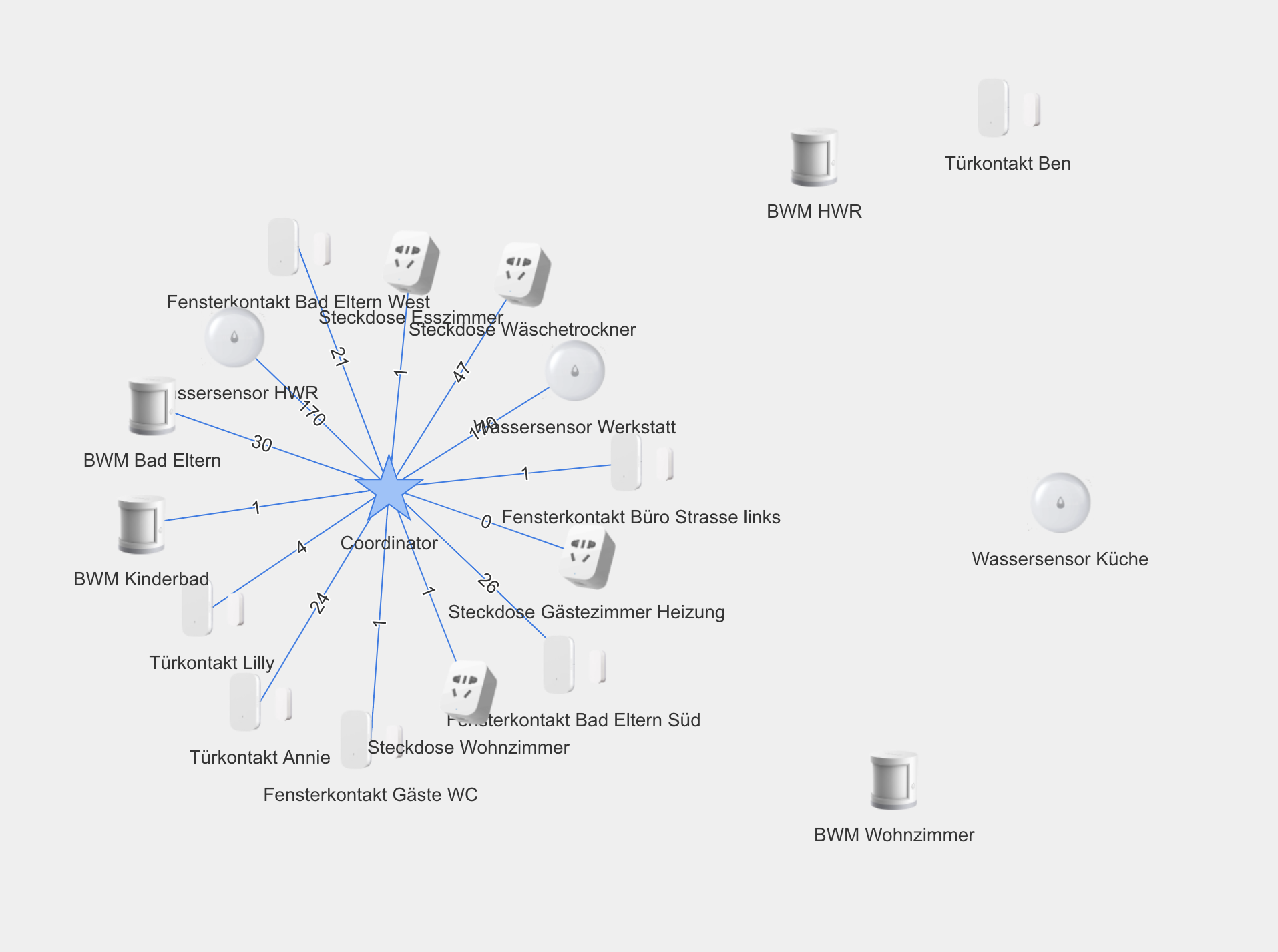
Woran kann das liegen, dass auch die an den Plugs angelernten Sensoren immer wieder in der Mitte landen?
5859_bildschirmfoto_2018-11-06_um_19.20.26.png -
Woran kann das liegen, dass auch die an den Plugs angelernten Sensoren immer wieder in der Mitte landen? `
da gibbet keinen Grund..verlass dich nicht auf die Map.. die ist zwar da aber würde es nach dieser gehen würde die hälfte meiner Devices nicht funktionieren
-
Bei der Installation des Adapters kommen einige Fehler, kann mein Problem daran liegen?
Danke!
$ ./iobroker url "https://github.com/ioBroker/ioBroker.zigbee" install https://github.com/ioBroker/ioBroker.zigbee/tarball/master npm install https://github.com/ioBroker/ioBroker.zigbee/tarball/master --production --save --prefix "/opt/iobroker" (System call) gyp WARN EACCES user "root" does not have permission to access the dev dir "/root/.node-gyp/6.13.0"gyp WARN EACCES attempting to reinstall using temporary dev dir "/opt/iobroker/node_modules/authenticate-pam/.node-gyp" ../authenticate_pam.cc:30:31: fatal error: security/pam_appl.h: Datei oder Verzeichnis nicht gefunden #include <security pam_appl.h=""> ^ compilation terminated. make: *** [Release/obj.target/authenticate_pam/authenticate_pam.o] Error 1 gyp ERR! build error gyp ERR! stack Error: `make` failed with exit code: 2gyp ERR! stack at ChildProcess.onExit (/usr/lib/node_modules/npm/node_modules/node-gyp/lib/build.js:276:23) gyp ERR! stack at emitTwo (events.js:106:13) gyp ERR! stack at ChildProcess.emit (events.js:191:7) gyp ERR! stack at Process.ChildProcess._handle.onexit (internal/child_process.js:219:12) gyp ERR! System Linux 4.9.59-v7+gyp ERR! command "/usr/bin/node" "/usr/lib/node_modules/npm/node_modules/node-gyp/bin/node-gyp.js" "rebuild" gyp ERR! cwd /opt/iobroker/node_modules/authenticate-pamgyp ERR! node -v v6.13.0 gyp ERR! node-gyp -v v3.4.0 gyp ERR! not ok prebuild-install WARN install EACCES: permission denied, access '/root/.npm' gyp WARN EACCES user "root" does not have permission to access the dev dir "/root/.node-gyp/6.13.0"gyp WARN EACCES attempting to reinstall using temporary dev dir "/opt/iobroker/node_modules/iobroker.zigbee/node_modules/serialport/.node-gyp" ../src/serialport.cpp: In function 'void EIO_AfterOpen(uv_work_t*)':../src/serialport.cpp:95:30: warning: 'v8::Local <v8::value>Nan::Callback::Call(int, v8::Local<v8::value>*) const' is deprecated [-Wdeprecated-declarations] data->callback.Call(2, argv); ^ In file included from ../src/./serialport.h:6:0, from ../src/serialport.cpp:1: ../../nan/nan.h:1655:3: note: declared here Call(int argc, v8::Local <v8::value>argv[]) const { ^~~~ ../src/serialport.cpp: In function 'void EIO_AfterUpdate(uv_work_t*)':../src/serialport.cpp:150:30: warning: 'v8::Local <v8::value>Nan::Callback::Call(int, v8::Local<v8::value>*) const' is deprecated [-Wdeprecated-declarations] data->callback.Call(1, argv); ^ In file included from ../src/./serialport.h:6:0, from ../src/serialport.cpp:1: ../../nan/nan.h:1655:3: note: declared here Call(int argc, v8::Local <v8::value>argv[]) const { ^~~~ ../src/serialport.cpp: In function 'void EIO_AfterClose(uv_work_t*)':../src/serialport.cpp:188:30: warning: 'v8::Local <v8::value>Nan::Callback::Call(int, v8::Local<v8::value>*) const' is deprecated [-Wdeprecated-declarations] data->callback.Call(1, argv); ^ In file included from ../src/./serialport.h:6:0, from ../src/serialport.cpp:1: ../../nan/nan.h:1655:3: note: declared here Call(int argc, v8::Local <v8::value>argv[]) const { ^~~~ ../src/serialport.cpp: In function 'void EIO_AfterFlush(uv_work_t*)':../src/serialport.cpp:231:30: warning: 'v8::Local <v8::value>Nan::Callback::Call(int, v8::Local<v8::value>*) const' is deprecated [-Wdeprecated-declarations] data->callback.Call(1, argv); ^ In file included from ../src/./serialport.h:6:0, from ../src/serialport.cpp:1: ../../nan/nan.h:1655:3: note: declared here Call(int argc, v8::Local <v8::value>argv[]) const { ^~~~ ../src/serialport.cpp: In function 'void EIO_AfterSet(uv_work_t*)':../src/serialport.cpp:285:30: warning: 'v8::Local <v8::value>Nan::Callback::Call(int, v8::Local<v8::value>*) const' is deprecated [-Wdeprecated-declarations] data->callback.Call(1, argv); ^ In file included from ../src/./serialport.h:6:0, from ../src/serialport.cpp:1: ../../nan/nan.h:1655:3: note: declared here Call(int argc, v8::Local <v8::value>argv[]) const { ^~~~ ../src/serialport.cpp: In function 'void EIO_AfterGet(uv_work_t*)':../src/serialport.cpp:336:30: warning: 'v8::Local <v8::value>Nan::Callback::Call(int, v8::Local<v8::value>*) const' is deprecated [-Wdeprecated-declarations] data->callback.Call(2, argv); ^ In file included from ../src/./serialport.h:6:0, from ../src/serialport.cpp:1: ../../nan/nan.h:1655:3: note: declared here Call(int argc, v8::Local <v8::value>argv[]) const { ^~~~ ../src/serialport.cpp: In function 'void EIO_AfterGetBaudRate(uv_work_t*)':../src/serialport.cpp:383:30: warning: 'v8::Local <v8::value>Nan::Callback::Call(int, v8::Local<v8::value>*) const' is deprecated [-Wdeprecated-declarations] data->callback.Call(2, argv); ^ In file included from ../src/./serialport.h:6:0, from ../src/serialport.cpp:1: ../../nan/nan.h:1655:3: note: declared here Call(int argc, v8::Local <v8::value>argv[]) const { ^~~~ ../src/serialport.cpp: In function 'void EIO_AfterDrain(uv_work_t*)':../src/serialport.cpp:424:30: warning: 'v8::Local <v8::value>Nan::Callback::Call(int, v8::Local<v8::value>*) const' is deprecated [-Wdeprecated-declarations] data->callback.Call(1, argv); ^ In file included from ../src/./serialport.h:6:0, from ../src/serialport.cpp:1: ../../nan/nan.h:1655:3: note: declared here Call(int argc, v8::Local <v8::value>argv[]) const { ^~~~ ../src/poller.cpp: In static member function 'static void Poller::onData(uv_poll_t*, int, int)':../src/poller.cpp:69:29: warning: 'v8::Local <v8::value>Nan::Callback::Call(int, v8::Local<v8::value>*) const' is deprecated [-Wdeprecated-declarations] obj->callback.Call(2, argv); ^ In file included from ../src/poller.cpp:1:0:../../nan/nan.h:1655:3: note: declared here Call(int argc, v8::Local <v8::value>argv[]) const { ^~~~ npm WARN optional SKIPPING OPTIONAL DEPENDENCY: authenticate-pam@1.0.2 (node_modules/authenticate-pam): npm WARN optional SKIPPING OPTIONAL DEPENDENCY: authenticate-pam@1.0.2 install: `node-gyp rebuild`npm WARN optional SKIPPING OPTIONAL DEPENDENCY: Exit status 1 process exited with code 0</v8::value></v8::value></v8::value></v8::value></v8::value></v8::value></v8::value></v8::value></v8::value></v8::value></v8::value></v8::value></v8::value></v8::value></v8::value></v8::value></v8::value></v8::value></v8::value></v8::value></v8::value></v8::value></v8::value></v8::value></v8::value></v8::value></v8::value></security> -
OK danke für die Info.
Woran kann es liegen wenn man auf einmal keine Geräte mehr anlernen kann? Ich habe nochmal alles gelöscht, auch den Adapter neu installiert. Ein paar Bewegungsmelder und Fensterkontakte gingen problemlos, jetzt geht beim Anlernen nichts mehr. Manchmal kommt noch diese Fehlemeldung:
"cannot get the node descriptor of the device"
-
es könenn nur 15 Geräte an den Stick direkt angelernt werden.. wenn du mehr willst musst du einen oder mehrere Router anbiden
was du mit den Plugs auch machst..
welche Stick Frimware Version hast du drauf ??
die kannst du im Log sehen direkt nach dem start des Adapters
-
Sieht man da die Version?
Ich habe gelesen, dass die Xiaomi Plugs in einen Deep Sleep gehen können, kann das evtl mein Problem sein?
zigbee.0 2018-11-07 20:56:58.765 info zigbee-shepherd ready. version: 2.6.3 rev 20180507 zigbee.0 2018-11-07 20:56:58.713 info zigbee-shepherd started! zigbee.0 2018-11-07 20:56:57.762 info Start on port: /dev/ttyACM0 with panID 6754 channel 11 zigbee.0 2018-11-07 20:56:57.761 info starting. Version 0.8.0-a in /opt/iobroker/node_modules/iobroker.zigbee, node: v6.13.0 host.ioBroker-Pi 2018-11-07 20:56:54.688 info instance system.adapter.zigbee.0 started with pid 1714 -
Sieht man da die Version?
Ich habe gelesen, dass die Xiaomi Plugs in einen Deep Sleep gehen können, kann das evtl mein Problem sein?
zigbee.0	2018-11-07 20:56:58.765	info	zigbee-shepherd ready. version: 2.6.3 rev 20180507
zigbee.0	2018-11-07 20:56:58.713	info	zigbee-shepherd started!
zigbee.0	2018-11-07 20:56:57.762	info	Start on port: /dev/ttyACM0 with panID 6754 channel 11
zigbee.0	2018-11-07 20:56:57.761	info	starting. Version 0.8.0-a in /opt/iobroker/node_modules/iobroker.zigbee, node: v6.13.0
host.ioBroker-Pi	2018-11-07 20:56:54.688	info	instance system.adapter.zigbee.0 started with pid 1714
```` `
zigbee-shepherd ready. version: 2.6.3 rev 20180507
das ist die Stick Version
-
Und das ist die aktuelle?
Ich habe extrem komisches Verhalten, mal lernt alles gut an, mal gar nicht. Manchmal geht ein Smart Plug ohne Probleme, mal verliert er die Verbindung wieder. Kann das an der Firmware des Sticks liegen? Auch mehrmaliges neu installieren des Adapters hat nichts gebracht.
-
Nach dem Update auf diese Versionen funktioniert der Adapter nicht mehr, was muss ich jetzt tun um den Adapter wieder zu starten? Neuinstallation hat nichts gebracht…
root@server:~# nodejs -v
v8.12.0
root@server:~# node -v
v8.12.0
root@server:~# npm -v
4.6.1
host.ioBroker-Pi	2018-11-14 09:51:42.608	error	instance system.adapter.zigbee.0 terminated with code 1 ()
host.ioBroker-Pi	2018-11-14 09:51:42.608	error	Caught by controller[0]: at Object.Module._extensions..js (module.js:664:10)
host.ioBroker-Pi	2018-11-14 09:51:42.608	error	Caught by controller[0]: at Module._compile (module.js:653:30)
host.ioBroker-Pi	2018-11-14 09:51:42.607	error	Caught by controller[0]: at Object. <anonymous>(/opt/iobroker/node_modules/cc-znp/node_modules/serialport/lib/bindings/linux.js:2:36)
host.ioBroker-Pi	2018-11-14 09:51:42.607	error	Caught by controller[0]: at bindings (/opt/iobroker/node_modules/cc-znp/node_modules/bindings/bindings.js:81:44)
host.ioBroker-Pi	2018-11-14 09:51:42.607	error	Caught by controller[0]: at require (internal/module.js:11:18)
host.ioBroker-Pi	2018-11-14 09:51:42.607	error	Caught by controller[0]: at Module.require (module.js:597:17)
host.ioBroker-Pi	2018-11-14 09:51:42.607	error	Caught by controller[0]: at Function.Module._load (module.js:498:3)
host.ioBroker-Pi	2018-11-14 09:51:42.607	error	Caught by controller[0]: at tryModuleLoad (module.js:506:12)
host.ioBroker-Pi	2018-11-14 09:51:42.606	error	Caught by controller[0]: at Module.load (module.js:566:32)
host.ioBroker-Pi	2018-11-14 09:51:42.606	error	Caught by controller[0]: at Object.Module._extensions..node (module.js:682:18)
host.ioBroker-Pi	2018-11-14 09:51:42.606	error	Caught by controller[0]: the module (for instance, using `npm rebuild` or `npm install`).
host.ioBroker-Pi	2018-11-14 09:51:42.606	error	Caught by controller[0]: NODE_MODULE_VERSION 57\. Please try re-compiling or re-installing
host.ioBroker-Pi	2018-11-14 09:51:42.606	error	Caught by controller[0]: NODE_MODULE_VERSION 48\. This version of Node.js requires
host.ioBroker-Pi	2018-11-14 09:51:42.605	error	Caught by controller[0]: was compiled against a different Node.js version using
host.ioBroker-Pi	2018-11-14 09:51:42.605	error	Caught by controller[0]: Error: The module '/opt/iobroker/node_modules/cc-znp/node_modules/serialport/build/Release/serialport.node'
host.ioBroker-Pi	2018-11-14 09:51:42.605	error	Caught by controller[0]: ^
host.ioBroker-Pi	2018-11-14 09:51:42.605	error	Caught by controller[0]: throw e
host.ioBroker-Pi	2018-11-14 09:51:42.604	error	Caught by controller[0]: /opt/iobroker/node_modules/cc-znp/node_modules/bindings/bindings.js:88
host.ioBroker-Pi	2018-11-14 09:51:41.555	info	instance system.adapter.zigbee.0 started with pid 14902</anonymous>

Hey! Du scheinst an dieser Unterhaltung interessiert zu sein, hast aber noch kein Konto.
Hast du es satt, bei jedem Besuch durch die gleichen Beiträge zu scrollen? Wenn du dich für ein Konto anmeldest, kommst du immer genau dorthin zurück, wo du zuvor warst, und kannst dich über neue Antworten benachrichtigen lassen (entweder per E-Mail oder Push-Benachrichtigung). Du kannst auch Lesezeichen speichern und Beiträge positiv bewerten, um anderen Community-Mitgliedern deine Wertschätzung zu zeigen.
Mit deinem Input könnte dieser Beitrag noch besser werden 💗
Registrieren Anmelden413
Online33.0k
Benutzer83.6k
Themen1.3m
Beiträge