




Licence agreement when installing Vis.0
-
Good evening.
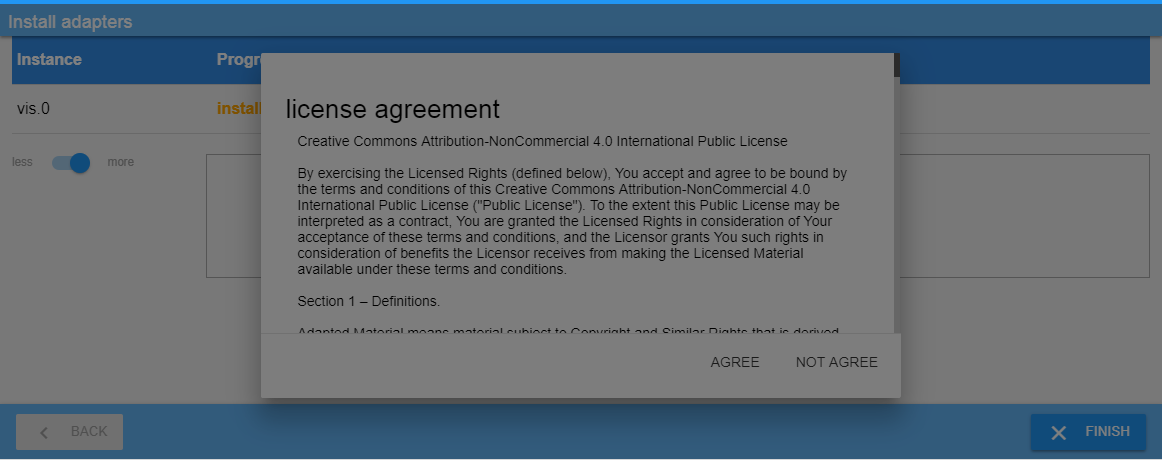
When I try to install Vis.0, I need to accept a "Creative Commons Attribution-NonCommercial 4.0 International Public licence" agreement. Problem is the screen grays out, and I can't press Agree.
Can I somehow do this through terminal instead?
System:
Raspberry pi 2b.
Raspbian-Jessie
node ver. 6.14.4
Npm Ver. 3.10.10
Regards Henrik
edit: I just realized this is only a german speaking forum. Hope you can help me anyway, my German is not that great :oops:
edit2: Found out that I needed to obtain a licence. Now that done, how do I install this licence?
-
You speak about licenses, but I can guess, that you mean 2 different licenses.
> Problem is the screen grays out, and I can't press Agree.
Have you solved this problem? Do you have screenshot?You must register on https://iobroker.net and then you can get the vis license.
-
You speak about licenses, but I can guess, that you mean 2 different licenses.
> Problem is the screen grays out, and I can't press Agree.
Have you solved this problem? Do you have screenshot?You must register on https://iobroker.net and then you can get the vis license. `
Hi
Thanks for your reply.
I figured out the Vis licence part, and got the licence at https://iobroker.net.
As far as I can see, this licence is entered after Vis is installed.
The problem is the EULA I need to accept when installing Vis. It is not possible to press "Agree" because the screen is greyed out.
Can I install Vis in the terminal instead?
If this is possible, I can enter the licence key in iobroker.
Regards Henrik -
Hi
It looks like Vis is installed already as I see Vis.0.
Are you sure the license pops up at the installation or after Vis has been installed ?
Can you please run this command at the console and share the output ?
cd /opt/ iobroker/
sudo iobroker update
This will give us an overview of all available adapters and shows which are installed.
What browser are u using?
Did you:
-
try a different browser
-
scroll down to the bottom of the license to check if the accept is not greyed out ?
~ cheers
Dutch
Sent from my iPhone using Tapatalk
-
-
I tried following browsers:
Chrome
Chromium (both from a pc, and localy on the PI)
MS Explorer.
Same result.
The EULA pops up before installation. It is not possible to scroll down passed the grey area.
Following versions is installed:
pi@raspberrypi:/opt/iobroker $ sudo iobroker update
Used repository: default
update done
Adapter "admin" : 3.4.7 , installed 3.4.7
Adapter "alexa2" : 1.1.0
Adapter "amazon-dash" : 0.2.7
Adapter "artnet" : 1.0.0
Adapter "b-control-em" : 0.2.1
Adapter "backitup" : 0.2.6
Adapter "benq" : 0.2.0
Adapter "ble" : 0.5.2
Adapter "bmw" : 1.3.1
Adapter "botvac" : 1.0.0
Adapter "broadlink2" : 1.8.0
Adapter "chromecast" : 1.3.5
Adapter "cloud" : 2.6.2 , installed 2.6.2
Adapter "contactid" : 0.1.2
Adapter "cul" : 0.4.0
Adapter "daikin" : 1.0.2
Adapter "daswetter" : 2.3.0
Adapter "deconz" : 0.2.5
Adapter "denon" : 0.3.6
Adapter "discovery" : 1.2.1 , installed 1.2.1
Adapter "dwd" : 2.2.2
Adapter "ebus" : 0.5.4
Adapter "egigeozone" : 0.1.2
Adapter "email" : 1.0.2
Adapter "energymanager" : 1.1.3
Adapter "enet" : 1.0.0
Adapter "epson_stylus_px830": 0.0.2
Adapter "fakeroku" : 0.2.1
Adapter "feiertage" : 1.0.0
Adapter "fhem" : 0.5.0
Adapter "find-my-iphone": 0.2.15
Adapter "firetv" : 0.0.27
Adapter "flot" : 1.9.1 , installed 1.9.2
Adapter "foobar2000" : 1.0.0
Adapter "fritzbox" : 0.2.1
Adapter "fritzdect" : 0.1.1
Adapter "fronius" : 1.0.2
Adapter "fullcalendar" : 0.2.4
Adapter "g-homa" : 0.2.0
Adapter "geofency" : 0.3.2
Adapter "haier" : 1.0.0
Adapter "harmony" : 0.9.3
Adapter "hid" : 0.1.16
Adapter "history" : 1.8.5 , installed 1.8.5
Adapter "hm-rega" : 1.7.1
Adapter "hm-rpc" : 1.7.2
Adapter "homee" : 0.3.1
Adapter "homepilot" : 0.3.1
Adapter "hp-ilo" : 1.0.0
Adapter "hue" : 0.6.9
Adapter "ical" : 1.6.1
Adapter "icons-addictive-flavour-png": 0.1.0
Adapter "icons-fatcow-hosting": 0.1.0
Adapter "icons-icons8" : 0.0.1
Adapter "icons-material-png": 0.1.0
Adapter "icons-material-svg": 0.1.0
Adapter "icons-mfd-png" : 1.0.2
Adapter "icons-mfd-svg" : 1.0.2
Adapter "icons-open-icon-library-png": 0.1.3
Adapter "icons-ultimate-png": 1.0.1
Adapter "influxdb" : 1.6.2
Adapter "innogy-smarthome": 0.1.17
Adapter "javascript" : 3.6.4 , installed 3.6.4
Adapter "jeelink" : 0.0.4
Controller "js-controller" : 1.4.2 , installed 1.4.2
Adapter "js2fs" : 0.1.3
Adapter "klf200" : 0.9.5
Adapter "km200" : 1.1.6
Adapter "knx" : 0.8.6
Adapter "kodi" : 1.0.0
Adapter "kress" : 2.5.5
Adapter "landroid" : 1.0.0
Adapter "landroid-s" : 2.5.4
Adapter "lgtv" : 1.0.5
Adapter "lgtv-rs" : 0.0.4
Adapter "lgtv11" : 1.0.3
Adapter "lifx" : 0.0.5
Adapter "lightify" : 0.2.16
Adapter "loxone" : 0.4.0
Adapter "luftdaten" : 0.0.5
Adapter "lupusec" : 0.2.7
Adapter "maxcube" : 0.1.2
Adapter "maxcul" : 0.5.3
Adapter "megad" : 1.2.1
Adapter "megadd" : 0.2.0
Adapter "megaesp" : 0.1.0
Adapter "miele" : 0.1.5
Adapter "mihome" : 1.0.5
Adapter "mihome-lamp" : 1.0.0
Adapter "mihome-plug" : 0.1.1
Adapter "mihome-vacuum" : 1.1.3
Adapter "mikrotik" : 1.0.2
Adapter "milight" : 0.3.4
Adapter "milight-smart-light": 0.0.5
Adapter "mobile" : 0.4.11 , installed 0.4.11
Adapter "modbus" : 1.1.1
Adapter "mpd" : 1.0.0
Adapter "mqtt" : 1.4.1
Adapter "mqtt-client" : 1.0.1
Adapter "musiccast" : 0.0.7
Adapter "mysensors" : 1.2.0
Adapter "nanoleaf-lightpanels": 0.4.1
Adapter "netatmo" : 1.3.0
Adapter "node-red" : 1.5.1
Adapter "noolite" : 0.0.1
Adapter "nut" : 1.1.3
Adapter "onkyo" : 0.2.1
Adapter "openhab" : 0.2.1
Adapter "opi" : 0.1.1
Adapter "owfs" : 0.5.0
Adapter "owntracks" : 0.2.0
Adapter "panasonic-viera": 0.1.0
Adapter "parser" : 1.0.1
Adapter "paw" : 0.0.7
Adapter "phantomjs" : 1.0.1
Adapter "piface" : 1.0.0
Adapter "pimatic" : 0.1.5
Adapter "ping" : 1.3.2 , installed 1.3.2
Adapter "places" : 0.6.0
Adapter "plexconnect" : 0.0.6
Adapter "proxmox" : 0.1.0
Adapter "proxy" : 1.0.1
Adapter "pushbullet" : 0.0.11
Adapter "pushover" : 1.0.4
Adapter "pushsafer" : 0.1.8
Adapter "radar" : 1.1.3
Adapter "rflink" : 1.2.0
Adapter "rickshaw" : 0.4.5
Adapter "rpi2" : 0.3.2
Adapter "rwe-smarthome" : 0.1.11
Adapter "s7" : 1.1.3
Adapter "samsung" : 0.2.9
Adapter "sayit" : 1.6.7
Adapter "sbfspot" : 2.2.4
Adapter "scenes" : 1.0.2
Adapter "sia" : 0.0.5
Adapter "simple-api" : 2.0.0
Adapter "smartmeter" : 1.2.1
Adapter "socketio" : 2.1.1
Adapter "solarwetter" : 1.0.0
Adapter "sonnen" : 0.0.3
Adapter "sonoff" : 2.2.2
Adapter "sonos" : 1.6.2
Adapter "sony-bravia" : 0.1.0
Adapter "spotify-premium": 0.3.0
Adapter "sql" : 1.9.2
Adapter "squeezebox" : 0.2.1
Adapter "starline" : 1.0.0
Adapter "stiebel-isg" : 1.1.1
Adapter "systeminfo" : 0.2.2
Adapter "tankerkoenig" : 1.0.4
Adapter "telegram" : 1.2.4
Adapter "terminal" : 0.1.2
Adapter "text2command" : 1.2.4
Adapter "tr-064" : 0.4.14
Adapter "tradfri" : 1.4.1
Adapter "tvspielfilm" : 1.0.4
Adapter "unifi" : 0.3.1
Adapter "upnp" : 0.3.9
Adapter "vcard" : 0.0.9
Adapter "viessmann" : 0.5.1
Adapter "vis" : 1.1.4
Adapter "vis-bars" : 0.1.4
Adapter "vis-canvas-gauges": 0.1.5
Adapter "vis-colorpicker": 1.1.1
Adapter "vis-fancyswitch": 1.1.0
Adapter "vis-google-fonts": 0.1.0
Adapter "vis-history" : 0.2.7
Adapter "vis-hqwidgets" : 1.1.2
Adapter "vis-jqui-mfd" : 1.0.12
Adapter "vis-justgage" : 1.0.0
Adapter "vis-keyboard" : 0.0.2
Adapter "vis-lcars" : 1.0.4
Adapter "vis-map" : 1.0.1
Adapter "vis-metro" : 1.1.2
Adapter "vis-players" : 0.1.5
Adapter "vis-plumb" : 1.0.1
Adapter "vis-rgraph" : 0.0.2
Adapter "vis-timeandweather": 1.1.7
Adapter "vis-weather" : 2.1.0
Adapter "vr200" : 1.0.0
Adapter "weatherunderground": 1.1.2
Adapter "web" : 2.3.6 , installed 2.4.1
Adapter "wetty" : 0.1.1
Adapter "wiffi-wz" : 1.3.1
Adapter "wifilight" : 0.2.0
Adapter "wm-bus" : 0.1.12
Adapter "wolf" : 0.9.2
Adapter "xs1" : 1.0.2
Adapter "yahka" : 0.5.5
Adapter "yamaha" : 0.3.18
Adapter "yeelight-2" : 0.4.0
Adapter "yr" : 1.0.6
Adapter "zigbee" : 0.6.0
Adapter "zont" : 0.5.3
Adapter "zwave" : 1.2.0
pi@raspberrypi:/opt/iobroker $
/Henrik
-
ok thank you, clear vis is not installed.
Pleasr try to install vis by using the command line and not the webinterface, lets see if this wil fix your specific issue.
cd /opt/iobroker/
sudo iobroker add vis
please share your results and outcome of this command
-
Tried this, and it installs the object Vis and is shown as installed in the list from your command earlier, but the instance is not installed. The object has no icon in the Name column, and seems not to work. Properly because I can't apply the licence.
If I try to run the device discover, Vis.0 appears as not installed. Try to install it, and same problem over again.
Is there another way to install the instance?
-
Tried this, and it installs the object Vis and is shown as installed in the list from your command earlier, but the instance is not installed. The object has no icon in the Name column, and seems not to work. Properly because I can't apply the licence.
If I try to run the device discover, Vis.0 appears as not installed. Try to install it, and same problem over again.
Is there another way to install the instance? `
Hmpf to bei honestly (and sorry for the late reply) the scenario you are mentioning is very uncommon and I haven't seen this before.
Would it be a possibility to have a teamvieweer session together to have a look at your settings and assist remotely ?
I would like to help but breaking my head about your comments and can't really find the root cause of the issue but willing to help remotely if wanted
Kind regards
Dutch
Sent from my iPhone using Tapatalk
-
Clear, cheers have fun[emoji3]
Sent from my iPhone using Tapatalk

Hey! Du scheinst an dieser Unterhaltung interessiert zu sein, hast aber noch kein Konto.
Hast du es satt, bei jedem Besuch durch die gleichen Beiträge zu scrollen? Wenn du dich für ein Konto anmeldest, kommst du immer genau dorthin zurück, wo du zuvor warst, und kannst dich über neue Antworten benachrichtigen lassen (entweder per E-Mail oder Push-Benachrichtigung). Du kannst auch Lesezeichen speichern und Beiträge positiv bewerten, um anderen Community-Mitgliedern deine Wertschätzung zu zeigen.
Mit deinem Input könnte dieser Beitrag noch besser werden 💗
Registrieren AnmeldenSupport us
286
Online33.0k
Benutzer83.5k
Themen1.3m
Beiträge