




[gelöst] ps4-waker/ NPM Modul von Github installieren/ (TV via HDMI CEC einschalten)
-
hei leute
ich glaub ich stell mich gerate total dumm an.
ich hab nen beitrag gefunden dem ich folgen möchte:
viewtopic.php?f=8&t=7715&hilit=ps4+waker
das ps4 waker skript:
https://github.com/dhleong/ps4-waker
Aber ich kriege es einfach nicht hin das skript in meinen iobroker zu bekommen.
im erwähnten Beitrag ist das nicht einmal das thema :(
wenn ich den folgenden link (https://github.com/dhleong/ps4-waker) in iobroker installieren möchte, sagt mir der log:
! host.raspberrypi 2018-07-06 18:33:09.809 info Update repository "default" under "http://download.iobroker.net/sources-dist.json"
! iobroker 2018-07-06 18:33:06.827 info exit 0
! iobroker 2018-07-06 18:33:06.727 info npm WARN optional SKIPPING OPTIONAL DEPENDENCY: Exit status 1
! iobroker 2018-07-06 18:33:06.727 info WARN optional SKIPPING OPTIONAL DEPENDENCY: mdns@2.4.0 (node_modules/mdns):npm WARN optional SKIPPING OPTIONAL DEPENDENCY: mdns@2.4.0 install:node-gyp rebuild
! iobroker 2018-07-06 18:33:06.725 info npm
! iobroker 2018-07-06 18:33:06.725 info npm WARN optional SKIPPING OPTIONAL DEPENDENCY: Exit status 1
! iobroker 2018-07-06 18:33:06.725 info WARN optional SKIPPING OPTIONAL DEPENDENCY: authenticate-pam@1.0.2 (node_modules/authenticate-pam):npm WARN optional SKIPPING OPTIONAL DEPENDENCY: authenticate-pam@1.0.2 install:node-gyp rebuild
! iobroker 2018-07-06 18:33:06.723 info npm
! iobroker 2018-07-06 18:33:01.167 info gyp ERR! not ok
! iobroker 2018-07-06 18:33:01.167 info gyp ERR! node-gyp -v v3.4.0
! iobroker 2018-07-06 18:33:01.167 info gyp ERR! node -v v6.14.2
! iobroker 2018-07-06 18:33:01.167 info gyp ERR! command "/usr/bin/node" "/usr/lib/node_modules/npm/node_modules/node-gyp/bin/node-gyp.js" "rebuild"gyp ERR! cwd /opt/iobroker/node_modules/mdns
! iobroker 2018-07-06 18:33:01.161 info gyp ERR! System Linux 4.14.34-v7+
! iobroker 2018-07-06 18:33:01.159 info gyp ERR! stack at Process.ChildProcess._handle.onexit (internal/child_process.js:219:12)
! iobroker 2018-07-06 18:33:01.159 info gyp ERR! stack at ChildProcess.emit (events.js:191:7)
! iobroker 2018-07-06 18:33:01.159 info gyp ERR! stack at emitTwo (events.js:106:13)
! iobroker 2018-07-06 18:33:01.159 info ERR! stack Error:makefailed with exit code: 2gyp ERR! stack at ChildProcess.onExit (/usr/lib/node_modules/npm/node_modules/node-gyp/lib/build.js:276:23)
! iobroker 2018-07-06 18:33:01.157 info gyp
! iobroker 2018-07-06 18:33:01.148 info ERR! build error
! iobroker 2018-07-06 18:33:01.146 info
! iobroker 2018-07-06 18:33:01.143 info gyp
! iobroker 2018-07-06 18:33:01.131 info make: *** [Release/obj.target/dns_sd_bindings/src/dns_sd.o] Fehler 1
! iobroker 2018-07-06 18:33:01.122 info compilation terminated.
! iobroker 2018-07-06 18:33:01.122 info ^
! iobroker 2018-07-06 18:33:01.122 info #include <dns_sd.h>iobroker 2018-07-06 18:33:01.122 info In file included from ../src/dns_sd.cpp:1:0:../src/mdns.hpp:32:20: fatal error: dns_sd.h: Datei oder Verzeichnis nicht gefunden
! iobroker 2018-07-06 18:32:58.110 info gyp ERR! not ok
! iobroker 2018-07-06 18:32:58.110 info gyp ERR! node-gyp -v v3.4.0
! iobroker 2018-07-06 18:32:58.110 info gyp ERR! node -v v6.14.2
! iobroker 2018-07-06 18:32:58.110 info gyp ERR! cwd /opt/iobroker/node_modules/authenticate-pam
! iobroker 2018-07-06 18:32:58.110 info gyp ERR! System Linux 4.14.34-v7+gyp ERR! command "/usr/bin/node" "/usr/lib/node_modules/npm/node_modules/node-gyp/bin/node-gyp.js" "rebuild"
! iobroker 2018-07-06 18:32:58.104 info gyp ERR! stack at Process.ChildProcess._handle.onexit (internal/child_process.js:219:12)
! iobroker 2018-07-06 18:32:58.104 info gyp ERR! stack at ChildProcess.emit (events.js:191:7)
! iobroker 2018-07-06 18:32:58.104 info gyp ERR! stack at emitTwo (events.js:106:13)
! iobroker 2018-07-06 18:32:58.104 info gyp ERR! stack Error:makefailed with exit code: 2gyp ERR! stack at ChildProcess.onExit (/usr/lib/node_modules/npm/node_modules/node-gyp/lib/build.js:276:23)
! iobroker 2018-07-06 18:32:58.095 info ERR! build error
! iobroker 2018-07-06 18:32:58.091 info gyp
! iobroker 2018-07-06 18:32:58.079 info make: *** [Release/obj.target/authenticate_pam/authenticate_pam.o] Fehler 1
! iobroker 2018-07-06 18:32:58.069 info compilation terminated.
! iobroker 2018-07-06 18:32:58.069 info ^
! iobroker 2018-07-06 18:32:58.069 info ../authenticate_pam.cc:30:31: fatal error: security/pam_appl.h: Datei oder Verzeichnis nicht gefunden #include <security pam_appl.h="">iobroker 2018-07-06 18:32:55.333 info WARN prefer global ps4-waker@1.4.3 should be installed with -g
! iobroker 2018-07-06 18:32:55.331 info npm
! iobroker 2018-07-06 18:32:21.472 info npm install https://github.com/dhleong/ps4-waker/tarball/master –production --prefix "/opt/iobroker" (System call)
! iobroker 2018-07-06 18:32:21.094 info install https://github.com/dhleong/ps4-waker/tarball/master</security></dns_sd.h>auch im javascript adpter habe ich "ps4-waker" eingetragen
ich denke die entscheidende zeile im log ist:
iobroker 2018-07-06 18:32:55.333 info WARN prefer global ps4-waker@1.4.3 should be installed with -g
aber ich weiss nicht was ich ändern muss
-
Das ist ein NPM-Modul, dessen Funktionalität Du in einem Skript verwenden kannst. Laut Doku:
const {Device} = require('ps4-waker'); var ps4 = new Device(); ps4.turnOn().then(() => ps4.close());@readme:Most methods on the Device object return a Promise and can be used with async/await. The Device will automatically attempt to maintain an active connection to your device until you explicitly close() it or call turnOff(). This will let you issue subsequent commands like .startTitle() or .sendKeys() without seeing the annoying "A companion app has connected/disconnected" messages all the time. `
-
achso jetzt verstehe ich was ein modul ist und macht xD. danke. werde mich jetzt dann noch einarbeiten in demfall (jetzt muss ich wohl endlich mit javascript anfangen, ist ja nichts für blockli oder) ich will jetzt nicht jede kleinigkeit hir fragen. sollte ich nicht weiter kommen melde ich mich :)
Gesendet von meinem ONEPLUS A5000 mit Tapatalk
-
Hi,
ich habe das Modul ps4-waker einfach in die Konfiguration des javascript-Adapters aufgenommen:
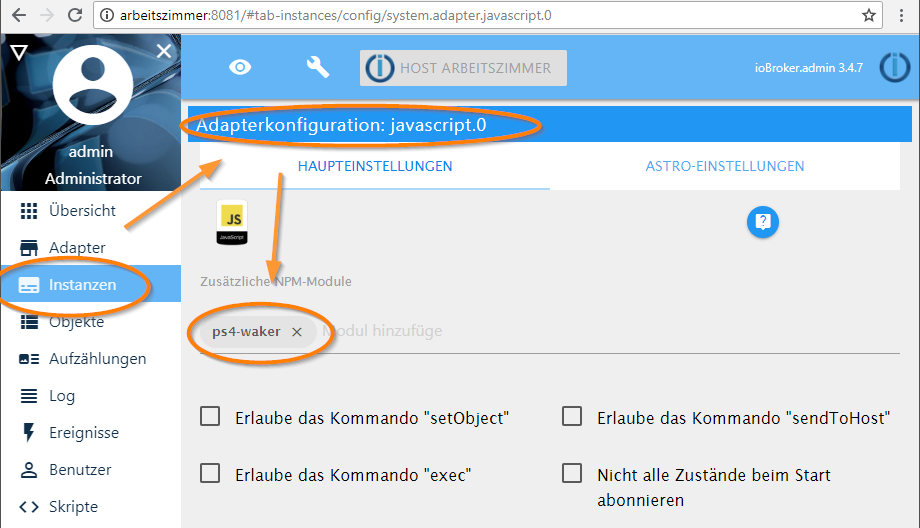
Dieser hat sich anschließend neu gestartet und im ioBroker-Log war das Folgende zu sehen:
018-07-06 20:39:51.745 - info: javascript.0 starting. Version 3.6.4 in C:/dev/iobroker/node_modules/iobroker.javascript, node: v8.11.1
2018-07-06 20:39:51.749 - info: javascript.0 npm install ps4-waker --production --prefix "C:\dev\iobroker\node_modules\iobroker.javascript" (System call)
2018-07-06 20:39:54.722 - info: javascript.0 C:\dev\iobroker\node_modules\iobroker.javascript\ps4-waker -> C:\dev\iobroker\node_modules\iobroker.javascript\node_modules\ps4-waker\bin\cmd.js
2018-07-06 20:39:54.731 - info: javascript.0 + ps4-waker@1.4.3
added 4 packages from 7 contributors in 1.133s
2018-07-06 20:39:54.748 - info: javascript.0 requesting all states
2018-07-06 20:39:54.749 - info: javascript.0 requesting all objects
[...]
Der javascript-Adapter hat also das ps4-waker-Modul installiert.
Anschließend ein kleines Testscript im javascript-Adapter:
const {Device} = require('ps4-waker');

var ps4 = new Device();
ps4.getDeviceStatus().then((result) => {
    console.log(JSON.stringify(result, null, 2));
    ps4.close()}
);
Das ergibt dann:
21:14:24.554	[info]	javascript.0 Start javascript script.js.Entwicklung.ps4
21:14:24.554	[info]	javascript.0 script.js.Entwicklung.ps4: registered 0 subscriptions and 0 schedules
21:14:24.555	[info]	javascript.0 script.js.Entwicklung.ps4: { "type": "device", "statusLine": "200 Ok", "statusCode": "200", "status": "Ok", "host-id": "00Dxxxxxxx", "host-type": "PS4", "host-name": "PS4", "host-request-port": "997", "device-discovery-protocol-version": "00020020", "system-version": "04550011", "address": "192.168.179.67", "port": "997" }
21:14:27.263	[info]	javascript.0 Stop script script.js.Entwicklung.ps4
Der javascript-Adapter hat das ps4-waker Modul nach
[...]/iobroker/node_modules/iobroker.javascript/node_modules/ps4-wakerinstalliert.
Dort kann dann mit
node ./bin/cmd.js searchdas gleiche gemacht werden. Der Aufruf vonnode ./bin/cmd.jsmüsste zur Credentialseingabe (wenn die PS4 an ist) führen. Das braucht man auch für den obigen API-Aufruf. -
Dein Log sieht in Ordnung aus, wo liegt jetzt das Problem ?
Sent from my iPhone using Tapatalk
-
und da bin ich schon wieder
wenn die ps aus ist habe ich mit dem code
! const {Device} = require('ps4-waker');
! var ps4 = new Device();
! ps4.getDeviceStatus().then((result) => {
! console.log(JSON.stringify(result, null, 2));
! ps4.close()}
! ); den selben log wie du21:14:24.554 [info] javascript.0 Start javascript script.js.Entwicklung.ps4
21:14:24.554 [info] javascript.0 script.js.Entwicklung.ps4: registered 0 subscriptions and 0 schedules
21:14:24.555 [info] javascript.0 script.js.Entwicklung.ps4: { "type": "device", "statusLine": "200 Ok", "statusCode": "200", "status": "Ok", "host-id": "00D9D1AC3901", "host-type": "PS4", "host-name": "PS4", "host-request-port": "997", "device-discovery-protocol-version": "00020020", "system-version": "04550011", "address": "192.168.179.67", "port": "997" }
21:14:27.263 [info] javascript.0 Stop script script.js.Entwicklung.ps4 `
wenn die ps an ist, bekomme ich folgenden log:! javascript.0 2018-07-07 19:37:07.228 info }
! javascript.0 2018-07-07 19:37:07.228 info "port": "997"
! javascript.0 2018-07-07 19:37:07.228 info "address": "192.168.0.16",
! javascript.0 2018-07-07 19:37:07.228 info "system-version": "05550021",
! javascript.0 2018-07-07 19:37:07.228 info "device-discovery-protocol-version": "00020020",
! javascript.0 2018-07-07 19:37:07.228 info "host-request-port": "997",
! javascript.0 2018-07-07 19:37:07.228 info "host-name": "PS4-774",
! javascript.0 2018-07-07 19:37:07.228 info "host-type": "PS4",
! javascript.0 2018-07-07 19:37:07.228 info "host-id": "709E29B77E00",
! javascript.0 2018-07-07 19:37:07.228 info "status": "Ok",
! javascript.0 2018-07-07 19:37:07.228 info "statusCode": "200",
! javascript.0 2018-07-07 19:37:07.228 info "statusLine": "200 Ok",
! javascript.0 2018-07-07 19:37:07.228 info "type": "device",
! javascript.0 2018-07-07 19:37:07.228 info script.js.Skripte.PS4.GET: {
! javascript.0 2018-07-07 19:37:07.219 info script.js.Skripte.PS4.GET: registered 0 subscriptions and 0 schedules
soweit so gut.um die ps mit dem befehlen
! exec("ps4-waker standby")
! exec("ps4-waker")
zu steuern muss ich sie ja noch "registrieren" also den credentials command im terminal ausführen (sagt ja auch der log in der untersten zeile, oder?).Im terminal bekomme ich aber immer die Rückmeldung
! Device must be awake for initial registration. Please turn it on manually and try again.
und dabei spielt es keine rolle ob die ps an oder aus ist.was mache ich falsch? oder bin ich total auf dem holz weg?
-
Bei mir unter Windows:
cd C:\dev\iobroker\node_modules\iobroker.javascript\node_modules\ps4-waker\binDort dann
node cmd.js --helpbringt die Befehlsliste. Dann
node cmd.jsbringt "Could not detect any matching PS4 device", wenn die PS4 aus ist.
node cmd.js searchbringt
{
  "type": "device",
  "statusLine": "200 Ok",
  "statusCode": "200",
  "status": "Ok",
  "host-id": "00Dxxxxxxxxx",
  "host-type": "PS4",
  "host-name": "PS4",
  "host-request-port": "997",
  "device-discovery-protocol-version": "00020020",
  "system-version": "0xxxxx011",
  "address": "192.168.xxxx"
}
Anschließendes
node cmd.jsbringt dann
Go to 'Settings -> PlayStation(R) App Connection Settings -> Add Device on your PS4 to obtain the PIN code.oder
WAKEUP sent to device... 192.168xxxx Logging in.. -
node cmd.js search sagt mir das die ps4 im standby ist, jedoch ist an. alle weiteren commands sagen mir: Device must be awake for initial registration. Please turn it on manually and try again.
7535_unbenannt.png -
War bei mir auch so. Ich habe es nach dem Search noch mal gemacht und dann ging es. Da weiß ich leider auch nicht mehr weiter.
-
Schon mal die Device-Info im Screenschon genauer angesehen? Das ist keine PS4. Das ist der PS4-Waker! Schau die mal meinen Datenblock oben an.
-
<ironie on="">Du hast eine relabelte China-PS3?</ironie>
-
"ps4-waker can't see the PS4"
This can have a several possible causes:
*The machine you're running on has multiple network adapters
The system will just "pick" one in this case, and it might not be the one you need. Use the –bind command line option to specify the address of the appropriate adapter. This must be the same adapter that your phone can see (at least for the first run, when getting credentials from the mobile app) as well as the one that can see your PS4.
*Your network is dropping UDP packets
The app needs to be able to send and receive on port 987 and 997 to discover and wake the PS4, and for your phone to discover it in the initial credentials step. Make sure your router is letting these ports through.
Also as part of discovery, ps4-waker listens by default on a random UDP port. If it is having trouble locating the PS4, and you're sure you've bound to the correct adapter using --bind, you may need to pick a port to listen on with --bind-port, and open that up on your router, as well.
*You have multiple PS4s on your network
By default, ps4-waker commands act on the first one they see. To search for every device on your network, add a -t <milliseconds>timeout flag to your command and it will keep waiting. You may also use -d to specify the IP address of a specific machine. Check out the "Device Selection" section of the command help, either here or by running ps4-waker -?.</milliseconds>
-
auch hier bekomme ich einen fehler
! /usr/lib/node_modules/ps4-waker/bin$ node cmd.js –bind -b 192.168.0.16
! events.js:160
! throw er; // Unhandled 'error' event
! ^
! Error: bind EADDRNOTAVAIL 192.168.0.16
! at Object.exports._errnoException (util.js:1020:11)
! at exports._exceptionWithHostPort (util.js:1043:20)
! at _handle.lookup (dgram.js:219:18)
! at _combinedTickCallback (internal/process/next_tick.js:83:11)
! at process._tickCallback (internal/process/next_tick.js:104:9)
! at Module.runMain (module.js:613:11)
! at run (bootstrap_node.js:394:7)
! at startup (bootstrap_node.js:160:9)
! at bootstrap_node.js:507:3
sorry für meine anfänger getue :(was bedeutet dieser strich:| (–bind | -b <ip>)
ist meine eingabe überhaupt richtig (node cmd.js --bind -b 192.168.0.16) (ip der ps4) oder leigt es ev. daran dass ich den iobroker auf nem raspi hab der auf dem 8081 port läuft? ich verstehe das so, dass die ps4 auf den 987 997 ports läuft. und da die app sich verbinden kann sollte sich der ps4-waker auch verbinden können oder?</ip>
-
Entweder --bind ODER -b eingeben. Nicht gleichzeitig. :D
-
You may also use -d to specify the IP address of a specific machine.
Du machst -b. Das ist das binden an ein lokales Netzwerkinterface. Mach -d




Hey! Du scheinst an dieser Unterhaltung interessiert zu sein, hast aber noch kein Konto.
Hast du es satt, bei jedem Besuch durch die gleichen Beiträge zu scrollen? Wenn du dich für ein Konto anmeldest, kommst du immer genau dorthin zurück, wo du zuvor warst, und kannst dich über neue Antworten benachrichtigen lassen (entweder per E-Mail oder Push-Benachrichtigung). Du kannst auch Lesezeichen speichern und Beiträge positiv bewerten, um anderen Community-Mitgliedern deine Wertschätzung zu zeigen.
Mit deinem Input könnte dieser Beitrag noch besser werden 💗
Registrieren AnmeldenSupport us
275
Online33.0k
Benutzer83.5k
Themen1.3m
Beiträge