Skip to content
  • Home
  • Aktuell
  • Tags
  • 0 Ungelesen 0
  • Kategorien
  • Unreplied
  • Beliebt
  • GitHub
  • Docu
  • Hilfe
Skins
  • Light
  • Brite
  • Cerulean
  • Cosmo
  • Flatly
  • Journal
  • Litera
  • Lumen
  • Lux
  • Materia
  • Minty
  • Morph
  • Pulse
  • Sandstone
  • Simplex
  • Sketchy
  • Spacelab
  • United
  • Yeti
  • Zephyr
  • Dark
  • Cyborg
  • Darkly
  • Quartz
  • Slate
  • Solar
  • Superhero
  • Vapor

  • Standard: (Kein Skin)
  • Kein Skin
Einklappen
ioBroker Logo

Community Forum

donate donate
  1. ioBroker Community Home
  2. Deutsch
  3. ioBroker Allgemein
  4. Adapter SNMP Drucker, Synology, QNAP etc auslesen

NEWS

  • UPDATE 31.10.: Amazon Alexa - ioBroker Skill läuft aus ?
    apollon77A
    apollon77
    48
    3
    8.7k

  • Monatsrückblick – September 2025
    BluefoxB
    Bluefox
    13
    1
    2.2k

  • Neues Video "KI im Smart Home" - ioBroker plus n8n
    BluefoxB
    Bluefox
    16
    1
    3.2k

Adapter SNMP Drucker, Synology, QNAP etc auslesen
Geplant Angeheftet Gesperrt Verschoben ioBroker Allgemein
snmp
365 Beiträge 85 Kommentatoren 95.0k Aufrufe 41 Watching
  • Älteste zuerst
  • Neuste zuerst
  • Meiste Stimmen
Antworten
  • In einem neuen Thema antworten
Anmelden zum Antworten
Dieses Thema wurde gelöscht. Nur Nutzer mit entsprechenden Rechten können es sehen.
  • SegwayS Offline
    SegwayS Offline
    Segway
    schrieb am zuletzt editiert von
    #76

    Okay ich mach mal eine Liste fertig. Ich hoffe ich bekomme die irgendwie gut aus dem MIB Browser raus - und dann brauch ich ja nur noch filtern.

    Gruß Dirk
    Intel Proxmox Cluster (3x NUC) mit Debian & Proxmox / IoB als VM unter Debian / 60+ Adapter installiert

    1 Antwort Letzte Antwort
    0
    • SegwayS Offline
      SegwayS Offline
      Segway
      schrieb am zuletzt editiert von
      #77

      Kurze Frage:

      soll ich das hier reinkopieren ? Dann hat die Liste aber keine Formatierung. Oder als csv oder xls hochladen ?

      Gruß Dirk
      Intel Proxmox Cluster (3x NUC) mit Debian & Proxmox / IoB als VM unter Debian / 60+ Adapter installiert

      1 Antwort Letzte Antwort
      1
      • SegwayS Offline
        SegwayS Offline
        Segway
        schrieb am zuletzt editiert von
        #78

        Sowas könnte ich mir vorstellen - müsst ihr sagen –> das ist aber nur eine Handvoll erst. Die anderen interessanten kommen noch. Mache ich aber erst wenn ich weiss wie ich es machen soll

        QNAP

        Name						OID										Type					Access			MIB Module		Description
        systemInfo				.1.3.6.1.4.1.24681.1.2			NAS-MIB	
        systemCPU-Usage		.1.3.6.1.4.1.24681.1.2.1		OCTET STRING			read-only		NAS-MIB	System CPU usage
        systemTotalMem			.1.3.6.1.4.1.24681.1.2.2		OCTET STRING			read-only		NAS-MIB	System total memory
        systemFreeMem			.1.3.6.1.4.1.24681.1.2.3		OCTET STRING			read-only		NAS-MIB	System free memory
        systemUptime			.1.3.6.1.4.1.24681.1.2.4		TIMETICKS				read-only		NAS-MIB	The amount of time since this host was last initialized.  Note that this is different from sysUpTime in the SNMPv2-MIB [RFC1907] because sysUpTime is the uptime of the network management portion of the system.
        cpu-Temperature			.1.3.6.1.4.1.24681.1.2.5		OCTET STRING			read-only		NAS-MIB	CPU temperature
        systemTemperature		.1.3.6.1.4.1.24681.1.2.6		OCTET STRING			read-only		NAS-MIB	System temperature
        ifNumber				.1.3.6.1.4.1.24681.1.2.8		INTEGER					read-only		NAS-MIB	The number of network interfaces (regardless of their current state) present on this system.
        systemIfTable			.1.3.6.1.4.1.24681.1.2.9		SEQUENCE OF IfEntryDef	not-accessible	NAS-MIB	A list of interface entries.  The number of entries is given by the value of IfNumber.
        ifEntry					.1.3.6.1.4.1.24681.1.2.9.1		IfEntryDef				not-accessible	NAS-MIB	An interface entry containing objects at the subnetwork layer and below for a particular interface.
        ifIndex					.1.3.6.1.4.1.24681.1.2.9.1.1	INTEGER					read-only		NAS-MIB	A unique value for each interface.  Its value ranges between 1 and the value of IfNumber.  The value for each interface must remain constant at least from one re-initialization of the entity's network management system to the next re- initialization.
        ifDescr					.1.3.6.1.4.1.24681.1.2.9.1.2	OCTET STRING			read-only		NAS-MIB	A textual string containing information about the interface.  This string should include the name of the manufacturer, the product name and the version of the hardware interface.
        ifPacketsReceived		.1.3.6.1.4.1.24681.1.2.9.1.3	COUNTER					read-only		NAS-MIB	System packets received.
        ifPacketsSent			.1.3.6.1.4.1.24681.1.2.9.1.4	COUNTER					read-only		NAS-MIB	System packets sent.
        ifErrorPackets			.1.3.6.1.4.1.24681.1.2.9.1.5	COUNTER					read-only		NAS-MIB	System error packets.
        hdNumber				.1.3.6.1.4.1.24681.1.2.10		INTEGER					read-only		NAS-MIB	The number of hard drive slots.
        systemHdTable			.1.3.6.1.4.1.24681.1.2.11		SEQUENCE OF HdEntryDef	not-accessible	NAS-MIB	A list of interface entries.  The number of entries is given by the value of HdNumber.
        hdEntry					.1.3.6.1.4.1.24681.1.2.11.1		HdEntryDef				not-accessible	NAS-MIB	An interface entry containing objects at the subnetwork layer and below for a particular interface.
        hdIndex					.1.3.6.1.4.1.24681.1.2.11.1.1	INTEGER					read-only		NAS-MIB	A unique value for each hard disk.  Its value ranges between 1 and the value of IfNumber.  The value for each interface must remain constant at least from one re-initialization of the entity's network management system to the next re- initialization.
        hdDescr					.1.3.6.1.4.1.24681.1.2.11.1.2	OCTET STRING			read-only		NAS-MIB	A textual string containing information about the interface.  This string should include the name of the manufacturer, the product name and the version of the hardware interface.
        hdTemperature			.1.3.6.1.4.1.24681.1.2.11.1.3	OCTET STRING			read-only		NAS-MIB	Hard disk temperature.
        hdStatus				.1.3.6.1.4.1.24681.1.2.11.1.4	INTEGER					read-only		NAS-MIB	HDD status. 0:not availible, 1:availible.
        hdModel					.1.3.6.1.4.1.24681.1.2.11.1.5	OCTET STRING			read-only		NAS-MIB	Hard disk model.
        hdCapacity				.1.3.6.1.4.1.24681.1.2.11.1.6	OCTET STRING			read-only		NAS-MIB	Hard disk capacity.
        hdSmartInfo				.1.3.6.1.4.1.24681.1.2.11.1.7	OCTET STRING			read-only		NAS-MIB	Hard disk SMART information.
        modelName				.1.3.6.1.4.1.24681.1.2.12		OCTET STRING			read-only		NAS-MIB	Model name
        hostName				.1.3.6.1.4.1.24681.1.2.13		OCTET STRING			read-only		NAS-MIB	Model name
        sysFanNumber			.1.3.6.1.4.1.24681.1.2.14		INTEGER					read-only		NAS-MIB	The number of system fan (regardless of their current state) present on this system.
        systemFanTable			.1.3.6.1.4.1.24681.1.2.15		SEQUENCE OF SysFanEntryDef	not-accessible	NAS-MIB	A list of interface entries.  The number of entries is given by the value of SysFanNumber.
        sysFanEntry				.1.3.6.1.4.1.24681.1.2.15.1		SysFanEntryDef			not-accessible	NAS-MIB	An system fan entry containing objects at the subnetwork layer and below for a particular interface.
        sysFanIndex				.1.3.6.1.4.1.24681.1.2.15.1.1	INTEGER					read-only		NAS-MIB	A unique value for each system fan. Its value ranges between 1 and the value of SysFanNumber.  The value for each interface must remain constant at least from one re-initialization of the entity's network management system to the next re- initialization.
        sysFanDescr				.1.3.6.1.4.1.24681.1.2.15.1.2	OCTET STRING			read-only		NAS-MIB	A textual string containing information about the interface.  This string should include the name of the manufacturer, the product name and the version of the hardware interface.
        sysFanSpeed				.1.3.6.1.4.1.24681.1.2.15.1.3	OCTET STRING			read-only		NAS-MIB	System fan speed.
        sysVolumeNumber			.1.3.6.1.4.1.24681.1.2.16		INTEGER					read-only		NAS-MIB	The number of system volumes (regardless of their current state) present on this system.
        systemVolumeTable		.1.3.6.1.4.1.24681.1.2.17		SEQUENCE OF SysVolumeEntryDef	not-accessible	NAS-MIB	A list of volume entries.  The number of entries is given by the value of SysVolumeNumber.
        sysVolumeEntry			.1.3.6.1.4.1.24681.1.2.17.1		SysVolumeEntryDef		not-accessible	NAS-MIB	An system volume entry
        sysVolumeIndex			.1.3.6.1.4.1.24681.1.2.17.1.1	INTEGER					read-only		NAS-MIB	A unique value for each system volume. Its value ranges between 1 and the value of SysVolumeNumber.  The value for each volume must remain constant at least from one re-initialization of the entity's volume system to the next re-initialization.
        sysVolumeDescr			.1.3.6.1.4.1.24681.1.2.17.1.2	OCTET STRING			read-only		NAS-MIB	A textual string containing information about the volume.
        sysVolumeFS				.1.3.6.1.4.1.24681.1.2.17.1.3	OCTET STRING			read-only		NAS-MIB	System Volume file system.
        sysVolumeTotalSize		.1.3.6.1.4.1.24681.1.2.17.1.4	OCTET STRING			read-only		NAS-MIB	System Volume total size.
        sysVolumeFreeSize		.1.3.6.1.4.1.24681.1.2.17.1.5	OCTET STRING			read-only		NAS-MIB	System Volume free size.
        sysVolumeStatus			.1.3.6.1.4.1.24681.1.2.17.1.6	OCTET STRING			read-only		NAS-MIB	System Volume status.


        Gruß Dirk
        Intel Proxmox Cluster (3x NUC) mit Debian & Proxmox / IoB als VM unter Debian / 60+ Adapter installiert

        1 Antwort Letzte Antwort
        0
        • S Offline
          S Offline
          Stuti
          schrieb am zuletzt editiert von
          #79

          Hallo,

          ich habe SNMP eben mal auf Windows 10 und Debian aktiviert. Die Uptime lässt sich immer gut auslesen.

          Bei allen System gibt es eine C Partition. Die Größe ist in einer OID und müsste mit der Blockgröße multipliziert und dann von Byte in GB umgerechnet werden. Soweit die Theorie…

          hrStorageDescr.1; .1.3.6.1.2.1.25.2.3.1.3.1

          hrStorageSize.1; .1.3.6.1.2.1.25.2.3.1.5

          hrStorageUsed.1; .1.3.6.1.2.1.25.2.3.1.6

          Beim Adapter kommt folgende Meldung:

          Error session.get: RequestFailedError: NoSuchName: 1.3.6.1.2.1.25.2.3.1.5

          Im MIB Browser werden die alle mit Werten angezeigt.

          Noch etwas, sobald ich versuche eine Sortierung in der Instanzkonfiguration vorzunehmen schmeißt er alle Werte raus. Die Zeilen bleiben alle da, aber sind leer.

          Gibt es auch irgendwo eine Konfigurationsdatei, die ich bearbeiten könnte? Oder wo wird die Konfiguration im allgemeinen abgespeichert?

          Mit nen bisschen Feintunning wird das ein super Adapter, der die wichtigsten Werte schön grafisch anzeigen kann.

          NUC i5 mit Proxmox - KVM für ioBroker
          Rest in Docker. z.B. KNXD, Pi-Hole, MySQL, Grafana, PostgreSQL, Wiki.js, Prometheus, Loki.

          KNX mit GIRA Homeserver, aber auch Shelly´s und Zigbee

          1 Antwort Letzte Antwort
          0
          • apollon77A Offline
            apollon77A Offline
            apollon77
            schrieb am zuletzt editiert von
            #80

            @marcolotti: vllt im github das Wiki aktivieren in deinem Adapter repo und dort direkt die Listen einstellen ?! Du kannst glaube ich erlauben das Leute Wiki frei editieren.

            Oder Starte ne Google docs Tabelle mit freiem Zugriff per Link?!

            Beitrag hat geholfen? Votet rechts unten im Beitrag :-) https://paypal.me/Apollon77 / https://github.com/sponsors/Apollon77

            • Debug-Log für Instanz einschalten? Admin -> Instanzen -> Expertenmodus -> Instanz aufklappen - Loglevel ändern
            • Logfiles auf Platte /opt/iobroker/log/… nutzen, Admin schneidet Zeilen ab
            1 Antwort Letzte Antwort
            0
            • S Offline
              S Offline
              skraw.iobroker
              schrieb am zuletzt editiert von
              #81

              Also das ist jetzt snmp Client Seite.

              Gibt es denn einen Adapter mit dem man "von aussen" irgendwelche Werte von Objekten per SNMP abfragen kann - also SNMP Server?

              Das waere beispielsweise fuer Temperatur-Messkurven interessant …

              1 Antwort Letzte Antwort
              0
              • A Offline
                A Offline
                Adnim
                schrieb am zuletzt editiert von
                #82

                Hi,

                cooler adapter, wäre auch schön wenn er die NAS von Asustor unterstützen würde.

                Anbei die MIB dateien davon
                4760_asustor_mib.zip

                1 Antwort Letzte Antwort
                0
                • cashC Offline
                  cashC Offline
                  cash
                  Most Active
                  schrieb am zuletzt editiert von
                  #83

                  Ich habe mich jetzt auch mit dem Adapter befasst. Wirklich super Arbeit. Leider müllt der Adapter meine Log voll wenn das IP Gerät nicht erreichbar ist.

                  In meinen Fall habe ich neben dem Synology einen HP Officejet eingepflegt. Der Adapter liefert mir auch brav gedruckte Seiten, Tintenstände usw. Nur läuft der Drucker bei mir nicht 24/7 sondern eher abends ein paar Stunden. Ich fände es praktisch wenn der Adapter nur abfragen macht wenn das Gerät pingbar ist. Z. B. Über ein Feld im iobroker. Der Pingadapter füllt ja brav alle möglichen IP Komponenten mit true wenn das Gerät erreichbar ist…

                  1 Antwort Letzte Antwort
                  0
                  • sigi234S Online
                    sigi234S Online
                    sigi234
                    Forum Testing Most Active
                    schrieb am zuletzt editiert von
                    #84

                    Hallo,

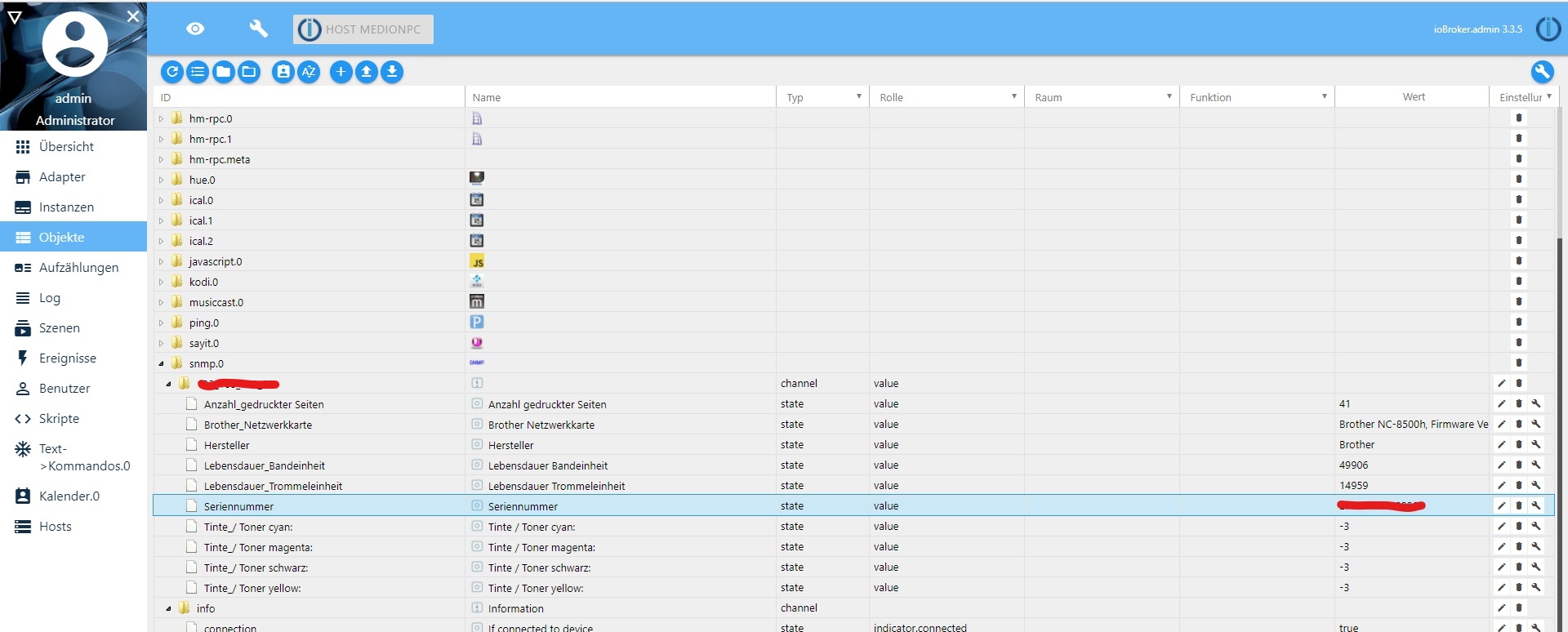
                    bekomme bei meinen Brother nur Minus Werte. Weis wer die Richtige OID?
                    2858_screenshot__543__li.jpg

                    Bitte benutzt das Voting rechts unten im Beitrag wenn er euch geholfen hat.
                    Immer Daten sichern!

                    1 Antwort Letzte Antwort
                    0
                    • C Offline
                      C Offline
                      claus1993
                      schrieb am zuletzt editiert von
                      #85

                      Hallo,

                      versuche bei meiner Synology DS207+ die Werte für CPU Last und die Festplatte auszulesen. Die Codes aus der offiziellen MIB Liste von Synology funktionieren bei der DS207+ leider nicht.

                      Hat hier eventuell jemand alternative Codes die ich zum Auslesen von der CPU Last und der Festplatten nutzen kann?

                      VG Claus

                      1 Antwort Letzte Antwort
                      0
                      • C Offline
                        C Offline
                        claus1993
                        schrieb am zuletzt editiert von
                        #86

                        @sigi234:

                        Hallo,

                        bekomme bei meinen Brother nur Minus Werte. Weis wer die Richtige OID? `

                        Habe auch einen Brother und bekomme auch diese Minus Werte. Soweit ich es kenne bedeutet es das der Füllzustand -3 eine leere Kartusche bedeutet. Voll wäre meines Wissens eine "0". Was mich hier jedoch irritiert ist das ich bei der Abfrage der Max Werte für meine Kartusche eine -2 bekomme.

                        VG Claus

                        1 Antwort Letzte Antwort
                        0
                        • sigi234S Online
                          sigi234S Online
                          sigi234
                          Forum Testing Most Active
                          schrieb am zuletzt editiert von
                          #87

                          Hallo,

                          eine leere Kartusche kann nicht sein, der Drucker ist Neu.

                          Bitte benutzt das Voting rechts unten im Beitrag wenn er euch geholfen hat.
                          Immer Daten sichern!

                          1 Antwort Letzte Antwort
                          0
                          • WebrangerW Offline
                            WebrangerW Offline
                            Webranger
                            schrieb am zuletzt editiert von
                            #88

                            Kann ich beim synology NAS auch die platten auslesen, bzw im vis dann anzeigen lassen 47% frei oder so

                            Intel NUC Celeron, Xiaomi Gateway, Fritzbox 7590, XS1

                            1 Antwort Letzte Antwort
                            0
                            • apollon77A Offline
                              apollon77A Offline
                              apollon77
                              schrieb am zuletzt editiert von
                              #89

                              Schau mal weiter oben in diesem Thread da war einiges zu synology.

                              Beitrag hat geholfen? Votet rechts unten im Beitrag :-) https://paypal.me/Apollon77 / https://github.com/sponsors/Apollon77

                              • Debug-Log für Instanz einschalten? Admin -> Instanzen -> Expertenmodus -> Instanz aufklappen - Loglevel ändern
                              • Logfiles auf Platte /opt/iobroker/log/… nutzen, Admin schneidet Zeilen ab
                              1 Antwort Letzte Antwort
                              0
                              • C Offline
                                C Offline
                                claus1993
                                schrieb am zuletzt editiert von
                                #90

                                @sigi234:

                                Hallo,

                                eine leere Kartusche kann nicht sein, der Drucker ist Neu. `

                                Meine Kartuschen sind leer, ich habe die gleichen Einstellungen und bekomme auch -3 angezeigt :o

                                Muss eh bald mal die Kartuschen wechseln und bin dann gespannt was mir angezeigt wird….

                                1 Antwort Letzte Antwort
                                0
                                • WebrangerW Offline
                                  WebrangerW Offline
                                  Webranger
                                  schrieb am zuletzt editiert von
                                  #91

                                  @apollon77:

                                  Schau mal weiter oben in diesem Thread da war einiges zu synology. `

                                  Hab ich gesehen aber leider kein Wert für HDD füllstand.

                                  Oder ich hab es überlesen

                                  Intel NUC Celeron, Xiaomi Gateway, Fritzbox 7590, XS1

                                  1 Antwort Letzte Antwort
                                  0
                                  • K Offline
                                    K Offline
                                    Kuddel
                                    schrieb am zuletzt editiert von
                                    #92

                                    Hallo zusammen,

                                    ich hab mir heute den Adapter auch installiert und konnte schon enige Werte von meinem QNAP-Backup-NAS abfragen.

                                    In wie weit kann ich Windows abfragen, da ich meine Daten auf einem Windows Server 2012R2 habe.

                                    Ich habe auf einer Win10 VM mal den SNMP Service hinzugefügt, "public" als Community eingetragen und die IP vom ioBroker freigegeben.

                                    Leider funktioniert die Abfrage der Uptime (.1.3.6.1.2.1.1.3.0) nicht.

                                    Mit dem MIB Browser bekomme ich auch ein Timeout.

                                    Jemand eine Idee, was das Problem sein könnte?

                                    1 Antwort Letzte Antwort
                                    0
                                    • C Offline
                                      C Offline
                                      claus1993
                                      schrieb am zuletzt editiert von
                                      #93

                                      Habe mal für meinen Brother Laserdrucker die Werte angefordert und bekomme als aktuellen Stand den Wert "-3" und als Zustand wenn Voll den Wert -2

                                      Zustand, wenn voll: 
                                      root@nagios:~# snmpget -v1 -c public 192.168.120.31 1.3.6.1.2.1.43.11.1.1.8.1.1 
                                      Antwort: SNMPv2-SMI::mib-2.43.11.1.1.8.1.1 = INTEGER: -2 
                                      
                                      Aktueller Stand: 
                                      root@nagios:~# snmpget -v1 -c public 192.168.120.31 1.3.6.1.2.1.43.11.1.1.9.1.1 
                                      Antwort: SNMPv2-SMI::mib-2.43.11.1.1.9.1.1 = INTEGER: -3


                                      Damit ich das in meiner VIS anzeigen kann wollte ich es in Prozentwerte umrechnen. Meine Idee war folgende Berechnung;

                                      Füllstand = Stand * 100 / Voll

                                      Füllstand = -2 * 100 / -3

                                      Füllstand = -200 / -3

                                      Füllstand = 66,67

                                      Soweit ist das für mich verständlich, verstehe nur nicht das die Kartusche als Größe -2 und als aktuellen Stand -3 hat. Wenn ich das mit der Formel berechne ergibt sich ein Füllstand von 150% :shock:

                                      Irgendwo habe ich einen Denkfehler und hoffe auf eure Unterstützung.

                                      Danke und Grüße,

                                      Claus

                                      1 Antwort Letzte Antwort
                                      0
                                      • RK62R Offline
                                        RK62R Offline
                                        RK62
                                        schrieb am zuletzt editiert von
                                        #94

                                        Soweit ich weiß, lassen sich die Füllstände bei BROTHER Druckern nicht via SNMP auslesen.

                                        Ich habe das mit das mit dem Parser von Website des Druckers ausgelesen:

                                        `Seite: http://<ip-des-druckers>/general/information.html?kind=item
                                        RegEx: \(C\)\*\*<\/dt></ip-des-druckers>`
                                        
                                        <dd>`\(([0-9.]*)%\)` Für die anderen Farben BK, Y, M  einsetzen.
                                        
                                        Gruß, Ralf</dd>
                                        
                                        
                                        1 Antwort Letzte Antwort
                                        0
                                        • RK62R Offline
                                          RK62R Offline
                                          RK62
                                          schrieb am zuletzt editiert von
                                          #95

                                          Ich habe noch das Problem, dass Dezimalwerte scheinbar nicht ausgelesen werden können.

                                          Siehe https://github.com/CTJaeger/ioBroker.snmp/issues/16

                                          Ist das bei euch auch so oder ist es ein Problem meiner ioBroker-Installation?

                                          Gruß, Ralf

                                          1 Antwort Letzte Antwort
                                          1
                                          Antworten
                                          • In einem neuen Thema antworten
                                          Anmelden zum Antworten
                                          • Älteste zuerst
                                          • Neuste zuerst
                                          • Meiste Stimmen


                                          Support us

                                          ioBroker
                                          Community Adapters
                                          Donate
                                          FAQ Cloud / IOT
                                          HowTo: Node.js-Update
                                          HowTo: Backup/Restore
                                          Downloads
                                          BLOG

                                          808

                                          Online

                                          32.4k

                                          Benutzer

                                          81.5k

                                          Themen

                                          1.3m

                                          Beiträge
                                          Community
                                          Impressum | Datenschutz-Bestimmungen | Nutzungsbedingungen | Einwilligungseinstellungen
                                          ioBroker Community 2014-2025
                                          logo
                                          • Anmelden

                                          • Du hast noch kein Konto? Registrieren

                                          • Anmelden oder registrieren, um zu suchen
                                          • Erster Beitrag
                                            Letzter Beitrag
                                          0
                                          • Home
                                          • Aktuell
                                          • Tags
                                          • Ungelesen 0
                                          • Kategorien
                                          • Unreplied
                                          • Beliebt
                                          • GitHub
                                          • Docu
                                          • Hilfe