




[Develop] Onkyo Adapter - VIS Weiterentwicklung
-
Hey Eisbaeer….
also du hast recht das ich Zone 2 nicht nutze. Ich hab heut morgen mal versucht die Zone 2 zu aktivieren( am Reciever eingeschaltet) um zu gucken ob ich dann über Objekte was steuern kann doch leider mit dem selben Ergebnis. Du meinst ich sollte Zone 2 aktivieren bzw. einstellen. Was genau meinst du damit ? Reicht nicht das einschalten der Zone 2 ????
-
Du meinst ich sollte Zone 2 aktivieren bzw. einstellen. Was genau meinst du damit ? Reicht nicht das einschalten der Zone 2 ???? `
Da ich den 509 nicht habe, bin ich mal die Anleitung durchgegangen. Bei muss für die Zone 2 nichts konfiguriert werden. Das ist bei meinem anders, da er für die Zone2 schon eine Endstufe mit eingebaut hat.-
Prüfe mal bitte noch die folgende Einstellung des Onkyo: Setup -> Hardware -> Network -> Network Control option . Die bitte auf an, sollte aber wohl schon so sein, sonst könntest du nicht über die App einschalten.
-
Das node-module, das für den Adapter verwendet wird, hat noch "high-level" commands integriert. Kannst du mal versuchen, in das Objekt "command" die folgenden Befehle einzutragen:
- power on
power off

power:on

power:off

main.power on

main.power off

main power on

main power off

main.power=on

main.power=off
Ich kann das alles im Moment nur leider nicht testen, da ich im Hotel sitze. Bitte gib mir dann eine Rückmeldung, ob und welche Befehle geklappt haben.
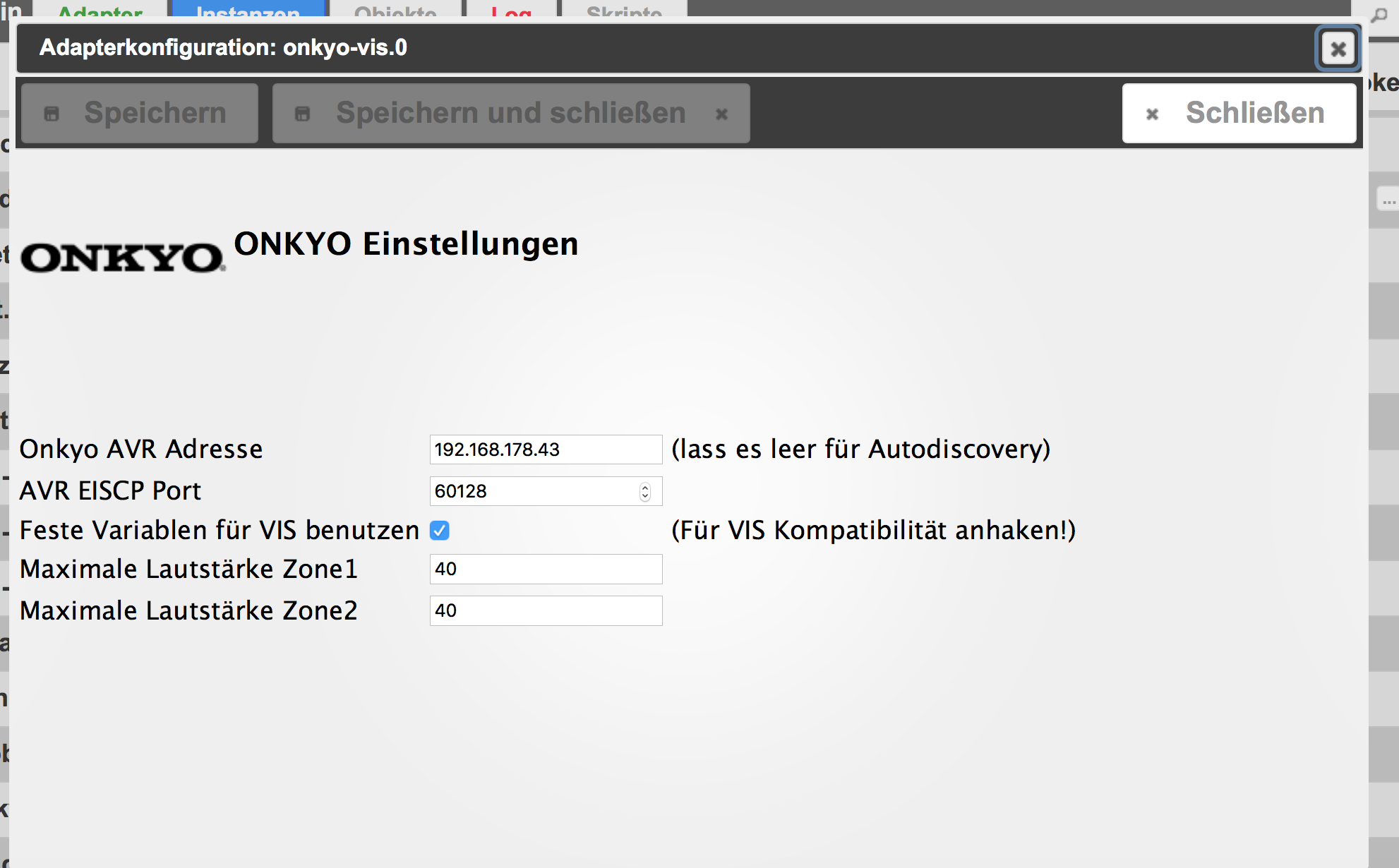
Und könntest du mir noch einen Screenshot der Adaptereinstellung in iobroker vom onkyo-vis hier reinstellen?
Danke und Grüße
-
-
Hallo Eisbaeer….
ich hab jetzt alle Befehle eingegeben wie du sie mir vorgegeben hast. Leider nimmt er nichts davon an. Hab vorsichtshalber auch mit eingeschalteter Zone2 das auch probiert mit dem gleichen Ergebnis. Wenn ich mit dem Power Button einschalte, was ja geht, steht bei commands PWR01....gebe ich das aber direkt ein kommt nichts :roll:
Drücke Strg+A und danach Strg+C, um den Inhalt in die Zwischenablage zu kopieren. Klicke irgendwo, um das Fenster zu schliessen. onkyo-vis.0 2018-03-20 19:26:22.455 info EISCP String: PWR00 onkyo-vis.0 2018-03-20 19:24:01.318 error at Socket. (/opt/iobroker/node_modules/redis/index.js:274:27) onkyo-vis.0 2018-03-20 19:24:01.318 error at JavascriptRedisParser.execute (/opt/iobroker/node_modules/redis-parser/lib/parser.js:574:12) onkyo-vis.0 2018-03-20 19:24:01.318 error at JavascriptRedisParser.returnReply (/opt/iobroker/node_modules/redis/index.js:192:18) onkyo-vis.0 2018-03-20 19:24:01.318 error at RedisClient.return_reply (/opt/iobroker/node_modules/redis/index.js:833:9) onkyo-vis.0 2018-03-20 19:24:01.318 error at return_pub_sub (/opt/iobroker/node_modules/redis/index.js:794:18) onkyo-vis.0 2018-03-20 19:24:01.318 error at RedisClient.emit (events.js:194:7) onkyo-vis.0 2018-03-20 19:24:01.318 error at emitThree (events.js:116:13) onkyo-vis.0 2018-03-20 19:24:01.318 error at RedisClient. (/opt/iobroker/node_modules/iobroker.js-controller/lib/states/statesInRedis.js:102:25) onkyo-vis.0 2018-03-20 19:24:01.318 error at change (/opt/iobroker/node_modules/iobroker.js-controller/lib/adapter.js:3190:37) onkyo-vis.0 2018-03-20 19:24:01.318 error at Object.stateChange (/opt/iobroker/node_modules/iobroker.onkyo-vis/onkyo.js:33:31) onkyo-vis.0 2018-03-20 19:24:01.318 error TypeError: state.val.match is not a function onkyo-vis.0 2018-03-20 19:24:01.315 error pmessage io.onkyo-vis.0.command {'val':0,'ack':false,'ts':1521570241309,'q':0,'from':'system.adapter.admin.0','lc':1521570191882} state.val.match is not a function onkyo-vis.0 2018-03-20 19:23:42.894 error at Socket. (/opt/iobroker/node_modules/redis/index.js:274:27) onkyo-vis.0 2018-03-20 19:23:42.894 error at JavascriptRedisParser.execute (/opt/iobroker/node_modules/redis-parser/lib/parser.js:574:12) onkyo-vis.0 2018-03-20 19:23:42.894 error at JavascriptRedisParser.returnReply (/opt/iobroker/node_modules/redis/index.js:192:18) onkyo-vis.0 2018-03-20 19:23:42.894 error at RedisClient.return_reply (/opt/iobroker/node_modules/redis/index.js:833:9) onkyo-vis.0 2018-03-20 19:23:42.894 error at return_pub_sub (/opt/iobroker/node_modules/redis/index.js:794:18) onkyo-vis.0 2018-03-20 19:23:42.894 error at RedisClient.emit (events.js:194:7) onkyo-vis.0 2018-03-20 19:23:42.894 error at emitThree (events.js:116:13) onkyo-vis.0 2018-03-20 19:23:42.894 error at RedisClient. (/opt/iobroker/node_modules/iobroker.js-controller/lib/states/statesInRedis.js:102:25) onkyo-vis.0 2018-03-20 19:23:42.894 error at change (/opt/iobroker/node_modules/iobroker.js-controller/lib/adapter.js:3190:37) onkyo-vis.0 2018-03-20 19:23:42.894 error at Object.stateChange (/opt/iobroker/node_modules/iobroker.onkyo-vis/onkyo.js:33:31) onkyo-vis.0 2018-03-20 19:23:42.894 error TypeError: state.val.match is not a function onkyo-vis.0 2018-03-20 19:23:42.890 error pmessage io.onkyo-vis.0.command {'val':0,'ack':false,'ts':1521570222884,'q':0,'from':'system.adapter.admin.0','lc':1521570191882} state.val.match is not a function onkyo-vis.0 2018-03-20 19:23:24.045 error at Socket. (/opt/iobroker/node_modules/redis/index.js:274:27) onkyo-vis.0 2018-03-20 19:23:24.045 error at JavascriptRedisParser.execute (/opt/iobroker/node_modules/redis-parser/lib/parser.js:574:12) onkyo-vis.0 2018-03-20 19:23:24.045 error at JavascriptRedisParser.returnReply (/opt/iobroker/node_modules/redis/index.js:192:18) onkyo-vis.0 2018-03-20 19:23:24.045 error at RedisClient.return_reply (/opt/iobroker/node_modules/redis/index.js:833:9) onkyo-vis.0 2018-03-20 19:23:24.045 error at return_pub_sub (/opt/iobroker/node_modules/redis/index.js:794:18) onkyo-vis.0 2018-03-20 19:23:24.045 error at RedisClient.emit (events.js:194:7) onkyo-vis.0 2018-03-20 19:23:24.045 error at emitThree (events.js:116:13) onkyo-vis.0 2018-03-20 19:23:24.045 error at RedisClient. (/opt/iobroker/node_modules/iobroker.js-controller/lib/states/statesInRedis.js:102:25) onkyo-vis.0 2018-03-20 19:23:24.045 error at change (/opt/iobroker/node_modules/iobroker.js-controller/lib/adapter.js:3190:37) onkyo-vis.0 2018-03-20 19:23:24.045 error at Object.stateChange (/opt/iobroker/node_modules/iobroker.onkyo-vis/onkyo.js:33:31) onkyo-vis.0 2018-03-20 19:23:24.045 error TypeError: state.val.match is not a function onkyo-vis.0 2018-03-20 19:23:24.042 error pmessage io.onkyo-vis.0.command {'val':0,'ack':false,'ts':1521570204036,'q':0,'from':'system.adapter.admin.0','lc':1521570191882} state.val.match is not a function onkyo-vis.0 2018-03-20 19:23:11.892 error at Socket. (/opt/iobroker/node_modules/redis/index.js:274:27) onkyo-vis.0 2018-03-20 19:23:11.892 error at JavascriptRedisParser.execute (/opt/iobroker/node_modules/redis-parser/lib/parser.js:574:12) onkyo-vis.0 2018-03-20 19:23:11.892 error at JavascriptRedisParser.returnReply (/opt/iobroker/node_modules/redis/index.js:192:18) onkyo-vis.0 2018-03-20 19:23:11.892 error at RedisClient.return_reply (/opt/iobroker/node_modules/redis/index.js:833:9) onkyo-vis.0 2018-03-20 19:23:11.892 error at return_pub_sub (/opt/iobroker/node_modules/redis/index.js:794:18) onkyo-vis.0 2018-03-20 19:23:11.892 error at RedisClient.emit (events.js:194:7) onkyo-vis.0 2018-03-20 19:23:11.892 error at emitThree (events.js:116:13) onkyo-vis.0 2018-03-20 19:23:11.892 error at RedisClient. (/opt/iobroker/node_modules/iobroker.js-controller/lib/states/statesInRedis.js:102:25) onkyo-vis.0 2018-03-20 19:23:11.892 error at change (/opt/iobroker/node_modules/iobroker.js-controller/lib/adapter.js:3190:37) onkyo-vis.0 2018-03-20 19:23:11.892 error at Object.stateChange (/opt/iobroker/node_modules/iobroker.onkyo-vis/onkyo.js:33:31) onkyo-vis.0 2018-03-20 19:23:11.892 error TypeError: state.val.match is not a function onkyo-vis.0 2018-03-20 19:23:11.888 error pmessage io.onkyo-vis.0.command {'val':0,'ack':false,'ts':1521570191882,'q':0,'from':'system.adapter.admin.0','lc':1521570191882} state.val.match is not a function onkyo-vis.0 2018-03-20 19:22:42.014 info EISCP String: PWR00 onkyo-vis.0 2018-03-20 19:22:41.488 info EISCP String: ZPW01 onkyo-vis.0 2018-03-20 19:22:21.409 info EISCP String: PWR01 onkyo-vis.0 2018-03-20 19:22:18.464 info EISCP String: PWR00 onkyo-vis.0 2018-03-20 19:22:18.112 error Error: ERROR (cmd_not_exist) Command power_zone1 does not exist in zone main onkyo-vis.0 2018-03-20 19:22:11.184 error at Socket. (/opt/iobroker/node_modules/redis/index.js:274:27) onkyo-vis.0 2018-03-20 19:22:11.184 error at JavascriptRedisParser.execute (/opt/iobroker/node_modules/redis-parser/lib/parser.js:574:12) onkyo-vis.0 2018-03-20 19:22:11.184 error at JavascriptRedisParser.returnReply (/opt/iobroker/node_modules/redis/index.js:192:18) onkyo-vis.0 2018-03-20 19:22:11.184 error at RedisClient.return_reply (/opt/iobroker/node_modules/redis/index.js:833:9) onkyo-vis.0 2018-03-20 19:22:11.184 error at return_pub_sub (/opt/iobroker/node_modules/redis/index.js:794:18) onkyo-vis.0 2018-03-20 19:22:11.184 error at RedisClient.emit (events.js:194:7) onkyo-vis.0 2018-03-20 19:22:11.184 error at emitThree (events.js:116:13) onkyo-vis.0 2018-03-20 19:22:11.184 error at RedisClient. (/opt/iobroker/node_modules/iobroker.js-controller/lib/states/statesInRedis.js:102:25) onkyo-vis.0 2018-03-20 19:22:11.184 error at change (/opt/iobroker/node_modules/iobroker.js-controller/lib/adapter.js:3190:37) onkyo-vis.0 2018-03-20 19:22:11.184 error at Object.stateChange (/opt/iobroker/node_modules/iobroker.onkyo-vis/onkyo.js:33:31) onkyo-vis.0 2018-03-20 19:22:11.184 error TypeError: state.val.match is not a function onkyo-vis.0 2018-03-20 19:22:11.182 error pmessage io.onkyo-vis.0.command {'val':0,'ack':false,'ts':1521570131179,'q':0,'from':'system.adapter.admin.0','lc':1521570058198} state.val.match is not a function onkyo-vis.0 2018-03-20 19:21:56.865 error at Socket. (/opt/iobroker/node_modules/redis/index.js:274:27) onkyo-vis.0 2018-03-20 19:21:56.865 error at JavascriptRedisParser.execute (/opt/iobroker/node_modules/redis-parser/lib/parser.js:574:12) onkyo-vis.0 2018-03-20 19:21:56.865 error at JavascriptRedisParser.returnReply (/opt/iobroker/node_modules/redis/index.js:192:18) onkyo-vis.0 2018-03-20 19:21:56.865 error at RedisClient.return_reply (/opt/iobroker/node_modules/redis/index.js:833:9) onkyo-vis.0 2018-03-20 19:21:56.865 error at return_pub_sub (/opt/iobroker/node_modules/redis/index.js:794:18) onkyo-vis.0 2018-03-20 19:21:56.865 error at RedisClient.emit (events.js:194:7) onkyo-vis.0 2018-03-20 19:21:56.865 error at emitThree (events.js:116:13) onkyo-vis.0 2018-03-20 19:21:56.865 error at RedisClient. (/opt/iobroker/node_modules/iobroker.js-controller/lib/states/statesInRedis.js:102:25) onkyo-vis.0 2018-03-20 19:21:56.865 error at change (/opt/iobroker/node_modules/iobroker.js-controller/lib/adapter.js:3190:37) onkyo-vis.0 2018-03-20 19:21:56.865 error at Object.stateChange (/opt/iobroker/node_modules/iobroker.onkyo-vis/onkyo.js:33:31) onkyo-vis.0 2018-03-20 19:21:56.865 error TypeError: state.val.match is not a function onkyo-vis.0 2018-03-20 19:21:56.860 error pmessage io.onkyo-vis.0.command {'val':0,'ack':false,'ts':1521570116838,'q':0,'from':'system.adapter.admin.0','lc':1521570058198} state.val.match is not a function onkyo-vis.0 2018-03-20 19:21:37.947 error at Socket. (/opt/iobroker/node_modules/redis/index.js:274:27) onkyo-vis.0 2018-03-20 19:21:37.947 error at JavascriptRedisParser.execute (/opt/iobroker/node_modules/redis-parser/lib/parser.js:574:12) onkyo-vis.0 2018-03-20 19:21:37.947 error at JavascriptRedisParser.returnReply (/opt/iobroker/node_modules/redis/index.js:192:18) onkyo-vis.0 2018-03-20 19:21:37.947 error at RedisClient.return_reply (/opt/iobroker/node_modules/redis/index.js:833:9) onkyo-vis.0 2018-03-20 19:21:37.947 error at return_pub_sub (/opt/iobroker/node_modules/redis/index.js:794:18) onkyo-vis.0 2018-03-20 19:21:37.947 error at RedisClient.emit (events.js:194:7) onkyo-vis.0 2018-03-20 19:21:37.947 error at emitThree (events.js:116:13) onkyo-vis.0 2018-03-20 19:21:37.947 error at RedisClient. (/opt/iobroker/node_modules/iobroker.js-controller/lib/states/statesInRedis.js:102:25) onkyo-vis.0 2018-03-20 19:21:37.947 error at change (/opt/iobroker/node_modules/iobroker.js-controller/lib/adapter.js:3190:37) onkyo-vis.0 2018-03-20 19:21:37.947 error at Object.stateChange (/opt/iobroker/node_modules/iobroker.onkyo-vis/onkyo.js:33:31) onkyo-vis.0 2018-03-20 19:21:37.947 error TypeError: state.val.match is not a function onkyo-vis.0 2018-03-20 19:21:37.941 error pmessage io.onkyo-vis.0.command {'val':0,'ack':false,'ts':1521570097924,'q':0,'from':'system.adapter.admin.0','lc':1521570058198} state.val.match is not a function onkyo-vis.0 2018-03-20 19:21:21.640 error at Socket. (/opt/iobroker/node_modules/redis/index.js:274:27) onkyo-vis.0 2018-03-20 19:21:21.640 error at JavascriptRedisParser.execute (/opt/iobroker/node_modules/redis-parser/lib/parser.js:574:12) onkyo-vis.0 2018-03-20 19:21:21.640 error at JavascriptRedisParser.returnReply (/opt/iobroker/node_modules/redis/index.js:192:18) onkyo-vis.0 2018-03-20 19:21:21.640 error at RedisClient.return_reply (/opt/iobroker/node_modules/redis/index.js:833:9) onkyo-vis.0 2018-03-20 19:21:21.640 error at return_pub_sub (/opt/iobroker/node_modules/redis/index.js:794:18) onkyo-vis.0 2018-03-20 19:21:21.640 error at RedisClient.emit (events.js:194:7) onkyo-vis.0 2018-03-20 19:21:21.640 error at emitThree (events.js:116:13) onkyo-vis.0 2018-03-20 19:21:21.640 error at RedisClient. (/opt/iobroker/node_modules/iobroker.js-controller/lib/states/statesInRedis.js:102:25) onkyo-vis.0 2018-03-20 19:21:21.640 error at change (/opt/iobroker/node_modules/iobroker.js-controller/lib/adapter.js:3190:37) onkyo-vis.0 2018-03-20 19:21:21.640 error at Object.stateChange (/opt/iobroker/node_modules/iobroker.onkyo-vis/onkyo.js:33:31) onkyo-vis.0 2018-03-20 19:21:21.640 error TypeError: state.val.match is not a function onkyo-vis.0 2018-03-20 19:21:21.635 error pmessage io.onkyo-vis.0.command {'val':0,'ack':false,'ts':1521570081628,'q':0,'from':'system.adapter.admin.0','lc':1521570058198} state.val.match is not a function onkyo-vis.0 2018-03-20 19:20:58.249 error at Socket. (/opt/iobroker/node_modules/redis/index.js:274:27) onkyo-vis.0 2018-03-20 19:20:58.249 error at JavascriptRedisParser.execute (/opt/iobroker/node_modules/redis-parser/lib/parser.js:574:12) onkyo-vis.0 2018-03-20 19:20:58.249 error at JavascriptRedisParser.returnReply (/opt/iobroker/node_modules/redis/index.js:192:18) onkyo-vis.0 2018-03-20 19:20:58.249 error at RedisClient.return_reply (/opt/iobroker/node_modules/redis/index.js:833:9) onkyo-vis.0 2018-03-20 19:20:58.249 error at return_pub_sub (/opt/iobroker/node_modules/redis/index.js:794:18) onkyo-vis.0 2018-03-20 19:20:58.249 error at RedisClient.emit (events.js:194:7) onkyo-vis.0 2018-03-20 19:20:58.249 error at emitThree (events.js:116:13) onkyo-vis.0 2018-03-20 19:20:58.249 error at RedisClient. (/opt/iobroker/node_modules/iobroker.js-controller/lib/states/statesInRedis.js:102:25) onkyo-vis.0 2018-03-20 19:20:58.249 error at change (/opt/iobroker/node_modules/iobroker.js-controller/lib/adapter.js:3190:37) onkyo-vis.0 2018-03-20 19:20:58.249 error at Object.stateChange (/opt/iobroker/node_modules/iobroker.onkyo-vis/onkyo.js:33:31) onkyo-vis.0 2018-03-20 19:20:58.249 error TypeError: state.val.match is not a function onkyo-vis.0 2018-03-20 19:20:58.206 error pmessage io.onkyo-vis.0.command {'val':0,'ack':false,'ts':1521570058198,'q':0,'from':'system.adapter.admin.0','lc':1521570058198} state.val.match is not a function onkyo-vis.0 2018-03-20 19:20:29.514 info EISCP String: MVL1B onkyo-vis.0 2018-03-20 19:20:29.008 info EISCP String: MVL1B onkyo-vis.0 2018-03-20 19:20:28.491 info EISCP String: AMT00 onkyo-vis.0 2018-03-20 19:20:27.978 info EISCP String: PWR01 onkyo-vis.0 2018-03-20 19:20:27.499 info EISCP String: SLI10 onkyo-vis.0 2018-03-20 19:20:26.276 info EISCP String: PRZ00 onkyo-vis.0 2018-03-20 19:20:25.993 info EISCP String: PRS00 onkyo-vis.0 2018-03-20 19:20:25.480 info EISCP String: TUZ10555 onkyo-vis.0 2018-03-20 19:20:24.999 info EISCP String: SLZ80 onkyo-vis.0 2018-03-20 19:20:23.476 info EISCP String: ZVLN/A onkyo-vis.0 2018-03-20 19:20:22.982 info EISCP String: ZMT00 onkyo-vis.0 2018-03-20 19:20:22.468 info EISCP String: ZPW00 onkyo-vis.0 2018-03-20 19:20:20.968 info EISCP String: ISTN/A onkyo-vis.0 2018-03-20 19:20:20.447 info EISCP String: ITRN/A onkyo-vis.0 2018-03-20 19:20:19.949 info EISCP String: ITMN/A onkyo-vis.0 2018-03-20 19:20:19.449 info EISCP String: ITIN/A onkyo-vis.0 2018-03-20 19:20:18.969 info EISCP String: IALN/A onkyo-vis.0 2018-03-20 19:20:18.460 info EISCP String: IATN/A onkyo-vis.0 2018-03-20 19:20:17.963 info EISCP String: IMDN/A onkyo-vis.0 2018-03-20 19:20:17.457 info EISCP String: NSTS-- onkyo-vis.0 2018-03-20 19:20:17.001 info EISCP String: NTR----/---- onkyo-vis.0 2018-03-20 19:20:16.445 info EISCP String: NTM00:56/--:-- onkyo-vis.0 2018-03-20 19:20:10.944 info EISCP String: SCTN/A onkyo-vis.0 2018-03-20 19:20:10.429 info EISCP String: SCHN/A onkyo-vis.0 2018-03-20 19:20:09.929 info EISCP String: STIN/A onkyo-vis.0 2018-03-20 19:20:09.421 info EISCP String: SATN/A onkyo-vis.0 2018-03-20 19:20:08.928 info EISCP String: SCNN/A onkyo-vis.0 2018-03-20 19:20:05.950 info EISCP String: PRS00 onkyo-vis.0 2018-03-20 19:20:04.939 info EISCP String: MOT00 onkyo-vis.0 2018-03-20 19:20:04.403 info EISCP String: DVLN/A onkyo-vis.0 2018-03-20 19:20:03.895 info EISCP String: ADV00 onkyo-vis.0 2018-03-20 19:20:03.419 info EISCP String: ADQ00 onkyo-vis.0 2018-03-20 19:20:02.891 info EISCP String: ADY00 onkyo-vis.0 2018-03-20 19:20:02.404 info EISCP String: RAS00 onkyo-vis.0 2018-03-20 19:20:01.898 info EISCP String: LTN00 onkyo-vis.0 2018-03-20 19:20:01.410 info EISCP String: LMD0C onkyo-vis.0 2018-03-20 19:19:59.883 info EISCP String: ISFN/A onkyo-vis.0 2018-03-20 19:19:58.902 info EISCP String: HAO02 onkyo-vis.0 2018-03-20 19:19:57.385 info EISCP String: SLA04 onkyo-vis.0 2018-03-20 19:19:56.398 info EISCP String: SLI10 onkyo-vis.0 2018-03-20 19:19:55.384 info EISCP String: IFAAnalog,,,,All Ch Stereo,5.1 ch, onkyo-vis.0 2018-03-20 19:19:54.874 info EISCP String: DIM00 onkyo-vis.0 2018-03-20 19:19:54.373 info EISCP String: DIF00 onkyo-vis.0 2018-03-20 19:19:53.864 info EISCP String: CTL-7 onkyo-vis.0 2018-03-20 19:19:53.362 info EISCP String: SWL-2 onkyo-vis.0 2018-03-20 19:19:52.871 info EISCP String: SLP00 onkyo-vis.0 2018-03-20 19:19:50.768 info Initial query: master-volume onkyo-vis.0 2018-03-20 19:19:50.768 info Initial query: volume onkyo-vis.0 2018-03-20 19:19:50.768 info Initial query: audio-muting onkyo-vis.0 2018-03-20 19:19:50.767 info Initial query: system-power onkyo-vis.0 2018-03-20 19:19:50.766 info Initial query: input-selector onkyo-vis.0 2018-03-20 19:19:49.361 info EISCP String: TFRB-2T-2 onkyo-vis.0 2018-03-20 19:19:48.871 info EISCP String: MVL1B onkyo-vis.0 2018-03-20 19:19:48.360 info EISCP String: MVL1B onkyo-vis.0 2018-03-20 19:19:47.874 info EISCP String: SPLN/A onkyo-vis.0 2018-03-20 19:19:47.346 info EISCP String: SPBN/A onkyo-vis.0 2018-03-20 19:19:46.860 info EISCP String: SPAN/A onkyo-vis.0 2018-03-20 19:19:46.338 info EISCP String: AMT00 onkyo-vis.0 2018-03-20 19:19:45.846 info EISCP String: PWR01 onkyo-vis.0 2018-03-20 19:19:45.763 error Error: ERROR (arg_not_exist) Argument query does not exist in command listening-mode onkyo-vis.0 2018-03-20 19:19:45.762 error Error: ERROR (arg_not_exist) Argument query does not exist in command internet-radio-preset onkyo-vis.0 2018-03-20 19:19:45.762 error Error: ERROR (arg_not_exist) Argument query does not exist in command net-tune-network onkyo-vis.0 2018-03-20 19:19:45.757 error Error: ERROR (arg_not_exist) Argument query does not exist in command dab-display-info onkyo-vis.0 2018-03-20 19:19:45.755 error Error: ERROR (arg_not_exist) Argument query does not exist in command ipod-list-info onkyo-vis.0 2018-03-20 19:19:45.751 error Error: ERROR (arg_not_exist) Argument query does not exist in command universal-port onkyo-vis.0 2018-03-20 19:19:45.750 error Error: ERROR (arg_not_exist) Argument query does not exist in command cd-r-recorder onkyo-vis.0 2018-03-20 19:19:45.749 error Error: ERROR (arg_not_exist) Argument query does not exist in command md-recorder onkyo-vis.0 2018-03-20 19:19:45.748 error Error: ERROR (arg_not_exist) Argument query does not exist in command dvd-player onkyo-vis.0 2018-03-20 19:19:45.747 error Error: ERROR (arg_not_exist) Argument query does not exist in command dat-recorder onkyo-vis.0 2018-03-20 19:19:45.747 error Error: ERROR (arg_not_exist) Argument query does not exist in command graphics-equalizer onkyo-vis.0 2018-03-20 19:19:45.746 error Error: ERROR (arg_not_exist) Argument query does not exist in command tape2-b onkyo-vis.0 2018-03-20 19:19:45.745 error Error: ERROR (arg_not_exist) Argument query does not exist in command tape1-a onkyo-vis.0 2018-03-20 19:19:45.744 error Error: ERROR (arg_not_exist) Argument query does not exist in command cd-player onkyo-vis.0 2018-03-20 19:19:45.742 error Error: ERROR (arg_not_exist) Argument query does not exist in command net-popup-message onkyo-vis.0 2018-03-20 19:19:45.742 error Error: ERROR (arg_not_exist) Argument query does not exist in command net-keyboard onkyo-vis.0 2018-03-20 19:19:45.741 error Error: ERROR (arg_not_exist) Argument query does not exist in command net-service onkyo-vis.0 2018-03-20 19:19:45.740 error Error: ERROR (arg_not_exist) Argument query does not exist in command net-usb-jacket-art onkyo-vis.0 2018-03-20 19:19:45.739 error Error: ERROR (arg_not_exist) Argument query does not exist in command net-usb-list-info onkyo-vis.0 2018-03-20 19:19:45.738 error Error: ERROR (arg_not_exist) Argument query does not exist in command internet-radio-preset onkyo-vis.0 2018-03-20 19:19:45.734 error Error: ERROR (arg_not_exist) Argument query does not exist in command network-usb onkyo-vis.0 2018-03-20 19:19:45.728 error Error: ERROR (arg_not_exist) Argument query does not exist in command sirius-parental-lock onkyo-vis.0 2018-03-20 19:19:45.725 error Error: ERROR (arg_not_exist) Argument query does not exist in command tp-scan onkyo-vis.0 2018-03-20 19:19:45.724 error Error: ERROR (arg_not_exist) Argument query does not exist in command pty-scan onkyo-vis.0 2018-03-20 19:19:45.722 error Error: ERROR (arg_not_exist) Argument query does not exist in command rds-information onkyo-vis.0 2018-03-20 19:19:45.721 error Error: ERROR (arg_not_exist) Argument query does not exist in command preset-memory onkyo-vis.0 2018-03-20 19:19:45.707 error Error: ERROR (arg_not_exist) Argument query does not exist in command 12v-trigger-c onkyo-vis.0 2018-03-20 19:19:45.706 error Error: ERROR (arg_not_exist) Argument query does not exist in command 12v-trigger-b onkyo-vis.0 2018-03-20 19:19:45.706 error Error: ERROR (arg_not_exist) Argument query does not exist in command 12v-trigger-a onkyo-vis.0 2018-03-20 19:19:45.704 error Error: ERROR (arg_not_exist) Argument query does not exist in command memory-setup onkyo-vis.0 2018-03-20 19:19:45.703 error Error: ERROR (arg_not_exist) Argument query does not exist in command setup onkyo-vis.0 2018-03-20 19:19:45.701 error Error: ERROR (arg_not_exist) Argument query does not exist in command speaker-level-calibration onkyo-vis.0 2018-03-20 19:19:45.678 info Successfully connected to AVR onkyo-vis.0 2018-03-20 19:19:45.625 info Connecting to AVR 192.168.178.43:60128 onkyo-vis.0 2018-03-20 19:19:45.295 info Create new object: onkyo-vis.0.Video_Information, role = switch onkyo-vis.0 2018-03-20 19:19:45.294 info My array objects: onkyo-vis.0.Video_Information, role = switch onkyo-vis.0 2018-03-20 19:19:45.294 info Create new object: onkyo-vis.0.Audio_Information, role = switch onkyo-vis.0 2018-03-20 19:19:45.294 info My array objects: onkyo-vis.0.Audio_Information, role = switch onkyo-vis.0 2018-03-20 19:19:45.292 info Create new object: onkyo-vis.0.Listening_Mode, role = switch onkyo-vis.0 2018-03-20 19:19:45.291 info My array objects: onkyo-vis.0.Listening_Mode, role = switch onkyo-vis.0 2018-03-20 19:19:45.290 info Create new object: onkyo-vis.0.Tuner_Preset_Zone2, role = switch onkyo-vis.0 2018-03-20 19:19:45.289 info My array objects: onkyo-vis.0.Tuner_Preset_Zone2, role = switch onkyo-vis.0 2018-03-20 19:19:45.286 info Create new object: onkyo-vis.0.Tuner_Preset_Zone1, role = switch onkyo-vis.0 2018-03-20 19:19:45.285 info My array objects: onkyo-vis.0.Tuner_Preset_Zone1, role = switch onkyo-vis.0 2018-03-20 19:19:45.284 info Create new object: onkyo-vis.0.Audio_Mute_Zone2, role = switch onkyo-vis.0 2018-03-20 19:19:45.283 info My array objects: onkyo-vis.0.Audio_Mute_Zone2, role = switch onkyo-vis.0 2018-03-20 19:19:45.281 info Create new object: onkyo-vis.0.Audio_Mute_Zone1, role = switch onkyo-vis.0 2018-03-20 19:19:45.281 info My array objects: onkyo-vis.0.Audio_Mute_Zone1, role = switch onkyo-vis.0 2018-03-20 19:19:45.281 info Create new object: onkyo-vis.0.Input_Select_Zone2, role = switch onkyo-vis.0 2018-03-20 19:19:45.280 info My array objects: onkyo-vis.0.Input_Select_Zone2, role = switch onkyo-vis.0 2018-03-20 19:19:45.279 info Create new object: onkyo-vis.0.Input_Select_Zone1, role = switch onkyo-vis.0 2018-03-20 19:19:45.278 info My array objects: onkyo-vis.0.Input_Select_Zone1, role = switch onkyo-vis.0 2018-03-20 19:19:45.276 info Create new object: onkyo-vis.0.Internet_Radio_Preset_Zone2, role = switch onkyo-vis.0 2018-03-20 19:19:45.275 info My array objects: onkyo-vis.0.Internet_Radio_Preset_Zone2, role = switch onkyo-vis.0 2018-03-20 19:19:45.273 info Create new object: onkyo-vis.0.Internet_Radio_Preset_Zone1, role = switch onkyo-vis.0 2018-03-20 19:19:45.272 info My array objects: onkyo-vis.0.Internet_Radio_Preset_Zone1, role = switch onkyo-vis.0 2018-03-20 19:19:45.272 info Create new object: onkyo-vis.0.Tuning_Zone2, role = switch onkyo-vis.0 2018-03-20 19:19:45.272 info My array objects: onkyo-vis.0.Tuning_Zone2, role = switch onkyo-vis.0 2018-03-20 19:19:45.271 info Create new object: onkyo-vis.0.Tuning_Zone1, role = switch onkyo-vis.0 2018-03-20 19:19:45.271 info My array objects: onkyo-vis.0.Tuning_Zone1, role = switch onkyo-vis.0 2018-03-20 19:19:45.270 info Create new object: onkyo-vis.0.Volume_Zone2, role = switch onkyo-vis.0 2018-03-20 19:19:45.270 info My array objects: onkyo-vis.0.Volume_Zone2, role = switch onkyo-vis.0 2018-03-20 19:19:45.269 info Create new object: onkyo-vis.0.Volume_Zone1, role = switch onkyo-vis.0 2018-03-20 19:19:45.269 info My array objects: onkyo-vis.0.Volume_Zone1, role = switch onkyo-vis.0 2018-03-20 19:19:45.269 info Create new object: onkyo-vis.0.NET_Shuffle_Status, role = switch onkyo-vis.0 2018-03-20 19:19:45.268 info My array objects: onkyo-vis.0.NET_Shuffle_Status, role = switch onkyo-vis.0 2018-03-20 19:19:45.268 info Create new object: onkyo-vis.0.NET_Repeat_Status, role = switch onkyo-vis.0 2018-03-20 19:19:45.268 info My array objects: onkyo-vis.0.NET_Repeat_Status, role = switch onkyo-vis.0 2018-03-20 19:19:45.267 info Create new object: onkyo-vis.0.NET_Play_Status, role = switch onkyo-vis.0 2018-03-20 19:19:45.267 info My array objects: onkyo-vis.0.NET_Play_Status, role = switch onkyo-vis.0 2018-03-20 19:19:45.266 info Create new object: onkyo-vis.0.NET/USB_Track_Info, role = switch onkyo-vis.0 2018-03-20 19:19:45.265 info My array objects: onkyo-vis.0.NET/USB_Track_Info, role = switch onkyo-vis.0 2018-03-20 19:19:45.264 info Create new object: onkyo-vis.0.NET/USB_Album_Name_Info, role = switch onkyo-vis.0 2018-03-20 19:19:45.264 info My array objects: onkyo-vis.0.NET/USB_Album_Name_Info, role = switch onkyo-vis.0 2018-03-20 19:19:45.263 info Create new object: onkyo-vis.0.NET/USB_Time, role = switch onkyo-vis.0 2018-03-20 19:19:45.262 info My array objects: onkyo-vis.0.NET/USB_Time, role = switch onkyo-vis.0 2018-03-20 19:19:45.261 info Create new object: onkyo-vis.0.NET/USB_Time_Current, role = switch onkyo-vis.0 2018-03-20 19:19:45.260 info My array objects: onkyo-vis.0.NET/USB_Time_Current, role = switch onkyo-vis.0 2018-03-20 19:19:45.259 info Create new object: onkyo-vis.0.NET/USB_Time_Info, role = switch onkyo-vis.0 2018-03-20 19:19:45.258 info My array objects: onkyo-vis.0.NET/USB_Time_Info, role = switch onkyo-vis.0 2018-03-20 19:19:45.257 info Create new object: onkyo-vis.0.NET/USB_Title_Name, role = switch onkyo-vis.0 2018-03-20 19:19:45.257 info My array objects: onkyo-vis.0.NET/USB_Title_Name, role = switch onkyo-vis.0 2018-03-20 19:19:45.256 info Create new object: onkyo-vis.0.NET/USB_Artist_Name_Info, role = switch onkyo-vis.0 2018-03-20 19:19:45.255 info My array objects: onkyo-vis.0.NET/USB_Artist_Name_Info, role = switch onkyo-vis.0 2018-03-20 19:19:45.254 info Create new object: onkyo-vis.0.Power_Zone2, role = switch onkyo-vis.0 2018-03-20 19:19:45.253 info My array objects: onkyo-vis.0.Power_Zone2, role = switch onkyo-vis.0 2018-03-20 19:19:45.252 info Create new object: onkyo-vis.0.Power_Zone1, role = switch onkyo-vis.0 2018-03-20 19:19:45.250 info My array objects: onkyo-vis.0.Power_Zone1, role = switch onkyo-vis.0 2018-03-20 19:19:45.234 info Create new object: onkyo-vis.0.command, role = switch onkyo-vis.0 2018-03-20 19:19:45.233 info My array objects: onkyo-vis.0.command, role = switch onkyo-vis.0 2018-03-20 19:19:45.218 info starting. Version 1.0.2 in /opt/iobroker/node_modules/iobroker.onkyo-vis, node: v6.12.0 onkyo-vis.0 2018-03-20 19:19:45.159 info States connected to redis: 127.0.0.1:6379 -
Hi Vossi80
Leider sind in den Log´s keine Debug infos mit drin. Kannst du in iobroker bitte die folgenden 3 Einstellungen setzen und das ganze nochmals testen. Es reicht aber auch schon aus, wenn du in command einmal PWR00 und PWR01 setzt. Das Log sollte dann Meldungen mit Debug enthalten. Wie im letzten Screenshot.
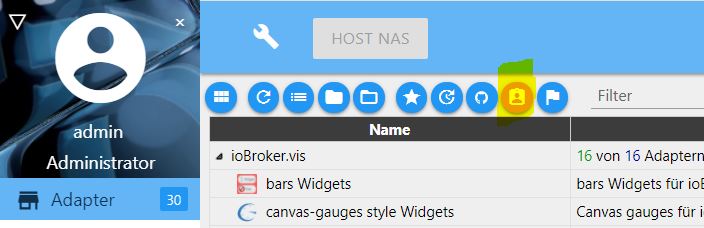

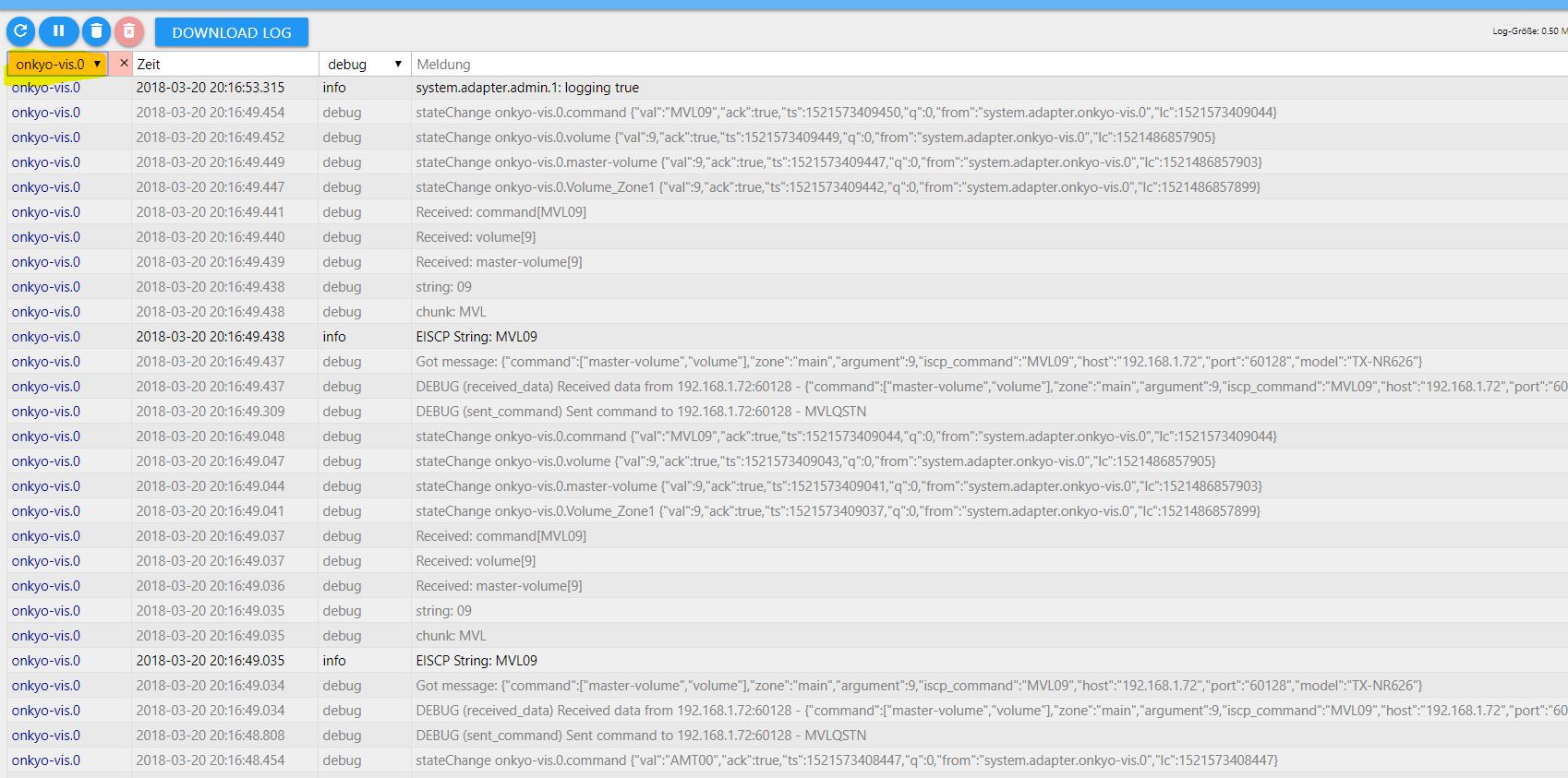
Gruß Eisbaeeer
-
Hab dir den Log mal in eine Datei gepackt. War für 3 min ganz schön groß. Hoffe du kannst da was raus lesen
6387_log.rtf -
Hi Vossi80
Ein letzter Versuch, wenn du noch die Geduld mit mir hast ;-)
Mich irritiert, dass im Log als Befehl anstatt "PWR00" oder "PWR01" immer sowas hier steht: "0,"
Kannst du in VIS mal einen Testview anlegen, dort einen einfachen boolean Button (also z.B. Licht an/aus) ablegen und dort die Objekt-ID Power_Zone1 auswählen. Lässt er sich dann über VIS ein bzw. ausschalten?
Ich möchte damit nur ausschließen, dass bei deiner Eingabe unter Objekten etwas schief läuft. Ich hab sonst erstmal keine Idee mehr und wir müssten das mal auf nächste Woche verschieben. Da bin ich wieder zuhause und kann an meinem Onkyo testen.
Gruß Eisbaeeer
-
Hi Vossi80
Ein letzter Versuch, wenn du noch die Geduld mit mir hast ;-)
Mich irritiert, dass im Log als Befehl anstatt "PWR00" oder "PWR01" immer sowas hier steht: "0,"
Kannst du in VIS mal einen Testview anlegen, dort einen einfachen boolean Button (also z.B. Licht an/aus) ablegen und dort die Objekt-ID Power_Zone1 auswählen. Lässt er sich dann über VIS ein bzw. ausschalten?
Ich möchte damit nur ausschließen, dass bei deiner Eingabe unter Objekten etwas schief läuft. Ich hab sonst erstmal keine Idee mehr und wir müssten das mal auf nächste Woche verschieben. Da bin ich wieder zuhause und kann an meinem Onkyo testen.
Gruß Eisbaeeer `
Hallo Eisbaeeer….
habe grade nochmal getestet so wie du es wolltest mit dem Button (Power Zone 1).... damit kann ich der Receiver an und aus schalten. Ein erster Lichtblick :P
-
Hallo Eisbaeeer….
habe grade nochmal getestet so wie du es wolltest mit dem Button (Power Zone 1).... damit kann ich der Receiver an und aus schalten. Ein erster Lichtblick :P `
Hey, das ist doch schon mal eine gute Nachricht.Damit ich den Fehler abfangen kann, der scheinbar bei der manuellen Eingabe im Feld "command" auftrittt, brauch ich nochmal deine Hilfe.
Kannst du mir genau beschreiben, wie du das "command" Objekt einträgst?
Bestätigst du das mit dem "Häkchen" oder mit "Enter"?
Welchen Browser verwendest du?
Die Entwickler testen alle Funktionen mit Chrome. Eventuell ist da ein Problem mit Firefox oder anderen?
Kannst du das noch mit Chrome testen, falls du den nicht schon verwendet hast?
Bist du mit Javascript oder Blockly vertraut?
Wenn ja, kannst du das in einem einfachen Script noch testen?
Ich kann dir da auch gerne ein Java-Script zur Verfügung stellen, das du zum testen hernehmen kannst.
Gruß Eisbaeeer
-
Also…. ich habe beide Möglichkeiten schon getestet, über Häkchen und auch die Enter Taste bestätigt. Normalerweise nutze ich Safari aber mit Chrome gehts auch nicht. Ich habe auch schon versucht per Script den Befehl zu steuern ging auch nicht allerdings bin ich mit Scripten nicht wirklich gut vertraut deshalb wäre es nett wenn du mir mal ein Script zu Verfügung stellen würdest.
Lg
-
also bei mir macht die 0.2.1 alles was sie soll
2678_onkyo.png -
Hey Eisbaeeer…. gibts was neues was ich noch probieren könnte damit der Adapter bei mir läuft. Hätte gerne das ich mir einem Knopfdruck den Receiver anschalte, auf den richtigen Internetradiosender schalte und eine bestimmte Lautstärke abgespielt wird. Wäre ja im Normalfall mit deinem Adapter möglich.....aber kein Stress , eilt nicht ;)
-
Hi Vossi80
Ich hab bei mir getestet. Gib mal bei Power_Zone1 statt "true" folgendes ein "01".
Dann sollte es auch bei dir klappen. Gleiches gilt für Zone2.
also 01 für ein und 00 für aus.
Gruß Eisbaeeer `
Hallo Eisbaeer…
stimmt , mit 00 und 01 lässt er sich ein und aus schalten. Was kann ich denn eingeben um zb "Net" auszuwählen?
-
Hi Vossi80
Ich hab mal die REAME erweitert. Darin sind jetzt alle Objekte drin, welche direkt mit VIS gesteuert werden können.
Bei deinem Wunsch wäre das wie folgt:
1. Power_Zone1 = 1
2. Internet_Radio_Preset_Zone1 = (deinen Speicherplatz)
3. Volume_Zone1 = ? (die Lautstärke in dezimal, die du auch am Receiver im Display siehst, welche du möchtest)
Gesamte Liste hier: https://github.com/eisbaeeer/iobroker.onkyo-vis
Gruß Eisbaeeer
-
Hi Vossi80
Ich hab mal die REAME erweitert. Darin sind jetzt alle Objekte drin, welche direkt mit VIS gesteuert werden können.
Bei deinem Wunsch wäre das wie folgt:
1. Power_Zone1 = 1
2. Internet_Radio_Preset_Zone1 = (deinen Speicherplatz)
3. Volume_Zone1 = ? (die Lautstärke in dezimal, die du auch am Receiver im Display siehst, welche du möchtest)
Gesamte Liste hier: https://github.com/eisbaeeer/iobroker.onkyo-vis
Gruß Eisbaeeer `
-Also an bekomm ich ihn und die Lautstärke kann ich auch einstellen doch leider schreibt er den Fehler
2018-03-29 09:39:01.846 - error: onkyo-vis.0 Error: ERROR (cmd_not_exist) Command internet_radio_preset_zone1 does not exist in zone main
wenn ich Internet_Radio_Preset_Zone1 = 12 eingebe :roll:
-
-Also an bekomm ich ihn und die Lautstärke kann ich auch einstellen doch leider schreibt er den Fehler
2018-03-29 09:39:01.846 - error: onkyo-vis.0 Error: ERROR (cmd_not_exist) Command internet_radio_preset_zone1 does not exist in zone main
wenn ich Internet_Radio_Preset_Zone1 = 12 eingebe `
Unabhängig von der Fehlermeldung (ich bekomme komischerweise auch welche, obwohl es dann funktioniert. Dass muss ich mir noch anschauen), hast du mal versucht einen normalen Radiospeicher aufzurufen? Gibt es bei dir den Speicherplatz 12? Bei mir sind die Speicherplätze per Webbrowser auf dem Onkyo zu konfigurieren.Versuch erstmal einen normalen Radiosender Speicher aufzurufen, dann den nächsten Schritt. Mir kommt es so vor, als ob der Receiver noch nicht alle Befehle unterstützt. Ich hab ihn aber in dieser Excel Liste gefunden. Leider sieht man in der Detailsicht nicht, welche Befehle er unterstützt.
Gruß Eisbaeeer
-
Hallo funktioniert der Adapter auch mit dem TX-NR 609, den finde ich nicht in der Liste..





Hey! Du scheinst an dieser Unterhaltung interessiert zu sein, hast aber noch kein Konto.
Hast du es satt, bei jedem Besuch durch die gleichen Beiträge zu scrollen? Wenn du dich für ein Konto anmeldest, kommst du immer genau dorthin zurück, wo du zuvor warst, und kannst dich über neue Antworten benachrichtigen lassen (entweder per E-Mail oder Push-Benachrichtigung). Du kannst auch Lesezeichen speichern und Beiträge positiv bewerten, um anderen Community-Mitgliedern deine Wertschätzung zu zeigen.
Mit deinem Input könnte dieser Beitrag noch besser werden 💗
Registrieren Anmelden428
Online33.0k
Benutzer83.7k
Themen1.3m
Beiträge