




Skript zur dynamischen Generierung Batterie/Akku Symbol
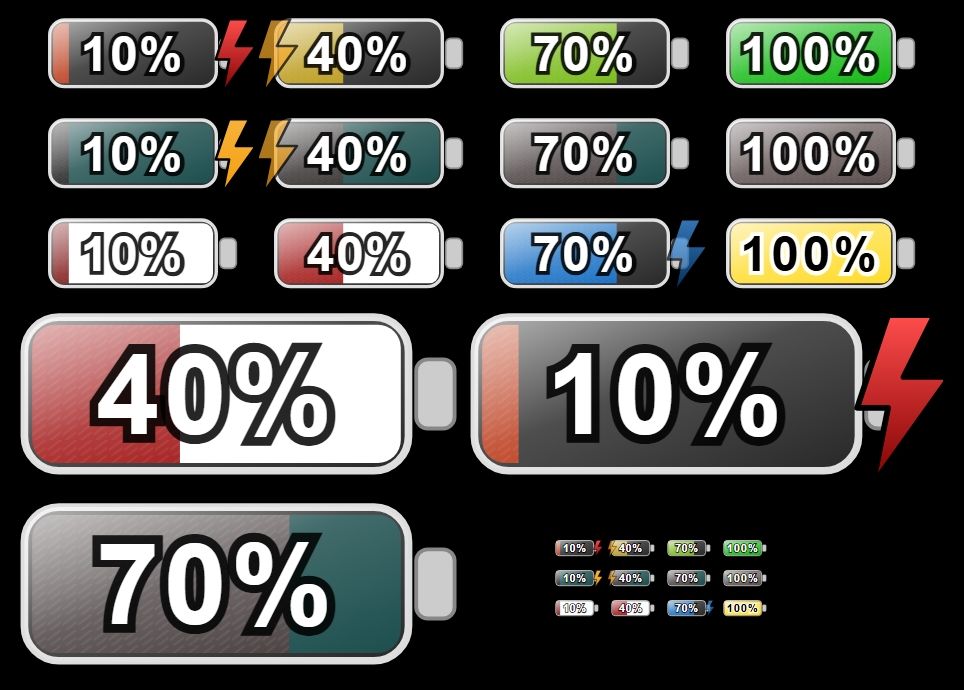
-
javascript.0 21:29:12.906 error
Error: ReferenceError: generateBatterySvg is not defined
javascript.0 21:29:12.906 error
at script.js.Trash.Akkuscript:18:10
javascript.0 21:29:12.906 error
at script.js.Trash.Akkuscript:24:3
javascript.0 21:29:12.906 error
at Script.runInContext (node:vm:149:12) -
Dann fehlt dir wohl code. Du musst dir schon post #1 komplett durch arbeiten. Es reicht nicht nur der Funktionsaufruf. Die Funktion selbst und weiterer Code gehören dazu.
Ro75
@Ro75 sagte in Skript zur dynamischen Generierung Batterie/Akku Symbol:
Dann fehlt dir wohl code. Du musst dir schon post #1 komplett durch arbeiten. Es reicht nicht nur der Funktionsaufruf. Die Funktion selbst und weiterer Code gehören dazu.
Danke ich habe es hinbekommen, wie machst du das mit dem Bolt? Wie erkennt dein Script das gerade geladen wird? Und wie kann ich den Bolt weiter nach Rechts versetzen bis schon bei Pos 120. Gruß Michael
-
@Ro75 sagte in Skript zur dynamischen Generierung Batterie/Akku Symbol:
Dann fehlt dir wohl code. Du musst dir schon post #1 komplett durch arbeiten. Es reicht nicht nur der Funktionsaufruf. Die Funktion selbst und weiterer Code gehören dazu.
Danke ich habe es hinbekommen, wie machst du das mit dem Bolt? Wie erkennt dein Script das gerade geladen wird? Und wie kann ich den Bolt weiter nach Rechts versetzen bis schon bei Pos 120. Gruß Michael
@michihorn also das mit dem Ladeblitz (an/aus) musst du selber lösen. Sprich anhand der Werte ermitteln (wird z.B. größer als der verherige Wert) oder du hast einen Datenpunkt der dir sagt, es wird geladen. Also das Skript erkennt es selber nicht. Du übergibst mit der Variable showBolt nur ein false oder true. Die Position legst du mit boltPos fest. Links ist 0 und ganz rechts ist 100, jeder andere Wert dazwischen eben eine Position zwischen linker und rechter Kante.
Ro75.
-
@michihorn also das mit dem Ladeblitz (an/aus) musst du selber lösen. Sprich anhand der Werte ermitteln (wird z.B. größer als der verherige Wert) oder du hast einen Datenpunkt der dir sagt, es wird geladen. Also das Skript erkennt es selber nicht. Du übergibst mit der Variable showBolt nur ein false oder true. Die Position legst du mit boltPos fest. Links ist 0 und ganz rechts ist 100, jeder andere Wert dazwischen eben eine Position zwischen linker und rechter Kante.
Ro75.
@Ro75 Ich habe mal das Script etwas erweitert, damit ich die Batt.Ladung meiner 6 Tablets darstellen kann. Der Bolt ist nun auch dynamisch je nach Tablet. Ich bin sicher das kann man eleganter machen, aber funktioniert.
Ansonsten ist dein Script nahezu unverändert.//Ersteller: Ro75 //Datum: 22.11.2025 //Version: 1.0.19 //Javascript: 8.9.2 //NodeJS: 20.x / 22.x //Stromversorgung Tablets const PF = 'tuya.1.bfae60c4e925ac6395xjeg.1'; // bitte anpassen const PK = 'tuya.1.bf12fc3c00a2407c0ezo9x.1'; // bitte anpassen const POG = 'tuya.1.bf2fb948ad6f4d3915reap.1'; // bitte anpassen const PWG = 'tuya.1.88008560d8f15bd1d73c.1'; // bitte anpassen const PB = 'tuya.1.bf55e3ce44e8927d2actif.1'; // bitte anpassen const PWZ = 'tuya.1.824307882462ab3b0506.1'; // bitte anpassen const Laden = "0_userdata.0.System.Tablet_Batt.Laden" // bitte anpassen //Datenpunkte zur VIS const ZielF = '0_userdata.0.System.Tablet_Batt.Flur'; // bitte anpassen const ZielK = '0_userdata.0.System.Tablet_Batt.Küche'; // bitte anpassen const ZielOG = '0_userdata.0.System.Tablet_Batt.OG'; // bitte anpassen const ZielWG = '0_userdata.0.System.Tablet_Batt.WG'; // bitte anpassen const ZielB = '0_userdata.0.System.Tablet_Batt.Büro'; // bitte anpassen const ZielWZ = '0_userdata.0.System.Tablet_Batt.WZ'; // bitte anpassen //Batt Level der Tablets const LevelF = 'fullybrowser.0.Flur.Info.batteryLevel'; // bitte anpassen const LevelK = 'fullybrowser.0.Küche.Info.batteryLevel'; // bitte anpassen const LevelOG = 'fullybrowser.0.OG.Info.batteryLevel'; // bitte anpassen const LevelWG = 'fullybrowser.0.WG.Info.batteryLevel'; // bitte anpassen const LevelB = 'fullybrowser.0.Büro.Info.batteryLevel'; // bitte anpassen const LevelWZ = 'fullybrowser.0.WZ.Info.batteryLevel'; // bitte anpassen var dValue const batt = [LevelF, LevelK, LevelOG, LevelWG, LevelB, LevelWZ]; on({ id: batt, change: 'any' }, function (dp) { // clamp: sorgt dafür, dass ein Wert nie kleiner als Minimum oder größer als Maximum wird. Nützlich für Prozentwerte. function clamp(v, a, b) { return Math.max(a, Math.min(b, v)); } // uid: erzeugt eine eindeutige ID, damit mehrere SVGs auf derselben Seite ohne Konflikte funktionieren. function uid(prefix = 'id') { return `${prefix}-${Math.random().toString(36).slice(2, 9)}`; } // hslToRgb: wandelt HSL-Farben in RGB um, damit kann später die Helligkeit berechnent werden. function hslToRgb(h, s, l) { s /= 100; l /= 100; const k = n => (n + h / 30) % 12; const a = s * Math.min(l, 1 - l); const f = n => l - a * Math.max(-1, Math.min(k(n) - 3, Math.min(9 - k(n), 1)) ); return [Math.round(255 * f(0)), Math.round(255 * f(8)), Math.round(255 * f(4))]; } // luminance: berechnet die wahrgenommene Helligkeit einer Farbe. Wichtig für gut lesbaren Text. function luminance(r, g, b) { const srgb = [r, g, b].map(c => { c /= 255; return (c <= 0.04045) ? c / 12.92 : Math.pow((c + 0.055) / 1.055, 2.4); }); return 0.2126 * srgb[0] + 0.7152 * srgb[1] + 0.0722 * srgb[2]; } // SAMPLE_POINTS: Tabelle für die Breite des Füllbalkens bei verschiedenen Prozentwerten für harmonische Übergänge. const SAMPLE_POINTS = [ { p: 0, w: 2 }, { p: 5, w: 10 }, { p: 10, w: 19 }, { p: 15, w: 29 }, { p: 20, w: 38 }, { p: 25, w: 48 }, { p: 30, w: 58 }, { p: 35, w: 67 }, { p: 40, w: 77 }, { p: 45, w: 86 }, { p: 50, w: 96 }, { p: 55, w: 106 }, { p: 60, w: 115 }, { p: 65, w: 125 }, { p: 70, w: 134 }, { p: 75, w: 144 }, { p: 80, w: 154 }, { p: 85, w: 163 }, { p: 90, w: 173 }, { p: 95, w: 182 }, { p: 100, w: 192 } ]; // interpolatedWidth: berechnet die Breite des Füllbalkens aus SAMPLE_POINTS, auch Zwischenwerte. function interpolatedWidth(percent) { const p = clamp(percent, 0, 100); for (const s of SAMPLE_POINTS) if (s.p === p) return s.w; let lower = SAMPLE_POINTS[0], upper = SAMPLE_POINTS[SAMPLE_POINTS.length - 1]; for (let i = 0; i < SAMPLE_POINTS.length - 1; i++) { const a = SAMPLE_POINTS[i], b = SAMPLE_POINTS[i + 1]; if (p > a.p && p < b.p) { lower = a; upper = b; break; } if (p === b.p) return b.w; } const t = (p - lower.p) / (upper.p - lower.p); return Math.round(lower.w + t * (upper.w - lower.w)); } // getDynamicLetterSpacing: fügt bei runden Ziffern etwas mehr Abstand ein, damit der Text optisch sauber wirkt. function getDynamicLetterSpacing(text) { const belly = ['0', '3', '6', '8', '9']; const t = String(text ?? ""); const count = [...t].filter(c => belly.includes(c)).length; const spacing = count * 0.04; return spacing === 0 ? null : `${spacing}em`; } // getFillColor: berechnet die Füllfarbe je nach Farbschema und Ladestand. function getFillColor(p, strongColors, colorScheme) { const raw = colorScheme ?? "default"; const scheme = raw.toLowerCase(); // Prüfe auf benutzerdefinierte Farben const isHex = /^#([0-9a-f]{3}|[0-9a-f]{6})$/i.test(raw); const isRgb = /^rgb\(\s*(\d+)\s*,\s*(\d+)\s*,\s*(\d+)\s*\)$/i.test(raw); const isRgba = /^rgba\(\s*(\d+)\s*,\s*(\d+)\s*,\s*(\d+)\s*,\s*((0?\.?\d+)|1|0)\s*\)$/i.test(raw); // ----------------------------------------------------- // BENUTZERDEFINIERTE FARBEN → RGB → HSL → dynamischer Verlauf // ----------------------------------------------------- if (isHex || isRgb || isRgba) { let r, g, b; if (isHex) { let hex = raw.slice(1); if (hex.length === 3) hex = hex.split("").map(x => x + x).join(""); r = parseInt(hex.slice(0, 2), 16); g = parseInt(hex.slice(2, 4), 16); b = parseInt(hex.slice(4, 6), 16); } else { // rgb(...) oder rgba(...) const nums = raw.match(/\d+\.?\d*/g).map(Number); [r, g, b] = nums; } // RGB → HSL const rf = r / 255, gf = g / 255, bf = b / 255; const max = Math.max(rf, gf, bf), min = Math.min(rf, gf, bf); const delta = max - min; let h = 0; if (delta !== 0) { if (max === rf) h = 60 * (((gf - bf) / delta) % 6); else if (max === gf) h = 60 * ((bf - rf) / delta + 2); else h = 60 * ((rf - gf) / delta + 4); } if (h < 0) h += 360; const l = (max + min) / 2; const s = delta === 0 ? 0 : delta / (1 - Math.abs(2 * l - 1)); const hue = Math.round(h); const saturation = Math.round(s * 100); const lightness = strongColors ? (20 + p * 0.25) : (35 + p * 0.3); return `hsl(${hue},${saturation}%,${lightness}%)`; } // ----------------------------------------------------- // STANDARD-SCHEMEN // ----------------------------------------------------- let hue, saturation, lightness; switch (scheme) { case 'green': hue = 120; saturation = strongColors ? 100 : 80; lightness = strongColors ? 25 + p / 4 : 35 + p * 0.3; break; case 'yellow': hue = 50; saturation = strongColors ? 100 : 85; lightness = strongColors ? 25 + p * 0.3 : 35 + p * 0.3; break; case 'blue': hue = 210; saturation = strongColors ? 100 : 75; lightness = strongColors ? 20 + p * 0.25 : 35 + p * 0.3; break; case 'red': hue = 0; saturation = strongColors ? 100 : 75; lightness = strongColors ? 20 + p * 0.25 : 35 + p * 0.3; break; case 'orange': hue = 30; saturation = strongColors ? 100 : 80; lightness = strongColors ? 20 + p * 0.25 : 35 + p * 0.3; break; case 'brown': hue = 25; saturation = strongColors ? 85 : 65; lightness = strongColors ? 20 + p * 0.2 : 25 + p * 0.25; break; case 'grey': hue = 0; saturation = strongColors ? 15 : 0; lightness = strongColors ? 20 + p * 0.4 : 25 + p * 0.4; break; case 'purple': hue = 275; saturation = strongColors ? 95 : 75; lightness = strongColors ? 25 + p * 0.25 : 35 + p * 0.3; break; case 'black': hue = 0; saturation = strongColors ? 10 : 0; lightness = strongColors ? 1 + p * 0.27 : 3 + p * 0.2; break; default: hue = Math.round(p * 1.2); saturation = strongColors ? 100 : 90; lightness = strongColors ? 35 : 50; break; } return `hsl(${hue},${saturation}%,${lightness}%)`; } // getBoltGradientFromScheme: bestimmt den Farbverlauf des Blitzsymbols je nach Schema. function getBoltGradientFromScheme(strongColors, boltColorScheme) { const scheme = ( boltColorScheme === 'default' ? 'default' : (boltColorScheme ?? 'default') ).toLowerCase(); if (scheme === 'default') return ['#f7b23b', '#f59e0b']; let hue, saturation; switch (scheme) { case 'green': hue = 120; saturation = strongColors ? 100 : 80; break; case 'yellow': hue = 50; saturation = strongColors ? 100 : 85; break; case 'blue': hue = 210; saturation = strongColors ? 100 : 75; break; case 'red': hue = 0; saturation = strongColors ? 100 : 75; break; case 'orange': hue = 30; saturation = strongColors ? 100 : 80; break; case 'brown': hue = 25; saturation = strongColors ? 85 : 65; break; case 'grey': hue = 0; saturation = strongColors ? 15 : 0; break; case 'purple': hue = 275; saturation = strongColors ? 95 : 75; break; case 'black': hue = 0; saturation = strongColors ? 10 : 0; break; default: hue = 45; saturation = 100; break; } const lightLow = strongColors ? 25 : 40; const lightHigh = strongColors ? 65 : 70; return [`hsl(${hue},${saturation}%,${lightHigh}%)`, `hsl(${hue},${saturation}%,${lightLow}%)`]; } // parseRightBackground: prüft, ob ein rechter Hintergrund gesetzt ist oder 'default' (dann keiner). function parseRightBackground(value) { if (!value || value === "default") return null; return value; } // generateBatterySvg: Hauptfunktion, erzeugt das komplette Batterie-SVG inklusive Form, Text, Farben, Blitz und Effekten. function generateBatterySvg( percent, decimalPlaces = 0, labelSuffix = '%', customLabel = null, showPercent = true, strongColors = false, colorScheme = 'default', showBolt = true, boltPos = 100, blinkBolt = true, boltColorScheme = 'default', rightBackground = 'default' ) { const raw = Number(percent); const p = clamp(Number.isFinite(raw) ? raw : 0, 0, 100); const viewBoxW = 264, viewBoxH = 129; const outer = { x: 20, y: 24, w: 200, h: 80, rx: 18 }; const inner = { x: 24, y: 28, h: 72, rx: 12 }; const maxInnerWidth = 192; const fillW = interpolatedWidth(p); const fillColor = getFillColor(p, strongColors, colorScheme); const rightCustom = parseRightBackground(rightBackground); const rightStartX = inner.x + fillW; const rightWidth = maxInnerWidth - fillW; const nums = (fillColor.match(/-?\d+(\.\d+)?/g) || []).map(Number); const [hVal = 0, sVal = 0, lVal = 50] = nums; const [r, g, b] = hslToRgb(hVal, sVal, lVal); const lum = luminance(r, g, b); const textFill = lum > 0.55 ? '#000' : '#fff'; const outlineColor = (textFill === '#fff') ? 'rgba(0,0,0,0.85)' : 'rgba(255,255,255,0.95)'; const formattedValue = Number(p).toFixed(decimalPlaces); const formattedTrimmed = decimalPlaces === 0 ? String(Math.round(Number(formattedValue))) : formattedValue; const displayText = customLabel ?? `${formattedTrimmed}${labelSuffix}`; const fontSize = Math.max(12, Math.round(inner.h * 0.33 * 2.25 * 1.10)); const textCenterX = inner.x + maxInnerWidth / 2; const textCenterY = inner.y + inner.h / 2; const TEXT_DY_EM = 0.35; const contact = { x: 224, y: 46, w: 20, h: 36 }; const contactCenterY = contact.y + contact.h / 2; const boltViewBox = { w: 102.7, h: 186.8 }; const boltTargetH = outer.h * 1.7; const boltScale = boltTargetH / boltViewBox.h; const boltOffsetY = contactCenterY + 26; const clampedBoltPos = clamp(boltPos, 0, 100); const boltMinX = -37.0; const boltMaxX = 185.0; const boltX = boltMinX + (boltMaxX - boltMinX) * (clampedBoltPos / 100); const boltTransform = ` translate(${boltX}, ${boltOffsetY}) scale(${boltScale}) translate(${-boltViewBox.w / 2}, ${-boltViewBox.h / 2}) `.trim(); const id = uid('b'); const boltAnimation = blinkBolt ? ` <style> @keyframes blinkBolt-${id} { 0%, 100% { opacity: 1; } 50% { opacity: 0.6; } } .blinking-bolt-${id} { animation: blinkBolt-${id} 1.8s ease-in-out infinite; } </style>` : ''; const boltClass = blinkBolt ? `blinking-bolt-${id}` : ''; const [boltColorLight, boltColorDark] = getBoltGradientFromScheme(strongColors, boltColorScheme); const dynamicLetterSpacing = getDynamicLetterSpacing(displayText); const letterSpacingAttr = dynamicLetterSpacing ? `letter-spacing="${dynamicLetterSpacing}"` : ''; return ` <svg xmlns="http://www.w3.org/2000/svg" viewBox="0 0 ${viewBoxW} ${viewBoxH}" width="100%" height="100%" preserveAspectRatio="xMidYMid meet"> ${boltAnimation} <defs> <linearGradient id="glass-${id}" x1="0" y1="0" x2="0" y2="1"> <stop offset="0%" stop-color="#ffffff" stop-opacity="0.80"/> <stop offset="100%" stop-color="#ffffff" stop-opacity="0.10"/> </linearGradient> <linearGradient id="diagGlass-${id}" x1="0" y1="0" x2="1" y2="1"> <stop offset="0%" stop-color="#ffffff" stop-opacity="0.75"/> <stop offset="45%" stop-color="#ffffff" stop-opacity="0.22"/> <stop offset="100%" stop-color="#ffffff" stop-opacity="0.03"/> </linearGradient> <pattern id="stripes-${id}" width="8" height="8" patternUnits="userSpaceOnUse"> <rect width="8" height="8" fill="transparent"/> <path d="M-1,6 l8,-6 M-1,10 l8,-6" stroke="#fff" stroke-opacity="0.08" stroke-width="1"/> </pattern> <clipPath id="clip-fill-${id}"> <rect x="${inner.x}" y="${inner.y}" width="${maxInnerWidth}" height="${inner.h}" rx="${inner.rx}" ry="${inner.rx}" /> </clipPath> <linearGradient id="boltGradient-${id}" x1="0" y1="0" x2="0" y2="1"> <stop offset="0%" stop-color="${boltColorLight}"/> <stop offset="100%" stop-color="${boltColorDark}"/> </linearGradient> <symbol id="boltSymbol-${id}" viewBox="0 0 102.7 186.8"> <path fill="url(#boltGradient-${id})" stroke="#000" stroke-width="6" stroke-linejoin="round" d="m34.8 2-32 96h32l-16 80 80-112h-48l32-64h-48z"/> </symbol> </defs> <!-- ÄUSSERER RAHMEN --> <rect x="${outer.x}" y="${outer.y}" width="${outer.w}" height="${outer.h}" rx="${outer.rx}" fill="#222" stroke="#ddd" stroke-width="4"/> <!-- FÜLLBEREICH LINKS (universeller Fix) --> ${fillW >= maxInnerWidth ? `<rect x="${inner.x}" y="${inner.y}" width="${maxInnerWidth}" height="${inner.h}" rx="${inner.rx}" ry="${inner.rx}" fill="${fillColor}"/>` : ( fillW > 0 ? `<path d=" M ${inner.x + inner.rx} ${inner.y} L ${inner.x + fillW} ${inner.y} L ${inner.x + fillW} ${inner.y + inner.h} L ${inner.x + inner.rx} ${inner.y + inner.h} A ${inner.rx} ${inner.rx} 0 0 1 ${inner.x} ${inner.y + inner.h - inner.rx} L ${inner.x} ${inner.y + inner.rx} A ${inner.rx} ${inner.rx} 0 0 1 ${inner.x + inner.rx} ${inner.y} Z" fill="${fillColor}"/>` : "" ) } <!-- RECHTE HINTERGRUNDHÄLFTE --> ${rightBackground === "default" || fillW >= maxInnerWidth ? "" : (rightWidth > 0 ? `<path d="M ${rightStartX} ${inner.y} L ${rightStartX + rightWidth - inner.rx} ${inner.y} A ${inner.rx} ${inner.rx} 0 0 1 ${rightStartX + rightWidth} ${inner.y + inner.rx} L ${rightStartX + rightWidth} ${inner.y + inner.h - inner.rx} A ${inner.rx} ${inner.rx} 0 0 1 ${rightStartX + rightWidth - inner.rx} ${inner.y + inner.h} L ${rightStartX} ${inner.y + inner.h} Z" fill="${rightCustom}"/>` : "") } <!-- GLAS UND TEXTURIERUNG --> <g clip-path="url(#clip-fill-${id})"> <rect x="${inner.x}" y="${inner.y}" width="${fillW}" height="${inner.h}" fill="url(#stripes-${id})" opacity="0.95"/> <rect x="${inner.x}" y="${inner.y}" width="${fillW}" height="${inner.h}" fill="url(#glass-${id})" opacity="0.25"/> </g> <!-- DIAGONALER GLASEFFEKT --> <rect x="${outer.x}" y="${outer.y}" width="${outer.w}" height="${outer.h}" rx="${outer.rx}" fill="url(#diagGlass-${id})" opacity="0.9"/> <!-- KONTAKT --> <rect x="224" y="46" width="20" height="36" rx="6" fill="#ccc" stroke="#888" stroke-width="2"/> <!-- BLITZ --> ${showBolt ? `<use href="#boltSymbol-${id}" class="${boltClass}" transform="${boltTransform}"/>` : ""} <!-- TEXT --> ${showPercent ? `<g transform="translate(${textCenterX}, ${textCenterY})"> <text text-anchor="middle" font-family="Arial, Helvetica, sans-serif" font-size="${fontSize}" font-weight="700" fill="${textFill}" stroke="${outlineColor}" stroke-width="${Math.max(2, Math.round(fontSize * 0.15))}" paint-order="stroke" dy="${TEXT_DY_EM}em" ${letterSpacingAttr}> ${displayText} </text> </g>` : "" } </svg> `.trim(); } switch (dp.id.split('.')[2]) { case 'Flur': if (getState(PF).val == true) { setState(Laden, true) } else { setState(Laden, false) } break; case 'Küche': if (getState(PK).val == true) { setState(Laden, true) } else { setState(Laden, false) } break; case 'OG': if (getState(POG).val == true) { setState(Laden, true) } else { setState(Laden, false) } break; case 'WG': if (getState(PWG).val == true) { setState(Laden, true) } else { setState(Laden, false) } break; case 'Büro': if (getState(PB).val == true) { setState(Laden, true) } else { setState(Laden, false) } break; case 'WZ': if (getState(PWZ).val == true) { setState(Laden, true) } else { setState(Laden, false) } break; ; }; const decimalPlaces = 0; // bitte anpassen const labelSuffix = '%'; // bitte anpassen const customLabel = null; // bitte anpassen const showPercent = true; // bitte anpassen, z.B. Datenpunkt für zentrale Festlegung const strongColors = true; // bitte anpassen, z.B. Datenpunkt für zentrale Festlegung const colorScheme = 'default'; // bitte anpassen, z.B. Datenpunkt für zentrale Festlegung const showBolt = getState(Laden).val; // bitte anpassen, z.B. Datenpunkt für zentrale Festlegung //const showBolt = false; // bitte anpassen, z.B. Datenpunkt für zentrale Festlegung const boltPos = 0; // bitte anpassen, z.B. Datenpunkt für zentrale Festlegung const blinkBolt = true; // bitte anpassen const boltColorScheme = 'default'; // bitte anpassen, z.B. Datenpunkt für zentrale Festlegung const rightBackground = 'default'; // bitte anpassen, z.B. Datenpunkt für zentrale Festlegung //Funktionsaufruf mit Speicherung der SVG in einen Datenpunkt switch (dp.id.split('.')[2]) { case 'Flur': dValue = getState(LevelF).val; setState(ZielF, generateBatterySvg(dValue, decimalPlaces, labelSuffix, customLabel, showPercent, strongColors, colorScheme, showBolt, boltPos, blinkBolt, boltColorScheme, rightBackground), true); break; case 'Küche': dValue = getState(LevelK).val; setState(ZielK, generateBatterySvg(dValue, decimalPlaces, labelSuffix, customLabel, showPercent, strongColors, colorScheme, showBolt, boltPos, blinkBolt, boltColorScheme, rightBackground), true); break; case 'OG': dValue = getState(LevelOG).val; setState(ZielOG, generateBatterySvg(dValue, decimalPlaces, labelSuffix, customLabel, showPercent, strongColors, colorScheme, showBolt, boltPos, blinkBolt, boltColorScheme, rightBackground), true); break; case 'WG': dValue = getState(LevelWG).val; setState(ZielWG, generateBatterySvg(dValue, decimalPlaces, labelSuffix, customLabel, showPercent, strongColors, colorScheme, showBolt, boltPos, blinkBolt, boltColorScheme, rightBackground), true); break; case 'Büro': dValue = getState(LevelB).val; setState(ZielB, generateBatterySvg(dValue, decimalPlaces, labelSuffix, customLabel, showPercent, strongColors, colorScheme, showBolt, boltPos, blinkBolt, boltColorScheme, rightBackground), true); break; case 'WZ': dValue = getState(LevelWZ).val; setState(ZielWZ, generateBatterySvg(dValue, decimalPlaces, labelSuffix, customLabel, showPercent, strongColors, colorScheme, showBolt, boltPos, blinkBolt, boltColorScheme, rightBackground), true); break; ; }; log((dp.id.split('.')[2]) + " " + dp.state.val + " %") });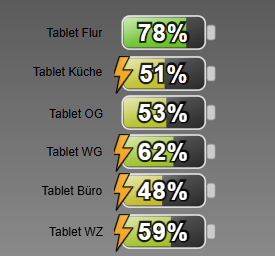
Nochmal Danke für das Script -
@Ro75 Ich habe mal das Script etwas erweitert, damit ich die Batt.Ladung meiner 6 Tablets darstellen kann. Der Bolt ist nun auch dynamisch je nach Tablet. Ich bin sicher das kann man eleganter machen, aber funktioniert.
Ansonsten ist dein Script nahezu unverändert.//Ersteller: Ro75 //Datum: 22.11.2025 //Version: 1.0.19 //Javascript: 8.9.2 //NodeJS: 20.x / 22.x //Stromversorgung Tablets const PF = 'tuya.1.bfae60c4e925ac6395xjeg.1'; // bitte anpassen const PK = 'tuya.1.bf12fc3c00a2407c0ezo9x.1'; // bitte anpassen const POG = 'tuya.1.bf2fb948ad6f4d3915reap.1'; // bitte anpassen const PWG = 'tuya.1.88008560d8f15bd1d73c.1'; // bitte anpassen const PB = 'tuya.1.bf55e3ce44e8927d2actif.1'; // bitte anpassen const PWZ = 'tuya.1.824307882462ab3b0506.1'; // bitte anpassen const Laden = "0_userdata.0.System.Tablet_Batt.Laden" // bitte anpassen //Datenpunkte zur VIS const ZielF = '0_userdata.0.System.Tablet_Batt.Flur'; // bitte anpassen const ZielK = '0_userdata.0.System.Tablet_Batt.Küche'; // bitte anpassen const ZielOG = '0_userdata.0.System.Tablet_Batt.OG'; // bitte anpassen const ZielWG = '0_userdata.0.System.Tablet_Batt.WG'; // bitte anpassen const ZielB = '0_userdata.0.System.Tablet_Batt.Büro'; // bitte anpassen const ZielWZ = '0_userdata.0.System.Tablet_Batt.WZ'; // bitte anpassen //Batt Level der Tablets const LevelF = 'fullybrowser.0.Flur.Info.batteryLevel'; // bitte anpassen const LevelK = 'fullybrowser.0.Küche.Info.batteryLevel'; // bitte anpassen const LevelOG = 'fullybrowser.0.OG.Info.batteryLevel'; // bitte anpassen const LevelWG = 'fullybrowser.0.WG.Info.batteryLevel'; // bitte anpassen const LevelB = 'fullybrowser.0.Büro.Info.batteryLevel'; // bitte anpassen const LevelWZ = 'fullybrowser.0.WZ.Info.batteryLevel'; // bitte anpassen var dValue const batt = [LevelF, LevelK, LevelOG, LevelWG, LevelB, LevelWZ]; on({ id: batt, change: 'any' }, function (dp) { // clamp: sorgt dafür, dass ein Wert nie kleiner als Minimum oder größer als Maximum wird. Nützlich für Prozentwerte. function clamp(v, a, b) { return Math.max(a, Math.min(b, v)); } // uid: erzeugt eine eindeutige ID, damit mehrere SVGs auf derselben Seite ohne Konflikte funktionieren. function uid(prefix = 'id') { return `${prefix}-${Math.random().toString(36).slice(2, 9)}`; } // hslToRgb: wandelt HSL-Farben in RGB um, damit kann später die Helligkeit berechnent werden. function hslToRgb(h, s, l) { s /= 100; l /= 100; const k = n => (n + h / 30) % 12; const a = s * Math.min(l, 1 - l); const f = n => l - a * Math.max(-1, Math.min(k(n) - 3, Math.min(9 - k(n), 1)) ); return [Math.round(255 * f(0)), Math.round(255 * f(8)), Math.round(255 * f(4))]; } // luminance: berechnet die wahrgenommene Helligkeit einer Farbe. Wichtig für gut lesbaren Text. function luminance(r, g, b) { const srgb = [r, g, b].map(c => { c /= 255; return (c <= 0.04045) ? c / 12.92 : Math.pow((c + 0.055) / 1.055, 2.4); }); return 0.2126 * srgb[0] + 0.7152 * srgb[1] + 0.0722 * srgb[2]; } // SAMPLE_POINTS: Tabelle für die Breite des Füllbalkens bei verschiedenen Prozentwerten für harmonische Übergänge. const SAMPLE_POINTS = [ { p: 0, w: 2 }, { p: 5, w: 10 }, { p: 10, w: 19 }, { p: 15, w: 29 }, { p: 20, w: 38 }, { p: 25, w: 48 }, { p: 30, w: 58 }, { p: 35, w: 67 }, { p: 40, w: 77 }, { p: 45, w: 86 }, { p: 50, w: 96 }, { p: 55, w: 106 }, { p: 60, w: 115 }, { p: 65, w: 125 }, { p: 70, w: 134 }, { p: 75, w: 144 }, { p: 80, w: 154 }, { p: 85, w: 163 }, { p: 90, w: 173 }, { p: 95, w: 182 }, { p: 100, w: 192 } ]; // interpolatedWidth: berechnet die Breite des Füllbalkens aus SAMPLE_POINTS, auch Zwischenwerte. function interpolatedWidth(percent) { const p = clamp(percent, 0, 100); for (const s of SAMPLE_POINTS) if (s.p === p) return s.w; let lower = SAMPLE_POINTS[0], upper = SAMPLE_POINTS[SAMPLE_POINTS.length - 1]; for (let i = 0; i < SAMPLE_POINTS.length - 1; i++) { const a = SAMPLE_POINTS[i], b = SAMPLE_POINTS[i + 1]; if (p > a.p && p < b.p) { lower = a; upper = b; break; } if (p === b.p) return b.w; } const t = (p - lower.p) / (upper.p - lower.p); return Math.round(lower.w + t * (upper.w - lower.w)); } // getDynamicLetterSpacing: fügt bei runden Ziffern etwas mehr Abstand ein, damit der Text optisch sauber wirkt. function getDynamicLetterSpacing(text) { const belly = ['0', '3', '6', '8', '9']; const t = String(text ?? ""); const count = [...t].filter(c => belly.includes(c)).length; const spacing = count * 0.04; return spacing === 0 ? null : `${spacing}em`; } // getFillColor: berechnet die Füllfarbe je nach Farbschema und Ladestand. function getFillColor(p, strongColors, colorScheme) { const raw = colorScheme ?? "default"; const scheme = raw.toLowerCase(); // Prüfe auf benutzerdefinierte Farben const isHex = /^#([0-9a-f]{3}|[0-9a-f]{6})$/i.test(raw); const isRgb = /^rgb\(\s*(\d+)\s*,\s*(\d+)\s*,\s*(\d+)\s*\)$/i.test(raw); const isRgba = /^rgba\(\s*(\d+)\s*,\s*(\d+)\s*,\s*(\d+)\s*,\s*((0?\.?\d+)|1|0)\s*\)$/i.test(raw); // ----------------------------------------------------- // BENUTZERDEFINIERTE FARBEN → RGB → HSL → dynamischer Verlauf // ----------------------------------------------------- if (isHex || isRgb || isRgba) { let r, g, b; if (isHex) { let hex = raw.slice(1); if (hex.length === 3) hex = hex.split("").map(x => x + x).join(""); r = parseInt(hex.slice(0, 2), 16); g = parseInt(hex.slice(2, 4), 16); b = parseInt(hex.slice(4, 6), 16); } else { // rgb(...) oder rgba(...) const nums = raw.match(/\d+\.?\d*/g).map(Number); [r, g, b] = nums; } // RGB → HSL const rf = r / 255, gf = g / 255, bf = b / 255; const max = Math.max(rf, gf, bf), min = Math.min(rf, gf, bf); const delta = max - min; let h = 0; if (delta !== 0) { if (max === rf) h = 60 * (((gf - bf) / delta) % 6); else if (max === gf) h = 60 * ((bf - rf) / delta + 2); else h = 60 * ((rf - gf) / delta + 4); } if (h < 0) h += 360; const l = (max + min) / 2; const s = delta === 0 ? 0 : delta / (1 - Math.abs(2 * l - 1)); const hue = Math.round(h); const saturation = Math.round(s * 100); const lightness = strongColors ? (20 + p * 0.25) : (35 + p * 0.3); return `hsl(${hue},${saturation}%,${lightness}%)`; } // ----------------------------------------------------- // STANDARD-SCHEMEN // ----------------------------------------------------- let hue, saturation, lightness; switch (scheme) { case 'green': hue = 120; saturation = strongColors ? 100 : 80; lightness = strongColors ? 25 + p / 4 : 35 + p * 0.3; break; case 'yellow': hue = 50; saturation = strongColors ? 100 : 85; lightness = strongColors ? 25 + p * 0.3 : 35 + p * 0.3; break; case 'blue': hue = 210; saturation = strongColors ? 100 : 75; lightness = strongColors ? 20 + p * 0.25 : 35 + p * 0.3; break; case 'red': hue = 0; saturation = strongColors ? 100 : 75; lightness = strongColors ? 20 + p * 0.25 : 35 + p * 0.3; break; case 'orange': hue = 30; saturation = strongColors ? 100 : 80; lightness = strongColors ? 20 + p * 0.25 : 35 + p * 0.3; break; case 'brown': hue = 25; saturation = strongColors ? 85 : 65; lightness = strongColors ? 20 + p * 0.2 : 25 + p * 0.25; break; case 'grey': hue = 0; saturation = strongColors ? 15 : 0; lightness = strongColors ? 20 + p * 0.4 : 25 + p * 0.4; break; case 'purple': hue = 275; saturation = strongColors ? 95 : 75; lightness = strongColors ? 25 + p * 0.25 : 35 + p * 0.3; break; case 'black': hue = 0; saturation = strongColors ? 10 : 0; lightness = strongColors ? 1 + p * 0.27 : 3 + p * 0.2; break; default: hue = Math.round(p * 1.2); saturation = strongColors ? 100 : 90; lightness = strongColors ? 35 : 50; break; } return `hsl(${hue},${saturation}%,${lightness}%)`; } // getBoltGradientFromScheme: bestimmt den Farbverlauf des Blitzsymbols je nach Schema. function getBoltGradientFromScheme(strongColors, boltColorScheme) { const scheme = ( boltColorScheme === 'default' ? 'default' : (boltColorScheme ?? 'default') ).toLowerCase(); if (scheme === 'default') return ['#f7b23b', '#f59e0b']; let hue, saturation; switch (scheme) { case 'green': hue = 120; saturation = strongColors ? 100 : 80; break; case 'yellow': hue = 50; saturation = strongColors ? 100 : 85; break; case 'blue': hue = 210; saturation = strongColors ? 100 : 75; break; case 'red': hue = 0; saturation = strongColors ? 100 : 75; break; case 'orange': hue = 30; saturation = strongColors ? 100 : 80; break; case 'brown': hue = 25; saturation = strongColors ? 85 : 65; break; case 'grey': hue = 0; saturation = strongColors ? 15 : 0; break; case 'purple': hue = 275; saturation = strongColors ? 95 : 75; break; case 'black': hue = 0; saturation = strongColors ? 10 : 0; break; default: hue = 45; saturation = 100; break; } const lightLow = strongColors ? 25 : 40; const lightHigh = strongColors ? 65 : 70; return [`hsl(${hue},${saturation}%,${lightHigh}%)`, `hsl(${hue},${saturation}%,${lightLow}%)`]; } // parseRightBackground: prüft, ob ein rechter Hintergrund gesetzt ist oder 'default' (dann keiner). function parseRightBackground(value) { if (!value || value === "default") return null; return value; } // generateBatterySvg: Hauptfunktion, erzeugt das komplette Batterie-SVG inklusive Form, Text, Farben, Blitz und Effekten. function generateBatterySvg( percent, decimalPlaces = 0, labelSuffix = '%', customLabel = null, showPercent = true, strongColors = false, colorScheme = 'default', showBolt = true, boltPos = 100, blinkBolt = true, boltColorScheme = 'default', rightBackground = 'default' ) { const raw = Number(percent); const p = clamp(Number.isFinite(raw) ? raw : 0, 0, 100); const viewBoxW = 264, viewBoxH = 129; const outer = { x: 20, y: 24, w: 200, h: 80, rx: 18 }; const inner = { x: 24, y: 28, h: 72, rx: 12 }; const maxInnerWidth = 192; const fillW = interpolatedWidth(p); const fillColor = getFillColor(p, strongColors, colorScheme); const rightCustom = parseRightBackground(rightBackground); const rightStartX = inner.x + fillW; const rightWidth = maxInnerWidth - fillW; const nums = (fillColor.match(/-?\d+(\.\d+)?/g) || []).map(Number); const [hVal = 0, sVal = 0, lVal = 50] = nums; const [r, g, b] = hslToRgb(hVal, sVal, lVal); const lum = luminance(r, g, b); const textFill = lum > 0.55 ? '#000' : '#fff'; const outlineColor = (textFill === '#fff') ? 'rgba(0,0,0,0.85)' : 'rgba(255,255,255,0.95)'; const formattedValue = Number(p).toFixed(decimalPlaces); const formattedTrimmed = decimalPlaces === 0 ? String(Math.round(Number(formattedValue))) : formattedValue; const displayText = customLabel ?? `${formattedTrimmed}${labelSuffix}`; const fontSize = Math.max(12, Math.round(inner.h * 0.33 * 2.25 * 1.10)); const textCenterX = inner.x + maxInnerWidth / 2; const textCenterY = inner.y + inner.h / 2; const TEXT_DY_EM = 0.35; const contact = { x: 224, y: 46, w: 20, h: 36 }; const contactCenterY = contact.y + contact.h / 2; const boltViewBox = { w: 102.7, h: 186.8 }; const boltTargetH = outer.h * 1.7; const boltScale = boltTargetH / boltViewBox.h; const boltOffsetY = contactCenterY + 26; const clampedBoltPos = clamp(boltPos, 0, 100); const boltMinX = -37.0; const boltMaxX = 185.0; const boltX = boltMinX + (boltMaxX - boltMinX) * (clampedBoltPos / 100); const boltTransform = ` translate(${boltX}, ${boltOffsetY}) scale(${boltScale}) translate(${-boltViewBox.w / 2}, ${-boltViewBox.h / 2}) `.trim(); const id = uid('b'); const boltAnimation = blinkBolt ? ` <style> @keyframes blinkBolt-${id} { 0%, 100% { opacity: 1; } 50% { opacity: 0.6; } } .blinking-bolt-${id} { animation: blinkBolt-${id} 1.8s ease-in-out infinite; } </style>` : ''; const boltClass = blinkBolt ? `blinking-bolt-${id}` : ''; const [boltColorLight, boltColorDark] = getBoltGradientFromScheme(strongColors, boltColorScheme); const dynamicLetterSpacing = getDynamicLetterSpacing(displayText); const letterSpacingAttr = dynamicLetterSpacing ? `letter-spacing="${dynamicLetterSpacing}"` : ''; return ` <svg xmlns="http://www.w3.org/2000/svg" viewBox="0 0 ${viewBoxW} ${viewBoxH}" width="100%" height="100%" preserveAspectRatio="xMidYMid meet"> ${boltAnimation} <defs> <linearGradient id="glass-${id}" x1="0" y1="0" x2="0" y2="1"> <stop offset="0%" stop-color="#ffffff" stop-opacity="0.80"/> <stop offset="100%" stop-color="#ffffff" stop-opacity="0.10"/> </linearGradient> <linearGradient id="diagGlass-${id}" x1="0" y1="0" x2="1" y2="1"> <stop offset="0%" stop-color="#ffffff" stop-opacity="0.75"/> <stop offset="45%" stop-color="#ffffff" stop-opacity="0.22"/> <stop offset="100%" stop-color="#ffffff" stop-opacity="0.03"/> </linearGradient> <pattern id="stripes-${id}" width="8" height="8" patternUnits="userSpaceOnUse"> <rect width="8" height="8" fill="transparent"/> <path d="M-1,6 l8,-6 M-1,10 l8,-6" stroke="#fff" stroke-opacity="0.08" stroke-width="1"/> </pattern> <clipPath id="clip-fill-${id}"> <rect x="${inner.x}" y="${inner.y}" width="${maxInnerWidth}" height="${inner.h}" rx="${inner.rx}" ry="${inner.rx}" /> </clipPath> <linearGradient id="boltGradient-${id}" x1="0" y1="0" x2="0" y2="1"> <stop offset="0%" stop-color="${boltColorLight}"/> <stop offset="100%" stop-color="${boltColorDark}"/> </linearGradient> <symbol id="boltSymbol-${id}" viewBox="0 0 102.7 186.8"> <path fill="url(#boltGradient-${id})" stroke="#000" stroke-width="6" stroke-linejoin="round" d="m34.8 2-32 96h32l-16 80 80-112h-48l32-64h-48z"/> </symbol> </defs> <!-- ÄUSSERER RAHMEN --> <rect x="${outer.x}" y="${outer.y}" width="${outer.w}" height="${outer.h}" rx="${outer.rx}" fill="#222" stroke="#ddd" stroke-width="4"/> <!-- FÜLLBEREICH LINKS (universeller Fix) --> ${fillW >= maxInnerWidth ? `<rect x="${inner.x}" y="${inner.y}" width="${maxInnerWidth}" height="${inner.h}" rx="${inner.rx}" ry="${inner.rx}" fill="${fillColor}"/>` : ( fillW > 0 ? `<path d=" M ${inner.x + inner.rx} ${inner.y} L ${inner.x + fillW} ${inner.y} L ${inner.x + fillW} ${inner.y + inner.h} L ${inner.x + inner.rx} ${inner.y + inner.h} A ${inner.rx} ${inner.rx} 0 0 1 ${inner.x} ${inner.y + inner.h - inner.rx} L ${inner.x} ${inner.y + inner.rx} A ${inner.rx} ${inner.rx} 0 0 1 ${inner.x + inner.rx} ${inner.y} Z" fill="${fillColor}"/>` : "" ) } <!-- RECHTE HINTERGRUNDHÄLFTE --> ${rightBackground === "default" || fillW >= maxInnerWidth ? "" : (rightWidth > 0 ? `<path d="M ${rightStartX} ${inner.y} L ${rightStartX + rightWidth - inner.rx} ${inner.y} A ${inner.rx} ${inner.rx} 0 0 1 ${rightStartX + rightWidth} ${inner.y + inner.rx} L ${rightStartX + rightWidth} ${inner.y + inner.h - inner.rx} A ${inner.rx} ${inner.rx} 0 0 1 ${rightStartX + rightWidth - inner.rx} ${inner.y + inner.h} L ${rightStartX} ${inner.y + inner.h} Z" fill="${rightCustom}"/>` : "") } <!-- GLAS UND TEXTURIERUNG --> <g clip-path="url(#clip-fill-${id})"> <rect x="${inner.x}" y="${inner.y}" width="${fillW}" height="${inner.h}" fill="url(#stripes-${id})" opacity="0.95"/> <rect x="${inner.x}" y="${inner.y}" width="${fillW}" height="${inner.h}" fill="url(#glass-${id})" opacity="0.25"/> </g> <!-- DIAGONALER GLASEFFEKT --> <rect x="${outer.x}" y="${outer.y}" width="${outer.w}" height="${outer.h}" rx="${outer.rx}" fill="url(#diagGlass-${id})" opacity="0.9"/> <!-- KONTAKT --> <rect x="224" y="46" width="20" height="36" rx="6" fill="#ccc" stroke="#888" stroke-width="2"/> <!-- BLITZ --> ${showBolt ? `<use href="#boltSymbol-${id}" class="${boltClass}" transform="${boltTransform}"/>` : ""} <!-- TEXT --> ${showPercent ? `<g transform="translate(${textCenterX}, ${textCenterY})"> <text text-anchor="middle" font-family="Arial, Helvetica, sans-serif" font-size="${fontSize}" font-weight="700" fill="${textFill}" stroke="${outlineColor}" stroke-width="${Math.max(2, Math.round(fontSize * 0.15))}" paint-order="stroke" dy="${TEXT_DY_EM}em" ${letterSpacingAttr}> ${displayText} </text> </g>` : "" } </svg> `.trim(); } switch (dp.id.split('.')[2]) { case 'Flur': if (getState(PF).val == true) { setState(Laden, true) } else { setState(Laden, false) } break; case 'Küche': if (getState(PK).val == true) { setState(Laden, true) } else { setState(Laden, false) } break; case 'OG': if (getState(POG).val == true) { setState(Laden, true) } else { setState(Laden, false) } break; case 'WG': if (getState(PWG).val == true) { setState(Laden, true) } else { setState(Laden, false) } break; case 'Büro': if (getState(PB).val == true) { setState(Laden, true) } else { setState(Laden, false) } break; case 'WZ': if (getState(PWZ).val == true) { setState(Laden, true) } else { setState(Laden, false) } break; ; }; const decimalPlaces = 0; // bitte anpassen const labelSuffix = '%'; // bitte anpassen const customLabel = null; // bitte anpassen const showPercent = true; // bitte anpassen, z.B. Datenpunkt für zentrale Festlegung const strongColors = true; // bitte anpassen, z.B. Datenpunkt für zentrale Festlegung const colorScheme = 'default'; // bitte anpassen, z.B. Datenpunkt für zentrale Festlegung const showBolt = getState(Laden).val; // bitte anpassen, z.B. Datenpunkt für zentrale Festlegung //const showBolt = false; // bitte anpassen, z.B. Datenpunkt für zentrale Festlegung const boltPos = 0; // bitte anpassen, z.B. Datenpunkt für zentrale Festlegung const blinkBolt = true; // bitte anpassen const boltColorScheme = 'default'; // bitte anpassen, z.B. Datenpunkt für zentrale Festlegung const rightBackground = 'default'; // bitte anpassen, z.B. Datenpunkt für zentrale Festlegung //Funktionsaufruf mit Speicherung der SVG in einen Datenpunkt switch (dp.id.split('.')[2]) { case 'Flur': dValue = getState(LevelF).val; setState(ZielF, generateBatterySvg(dValue, decimalPlaces, labelSuffix, customLabel, showPercent, strongColors, colorScheme, showBolt, boltPos, blinkBolt, boltColorScheme, rightBackground), true); break; case 'Küche': dValue = getState(LevelK).val; setState(ZielK, generateBatterySvg(dValue, decimalPlaces, labelSuffix, customLabel, showPercent, strongColors, colorScheme, showBolt, boltPos, blinkBolt, boltColorScheme, rightBackground), true); break; case 'OG': dValue = getState(LevelOG).val; setState(ZielOG, generateBatterySvg(dValue, decimalPlaces, labelSuffix, customLabel, showPercent, strongColors, colorScheme, showBolt, boltPos, blinkBolt, boltColorScheme, rightBackground), true); break; case 'WG': dValue = getState(LevelWG).val; setState(ZielWG, generateBatterySvg(dValue, decimalPlaces, labelSuffix, customLabel, showPercent, strongColors, colorScheme, showBolt, boltPos, blinkBolt, boltColorScheme, rightBackground), true); break; case 'Büro': dValue = getState(LevelB).val; setState(ZielB, generateBatterySvg(dValue, decimalPlaces, labelSuffix, customLabel, showPercent, strongColors, colorScheme, showBolt, boltPos, blinkBolt, boltColorScheme, rightBackground), true); break; case 'WZ': dValue = getState(LevelWZ).val; setState(ZielWZ, generateBatterySvg(dValue, decimalPlaces, labelSuffix, customLabel, showPercent, strongColors, colorScheme, showBolt, boltPos, blinkBolt, boltColorScheme, rightBackground), true); break; ; }; log((dp.id.split('.')[2]) + " " + dp.state.val + " %") });
Nochmal Danke für das Script@michihorn am skript hättest du gar nichts ändern oder anpassen brauchen. du hättest nur die funktion mit den unterschiedlichen parametern mehrfach aufrufen müssen, sprich unterschiedlihe zieldatenpunkte und datenpunkte mit den werten zur ladung.
Ro75.
-
@michihorn am skript hättest du gar nichts ändern oder anpassen brauchen. du hättest nur die funktion mit den unterschiedlichen parametern mehrfach aufrufen müssen, sprich unterschiedlihe zieldatenpunkte und datenpunkte mit den werten zur ladung.
Ro75.
-
Hinweis für alle Nutzer des Scripts:
Sollte es bei einzelnen Nutzern Probleme mit der Darstellung der Schriftgröße des Batteriestands geben (z. B. wenn die Schrift zu klein angezeigt wird), könnt ihr das mit folgender kleiner Anpassung beheben:
Sucht im Script nach dieser Zeile (zu finden fast am Ende):
font-size="${fontSize}"und ersetzt diese durch:
style="font-size:${fontSize}px !important"Da dieser Anzeigefehler nur sehr selten auftritt, habe ich das Script im ersten Beitrag noch nicht offiziell angepasst. Dieser Hinweis dient als schnelle Lösung für Betroffene.
Viele Grüße
Ro75

Hey! Du scheinst an dieser Unterhaltung interessiert zu sein, hast aber noch kein Konto.
Hast du es satt, bei jedem Besuch durch die gleichen Beiträge zu scrollen? Wenn du dich für ein Konto anmeldest, kommst du immer genau dorthin zurück, wo du zuvor warst, und kannst dich über neue Antworten benachrichtigen lassen (entweder per E-Mail oder Push-Benachrichtigung). Du kannst auch Lesezeichen speichern und Beiträge positiv bewerten, um anderen Community-Mitgliedern deine Wertschätzung zu zeigen.
Mit deinem Input könnte dieser Beitrag noch besser werden 💗
Registrieren AnmeldenSupport us
208
Online33.0k
Benutzer83.6k
Themen1.3m
Beiträge