




Test Adapter Midea Geräten v1.x.x


-
@hoschi2007 also, wenn deine Klimaanlage mit einer der folgenden Apps funktioniert
- Midea Air
- NetHome Plus
- Smarthome (ehemals MSmartHome)
- Ariston Clima
Sollte es gehen, die App würde sich mit dem Account der App alles notwendige holen.
Wenn du
- Geräte-ID
- IP
- Token
- Key
deiner Anlagen hast, dann könntest du diese Dinge auch manuell im Adapter eintragen
@tombox könnte beantworten ob der Adapter auch ganz ohne Account funktionieren würde, nur mit lokal eingetragenen Geräten?
-
@BananaJoe theoretisch ja aber ist eher schwer alle die information zu haben
@tombox naja, eine der beiden CLI-Tools hatte die damals ausgeworfen.
Laut meiner Bash-History was es vermutlich https://pypi.org/project/msmart-ng/
mit dem Befehlmsmart-ng discover -
Eine kleine Sache ist mir noch aufgefallen, es fehlt der Datenpunkt "Tank voll" beim Entfeuchter.
War früher
midea.0.152832116580279.tank_fullkann man den wieder einbauen?
Grüße
midea.0.152832116580279.tank_full
Zeig mal einen Screenshot der Datenpunkte unterhalb von
midea.0.152832116580279.status.bzw. suche dort mal, ich schätze der taucht dort auf.
Ich vermute mal das der Adapter die Datenpunkte nicht extra eingeimpft bekommt sondern immer alles darstellt was er ermitteln kann, getrennt nach Anzeige (status) und Steuerungsmöglichkeiten (control).
Untermidea.0.xxxx.capabilitiesist vermutlich was das Gerät alles kannioBroker@Ubuntu 24.04 LTS (Proxmox VM) für: >260 Geräte, 6 Switche, 7 AP, 10 IP-Cam, 1 NAS 42TB, 1 Proxmox 128GB 15TB, 2 Proxmox 32GB 1TB, 1 Hyper-V 52GB 42TB, 14 x Echo, 5x FireTV, 5 x Tablett/Handy VIS || >=160 Tasmota/Shelly || >=95 ZigBee || PV 8.1kW / Akku 14kWh || 2x USV APC 750W kaskadiert || Kobra S1 Max
-
midea.0.152832116580279.tank_full
Zeig mal einen Screenshot der Datenpunkte unterhalb von
midea.0.152832116580279.status.bzw. suche dort mal, ich schätze der taucht dort auf.
Ich vermute mal das der Adapter die Datenpunkte nicht extra eingeimpft bekommt sondern immer alles darstellt was er ermitteln kann, getrennt nach Anzeige (status) und Steuerungsmöglichkeiten (control).
Untermidea.0.xxxx.capabilitiesist vermutlich was das Gerät alles kann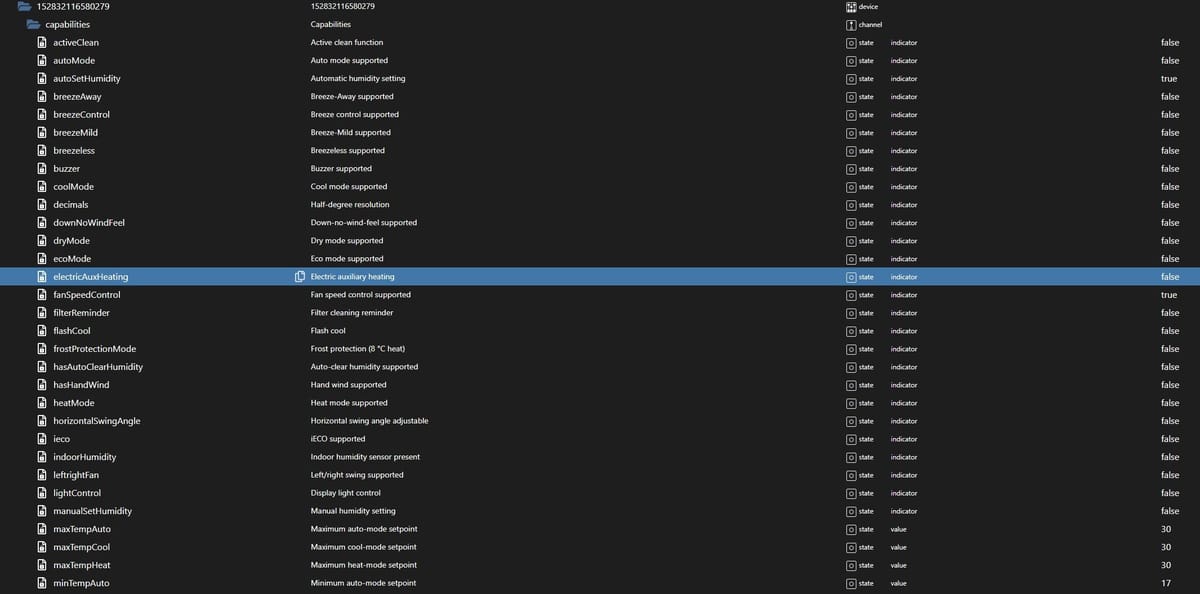
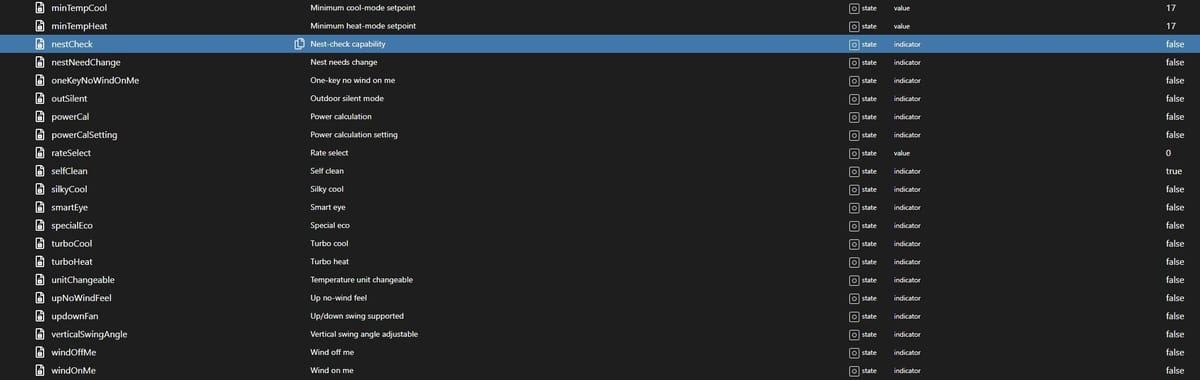
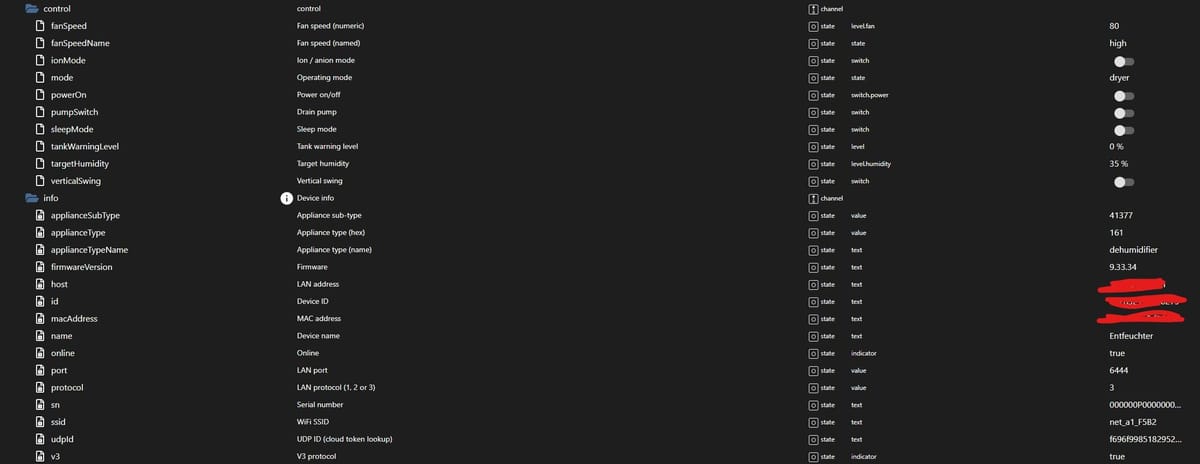
Ich konnte ihn nicht finden, er einzige ist TankWarningLevel aber hier ändert sich nichts wenn der Tank voll ist.
Grüße
-
Ich konnte ihn nicht finden, er einzige ist TankWarningLevel aber hier ändert sich nichts wenn der Tank voll ist.
Grüße
-
Ich konnte ihn nicht finden, er einzige ist TankWarningLevel aber hier ändert sich nichts wenn der Tank voll ist.
Grüße
@MichaelF genau, von Status sind ja keine Bilder dabei.
Bei meinem Luftentfeuchte im Bad (nicht von Midea) nutze ich inzwischen übrigens inzwischen das hier:
ioBroker@Ubuntu 24.04 LTS (Proxmox VM) für: >260 Geräte, 6 Switche, 7 AP, 10 IP-Cam, 1 NAS 42TB, 1 Proxmox 128GB 15TB, 2 Proxmox 32GB 1TB, 1 Hyper-V 52GB 42TB, 14 x Echo, 5x FireTV, 5 x Tablett/Handy VIS || >=160 Tasmota/Shelly || >=95 ZigBee || PV 8.1kW / Akku 14kWh || 2x USV APC 750W kaskadiert || Kobra S1 Max
-
@MichaelF
relevant sind ja die status felder
<id>.status.tankLevel (Wert: 0)
<id>.status.tankFull (Wert: false)
<id>.status.tankWarningLevel (Wert: 0) -
@MichaelF genau, von Status sind ja keine Bilder dabei.
Bei meinem Luftentfeuchte im Bad (nicht von Midea) nutze ich inzwischen übrigens inzwischen das hier:
Danke für den Tipp, das schau ich mir näher an. Hätte sogar ein Abfluss in der Nähe.
-
hallo zusammen,
ich versuche gerade meine midea Waschmaschine in den Adapter zu bekommen. Anmeldung im Adapter scheint zu funktionieren, aber er findet keine Waschmaschine.
hier das Debug-Protokoll. Vielleicht kann jemand etwas damit anfangen.
Ach so, Router ist eine Fritzbox und iobroker läuft auf einer VM auf Synology.Gruß
Holgermidea.0 2026-06-01 20:35:26.352 info Discovery summary: cloud=1, lan=0, both=0, registered=0 cloud-only=[153931629356384] midea.0 2026-06-01 20:35:26.352 warn Appliance 153931629356384 (Trommelwaschmaschine) is bound to the cloud account but did not respond to LAN discovery — control requires a local broadcast domain, or UDP/6445 is firewalled. midea.0 2026-06-01 20:35:26.351 warn LAN discovery found 0 appliance(s) — your ioBroker host is not on the same broadcast domain as the appliance, or UDP 6445 is firewalled. Across VLANs you need a UDP broadcast relay (e.g. udpbroadcastrelay). midea.0 2026-06-01 20:35:26.350 debug discover: finished, 0 appliance(s) midea.0 2026-06-01 20:35:21.354 debug discover: tx 72B -> 192.168.178.170:20086 via ens3(192.168.178.67/24) midea.0 2026-06-01 20:35:21.354 debug discover: tx 72B -> 192.168.178.170:6445 via ens3(192.168.178.67/24) midea.0 2026-06-01 20:35:21.354 debug discover: tx 72B -> 192.168.178.255:20086 via ens3(192.168.178.67/24) midea.0 2026-06-01 20:35:21.352 debug discover: tx 72B -> 192.168.178.255:6445 via ens3(192.168.178.67/24) midea.0 2026-06-01 20:35:21.347 debug discover: starting UDP broadcast targets=[192.168.178.255,192.168.178.170] ports=[6445,20086] timeoutMs=5000 midea.0 2026-06-01 20:35:21.346 debug discover: local interfaces: ens3(192.168.178.67/24->192.168.178.255) midea.0 2026-06-01 20:35:21.341 info LAN discovery: also unicast-probing configured device IPs [192.168.178.170] midea.0 2026-06-01 20:35:21.340 debug LAN discovery: broadcasting to [192.168.178.255] on UDP/6445+20086 midea.0 2026-06-01 20:35:21.335 debug cloud: id=153931629356384 name="Trommelwaschmaschine" type=0xdb online=false midea.0 2026-06-01 20:35:21.329 info Cloud listing: 1 appliance(s) midea.0 2026-06-01 20:35:21.315 debug CloudClient: listAppliances -> 1 appliance(s) midea.0 2026-06-01 20:35:21.315 debug CloudClient: /v1/appliance/user/list/get reply code=0 msg=ok midea.0 2026-06-01 20:35:20.838 debug CloudClient: POST /v1/appliance/user/list/get bodyLen=142 hasToken=true midea.0 2026-06-01 20:35:20.837 debug CloudClient: listAppliances() midea.0 2026-06-01 20:35:20.837 debug CloudClient: authenticated (uid=413423784d0150b8bb37c0c3540a78ef) midea.0 2026-06-01 20:35:20.836 debug CloudClient: /mj/user/login reply code=0 msg=成功 midea.0 2026-06-01 20:35:15.390 debug CloudClient: POST /mj/user/login bodyLen=729 hasToken=false midea.0 2026-06-01 20:35:15.388 debug CloudClient: /v1/user/login/id/get reply code=0 msg=OK midea.0 2026-06-01 20:35:15.045 debug CloudClient: POST /v1/user/login/id/get bodyLen=211 hasToken=false midea.0 2026-06-01 20:35:15.044 debug CloudClient: re-route confirmed mp-prod.appsmb.com midea.0 2026-06-01 20:35:15.044 debug CloudClient: /v1/multicloud/platform/user/route reply code=0 msg=ok midea.0 2026-06-01 20:35:14.599 debug CloudClient: POST /v1/multicloud/platform/user/route bodyLen=239 hasToken=false midea.0 2026-06-01 20:35:14.595 debug Midea adapter starting up, poll interval=30 s midea.0 2026-06-01 20:35:13.230 info starting. Version 1.8.3 (non-npm: TA2k/ioBroker.midea) in /opt/iobroker/node_modules/iobroker.midea, node: v22.22.2, js-controller: 7.0.7 -
hallo zusammen,
ich versuche gerade meine midea Waschmaschine in den Adapter zu bekommen. Anmeldung im Adapter scheint zu funktionieren, aber er findet keine Waschmaschine.
hier das Debug-Protokoll. Vielleicht kann jemand etwas damit anfangen.
Ach so, Router ist eine Fritzbox und iobroker läuft auf einer VM auf Synology.Gruß
Holgermidea.0 2026-06-01 20:35:26.352 info Discovery summary: cloud=1, lan=0, both=0, registered=0 cloud-only=[153931629356384] midea.0 2026-06-01 20:35:26.352 warn Appliance 153931629356384 (Trommelwaschmaschine) is bound to the cloud account but did not respond to LAN discovery — control requires a local broadcast domain, or UDP/6445 is firewalled. midea.0 2026-06-01 20:35:26.351 warn LAN discovery found 0 appliance(s) — your ioBroker host is not on the same broadcast domain as the appliance, or UDP 6445 is firewalled. Across VLANs you need a UDP broadcast relay (e.g. udpbroadcastrelay). midea.0 2026-06-01 20:35:26.350 debug discover: finished, 0 appliance(s) midea.0 2026-06-01 20:35:21.354 debug discover: tx 72B -> 192.168.178.170:20086 via ens3(192.168.178.67/24) midea.0 2026-06-01 20:35:21.354 debug discover: tx 72B -> 192.168.178.170:6445 via ens3(192.168.178.67/24) midea.0 2026-06-01 20:35:21.354 debug discover: tx 72B -> 192.168.178.255:20086 via ens3(192.168.178.67/24) midea.0 2026-06-01 20:35:21.352 debug discover: tx 72B -> 192.168.178.255:6445 via ens3(192.168.178.67/24) midea.0 2026-06-01 20:35:21.347 debug discover: starting UDP broadcast targets=[192.168.178.255,192.168.178.170] ports=[6445,20086] timeoutMs=5000 midea.0 2026-06-01 20:35:21.346 debug discover: local interfaces: ens3(192.168.178.67/24->192.168.178.255) midea.0 2026-06-01 20:35:21.341 info LAN discovery: also unicast-probing configured device IPs [192.168.178.170] midea.0 2026-06-01 20:35:21.340 debug LAN discovery: broadcasting to [192.168.178.255] on UDP/6445+20086 midea.0 2026-06-01 20:35:21.335 debug cloud: id=153931629356384 name="Trommelwaschmaschine" type=0xdb online=false midea.0 2026-06-01 20:35:21.329 info Cloud listing: 1 appliance(s) midea.0 2026-06-01 20:35:21.315 debug CloudClient: listAppliances -> 1 appliance(s) midea.0 2026-06-01 20:35:21.315 debug CloudClient: /v1/appliance/user/list/get reply code=0 msg=ok midea.0 2026-06-01 20:35:20.838 debug CloudClient: POST /v1/appliance/user/list/get bodyLen=142 hasToken=true midea.0 2026-06-01 20:35:20.837 debug CloudClient: listAppliances() midea.0 2026-06-01 20:35:20.837 debug CloudClient: authenticated (uid=413423784d0150b8bb37c0c3540a78ef) midea.0 2026-06-01 20:35:20.836 debug CloudClient: /mj/user/login reply code=0 msg=成功 midea.0 2026-06-01 20:35:15.390 debug CloudClient: POST /mj/user/login bodyLen=729 hasToken=false midea.0 2026-06-01 20:35:15.388 debug CloudClient: /v1/user/login/id/get reply code=0 msg=OK midea.0 2026-06-01 20:35:15.045 debug CloudClient: POST /v1/user/login/id/get bodyLen=211 hasToken=false midea.0 2026-06-01 20:35:15.044 debug CloudClient: re-route confirmed mp-prod.appsmb.com midea.0 2026-06-01 20:35:15.044 debug CloudClient: /v1/multicloud/platform/user/route reply code=0 msg=ok midea.0 2026-06-01 20:35:14.599 debug CloudClient: POST /v1/multicloud/platform/user/route bodyLen=239 hasToken=false midea.0 2026-06-01 20:35:14.595 debug Midea adapter starting up, poll interval=30 s midea.0 2026-06-01 20:35:13.230 info starting. Version 1.8.3 (non-npm: TA2k/ioBroker.midea) in /opt/iobroker/node_modules/iobroker.midea, node: v22.22.2, js-controller: 7.0.7Da wirst du wohl den genannten Port erreichbar machen müssen.
-
habe ich mit schon gedacht, aber wo? Fritzbox oder wo anders?
-
habe ich mit schon gedacht, aber wo? Fritzbox oder wo anders?
Schau dir das Log an. Am besten aber halt das richtige, chronologisch sinnvoll aufgeführte
iob logsDann müsstest du dir das selber beantworten können.
-
hallo zusammen,
ich versuche gerade meine midea Waschmaschine in den Adapter zu bekommen. Anmeldung im Adapter scheint zu funktionieren, aber er findet keine Waschmaschine.
hier das Debug-Protokoll. Vielleicht kann jemand etwas damit anfangen.
Ach so, Router ist eine Fritzbox und iobroker läuft auf einer VM auf Synology.Gruß
Holgermidea.0 2026-06-01 20:35:26.352 info Discovery summary: cloud=1, lan=0, both=0, registered=0 cloud-only=[153931629356384] midea.0 2026-06-01 20:35:26.352 warn Appliance 153931629356384 (Trommelwaschmaschine) is bound to the cloud account but did not respond to LAN discovery — control requires a local broadcast domain, or UDP/6445 is firewalled. midea.0 2026-06-01 20:35:26.351 warn LAN discovery found 0 appliance(s) — your ioBroker host is not on the same broadcast domain as the appliance, or UDP 6445 is firewalled. Across VLANs you need a UDP broadcast relay (e.g. udpbroadcastrelay). midea.0 2026-06-01 20:35:26.350 debug discover: finished, 0 appliance(s) midea.0 2026-06-01 20:35:21.354 debug discover: tx 72B -> 192.168.178.170:20086 via ens3(192.168.178.67/24) midea.0 2026-06-01 20:35:21.354 debug discover: tx 72B -> 192.168.178.170:6445 via ens3(192.168.178.67/24) midea.0 2026-06-01 20:35:21.354 debug discover: tx 72B -> 192.168.178.255:20086 via ens3(192.168.178.67/24) midea.0 2026-06-01 20:35:21.352 debug discover: tx 72B -> 192.168.178.255:6445 via ens3(192.168.178.67/24) midea.0 2026-06-01 20:35:21.347 debug discover: starting UDP broadcast targets=[192.168.178.255,192.168.178.170] ports=[6445,20086] timeoutMs=5000 midea.0 2026-06-01 20:35:21.346 debug discover: local interfaces: ens3(192.168.178.67/24->192.168.178.255) midea.0 2026-06-01 20:35:21.341 info LAN discovery: also unicast-probing configured device IPs [192.168.178.170] midea.0 2026-06-01 20:35:21.340 debug LAN discovery: broadcasting to [192.168.178.255] on UDP/6445+20086 midea.0 2026-06-01 20:35:21.335 debug cloud: id=153931629356384 name="Trommelwaschmaschine" type=0xdb online=false midea.0 2026-06-01 20:35:21.329 info Cloud listing: 1 appliance(s) midea.0 2026-06-01 20:35:21.315 debug CloudClient: listAppliances -> 1 appliance(s) midea.0 2026-06-01 20:35:21.315 debug CloudClient: /v1/appliance/user/list/get reply code=0 msg=ok midea.0 2026-06-01 20:35:20.838 debug CloudClient: POST /v1/appliance/user/list/get bodyLen=142 hasToken=true midea.0 2026-06-01 20:35:20.837 debug CloudClient: listAppliances() midea.0 2026-06-01 20:35:20.837 debug CloudClient: authenticated (uid=413423784d0150b8bb37c0c3540a78ef) midea.0 2026-06-01 20:35:20.836 debug CloudClient: /mj/user/login reply code=0 msg=成功 midea.0 2026-06-01 20:35:15.390 debug CloudClient: POST /mj/user/login bodyLen=729 hasToken=false midea.0 2026-06-01 20:35:15.388 debug CloudClient: /v1/user/login/id/get reply code=0 msg=OK midea.0 2026-06-01 20:35:15.045 debug CloudClient: POST /v1/user/login/id/get bodyLen=211 hasToken=false midea.0 2026-06-01 20:35:15.044 debug CloudClient: re-route confirmed mp-prod.appsmb.com midea.0 2026-06-01 20:35:15.044 debug CloudClient: /v1/multicloud/platform/user/route reply code=0 msg=ok midea.0 2026-06-01 20:35:14.599 debug CloudClient: POST /v1/multicloud/platform/user/route bodyLen=239 hasToken=false midea.0 2026-06-01 20:35:14.595 debug Midea adapter starting up, poll interval=30 s midea.0 2026-06-01 20:35:13.230 info starting. Version 1.8.3 (non-npm: TA2k/ioBroker.midea) in /opt/iobroker/node_modules/iobroker.midea, node: v22.22.2, js-controller: 7.0.7@Holger-Etzel Selbst die cloud meldet das Gerät als offline. ist es denn wirklich aktiv erreichbar?
-
Ich versuche gerade meine Klimaanlagen im Adapter zum laufen zu bekommen.
ich bekomme immer die Fehlermeldung-
Cloud listAppliances failed: CloudClient: Account or password incorrect, please re-enter (code=3102) -
-
die Zugangsdaten sind korrekt
-
Klimaanlagen sind sehr wahrscheinlich V1
-
ich benutze die SmartHome App > da sind die beiden Klimaanlagen zu sehen und können gesteuert werden
hat jemand noch eine Idee woran es liegen könnte?
-
-
Ich versuche gerade meine Klimaanlagen im Adapter zum laufen zu bekommen.
ich bekomme immer die Fehlermeldung-
Cloud listAppliances failed: CloudClient: Account or password incorrect, please re-enter (code=3102) -
-
die Zugangsdaten sind korrekt
-
Klimaanlagen sind sehr wahrscheinlich V1
-
ich benutze die SmartHome App > da sind die beiden Klimaanlagen zu sehen und können gesteuert werden
hat jemand noch eine Idee woran es liegen könnte?
Ich antworte mir mal selber.
Das Problem mit dem Account lag an der MSmartHome App.
Den Account habe ich migriert von der MideaAir App > geht alles automatisch.
In meinem Profil wurde der "Registrierungsbereich" auf USA gestellt.
Das kann man in der App nicht selber ändern.Lösung: neuen Account einrichten und auf Deutschland stellen.
- nicht die "Region" sondern "Registrierungsbereich" im Profil
-
-
ich bekomme meine Midea Klimaanlagen nicht in den Adapter eingebunden.
- Klimaanlagen sind wohl V1
- Midea Air, MSmartHome und NetHome
-- in allen App´s sind die Klimaanlagen erreichbar und steuerbar
- Im Adapter steht "V1-Firmware-Geräte im LAN werden nicht unterstützt"
- in GitHub steht "V1 and V2 appliances run cloudless"
Wie werden die V1 den jetzt angesprochen?
der Objektbaum baut sich nicht wirklich auf. Nur den Ordner Info gibt es.
midea.0 2026-06-13 12:27:35.175 info Discovery summary: cloud=1, lan=0, both=0, registered=0 cloud-only=[31885837210977] midea.0 2026-06-13 12:27:35.175 warn Appliance 31885837210977 (Wohnzimmer) is bound to the cloud account but did not respond to LAN discovery — control requires a local broadcast domain, or UDP/6445 is firewalled. midea.0 2026-06-13 12:27:35.175 warn LAN discovery found 0 appliance(s) — your ioBroker host is not on the same broadcast domain as the appliance, or UDP 6445 is firewalled. Across VLANs you need a UDP broadcast relay (e.g. udpbroadcastrelay). midea.0 2026-06-13 12:27:35.175 debug discover: finished, 0 appliance(s) midea.0 2026-06-13 12:27:30.433 debug discover: rx 120B from 192.168.0.160:6445 via eth0(192.168.0.53/24) midea.0 2026-06-13 12:27:30.175 debug discover: tx 72B -> 192.168.0.255:20086 via eth0(192.168.0.53/24) midea.0 2026-06-13 12:27:30.174 debug discover: tx 72B -> 192.168.0.255:6445 via eth0(192.168.0.53/24) midea.0 2026-06-13 12:27:30.173 debug discover: starting UDP broadcast targets=[192.168.0.255] ports=[6445,20086] timeoutMs=5000 midea.0 2026-06-13 12:27:30.173 debug discover: local interfaces: eth0(192.168.0.53/24->192.168.0.255) midea.0 2026-06-13 12:27:30.172 debug LAN discovery: broadcasting to [192.168.0.255] on UDP/6445+20086 midea.0 2026-06-13 12:27:30.172 debug cloud: id=31885837210977 name="Wohnzimmer" type=0xac online=true midea.0 2026-06-13 12:27:30.172 info Cloud listing: 1 appliance(s) midea.0 2026-06-13 12:27:30.087 debug CloudClientV1: POST /v1/appliance/user/list/get hasToken=true midea.0 2026-06-13 12:27:30.087 debug CloudClientV1: listAppliances() midea.0 2026-06-13 12:27:30.087 debug CloudClientV1: authenticated (app=nethome) midea.0 2026-06-13 12:27:30.042 debug CloudClientV1: POST /v1/user/login hasToken=false midea.0 2026-06-13 12:27:29.972 debug CloudClientV1: POST /v1/user/login/id/get hasToken=false midea.0 2026-06-13 12:27:29.971 debug Midea adapter starting up, poll interval=30 s midea.0 2026-06-13 12:27:29.873 info starting. Version 1.8.4 in /opt/iobroker/node_modules/iobroker.midea, node: v22.22.2, js-controller: 7.1.2 code_text -
ich bekomme meine Midea Klimaanlagen nicht in den Adapter eingebunden.
- Klimaanlagen sind wohl V1
- Midea Air, MSmartHome und NetHome
-- in allen App´s sind die Klimaanlagen erreichbar und steuerbar
- Im Adapter steht "V1-Firmware-Geräte im LAN werden nicht unterstützt"
- in GitHub steht "V1 and V2 appliances run cloudless"
Wie werden die V1 den jetzt angesprochen?
der Objektbaum baut sich nicht wirklich auf. Nur den Ordner Info gibt es.
midea.0
2026-06-13 12:27:35.175	info	Discovery summary: cloud=1, lan=0, both=0, registered=0 cloud-only=[31885837210977]

midea.0
2026-06-13 12:27:35.175	warn	Appliance 31885837210977 (Wohnzimmer) is bound to the cloud account but did not respond to LAN discovery — control requires a local broadcast domain, or UDP/6445 is firewalled.

midea.0
2026-06-13 12:27:35.175	warn	LAN discovery found 0 appliance(s) — your ioBroker host is not on the same broadcast domain as the appliance, or UDP 6445 is firewalled. Across VLANs you need a UDP broadcast relay (e.g. udpbroadcastrelay).

midea.0
2026-06-13 12:27:35.175	debug	discover: finished, 0 appliance(s)

midea.0
2026-06-13 12:27:30.433	debug	discover: rx 120B from 192.168.0.160:6445 via eth0(192.168.0.53/24)

midea.0
2026-06-13 12:27:30.175	debug	discover: tx 72B -> 192.168.0.255:20086 via eth0(192.168.0.53/24)

midea.0
2026-06-13 12:27:30.174	debug	discover: tx 72B -> 192.168.0.255:6445 via eth0(192.168.0.53/24)

midea.0
2026-06-13 12:27:30.173	debug	discover: starting UDP broadcast targets=[192.168.0.255] ports=[6445,20086] timeoutMs=5000

midea.0
2026-06-13 12:27:30.173	debug	discover: local interfaces: eth0(192.168.0.53/24->192.168.0.255)

midea.0
2026-06-13 12:27:30.172	debug	LAN discovery: broadcasting to [192.168.0.255] on UDP/6445+20086

midea.0
2026-06-13 12:27:30.172	debug	cloud: id=31885837210977 name="Wohnzimmer" type=0xac online=true

midea.0
2026-06-13 12:27:30.172	info	Cloud listing: 1 appliance(s)

midea.0
2026-06-13 12:27:30.087	debug	CloudClientV1: POST /v1/appliance/user/list/get hasToken=true

midea.0
2026-06-13 12:27:30.087	debug	CloudClientV1: listAppliances()

midea.0
2026-06-13 12:27:30.087	debug	CloudClientV1: authenticated (app=nethome)

midea.0
2026-06-13 12:27:30.042	debug	CloudClientV1: POST /v1/user/login hasToken=false

midea.0
2026-06-13 12:27:29.972	debug	CloudClientV1: POST /v1/user/login/id/get hasToken=false

midea.0
2026-06-13 12:27:29.971	debug	Midea adapter starting up, poll interval=30 s

midea.0
2026-06-13 12:27:29.873	info	starting. Version 1.8.4 in /opt/iobroker/node_modules/iobroker.midea, node: v22.22.2, js-controller: 7.1.2
code_text




Hey! Du scheinst an dieser Unterhaltung interessiert zu sein, hast aber noch kein Konto.
Hast du es satt, bei jedem Besuch durch die gleichen Beiträge zu scrollen? Wenn du dich für ein Konto anmeldest, kommst du immer genau dorthin zurück, wo du zuvor warst, und kannst dich über neue Antworten benachrichtigen lassen (entweder per E-Mail oder Push-Benachrichtigung). Du kannst auch Lesezeichen speichern und Beiträge positiv bewerten, um anderen Community-Mitgliedern deine Wertschätzung zu zeigen.
Mit deinem Input könnte dieser Beitrag noch besser werden 💗
Registrieren AnmeldenSupport us
217
Online33.0k
Benutzer83.6k
Themen1.3m
Beiträge