




Iobroker backitup error.. Wo liegt das problem
-
Alles.
@Thomas-Braun
========== Start marking the full check here ===========bash Script v.2026-01-31 *** BASE SYSTEM *** Operating System: Raspbian GNU/Linux 11 (bullseye) Static hostname: RaspberryPi4 Icon name: computer Kernel: Linux 6.1.54-v8+ Architecture: arm64 OS is similar to: debian Model : Raspberry Pi 4 Model B Rev 1.4 Docker : false Virtualization : none Kernel : aarch64 Userland : 32 bit Outdated 32Bit architecture detected. Only a pure 64Bit-System will be supported in the future. You will have to reinstall your operating system with full 64Bit support or upgrade to more modern hardware soon. Systemuptime and Load: 20:56:05 up 48 min, 1 user, load average: 0.41, 0.27, 0.30 CPU threads: 4 *** LIFE CYCLE STATUS *** Debian Release codenamed 'bullseye' reached its END OF LIFE and needs to be updated to the latest stable release 'trixie' NOW! *** RASPBERRY THROTTLING *** Current issues: No throttling issues detected. Previously detected issues: No throttling issues detected. *** TIME AND TIMEZONES *** Local time: Sun 2026-03-15 20:56:05 CET Universal time: Sun 2026-03-15 19:56:05 UTC RTC time: n/a Time zone: Europe/Vienna (CET, +0100) System clock synchronized: yes NTP service: active RTC in local TZ: no *** Users and Groups *** User that called 'iob diag': pi HOME=/home/pi GROUPS=pi adm dialout cdrom sudo audio video plugdev games users input netdev gpio i2c spi iobroker User that is running 'js-controller': iobroker HOME=/home/iobroker GROUPS=iobroker tty dialout audio video plugdev bluetooth gpio i2c *** DISPLAY-SERVER SETUP *** Display-Server: false Unit display-manager.service could not be found. Display-Manager: Desktop: Session: tty *** MEMORY *** total used free shared buff/cache available Mem: 7.8G 557M 6.6G 0.0K 573M 7.1G Swap: 99M 0B 99M Total: 7.9G 557M 6.7G Active iob-Instances: 9 7760 M total memory 557 M used memory 703 M active memory 306 M inactive memory 6629 M free memory 58 M buffer memory 514 M swap cache 99 M total swap 0 M used swap 99 M free swap *** top - Table Of Processes *** top - 20:56:06 up 48 min, 1 user, load average: 0.41, 0.27, 0.30 Tasks: 147 total, 1 running, 146 sleeping, 0 stopped, 0 zombie %Cpu(s): 1.5 us, 1.5 sy, 0.0 ni, 97.1 id, 0.0 wa, 0.0 hi, 0.0 si, 0.0 st MiB Mem : 7760.8 total, 6629.6 free, 557.5 used, 573.8 buff/cache MiB Swap: 100.0 total, 100.0 free, 0.0 used. 7081.6 avail Mem *** FAILED SERVICES *** UNIT LOAD ACTIVE SUB DESCRIPTION 0 loaded units listed. *** DMESG CRITICAL ERRORS *** No critical errors detected *** FILESYSTEM *** Filesystem Type Size Used Avail Use% Mounted on /dev/root ext4 916G 6.7G 863G 1% / devtmpfs devtmpfs 3.6G 0 3.6G 0% /dev tmpfs tmpfs 3.8G 0 3.8G 0% /dev/shm tmpfs tmpfs 1.6G 724K 1.6G 1% /run tmpfs tmpfs 5.0M 4.0K 5.0M 1% /run/lock /dev/sda1 vfat 253M 52M 201M 21% /boot tmpfs tmpfs 777M 0 777M 0% /run/user/1000 Messages concerning ext4 filesystem in dmesg: [Sun Mar 15 20:07:32 2026] EXT4-fs (sda2): mounted filesystem with ordered data mode. Quota mode: none. [Sun Mar 15 20:07:32 2026] VFS: Mounted root (ext4 filesystem) readonly on device 8:2. [Sun Mar 15 20:07:36 2026] EXT4-fs (sda2): re-mounted. Quota mode: none. Show mounted filesystems: TARGET SOURCE FSTYPE OPTIONS / /dev/sda2 ext4 rw,noatime,stripe=8191 `-/boot /dev/sda1 vfat rw,relatime,fmask=0022,dmask=0022,codepage=437,iocharset=ascii,shortname=mixed,flush,errors=remount-ro Files in neuralgic directories: /var: 2.0G /var/ 1.3G /var/log 1.2G /var/log/journal/3b31b8f74a5a4e889cadcd832f7f9b9a 1.2G /var/log/journal 586M /var/cache Archived and active journals take up 1.1G in the file system. /opt/iobroker/backups: 36M /opt/iobroker/backups/ /opt/iobroker/iobroker-data: 204M /opt/iobroker/iobroker-data/ 80M /opt/iobroker/iobroker-data/backup-objects 78M /opt/iobroker/iobroker-data/files 47M /opt/iobroker/iobroker-data/files/admin.admin 46M /opt/iobroker/iobroker-data/files/admin.admin/custom/assets The five largest files in iobroker-data are: 9.4M /opt/iobroker/iobroker-data/objects.jsonl 8.2M /opt/iobroker/iobroker-data/files/backitup.admin/assets/index-BDfRPp5J.js 5.1M /opt/iobroker/iobroker-data/objects.json.migrated 5.1M /opt/iobroker/iobroker-data/objects.json.bak.migrated 3.7M /opt/iobroker/iobroker-data/files/backitup.admin/custom/assets/index-NCiLc44Q.js USB-Devices by-id: USB-Sticks - Avoid direct links to /dev/tty* in your adapter setups, please always prefer the links 'by-id': No Devices found 'by-id' No nvbackup.json found. *** NodeJS-Installation *** /usr/bin/nodejs v20.19.1 /usr/bin/node v20.19.1 /usr/bin/npm 10.8.2 /usr/bin/npx 10.8.2 ✓ Node.js installation is correct nodejs: Installed: 20.19.1-1nodesource1 Candidate: 20.19.1-1nodesource1 Version table: *** 20.19.1-1nodesource1 600 500 https://deb.nodesource.com/node_20.x nodistro/main armhf Packages 100 /var/lib/dpkg/status 20.19.0-1nodesource1 600 500 https://deb.nodesource.com/node_20.x nodistro/main armhf Packages 20.18.3-1nodesource1 600 500 https://deb.nodesource.com/node_20.x nodistro/main armhf Packages 20.18.2-1nodesource1 600 500 https://deb.nodesource.com/node_20.x nodistro/main armhf Packages 20.18.1-1nodesource1 600 500 https://deb.nodesource.com/node_20.x nodistro/main armhf Packages 20.18.0-1nodesource1 600 500 https://deb.nodesource.com/node_20.x nodistro/main armhf Packages 20.17.0-1nodesource1 600 500 https://deb.nodesource.com/node_20.x nodistro/main armhf Packages 20.16.0-1nodesource1 600 500 https://deb.nodesource.com/node_20.x nodistro/main armhf Packages 20.15.1-1nodesource1 600 500 https://deb.nodesource.com/node_20.x nodistro/main armhf Packages 20.15.0-1nodesource1 600 500 https://deb.nodesource.com/node_20.x nodistro/main armhf Packages 20.14.0-1nodesource1 600 500 https://deb.nodesource.com/node_20.x nodistro/main armhf Packages 20.13.1-1nodesource1 600 500 https://deb.nodesource.com/node_20.x nodistro/main armhf Packages 20.13.0-1nodesource1 600 500 https://deb.nodesource.com/node_20.x nodistro/main armhf Packages 20.12.2-1nodesource1 600 500 https://deb.nodesource.com/node_20.x nodistro/main armhf Packages 20.12.1-1nodesource1 600 500 https://deb.nodesource.com/node_20.x nodistro/main armhf Packages 20.12.0-1nodesource1 600 500 https://deb.nodesource.com/node_20.x nodistro/main armhf Packages 20.11.1-1nodesource1 600 500 https://deb.nodesource.com/node_20.x nodistro/main armhf Packages 20.11.0-1nodesource1 600 500 https://deb.nodesource.com/node_20.x nodistro/main armhf Packages 20.10.0-1nodesource1 600 500 https://deb.nodesource.com/node_20.x nodistro/main armhf Packages 20.9.0-1nodesource1 600 500 https://deb.nodesource.com/node_20.x nodistro/main armhf Packages 20.8.1-1nodesource1 600 500 https://deb.nodesource.com/node_20.x nodistro/main armhf Packages 20.8.0-1nodesource1 600 500 https://deb.nodesource.com/node_20.x nodistro/main armhf Packages 20.7.0-1nodesource1 600 500 https://deb.nodesource.com/node_20.x nodistro/main armhf Packages 20.6.1-1nodesource1 600 500 https://deb.nodesource.com/node_20.x nodistro/main armhf Packages 20.6.0-1nodesource1 600 500 https://deb.nodesource.com/node_20.x nodistro/main armhf Packages 20.5.1-1nodesource1 600 500 https://deb.nodesource.com/node_20.x nodistro/main armhf Packages 20.5.0-1nodesource1 600 500 https://deb.nodesource.com/node_20.x nodistro/main armhf Packages 20.4.0-1nodesource1 600 500 https://deb.nodesource.com/node_20.x nodistro/main armhf Packages 20.3.1-1nodesource1 600 500 https://deb.nodesource.com/node_20.x nodistro/main armhf Packages 20.3.0-1nodesource1 600 500 https://deb.nodesource.com/node_20.x nodistro/main armhf Packages 20.2.0-1nodesource1 600 500 https://deb.nodesource.com/node_20.x nodistro/main armhf Packages 20.1.0-1nodesource1 600 500 https://deb.nodesource.com/node_20.x nodistro/main armhf Packages 20.0.0-1nodesource1 600 500 https://deb.nodesource.com/node_20.x nodistro/main armhf Packages 12.22.12~dfsg-1~deb11u7 500 500 http://raspbian.raspberrypi.org/raspbian bullseye/main armhf Packages Temp directories causing deletion problem: 0 No problems detected Errors in npm tree: 0 No problems detected Checking for nodejs vulnerability: ██████ █████ ███ ██ ██████ ███████ ███████ ██ ██ ██ ██ ████ ██ ██ ██ ██ ██ ██ ██ ███████ ██ ██ ██ ██ ███ █████ ███████ ██ ██ ██ ██ ██ ██ ██ ██ ██ ██ ██ ██ ██████ ██ ██ ██ ████ ██████ ███████ ██ ██ The current Node.js version (v20.19.1) is vulnerable to the following CVEs: CVE-2025-23166(high): The C++ method SignTraits::DeriveBits() may incorrectly call ThrowException() based on user-supplied inputs when executing in a background thread, crashing the Node.js process. Such cryptographic operations are commonly applied to untrusted inputs. Thus, this mechanism potentially allows an adversary to remotely crash a Node.js runtime. Patched versions: ^20.19.2 || ^22.15.1 || ^23.11.1 || ^24.0.2 = CVE-2025-23167(medium): A flaw in Node.js 20's HTTP parser allows improper termination of HTTP/1 headers using `\r\n\rX` instead of the required `\r\n\r\n`. This inconsistency enables request smuggling, allowing attackers to bypass proxy-based access controls and submit unauthorized requests. The issue was resolved by upgrading `llhttp` to version 9, which enforces correct header termination. Impact: * This vulnerability affects only Node.js 20.x users prior to the `llhttp` v9 upgrade. Patched versions: ^20.19.2 = CVE-2025-55130(high): A flaw in Node.js’s Permissions model allows attackers to bypass `--allow-fs-read` and `--allow-fs-write` restrictions using crafted relative symlink paths. By chaining directories and symlinks, a script granted access only to the current directory can escape the allowed path and read sensitive files. This breaks the expected isolation guarantees and enables arbitrary file read/write, leading to potential system compromise. This vulnerability affects users of the permission model on Node.js v20, v22, v24, and v25. Patched versions: ^20.20.0 || ^22.22.0 || ^24.13.0 || ^25.3.0 = CVE-2025-55131(high): A flaw in Node.js's buffer allocation logic can expose uninitialized memory when allocations are interrupted, when using the `vm` module with the timeout option. Under specific timing conditions, buffers allocated with `Buffer.alloc` and other `TypedArray` instances like `Uint8Array` may contain leftover data from previous operations, allowing in-process secrets like tokens or passwords to leak or causing data corruption. While exploitation typically requires precise timing or in-process code execution, it can become remotely exploitable when untrusted input influences workload and timeouts, leading to potential confidentiality and integrity impact. Patched versions: ^20.20.0 || ^22.22.0 || ^24.13.0 || ^25.3.0 = CVE-2025-55132(low): A flaw in Node.js's permission model allows a file's access and modification timestamps to be changed via `futimes()` even when the process has only read permissions. Unlike `utimes()`, `futimes()` does not apply the expected write-permission checks, which means file metadata can be modified in read-only directories. This behavior could be used to alter timestamps in ways that obscure activity, reducing the reliability of logs. This vulnerability affects users of the permission model on Node.js v20, v22, v24, and v25. Patched versions: ^20.20.0 || ^22.22.0 || ^24.13.0 || ^25.3.0 = CVE-2025-59465(high): A malformed `HTTP/2 HEADERS` frame with oversized, invalid `HPACK` data can cause Node.js to crash by triggering an unhandled `TLSSocket` error `ECONNRESET`. Instead of safely closing the connection, the process crashes, enabling a remote denial of service. This primarily affects applications that do not attach explicit error handlers to secure sockets, for example: server.on('secureConnection', socket => { socket.on('error', err => { console.log(err) }) }) Patched versions: ^20.20.0 || ^22.22.0 || ^24.13.0 || ^25.3.0 = CVE-2025-59466(medium): We have identified a bug in Node.js error handling where "Maximum call stack size exceeded" errors become uncatchable when `async_hooks.createHook()` is enabled. Instead of reaching `process.on('uncaughtException')`, the process terminates, making the crash unrecoverable. Applications that rely on `AsyncLocalStorage` (v22, v20) or `async_hooks.createHook()` (v24, v22, v20) become vulnerable to denial-of-service crashes triggered by deep recursion under specific conditions. Patched versions: ^20.20.0 || ^22.22.0 || ^24.13.0 || ^25.3.0 = CVE-2026-21637(medium): A flaw in Node.js TLS error handling allows remote attackers to crash or exhaust resources of a TLS server when `pskCallback` or `ALPNCallback` are in use. Synchronous exceptions thrown during these callbacks bypass standard TLS error handling paths (tlsClientError and error), causing either immediate process termination or silent file descriptor leaks that eventually lead to denial of service. Because these callbacks process attacker-controlled input during the TLS handshake, a remote client can repeatedly trigger the issue. This vulnerability affects TLS servers using PSK or ALPN callbacks across Node.js versions where these callbacks throw without being safely wrapped. Patched versions: ^20.20.0 || ^22.22.0 || ^24.13.0 || ^25.3.0 = Outdated 32Bit architecture detected. Only a pure 64Bit-System will be supported in the future. You will have to reinstall your operating system with full 64Bit support or upgrade to more modern hardware soon. *** ioBroker-Installation *** ioBroker Status iobroker is running on this host. Objects type: jsonl States type: jsonl Hosts: RaspberryPi4 RaspberryPi4 (version: 7.0.7, hostname: RaspberryPi4 , alive, uptime: 2915) Core adapters versions js-controller: 7.0.7 admin: 7.7.22 javascript: "javascript" not found nodejs modules from github: 0 Adapter State + system.adapter.admin.0 : admin : RaspberryPi4 - enabled, port: 8081, bind: 0.0.0.0, run as: admin + system.adapter.backitup.0 : backitup : RaspberryPi4 - enabled system.adapter.ble.0 : ble : RaspberryPi4 - disabled + system.adapter.discovery.0 : discovery : RaspberryPi4 - enabled + system.adapter.hue.0 : hue : RaspberryPi4 - enabled, port: 443 system.adapter.info.0 : info : RaspberryPi4 - enabled + system.adapter.knx.0 : knx : RaspberryPi4 - enabled, bind: 192.168.1.6 system.adapter.mielecloudservice.0 : mielecloudservice : RaspberryPi4 - enabled system.adapter.mqtt.0 : mqtt : RaspberryPi4 - disabled, port: 1883, bind: 0.0.0.0 + system.adapter.node-red.0 : node-red : RaspberryPi4 - enabled, port: 1880, bind: 0.0.0.0 + system.adapter.rpi2.0 : rpi2 : RaspberryPi4 - enabled + system.adapter.shelly.0 : shelly : RaspberryPi4 - enabled, port: 1882, bind: 192.168.1.6 system.adapter.unifi.0 : unifi : RaspberryPi4 - disabled + instance is alive Enabled adapters with bindings + system.adapter.admin.0 : admin : RaspberryPi4 - enabled, port: 8081, bind: 0.0.0.0, run as: admin + system.adapter.hue.0 : hue : RaspberryPi4 - enabled, port: 443 + system.adapter.node-red.0 : node-red : RaspberryPi4 - enabled, port: 1880, bind: 0.0.0.0 + system.adapter.shelly.0 : shelly : RaspberryPi4 - enabled, port: 1882, bind: 192.168.1.6 ioBroker-Repositories ┌─────────┬────────────────────┬─────────────────────────────────────────────────────────┬──────────────┐ │ (index) │ name │ url │ auto upgrade │ ├─────────┼────────────────────┼─────────────────────────────────────────────────────────┼──────────────┤ │ 0 │ 'Stable (default)' │ 'http://download.iobroker.net/sources-dist.json' │ false │ │ 1 │ 'Beta (latest)' │ 'http://download.iobroker.net/sources-dist-latest.json' │ false │ └─────────┴────────────────────┴─────────────────────────────────────────────────────────┴──────────────┘ Active repo(s): Stable (default) Upgrade policy: none Installed ioBroker-Adapters Used repository: Stable (default) Adapter "admin" : 7.7.22 , installed 7.7.22 Adapter "backitup" : 3.3.14 , installed 3.3.14 Adapter "ble" : 0.14.0 , installed 0.14.0 Adapter "discovery" : 5.0.0 , installed 5.0.0 Adapter "hue" : 3.16.2 , installed 3.16.2 Controller "js-controller": 7.0.7 , installed 7.0.7 Adapter "knx" : 2.0.30 , installed 2.0.30 Adapter "mielecloudservice": 6.5.10, installed 6.5.10 Adapter "mqtt" : 6.1.4 , installed 6.1.4 Adapter "node-red" : 5.2.1 , installed 5.2.1 Adapter "rpi2" : 2.4.0 , installed 2.4.0 Adapter "shelly" : 10.5.2 , installed 10.5.2 Adapter "unifi" : 0.7.0 , installed 0.7.0 Objects and States Please stand by - This may take a while Objects: 2338 States: 1700 *** OS-Repositories and Updates *** Hit:1 http://archive.raspberrypi.org/debian bullseye InRelease Hit:2 http://raspbian.raspberrypi.org/raspbian bullseye InRelease Hit:3 https://deb.nodesource.com/node_20.x nodistro InRelease Reading package lists... Pending systemupdates: 0 *** Listening Ports *** Active Internet connections (only servers) Proto Recv-Q Send-Q Local Address Foreign Address State User Inode PID/Program name tcp 0 0 192.168.1.6:1882 0.0.0.0:* LISTEN 1001 13059 899/io.shelly.0 tcp 0 0 0.0.0.0:1880 0.0.0.0:* LISTEN 1001 17409 736/node-red tcp 0 0 127.0.0.1:9001 0.0.0.0:* LISTEN 1001 12752 452/iobroker.js-con tcp 0 0 127.0.0.1:9000 0.0.0.0:* LISTEN 1001 13739 452/iobroker.js-con tcp 0 0 0.0.0.0:22 0.0.0.0:* LISTEN 0 12708 500/sshd: /usr/sbin tcp6 0 0 :::8081 :::* LISTEN 1001 12836 559/io.admin.0 tcp6 0 0 :::22 :::* LISTEN 0 12710 500/sshd: /usr/sbin udp 0 0 0.0.0.0:5353 0.0.0.0:* 108 12152 369/avahi-daemon: r udp 0 0 192.168.1.6:52153 0.0.0.0:* 1001 17545 736/node-red udp 0 0 192.168.1.6:44985 0.0.0.0:* 1001 17446 832/io.knx.0 udp 0 0 0.0.0.0:68 0.0.0.0:* 0 13735 652/dhcpcd udp 0 0 0.0.0.0:49676 0.0.0.0:* 108 12154 369/avahi-daemon: r udp6 0 0 :::5353 :::* 108 12153 369/avahi-daemon: r udp6 0 0 :::36371 :::* 108 12155 369/avahi-daemon: r udp6 0 0 :::546 :::* 0 15246 652/dhcpcd *** Log File - Last 25 Lines *** 2026-03-15 20:36:33.181 - info: backitup.0 (3330) terminating 2026-03-15 20:36:33.255 - info: host.RaspberryPi4 instance system.adapter.backitup.0 terminated with code 11 (ADAPTER_REQUESTED_TERMINATION) 2026-03-15 20:36:36.872 - info: host.RaspberryPi4 instance system.adapter.backitup.0 in version "3.3.14" started with pid 3417 2026-03-15 20:36:39.742 - info: backitup.0 (3417) starting. Version 3.3.14 in /opt/iobroker/node_modules/iobroker.backitup, node: v20.19.1, js-controller: 7.0.7 2026-03-15 20:36:39.841 - info: backitup.0 (3417) [iobroker] backup will be activated at 03:00 every 5 day(s) 2026-03-15 20:36:40.900 - error: backitup.0 (3417) Error: Command failed: sudo mount -t cifs -o username=ioBroker,password=****,noserverino,rw,forceuid,uid=iobroker,forcegid,gid=iobroker,file_mode=0777,dir_mode=0777 //192.168.1.1/ fritz.nas/iobbackup /opt/iobroker/backups mount: bad usage Try 'mount --help' for more information. 2026-03-15 20:37:29.940 - error: backitup.0 (3417) [iobroker/mount] [undefined Error: Command failed: sudo mount -t cifs -o username=ioBroker,password=****,noserverino,rw,forceuid,uid=iobroker,forcegid,gid=iobroker,file_mode=0777,dir_mode=0777 //192.168.1.1/ fritz.nas/iobbackup /opt/iobroker/backups 2026-03-15 20:37:29.942 - error: backitup.0 (3417) [iobroker/mount] mount: bad usage 2026-03-15 20:37:29.943 - error: backitup.0 (3417) [iobroker/mount] Try 'mount --help' for more information. 2026-03-15 20:37:40.474 - error: backitup.0 (3417) [iobroker/clean] Backup files not deleted from /opt/iobroker/backups because some errors. 2026-03-15 20:38:20.738 - info: host.RaspberryPi4 stopInstance system.adapter.backitup.0 (force=false, process=true) 2026-03-15 20:38:20.748 - info: backitup.0 (3417) Got terminate signal TERMINATE_YOURSELF 2026-03-15 20:38:20.749 - info: backitup.0 (3417) cleaned everything up... 2026-03-15 20:38:20.751 - info: backitup.0 (3417) terminating 2026-03-15 20:38:20.752 - info: backitup.0 (3417) Terminated (ADAPTER_REQUESTED_TERMINATION): Without reason 2026-03-15 20:38:20.825 - info: host.RaspberryPi4 stopInstance system.adapter.backitup.0 send kill signal 2026-03-15 20:38:21.255 - info: backitup.0 (3417) terminating 2026-03-15 20:38:21.327 - info: host.RaspberryPi4 instance system.adapter.backitup.0 terminated with code 11 (ADAPTER_REQUESTED_TERMINATION) 2026-03-15 20:38:24.882 - info: host.RaspberryPi4 instance system.adapter.backitup.0 in version "3.3.14" started with pid 3553 2026-03-15 20:38:27.781 - info: backitup.0 (3553) starting. Version 3.3.14 in /opt/iobroker/node_modules/iobroker.backitup, node: v20.19.1, js-controller: 7.0.7 2026-03-15 20:38:27.869 - info: backitup.0 (3553) [iobroker] backup will be activated at 03:00 every 5 day(s) 2026-03-15 20:38:51.408 - warn: backitup.0 (3553) [iobroker/clean] No older backup files are deleted, because this backup was started manually============ Mark until here for C&P =============
-
@Thomas-Braun
========== Start marking the full check here ===========bash Script v.2026-01-31 *** BASE SYSTEM *** Operating System: Raspbian GNU/Linux 11 (bullseye) Static hostname: RaspberryPi4 Icon name: computer Kernel: Linux 6.1.54-v8+ Architecture: arm64 OS is similar to: debian Model : Raspberry Pi 4 Model B Rev 1.4 Docker : false Virtualization : none Kernel : aarch64 Userland : 32 bit Outdated 32Bit architecture detected. Only a pure 64Bit-System will be supported in the future. You will have to reinstall your operating system with full 64Bit support or upgrade to more modern hardware soon. Systemuptime and Load: 20:56:05 up 48 min, 1 user, load average: 0.41, 0.27, 0.30 CPU threads: 4 *** LIFE CYCLE STATUS *** Debian Release codenamed 'bullseye' reached its END OF LIFE and needs to be updated to the latest stable release 'trixie' NOW! *** RASPBERRY THROTTLING *** Current issues: No throttling issues detected. Previously detected issues: No throttling issues detected. *** TIME AND TIMEZONES *** Local time: Sun 2026-03-15 20:56:05 CET Universal time: Sun 2026-03-15 19:56:05 UTC RTC time: n/a Time zone: Europe/Vienna (CET, +0100) System clock synchronized: yes NTP service: active RTC in local TZ: no *** Users and Groups *** User that called 'iob diag': pi HOME=/home/pi GROUPS=pi adm dialout cdrom sudo audio video plugdev games users input netdev gpio i2c spi iobroker User that is running 'js-controller': iobroker HOME=/home/iobroker GROUPS=iobroker tty dialout audio video plugdev bluetooth gpio i2c *** DISPLAY-SERVER SETUP *** Display-Server: false Unit display-manager.service could not be found. Display-Manager: Desktop: Session: tty *** MEMORY *** total used free shared buff/cache available Mem: 7.8G 557M 6.6G 0.0K 573M 7.1G Swap: 99M 0B 99M Total: 7.9G 557M 6.7G Active iob-Instances: 9 7760 M total memory 557 M used memory 703 M active memory 306 M inactive memory 6629 M free memory 58 M buffer memory 514 M swap cache 99 M total swap 0 M used swap 99 M free swap *** top - Table Of Processes *** top - 20:56:06 up 48 min, 1 user, load average: 0.41, 0.27, 0.30 Tasks: 147 total, 1 running, 146 sleeping, 0 stopped, 0 zombie %Cpu(s): 1.5 us, 1.5 sy, 0.0 ni, 97.1 id, 0.0 wa, 0.0 hi, 0.0 si, 0.0 st MiB Mem : 7760.8 total, 6629.6 free, 557.5 used, 573.8 buff/cache MiB Swap: 100.0 total, 100.0 free, 0.0 used. 7081.6 avail Mem *** FAILED SERVICES *** UNIT LOAD ACTIVE SUB DESCRIPTION 0 loaded units listed. *** DMESG CRITICAL ERRORS *** No critical errors detected *** FILESYSTEM *** Filesystem Type Size Used Avail Use% Mounted on /dev/root ext4 916G 6.7G 863G 1% / devtmpfs devtmpfs 3.6G 0 3.6G 0% /dev tmpfs tmpfs 3.8G 0 3.8G 0% /dev/shm tmpfs tmpfs 1.6G 724K 1.6G 1% /run tmpfs tmpfs 5.0M 4.0K 5.0M 1% /run/lock /dev/sda1 vfat 253M 52M 201M 21% /boot tmpfs tmpfs 777M 0 777M 0% /run/user/1000 Messages concerning ext4 filesystem in dmesg: [Sun Mar 15 20:07:32 2026] EXT4-fs (sda2): mounted filesystem with ordered data mode. Quota mode: none. [Sun Mar 15 20:07:32 2026] VFS: Mounted root (ext4 filesystem) readonly on device 8:2. [Sun Mar 15 20:07:36 2026] EXT4-fs (sda2): re-mounted. Quota mode: none. Show mounted filesystems: TARGET SOURCE FSTYPE OPTIONS / /dev/sda2 ext4 rw,noatime,stripe=8191 `-/boot /dev/sda1 vfat rw,relatime,fmask=0022,dmask=0022,codepage=437,iocharset=ascii,shortname=mixed,flush,errors=remount-ro Files in neuralgic directories: /var: 2.0G /var/ 1.3G /var/log 1.2G /var/log/journal/3b31b8f74a5a4e889cadcd832f7f9b9a 1.2G /var/log/journal 586M /var/cache Archived and active journals take up 1.1G in the file system. /opt/iobroker/backups: 36M /opt/iobroker/backups/ /opt/iobroker/iobroker-data: 204M /opt/iobroker/iobroker-data/ 80M /opt/iobroker/iobroker-data/backup-objects 78M /opt/iobroker/iobroker-data/files 47M /opt/iobroker/iobroker-data/files/admin.admin 46M /opt/iobroker/iobroker-data/files/admin.admin/custom/assets The five largest files in iobroker-data are: 9.4M /opt/iobroker/iobroker-data/objects.jsonl 8.2M /opt/iobroker/iobroker-data/files/backitup.admin/assets/index-BDfRPp5J.js 5.1M /opt/iobroker/iobroker-data/objects.json.migrated 5.1M /opt/iobroker/iobroker-data/objects.json.bak.migrated 3.7M /opt/iobroker/iobroker-data/files/backitup.admin/custom/assets/index-NCiLc44Q.js USB-Devices by-id: USB-Sticks - Avoid direct links to /dev/tty* in your adapter setups, please always prefer the links 'by-id': No Devices found 'by-id' No nvbackup.json found. *** NodeJS-Installation *** /usr/bin/nodejs v20.19.1 /usr/bin/node v20.19.1 /usr/bin/npm 10.8.2 /usr/bin/npx 10.8.2 ✓ Node.js installation is correct nodejs: Installed: 20.19.1-1nodesource1 Candidate: 20.19.1-1nodesource1 Version table: *** 20.19.1-1nodesource1 600 500 https://deb.nodesource.com/node_20.x nodistro/main armhf Packages 100 /var/lib/dpkg/status 20.19.0-1nodesource1 600 500 https://deb.nodesource.com/node_20.x nodistro/main armhf Packages 20.18.3-1nodesource1 600 500 https://deb.nodesource.com/node_20.x nodistro/main armhf Packages 20.18.2-1nodesource1 600 500 https://deb.nodesource.com/node_20.x nodistro/main armhf Packages 20.18.1-1nodesource1 600 500 https://deb.nodesource.com/node_20.x nodistro/main armhf Packages 20.18.0-1nodesource1 600 500 https://deb.nodesource.com/node_20.x nodistro/main armhf Packages 20.17.0-1nodesource1 600 500 https://deb.nodesource.com/node_20.x nodistro/main armhf Packages 20.16.0-1nodesource1 600 500 https://deb.nodesource.com/node_20.x nodistro/main armhf Packages 20.15.1-1nodesource1 600 500 https://deb.nodesource.com/node_20.x nodistro/main armhf Packages 20.15.0-1nodesource1 600 500 https://deb.nodesource.com/node_20.x nodistro/main armhf Packages 20.14.0-1nodesource1 600 500 https://deb.nodesource.com/node_20.x nodistro/main armhf Packages 20.13.1-1nodesource1 600 500 https://deb.nodesource.com/node_20.x nodistro/main armhf Packages 20.13.0-1nodesource1 600 500 https://deb.nodesource.com/node_20.x nodistro/main armhf Packages 20.12.2-1nodesource1 600 500 https://deb.nodesource.com/node_20.x nodistro/main armhf Packages 20.12.1-1nodesource1 600 500 https://deb.nodesource.com/node_20.x nodistro/main armhf Packages 20.12.0-1nodesource1 600 500 https://deb.nodesource.com/node_20.x nodistro/main armhf Packages 20.11.1-1nodesource1 600 500 https://deb.nodesource.com/node_20.x nodistro/main armhf Packages 20.11.0-1nodesource1 600 500 https://deb.nodesource.com/node_20.x nodistro/main armhf Packages 20.10.0-1nodesource1 600 500 https://deb.nodesource.com/node_20.x nodistro/main armhf Packages 20.9.0-1nodesource1 600 500 https://deb.nodesource.com/node_20.x nodistro/main armhf Packages 20.8.1-1nodesource1 600 500 https://deb.nodesource.com/node_20.x nodistro/main armhf Packages 20.8.0-1nodesource1 600 500 https://deb.nodesource.com/node_20.x nodistro/main armhf Packages 20.7.0-1nodesource1 600 500 https://deb.nodesource.com/node_20.x nodistro/main armhf Packages 20.6.1-1nodesource1 600 500 https://deb.nodesource.com/node_20.x nodistro/main armhf Packages 20.6.0-1nodesource1 600 500 https://deb.nodesource.com/node_20.x nodistro/main armhf Packages 20.5.1-1nodesource1 600 500 https://deb.nodesource.com/node_20.x nodistro/main armhf Packages 20.5.0-1nodesource1 600 500 https://deb.nodesource.com/node_20.x nodistro/main armhf Packages 20.4.0-1nodesource1 600 500 https://deb.nodesource.com/node_20.x nodistro/main armhf Packages 20.3.1-1nodesource1 600 500 https://deb.nodesource.com/node_20.x nodistro/main armhf Packages 20.3.0-1nodesource1 600 500 https://deb.nodesource.com/node_20.x nodistro/main armhf Packages 20.2.0-1nodesource1 600 500 https://deb.nodesource.com/node_20.x nodistro/main armhf Packages 20.1.0-1nodesource1 600 500 https://deb.nodesource.com/node_20.x nodistro/main armhf Packages 20.0.0-1nodesource1 600 500 https://deb.nodesource.com/node_20.x nodistro/main armhf Packages 12.22.12~dfsg-1~deb11u7 500 500 http://raspbian.raspberrypi.org/raspbian bullseye/main armhf Packages Temp directories causing deletion problem: 0 No problems detected Errors in npm tree: 0 No problems detected Checking for nodejs vulnerability: ██████ █████ ███ ██ ██████ ███████ ███████ ██ ██ ██ ██ ████ ██ ██ ██ ██ ██ ██ ██ ███████ ██ ██ ██ ██ ███ █████ ███████ ██ ██ ██ ██ ██ ██ ██ ██ ██ ██ ██ ██ ██████ ██ ██ ██ ████ ██████ ███████ ██ ██ The current Node.js version (v20.19.1) is vulnerable to the following CVEs: CVE-2025-23166(high): The C++ method SignTraits::DeriveBits() may incorrectly call ThrowException() based on user-supplied inputs when executing in a background thread, crashing the Node.js process. Such cryptographic operations are commonly applied to untrusted inputs. Thus, this mechanism potentially allows an adversary to remotely crash a Node.js runtime. Patched versions: ^20.19.2 || ^22.15.1 || ^23.11.1 || ^24.0.2 = CVE-2025-23167(medium): A flaw in Node.js 20's HTTP parser allows improper termination of HTTP/1 headers using `\r\n\rX` instead of the required `\r\n\r\n`. This inconsistency enables request smuggling, allowing attackers to bypass proxy-based access controls and submit unauthorized requests. The issue was resolved by upgrading `llhttp` to version 9, which enforces correct header termination. Impact: * This vulnerability affects only Node.js 20.x users prior to the `llhttp` v9 upgrade. Patched versions: ^20.19.2 = CVE-2025-55130(high): A flaw in Node.js’s Permissions model allows attackers to bypass `--allow-fs-read` and `--allow-fs-write` restrictions using crafted relative symlink paths. By chaining directories and symlinks, a script granted access only to the current directory can escape the allowed path and read sensitive files. This breaks the expected isolation guarantees and enables arbitrary file read/write, leading to potential system compromise. This vulnerability affects users of the permission model on Node.js v20, v22, v24, and v25. Patched versions: ^20.20.0 || ^22.22.0 || ^24.13.0 || ^25.3.0 = CVE-2025-55131(high): A flaw in Node.js's buffer allocation logic can expose uninitialized memory when allocations are interrupted, when using the `vm` module with the timeout option. Under specific timing conditions, buffers allocated with `Buffer.alloc` and other `TypedArray` instances like `Uint8Array` may contain leftover data from previous operations, allowing in-process secrets like tokens or passwords to leak or causing data corruption. While exploitation typically requires precise timing or in-process code execution, it can become remotely exploitable when untrusted input influences workload and timeouts, leading to potential confidentiality and integrity impact. Patched versions: ^20.20.0 || ^22.22.0 || ^24.13.0 || ^25.3.0 = CVE-2025-55132(low): A flaw in Node.js's permission model allows a file's access and modification timestamps to be changed via `futimes()` even when the process has only read permissions. Unlike `utimes()`, `futimes()` does not apply the expected write-permission checks, which means file metadata can be modified in read-only directories. This behavior could be used to alter timestamps in ways that obscure activity, reducing the reliability of logs. This vulnerability affects users of the permission model on Node.js v20, v22, v24, and v25. Patched versions: ^20.20.0 || ^22.22.0 || ^24.13.0 || ^25.3.0 = CVE-2025-59465(high): A malformed `HTTP/2 HEADERS` frame with oversized, invalid `HPACK` data can cause Node.js to crash by triggering an unhandled `TLSSocket` error `ECONNRESET`. Instead of safely closing the connection, the process crashes, enabling a remote denial of service. This primarily affects applications that do not attach explicit error handlers to secure sockets, for example: server.on('secureConnection', socket => { socket.on('error', err => { console.log(err) }) }) Patched versions: ^20.20.0 || ^22.22.0 || ^24.13.0 || ^25.3.0 = CVE-2025-59466(medium): We have identified a bug in Node.js error handling where "Maximum call stack size exceeded" errors become uncatchable when `async_hooks.createHook()` is enabled. Instead of reaching `process.on('uncaughtException')`, the process terminates, making the crash unrecoverable. Applications that rely on `AsyncLocalStorage` (v22, v20) or `async_hooks.createHook()` (v24, v22, v20) become vulnerable to denial-of-service crashes triggered by deep recursion under specific conditions. Patched versions: ^20.20.0 || ^22.22.0 || ^24.13.0 || ^25.3.0 = CVE-2026-21637(medium): A flaw in Node.js TLS error handling allows remote attackers to crash or exhaust resources of a TLS server when `pskCallback` or `ALPNCallback` are in use. Synchronous exceptions thrown during these callbacks bypass standard TLS error handling paths (tlsClientError and error), causing either immediate process termination or silent file descriptor leaks that eventually lead to denial of service. Because these callbacks process attacker-controlled input during the TLS handshake, a remote client can repeatedly trigger the issue. This vulnerability affects TLS servers using PSK or ALPN callbacks across Node.js versions where these callbacks throw without being safely wrapped. Patched versions: ^20.20.0 || ^22.22.0 || ^24.13.0 || ^25.3.0 = Outdated 32Bit architecture detected. Only a pure 64Bit-System will be supported in the future. You will have to reinstall your operating system with full 64Bit support or upgrade to more modern hardware soon. *** ioBroker-Installation *** ioBroker Status iobroker is running on this host. Objects type: jsonl States type: jsonl Hosts: RaspberryPi4 RaspberryPi4 (version: 7.0.7, hostname: RaspberryPi4 , alive, uptime: 2915) Core adapters versions js-controller: 7.0.7 admin: 7.7.22 javascript: "javascript" not found nodejs modules from github: 0 Adapter State + system.adapter.admin.0 : admin : RaspberryPi4 - enabled, port: 8081, bind: 0.0.0.0, run as: admin + system.adapter.backitup.0 : backitup : RaspberryPi4 - enabled system.adapter.ble.0 : ble : RaspberryPi4 - disabled + system.adapter.discovery.0 : discovery : RaspberryPi4 - enabled + system.adapter.hue.0 : hue : RaspberryPi4 - enabled, port: 443 system.adapter.info.0 : info : RaspberryPi4 - enabled + system.adapter.knx.0 : knx : RaspberryPi4 - enabled, bind: 192.168.1.6 system.adapter.mielecloudservice.0 : mielecloudservice : RaspberryPi4 - enabled system.adapter.mqtt.0 : mqtt : RaspberryPi4 - disabled, port: 1883, bind: 0.0.0.0 + system.adapter.node-red.0 : node-red : RaspberryPi4 - enabled, port: 1880, bind: 0.0.0.0 + system.adapter.rpi2.0 : rpi2 : RaspberryPi4 - enabled + system.adapter.shelly.0 : shelly : RaspberryPi4 - enabled, port: 1882, bind: 192.168.1.6 system.adapter.unifi.0 : unifi : RaspberryPi4 - disabled + instance is alive Enabled adapters with bindings + system.adapter.admin.0 : admin : RaspberryPi4 - enabled, port: 8081, bind: 0.0.0.0, run as: admin + system.adapter.hue.0 : hue : RaspberryPi4 - enabled, port: 443 + system.adapter.node-red.0 : node-red : RaspberryPi4 - enabled, port: 1880, bind: 0.0.0.0 + system.adapter.shelly.0 : shelly : RaspberryPi4 - enabled, port: 1882, bind: 192.168.1.6 ioBroker-Repositories ┌─────────┬────────────────────┬─────────────────────────────────────────────────────────┬──────────────┐ │ (index) │ name │ url │ auto upgrade │ ├─────────┼────────────────────┼─────────────────────────────────────────────────────────┼──────────────┤ │ 0 │ 'Stable (default)' │ 'http://download.iobroker.net/sources-dist.json' │ false │ │ 1 │ 'Beta (latest)' │ 'http://download.iobroker.net/sources-dist-latest.json' │ false │ └─────────┴────────────────────┴─────────────────────────────────────────────────────────┴──────────────┘ Active repo(s): Stable (default) Upgrade policy: none Installed ioBroker-Adapters Used repository: Stable (default) Adapter "admin" : 7.7.22 , installed 7.7.22 Adapter "backitup" : 3.3.14 , installed 3.3.14 Adapter "ble" : 0.14.0 , installed 0.14.0 Adapter "discovery" : 5.0.0 , installed 5.0.0 Adapter "hue" : 3.16.2 , installed 3.16.2 Controller "js-controller": 7.0.7 , installed 7.0.7 Adapter "knx" : 2.0.30 , installed 2.0.30 Adapter "mielecloudservice": 6.5.10, installed 6.5.10 Adapter "mqtt" : 6.1.4 , installed 6.1.4 Adapter "node-red" : 5.2.1 , installed 5.2.1 Adapter "rpi2" : 2.4.0 , installed 2.4.0 Adapter "shelly" : 10.5.2 , installed 10.5.2 Adapter "unifi" : 0.7.0 , installed 0.7.0 Objects and States Please stand by - This may take a while Objects: 2338 States: 1700 *** OS-Repositories and Updates *** Hit:1 http://archive.raspberrypi.org/debian bullseye InRelease Hit:2 http://raspbian.raspberrypi.org/raspbian bullseye InRelease Hit:3 https://deb.nodesource.com/node_20.x nodistro InRelease Reading package lists... Pending systemupdates: 0 *** Listening Ports *** Active Internet connections (only servers) Proto Recv-Q Send-Q Local Address Foreign Address State User Inode PID/Program name tcp 0 0 192.168.1.6:1882 0.0.0.0:* LISTEN 1001 13059 899/io.shelly.0 tcp 0 0 0.0.0.0:1880 0.0.0.0:* LISTEN 1001 17409 736/node-red tcp 0 0 127.0.0.1:9001 0.0.0.0:* LISTEN 1001 12752 452/iobroker.js-con tcp 0 0 127.0.0.1:9000 0.0.0.0:* LISTEN 1001 13739 452/iobroker.js-con tcp 0 0 0.0.0.0:22 0.0.0.0:* LISTEN 0 12708 500/sshd: /usr/sbin tcp6 0 0 :::8081 :::* LISTEN 1001 12836 559/io.admin.0 tcp6 0 0 :::22 :::* LISTEN 0 12710 500/sshd: /usr/sbin udp 0 0 0.0.0.0:5353 0.0.0.0:* 108 12152 369/avahi-daemon: r udp 0 0 192.168.1.6:52153 0.0.0.0:* 1001 17545 736/node-red udp 0 0 192.168.1.6:44985 0.0.0.0:* 1001 17446 832/io.knx.0 udp 0 0 0.0.0.0:68 0.0.0.0:* 0 13735 652/dhcpcd udp 0 0 0.0.0.0:49676 0.0.0.0:* 108 12154 369/avahi-daemon: r udp6 0 0 :::5353 :::* 108 12153 369/avahi-daemon: r udp6 0 0 :::36371 :::* 108 12155 369/avahi-daemon: r udp6 0 0 :::546 :::* 0 15246 652/dhcpcd *** Log File - Last 25 Lines *** 2026-03-15 20:36:33.181 - info: backitup.0 (3330) terminating 2026-03-15 20:36:33.255 - info: host.RaspberryPi4 instance system.adapter.backitup.0 terminated with code 11 (ADAPTER_REQUESTED_TERMINATION) 2026-03-15 20:36:36.872 - info: host.RaspberryPi4 instance system.adapter.backitup.0 in version "3.3.14" started with pid 3417 2026-03-15 20:36:39.742 - info: backitup.0 (3417) starting. Version 3.3.14 in /opt/iobroker/node_modules/iobroker.backitup, node: v20.19.1, js-controller: 7.0.7 2026-03-15 20:36:39.841 - info: backitup.0 (3417) [iobroker] backup will be activated at 03:00 every 5 day(s) 2026-03-15 20:36:40.900 - error: backitup.0 (3417) Error: Command failed: sudo mount -t cifs -o username=ioBroker,password=****,noserverino,rw,forceuid,uid=iobroker,forcegid,gid=iobroker,file_mode=0777,dir_mode=0777 //192.168.1.1/ fritz.nas/iobbackup /opt/iobroker/backups mount: bad usage Try 'mount --help' for more information. 2026-03-15 20:37:29.940 - error: backitup.0 (3417) [iobroker/mount] [undefined Error: Command failed: sudo mount -t cifs -o username=ioBroker,password=****,noserverino,rw,forceuid,uid=iobroker,forcegid,gid=iobroker,file_mode=0777,dir_mode=0777 //192.168.1.1/ fritz.nas/iobbackup /opt/iobroker/backups 2026-03-15 20:37:29.942 - error: backitup.0 (3417) [iobroker/mount] mount: bad usage 2026-03-15 20:37:29.943 - error: backitup.0 (3417) [iobroker/mount] Try 'mount --help' for more information. 2026-03-15 20:37:40.474 - error: backitup.0 (3417) [iobroker/clean] Backup files not deleted from /opt/iobroker/backups because some errors. 2026-03-15 20:38:20.738 - info: host.RaspberryPi4 stopInstance system.adapter.backitup.0 (force=false, process=true) 2026-03-15 20:38:20.748 - info: backitup.0 (3417) Got terminate signal TERMINATE_YOURSELF 2026-03-15 20:38:20.749 - info: backitup.0 (3417) cleaned everything up... 2026-03-15 20:38:20.751 - info: backitup.0 (3417) terminating 2026-03-15 20:38:20.752 - info: backitup.0 (3417) Terminated (ADAPTER_REQUESTED_TERMINATION): Without reason 2026-03-15 20:38:20.825 - info: host.RaspberryPi4 stopInstance system.adapter.backitup.0 send kill signal 2026-03-15 20:38:21.255 - info: backitup.0 (3417) terminating 2026-03-15 20:38:21.327 - info: host.RaspberryPi4 instance system.adapter.backitup.0 terminated with code 11 (ADAPTER_REQUESTED_TERMINATION) 2026-03-15 20:38:24.882 - info: host.RaspberryPi4 instance system.adapter.backitup.0 in version "3.3.14" started with pid 3553 2026-03-15 20:38:27.781 - info: backitup.0 (3553) starting. Version 3.3.14 in /opt/iobroker/node_modules/iobroker.backitup, node: v20.19.1, js-controller: 7.0.7 2026-03-15 20:38:27.869 - info: backitup.0 (3553) [iobroker] backup will be activated at 03:00 every 5 day(s) 2026-03-15 20:38:51.408 - warn: backitup.0 (3553) [iobroker/clean] No older backup files are deleted, because this backup was started manually============ Mark until here for C&P =============
@SpeedyBlade sagte in Iobroker backitup error.. Wo liegt das problem:
Outdated 32Bit architecture detected. Only a pure 64Bit-System will be supported in the future. You will have to reinstall your operating system with full 64Bit support or upgrade to more modern hardware soon.
also unbedingt trixie lite 64Bit installieren
-
@Thomas-Braun
========== Start marking the full check here ===========bash Script v.2026-01-31 *** BASE SYSTEM *** Operating System: Raspbian GNU/Linux 11 (bullseye) Static hostname: RaspberryPi4 Icon name: computer Kernel: Linux 6.1.54-v8+ Architecture: arm64 OS is similar to: debian Model : Raspberry Pi 4 Model B Rev 1.4 Docker : false Virtualization : none Kernel : aarch64 Userland : 32 bit Outdated 32Bit architecture detected. Only a pure 64Bit-System will be supported in the future. You will have to reinstall your operating system with full 64Bit support or upgrade to more modern hardware soon. Systemuptime and Load: 20:56:05 up 48 min, 1 user, load average: 0.41, 0.27, 0.30 CPU threads: 4 *** LIFE CYCLE STATUS *** Debian Release codenamed 'bullseye' reached its END OF LIFE and needs to be updated to the latest stable release 'trixie' NOW! *** RASPBERRY THROTTLING *** Current issues: No throttling issues detected. Previously detected issues: No throttling issues detected. *** TIME AND TIMEZONES *** Local time: Sun 2026-03-15 20:56:05 CET Universal time: Sun 2026-03-15 19:56:05 UTC RTC time: n/a Time zone: Europe/Vienna (CET, +0100) System clock synchronized: yes NTP service: active RTC in local TZ: no *** Users and Groups *** User that called 'iob diag': pi HOME=/home/pi GROUPS=pi adm dialout cdrom sudo audio video plugdev games users input netdev gpio i2c spi iobroker User that is running 'js-controller': iobroker HOME=/home/iobroker GROUPS=iobroker tty dialout audio video plugdev bluetooth gpio i2c *** DISPLAY-SERVER SETUP *** Display-Server: false Unit display-manager.service could not be found. Display-Manager: Desktop: Session: tty *** MEMORY *** total used free shared buff/cache available Mem: 7.8G 557M 6.6G 0.0K 573M 7.1G Swap: 99M 0B 99M Total: 7.9G 557M 6.7G Active iob-Instances: 9 7760 M total memory 557 M used memory 703 M active memory 306 M inactive memory 6629 M free memory 58 M buffer memory 514 M swap cache 99 M total swap 0 M used swap 99 M free swap *** top - Table Of Processes *** top - 20:56:06 up 48 min, 1 user, load average: 0.41, 0.27, 0.30 Tasks: 147 total, 1 running, 146 sleeping, 0 stopped, 0 zombie %Cpu(s): 1.5 us, 1.5 sy, 0.0 ni, 97.1 id, 0.0 wa, 0.0 hi, 0.0 si, 0.0 st MiB Mem : 7760.8 total, 6629.6 free, 557.5 used, 573.8 buff/cache MiB Swap: 100.0 total, 100.0 free, 0.0 used. 7081.6 avail Mem *** FAILED SERVICES *** UNIT LOAD ACTIVE SUB DESCRIPTION 0 loaded units listed. *** DMESG CRITICAL ERRORS *** No critical errors detected *** FILESYSTEM *** Filesystem Type Size Used Avail Use% Mounted on /dev/root ext4 916G 6.7G 863G 1% / devtmpfs devtmpfs 3.6G 0 3.6G 0% /dev tmpfs tmpfs 3.8G 0 3.8G 0% /dev/shm tmpfs tmpfs 1.6G 724K 1.6G 1% /run tmpfs tmpfs 5.0M 4.0K 5.0M 1% /run/lock /dev/sda1 vfat 253M 52M 201M 21% /boot tmpfs tmpfs 777M 0 777M 0% /run/user/1000 Messages concerning ext4 filesystem in dmesg: [Sun Mar 15 20:07:32 2026] EXT4-fs (sda2): mounted filesystem with ordered data mode. Quota mode: none. [Sun Mar 15 20:07:32 2026] VFS: Mounted root (ext4 filesystem) readonly on device 8:2. [Sun Mar 15 20:07:36 2026] EXT4-fs (sda2): re-mounted. Quota mode: none. Show mounted filesystems: TARGET SOURCE FSTYPE OPTIONS / /dev/sda2 ext4 rw,noatime,stripe=8191 `-/boot /dev/sda1 vfat rw,relatime,fmask=0022,dmask=0022,codepage=437,iocharset=ascii,shortname=mixed,flush,errors=remount-ro Files in neuralgic directories: /var: 2.0G /var/ 1.3G /var/log 1.2G /var/log/journal/3b31b8f74a5a4e889cadcd832f7f9b9a 1.2G /var/log/journal 586M /var/cache Archived and active journals take up 1.1G in the file system. /opt/iobroker/backups: 36M /opt/iobroker/backups/ /opt/iobroker/iobroker-data: 204M /opt/iobroker/iobroker-data/ 80M /opt/iobroker/iobroker-data/backup-objects 78M /opt/iobroker/iobroker-data/files 47M /opt/iobroker/iobroker-data/files/admin.admin 46M /opt/iobroker/iobroker-data/files/admin.admin/custom/assets The five largest files in iobroker-data are: 9.4M /opt/iobroker/iobroker-data/objects.jsonl 8.2M /opt/iobroker/iobroker-data/files/backitup.admin/assets/index-BDfRPp5J.js 5.1M /opt/iobroker/iobroker-data/objects.json.migrated 5.1M /opt/iobroker/iobroker-data/objects.json.bak.migrated 3.7M /opt/iobroker/iobroker-data/files/backitup.admin/custom/assets/index-NCiLc44Q.js USB-Devices by-id: USB-Sticks - Avoid direct links to /dev/tty* in your adapter setups, please always prefer the links 'by-id': No Devices found 'by-id' No nvbackup.json found. *** NodeJS-Installation *** /usr/bin/nodejs v20.19.1 /usr/bin/node v20.19.1 /usr/bin/npm 10.8.2 /usr/bin/npx 10.8.2 ✓ Node.js installation is correct nodejs: Installed: 20.19.1-1nodesource1 Candidate: 20.19.1-1nodesource1 Version table: *** 20.19.1-1nodesource1 600 500 https://deb.nodesource.com/node_20.x nodistro/main armhf Packages 100 /var/lib/dpkg/status 20.19.0-1nodesource1 600 500 https://deb.nodesource.com/node_20.x nodistro/main armhf Packages 20.18.3-1nodesource1 600 500 https://deb.nodesource.com/node_20.x nodistro/main armhf Packages 20.18.2-1nodesource1 600 500 https://deb.nodesource.com/node_20.x nodistro/main armhf Packages 20.18.1-1nodesource1 600 500 https://deb.nodesource.com/node_20.x nodistro/main armhf Packages 20.18.0-1nodesource1 600 500 https://deb.nodesource.com/node_20.x nodistro/main armhf Packages 20.17.0-1nodesource1 600 500 https://deb.nodesource.com/node_20.x nodistro/main armhf Packages 20.16.0-1nodesource1 600 500 https://deb.nodesource.com/node_20.x nodistro/main armhf Packages 20.15.1-1nodesource1 600 500 https://deb.nodesource.com/node_20.x nodistro/main armhf Packages 20.15.0-1nodesource1 600 500 https://deb.nodesource.com/node_20.x nodistro/main armhf Packages 20.14.0-1nodesource1 600 500 https://deb.nodesource.com/node_20.x nodistro/main armhf Packages 20.13.1-1nodesource1 600 500 https://deb.nodesource.com/node_20.x nodistro/main armhf Packages 20.13.0-1nodesource1 600 500 https://deb.nodesource.com/node_20.x nodistro/main armhf Packages 20.12.2-1nodesource1 600 500 https://deb.nodesource.com/node_20.x nodistro/main armhf Packages 20.12.1-1nodesource1 600 500 https://deb.nodesource.com/node_20.x nodistro/main armhf Packages 20.12.0-1nodesource1 600 500 https://deb.nodesource.com/node_20.x nodistro/main armhf Packages 20.11.1-1nodesource1 600 500 https://deb.nodesource.com/node_20.x nodistro/main armhf Packages 20.11.0-1nodesource1 600 500 https://deb.nodesource.com/node_20.x nodistro/main armhf Packages 20.10.0-1nodesource1 600 500 https://deb.nodesource.com/node_20.x nodistro/main armhf Packages 20.9.0-1nodesource1 600 500 https://deb.nodesource.com/node_20.x nodistro/main armhf Packages 20.8.1-1nodesource1 600 500 https://deb.nodesource.com/node_20.x nodistro/main armhf Packages 20.8.0-1nodesource1 600 500 https://deb.nodesource.com/node_20.x nodistro/main armhf Packages 20.7.0-1nodesource1 600 500 https://deb.nodesource.com/node_20.x nodistro/main armhf Packages 20.6.1-1nodesource1 600 500 https://deb.nodesource.com/node_20.x nodistro/main armhf Packages 20.6.0-1nodesource1 600 500 https://deb.nodesource.com/node_20.x nodistro/main armhf Packages 20.5.1-1nodesource1 600 500 https://deb.nodesource.com/node_20.x nodistro/main armhf Packages 20.5.0-1nodesource1 600 500 https://deb.nodesource.com/node_20.x nodistro/main armhf Packages 20.4.0-1nodesource1 600 500 https://deb.nodesource.com/node_20.x nodistro/main armhf Packages 20.3.1-1nodesource1 600 500 https://deb.nodesource.com/node_20.x nodistro/main armhf Packages 20.3.0-1nodesource1 600 500 https://deb.nodesource.com/node_20.x nodistro/main armhf Packages 20.2.0-1nodesource1 600 500 https://deb.nodesource.com/node_20.x nodistro/main armhf Packages 20.1.0-1nodesource1 600 500 https://deb.nodesource.com/node_20.x nodistro/main armhf Packages 20.0.0-1nodesource1 600 500 https://deb.nodesource.com/node_20.x nodistro/main armhf Packages 12.22.12~dfsg-1~deb11u7 500 500 http://raspbian.raspberrypi.org/raspbian bullseye/main armhf Packages Temp directories causing deletion problem: 0 No problems detected Errors in npm tree: 0 No problems detected Checking for nodejs vulnerability: ██████ █████ ███ ██ ██████ ███████ ███████ ██ ██ ██ ██ ████ ██ ██ ██ ██ ██ ██ ██ ███████ ██ ██ ██ ██ ███ █████ ███████ ██ ██ ██ ██ ██ ██ ██ ██ ██ ██ ██ ██ ██████ ██ ██ ██ ████ ██████ ███████ ██ ██ The current Node.js version (v20.19.1) is vulnerable to the following CVEs: CVE-2025-23166(high): The C++ method SignTraits::DeriveBits() may incorrectly call ThrowException() based on user-supplied inputs when executing in a background thread, crashing the Node.js process. Such cryptographic operations are commonly applied to untrusted inputs. Thus, this mechanism potentially allows an adversary to remotely crash a Node.js runtime. Patched versions: ^20.19.2 || ^22.15.1 || ^23.11.1 || ^24.0.2 = CVE-2025-23167(medium): A flaw in Node.js 20's HTTP parser allows improper termination of HTTP/1 headers using `\r\n\rX` instead of the required `\r\n\r\n`. This inconsistency enables request smuggling, allowing attackers to bypass proxy-based access controls and submit unauthorized requests. The issue was resolved by upgrading `llhttp` to version 9, which enforces correct header termination. Impact: * This vulnerability affects only Node.js 20.x users prior to the `llhttp` v9 upgrade. Patched versions: ^20.19.2 = CVE-2025-55130(high): A flaw in Node.js’s Permissions model allows attackers to bypass `--allow-fs-read` and `--allow-fs-write` restrictions using crafted relative symlink paths. By chaining directories and symlinks, a script granted access only to the current directory can escape the allowed path and read sensitive files. This breaks the expected isolation guarantees and enables arbitrary file read/write, leading to potential system compromise. This vulnerability affects users of the permission model on Node.js v20, v22, v24, and v25. Patched versions: ^20.20.0 || ^22.22.0 || ^24.13.0 || ^25.3.0 = CVE-2025-55131(high): A flaw in Node.js's buffer allocation logic can expose uninitialized memory when allocations are interrupted, when using the `vm` module with the timeout option. Under specific timing conditions, buffers allocated with `Buffer.alloc` and other `TypedArray` instances like `Uint8Array` may contain leftover data from previous operations, allowing in-process secrets like tokens or passwords to leak or causing data corruption. While exploitation typically requires precise timing or in-process code execution, it can become remotely exploitable when untrusted input influences workload and timeouts, leading to potential confidentiality and integrity impact. Patched versions: ^20.20.0 || ^22.22.0 || ^24.13.0 || ^25.3.0 = CVE-2025-55132(low): A flaw in Node.js's permission model allows a file's access and modification timestamps to be changed via `futimes()` even when the process has only read permissions. Unlike `utimes()`, `futimes()` does not apply the expected write-permission checks, which means file metadata can be modified in read-only directories. This behavior could be used to alter timestamps in ways that obscure activity, reducing the reliability of logs. This vulnerability affects users of the permission model on Node.js v20, v22, v24, and v25. Patched versions: ^20.20.0 || ^22.22.0 || ^24.13.0 || ^25.3.0 = CVE-2025-59465(high): A malformed `HTTP/2 HEADERS` frame with oversized, invalid `HPACK` data can cause Node.js to crash by triggering an unhandled `TLSSocket` error `ECONNRESET`. Instead of safely closing the connection, the process crashes, enabling a remote denial of service. This primarily affects applications that do not attach explicit error handlers to secure sockets, for example: server.on('secureConnection', socket => { socket.on('error', err => { console.log(err) }) }) Patched versions: ^20.20.0 || ^22.22.0 || ^24.13.0 || ^25.3.0 = CVE-2025-59466(medium): We have identified a bug in Node.js error handling where "Maximum call stack size exceeded" errors become uncatchable when `async_hooks.createHook()` is enabled. Instead of reaching `process.on('uncaughtException')`, the process terminates, making the crash unrecoverable. Applications that rely on `AsyncLocalStorage` (v22, v20) or `async_hooks.createHook()` (v24, v22, v20) become vulnerable to denial-of-service crashes triggered by deep recursion under specific conditions. Patched versions: ^20.20.0 || ^22.22.0 || ^24.13.0 || ^25.3.0 = CVE-2026-21637(medium): A flaw in Node.js TLS error handling allows remote attackers to crash or exhaust resources of a TLS server when `pskCallback` or `ALPNCallback` are in use. Synchronous exceptions thrown during these callbacks bypass standard TLS error handling paths (tlsClientError and error), causing either immediate process termination or silent file descriptor leaks that eventually lead to denial of service. Because these callbacks process attacker-controlled input during the TLS handshake, a remote client can repeatedly trigger the issue. This vulnerability affects TLS servers using PSK or ALPN callbacks across Node.js versions where these callbacks throw without being safely wrapped. Patched versions: ^20.20.0 || ^22.22.0 || ^24.13.0 || ^25.3.0 = Outdated 32Bit architecture detected. Only a pure 64Bit-System will be supported in the future. You will have to reinstall your operating system with full 64Bit support or upgrade to more modern hardware soon. *** ioBroker-Installation *** ioBroker Status iobroker is running on this host. Objects type: jsonl States type: jsonl Hosts: RaspberryPi4 RaspberryPi4 (version: 7.0.7, hostname: RaspberryPi4 , alive, uptime: 2915) Core adapters versions js-controller: 7.0.7 admin: 7.7.22 javascript: "javascript" not found nodejs modules from github: 0 Adapter State + system.adapter.admin.0 : admin : RaspberryPi4 - enabled, port: 8081, bind: 0.0.0.0, run as: admin + system.adapter.backitup.0 : backitup : RaspberryPi4 - enabled system.adapter.ble.0 : ble : RaspberryPi4 - disabled + system.adapter.discovery.0 : discovery : RaspberryPi4 - enabled + system.adapter.hue.0 : hue : RaspberryPi4 - enabled, port: 443 system.adapter.info.0 : info : RaspberryPi4 - enabled + system.adapter.knx.0 : knx : RaspberryPi4 - enabled, bind: 192.168.1.6 system.adapter.mielecloudservice.0 : mielecloudservice : RaspberryPi4 - enabled system.adapter.mqtt.0 : mqtt : RaspberryPi4 - disabled, port: 1883, bind: 0.0.0.0 + system.adapter.node-red.0 : node-red : RaspberryPi4 - enabled, port: 1880, bind: 0.0.0.0 + system.adapter.rpi2.0 : rpi2 : RaspberryPi4 - enabled + system.adapter.shelly.0 : shelly : RaspberryPi4 - enabled, port: 1882, bind: 192.168.1.6 system.adapter.unifi.0 : unifi : RaspberryPi4 - disabled + instance is alive Enabled adapters with bindings + system.adapter.admin.0 : admin : RaspberryPi4 - enabled, port: 8081, bind: 0.0.0.0, run as: admin + system.adapter.hue.0 : hue : RaspberryPi4 - enabled, port: 443 + system.adapter.node-red.0 : node-red : RaspberryPi4 - enabled, port: 1880, bind: 0.0.0.0 + system.adapter.shelly.0 : shelly : RaspberryPi4 - enabled, port: 1882, bind: 192.168.1.6 ioBroker-Repositories ┌─────────┬────────────────────┬─────────────────────────────────────────────────────────┬──────────────┐ │ (index) │ name │ url │ auto upgrade │ ├─────────┼────────────────────┼─────────────────────────────────────────────────────────┼──────────────┤ │ 0 │ 'Stable (default)' │ 'http://download.iobroker.net/sources-dist.json' │ false │ │ 1 │ 'Beta (latest)' │ 'http://download.iobroker.net/sources-dist-latest.json' │ false │ └─────────┴────────────────────┴─────────────────────────────────────────────────────────┴──────────────┘ Active repo(s): Stable (default) Upgrade policy: none Installed ioBroker-Adapters Used repository: Stable (default) Adapter "admin" : 7.7.22 , installed 7.7.22 Adapter "backitup" : 3.3.14 , installed 3.3.14 Adapter "ble" : 0.14.0 , installed 0.14.0 Adapter "discovery" : 5.0.0 , installed 5.0.0 Adapter "hue" : 3.16.2 , installed 3.16.2 Controller "js-controller": 7.0.7 , installed 7.0.7 Adapter "knx" : 2.0.30 , installed 2.0.30 Adapter "mielecloudservice": 6.5.10, installed 6.5.10 Adapter "mqtt" : 6.1.4 , installed 6.1.4 Adapter "node-red" : 5.2.1 , installed 5.2.1 Adapter "rpi2" : 2.4.0 , installed 2.4.0 Adapter "shelly" : 10.5.2 , installed 10.5.2 Adapter "unifi" : 0.7.0 , installed 0.7.0 Objects and States Please stand by - This may take a while Objects: 2338 States: 1700 *** OS-Repositories and Updates *** Hit:1 http://archive.raspberrypi.org/debian bullseye InRelease Hit:2 http://raspbian.raspberrypi.org/raspbian bullseye InRelease Hit:3 https://deb.nodesource.com/node_20.x nodistro InRelease Reading package lists... Pending systemupdates: 0 *** Listening Ports *** Active Internet connections (only servers) Proto Recv-Q Send-Q Local Address Foreign Address State User Inode PID/Program name tcp 0 0 192.168.1.6:1882 0.0.0.0:* LISTEN 1001 13059 899/io.shelly.0 tcp 0 0 0.0.0.0:1880 0.0.0.0:* LISTEN 1001 17409 736/node-red tcp 0 0 127.0.0.1:9001 0.0.0.0:* LISTEN 1001 12752 452/iobroker.js-con tcp 0 0 127.0.0.1:9000 0.0.0.0:* LISTEN 1001 13739 452/iobroker.js-con tcp 0 0 0.0.0.0:22 0.0.0.0:* LISTEN 0 12708 500/sshd: /usr/sbin tcp6 0 0 :::8081 :::* LISTEN 1001 12836 559/io.admin.0 tcp6 0 0 :::22 :::* LISTEN 0 12710 500/sshd: /usr/sbin udp 0 0 0.0.0.0:5353 0.0.0.0:* 108 12152 369/avahi-daemon: r udp 0 0 192.168.1.6:52153 0.0.0.0:* 1001 17545 736/node-red udp 0 0 192.168.1.6:44985 0.0.0.0:* 1001 17446 832/io.knx.0 udp 0 0 0.0.0.0:68 0.0.0.0:* 0 13735 652/dhcpcd udp 0 0 0.0.0.0:49676 0.0.0.0:* 108 12154 369/avahi-daemon: r udp6 0 0 :::5353 :::* 108 12153 369/avahi-daemon: r udp6 0 0 :::36371 :::* 108 12155 369/avahi-daemon: r udp6 0 0 :::546 :::* 0 15246 652/dhcpcd *** Log File - Last 25 Lines *** 2026-03-15 20:36:33.181 - info: backitup.0 (3330) terminating 2026-03-15 20:36:33.255 - info: host.RaspberryPi4 instance system.adapter.backitup.0 terminated with code 11 (ADAPTER_REQUESTED_TERMINATION) 2026-03-15 20:36:36.872 - info: host.RaspberryPi4 instance system.adapter.backitup.0 in version "3.3.14" started with pid 3417 2026-03-15 20:36:39.742 - info: backitup.0 (3417) starting. Version 3.3.14 in /opt/iobroker/node_modules/iobroker.backitup, node: v20.19.1, js-controller: 7.0.7 2026-03-15 20:36:39.841 - info: backitup.0 (3417) [iobroker] backup will be activated at 03:00 every 5 day(s) 2026-03-15 20:36:40.900 - error: backitup.0 (3417) Error: Command failed: sudo mount -t cifs -o username=ioBroker,password=****,noserverino,rw,forceuid,uid=iobroker,forcegid,gid=iobroker,file_mode=0777,dir_mode=0777 //192.168.1.1/ fritz.nas/iobbackup /opt/iobroker/backups mount: bad usage Try 'mount --help' for more information. 2026-03-15 20:37:29.940 - error: backitup.0 (3417) [iobroker/mount] [undefined Error: Command failed: sudo mount -t cifs -o username=ioBroker,password=****,noserverino,rw,forceuid,uid=iobroker,forcegid,gid=iobroker,file_mode=0777,dir_mode=0777 //192.168.1.1/ fritz.nas/iobbackup /opt/iobroker/backups 2026-03-15 20:37:29.942 - error: backitup.0 (3417) [iobroker/mount] mount: bad usage 2026-03-15 20:37:29.943 - error: backitup.0 (3417) [iobroker/mount] Try 'mount --help' for more information. 2026-03-15 20:37:40.474 - error: backitup.0 (3417) [iobroker/clean] Backup files not deleted from /opt/iobroker/backups because some errors. 2026-03-15 20:38:20.738 - info: host.RaspberryPi4 stopInstance system.adapter.backitup.0 (force=false, process=true) 2026-03-15 20:38:20.748 - info: backitup.0 (3417) Got terminate signal TERMINATE_YOURSELF 2026-03-15 20:38:20.749 - info: backitup.0 (3417) cleaned everything up... 2026-03-15 20:38:20.751 - info: backitup.0 (3417) terminating 2026-03-15 20:38:20.752 - info: backitup.0 (3417) Terminated (ADAPTER_REQUESTED_TERMINATION): Without reason 2026-03-15 20:38:20.825 - info: host.RaspberryPi4 stopInstance system.adapter.backitup.0 send kill signal 2026-03-15 20:38:21.255 - info: backitup.0 (3417) terminating 2026-03-15 20:38:21.327 - info: host.RaspberryPi4 instance system.adapter.backitup.0 terminated with code 11 (ADAPTER_REQUESTED_TERMINATION) 2026-03-15 20:38:24.882 - info: host.RaspberryPi4 instance system.adapter.backitup.0 in version "3.3.14" started with pid 3553 2026-03-15 20:38:27.781 - info: backitup.0 (3553) starting. Version 3.3.14 in /opt/iobroker/node_modules/iobroker.backitup, node: v20.19.1, js-controller: 7.0.7 2026-03-15 20:38:27.869 - info: backitup.0 (3553) [iobroker] backup will be activated at 03:00 every 5 day(s) 2026-03-15 20:38:51.408 - warn: backitup.0 (3553) [iobroker/clean] No older backup files are deleted, because this backup was started manually============ Mark until here for C&P =============
@SpeedyBlade sagte in Iobroker backitup error.. Wo liegt das problem:
Userland : 32 bit
Damit bist du ohnehin für inline-Upgrades disqualifiziert. Kannst du nur neuinstallieren.
Dann gleich einen anderen user als 'pi' verwenden.Das würde dann auch
Checking for nodejs vulnerability:


██████   █████  ███    ██  ██████  ███████ ███████
██   ██ ██   ██ ████   ██ ██       ██      ██   ██
██   ██ ███████ ██ ██  ██ ██   ███ █████   ███████
██   ██ ██   ██ ██  ██ ██ ██    ██ ██      ██   ██
██████  ██   ██ ██   ████  ██████  ███████ ██   ██
gleich mit erledigen.
-
@SpeedyBlade sagte in Iobroker backitup error.. Wo liegt das problem:
Userland : 32 bit
Damit bist du ohnehin für inline-Upgrades disqualifiziert. Kannst du nur neuinstallieren.
Dann gleich einen anderen user als 'pi' verwenden.Das würde dann auch
Checking for nodejs vulnerability:


██████   █████  ███    ██  ██████  ███████ ███████
██   ██ ██   ██ ████   ██ ██       ██      ██   ██
██   ██ ███████ ██ ██  ██ ██   ███ █████   ███████
██   ██ ██   ██ ██  ██ ██ ██    ██ ██      ██   ██
██████  ██   ██ ██   ████  ██████  ███████ ██   ██
gleich mit erledigen.
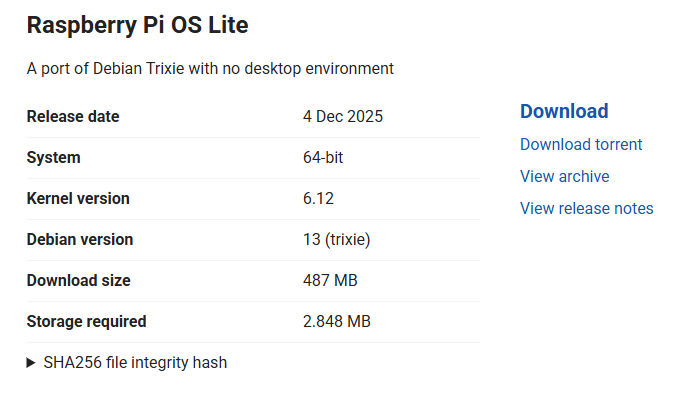
das ist dann mit der neuen Version erledigt oder muss ich da was speziell tun?
Checking for nodejs vulnerability:██████ █████ ███ ██ ██████ ███████ ███████
██ ██ ██ ██ ████ ██ ██ ██ ██ ██
██ ██ ███████ ██ ██ ██ ██ ███ █████ ███████
██ ██ ██ ██ ██ ██ ██ ██ ██ ██ ██ ██
██████ ██ ██ ██ ████ ██████ ███████ ██ ██ -
das ist dann mit der neuen Version erledigt oder muss ich da was speziell tun?
Checking for nodejs vulnerability:██████ █████ ███ ██ ██████ ███████ ███████
██ ██ ██ ██ ████ ██ ██ ██ ██ ██
██ ██ ███████ ██ ██ ██ ██ ███ █████ ███████
██ ██ ██ ██ ██ ██ ██ ██ ██ ██ ██ ██
██████ ██ ██ ██ ████ ██████ ███████ ██ ██Mach doch nicht schon wieder was 'neben der Spur'...
So geht das am unfallfreisten:
https://forum.iobroker.net/topic/51869/installation-auf-raspi-einfacher-geht-s-nicht
-
Mach doch nicht schon wieder was 'neben der Spur'...
So geht das am unfallfreisten:
https://forum.iobroker.net/topic/51869/installation-auf-raspi-einfacher-geht-s-nicht
@Thomas-Braun das hab ich eh auch drauf
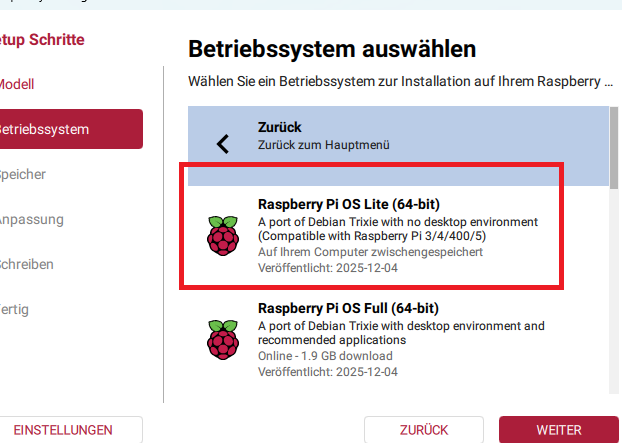
wo ist der Unterschied zw. 64-bit und Legacy, 64-bit?
macht es nicht sinn dann direkt auf forky oder duke zu warten / gehen?
Und kann ich dieses image nur auf einen pi spielen oder jeden anderen mini-server auch?wäre dann das hier
-
@Thomas-Braun das hab ich eh auch drauf
wo ist der Unterschied zw. 64-bit und Legacy, 64-bit?
macht es nicht sinn dann direkt auf forky oder duke zu warten / gehen?
Und kann ich dieses image nur auf einen pi spielen oder jeden anderen mini-server auch?wäre dann das hier
@SpeedyBlade sagte in Iobroker backitup error.. Wo liegt das problem:
macht es nicht sinn dann direkt auf forky oder duke zu warten / gehen
das willst du nicht!
Die Paketquellen für bookworm werden nicht mehr gepflegt. -
@Thomas-Braun das hab ich eh auch drauf
wo ist der Unterschied zw. 64-bit und Legacy, 64-bit?
macht es nicht sinn dann direkt auf forky oder duke zu warten / gehen?
Und kann ich dieses image nur auf einen pi spielen oder jeden anderen mini-server auch?wäre dann das hier
Nein, du kannst nicht auf ein Release weit in der Zukunft warten, dein System ist JETZT vergammelt und muss JETZT auf einen noch unterhaltenen Stand gehievt werden.
Die 64Bit-Lite ist richtig für deinen Raspberry4
-
@Thomas-Braun das hab ich eh auch drauf
wo ist der Unterschied zw. 64-bit und Legacy, 64-bit?
macht es nicht sinn dann direkt auf forky oder duke zu warten / gehen?
Und kann ich dieses image nur auf einen pi spielen oder jeden anderen mini-server auch?wäre dann das hier
@SpeedyBlade sagte in Iobroker backitup error.. Wo liegt das problem:
Und kann ich dieses image nur auf einen pi spielen oder jeden anderen mini-server auch?
Bei RaspberryOS gibt es hardwarespezifische Anpassungen, das kannst du nicht für anderes verwenden.
-
@Thomas-Braun das hab ich eh auch drauf
wo ist der Unterschied zw. 64-bit und Legacy, 64-bit?
macht es nicht sinn dann direkt auf forky oder duke zu warten / gehen?
Und kann ich dieses image nur auf einen pi spielen oder jeden anderen mini-server auch?wäre dann das hier
@SpeedyBlade sagte in Iobroker backitup error.. Wo liegt das problem:
wo ist der Unterschied zw. 64-bit und Legacy, 64-bit?
Legacy ist das sog. 'oldstable'-Release, also der Vorgänger zum jeweilig aktuellen Release.
Im Moment ist das 'bookworm' (Debian 12). -
@SpeedyBlade sagte in Iobroker backitup error.. Wo liegt das problem:
Und kann ich dieses image nur auf einen pi spielen oder jeden anderen mini-server auch?
Bei RaspberryOS gibt es hardwarespezifische Anpassungen, das kannst du nicht für anderes verwenden.
@Thomas-Braun sagte in Iobroker backitup error.. Wo liegt das problem:
@SpeedyBlade sagte in Iobroker backitup error.. Wo liegt das problem:
Und kann ich dieses image nur auf einen pi spielen oder jeden anderen mini-server auch?
Bei RaspberryOS gibt es hardwarespezifische Anpassungen, das kannst du nicht für anderes verwenden.
alle klar...danke
-
@SpeedyBlade sagte in Iobroker backitup error.. Wo liegt das problem:
wo ist der Unterschied zw. 64-bit und Legacy, 64-bit?
Legacy ist das sog. 'oldstable'-Release, also der Vorgänger zum jeweilig aktuellen Release.
Im Moment ist das 'bookworm' (Debian 12).@Thomas-Braun verstanden...danke
-
@Thomas-Braun sagte in Iobroker backitup error.. Wo liegt das problem:
@SpeedyBlade sagte in Iobroker backitup error.. Wo liegt das problem:
Und kann ich dieses image nur auf einen pi spielen oder jeden anderen mini-server auch?
Bei RaspberryOS gibt es hardwarespezifische Anpassungen, das kannst du nicht für anderes verwenden.
alle klar...danke
Du könntest aber auf dem jetzigen System schon mal (versuchen) nodejs@22 zu fahren.
Dann ist der Versionssprung auf dem neuen System kleiner.Geht per
iob nodejs-update -
@SpeedyBlade sagte in Iobroker backitup error.. Wo liegt das problem:
macht es nicht sinn dann direkt auf forky oder duke zu warten / gehen
das willst du nicht!
Die Paketquellen für bookworm werden nicht mehr gepflegt.@Homoran aber das heißt ja dann...ca. alle 2 Jahre neues BS aufspielen?! 😒
-
Du könntest aber auf dem jetzigen System schon mal (versuchen) nodejs@22 zu fahren.
Dann ist der Versionssprung auf dem neuen System kleiner.Geht per
iob nodejs-update@Thomas-Braun sagte in Iobroker backitup error.. Wo liegt das problem:
Geht per
auch bei 32bittigem bullseye?
-
@Homoran aber das heißt ja dann...ca. alle 2 Jahre neues BS aufspielen?! 😒
@SpeedyBlade sagte in Iobroker backitup error.. Wo liegt das problem:
aber das heißt ja dann...ca. alle 2 Jahre neues BS aufspielen?!
Die Standardaussage von RaspberryOS ist ohnehin:
Only new installations are supported.Das heißt aber nicht, das es u. U. nicht doch geht.
Bei deinem 32bit-BookwormBullsyeye geht es aber in der Tat nicht.@homoran
Müsste man mal schauen, wo man da auskommt. Soweit ich weiß gibt es aber zumindest ein älteres nodejs22 noch für 32bit. -
@Homoran aber das heißt ja dann...ca. alle 2 Jahre neues BS aufspielen?! 😒
@SpeedyBlade sagte in Iobroker backitup error.. Wo liegt das problem:
@Homoran aber das heißt ja dann...ca. alle 2 Jahre neues BS aufspielen?! 😒
mache ich immer so, damit auch mal wueder alle Dateileichen ausgeputzt weden.
Es geht allerdings demnächst eventuell wieder per upgrade. Nur durch die Einführung des Pi5 wurde so massiv im OS rumgeschraubt, dass es jetzt gerade nicht unfallfrei geht.
-
@SpeedyBlade sagte in Iobroker backitup error.. Wo liegt das problem:
aber das heißt ja dann...ca. alle 2 Jahre neues BS aufspielen?!
Die Standardaussage von RaspberryOS ist ohnehin:
Only new installations are supported.Das heißt aber nicht, das es u. U. nicht doch geht.
Bei deinem 32bit-BookwormBullsyeye geht es aber in der Tat nicht.@homoran
Müsste man mal schauen, wo man da auskommt. Soweit ich weiß gibt es aber zumindest ein älteres nodejs22 noch für 32bit.@Thomas-Braun ich werde neu aufsetzen, bevor ich mir noch mehr Probleme hole ;)...danke
-
@Thomas-Braun ich werde neu aufsetzen, bevor ich mir noch mehr Probleme hole ;)...danke
@SpeedyBlade sagte in Iobroker backitup error.. Wo liegt das problem:
ich werde neu aufsetzen
Du hast eh keine anderen Optionen.

Hey! Du scheinst an dieser Unterhaltung interessiert zu sein, hast aber noch kein Konto.
Hast du es satt, bei jedem Besuch durch die gleichen Beiträge zu scrollen? Wenn du dich für ein Konto anmeldest, kommst du immer genau dorthin zurück, wo du zuvor warst, und kannst dich über neue Antworten benachrichtigen lassen (entweder per E-Mail oder Push-Benachrichtigung). Du kannst auch Lesezeichen speichern und Beiträge positiv bewerten, um anderen Community-Mitgliedern deine Wertschätzung zu zeigen.
Mit deinem Input könnte dieser Beitrag noch besser werden 💗
Registrieren Anmelden295
Online33.0k
Benutzer83.6k
Themen1.3m
Beiträge