Skip to content
  • Home
  • Aktuell
  • Tags
  • 0 Ungelesen 0
  • Kategorien
  • Unreplied
  • Beliebt
  • GitHub
  • Docu
  • Hilfe
Skins
  • Light
  • Brite
  • Cerulean
  • Cosmo
  • Flatly
  • Journal
  • Litera
  • Lumen
  • Lux
  • Materia
  • Minty
  • Morph
  • Pulse
  • Sandstone
  • Simplex
  • Sketchy
  • Spacelab
  • United
  • Yeti
  • Zephyr
  • Dark
  • Cyborg
  • Darkly
  • Quartz
  • Slate
  • Solar
  • Superhero
  • Vapor

  • Standard: (Kein Skin)
  • Kein Skin
Einklappen
ioBroker Logo

Community Forum

donate donate
  1. ioBroker Community Home
  2. Deutsch
  3. ioBroker Allgemein
  4. [gelöst] Kann ioBroker auf Windows 10 nicht installieren
NEWS

  • Monatsrückblick Januar/Februar 2026 ist online!
    BluefoxB
    Bluefox
    16
    1
    277

  • Jahresrückblick 2025 – unser neuer Blogbeitrag ist online! ✨
    BluefoxB
    Bluefox
    17
    1
    4.6k

  • Neuer Blogbeitrag: Monatsrückblick - Dezember 2025 🎄
    BluefoxB
    Bluefox
    13
    1
    1.3k

[gelöst] Kann ioBroker auf Windows 10 nicht installieren
Geplant Angeheftet Gesperrt Verschoben ioBroker Allgemein
26 Beiträge 7 Kommentatoren 6.4k Aufrufe
  • Älteste zuerst
  • Neuste zuerst
  • Meiste Stimmen
Antworten
  • In einem neuen Thema antworten
Anmelden zum Antworten
Dieses Thema wurde gelöscht. Nur Nutzer mit entsprechenden Rechten können es sehen.
  • R Offline
    R Offline
    rh1212
    schrieb am zuletzt editiert von
    #9

    @eric2905:

    Mit welchem Ergebnis?

    Gruß,

    Eric

    Von unterwegs getippert `

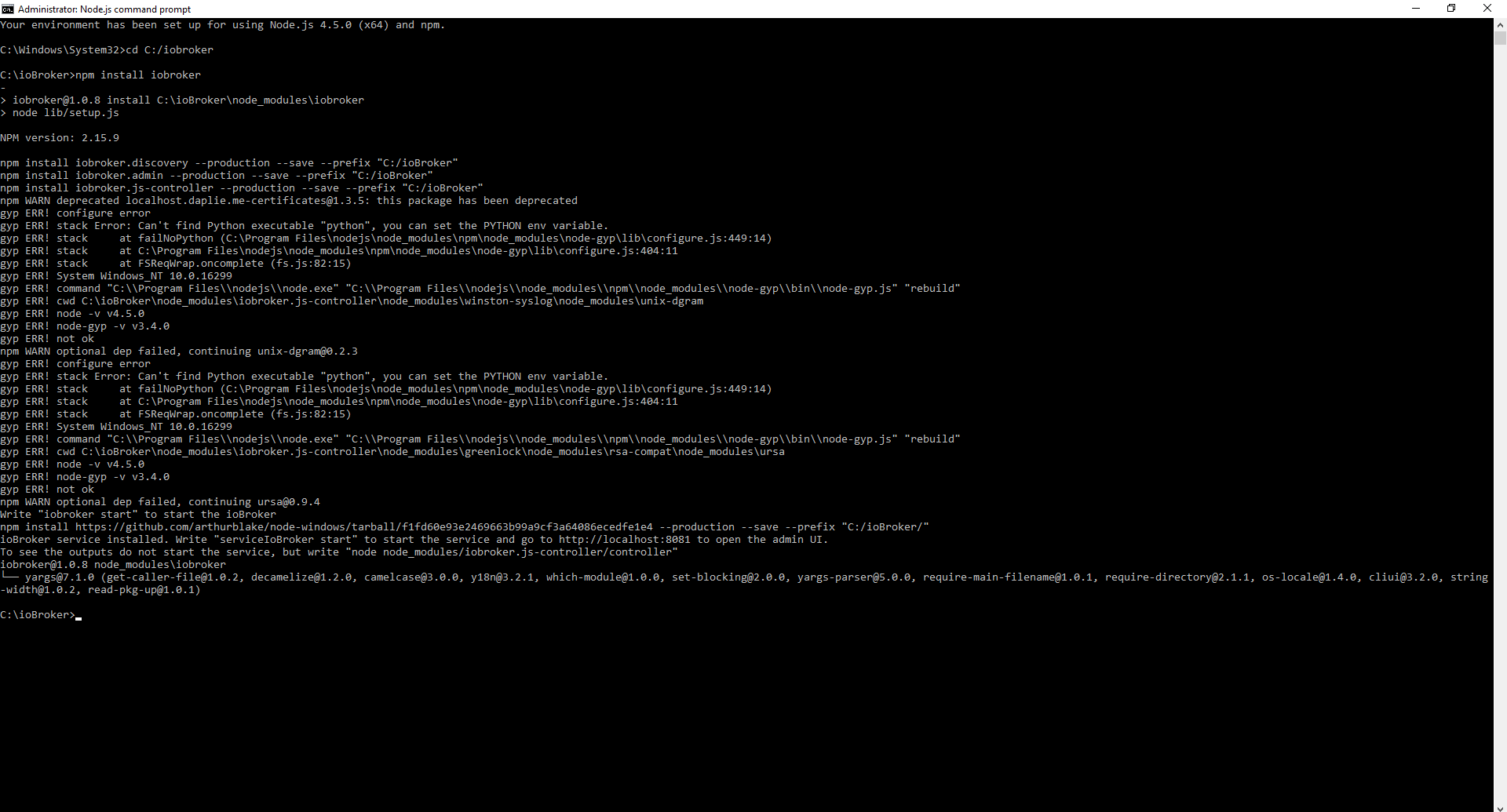
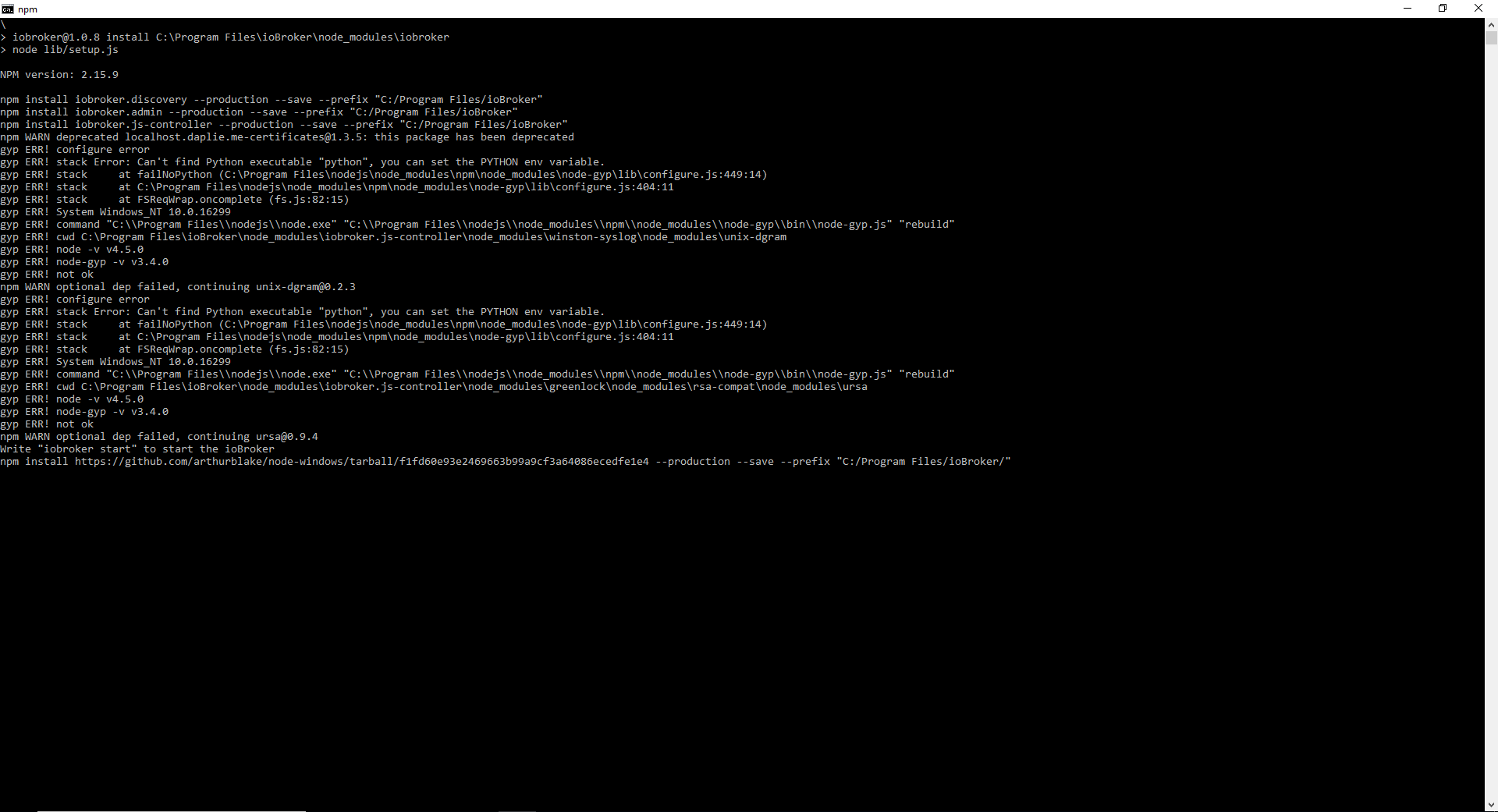
    iobroker@1.0.8 install C:\ioBroker\node_modules\iobroker
    > node lib/setup.js
    
    NPM version: 2.15.9
    
    npm install iobroker.discovery --production --save --prefix "C:/ioBroker"
    npm install iobroker.admin --production --save --prefix "C:/ioBroker"
    npm install iobroker.js-controller --production --save --prefix "C:/ioBroker"
    npm WARN deprecated localhost.daplie.me-certificates@1.3.5: this package has been deprecated
    gyp ERR! configure error
    gyp ERR! stack Error: Can't find Python executable "python", you can set the PYTHON env variable.
    gyp ERR! stack     at failNoPython (C:\Program Files\nodejs\node_modules\npm\node_modules\node-gyp\lib\configure.js:449:14)
    gyp ERR! stack     at C:\Program Files\nodejs\node_modules\npm\node_modules\node-gyp\lib\configure.js:404:11
    gyp ERR! stack     at FSReqWrap.oncomplete (fs.js:82:15)
    gyp ERR! System Windows_NT 10.0.16299
    gyp ERR! command "C:\\Program Files\\nodejs\\node.exe" "C:\\Program Files\\nodejs\\node_modules\\npm\\node_modules\\node-gyp\\bin\\node-gyp.js" "rebuild"
    gyp ERR! cwd C:\ioBroker\node_modules\iobroker.js-controller\node_modules\winston-syslog\node_modules\unix-dgram
    gyp ERR! node -v v4.5.0
    gyp ERR! node-gyp -v v3.4.0
    gyp ERR! not ok
    npm WARN optional dep failed, continuing unix-dgram@0.2.3
    gyp ERR! configure error
    gyp ERR! stack Error: Can't find Python executable "python", you can set the PYTHON env variable.
    gyp ERR! stack     at failNoPython (C:\Program Files\nodejs\node_modules\npm\node_modules\node-gyp\lib\configure.js:449:14)
    gyp ERR! stack     at C:\Program Files\nodejs\node_modules\npm\node_modules\node-gyp\lib\configure.js:404:11
    gyp ERR! stack     at FSReqWrap.oncomplete (fs.js:82:15)
    gyp ERR! System Windows_NT 10.0.16299
    gyp ERR! command "C:\\Program Files\\nodejs\\node.exe" "C:\\Program Files\\nodejs\\node_modules\\npm\\node_modules\\node-gyp\\bin\\node-gyp.js" "rebuild"
    gyp ERR! cwd C:\ioBroker\node_modules\iobroker.js-controller\node_modules\greenlock\node_modules\rsa-compat\node_modules\ursa
    gyp ERR! node -v v4.5.0
    gyp ERR! node-gyp -v v3.4.0
    gyp ERR! not ok
    npm WARN optional dep failed, continuing ursa@0.9.4
    Write "iobroker start" to start the ioBroker
    npm install https://github.com/arthurblake/node-windows/tarball/f1fd60e93e2469663b99a9cf3a64086ecedfe1e4 --production --save --prefix "C:/ioBroker/"


    oder ersten Screenshot. Also leider ging auch nicht.

    1 Antwort Letzte Antwort
    0
    • rantanplanR Offline
      rantanplanR Offline
      rantanplan
      schrieb am zuletzt editiert von
      #10

      Hallo rh1212

      Python Fehlermeldungen habe ich immer ignoriert.

      Keine Ahnung wofür Python bei ioBroker gebraucht wird.

      Ich habe es noch nie gebraucht und nie installiert.

      Grüße

      Rantanplan

      CCU3 / MS Server 2019(VM) / Scripten mit Blockly

      1 Antwort Letzte Antwort
      0
      • R Offline
        R Offline
        rh1212
        schrieb am zuletzt editiert von
        #11

        @rantanplan:

        Hallo rh1212

        Python Fehlermeldungen habe ich immer ignoriert.

        Keine Ahnung wofür Python bei ioBroker gebraucht wird.

        Ich habe es noch nie gebraucht und nie installiert.

        Grüße `

        Hallo rantanplan,

        danke für die Antwort. Das problem ist, dass nach der Installtionen öffnet die localhost seite nicht.

        1 Antwort Letzte Antwort
        0
        • HomoranH Nicht stören
          HomoranH Nicht stören
          Homoran
          Global Moderator Administrators
          schrieb am zuletzt editiert von
          #12

          Hast du mal ein sudo iobroker start gemacht?

          kein Support per PN! - Fragen im Forum stellen -
          Benutzt das Voting rechts unten im Beitrag wenn er euch geholfen hat.
          Das Forum freut sich über eine Spende. Benutzt dazu den Spendenbutton im Header. Danke!
          der Installationsfixer: curl -fsL https://iobroker.net/fix.sh | bash -

          1 Antwort Letzte Antwort
          0
          • eric2905E Offline
            eric2905E Offline
            eric2905
            schrieb am zuletzt editiert von
            #13

            Eh, im Log aus der Installer-Installation steht doch

            Write "iobroker start" to start the ioBroker
            ````.
            
            Hast Du das mal probiert?
            
            Gruß,
            
            Eric
            
            Von unterwegs getippert

            Roses are red, violets are blue,

            if I listen to metal, my neighbours do too

            1 Antwort Letzte Antwort
            0
            • R Offline
              R Offline
              rh1212
              schrieb am zuletzt editiert von
              #14

              @Homoran:

              Hast du mal ein sudo iobroker start gemacht? `

              @eric2905:

              Eh, im Log aus der Installer-Installation steht doch

              Write "iobroker start" to start the ioBroker
              ````.
              
              Hast Du das mal probiert?
              
              Gruß,
              
              Eric
              
              Von unterwegs getippert `  
              

              ja und leider ging nicht

              1 Antwort Letzte Antwort
              0
              • rantanplanR Offline
                rantanplanR Offline
                rantanplan
                schrieb am zuletzt editiert von
                #15

                @rh1212:

                Das problem ist, dass nach der Installtionen öffnet die localhost seite nicht. `

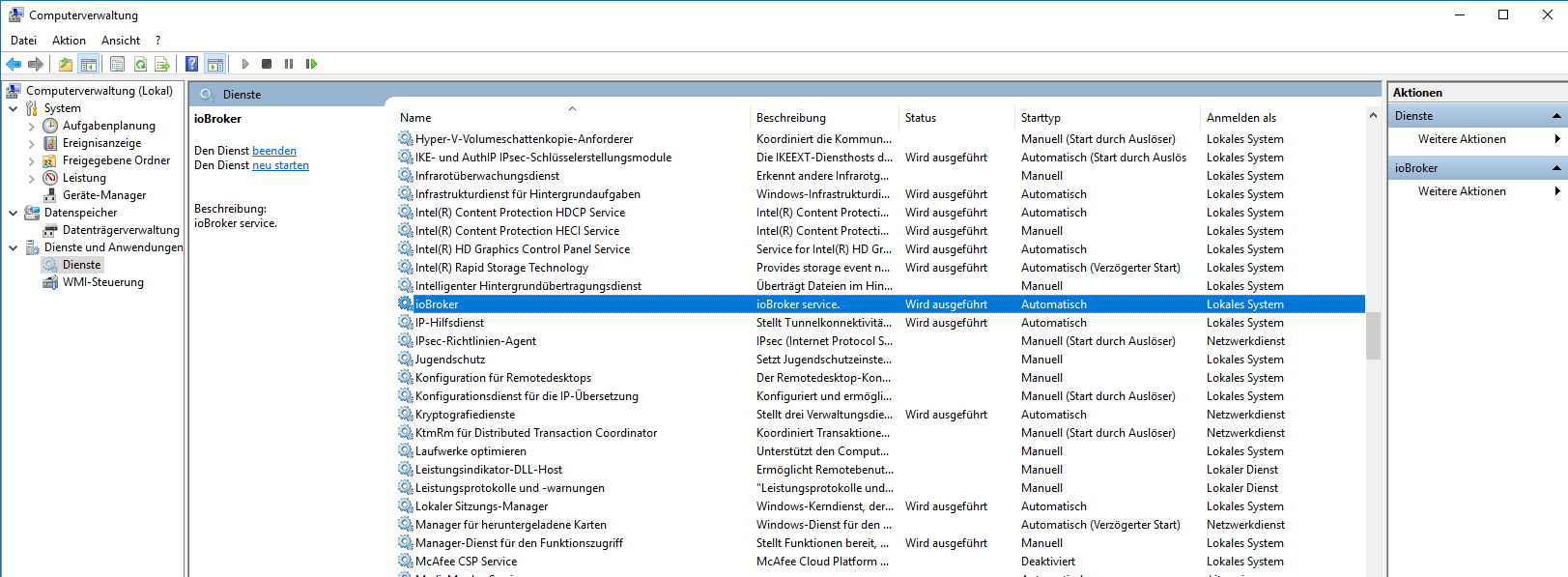
                Auf Windows läuft ioBroker als Dienst. Schau mal ob der läuft.

                Rantanplan

                CCU3 / MS Server 2019(VM) / Scripten mit Blockly

                1 Antwort Letzte Antwort
                0
                • eric2905E Offline
                  eric2905E Offline
                  eric2905
                  schrieb am zuletzt editiert von
                  #16

                  Ich weiß schon, warum ich Windows nicht mag ;-)

                  Von unterwegs getippert

                  Roses are red, violets are blue,

                  if I listen to metal, my neighbours do too

                  1 Antwort Letzte Antwort
                  0
                  • R Offline
                    R Offline
                    rh1212
                    schrieb am zuletzt editiert von
                    #17

                    @rantanplan:

                    @rh1212:

                    Das problem ist, dass nach der Installtionen öffnet die localhost seite nicht. `

                    Auf Windows läuft ioBroker als Dienst. Schau mal ob der läuft. `

                    Unter Dienste steht iobroker.exe aber ist gestopped, ich versuchte mit recht klick das zu starten aber bekam ich ein fehler Meldung. "The service cannot be started, either because it is disabled or because it has no enabled devices associated with it"

                    1 Antwort Letzte Antwort
                    0
                    • rantanplanR Offline
                      rantanplanR Offline
                      rantanplan
                      schrieb am zuletzt editiert von
                      #18

                      Dienst so einrichten.
                      147_beispiel.png

                      Reiter "Anmelden" -> "Anmelden als: Lokales Systemkonto

                      Rantanplan

                      CCU3 / MS Server 2019(VM) / Scripten mit Blockly

                      1 Antwort Letzte Antwort
                      0
                      • R Offline
                        R Offline
                        rh1212
                        schrieb am zuletzt editiert von
                        #19

                        @rantanplan:

                        Dienst so einrichten.

                        beispiel.PNG

                        Reiter "Anmelden" -> "Anmelden als: Lokales Systemkonto `

                        Ach das hat funktioniert!!!! Vielen vielen Dank!!!!

                        1 Antwort Letzte Antwort
                        0
                        • rantanplanR Offline
                          rantanplanR Offline
                          rantanplan
                          schrieb am zuletzt editiert von
                          #20

                          @rh1212:

                          Ach das hat funktioniert!!!! Vielen vielen Dank!!!! `

                          Prima.

                          Dann bitte ein [gelöst] in den Betreff des ersten Beitrags setzen.

                          Danke.

                          Grüße

                          Rantanplan

                          CCU3 / MS Server 2019(VM) / Scripten mit Blockly

                          1 Antwort Letzte Antwort
                          0
                          • apollon77A Offline
                            apollon77A Offline
                            apollon77
                            schrieb am zuletzt editiert von
                            #21

                            @rantanplan:

                            Python Fehlermeldungen habe ich immer ignoriert.

                            Keine Ahnung wofür Python bei ioBroker gebraucht wird.

                            Ich habe es noch nie gebraucht und nie installiert. `

                            ioBroker selbst braucht das nicht. Es gibt aber nodejs Libraries die ggf beim Installationsprozess gebaut werden oder sowas und da kann es nötig sein das python da ist, da sonst ggf Libraries und damit ggf Adapter nicht installierbar sind.

                            Beitrag hat geholfen? Votet rechts unten im Beitrag :-) https://paypal.me/Apollon77 / https://github.com/sponsors/Apollon77

                            • Debug-Log für Instanz einschalten? Admin -> Instanzen -> Expertenmodus -> Instanz aufklappen - Loglevel ändern
                            • Logfiles auf Platte /opt/iobroker/log/… nutzen, Admin schneidet Zeilen ab
                            1 Antwort Letzte Antwort
                            0
                            • M Offline
                              M Offline
                              mean
                              schrieb am zuletzt editiert von
                              #22

                              Hallo,

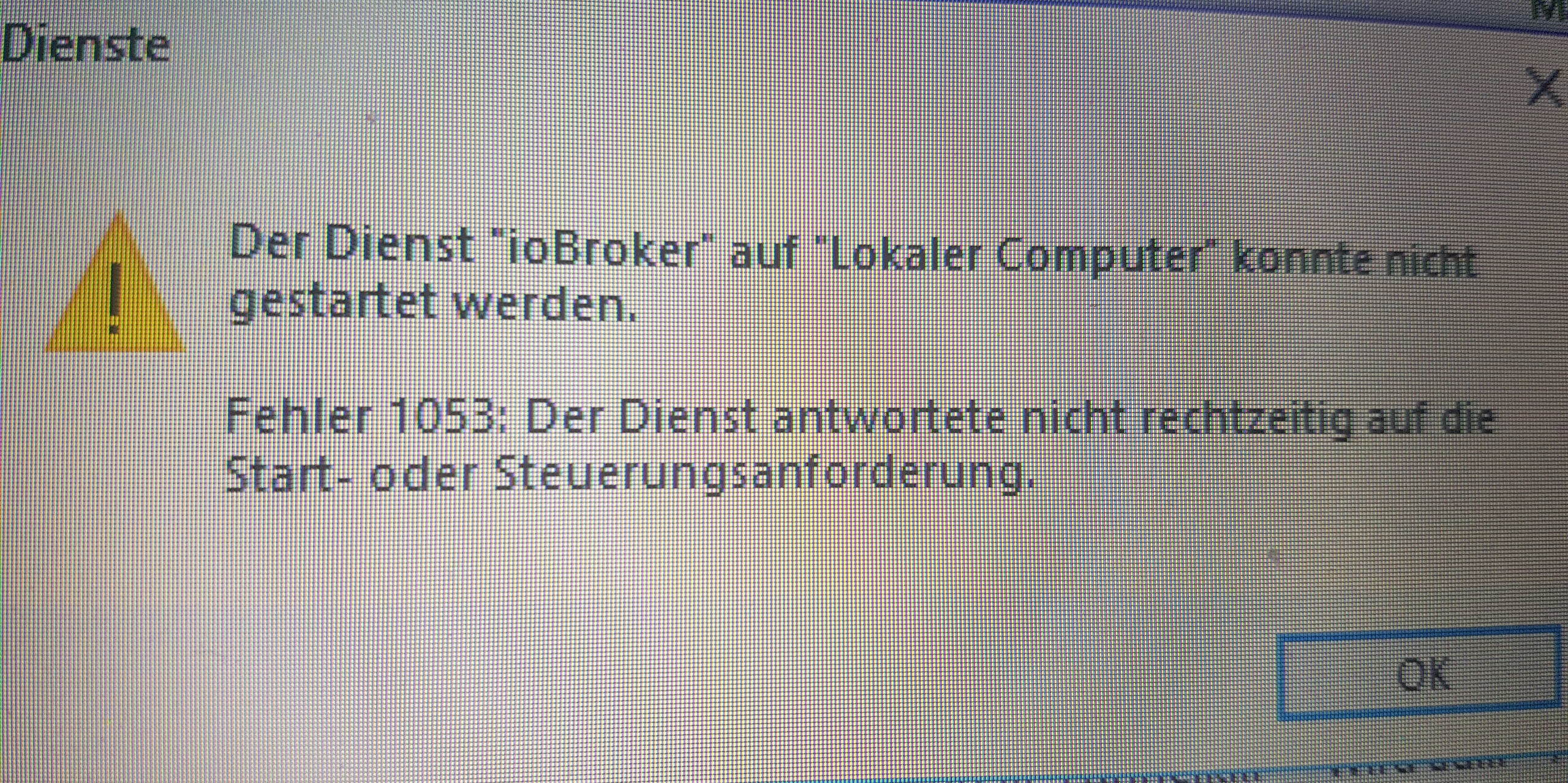
                              Leider habe ich folgendes Problem mit io und win10. Hat jemand eine Lösung?

                              8773_20181016_220714.jpg

                              1 Antwort Letzte Antwort
                              0
                              • sigi234S Online
                                sigi234S Online
                                sigi234
                                Forum Testing Most Active
                                schrieb am zuletzt editiert von
                                #23

                                2858_screenshot__947_.png

                                Bitte benutzt das Voting rechts unten im Beitrag wenn er euch geholfen hat.
                                Immer Daten sichern!

                                1 Antwort Letzte Antwort
                                0
                                • M Offline
                                  M Offline
                                  mean
                                  schrieb am zuletzt editiert von
                                  #24

                                  Wenn ich den Dienst starten will dann kommt die oben genannte Meldung.

                                  1 Antwort Letzte Antwort
                                  0
                                  • sigi234S Online
                                    sigi234S Online
                                    sigi234
                                    Forum Testing Most Active
                                    schrieb am zuletzt editiert von
                                    #25

                                    viewtopic.php?f=17&t=16920

                                    viewtopic.php?f=17&t=16920&start=20#p178052

                                    http://www.iobroker.net/docu/?page_id=2291&lang=de

                                    Bitte benutzt das Voting rechts unten im Beitrag wenn er euch geholfen hat.
                                    Immer Daten sichern!

                                    1 Antwort Letzte Antwort
                                    0
                                    • M Offline
                                      M Offline
                                      mean
                                      schrieb am zuletzt editiert von
                                      #26

                                      Wow…. merci läuft.... Danke

                                      1 Antwort Letzte Antwort
                                      0
                                      Antworten
                                      • In einem neuen Thema antworten
                                      Anmelden zum Antworten
                                      • Älteste zuerst
                                      • Neuste zuerst
                                      • Meiste Stimmen


                                      Support us

                                      ioBroker
                                      Community Adapters
                                      Donate
                                      FAQ Cloud / IOT
                                      HowTo: Node.js-Update
                                      HowTo: Backup/Restore
                                      Downloads
                                      BLOG

                                      278

                                      Online

                                      32.7k

                                      Benutzer

                                      82.5k

                                      Themen

                                      1.3m

                                      Beiträge
                                      Community
                                      Impressum | Datenschutz-Bestimmungen | Nutzungsbedingungen | Einwilligungseinstellungen
                                      ioBroker Community 2014-2025
                                      logo
                                      • Anmelden

                                      • Du hast noch kein Konto? Registrieren

                                      • Anmelden oder registrieren, um zu suchen
                                      • Erster Beitrag
                                        Letzter Beitrag
                                      0
                                      • Home
                                      • Aktuell
                                      • Tags
                                      • Ungelesen 0
                                      • Kategorien
                                      • Unreplied
                                      • Beliebt
                                      • GitHub
                                      • Docu
                                      • Hilfe