
NEWS




Alexa App findet kein Gerät
-
Der Befehl scheint nicht (beim downgrade) zu funktionieren, er sagt zwar ich bin auf node 22, aber nach dem reboot wird in der Webansicht immer noch 23.2.0 angezeigt
user@ioBroker:~$ nodejs -v v23.2.0 Auszug Diag zur node: *** NodeJS-Installation *** /usr/bin/nodejs v23.2.0 /usr/bin/node v23.2.0 /usr/bin/npm 10.9.0 /usr/bin/npx 10.9.0 /usr/bin/corepack 0.29.4 nodejs: Installed: 23.2.0-1nodesource1 Candidate: 23.2.0-1nodesource1 Version table: *** 23.2.0-1nodesource1 100 100 /var/lib/dpkg/status 22.22.0-1nodesource1 600 500 https://deb.nodesource.com/node_22.x nodistro/main amd64 Packages 22.21.0-1nodesource1 600 500 https://deb.nodesource.com/node_22.x nodistro/main amd64 Packages 22.20.0-1nodesource1 600 500 https://deb.nodesource.com/node_22.x nodistro/main amd64 Packages 22.19.0-1nodesource1 600 500 https://deb.nodesource.com/node_22.x nodistro/main amd64 Packages 22.18.0-1nodesource1 600 500 https://deb.nodesource.com/node_22.x nodistro/main amd64 Packages 22.17.1-1nodesource1 600 500 https://deb.nodesource.com/node_22.x nodistro/main amd64 Packages 22.17.0-1nodesource1 600 500 https://deb.nodesource.com/node_22.x nodistro/main amd64 Packages 22.16.0-1nodesource1 600 500 https://deb.nodesource.com/node_22.x nodistro/main amd64 Packages 22.15.1-1nodesource1 600 500 https://deb.nodesource.com/node_22.x nodistro/main amd64 Packages 22.15.0-1nodesource1 600 500 https://deb.nodesource.com/node_22.x nodistro/main amd64 Packages 22.14.0-1nodesource1 600 500 https://deb.nodesource.com/node_22.x nodistro/main amd64 Packages 22.13.1-1nodesource1 600 500 https://deb.nodesource.com/node_22.x nodistro/main amd64 Packages 22.13.0-1nodesource1 600 500 https://deb.nodesource.com/node_22.x nodistro/main amd64 Packages 22.12.0-1nodesource1 600 500 https://deb.nodesource.com/node_22.x nodistro/main amd64 Packages 22.11.0-1nodesource1 600 500 https://deb.nodesource.com/node_22.x nodistro/main amd64 Packages 22.10.0-1nodesource1 600 500 https://deb.nodesource.com/node_22.x nodistro/main amd64 Packages 22.9.0-1nodesource1 600 500 https://deb.nodesource.com/node_22.x nodistro/main amd64 Packages 22.8.0-1nodesource1 600 500 https://deb.nodesource.com/node_22.x nodistro/main amd64 Packages 22.7.0-1nodesource1 600 500 https://deb.nodesource.com/node_22.x nodistro/main amd64 Packages 22.6.0-1nodesource1 600 500 https://deb.nodesource.com/node_22.x nodistro/main amd64 Packages 22.5.1-1nodesource1 600 500 https://deb.nodesource.com/node_22.x nodistro/main amd64 Packages 22.5.0-1nodesource1 600 500 https://deb.nodesource.com/node_22.x nodistro/main amd64 Packages 22.4.1-1nodesource1 600 500 https://deb.nodesource.com/node_22.x nodistro/main amd64 Packages 22.4.0-1nodesource1 600 500 https://deb.nodesource.com/node_22.x nodistro/main amd64 Packages 22.3.0-1nodesource1 600 500 https://deb.nodesource.com/node_22.x nodistro/main amd64 Packages 22.2.0-1nodesource1 600 500 https://deb.nodesource.com/node_22.x nodistro/main amd64 Packages 22.1.0-1nodesource1 600 500 https://deb.nodesource.com/node_22.x nodistro/main amd64 Packages 22.0.0-1nodesource1 600 500 https://deb.nodesource.com/node_22.x nodistro/main amd64 Packages 12.22.9~dfsg-1ubuntu3.6 500 500 http://de.archive.ubuntu.com/ubuntu jammy-updates/universe amd64 Packages 500 http://security.ubuntu.com/ubuntu jammy-security/universe amd64 Packages 12.22.9~dfsg-1ubuntu3 500 500 http://de.archive.ubuntu.com/ubuntu jammy/universe amd64 Packages Temp directories causing deletion problem: 0 No problems detected Errors in npm tree: 0 No problems detected Checking for nodejs vulnerability: (node:4061) ExperimentalWarning: CommonJS module /usr/lib/node_modules/npm/node_modules/debug/src/node.js is loading ES Module /usr/lib/node_modules/npm/node_modules/supports-color/index.js using require(). Support for loading ES Module in require() is an experimental feature and might change at any time (Use `node --trace-warnings ...` to show where the warning was created) (node:4322) ExperimentalWarning: CommonJS module /usr/lib/node_modules/npm/node_modules/debug/src/node.js is loading ES Module /usr/lib/node_modules/npm/node_modules/supports-color/index.js using require(). Support for loading ES Module in require() is an experimental feature and might change at any time (Use `node --trace-warnings ...` to show where the warning was created) ██████ █████ ███ ██ ██████ ███████ ███████ ██ ██ ██ ██ ████ ██ ██ ██ ██ ██ ██ ██ ███████ ██ ██ ██ ██ ███ █████ ███████ ██ ██ ██ ██ ██ ██ ██ ██ ██ ██ ██ ██ ██████ ██ ██ ██ ████ ██████ ███████ ██ ██ v23.2.0 is end-of-life. There are high chances of being vulnerable. Please upgrade it. *** ioBroker-Installation *** ioBroker Status iobroker is running on this host. Objects type: jsonl States type: jsonl Hosts: ioBroker ioBroker (version: 7.0.6, hostname: ioBroker , alive, uptime: 138) Core adapters versions js-controller: 7.0.6 admin: 7.6.17 javascript: 8.9.2@grogo sagte in Alexa App findet kein Gerät:
Der Befehl scheint nicht (beim downgrade) zu funktionieren,
doch, das tut er!
@grogo sagte in Alexa App findet kein Gerät:
er sagt zwar ich bin auf node 22,
wo ist der Konsolenin- und output davon?
@grogo sagte in Alexa App findet kein Gerät:
Auszug
bitte alles!
kein Support per PN! - Fragen im Forum stellen - Benutzt das Voting rechts unten im Beitrag wenn er euch geholfen hat.
Das Forum freut sich über eine Spende. Benutzt dazu den Spendenbutton oben rechts. Danke!
der Installationsfixer: curl -fsL https://iobroker.net/fix.sh | bash - -
@grogo sagte in Alexa App findet kein Gerät:
Der Befehl scheint nicht (beim downgrade) zu funktionieren,
doch, das tut er!
@grogo sagte in Alexa App findet kein Gerät:
er sagt zwar ich bin auf node 22,
wo ist der Konsolenin- und output davon?
@grogo sagte in Alexa App findet kein Gerät:
Auszug
bitte alles!
@Homoran sagte in Alexa App findet kein Gerät:
doch, das tut er!
Das tut er aber nur, wenn das Repo, genauer die Priority der Quelle auf 1001 und nicht auf 600 steht, wie hier.
Die allerneuste Version (ist aber noch nicht in freier Wildbahn verfügbar) macht aber auch das dann.Hier mal per
iob nodejs-update 22versuchen. Ansonsten:
iob stop sudo apt upgrade nodejs=22.22.0-1nodesource1 iob start -
Herzlichen Dank für deine Hilfe, der befehl sudo apt upgrade nodejs=22.22.0-1nodesource1 hat geholfen, danach war ich auf nodejs 22.22.0
========== Start marking the full check here =========== ```bash Script v.2025-08-09 *** BASE SYSTEM *** Operating System: Ubuntu 22.04.5 LTS Static hostname: ioBroker Icon name: computer-desktop Chassis: desktop Kernel: Linux 5.15.0-164-generic Architecture: x86-64 Hardware Vendor: Intel_R_ Client Systems Hardware Model: NUC8i3BEH OS is similar to: debian model name : Intel(R) Core(TM) i3-8109U CPU @ 3.00GHz Docker : false Virtualization : none Kernel : x86_64 Userland : 64 bit Systemuptime and Load: 10:44:01 up 40 min, 2 users, load average: 0.14, 0.31, 0.34 CPU threads: 4 *** LIFE CYCLE STATUS *** Operating System codenamed 'jammy' is an aging Ubuntu release! Please upgrade to the latest LTS release 'noble' in due time! *** TIME AND TIMEZONES *** Local time: Thu 2026-01-29 10:44:01 CET Universal time: Thu 2026-01-29 09:44:01 UTC RTC time: Thu 2026-01-29 09:44:01 Time zone: Europe/Berlin (CET, +0100) System clock synchronized: yes NTP service: active RTC in local TZ: no *** Users and Groups *** User that called 'iob diag': xxx HOME=/home/xxx GROUPS=xxx adm cdrom sudo dip plugdev lpadmin sambashare iobroker User that is running 'js-controller': iobroker HOME=/home/iobroker GROUPS=iobroker tty dialout audio video plugdev bluetooth *** DISPLAY-SERVER SETUP *** Display-Server: false Display-Manager: * gdm.service - GNOME Display Manager Desktop: Session: tty *** MEMORY *** total used free shared buff/cache available Mem: 7.8G 2.4G 3.1G 1.0M 2.4G 5.1G Swap: 2.0G 0B 2.0G Total: 9.9G 2.4G 5.1G Active iob-Instances: 28 7807 M total memory 2372 M used memory 1273 M active memory 2912 M inactive memory 3073 M free memory 469 M buffer memory 1891 M swap cache 2047 M total swap 0 M used swap 2047 M free swap *** top - Table Of Processes *** top - 10:44:01 up 40 min, 2 users, load average: 0.14, 0.31, 0.34 Tasks: 188 total, 1 running, 187 sleeping, 0 stopped, 0 zombie %Cpu(s): 19.0 us, 0.0 sy, 0.0 ni, 81.0 id, 0.0 wa, 0.0 hi, 0.0 si, 0.0 st MiB Mem : 7807.5 total, 3073.4 free, 2372.9 used, 2361.2 buff/cache MiB Swap: 2048.0 total, 2048.0 free, 0.0 used. 5130.7 avail Mem *** FAILED SERVICES *** UNIT LOAD ACTIVE SUB DESCRIPTION 0 loaded units listed. *** DMESG CRITICAL ERRORS *** No critical errors detected *** FILESYSTEM *** Filesystem Type Size Used Avail Use% Mounted on tmpfs tmpfs 781M 1.6M 780M 1% /run /dev/sda2 ext4 109G 39G 65G 38% / tmpfs tmpfs 3.9G 0 3.9G 0% /dev/shm tmpfs tmpfs 5.0M 4.0K 5.0M 1% /run/lock /dev/sda1 vfat 511M 6.1M 505M 2% /boot/efi tmpfs tmpfs 781M 64K 781M 1% /run/user/1000 Messages concerning ext4 filesystem in dmesg: [Thu Jan 29 10:03:32 2026] EXT4-fs (sda2): mounted filesystem with ordered data mode. Opts: (null). Quota mode: none. [Thu Jan 29 10:03:33 2026] EXT4-fs (sda2): re-mounted. Opts: errors=remount-ro. Quota mode: none. Show mounted filesystems: TARGET SOURCE FSTYPE OPTIONS / /dev/sda2 ext4 rw,relatime,errors=remount-ro |-/run/user/1000/doc portal fuse.portal rw,nosuid,nodev,relatime,user_id=1000,group_id=1000 |-/snap/bare/5 /dev/loop0 squashfs ro,nodev,relatime,errors=continue |-/snap/core/17247 /dev/loop1 squashfs ro,nodev,relatime,errors=continue |-/snap/core/17272 /dev/loop2 squashfs ro,nodev,relatime,errors=continue |-/snap/core18/2976 /dev/loop3 squashfs ro,nodev,relatime,errors=continue |-/snap/core18/2979 /dev/loop4 squashfs ro,nodev,relatime,errors=continue |-/snap/core20/2682 /dev/loop5 squashfs ro,nodev,relatime,errors=continue |-/snap/core20/2686 /dev/loop6 squashfs ro,nodev,relatime,errors=continue |-/snap/core22/2216 /dev/loop7 squashfs ro,nodev,relatime,errors=continue |-/snap/core22/2292 /dev/loop8 squashfs ro,nodev,relatime,errors=continue |-/snap/core24/1243 /dev/loop9 squashfs ro,nodev,relatime,errors=continue |-/snap/core24/1267 /dev/loop10 squashfs ro,nodev,relatime,errors=continue |-/snap/firefox/7720 /dev/loop12 squashfs ro,nodev,relatime,errors=continue |-/snap/firefox/7672 /dev/loop11 squashfs ro,nodev,relatime,errors=continue |-/snap/gnome-3-26-1604/104 /dev/loop13 squashfs ro,nodev,relatime,errors=continue |-/snap/gnome-3-26-1604/111 /dev/loop14 squashfs ro,nodev,relatime,errors=continue |-/snap/gnome-3-28-1804/194 /dev/loop15 squashfs ro,nodev,relatime,errors=continue |-/snap/gnome-3-28-1804/198 /dev/loop16 squashfs ro,nodev,relatime,errors=continue |-/snap/gnome-3-34-1804/90 /dev/loop17 squashfs ro,nodev,relatime,errors=continue |-/snap/gnome-3-34-1804/93 /dev/loop18 squashfs ro,nodev,relatime,errors=continue |-/snap/gnome-3-38-2004/140 /dev/loop19 squashfs ro,nodev,relatime,errors=continue |-/snap/gnome-3-38-2004/143 /dev/loop20 squashfs ro,nodev,relatime,errors=continue |-/snap/gnome-42-2204/226 /dev/loop21 squashfs ro,nodev,relatime,errors=continue |-/snap/gnome-42-2204/247 /dev/loop22 squashfs ro,nodev,relatime,errors=continue |-/snap/gnome-46-2404/145 /dev/loop23 squashfs ro,nodev,relatime,errors=continue |-/snap/gnome-46-2404/153 /dev/loop24 squashfs ro,nodev,relatime,errors=continue |-/snap/gnome-system-monitor/186 /dev/loop25 squashfs ro,nodev,relatime,errors=continue |-/snap/gnome-system-monitor/193 /dev/loop26 squashfs ro,nodev,relatime,errors=continue |-/snap/gtk-common-themes/1535 /dev/loop28 squashfs ro,nodev,relatime,errors=continue |-/snap/gtk-common-themes/1534 /dev/loop27 squashfs ro,nodev,relatime,errors=continue |-/snap/mesa-2404/1165 /dev/loop29 squashfs ro,nodev,relatime,errors=continue |-/snap/mesa-2404/912 /dev/loop30 squashfs ro,nodev,relatime,errors=continue |-/snap/snapd/25577 /dev/loop31 squashfs ro,nodev,relatime,errors=continue |-/snap/snapd/25935 /dev/loop32 squashfs ro,nodev,relatime,errors=continue |-/snap/snapd-desktop-integration/315 /dev/loop33 squashfs ro,nodev,relatime,errors=continue |-/snap/snapd-desktop-integration/343 /dev/loop34 squashfs ro,nodev,relatime,errors=continue `-/boot/efi /dev/sda1 vfat rw,relatime,fmask=0077,dmask=0077,codepage=437,iocharset=iso8859-1,shortname=mixed,errors=remount-ro Files in neuralgic directories: /var: 12G /var/ 8.1G /var/lib 7.6G /var/lib/snapd 5.4G /var/lib/snapd/cache 3.2G /var/log/journal/1089d1fbc47b420c95456a9912af9753 Archived and active journals take up 3.1G in the file system. /opt/iobroker/backups: 55M /opt/iobroker/backups/ /opt/iobroker/iobroker-data: 557M /opt/iobroker/iobroker-data/ 319M /opt/iobroker/iobroker-data/files 176M /opt/iobroker/iobroker-data/backup-objects 67M /opt/iobroker/iobroker-data/files/echarts.admin 61M /opt/iobroker/iobroker-data/files/echarts The five largest files in iobroker-data are: 31M /opt/iobroker/iobroker-data/objects.jsonl 26M /opt/iobroker/iobroker-data/files/echarts/static/js/main.41cee985.js.map 26M /opt/iobroker/iobroker-data/files/echarts.admin/chart/static/js/main.41cee985.js.map 24M /opt/iobroker/iobroker-data/files/echarts.admin/static/js/main.70a15e1f.js.map 18M /opt/iobroker/iobroker-data/files/echarts/preview/static/js/main.5fe9c7da.js.map USB-Devices by-id: USB-Sticks - Avoid direct links to /dev/tty* in your adapter setups, please always prefer the links 'by-id': No Devices found 'by-id' Zigbee Network Settings on your coordinator/in nvbackup are: zigbee.X Extended Pan ID: *** MASKED *** Pan ID: *** MASKED *** Channel: *** MASKED *** Network Key: *** MASKED *** To unmask the settings run 'iob diag --unmask' *** NodeJS-Installation *** /usr/bin/nodejs v22.22.0 /usr/bin/node v22.22.0 /usr/bin/npm 10.9.4 /usr/bin/npx 10.9.4 /usr/bin/corepack 0.34.0 nodejs: Installed: 22.22.0-1nodesource1 Candidate: 22.22.0-1nodesource1 Version table: *** 22.22.0-1nodesource1 600 500 https://deb.nodesource.com/node_22.x nodistro/main amd64 Packages 100 /var/lib/dpkg/status 22.21.0-1nodesource1 600 500 https://deb.nodesource.com/node_22.x nodistro/main amd64 Packages 22.20.0-1nodesource1 600 500 https://deb.nodesource.com/node_22.x nodistro/main amd64 Packages 22.19.0-1nodesource1 600 500 https://deb.nodesource.com/node_22.x nodistro/main amd64 Packages 22.18.0-1nodesource1 600 500 https://deb.nodesource.com/node_22.x nodistro/main amd64 Packages 22.17.1-1nodesource1 600 500 https://deb.nodesource.com/node_22.x nodistro/main amd64 Packages 22.17.0-1nodesource1 600 500 https://deb.nodesource.com/node_22.x nodistro/main amd64 Packages 22.16.0-1nodesource1 600 500 https://deb.nodesource.com/node_22.x nodistro/main amd64 Packages 22.15.1-1nodesource1 600 500 https://deb.nodesource.com/node_22.x nodistro/main amd64 Packages 22.15.0-1nodesource1 600 500 https://deb.nodesource.com/node_22.x nodistro/main amd64 Packages 22.14.0-1nodesource1 600 500 https://deb.nodesource.com/node_22.x nodistro/main amd64 Packages 22.13.1-1nodesource1 600 500 https://deb.nodesource.com/node_22.x nodistro/main amd64 Packages 22.13.0-1nodesource1 600 500 https://deb.nodesource.com/node_22.x nodistro/main amd64 Packages 22.12.0-1nodesource1 600 500 https://deb.nodesource.com/node_22.x nodistro/main amd64 Packages 22.11.0-1nodesource1 600 500 https://deb.nodesource.com/node_22.x nodistro/main amd64 Packages 22.10.0-1nodesource1 600 500 https://deb.nodesource.com/node_22.x nodistro/main amd64 Packages 22.9.0-1nodesource1 600 500 https://deb.nodesource.com/node_22.x nodistro/main amd64 Packages 22.8.0-1nodesource1 600 500 https://deb.nodesource.com/node_22.x nodistro/main amd64 Packages 22.7.0-1nodesource1 600 500 https://deb.nodesource.com/node_22.x nodistro/main amd64 Packages 22.6.0-1nodesource1 600 500 https://deb.nodesource.com/node_22.x nodistro/main amd64 Packages 22.5.1-1nodesource1 600 500 https://deb.nodesource.com/node_22.x nodistro/main amd64 Packages 22.5.0-1nodesource1 600 500 https://deb.nodesource.com/node_22.x nodistro/main amd64 Packages 22.4.1-1nodesource1 600 500 https://deb.nodesource.com/node_22.x nodistro/main amd64 Packages 22.4.0-1nodesource1 600 500 https://deb.nodesource.com/node_22.x nodistro/main amd64 Packages 22.3.0-1nodesource1 600 500 https://deb.nodesource.com/node_22.x nodistro/main amd64 Packages 22.2.0-1nodesource1 600 500 https://deb.nodesource.com/node_22.x nodistro/main amd64 Packages 22.1.0-1nodesource1 600 500 https://deb.nodesource.com/node_22.x nodistro/main amd64 Packages 22.0.0-1nodesource1 600 500 https://deb.nodesource.com/node_22.x nodistro/main amd64 Packages 12.22.9~dfsg-1ubuntu3.6 500 500 http://de.archive.ubuntu.com/ubuntu jammy-updates/universe amd64 Packages 500 http://security.ubuntu.com/ubuntu jammy-security/universe amd64 Packages 12.22.9~dfsg-1ubuntu3 500 500 http://de.archive.ubuntu.com/ubuntu jammy/universe amd64 Packages Temp directories causing deletion problem: 0 No problems detected Errors in npm tree: 0 No problems detected Checking for nodejs vulnerability: █████ ██ ██ ██████ ██████ ██████ ██████ ██ ██ ██ ██ ██ ██ ██ ██ ██ ██ ██ ██ ██ ██ ███████ ██ ██ ██ ███ ██ ██ ██ ██ ██ ██ ██ ██ ██ ██ ██ ██ ██ ██ ██ ██ ██ ██ ██ ██ ██ ██ ██ ███████ ███████ ██████ ██████ ██████ ██████ ██ *** ioBroker-Installation *** ioBroker Status iobroker is running on this host. Objects type: jsonl States type: jsonl Hosts: ioBroker ioBroker (version: 7.0.6, hostname: ioBroker , alive, uptime: 466) Core adapters versions js-controller: 7.0.6 admin: 7.6.17 javascript: 8.9.2 nodejs modules from github: 2 | `-- xmlbuilder@0.4.2 invalid: "https://github.com/hobbyquaker/xmlbuilder-js/tarball/29fe5030dc6852007dc8d1bfd5109d75f8da58d5" from node_modules/homematic-xmlrpc | +-- samsungtv@0.0.0 invalid: "https://git@github.com/luca-saggese/samsungtv" from node_modules/iobroker.samsung Adapter State + system.adapter.admin.0 : admin : ioBroker - enabled, port: 8081, bind: 0.0.0.0, run as: admin + system.adapter.alexa2.0 : alexa2 : ioBroker - enabled + system.adapter.backitup.0 : backitup : ioBroker - enabled + system.adapter.device-reminder.0 : device-reminder : ioBroker - enabled + system.adapter.discovery.0 : discovery : ioBroker - enabled + system.adapter.echarts.0 : echarts : ioBroker - enabled + system.adapter.email.0 : email : ioBroker - enabled system.adapter.flot.0 : flot : ioBroker - enabled + system.adapter.history.0 : history : ioBroker - enabled + system.adapter.hm-rega.0 : hm-rega : ioBroker - enabled + system.adapter.hm-rpc.0 : hm-rpc : ioBroker - enabled, port: 0 + system.adapter.hm-rpc.1 : hm-rpc : ioBroker - enabled, port: 0 system.adapter.ical.0 : ical : ioBroker - enabled system.adapter.icons-mfd-svg.0 : icons-mfd-svg : ioBroker - enabled + system.adapter.info.0 : info : ioBroker - enabled + system.adapter.iot.0 : iot : ioBroker - enabled + system.adapter.javascript.0 : javascript : ioBroker - enabled + system.adapter.luxtronik2.0 : luxtronik2 : ioBroker - enabled, port: 8214 system.adapter.mihome.0 : mihome : ioBroker - disabled, port: 9898, bind: 0.0.0.0 + system.adapter.mqtt.0 : mqtt : ioBroker - enabled, port: 1883, bind: 0.0.0.0 system.adapter.onvif.0 : onvif : ioBroker - disabled, port: 80, 7575, 8000, 8080, 8081, 8899 system.adapter.parser.0 : parser : ioBroker - disabled + system.adapter.ping.0 : ping : ioBroker - enabled + system.adapter.pushover.0 : pushover : ioBroker - enabled + system.adapter.samsung.0 : samsung : ioBroker - enabled + system.adapter.senec.0 : senec : ioBroker - enabled + system.adapter.shelly.0 : shelly : ioBroker - enabled, port: 1882, bind: 0.0.0.0 + system.adapter.shelly.1 : shelly : ioBroker - enabled, port: 1882, bind: 0.0.0.0 + system.adapter.simple-api.0 : simple-api : ioBroker - enabled, port: 8087, bind: 0.0.0.0, run as: admin + system.adapter.trashschedule.0 : trashschedule : ioBroker - enabled + system.adapter.valloxmv.0 : valloxmv : ioBroker - enabled, port: 80 system.adapter.vis-bars.0 : vis-bars : ioBroker - enabled system.adapter.vis-canvas-gauges.0 : vis-canvas-gauges : ioBroker - enabled system.adapter.vis-colorpicker.0 : vis-colorpicker : ioBroker - enabled system.adapter.vis-fancyswitch.0 : vis-fancyswitch : ioBroker - enabled system.adapter.vis-hqwidgets.0 : vis-hqwidgets : ioBroker - enabled system.adapter.vis-keyboard.0 : vis-keyboard : ioBroker - enabled system.adapter.vis-material-advanced.0 : vis-material-advanced : ioBroker - enabled system.adapter.vis-metro.0 : vis-metro : ioBroker - enabled system.adapter.vis.0 : vis : ioBroker - enabled + system.adapter.web.0 : web : ioBroker - enabled, port: 8082, bind: 0.0.0.0, run as: admin + system.adapter.wiffi-wz.0 : wiffi-wz : ioBroker - enabled system.adapter.zigbee2mqtt.0 : zigbee2mqtt : ioBroker - disabled + instance is alive Enabled adapters with bindings + system.adapter.admin.0 : admin : ioBroker - enabled, port: 8081, bind: 0.0.0.0, run as: admin + system.adapter.hm-rpc.0 : hm-rpc : ioBroker - enabled, port: 0 + system.adapter.hm-rpc.1 : hm-rpc : ioBroker - enabled, port: 0 + system.adapter.luxtronik2.0 : luxtronik2 : ioBroker - enabled, port: 8214 + system.adapter.mqtt.0 : mqtt : ioBroker - enabled, port: 1883, bind: 0.0.0.0 + system.adapter.shelly.0 : shelly : ioBroker - enabled, port: 1882, bind: 0.0.0.0 + system.adapter.shelly.1 : shelly : ioBroker - enabled, port: 1882, bind: 0.0.0.0 + system.adapter.simple-api.0 : simple-api : ioBroker - enabled, port: 8087, bind: 0.0.0.0, run as: admin + system.adapter.valloxmv.0 : valloxmv : ioBroker - enabled, port: 80 + system.adapter.web.0 : web : ioBroker - enabled, port: 8082, bind: 0.0.0.0, run as: admin ioBroker-Repositories ┌─────────┬──────────┬─────────────────────────────────────────────────────────┬──────────────┐ │ (index) │ name │ url │ auto upgrade │ ├─────────┼──────────┼─────────────────────────────────────────────────────────┼──────────────┤ │ 0 │ 'stable' │ 'http://download.iobroker.net/sources-dist.json' │ false │ │ 1 │ 'beta' │ 'http://download.iobroker.net/sources-dist-latest.json' │ false │ └─────────┴──────────┴─────────────────────────────────────────────────────────┴──────────────┘ Active repo(s): stable Upgrade policy: major Installed ioBroker-Adapters Used repository: stable Adapter "admin" : 7.7.22 , installed 7.6.17 [Updatable] Adapter "alexa2" : 3.27.4 , installed 3.27.4 Adapter "backitup" : 3.3.13 , installed 3.3.10 [Updatable] Adapter "device-reminder": 3.1.2 , installed 3.1.2 Adapter "discovery" : 5.0.0 , installed 5.0.0 Adapter "echarts" : 1.9.2 , installed 1.9.2 Adapter "email" : 2.0.4 , installed 2.0.4 Adapter "flot" : 1.12.0 , installed 1.12.0 Adapter "history" : 3.0.1 , installed 3.0.1 Adapter "hm-rega" : 5.1.0 , installed 3.0.47 [Updatable] Adapter "hm-rpc" : 2.0.2 , installed 1.17.0 [Updatable] Adapter "ical" : 1.18.1 , installed 1.16.1 [Updatable] Adapter "icons-mfd-svg": 1.2.0 , installed 1.2.0 Adapter "iot" : 5.0.7 , installed 5.0.7 Adapter "javascript" : 9.0.11 , installed 8.9.2 [Updatable] Controller "js-controller": 7.0.7 , installed 7.0.6 [Updatable] Adapter "mihome" : 1.4.0 , installed 1.4.0 Adapter "mqtt" : 6.1.4 , installed 6.1.2 [Updatable] Adapter "onvif" : 1.1.4 , installed 1.1.4 Adapter "parser" : 2.2.4 , installed 2.2.4 Adapter "ph803w" : 1.2.0 , installed 1.2.0 Adapter "ping" : 1.7.9 , installed 1.6.2 [Updatable] Adapter "pushover" : 4.1.0 , installed 4.1.0 Adapter "samsung" : 0.6.1 , installed 0.6.1 Adapter "senec" : 1.6.17 , installed 1.6.17 Adapter "shelly" : 10.5.2 , installed 9.5.1 [Updatable] Adapter "simple-api" : 2.8.0 , installed 2.8.0 Adapter "socketio" : 6.7.1 , installed 6.7.1 Adapter "trashschedule": 3.3.0 , installed 3.3.0 Adapter "valloxmv" : 1.4.1 , installed 1.4.1 Adapter "vis" : 1.5.6 , installed 1.5.6 Adapter "vis-bars" : 0.1.4 , installed 0.1.4 Adapter "vis-canvas-gauges": 1.0.1, installed 1.0.1 Adapter "vis-colorpicker": 2.0.3 , installed 2.0.3 Adapter "vis-fancyswitch": 1.1.0 , installed 1.1.0 Adapter "vis-hqwidgets": 1.5.1 , installed 1.5.1 Adapter "vis-keyboard" : 0.0.2 , installed 0.0.2 Adapter "vis-material-advanced": 1.7.4, installed 1.7.4 Adapter "vis-metro" : 1.2.0 , installed 1.2.0 Adapter "web" : 7.0.8 , installed 7.0.8 Adapter "wiffi-wz" : 2.2.1 , installed 2.2.1 Adapter "ws" : 2.6.2 , installed 2.6.2 Adapter "zigbee2mqtt" : 3.0.10 , installed 3.0.9 [Updatable] Objects and States Please stand by - This may take a while Objects: 17423 States: 13253 *** OS-Repositories and Updates *** Hit:1 http://de.archive.ubuntu.com/ubuntu jammy InRelease Hit:2 http://security.ubuntu.com/ubuntu jammy-security InRelease Hit:3 http://de.archive.ubuntu.com/ubuntu jammy-updates InRelease Hit:4 http://de.archive.ubuntu.com/ubuntu jammy-backports InRelease Hit:5 https://deb.nodesource.com/node_22.x nodistro InRelease Reading package lists... Pending Updates: 0 *** Listening Ports *** Active Internet connections (only servers) Proto Recv-Q Send-Q Local Address Foreign Address State User Inode PID/Program name tcp 0 0 0.0.0.0:1883 0.0.0.0:* LISTEN 1001 142160 58916/io.mqtt.0 tcp 0 0 0.0.0.0:1882 0.0.0.0:* LISTEN 1001 142249 58968/io.shelly.1 tcp 0 0 127.0.0.1:631 0.0.0.0:* LISTEN 0 27581 781/cupsd tcp 0 0 127.0.0.1:9000 0.0.0.0:* LISTEN 1001 138989 58595/iobroker.js-c tcp 0 0 127.0.0.1:9001 0.0.0.0:* LISTEN 1001 138984 58595/iobroker.js-c tcp 0 0 0.0.0.0:22 0.0.0.0:* LISTEN 0 21429 808/sshd: /usr/sbin tcp 0 0 0.0.0.0:111 0.0.0.0:* LISTEN 0 14859 1/init tcp 0 0 0.0.0.0:8181 0.0.0.0:* LISTEN 1001 143966 59654/io.wiffi-wz.0 tcp 0 0 192.168.xxx.xxx:2001 0.0.0.0:* LISTEN 1001 141302 58770/io.hm-rpc.0 tcp 0 0 192.168.xxx.xxx:2000 0.0.0.0:* LISTEN 1001 141949 58785/io.hm-rpc.1 tcp 0 0 127.0.0.53:53 0.0.0.0:* LISTEN 101 23069 621/systemd-resolve tcp6 0 0 :::22 :::* LISTEN 0 21431 808/sshd: /usr/sbin tcp6 0 0 :::111 :::* LISTEN 0 14861 1/init tcp6 0 0 :::8082 :::* LISTEN 1001 142317 59001/io.web.0 tcp6 0 0 :::8081 :::* LISTEN 1001 139999 58616/io.admin.0 tcp6 0 0 :::8087 :::* LISTEN 1001 144032 59911/io.simple-api tcp6 0 0 ::1:631 :::* LISTEN 0 27580 781/cupsd udp 0 0 0.0.0.0:55956 0.0.0.0:* 116 27377 712/avahi-daemon: r udp 0 0 127.0.0.53:53 0.0.0.0:* 101 23068 621/systemd-resolve udp 0 0 0.0.0.0:111 0.0.0.0:* 0 14860 1/init udp 0 0 0.0.0.0:5353 0.0.0.0:* 116 27375 712/avahi-daemon: r udp 0 0 0.0.0.0:5683 0.0.0.0:* 1001 143367 58800/io.shelly.0 udp6 0 0 :::111 :::* 0 14862 1/init udp6 0 0 xxxx::xxxx:xxxx:xxx:xxx :::* 0 30754 715/NetworkManager udp6 0 0 :::41876 :::* 116 27378 712/avahi-daemon: r udp6 0 0 :::5353 :::* 116 27376 712/avahi-daemon: r *** Log File - Last 25 Lines *** 2026-01-29 10:41:18.409 - info: iot.0 (60278) terminating 2026-01-29 10:41:18.488 - info: host.ioBroker instance system.adapter.iot.0 terminated with code 11 (ADAPTER_REQUESTED_TERMINATION) 2026-01-29 10:41:21.473 - info: host.ioBroker "system.adapter.iot.0" enabled 2026-01-29 10:41:21.871 - info: host.ioBroker instance system.adapter.iot.0 in version "5.0.7" started with pid 66919 2026-01-29 10:41:22.737 - info: iot.0 (66919) starting. Version 5.0.7 in /opt/iobroker/node_modules/iobroker.iot, node: v22.22.0, js-controller: 7.0.6 2026-01-29 10:41:22.830 - info: iot.0 (66919) Connecting with a18wym7vjdl22g.iot.eu-west-1.amazonaws.com 2026-01-29 10:41:23.065 - info: iot.0 (66919) Connection changed: connect "xxxx" 2026-01-29 10:42:00.023 - info: host.ioBroker instance system.adapter.ical.0 in version "1.16.1" started with pid 68055 2026-01-29 10:42:00.906 - info: ical.0 (68055) starting. Version 1.16.1 in /opt/iobroker/node_modules/iobroker.ical, node: v22.22.0, js-controller: 7.0.6 2026-01-29 10:42:01.470 - info: ical.0 (68055) processing URL: calendar1 https://calendar.google.com/calendar/ical/ikp6b113a4760q8mf9jeg9tr4k%40group.calendar.google.com/private-54b50e603d1a4e464e11472947929a6a/basic.ics 2026-01-29 10:42:06.573 - info: ical.0 (68055) Terminated (NO_ERROR): Without reason 2026-01-29 10:42:07.106 - info: host.ioBroker instance system.adapter.ical.0 having pid 68055 terminated with code 0 (NO_ERROR) 2026-01-29 10:42:18.455 - info: admin.0 (58616) ==> Connected system.user.admin from ::ffff:192.168.0.2 2026-01-29 10:42:20.835 - info: iot.0 (66919) Request V3 devices 2026-01-29 10:42:27.268 - info: admin.0 (58616) <== Disconnect system.user.admin from ::ffff:192.168.0.2 iot 2026-01-29 10:43:00.021 - info: host.ioBroker instance system.adapter.ical.0 in version "1.16.1" started with pid 70174 2026-01-29 10:43:00.850 - info: ical.0 (70174) starting. Version 1.16.1 in /opt/iobroker/node_modules/iobroker.ical, node: v22.22.0, js-controller: 7.0.6 2026-01-29 10:43:01.314 - info: ical.0 (70174) processing URL: calendar1 https://calendar.google.com/calendar/ical/ikp6b113a4760q8mf9jeg9tr4k%40group.calendar.google.com/private-54b50e603d1a4e464e11472947929a6a/basic.ics 2026-01-29 10:43:06.414 - info: ical.0 (70174) Terminated (NO_ERROR): Without reason 2026-01-29 10:43:06.948 - info: host.ioBroker instance system.adapter.ical.0 having pid 70174 terminated with code 0 (NO_ERROR) 2026-01-29 10:44:00.031 - info: host.ioBroker instance system.adapter.ical.0 in version "1.16.1" started with pid 72183 2026-01-29 10:44:00.935 - info: ical.0 (72183) starting. Version 1.16.1 in /opt/iobroker/node_modules/iobroker.ical, node: v22.22.0, js-controller: 7.0.6 2026-01-29 10:44:01.599 - info: ical.0 (72183) processing URL: calendar1 https://calendar.google.com/calendar/ical/ikp6b113a4760q8mf9jeg9tr4k%40group.calendar.google.com/private-54b50e603d1a4e464e11472947929a6a/basic.ics 2026-01-29 10:44:06.741 - info: ical.0 (72183) Terminated (NO_ERROR): Without reason 2026-01-29 10:44:07.274 - info: host.ioBroker instance system.adapter.ical.0 having pid 72183 terminated with code 0 (NO_ERROR)============ Mark until here for C&P =============
-
Ich finde immer noch kein neues Gerät in der Alexa App
In der Alexa App führe ich folgende Befehle aus:
- App starten
- Karteikarte Geräte (Lampe)
- Drücke auf das "+" oben rechts
- Wähle aus der Liste "Gerät hinzufügen
- Welches Gerät möchtest du einrichten: Auswahl aus der Liste "Sonstiges" (ganz unten)
- Welches Logo ist auf deinem Gerät: "Du kannst kein passendes Logo finden?" klicken
- Verbinde dein Gerät mit Alexa "nicht sicher?" klicken
- danch Sucht Alexa nach passenden Geräten (Dauert etwa 40sec)
- Alexa konnte kein neues Gerät der Kategorie sonstiges finden, um sich damit zu verbinden.
Stimmt die Vorgehensweise in der Alexa App?
-
Ich finde immer noch kein neues Gerät in der Alexa App
In der Alexa App führe ich folgende Befehle aus:
- App starten
- Karteikarte Geräte (Lampe)
- Drücke auf das "+" oben rechts
- Wähle aus der Liste "Gerät hinzufügen
- Welches Gerät möchtest du einrichten: Auswahl aus der Liste "Sonstiges" (ganz unten)
- Welches Logo ist auf deinem Gerät: "Du kannst kein passendes Logo finden?" klicken
- Verbinde dein Gerät mit Alexa "nicht sicher?" klicken
- danch Sucht Alexa nach passenden Geräten (Dauert etwa 40sec)
- Alexa konnte kein neues Gerät der Kategorie sonstiges finden, um sich damit zu verbinden.
Stimmt die Vorgehensweise in der Alexa App?
@grogo sagte in Alexa App findet kein Gerät:
Ich finde immer noch kein neues Gerät in der Alexa App
du hast allerdings auch einige updatefähige Adapter!
inwieweit da noch etwas reinspielt weiß ich nicht.seltsam ist auch, dass ws in den Instanzen, aber nicht unter den Adaptern gelistet ist
hast du da ein Backup wiederhergestellt, dass möglicherweise vor der Fertigstellung gestört wurde?
-
Ich arbeite eigentlich nach dem Motto: Never touch a running system bei den Updates.
HM-RPC und HM-rega z.B. würde ich nicht updaten, da hier einige Selfmade Homematic Komponenten laufen
Ich kann die anderen Adapter gerne noch updaten, aber ich denke diese sind nicht für die Schnittstelle zwischen IOT Adapter und Alexa Account verantwortlich.
WS: Dies war mal ein Test für eine "eigene" Schnittstelle, ist ein Ordner im Reiter Objekte ohne Inhalt, könnte ich auch wieder löschen. Unter Instanzen finde ich keinen Eintrag "ws"
Ich glaube es kommt daher, ein Backup habe ich nicht wieder her gestellt. -
Ich arbeite eigentlich nach dem Motto: Never touch a running system bei den Updates.
HM-RPC und HM-rega z.B. würde ich nicht updaten, da hier einige Selfmade Homematic Komponenten laufen
Ich kann die anderen Adapter gerne noch updaten, aber ich denke diese sind nicht für die Schnittstelle zwischen IOT Adapter und Alexa Account verantwortlich.
WS: Dies war mal ein Test für eine "eigene" Schnittstelle, ist ein Ordner im Reiter Objekte ohne Inhalt, könnte ich auch wieder löschen. Unter Instanzen finde ich keinen Eintrag "ws"
Ich glaube es kommt daher, ein Backup habe ich nicht wieder her gestellt.@grogo sagte in Alexa App findet kein Gerät:
Ich arbeite eigentlich nach dem Motto: Never touch a running system bei den Updates.
Grundfalsch. IMMER, IMMER, IMMER updaten.
Dein Betriebssystem solltest du so langsam auch mal anpacken, bevor dir das absäuft.
Und schalt den Desktop an der Kiste AUS. -
Herzlichen Dank für Euren Support und Eure Tipps, ich habe den Fehler jetzt behoben. Nachdem ich sicher war, dass die Geräte in IOT Instanz richtig eingetragen sind und diese sich auch verbindet, habe ich die Iobroker.assistant skill deaktiviert, die Alexa App deinstalliert und wieder installiert. Danach habe ich den iobroker.skill wieder aktiviert.
Jetzt findet die Alexa ab alle Geräte die in der Instanz aufgelistet sind. Warum dies beim ersten aktiven des Skills nicht geklappt hat, oder warum es keine Fehlermeldung vom Skills gegeben hat, weiß ich leider nicht.
Fazit: Bei mir hat das deaktivieren des Skills, die Deinstallation und Installation der Alexa ab und das aktivieren des Skills zu Erfolg geführt. -
Herzlichen Dank für Euren Support und Eure Tipps, ich habe den Fehler jetzt behoben. Nachdem ich sicher war, dass die Geräte in IOT Instanz richtig eingetragen sind und diese sich auch verbindet, habe ich die Iobroker.assistant skill deaktiviert, die Alexa App deinstalliert und wieder installiert. Danach habe ich den iobroker.skill wieder aktiviert.
Jetzt findet die Alexa ab alle Geräte die in der Instanz aufgelistet sind. Warum dies beim ersten aktiven des Skills nicht geklappt hat, oder warum es keine Fehlermeldung vom Skills gegeben hat, weiß ich leider nicht.
Fazit: Bei mir hat das deaktivieren des Skills, die Deinstallation und Installation der Alexa ab und das aktivieren des Skills zu Erfolg geführt. -
Hallo liebes Forum,
ich habe folgendes Problem und hoffe ihr könnt mir weiterhelfen:
In meinem Wohnzimmer habe ich mehrere Rollladen, die ich mit der Tante A gleichzeitig steuere. Vor zwei Tagen teilte mit die Tante A mit "Der mit Wohnzimmerrollladen verbundene Skill ist nicht aktiviert. Bitte aktiviere den Skill, um dieses Gerät zu steuern." Einzeln lassen sich die Rollladen mit der Tante A weiterhin wie gewohnt steuern. Außerdem wundert mich, dass in meiner ioT-Instanz neu hinzugefügte Geräte in der App der Tante A nicht angezeigt werden.
Ich habe den Alexa-Skill bereits deaktiviert und neu aktiviert. Auch die Instanzen iot und cloud neu gestartet, sind beide grün.
Mein System ist aktuell, die Adapter alle uptodate.
Und hier noch ein paar Daten zu meinem System:
CPU: 39,87 %
RAM: 87 %
Betriebszeit: 3d23h
Verfügbar: 7.0.7
Installiert: 7.0.7
Ereignisse: ⇥47 / ↦13
Plattform: linux
Betriebssystem: linux
Architektur: arm64
CPUs: 4
Geschwindigkeit: 1500 MHz
Modell: Cortex-A72
RAM: 3.7 GB
System-Betriebszeit: 5 T. 02:51:09
Node.js: v22.22.2
Zeit: 7.4.2026, 14:04:41
Zeitversatz: -120
NPM: 10.9.7
Adapter-Anzahl: 598
Datenträgergröße: 28.7 GB
Freier Festplattenspeicher: 20.1 GB
Aktive Instanzen: 46
Pfad: /opt/iobroker/
Betriebszeit: 3 T. 22:52:04 -
kurzes Update:
Ich habe die ioT-Instanz gelöscht und neu installiert und den iobroker.assistent skill deaktiviert und neu aktiviert. Leider erhalte ich weiterhin die folgende Meldung von Tante A: "Der mit Gerät verbundene Skill ist nicht aktiviert. Bitte aktiviere den Skill, um dieses Gerät zu steuern."
Des Weiteren habe ich ein anderes Gerät gelöscht und neu angelegt. Die bei dem Neuanlegen verwendeten Smartnamen tauchen in der Alexa-App auch nicht auf. Versuche ich das Gerät per Sprache zu steuern erhalte ich dort jetzt die selbe Antwort "Der mit Schlafzimmerlicht verbundene Skill ist nicht aktiviert. Bitte aktiviere den Skill, um dieses Gerät zu steuern."
Im Debug findet sich keine Fehlermeldung und die Adapter sind weiter grün.
Was kann ich tun, um das Problem in den Griff zu bekommen?
Vielen Dank für eure Hilfe im Voraus!! -
Nach einer kompletten Neuinstallation klappt es nun wieder, woran es gelegen hat weiß ich nicht.
-
Hallo zusammen,
ich bin neu im Bereich IoBroker und Cloud (in dem Fall Alexa) und brauche eure Hilfe.
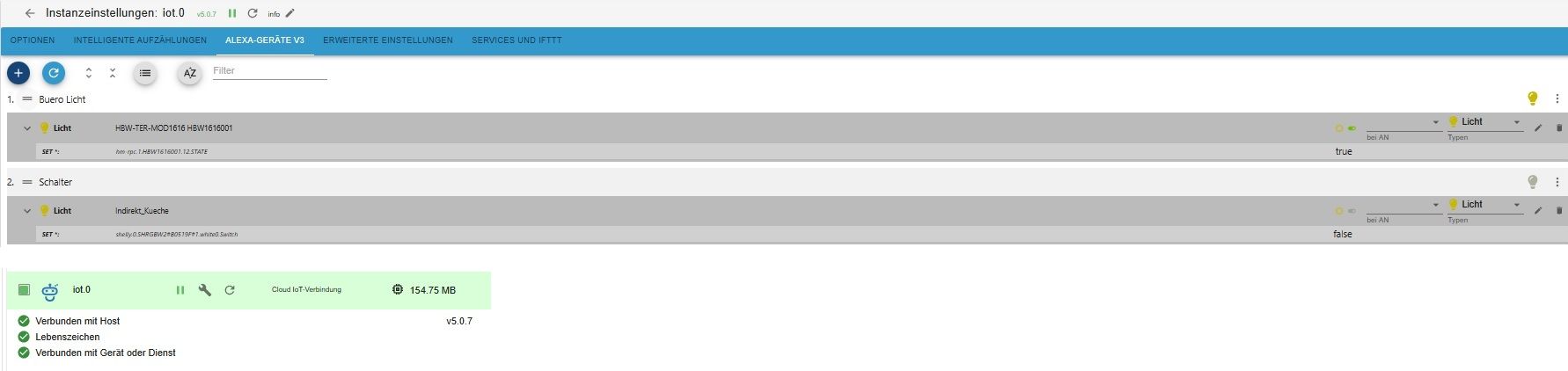
Wie bereits in dem Thread diskutiert, findet die Alexa App bei mir auch keine Geräte.Folgendes habe ich bisher probiert (ohne Erfolg):
- EInrichtung eines IOBroker Pro Kontos + Lizenz
- Installation des IoT Adapters
- Aktivierung des IoBroker Assistant Skills in der Alexa App
- Ich habe den Datenpunkten Rollen zugewiesen, diese werden auch sauber in den Geräten V3 für Alexa aufgeführt.
Ich habe sowohl den IoT Adapter wie auch den Skill (und die komplette Alexa App) de- und wieder installiert, leider ohne Erfolg.
Mein System:
Hardware: Raspi 4B 32-bit OS
Software: Node 20.20.2, nvm: 0.39.7, npm: 10.8.2
IoT Adapter: 5.0.12
IoT Adapter leuchtet grün und Email/Passwort ist korrekt (Email nur kleine Buchstaben, kein # im Passwort etc)Hat jemand einen Tipp, woran das liegen könnte?
Falls ihr noch mehr Infos braucht, reiche ich diese gerne nach.Viele Grüße,
Dimi -
Hallo zusammen,
ich bin neu im Bereich IoBroker und Cloud (in dem Fall Alexa) und brauche eure Hilfe.
Wie bereits in dem Thread diskutiert, findet die Alexa App bei mir auch keine Geräte.Folgendes habe ich bisher probiert (ohne Erfolg):
- EInrichtung eines IOBroker Pro Kontos + Lizenz
- Installation des IoT Adapters
- Aktivierung des IoBroker Assistant Skills in der Alexa App
- Ich habe den Datenpunkten Rollen zugewiesen, diese werden auch sauber in den Geräten V3 für Alexa aufgeführt.
Ich habe sowohl den IoT Adapter wie auch den Skill (und die komplette Alexa App) de- und wieder installiert, leider ohne Erfolg.
Mein System:
Hardware: Raspi 4B 32-bit OS
Software: Node 20.20.2, nvm: 0.39.7, npm: 10.8.2
IoT Adapter: 5.0.12
IoT Adapter leuchtet grün und Email/Passwort ist korrekt (Email nur kleine Buchstaben, kein # im Passwort etc)Hat jemand einen Tipp, woran das liegen könnte?
Falls ihr noch mehr Infos braucht, reiche ich diese gerne nach.Viele Grüße,
DimiHardware: Raspi 4B 32-bit OS
Software: Node 20.20.2,Beides veraltet. Installier da NEU (anders kommst du da nicht runter) ein 64Bit-System.
Und dann muss da auch nodejs@22 verwendet werden.

Hey! Du scheinst an dieser Unterhaltung interessiert zu sein, hast aber noch kein Konto.
Hast du es satt, bei jedem Besuch durch die gleichen Beiträge zu scrollen? Wenn du dich für ein Konto anmeldest, kommst du immer genau dorthin zurück, wo du zuvor warst, und kannst dich über neue Antworten benachrichtigen lassen (entweder per E-Mail oder Push-Benachrichtigung). Du kannst auch Lesezeichen speichern und Beiträge positiv bewerten, um anderen Community-Mitgliedern deine Wertschätzung zu zeigen.
Mit deinem Input könnte dieser Beitrag noch besser werden 💗
Registrieren Anmelden161
Online33.1k
Benutzende83.7k
Themen1.3m
Beiträge