




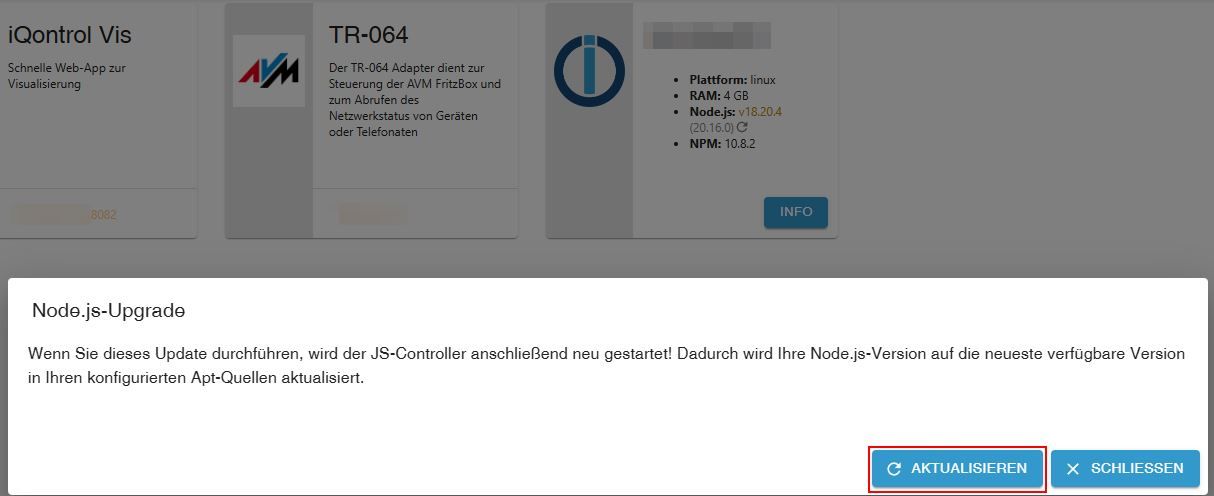
Node.js Update über GUI funktioniert nicht, wie vorgehen?
-
@thomas-braun sagte in Node.js Update über GUI funktioniert nicht, wie vorgehen?:
Ich würde sowas immer über die Kommandozeile machen...
iob nodejs-updateHat funktioniert.

Herzlichen Dank.Aber warum wird die Update-Möglichkeit auch in der GUI angeboten?
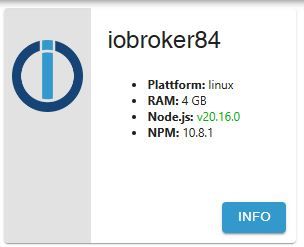
@meute ...ist aber anscheinend nur update und kein upgrade
-
@thomas-braun sagte in Node.js Update über GUI funktioniert nicht, wie vorgehen?:
Ich würde sowas immer über die Kommandozeile machen...
iob nodejs-updateCool wäre noch, wenn man den Befehl (und ggf. noch fehlende Weitere) hier eintragen könnte:
https://www.iobroker.net/docu/index-98.htm
https://github.com/ioBroker/ioBroker.docs/blob/master/docs/en/config/cli.mdfraenk for friends Code: MATF103
-
@thomas-braun sagte in Node.js Update über GUI funktioniert nicht, wie vorgehen?:
Ich würde sowas immer über die Kommandozeile machen...
iob nodejs-updateCool wäre noch, wenn man den Befehl (und ggf. noch fehlende Weitere) hier eintragen könnte:
https://www.iobroker.net/docu/index-98.htm
https://github.com/ioBroker/ioBroker.docs/blob/master/docs/en/config/cli.md@meute Lebt vom Mitmachen.
Doku kann jeder beisteuern. -
@meute Lebt vom Mitmachen.
Doku kann jeder beisteuern.@thomas-braun sagte in Node.js Update über GUI funktioniert nicht, wie vorgehen?:
Doku kann jeder beisteuern.
wobei die Doku von 2018 aber nicht wirklich gemeint sein wird.
kein Support per PN! - Fragen im Forum stellen - Benutzt das Voting rechts unten im Beitrag wenn er euch geholfen hat.
Das Forum freut sich über eine Spende. Benutzt dazu den Spendenbutton oben rechts. Danke!
der Installationsfixer: curl -fsL https://iobroker.net/fix.sh | bash - -
@thomas-braun sagte in Node.js Update über GUI funktioniert nicht, wie vorgehen?:
Doku kann jeder beisteuern.
wobei die Doku von 2018 aber nicht wirklich gemeint sein wird.
Nein. Aber in der aktuellen Fassung ist es auch nicht drin.
-
@meute Lebt vom Mitmachen.
Doku kann jeder beisteuern.@thomas-braun sagte in Node.js Update über GUI funktioniert nicht, wie vorgehen?:
@meute Lebt vom Mitmachen.
Doku kann jeder beisteuern.Doku auf GitHub ergänzt.
iobroker nodejs-update
2 Pull requests wurden erstellt für DE und EN. -
Für mich funktioniert weder GUI noch CLI für das node-jd Update.
Hier meine Ausgangslage - im GUI wird das angezeigt:
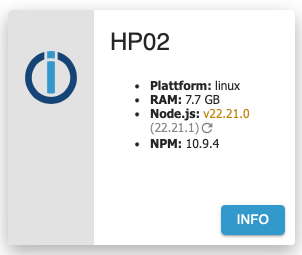
Wenn ich auf den "Kringel" zum Update klicke, behauptet das GUI dass es erfolgreich war, aber nach einem Reload sieht es wieder exakt gleich.
Mach ich es über das Terminal, dass sieht es es zunächst gut aus:
peter@HP02:~$ iob stop
peter@HP02:~$ iob nodejs-update

ioBroker nodejs fixer 2025-08-09

Recommended nodejs-version is: 22.21.1
Checking your installation now. Please be patient!

Your current setup is:
/usr/bin/nodejs         v22.21.0
/usr/bin/node           v22.21.0
/usr/bin/npm            10.9.4
/usr/bin/npx            10.9.4
/usr/bin/corepack       0.34.0

We found these nodejs versions available for installation:

nodejs:
  Installed: 22.21.0-1nodesource1
  Candidate: 22.21.0-1nodesource1
  Version table:
 *** 22.21.0-1nodesource1 1001
        500 https://deb.nodesource.com/node_22.x nodistro/main amd64 Packages
        100 /var/lib/dpkg/status
     22.20.0-1nodesource1 1001
        500 https://deb.nodesource.com/node_22.x nodistro/main amd64 Packages
     22.19.0-1nodesource1 1001
        500 https://deb.nodesource.com/node_22.x nodistro/main amd64 Packages
     22.18.0-1nodesource1 1001
        500 https://deb.nodesource.com/node_22.x nodistro/main amd64 Packages
     22.17.1-1nodesource1 1001
        500 https://deb.nodesource.com/node_22.x nodistro/main amd64 Packages
     22.17.0-1nodesource1 1001
        500 https://deb.nodesource.com/node_22.x nodistro/main amd64 Packages
     22.16.0-1nodesource1 1001
        500 https://deb.nodesource.com/node_22.x nodistro/main amd64 Packages
     22.15.1-1nodesource1 1001
        500 https://deb.nodesource.com/node_22.x nodistro/main amd64 Packages
     22.15.0-1nodesource1 1001
        500 https://deb.nodesource.com/node_22.x nodistro/main amd64 Packages
     22.14.0-1nodesource1 1001
        500 https://deb.nodesource.com/node_22.x nodistro/main amd64 Packages
     22.13.1-1nodesource1 1001
        500 https://deb.nodesource.com/node_22.x nodistro/main amd64 Packages
     22.13.0-1nodesource1 1001
        500 https://deb.nodesource.com/node_22.x nodistro/main amd64 Packages
     22.12.0-1nodesource1 1001
        500 https://deb.nodesource.com/node_22.x nodistro/main amd64 Packages
     22.11.0-1nodesource1 1001
        500 https://deb.nodesource.com/node_22.x nodistro/main amd64 Packages
     22.10.0-1nodesource1 1001
        500 https://deb.nodesource.com/node_22.x nodistro/main amd64 Packages
     22.9.0-1nodesource1 1001
        500 https://deb.nodesource.com/node_22.x nodistro/main amd64 Packages
     22.8.0-1nodesource1 1001
        500 https://deb.nodesource.com/node_22.x nodistro/main amd64 Packages
     22.7.0-1nodesource1 1001
        500 https://deb.nodesource.com/node_22.x nodistro/main amd64 Packages
     22.6.0-1nodesource1 1001
        500 https://deb.nodesource.com/node_22.x nodistro/main amd64 Packages
     22.5.1-1nodesource1 1001
        500 https://deb.nodesource.com/node_22.x nodistro/main amd64 Packages
     22.5.0-1nodesource1 1001
        500 https://deb.nodesource.com/node_22.x nodistro/main amd64 Packages
     22.4.1-1nodesource1 1001
        500 https://deb.nodesource.com/node_22.x nodistro/main amd64 Packages
     22.4.0-1nodesource1 1001
        500 https://deb.nodesource.com/node_22.x nodistro/main amd64 Packages
     22.3.0-1nodesource1 1001
        500 https://deb.nodesource.com/node_22.x nodistro/main amd64 Packages
     22.2.0-1nodesource1 1001
        500 https://deb.nodesource.com/node_22.x nodistro/main amd64 Packages
     22.1.0-1nodesource1 1001
        500 https://deb.nodesource.com/node_22.x nodistro/main amd64 Packages
     22.0.0-1nodesource1 1001
        500 https://deb.nodesource.com/node_22.x nodistro/main amd64 Packages
     12.22.9~dfsg-1ubuntu3.6 500
        500 http://ch.archive.ubuntu.com/ubuntu jammy-updates/universe amd64 Packages
        500 http://security.ubuntu.com/ubuntu jammy-security/universe amd64 Packages
     12.22.9~dfsg-1ubuntu3 500
        500 http://ch.archive.ubuntu.com/ubuntu jammy/universe amd64 Packages


Nothing to do - Your installation is using the correct paths.

You are running nodejs v22.21.0. Do you want to install recommended version 22.21.1?

Press <y> to continue or any other key to quit
Trying to fix your installation now. Please be patient.
rm: cannot remove '/etc/apt/keyrings/nodesource.gpg 2> /dev/null': No such file or directory
Stopping ioBroker now
#
ioBroker has been stopped


Removing dfsg-nodejs


*** These repos are active on your system:
Hit:1 http://ch.archive.ubuntu.com/ubuntu jammy InRelease
Hit:2 http://ch.archive.ubuntu.com/ubuntu jammy-updates InRelease
Hit:3 http://ch.archive.ubuntu.com/ubuntu jammy-backports InRelease
Hit:4 http://security.ubuntu.com/ubuntu jammy-security InRelease
Reading package lists... Done

*** Installing ca-certificates, curl and gnupg, just in case they are missing.

*** Creating new /etc/apt/sources.list.d/nodesource.list and pinning source

deb [signed-by=/etc/apt/keyrings/nodesource.gpg] https://deb.nodesource.com/node_22.x nodistro main
Package: nodejs
Pin: origin deb.nodesource.com
Pin-Priority: 1001

*** These repos are active after the adjustments:
Hit:1 http://ch.archive.ubuntu.com/ubuntu jammy InRelease
Hit:2 http://ch.archive.ubuntu.com/ubuntu jammy-updates InRelease
Hit:3 http://security.ubuntu.com/ubuntu jammy-security InRelease
Hit:4 http://ch.archive.ubuntu.com/ubuntu jammy-backports InRelease
Get:5 https://deb.nodesource.com/node_22.x nodistro InRelease [12.1 kB]
Get:6 https://deb.nodesource.com/node_22.x nodistro/main amd64 Packages [8605 B]
Fetched 20.7 kB in 0s (43.6 kB/s)
Reading package lists... Done

Installing nodejs now!

Installing latest nodejs v22 release

SUCCESS!
v22.21.0 has been installed! You are using the latest nodejs@22 release now!

COMPATIBILITY CHECK IN PROGRESS (Only a --dry-run! No modules are really changed or added!)
add fsevents 2.3.3

added 1 package in 2s

203 packages are looking for funding
  run `npm fund` for details


*** You need to manually restart your container/virtual machine now! ***
Anschließend bin ich nach wie vor auf v22.21.0 und nicht auf v22.21.1
-
Für mich funktioniert weder GUI noch CLI für das node-jd Update.
Hier meine Ausgangslage - im GUI wird das angezeigt:
Wenn ich auf den "Kringel" zum Update klicke, behauptet das GUI dass es erfolgreich war, aber nach einem Reload sieht es wieder exakt gleich.
Mach ich es über das Terminal, dass sieht es es zunächst gut aus:
peter@HP02:~$ iob stop
peter@HP02:~$ iob nodejs-update

ioBroker nodejs fixer 2025-08-09

Recommended nodejs-version is: 22.21.1
Checking your installation now. Please be patient!

Your current setup is:
/usr/bin/nodejs         v22.21.0
/usr/bin/node           v22.21.0
/usr/bin/npm            10.9.4
/usr/bin/npx            10.9.4
/usr/bin/corepack       0.34.0

We found these nodejs versions available for installation:

nodejs:
  Installed: 22.21.0-1nodesource1
  Candidate: 22.21.0-1nodesource1
  Version table:
 *** 22.21.0-1nodesource1 1001
        500 https://deb.nodesource.com/node_22.x nodistro/main amd64 Packages
        100 /var/lib/dpkg/status
     22.20.0-1nodesource1 1001
        500 https://deb.nodesource.com/node_22.x nodistro/main amd64 Packages
     22.19.0-1nodesource1 1001
        500 https://deb.nodesource.com/node_22.x nodistro/main amd64 Packages
     22.18.0-1nodesource1 1001
        500 https://deb.nodesource.com/node_22.x nodistro/main amd64 Packages
     22.17.1-1nodesource1 1001
        500 https://deb.nodesource.com/node_22.x nodistro/main amd64 Packages
     22.17.0-1nodesource1 1001
        500 https://deb.nodesource.com/node_22.x nodistro/main amd64 Packages
     22.16.0-1nodesource1 1001
        500 https://deb.nodesource.com/node_22.x nodistro/main amd64 Packages
     22.15.1-1nodesource1 1001
        500 https://deb.nodesource.com/node_22.x nodistro/main amd64 Packages
     22.15.0-1nodesource1 1001
        500 https://deb.nodesource.com/node_22.x nodistro/main amd64 Packages
     22.14.0-1nodesource1 1001
        500 https://deb.nodesource.com/node_22.x nodistro/main amd64 Packages
     22.13.1-1nodesource1 1001
        500 https://deb.nodesource.com/node_22.x nodistro/main amd64 Packages
     22.13.0-1nodesource1 1001
        500 https://deb.nodesource.com/node_22.x nodistro/main amd64 Packages
     22.12.0-1nodesource1 1001
        500 https://deb.nodesource.com/node_22.x nodistro/main amd64 Packages
     22.11.0-1nodesource1 1001
        500 https://deb.nodesource.com/node_22.x nodistro/main amd64 Packages
     22.10.0-1nodesource1 1001
        500 https://deb.nodesource.com/node_22.x nodistro/main amd64 Packages
     22.9.0-1nodesource1 1001
        500 https://deb.nodesource.com/node_22.x nodistro/main amd64 Packages
     22.8.0-1nodesource1 1001
        500 https://deb.nodesource.com/node_22.x nodistro/main amd64 Packages
     22.7.0-1nodesource1 1001
        500 https://deb.nodesource.com/node_22.x nodistro/main amd64 Packages
     22.6.0-1nodesource1 1001
        500 https://deb.nodesource.com/node_22.x nodistro/main amd64 Packages
     22.5.1-1nodesource1 1001
        500 https://deb.nodesource.com/node_22.x nodistro/main amd64 Packages
     22.5.0-1nodesource1 1001
        500 https://deb.nodesource.com/node_22.x nodistro/main amd64 Packages
     22.4.1-1nodesource1 1001
        500 https://deb.nodesource.com/node_22.x nodistro/main amd64 Packages
     22.4.0-1nodesource1 1001
        500 https://deb.nodesource.com/node_22.x nodistro/main amd64 Packages
     22.3.0-1nodesource1 1001
        500 https://deb.nodesource.com/node_22.x nodistro/main amd64 Packages
     22.2.0-1nodesource1 1001
        500 https://deb.nodesource.com/node_22.x nodistro/main amd64 Packages
     22.1.0-1nodesource1 1001
        500 https://deb.nodesource.com/node_22.x nodistro/main amd64 Packages
     22.0.0-1nodesource1 1001
        500 https://deb.nodesource.com/node_22.x nodistro/main amd64 Packages
     12.22.9~dfsg-1ubuntu3.6 500
        500 http://ch.archive.ubuntu.com/ubuntu jammy-updates/universe amd64 Packages
        500 http://security.ubuntu.com/ubuntu jammy-security/universe amd64 Packages
     12.22.9~dfsg-1ubuntu3 500
        500 http://ch.archive.ubuntu.com/ubuntu jammy/universe amd64 Packages


Nothing to do - Your installation is using the correct paths.

You are running nodejs v22.21.0. Do you want to install recommended version 22.21.1?

Press <y> to continue or any other key to quit
Trying to fix your installation now. Please be patient.
rm: cannot remove '/etc/apt/keyrings/nodesource.gpg 2> /dev/null': No such file or directory
Stopping ioBroker now
#
ioBroker has been stopped


Removing dfsg-nodejs


*** These repos are active on your system:
Hit:1 http://ch.archive.ubuntu.com/ubuntu jammy InRelease
Hit:2 http://ch.archive.ubuntu.com/ubuntu jammy-updates InRelease
Hit:3 http://ch.archive.ubuntu.com/ubuntu jammy-backports InRelease
Hit:4 http://security.ubuntu.com/ubuntu jammy-security InRelease
Reading package lists... Done

*** Installing ca-certificates, curl and gnupg, just in case they are missing.

*** Creating new /etc/apt/sources.list.d/nodesource.list and pinning source

deb [signed-by=/etc/apt/keyrings/nodesource.gpg] https://deb.nodesource.com/node_22.x nodistro main
Package: nodejs
Pin: origin deb.nodesource.com
Pin-Priority: 1001

*** These repos are active after the adjustments:
Hit:1 http://ch.archive.ubuntu.com/ubuntu jammy InRelease
Hit:2 http://ch.archive.ubuntu.com/ubuntu jammy-updates InRelease
Hit:3 http://security.ubuntu.com/ubuntu jammy-security InRelease
Hit:4 http://ch.archive.ubuntu.com/ubuntu jammy-backports InRelease
Get:5 https://deb.nodesource.com/node_22.x nodistro InRelease [12.1 kB]
Get:6 https://deb.nodesource.com/node_22.x nodistro/main amd64 Packages [8605 B]
Fetched 20.7 kB in 0s (43.6 kB/s)
Reading package lists... Done

Installing nodejs now!

Installing latest nodejs v22 release

SUCCESS!
v22.21.0 has been installed! You are using the latest nodejs@22 release now!

COMPATIBILITY CHECK IN PROGRESS (Only a --dry-run! No modules are really changed or added!)
add fsevents 2.3.3

added 1 package in 2s

203 packages are looking for funding
  run `npm fund` for details


*** You need to manually restart your container/virtual machine now! ***
Anschließend bin ich nach wie vor auf v22.21.0 und nicht auf v22.21.1
@PeterSmarthome sagte in Node.js Update über GUI funktioniert nicht, wie vorgehen?:
Anschließend bin ich nach wie vor auf v22.21.0 und nicht auf v22.21.1
Richtig. Die v22.21.1 ist noch nicht im nodesource-Repo veröffentlicht worden.
-
@warp735 sagte in Node.js Update über GUI funktioniert nicht, wie vorgehen?:
Warum wird´s dann angezeigt?
Weil im 'upstream' vom Projekt 'nodejs.org' halt die 22.21.1 veröffentlicht wurde, es aber im 'downstream' von nodesource nicht für deren Repo gepackt wurde.


Hey! Du scheinst an dieser Unterhaltung interessiert zu sein, hast aber noch kein Konto.
Hast du es satt, bei jedem Besuch durch die gleichen Beiträge zu scrollen? Wenn du dich für ein Konto anmeldest, kommst du immer genau dorthin zurück, wo du zuvor warst, und kannst dich über neue Antworten benachrichtigen lassen (entweder per E-Mail oder Push-Benachrichtigung). Du kannst auch Lesezeichen speichern und Beiträge positiv bewerten, um anderen Community-Mitgliedern deine Wertschätzung zu zeigen.
Mit deinem Input könnte dieser Beitrag noch besser werden 💗
Registrieren Anmelden302
Online33.0k
Benutzer83.6k
Themen1.3m
Beiträge