



Skip to content
  • Home
  • Aktuell
  • Tags
  • 0 Ungelesen 0
  • Kategorien
  • Unreplied
  • Beliebt
  • GitHub
  • Docu
  • Hilfe
Skins
  • Light
  • Brite
  • Cerulean
  • Cosmo
  • Flatly
  • Journal
  • Litera
  • Lumen
  • Lux
  • Materia
  • Minty
  • Morph
  • Pulse
  • Sandstone
  • Simplex
  • Sketchy
  • Spacelab
  • United
  • Yeti
  • Zephyr
  • Dark
  • Cyborg
  • Darkly
  • Quartz
  • Slate
  • Solar
  • Superhero
  • Vapor

  • Standard: (Kein Skin)
  • Kein Skin
Einklappen
ioBroker Logo

Community Forum

donate donate
  1. ioBroker Community Home
  2. Deutsch
  3. ioBroker Allgemein
  4. Node.js Update über GUI funktioniert nicht, wie vorgehen?

NEWS

  • Jahresrückblick 2025 – unser neuer Blogbeitrag ist online! ✨
    BluefoxB
    Bluefox
    16
    1
    1.3k

  • Neuer Blogbeitrag: Monatsrückblick - Dezember 2025 🎄
    BluefoxB
    Bluefox
    13
    1
    774

  • Weihnachtsangebot 2025! 🎄
    BluefoxB
    Bluefox
    25
    1
    2.0k

Node.js Update über GUI funktioniert nicht, wie vorgehen?

Geplant Angeheftet Gesperrt Verschoben ioBroker Allgemein
15 Beiträge 6 Kommentatoren 1.1k Aufrufe 4 Watching
  • Älteste zuerst
  • Neuste zuerst
  • Meiste Stimmen
Antworten
  • In einem neuen Thema antworten
Anmelden zum Antworten
Dieses Thema wurde gelöscht. Nur Nutzer mit entsprechenden Rechten können es sehen.
  • meuteM Offline
    meuteM Offline
    meute
    schrieb am zuletzt editiert von
    #1

    Hallo,

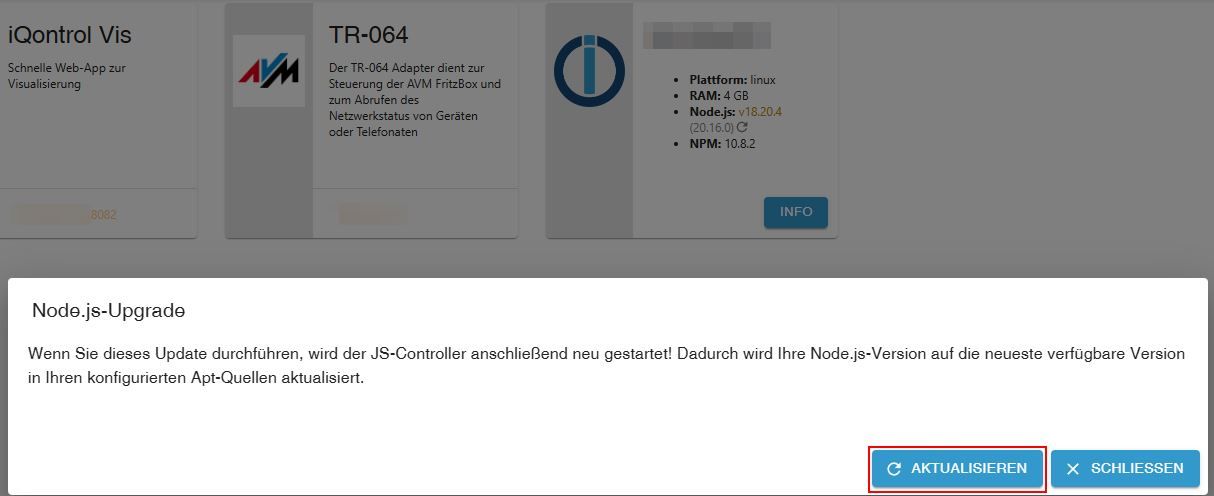
    Node.js 20.16.0 wird in der GUI angeboten.
    Ich wollte über die GUI updaten.
    Er macht kurz was und startet dann Dienste neu.
    Aber die Version ist immer noch bei 18.20.4.

    Wie ist die korrekte Vorgehensweise für das Node.js-Update?

    $ type -P nodejs node npm npx && nodejs -v && node -v && npm -v && npx -v
    /usr/bin/nodejs
    /usr/bin/node
    /usr/bin/npm
    /usr/bin/npx
    v18.20.4
    v18.20.4
    10.8.2
    10.8.2
    

    Screenshot_2024-08-20_19-24-33.jpg

    fraenk for friends Code: MATF103

    Thomas BraunT T 2 Antworten Letzte Antwort
    0
    • meuteM meute

      Hallo,

      Node.js 20.16.0 wird in der GUI angeboten.
      Ich wollte über die GUI updaten.
      Er macht kurz was und startet dann Dienste neu.
      Aber die Version ist immer noch bei 18.20.4.

      Wie ist die korrekte Vorgehensweise für das Node.js-Update?

      $ type -P nodejs node npm npx && nodejs -v && node -v && npm -v && npx -v
      /usr/bin/nodejs
      /usr/bin/node
      /usr/bin/npm
      /usr/bin/npx
      v18.20.4
      v18.20.4
      10.8.2
      10.8.2
      

      Screenshot_2024-08-20_19-24-33.jpg

      Thomas BraunT Online
      Thomas BraunT Online
      Thomas Braun
      Most Active
      schrieb am zuletzt editiert von
      #2

      @meute

      Ich würde sowas immer über die Kommandozeile machen...

      iob nodejs-update
      

      Linux-Werkzeugkasten:
      https://forum.iobroker.net/topic/42952/der-kleine-iobroker-linux-werkzeugkasten
      NodeJS Fixer Skript:
      https://forum.iobroker.net/topic/68035/iob-node-fix-skript
      iob_diag: curl -sLf -o diag.sh https://iobroker.net/diag.sh && bash diag.sh

      meuteM 2 Antworten Letzte Antwort
      1
      • meuteM meute

        Hallo,

        Node.js 20.16.0 wird in der GUI angeboten.
        Ich wollte über die GUI updaten.
        Er macht kurz was und startet dann Dienste neu.
        Aber die Version ist immer noch bei 18.20.4.

        Wie ist die korrekte Vorgehensweise für das Node.js-Update?

        $ type -P nodejs node npm npx && nodejs -v && node -v && npm -v && npx -v
        /usr/bin/nodejs
        /usr/bin/node
        /usr/bin/npm
        /usr/bin/npx
        v18.20.4
        v18.20.4
        10.8.2
        10.8.2
        

        Screenshot_2024-08-20_19-24-33.jpg

        T Offline
        T Offline
        TT-Tom
        schrieb am zuletzt editiert von
        #3

        @meute

        das Update wird nur innerhalb eines major-release gemacht. So würde ich den Text deuten. Um die neue Mauer-Release einzubauen setzen, kannst du folgendes ind der Konsole nutzen.

        iob stop
        iob nodejs-update 20
        iob start
        

        Gruß Tom
        https://github.com/tt-tom17
        Wenn meine Hilfe erfolgreich war, benutze bitte das Voting unten rechts im Beitrag

        NSPanel Script Wiki
        https://github.com/joBr99/nspanel-lovelace-ui/wiki

        NSPanel Adapter Wiki
        https://github.com/ticaki/ioBroker.nspanel-lovelace-ui/wiki

        1 Antwort Letzte Antwort
        1
        • Thomas BraunT Thomas Braun

          @meute

          Ich würde sowas immer über die Kommandozeile machen...

          iob nodejs-update
          
          meuteM Offline
          meuteM Offline
          meute
          schrieb am zuletzt editiert von
          #4

          @thomas-braun sagte in Node.js Update über GUI funktioniert nicht, wie vorgehen?:

          @meute

          Ich würde sowas immer über die Kommandozeile machen...

          iob nodejs-update
          

          Hat funktioniert. :+1:
          Herzlichen Dank.

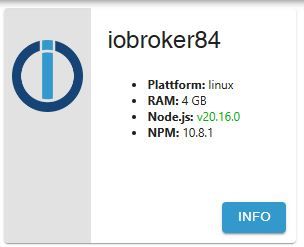
          Aber warum wird die Update-Möglichkeit auch in der GUI angeboten?
          Screenshot_2024-08-20_19-53-08.jpg

          fraenk for friends Code: MATF103

          Thomas BraunT HomoranH 2 Antworten Letzte Antwort
          0
          • meuteM meute

            @thomas-braun sagte in Node.js Update über GUI funktioniert nicht, wie vorgehen?:

            @meute

            Ich würde sowas immer über die Kommandozeile machen...

            iob nodejs-update
            

            Hat funktioniert. :+1:
            Herzlichen Dank.

            Aber warum wird die Update-Möglichkeit auch in der GUI angeboten?

            Screenshot_2024-08-20_19-53-08.jpg

            Thomas BraunT Online
            Thomas BraunT Online
            Thomas Braun
            Most Active
            schrieb am zuletzt editiert von Thomas Braun
            #5

            @meute sagte in Node.js Update über GUI funktioniert nicht, wie vorgehen?:

            Aber warum wird die Update-Möglichkeit auch in der GUI angeboten?

            Damit es (vermeintlich) einfacher ist... ;-)

            GUIs haben immer das Problem, das sie zwar hübscher sein mögen, aber die Kommandozeile ist viel mächtiger.

            Linux-Werkzeugkasten:
            https://forum.iobroker.net/topic/42952/der-kleine-iobroker-linux-werkzeugkasten
            NodeJS Fixer Skript:
            https://forum.iobroker.net/topic/68035/iob-node-fix-skript
            iob_diag: curl -sLf -o diag.sh https://iobroker.net/diag.sh && bash diag.sh

            1 Antwort Letzte Antwort
            0
            • meuteM meute

              @thomas-braun sagte in Node.js Update über GUI funktioniert nicht, wie vorgehen?:

              @meute

              Ich würde sowas immer über die Kommandozeile machen...

              iob nodejs-update
              

              Hat funktioniert. :+1:
              Herzlichen Dank.

              Aber warum wird die Update-Möglichkeit auch in der GUI angeboten?

              Screenshot_2024-08-20_19-53-08.jpg

              HomoranH Nicht stören
              HomoranH Nicht stören
              Homoran
              Global Moderator Administrators
              schrieb am zuletzt editiert von
              #6

              @meute ...ist aber anscheinend nur update und kein upgrade

              kein Support per PN! - Fragen im Forum stellen - es gibt fast nichts, was nicht auch für andere interessant ist.

              Benutzt das Voting rechts unten im Beitrag wenn er euch geholfen hat.

              der Installationsfixer: curl -fsL https://iobroker.net/fix.sh | bash -

              1 Antwort Letzte Antwort
              2
              • Thomas BraunT Thomas Braun

                @meute

                Ich würde sowas immer über die Kommandozeile machen...

                iob nodejs-update
                
                meuteM Offline
                meuteM Offline
                meute
                schrieb am zuletzt editiert von meute
                #7

                @thomas-braun sagte in Node.js Update über GUI funktioniert nicht, wie vorgehen?:

                Ich würde sowas immer über die Kommandozeile machen...

                iob nodejs-update
                

                Cool wäre noch, wenn man den Befehl (und ggf. noch fehlende Weitere) hier eintragen könnte:
                https://www.iobroker.net/docu/index-98.htm
                https://github.com/ioBroker/ioBroker.docs/blob/master/docs/en/config/cli.md

                fraenk for friends Code: MATF103

                Thomas BraunT 1 Antwort Letzte Antwort
                0
                • meuteM meute

                  @thomas-braun sagte in Node.js Update über GUI funktioniert nicht, wie vorgehen?:

                  Ich würde sowas immer über die Kommandozeile machen...

                  iob nodejs-update
                  

                  Cool wäre noch, wenn man den Befehl (und ggf. noch fehlende Weitere) hier eintragen könnte:
                  https://www.iobroker.net/docu/index-98.htm
                  https://github.com/ioBroker/ioBroker.docs/blob/master/docs/en/config/cli.md

                  Thomas BraunT Online
                  Thomas BraunT Online
                  Thomas Braun
                  Most Active
                  schrieb am zuletzt editiert von
                  #8

                  @meute Lebt vom Mitmachen.
                  Doku kann jeder beisteuern.

                  Linux-Werkzeugkasten:
                  https://forum.iobroker.net/topic/42952/der-kleine-iobroker-linux-werkzeugkasten
                  NodeJS Fixer Skript:
                  https://forum.iobroker.net/topic/68035/iob-node-fix-skript
                  iob_diag: curl -sLf -o diag.sh https://iobroker.net/diag.sh && bash diag.sh

                  HomoranH meuteM 2 Antworten Letzte Antwort
                  0
                  • Thomas BraunT Thomas Braun

                    @meute Lebt vom Mitmachen.
                    Doku kann jeder beisteuern.

                    HomoranH Nicht stören
                    HomoranH Nicht stören
                    Homoran
                    Global Moderator Administrators
                    schrieb am zuletzt editiert von
                    #9

                    @thomas-braun sagte in Node.js Update über GUI funktioniert nicht, wie vorgehen?:

                    Doku kann jeder beisteuern.

                    wobei die Doku von 2018 aber nicht wirklich gemeint sein wird.

                    kein Support per PN! - Fragen im Forum stellen - es gibt fast nichts, was nicht auch für andere interessant ist.

                    Benutzt das Voting rechts unten im Beitrag wenn er euch geholfen hat.

                    der Installationsfixer: curl -fsL https://iobroker.net/fix.sh | bash -

                    Thomas BraunT 1 Antwort Letzte Antwort
                    0
                    • HomoranH Homoran

                      @thomas-braun sagte in Node.js Update über GUI funktioniert nicht, wie vorgehen?:

                      Doku kann jeder beisteuern.

                      wobei die Doku von 2018 aber nicht wirklich gemeint sein wird.

                      Thomas BraunT Online
                      Thomas BraunT Online
                      Thomas Braun
                      Most Active
                      schrieb am zuletzt editiert von
                      #10

                      @homoran

                      Nein. Aber in der aktuellen Fassung ist es auch nicht drin.

                      https://www.iobroker.net/#de/documentation/config/cli.md

                      Linux-Werkzeugkasten:
                      https://forum.iobroker.net/topic/42952/der-kleine-iobroker-linux-werkzeugkasten
                      NodeJS Fixer Skript:
                      https://forum.iobroker.net/topic/68035/iob-node-fix-skript
                      iob_diag: curl -sLf -o diag.sh https://iobroker.net/diag.sh && bash diag.sh

                      1 Antwort Letzte Antwort
                      0
                      • Thomas BraunT Thomas Braun

                        @meute Lebt vom Mitmachen.
                        Doku kann jeder beisteuern.

                        meuteM Offline
                        meuteM Offline
                        meute
                        schrieb am zuletzt editiert von meute
                        #11

                        @thomas-braun sagte in Node.js Update über GUI funktioniert nicht, wie vorgehen?:

                        @meute Lebt vom Mitmachen.
                        Doku kann jeder beisteuern.

                        Doku auf GitHub ergänzt.
                        iobroker nodejs-update
                        2 Pull requests wurden erstellt für DE und EN.

                        fraenk for friends Code: MATF103

                        1 Antwort Letzte Antwort
                        1
                        • P Offline
                          P Offline
                          PeterSmarthome
                          schrieb am zuletzt editiert von
                          #12

                          Für mich funktioniert weder GUI noch CLI für das node-jd Update.

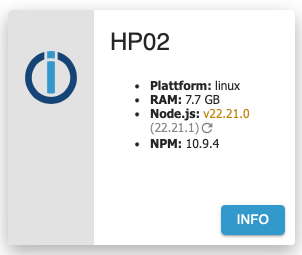
                          Hier meine Ausgangslage - im GUI wird das angezeigt:
                          d347a8e4-2f1f-4be1-92fd-f385c3fc9dad-image.png

                          Wenn ich auf den "Kringel" zum Update klicke, behauptet das GUI dass es erfolgreich war, aber nach einem Reload sieht es wieder exakt gleich.

                          Mach ich es über das Terminal, dass sieht es es zunächst gut aus:

                          peter@HP02:~$ iob stop
                          peter@HP02:~$ iob nodejs-update
                          
                          ioBroker nodejs fixer 2025-08-09
                          
                          Recommended nodejs-version is: 22.21.1
                          Checking your installation now. Please be patient!
                          
                          Your current setup is:
                          /usr/bin/nodejs         v22.21.0
                          /usr/bin/node           v22.21.0
                          /usr/bin/npm            10.9.4
                          /usr/bin/npx            10.9.4
                          /usr/bin/corepack       0.34.0
                          
                          We found these nodejs versions available for installation:
                          
                          nodejs:
                            Installed: 22.21.0-1nodesource1
                            Candidate: 22.21.0-1nodesource1
                            Version table:
                           *** 22.21.0-1nodesource1 1001
                                  500 https://deb.nodesource.com/node_22.x nodistro/main amd64 Packages
                                  100 /var/lib/dpkg/status
                               22.20.0-1nodesource1 1001
                                  500 https://deb.nodesource.com/node_22.x nodistro/main amd64 Packages
                               22.19.0-1nodesource1 1001
                                  500 https://deb.nodesource.com/node_22.x nodistro/main amd64 Packages
                               22.18.0-1nodesource1 1001
                                  500 https://deb.nodesource.com/node_22.x nodistro/main amd64 Packages
                               22.17.1-1nodesource1 1001
                                  500 https://deb.nodesource.com/node_22.x nodistro/main amd64 Packages
                               22.17.0-1nodesource1 1001
                                  500 https://deb.nodesource.com/node_22.x nodistro/main amd64 Packages
                               22.16.0-1nodesource1 1001
                                  500 https://deb.nodesource.com/node_22.x nodistro/main amd64 Packages
                               22.15.1-1nodesource1 1001
                                  500 https://deb.nodesource.com/node_22.x nodistro/main amd64 Packages
                               22.15.0-1nodesource1 1001
                                  500 https://deb.nodesource.com/node_22.x nodistro/main amd64 Packages
                               22.14.0-1nodesource1 1001
                                  500 https://deb.nodesource.com/node_22.x nodistro/main amd64 Packages
                               22.13.1-1nodesource1 1001
                                  500 https://deb.nodesource.com/node_22.x nodistro/main amd64 Packages
                               22.13.0-1nodesource1 1001
                                  500 https://deb.nodesource.com/node_22.x nodistro/main amd64 Packages
                               22.12.0-1nodesource1 1001
                                  500 https://deb.nodesource.com/node_22.x nodistro/main amd64 Packages
                               22.11.0-1nodesource1 1001
                                  500 https://deb.nodesource.com/node_22.x nodistro/main amd64 Packages
                               22.10.0-1nodesource1 1001
                                  500 https://deb.nodesource.com/node_22.x nodistro/main amd64 Packages
                               22.9.0-1nodesource1 1001
                                  500 https://deb.nodesource.com/node_22.x nodistro/main amd64 Packages
                               22.8.0-1nodesource1 1001
                                  500 https://deb.nodesource.com/node_22.x nodistro/main amd64 Packages
                               22.7.0-1nodesource1 1001
                                  500 https://deb.nodesource.com/node_22.x nodistro/main amd64 Packages
                               22.6.0-1nodesource1 1001
                                  500 https://deb.nodesource.com/node_22.x nodistro/main amd64 Packages
                               22.5.1-1nodesource1 1001
                                  500 https://deb.nodesource.com/node_22.x nodistro/main amd64 Packages
                               22.5.0-1nodesource1 1001
                                  500 https://deb.nodesource.com/node_22.x nodistro/main amd64 Packages
                               22.4.1-1nodesource1 1001
                                  500 https://deb.nodesource.com/node_22.x nodistro/main amd64 Packages
                               22.4.0-1nodesource1 1001
                                  500 https://deb.nodesource.com/node_22.x nodistro/main amd64 Packages
                               22.3.0-1nodesource1 1001
                                  500 https://deb.nodesource.com/node_22.x nodistro/main amd64 Packages
                               22.2.0-1nodesource1 1001
                                  500 https://deb.nodesource.com/node_22.x nodistro/main amd64 Packages
                               22.1.0-1nodesource1 1001
                                  500 https://deb.nodesource.com/node_22.x nodistro/main amd64 Packages
                               22.0.0-1nodesource1 1001
                                  500 https://deb.nodesource.com/node_22.x nodistro/main amd64 Packages
                               12.22.9~dfsg-1ubuntu3.6 500
                                  500 http://ch.archive.ubuntu.com/ubuntu jammy-updates/universe amd64 Packages
                                  500 http://security.ubuntu.com/ubuntu jammy-security/universe amd64 Packages
                               12.22.9~dfsg-1ubuntu3 500
                                  500 http://ch.archive.ubuntu.com/ubuntu jammy/universe amd64 Packages


                          Nothing to do - Your installation is using the correct paths.
                          
                          You are running nodejs v22.21.0. Do you want to install recommended version 22.21.1? 
                          
                          Press <y> to continue or any other key to quit
                          Trying to fix your installation now. Please be patient.
                          rm: cannot remove '/etc/apt/keyrings/nodesource.gpg 2> /dev/null': No such file or directory
                          Stopping ioBroker now
                          #
                          ioBroker has been stopped
                          
                          
                          Removing dfsg-nodejs


                          *** These repos are active on your system:
                          Hit:1 http://ch.archive.ubuntu.com/ubuntu jammy InRelease
                          Hit:2 http://ch.archive.ubuntu.com/ubuntu jammy-updates InRelease
                          Hit:3 http://ch.archive.ubuntu.com/ubuntu jammy-backports InRelease
                          Hit:4 http://security.ubuntu.com/ubuntu jammy-security InRelease
                          Reading package lists... Done
                          
                          *** Installing ca-certificates, curl and gnupg, just in case they are missing.
                          
                          *** Creating new /etc/apt/sources.list.d/nodesource.list and pinning source
                          
                          deb [signed-by=/etc/apt/keyrings/nodesource.gpg] https://deb.nodesource.com/node_22.x nodistro main
                          Package: nodejs
                          Pin: origin deb.nodesource.com
                          Pin-Priority: 1001
                          
                          *** These repos are active after the adjustments:
                          Hit:1 http://ch.archive.ubuntu.com/ubuntu jammy InRelease
                          Hit:2 http://ch.archive.ubuntu.com/ubuntu jammy-updates InRelease              
                          Hit:3 http://security.ubuntu.com/ubuntu jammy-security InRelease               
                          Hit:4 http://ch.archive.ubuntu.com/ubuntu jammy-backports InRelease
                          Get:5 https://deb.nodesource.com/node_22.x nodistro InRelease [12.1 kB]
                          Get:6 https://deb.nodesource.com/node_22.x nodistro/main amd64 Packages [8605 B]
                          Fetched 20.7 kB in 0s (43.6 kB/s)   
                          Reading package lists... Done
                          
                          Installing nodejs now!
                          
                          Installing latest nodejs v22 release
                          
                          SUCCESS!
                          v22.21.0 has been installed! You are using the latest nodejs@22 release now!
                          
                          COMPATIBILITY CHECK IN PROGRESS (Only a --dry-run! No modules are really changed or added!)
                          add fsevents 2.3.3
                          
                          added 1 package in 2s
                          
                          203 packages are looking for funding
                            run `npm fund` for details
                          
                          
                          *** You need to manually restart your container/virtual machine now! *** 
                          

                          Anschließend bin ich nach wie vor auf v22.21.0 und nicht auf v22.21.1

                          Thomas BraunT 1 Antwort Letzte Antwort
                          0
                          • P PeterSmarthome

                            Für mich funktioniert weder GUI noch CLI für das node-jd Update.

                            Hier meine Ausgangslage - im GUI wird das angezeigt:

                            d347a8e4-2f1f-4be1-92fd-f385c3fc9dad-image.png

                            Wenn ich auf den "Kringel" zum Update klicke, behauptet das GUI dass es erfolgreich war, aber nach einem Reload sieht es wieder exakt gleich.

                            Mach ich es über das Terminal, dass sieht es es zunächst gut aus:

                            peter@HP02:~$ iob stop
                            peter@HP02:~$ iob nodejs-update
                            
                            ioBroker nodejs fixer 2025-08-09
                            
                            Recommended nodejs-version is: 22.21.1
                            Checking your installation now. Please be patient!
                            
                            Your current setup is:
                            /usr/bin/nodejs         v22.21.0
                            /usr/bin/node           v22.21.0
                            /usr/bin/npm            10.9.4
                            /usr/bin/npx            10.9.4
                            /usr/bin/corepack       0.34.0
                            
                            We found these nodejs versions available for installation:
                            
                            nodejs:
                              Installed: 22.21.0-1nodesource1
                              Candidate: 22.21.0-1nodesource1
                              Version table:
                             *** 22.21.0-1nodesource1 1001
                                    500 https://deb.nodesource.com/node_22.x nodistro/main amd64 Packages
                                    100 /var/lib/dpkg/status
                                 22.20.0-1nodesource1 1001
                                    500 https://deb.nodesource.com/node_22.x nodistro/main amd64 Packages
                                 22.19.0-1nodesource1 1001
                                    500 https://deb.nodesource.com/node_22.x nodistro/main amd64 Packages
                                 22.18.0-1nodesource1 1001
                                    500 https://deb.nodesource.com/node_22.x nodistro/main amd64 Packages
                                 22.17.1-1nodesource1 1001
                                    500 https://deb.nodesource.com/node_22.x nodistro/main amd64 Packages
                                 22.17.0-1nodesource1 1001
                                    500 https://deb.nodesource.com/node_22.x nodistro/main amd64 Packages
                                 22.16.0-1nodesource1 1001
                                    500 https://deb.nodesource.com/node_22.x nodistro/main amd64 Packages
                                 22.15.1-1nodesource1 1001
                                    500 https://deb.nodesource.com/node_22.x nodistro/main amd64 Packages
                                 22.15.0-1nodesource1 1001
                                    500 https://deb.nodesource.com/node_22.x nodistro/main amd64 Packages
                                 22.14.0-1nodesource1 1001
                                    500 https://deb.nodesource.com/node_22.x nodistro/main amd64 Packages
                                 22.13.1-1nodesource1 1001
                                    500 https://deb.nodesource.com/node_22.x nodistro/main amd64 Packages
                                 22.13.0-1nodesource1 1001
                                    500 https://deb.nodesource.com/node_22.x nodistro/main amd64 Packages
                                 22.12.0-1nodesource1 1001
                                    500 https://deb.nodesource.com/node_22.x nodistro/main amd64 Packages
                                 22.11.0-1nodesource1 1001
                                    500 https://deb.nodesource.com/node_22.x nodistro/main amd64 Packages
                                 22.10.0-1nodesource1 1001
                                    500 https://deb.nodesource.com/node_22.x nodistro/main amd64 Packages
                                 22.9.0-1nodesource1 1001
                                    500 https://deb.nodesource.com/node_22.x nodistro/main amd64 Packages
                                 22.8.0-1nodesource1 1001
                                    500 https://deb.nodesource.com/node_22.x nodistro/main amd64 Packages
                                 22.7.0-1nodesource1 1001
                                    500 https://deb.nodesource.com/node_22.x nodistro/main amd64 Packages
                                 22.6.0-1nodesource1 1001
                                    500 https://deb.nodesource.com/node_22.x nodistro/main amd64 Packages
                                 22.5.1-1nodesource1 1001
                                    500 https://deb.nodesource.com/node_22.x nodistro/main amd64 Packages
                                 22.5.0-1nodesource1 1001
                                    500 https://deb.nodesource.com/node_22.x nodistro/main amd64 Packages
                                 22.4.1-1nodesource1 1001
                                    500 https://deb.nodesource.com/node_22.x nodistro/main amd64 Packages
                                 22.4.0-1nodesource1 1001
                                    500 https://deb.nodesource.com/node_22.x nodistro/main amd64 Packages
                                 22.3.0-1nodesource1 1001
                                    500 https://deb.nodesource.com/node_22.x nodistro/main amd64 Packages
                                 22.2.0-1nodesource1 1001
                                    500 https://deb.nodesource.com/node_22.x nodistro/main amd64 Packages
                                 22.1.0-1nodesource1 1001
                                    500 https://deb.nodesource.com/node_22.x nodistro/main amd64 Packages
                                 22.0.0-1nodesource1 1001
                                    500 https://deb.nodesource.com/node_22.x nodistro/main amd64 Packages
                                 12.22.9~dfsg-1ubuntu3.6 500
                                    500 http://ch.archive.ubuntu.com/ubuntu jammy-updates/universe amd64 Packages
                                    500 http://security.ubuntu.com/ubuntu jammy-security/universe amd64 Packages
                                 12.22.9~dfsg-1ubuntu3 500
                                    500 http://ch.archive.ubuntu.com/ubuntu jammy/universe amd64 Packages


                            Nothing to do - Your installation is using the correct paths.
                            
                            You are running nodejs v22.21.0. Do you want to install recommended version 22.21.1? 
                            
                            Press <y> to continue or any other key to quit
                            Trying to fix your installation now. Please be patient.
                            rm: cannot remove '/etc/apt/keyrings/nodesource.gpg 2> /dev/null': No such file or directory
                            Stopping ioBroker now
                            #
                            ioBroker has been stopped
                            
                            
                            Removing dfsg-nodejs


                            *** These repos are active on your system:
                            Hit:1 http://ch.archive.ubuntu.com/ubuntu jammy InRelease
                            Hit:2 http://ch.archive.ubuntu.com/ubuntu jammy-updates InRelease
                            Hit:3 http://ch.archive.ubuntu.com/ubuntu jammy-backports InRelease
                            Hit:4 http://security.ubuntu.com/ubuntu jammy-security InRelease
                            Reading package lists... Done
                            
                            *** Installing ca-certificates, curl and gnupg, just in case they are missing.
                            
                            *** Creating new /etc/apt/sources.list.d/nodesource.list and pinning source
                            
                            deb [signed-by=/etc/apt/keyrings/nodesource.gpg] https://deb.nodesource.com/node_22.x nodistro main
                            Package: nodejs
                            Pin: origin deb.nodesource.com
                            Pin-Priority: 1001
                            
                            *** These repos are active after the adjustments:
                            Hit:1 http://ch.archive.ubuntu.com/ubuntu jammy InRelease
                            Hit:2 http://ch.archive.ubuntu.com/ubuntu jammy-updates InRelease              
                            Hit:3 http://security.ubuntu.com/ubuntu jammy-security InRelease               
                            Hit:4 http://ch.archive.ubuntu.com/ubuntu jammy-backports InRelease
                            Get:5 https://deb.nodesource.com/node_22.x nodistro InRelease [12.1 kB]
                            Get:6 https://deb.nodesource.com/node_22.x nodistro/main amd64 Packages [8605 B]
                            Fetched 20.7 kB in 0s (43.6 kB/s)   
                            Reading package lists... Done
                            
                            Installing nodejs now!
                            
                            Installing latest nodejs v22 release
                            
                            SUCCESS!
                            v22.21.0 has been installed! You are using the latest nodejs@22 release now!
                            
                            COMPATIBILITY CHECK IN PROGRESS (Only a --dry-run! No modules are really changed or added!)
                            add fsevents 2.3.3
                            
                            added 1 package in 2s
                            
                            203 packages are looking for funding
                              run `npm fund` for details
                            
                            
                            *** You need to manually restart your container/virtual machine now! *** 
                            

                            Anschließend bin ich nach wie vor auf v22.21.0 und nicht auf v22.21.1

                            Thomas BraunT Online
                            Thomas BraunT Online
                            Thomas Braun
                            Most Active
                            schrieb am zuletzt editiert von
                            #13

                            @PeterSmarthome sagte in Node.js Update über GUI funktioniert nicht, wie vorgehen?:

                            Anschließend bin ich nach wie vor auf v22.21.0 und nicht auf v22.21.1

                            Richtig. Die v22.21.1 ist noch nicht im nodesource-Repo veröffentlicht worden.

                            Linux-Werkzeugkasten:
                            https://forum.iobroker.net/topic/42952/der-kleine-iobroker-linux-werkzeugkasten
                            NodeJS Fixer Skript:
                            https://forum.iobroker.net/topic/68035/iob-node-fix-skript
                            iob_diag: curl -sLf -o diag.sh https://iobroker.net/diag.sh && bash diag.sh

                            1 Antwort Letzte Antwort
                            3
                            • W Offline
                              W Offline
                              warp735
                              schrieb am zuletzt editiert von
                              #14

                              Warum wird´s dann angezeigt?

                              Thomas BraunT 1 Antwort Letzte Antwort
                              1
                              • W warp735

                                Warum wird´s dann angezeigt?

                                Thomas BraunT Online
                                Thomas BraunT Online
                                Thomas Braun
                                Most Active
                                schrieb am zuletzt editiert von
                                #15

                                @warp735 sagte in Node.js Update über GUI funktioniert nicht, wie vorgehen?:

                                Warum wird´s dann angezeigt?

                                Weil im 'upstream' vom Projekt 'nodejs.org' halt die 22.21.1 veröffentlicht wurde, es aber im 'downstream' von nodesource nicht für deren Repo gepackt wurde.

                                Linux-Werkzeugkasten:
                                https://forum.iobroker.net/topic/42952/der-kleine-iobroker-linux-werkzeugkasten
                                NodeJS Fixer Skript:
                                https://forum.iobroker.net/topic/68035/iob-node-fix-skript
                                iob_diag: curl -sLf -o diag.sh https://iobroker.net/diag.sh && bash diag.sh

                                1 Antwort Letzte Antwort
                                2
                                Antworten
                                • In einem neuen Thema antworten
                                Anmelden zum Antworten
                                • Älteste zuerst
                                • Neuste zuerst
                                • Meiste Stimmen


                                Support us

                                ioBroker
                                Community Adapters
                                Donate
                                FAQ Cloud / IOT
                                HowTo: Node.js-Update
                                HowTo: Backup/Restore
                                Downloads
                                BLOG

                                829

                                Online

                                32.6k

                                Benutzer

                                82.0k

                                Themen

                                1.3m

                                Beiträge
                                Community
                                Impressum | Datenschutz-Bestimmungen | Nutzungsbedingungen | Einwilligungseinstellungen
                                ioBroker Community 2014-2025
                                logo
                                • Anmelden

                                • Du hast noch kein Konto? Registrieren

                                • Anmelden oder registrieren, um zu suchen
                                • Erster Beitrag
                                  Letzter Beitrag
                                0
                                • Home
                                • Aktuell
                                • Tags
                                • Ungelesen 0
                                • Kategorien
                                • Unreplied
                                • Beliebt
                                • GitHub
                                • Docu
                                • Hilfe