




s7 Adapter funktioniert nicht mehr noch node update
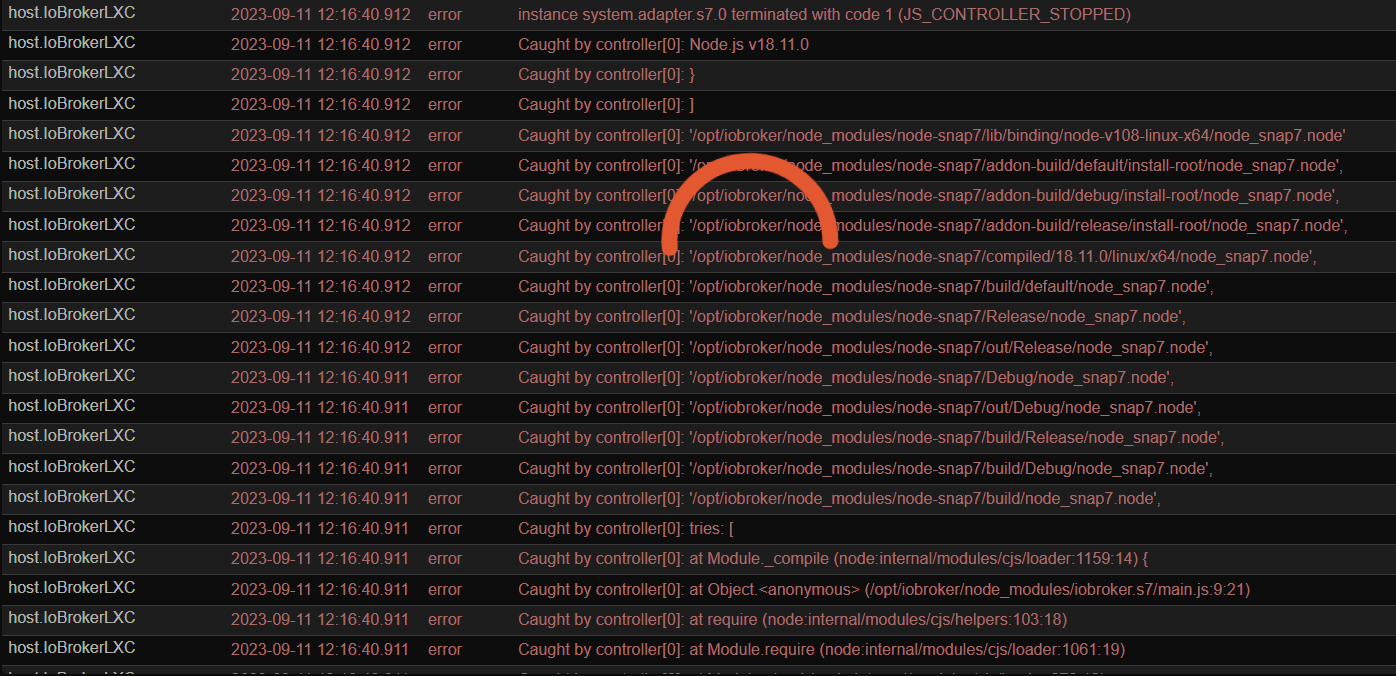
-
@thomas-braun Das komische bevor ich nodejs von 20.x..x auf 22.x.x aktualisiert habe hat es funktoniert. Und es betrifft nur die beiden S7 Adapter.
========== Start marking the full check here =========== ```bash Script v.2025-08-09 *** BASE SYSTEM *** Operating System: Debian GNU/Linux 11 (bullseye) Static hostname: SmartHomeMira Icon name: computer-vm Chassis: vm Virtualization: kvm Kernel: Linux 5.10.0-35-amd64 Architecture: x86-64 OS is similar to: model name : Intel(R) Core(TM) i5-8259U CPU @ 2.30GHz Docker : false Virtualization : kvm Kernel : x86_64 Userland : 64 bit Systemuptime and Load: 17:17:50 up 18 min, 2 users, load average: 0.35, 0.30, 0.34 CPU threads: 2 *** LIFE CYCLE STATUS *** Debian Release codenamed 'bullseye' reached its END OF LIFE and needs to be updated to the latest stable release 'trixie' NOW! *** TIME AND TIMEZONES *** Local time: Sun 2025-11-09 17:17:51 CET Universal time: Sun 2025-11-09 16:17:51 UTC RTC time: Sun 2025-11-09 16:17:52 Time zone: Europe/Berlin (CET, +0100) System clock synchronized: yes NTP service: active RTC in local TZ: no *** Users and Groups *** User that called 'iob diag': mira HOME=/home/mira GROUPS=mira cdrom floppy sudo audio dip video plugdev netdev bluetooth scanner iobroker User that is running 'js-controller': iobroker HOME=/home/iobroker GROUPS=iobroker tty dialout audio video plugdev bluetooth *** DISPLAY-SERVER SETUP *** Display-Server: false Display-Manager: * gdm3.service - LSB: GNOME Display Manager Desktop: Session: tty *** MEMORY *** total used free shared buff/cache available Mem: 3.9G 2.5G 658M 0.0K 770M 1.2G Swap: 974M 0.0K 974M Total: 4.9G 2.5G 1.6G Active iob-Instances: 26 3921 M total memory 2493 M used memory 422 M active memory 2624 M inactive memory 658 M free memory 164 M buffer memory 605 M swap cache 974 M total swap 0 M used swap 974 M free swap *** top - Table Of Processes *** top - 17:17:51 up 18 min, 2 users, load average: 0.35, 0.30, 0.34 Tasks: 136 total, 1 running, 135 sleeping, 0 stopped, 0 zombie %Cpu(s): 0.0 us, 0.0 sy, 0.0 ni,100.0 id, 0.0 wa, 0.0 hi, 0.0 si, 0.0 st MiB Mem : 3921.4 total, 657.8 free, 2493.0 used, 770.5 buff/cache MiB Swap: 975.0 total, 974.5 free, 0.5 used. 1189.9 avail Mem *** FAILED SERVICES *** UNIT LOAD ACTIVE SUB DESCRIPTION 0 loaded units listed. *** DMESG CRITICAL ERRORS *** No critical errors detected *** FILESYSTEM *** Filesystem Type Size Used Avail Use% Mounted on udev devtmpfs 1.9G 0 1.9G 0% /dev tmpfs tmpfs 393M 868K 392M 1% /run /dev/sda1 ext4 31G 18G 12G 60% / tmpfs tmpfs 2.0G 0 2.0G 0% /dev/shm tmpfs tmpfs 5.0M 0 5.0M 0% /run/lock tmpfs tmpfs 393M 52K 393M 1% /run/user/1000 Messages concerning ext4 filesystem in dmesg: [Sun Nov 9 16:59:21 2025] EXT4-fs (sda1): mounted filesystem with ordered data mode. Opts: (null) [Sun Nov 9 16:59:22 2025] EXT4-fs (sda1): re-mounted. Opts: errors=remount-ro Show mounted filesystems: TARGET SOURCE FSTYPE OPTIONS / /dev/sda1 ext4 rw,relatime,errors=remount-ro Files in neuralgic directories: /var: 3.0G /var/ 1.5G /var/cache/apt/archives 1.5G /var/cache/apt 1.5G /var/cache 1.3G /var/log/journal/b10d7d2025ff4d469c4f8cc3d666e31e Hint: You are currently not seeing messages from other users and the system. Users in groups 'adm', 'systemd-journal' can see all messages. Pass -q to turn off this notice. Archived and active journals take up 112.0M in the file system. /opt/iobroker/backups: 338M /opt/iobroker/backups/ /opt/iobroker/iobroker-data: 748M /opt/iobroker/iobroker-data/ 349M /opt/iobroker/iobroker-data/files 267M /opt/iobroker/iobroker-data/backup-objects 68M /opt/iobroker/iobroker-data/files/vis-2 47M /opt/iobroker/iobroker-data/files/admin.admin The five largest files in iobroker-data are: 36M /opt/iobroker/iobroker-data/objects.jsonl 21M /opt/iobroker/iobroker-data/files/s7.admin/static/js/main.9f443724.js.map 18M /opt/iobroker/iobroker-data/objects.json.migrated 18M /opt/iobroker/iobroker-data/objects.json.bak.migrated 12M /opt/iobroker/iobroker-data/files/admin.0/zip/2024-06-29-scripts.zip USB-Devices by-id: USB-Sticks - Avoid direct links to /dev/tty* in your adapter setups, please always prefer the links 'by-id': No Devices found 'by-id' *** ZigBee Settings *** HINT: Your zigbee.0 COM-Port is NOT matching 'by-id'. Please check your setting: /dev/ttyUSB0 Zigbee Network Settings on your coordinator/in nvbackup are: zigbee.X Extended Pan ID: *** MASKED *** Pan ID: *** MASKED *** Channel: *** MASKED *** Network Key: *** MASKED *** To unmask the settings run 'iob diag --unmask' *** NodeJS-Installation *** /usr/bin/nodejs v22.21.0 /usr/bin/node v22.21.0 /usr/bin/npm 10.9.4 /usr/bin/npx 10.9.4 /usr/bin/corepack 0.34.0 nodejs: Installed: 22.21.0-1nodesource1 Candidate: 22.21.0-1nodesource1 Version table: *** 22.21.0-1nodesource1 600 500 https://deb.nodesource.com/node_22.x nodistro/main amd64 Packages 100 /var/lib/dpkg/status 22.20.0-1nodesource1 600 500 https://deb.nodesource.com/node_22.x nodistro/main amd64 Packages 22.19.0-1nodesource1 600 500 https://deb.nodesource.com/node_22.x nodistro/main amd64 Packages 22.18.0-1nodesource1 600 500 https://deb.nodesource.com/node_22.x nodistro/main amd64 Packages 22.17.1-1nodesource1 600 500 https://deb.nodesource.com/node_22.x nodistro/main amd64 Packages 22.17.0-1nodesource1 600 500 https://deb.nodesource.com/node_22.x nodistro/main amd64 Packages 22.16.0-1nodesource1 600 500 https://deb.nodesource.com/node_22.x nodistro/main amd64 Packages 22.15.1-1nodesource1 600 500 https://deb.nodesource.com/node_22.x nodistro/main amd64 Packages 22.15.0-1nodesource1 600 500 https://deb.nodesource.com/node_22.x nodistro/main amd64 Packages 22.14.0-1nodesource1 600 500 https://deb.nodesource.com/node_22.x nodistro/main amd64 Packages 22.13.1-1nodesource1 600 500 https://deb.nodesource.com/node_22.x nodistro/main amd64 Packages 22.13.0-1nodesource1 600 500 https://deb.nodesource.com/node_22.x nodistro/main amd64 Packages 22.12.0-1nodesource1 600 500 https://deb.nodesource.com/node_22.x nodistro/main amd64 Packages 22.11.0-1nodesource1 600 500 https://deb.nodesource.com/node_22.x nodistro/main amd64 Packages 22.10.0-1nodesource1 600 500 https://deb.nodesource.com/node_22.x nodistro/main amd64 Packages 22.9.0-1nodesource1 600 500 https://deb.nodesource.com/node_22.x nodistro/main amd64 Packages 22.8.0-1nodesource1 600 500 https://deb.nodesource.com/node_22.x nodistro/main amd64 Packages 22.7.0-1nodesource1 600 500 https://deb.nodesource.com/node_22.x nodistro/main amd64 Packages 22.6.0-1nodesource1 600 500 https://deb.nodesource.com/node_22.x nodistro/main amd64 Packages 22.5.1-1nodesource1 600 500 https://deb.nodesource.com/node_22.x nodistro/main amd64 Packages 22.5.0-1nodesource1 600 500 https://deb.nodesource.com/node_22.x nodistro/main amd64 Packages 22.4.1-1nodesource1 600 500 https://deb.nodesource.com/node_22.x nodistro/main amd64 Packages 22.4.0-1nodesource1 600 500 https://deb.nodesource.com/node_22.x nodistro/main amd64 Packages 22.3.0-1nodesource1 600 500 https://deb.nodesource.com/node_22.x nodistro/main amd64 Packages 22.2.0-1nodesource1 600 500 https://deb.nodesource.com/node_22.x nodistro/main amd64 Packages 22.1.0-1nodesource1 600 500 https://deb.nodesource.com/node_22.x nodistro/main amd64 Packages 22.0.0-1nodesource1 600 500 https://deb.nodesource.com/node_22.x nodistro/main amd64 Packages 12.22.12~dfsg-1~deb11u7 500 500 http://security.debian.org/debian-security bullseye-security/main amd64 Packages 12.22.12~dfsg-1~deb11u4 500 500 http://deb.debian.org/debian bullseye/main amd64 Packages Temp directories causing deletion problem: 0 No problems detected Errors in npm tree: 0 No problems detected Checking for nodejs vulnerability: █████ ██ ██ ██████ ██████ ██████ ██████ ██ ██ ██ ██ ██ ██ ██ ██ ██ ██ ██ ██ ██ ██ ███████ ██ ██ ██ ███ ██ ██ ██ ██ ██ ██ ██ ██ ██ ██ ██ ██ ██ ██ ██ ██ ██ ██ ██ ██ ██ ██ ██ ███████ ███████ ██████ ██████ ██████ ██████ ██ *** ioBroker-Installation *** ioBroker Status iobroker is running on this host. Objects type: jsonl States type: jsonl Hosts: Media03 Media03 (version: 4.0.21, hostname: Media03 , alive, uptime: 1064) Media04 Media04 (version: 7.0.6, hostname: Media04 , alive, uptime: 2810) SmartHomeMira SmartHomeMira (version: 7.0.6, hostname: SmartHomeMira , alive, uptime: 947) dns-server-2-emilia dns-server-2-emilia (version: 2.2.9, hostname: dns-server-2-emilia, dead, uptime: 3983) raspberrypi raspberrypi (version: 7.0.6, hostname: raspberrypi , dead, uptime: 84743) Core adapters versions js-controller: 7.0.6 admin: 7.7.19 javascript: 8.9.2 nodejs modules from github: 0 Adapter State system.adapter.accuweather.0 : accuweather : SmartHomeMira - disabled system.adapter.adguard.0 : adguard : SmartHomeMira - disabled + system.adapter.admin.0 : admin : SmartHomeMira - enabled, port: 8081, bind: 0.0.0.0 (SSL), run as: admin + system.adapter.admin.1 : admin : SmartHomeMira - enabled, port: 8089, bind: 0.0.0.0 (SSL), run as: admin + system.adapter.alexa2.0 : alexa2 : SmartHomeMira - enabled + system.adapter.asuswrt.1 : asuswrt : SmartHomeMira - enabled + system.adapter.backitup.0 : backitup : SmartHomeMira - enabled + system.adapter.backitup.1 : backitup : Media04 - enabled system.adapter.cloud.0 : cloud : SmartHomeMira - disabled system.adapter.daswetter.0 : daswetter : SmartHomeMira - enabled system.adapter.discovery.0 : discovery : SmartHomeMira - disabled + system.adapter.ds18b20.0 : ds18b20 : Media04 - enabled system.adapter.dwd.0 : dwd : SmartHomeMira - enabled system.adapter.email.0 : email : SmartHomeMira - disabled system.adapter.energiefluss.0 : energiefluss : SmartHomeMira - disabled system.adapter.feiertage.0 : feiertage : SmartHomeMira - enabled + system.adapter.hass.0 : hass : SmartHomeMira - enabled, port: 8123 system.adapter.ical.0 : ical : SmartHomeMira - disabled system.adapter.icons-icons8.0 : icons-icons8 : SmartHomeMira - enabled system.adapter.icons-ultimate-png.0 : icons-ultimate-png : SmartHomeMira - enabled + system.adapter.influxdb.0 : influxdb : SmartHomeMira - enabled, port: 8086 system.adapter.iot.0 : iot : SmartHomeMira - disabled + system.adapter.javascript.0 : javascript : SmartHomeMira - enabled + system.adapter.javascript.1 : javascript : Media04 - enabled + system.adapter.javascript.2 : javascript : SmartHomeMira - enabled + system.adapter.linux-control.0 : linux-control : SmartHomeMira - enabled system.adapter.mobile.0 : mobile : SmartHomeMira - enabled + system.adapter.mqtt-client.0 : mqtt-client : SmartHomeMira - enabled, port: 8883 system.adapter.mqtt.1 : mqtt : SmartHomeMira - disabled, port: 8883, bind: 0.0.0.0 system.adapter.netatmo-crawler.0 : netatmo-crawler : SmartHomeMira - disabled system.adapter.nina.0 : nina : SmartHomeMira - disabled + system.adapter.node-red.0 : node-red : SmartHomeMira - enabled, port: 1880, bind: 0.0.0.0 system.adapter.node-red.1 : node-red : SmartHomeMira - disabled, port: 1881, bind: 0.0.0.0 + system.adapter.ping.0 : ping : SmartHomeMira - enabled system.adapter.radar2.0 : radar2 : Media04 - disabled system.adapter.rpi2.0 : rpi2 : Media03 - enabled system.adapter.rpi2.3 : rpi2 : dns-server-2-emilia - enabled + system.adapter.rpi2.4 : rpi2 : Media04 - enabled system.adapter.s7.0 : s7 : SmartHomeMira - enabled system.adapter.s7.1 : s7 : SmartHomeMira - enabled + system.adapter.sonoff.0 : sonoff : SmartHomeMira - enabled, port: 1883, bind: 0.0.0.0 + system.adapter.sourceanalytix.0 : sourceanalytix : SmartHomeMira - enabled + system.adapter.telegram.0 : telegram : SmartHomeMira - enabled, port: 8443, bind: 0.0.0.0 + system.adapter.vis-2.0 : vis-2 : SmartHomeMira - enabled system.adapter.vis-colorpicker.0 : vis-colorpicker : SmartHomeMira - enabled system.adapter.vis-fancyswitch.0 : vis-fancyswitch : SmartHomeMira - enabled system.adapter.vis-history.0 : vis-history : SmartHomeMira - enabled system.adapter.vis-hqwidgets.0 : vis-hqwidgets : SmartHomeMira - enabled system.adapter.vis-icontwo.0 : vis-icontwo : SmartHomeMira - enabled + system.adapter.vis-inventwo.0 : vis-inventwo : SmartHomeMira - enabled system.adapter.vis-jqui-mfd.0 : vis-jqui-mfd : SmartHomeMira - enabled system.adapter.vis-justgage.0 : vis-justgage : SmartHomeMira - enabled system.adapter.vis-materialdesign.0 : vis-materialdesign : SmartHomeMira - enabled system.adapter.vis-metro.0 : vis-metro : SmartHomeMira - enabled system.adapter.vis-players.0 : vis-players : SmartHomeMira - enabled system.adapter.vis-plumb.0 : vis-plumb : SmartHomeMira - enabled system.adapter.vis-rgraph.0 : vis-rgraph : SmartHomeMira - enabled system.adapter.vis-timeandweather.0 : vis-timeandweather : SmartHomeMira - enabled system.adapter.vis.0 : vis : SmartHomeMira - enabled system.adapter.volumio.0 : volumio : SmartHomeMira - disabled + system.adapter.web.0 : web : SmartHomeMira - enabled, port: 8082, bind: 0.0.0.0, run as: admin system.adapter.web.1 : web : SmartHomeMira - disabled, port: 8090, bind: 0.0.0.0 (SSL), run as: benutzer + system.adapter.wled.0 : wled : SmartHomeMira - enabled system.adapter.yr.0 : yr : SmartHomeMira - disabled + system.adapter.zigbee.0 : zigbee : Media04 - enabled, port: /dev/ttyUSB0 + instance is alive Enabled adapters with bindings + system.adapter.admin.0 : admin : SmartHomeMira - enabled, port: 8081, bind: 0.0.0.0 (SSL), run as: admin + system.adapter.admin.1 : admin : SmartHomeMira - enabled, port: 8089, bind: 0.0.0.0 (SSL), run as: admin + system.adapter.hass.0 : hass : SmartHomeMira - enabled, port: 8123 + system.adapter.influxdb.0 : influxdb : SmartHomeMira - enabled, port: 8086 + system.adapter.mqtt-client.0 : mqtt-client : SmartHomeMira - enabled, port: 8883 + system.adapter.node-red.0 : node-red : SmartHomeMira - enabled, port: 1880, bind: 0.0.0.0 + system.adapter.sonoff.0 : sonoff : SmartHomeMira - enabled, port: 1883, bind: 0.0.0.0 + system.adapter.telegram.0 : telegram : SmartHomeMira - enabled, port: 8443, bind: 0.0.0.0 + system.adapter.web.0 : web : SmartHomeMira - enabled, port: 8082, bind: 0.0.0.0, run as: admin + system.adapter.zigbee.0 : zigbee : Media04 - enabled, port: /dev/ttyUSB0 ioBroker-Repositories ┌────────────────────────────────────────────────────────────────────────────────────────────── │ (index) │ name │ url │ auto upgrade │ ├────────────────────────────────────────────────────────────────────────────────────────────── │ 0 │ 'stable' │ 'http://download.iobroker.net/sources-dist.json' │ false │ │ 1 │ 'beta' │ 'http://download.iobroker.net/sources-dist-latest.json' │ false │ └────────────────────────────────────────────────────────────────────────────────────────────── Active repo(s): stable Upgrade policy: none Installed ioBroker-Adapters Used repository: stable Adapter "accuweather" : 2.1.1 , installed 2.1.1 Adapter "adguard" : 1.0.1 , installed 1.0.1 Adapter "admin" : 7.7.19 , installed 7.7.19 Adapter "alexa2" : 3.27.4 , installed 3.27.4 Adapter "asuswrt" : 1.0.1 , installed 1.0.1 Adapter "backitup" : 3.3.10 , installed 3.3.5 [Updatable] Adapter "cloud" : 5.0.1 , installed 5.0.1 Adapter "daswetter" : 3.2.3 , installed 3.2.3 Adapter "discovery" : 5.0.0 , installed 5.0.0 Adapter "dwd" : 2.8.5 , installed 2.8.5 Adapter "email" : 2.0.4 , installed 2.0.4 Adapter "energiefluss" : 3.6.2 , installed 3.6.2 Adapter "feiertage" : 1.2.1 , installed 1.2.1 Adapter "hass" : 1.4.0 , installed 1.4.0 Adapter "ical" : 1.17.0 , installed 1.17.0 Adapter "icons-icons8" : 0.0.1 , installed 0.0.1 Adapter "icons-ultimate-png": 1.0.1, installed 1.0.1 Adapter "influxdb" : 4.0.2 , installed 4.0.2 Adapter "iot" : 5.0.7 , installed 3.3.0 [Updatable] Adapter "javascript" : 8.9.2 , installed 8.9.2 Controller "js-controller": 7.0.7 , installed 7.0.6 [Updatable] Adapter "linux-control": 1.1.5 , installed 1.1.5 Adapter "mobile" : 1.0.1 , installed 1.0.1 Adapter "mqtt" : 6.1.4 , installed 6.1.2 [Updatable] Adapter "mqtt-client" : 3.0.0 , installed 2.1.0 [Updatable] Adapter "netatmo-crawler": 1.1.0 , installed 1.1.0 Adapter "nina" : 0.0.25 , installed 0.0.25 Adapter "node-red" : 5.2.1 , installed 6.0.7 Adapter "ping" : 1.6.2 , installed 1.6.2 Adapter "radar2" : 2.4.0 , installed 2.4.0 Adapter "rpi2" : 2.4.0 , installed 2.4.0 Adapter "s7" : 1.5.0 , installed 1.4.3 [Updatable] Adapter "simple-api" : 2.8.0 , installed 2.8.0 Adapter "socketio" : 6.7.1 , installed 6.7.1 Adapter "sonoff" : 3.2.1 , installed 3.2.1 Adapter "telegram" : 4.1.0 , installed 4.1.0 Adapter "vis" : 1.5.6 , installed 1.5.6 Adapter "vis-2" : 2.13.4 , installed 2.13.4 Adapter "vis-colorpicker": 2.0.3 , installed 2.0.3 Adapter "vis-fancyswitch": 1.1.0 , installed 1.1.0 Adapter "vis-history" : 1.0.0 , installed 1.0.0 Adapter "vis-hqwidgets": 1.5.1 , installed 1.5.1 Adapter "vis-icontwo" : 1.18.0 , installed 1.18.0 Adapter "vis-inventwo" : 3.3.5 , installed 3.3.5 Adapter "vis-jqui-mfd" : 1.1.1 , installed 1.1.1 Adapter "vis-justgage" : 2.1.7 , installed 2.1.7 Adapter "vis-materialdesign": 0.5.9, installed 0.5.9 Adapter "vis-metro" : 1.2.0 , installed 1.2.0 Adapter "vis-players" : 0.1.6 , installed 0.1.6 Adapter "vis-plumb" : 1.0.2 , installed 1.0.2 Adapter "vis-rgraph" : 0.0.2 , installed 0.0.2 Adapter "vis-timeandweather": 1.2.2, installed 1.2.2 Adapter "volumio" : 0.2.0 , installed 0.2.0 Adapter "web" : 7.0.8 , installed 7.0.8 Adapter "wled" : 0.7.2 , installed 0.7.2 Adapter "ws" : 2.6.2 , installed 2.6.2 Adapter "yr" : 5.3.0 , installed 5.3.0 Objects and States Please stand by - This may take a while Objects: 16950 States: 16323 *** OS-Repositories and Updates *** Hit:1 http://security.debian.org/debian-security bullseye-security InRelease Hit:2 http://deb.debian.org/debian bullseye InRelease Hit:3 http://deb.debian.org/debian bullseye-updates InRelease Hit:4 https://deb.nodesource.com/node_22.x nodistro InRelease Reading package lists... Pending Updates: 0 *** Listening Ports *** Active Internet connections (only servers) Proto Recv-Q Send-Q Local Address Foreign Address State User Inode PID/Program name tcp 0 0 0.0.0.0:22 0.0.0.0:* LISTEN 0 47735 7649/sshd: /usr/sbi tcp 0 0 0.0.0.0:1880 0.0.0.0:* LISTEN 1001 27158 4123/node-red tcp 0 0 0.0.0.0:1883 0.0.0.0:* LISTEN 1001 28978 4620/io.sonoff.0 tcp 0 0 0.0.0.0:9000 0.0.0.0:* LISTEN 1001 25435 3885/iobroker.js-co tcp 0 0 0.0.0.0:9001 0.0.0.0:* LISTEN 1001 25430 3885/iobroker.js-co tcp 0 0 0.0.0.0:111 0.0.0.0:* LISTEN 0 1440 1/init tcp6 0 0 :::22 :::* LISTEN 0 47737 7649/sshd: /usr/sbi tcp6 0 0 :::8089 :::* LISTEN 1001 25539 3907/io.admin.1 tcp6 0 0 :::111 :::* LISTEN 0 1444 1/init tcp6 0 0 :::80 :::* LISTEN 1001 27160 4123/node-red tcp6 0 0 :::8081 :::* LISTEN 1001 26700 3952/io.admin.0 tcp6 0 0 :::8082 :::* LISTEN 1001 28568 5005/io.web.0 udp 0 0 192.168.1.10:1900 0.0.0.0:* 1001 27161 4123/node-red udp 0 0 0.0.0.0:111 0.0.0.0:* 0 1441 1/init udp 0 0 0.0.0.0:5353 0.0.0.0:* 1001 31220 5643/io.wled.0 udp 0 0 0.0.0.0:5353 0.0.0.0:* 109 13062 347/avahi-daemon: r udp 0 0 0.0.0.0:42322 0.0.0.0:* 109 13064 347/avahi-daemon: r udp6 0 0 :::111 :::* 0 1447 1/init udp6 0 0 fe80::a8d9:8dff:fee:546 :::* 0 13868 361/NetworkManager udp6 0 0 :::5353 :::* 109 13063 347/avahi-daemon: r udp6 0 0 :::55042 :::* 109 13065 347/avahi-daemon: r *** Log File - Last 25 Lines *** 2025-11-09 17:08:54.031 - info: linux-control.0 (5431) getting data from AIDA_Luna (192.168.1.47:22) 2025-11-09 17:08:57.005 - info: linux-control.0 (5431) [getConnection] Host 'Media03_WZ_Radio' (192.168.1.33:22) seems not to be online 2025-11-09 17:08:57.100 - info: linux-control.0 (5431) [getConnection] Host 'AIDA_Luna' (192.168.1.47:22) seems not to be online 2025-11-09 17:09:19.662 - info: javascript.0 (3988) script.js.Wohnung.Motion_Detection.Flur_DBs_in_virtuelle: BWM neu: Bewegung erkannt 2025-11-09 17:09:19.665 - info: javascript.0 (3988) script.js.Wohnung.Motion_Detection.Flur_weißer_Ring_Ein__Aus_(Test): Ring weiß Aus (timeout stop) 2025-11-09 17:09:52.797 - info: javascript.0 (3988) script.js.Wohnung.Motion_Detection.Flur_DBs_in_virtuelle: BWM neu: Bewegung nicht mehr 2025-11-09 17:10:27.007 - info: host.SmartHomeMira instance system.adapter.daswetter.0 in version "3.2.3" started with pid 6745 2025-11-09 17:10:27.540 - info: daswetter.0 (6745) Sets unsupported 2025-11-09 17:10:27.801 - info: daswetter.0 (6745) starting. Version 3.2.3 in /opt/iobroker/node_modules/iobroker.daswetter, node: v22.21.0, js-controller: 7.0.6 2025-11-09 17:10:30.128 - info: daswetter.0 (6745) Terminated (ADAPTER_REQUESTED_TERMINATION): All data handled, adapter stopped until next scheduled moment 2025-11-09 17:10:30.633 - info: daswetter.0 (6745) cleaned everything up... 2025-11-09 17:10:30.642 - info: host.SmartHomeMira instance system.adapter.daswetter.0 having pid 6745 terminated with code 11 (ADAPTER_REQUESTED_TERMINATION) 2025-11-09 17:13:22.953 - info: javascript.0 (3988) script.js.Wohnung.Motion_Detection.Flur_DBs_in_virtuelle: BWM neu: Bewegung erkannt 2025-11-09 17:13:22.956 - info: javascript.0 (3988) script.js.Wohnung.Motion_Detection.Flur_weißer_Ring_Ein__Aus_(Test): Ring weiß Aus (timeout stop) 2025-11-09 17:13:57.010 - info: linux-control.0 (5431) getting data from Media03_WZ_Radio (192.168.1.33:22) 2025-11-09 17:13:57.106 - info: linux-control.0 (5431) getting data from AIDA_Luna (192.168.1.47:22) 2025-11-09 17:13:57.751 - info: javascript.0 (3988) script.js.Wohnung.Motion_Detection.Flur_DBs_in_virtuelle: BWM neu: Bewegung nicht mehr 2025-11-09 17:14:00.076 - info: linux-control.0 (5431) [getConnection] Host 'Media03_WZ_Radio' (192.168.1.33:22) seems not to be online 2025-11-09 17:14:00.172 - info: linux-control.0 (5431) [getConnection] Host 'AIDA_Luna' (192.168.1.47:22) seems not to be online 2025-11-09 17:15:27.009 - info: host.SmartHomeMira instance system.adapter.daswetter.0 in version "3.2.3" started with pid 7247 2025-11-09 17:15:27.535 - info: daswetter.0 (7247) Sets unsupported 2025-11-09 17:15:27.818 - info: daswetter.0 (7247) starting. Version 3.2.3 in /opt/iobroker/node_modules/iobroker.daswetter, node: v22.21.0, js-controller: 7.0.6 2025-11-09 17:15:30.163 - info: daswetter.0 (7247) Terminated (ADAPTER_REQUESTED_TERMINATION): All data handled, adapter stopped until next scheduled moment 2025-11-09 17:15:30.668 - info: daswetter.0 (7247) cleaned everything up... 2025-11-09 17:15:30.677 - info: host.SmartHomeMira instance system.adapter.daswetter.0 having pid 7247 terminated with code 11 (ADAPTER_REQUESTED_TERMINATION)============ Mark until here for C&P =============
iob diag has finished.
mira@SmartHomeMira:~$
@basti97 sagte in s7 Adapter funktioniert nicht mehr noch node update:
aktualisiert habe hat es funktoniert.
Da war es ja auch gegen nodejs@20 gebaut...
Jedenfalls ist
Operating System: Debian GNU/Linux 11 (bullseye)
zu alt. Installier da Debian 13 'Trixie'
-
@basti97 sagte in s7 Adapter funktioniert nicht mehr noch node update:
aktualisiert habe hat es funktoniert.
Da war es ja auch gegen nodejs@20 gebaut...
Jedenfalls ist
Operating System: Debian GNU/Linux 11 (bullseye)
zu alt. Installier da Debian 13 'Trixie'
@thomas-braun Ok werde ich machen da installiere ich Linux komplett neu. Aber warum ensteht der Fehler nur bei den S7 Adapter und nicht bei allen Adaptern.
Iobroker läuft als VM auf Proxmoxserver x folgende Hersteller im Einsatz Sonoff, Gosund, Siemens x Aofo über Tasmota x Zigbee x das Smarthome wächst und wächst
-
@thomas-braun Ok werde ich machen da installiere ich Linux komplett neu. Aber warum ensteht der Fehler nur bei den S7 Adapter und nicht bei allen Adaptern.
@basti97 sagte in s7 Adapter funktioniert nicht mehr noch node update:
nstalliere ich Linux komplett neu.
Dann aber diesmal gleich ohne Desktop.
Aber warum ensteht der Fehler nur bei den S7 Adapter und nicht bei allen Adaptern.
Das ist kein 'Fehler'. Du brauchst nur ein aktuelles System.
Und andere Adapter haben keine Bestandteile, die kompiliert werden müssen. Deswegen funktionieren die auch mit einer anderen ABI. -
@basti97 sagte in s7 Adapter funktioniert nicht mehr noch node update:
nstalliere ich Linux komplett neu.
Dann aber diesmal gleich ohne Desktop.
Aber warum ensteht der Fehler nur bei den S7 Adapter und nicht bei allen Adaptern.
Das ist kein 'Fehler'. Du brauchst nur ein aktuelles System.
Und andere Adapter haben keine Bestandteile, die kompiliert werden müssen. Deswegen funktionieren die auch mit einer anderen ABI.@thomas-braun Achso ich hatte das ganze immer mit dem Desktop gemacht aber eigentlich braucht man ihn ja wirklich nicht da er ja auch zusätzliche Ressourcen verbraucht.
Iobroker läuft als VM auf Proxmoxserver x folgende Hersteller im Einsatz Sonoff, Gosund, Siemens x Aofo über Tasmota x Zigbee x das Smarthome wächst und wächst
-
@thomas-braun Achso ich hatte das ganze immer mit dem Desktop gemacht aber eigentlich braucht man ihn ja wirklich nicht da er ja auch zusätzliche Ressourcen verbraucht.
Unter anderem auch das...
-
Unter anderem auch das...
@thomas-braun Gibt es noch mehr Vorteile ohne Desktop? Das muss ich ja bei der Installation den Haken bei Desktop rausmachen richtig?
Iobroker läuft als VM auf Proxmoxserver x folgende Hersteller im Einsatz Sonoff, Gosund, Siemens x Aofo über Tasmota x Zigbee x das Smarthome wächst und wächst
-
@thomas-braun Gibt es noch mehr Vorteile ohne Desktop? Das muss ich ja bei der Installation den Haken bei Desktop rausmachen richtig?
Du schleppst weniger Sicherheitslücken an (nicht laufender Code kann nicht angegriffen werden),
das Ding läuft stabiler (nicht laufender Code kann nicht abstürzen),
das System ist einfacher zu warten (nicht installierte Pakete machen die Abhängigkeiten übersichtlicher),
Versionsupgrades sind einfacher, weil man weniger Dinge berücksichtigen muss.Usw...
-
Du schleppst weniger Sicherheitslücken an (nicht laufender Code kann nicht angegriffen werden),
das Ding läuft stabiler (nicht laufender Code kann nicht abstürzen),
das System ist einfacher zu warten (nicht installierte Pakete machen die Abhängigkeiten übersichtlicher),
Versionsupgrades sind einfacher, weil man weniger Dinge berücksichtigen muss.Usw...
@thomas-braun Super vielen Dank da werde ich das ganze in den nächsten Tagen nochmal alles komplett neu installieren und das Iobroker Backup zurück spielen. Für jetzt habe ich erstmal das Snapshot bevor ich angefangen habe zurück gespielt damit derS7 Adapter erstmal wieder läuft.
Vielen Dank für deine schnelle und ausführliche Hilfe.
Ich wünsche dir noch einen schönen SonntagIobroker läuft als VM auf Proxmoxserver x folgende Hersteller im Einsatz Sonoff, Gosund, Siemens x Aofo über Tasmota x Zigbee x das Smarthome wächst und wächst
-
@thomas-braun Super vielen Dank da werde ich das ganze in den nächsten Tagen nochmal alles komplett neu installieren und das Iobroker Backup zurück spielen. Für jetzt habe ich erstmal das Snapshot bevor ich angefangen habe zurück gespielt damit derS7 Adapter erstmal wieder läuft.
Vielen Dank für deine schnelle und ausführliche Hilfe.
Ich wünsche dir noch einen schönen Sonntag@basti97 sagte in s7 Adapter funktioniert nicht mehr noch node update:
das Snapshot bevor ich angefangen habe zurück gespielt
Warum nicht einfach nur nodejs@20 wieder installiert?
iob nodejs-update 20und du wärst da gewesen.
-
@basti97 sagte in s7 Adapter funktioniert nicht mehr noch node update:
das Snapshot bevor ich angefangen habe zurück gespielt
Warum nicht einfach nur nodejs@20 wieder installiert?
iob nodejs-update 20und du wärst da gewesen.
@thomas-braun joa das wäre eigentlich auch eine Möglichkeit aber ist es nicht theoretisch besser wenn dann das Linux neuzumachen. Dann hätte ich erstmal ruhe und ein bisschen Datenmüll weniger von Linux
Iobroker läuft als VM auf Proxmoxserver x folgende Hersteller im Einsatz Sonoff, Gosund, Siemens x Aofo über Tasmota x Zigbee x das Smarthome wächst und wächst
-
@thomas-braun joa das wäre eigentlich auch eine Möglichkeit aber ist es nicht theoretisch besser wenn dann das Linux neuzumachen. Dann hätte ich erstmal ruhe und ein bisschen Datenmüll weniger von Linux
Dein OS musst du so oder so auf Stand bringen. Ob du dich über zwei Distributions-Upgrades quälst oder gleich alles 'neumachst' ist mir egal.
Ich wollte auch nur darauf hinweisen, das man wegen einem Downgrade von nodejs nicht umständlich ein Snapshot wieder reinrollt. Geht mit dem obigen Befehl meiner Meinung nach viel eleganter. -
Dein OS musst du so oder so auf Stand bringen. Ob du dich über zwei Distributions-Upgrades quälst oder gleich alles 'neumachst' ist mir egal.
Ich wollte auch nur darauf hinweisen, das man wegen einem Downgrade von nodejs nicht umständlich ein Snapshot wieder reinrollt. Geht mit dem obigen Befehl meiner Meinung nach viel eleganter.@thomas-braun Achso das wusste ich nicht aber danke
-
Dein OS musst du so oder so auf Stand bringen. Ob du dich über zwei Distributions-Upgrades quälst oder gleich alles 'neumachst' ist mir egal.
Ich wollte auch nur darauf hinweisen, das man wegen einem Downgrade von nodejs nicht umständlich ein Snapshot wieder reinrollt. Geht mit dem obigen Befehl meiner Meinung nach viel eleganter.ich habe das jetzt mal neuinstalliert aber warum möchte iobroker sudo berechtigung bei der Installation haben.
mira@SmartHomeMira:~$ curl -sLf https://iobroker.net/install.sh | bash -

Your system is booting into 'graphical.target', which means that a user interface or desktop is available. Usually a server is running without a desktop for security reasons and to save RAM. Please run 'iob fix' after the installation to change this.
library: loaded
Library version=2025-08-09

==========================================================================

    Welcome to the ioBroker installer!
    Installer version: 2025-02-02

    You might need to enter your password a couple of times.

==========================================================================


==========================================================================
    Installing prerequisites (1/4)
==========================================================================

[sudo] Passwort für mira:
OK:1 https://deb.nodesource.com/node_22.x nodistro InRelease
OK:2 http://deb.debian.org/debian trixie InRelease
OK:3 http://security.debian.org/debian-security trixie-security InRelease
Holen:4 http://deb.debian.org/debian trixie-updates InRelease [47,3 kB]
Es wurden 47,3 kB in 1 s geholt (38,7 kB/s).
Paketlisten werden gelesen… Fertig
W: https://deb.nodesource.com/node_22.x/dists/nodistro/InRelease: Policy will reject signature within a year, see --audit for details

==========================================================================
    Creating ioBroker user and directory (2/4)
==========================================================================

Created /etc/sudoers.d/iobroker
Directory /opt/iobroker created

==========================================================================
    Installing ioBroker (3/4)
==========================================================================


==========================================================================
    Finalizing installation (4/4)
==========================================================================

Enabling autostart...
Autostart enabled!
Fixing directory permissions...

==========================================================================

    ioBroker was installed successfully
    Open http://192.168.1.70:8081 in a browser and start configuring!

==========================================================================


You need to re-login before doing anything else on the console!


==========================================================================

    Please run 'iob fix' after the required re-login to fix some common issues.

==========================================================================

mira@SmartHomeMira:~$ iob fix
bash: /home/iobroker/.fix.sh: Keine Berechtigung
mira@SmartHomeMira:~$ iobroker fix
bash: /home/iobroker/.fix.sh: Keine Berechtigung
mira@SmartHomeMira:~$ su iob fix
su: user iob does not exist or the user entry does not contain all the required fields
mira@SmartHomeMira:~$ su- iob fix
-bash: su-: Kommando nicht gefunden.
mira@SmartHomeMira:~$ su - iob fix
su: user iob does not exist or the user entry does not contain all the required fields
mira@SmartHomeMira:~$ iob fix
bash: /home/iobroker/.fix.sh: Keine Berechtigung
mira@SmartHomeMira:~$
Iobroker läuft als VM auf Proxmoxserver x folgende Hersteller im Einsatz Sonoff, Gosund, Siemens x Aofo über Tasmota x Zigbee x das Smarthome wächst und wächst
-
ich habe das jetzt mal neuinstalliert aber warum möchte iobroker sudo berechtigung bei der Installation haben.
mira@SmartHomeMira:~$ curl -sLf https://iobroker.net/install.sh | bash - Your system is booting into 'graphical.target', which means that a user interface or desktop is available. Usually a server is running without a desktop for security reasons and to save RAM. Please run 'iob fix' after the installation to change this. library: loaded Library version=2025-08-09 ========================================================================== Welcome to the ioBroker installer! Installer version: 2025-02-02 You might need to enter your password a couple of times. ========================================================================== ========================================================================== Installing prerequisites (1/4) ========================================================================== [sudo] Passwort für mira: OK:1 https://deb.nodesource.com/node_22.x nodistro InRelease OK:2 http://deb.debian.org/debian trixie InRelease OK:3 http://security.debian.org/debian-security trixie-security InRelease Holen:4 http://deb.debian.org/debian trixie-updates InRelease [47,3 kB] Es wurden 47,3 kB in 1 s geholt (38,7 kB/s). Paketlisten werden gelesen… Fertig W: https://deb.nodesource.com/node_22.x/dists/nodistro/InRelease: Policy will reject signature within a year, see --audit for details ========================================================================== Creating ioBroker user and directory (2/4) ========================================================================== Created /etc/sudoers.d/iobroker Directory /opt/iobroker created ========================================================================== Installing ioBroker (3/4) ========================================================================== ========================================================================== Finalizing installation (4/4) ========================================================================== Enabling autostart... Autostart enabled! Fixing directory permissions... ========================================================================== ioBroker was installed successfully Open http://192.168.1.70:8081 in a browser and start configuring! ========================================================================== You need to re-login before doing anything else on the console! ========================================================================== Please run 'iob fix' after the required re-login to fix some common issues. ========================================================================== mira@SmartHomeMira:~$ iob fix bash: /home/iobroker/.fix.sh: Keine Berechtigung mira@SmartHomeMira:~$ iobroker fix bash: /home/iobroker/.fix.sh: Keine Berechtigung mira@SmartHomeMira:~$ su iob fix su: user iob does not exist or the user entry does not contain all the required fields mira@SmartHomeMira:~$ su- iob fix -bash: su-: Kommando nicht gefunden. mira@SmartHomeMira:~$ su - iob fix su: user iob does not exist or the user entry does not contain all the required fields mira@SmartHomeMira:~$ iob fix bash: /home/iobroker/.fix.sh: Keine Berechtigung mira@SmartHomeMira:~$@basti97 sagte in s7 Adapter funktioniert nicht mehr noch node update:
aber warum möchte iobroker sudo berechtigung bei der Installation haben
Weil z. B. der iobroker.service nur mit root-Rechten angelegt werden kann.
Und auch Pakete nur vom root installiert werden können. -
@basti97 sagte in s7 Adapter funktioniert nicht mehr noch node update:
aber warum möchte iobroker sudo berechtigung bei der Installation haben
Weil z. B. der iobroker.service nur mit root-Rechten angelegt werden kann.
Und auch Pakete nur vom root installiert werden können.@thomas-braun also ist das richtig aber wiso klappt dann zb iob fix nicht
Iobroker läuft als VM auf Proxmoxserver x folgende Hersteller im Einsatz Sonoff, Gosund, Siemens x Aofo über Tasmota x Zigbee x das Smarthome wächst und wächst
-
ich habe das jetzt mal neuinstalliert aber warum möchte iobroker sudo berechtigung bei der Installation haben.
mira@SmartHomeMira:~$ curl -sLf https://iobroker.net/install.sh | bash - Your system is booting into 'graphical.target', which means that a user interface or desktop is available. Usually a server is running without a desktop for security reasons and to save RAM. Please run 'iob fix' after the installation to change this. library: loaded Library version=2025-08-09 ========================================================================== Welcome to the ioBroker installer! Installer version: 2025-02-02 You might need to enter your password a couple of times. ========================================================================== ========================================================================== Installing prerequisites (1/4) ========================================================================== [sudo] Passwort für mira: OK:1 https://deb.nodesource.com/node_22.x nodistro InRelease OK:2 http://deb.debian.org/debian trixie InRelease OK:3 http://security.debian.org/debian-security trixie-security InRelease Holen:4 http://deb.debian.org/debian trixie-updates InRelease [47,3 kB] Es wurden 47,3 kB in 1 s geholt (38,7 kB/s). Paketlisten werden gelesen… Fertig W: https://deb.nodesource.com/node_22.x/dists/nodistro/InRelease: Policy will reject signature within a year, see --audit for details ========================================================================== Creating ioBroker user and directory (2/4) ========================================================================== Created /etc/sudoers.d/iobroker Directory /opt/iobroker created ========================================================================== Installing ioBroker (3/4) ========================================================================== ========================================================================== Finalizing installation (4/4) ========================================================================== Enabling autostart... Autostart enabled! Fixing directory permissions... ========================================================================== ioBroker was installed successfully Open http://192.168.1.70:8081 in a browser and start configuring! ========================================================================== You need to re-login before doing anything else on the console! ========================================================================== Please run 'iob fix' after the required re-login to fix some common issues. ========================================================================== mira@SmartHomeMira:~$ iob fix bash: /home/iobroker/.fix.sh: Keine Berechtigung mira@SmartHomeMira:~$ iobroker fix bash: /home/iobroker/.fix.sh: Keine Berechtigung mira@SmartHomeMira:~$ su iob fix su: user iob does not exist or the user entry does not contain all the required fields mira@SmartHomeMira:~$ su- iob fix -bash: su-: Kommando nicht gefunden. mira@SmartHomeMira:~$ su - iob fix su: user iob does not exist or the user entry does not contain all the required fields mira@SmartHomeMira:~$ iob fix bash: /home/iobroker/.fix.sh: Keine Berechtigung mira@SmartHomeMira:~$@basti97 sagte in s7 Adapter funktioniert nicht mehr noch node update:
Please run 'iob fix' after the required re-login to fix some common issues.Musst du machen, dann gehen auch die Meldungen wie
bash: /home/iobroker/.fix.sh: Keine Berechtigung
weg.
-
@basti97 sagte in s7 Adapter funktioniert nicht mehr noch node update:
Please run 'iob fix' after the required re-login to fix some common issues.Musst du machen, dann gehen auch die Meldungen wie
bash: /home/iobroker/.fix.sh: Keine Berechtigung
weg.
@thomas-braun Super da habe ich falsch gelesen
-
@thomas-braun also ist das richtig aber wiso klappt dann zb iob fix nicht
@basti97 sagte in s7 Adapter funktioniert nicht mehr noch node update:
also ist das richtig aber wiso klappt dann zb iob fix nicht
Weil du der Anleitung nicht folgst und mira nicht neueinloggst.
Besser noch ist ein kompletter Reboot von der Kiste. -
@basti97 sagte in s7 Adapter funktioniert nicht mehr noch node update:
also ist das richtig aber wiso klappt dann zb iob fix nicht
Weil du der Anleitung nicht folgst und mira nicht neueinloggst.
Besser noch ist ein kompletter Reboot von der Kiste.@thomas-braun Das habe ich gerade gemacht. Die Installation ist jetzt echt einfach beim letzten mal musste man alles noch einzeln installieren.
Iobroker läuft als VM auf Proxmoxserver x folgende Hersteller im Einsatz Sonoff, Gosund, Siemens x Aofo über Tasmota x Zigbee x das Smarthome wächst und wächst
-
@thomas-braun Das habe ich gerade gemacht. Die Installation ist jetzt echt einfach beim letzten mal musste man alles noch einzeln installieren.
@basti97 sagte in s7 Adapter funktioniert nicht mehr noch node update:
Die Installation ist jetzt echt einfach beim letzten mal musste man alles noch einzeln installieren.
Dafür wird halt jetzt mehr installiert als ggfls. notwendig. Aber irgendwas ist halt immer, wenn du alle User irgendwo abholen willst.


Hey! Du scheinst an dieser Unterhaltung interessiert zu sein, hast aber noch kein Konto.
Hast du es satt, bei jedem Besuch durch die gleichen Beiträge zu scrollen? Wenn du dich für ein Konto anmeldest, kommst du immer genau dorthin zurück, wo du zuvor warst, und kannst dich über neue Antworten benachrichtigen lassen (entweder per E-Mail oder Push-Benachrichtigung). Du kannst auch Lesezeichen speichern und Beiträge positiv bewerten, um anderen Community-Mitgliedern deine Wertschätzung zu zeigen.
Mit deinem Input könnte dieser Beitrag noch besser werden 💗
Registrieren Anmelden274
Online33.0k
Benutzer83.6k
Themen1.3m
Beiträge