




[gelöst] zigbee2mqtt für Zigbee-Erweiterung mit SLZB-06
-
@dgr sagte in zigbee2mqtt für Zigbee-Erweiterung mit SLZB-06:
Hallo,
ich arbeite mit einem Zigbee-Netz über den Adapter "ZigBee-Adapter für Xiaomi (und andere) Geräte über Chip cc26xx/cc25xx". Das läuft soweit sehr gut. Für andere Anwendungen läuft auch mqtt.
In einen etwas entfernten Raum mit Aqara-Sensoren reicht das Zigbee-Netz nicht hin. Dort habe LAN und möchte einen über POE angeschlossenen SLZB-06 als Erweiterung des Netzes installieren.
Ich habe im Netz gefunden, dass der Adapter zigbee2mqtt auch installiert werden muss. Das habe ich auch getan, komme nun aber mit der weiteren Konfiguration nicht weiter. Beispiele im Netz beziehen sich immer auf HA. Ich bin mir auch nicht sicher, ob ich auch Mosquitto installieren muss.
Kann hier jemand helfen, auch mit der Konfiguration des SLZB-06 für diesen Zweck ?Dumm gefragt - wenn du mit dem zigbee adapter schon gut zu Rande kommst, warum dann nicht einfach eine 2. Instanz vom zigbee adapter mit dem SLZB-06 als koordinator ? Anleitung zum konfigurieren ist in der Adapter Doku enthalten.
Dann brauchst du nicht w unterschiedliche zigbee-Software Pakete für den gleichen Zweck.
A.
@asgothian sagte in zigbee2mqtt für Zigbee-Erweiterung mit SLZB-06:
Dumm gefragt - wenn du mit dem zigbee adapter schon gut zu Rande kommst, warum dann nicht einfach eine 2. Instanz vom zigbee adapter mit dem SLZB-06 als koordinator ?
Da 'hilft' ja dann keine KI bei...
-
@asgothian sagte in zigbee2mqtt für Zigbee-Erweiterung mit SLZB-06:
Dumm gefragt - wenn du mit dem zigbee adapter schon gut zu Rande kommst, warum dann nicht einfach eine 2. Instanz vom zigbee adapter mit dem SLZB-06 als koordinator ?
Da 'hilft' ja dann keine KI bei...
@thomas-braun sagte in zigbee2mqtt für Zigbee-Erweiterung mit SLZB-06:
@asgothian sagte in zigbee2mqtt für Zigbee-Erweiterung mit SLZB-06:
Dumm gefragt - wenn du mit dem zigbee adapter schon gut zu Rande kommst, warum dann nicht einfach eine 2. Instanz vom zigbee adapter mit dem SLZB-06 als koordinator ?
Da 'hilft' ja dann keine KI bei...
Ich denke sowohl KI als auch ihre Schwester KD haben schon genug Schaden angerichtet.
A.
-
@dgr sagte in zigbee2mqtt für Zigbee-Erweiterung mit SLZB-06:
sudo apt autoremove
iob stop
sudo reboot
Und dann
corepack enable
sudo mkdir /opt/zigbee2mqtt
sudo chown -R ${USER}: /opt/zigbee2mqtt
git clone --depth 1 https://github.com/Koenkk/zigbee2mqtt.git /opt/zigbee2mqtt
cd /opt/zigbee2mqtt
pnpm install --frozen-lockfile
wie in der Anleitung.
@thomas-braun
Hallo und guten Tag,zunächst möchte ich mich für meine Fehlleistungen von gestern entschuldigen. Wenn man keine Ahnung hat, sollte man erst recht nicht nach dubiosen Quellen handeln.
Warum ich mich so auf Z2M gestürzt habe kann ich mir im Nachhinein auch nicht so richtig erklären. Mit einer zweiten Instanz für Zigbee geht es zumindest für meine Zwecke sehr viel einfacher. Darauf wurde hier im Forum auch mehrfach hingewiesen. Das habe ich eben auch so umsetzen können und einen ersten Sensor angelernt.
Die gestrigen Installationen zigbee2mqtt und Mosquitto möchte ich jetzt komplett wieder deinstallieren.
Sollte ich trotzdem vorher noch die letzten Anweisungen von Thomas Braun ausführen ?sudo apt autoremove
iob stop
sudo rebootcorepack enable
sudo mkdir /opt/zigbee2mqtt
sudo chown -R ${USER}: /opt/zigbee2mqtt
git clone --depth 1 https://github.com/Koenkk/zigbee2mqtt.git /opt/zigbee2mqtt
cd /opt/zigbee2mqtt
pnpm install --frozen-lockfileEs könnte ja sein, dass es ansonsten Probleme bei der Deinstallation gibt.
Folgende Prozesse sind gegenwärtig aktiv:pi@raspi2:~ $ pstree systemd─┬─ModemManager───2*[{ModemManager}] ├─NetworkManager───2*[{NetworkManager}] ├─2*[agetty] ├─avahi-daemon───avahi-daemon ├─bluetoothd ├─cron ├─dbus-daemon ├─grafana───17*[{grafana}] ├─influxd───15*[{influxd}] ├─iobroker.js-con─┬─io.admin.0───10*[{io.admin.0}] │ ├─io.backitup.0───10*[{io.backitup.0}] │ ├─io.cameras.0───10*[{io.cameras.0}] │ ├─io.discovery.0───10*[{io.discovery.0}] │ ├─io.email.0───10*[{io.email.0}] │ ├─io.history.0───10*[{io.history.0}] │ ├─io.influxdb.0───10*[{io.influxdb.0}] │ ├─io.javascript.0───10*[{io.javascript.0}] │ ├─io.linux-contro───10*[{io.linux-contro}] │ ├─io.mqtt.0───10*[{io.mqtt.0}] │ ├─io.notification───10*[{io.notification}] │ ├─io.ping.0───10*[{io.ping.0}] │ ├─io.rpi2.0───10*[{io.rpi2.0}] │ ├─io.signal-cmb.0───10*[{io.signal-cmb.0}] │ ├─io.simple-api.0───10*[{io.simple-api.0}] │ ├─io.tankerkoenig───10*[{io.tankerkoenig}] │ ├─io.tuya.0───10*[{io.tuya.0}] │ ├─io.viessmannapi───10*[{io.viessmannapi}] │ ├─io.vis-2.0───10*[{io.vis-2.0}] │ ├─io.vis-inventwo───10*[{io.vis-inventwo}] │ ├─io.web.0───10*[{io.web.0}] │ ├─io.wled.0───10*[{io.wled.0}] │ ├─io.zigbee.0───10*[{io.zigbee.0}] │ ├─io.zigbee.1───10*[{io.zigbee.1}] │ └─10*[{iobroker.js-con}] ├─mosquitto ├─nmbd ├─pihole-FTL───11*[{pihole-FTL}] ├─polkitd───2*[{polkitd}] ├─smbd─┬─cleanupd │ ├─smbd │ └─smbd-notifyd ├─sshd─┬─sshd───sshd───bash │ └─sshd───sshd───bash───pstree ├─systemd───(sd-pam) ├─systemd-journal ├─systemd-logind ├─systemd-timesyn───{systemd-timesyn} ├─systemd-udevd ├─telegraf───13*[{telegraf}] ├─thd ├─wetterstation.s───wetterstation.s─┬─tail │ └─timeout───nc └─wpa_supplicant pi@raspi2:~ $Ich sehe hier nur mosquitto und nicht zigbee2mqtt.
Also für Mosquitto dann: sudo service mosquitto stop und sudo apt-get remove mosquitto
Falls nur der Dienst für zigbee2mqtt nicht läuft, dann: sudo apt-get remove zigbee2mqtt
Dann noch Deinstallation Adapter zigbee2mqtt.
Was wäre für eine saubere Deinstallation noch erforderlich und ist das überhaupt richtig so ?Wenn es danach noch Verzeichnisse für mosquitto oder zigbee2mqtt geben sollte, kann ich die dann löschen ?
-
@thomas-braun
Hallo und guten Tag,zunächst möchte ich mich für meine Fehlleistungen von gestern entschuldigen. Wenn man keine Ahnung hat, sollte man erst recht nicht nach dubiosen Quellen handeln.
Warum ich mich so auf Z2M gestürzt habe kann ich mir im Nachhinein auch nicht so richtig erklären. Mit einer zweiten Instanz für Zigbee geht es zumindest für meine Zwecke sehr viel einfacher. Darauf wurde hier im Forum auch mehrfach hingewiesen. Das habe ich eben auch so umsetzen können und einen ersten Sensor angelernt.
Die gestrigen Installationen zigbee2mqtt und Mosquitto möchte ich jetzt komplett wieder deinstallieren.
Sollte ich trotzdem vorher noch die letzten Anweisungen von Thomas Braun ausführen ?sudo apt autoremove
iob stop
sudo rebootcorepack enable
sudo mkdir /opt/zigbee2mqtt
sudo chown -R ${USER}: /opt/zigbee2mqtt
git clone --depth 1 https://github.com/Koenkk/zigbee2mqtt.git /opt/zigbee2mqtt
cd /opt/zigbee2mqtt
pnpm install --frozen-lockfileEs könnte ja sein, dass es ansonsten Probleme bei der Deinstallation gibt.
Folgende Prozesse sind gegenwärtig aktiv:pi@raspi2:~ $ pstree systemd─┬─ModemManager───2*[{ModemManager}] ├─NetworkManager───2*[{NetworkManager}] ├─2*[agetty] ├─avahi-daemon───avahi-daemon ├─bluetoothd ├─cron ├─dbus-daemon ├─grafana───17*[{grafana}] ├─influxd───15*[{influxd}] ├─iobroker.js-con─┬─io.admin.0───10*[{io.admin.0}] │ ├─io.backitup.0───10*[{io.backitup.0}] │ ├─io.cameras.0───10*[{io.cameras.0}] │ ├─io.discovery.0───10*[{io.discovery.0}] │ ├─io.email.0───10*[{io.email.0}] │ ├─io.history.0───10*[{io.history.0}] │ ├─io.influxdb.0───10*[{io.influxdb.0}] │ ├─io.javascript.0───10*[{io.javascript.0}] │ ├─io.linux-contro───10*[{io.linux-contro}] │ ├─io.mqtt.0───10*[{io.mqtt.0}] │ ├─io.notification───10*[{io.notification}] │ ├─io.ping.0───10*[{io.ping.0}] │ ├─io.rpi2.0───10*[{io.rpi2.0}] │ ├─io.signal-cmb.0───10*[{io.signal-cmb.0}] │ ├─io.simple-api.0───10*[{io.simple-api.0}] │ ├─io.tankerkoenig───10*[{io.tankerkoenig}] │ ├─io.tuya.0───10*[{io.tuya.0}] │ ├─io.viessmannapi───10*[{io.viessmannapi}] │ ├─io.vis-2.0───10*[{io.vis-2.0}] │ ├─io.vis-inventwo───10*[{io.vis-inventwo}] │ ├─io.web.0───10*[{io.web.0}] │ ├─io.wled.0───10*[{io.wled.0}] │ ├─io.zigbee.0───10*[{io.zigbee.0}] │ ├─io.zigbee.1───10*[{io.zigbee.1}] │ └─10*[{iobroker.js-con}] ├─mosquitto ├─nmbd ├─pihole-FTL───11*[{pihole-FTL}] ├─polkitd───2*[{polkitd}] ├─smbd─┬─cleanupd │ ├─smbd │ └─smbd-notifyd ├─sshd─┬─sshd───sshd───bash │ └─sshd───sshd───bash───pstree ├─systemd───(sd-pam) ├─systemd-journal ├─systemd-logind ├─systemd-timesyn───{systemd-timesyn} ├─systemd-udevd ├─telegraf───13*[{telegraf}] ├─thd ├─wetterstation.s───wetterstation.s─┬─tail │ └─timeout───nc └─wpa_supplicant pi@raspi2:~ $Ich sehe hier nur mosquitto und nicht zigbee2mqtt.
Also für Mosquitto dann: sudo service mosquitto stop und sudo apt-get remove mosquitto
Falls nur der Dienst für zigbee2mqtt nicht läuft, dann: sudo apt-get remove zigbee2mqtt
Dann noch Deinstallation Adapter zigbee2mqtt.
Was wäre für eine saubere Deinstallation noch erforderlich und ist das überhaupt richtig so ?Wenn es danach noch Verzeichnisse für mosquitto oder zigbee2mqtt geben sollte, kann ich die dann löschen ?
Das hängt davon ab, was du da von dem eingeflüsterten KI-Quatsch umgesetzt hast. Wenn kein Service für zigbee2mqtt angelegt wurde kann das Verzeichnis einfach gelöscht werden. Mit
sudo apt-get remove zigbee2mqttkannst du nix machen, weil das ja wohl nicht über den Paketmanager installiert wurde.
mosquitto bekommst du perapt purge mosquittoaus dem System, vorausgesetzt das wurde sauber über apt installiert. -
@thomas-braun
Hallo und guten Tag,zunächst möchte ich mich für meine Fehlleistungen von gestern entschuldigen. Wenn man keine Ahnung hat, sollte man erst recht nicht nach dubiosen Quellen handeln.
Warum ich mich so auf Z2M gestürzt habe kann ich mir im Nachhinein auch nicht so richtig erklären. Mit einer zweiten Instanz für Zigbee geht es zumindest für meine Zwecke sehr viel einfacher. Darauf wurde hier im Forum auch mehrfach hingewiesen. Das habe ich eben auch so umsetzen können und einen ersten Sensor angelernt.
Die gestrigen Installationen zigbee2mqtt und Mosquitto möchte ich jetzt komplett wieder deinstallieren.
Sollte ich trotzdem vorher noch die letzten Anweisungen von Thomas Braun ausführen ?sudo apt autoremove
iob stop
sudo rebootcorepack enable
sudo mkdir /opt/zigbee2mqtt
sudo chown -R ${USER}: /opt/zigbee2mqtt
git clone --depth 1 https://github.com/Koenkk/zigbee2mqtt.git /opt/zigbee2mqtt
cd /opt/zigbee2mqtt
pnpm install --frozen-lockfileEs könnte ja sein, dass es ansonsten Probleme bei der Deinstallation gibt.
Folgende Prozesse sind gegenwärtig aktiv:pi@raspi2:~ $ pstree systemd─┬─ModemManager───2*[{ModemManager}] ├─NetworkManager───2*[{NetworkManager}] ├─2*[agetty] ├─avahi-daemon───avahi-daemon ├─bluetoothd ├─cron ├─dbus-daemon ├─grafana───17*[{grafana}] ├─influxd───15*[{influxd}] ├─iobroker.js-con─┬─io.admin.0───10*[{io.admin.0}] │ ├─io.backitup.0───10*[{io.backitup.0}] │ ├─io.cameras.0───10*[{io.cameras.0}] │ ├─io.discovery.0───10*[{io.discovery.0}] │ ├─io.email.0───10*[{io.email.0}] │ ├─io.history.0───10*[{io.history.0}] │ ├─io.influxdb.0───10*[{io.influxdb.0}] │ ├─io.javascript.0───10*[{io.javascript.0}] │ ├─io.linux-contro───10*[{io.linux-contro}] │ ├─io.mqtt.0───10*[{io.mqtt.0}] │ ├─io.notification───10*[{io.notification}] │ ├─io.ping.0───10*[{io.ping.0}] │ ├─io.rpi2.0───10*[{io.rpi2.0}] │ ├─io.signal-cmb.0───10*[{io.signal-cmb.0}] │ ├─io.simple-api.0───10*[{io.simple-api.0}] │ ├─io.tankerkoenig───10*[{io.tankerkoenig}] │ ├─io.tuya.0───10*[{io.tuya.0}] │ ├─io.viessmannapi───10*[{io.viessmannapi}] │ ├─io.vis-2.0───10*[{io.vis-2.0}] │ ├─io.vis-inventwo───10*[{io.vis-inventwo}] │ ├─io.web.0───10*[{io.web.0}] │ ├─io.wled.0───10*[{io.wled.0}] │ ├─io.zigbee.0───10*[{io.zigbee.0}] │ ├─io.zigbee.1───10*[{io.zigbee.1}] │ └─10*[{iobroker.js-con}] ├─mosquitto ├─nmbd ├─pihole-FTL───11*[{pihole-FTL}] ├─polkitd───2*[{polkitd}] ├─smbd─┬─cleanupd │ ├─smbd │ └─smbd-notifyd ├─sshd─┬─sshd───sshd───bash │ └─sshd───sshd───bash───pstree ├─systemd───(sd-pam) ├─systemd-journal ├─systemd-logind ├─systemd-timesyn───{systemd-timesyn} ├─systemd-udevd ├─telegraf───13*[{telegraf}] ├─thd ├─wetterstation.s───wetterstation.s─┬─tail │ └─timeout───nc └─wpa_supplicant pi@raspi2:~ $Ich sehe hier nur mosquitto und nicht zigbee2mqtt.
Also für Mosquitto dann: sudo service mosquitto stop und sudo apt-get remove mosquitto
Falls nur der Dienst für zigbee2mqtt nicht läuft, dann: sudo apt-get remove zigbee2mqtt
Dann noch Deinstallation Adapter zigbee2mqtt.
Was wäre für eine saubere Deinstallation noch erforderlich und ist das überhaupt richtig so ?Wenn es danach noch Verzeichnisse für mosquitto oder zigbee2mqtt geben sollte, kann ich die dann löschen ?
-
@thomas-braun
habe erstmal nur iob diag ausgeführt.========== Start marking the full check here =========== ```bash Script v.2025-08-09 *** BASE SYSTEM *** Operating System: Debian GNU/Linux 12 (bookworm) Static hostname: raspi2 Icon name: computer Kernel: Linux 6.12.47+rpt-rpi-2712 Architecture: arm64 OS is similar to: Model : Raspberry Pi 5 Model B Rev 1.0 Docker : false Virtualization : none Kernel : aarch64 Userland : 64 bit Systemuptime and Load: 10:59:57 up 17:04, 3 users, load average: 0.12, 0.23, 0.23 CPU threads: 4 *** LIFE CYCLE STATUS *** Debian 'bookworm' is the current oldstable version. Please upgrade to the latest stable release 'trixie' in due time! *** RASPBERRY THROTTLING *** Current issues: No throttling issues detected. Previously detected issues: No throttling issues detected. *** TIME AND TIMEZONES *** Local time: Sun 2025-11-02 10:59:57 CET Universal time: Sun 2025-11-02 09:59:57 UTC RTC time: Sun 2025-11-02 09:59:57 Time zone: Europe/Berlin (CET, +0100) System clock synchronized: yes NTP service: active RTC in local TZ: no *** Users and Groups *** User that called 'iob diag': pi HOME=/home/pi GROUPS=pi root adm dialout cdrom sudo audio video plugdev games users input render netdev gpio i2c spi iobroker User that is running 'js-controller': iobroker HOME=/home/iobroker GROUPS=iobroker tty dialout audio video plugdev bluetooth gpio i2c *** DISPLAY-SERVER SETUP *** Display-Server: false Unit display-manager.service could not be found. Display-Manager: Desktop: Session: tty *** MEMORY *** total used free shared buff/cache available Mem: 8.5G 3.4G 594M 11M 4.9G 5.0G Swap: 536M 275M 261M Total: 9.0G 3.7G 855M Active iob-Instances: 25 8063 M total memory 3265 M used memory 3065 M active memory 3414 M inactive memory 566 M free memory 703 M buffer memory 3946 M swap cache 511 M total swap 263 M used swap 248 M free swap *** top - Table Of Processes *** top - 10:59:57 up 17:04, 3 users, load average: 0.12, 0.23, 0.23 Tasks: 257 total, 1 running, 256 sleeping, 0 stopped, 0 zombie %Cpu(s): 0.0 us, 0.0 sy, 0.0 ni,100.0 id, 0.0 wa, 0.0 hi, 0.0 si, 0.0 st MiB Mem : 8063.1 total, 566.1 free, 3266.1 used, 4650.0 buff/cache MiB Swap: 512.0 total, 248.9 free, 263.0 used. 4797.0 avail Mem *** FAILED SERVICES *** UNIT LOAD ACTIVE SUB DESCRIPTION 0 loaded units listed. *** DMESG CRITICAL ERRORS *** No critical errors detected *** FILESYSTEM *** Filesystem Type Size Used Avail Use% Mounted on udev devtmpfs 3.9G 0 3.9G 0% /dev tmpfs tmpfs 807M 7.6M 799M 1% /run /dev/nvme0n1p2 ext4 459G 18G 418G 4% / tmpfs tmpfs 4.0G 4.4M 4.0G 1% /dev/shm tmpfs tmpfs 5.0M 48K 5.0M 1% /run/lock /dev/nvme0n1p1 vfat 510M 57M 454M 12% /boot/firmware /dev/nvme1n1p1 ext4 117G 78G 34G 70% /mnt/SSD2 tmpfs tmpfs 807M 0 807M 0% /run/user/1000 Messages concerning ext4 filesystem in dmesg: [Sat Nov 1 17:55:51 2025] Kernel command line: reboot=w coherent_pool=1M 8250.nr_uarts=1 pci=pcie_bus_safe cgroup_disable=memory numa_policy=interleave nvme.max_host_mem_size_mb=0 numa=fake=8 system_heap.max_order=0 smsc95xx.macaddr=2C:CF:67:4D:C4:7D vc_mem.mem_base=0x3fc00000 vc_mem.mem_size=0x40000000 console=ttyAMA10,115200 console=tty1 root=PARTUUID=0e42bbc9-02 rootfstype=ext4 fsck.repair=yes rootwait cfg80211.ieee80211_regdom=DE [Sat Nov 1 17:55:55 2025] EXT4-fs (nvme0n1p2): mounted filesystem ce208fd3-38a8-424a-87a2-cd44114eb820 ro with ordered data mode. Quota mode: none. [Sat Nov 1 17:55:55 2025] EXT4-fs (nvme0n1p2): re-mounted ce208fd3-38a8-424a-87a2-cd44114eb820 r/w. [Sat Nov 1 17:55:56 2025] EXT4-fs (nvme1n1p1): mounted filesystem 10967a35-88c5-40d6-915d-5cade85cc8bd r/w with ordered data mode. Quota mode: none. Show mounted filesystems: TARGET SOURCE FSTYPE OPTIONS / /dev/nvme0n1p2 ext4 rw,noatime |-/boot/firmware /dev/nvme0n1p1 vfat rw,relatime,fmask=0022,dmask=0022,codepage=437,iocharset=ascii,shortname=mixed,errors=remount-ro `-/mnt/SSD2 /dev/nvme1n1p1 ext4 rw,nosuid,nodev,noexec,noatime Files in neuralgic directories: /var: 5.8G /var/ 2.4G /var/log 2.3G /var/log/journal/4f5e31d4652941b2b9c5a320c9035a38 2.3G /var/log/journal 2.3G /var/lib Archived and active journals take up 2.2G in the file system. /opt/iobroker/backups: 2.1G /opt/iobroker/backups/ /opt/iobroker/iobroker-data: 592M /opt/iobroker/iobroker-data/ 444M /opt/iobroker/iobroker-data/files 90M /opt/iobroker/iobroker-data/backup-objects 78M /opt/iobroker/iobroker-data/files/icons-open-icon-library-png 70M /opt/iobroker/iobroker-data/files/vis-2 The five largest files in iobroker-data are: 30M /opt/iobroker/iobroker-data/files/notification-manager.admin/build/index.js.map 27M /opt/iobroker/iobroker-data/files/tankerkoenig.admin/build/index.js.map 23M /opt/iobroker/iobroker-data/objects.jsonl 19M /opt/iobroker/iobroker-data/files/cameras.admin/static/js/main.b371dc6f.js.map 17M /opt/iobroker/iobroker-data/states.jsonl USB-Devices by-id: USB-Sticks - Avoid direct links to /dev/tty* in your adapter setups, please always prefer the links 'by-id': /dev/serial/by-id/usb-dresden_elektronik_ingenieurtechnik_GmbH_ConBee_II_DE2130518-if00 *** ZigBee Settings *** HINT: Your zigbee.0 COM-Port is NOT matching 'by-id'. Please check your setting: /dev/ttyACM0 HINT: Your zigbee.1 COM-Port is NOT matching 'by-id'. Please check your setting: tcp Zigbee Network Settings on your coordinator/in nvbackup are: zigbee.X Extended Pan ID: *** MASKED *** Pan ID: *** MASKED *** Channel: *** MASKED *** Network Key: *** MASKED *** To unmask the settings run 'iob diag --unmask' *** NodeJS-Installation *** /usr/bin/nodejs v22.21.0 /usr/bin/node v22.21.0 /usr/bin/npm 10.9.4 /usr/bin/npx 10.9.4 /usr/bin/corepack 0.34.0 nodejs: Installed: 22.21.0-1nodesource1 Candidate: 22.21.0-1nodesource1 Version table: *** 22.21.0-1nodesource1 600 500 https://deb.nodesource.com/node_22.x nodistro/main arm64 Packages 100 /var/lib/dpkg/status 22.20.0-1nodesource1 600 500 https://deb.nodesource.com/node_22.x nodistro/main arm64 Packages 22.19.0-1nodesource1 600 500 https://deb.nodesource.com/node_22.x nodistro/main arm64 Packages 22.18.0-1nodesource1 600 500 https://deb.nodesource.com/node_22.x nodistro/main arm64 Packages 22.17.1-1nodesource1 600 500 https://deb.nodesource.com/node_22.x nodistro/main arm64 Packages 22.17.0-1nodesource1 600 500 https://deb.nodesource.com/node_22.x nodistro/main arm64 Packages 22.16.0-1nodesource1 600 500 https://deb.nodesource.com/node_22.x nodistro/main arm64 Packages 22.15.1-1nodesource1 600 500 https://deb.nodesource.com/node_22.x nodistro/main arm64 Packages 22.15.0-1nodesource1 600 500 https://deb.nodesource.com/node_22.x nodistro/main arm64 Packages 22.14.0-1nodesource1 600 500 https://deb.nodesource.com/node_22.x nodistro/main arm64 Packages 22.13.1-1nodesource1 600 500 https://deb.nodesource.com/node_22.x nodistro/main arm64 Packages 22.13.0-1nodesource1 600 500 https://deb.nodesource.com/node_22.x nodistro/main arm64 Packages 22.12.0-1nodesource1 600 500 https://deb.nodesource.com/node_22.x nodistro/main arm64 Packages 22.11.0-1nodesource1 600 500 https://deb.nodesource.com/node_22.x nodistro/main arm64 Packages 22.10.0-1nodesource1 600 500 https://deb.nodesource.com/node_22.x nodistro/main arm64 Packages 22.9.0-1nodesource1 600 500 https://deb.nodesource.com/node_22.x nodistro/main arm64 Packages 22.8.0-1nodesource1 600 500 https://deb.nodesource.com/node_22.x nodistro/main arm64 Packages 22.7.0-1nodesource1 600 500 https://deb.nodesource.com/node_22.x nodistro/main arm64 Packages 22.6.0-1nodesource1 600 500 https://deb.nodesource.com/node_22.x nodistro/main arm64 Packages 22.5.1-1nodesource1 600 500 https://deb.nodesource.com/node_22.x nodistro/main arm64 Packages 22.5.0-1nodesource1 600 500 https://deb.nodesource.com/node_22.x nodistro/main arm64 Packages 22.4.1-1nodesource1 600 500 https://deb.nodesource.com/node_22.x nodistro/main arm64 Packages 22.4.0-1nodesource1 600 500 https://deb.nodesource.com/node_22.x nodistro/main arm64 Packages 22.3.0-1nodesource1 600 500 https://deb.nodesource.com/node_22.x nodistro/main arm64 Packages 22.2.0-1nodesource1 600 500 https://deb.nodesource.com/node_22.x nodistro/main arm64 Packages 22.1.0-1nodesource1 600 500 https://deb.nodesource.com/node_22.x nodistro/main arm64 Packages 22.0.0-1nodesource1 600 500 https://deb.nodesource.com/node_22.x nodistro/main arm64 Packages 18.20.4+dfsg-1~deb12u1 500 500 http://deb.debian.org/debian bookworm/main arm64 Packages 500 http://deb.debian.org/debian-security bookworm-security/main arm64 Packages Temp directories causing deletion problem: 0 No problems detected Errors in npm tree: 0 No problems detected Checking for nodejs vulnerability: █████ ██ ██ ██████ ██████ ██████ ██████ ██ ██ ██ ██ ██ ██ ██ ██ ██ ██ ██ ██ ██ ██ ███████ ██ ██ ██ ███ ██ ██ ██ ██ ██ ██ ██ ██ ██ ██ ██ ██ ██ ██ ██ ██ ██ ██ ██ ██ ██ ██ ██ ███████ ███████ ██████ ██████ ██████ ██████ ██ *** ioBroker-Installation *** ioBroker Status iobroker is running on this host. Objects type: jsonl States type: jsonl Hosts: raspi2 raspi2 (version: 7.0.7, hostname: raspi2 , alive, uptime: 26898) Core adapters versions js-controller: 7.0.7 admin: 7.7.2 javascript: 8.9.2 nodejs modules from github: 0 Adapter State + system.adapter.admin.0 : admin : raspi2 - enabled, port: 8081, bind: 0.0.0.0, run as: admin + system.adapter.backitup.0 : backitup : raspi2 - enabled + system.adapter.cameras.0 : cameras : raspi2 - enabled, port: 8200, bind: 127.0.0.1 + system.adapter.discovery.0 : discovery : raspi2 - enabled + system.adapter.email.0 : email : raspi2 - enabled + system.adapter.history.0 : history : raspi2 - enabled system.adapter.icons-addictive-flavour-png.0: icons-addictive-flavour-png: raspi2 - enabled system.adapter.icons-mfd-png.0 : icons-mfd-png : raspi2 - enabled system.adapter.icons-mfd-svg.0 : icons-mfd-svg : raspi2 - enabled system.adapter.icons-open-icon-library-png.0: icons-open-icon-library-png: raspi2 - enabled + system.adapter.influxdb.0 : influxdb : raspi2 - enabled, port: 8086 + system.adapter.javascript.0 : javascript : raspi2 - enabled + system.adapter.linux-control.0 : linux-control : raspi2 - enabled + system.adapter.mqtt.0 : mqtt : raspi2 - enabled, port: 1886, bind: 0.0.0.0 system.adapter.mqtt.1 : mqtt : raspi2 - disabled, port: 1887, bind: 0.0.0.0 + system.adapter.notification-manager.0 : notification-manager : raspi2 - enabled system.adapter.onvif.0 : onvif : raspi2 - disabled, port: 80, 7575, 8000, 8080, 8081, 8899 + system.adapter.ping.0 : ping : raspi2 - enabled + system.adapter.rpi2.0 : rpi2 : raspi2 - enabled + system.adapter.signal-cmb.0 : signal-cmb : raspi2 - enabled + system.adapter.simple-api.0 : simple-api : raspi2 - enabled, port: 8087, bind: 0.0.0.0, run as: admin + system.adapter.tankerkoenig.0 : tankerkoenig : raspi2 - enabled + system.adapter.tuya.0 : tuya : raspi2 - enabled + system.adapter.viessmannapi.0 : viessmannapi : raspi2 - enabled system.adapter.vis-2-widgets-inventwo.0 : vis-2-widgets-inventwo: raspi2 - enabled system.adapter.vis-2-widgets-material.0 : vis-2-widgets-material: raspi2 - enabled + system.adapter.vis-2.0 : vis-2 : raspi2 - enabled system.adapter.vis-hqwidgets.0 : vis-hqwidgets : raspi2 - enabled system.adapter.vis-icontwo.0 : vis-icontwo : raspi2 - enabled + system.adapter.vis-inventwo.0 : vis-inventwo : raspi2 - enabled system.adapter.vis-jqui-mfd.0 : vis-jqui-mfd : raspi2 - enabled system.adapter.vis-material-advanced.0 : vis-material-advanced : raspi2 - enabled system.adapter.vis-timeandweather.0 : vis-timeandweather : raspi2 - enabled system.adapter.vis.0 : vis : raspi2 - disabled + system.adapter.web.0 : web : raspi2 - enabled, port: 8082, bind: 0.0.0.0, run as: admin + system.adapter.wled.0 : wled : raspi2 - enabled + system.adapter.zigbee.0 : zigbee : raspi2 - enabled, port: /dev/ttyACM0 + system.adapter.zigbee.1 : zigbee : raspi2 - enabled, port: tcp://192.168.196.22:6638 system.adapter.zigbee2mqtt.0 : zigbee2mqtt : raspi2 - disabled + instance is alive Enabled adapters with bindings + system.adapter.admin.0 : admin : raspi2 - enabled, port: 8081, bind: 0.0.0.0, run as: admin + system.adapter.cameras.0 : cameras : raspi2 - enabled, port: 8200, bind: 127.0.0.1 + system.adapter.influxdb.0 : influxdb : raspi2 - enabled, port: 8086 + system.adapter.mqtt.0 : mqtt : raspi2 - enabled, port: 1886, bind: 0.0.0.0 + system.adapter.simple-api.0 : simple-api : raspi2 - enabled, port: 8087, bind: 0.0.0.0, run as: admin + system.adapter.web.0 : web : raspi2 - enabled, port: 8082, bind: 0.0.0.0, run as: admin + system.adapter.zigbee.0 : zigbee : raspi2 - enabled, port: /dev/ttyACM0 + system.adapter.zigbee.1 : zigbee : raspi2 - enabled, port: tcp://192.168.196.22:6638 ioBroker-Repositories ┌─────────┬──────────┬─────────────────────────────────────────────────────────┬──────────────┐ │ (index) │ name │ url │ auto upgrade │ ├─────────┼──────────┼─────────────────────────────────────────────────────────┼──────────────┤ │ 0 │ 'stable' │ 'http://download.iobroker.net/sources-dist.json' │ false │ │ 1 │ 'beta' │ 'http://download.iobroker.net/sources-dist-latest.json' │ false │ └─────────┴──────────┴─────────────────────────────────────────────────────────┴──────────────┘ Active repo(s): stable Upgrade policy: none Installed ioBroker-Adapters Used repository: stable Adapter "admin" : 7.7.19 , installed 7.7.2 [Updatable] Adapter "backitup" : 3.3.5 , installed 3.3.5 Adapter "cameras" : 2.1.2 , installed 2.1.2 Adapter "discovery" : 5.0.0 , installed 5.0.0 Adapter "email" : 2.0.4 , installed 2.0.4 Adapter "history" : 3.0.1 , installed 3.0.1 Adapter "icons-addictive-flavour-png": 0.1.0, installed 0.1.0 Adapter "icons-mfd-png": 1.2.1 , installed 1.2.1 Adapter "icons-mfd-svg": 1.2.0 , installed 1.2.0 Adapter "icons-open-icon-library-png": 0.1.2, installed 0.1.2 Adapter "influxdb" : 4.0.2 , installed 4.0.2 Adapter "javascript" : 8.9.2 , installed 8.9.2 Controller "js-controller": 7.0.7 , installed 7.0.7 Adapter "linux-control": 1.1.5 , installed 1.1.5 Adapter "mqtt" : 6.1.4 , installed 6.1.4 Adapter "notification-manager": 1.3.0, installed 1.3.0 Adapter "onvif" : 1.1.4 , installed 1.1.4 Adapter "ping" : 1.6.2 , installed 1.6.2 Adapter "rpi2" : 2.4.0 , installed 2.4.0 Adapter "signal-cmb" : 0.3.0 , installed 0.3.0 Adapter "simple-api" : 2.8.0 , installed 2.8.0 Adapter "socketio" : 6.7.1 , installed 6.7.1 Adapter "tankerkoenig" : 3.4.0 , installed 3.4.0 Adapter "tuya" : 3.16.0 , installed 3.16.0 Adapter "viessmannapi" : 2.3.0 , installed 2.4.3 Adapter "vis" : 1.5.6 , installed 1.5.6 Adapter "vis-2" : 2.13.4 , installed 2.13.4 Adapter "vis-2-widgets-inventwo": 0.2.2, installed 0.2.2 Adapter "vis-2-widgets-material": 1.4.10, installed 1.4.10 Adapter "vis-hqwidgets": 1.5.1 , installed 1.5.1 Adapter "vis-icontwo" : 1.18.0 , installed 1.18.0 Adapter "vis-inventwo" : 3.3.5 , installed 3.3.5 Adapter "vis-jqui-mfd" : 1.1.1 , installed 1.1.1 Adapter "vis-material-advanced": 1.7.4, installed 1.7.4 Adapter "vis-timeandweather": 1.2.2, installed 1.2.2 Adapter "web" : 7.0.8 , installed 7.0.8 Adapter "wled" : 0.7.2 , installed 0.7.2 Adapter "ws" : 2.6.2 , installed 2.6.2 Adapter "zigbee" : 3.1.5 , installed 3.1.5 Adapter "zigbee2mqtt" : 3.0.9 , installed 3.0.9 Objects and States Please stand by - This may take a while Objects: 12754 States: 9572 *** OS-Repositories and Updates *** Hit:1 http://archive.raspberrypi.com/debian bookworm InRelease Hit:2 http://deb.debian.org/debian bookworm InRelease Hit:3 http://deb.debian.org/debian-security bookworm-security InRelease Hit:4 http://deb.debian.org/debian bookworm-updates InRelease Hit:5 https://deb.nodesource.com/node_22.x nodistro InRelease Hit:6 https://repos.influxdata.com/debian stable InRelease Reading package lists... Pending Updates: 0 *** Listening Ports *** Active Internet connections (only servers) Proto Recv-Q Send-Q Local Address Foreign Address State User Inode PID/Program name tcp 0 0 127.0.0.1:1883 0.0.0.0:* LISTEN 108 787654 195635/mosquitto tcp 0 0 0.0.0.0:443 0.0.0.0:* LISTEN 994 4989 793/pihole-FTL tcp 0 0 0.0.0.0:445 0.0.0.0:* LISTEN 0 5991 816/smbd tcp 0 0 0.0.0.0:139 0.0.0.0:* LISTEN 0 5992 816/smbd tcp 0 0 0.0.0.0:80 0.0.0.0:* LISTEN 994 4988 793/pihole-FTL tcp 0 0 0.0.0.0:22 0.0.0.0:* LISTEN 0 5839 725/sshd: /usr/sbin tcp 0 0 0.0.0.0:53 0.0.0.0:* LISTEN 994 942 793/pihole-FTL tcp 0 0 0.0.0.0:61999 0.0.0.0:* LISTEN 1003 3578775 900169/nc tcp 0 0 127.0.0.1:9001 0.0.0.0:* LISTEN 1001 2011863 498037/iobroker.js- tcp 0 0 127.0.0.1:9000 0.0.0.0:* LISTEN 1001 2011871 498037/iobroker.js- tcp 0 0 0.0.0.0:1886 0.0.0.0:* LISTEN 1001 2017316 498938/io.mqtt.0 tcp 0 0 127.0.0.1:8200 0.0.0.0:* LISTEN 1001 2027634 499403/io.cameras.0 tcp6 0 0 :::3000 :::* LISTEN 106 2010798 498041/grafana tcp6 0 0 :::8081 :::* LISTEN 1001 2011915 498567/io.admin.0 tcp6 0 0 :::8082 :::* LISTEN 1001 2020871 499320/io.web.0 tcp6 0 0 :::8086 :::* LISTEN 999 2010585 497980/influxd tcp6 0 0 :::8087 :::* LISTEN 1001 2022298 500090/io.simple-ap tcp6 0 0 ::1:1883 :::* LISTEN 108 787655 195635/mosquitto tcp6 0 0 :::443 :::* LISTEN 994 4991 793/pihole-FTL tcp6 0 0 :::445 :::* LISTEN 0 5989 816/smbd tcp6 0 0 :::139 :::* LISTEN 0 5990 816/smbd tcp6 0 0 :::80 :::* LISTEN 994 4990 793/pihole-FTL tcp6 0 0 :::22 :::* LISTEN 0 5841 725/sshd: /usr/sbin tcp6 0 0 :::53 :::* LISTEN 994 944 793/pihole-FTL udp 0 0 0.0.0.0:6666 0.0.0.0:* 1001 2019821 499052/io.tuya.0 udp 0 0 0.0.0.0:6667 0.0.0.0:* 1001 2019822 499052/io.tuya.0 udp 0 0 0.0.0.0:35990 0.0.0.0:* 104 5771 567/avahi-daemon: r udp 0 0 0.0.0.0:53 0.0.0.0:* 994 941 793/pihole-FTL udp 0 0 0.0.0.0:123 0.0.0.0:* 994 6523 793/pihole-FTL udp 0 0 192.168.196.255:137 0.0.0.0:* 0 4891 812/nmbd udp 0 0 192.168.196.163:137 0.0.0.0:* 0 4890 812/nmbd udp 0 0 0.0.0.0:137 0.0.0.0:* 0 4878 812/nmbd udp 0 0 192.168.196.255:138 0.0.0.0:* 0 4893 812/nmbd udp 0 0 192.168.196.163:138 0.0.0.0:* 0 4892 812/nmbd udp 0 0 0.0.0.0:138 0.0.0.0:* 0 4879 812/nmbd udp 0 0 0.0.0.0:5353 0.0.0.0:* 1001 2018999 499388/io.wled.0 udp 0 0 0.0.0.0:5353 0.0.0.0:* 104 5769 567/avahi-daemon: r udp6 0 0 :::40467 :::* 104 5772 567/avahi-daemon: r udp6 0 0 :::53 :::* 994 943 793/pihole-FTL udp6 0 0 :::123 :::* 994 7728 793/pihole-FTL udp6 0 0 fe80::79fe:afdf:59b:546 :::* 0 7691 611/NetworkManager udp6 0 0 :::5353 :::* 104 5770 567/avahi-daemon: r *** Log File - Last 25 Lines *** 2025-11-02 10:59:21.902 - info: javascript.0 (498609) script.js.Scripte.Meldungen.Überwachung.Raspi-Temp: MIN - IST - MAX: 58 - 62.0 - 62 2025-11-02 10:59:27.293 - info: javascript.0 (498609) script.js.Scripte.Meldungen.Überwachung.Raspi-Temp: MIN - IST - MAX: 58 - 60.4 - 62 2025-11-02 10:59:27.861 - info: javascript.0 (498609) script.js.Scripte.Meldungen.Stromzähler.Zählerstand: 16 2025-11-02 10:59:32.681 - info: javascript.0 (498609) script.js.Scripte.Meldungen.Überwachung.Raspi-Temp: MIN - IST - MAX: 58 - 60.9 - 62 2025-11-02 10:59:36.857 - info: javascript.0 (498609) script.js.Scripte.Meldungen.Stromzähler.Zählerstand: 17 2025-11-02 10:59:38.065 - info: javascript.0 (498609) script.js.Scripte.Meldungen.Überwachung.Raspi-Temp: MIN - IST - MAX: 58 - 59.3 - 62 2025-11-02 10:59:43.453 - info: javascript.0 (498609) script.js.Scripte.Meldungen.Überwachung.Raspi-Temp: MIN - IST - MAX: 58 - 60.9 - 62 2025-11-02 10:59:44.857 - info: javascript.0 (498609) script.js.Scripte.Meldungen.Stromzähler.Zählerstand: 18 2025-11-02 10:59:48.845 - info: javascript.0 (498609) script.js.Scripte.Meldungen.Überwachung.Raspi-Temp: MIN - IST - MAX: 58 - 62.0 - 62 2025-11-02 10:59:52.862 - info: javascript.0 (498609) script.js.Scripte.Meldungen.Stromzähler.Zählerstand: 19 2025-11-02 10:59:54.237 - info: javascript.0 (498609) script.js.Scripte.Meldungen.Überwachung.Raspi-Temp: MIN - IST - MAX: 58 - 61.5 - 62 2025-11-02 10:59:59.644 - info: javascript.0 (498609) script.js.Scripte.Meldungen.Überwachung.Raspi-Temp: MIN - IST - MAX: 58 - 62.0 - 62 2025-11-02 11:00:00.009 - info: javascript.0 (498609) script.js.Scripte.Meldungen.Anzeige.Test5: 15.15 2025-11-02 11:00:00.031 - info: javascript.0 (498609) script.js.Scripte.Meldungen.Überwachung.Regenmeldung: 0 2025-11-02 11:00:00.859 - info: javascript.0 (498609) script.js.Scripte.Meldungen.Stromzähler.Zählerstand: 20 2025-11-02 11:00:01.168 - info: linux-control.0 (499457) getting data from Raspi2 (192.168.196.163:22) 2025-11-02 11:00:02.014 - info: javascript.0 (498609) script.js.Scripte.Meldungen.Anzeige.Test5: 15.15 2025-11-02 11:00:05.066 - info: javascript.0 (498609) script.js.Scripte.Meldungen.Überwachung.Raspi-Temp: MIN - IST - MAX: 58 - 64.2 - 62 2025-11-02 11:00:06.904 - info: linux-control.0 (499457) successful received data from Raspi2 (192.168.196.163:22) 2025-11-02 11:00:08.863 - info: javascript.0 (498609) script.js.Scripte.Meldungen.Stromzähler.Zählerstand: 21 2025-11-02 11:00:15.849 - info: javascript.0 (498609) script.js.Scripte.Meldungen.Überwachung.Raspi-Temp: MIN - IST - MAX: 58 - 63.7 - 62 2025-11-02 11:00:16.859 - info: javascript.0 (498609) script.js.Scripte.Meldungen.Stromzähler.Zählerstand: 22 2025-11-02 11:00:21.786 - info: javascript.0 (498609) script.js.Scripte.Meldungen.Überwachung.Raspi-Temp: MIN - IST - MAX: 58 - 64.2 - 62 2025-11-02 11:00:24.865 - info: javascript.0 (498609) script.js.Scripte.Meldungen.Stromzähler.Zählerstand: 23 2025-11-02 11:00:27.176 - info: javascript.0 (498609) script.js.Scripte.Meldungen.Überwachung.Raspi-Temp: MIN - IST - MAX: 58 - 62.6 - 62============ Mark until here for C&P =============
iob diag has finished.
-
@thomas-braun
habe erstmal nur iob diag ausgeführt.========== Start marking the full check here =========== ```bash Script v.2025-08-09 *** BASE SYSTEM *** Operating System: Debian GNU/Linux 12 (bookworm) Static hostname: raspi2 Icon name: computer Kernel: Linux 6.12.47+rpt-rpi-2712 Architecture: arm64 OS is similar to: Model : Raspberry Pi 5 Model B Rev 1.0 Docker : false Virtualization : none Kernel : aarch64 Userland : 64 bit Systemuptime and Load: 10:59:57 up 17:04, 3 users, load average: 0.12, 0.23, 0.23 CPU threads: 4 *** LIFE CYCLE STATUS *** Debian 'bookworm' is the current oldstable version. Please upgrade to the latest stable release 'trixie' in due time! *** RASPBERRY THROTTLING *** Current issues: No throttling issues detected. Previously detected issues: No throttling issues detected. *** TIME AND TIMEZONES *** Local time: Sun 2025-11-02 10:59:57 CET Universal time: Sun 2025-11-02 09:59:57 UTC RTC time: Sun 2025-11-02 09:59:57 Time zone: Europe/Berlin (CET, +0100) System clock synchronized: yes NTP service: active RTC in local TZ: no *** Users and Groups *** User that called 'iob diag': pi HOME=/home/pi GROUPS=pi root adm dialout cdrom sudo audio video plugdev games users input render netdev gpio i2c spi iobroker User that is running 'js-controller': iobroker HOME=/home/iobroker GROUPS=iobroker tty dialout audio video plugdev bluetooth gpio i2c *** DISPLAY-SERVER SETUP *** Display-Server: false Unit display-manager.service could not be found. Display-Manager: Desktop: Session: tty *** MEMORY *** total used free shared buff/cache available Mem: 8.5G 3.4G 594M 11M 4.9G 5.0G Swap: 536M 275M 261M Total: 9.0G 3.7G 855M Active iob-Instances: 25 8063 M total memory 3265 M used memory 3065 M active memory 3414 M inactive memory 566 M free memory 703 M buffer memory 3946 M swap cache 511 M total swap 263 M used swap 248 M free swap *** top - Table Of Processes *** top - 10:59:57 up 17:04, 3 users, load average: 0.12, 0.23, 0.23 Tasks: 257 total, 1 running, 256 sleeping, 0 stopped, 0 zombie %Cpu(s): 0.0 us, 0.0 sy, 0.0 ni,100.0 id, 0.0 wa, 0.0 hi, 0.0 si, 0.0 st MiB Mem : 8063.1 total, 566.1 free, 3266.1 used, 4650.0 buff/cache MiB Swap: 512.0 total, 248.9 free, 263.0 used. 4797.0 avail Mem *** FAILED SERVICES *** UNIT LOAD ACTIVE SUB DESCRIPTION 0 loaded units listed. *** DMESG CRITICAL ERRORS *** No critical errors detected *** FILESYSTEM *** Filesystem Type Size Used Avail Use% Mounted on udev devtmpfs 3.9G 0 3.9G 0% /dev tmpfs tmpfs 807M 7.6M 799M 1% /run /dev/nvme0n1p2 ext4 459G 18G 418G 4% / tmpfs tmpfs 4.0G 4.4M 4.0G 1% /dev/shm tmpfs tmpfs 5.0M 48K 5.0M 1% /run/lock /dev/nvme0n1p1 vfat 510M 57M 454M 12% /boot/firmware /dev/nvme1n1p1 ext4 117G 78G 34G 70% /mnt/SSD2 tmpfs tmpfs 807M 0 807M 0% /run/user/1000 Messages concerning ext4 filesystem in dmesg: [Sat Nov 1 17:55:51 2025] Kernel command line: reboot=w coherent_pool=1M 8250.nr_uarts=1 pci=pcie_bus_safe cgroup_disable=memory numa_policy=interleave nvme.max_host_mem_size_mb=0 numa=fake=8 system_heap.max_order=0 smsc95xx.macaddr=2C:CF:67:4D:C4:7D vc_mem.mem_base=0x3fc00000 vc_mem.mem_size=0x40000000 console=ttyAMA10,115200 console=tty1 root=PARTUUID=0e42bbc9-02 rootfstype=ext4 fsck.repair=yes rootwait cfg80211.ieee80211_regdom=DE [Sat Nov 1 17:55:55 2025] EXT4-fs (nvme0n1p2): mounted filesystem ce208fd3-38a8-424a-87a2-cd44114eb820 ro with ordered data mode. Quota mode: none. [Sat Nov 1 17:55:55 2025] EXT4-fs (nvme0n1p2): re-mounted ce208fd3-38a8-424a-87a2-cd44114eb820 r/w. [Sat Nov 1 17:55:56 2025] EXT4-fs (nvme1n1p1): mounted filesystem 10967a35-88c5-40d6-915d-5cade85cc8bd r/w with ordered data mode. Quota mode: none. Show mounted filesystems: TARGET SOURCE FSTYPE OPTIONS / /dev/nvme0n1p2 ext4 rw,noatime |-/boot/firmware /dev/nvme0n1p1 vfat rw,relatime,fmask=0022,dmask=0022,codepage=437,iocharset=ascii,shortname=mixed,errors=remount-ro `-/mnt/SSD2 /dev/nvme1n1p1 ext4 rw,nosuid,nodev,noexec,noatime Files in neuralgic directories: /var: 5.8G /var/ 2.4G /var/log 2.3G /var/log/journal/4f5e31d4652941b2b9c5a320c9035a38 2.3G /var/log/journal 2.3G /var/lib Archived and active journals take up 2.2G in the file system. /opt/iobroker/backups: 2.1G /opt/iobroker/backups/ /opt/iobroker/iobroker-data: 592M /opt/iobroker/iobroker-data/ 444M /opt/iobroker/iobroker-data/files 90M /opt/iobroker/iobroker-data/backup-objects 78M /opt/iobroker/iobroker-data/files/icons-open-icon-library-png 70M /opt/iobroker/iobroker-data/files/vis-2 The five largest files in iobroker-data are: 30M /opt/iobroker/iobroker-data/files/notification-manager.admin/build/index.js.map 27M /opt/iobroker/iobroker-data/files/tankerkoenig.admin/build/index.js.map 23M /opt/iobroker/iobroker-data/objects.jsonl 19M /opt/iobroker/iobroker-data/files/cameras.admin/static/js/main.b371dc6f.js.map 17M /opt/iobroker/iobroker-data/states.jsonl USB-Devices by-id: USB-Sticks - Avoid direct links to /dev/tty* in your adapter setups, please always prefer the links 'by-id': /dev/serial/by-id/usb-dresden_elektronik_ingenieurtechnik_GmbH_ConBee_II_DE2130518-if00 *** ZigBee Settings *** HINT: Your zigbee.0 COM-Port is NOT matching 'by-id'. Please check your setting: /dev/ttyACM0 HINT: Your zigbee.1 COM-Port is NOT matching 'by-id'. Please check your setting: tcp Zigbee Network Settings on your coordinator/in nvbackup are: zigbee.X Extended Pan ID: *** MASKED *** Pan ID: *** MASKED *** Channel: *** MASKED *** Network Key: *** MASKED *** To unmask the settings run 'iob diag --unmask' *** NodeJS-Installation *** /usr/bin/nodejs v22.21.0 /usr/bin/node v22.21.0 /usr/bin/npm 10.9.4 /usr/bin/npx 10.9.4 /usr/bin/corepack 0.34.0 nodejs: Installed: 22.21.0-1nodesource1 Candidate: 22.21.0-1nodesource1 Version table: *** 22.21.0-1nodesource1 600 500 https://deb.nodesource.com/node_22.x nodistro/main arm64 Packages 100 /var/lib/dpkg/status 22.20.0-1nodesource1 600 500 https://deb.nodesource.com/node_22.x nodistro/main arm64 Packages 22.19.0-1nodesource1 600 500 https://deb.nodesource.com/node_22.x nodistro/main arm64 Packages 22.18.0-1nodesource1 600 500 https://deb.nodesource.com/node_22.x nodistro/main arm64 Packages 22.17.1-1nodesource1 600 500 https://deb.nodesource.com/node_22.x nodistro/main arm64 Packages 22.17.0-1nodesource1 600 500 https://deb.nodesource.com/node_22.x nodistro/main arm64 Packages 22.16.0-1nodesource1 600 500 https://deb.nodesource.com/node_22.x nodistro/main arm64 Packages 22.15.1-1nodesource1 600 500 https://deb.nodesource.com/node_22.x nodistro/main arm64 Packages 22.15.0-1nodesource1 600 500 https://deb.nodesource.com/node_22.x nodistro/main arm64 Packages 22.14.0-1nodesource1 600 500 https://deb.nodesource.com/node_22.x nodistro/main arm64 Packages 22.13.1-1nodesource1 600 500 https://deb.nodesource.com/node_22.x nodistro/main arm64 Packages 22.13.0-1nodesource1 600 500 https://deb.nodesource.com/node_22.x nodistro/main arm64 Packages 22.12.0-1nodesource1 600 500 https://deb.nodesource.com/node_22.x nodistro/main arm64 Packages 22.11.0-1nodesource1 600 500 https://deb.nodesource.com/node_22.x nodistro/main arm64 Packages 22.10.0-1nodesource1 600 500 https://deb.nodesource.com/node_22.x nodistro/main arm64 Packages 22.9.0-1nodesource1 600 500 https://deb.nodesource.com/node_22.x nodistro/main arm64 Packages 22.8.0-1nodesource1 600 500 https://deb.nodesource.com/node_22.x nodistro/main arm64 Packages 22.7.0-1nodesource1 600 500 https://deb.nodesource.com/node_22.x nodistro/main arm64 Packages 22.6.0-1nodesource1 600 500 https://deb.nodesource.com/node_22.x nodistro/main arm64 Packages 22.5.1-1nodesource1 600 500 https://deb.nodesource.com/node_22.x nodistro/main arm64 Packages 22.5.0-1nodesource1 600 500 https://deb.nodesource.com/node_22.x nodistro/main arm64 Packages 22.4.1-1nodesource1 600 500 https://deb.nodesource.com/node_22.x nodistro/main arm64 Packages 22.4.0-1nodesource1 600 500 https://deb.nodesource.com/node_22.x nodistro/main arm64 Packages 22.3.0-1nodesource1 600 500 https://deb.nodesource.com/node_22.x nodistro/main arm64 Packages 22.2.0-1nodesource1 600 500 https://deb.nodesource.com/node_22.x nodistro/main arm64 Packages 22.1.0-1nodesource1 600 500 https://deb.nodesource.com/node_22.x nodistro/main arm64 Packages 22.0.0-1nodesource1 600 500 https://deb.nodesource.com/node_22.x nodistro/main arm64 Packages 18.20.4+dfsg-1~deb12u1 500 500 http://deb.debian.org/debian bookworm/main arm64 Packages 500 http://deb.debian.org/debian-security bookworm-security/main arm64 Packages Temp directories causing deletion problem: 0 No problems detected Errors in npm tree: 0 No problems detected Checking for nodejs vulnerability: █████ ██ ██ ██████ ██████ ██████ ██████ ██ ██ ██ ██ ██ ██ ██ ██ ██ ██ ██ ██ ██ ██ ███████ ██ ██ ██ ███ ██ ██ ██ ██ ██ ██ ██ ██ ██ ██ ██ ██ ██ ██ ██ ██ ██ ██ ██ ██ ██ ██ ██ ███████ ███████ ██████ ██████ ██████ ██████ ██ *** ioBroker-Installation *** ioBroker Status iobroker is running on this host. Objects type: jsonl States type: jsonl Hosts: raspi2 raspi2 (version: 7.0.7, hostname: raspi2 , alive, uptime: 26898) Core adapters versions js-controller: 7.0.7 admin: 7.7.2 javascript: 8.9.2 nodejs modules from github: 0 Adapter State + system.adapter.admin.0 : admin : raspi2 - enabled, port: 8081, bind: 0.0.0.0, run as: admin + system.adapter.backitup.0 : backitup : raspi2 - enabled + system.adapter.cameras.0 : cameras : raspi2 - enabled, port: 8200, bind: 127.0.0.1 + system.adapter.discovery.0 : discovery : raspi2 - enabled + system.adapter.email.0 : email : raspi2 - enabled + system.adapter.history.0 : history : raspi2 - enabled system.adapter.icons-addictive-flavour-png.0: icons-addictive-flavour-png: raspi2 - enabled system.adapter.icons-mfd-png.0 : icons-mfd-png : raspi2 - enabled system.adapter.icons-mfd-svg.0 : icons-mfd-svg : raspi2 - enabled system.adapter.icons-open-icon-library-png.0: icons-open-icon-library-png: raspi2 - enabled + system.adapter.influxdb.0 : influxdb : raspi2 - enabled, port: 8086 + system.adapter.javascript.0 : javascript : raspi2 - enabled + system.adapter.linux-control.0 : linux-control : raspi2 - enabled + system.adapter.mqtt.0 : mqtt : raspi2 - enabled, port: 1886, bind: 0.0.0.0 system.adapter.mqtt.1 : mqtt : raspi2 - disabled, port: 1887, bind: 0.0.0.0 + system.adapter.notification-manager.0 : notification-manager : raspi2 - enabled system.adapter.onvif.0 : onvif : raspi2 - disabled, port: 80, 7575, 8000, 8080, 8081, 8899 + system.adapter.ping.0 : ping : raspi2 - enabled + system.adapter.rpi2.0 : rpi2 : raspi2 - enabled + system.adapter.signal-cmb.0 : signal-cmb : raspi2 - enabled + system.adapter.simple-api.0 : simple-api : raspi2 - enabled, port: 8087, bind: 0.0.0.0, run as: admin + system.adapter.tankerkoenig.0 : tankerkoenig : raspi2 - enabled + system.adapter.tuya.0 : tuya : raspi2 - enabled + system.adapter.viessmannapi.0 : viessmannapi : raspi2 - enabled system.adapter.vis-2-widgets-inventwo.0 : vis-2-widgets-inventwo: raspi2 - enabled system.adapter.vis-2-widgets-material.0 : vis-2-widgets-material: raspi2 - enabled + system.adapter.vis-2.0 : vis-2 : raspi2 - enabled system.adapter.vis-hqwidgets.0 : vis-hqwidgets : raspi2 - enabled system.adapter.vis-icontwo.0 : vis-icontwo : raspi2 - enabled + system.adapter.vis-inventwo.0 : vis-inventwo : raspi2 - enabled system.adapter.vis-jqui-mfd.0 : vis-jqui-mfd : raspi2 - enabled system.adapter.vis-material-advanced.0 : vis-material-advanced : raspi2 - enabled system.adapter.vis-timeandweather.0 : vis-timeandweather : raspi2 - enabled system.adapter.vis.0 : vis : raspi2 - disabled + system.adapter.web.0 : web : raspi2 - enabled, port: 8082, bind: 0.0.0.0, run as: admin + system.adapter.wled.0 : wled : raspi2 - enabled + system.adapter.zigbee.0 : zigbee : raspi2 - enabled, port: /dev/ttyACM0 + system.adapter.zigbee.1 : zigbee : raspi2 - enabled, port: tcp://192.168.196.22:6638 system.adapter.zigbee2mqtt.0 : zigbee2mqtt : raspi2 - disabled + instance is alive Enabled adapters with bindings + system.adapter.admin.0 : admin : raspi2 - enabled, port: 8081, bind: 0.0.0.0, run as: admin + system.adapter.cameras.0 : cameras : raspi2 - enabled, port: 8200, bind: 127.0.0.1 + system.adapter.influxdb.0 : influxdb : raspi2 - enabled, port: 8086 + system.adapter.mqtt.0 : mqtt : raspi2 - enabled, port: 1886, bind: 0.0.0.0 + system.adapter.simple-api.0 : simple-api : raspi2 - enabled, port: 8087, bind: 0.0.0.0, run as: admin + system.adapter.web.0 : web : raspi2 - enabled, port: 8082, bind: 0.0.0.0, run as: admin + system.adapter.zigbee.0 : zigbee : raspi2 - enabled, port: /dev/ttyACM0 + system.adapter.zigbee.1 : zigbee : raspi2 - enabled, port: tcp://192.168.196.22:6638 ioBroker-Repositories ┌─────────┬──────────┬─────────────────────────────────────────────────────────┬──────────────┐ │ (index) │ name │ url │ auto upgrade │ ├─────────┼──────────┼─────────────────────────────────────────────────────────┼──────────────┤ │ 0 │ 'stable' │ 'http://download.iobroker.net/sources-dist.json' │ false │ │ 1 │ 'beta' │ 'http://download.iobroker.net/sources-dist-latest.json' │ false │ └─────────┴──────────┴─────────────────────────────────────────────────────────┴──────────────┘ Active repo(s): stable Upgrade policy: none Installed ioBroker-Adapters Used repository: stable Adapter "admin" : 7.7.19 , installed 7.7.2 [Updatable] Adapter "backitup" : 3.3.5 , installed 3.3.5 Adapter "cameras" : 2.1.2 , installed 2.1.2 Adapter "discovery" : 5.0.0 , installed 5.0.0 Adapter "email" : 2.0.4 , installed 2.0.4 Adapter "history" : 3.0.1 , installed 3.0.1 Adapter "icons-addictive-flavour-png": 0.1.0, installed 0.1.0 Adapter "icons-mfd-png": 1.2.1 , installed 1.2.1 Adapter "icons-mfd-svg": 1.2.0 , installed 1.2.0 Adapter "icons-open-icon-library-png": 0.1.2, installed 0.1.2 Adapter "influxdb" : 4.0.2 , installed 4.0.2 Adapter "javascript" : 8.9.2 , installed 8.9.2 Controller "js-controller": 7.0.7 , installed 7.0.7 Adapter "linux-control": 1.1.5 , installed 1.1.5 Adapter "mqtt" : 6.1.4 , installed 6.1.4 Adapter "notification-manager": 1.3.0, installed 1.3.0 Adapter "onvif" : 1.1.4 , installed 1.1.4 Adapter "ping" : 1.6.2 , installed 1.6.2 Adapter "rpi2" : 2.4.0 , installed 2.4.0 Adapter "signal-cmb" : 0.3.0 , installed 0.3.0 Adapter "simple-api" : 2.8.0 , installed 2.8.0 Adapter "socketio" : 6.7.1 , installed 6.7.1 Adapter "tankerkoenig" : 3.4.0 , installed 3.4.0 Adapter "tuya" : 3.16.0 , installed 3.16.0 Adapter "viessmannapi" : 2.3.0 , installed 2.4.3 Adapter "vis" : 1.5.6 , installed 1.5.6 Adapter "vis-2" : 2.13.4 , installed 2.13.4 Adapter "vis-2-widgets-inventwo": 0.2.2, installed 0.2.2 Adapter "vis-2-widgets-material": 1.4.10, installed 1.4.10 Adapter "vis-hqwidgets": 1.5.1 , installed 1.5.1 Adapter "vis-icontwo" : 1.18.0 , installed 1.18.0 Adapter "vis-inventwo" : 3.3.5 , installed 3.3.5 Adapter "vis-jqui-mfd" : 1.1.1 , installed 1.1.1 Adapter "vis-material-advanced": 1.7.4, installed 1.7.4 Adapter "vis-timeandweather": 1.2.2, installed 1.2.2 Adapter "web" : 7.0.8 , installed 7.0.8 Adapter "wled" : 0.7.2 , installed 0.7.2 Adapter "ws" : 2.6.2 , installed 2.6.2 Adapter "zigbee" : 3.1.5 , installed 3.1.5 Adapter "zigbee2mqtt" : 3.0.9 , installed 3.0.9 Objects and States Please stand by - This may take a while Objects: 12754 States: 9572 *** OS-Repositories and Updates *** Hit:1 http://archive.raspberrypi.com/debian bookworm InRelease Hit:2 http://deb.debian.org/debian bookworm InRelease Hit:3 http://deb.debian.org/debian-security bookworm-security InRelease Hit:4 http://deb.debian.org/debian bookworm-updates InRelease Hit:5 https://deb.nodesource.com/node_22.x nodistro InRelease Hit:6 https://repos.influxdata.com/debian stable InRelease Reading package lists... Pending Updates: 0 *** Listening Ports *** Active Internet connections (only servers) Proto Recv-Q Send-Q Local Address Foreign Address State User Inode PID/Program name tcp 0 0 127.0.0.1:1883 0.0.0.0:* LISTEN 108 787654 195635/mosquitto tcp 0 0 0.0.0.0:443 0.0.0.0:* LISTEN 994 4989 793/pihole-FTL tcp 0 0 0.0.0.0:445 0.0.0.0:* LISTEN 0 5991 816/smbd tcp 0 0 0.0.0.0:139 0.0.0.0:* LISTEN 0 5992 816/smbd tcp 0 0 0.0.0.0:80 0.0.0.0:* LISTEN 994 4988 793/pihole-FTL tcp 0 0 0.0.0.0:22 0.0.0.0:* LISTEN 0 5839 725/sshd: /usr/sbin tcp 0 0 0.0.0.0:53 0.0.0.0:* LISTEN 994 942 793/pihole-FTL tcp 0 0 0.0.0.0:61999 0.0.0.0:* LISTEN 1003 3578775 900169/nc tcp 0 0 127.0.0.1:9001 0.0.0.0:* LISTEN 1001 2011863 498037/iobroker.js- tcp 0 0 127.0.0.1:9000 0.0.0.0:* LISTEN 1001 2011871 498037/iobroker.js- tcp 0 0 0.0.0.0:1886 0.0.0.0:* LISTEN 1001 2017316 498938/io.mqtt.0 tcp 0 0 127.0.0.1:8200 0.0.0.0:* LISTEN 1001 2027634 499403/io.cameras.0 tcp6 0 0 :::3000 :::* LISTEN 106 2010798 498041/grafana tcp6 0 0 :::8081 :::* LISTEN 1001 2011915 498567/io.admin.0 tcp6 0 0 :::8082 :::* LISTEN 1001 2020871 499320/io.web.0 tcp6 0 0 :::8086 :::* LISTEN 999 2010585 497980/influxd tcp6 0 0 :::8087 :::* LISTEN 1001 2022298 500090/io.simple-ap tcp6 0 0 ::1:1883 :::* LISTEN 108 787655 195635/mosquitto tcp6 0 0 :::443 :::* LISTEN 994 4991 793/pihole-FTL tcp6 0 0 :::445 :::* LISTEN 0 5989 816/smbd tcp6 0 0 :::139 :::* LISTEN 0 5990 816/smbd tcp6 0 0 :::80 :::* LISTEN 994 4990 793/pihole-FTL tcp6 0 0 :::22 :::* LISTEN 0 5841 725/sshd: /usr/sbin tcp6 0 0 :::53 :::* LISTEN 994 944 793/pihole-FTL udp 0 0 0.0.0.0:6666 0.0.0.0:* 1001 2019821 499052/io.tuya.0 udp 0 0 0.0.0.0:6667 0.0.0.0:* 1001 2019822 499052/io.tuya.0 udp 0 0 0.0.0.0:35990 0.0.0.0:* 104 5771 567/avahi-daemon: r udp 0 0 0.0.0.0:53 0.0.0.0:* 994 941 793/pihole-FTL udp 0 0 0.0.0.0:123 0.0.0.0:* 994 6523 793/pihole-FTL udp 0 0 192.168.196.255:137 0.0.0.0:* 0 4891 812/nmbd udp 0 0 192.168.196.163:137 0.0.0.0:* 0 4890 812/nmbd udp 0 0 0.0.0.0:137 0.0.0.0:* 0 4878 812/nmbd udp 0 0 192.168.196.255:138 0.0.0.0:* 0 4893 812/nmbd udp 0 0 192.168.196.163:138 0.0.0.0:* 0 4892 812/nmbd udp 0 0 0.0.0.0:138 0.0.0.0:* 0 4879 812/nmbd udp 0 0 0.0.0.0:5353 0.0.0.0:* 1001 2018999 499388/io.wled.0 udp 0 0 0.0.0.0:5353 0.0.0.0:* 104 5769 567/avahi-daemon: r udp6 0 0 :::40467 :::* 104 5772 567/avahi-daemon: r udp6 0 0 :::53 :::* 994 943 793/pihole-FTL udp6 0 0 :::123 :::* 994 7728 793/pihole-FTL udp6 0 0 fe80::79fe:afdf:59b:546 :::* 0 7691 611/NetworkManager udp6 0 0 :::5353 :::* 104 5770 567/avahi-daemon: r *** Log File - Last 25 Lines *** 2025-11-02 10:59:21.902 - info: javascript.0 (498609) script.js.Scripte.Meldungen.Überwachung.Raspi-Temp: MIN - IST - MAX: 58 - 62.0 - 62 2025-11-02 10:59:27.293 - info: javascript.0 (498609) script.js.Scripte.Meldungen.Überwachung.Raspi-Temp: MIN - IST - MAX: 58 - 60.4 - 62 2025-11-02 10:59:27.861 - info: javascript.0 (498609) script.js.Scripte.Meldungen.Stromzähler.Zählerstand: 16 2025-11-02 10:59:32.681 - info: javascript.0 (498609) script.js.Scripte.Meldungen.Überwachung.Raspi-Temp: MIN - IST - MAX: 58 - 60.9 - 62 2025-11-02 10:59:36.857 - info: javascript.0 (498609) script.js.Scripte.Meldungen.Stromzähler.Zählerstand: 17 2025-11-02 10:59:38.065 - info: javascript.0 (498609) script.js.Scripte.Meldungen.Überwachung.Raspi-Temp: MIN - IST - MAX: 58 - 59.3 - 62 2025-11-02 10:59:43.453 - info: javascript.0 (498609) script.js.Scripte.Meldungen.Überwachung.Raspi-Temp: MIN - IST - MAX: 58 - 60.9 - 62 2025-11-02 10:59:44.857 - info: javascript.0 (498609) script.js.Scripte.Meldungen.Stromzähler.Zählerstand: 18 2025-11-02 10:59:48.845 - info: javascript.0 (498609) script.js.Scripte.Meldungen.Überwachung.Raspi-Temp: MIN - IST - MAX: 58 - 62.0 - 62 2025-11-02 10:59:52.862 - info: javascript.0 (498609) script.js.Scripte.Meldungen.Stromzähler.Zählerstand: 19 2025-11-02 10:59:54.237 - info: javascript.0 (498609) script.js.Scripte.Meldungen.Überwachung.Raspi-Temp: MIN - IST - MAX: 58 - 61.5 - 62 2025-11-02 10:59:59.644 - info: javascript.0 (498609) script.js.Scripte.Meldungen.Überwachung.Raspi-Temp: MIN - IST - MAX: 58 - 62.0 - 62 2025-11-02 11:00:00.009 - info: javascript.0 (498609) script.js.Scripte.Meldungen.Anzeige.Test5: 15.15 2025-11-02 11:00:00.031 - info: javascript.0 (498609) script.js.Scripte.Meldungen.Überwachung.Regenmeldung: 0 2025-11-02 11:00:00.859 - info: javascript.0 (498609) script.js.Scripte.Meldungen.Stromzähler.Zählerstand: 20 2025-11-02 11:00:01.168 - info: linux-control.0 (499457) getting data from Raspi2 (192.168.196.163:22) 2025-11-02 11:00:02.014 - info: javascript.0 (498609) script.js.Scripte.Meldungen.Anzeige.Test5: 15.15 2025-11-02 11:00:05.066 - info: javascript.0 (498609) script.js.Scripte.Meldungen.Überwachung.Raspi-Temp: MIN - IST - MAX: 58 - 64.2 - 62 2025-11-02 11:00:06.904 - info: linux-control.0 (499457) successful received data from Raspi2 (192.168.196.163:22) 2025-11-02 11:00:08.863 - info: javascript.0 (498609) script.js.Scripte.Meldungen.Stromzähler.Zählerstand: 21 2025-11-02 11:00:15.849 - info: javascript.0 (498609) script.js.Scripte.Meldungen.Überwachung.Raspi-Temp: MIN - IST - MAX: 58 - 63.7 - 62 2025-11-02 11:00:16.859 - info: javascript.0 (498609) script.js.Scripte.Meldungen.Stromzähler.Zählerstand: 22 2025-11-02 11:00:21.786 - info: javascript.0 (498609) script.js.Scripte.Meldungen.Überwachung.Raspi-Temp: MIN - IST - MAX: 58 - 64.2 - 62 2025-11-02 11:00:24.865 - info: javascript.0 (498609) script.js.Scripte.Meldungen.Stromzähler.Zählerstand: 23 2025-11-02 11:00:27.176 - info: javascript.0 (498609) script.js.Scripte.Meldungen.Überwachung.Raspi-Temp: MIN - IST - MAX: 58 - 62.6 - 62============ Mark until here for C&P =============
iob diag has finished.
pi@raspi2:~ $ sudo apt purge mosquitto Paketlisten werden gelesen… Fertig Abhängigkeitsbaum wird aufgebaut… Fertig Statusinformationen werden eingelesen… Fertig Die folgenden Pakete wurden automatisch installiert und werden nicht mehr benötigt: libcamera0.3 libcamera0.4 libdlt2 libdrm-nouveau2 libunwind8 linux-headers-6.12.20+rpt-common-rpi linux-headers-6.12.20+rpt-rpi-2712 linux-headers-6.12.20+rpt-rpi-v8 linux-headers-6.12.25+rpt-common-rpi linux-headers-6.12.25+rpt-rpi-2712 linux-headers-6.12.25+rpt-rpi-v8 linux-headers-6.6.51+rpt-common-rpi linux-headers-6.6.62+rpt-common-rpi linux-headers-6.6.62+rpt-rpi-2712 linux-headers-6.6.62+rpt-rpi-v8 linux-headers-6.6.74+rpt-common-rpi linux-headers-6.6.74+rpt-rpi-2712 linux-headers-6.6.74+rpt-rpi-v8 linux-image-6.12.20+rpt-rpi-2712 linux-image-6.12.20+rpt-rpi-v8 linux-image-6.12.25+rpt-rpi-2712 linux-image-6.12.25+rpt-rpi-v8 linux-image-6.6.62+rpt-rpi-2712 linux-image-6.6.62+rpt-rpi-v8 linux-image-6.6.74+rpt-rpi-2712 linux-image-6.6.74+rpt-rpi-v8 linux-kbuild-6.12.20+rpt linux-kbuild-6.12.25+rpt linux-kbuild-6.6.51+rpt linux-kbuild-6.6.62+rpt linux-kbuild-6.6.74+rpt rpicam-apps-lite Verwenden Sie »sudo apt autoremove«, um sie zu entfernen. Die folgenden Pakete werden ENTFERNT: mosquitto* 0 aktualisiert, 0 neu installiert, 1 zu entfernen und 0 nicht aktualisiert. Nach dieser Operation werden 1.140 kB Plattenplatz freigegeben. Möchten Sie fortfahren? [J/n] j (Lese Datenbank ... 196663 Dateien und Verzeichnisse sind derzeit installiert.) Entfernen von mosquitto (2.0.11-1.2+deb12u2) ... Trigger für man-db (2.11.2-2) werden verarbeitet ... Trigger für libc-bin (2.36-9+rpt2+deb12u13) werden verarbeitet ... (Lese Datenbank ... 196639 Dateien und Verzeichnisse sind derzeit installiert.) Löschen der Konfigurationsdateien von mosquitto (2.0.11-1.2+deb12u2) ... pi@raspi2:~ $ -
@thomas-braun
habe erstmal nur iob diag ausgeführt.========== Start marking the full check here =========== ```bash Script v.2025-08-09 *** BASE SYSTEM *** Operating System: Debian GNU/Linux 12 (bookworm) Static hostname: raspi2 Icon name: computer Kernel: Linux 6.12.47+rpt-rpi-2712 Architecture: arm64 OS is similar to: Model : Raspberry Pi 5 Model B Rev 1.0 Docker : false Virtualization : none Kernel : aarch64 Userland : 64 bit Systemuptime and Load: 10:59:57 up 17:04, 3 users, load average: 0.12, 0.23, 0.23 CPU threads: 4 *** LIFE CYCLE STATUS *** Debian 'bookworm' is the current oldstable version. Please upgrade to the latest stable release 'trixie' in due time! *** RASPBERRY THROTTLING *** Current issues: No throttling issues detected. Previously detected issues: No throttling issues detected. *** TIME AND TIMEZONES *** Local time: Sun 2025-11-02 10:59:57 CET Universal time: Sun 2025-11-02 09:59:57 UTC RTC time: Sun 2025-11-02 09:59:57 Time zone: Europe/Berlin (CET, +0100) System clock synchronized: yes NTP service: active RTC in local TZ: no *** Users and Groups *** User that called 'iob diag': pi HOME=/home/pi GROUPS=pi root adm dialout cdrom sudo audio video plugdev games users input render netdev gpio i2c spi iobroker User that is running 'js-controller': iobroker HOME=/home/iobroker GROUPS=iobroker tty dialout audio video plugdev bluetooth gpio i2c *** DISPLAY-SERVER SETUP *** Display-Server: false Unit display-manager.service could not be found. Display-Manager: Desktop: Session: tty *** MEMORY *** total used free shared buff/cache available Mem: 8.5G 3.4G 594M 11M 4.9G 5.0G Swap: 536M 275M 261M Total: 9.0G 3.7G 855M Active iob-Instances: 25 8063 M total memory 3265 M used memory 3065 M active memory 3414 M inactive memory 566 M free memory 703 M buffer memory 3946 M swap cache 511 M total swap 263 M used swap 248 M free swap *** top - Table Of Processes *** top - 10:59:57 up 17:04, 3 users, load average: 0.12, 0.23, 0.23 Tasks: 257 total, 1 running, 256 sleeping, 0 stopped, 0 zombie %Cpu(s): 0.0 us, 0.0 sy, 0.0 ni,100.0 id, 0.0 wa, 0.0 hi, 0.0 si, 0.0 st MiB Mem : 8063.1 total, 566.1 free, 3266.1 used, 4650.0 buff/cache MiB Swap: 512.0 total, 248.9 free, 263.0 used. 4797.0 avail Mem *** FAILED SERVICES *** UNIT LOAD ACTIVE SUB DESCRIPTION 0 loaded units listed. *** DMESG CRITICAL ERRORS *** No critical errors detected *** FILESYSTEM *** Filesystem Type Size Used Avail Use% Mounted on udev devtmpfs 3.9G 0 3.9G 0% /dev tmpfs tmpfs 807M 7.6M 799M 1% /run /dev/nvme0n1p2 ext4 459G 18G 418G 4% / tmpfs tmpfs 4.0G 4.4M 4.0G 1% /dev/shm tmpfs tmpfs 5.0M 48K 5.0M 1% /run/lock /dev/nvme0n1p1 vfat 510M 57M 454M 12% /boot/firmware /dev/nvme1n1p1 ext4 117G 78G 34G 70% /mnt/SSD2 tmpfs tmpfs 807M 0 807M 0% /run/user/1000 Messages concerning ext4 filesystem in dmesg: [Sat Nov 1 17:55:51 2025] Kernel command line: reboot=w coherent_pool=1M 8250.nr_uarts=1 pci=pcie_bus_safe cgroup_disable=memory numa_policy=interleave nvme.max_host_mem_size_mb=0 numa=fake=8 system_heap.max_order=0 smsc95xx.macaddr=2C:CF:67:4D:C4:7D vc_mem.mem_base=0x3fc00000 vc_mem.mem_size=0x40000000 console=ttyAMA10,115200 console=tty1 root=PARTUUID=0e42bbc9-02 rootfstype=ext4 fsck.repair=yes rootwait cfg80211.ieee80211_regdom=DE [Sat Nov 1 17:55:55 2025] EXT4-fs (nvme0n1p2): mounted filesystem ce208fd3-38a8-424a-87a2-cd44114eb820 ro with ordered data mode. Quota mode: none. [Sat Nov 1 17:55:55 2025] EXT4-fs (nvme0n1p2): re-mounted ce208fd3-38a8-424a-87a2-cd44114eb820 r/w. [Sat Nov 1 17:55:56 2025] EXT4-fs (nvme1n1p1): mounted filesystem 10967a35-88c5-40d6-915d-5cade85cc8bd r/w with ordered data mode. Quota mode: none. Show mounted filesystems: TARGET SOURCE FSTYPE OPTIONS / /dev/nvme0n1p2 ext4 rw,noatime |-/boot/firmware /dev/nvme0n1p1 vfat rw,relatime,fmask=0022,dmask=0022,codepage=437,iocharset=ascii,shortname=mixed,errors=remount-ro `-/mnt/SSD2 /dev/nvme1n1p1 ext4 rw,nosuid,nodev,noexec,noatime Files in neuralgic directories: /var: 5.8G /var/ 2.4G /var/log 2.3G /var/log/journal/4f5e31d4652941b2b9c5a320c9035a38 2.3G /var/log/journal 2.3G /var/lib Archived and active journals take up 2.2G in the file system. /opt/iobroker/backups: 2.1G /opt/iobroker/backups/ /opt/iobroker/iobroker-data: 592M /opt/iobroker/iobroker-data/ 444M /opt/iobroker/iobroker-data/files 90M /opt/iobroker/iobroker-data/backup-objects 78M /opt/iobroker/iobroker-data/files/icons-open-icon-library-png 70M /opt/iobroker/iobroker-data/files/vis-2 The five largest files in iobroker-data are: 30M /opt/iobroker/iobroker-data/files/notification-manager.admin/build/index.js.map 27M /opt/iobroker/iobroker-data/files/tankerkoenig.admin/build/index.js.map 23M /opt/iobroker/iobroker-data/objects.jsonl 19M /opt/iobroker/iobroker-data/files/cameras.admin/static/js/main.b371dc6f.js.map 17M /opt/iobroker/iobroker-data/states.jsonl USB-Devices by-id: USB-Sticks - Avoid direct links to /dev/tty* in your adapter setups, please always prefer the links 'by-id': /dev/serial/by-id/usb-dresden_elektronik_ingenieurtechnik_GmbH_ConBee_II_DE2130518-if00 *** ZigBee Settings *** HINT: Your zigbee.0 COM-Port is NOT matching 'by-id'. Please check your setting: /dev/ttyACM0 HINT: Your zigbee.1 COM-Port is NOT matching 'by-id'. Please check your setting: tcp Zigbee Network Settings on your coordinator/in nvbackup are: zigbee.X Extended Pan ID: *** MASKED *** Pan ID: *** MASKED *** Channel: *** MASKED *** Network Key: *** MASKED *** To unmask the settings run 'iob diag --unmask' *** NodeJS-Installation *** /usr/bin/nodejs v22.21.0 /usr/bin/node v22.21.0 /usr/bin/npm 10.9.4 /usr/bin/npx 10.9.4 /usr/bin/corepack 0.34.0 nodejs: Installed: 22.21.0-1nodesource1 Candidate: 22.21.0-1nodesource1 Version table: *** 22.21.0-1nodesource1 600 500 https://deb.nodesource.com/node_22.x nodistro/main arm64 Packages 100 /var/lib/dpkg/status 22.20.0-1nodesource1 600 500 https://deb.nodesource.com/node_22.x nodistro/main arm64 Packages 22.19.0-1nodesource1 600 500 https://deb.nodesource.com/node_22.x nodistro/main arm64 Packages 22.18.0-1nodesource1 600 500 https://deb.nodesource.com/node_22.x nodistro/main arm64 Packages 22.17.1-1nodesource1 600 500 https://deb.nodesource.com/node_22.x nodistro/main arm64 Packages 22.17.0-1nodesource1 600 500 https://deb.nodesource.com/node_22.x nodistro/main arm64 Packages 22.16.0-1nodesource1 600 500 https://deb.nodesource.com/node_22.x nodistro/main arm64 Packages 22.15.1-1nodesource1 600 500 https://deb.nodesource.com/node_22.x nodistro/main arm64 Packages 22.15.0-1nodesource1 600 500 https://deb.nodesource.com/node_22.x nodistro/main arm64 Packages 22.14.0-1nodesource1 600 500 https://deb.nodesource.com/node_22.x nodistro/main arm64 Packages 22.13.1-1nodesource1 600 500 https://deb.nodesource.com/node_22.x nodistro/main arm64 Packages 22.13.0-1nodesource1 600 500 https://deb.nodesource.com/node_22.x nodistro/main arm64 Packages 22.12.0-1nodesource1 600 500 https://deb.nodesource.com/node_22.x nodistro/main arm64 Packages 22.11.0-1nodesource1 600 500 https://deb.nodesource.com/node_22.x nodistro/main arm64 Packages 22.10.0-1nodesource1 600 500 https://deb.nodesource.com/node_22.x nodistro/main arm64 Packages 22.9.0-1nodesource1 600 500 https://deb.nodesource.com/node_22.x nodistro/main arm64 Packages 22.8.0-1nodesource1 600 500 https://deb.nodesource.com/node_22.x nodistro/main arm64 Packages 22.7.0-1nodesource1 600 500 https://deb.nodesource.com/node_22.x nodistro/main arm64 Packages 22.6.0-1nodesource1 600 500 https://deb.nodesource.com/node_22.x nodistro/main arm64 Packages 22.5.1-1nodesource1 600 500 https://deb.nodesource.com/node_22.x nodistro/main arm64 Packages 22.5.0-1nodesource1 600 500 https://deb.nodesource.com/node_22.x nodistro/main arm64 Packages 22.4.1-1nodesource1 600 500 https://deb.nodesource.com/node_22.x nodistro/main arm64 Packages 22.4.0-1nodesource1 600 500 https://deb.nodesource.com/node_22.x nodistro/main arm64 Packages 22.3.0-1nodesource1 600 500 https://deb.nodesource.com/node_22.x nodistro/main arm64 Packages 22.2.0-1nodesource1 600 500 https://deb.nodesource.com/node_22.x nodistro/main arm64 Packages 22.1.0-1nodesource1 600 500 https://deb.nodesource.com/node_22.x nodistro/main arm64 Packages 22.0.0-1nodesource1 600 500 https://deb.nodesource.com/node_22.x nodistro/main arm64 Packages 18.20.4+dfsg-1~deb12u1 500 500 http://deb.debian.org/debian bookworm/main arm64 Packages 500 http://deb.debian.org/debian-security bookworm-security/main arm64 Packages Temp directories causing deletion problem: 0 No problems detected Errors in npm tree: 0 No problems detected Checking for nodejs vulnerability: █████ ██ ██ ██████ ██████ ██████ ██████ ██ ██ ██ ██ ██ ██ ██ ██ ██ ██ ██ ██ ██ ██ ███████ ██ ██ ██ ███ ██ ██ ██ ██ ██ ██ ██ ██ ██ ██ ██ ██ ██ ██ ██ ██ ██ ██ ██ ██ ██ ██ ██ ███████ ███████ ██████ ██████ ██████ ██████ ██ *** ioBroker-Installation *** ioBroker Status iobroker is running on this host. Objects type: jsonl States type: jsonl Hosts: raspi2 raspi2 (version: 7.0.7, hostname: raspi2 , alive, uptime: 26898) Core adapters versions js-controller: 7.0.7 admin: 7.7.2 javascript: 8.9.2 nodejs modules from github: 0 Adapter State + system.adapter.admin.0 : admin : raspi2 - enabled, port: 8081, bind: 0.0.0.0, run as: admin + system.adapter.backitup.0 : backitup : raspi2 - enabled + system.adapter.cameras.0 : cameras : raspi2 - enabled, port: 8200, bind: 127.0.0.1 + system.adapter.discovery.0 : discovery : raspi2 - enabled + system.adapter.email.0 : email : raspi2 - enabled + system.adapter.history.0 : history : raspi2 - enabled system.adapter.icons-addictive-flavour-png.0: icons-addictive-flavour-png: raspi2 - enabled system.adapter.icons-mfd-png.0 : icons-mfd-png : raspi2 - enabled system.adapter.icons-mfd-svg.0 : icons-mfd-svg : raspi2 - enabled system.adapter.icons-open-icon-library-png.0: icons-open-icon-library-png: raspi2 - enabled + system.adapter.influxdb.0 : influxdb : raspi2 - enabled, port: 8086 + system.adapter.javascript.0 : javascript : raspi2 - enabled + system.adapter.linux-control.0 : linux-control : raspi2 - enabled + system.adapter.mqtt.0 : mqtt : raspi2 - enabled, port: 1886, bind: 0.0.0.0 system.adapter.mqtt.1 : mqtt : raspi2 - disabled, port: 1887, bind: 0.0.0.0 + system.adapter.notification-manager.0 : notification-manager : raspi2 - enabled system.adapter.onvif.0 : onvif : raspi2 - disabled, port: 80, 7575, 8000, 8080, 8081, 8899 + system.adapter.ping.0 : ping : raspi2 - enabled + system.adapter.rpi2.0 : rpi2 : raspi2 - enabled + system.adapter.signal-cmb.0 : signal-cmb : raspi2 - enabled + system.adapter.simple-api.0 : simple-api : raspi2 - enabled, port: 8087, bind: 0.0.0.0, run as: admin + system.adapter.tankerkoenig.0 : tankerkoenig : raspi2 - enabled + system.adapter.tuya.0 : tuya : raspi2 - enabled + system.adapter.viessmannapi.0 : viessmannapi : raspi2 - enabled system.adapter.vis-2-widgets-inventwo.0 : vis-2-widgets-inventwo: raspi2 - enabled system.adapter.vis-2-widgets-material.0 : vis-2-widgets-material: raspi2 - enabled + system.adapter.vis-2.0 : vis-2 : raspi2 - enabled system.adapter.vis-hqwidgets.0 : vis-hqwidgets : raspi2 - enabled system.adapter.vis-icontwo.0 : vis-icontwo : raspi2 - enabled + system.adapter.vis-inventwo.0 : vis-inventwo : raspi2 - enabled system.adapter.vis-jqui-mfd.0 : vis-jqui-mfd : raspi2 - enabled system.adapter.vis-material-advanced.0 : vis-material-advanced : raspi2 - enabled system.adapter.vis-timeandweather.0 : vis-timeandweather : raspi2 - enabled system.adapter.vis.0 : vis : raspi2 - disabled + system.adapter.web.0 : web : raspi2 - enabled, port: 8082, bind: 0.0.0.0, run as: admin + system.adapter.wled.0 : wled : raspi2 - enabled + system.adapter.zigbee.0 : zigbee : raspi2 - enabled, port: /dev/ttyACM0 + system.adapter.zigbee.1 : zigbee : raspi2 - enabled, port: tcp://192.168.196.22:6638 system.adapter.zigbee2mqtt.0 : zigbee2mqtt : raspi2 - disabled + instance is alive Enabled adapters with bindings + system.adapter.admin.0 : admin : raspi2 - enabled, port: 8081, bind: 0.0.0.0, run as: admin + system.adapter.cameras.0 : cameras : raspi2 - enabled, port: 8200, bind: 127.0.0.1 + system.adapter.influxdb.0 : influxdb : raspi2 - enabled, port: 8086 + system.adapter.mqtt.0 : mqtt : raspi2 - enabled, port: 1886, bind: 0.0.0.0 + system.adapter.simple-api.0 : simple-api : raspi2 - enabled, port: 8087, bind: 0.0.0.0, run as: admin + system.adapter.web.0 : web : raspi2 - enabled, port: 8082, bind: 0.0.0.0, run as: admin + system.adapter.zigbee.0 : zigbee : raspi2 - enabled, port: /dev/ttyACM0 + system.adapter.zigbee.1 : zigbee : raspi2 - enabled, port: tcp://192.168.196.22:6638 ioBroker-Repositories ┌─────────┬──────────┬─────────────────────────────────────────────────────────┬──────────────┐ │ (index) │ name │ url │ auto upgrade │ ├─────────┼──────────┼─────────────────────────────────────────────────────────┼──────────────┤ │ 0 │ 'stable' │ 'http://download.iobroker.net/sources-dist.json' │ false │ │ 1 │ 'beta' │ 'http://download.iobroker.net/sources-dist-latest.json' │ false │ └─────────┴──────────┴─────────────────────────────────────────────────────────┴──────────────┘ Active repo(s): stable Upgrade policy: none Installed ioBroker-Adapters Used repository: stable Adapter "admin" : 7.7.19 , installed 7.7.2 [Updatable] Adapter "backitup" : 3.3.5 , installed 3.3.5 Adapter "cameras" : 2.1.2 , installed 2.1.2 Adapter "discovery" : 5.0.0 , installed 5.0.0 Adapter "email" : 2.0.4 , installed 2.0.4 Adapter "history" : 3.0.1 , installed 3.0.1 Adapter "icons-addictive-flavour-png": 0.1.0, installed 0.1.0 Adapter "icons-mfd-png": 1.2.1 , installed 1.2.1 Adapter "icons-mfd-svg": 1.2.0 , installed 1.2.0 Adapter "icons-open-icon-library-png": 0.1.2, installed 0.1.2 Adapter "influxdb" : 4.0.2 , installed 4.0.2 Adapter "javascript" : 8.9.2 , installed 8.9.2 Controller "js-controller": 7.0.7 , installed 7.0.7 Adapter "linux-control": 1.1.5 , installed 1.1.5 Adapter "mqtt" : 6.1.4 , installed 6.1.4 Adapter "notification-manager": 1.3.0, installed 1.3.0 Adapter "onvif" : 1.1.4 , installed 1.1.4 Adapter "ping" : 1.6.2 , installed 1.6.2 Adapter "rpi2" : 2.4.0 , installed 2.4.0 Adapter "signal-cmb" : 0.3.0 , installed 0.3.0 Adapter "simple-api" : 2.8.0 , installed 2.8.0 Adapter "socketio" : 6.7.1 , installed 6.7.1 Adapter "tankerkoenig" : 3.4.0 , installed 3.4.0 Adapter "tuya" : 3.16.0 , installed 3.16.0 Adapter "viessmannapi" : 2.3.0 , installed 2.4.3 Adapter "vis" : 1.5.6 , installed 1.5.6 Adapter "vis-2" : 2.13.4 , installed 2.13.4 Adapter "vis-2-widgets-inventwo": 0.2.2, installed 0.2.2 Adapter "vis-2-widgets-material": 1.4.10, installed 1.4.10 Adapter "vis-hqwidgets": 1.5.1 , installed 1.5.1 Adapter "vis-icontwo" : 1.18.0 , installed 1.18.0 Adapter "vis-inventwo" : 3.3.5 , installed 3.3.5 Adapter "vis-jqui-mfd" : 1.1.1 , installed 1.1.1 Adapter "vis-material-advanced": 1.7.4, installed 1.7.4 Adapter "vis-timeandweather": 1.2.2, installed 1.2.2 Adapter "web" : 7.0.8 , installed 7.0.8 Adapter "wled" : 0.7.2 , installed 0.7.2 Adapter "ws" : 2.6.2 , installed 2.6.2 Adapter "zigbee" : 3.1.5 , installed 3.1.5 Adapter "zigbee2mqtt" : 3.0.9 , installed 3.0.9 Objects and States Please stand by - This may take a while Objects: 12754 States: 9572 *** OS-Repositories and Updates *** Hit:1 http://archive.raspberrypi.com/debian bookworm InRelease Hit:2 http://deb.debian.org/debian bookworm InRelease Hit:3 http://deb.debian.org/debian-security bookworm-security InRelease Hit:4 http://deb.debian.org/debian bookworm-updates InRelease Hit:5 https://deb.nodesource.com/node_22.x nodistro InRelease Hit:6 https://repos.influxdata.com/debian stable InRelease Reading package lists... Pending Updates: 0 *** Listening Ports *** Active Internet connections (only servers) Proto Recv-Q Send-Q Local Address Foreign Address State User Inode PID/Program name tcp 0 0 127.0.0.1:1883 0.0.0.0:* LISTEN 108 787654 195635/mosquitto tcp 0 0 0.0.0.0:443 0.0.0.0:* LISTEN 994 4989 793/pihole-FTL tcp 0 0 0.0.0.0:445 0.0.0.0:* LISTEN 0 5991 816/smbd tcp 0 0 0.0.0.0:139 0.0.0.0:* LISTEN 0 5992 816/smbd tcp 0 0 0.0.0.0:80 0.0.0.0:* LISTEN 994 4988 793/pihole-FTL tcp 0 0 0.0.0.0:22 0.0.0.0:* LISTEN 0 5839 725/sshd: /usr/sbin tcp 0 0 0.0.0.0:53 0.0.0.0:* LISTEN 994 942 793/pihole-FTL tcp 0 0 0.0.0.0:61999 0.0.0.0:* LISTEN 1003 3578775 900169/nc tcp 0 0 127.0.0.1:9001 0.0.0.0:* LISTEN 1001 2011863 498037/iobroker.js- tcp 0 0 127.0.0.1:9000 0.0.0.0:* LISTEN 1001 2011871 498037/iobroker.js- tcp 0 0 0.0.0.0:1886 0.0.0.0:* LISTEN 1001 2017316 498938/io.mqtt.0 tcp 0 0 127.0.0.1:8200 0.0.0.0:* LISTEN 1001 2027634 499403/io.cameras.0 tcp6 0 0 :::3000 :::* LISTEN 106 2010798 498041/grafana tcp6 0 0 :::8081 :::* LISTEN 1001 2011915 498567/io.admin.0 tcp6 0 0 :::8082 :::* LISTEN 1001 2020871 499320/io.web.0 tcp6 0 0 :::8086 :::* LISTEN 999 2010585 497980/influxd tcp6 0 0 :::8087 :::* LISTEN 1001 2022298 500090/io.simple-ap tcp6 0 0 ::1:1883 :::* LISTEN 108 787655 195635/mosquitto tcp6 0 0 :::443 :::* LISTEN 994 4991 793/pihole-FTL tcp6 0 0 :::445 :::* LISTEN 0 5989 816/smbd tcp6 0 0 :::139 :::* LISTEN 0 5990 816/smbd tcp6 0 0 :::80 :::* LISTEN 994 4990 793/pihole-FTL tcp6 0 0 :::22 :::* LISTEN 0 5841 725/sshd: /usr/sbin tcp6 0 0 :::53 :::* LISTEN 994 944 793/pihole-FTL udp 0 0 0.0.0.0:6666 0.0.0.0:* 1001 2019821 499052/io.tuya.0 udp 0 0 0.0.0.0:6667 0.0.0.0:* 1001 2019822 499052/io.tuya.0 udp 0 0 0.0.0.0:35990 0.0.0.0:* 104 5771 567/avahi-daemon: r udp 0 0 0.0.0.0:53 0.0.0.0:* 994 941 793/pihole-FTL udp 0 0 0.0.0.0:123 0.0.0.0:* 994 6523 793/pihole-FTL udp 0 0 192.168.196.255:137 0.0.0.0:* 0 4891 812/nmbd udp 0 0 192.168.196.163:137 0.0.0.0:* 0 4890 812/nmbd udp 0 0 0.0.0.0:137 0.0.0.0:* 0 4878 812/nmbd udp 0 0 192.168.196.255:138 0.0.0.0:* 0 4893 812/nmbd udp 0 0 192.168.196.163:138 0.0.0.0:* 0 4892 812/nmbd udp 0 0 0.0.0.0:138 0.0.0.0:* 0 4879 812/nmbd udp 0 0 0.0.0.0:5353 0.0.0.0:* 1001 2018999 499388/io.wled.0 udp 0 0 0.0.0.0:5353 0.0.0.0:* 104 5769 567/avahi-daemon: r udp6 0 0 :::40467 :::* 104 5772 567/avahi-daemon: r udp6 0 0 :::53 :::* 994 943 793/pihole-FTL udp6 0 0 :::123 :::* 994 7728 793/pihole-FTL udp6 0 0 fe80::79fe:afdf:59b:546 :::* 0 7691 611/NetworkManager udp6 0 0 :::5353 :::* 104 5770 567/avahi-daemon: r *** Log File - Last 25 Lines *** 2025-11-02 10:59:21.902 - info: javascript.0 (498609) script.js.Scripte.Meldungen.Überwachung.Raspi-Temp: MIN - IST - MAX: 58 - 62.0 - 62 2025-11-02 10:59:27.293 - info: javascript.0 (498609) script.js.Scripte.Meldungen.Überwachung.Raspi-Temp: MIN - IST - MAX: 58 - 60.4 - 62 2025-11-02 10:59:27.861 - info: javascript.0 (498609) script.js.Scripte.Meldungen.Stromzähler.Zählerstand: 16 2025-11-02 10:59:32.681 - info: javascript.0 (498609) script.js.Scripte.Meldungen.Überwachung.Raspi-Temp: MIN - IST - MAX: 58 - 60.9 - 62 2025-11-02 10:59:36.857 - info: javascript.0 (498609) script.js.Scripte.Meldungen.Stromzähler.Zählerstand: 17 2025-11-02 10:59:38.065 - info: javascript.0 (498609) script.js.Scripte.Meldungen.Überwachung.Raspi-Temp: MIN - IST - MAX: 58 - 59.3 - 62 2025-11-02 10:59:43.453 - info: javascript.0 (498609) script.js.Scripte.Meldungen.Überwachung.Raspi-Temp: MIN - IST - MAX: 58 - 60.9 - 62 2025-11-02 10:59:44.857 - info: javascript.0 (498609) script.js.Scripte.Meldungen.Stromzähler.Zählerstand: 18 2025-11-02 10:59:48.845 - info: javascript.0 (498609) script.js.Scripte.Meldungen.Überwachung.Raspi-Temp: MIN - IST - MAX: 58 - 62.0 - 62 2025-11-02 10:59:52.862 - info: javascript.0 (498609) script.js.Scripte.Meldungen.Stromzähler.Zählerstand: 19 2025-11-02 10:59:54.237 - info: javascript.0 (498609) script.js.Scripte.Meldungen.Überwachung.Raspi-Temp: MIN - IST - MAX: 58 - 61.5 - 62 2025-11-02 10:59:59.644 - info: javascript.0 (498609) script.js.Scripte.Meldungen.Überwachung.Raspi-Temp: MIN - IST - MAX: 58 - 62.0 - 62 2025-11-02 11:00:00.009 - info: javascript.0 (498609) script.js.Scripte.Meldungen.Anzeige.Test5: 15.15 2025-11-02 11:00:00.031 - info: javascript.0 (498609) script.js.Scripte.Meldungen.Überwachung.Regenmeldung: 0 2025-11-02 11:00:00.859 - info: javascript.0 (498609) script.js.Scripte.Meldungen.Stromzähler.Zählerstand: 20 2025-11-02 11:00:01.168 - info: linux-control.0 (499457) getting data from Raspi2 (192.168.196.163:22) 2025-11-02 11:00:02.014 - info: javascript.0 (498609) script.js.Scripte.Meldungen.Anzeige.Test5: 15.15 2025-11-02 11:00:05.066 - info: javascript.0 (498609) script.js.Scripte.Meldungen.Überwachung.Raspi-Temp: MIN - IST - MAX: 58 - 64.2 - 62 2025-11-02 11:00:06.904 - info: linux-control.0 (499457) successful received data from Raspi2 (192.168.196.163:22) 2025-11-02 11:00:08.863 - info: javascript.0 (498609) script.js.Scripte.Meldungen.Stromzähler.Zählerstand: 21 2025-11-02 11:00:15.849 - info: javascript.0 (498609) script.js.Scripte.Meldungen.Überwachung.Raspi-Temp: MIN - IST - MAX: 58 - 63.7 - 62 2025-11-02 11:00:16.859 - info: javascript.0 (498609) script.js.Scripte.Meldungen.Stromzähler.Zählerstand: 22 2025-11-02 11:00:21.786 - info: javascript.0 (498609) script.js.Scripte.Meldungen.Überwachung.Raspi-Temp: MIN - IST - MAX: 58 - 64.2 - 62 2025-11-02 11:00:24.865 - info: javascript.0 (498609) script.js.Scripte.Meldungen.Stromzähler.Zählerstand: 23 2025-11-02 11:00:27.176 - info: javascript.0 (498609) script.js.Scripte.Meldungen.Überwachung.Raspi-Temp: MIN - IST - MAX: 58 - 62.6 - 62============ Mark until here for C&P =============
iob diag has finished.
@dgr sagte in zigbee2mqtt für Zigbee-Erweiterung mit SLZB-06:
Please upgrade to the latest stable release 'trixie' in due time!
Tu das baldmöglichst.
HINT:
Your zigbee.0 COM-Port is NOT matching 'by-id'. Please check your setting:
/dev/ttyACM0
Verwende den Link 'by-id'.
Adapter "admin" : 7.7.19 , installed 7.7.2 [Updatable]
Updaten...
In den Paketquellen fehlt die Quelle für Grafana.
-
@dgr sagte in zigbee2mqtt für Zigbee-Erweiterung mit SLZB-06:
Please upgrade to the latest stable release 'trixie' in due time!
Tu das baldmöglichst.
HINT:
Your zigbee.0 COM-Port is NOT matching 'by-id'. Please check your setting:
/dev/ttyACM0
Verwende den Link 'by-id'.
Adapter "admin" : 7.7.19 , installed 7.7.2 [Updatable]
Updaten...
In den Paketquellen fehlt die Quelle für Grafana.
@thomas-braun
Upgrade auf Trixie mache ich beim Wechsel auf mein derzeit ungenutztes Zweitsystem
Admin-Adapter habe ich aktualisiert. Die Instanz Zigbee.0 läuft zwar, aber bei Channel gibt es ein gelbes (Warn)-Symbol.
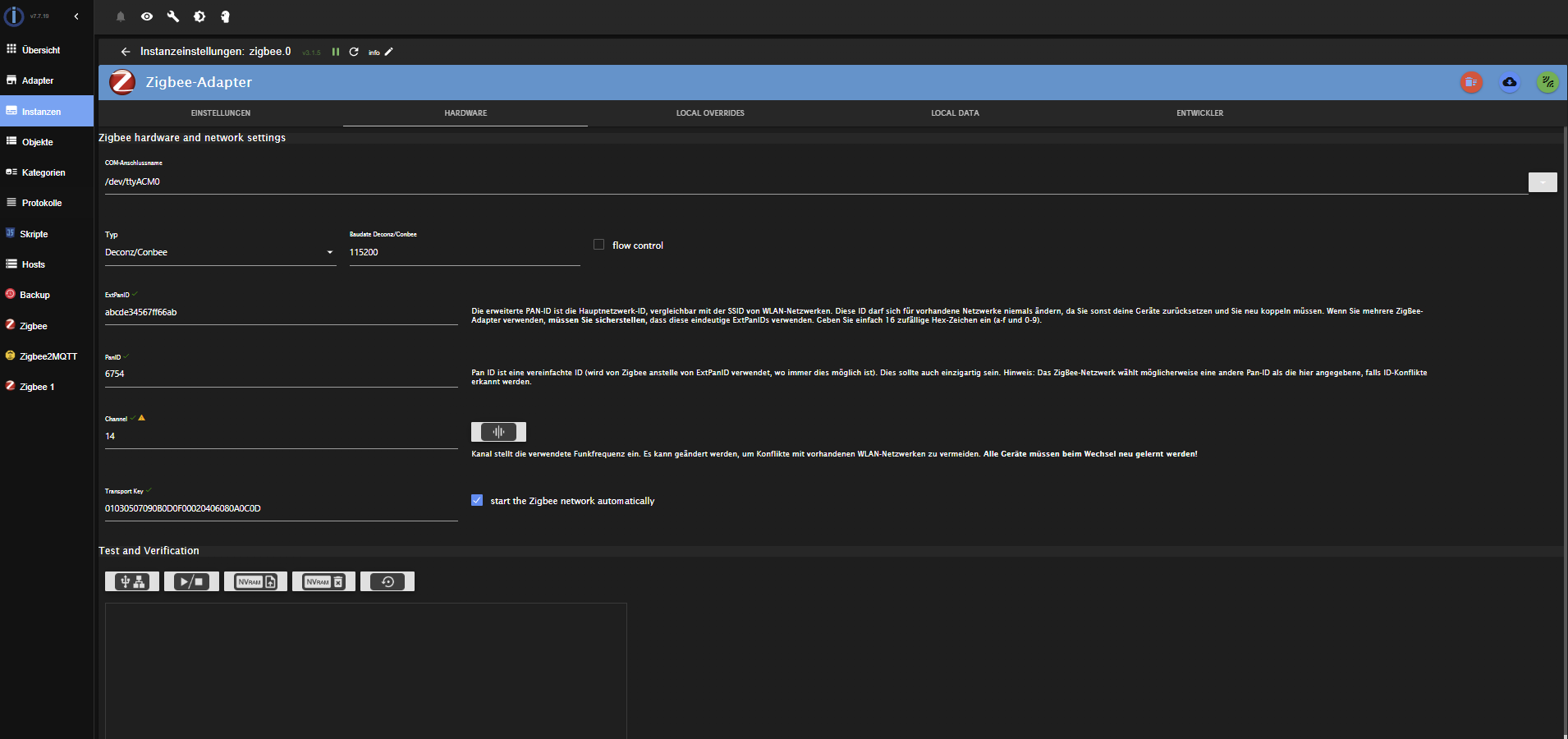
Das Zigbee2mqtt - Verzeichnis war leer. Ich habe es gelöscht.
Grafana muß ich mir ansehen. Läuft aber eigentlich. Ich sollte ein Update machen von 11.3.1 auf aktuell 12.2
-
@thomas-braun
Upgrade auf Trixie mache ich beim Wechsel auf mein derzeit ungenutztes Zweitsystem
Admin-Adapter habe ich aktualisiert. Die Instanz Zigbee.0 läuft zwar, aber bei Channel gibt es ein gelbes (Warn)-Symbol.
Das Zigbee2mqtt - Verzeichnis war leer. Ich habe es gelöscht.
Grafana muß ich mir ansehen. Läuft aber eigentlich. Ich sollte ein Update machen von 11.3.1 auf aktuell 12.2
@dgr sagte in zigbee2mqtt für Zigbee-Erweiterung mit SLZB-06:
Grafana muß ich mir ansehen. Läuft aber eigentlich.
Klar läuft das. Aber du hast keine Paketquelle dafür aktiv. Und damit klemmst du dich von Updates jeglicher Art ab. Ist gefährlich, weil auch keine Sicherheitsupdates mitkommen.
-
@dgr sagte in zigbee2mqtt für Zigbee-Erweiterung mit SLZB-06:
Grafana muß ich mir ansehen. Läuft aber eigentlich.
Klar läuft das. Aber du hast keine Paketquelle dafür aktiv. Und damit klemmst du dich von Updates jeglicher Art ab. Ist gefährlich, weil auch keine Sicherheitsupdates mitkommen.
für influx gibt es das in /etc/apt/sources.list.d (influxdb.list)
Aber wie kann ich eine Datei grafana.list erzeugen ? -
für influx gibt es das in /etc/apt/sources.list.d (influxdb.list)
Aber wie kann ich eine Datei grafana.list erzeugen ? -
für influx gibt es das in /etc/apt/sources.list.d (influxdb.list)
Aber wie kann ich eine Datei grafana.list erzeugen ?@dgr sagte in zigbee2mqtt für Zigbee-Erweiterung mit SLZB-06:
für influx gibt es das in /etc/apt/sources.list.d (influxdb.list)
Aber wie kann ich eine Datei grafana.list erzeugen ? -
@thomas-braun
Danke, hat geklappt.Grafana hat sich anschließend auch gemeldet wegen update und Update ist gelaufen.
Danke nochmal an alle.
-
@thomas-braun
Danke, hat geklappt.Grafana hat sich anschließend auch gemeldet wegen update und Update ist gelaufen.
Danke nochmal an alle.
@dgr
Dann ändere den Titel auf am Anfang auf [erl] oder ähnliches.
Sorry nicht gesehen dass da schon gelöst steht. -
@thomas-braun
Danke, hat geklappt.Grafana hat sich anschließend auch gemeldet wegen update und Update ist gelaufen.
Danke nochmal an alle.



Hey! Du scheinst an dieser Unterhaltung interessiert zu sein, hast aber noch kein Konto.
Hast du es satt, bei jedem Besuch durch die gleichen Beiträge zu scrollen? Wenn du dich für ein Konto anmeldest, kommst du immer genau dorthin zurück, wo du zuvor warst, und kannst dich über neue Antworten benachrichtigen lassen (entweder per E-Mail oder Push-Benachrichtigung). Du kannst auch Lesezeichen speichern und Beiträge positiv bewerten, um anderen Community-Mitgliedern deine Wertschätzung zu zeigen.
Mit deinem Input könnte dieser Beitrag noch besser werden 💗
Registrieren Anmelden236
Online33.0k
Benutzer83.6k
Themen1.3m
Beiträge