




docker container startet nicht unter proxmox 9
-
hi,
hab einen frischen server mit proxmox 9 aufgesetzt. darunter docker-ce installiert, nun iobroker per docker-compose.yml gestartet.docker-compose.yml:
services:
  iobroker:
    container_name: iobroker
    image: buanet/iobroker
    hostname: iobroker
    restart: always
    ports:
      - "8081:8081"
    volumes:
      - iobrokerdata:/opt/iobroker
    environment:
      - TZ=Europe/Berlin
      - DEBUG=yes
#    devices:
#      - /dev/ttyUSB0:/dev/ttyUSB0

volumes:
  iobrokerdata:
der start über
docker compose up -d
schlägt aber fehl. output:iobroker | -------------------------------------------------------------------------------- iobroker | ----- Step 5 of 5: ioBroker Startup ----- iobroker | -------------------------------------------------------------------------------- iobroker | iobroker | Starting ioBroker... iobroker | iobroker | ##### #### ### ## # iobroker.js-controller log output # ## ### #### ##### iobroker | Error while calling "getconf CLK_TCK" Error: spawn /bin/sh EACCES iobroker | at ChildProcess._handle.onexit (node:internal/child_process:285:19) iobroker | at onErrorNT (node:internal/child_process:483:16) iobroker | at process.processTicksAndRejections (node:internal/process/task_queues:90:21) { iobroker | errno: -13, iobroker | code: 'EACCES', iobroker | syscall: 'spawn /bin/sh', iobroker | path: '/bin/sh', iobroker | spawnargs: [ '-c', 'getconf CLK_TCK' ], iobroker | cmd: 'getconf CLK_TCK' iobroker | } iobroker | read ENOTCONN iobroker | Error: read ENOTCONN iobroker | at tryReadStart (node:net:716:20) iobroker | at Socket._read (node:net:731:5) iobroker | at Readable.read (node:internal/streams/readable:739:12) iobroker | at Socket.read (node:net:785:39) iobroker | at new Socket (node:net:494:12) iobroker | at Object.Socket (node:net:363:41) iobroker | at createSocket (node:internal/child_process:335:14) iobroker | at ChildProcess.spawn (node:internal/child_process:450:23) iobroker | at spawn (node:child_process:786:9) iobroker | at Object.execFile (node:child_process:349:17) iobroker | read ENOTCONN iobroker | Error: read ENOTCONN iobroker | at tryReadStart (node:net:716:20) iobroker | at Socket._read (node:net:731:5) iobroker | at Readable.read (node:internal/streams/readable:739:12) iobroker | at Socket.read (node:net:785:39) iobroker | at new Socket (node:net:494:12) iobroker | at Object.Socket (node:net:363:41) iobroker | at createSocket (node:internal/child_process:335:14) iobroker | at ChildProcess.spawn (node:internal/child_process:450:23) iobroker | at spawn (node:child_process:786:9) iobroker | at Object.execFile (node:child_process:349:17) iobroker | read ENOTCONN iobroker | Error: read ENOTCONN iobroker | at tryReadStart (node:net:716:20) iobroker | at Socket._read (node:net:731:5) iobroker | at Readable.read (node:internal/streams/readable:739:12) iobroker | at Socket.read (node:net:785:39) iobroker | at new Socket (node:net:494:12) iobroker | at Object.Socket (node:net:363:41) iobroker | at createSocket (node:internal/child_process:335:14) iobroker | at ChildProcess.spawn (node:internal/child_process:450:23) iobroker | at spawn (node:child_process:786:9) iobroker | at Object.execFile (node:child_process:349:17)hat jemand eine idee, was das ist? hab schon gesucht, aber nichts passendes gefunden.
gruß,
andrehier das komplette startlog:
iobroker | -------------------------------------------------------------------------------- iobroker | ------------------------- 2025-09-24 16:42:38 ------------------------- iobroker | -------------------------------------------------------------------------------- iobroker | ----- ----- iobroker | ----- ██╗ ██████╗ ██████╗ ██████╗ ██████╗ ██╗ ██╗ ███████╗ ██████╗ ----- iobroker | ----- ██║ ██╔═══██╗ ██╔══██╗ ██╔══██╗ ██╔═══██╗ ██║ ██╔╝ ██╔════╝ ██╔══██╗ ----- iobroker | ----- ██║ ██║ ██║ ██████╔╝ ██████╔╝ ██║ ██║ █████╔╝ █████╗ ██████╔╝ ----- iobroker | ----- ██║ ██║ ██║ ██╔══██╗ ██╔══██╗ ██║ ██║ ██╔═██╗ ██╔══╝ ██╔══██╗ ----- iobroker | ----- ██║ ╚██████╔╝ ██████╔╝ ██║ ██║ ╚██████╔╝ ██║ ██╗ ███████╗ ██║ ██║ ----- iobroker | ----- ╚═╝ ╚═════╝ ╚═════╝ ╚═╝ ╚═╝ ╚═════╝ ╚═╝ ╚═╝ ╚══════╝ ╚═╝ ╚═╝ ----- iobroker | ----- ----- iobroker | ----- Welcome to your ioBroker Docker container! ----- iobroker | ----- Startupscript is now running! ----- iobroker | ----- Please be patient! ----- iobroker | -------------------------------------------------------------------------------- iobroker | iobroker | -------------------------------------------------------------------------------- iobroker | ----- System Information ----- iobroker | ----- arch: x86_64 ----- iobroker | ----- hostname: iobroker ----- iobroker | ----- ----- iobroker | ----- Version Information ----- iobroker | ----- image: v11.0.0 ----- iobroker | ----- build: 20250912.234259 ----- iobroker | ----- node: v22.19.0 ----- iobroker | ----- npm: 10.9.3 ----- iobroker | ----- ----- iobroker | ----- Environment Variables ----- iobroker | ----- DEBUG: yes ----- iobroker | ----- SETGID: 1000 ----- iobroker | ----- SETUID: 1000 ----- iobroker | -------------------------------------------------------------------------------- iobroker | iobroker | -------------------------------------------------------------------------------- iobroker | ----- Step 1 of 5: Preparing Container ----- iobroker | -------------------------------------------------------------------------------- iobroker | iobroker | iobroker | iobroker | -------------------------------------------------------------------------------- iobroker | ----- Step 2 of 5: Detecting ioBroker Installation ----- iobroker | -------------------------------------------------------------------------------- iobroker | iobroker | Existing installation of ioBroker detected in "/opt/iobroker". iobroker | iobroker | -------------------------------------------------------------------------------- iobroker | ----- Step 3 of 5: Checking ioBroker Installation ----- iobroker | -------------------------------------------------------------------------------- iobroker | iobroker | (Re)setting permissions (This might take a while! Please be patient!)... Done. iobroker | iobroker | Checking database connection... Done. iobroker | iobroker | Hostname in ioBroker matches the hostname of this container. iobroker | No action required. iobroker | iobroker | -------------------------------------------------------------------------------- iobroker | ----- Step 4 of 5: Applying Special Settings ----- iobroker | -------------------------------------------------------------------------------- iobroker | iobroker | Some adapters have special requirements/ settings which can be activated by the use of environment variables. iobroker | For more information see ioBroker Docker image docs (https://docs.buanet.de/iobroker-docker-image/docs/). iobroker | iobroker | -------------------------------------------------------------------------------- iobroker | ----- Step 5 of 5: ioBroker Startup ----- iobroker | -------------------------------------------------------------------------------- iobroker | iobroker | Starting ioBroker... iobroker | iobroker | ##### #### ### ## # iobroker.js-controller log output # ## ### #### ##### iobroker | Error while calling "getconf CLK_TCK" Error: spawn /bin/sh EACCES iobroker | at ChildProcess._handle.onexit (node:internal/child_process:285:19) iobroker | at onErrorNT (node:internal/child_process:483:16) iobroker | at process.processTicksAndRejections (node:internal/process/task_queues:90:21) { iobroker | errno: -13, iobroker | code: 'EACCES', iobroker | syscall: 'spawn /bin/sh', iobroker | path: '/bin/sh', iobroker | spawnargs: [ '-c', 'getconf CLK_TCK' ], iobroker | cmd: 'getconf CLK_TCK' iobroker | } -
hier das komplette startlog:
iobroker | -------------------------------------------------------------------------------- iobroker | ------------------------- 2025-09-24 16:42:38 ------------------------- iobroker | -------------------------------------------------------------------------------- iobroker | ----- ----- iobroker | ----- ██╗ ██████╗ ██████╗ ██████╗ ██████╗ ██╗ ██╗ ███████╗ ██████╗ ----- iobroker | ----- ██║ ██╔═══██╗ ██╔══██╗ ██╔══██╗ ██╔═══██╗ ██║ ██╔╝ ██╔════╝ ██╔══██╗ ----- iobroker | ----- ██║ ██║ ██║ ██████╔╝ ██████╔╝ ██║ ██║ █████╔╝ █████╗ ██████╔╝ ----- iobroker | ----- ██║ ██║ ██║ ██╔══██╗ ██╔══██╗ ██║ ██║ ██╔═██╗ ██╔══╝ ██╔══██╗ ----- iobroker | ----- ██║ ╚██████╔╝ ██████╔╝ ██║ ██║ ╚██████╔╝ ██║ ██╗ ███████╗ ██║ ██║ ----- iobroker | ----- ╚═╝ ╚═════╝ ╚═════╝ ╚═╝ ╚═╝ ╚═════╝ ╚═╝ ╚═╝ ╚══════╝ ╚═╝ ╚═╝ ----- iobroker | ----- ----- iobroker | ----- Welcome to your ioBroker Docker container! ----- iobroker | ----- Startupscript is now running! ----- iobroker | ----- Please be patient! ----- iobroker | -------------------------------------------------------------------------------- iobroker | iobroker | -------------------------------------------------------------------------------- iobroker | ----- System Information ----- iobroker | ----- arch: x86_64 ----- iobroker | ----- hostname: iobroker ----- iobroker | ----- ----- iobroker | ----- Version Information ----- iobroker | ----- image: v11.0.0 ----- iobroker | ----- build: 20250912.234259 ----- iobroker | ----- node: v22.19.0 ----- iobroker | ----- npm: 10.9.3 ----- iobroker | ----- ----- iobroker | ----- Environment Variables ----- iobroker | ----- DEBUG: yes ----- iobroker | ----- SETGID: 1000 ----- iobroker | ----- SETUID: 1000 ----- iobroker | -------------------------------------------------------------------------------- iobroker | iobroker | -------------------------------------------------------------------------------- iobroker | ----- Step 1 of 5: Preparing Container ----- iobroker | -------------------------------------------------------------------------------- iobroker | iobroker | iobroker | iobroker | -------------------------------------------------------------------------------- iobroker | ----- Step 2 of 5: Detecting ioBroker Installation ----- iobroker | -------------------------------------------------------------------------------- iobroker | iobroker | Existing installation of ioBroker detected in "/opt/iobroker". iobroker | iobroker | -------------------------------------------------------------------------------- iobroker | ----- Step 3 of 5: Checking ioBroker Installation ----- iobroker | -------------------------------------------------------------------------------- iobroker | iobroker | (Re)setting permissions (This might take a while! Please be patient!)... Done. iobroker | iobroker | Checking database connection... Done. iobroker | iobroker | Hostname in ioBroker matches the hostname of this container. iobroker | No action required. iobroker | iobroker | -------------------------------------------------------------------------------- iobroker | ----- Step 4 of 5: Applying Special Settings ----- iobroker | -------------------------------------------------------------------------------- iobroker | iobroker | Some adapters have special requirements/ settings which can be activated by the use of environment variables. iobroker | For more information see ioBroker Docker image docs (https://docs.buanet.de/iobroker-docker-image/docs/). iobroker | iobroker | -------------------------------------------------------------------------------- iobroker | ----- Step 5 of 5: ioBroker Startup ----- iobroker | -------------------------------------------------------------------------------- iobroker | iobroker | Starting ioBroker... iobroker | iobroker | ##### #### ### ## # iobroker.js-controller log output # ## ### #### ##### iobroker | Error while calling "getconf CLK_TCK" Error: spawn /bin/sh EACCES iobroker | at ChildProcess._handle.onexit (node:internal/child_process:285:19) iobroker | at onErrorNT (node:internal/child_process:483:16) iobroker | at process.processTicksAndRejections (node:internal/process/task_queues:90:21) { iobroker | errno: -13, iobroker | code: 'EACCES', iobroker | syscall: 'spawn /bin/sh', iobroker | path: '/bin/sh', iobroker | spawnargs: [ '-c', 'getconf CLK_TCK' ], iobroker | cmd: 'getconf CLK_TCK' iobroker | }@astrakid sagte in docker container startet nicht unter proxmox 9:
das liegt höchst wahrscheinlich daran, das du dadurch eine verschachtelte virtualisierung erzeugst. also die virtualisierung in einer virtualisierung hat weniger rechte.
schau mal ob du da was dazu in proxmox konfigurieren kannst.Meine Adapter und Widgets
TVProgram, SqueezeboxRPC, OpenLiga, RSSFeed, MyTime,, pi-hole2, vis-json-template, skiinfo, vis-mapwidgets, vis-2-widgets-rssfeed
Links im Profil -
@astrakid sagte in docker container startet nicht unter proxmox 9:
das liegt höchst wahrscheinlich daran, das du dadurch eine verschachtelte virtualisierung erzeugst. also die virtualisierung in einer virtualisierung hat weniger rechte.
schau mal ob du da was dazu in proxmox konfigurieren kannst.@oliverio sagte in docker container startet nicht unter proxmox 9:
h eine verschachtelte virtualisierung erzeugst. also die virtualisierung in einer virtualisierung
innerhalb des OS habe ich docker direkt installiert und gestartet, nicht in einem LXC oder einer VM. und als benutzer root (ich weiß, nicht optimal).
-
@astrakid sagte in docker container startet nicht unter proxmox 9:
das liegt höchst wahrscheinlich daran, das du dadurch eine verschachtelte virtualisierung erzeugst. also die virtualisierung in einer virtualisierung hat weniger rechte.
schau mal ob du da was dazu in proxmox konfigurieren kannst.Da fehlt mir die Beschreibung des "Zwischenbaus"
Auf einem Proxmox System sollte man nur LXC-Container und virtuelle Maschinen installieren...
docker-ce direkt auf dem PVE Muttersystem installieren schafft Verdruss...
Wenn Du eine VM aufgesetzt hast oder einen LXC Container, in dem dann wiederum docker läuft:
Was ist denn die Ausgabe, wenn Du als normaler User in der VM / dem LXC dies hier eintippst:
marrtin@iobroker-test-sicher:/opt/iobroker$ getconf CLK_TCK 100 -
Da fehlt mir die Beschreibung des "Zwischenbaus"
Auf einem Proxmox System sollte man nur LXC-Container und virtuelle Maschinen installieren...
docker-ce direkt auf dem PVE Muttersystem installieren schafft Verdruss...
Wenn Du eine VM aufgesetzt hast oder einen LXC Container, in dem dann wiederum docker läuft:
Was ist denn die Ausgabe, wenn Du als normaler User in der VM / dem LXC dies hier eintippst:
marrtin@iobroker-test-sicher:/opt/iobroker$ getconf CLK_TCK 100 -
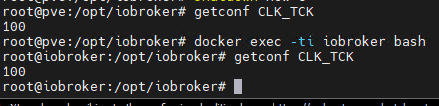
@martinp sagte in docker container startet nicht unter proxmox 9:
getconf CLK_TCK

funktioniert sogar aus dem iobroker-container heraus:
@astrakid Du hast also docker direkt im Hypervisor installiert?
Etwas direkt im Hypervisor installieren ist schlechter Stil ...
https://www.reddit.com/r/Proxmox/comments/1cluao4/whats_the_best_way_to_run_docker_in_proxmox/
EDIT: ich sehe gerade "root"
Unter welchem User ist denn das Installationsskript gelaufen?
Intel(R) Celeron(R) CPU N3000 @1.04GHz 8G RAM 480G SSD * Virtualization : unprivileged lxc container on Proxmox * 6 GByte RAM für den iobroker Container * Remote-Access über Wireguard meiner Fritzbox
-
@astrakid Du hast also docker direkt im Hypervisor installiert?
Etwas direkt im Hypervisor installieren ist schlechter Stil ...
https://www.reddit.com/r/Proxmox/comments/1cluao4/whats_the_best_way_to_run_docker_in_proxmox/
EDIT: ich sehe gerade "root"
Unter welchem User ist denn das Installationsskript gelaufen?
@martinp sagte in docker container startet nicht unter proxmox 9:
https://www.reddit.com/r/Proxmox/comments/1cluao4/whats_the_best_way_to_run_docker_in_proxmox/
im link steht was von, das es die netzwerkfähigkeiten von proxmox zerstört.
wahrscheinlich wenn man irgendwas mit macvlan oder ipvlan verwenden will, da dann ein eigener treiber genutzt wird.ich dachte proxmox sei ein geschlossenes system/betriebssystem. da dann noch was auf oberster ebene zu installieren dürfte doch dann beim nächsten update ebenfalls schwierigkeiten geben.
-
@oliverio sagte in docker container startet nicht unter proxmox 9:
h eine verschachtelte virtualisierung erzeugst. also die virtualisierung in einer virtualisierung
innerhalb des OS habe ich docker direkt installiert und gestartet, nicht in einem LXC oder einer VM. und als benutzer root (ich weiß, nicht optimal).
@astrakid sagte in docker container startet nicht unter proxmox 9:
als benutzer root (ich weiß, nicht optimal)
Das ist mehr als nur "nicht optimal". Als
rootzerschießt Du Dir die Rechte.
Darum fummelt mal niemals alsrootim System rum.Und was Docker auf Proxmox angeht, schließe ich mich den anderen an.
Proxmox ist eine Virtualisierungslösung - Docker eine andere. Die beiden zu kombinieren ist vermutlich auch mehr als nur "schlechter Stil".Bei mir läuft ioBroker als LXC. Mit 2 Kernen und 8 GB RAM. Einwandfrei.
"Any fool can write code that a computer can understand. Good programmers write code that humans can understand." (Martin Fowler, "Refactoring")
Proxmox 9.1.1 LXC|8 GB|Core i7-6700
HmIP|ZigBee|Tasmota|Unifi
Zabbix Certified Specialist
Konnte ich Dir helfen? Dann benutze bitte das Voting unten rechts im Beitrag -
@astrakid sagte in docker container startet nicht unter proxmox 9:
als benutzer root (ich weiß, nicht optimal)
Das ist mehr als nur "nicht optimal". Als
rootzerschießt Du Dir die Rechte.
Darum fummelt mal niemals alsrootim System rum.Und was Docker auf Proxmox angeht, schließe ich mich den anderen an.
Proxmox ist eine Virtualisierungslösung - Docker eine andere. Die beiden zu kombinieren ist vermutlich auch mehr als nur "schlechter Stil".Bei mir läuft ioBroker als LXC. Mit 2 Kernen und 8 GB RAM. Einwandfrei.
Es funktioniert, von proxmox wird für Docker allerdings eine vm empfohlen, ein lxc Container soll aber auch funktionieren.
Alle virtualisierten Prozesse laufen im Endeffekt parallel auf dem Prozessor, egal wie tief verschachtelt wurde. -
@astrakid Du hast also docker direkt im Hypervisor installiert?
Etwas direkt im Hypervisor installieren ist schlechter Stil ...
https://www.reddit.com/r/Proxmox/comments/1cluao4/whats_the_best_way_to_run_docker_in_proxmox/
EDIT: ich sehe gerade "root"
Unter welchem User ist denn das Installationsskript gelaufen?
ich hab iobroker über ein docker compose File gebaut, alles als root. Der Rest läuft im docker Container ab.
Proxmox ist kein hypervisor, proxmox ist eigentlich nur eine Verwaltungsschicht, das OS ist Debian. Proxmox verwaltet lxc Container und kvm. Alles in einer schicken Oberfläche. Dass docker die Netzwerkkonfiguration von proxmox beeinflusst halte ich für ein Gerücht
Ich habe selbst proxmox 8 mit docker im Hostsystem laufen, u.a. auch iobroker. Reibungslos, inkl. Durchreichen eines zigbee USB Sticks.
Ich halte die containerisierung innerhalb eines Containers für widersinnig. Der Vorteil ist klar, dass man dann alles innerhalb der proxomox Verwaltung liegen hat.Mir geht es jetzt nur darum, den Fehler zu beheben.
Unter root zu arbeiten ist unvernünftig, das weiss ich. Das ist aber ein Sicherheitsthema. -
@astrakid sagte in docker container startet nicht unter proxmox 9:
als benutzer root (ich weiß, nicht optimal)
Das ist mehr als nur "nicht optimal". Als
rootzerschießt Du Dir die Rechte.
Darum fummelt mal niemals alsrootim System rum.Und was Docker auf Proxmox angeht, schließe ich mich den anderen an.
Proxmox ist eine Virtualisierungslösung - Docker eine andere. Die beiden zu kombinieren ist vermutlich auch mehr als nur "schlechter Stil".Bei mir läuft ioBroker als LXC. Mit 2 Kernen und 8 GB RAM. Einwandfrei.
@codierknecht sagte in docker container startet nicht unter proxmox 9:
@astrakid sagte in docker container startet nicht unter proxmox 9:
als benutzer root (ich weiß, nicht optimal)
Das ist mehr als nur "nicht optimal". Als
rootzerschießt Du Dir die Rechte.
Darum fummelt mal niemals alsrootim System rum.Und was Docker auf Proxmox angeht, schließe ich mich den anderen an.
Proxmox ist eine Virtualisierungslösung - Docker eine andere. Die beiden zu kombinieren ist vermutlich auch mehr als nur "schlechter Stil".Bei mir läuft ioBroker als LXC. Mit 2 Kernen und 8 GB RAM. Einwandfrei.
Einige Sachen werden vom Maintainer primär als Docker Container gepflegt.
Da ich den Pflegeaufwand für geringer erachte, wenn man sich dem Mainstream anschließt, habe ich einige Werkzeuge als Docker-Container installiert...
Eine Docker Instanz auf einem unprivilegierten LXC Container, für Docker Images, die auf keine speziellen Hardwares zugreifen müssen.
Darauf dann in Docker Containern
- portainer,
- PiHole,
- Radicale,
- gitea
Eine weitere Docker Instanz auf einem privilegierten LXC.
Darauf
- portainer
- frigate (wg google coral usb stick im privilegierten container)
- zigbee2mqtt (wg conbee3 stick)
Funktioniert eigentlich ganz gut ... Nur der google coral stick wandert manchmal von device id zu device id.
Habe da noch keine udev Regel gefunden, deren Verlinkung frigate auch als Zugangspunkt akzeptiert...



Hey! Du scheinst an dieser Unterhaltung interessiert zu sein, hast aber noch kein Konto.
Hast du es satt, bei jedem Besuch durch die gleichen Beiträge zu scrollen? Wenn du dich für ein Konto anmeldest, kommst du immer genau dorthin zurück, wo du zuvor warst, und kannst dich über neue Antworten benachrichtigen lassen (entweder per E-Mail oder Push-Benachrichtigung). Du kannst auch Lesezeichen speichern und Beiträge positiv bewerten, um anderen Community-Mitgliedern deine Wertschätzung zu zeigen.
Mit deinem Input könnte dieser Beitrag noch besser werden 💗
Registrieren Anmelden481
Online33.0k
Benutzer83.6k
Themen1.3m
Beiträge