




Zigbee Adapter zeigt keine Geräte mehr an
-
@chris25 Die Warnmeldungen für die Gruppen 28 und 170 kommen aber weiter ?
kannst du bitte auch schauen ob die Gruppen in der shepherd.db drin stehen ?
- Datei /opt/iobroker/iobroker-data/zigbee_0/shepherd.db (eine JSON Datei)
- Es müsste einen Eintrag geben der dem in der Meldung ähnlich ist.
A.
ja die Einträge gibt es dort
{"id":81,"type":"Group","groupID":170,"members":[{"deviceIeeeAddr":"0xa4c138d5cc53a8da","endpointID":1}],"meta":{}}
{"id":82,"type":"Group","groupID":28,"members":[],"meta":{}}
{"id":83,"type":"Group","groupID":29,"members":[],"meta":{}}
Das sind die Logs dazu. Die neue Gruppe mit der GroupID 29 taucht da nicht auf.
zigbee.0 2025-08-25 21:43:20.305 warn get devices: strange device: {"type":"group","mapped":{"_events":{},"_eventsCount":0,"databaseID":81,"groupID":170,"_members":[{"_events":{},"_eventsCount":0,"deviceID":256,"inputClusters":[3,4,5,6,1794,2820,57344,57345,0],"outputClusters":[25,10],"profileID":260,"ID":1,"clusters":{"57344":{"attributes":{"53251":"AAAA"}},"genBasic":{"attributes":{"65503":"Aζ/\u0016","65506":54,"65508":0,"65534":0,"modelId":"TS0001","manufacturerName":"_TZ3000_46t1rvdu","powerSource":1,"zclVersion":3,"appVersion":70,"stackVersion":0,"hwVersion":1,"dateCode":""}},"genOnOff":{"attributes":{"onOff":0,"onTime":0,"offWaitTime":0,"moesStartUpOnOff":2}},"manuSpecificTuya_3":{"attributes":{"53248":0,"53249":0,"53250":0,"53251":0,"53252":0,"53253":0,"switchType":1}}},"deviceIeeeAddress":"0xa4c138d5cc53a8da","deviceNetworkAddress":51931,"_binds":[{"cluster":6,"type":"endpoint","deviceIeeeAddress":"0x00212effff053c18","endpointID":1}],"_configuredReportings":[{"cluster":6,"attrId":0,"minRepIntval":0,"maxRepIntval":3600,"repChange":0}],"meta":{},"pendingRequests":{"sendInProgress":false,"id":1,"deviceIeeeAddress":"0xa4c138d5cc53a8da"}}],"meta":{},"toZigbee":[{"key":["state","brightness","brightness_percent","on_time","off_wait_time"],"options":[{"name":"transition","label":"Transition","access":2,"type":"numeric","property":"transition","description":"Controls the transition time (in seconds) of on/off, brightness, color temperature (if applicable) and color (if applicable) changes. Defaults to `0` (no transition).","value_min":0}]},{"key":["color","color_temp","color_temp_percent"],"options":[{"name":"color_sync","label":"Color sync","access":2,"type":"binary","property":"color_sync","description":"When enabled colors will be synced, e.g. if the light supports both color x/y and color temperature a conversion from color x/y to color temperature will be done when setting the x/y color (default true).","value_on":true,"value_off":false},{"name":"transition","label":"Transition","access":2,"type":"numeric","property":"transition","description":"Controls the transition time (in seconds) of on/off, brightness, color temperature (if applicable) and color (if applicable) changes. Defaults to `0` (no transition).","value_min":0}]},{"key":["effect"]},{"key":["transition"]},{"key":["position","tilt"],"options":[{"name":"invert_cover","label":"Invert cover","access":2,"type":"binary","property":"invert_cover","description":"Inverts the cover position, false: open=100,close=0, true: open=0,close=100 (default false).","value_on":true,"value_off":false},{"name":"cover_position_tilt_disable_report","label":"Cover position tilt disable report","access":2,"type":"binary","property":"cover_position_tilt_disable_report","description":"Do not publish set cover target position as a normal 'position' value (default false).","value_on":true,"value_off":false}]},{"key":["occupied_heating_setpoint"],"options":[{"name":"thermostat_unit","label":"Thermostat unit","access":2,"type":"enum","property":"thermostat_unit","description":"Controls the temperature unit of the thermostat (default celsius).","values":["celsius","fahrenheit"]}]},{"key":["tint_scene"]},{"key":["brightness_move","brightness_move_onoff"]},{"key":["brightness_step","brightness_step_onoff"],"options":[{"name":"transition","label":"Transition","access":2,"type":"numeric","property":"transition","description":"Controls the transition time (in seconds) of on/off, brightness, color temperature (if applicable) and color (if applicable) changes. Defaults to `0` (no transition).","value_min":0}]},{"key":["color_temp_step"],"options":[{"name":"transition","label":"Transition","access":2,"type":"numeric","property":"transition","description":"Controls the transition time (in seconds) of on/off, brightness, color temperature (if applicable) and color (if applicable) changes. Defaults to `0` (no transition).","value_min":0}]},{"key":["colortemp_move","color_temp_move"]},{"key":["hue_move","saturation_move"]},{"key":["hue_step","saturation_step"],"options":[{"name":"transition","label":"Transition","access":2,"type":"numeric","property":"transition","description":"Controls the transition time (in seconds) of on/off, brightness, color temperature (if applicable) and color (if applicable) changes. Defaults to `0` (no transition).","value_min":0}]}],"model":"group"},"group":{"_events":{},"_eventsCount":0,"databaseID":81,"groupID":170,"_members":[{"_events":{},"_eventsCount":0,"deviceID":256,"inputClusters":[3,4,5,6,1794,2820,57344,57345,0],"outputClusters":[25,10],"profileID":260,"ID":1,"clusters":{"57344":{"attributes":{"53251":"AAAA"}},"genBasic":{"attributes":{"65503":"Aζ/\u0016","65506":54,"65508":0,"65534":0,"modelId":"TS0001","manufacturerName":"_TZ3000_46t1rvdu","powerSource":1,"zclVersion":3,"appVersion":70,"stackVersion":0,"hwVersion":1,"dateCode":""}},"genOnOff":{"attributes":{"onOff":0,"onTime":0,"offWaitTime":0,"moesStartUpOnOff":2}},"manuSpecificTuya_3":{"attributes":{"53248":0,"53249":0,"53250":0,"53251":0,"53252":0,"53253":0,"switchType":1}}},"deviceIeeeAddress":"0xa4c138d5cc53a8da","deviceNetworkAddress":51931,"_binds":[{"cluster":6,"type":"endpoint","deviceIeeeAddress":"0x00212effff053c18","endpointID":1}],"_configuredReportings":[{"cluster":6,"attrId":0,"minRepIntval":0,"maxRepIntval":3600,"repChange":0}],"meta":{},"pendingRequests":{"sendInProgress":false,"id":1,"deviceIeeeAddress":"0xa4c138d5cc53a8da"}}],"meta":{},"toZigbee":[{"key":["state","brightness","brightness_percent","on_time","off_wait_time"],"options":[{"name":"transition","label":"Transition","access":2,"type":"numeric","property":"transition","description":"Controls the transition time (in seconds) of on/off, brightness, color temperature (if applicable) and color (if applicable) changes. Defaults to `0` (no transition).","value_min":0}]},{"key":["color","color_temp","color_temp_percent"],"options":[{"name":"color_sync","label":"Color sync","access":2,"type":"binary","property":"color_sync","description":"When enabled colors will be synced, e.g. if the light supports both color x/y and color temperature a conversion from color x/y to color temperature will be done when setting the x/y color (default true).","value_on":true,"value_off":false},{"name":"transition","label":"Transition","access":2,"type":"numeric","property":"transition","description":"Controls the transition time (in seconds) of on/off, brightness, color temperature (if applicable) and color (if applicable) changes. Defaults to `0` (no transition).","value_min":0}]},{"key":["effect"]},{"key":["transition"]},{"key":["position","tilt"],"options":[{"name":"invert_cover","label":"Invert cover","access":2,"type":"binary","property":"invert_cover","description":"Inverts the cover position, false: open=100,close=0, true: open=0,close=100 (default false).","value_on":true,"value_off":false},{"name":"cover_position_tilt_disable_report","label":"Cover position tilt disable report","access":2,"type":"binary","property":"cover_position_tilt_disable_report","description":"Do not publish set cover target position as a normal 'position' value (default false).","value_on":true,"value_off":false}]},{"key":["occupied_heating_setpoint"],"options":[{"name":"thermostat_unit","label":"Thermostat unit","access":2,"type":"enum","property":"thermostat_unit","description":"Controls the temperature unit of the thermostat (default celsius).","values":["celsius","fahrenheit"]}]},{"key":["tint_scene"]},{"key":["brightness_move","brightness_move_onoff"]},{"key":["brightness_step","brightness_step_onoff"],"options":[{"name":"transition","label":"Transition","access":2,"type":"numeric","property":"transition","description":"Controls the transition time (in seconds) of on/off, brightness, color temperature (if applicable) and color (if applicable) changes. Defaults to `0` (no transition).","value_min":0}]},{"key":["color_temp_step"],"options":[{"name":"transition","label":"Transition","access":2,"type":"numeric","property":"transition","description":"Controls the transition time (in seconds) of on/off, brightness, color temperature (if applicable) and color (if applicable) changes. Defaults to `0` (no transition).","value_min":0}]},{"key":["colortemp_move","color_temp_move"]},{"key":["hue_move","saturation_move"]},{"key":["hue_step","saturation_step"],"options":[{"name":"transition","label":"Transition","access":2,"type":"numeric","property":"transition","description":"Controls the transition time (in seconds) of on/off, brightness, color temperature (if applicable) and color (if applicable) changes. Defaults to `0` (no transition).","value_min":0}]}],"model":"group"},"name":"Group 170"} from resolveEntity for {"_events":{},"_eventsCount":0,"ID":74,"_endpoints":[{"_events":{},"_eventsCount":0,"deviceID":5,"inputClusters":[0,6,10,25,1281],"outputClusters":[1,32,1280,1282],"profileID":260,"ID":1,"clusters":{},"deviceIeeeAddress":170,"deviceNetworkAddress":0,"_binds":[],"_configuredReportings":[],"meta":{},"pendingRequests":{"sendInProgress":false,"id":1,"deviceIeeeAddress":170}},{"_events":{},"_eventsCount":0,"deviceID":100,"inputClusters":[],"outputClusters":[33],"profileID":41440,"ID":242,"clusters":{},"deviceIeeeAddress":170,"deviceNetworkAddress":0,"_binds":[],"_configuredReportings":[],"meta":{},"pendingRequests":{"sendInProgress":false,"id":242,"deviceIeeeAddress":170}}],"_ieeeAddr":170,"_interviewState":"SUCCESSFUL","_lastSeen":1728654285725,"_manufacturerID":4405,"_networkAddress":0,"_type":"Coordinator","_skipDefaultResponse":false,"_pendingRequestTimeout":0,"_customClusters":{},"meta":{}} zigbee.0 2025-08-25 21:43:20.304 warn get devices: strange device: {"type":"group","mapped":{"_events":{},"_eventsCount":0,"databaseID":82,"groupID":28,"_members":[],"meta":{},"toZigbee":[{"key":["state","brightness","brightness_percent","on_time","off_wait_time"],"options":[{"name":"transition","label":"Transition","access":2,"type":"numeric","property":"transition","description":"Controls the transition time (in seconds) of on/off, brightness, color temperature (if applicable) and color (if applicable) changes. Defaults to `0` (no transition).","value_min":0}]},{"key":["color","color_temp","color_temp_percent"],"options":[{"name":"color_sync","label":"Color sync","access":2,"type":"binary","property":"color_sync","description":"When enabled colors will be synced, e.g. if the light supports both color x/y and color temperature a conversion from color x/y to color temperature will be done when setting the x/y color (default true).","value_on":true,"value_off":false},{"name":"transition","label":"Transition","access":2,"type":"numeric","property":"transition","description":"Controls the transition time (in seconds) of on/off, brightness, color temperature (if applicable) and color (if applicable) changes. Defaults to `0` (no transition).","value_min":0}]},{"key":["effect"]},{"key":["transition"]},{"key":["position","tilt"],"options":[{"name":"invert_cover","label":"Invert cover","access":2,"type":"binary","property":"invert_cover","description":"Inverts the cover position, false: open=100,close=0, true: open=0,close=100 (default false).","value_on":true,"value_off":false},{"name":"cover_position_tilt_disable_report","label":"Cover position tilt disable report","access":2,"type":"binary","property":"cover_position_tilt_disable_report","description":"Do not publish set cover target position as a normal 'position' value (default false).","value_on":true,"value_off":false}]},{"key":["occupied_heating_setpoint"],"options":[{"name":"thermostat_unit","label":"Thermostat unit","access":2,"type":"enum","property":"thermostat_unit","description":"Controls the temperature unit of the thermostat (default celsius).","values":["celsius","fahrenheit"]}]},{"key":["tint_scene"]},{"key":["brightness_move","brightness_move_onoff"]},{"key":["brightness_step","brightness_step_onoff"],"options":[{"name":"transition","label":"Transition","access":2,"type":"numeric","property":"transition","description":"Controls the transition time (in seconds) of on/off, brightness, color temperature (if applicable) and color (if applicable) changes. Defaults to `0` (no transition).","value_min":0}]},{"key":["color_temp_step"],"options":[{"name":"transition","label":"Transition","access":2,"type":"numeric","property":"transition","description":"Controls the transition time (in seconds) of on/off, brightness, color temperature (if applicable) and color (if applicable) changes. Defaults to `0` (no transition).","value_min":0}]},{"key":["colortemp_move","color_temp_move"]},{"key":["hue_move","saturation_move"]},{"key":["hue_step","saturation_step"],"options":[{"name":"transition","label":"Transition","access":2,"type":"numeric","property":"transition","description":"Controls the transition time (in seconds) of on/off, brightness, color temperature (if applicable) and color (if applicable) changes. Defaults to `0` (no transition).","value_min":0}]}],"model":"group"},"group":{"_events":{},"_eventsCount":0,"databaseID":82,"groupID":28,"_members":[],"meta":{},"toZigbee":[{"key":["state","brightness","brightness_percent","on_time","off_wait_time"],"options":[{"name":"transition","label":"Transition","access":2,"type":"numeric","property":"transition","description":"Controls the transition time (in seconds) of on/off, brightness, color temperature (if applicable) and color (if applicable) changes. Defaults to `0` (no transition).","value_min":0}]},{"key":["color","color_temp","color_temp_percent"],"options":[{"name":"color_sync","label":"Color sync","access":2,"type":"binary","property":"color_sync","description":"When enabled colors will be synced, e.g. if the light supports both color x/y and color temperature a conversion from color x/y to color temperature will be done when setting the x/y color (default true).","value_on":true,"value_off":false},{"name":"transition","label":"Transition","access":2,"type":"numeric","property":"transition","description":"Controls the transition time (in seconds) of on/off, brightness, color temperature (if applicable) and color (if applicable) changes. Defaults to `0` (no transition).","value_min":0}]},{"key":["effect"]},{"key":["transition"]},{"key":["position","tilt"],"options":[{"name":"invert_cover","label":"Invert cover","access":2,"type":"binary","property":"invert_cover","description":"Inverts the cover position, false: open=100,close=0, true: open=0,close=100 (default false).","value_on":true,"value_off":false},{"name":"cover_position_tilt_disable_report","label":"Cover position tilt disable report","access":2,"type":"binary","property":"cover_position_tilt_disable_report","description":"Do not publish set cover target position as a normal 'position' value (default false).","value_on":true,"value_off":false}]},{"key":["occupied_heating_setpoint"],"options":[{"name":"thermostat_unit","label":"Thermostat unit","access":2,"type":"enum","property":"thermostat_unit","description":"Controls the temperature unit of the thermostat (default celsius).","values":["celsius","fahrenheit"]}]},{"key":["tint_scene"]},{"key":["brightness_move","brightness_move_onoff"]},{"key":["brightness_step","brightness_step_onoff"],"options":[{"name":"transition","label":"Transition","access":2,"type":"numeric","property":"transition","description":"Controls the transition time (in seconds) of on/off, brightness, color temperature (if applicable) and color (if applicable) changes. Defaults to `0` (no transition).","value_min":0}]},{"key":["color_temp_step"],"options":[{"name":"transition","label":"Transition","access":2,"type":"numeric","property":"transition","description":"Controls the transition time (in seconds) of on/off, brightness, color temperature (if applicable) and color (if applicable) changes. Defaults to `0` (no transition).","value_min":0}]},{"key":["colortemp_move","color_temp_move"]},{"key":["hue_move","saturation_move"]},{"key":["hue_step","saturation_step"],"options":[{"name":"transition","label":"Transition","access":2,"type":"numeric","property":"transition","description":"Controls the transition time (in seconds) of on/off, brightness, color temperature (if applicable) and color (if applicable) changes. Defaults to `0` (no transition).","value_min":0}]}],"model":"group"},"name":"Group 28"} from resolveEntity for {"_events":{},"_eventsCount":0,"ID":60,"_endpoints":[{"_events":{},"_eventsCount":0,"deviceID":5,"inputClusters":[0,10,25],"outputClusters":[1,32,1280],"profileID":260,"ID":1,"clusters":{},"deviceIeeeAddress":28,"deviceNetworkAddress":0,"_binds":[],"_configuredReportings":[],"meta":{},"pendingRequests":{"sendInProgress":false,"id":1,"deviceIeeeAddress":28}},{"_events":{},"_eventsCount":0,"deviceID":100,"inputClusters":[],"outputClusters":[33],"profileID":41440,"ID":242,"clusters":{},"deviceIeeeAddress":28,"deviceNetworkAddress":0,"_binds":[],"_configuredReportings":[],"meta":{},"pendingRequests":{"sendInProgress":false,"id":242,"deviceIeeeAddress":28}}],"_ieeeAddr":28,"_interviewState":"SUCCESSFUL","_lastSeen":null,"_manufacturerID":4405,"_networkAddress":0,"_type":"Coordinator","_skipDefaultResponse":false,"_pendingRequestTimeout":0,"_customClusters":{},"meta":{}} -
ja die Einträge gibt es dort
{"id":81,"type":"Group","groupID":170,"members":[{"deviceIeeeAddr":"0xa4c138d5cc53a8da","endpointID":1}],"meta":{}}
{"id":82,"type":"Group","groupID":28,"members":[],"meta":{}}
{"id":83,"type":"Group","groupID":29,"members":[],"meta":{}}
Das sind die Logs dazu. Die neue Gruppe mit der GroupID 29 taucht da nicht auf.
zigbee.0 2025-08-25 21:43:20.305 warn get devices: strange device: {"type":"group","mapped":{"_events":{},"_eventsCount":0,"databaseID":81,"groupID":170,"_members":[{"_events":{},"_eventsCount":0,"deviceID":256,"inputClusters":[3,4,5,6,1794,2820,57344,57345,0],"outputClusters":[25,10],"profileID":260,"ID":1,"clusters":{"57344":{"attributes":{"53251":"AAAA"}},"genBasic":{"attributes":{"65503":"Aζ/\u0016","65506":54,"65508":0,"65534":0,"modelId":"TS0001","manufacturerName":"_TZ3000_46t1rvdu","powerSource":1,"zclVersion":3,"appVersion":70,"stackVersion":0,"hwVersion":1,"dateCode":""}},"genOnOff":{"attributes":{"onOff":0,"onTime":0,"offWaitTime":0,"moesStartUpOnOff":2}},"manuSpecificTuya_3":{"attributes":{"53248":0,"53249":0,"53250":0,"53251":0,"53252":0,"53253":0,"switchType":1}}},"deviceIeeeAddress":"0xa4c138d5cc53a8da","deviceNetworkAddress":51931,"_binds":[{"cluster":6,"type":"endpoint","deviceIeeeAddress":"0x00212effff053c18","endpointID":1}],"_configuredReportings":[{"cluster":6,"attrId":0,"minRepIntval":0,"maxRepIntval":3600,"repChange":0}],"meta":{},"pendingRequests":{"sendInProgress":false,"id":1,"deviceIeeeAddress":"0xa4c138d5cc53a8da"}}],"meta":{},"toZigbee":[{"key":["state","brightness","brightness_percent","on_time","off_wait_time"],"options":[{"name":"transition","label":"Transition","access":2,"type":"numeric","property":"transition","description":"Controls the transition time (in seconds) of on/off, brightness, color temperature (if applicable) and color (if applicable) changes. Defaults to `0` (no transition).","value_min":0}]},{"key":["color","color_temp","color_temp_percent"],"options":[{"name":"color_sync","label":"Color sync","access":2,"type":"binary","property":"color_sync","description":"When enabled colors will be synced, e.g. if the light supports both color x/y and color temperature a conversion from color x/y to color temperature will be done when setting the x/y color (default true).","value_on":true,"value_off":false},{"name":"transition","label":"Transition","access":2,"type":"numeric","property":"transition","description":"Controls the transition time (in seconds) of on/off, brightness, color temperature (if applicable) and color (if applicable) changes. Defaults to `0` (no transition).","value_min":0}]},{"key":["effect"]},{"key":["transition"]},{"key":["position","tilt"],"options":[{"name":"invert_cover","label":"Invert cover","access":2,"type":"binary","property":"invert_cover","description":"Inverts the cover position, false: open=100,close=0, true: open=0,close=100 (default false).","value_on":true,"value_off":false},{"name":"cover_position_tilt_disable_report","label":"Cover position tilt disable report","access":2,"type":"binary","property":"cover_position_tilt_disable_report","description":"Do not publish set cover target position as a normal 'position' value (default false).","value_on":true,"value_off":false}]},{"key":["occupied_heating_setpoint"],"options":[{"name":"thermostat_unit","label":"Thermostat unit","access":2,"type":"enum","property":"thermostat_unit","description":"Controls the temperature unit of the thermostat (default celsius).","values":["celsius","fahrenheit"]}]},{"key":["tint_scene"]},{"key":["brightness_move","brightness_move_onoff"]},{"key":["brightness_step","brightness_step_onoff"],"options":[{"name":"transition","label":"Transition","access":2,"type":"numeric","property":"transition","description":"Controls the transition time (in seconds) of on/off, brightness, color temperature (if applicable) and color (if applicable) changes. Defaults to `0` (no transition).","value_min":0}]},{"key":["color_temp_step"],"options":[{"name":"transition","label":"Transition","access":2,"type":"numeric","property":"transition","description":"Controls the transition time (in seconds) of on/off, brightness, color temperature (if applicable) and color (if applicable) changes. Defaults to `0` (no transition).","value_min":0}]},{"key":["colortemp_move","color_temp_move"]},{"key":["hue_move","saturation_move"]},{"key":["hue_step","saturation_step"],"options":[{"name":"transition","label":"Transition","access":2,"type":"numeric","property":"transition","description":"Controls the transition time (in seconds) of on/off, brightness, color temperature (if applicable) and color (if applicable) changes. Defaults to `0` (no transition).","value_min":0}]}],"model":"group"},"group":{"_events":{},"_eventsCount":0,"databaseID":81,"groupID":170,"_members":[{"_events":{},"_eventsCount":0,"deviceID":256,"inputClusters":[3,4,5,6,1794,2820,57344,57345,0],"outputClusters":[25,10],"profileID":260,"ID":1,"clusters":{"57344":{"attributes":{"53251":"AAAA"}},"genBasic":{"attributes":{"65503":"Aζ/\u0016","65506":54,"65508":0,"65534":0,"modelId":"TS0001","manufacturerName":"_TZ3000_46t1rvdu","powerSource":1,"zclVersion":3,"appVersion":70,"stackVersion":0,"hwVersion":1,"dateCode":""}},"genOnOff":{"attributes":{"onOff":0,"onTime":0,"offWaitTime":0,"moesStartUpOnOff":2}},"manuSpecificTuya_3":{"attributes":{"53248":0,"53249":0,"53250":0,"53251":0,"53252":0,"53253":0,"switchType":1}}},"deviceIeeeAddress":"0xa4c138d5cc53a8da","deviceNetworkAddress":51931,"_binds":[{"cluster":6,"type":"endpoint","deviceIeeeAddress":"0x00212effff053c18","endpointID":1}],"_configuredReportings":[{"cluster":6,"attrId":0,"minRepIntval":0,"maxRepIntval":3600,"repChange":0}],"meta":{},"pendingRequests":{"sendInProgress":false,"id":1,"deviceIeeeAddress":"0xa4c138d5cc53a8da"}}],"meta":{},"toZigbee":[{"key":["state","brightness","brightness_percent","on_time","off_wait_time"],"options":[{"name":"transition","label":"Transition","access":2,"type":"numeric","property":"transition","description":"Controls the transition time (in seconds) of on/off, brightness, color temperature (if applicable) and color (if applicable) changes. Defaults to `0` (no transition).","value_min":0}]},{"key":["color","color_temp","color_temp_percent"],"options":[{"name":"color_sync","label":"Color sync","access":2,"type":"binary","property":"color_sync","description":"When enabled colors will be synced, e.g. if the light supports both color x/y and color temperature a conversion from color x/y to color temperature will be done when setting the x/y color (default true).","value_on":true,"value_off":false},{"name":"transition","label":"Transition","access":2,"type":"numeric","property":"transition","description":"Controls the transition time (in seconds) of on/off, brightness, color temperature (if applicable) and color (if applicable) changes. Defaults to `0` (no transition).","value_min":0}]},{"key":["effect"]},{"key":["transition"]},{"key":["position","tilt"],"options":[{"name":"invert_cover","label":"Invert cover","access":2,"type":"binary","property":"invert_cover","description":"Inverts the cover position, false: open=100,close=0, true: open=0,close=100 (default false).","value_on":true,"value_off":false},{"name":"cover_position_tilt_disable_report","label":"Cover position tilt disable report","access":2,"type":"binary","property":"cover_position_tilt_disable_report","description":"Do not publish set cover target position as a normal 'position' value (default false).","value_on":true,"value_off":false}]},{"key":["occupied_heating_setpoint"],"options":[{"name":"thermostat_unit","label":"Thermostat unit","access":2,"type":"enum","property":"thermostat_unit","description":"Controls the temperature unit of the thermostat (default celsius).","values":["celsius","fahrenheit"]}]},{"key":["tint_scene"]},{"key":["brightness_move","brightness_move_onoff"]},{"key":["brightness_step","brightness_step_onoff"],"options":[{"name":"transition","label":"Transition","access":2,"type":"numeric","property":"transition","description":"Controls the transition time (in seconds) of on/off, brightness, color temperature (if applicable) and color (if applicable) changes. Defaults to `0` (no transition).","value_min":0}]},{"key":["color_temp_step"],"options":[{"name":"transition","label":"Transition","access":2,"type":"numeric","property":"transition","description":"Controls the transition time (in seconds) of on/off, brightness, color temperature (if applicable) and color (if applicable) changes. Defaults to `0` (no transition).","value_min":0}]},{"key":["colortemp_move","color_temp_move"]},{"key":["hue_move","saturation_move"]},{"key":["hue_step","saturation_step"],"options":[{"name":"transition","label":"Transition","access":2,"type":"numeric","property":"transition","description":"Controls the transition time (in seconds) of on/off, brightness, color temperature (if applicable) and color (if applicable) changes. Defaults to `0` (no transition).","value_min":0}]}],"model":"group"},"name":"Group 170"} from resolveEntity for {"_events":{},"_eventsCount":0,"ID":74,"_endpoints":[{"_events":{},"_eventsCount":0,"deviceID":5,"inputClusters":[0,6,10,25,1281],"outputClusters":[1,32,1280,1282],"profileID":260,"ID":1,"clusters":{},"deviceIeeeAddress":170,"deviceNetworkAddress":0,"_binds":[],"_configuredReportings":[],"meta":{},"pendingRequests":{"sendInProgress":false,"id":1,"deviceIeeeAddress":170}},{"_events":{},"_eventsCount":0,"deviceID":100,"inputClusters":[],"outputClusters":[33],"profileID":41440,"ID":242,"clusters":{},"deviceIeeeAddress":170,"deviceNetworkAddress":0,"_binds":[],"_configuredReportings":[],"meta":{},"pendingRequests":{"sendInProgress":false,"id":242,"deviceIeeeAddress":170}}],"_ieeeAddr":170,"_interviewState":"SUCCESSFUL","_lastSeen":1728654285725,"_manufacturerID":4405,"_networkAddress":0,"_type":"Coordinator","_skipDefaultResponse":false,"_pendingRequestTimeout":0,"_customClusters":{},"meta":{}} zigbee.0 2025-08-25 21:43:20.304 warn get devices: strange device: {"type":"group","mapped":{"_events":{},"_eventsCount":0,"databaseID":82,"groupID":28,"_members":[],"meta":{},"toZigbee":[{"key":["state","brightness","brightness_percent","on_time","off_wait_time"],"options":[{"name":"transition","label":"Transition","access":2,"type":"numeric","property":"transition","description":"Controls the transition time (in seconds) of on/off, brightness, color temperature (if applicable) and color (if applicable) changes. Defaults to `0` (no transition).","value_min":0}]},{"key":["color","color_temp","color_temp_percent"],"options":[{"name":"color_sync","label":"Color sync","access":2,"type":"binary","property":"color_sync","description":"When enabled colors will be synced, e.g. if the light supports both color x/y and color temperature a conversion from color x/y to color temperature will be done when setting the x/y color (default true).","value_on":true,"value_off":false},{"name":"transition","label":"Transition","access":2,"type":"numeric","property":"transition","description":"Controls the transition time (in seconds) of on/off, brightness, color temperature (if applicable) and color (if applicable) changes. Defaults to `0` (no transition).","value_min":0}]},{"key":["effect"]},{"key":["transition"]},{"key":["position","tilt"],"options":[{"name":"invert_cover","label":"Invert cover","access":2,"type":"binary","property":"invert_cover","description":"Inverts the cover position, false: open=100,close=0, true: open=0,close=100 (default false).","value_on":true,"value_off":false},{"name":"cover_position_tilt_disable_report","label":"Cover position tilt disable report","access":2,"type":"binary","property":"cover_position_tilt_disable_report","description":"Do not publish set cover target position as a normal 'position' value (default false).","value_on":true,"value_off":false}]},{"key":["occupied_heating_setpoint"],"options":[{"name":"thermostat_unit","label":"Thermostat unit","access":2,"type":"enum","property":"thermostat_unit","description":"Controls the temperature unit of the thermostat (default celsius).","values":["celsius","fahrenheit"]}]},{"key":["tint_scene"]},{"key":["brightness_move","brightness_move_onoff"]},{"key":["brightness_step","brightness_step_onoff"],"options":[{"name":"transition","label":"Transition","access":2,"type":"numeric","property":"transition","description":"Controls the transition time (in seconds) of on/off, brightness, color temperature (if applicable) and color (if applicable) changes. Defaults to `0` (no transition).","value_min":0}]},{"key":["color_temp_step"],"options":[{"name":"transition","label":"Transition","access":2,"type":"numeric","property":"transition","description":"Controls the transition time (in seconds) of on/off, brightness, color temperature (if applicable) and color (if applicable) changes. Defaults to `0` (no transition).","value_min":0}]},{"key":["colortemp_move","color_temp_move"]},{"key":["hue_move","saturation_move"]},{"key":["hue_step","saturation_step"],"options":[{"name":"transition","label":"Transition","access":2,"type":"numeric","property":"transition","description":"Controls the transition time (in seconds) of on/off, brightness, color temperature (if applicable) and color (if applicable) changes. Defaults to `0` (no transition).","value_min":0}]}],"model":"group"},"group":{"_events":{},"_eventsCount":0,"databaseID":82,"groupID":28,"_members":[],"meta":{},"toZigbee":[{"key":["state","brightness","brightness_percent","on_time","off_wait_time"],"options":[{"name":"transition","label":"Transition","access":2,"type":"numeric","property":"transition","description":"Controls the transition time (in seconds) of on/off, brightness, color temperature (if applicable) and color (if applicable) changes. Defaults to `0` (no transition).","value_min":0}]},{"key":["color","color_temp","color_temp_percent"],"options":[{"name":"color_sync","label":"Color sync","access":2,"type":"binary","property":"color_sync","description":"When enabled colors will be synced, e.g. if the light supports both color x/y and color temperature a conversion from color x/y to color temperature will be done when setting the x/y color (default true).","value_on":true,"value_off":false},{"name":"transition","label":"Transition","access":2,"type":"numeric","property":"transition","description":"Controls the transition time (in seconds) of on/off, brightness, color temperature (if applicable) and color (if applicable) changes. Defaults to `0` (no transition).","value_min":0}]},{"key":["effect"]},{"key":["transition"]},{"key":["position","tilt"],"options":[{"name":"invert_cover","label":"Invert cover","access":2,"type":"binary","property":"invert_cover","description":"Inverts the cover position, false: open=100,close=0, true: open=0,close=100 (default false).","value_on":true,"value_off":false},{"name":"cover_position_tilt_disable_report","label":"Cover position tilt disable report","access":2,"type":"binary","property":"cover_position_tilt_disable_report","description":"Do not publish set cover target position as a normal 'position' value (default false).","value_on":true,"value_off":false}]},{"key":["occupied_heating_setpoint"],"options":[{"name":"thermostat_unit","label":"Thermostat unit","access":2,"type":"enum","property":"thermostat_unit","description":"Controls the temperature unit of the thermostat (default celsius).","values":["celsius","fahrenheit"]}]},{"key":["tint_scene"]},{"key":["brightness_move","brightness_move_onoff"]},{"key":["brightness_step","brightness_step_onoff"],"options":[{"name":"transition","label":"Transition","access":2,"type":"numeric","property":"transition","description":"Controls the transition time (in seconds) of on/off, brightness, color temperature (if applicable) and color (if applicable) changes. Defaults to `0` (no transition).","value_min":0}]},{"key":["color_temp_step"],"options":[{"name":"transition","label":"Transition","access":2,"type":"numeric","property":"transition","description":"Controls the transition time (in seconds) of on/off, brightness, color temperature (if applicable) and color (if applicable) changes. Defaults to `0` (no transition).","value_min":0}]},{"key":["colortemp_move","color_temp_move"]},{"key":["hue_move","saturation_move"]},{"key":["hue_step","saturation_step"],"options":[{"name":"transition","label":"Transition","access":2,"type":"numeric","property":"transition","description":"Controls the transition time (in seconds) of on/off, brightness, color temperature (if applicable) and color (if applicable) changes. Defaults to `0` (no transition).","value_min":0}]}],"model":"group"},"name":"Group 28"} from resolveEntity for {"_events":{},"_eventsCount":0,"ID":60,"_endpoints":[{"_events":{},"_eventsCount":0,"deviceID":5,"inputClusters":[0,10,25],"outputClusters":[1,32,1280],"profileID":260,"ID":1,"clusters":{},"deviceIeeeAddress":28,"deviceNetworkAddress":0,"_binds":[],"_configuredReportings":[],"meta":{},"pendingRequests":{"sendInProgress":false,"id":1,"deviceIeeeAddress":28}},{"_events":{},"_eventsCount":0,"deviceID":100,"inputClusters":[],"outputClusters":[33],"profileID":41440,"ID":242,"clusters":{},"deviceIeeeAddress":28,"deviceNetworkAddress":0,"_binds":[],"_configuredReportings":[],"meta":{},"pendingRequests":{"sendInProgress":false,"id":242,"deviceIeeeAddress":28}}],"_ieeeAddr":28,"_interviewState":"SUCCESSFUL","_lastSeen":null,"_manufacturerID":4405,"_networkAddress":0,"_type":"Coordinator","_skipDefaultResponse":false,"_pendingRequestTimeout":0,"_customClusters":{},"meta":{}}@chris25 das passt schon. Die neue Gruppe ist 29, die Gruppe 28 gab es schon vorher.
Trotzdem ist mir nicht klar warum diese Gruppen nicht sauber erkannt werden.Kannst du bitte nochmal eine Gruppe anlegen, und dabei gezielt die ID 1 vergeben ? Auch hast du das Gerät der Gruppe 170 hinzugefügt, nicht zu der neu angelegten.
Bitte auch prüfen ob du das Gerät über die Gruppe 170 schalten kannst - Wichtig - der Status im Adapter wird sich durch Schalten über die Gruppe nicht ändern - du musst das gerät selber anschauen.
A
-
ja ich hatte es ausversehen eine der "alten" Gruppen zugewiesen. Habe die Gruppe 1 mit der GroupID 1 angelegt und das Gerät dort zugewiesen. Beim Wechseln der Gruppe für das Gerät crasht der Adapter
zigbee.0
2025-08-25 21:57:17.202	error	Cannot read properties of undefined (reading 'deleteObj')

zigbee.0
2025-08-25 21:57:17.202	error	TypeError: Cannot read properties of undefined (reading 'deleteObj') at /opt/iobroker/node_modules/iobroker.zigbee/lib/groups.js:360:51 at Array.forEach (<anonymous>) at Immediate.<anonymous> (/opt/iobroker/node_modules/iobroker.zigbee/lib/groups.js:356:29) at processImmediate (node:internal/timers:487:21)

zigbee.0
2025-08-25 21:57:17.202	error	uncaught exception: Cannot read properties of undefined (reading 'deleteObj')

zigbee.0
2025-08-25 21:57:17.183	error	getGroups: caught error: TypeError: Cannot read properties of undefined (reading 'getGroups')

zigbee.0
2025-08-25 21:57:16.961	error	id.match is not a function

zigbee.0
2025-08-25 21:57:16.961	error	TypeError: id.match is not a function at StatesController.getDefaultGroupIcon (/opt/iobroker/node_modules/iobroker.zigbee/lib/statescontroller.js:764:32) at Groups.updateGroupMembership (/opt/iobroker/node_modules/iobroker.zigbee/lib/groups.js:176:56)

zigbee.0
2025-08-25 21:57:16.961	error	unhandled promise rejection: id.match is not a function

zigbee.0
2025-08-25 21:57:16.961	error	Unhandled promise rejection. This error originated either by throwing inside of an async function without a catch block, or by rejecting a promise which was not handled with .catch().
Beim einschalten über die Gruppe gibts ebenfalls einen Crash
zigbee.0 2025-08-25 21:59:22.603 error device.ieeeAddr.substr is not a function zigbee.0 2025-08-25 21:59:22.603 error TypeError: device.ieeeAddr.substr is not a function at StatesController.onZigbeeEvent (/opt/iobroker/node_modules/iobroker.zigbee/lib/statescontroller.js:1115:39) at ZigbeeController.emit (node:events:518:28) at ZigbeeController.emit (node:domain:489:12) at ZigbeeController.event (/opt/iobroker/node_modules/iobroker.zigbee/lib/zigbeecontroller.js:345:14) at ZigbeeController.handleMessage (/opt/iobroker/node_modules/iobroker.zigbee/lib/zigbeecontroller.js:909:14) zigbee.0 2025-08-25 21:59:22.603 error unhandled promise rejection: device.ieeeAddr.substr is not a function zigbee.0 2025-08-25 21:59:22.603 error Unhandled promise rejection. This error originated either by throwing inside of an async function without a catch block, or by rejecting a promise which was not handled with .catch(). -
ja ich hatte es ausversehen eine der "alten" Gruppen zugewiesen. Habe die Gruppe 1 mit der GroupID 1 angelegt und das Gerät dort zugewiesen. Beim Wechseln der Gruppe für das Gerät crasht der Adapter
zigbee.0
2025-08-25 21:57:17.202	error	Cannot read properties of undefined (reading 'deleteObj')

zigbee.0
2025-08-25 21:57:17.202	error	TypeError: Cannot read properties of undefined (reading 'deleteObj') at /opt/iobroker/node_modules/iobroker.zigbee/lib/groups.js:360:51 at Array.forEach (<anonymous>) at Immediate.<anonymous> (/opt/iobroker/node_modules/iobroker.zigbee/lib/groups.js:356:29) at processImmediate (node:internal/timers:487:21)

zigbee.0
2025-08-25 21:57:17.202	error	uncaught exception: Cannot read properties of undefined (reading 'deleteObj')

zigbee.0
2025-08-25 21:57:17.183	error	getGroups: caught error: TypeError: Cannot read properties of undefined (reading 'getGroups')

zigbee.0
2025-08-25 21:57:16.961	error	id.match is not a function

zigbee.0
2025-08-25 21:57:16.961	error	TypeError: id.match is not a function at StatesController.getDefaultGroupIcon (/opt/iobroker/node_modules/iobroker.zigbee/lib/statescontroller.js:764:32) at Groups.updateGroupMembership (/opt/iobroker/node_modules/iobroker.zigbee/lib/groups.js:176:56)

zigbee.0
2025-08-25 21:57:16.961	error	unhandled promise rejection: id.match is not a function

zigbee.0
2025-08-25 21:57:16.961	error	Unhandled promise rejection. This error originated either by throwing inside of an async function without a catch block, or by rejecting a promise which was not handled with .catch().
Beim einschalten über die Gruppe gibts ebenfalls einen Crash
zigbee.0 2025-08-25 21:59:22.603 error device.ieeeAddr.substr is not a function zigbee.0 2025-08-25 21:59:22.603 error TypeError: device.ieeeAddr.substr is not a function at StatesController.onZigbeeEvent (/opt/iobroker/node_modules/iobroker.zigbee/lib/statescontroller.js:1115:39) at ZigbeeController.emit (node:events:518:28) at ZigbeeController.emit (node:domain:489:12) at ZigbeeController.event (/opt/iobroker/node_modules/iobroker.zigbee/lib/zigbeecontroller.js:345:14) at ZigbeeController.handleMessage (/opt/iobroker/node_modules/iobroker.zigbee/lib/zigbeecontroller.js:909:14) zigbee.0 2025-08-25 21:59:22.603 error unhandled promise rejection: device.ieeeAddr.substr is not a function zigbee.0 2025-08-25 21:59:22.603 error Unhandled promise rejection. This error originated either by throwing inside of an async function without a catch block, or by rejecting a promise which was not handled with .catch(). -
@chris25 Ok.. da ist also etwas mit den Gruppen nicht ok. Kannst du bitte als letztes versuchen alle Gruppen zu löschen (einfach über die Kachel) ?Dann sollten die Meldungen weg sein.
A.
Okay... das ist jetzt sehr komisch, ich habe alle 4 Gruppen gelöscht und den Adapter neu gestartet. Die 2 von mir angelegten Gruppen sind weg. Die Gruppen 28 & 170 kommen allerdings von alleine wieder :(
-
@chris25 sagte in Zigbee Adapter zeigt keine Geräte mehr an:
Okay... das ist jetzt sehr komisch, ich habe alle 4 Gruppen gelöscht und den Adapter neu gestartet. Die 2 von mir angelegten Gruppen sind weg. Die Gruppen 28 & 170 kommen allerdings von alleine wieder :(
Das ist leider nicht so komisch wie es scheint. die genauen Hintergründe habe ich noch nicht vollständig heraus bekommen, aber es scheint so das bestimmte Geräte selbstständig Gruppen anlegen. Manche beim Pairing, manche bei der Konfiguration, andere immer wenn die Gruppe nicht existiert.
Da der Adapter selber keine Liste von Gruppen verwaltet, sondern immer alle vom Herdsman gemeldeten Gruppen verwaltet kommen diese wieder. Bei den Geräten die ich im Einsatz habe passiert das immer dann wenn ich eine Ikea Fernbedienung anlerne - dann bekomme ich die Ikea Gruppe (901)
Ich bin sowieso dabei das Thema Gruppen zu überarbeiten - das kommt dann mit der 3.1. Vielleicht finde ich da eine entsprechend passende Lösung.
Kannst du bitte nochmal einen (letzten) Test machen - bitte genau in dieser Reihenfolge:
- per JS Skriptstub die beiden Gruppen löschen (Skript ist beiliegend)
- Adapter anhalten
- shepherd.db ueberpruefen ob die Gruppen wirklich weg sind
- Adapter starten
Wichtig ist das in diesem gesamten Ablauf weder das Zigbee-Tab noch die Zigbee-EInstellungen geöffnet werden / sind.
sendTo('zigbee.0', 'deleteGroup', '28');
sendTo('zigbee.0', 'deleteGroup', '170');
A.
-
@chris25 sagte in Zigbee Adapter zeigt keine Geräte mehr an:
Okay... das ist jetzt sehr komisch, ich habe alle 4 Gruppen gelöscht und den Adapter neu gestartet. Die 2 von mir angelegten Gruppen sind weg. Die Gruppen 28 & 170 kommen allerdings von alleine wieder :(
Das ist leider nicht so komisch wie es scheint. die genauen Hintergründe habe ich noch nicht vollständig heraus bekommen, aber es scheint so das bestimmte Geräte selbstständig Gruppen anlegen. Manche beim Pairing, manche bei der Konfiguration, andere immer wenn die Gruppe nicht existiert.
Da der Adapter selber keine Liste von Gruppen verwaltet, sondern immer alle vom Herdsman gemeldeten Gruppen verwaltet kommen diese wieder. Bei den Geräten die ich im Einsatz habe passiert das immer dann wenn ich eine Ikea Fernbedienung anlerne - dann bekomme ich die Ikea Gruppe (901)
Ich bin sowieso dabei das Thema Gruppen zu überarbeiten - das kommt dann mit der 3.1. Vielleicht finde ich da eine entsprechend passende Lösung.
Kannst du bitte nochmal einen (letzten) Test machen - bitte genau in dieser Reihenfolge:
- per JS Skriptstub die beiden Gruppen löschen (Skript ist beiliegend)
- Adapter anhalten
- shepherd.db ueberpruefen ob die Gruppen wirklich weg sind
- Adapter starten
Wichtig ist das in diesem gesamten Ablauf weder das Zigbee-Tab noch die Zigbee-EInstellungen geöffnet werden / sind.
sendTo('zigbee.0', 'deleteGroup', '28');
sendTo('zigbee.0', 'deleteGroup', '170');
A.
Ikea Fernbedienungen habe ich auch im Einsatz, vielleicht kommen die Gruppen davon ?
Ich habe die beiden Gruppen per JS gelöscht, in der shepherd.db sind sie ebenfalls weg. Nach einem Adapter Neustart tauchen sie weder in der Liste mit den Geräten noch in den Objekten von Zigbee auf. Der Fehler für die beiden Gruppen kommt allerdings leider immer noch wenn ich mir die Geräteliste anzeigen lasse :(
Edit: die beiden Gruppen tauchen nach einem zweiten Neustart des Adapters wieder auf in der UI, in den Objekten und in der shepherd.db auf.
-
Ikea Fernbedienungen habe ich auch im Einsatz, vielleicht kommen die Gruppen davon ?
Ich habe die beiden Gruppen per JS gelöscht, in der shepherd.db sind sie ebenfalls weg. Nach einem Adapter Neustart tauchen sie weder in der Liste mit den Geräten noch in den Objekten von Zigbee auf. Der Fehler für die beiden Gruppen kommt allerdings leider immer noch wenn ich mir die Geräteliste anzeigen lasse :(
Edit: die beiden Gruppen tauchen nach einem zweiten Neustart des Adapters wieder auf in der UI, in den Objekten und in der shepherd.db auf.
@chris25 sagte in Zigbee Adapter zeigt keine Geräte mehr an:
Ikea Fernbedienungen habe ich auch im Einsatz, vielleicht kommen die Gruppen davon ?
Nein, Ikea nutzt eigentlich immer die Gruppe 901
Ich habe die beiden Gruppen per JS gelöscht, in der shepherd.db sind sie ebenfalls weg. Nach einem Adapter Neustart tauchen sie weder in der Liste mit den Geräten noch in den Objekten von Zigbee auf. Der Fehler für die beiden Gruppen kommt allerdings leider immer noch wenn ich mir die Geräteliste anzeigen lasse :(
Edit: die beiden Gruppen tauchen nach einem zweiten Neustart des Adapters wieder auf in der UI, in den Objekten und in der shepherd.db auf.
Ärgerlich - irgendwer legt diese Gruppen also an.
Damit weiss ich bescheid, aber noch nicht was zu tun ist - ich bräuchte dringend eines der Geräte welches dafür verantwortlich ist.
A
-
@chris25 sagte in Zigbee Adapter zeigt keine Geräte mehr an:
Ikea Fernbedienungen habe ich auch im Einsatz, vielleicht kommen die Gruppen davon ?
Nein, Ikea nutzt eigentlich immer die Gruppe 901
Ich habe die beiden Gruppen per JS gelöscht, in der shepherd.db sind sie ebenfalls weg. Nach einem Adapter Neustart tauchen sie weder in der Liste mit den Geräten noch in den Objekten von Zigbee auf. Der Fehler für die beiden Gruppen kommt allerdings leider immer noch wenn ich mir die Geräteliste anzeigen lasse :(
Edit: die beiden Gruppen tauchen nach einem zweiten Neustart des Adapters wieder auf in der UI, in den Objekten und in der shepherd.db auf.
Ärgerlich - irgendwer legt diese Gruppen also an.
Damit weiss ich bescheid, aber noch nicht was zu tun ist - ich bräuchte dringend eines der Geräte welches dafür verantwortlich ist.
A
-
ich würde dir sehr gerne helfen und die Infos dazu liefern. Lässt sich das irgendwie rausfinden welche Geräte diese beiden Gruppen anlegen ? Das komische ist auch, dass keine Geräte den Gruppen zugeordnet sind.
@chris25 sagte in Zigbee Adapter zeigt keine Geräte mehr an:
ich würde dir sehr gerne helfen und die Infos dazu liefern. Lässt sich das irgendwie rausfinden welche Geräte diese beiden Gruppen anlegen ? Das komische ist auch, dass keine Geräte den Gruppen zugeordnet sind.
Leider ist das nicht so einfach. Ich gehe im Moment davon aus das beliebige Fernbedienungen / Steuergeräte dieses Verhalten zeigen können. Kannst du mal eine Liste von Gerätetypen posten die bei Dir im Netz sind, wobei du Geräte der folgenden Hersteller erst einmal ausklammern kannst:
- Ikea
- Philips / Hue
- Aqara
- Innr
Auch kannst du alle Leuchtmittel und Steckdosen auslassen - die sind eher nicht verantwortlich.
Das kein Gerät der Gruppe zugeordnet ist ist soweit auch ok. Das ist bei allen automatisch generierten Gruppen der Fall.
-
@chris25 sagte in Zigbee Adapter zeigt keine Geräte mehr an:
ich würde dir sehr gerne helfen und die Infos dazu liefern. Lässt sich das irgendwie rausfinden welche Geräte diese beiden Gruppen anlegen ? Das komische ist auch, dass keine Geräte den Gruppen zugeordnet sind.
Leider ist das nicht so einfach. Ich gehe im Moment davon aus das beliebige Fernbedienungen / Steuergeräte dieses Verhalten zeigen können. Kannst du mal eine Liste von Gerätetypen posten die bei Dir im Netz sind, wobei du Geräte der folgenden Hersteller erst einmal ausklammern kannst:
- Ikea
- Philips / Hue
- Aqara
- Innr
Auch kannst du alle Leuchtmittel und Steckdosen auslassen - die sind eher nicht verantwortlich.
Das kein Gerät der Gruppe zugeordnet ist ist soweit auch ok. Das ist bei allen automatisch generierten Gruppen der Fall.
anbei die Liste mit den Geräten
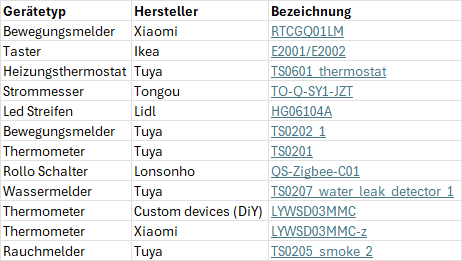
Ich vermute, dass LYWSD03MMC oder LYWSD03MMC-z die Probleme bereiten könnten ? Eins dieser Geräte hatte die in den vorherigen Logs auch Sorgen bereitet. Das sind Xiaomi BLE Thermometer auf Zigbee umgeflashed.
zigbee.0 2025-08-25 16:14:16.215 warn DeviceConfigure:0xa4c13888969a5dec LYWSD03MMC Failed to configure. --> Bind 0xa4c13888969a5dec/1 msTemperatureMeasurement from '0x00212effff053c18/1' failed (Status 'TABLE_FULL') -
anbei die Liste mit den Geräten
Ich vermute, dass LYWSD03MMC oder LYWSD03MMC-z die Probleme bereiten könnten ? Eins dieser Geräte hatte die in den vorherigen Logs auch Sorgen bereitet. Das sind Xiaomi BLE Thermometer auf Zigbee umgeflashed.
zigbee.0 2025-08-25 16:14:16.215 warn DeviceConfigure:0xa4c13888969a5dec LYWSD03MMC Failed to configure. --> Bind 0xa4c13888969a5dec/1 msTemperatureMeasurement from '0x00212effff053c18/1' failed (Status 'TABLE_FULL')@chris25 Hmm.. ich hab da eher den Tongou oder den Rauchmelder im Verdacht. die Thermometer haben eigentlich keinen Grund zu dem Gruppen-kram.
Mit dem Tongue könntest Du für mich noch etwas testen:
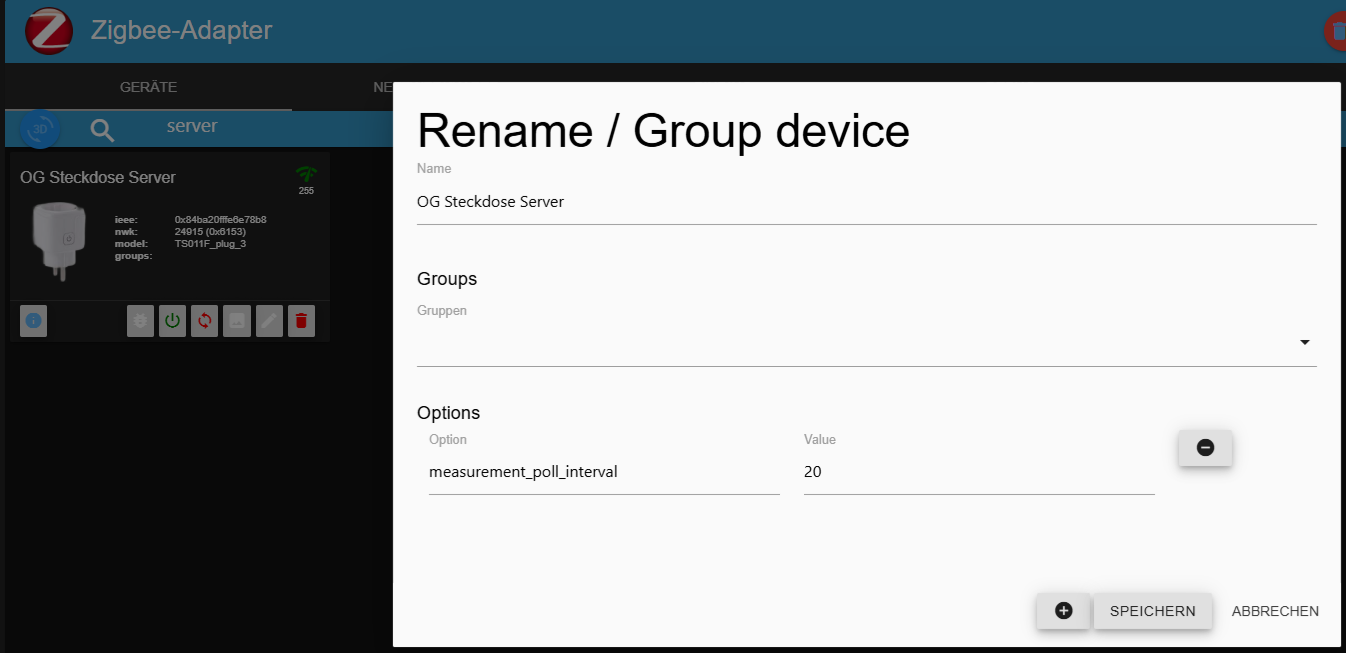
Lt. Beschreibung kann das poll-intervall eingestellt werden. Da wäre mal interessant ob das via den Options für das Gerät (analog zum BWM) geht. (via
measurement_poll_intervallmit einer Zahl zwischen 1 und 60Auch die anderen Optionen die bei Z2M angegeben sind können funktionieren - ich hab einfach zu wenig devices mit so Optionen.
A.
Nachtrag: Um die Option zu aktivieren müsstest du dem Gerät vom ioBroker einen Befehl senden, sprich in diesem Fall einfach mal den Anzeigemodus (indicator mode) umsetzen - dann schaltest Du deinen Stromkreis nicht ab :)
A. -
@chris25 Hmm.. ich hab da eher den Tongou oder den Rauchmelder im Verdacht. die Thermometer haben eigentlich keinen Grund zu dem Gruppen-kram.
Mit dem Tongue könntest Du für mich noch etwas testen:
Lt. Beschreibung kann das poll-intervall eingestellt werden. Da wäre mal interessant ob das via den Options für das Gerät (analog zum BWM) geht. (via
measurement_poll_intervallmit einer Zahl zwischen 1 und 60Auch die anderen Optionen die bei Z2M angegeben sind können funktionieren - ich hab einfach zu wenig devices mit so Optionen.
A.
Nachtrag: Um die Option zu aktivieren müsstest du dem Gerät vom ioBroker einen Befehl senden, sprich in diesem Fall einfach mal den Anzeigemodus (indicator mode) umsetzen - dann schaltest Du deinen Stromkreis nicht ab :)
A. -
Habe es mit einer Steckdose probiert die diese Option hat, leider lässt sich damit das Intervall nicht beeinflussen, die Daten werden unabhängig vom Wert nur jede Minute gezogen.
-
Ja hatte den Wert von power_outage_memory hin und her gewechselt
-
@chris25 bitte folgendes Versuchen:
- das intervall via send_payload mit dem Wert `{'measurement_poll_intervall':30} setzen. Nachschauen ob es eine Meldung im Log gibt wenn du das machst.
- als weitere Option
state_actionmit dem Werttrueeintragen - die Steckdose auf Debug setzen (Bug icon aktivieren)
- Steckdose schalten - schauen ob es eine ELEVATED Meldung gibt wo die Steckdose ein
actionSendet.
WIchtig - nach dem Test bitte das Bug icon wieder deaktivieren!
A.
-
@chris25 bitte folgendes Versuchen:
- das intervall via send_payload mit dem Wert `{'measurement_poll_intervall':30} setzen. Nachschauen ob es eine Meldung im Log gibt wenn du das machst.
- als weitere Option
state_actionmit dem Werttrueeintragen - die Steckdose auf Debug setzen (Bug icon aktivieren)
- Steckdose schalten - schauen ob es eine ELEVATED Meldung gibt wo die Steckdose ein
actionSendet.
WIchtig - nach dem Test bitte das Bug icon wieder deaktivieren!
A.
Habe die Punkte von dir versucht, leider auch ohne Erfolg.
Den send_payload Wert musste ich auf {"measurement_poll_intervall":20 } ändern anders kam eine Fehlermeldung.
Die Steckdose direkt über den Power state schalten kann ich nicht, da ansonsten der Server weg ist. Habe stattdessen wieder den Wert von power_outage_memory geändert.zigbee.0 2025-08-27 08:29:32.897 warn ELEVATED:I02 (a85e) value generated '227' from device 84ba20fffe6e78b8 for 'Measured electrical potential value' zigbee.0 2025-08-27 08:29:32.897 warn ELEVATED:I02 (a85e) value generated '0.166' from device 84ba20fffe6e78b8 for 'Instantaneous measured electrical current' zigbee.0 2025-08-27 08:29:32.897 warn ELEVATED:I02 (a85e) value generated '19' from device 84ba20fffe6e78b8 for 'Load power' zigbee.0 2025-08-27 08:29:32.897 warn ELEVATED:I01 (a85e) message received '{"power":19,"current":0.166,"voltage":227}' from device 84ba20fffe6e78b8 type 'TS011F_plug_3' zigbee.0 2025-08-27 08:29:32.896 warn ELEVATED:I02 (a85e) value generated '255' from device 84ba20fffe6e78b8 for 'Link quality' zigbee.0 2025-08-27 08:29:32.896 warn ELEVATED:I01 (a85e) message received '{"linkquality":255}' from device 84ba20fffe6e78b8 type 'TS011F_plug_3' zigbee.0 2025-08-27 08:29:32.895 warn ELEVATED:I01 (a85e) Zigbee Event of Type readResponse from device 0x84ba20fffe6e78b8, incoming event: {"type":"readResponse","data":{"rmsVoltage":227,"rmsCurrent":166,"activePower":19},"linkquality":255,"groupID":0,"cluster":"haElectricalMeasurement","meta":{"zclTransactionSequenceNumber":13,"frameControl":{"frameType":0,"manufacturerSpecific":false,"direction":1,"disableDefaultResponse":true,"reservedBits":0}},"endpoint_id":1} zigbee.0 2025-08-27 08:28:32.802 warn ELEVATED:I02 (bda0) value generated '227' from device 84ba20fffe6e78b8 for 'Measured electrical potential value' zigbee.0 2025-08-27 08:28:32.802 warn ELEVATED:I02 (bda0) value generated '0.214' from device 84ba20fffe6e78b8 for 'Instantaneous measured electrical current' zigbee.0 2025-08-27 08:28:32.802 warn ELEVATED:I02 (bda0) value generated '23' from device 84ba20fffe6e78b8 for 'Load power' zigbee.0 2025-08-27 08:28:32.802 warn ELEVATED:I01 (bda0) message received '{"power":23,"current":0.214,"voltage":227}' from device 84ba20fffe6e78b8 type 'TS011F_plug_3' zigbee.0 2025-08-27 08:28:32.802 warn ELEVATED:I02 (bda0) value generated '255' from device 84ba20fffe6e78b8 for 'Link quality' zigbee.0 2025-08-27 08:28:32.802 warn ELEVATED:I01 (bda0) message received '{"linkquality":255}' from device 84ba20fffe6e78b8 type 'TS011F_plug_3' zigbee.0 2025-08-27 08:28:32.800 warn ELEVATED:I01 (bda0) Zigbee Event of Type readResponse from device 0x84ba20fffe6e78b8, incoming event: {"type":"readResponse","data":{"rmsVoltage":227,"rmsCurrent":214,"activePower":23},"linkquality":255,"groupID":0,"cluster":"haElectricalMeasurement","meta":{"zclTransactionSequenceNumber":3,"frameControl":{"frameType":0,"manufacturerSpecific":false,"direction":1,"disableDefaultResponse":true,"reservedBits":0}},"endpoint_id":1} zigbee.0 2025-08-27 08:27:48.220 warn ELEVATED:I02 (0f7b) value generated '255' from device 84ba20fffe6e78b8 for 'Link quality' zigbee.0 2025-08-27 08:27:48.220 warn ELEVATED:I01 (0f7b) message received '{"linkquality":255}' from device 84ba20fffe6e78b8 type 'TS011F_plug_3' zigbee.0 2025-08-27 08:27:48.219 warn ELEVATED:I01 (0f7b) Zigbee Event of Type attributeReport from device 0x84ba20fffe6e78b8, incoming event: {"type":"attributeReport","data":{"moesStartUpOnOff":0},"linkquality":255,"groupID":0,"cluster":"genOnOff","meta":{"zclTransactionSequenceNumber":2,"frameControl":{"frameType":0,"manufacturerSpecific":false,"direction":1,"disableDefaultResponse":false,"reservedBits":0}},"endpoint_id":1} zigbee.0 2025-08-27 08:27:48.206 warn ELEVATED:SUCCESS (0ee3) convert result {"state":{"power_outage_memory":"off"}} for device 0x84ba20fffe6e78b8 zigbee.0 2025-08-27 08:27:48.068 warn ELEVATED:O04 (0ee3) convert power_outage_memory, "off", {} for device 0x84ba20fffe6e78b8 with Endpoint power_outage_memory zigbee.0 2025-08-27 08:27:48.068 warn ELEVATED:O04 (0ee3) convert power_outage_memory, "off", {} for device 0x84ba20fffe6e78b8 with Endpoint power_outage_memory zigbee.0 2025-08-27 08:27:48.068 warn ELEVATED:O04 (0ee3) convert power_outage_memory, "off", {} for device 0x84ba20fffe6e78b8 with Endpoint power_outage_memory zigbee.0 2025-08-27 08:27:48.068 warn ELEVATED:O03 (0ee3) Publishing to 0x84ba20fffe6e78b8 of model TS011F_plug_3 with power_outage_memory zigbee.0 2025-08-27 08:27:48.068 warn ELEVATED:O02 (0ee3) Change state 'power_outage_memory' at device 0x84ba20fffe6e78b8 type 'TS011F_plug_3' zigbee.0 2025-08-27 08:27:48.067 warn ELEVATED:O01 (0ee3) User state change of state zigbee.0.84ba20fffe6e78b8.power_outage_memory with value off (ack: false) from system.adapter.admin.0Edit habe den Payload auch noch auf folgendes gesetzt, auch ohne Erfolg
{
  "measurement_poll_intervall": 20,
  "state_action": true
}
Habe nur diese Meldung gefunden
zigbee.0
2025-08-27 08:37:14.992	info	No converter available for 'TS011F_plug_3' with key 'state_action'

Hey! Du scheinst an dieser Unterhaltung interessiert zu sein, hast aber noch kein Konto.
Hast du es satt, bei jedem Besuch durch die gleichen Beiträge zu scrollen? Wenn du dich für ein Konto anmeldest, kommst du immer genau dorthin zurück, wo du zuvor warst, und kannst dich über neue Antworten benachrichtigen lassen (entweder per E-Mail oder Push-Benachrichtigung). Du kannst auch Lesezeichen speichern und Beiträge positiv bewerten, um anderen Community-Mitgliedern deine Wertschätzung zu zeigen.
Mit deinem Input könnte dieser Beitrag noch besser werden 💗
Registrieren Anmelden301
Online33.0k
Benutzer83.6k
Themen1.3m
Beiträge