




System & Admin Upgrade "exited with code 25" Start-Schleife?
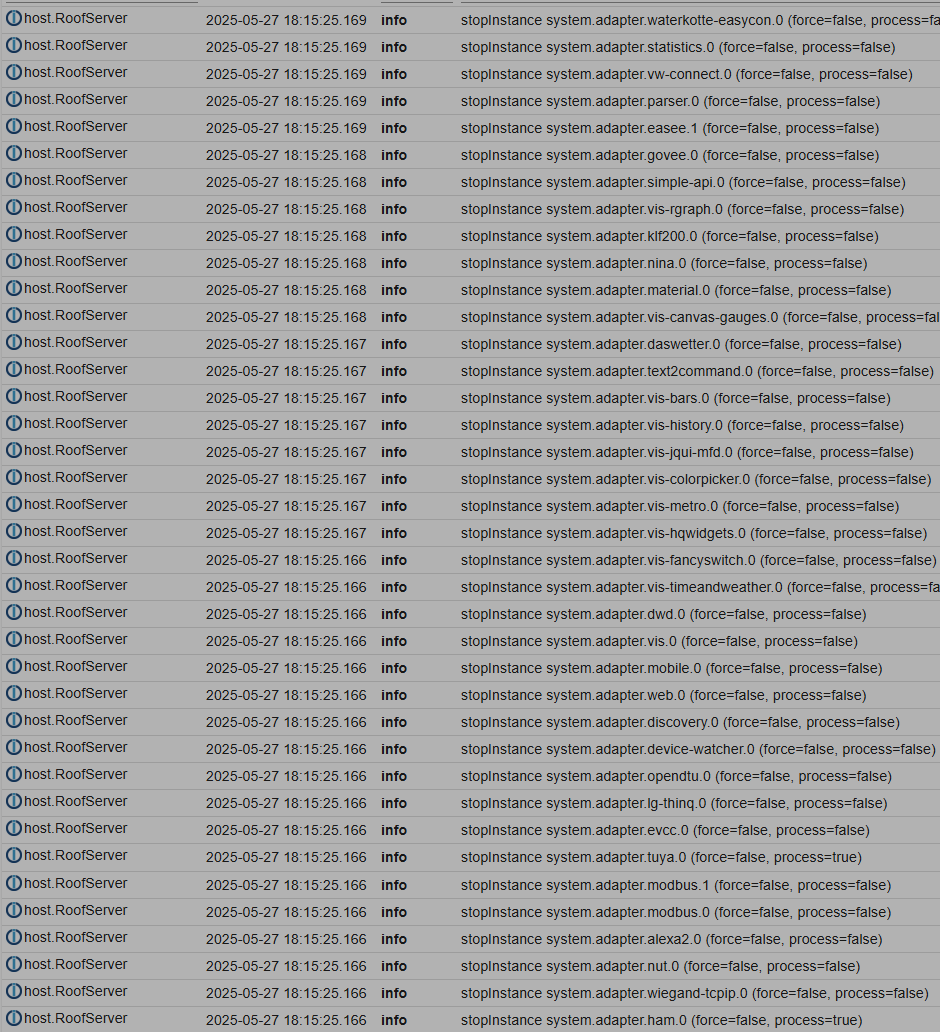
-
@adarof Check ist mir erstmal nicht bekannt.
Was kam den bei der Ausführung von iob fix zurück?
Und ich würde trotzdem mal im Forum nach dem Error 25 suchen.
Edit: kann auch gut sein das der JS-Controller zerschossen ist. Installiere den doch mal neu
@wendy2702
Geht das so?iob stop cd /opt/iobroker sudo -H -u iobroker npm reinstall iobroker.js-controllerergibt:
hmersch@RoofServer:/opt/iobroker$ sudo -H -u iobroker npm install iobroker.js-controller
npm warn skipping integrity check for git dependency ssh://git@github.com/theknut/ioBroker.waterkotte-easycon.git
npm warn skipping integrity check for git dependency ssh://git@github.com/eifel-tech/ioBroker.syrconnect.git
npm warn skipping integrity check for git dependency ssh://git@github.com/nbuenger/ioBroker.govee.git
npm warn deprecated dgram@1.0.1: npm is holding this package for security reasons. As it's a core Node module, we will not transfer it over to other users. You may safely remove the package from your dependencies.
npm warn deprecated @npmcli/move-file@1.1.2: This functionality has been moved to @npmcli/fs
npm warn deprecated inflight@1.0.6: This module is not supported, and leaks memory. Do not use it. Check out lru-cache if you want a good and tested way to coalesce async requests by a key value, which is much more comprehensive and powerful.
npm warn deprecated lodash.get@4.4.2: This package is deprecated. Use the optional chaining (?.) operator instead.
npm warn deprecated npmlog@6.0.2: This package is no longer supported.
npm warn deprecated har-validator@5.1.5: this library is no longer supported
npm warn deprecated rimraf@3.0.2: Rimraf versions prior to v4 are no longer supported
npm warn deprecated are-we-there-yet@3.0.1: This package is no longer supported.
npm warn deprecated q@1.1.2: You or someone you depend on is using Q, the JavaScript Promise library that gave JavaScript developers strong feelings about promises. They can almost certainly migrate to the native JavaScript promise now. Thank you literally everyone for joining me in this bet against the odds. Be excellent to each other.
npm warn deprecated
npm warn deprecated (For a CapTP with native promises, see @endo/eventual-send and @endo/captp)
npm warn deprecated glob@7.2.3: Glob versions prior to v9 are no longer supported
npm warn deprecated glob@7.2.3: Glob versions prior to v9 are no longer supported
npm warn deprecated glob@8.1.0: Glob versions prior to v9 are no longer supported
npm warn deprecated glob@7.2.3: Glob versions prior to v9 are no longer supported
npm warn deprecated glob@7.2.3: Glob versions prior to v9 are no longer supported
npm warn deprecated querystring@0.2.1: The querystring API is considered Legacy. new code should use the URLSearchParams API instead.
npm warn deprecated node-inspect@2.0.0: This module is part of Node.js core and does not need to be installed separately. It is now unmaintained.
npm warn deprecated multer@1.4.5-lts.2: Multer 1.x is impacted by a number of vulnerabilities, which have been patched in 2.x. You should upgrade to the latest 2.x version.
npm warn deprecated debug@4.1.1: Debug versions >=3.2.0 <3.2.7 || >=4 <4.3.1 have a low-severity ReDos regression when used in a Node.js environment. It is recommended you upgrade to 3.2.7 or 4.3.1. (https://github.com/visionmedia/debug/issues/797)
npm warn deprecated debug@4.1.1: Debug versions >=3.2.0 <3.2.7 || >=4 <4.3.1 have a low-severity ReDos regression when used in a Node.js environment. It is recommended you upgrade to 3.2.7 or 4.3.1. (https://github.com/visionmedia/debug/issues/797)
npm warn deprecated debug@4.1.1: Debug versions >=3.2.0 <3.2.7 || >=4 <4.3.1 have a low-severity ReDos regression when used in a Node.js environment. It is recommended you upgrade to 3.2.7 or 4.3.1. (https://github.com/visionmedia/debug/issues/797)
npm warn deprecated gauge@4.0.4: This package is no longer supported.
npm warn deprecated uuid@3.4.0: Please upgrade  to version 7 or higher.  Older versions may use Math.random() in certain circumstances, which is known to be problematic.  See https://v8.dev/blog/math-random for details.
npm warn deprecated request@2.88.2: request has been deprecated, see https://github.com/request/request/issues/3142
npm warn deprecated node-domexception@1.0.0: Use your platform's native DOMException instead
npm warn deprecated sinon@15.2.0: 16.1.1
⠦

removed 40 packages, and changed 1483 packages in 2m
... aber nach "iob start" gleiches Verhalten :-(
"iob fix" sagt nun das hier:
hmersch@RoofServer:/opt/iobroker$ iob fix
library: loaded
Library version=2024-10-22

==========================================================================

    Welcome to the ioBroker installation fixer!
    Script version: 205-02-02

    You might need to enter your password a couple of times.

==========================================================================


==========================================================================
    Installing prerequisites (1/5)
==========================================================================

OK:1 http://de.archive.ubuntu.com/ubuntu jammy InRelease
OK:2 https://deb.nodesource.com/node_20.x nodistro InRelease
Holen:3 http://de.archive.ubuntu.com/ubuntu jammy-updates InRelease [128 kB]
Holen:4 https://dl.cloudsmith.io/public/tvheadend/tvheadend/deb/ubuntu focal InRelease [4.418 B]
OK:5 https://gcups-static.greencell.global/deb stable InRelease
Holen:6 http://de.archive.ubuntu.com/ubuntu jammy-backports InRelease [127 kB]
Holen:7 https://dl.cloudsmith.io/public/tvheadend/tvheadend/deb/ubuntu focal/main amd64 Packages [36,7 kB]
Holen:8 http://de.archive.ubuntu.com/ubuntu jammy-updates/main Translation-en [420 kB]
Holen:9 http://de.archive.ubuntu.com/ubuntu jammy-updates/main amd64 DEP-11 Metadata [114 kB]
Holen:10 http://de.archive.ubuntu.com/ubuntu jammy-updates/restricted amd64 DEP-11 Metadata [212 B]
Holen:11 http://de.archive.ubuntu.com/ubuntu jammy-updates/universe amd64 DEP-11 Metadata [359 kB]
Holen:12 http://de.archive.ubuntu.com/ubuntu jammy-updates/multiverse amd64 DEP-11 Metadata [940 B]
Holen:13 http://de.archive.ubuntu.com/ubuntu jammy-backports/main amd64 DEP-11 Metadata [7.096 B]
Holen:14 http://de.archive.ubuntu.com/ubuntu jammy-backports/restricted amd64 DEP-11 Metadata [212 B]
Holen:15 http://de.archive.ubuntu.com/ubuntu jammy-backports/universe amd64 DEP-11 Metadata [24,1 kB]
Holen:16 http://de.archive.ubuntu.com/ubuntu jammy-backports/multiverse amd64 DEP-11 Metadata [212 B]
OK:17 http://security.ubuntu.com/ubuntu jammy-security InRelease
Es wurden 260 kB in 2 s geholt (126 kB/s).
Paketlisten werden gelesen… Fertig
N: Das Laden der konfigurierten Datei »main/binary-i386/Packages« wird übersprungen, da das Depot »https://deb.nodesource.com/node_20.x nodistro InRelease« die Architektur »i386« nicht unterstützt.

==========================================================================
    Checking ioBroker user and directory permissions (2/5)
==========================================================================

Created /etc/sudoers.d/iobroker
Fixing directory permissions...

==========================================================================
    Check and cleanup npm temporary directories (3/5)
==========================================================================

Done.

==========================================================================
    Database maintenance (4/5)
==========================================================================

Checking for uncompressed JSONL databases... This might take a while!

Compressing /opt/iobroker/iobroker-data/states.jsonl
Compressing /opt/iobroker/iobroker-data/objects.jsonl
Compressed 2 JSONL files. Done

==========================================================================
    Checking autostart (5/5)
==========================================================================

==== AUTHENTICATING FOR org.freedesktop.systemd1.manage-units ===
Legitimierung ist zum Stoppen von »iobroker.service« notwendig.
Multiple identities can be used for authentication:
 1.  user,,, (user)
 2.  hmersch
 4.  iobroker
Choose identity to authenticate as (1-4): 2
Password:
==== AUTHENTICATION COMPLETE ===
Enabling autostart...
Autostart enabled!

==========================================================================

    Your installation was fixed successfully
    Run iobroker start to start ioBroker again!

==========================================================================
Ich hatte schon nach Error-25 gesucht; meist scheint ein "iob fix" geholfen zu haben.
Meinst Du ich sollte "rm -rf node_modules" versuchen, wie hier beschrieben?
https://forum.iobroker.net/topic/56543/nach-nodejs-update-kein-adapter-mehr-updatebar/46 -
Keine Ahnung ob das hilft.
Kommt denn noch immer der Eintrag bezüglich JS Controller im log?
@wendy2702 Das ist doch mysteriös. Nun hatte ich bei "iob logs" (und auch iob status) permanent das hier:
node:internal/modules/cjs/loader:1215
  throw err;
  ^

Error: Cannot find module '/opt/iobroker/node_modules/iobroker.js-controller/iobroker.js'
    at Module._resolveFilename (node:internal/modules/cjs/loader:1212:15)
    at Module._load (node:internal/modules/cjs/loader:1043:27)
    at Function.executeUserEntryPoint [as runMain] (node:internal/modules/run_main:164:12)
    at node:internal/main/run_main_module:28:49 {
  code: 'MODULE_NOT_FOUND',
  requireStack: []
}
Also hab ich nochmal
"sudo -H -u iobroker npm reinstall iobroker.js-controller" gemacht
Nun tut das wieder. laut Logs ausgabe war nun ein anderer Adapter unglücklich:2025-05-27 19:59:11.436 - error: unifi.0 (144596) [updateUnifiData site default] error: Cannot find module './admin/lib/objects_wlans.json' Require stack: - /opt/iobroker/node_modules/iobroker.unifi/main.js, stack: Error: Cannot find module './admin/lib/objects_wlans.json'Alsob da im Hintergrund noch was passiert, was da Dateien löscht / kompiliert / generiert.
Noch eine Idee?
-
@wendy2702 Das ist doch mysteriös. Nun hatte ich bei "iob logs" (und auch iob status) permanent das hier:
node:internal/modules/cjs/loader:1215
  throw err;
  ^

Error: Cannot find module '/opt/iobroker/node_modules/iobroker.js-controller/iobroker.js'
    at Module._resolveFilename (node:internal/modules/cjs/loader:1212:15)
    at Module._load (node:internal/modules/cjs/loader:1043:27)
    at Function.executeUserEntryPoint [as runMain] (node:internal/modules/run_main:164:12)
    at node:internal/main/run_main_module:28:49 {
  code: 'MODULE_NOT_FOUND',
  requireStack: []
}
Also hab ich nochmal
"sudo -H -u iobroker npm reinstall iobroker.js-controller" gemacht
Nun tut das wieder. laut Logs ausgabe war nun ein anderer Adapter unglücklich:2025-05-27 19:59:11.436 - error: unifi.0 (144596) [updateUnifiData site default] error: Cannot find module './admin/lib/objects_wlans.json' Require stack: - /opt/iobroker/node_modules/iobroker.unifi/main.js, stack: Error: Cannot find module './admin/lib/objects_wlans.json'Alsob da im Hintergrund noch was passiert, was da Dateien löscht / kompiliert / generiert.
Noch eine Idee?
Beim nächsten start doch wieder js-controller:
2025-05-27 20:22:15.697  - info: web.0 (150845) starting. Version 7.0.8 in /opt/iobroker/node_modules/iobroker.web, node: v20.19.2, js-controller: 7.0.7
2025-05-27 20:22:15.733  - error: web.0 (150845) Unhandled promise rejection. This error originated either by throwing inside of an async function without a catch block, or by rejecting a promise which was not handled with .catch().
2025-05-27 20:22:15.741  - info: vis.0 (150856) starting. Version 1.5.6 in /opt/iobroker/node_modules/iobroker.vis, node: v20.19.2, js-controller: 7.0.7
2025-05-27 20:22:15.734  - error: web.0 (150845) unhandled promise rejection: Cannot find i18n directory
2025-05-27 20:22:15.738  - error: web.0 (150845) Error: Cannot find i18n directory
    at Module.init (file:///opt/iobroker/node_modules/@iobroker/i18n/build/esm/index.js:45:15)
    at WebAdapter.onReady (/opt/iobroker/node_modules/iobroker.web/dist/main.js:561:26)
2025-05-27 20:22:15.739  - error: web.0 (150845) Cannot find i18n directory
2025-05-27 20:22:15.760  - warn: web.0 (150845) setTimeout called, but adapter is shutting down
2025-05-27 20:22:15.860  - error: vis.0 (150856) Unhandled promise rejection. This error originated either by throwing inside of an async function without a catch block, or by rejecting a promise which was not handled with .catch().
2025-05-27 20:22:15.860  - error: vis.0 (150856) unhandled promise rejection: ENOENT: no such file or directory, open '/opt/iobroker/node_modules/iobroker.vis/lib/../www/js/config.js'
2025-05-27 20:22:15.862  - error: vis.0 (150856) Error: ENOENT: no such file or directory, open '/opt/iobroker/node_modules/iobroker.vis/lib/../www/js/config.js'
    at Object.openSync (node:fs:574:18)
    at Object.readFileSync (node:fs:453:35)
    at syncWidgetSets (/opt/iobroker/node_modules/iobroker.vis/lib/install.js:192:24)
    at generatePages (/opt/iobroker/node_modules/iobroker.vis/main.js:157:21)
    at main (/opt/iobroker/node_modules/iobroker.vis/main.js:235:32)
Es scheinen immer Verzeichnisse nicht auffindbar zu sein. Wenn ich dann aber z.B. nach "/opt/iobroker/node_modules/iobroker.vis/lib/../www/widgets/" ist es vorhanden
-
@adarof kannst du den installations Befehl mal so ausführen
cd /opt/iobroker
sudo -H -u iobroker npm install iobroker.js-controller
iob stop
iob fix
iob start
iob update
Also nicht mit „reinstall“
@wendy2702
iob stop war vorher, dann das hier:hmersch@RoofServer:/opt/iobroker$ sudo -H -u iobroker npm install iobroker.js-controller npm warn skipping integrity check for git dependency ssh://git@github.com/theknut/ioBroker.waterkotte-easycon.git npm warn skipping integrity check for git dependency ssh://git@github.com/nbuenger/ioBroker.govee.git npm warn skipping integrity check for git dependency ssh://git@github.com/eifel-tech/ioBroker.syrconnect.git npm warn deprecated dgram@1.0.1: npm is holding this package for security reasons. As it's a core Node module, we will not transfer it over to other users. You may safely remove the package from your dependencies. npm warn deprecated @npmcli/move-file@1.1.2: This functionality has been moved to @npmcli/fs npm warn deprecated inflight@1.0.6: This module is not supported, and leaks memory. Do not use it. Check out lru-cache if you want a good and tested way to coalesce async requests by a key value, which is much more comprehensive and powerful. npm warn deprecated lodash.get@4.4.2: This package is deprecated. Use the optional chaining (?.) operator instead. npm warn deprecated npmlog@6.0.2: This package is no longer supported. npm warn deprecated har-validator@5.1.5: this library is no longer supported npm warn deprecated rimraf@3.0.2: Rimraf versions prior to v4 are no longer supported npm warn deprecated are-we-there-yet@3.0.1: This package is no longer supported. npm warn deprecated q@1.1.2: You or someone you depend on is using Q, the JavaScript Promise library that gave JavaScript developers strong feelings about promises. They can almost certainly migrate to the native JavaScript promise now. Thank you literally everyone for joining me in this bet against the odds. Be excellent to each other. npm warn deprecated npm warn deprecated (For a CapTP with native promises, see @endo/eventual-send and @endo/captp) npm warn deprecated glob@7.2.3: Glob versions prior to v9 are no longer supported npm warn deprecated glob@7.2.3: Glob versions prior to v9 are no longer supported npm warn deprecated glob@8.1.0: Glob versions prior to v9 are no longer supported npm warn deprecated glob@7.2.3: Glob versions prior to v9 are no longer supported npm warn deprecated glob@7.2.3: Glob versions prior to v9 are no longer supported npm warn deprecated querystring@0.2.1: The querystring API is considered Legacy. new code should use the URLSearchParams API instead. npm warn deprecated node-inspect@2.0.0: This module is part of Node.js core and does not need to be installed separately. It is now unmaintained. npm warn deprecated multer@1.4.5-lts.2: Multer 1.x is impacted by a number of vulnerabilities, which have been patched in 2.x. You should upgrade to the latest 2.x version. npm warn deprecated debug@4.1.1: Debug versions >=3.2.0 <3.2.7 || >=4 <4.3.1 have a low-severity ReDos regression when used in a Node.js environment. It is recommended you upgrade to 3.2.7 or 4.3.1. (https://github.com/visionmedia/debug/issues/797) npm warn deprecated debug@4.1.1: Debug versions >=3.2.0 <3.2.7 || >=4 <4.3.1 have a low-severity ReDos regression when used in a Node.js environment. It is recommended you upgrade to 3.2.7 or 4.3.1. (https://github.com/visionmedia/debug/issues/797) npm warn deprecated debug@4.1.1: Debug versions >=3.2.0 <3.2.7 || >=4 <4.3.1 have a low-severity ReDos regression when used in a Node.js environment. It is recommended you upgrade to 3.2.7 or 4.3.1. (https://github.com/visionmedia/debug/issues/797) npm warn deprecated gauge@4.0.4: This package is no longer supported. npm warn deprecated uuid@3.4.0: Please upgrade to version 7 or higher. Older versions may use Math.random() in certain circumstances, which is known to be problematic. See https://v8.dev/blog/math-random for details. npm warn deprecated request@2.88.2: request has been deprecated, see https://github.com/request/request/issues/3142 npm warn deprecated node-domexception@1.0.0: Use your platform's native DOMException instead npm warn deprecated sinon@15.2.0: 16.1.1 added 1 package, and changed 1484 packages in 2m 180 packages are looking for funding run `npm fund` for details hmersch@RoofServer:/opt/iobroker$ iob fix library: loaded Library version=2024-10-22 ========================================================================== Welcome to the ioBroker installation fixer! Script version: 205-02-02 You might need to enter your password a couple of times. ========================================================================== ========================================================================== Installing prerequisites (1/5) ========================================================================== OK:1 http://security.ubuntu.com/ubuntu jammy-security InRelease OK:2 http://de.archive.ubuntu.com/ubuntu jammy InRelease OK:3 http://de.archive.ubuntu.com/ubuntu jammy-updates InRelease OK:4 http://de.archive.ubuntu.com/ubuntu jammy-backports InRelease OK:5 https://deb.nodesource.com/node_20.x nodistro InRelease OK:6 https://gcups-static.greencell.global/deb stable InRelease Holen:7 https://dl.cloudsmith.io/public/tvheadend/tvheadend/deb/ubuntu focal InRelease [4.418 B] Es wurden 4.418 B in 1 s geholt (5.136 B/s). Paketlisten werden gelesen… Fertig N: Das Laden der konfigurierten Datei »main/binary-i386/Packages« wird übersprungen, da das Depot »https://deb.nodesource.com/node_20.x nodistro InRelease« die Architektur »i386« nicht unterstützt. ========================================================================== Checking ioBroker user and directory permissions (2/5) ========================================================================== Created /etc/sudoers.d/iobroker Fixing directory permissions... ========================================================================== Check and cleanup npm temporary directories (3/5) ========================================================================== Done. ========================================================================== Database maintenance (4/5) ========================================================================== Checking for uncompressed JSONL databases... This might take a while! Compressing /opt/iobroker/iobroker-data/states.jsonl Compressing /opt/iobroker/iobroker-data/objects.jsonl Compressed 2 JSONL files. Done ========================================================================== Checking autostart (5/5) ========================================================================== ==== AUTHENTICATING FOR org.freedesktop.systemd1.manage-units === Legitimierung ist zum Stoppen von »iobroker.service« notwendig. Multiple identities can be used for authentication: 1. user,,, (user) 2. hmersch 4. iobroker Choose identity to authenticate as (1-4): 2 Password: ==== AUTHENTICATION COMPLETE === Enabling autostart... Autostart enabled! ========================================================================== Your installation was fixed successfully Run iobroker start to start ioBroker again! ========================================================================== hmersch@RoofServer:/opt/iobroker$ sudo -H -u iobroker npm install iobroker.js-controller^C hmersch@RoofServer:/opt/iobroker$ iob start hmersch@RoofServer:/opt/iobroker$ iob update Used repository: stable Adapter "admin" : 7.6.17 , installed 7.6.3 [Updatable] Adapter "alexa2" : 3.26.5 , installed 3.26.5 Adapter "amazon-dash" : 1.2.0 , installed 1.2.0 Adapter "backitup" : 3.2.2 , installed 3.0.31 [Updatable] Adapter "daswetter" : 3.2.3 , installed 3.2.3 Adapter "device-watcher": 2.12.1 , installed 2.12.1 Adapter "discovery" : 5.0.0 , installed 5.0.0 Adapter "dwd" : 2.8.5 , installed 2.8.5 Adapter "easee" : 1.0.10 , installed 1.0.10 Adapter "email" : 2.0.4 , installed 2.0.3 [Updatable] Adapter "evcc" : 0.1.1 , installed 0.2.2 Adapter "flot" : 1.12.0 , installed 1.12.0 Adapter "ham" : 5.3.1 , installed 5.3.1 Adapter "history" : 3.0.1 , installed 3.0.1 Adapter "hm-rega" : 5.1.0 , installed 5.1.0 Adapter "hm-rpc" : 2.0.2 , installed 2.0.2 Adapter "homeconnect" : 1.4.3 , installed 1.4.3 Adapter "ical" : 1.16.1 , installed 1.16.1 Adapter "icons-addictive-flavour-png": 0.1.0, installed 0.1.0 Adapter "icons-material-png": 0.1.0, installed 0.1.0 Adapter "icons-mfd-png": 1.2.1 , installed 1.2.1 Adapter "icons-mfd-svg": 1.2.0 , installed 1.2.0 Adapter "javascript" : 8.8.3 , installed 8.8.3 Controller "js-controller": 7.0.6 , installed 7.0.7 Adapter "klf200" : 1.3.5 , installed 1.3.5 Adapter "lg-thinq" : 1.1.0 , installed 1.1.0 Adapter "material" : 1.3.1 , installed 1.3.1 Adapter "mielecloudservice": 6.5.10, installed 6.5.10 Adapter "mobile" : 1.0.1 , installed 1.0.1 Adapter "modbus" : 6.3.2 , installed 6.3.2 Adapter "nina" : 0.0.25 , installed 0.0.25 Adapter "nut" : 1.6.0 , installed 1.6.0 Adapter "opendtu" : 3.1.0 , installed 3.1.0 Adapter "parser" : 2.2.4 , installed 2.2.4 Adapter "ping" : 1.6.2 , installed 1.6.2 Adapter "rickshaw" : 1.0.0 , installed 1.0.0 Adapter "sbfspot" : 4.4.2 , installed 4.4.2 Adapter "simple-api" : 2.8.0 , installed 2.8.0 Adapter "socketio" : 6.7.1 , installed 6.7.1 Adapter "sonoff" : 3.1.2 , installed 3.1.2 Adapter "sql" : 3.0.1 , installed 3.0.1 Adapter "statistics" : 2.4.0 , installed 2.4.0 Adapter "telegram" : 4.1.0 , installed 4.1.0 Adapter "text2command" : 3.0.3 , installed 3.0.3 Adapter "tr-064" : 4.3.0 , installed 4.3.0 Adapter "tuya" : 3.16.0 , installed 3.16.0 Adapter "unifi" : 0.7.0 , installed 0.7.0 Adapter "vis" : 1.5.6 , installed 1.5.6 Adapter "vis-bars" : 0.1.4 , installed 0.1.4 Adapter "vis-canvas-gauges": 1.0.1, installed 1.0.1 Adapter "vis-colorpicker": 2.0.3 , installed 2.0.3 Adapter "vis-fancyswitch": 1.1.0 , installed 1.1.0 Adapter "vis-history" : 1.0.0 , installed 1.0.0 Adapter "vis-hqwidgets": 1.5.1 , installed 1.5.1 Adapter "vis-jqui-mfd" : 1.1.1 , installed 1.1.1 Adapter "vis-metro" : 1.2.0 , installed 1.2.0 Adapter "vis-rgraph" : 0.0.2 , installed 0.0.2 Adapter "vis-timeandweather": 1.2.2, installed 1.2.2 Adapter "web" : 7.0.8 , installed 7.0.8 Adapter "wiegand-tcpip": 0.4.6 , installed 0.4.7 Adapter "ws" : 2.6.2 , installed 2.6.2 hmersch@RoofServer:/opt/iobroker$ -
@wendy2702
iob stop war vorher, dann das hier:hmersch@RoofServer:/opt/iobroker$ sudo -H -u iobroker npm install iobroker.js-controller npm warn skipping integrity check for git dependency ssh://git@github.com/theknut/ioBroker.waterkotte-easycon.git npm warn skipping integrity check for git dependency ssh://git@github.com/nbuenger/ioBroker.govee.git npm warn skipping integrity check for git dependency ssh://git@github.com/eifel-tech/ioBroker.syrconnect.git npm warn deprecated dgram@1.0.1: npm is holding this package for security reasons. As it's a core Node module, we will not transfer it over to other users. You may safely remove the package from your dependencies. npm warn deprecated @npmcli/move-file@1.1.2: This functionality has been moved to @npmcli/fs npm warn deprecated inflight@1.0.6: This module is not supported, and leaks memory. Do not use it. Check out lru-cache if you want a good and tested way to coalesce async requests by a key value, which is much more comprehensive and powerful. npm warn deprecated lodash.get@4.4.2: This package is deprecated. Use the optional chaining (?.) operator instead. npm warn deprecated npmlog@6.0.2: This package is no longer supported. npm warn deprecated har-validator@5.1.5: this library is no longer supported npm warn deprecated rimraf@3.0.2: Rimraf versions prior to v4 are no longer supported npm warn deprecated are-we-there-yet@3.0.1: This package is no longer supported. npm warn deprecated q@1.1.2: You or someone you depend on is using Q, the JavaScript Promise library that gave JavaScript developers strong feelings about promises. They can almost certainly migrate to the native JavaScript promise now. Thank you literally everyone for joining me in this bet against the odds. Be excellent to each other. npm warn deprecated npm warn deprecated (For a CapTP with native promises, see @endo/eventual-send and @endo/captp) npm warn deprecated glob@7.2.3: Glob versions prior to v9 are no longer supported npm warn deprecated glob@7.2.3: Glob versions prior to v9 are no longer supported npm warn deprecated glob@8.1.0: Glob versions prior to v9 are no longer supported npm warn deprecated glob@7.2.3: Glob versions prior to v9 are no longer supported npm warn deprecated glob@7.2.3: Glob versions prior to v9 are no longer supported npm warn deprecated querystring@0.2.1: The querystring API is considered Legacy. new code should use the URLSearchParams API instead. npm warn deprecated node-inspect@2.0.0: This module is part of Node.js core and does not need to be installed separately. It is now unmaintained. npm warn deprecated multer@1.4.5-lts.2: Multer 1.x is impacted by a number of vulnerabilities, which have been patched in 2.x. You should upgrade to the latest 2.x version. npm warn deprecated debug@4.1.1: Debug versions >=3.2.0 <3.2.7 || >=4 <4.3.1 have a low-severity ReDos regression when used in a Node.js environment. It is recommended you upgrade to 3.2.7 or 4.3.1. (https://github.com/visionmedia/debug/issues/797) npm warn deprecated debug@4.1.1: Debug versions >=3.2.0 <3.2.7 || >=4 <4.3.1 have a low-severity ReDos regression when used in a Node.js environment. It is recommended you upgrade to 3.2.7 or 4.3.1. (https://github.com/visionmedia/debug/issues/797) npm warn deprecated debug@4.1.1: Debug versions >=3.2.0 <3.2.7 || >=4 <4.3.1 have a low-severity ReDos regression when used in a Node.js environment. It is recommended you upgrade to 3.2.7 or 4.3.1. (https://github.com/visionmedia/debug/issues/797) npm warn deprecated gauge@4.0.4: This package is no longer supported. npm warn deprecated uuid@3.4.0: Please upgrade to version 7 or higher. Older versions may use Math.random() in certain circumstances, which is known to be problematic. See https://v8.dev/blog/math-random for details. npm warn deprecated request@2.88.2: request has been deprecated, see https://github.com/request/request/issues/3142 npm warn deprecated node-domexception@1.0.0: Use your platform's native DOMException instead npm warn deprecated sinon@15.2.0: 16.1.1 added 1 package, and changed 1484 packages in 2m 180 packages are looking for funding run `npm fund` for details hmersch@RoofServer:/opt/iobroker$ iob fix library: loaded Library version=2024-10-22 ========================================================================== Welcome to the ioBroker installation fixer! Script version: 205-02-02 You might need to enter your password a couple of times. ========================================================================== ========================================================================== Installing prerequisites (1/5) ========================================================================== OK:1 http://security.ubuntu.com/ubuntu jammy-security InRelease OK:2 http://de.archive.ubuntu.com/ubuntu jammy InRelease OK:3 http://de.archive.ubuntu.com/ubuntu jammy-updates InRelease OK:4 http://de.archive.ubuntu.com/ubuntu jammy-backports InRelease OK:5 https://deb.nodesource.com/node_20.x nodistro InRelease OK:6 https://gcups-static.greencell.global/deb stable InRelease Holen:7 https://dl.cloudsmith.io/public/tvheadend/tvheadend/deb/ubuntu focal InRelease [4.418 B] Es wurden 4.418 B in 1 s geholt (5.136 B/s). Paketlisten werden gelesen… Fertig N: Das Laden der konfigurierten Datei »main/binary-i386/Packages« wird übersprungen, da das Depot »https://deb.nodesource.com/node_20.x nodistro InRelease« die Architektur »i386« nicht unterstützt. ========================================================================== Checking ioBroker user and directory permissions (2/5) ========================================================================== Created /etc/sudoers.d/iobroker Fixing directory permissions... ========================================================================== Check and cleanup npm temporary directories (3/5) ========================================================================== Done. ========================================================================== Database maintenance (4/5) ========================================================================== Checking for uncompressed JSONL databases... This might take a while! Compressing /opt/iobroker/iobroker-data/states.jsonl Compressing /opt/iobroker/iobroker-data/objects.jsonl Compressed 2 JSONL files. Done ========================================================================== Checking autostart (5/5) ========================================================================== ==== AUTHENTICATING FOR org.freedesktop.systemd1.manage-units === Legitimierung ist zum Stoppen von »iobroker.service« notwendig. Multiple identities can be used for authentication: 1. user,,, (user) 2. hmersch 4. iobroker Choose identity to authenticate as (1-4): 2 Password: ==== AUTHENTICATION COMPLETE === Enabling autostart... Autostart enabled! ========================================================================== Your installation was fixed successfully Run iobroker start to start ioBroker again! ========================================================================== hmersch@RoofServer:/opt/iobroker$ sudo -H -u iobroker npm install iobroker.js-controller^C hmersch@RoofServer:/opt/iobroker$ iob start hmersch@RoofServer:/opt/iobroker$ iob update Used repository: stable Adapter "admin" : 7.6.17 , installed 7.6.3 [Updatable] Adapter "alexa2" : 3.26.5 , installed 3.26.5 Adapter "amazon-dash" : 1.2.0 , installed 1.2.0 Adapter "backitup" : 3.2.2 , installed 3.0.31 [Updatable] Adapter "daswetter" : 3.2.3 , installed 3.2.3 Adapter "device-watcher": 2.12.1 , installed 2.12.1 Adapter "discovery" : 5.0.0 , installed 5.0.0 Adapter "dwd" : 2.8.5 , installed 2.8.5 Adapter "easee" : 1.0.10 , installed 1.0.10 Adapter "email" : 2.0.4 , installed 2.0.3 [Updatable] Adapter "evcc" : 0.1.1 , installed 0.2.2 Adapter "flot" : 1.12.0 , installed 1.12.0 Adapter "ham" : 5.3.1 , installed 5.3.1 Adapter "history" : 3.0.1 , installed 3.0.1 Adapter "hm-rega" : 5.1.0 , installed 5.1.0 Adapter "hm-rpc" : 2.0.2 , installed 2.0.2 Adapter "homeconnect" : 1.4.3 , installed 1.4.3 Adapter "ical" : 1.16.1 , installed 1.16.1 Adapter "icons-addictive-flavour-png": 0.1.0, installed 0.1.0 Adapter "icons-material-png": 0.1.0, installed 0.1.0 Adapter "icons-mfd-png": 1.2.1 , installed 1.2.1 Adapter "icons-mfd-svg": 1.2.0 , installed 1.2.0 Adapter "javascript" : 8.8.3 , installed 8.8.3 Controller "js-controller": 7.0.6 , installed 7.0.7 Adapter "klf200" : 1.3.5 , installed 1.3.5 Adapter "lg-thinq" : 1.1.0 , installed 1.1.0 Adapter "material" : 1.3.1 , installed 1.3.1 Adapter "mielecloudservice": 6.5.10, installed 6.5.10 Adapter "mobile" : 1.0.1 , installed 1.0.1 Adapter "modbus" : 6.3.2 , installed 6.3.2 Adapter "nina" : 0.0.25 , installed 0.0.25 Adapter "nut" : 1.6.0 , installed 1.6.0 Adapter "opendtu" : 3.1.0 , installed 3.1.0 Adapter "parser" : 2.2.4 , installed 2.2.4 Adapter "ping" : 1.6.2 , installed 1.6.2 Adapter "rickshaw" : 1.0.0 , installed 1.0.0 Adapter "sbfspot" : 4.4.2 , installed 4.4.2 Adapter "simple-api" : 2.8.0 , installed 2.8.0 Adapter "socketio" : 6.7.1 , installed 6.7.1 Adapter "sonoff" : 3.1.2 , installed 3.1.2 Adapter "sql" : 3.0.1 , installed 3.0.1 Adapter "statistics" : 2.4.0 , installed 2.4.0 Adapter "telegram" : 4.1.0 , installed 4.1.0 Adapter "text2command" : 3.0.3 , installed 3.0.3 Adapter "tr-064" : 4.3.0 , installed 4.3.0 Adapter "tuya" : 3.16.0 , installed 3.16.0 Adapter "unifi" : 0.7.0 , installed 0.7.0 Adapter "vis" : 1.5.6 , installed 1.5.6 Adapter "vis-bars" : 0.1.4 , installed 0.1.4 Adapter "vis-canvas-gauges": 1.0.1, installed 1.0.1 Adapter "vis-colorpicker": 2.0.3 , installed 2.0.3 Adapter "vis-fancyswitch": 1.1.0 , installed 1.1.0 Adapter "vis-history" : 1.0.0 , installed 1.0.0 Adapter "vis-hqwidgets": 1.5.1 , installed 1.5.1 Adapter "vis-jqui-mfd" : 1.1.1 , installed 1.1.1 Adapter "vis-metro" : 1.2.0 , installed 1.2.0 Adapter "vis-rgraph" : 0.0.2 , installed 0.0.2 Adapter "vis-timeandweather": 1.2.2, installed 1.2.2 Adapter "web" : 7.0.8 , installed 7.0.8 Adapter "wiegand-tcpip": 0.4.6 , installed 0.4.7 Adapter "ws" : 2.6.2 , installed 2.6.2 hmersch@RoofServer:/opt/iobroker$Ich sehe da auch immer viele "error instance system.adapter.sonoff.0 terminated with code 7 (ADAPTER_ALREADY_RUNNING)" von unterschiedlichsten Adaptern.
Als ob iobroker alle Adapter mehrfach startet - was dann ja zu den Zugriffsproblemen führen könnteJedenfalls hat das npm install & fix & start & update keine Änderung gebracht
-
Ich sehe da auch immer viele "error instance system.adapter.sonoff.0 terminated with code 7 (ADAPTER_ALREADY_RUNNING)" von unterschiedlichsten Adaptern.
Als ob iobroker alle Adapter mehrfach startet - was dann ja zu den Zugriffsproblemen führen könnteJedenfalls hat das npm install & fix & start & update keine Änderung gebracht
-
Ich sehe da auch immer viele "error instance system.adapter.sonoff.0 terminated with code 7 (ADAPTER_ALREADY_RUNNING)" von unterschiedlichsten Adaptern.
Als ob iobroker alle Adapter mehrfach startet - was dann ja zu den Zugriffsproblemen führen könnteJedenfalls hat das npm install & fix & start & update keine Änderung gebracht
-
@wendy2702 Ja, einmal nach dem Ubuntu Update und auch gerade bevor ich Deine Idee mit dem "npm install & iob stop & iob fix & iob start & iob update" gemacht habe
iob stop all -
iob stop all@thomas-braun Danke, stopped das mehr als einfach "iob stop" ?
Nun ist es wieder kaputt gegangen:
hmersch@RoofServer:/opt/iobroker$ iob stop all The adapter "admin.0" was stopped. The adapter "history.0" was stopped. The adapter "javascript.0" was stopped. The adapter "email.0" was stopped. The adapter "sql.0" was stopped. The adapter "telegram.0" was stopped. The adapter "tr-064.0" was stopped. The adapter "hm-rpc.0" was stopped. The adapter "hm-rpc.1" was stopped. The adapter "hm-rega.0" was stopped. The adapter "ical.0" was stopped. The adapter "unifi.0" was stopped. The adapter "backitup.0" was stopped. The adapter "sonoff.0" was stopped. The adapter "hm-rpc.2" was stopped. The adapter "ping.0" was stopped. The adapter "homeconnect.0" was stopped. The adapter "mielecloudservice.0" was stopped. The adapter "wiegand-tcpip.0" was stopped. The adapter "nut.0" was stopped. The adapter "alexa2.0" was stopped. The adapter "modbus.0" was stopped. The adapter "modbus.1" was stopped. The adapter "tuya.0" was stopped. The adapter "evcc.0" was stopped. The adapter "lg-thinq.0" was stopped. The adapter "opendtu.0" was stopped. The adapter "device-watcher.0" was stopped. The adapter "discovery.0" was stopped. The adapter "web.0" was stopped. The adapter "mobile.0" was stopped. The adapter "vis.0" was stopped. The adapter "dwd.0" was stopped. The adapter "icons-material-png.0" was stopped. The adapter "icons-mfd-svg.0" was stopped. The adapter "vis-timeandweather.0" was stopped. The adapter "vis-fancyswitch.0" was stopped. The adapter "vis-hqwidgets.0" was stopped. The adapter "vis-metro.0" was stopped. The adapter "vis-colorpicker.0" was stopped. The adapter "icons-mfd-png.0" was stopped. The adapter "vis-jqui-mfd.0" was stopped. The adapter "flot.0" was stopped. The adapter "vis-history.0" was stopped. The adapter "vis-bars.0" was stopped. The adapter "icons-addictive-flavour-png.0" was stopped. The adapter "text2command.0" was stopped. The adapter "daswetter.0" was stopped. The adapter "vis-canvas-gauges.0" was stopped. The adapter "material.0" was stopped. The adapter "nina.0" was stopped. The adapter "vis-rgraph.0" was stopped. The adapter "rickshaw.0" was stopped. The adapter "simple-api.0" was stopped. The adapter "govee.0" was stopped. The adapter "easee.1" was stopped. The adapter "parser.0" was stopped. The adapter "vw-connect.0" was stopped. The adapter "statistics.0" was stopped. hmersch@RoofServer:/opt/iobroker$ iob stop all^C hmersch@RoofServer:/opt/iobroker$ iob stop all Cannot determine Lua scripts strategy: Connection is closed. ["cfg.o.system.host.RoofServer"] Uncaught Rejection: Error [ERR_MODULE_NOT_FOUND]: Cannot find module '/opt/iobroker/node_modules/@iobroker/db-objects-jsonl/build/esm/index.js' imported from /opt/iobroker/node_modules/@iobroker/js-controller-cli/build/esm/lib/setup/dbConnection.js at finalizeResolution (node:internal/modules/esm/resolve:283:11) at moduleResolve (node:internal/modules/esm/resolve:952:10) at defaultResolve (node:internal/modules/esm/resolve:1188:11) at ModuleLoader.defaultResolve (node:internal/modules/esm/loader:642:12) at #cachedDefaultResolve (node:internal/modules/esm/loader:591:25) at ModuleLoader.resolve (node:internal/modules/esm/loader:574:38) at ModuleLoader.getModuleJobForImport (node:internal/modules/esm/loader:236:38) at ModuleLoader.import (node:internal/modules/esm/loader:539:34) at defaultImportModuleDynamicallyForModule (node:internal/modules/esm/utils:215:31) at importModuleDynamicallyCallback (node:internal/modules/esm/utils:254:12) hmersch@RoofServer:/opt/iobroker$ hmersch@RoofServer:/opt/iobroker$ hmersch@RoofServer:/opt/iobroker$ hmersch@RoofServer:/opt/iobroker$ iob stop all node:internal/modules/cjs/loader:1215 throw err; ^ Error: Cannot find module '/opt/iobroker/node_modules/iobroker.js-controller/iobroker.js' at Module._resolveFilename (node:internal/modules/cjs/loader:1212:15) at Module._load (node:internal/modules/cjs/loader:1043:27) at Function.executeUserEntryPoint [as runMain] (node:internal/modules/run_main:164:12) at node:internal/main/run_main_module:28:49 { code: 'MODULE_NOT_FOUND', requireStack: [] } Node.js v20.19.2 hmersch@RoofServer:/opt/iobroker$ iob stop all node:internal/modules/cjs/loader:1215 throw err; ^ Error: Cannot find module '/opt/iobroker/node_modules/iobroker.js-controller/iobroker.js' at Module._resolveFilename (node:internal/modules/cjs/loader:1212:15) at Module._load (node:internal/modules/cjs/loader:1043:27) at Function.executeUserEntryPoint [as runMain] (node:internal/modules/run_main:164:12) at node:internal/main/run_main_module:28:49 { code: 'MODULE_NOT_FOUND', requireStack: [] } Node.js v20.19.2 -
@thomas-braun Danke, stopped das mehr als einfach "iob stop" ?
Nun ist es wieder kaputt gegangen:
hmersch@RoofServer:/opt/iobroker$ iob stop all The adapter "admin.0" was stopped. The adapter "history.0" was stopped. The adapter "javascript.0" was stopped. The adapter "email.0" was stopped. The adapter "sql.0" was stopped. The adapter "telegram.0" was stopped. The adapter "tr-064.0" was stopped. The adapter "hm-rpc.0" was stopped. The adapter "hm-rpc.1" was stopped. The adapter "hm-rega.0" was stopped. The adapter "ical.0" was stopped. The adapter "unifi.0" was stopped. The adapter "backitup.0" was stopped. The adapter "sonoff.0" was stopped. The adapter "hm-rpc.2" was stopped. The adapter "ping.0" was stopped. The adapter "homeconnect.0" was stopped. The adapter "mielecloudservice.0" was stopped. The adapter "wiegand-tcpip.0" was stopped. The adapter "nut.0" was stopped. The adapter "alexa2.0" was stopped. The adapter "modbus.0" was stopped. The adapter "modbus.1" was stopped. The adapter "tuya.0" was stopped. The adapter "evcc.0" was stopped. The adapter "lg-thinq.0" was stopped. The adapter "opendtu.0" was stopped. The adapter "device-watcher.0" was stopped. The adapter "discovery.0" was stopped. The adapter "web.0" was stopped. The adapter "mobile.0" was stopped. The adapter "vis.0" was stopped. The adapter "dwd.0" was stopped. The adapter "icons-material-png.0" was stopped. The adapter "icons-mfd-svg.0" was stopped. The adapter "vis-timeandweather.0" was stopped. The adapter "vis-fancyswitch.0" was stopped. The adapter "vis-hqwidgets.0" was stopped. The adapter "vis-metro.0" was stopped. The adapter "vis-colorpicker.0" was stopped. The adapter "icons-mfd-png.0" was stopped. The adapter "vis-jqui-mfd.0" was stopped. The adapter "flot.0" was stopped. The adapter "vis-history.0" was stopped. The adapter "vis-bars.0" was stopped. The adapter "icons-addictive-flavour-png.0" was stopped. The adapter "text2command.0" was stopped. The adapter "daswetter.0" was stopped. The adapter "vis-canvas-gauges.0" was stopped. The adapter "material.0" was stopped. The adapter "nina.0" was stopped. The adapter "vis-rgraph.0" was stopped. The adapter "rickshaw.0" was stopped. The adapter "simple-api.0" was stopped. The adapter "govee.0" was stopped. The adapter "easee.1" was stopped. The adapter "parser.0" was stopped. The adapter "vw-connect.0" was stopped. The adapter "statistics.0" was stopped. hmersch@RoofServer:/opt/iobroker$ iob stop all^C hmersch@RoofServer:/opt/iobroker$ iob stop all Cannot determine Lua scripts strategy: Connection is closed. ["cfg.o.system.host.RoofServer"] Uncaught Rejection: Error [ERR_MODULE_NOT_FOUND]: Cannot find module '/opt/iobroker/node_modules/@iobroker/db-objects-jsonl/build/esm/index.js' imported from /opt/iobroker/node_modules/@iobroker/js-controller-cli/build/esm/lib/setup/dbConnection.js at finalizeResolution (node:internal/modules/esm/resolve:283:11) at moduleResolve (node:internal/modules/esm/resolve:952:10) at defaultResolve (node:internal/modules/esm/resolve:1188:11) at ModuleLoader.defaultResolve (node:internal/modules/esm/loader:642:12) at #cachedDefaultResolve (node:internal/modules/esm/loader:591:25) at ModuleLoader.resolve (node:internal/modules/esm/loader:574:38) at ModuleLoader.getModuleJobForImport (node:internal/modules/esm/loader:236:38) at ModuleLoader.import (node:internal/modules/esm/loader:539:34) at defaultImportModuleDynamicallyForModule (node:internal/modules/esm/utils:215:31) at importModuleDynamicallyCallback (node:internal/modules/esm/utils:254:12) hmersch@RoofServer:/opt/iobroker$ hmersch@RoofServer:/opt/iobroker$ hmersch@RoofServer:/opt/iobroker$ hmersch@RoofServer:/opt/iobroker$ iob stop all node:internal/modules/cjs/loader:1215 throw err; ^ Error: Cannot find module '/opt/iobroker/node_modules/iobroker.js-controller/iobroker.js' at Module._resolveFilename (node:internal/modules/cjs/loader:1212:15) at Module._load (node:internal/modules/cjs/loader:1043:27) at Function.executeUserEntryPoint [as runMain] (node:internal/modules/run_main:164:12) at node:internal/main/run_main_module:28:49 { code: 'MODULE_NOT_FOUND', requireStack: [] } Node.js v20.19.2 hmersch@RoofServer:/opt/iobroker$ iob stop all node:internal/modules/cjs/loader:1215 throw err; ^ Error: Cannot find module '/opt/iobroker/node_modules/iobroker.js-controller/iobroker.js' at Module._resolveFilename (node:internal/modules/cjs/loader:1212:15) at Module._load (node:internal/modules/cjs/loader:1043:27) at Function.executeUserEntryPoint [as runMain] (node:internal/modules/run_main:164:12) at node:internal/main/run_main_module:28:49 { code: 'MODULE_NOT_FOUND', requireStack: [] } Node.js v20.19.2und ... ein paar sekunden später:
hmersch@RoofServer:/opt/iobroker$ iob status
iobroker is running on this host.


Objects type: jsonl
States  type: jsonl
okay, davon kann ich dann "iob start admin.0" machen... oder auch nicht:
hmersch@RoofServer:/opt/iobroker$ iob start admin.0
node:internal/modules/cjs/loader:1215
  throw err;
  ^

Error: Cannot find module '/opt/iobroker/node_modules/iobroker.js-controller/iobroker.js'
    at Module._resolveFilename (node:internal/modules/cjs/loader:1212:15)
    at Module._load (node:internal/modules/cjs/loader:1043:27)
    at Function.executeUserEntryPoint [as runMain] (node:internal/modules/run_main:164:12)
    at node:internal/main/run_main_module:28:49 {
  code: 'MODULE_NOT_FOUND',
  requireStack: []
}
nun ist es wieder kaputt und ich müsste mit "npm install .." loslegen?
Irgendwas ist da doch ganz ganz merkwürdig
Da läuft auch noch jede Menge bzw wird gestartet:
hmersch@RoofServer:/opt/iobroker$ ps aux |grep iobroker
iobroker   16132 76.8  3.3 11995472 543668 ?     Rsl  21:16   0:40 iobroker.js-controller
iobroker   16218 13.5  0.6 11741200 100672 ?     Sl   21:16   0:03 io.telegram.0
iobroker   16265 34.5  2.1 12091024 356848 ?     Sl   21:16   0:05 io.admin.0
iobroker   16287 16.5  0.6 11565564 103964 ?     Sl   21:16   0:01 io.history.0
iobroker   16331 41.2  0.6 11561820 102412 ?     Sl   21:17   0:01 /usr/bin/node /opt/iobroker/node_modules/iobroker.ical/main.js --instance 0 --loglevel info
iobroker   16342  113  0.9 11603300 156264 ?     Rl   21:17   0:02 /usr/bin/node /opt/iobroker/node_modules/iobroker.javascript/main.js --instance 0 --loglevel info
iobroker   16349 94.0  0.5 11559260 93536 ?      Rl   21:17   0:01 /usr/bin/node /opt/iobroker/node_modules/iobroker.unifi/main.js --instance 0 --loglevel warn
iobroker   16358  136  0.5 11538412 85436 ?      Rl   21:17   0:01 /usr/bin/node /opt/iobroker/node_modules/iobroker.email/build/main.js --instance 0 --loglevel info
hmersch    16380  0.0  0.0   9608  2428 pts/0    S+   21:17   0:00 grep --color=auto iobroker
Wer startet denn da noch was?
Gibt es unterschiedliche Wege, wie der iobroker Prozess gestartet wird und ich gehe beide wenn ich hier "iob start" macht?
Nach einem erneuten "iob stop all":
hmersch@RoofServer:/opt/iobroker$ ps aux |grep iobroker
iobroker   16941 34.7  5.1 2045780 834000 ?      Rl   21:19   0:43 npm install @iobroker-javascript.0/klf-200-api@npm:klf-200-api@latest
hmersch    17589  0.0  0.0   9608  2348 pts/0    S+   21:21   0:00 grep --color=auto iobroker
...und dann wird neu gestartet. Das "iob stop all" scheint bei mir also nicht zu stoppen sondern zu restarten.
Kann sich das jemand erklären?
-
und ... ein paar sekunden später:
hmersch@RoofServer:/opt/iobroker$ iob status
iobroker is running on this host.


Objects type: jsonl
States  type: jsonl
okay, davon kann ich dann "iob start admin.0" machen... oder auch nicht:
hmersch@RoofServer:/opt/iobroker$ iob start admin.0
node:internal/modules/cjs/loader:1215
  throw err;
  ^

Error: Cannot find module '/opt/iobroker/node_modules/iobroker.js-controller/iobroker.js'
    at Module._resolveFilename (node:internal/modules/cjs/loader:1212:15)
    at Module._load (node:internal/modules/cjs/loader:1043:27)
    at Function.executeUserEntryPoint [as runMain] (node:internal/modules/run_main:164:12)
    at node:internal/main/run_main_module:28:49 {
  code: 'MODULE_NOT_FOUND',
  requireStack: []
}
nun ist es wieder kaputt und ich müsste mit "npm install .." loslegen?
Irgendwas ist da doch ganz ganz merkwürdig
Da läuft auch noch jede Menge bzw wird gestartet:
hmersch@RoofServer:/opt/iobroker$ ps aux |grep iobroker
iobroker   16132 76.8  3.3 11995472 543668 ?     Rsl  21:16   0:40 iobroker.js-controller
iobroker   16218 13.5  0.6 11741200 100672 ?     Sl   21:16   0:03 io.telegram.0
iobroker   16265 34.5  2.1 12091024 356848 ?     Sl   21:16   0:05 io.admin.0
iobroker   16287 16.5  0.6 11565564 103964 ?     Sl   21:16   0:01 io.history.0
iobroker   16331 41.2  0.6 11561820 102412 ?     Sl   21:17   0:01 /usr/bin/node /opt/iobroker/node_modules/iobroker.ical/main.js --instance 0 --loglevel info
iobroker   16342  113  0.9 11603300 156264 ?     Rl   21:17   0:02 /usr/bin/node /opt/iobroker/node_modules/iobroker.javascript/main.js --instance 0 --loglevel info
iobroker   16349 94.0  0.5 11559260 93536 ?      Rl   21:17   0:01 /usr/bin/node /opt/iobroker/node_modules/iobroker.unifi/main.js --instance 0 --loglevel warn
iobroker   16358  136  0.5 11538412 85436 ?      Rl   21:17   0:01 /usr/bin/node /opt/iobroker/node_modules/iobroker.email/build/main.js --instance 0 --loglevel info
hmersch    16380  0.0  0.0   9608  2428 pts/0    S+   21:17   0:00 grep --color=auto iobroker
Wer startet denn da noch was?
Gibt es unterschiedliche Wege, wie der iobroker Prozess gestartet wird und ich gehe beide wenn ich hier "iob start" macht?
Nach einem erneuten "iob stop all":
hmersch@RoofServer:/opt/iobroker$ ps aux |grep iobroker
iobroker   16941 34.7  5.1 2045780 834000 ?      Rl   21:19   0:43 npm install @iobroker-javascript.0/klf-200-api@npm:klf-200-api@latest
hmersch    17589  0.0  0.0   9608  2348 pts/0    S+   21:21   0:00 grep --color=auto iobroker
...und dann wird neu gestartet. Das "iob stop all" scheint bei mir also nicht zu stoppen sondern zu restarten.
Kann sich das jemand erklären?
@adarof bei sauberer Installation bedeutet ein
iob stopDas alles gestoppt wird.
Wenn du den stoppst, schaust das alle Prozesse beendet sind, dann den Rechner mal neu startest und mal direkt das log anschaust.
Edit: sieht fast so aus als wenn er die Adapter teilweise neu installiert. Vielleicht bist du auch nur zu ungeduldig
-
und ... ein paar sekunden später:
hmersch@RoofServer:/opt/iobroker$ iob status
iobroker is running on this host.


Objects type: jsonl
States  type: jsonl
okay, davon kann ich dann "iob start admin.0" machen... oder auch nicht:
hmersch@RoofServer:/opt/iobroker$ iob start admin.0
node:internal/modules/cjs/loader:1215
  throw err;
  ^

Error: Cannot find module '/opt/iobroker/node_modules/iobroker.js-controller/iobroker.js'
    at Module._resolveFilename (node:internal/modules/cjs/loader:1212:15)
    at Module._load (node:internal/modules/cjs/loader:1043:27)
    at Function.executeUserEntryPoint [as runMain] (node:internal/modules/run_main:164:12)
    at node:internal/main/run_main_module:28:49 {
  code: 'MODULE_NOT_FOUND',
  requireStack: []
}
nun ist es wieder kaputt und ich müsste mit "npm install .." loslegen?
Irgendwas ist da doch ganz ganz merkwürdig
Da läuft auch noch jede Menge bzw wird gestartet:
hmersch@RoofServer:/opt/iobroker$ ps aux |grep iobroker
iobroker   16132 76.8  3.3 11995472 543668 ?     Rsl  21:16   0:40 iobroker.js-controller
iobroker   16218 13.5  0.6 11741200 100672 ?     Sl   21:16   0:03 io.telegram.0
iobroker   16265 34.5  2.1 12091024 356848 ?     Sl   21:16   0:05 io.admin.0
iobroker   16287 16.5  0.6 11565564 103964 ?     Sl   21:16   0:01 io.history.0
iobroker   16331 41.2  0.6 11561820 102412 ?     Sl   21:17   0:01 /usr/bin/node /opt/iobroker/node_modules/iobroker.ical/main.js --instance 0 --loglevel info
iobroker   16342  113  0.9 11603300 156264 ?     Rl   21:17   0:02 /usr/bin/node /opt/iobroker/node_modules/iobroker.javascript/main.js --instance 0 --loglevel info
iobroker   16349 94.0  0.5 11559260 93536 ?      Rl   21:17   0:01 /usr/bin/node /opt/iobroker/node_modules/iobroker.unifi/main.js --instance 0 --loglevel warn
iobroker   16358  136  0.5 11538412 85436 ?      Rl   21:17   0:01 /usr/bin/node /opt/iobroker/node_modules/iobroker.email/build/main.js --instance 0 --loglevel info
hmersch    16380  0.0  0.0   9608  2428 pts/0    S+   21:17   0:00 grep --color=auto iobroker
Wer startet denn da noch was?
Gibt es unterschiedliche Wege, wie der iobroker Prozess gestartet wird und ich gehe beide wenn ich hier "iob start" macht?
Nach einem erneuten "iob stop all":
hmersch@RoofServer:/opt/iobroker$ ps aux |grep iobroker
iobroker   16941 34.7  5.1 2045780 834000 ?      Rl   21:19   0:43 npm install @iobroker-javascript.0/klf-200-api@npm:klf-200-api@latest
hmersch    17589  0.0  0.0   9608  2348 pts/0    S+   21:21   0:00 grep --color=auto iobroker
...und dann wird neu gestartet. Das "iob stop all" scheint bei mir also nicht zu stoppen sondern zu restarten.
Kann sich das jemand erklären?
systemctl stop iobroker.service -
@adarof bei sauberer Installation bedeutet ein
iob stopDas alles gestoppt wird.
Wenn du den stoppst, schaust das alle Prozesse beendet sind, dann den Rechner mal neu startest und mal direkt das log anschaust.
Edit: sieht fast so aus als wenn er die Adapter teilweise neu installiert. Vielleicht bist du auch nur zu ungeduldig
hmersch@RoofServer:/opt/iobroker$ iob stop
hmersch@RoofServer:/opt/iobroker$ ps aux|grep iob
hmersch    18154  0.0  0.0   9476  2396 pts/0    S+   21:23   0:00 grep --color=auto iob
hmersch@RoofServer:/opt/iobroker$ ps aux|grep iob
hmersch    18156  0.0  0.0   9476  2352 pts/0    S+   21:23   0:00 grep --color=auto iob
... und nen reboot ...
hmersch@RoofServer:~$ ps aux|grep iob
iobroker    1429 77.2  3.4 12123260 557232 ?     Rsl  21:24   0:26 iobroker.js-controller
iobroker    2315 30.0  2.1 12082912 345432 ?     Rl   21:25   0:06 io.admin.0
iobroker    2362 14.5  0.6 11565428 106084 ?     Sl   21:25   0:02 io.history.0
iobroker    2540 37.5  1.0 11608208 164672 ?     Sl   21:25   0:02 /usr/bin/node /opt/iobroker/node_modules/iobroker.javascript/main.js --instance 0 --loglevel info
iobroker    2548 28.7  0.6 11560052 97652 ?      Sl   21:25   0:02 /usr/bin/node /opt/iobroker/node_modules/iobroker.email/build/main.js --instance 0 --loglevel info
iobroker    2563 48.5  0.5 11562508 96880 ?      Sl   21:25   0:01 /usr/bin/node /opt/iobroker/node_modules/iobroker.sql/main.js --instance 0 --loglevel info
iobroker    2601  0.0  0.0      0     0 ?        Z    21:25   0:00 [sh] <defunct>
hmersch     2605  0.0  0.0   9608  2216 pts/0    R+   21:25   0:00 grep --color=auto iob
... danach warten bis zum "absturz" und "iob logs"
Hm:
2025-05-27 21:27:41.438 - error: host.RoofServer Error: Could not determine controller directory at getControllerDir (file:///opt/iobroker/node_modules/@iobroker/js-controller-common-db/build/esm/lib/common/tools.js:1833:11) at Module.getPidsFileName (file:///opt/iobroker/node_modules/@iobroker/js-controller-common-db/build/esm/lib/common/tools.js:3368:22) at Timeout._onTimeout (file:///opt/iobroker/node_modules/iobroker.js-controller/build/esm/main.js:2871:91) at listOnTimeout (node:internal/timers:581:17) at processTimers (node:internal/timers:519:7) -
systemctl stop iobroker.service@thomas-braun Ah, danke - logisch, ja! Kommt sich das in die Quere mit "iob start" - also werden dann 2 Instanzen auf /opt/iobroker gestartet? Kann ich vielleicht den iobroker.service falsch eingerichtet haben?
Aber auch wenn ich "systemctl stop iobroker.service" mache und danach "manuell" via "iob start" kommt es zum "Absturz" - und dabei sind immernoch "ADAPTER_ALREADY_RUNNING"-Meldungen im Log.
Irgendwas läuft da einfach doppelt -
@adarof bei sauberer Installation bedeutet ein
iob stopDas alles gestoppt wird.
Wenn du den stoppst, schaust das alle Prozesse beendet sind, dann den Rechner mal neu startest und mal direkt das log anschaust.
Edit: sieht fast so aus als wenn er die Adapter teilweise neu installiert. Vielleicht bist du auch nur zu ungeduldig
@wendy2702 Okay - vielleicht ... lass ich ihn dann mal über Nacht sich erholen. Mir fehlen gerade etwas auch die Ideen bzw das Hintergrundwissen um da bei fehlerhaften Verzeichniszugriffen, die aber eigentlich / kurz später da sind noch eine Idee zu haben.
Würde mich morgen melden und hoffen, dass Ihr weitere Ideen habt.
Dank Euch für heute abend -
@wendy2702 Okay - vielleicht ... lass ich ihn dann mal über Nacht sich erholen. Mir fehlen gerade etwas auch die Ideen bzw das Hintergrundwissen um da bei fehlerhaften Verzeichniszugriffen, die aber eigentlich / kurz später da sind noch eine Idee zu haben.
Würde mich morgen melden und hoffen, dass Ihr weitere Ideen habt.
Dank Euch für heute abendFaszinierenderweise hat es noch 2 mal Neugestartet und seit dem läuft es.
Bin nun ein paar Tage unterwegs und werde danach das Neustartverhalten dann nochmal eingehender untersuchen.
Ob das dann noch was mit dem System- und/oder Admin Upgrade zu tun hat ... werden wir später sehenDanke Euch erstmal
-
Faszinierenderweise hat es noch 2 mal Neugestartet und seit dem läuft es.
Bin nun ein paar Tage unterwegs und werde danach das Neustartverhalten dann nochmal eingehender untersuchen.
Ob das dann noch was mit dem System- und/oder Admin Upgrade zu tun hat ... werden wir später sehenDanke Euch erstmal
Ich habe nun beim Upgrade vom Javascript etwas genauer hingeschaut.
$ iobroker upgrade javascript@8.9.2

Update javascript from @8.8.3 to @8.9.2

NPM version: 10.8.2

Installing iobroker.javascript@8.9.2... (System call)

changed 1525 packages in 3m194
Ist das "normal", dass beim Updaten eines Adapters 1524 pakete geändert wurden und es dann halt auch entsprechend lange dauert?
Gruss -


Hey! Du scheinst an dieser Unterhaltung interessiert zu sein, hast aber noch kein Konto.
Hast du es satt, bei jedem Besuch durch die gleichen Beiträge zu scrollen? Wenn du dich für ein Konto anmeldest, kommst du immer genau dorthin zurück, wo du zuvor warst, und kannst dich über neue Antworten benachrichtigen lassen (entweder per E-Mail oder Push-Benachrichtigung). Du kannst auch Lesezeichen speichern und Beiträge positiv bewerten, um anderen Community-Mitgliedern deine Wertschätzung zu zeigen.
Mit deinem Input könnte dieser Beitrag noch besser werden 💗
Registrieren Anmelden273
Online33.0k
Benutzer83.6k
Themen1.3m
Beiträge