




div. 404 Fehler im IOB (Admin)
-
gerade durchlaufen lassen und Neustart. Bleibt dabei :-(
Auch: iob fix, iob update, iob upgrade self
keine Änderung.@wsvd said in div. 404 Fehler im IOB (Admin):
gerade durchlaufen lassen und Neustart. Bleibt dabei :-(
Na dann zeig mal die LANGFASSUNG von
iob diagin codetags. -
Hallo an die Experten !
Ich habe jetzt den ganzen Tag 3x neue Komplettinstallationen Debian/IOB mit anschliessendem Backup-Restore des IOB durchgeführt (auf zwei unterschiedlicher Hardware).
Bei allen tritt dieser Fehler bei Aufruf der Rot gekennzeichneten Felder auf: (/backitup/ ist ein Beispiel)
404
Oops! The page you're looking for can't be found. 😔
File //adapter/backitup/tab_m.html?0&instance=0&newReact=true&0&react=dark not found
Return to Home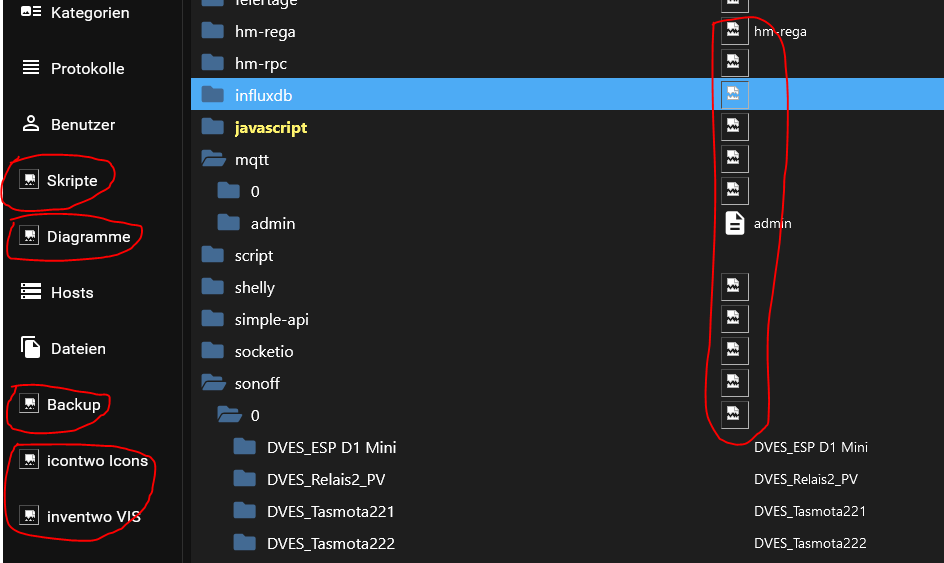
Es ist nicht möglich diese Funktionen aufzurufen. Skripte scheinen zu laufen.
Ich bin am verzweifeln

Bitte, wer kann helfen ??!! Was braucht ihr noch ??======================= SUMMARY ======================= v.2024-10-19 Static hostname: odroid-m1-iob Icon name: computer Operating System: Debian GNU/Linux 12 (bookworm) Kernel: Linux 6.1.0-odroid-arm64 Architecture: arm64 Installation: native Kernel: aarch64 Userland: 64 bit Timezone: Europe/Berlin (CET, +0100) User-ID: 1000 Display-Server: false Boot Target: multi-user.target Pending OS-Updates: 0 Pending iob updates: 0 Nodejs-Installation: /usr/bin/nodejs v20.18.2 /usr/bin/node v20.18.2 /usr/bin/npm 10.8.2 /usr/bin/npx 10.8.2 /usr/bin/corepack 0.29.4 Recommended versions are nodejs 20.18.2 and npm 10.8.2 nodeJS installation is correct MEMORY: total used free shared buff/cache available Mem: 7.8G 1.5G 5.2G 10M 1.4G 6.3G Swap: 5.0G 0B 5.0G Total: 12G 1.5G 10G Active iob-Instances: 13 Upgrade policy: none ioBroker Core: js-controller 7.0.6 admin 7.4.10 ioBroker Status: iobroker is running on this host. Objects type: jsonl States type: jsonl Status admin and web instance: + system.adapter.admin.0 : admin : odroid-m1-iob - enabled, port: 8081, bind: 0.0.0.0, run as: admin + system.adapter.web.0 : web : odroid-m1-iob - enabled, port: 8082, bind: 0.0.0.0, run as: admin Objects: 1950 States: 1591 Size of iob-Database: 11M /opt/iobroker/iobroker-data/objects.jsonl 2.8M /opt/iobroker/iobroker-data/states.jsonl Operating System is the current Debian stable version codenamed 'bookworm'! =================== END OF SUMMARY ====================@wsvd sagte in div. 404 Fehler im IOB (Admin):
mit anschliessendem Backup-Restore des IOB durchgeführt
Lagen die Versionen im Backup ggfls. weit auseinander zu den aktuellen Adaptern?
Insbesondere sowas die admin, js-controller usw. -
@wsvd
Nur mal zur Sicherheit.:
Wie lange hast du nach dem Abschluss des Restores durch backitUp gewartet? Die Installation aller Adapter beginnt erst nachdem backitUp sein restore ABGESCHLOSSEN hat - und dass kann je nach System auch längere Zeit dauern. Kann es also sein, dass di INstallation schlicht und einfach noch am Laufen war?
Aktuelle backitUp Versionen sollten am Ende eine diesbezügliche Info ausgeben.
@mcm1957
Bei einem Restore habe ich 60min gewartet (muss ja auch noch anderes machen). -
@wsvd sagte in div. 404 Fehler im IOB (Admin):
mit anschliessendem Backup-Restore des IOB durchgeführt
Lagen die Versionen im Backup ggfls. weit auseinander zu den aktuellen Adaptern?
Insbesondere sowas die admin, js-controller usw.@thomas-braun
Dass letzte Backup war vom 29.01.25 und am 28. hatte ich die Adapter upgedated. Kann dann nicht auseinander sein. -
@thomas-braun
Dass letzte Backup war vom 29.01.25 und am 28. hatte ich die Adapter upgedated. Kann dann nicht auseinander sein.@wsvd
Dann die Langfassung von
iob diagAuch wenn die Zusammenfassung eigentlich keinen Hinweis auf was 'krummes' liefert.
-
@wsvd
Dann die Langfassung von
iob diagAuch wenn die Zusammenfassung eigentlich keinen Hinweis auf was 'krummes' liefert.
========== Start marking the full check here =========== ```bash Script v.2024-10-19 *** BASE SYSTEM *** Static hostname: odroid-m1-iob Icon name: computer Operating System: Debian GNU/Linux 12 (bookworm) Kernel: Linux 6.1.0-odroid-arm64 Architecture: arm64 OS is similar to: Docker : false Virtualization : none Kernel : aarch64 Userland : 64 bit Systemuptime and Load: 18:47:57 up 7 min, 2 users, load average: 1.22, 1.01, 0.51 CPU threads: 4 *** LIFE CYCLE STATUS *** Operating System is the current Debian stable version codenamed 'bookworm'! *** TIME AND TIMEZONES *** Local time: Sat 2025-02-01 18:47:57 CET Universal time: Sat 2025-02-01 17:47:57 UTC RTC time: Sat 2025-02-01 17:47:57 Time zone: Europe/Berlin (CET, +0100) System clock synchronized: yes NTP service: active RTC in local TZ: no *** Users and Groups *** User that called 'iob diag': mario HOME=/home/mario GROUPS=mario cdrom floppy audio dip video plugdev users netdev iobroker User that is running 'js-controller': iobroker HOME=/home/iobroker GROUPS=iobroker tty dialout audio video plugdev *** DISPLAY-SERVER SETUP *** Display-Server: false Desktop: Terminal: tty *** MEMORY *** total used free shared buff/cache available Mem: 7.8G 1.3G 6.0G 9.4M 618M 6.5G Swap: 5.0G 0B 5.0G Total: 12G 1.3G 11G Active iob-Instances: 13 7449 M total memory 1286 M used memory 1125 M active memory 352 M inactive memory 5743 M free memory 52 M buffer memory 537 M swap cache 4790 M total swap 0 M used swap 4790 M free swap *** top - Table Of Processes *** top - 18:47:57 up 7 min, 2 users, load average: 1.22, 1.01, 0.51 Tasks: 152 total, 1 running, 151 sleeping, 0 stopped, 0 zombie %Cpu(s): 14.3 us, 14.3 sy, 0.0 ni, 57.1 id, 0.0 wa, 14.3 hi, 0.0 si, 0.0 st MiB Mem : 7449.3 total, 5743.1 free, 1286.2 used, 589.5 buff/cache MiB Swap: 4791.0 total, 4791.0 free, 0.0 used. 6163.1 avail Mem *** FAILED SERVICES *** UNIT LOAD ACTIVE SUB DESCRIPTION * odroid-alsa.service loaded failed failed ODROID ALSA Setup Service LOAD = Reflects whether the unit definition was properly loaded. ACTIVE = The high-level unit activation state, i.e. generalization of SUB. SUB = The low-level unit activation state, values depend on unit type. 1 loaded units listed. *** DMESG CRITICAL ERRORS *** No critical errors detected *** FILESYSTEM *** Filesystem Type Size Used Avail Use% Mounted on udev devtmpfs 3.7G 0 3.7G 0% /dev tmpfs tmpfs 745M 9.0M 736M 2% /run /dev/nvme0n1p2 ext4 112G 5.7G 101G 6% / tmpfs tmpfs 3.7G 0 3.7G 0% /dev/shm tmpfs tmpfs 5.0M 12K 5.0M 1% /run/lock tmpfs tmpfs 128M 12K 128M 1% /var/log /dev/nvme0n1p1 ext2 457M 27M 406M 7% /boot tmpfs tmpfs 745M 0 745M 0% /run/user/1000 Messages concerning ext4 filesystem in dmesg: [Sat Feb 1 18:40:43 2025] EXT4-fs (nvme0n1p2): mounted filesystem with ordered data mode. Quota mode: none. [Sat Feb 1 18:40:44 2025] EXT4-fs (nvme0n1p2): re-mounted. Quota mode: none. Show mounted filesystems: TARGET SOURCE FSTYPE OPTIONS / /dev/disk/by-uuid/7d46186d-d54a-4af5-90d0-1567fa2a316b ext4 rw,relatime,errors=remount-ro `-/boot /dev/nvme0n1p1 ext2 rw,relatime,errors=continue Files in neuralgic directories: /var: 266M /var/ 184M /var/lib 142M /var/lib/apt/lists 142M /var/lib/apt 83M /var/cache Hint: You are currently not seeing messages from other users and the system. Users in groups 'adm', 'systemd-journal' can see all messages. Pass -q to turn off this notice. No journal files were opened due to insufficient permissions. /opt/iobroker/backups: 23M /opt/iobroker/backups/ /opt/iobroker/iobroker-data: 1.1G /opt/iobroker/iobroker-data/ 1018M /opt/iobroker/iobroker-data/files 617M /opt/iobroker/iobroker-data/files/javascript.admin 560M /opt/iobroker/iobroker-data/files/javascript.admin/static 558M /opt/iobroker/iobroker-data/files/javascript.admin/static/js The five largest files in iobroker-data are: 26M /opt/iobroker/iobroker-data/files/echarts/static/js/main.41cee985.js.map 26M /opt/iobroker/iobroker-data/files/echarts.admin/chart/static/js/main.41cee985.js.map 24M /opt/iobroker/iobroker-data/files/web.admin/static/js/main.135279a0.js.map 24M /opt/iobroker/iobroker-data/files/echarts.admin/static/js/main.70a15e1f.js.map 18M /opt/iobroker/iobroker-data/files/echarts/preview/static/js/main.5fe9c7da.js.map USB-Devices by-id: USB-Sticks - Avoid direct links to /dev/tty* in your adapter setups, please always prefer the links 'by-id': No Devices found 'by-id' *** NodeJS-Installation *** /usr/bin/nodejs v20.18.2 /usr/bin/node v20.18.2 /usr/bin/npm 10.8.2 /usr/bin/npx 10.8.2 /usr/bin/corepack 0.29.4 nodejs: Installed: 20.18.2-1nodesource1 Candidate: 20.18.2-1nodesource1 Version table: *** 20.18.2-1nodesource1 500 500 https://deb.nodesource.com/node_20.x nodistro/main arm64 Packages 100 /var/lib/dpkg/status 20.18.1-1nodesource1 500 500 https://deb.nodesource.com/node_20.x nodistro/main arm64 Packages 20.18.0-1nodesource1 500 500 https://deb.nodesource.com/node_20.x nodistro/main arm64 Packages 20.17.0-1nodesource1 500 500 https://deb.nodesource.com/node_20.x nodistro/main arm64 Packages 20.16.0-1nodesource1 500 500 https://deb.nodesource.com/node_20.x nodistro/main arm64 Packages 20.15.1-1nodesource1 500 500 https://deb.nodesource.com/node_20.x nodistro/main arm64 Packages 20.15.0-1nodesource1 500 500 https://deb.nodesource.com/node_20.x nodistro/main arm64 Packages 20.14.0-1nodesource1 500 500 https://deb.nodesource.com/node_20.x nodistro/main arm64 Packages 20.13.1-1nodesource1 500 500 https://deb.nodesource.com/node_20.x nodistro/main arm64 Packages 20.13.0-1nodesource1 500 500 https://deb.nodesource.com/node_20.x nodistro/main arm64 Packages 20.12.2-1nodesource1 500 500 https://deb.nodesource.com/node_20.x nodistro/main arm64 Packages 20.12.1-1nodesource1 500 500 https://deb.nodesource.com/node_20.x nodistro/main arm64 Packages 20.12.0-1nodesource1 500 500 https://deb.nodesource.com/node_20.x nodistro/main arm64 Packages 20.11.1-1nodesource1 500 500 https://deb.nodesource.com/node_20.x nodistro/main arm64 Packages 20.11.0-1nodesource1 500 500 https://deb.nodesource.com/node_20.x nodistro/main arm64 Packages 20.10.0-1nodesource1 500 500 https://deb.nodesource.com/node_20.x nodistro/main arm64 Packages 20.9.0-1nodesource1 500 500 https://deb.nodesource.com/node_20.x nodistro/main arm64 Packages 20.8.1-1nodesource1 500 500 https://deb.nodesource.com/node_20.x nodistro/main arm64 Packages 20.8.0-1nodesource1 500 500 https://deb.nodesource.com/node_20.x nodistro/main arm64 Packages 20.7.0-1nodesource1 500 500 https://deb.nodesource.com/node_20.x nodistro/main arm64 Packages 20.6.1-1nodesource1 500 500 https://deb.nodesource.com/node_20.x nodistro/main arm64 Packages 20.6.0-1nodesource1 500 500 https://deb.nodesource.com/node_20.x nodistro/main arm64 Packages 20.5.1-1nodesource1 500 500 https://deb.nodesource.com/node_20.x nodistro/main arm64 Packages 20.5.0-1nodesource1 500 500 https://deb.nodesource.com/node_20.x nodistro/main arm64 Packages 20.4.0-1nodesource1 500 500 https://deb.nodesource.com/node_20.x nodistro/main arm64 Packages 20.3.1-1nodesource1 500 500 https://deb.nodesource.com/node_20.x nodistro/main arm64 Packages 20.3.0-1nodesource1 500 500 https://deb.nodesource.com/node_20.x nodistro/main arm64 Packages 20.2.0-1nodesource1 500 500 https://deb.nodesource.com/node_20.x nodistro/main arm64 Packages 20.1.0-1nodesource1 500 500 https://deb.nodesource.com/node_20.x nodistro/main arm64 Packages 20.0.0-1nodesource1 500 500 https://deb.nodesource.com/node_20.x nodistro/main arm64 Packages 18.19.0+dfsg-6~deb12u2 500 500 http://ftp.gwdg.de/debian bookworm/main arm64 Packages 18.19.0+dfsg-6~deb12u1 500 500 http://security.debian.org/debian-security bookworm-security/main arm64 Packages Temp directories causing deletion problem: 0 No problems detected Errors in npm tree: 0 No problems detected *** ioBroker-Installation *** ioBroker Status iobroker is running on this host. Objects type: jsonl States type: jsonl Hosts: odroid-m1-iob odroid-m1-iob (version: 7.0.6, hostname: odroid-m1-iob , alive, uptime: 425) Core adapters versions js-controller: 7.0.6 admin: 7.4.10 javascript: 8.8.3 nodejs modules from github: 0 Adapter State + system.adapter.admin.0 : admin : odroid-m1-iob - enabled, port: 8081, bind: 0.0.0.0, run as: admin system.adapter.backitup.0 : backitup : odroid-m1-iob - disabled + system.adapter.discovery.0 : discovery : odroid-m1-iob - enabled + system.adapter.echarts.0 : echarts : odroid-m1-iob - enabled system.adapter.feiertage.0 : feiertage : odroid-m1-iob - enabled + system.adapter.hm-rega.0 : hm-rega : odroid-m1-iob - enabled + system.adapter.hm-rpc.0 : hm-rpc : odroid-m1-iob - enabled + system.adapter.hm-rpc.1 : hm-rpc : odroid-m1-iob - enabled + system.adapter.influxdb.0 : influxdb : odroid-m1-iob - enabled, port: 8086 + system.adapter.javascript.0 : javascript : odroid-m1-iob - enabled + system.adapter.mqtt.0 : mqtt : odroid-m1-iob - enabled, port: 1882, bind: 0.0.0.0 system.adapter.shelly.0 : shelly : odroid-m1-iob - disabled, port: 1884, bind: 0.0.0.0 + system.adapter.sonoff.0 : sonoff : odroid-m1-iob - enabled, port: 1883, bind: 0.0.0.0 system.adapter.vis-bars.0 : vis-bars : odroid-m1-iob - disabled system.adapter.vis-icontwo.0 : vis-icontwo : odroid-m1-iob - disabled + system.adapter.vis-inventwo.0 : vis-inventwo : odroid-m1-iob - enabled system.adapter.vis.0 : vis : odroid-m1-iob - enabled + system.adapter.web.0 : web : odroid-m1-iob - enabled, port: 8082, bind: 0.0.0.0, run as: admin + instance is alive Enabled adapters with bindings + system.adapter.admin.0 : admin : odroid-m1-iob - enabled, port: 8081, bind: 0.0.0.0, run as: admin + system.adapter.influxdb.0 : influxdb : odroid-m1-iob - enabled, port: 8086 + system.adapter.mqtt.0 : mqtt : odroid-m1-iob - enabled, port: 1882, bind: 0.0.0.0 + system.adapter.sonoff.0 : sonoff : odroid-m1-iob - enabled, port: 1883, bind: 0.0.0.0 + system.adapter.web.0 : web : odroid-m1-iob - enabled, port: 8082, bind: 0.0.0.0, run as: admin ioBroker-Repositories ┌─────────┬──────────┬─────────────────────────────────────────────────────────┬──────────────┐ │ (index) │ name │ url │ auto upgrade │ ├─────────┼──────────┼─────────────────────────────────────────────────────────┼──────────────┤ │ 0 │ 'stable' │ 'http://download.iobroker.net/sources-dist.json' │ false │ │ 1 │ 'beta' │ 'http://download.iobroker.net/sources-dist-latest.json' │ false │ └─────────┴──────────┴─────────────────────────────────────────────────────────┴──────────────┘ Active repo(s): stable Upgrade policy: none Installed ioBroker-Instances Used repository: stable Adapter "admin" : 7.4.10 , installed 7.4.10 Adapter "backitup" : 3.0.31 , installed 3.0.31 Adapter "discovery" : 5.0.0 , installed 5.0.0 Adapter "echarts" : 1.9.2 , installed 1.9.2 Adapter "feiertage" : 1.2.1 , installed 1.2.1 Adapter "hm-rega" : 5.1.0 , installed 5.1.0 Adapter "hm-rpc" : 2.0.2 , installed 2.0.2 Adapter "influxdb" : 4.0.2 , installed 4.0.2 Adapter "javascript" : 8.8.3 , installed 8.8.3 Controller "js-controller": 7.0.6 , installed 7.0.6 Adapter "mqtt" : 6.1.2 , installed 6.1.2 Adapter "shelly" : 8.5.1 , installed 8.5.1 Adapter "simple-api" : 2.8.0 , installed 2.8.0 Adapter "socketio" : 6.7.1 , installed 6.7.1 Adapter "sonoff" : 3.1.2 , installed 3.1.2 Adapter "vis" : 1.5.6 , installed 1.5.6 Adapter "vis-bars" : 0.1.4 , installed 0.1.4 Adapter "vis-icontwo" : 1.11.0 , installed 1.11.0 Adapter "vis-inventwo" : 3.3.4 , installed 3.3.4 Adapter "web" : 6.2.5 , installed 6.2.5 Adapter "ws" : 2.6.2 , installed 2.6.2 Objects and States Please stand by - This may take a while Objects: 1950 States: 1591 *** OS-Repositories and Updates *** Hit:1 http://security.debian.org/debian-security bookworm-security InRelease Hit:2 http://ftp.gwdg.de/debian bookworm InRelease Hit:3 http://ftp.gwdg.de/debian bookworm-updates InRelease Hit:4 https://repos.influxdata.com/debian stable InRelease Hit:5 https://deb.nodesource.com/node_20.x nodistro InRelease Hit:6 http://ppa.linuxfactory.or.kr bookworm InRelease Reading package lists... Pending Updates: 0 *** Listening Ports *** Active Internet connections (only servers) Proto Recv-Q Send-Q Local Address Foreign Address State User Inode PID/Program name tcp 0 0 0.0.0.0:111 0.0.0.0:* LISTEN 0 2215 1/init tcp 0 0 0.0.0.0:22 0.0.0.0:* LISTEN 0 11020 1223/sshd: /usr/sbi tcp 0 0 127.0.0.1:8088 0.0.0.0:* LISTEN 999 10048 1203/influxd tcp 0 0 0.0.0.0:1882 0.0.0.0:* LISTEN 1001 11289 1350/io.mqtt.0 tcp 0 0 0.0.0.0:1883 0.0.0.0:* LISTEN 1001 1642 1335/io.sonoff.0 tcp 0 0 127.0.0.1:9001 0.0.0.0:* LISTEN 1001 10085 1242/iobroker.js-co tcp 0 0 127.0.0.1:9000 0.0.0.0:* LISTEN 1001 1541 1242/iobroker.js-co tcp 0 0 192.168.230.199:2010 0.0.0.0:* LISTEN 1001 12363 1414/io.hm-rpc.1 tcp 0 0 192.168.230.199:2001 0.0.0.0:* LISTEN 1001 1666 1399/io.hm-rpc.0 tcp6 0 0 :::111 :::* LISTEN 0 9538 1/init tcp6 0 0 :::22 :::* LISTEN 0 11029 1223/sshd: /usr/sbi tcp6 0 0 :::8082 :::* LISTEN 1001 1686 1444/io.web.0 tcp6 0 0 :::8081 :::* LISTEN 1001 1578 1262/io.admin.0 tcp6 0 0 :::8086 :::* LISTEN 999 10061 1203/influxd udp 0 0 0.0.0.0:111 0.0.0.0:* 0 1266 1/init udp6 0 0 :::111 :::* 0 2216 1/init *** Log File - Last 25 Lines *** 2025-02-01 18:41:27.235 - info: hm-rega.0 (1384) time difference local-ccu 0s 2025-02-01 18:41:29.555 - info: hm-rega.0 (1384) request state values 2025-02-01 18:41:30.779 - info: hm-rpc.0 (1399) starting. Version 2.0.2 in /opt/iobroker/node_modules/iobroker.hm-rpc, node: v20.18.2, js-controller: 7.0.6 2025-02-01 18:41:31.153 - info: hm-rpc.0 (1399) xmlrpc server is trying to listen on 192.168.230.199:2001 2025-02-01 18:41:31.156 - info: hm-rpc.0 (1399) xmlrpc client is trying to connect to 192.168.230.210:2001/ with ["http://192.168.230.211:2001","odroid-m1-iob:hm-rpc.0:e17154b5a40c67e5d6bab12d82c83565"] 2025-02-01 18:41:31.267 - info: hm-rpc.0 (1399) Connected 2025-02-01 18:41:31.587 - info: hm-rega.0 (1384) Updated all datapoints 2025-02-01 18:41:32.089 - info: hm-rega.0 (1384) added/updated 1 objects 2025-02-01 18:41:32.113 - info: hm-rega.0 (1384) got 9 variables 2025-02-01 18:41:33.171 - info: hm-rega.0 (1384) added/updated 9 variables 2025-02-01 18:41:33.174 - info: hm-rega.0 (1384) deleted 0 variables 2025-02-01 18:41:33.323 - info: hm-rega.0 (1384) got 11 programs 2025-02-01 18:41:34.303 - info: hm-rega.0 (1384) added/updated 11 programs 2025-02-01 18:41:34.306 - info: hm-rega.0 (1384) deleted 0 programs 2025-02-01 18:41:34.340 - info: hm-rega.0 (1384) update rooms to enum.rooms 2025-02-01 18:41:34.401 - info: hm-rega.0 (1384) update functions to enum.functions 2025-02-01 18:41:34.449 - info: hm-rega.0 (1384) update favorites to enum.favorites 2025-02-01 18:41:34.840 - info: hm-rpc.1 (1414) starting. Version 2.0.2 in /opt/iobroker/node_modules/iobroker.hm-rpc, node: v20.18.2, js-controller: 7.0.6 2025-02-01 18:41:35.101 - info: hm-rpc.1 (1414) xmlrpc server is trying to listen on 192.168.230.199:2010 2025-02-01 18:41:35.104 - info: hm-rpc.1 (1414) xmlrpc client is trying to connect to 192.168.230.210:2010/ with ["http://192.168.230.211:2010","odroid-m1-iob:hm-rpc.1:049c08b7ce16b0b492e6b313c51d3859"] 2025-02-01 18:41:35.220 - info: hm-rpc.1 (1414) Connected 2025-02-01 18:41:38.407 - info: discovery.0 (1429) starting. Version 5.0.0 in /opt/iobroker/node_modules/iobroker.discovery, node: v20.18.2, js-controller: 7.0.6 2025-02-01 18:41:45.343 - info: vis.0 (1459) starting. Version 1.5.6 in /opt/iobroker/node_modules/iobroker.vis, node: v20.18.2, js-controller: 7.0.6 2025-02-01 18:41:47.310 - info: vis.0 (1459) Terminated (NO_ERROR): Without reason 2025-02-01 18:41:52.665 - info: vis-inventwo.0 (1489) starting. Version 3.3.4 in /opt/iobroker/node_modules/iobroker.vis-inventwo, node: v20.18.2, js-controller: 7.0.6 ============ Mark until here for C&P ============= iob diag has finished. -
========== Start marking the full check here =========== ```bash Script v.2024-10-19 *** BASE SYSTEM *** Static hostname: odroid-m1-iob Icon name: computer Operating System: Debian GNU/Linux 12 (bookworm) Kernel: Linux 6.1.0-odroid-arm64 Architecture: arm64 OS is similar to: Docker : false Virtualization : none Kernel : aarch64 Userland : 64 bit Systemuptime and Load: 18:47:57 up 7 min, 2 users, load average: 1.22, 1.01, 0.51 CPU threads: 4 *** LIFE CYCLE STATUS *** Operating System is the current Debian stable version codenamed 'bookworm'! *** TIME AND TIMEZONES *** Local time: Sat 2025-02-01 18:47:57 CET Universal time: Sat 2025-02-01 17:47:57 UTC RTC time: Sat 2025-02-01 17:47:57 Time zone: Europe/Berlin (CET, +0100) System clock synchronized: yes NTP service: active RTC in local TZ: no *** Users and Groups *** User that called 'iob diag': mario HOME=/home/mario GROUPS=mario cdrom floppy audio dip video plugdev users netdev iobroker User that is running 'js-controller': iobroker HOME=/home/iobroker GROUPS=iobroker tty dialout audio video plugdev *** DISPLAY-SERVER SETUP *** Display-Server: false Desktop: Terminal: tty *** MEMORY *** total used free shared buff/cache available Mem: 7.8G 1.3G 6.0G 9.4M 618M 6.5G Swap: 5.0G 0B 5.0G Total: 12G 1.3G 11G Active iob-Instances: 13 7449 M total memory 1286 M used memory 1125 M active memory 352 M inactive memory 5743 M free memory 52 M buffer memory 537 M swap cache 4790 M total swap 0 M used swap 4790 M free swap *** top - Table Of Processes *** top - 18:47:57 up 7 min, 2 users, load average: 1.22, 1.01, 0.51 Tasks: 152 total, 1 running, 151 sleeping, 0 stopped, 0 zombie %Cpu(s): 14.3 us, 14.3 sy, 0.0 ni, 57.1 id, 0.0 wa, 14.3 hi, 0.0 si, 0.0 st MiB Mem : 7449.3 total, 5743.1 free, 1286.2 used, 589.5 buff/cache MiB Swap: 4791.0 total, 4791.0 free, 0.0 used. 6163.1 avail Mem *** FAILED SERVICES *** UNIT LOAD ACTIVE SUB DESCRIPTION * odroid-alsa.service loaded failed failed ODROID ALSA Setup Service LOAD = Reflects whether the unit definition was properly loaded. ACTIVE = The high-level unit activation state, i.e. generalization of SUB. SUB = The low-level unit activation state, values depend on unit type. 1 loaded units listed. *** DMESG CRITICAL ERRORS *** No critical errors detected *** FILESYSTEM *** Filesystem Type Size Used Avail Use% Mounted on udev devtmpfs 3.7G 0 3.7G 0% /dev tmpfs tmpfs 745M 9.0M 736M 2% /run /dev/nvme0n1p2 ext4 112G 5.7G 101G 6% / tmpfs tmpfs 3.7G 0 3.7G 0% /dev/shm tmpfs tmpfs 5.0M 12K 5.0M 1% /run/lock tmpfs tmpfs 128M 12K 128M 1% /var/log /dev/nvme0n1p1 ext2 457M 27M 406M 7% /boot tmpfs tmpfs 745M 0 745M 0% /run/user/1000 Messages concerning ext4 filesystem in dmesg: [Sat Feb 1 18:40:43 2025] EXT4-fs (nvme0n1p2): mounted filesystem with ordered data mode. Quota mode: none. [Sat Feb 1 18:40:44 2025] EXT4-fs (nvme0n1p2): re-mounted. Quota mode: none. Show mounted filesystems: TARGET SOURCE FSTYPE OPTIONS / /dev/disk/by-uuid/7d46186d-d54a-4af5-90d0-1567fa2a316b ext4 rw,relatime,errors=remount-ro `-/boot /dev/nvme0n1p1 ext2 rw,relatime,errors=continue Files in neuralgic directories: /var: 266M /var/ 184M /var/lib 142M /var/lib/apt/lists 142M /var/lib/apt 83M /var/cache Hint: You are currently not seeing messages from other users and the system. Users in groups 'adm', 'systemd-journal' can see all messages. Pass -q to turn off this notice. No journal files were opened due to insufficient permissions. /opt/iobroker/backups: 23M /opt/iobroker/backups/ /opt/iobroker/iobroker-data: 1.1G /opt/iobroker/iobroker-data/ 1018M /opt/iobroker/iobroker-data/files 617M /opt/iobroker/iobroker-data/files/javascript.admin 560M /opt/iobroker/iobroker-data/files/javascript.admin/static 558M /opt/iobroker/iobroker-data/files/javascript.admin/static/js The five largest files in iobroker-data are: 26M /opt/iobroker/iobroker-data/files/echarts/static/js/main.41cee985.js.map 26M /opt/iobroker/iobroker-data/files/echarts.admin/chart/static/js/main.41cee985.js.map 24M /opt/iobroker/iobroker-data/files/web.admin/static/js/main.135279a0.js.map 24M /opt/iobroker/iobroker-data/files/echarts.admin/static/js/main.70a15e1f.js.map 18M /opt/iobroker/iobroker-data/files/echarts/preview/static/js/main.5fe9c7da.js.map USB-Devices by-id: USB-Sticks - Avoid direct links to /dev/tty* in your adapter setups, please always prefer the links 'by-id': No Devices found 'by-id' *** NodeJS-Installation *** /usr/bin/nodejs v20.18.2 /usr/bin/node v20.18.2 /usr/bin/npm 10.8.2 /usr/bin/npx 10.8.2 /usr/bin/corepack 0.29.4 nodejs: Installed: 20.18.2-1nodesource1 Candidate: 20.18.2-1nodesource1 Version table: *** 20.18.2-1nodesource1 500 500 https://deb.nodesource.com/node_20.x nodistro/main arm64 Packages 100 /var/lib/dpkg/status 20.18.1-1nodesource1 500 500 https://deb.nodesource.com/node_20.x nodistro/main arm64 Packages 20.18.0-1nodesource1 500 500 https://deb.nodesource.com/node_20.x nodistro/main arm64 Packages 20.17.0-1nodesource1 500 500 https://deb.nodesource.com/node_20.x nodistro/main arm64 Packages 20.16.0-1nodesource1 500 500 https://deb.nodesource.com/node_20.x nodistro/main arm64 Packages 20.15.1-1nodesource1 500 500 https://deb.nodesource.com/node_20.x nodistro/main arm64 Packages 20.15.0-1nodesource1 500 500 https://deb.nodesource.com/node_20.x nodistro/main arm64 Packages 20.14.0-1nodesource1 500 500 https://deb.nodesource.com/node_20.x nodistro/main arm64 Packages 20.13.1-1nodesource1 500 500 https://deb.nodesource.com/node_20.x nodistro/main arm64 Packages 20.13.0-1nodesource1 500 500 https://deb.nodesource.com/node_20.x nodistro/main arm64 Packages 20.12.2-1nodesource1 500 500 https://deb.nodesource.com/node_20.x nodistro/main arm64 Packages 20.12.1-1nodesource1 500 500 https://deb.nodesource.com/node_20.x nodistro/main arm64 Packages 20.12.0-1nodesource1 500 500 https://deb.nodesource.com/node_20.x nodistro/main arm64 Packages 20.11.1-1nodesource1 500 500 https://deb.nodesource.com/node_20.x nodistro/main arm64 Packages 20.11.0-1nodesource1 500 500 https://deb.nodesource.com/node_20.x nodistro/main arm64 Packages 20.10.0-1nodesource1 500 500 https://deb.nodesource.com/node_20.x nodistro/main arm64 Packages 20.9.0-1nodesource1 500 500 https://deb.nodesource.com/node_20.x nodistro/main arm64 Packages 20.8.1-1nodesource1 500 500 https://deb.nodesource.com/node_20.x nodistro/main arm64 Packages 20.8.0-1nodesource1 500 500 https://deb.nodesource.com/node_20.x nodistro/main arm64 Packages 20.7.0-1nodesource1 500 500 https://deb.nodesource.com/node_20.x nodistro/main arm64 Packages 20.6.1-1nodesource1 500 500 https://deb.nodesource.com/node_20.x nodistro/main arm64 Packages 20.6.0-1nodesource1 500 500 https://deb.nodesource.com/node_20.x nodistro/main arm64 Packages 20.5.1-1nodesource1 500 500 https://deb.nodesource.com/node_20.x nodistro/main arm64 Packages 20.5.0-1nodesource1 500 500 https://deb.nodesource.com/node_20.x nodistro/main arm64 Packages 20.4.0-1nodesource1 500 500 https://deb.nodesource.com/node_20.x nodistro/main arm64 Packages 20.3.1-1nodesource1 500 500 https://deb.nodesource.com/node_20.x nodistro/main arm64 Packages 20.3.0-1nodesource1 500 500 https://deb.nodesource.com/node_20.x nodistro/main arm64 Packages 20.2.0-1nodesource1 500 500 https://deb.nodesource.com/node_20.x nodistro/main arm64 Packages 20.1.0-1nodesource1 500 500 https://deb.nodesource.com/node_20.x nodistro/main arm64 Packages 20.0.0-1nodesource1 500 500 https://deb.nodesource.com/node_20.x nodistro/main arm64 Packages 18.19.0+dfsg-6~deb12u2 500 500 http://ftp.gwdg.de/debian bookworm/main arm64 Packages 18.19.0+dfsg-6~deb12u1 500 500 http://security.debian.org/debian-security bookworm-security/main arm64 Packages Temp directories causing deletion problem: 0 No problems detected Errors in npm tree: 0 No problems detected *** ioBroker-Installation *** ioBroker Status iobroker is running on this host. Objects type: jsonl States type: jsonl Hosts: odroid-m1-iob odroid-m1-iob (version: 7.0.6, hostname: odroid-m1-iob , alive, uptime: 425) Core adapters versions js-controller: 7.0.6 admin: 7.4.10 javascript: 8.8.3 nodejs modules from github: 0 Adapter State + system.adapter.admin.0 : admin : odroid-m1-iob - enabled, port: 8081, bind: 0.0.0.0, run as: admin system.adapter.backitup.0 : backitup : odroid-m1-iob - disabled + system.adapter.discovery.0 : discovery : odroid-m1-iob - enabled + system.adapter.echarts.0 : echarts : odroid-m1-iob - enabled system.adapter.feiertage.0 : feiertage : odroid-m1-iob - enabled + system.adapter.hm-rega.0 : hm-rega : odroid-m1-iob - enabled + system.adapter.hm-rpc.0 : hm-rpc : odroid-m1-iob - enabled + system.adapter.hm-rpc.1 : hm-rpc : odroid-m1-iob - enabled + system.adapter.influxdb.0 : influxdb : odroid-m1-iob - enabled, port: 8086 + system.adapter.javascript.0 : javascript : odroid-m1-iob - enabled + system.adapter.mqtt.0 : mqtt : odroid-m1-iob - enabled, port: 1882, bind: 0.0.0.0 system.adapter.shelly.0 : shelly : odroid-m1-iob - disabled, port: 1884, bind: 0.0.0.0 + system.adapter.sonoff.0 : sonoff : odroid-m1-iob - enabled, port: 1883, bind: 0.0.0.0 system.adapter.vis-bars.0 : vis-bars : odroid-m1-iob - disabled system.adapter.vis-icontwo.0 : vis-icontwo : odroid-m1-iob - disabled + system.adapter.vis-inventwo.0 : vis-inventwo : odroid-m1-iob - enabled system.adapter.vis.0 : vis : odroid-m1-iob - enabled + system.adapter.web.0 : web : odroid-m1-iob - enabled, port: 8082, bind: 0.0.0.0, run as: admin + instance is alive Enabled adapters with bindings + system.adapter.admin.0 : admin : odroid-m1-iob - enabled, port: 8081, bind: 0.0.0.0, run as: admin + system.adapter.influxdb.0 : influxdb : odroid-m1-iob - enabled, port: 8086 + system.adapter.mqtt.0 : mqtt : odroid-m1-iob - enabled, port: 1882, bind: 0.0.0.0 + system.adapter.sonoff.0 : sonoff : odroid-m1-iob - enabled, port: 1883, bind: 0.0.0.0 + system.adapter.web.0 : web : odroid-m1-iob - enabled, port: 8082, bind: 0.0.0.0, run as: admin ioBroker-Repositories ┌─────────┬──────────┬─────────────────────────────────────────────────────────┬──────────────┐ │ (index) │ name │ url │ auto upgrade │ ├─────────┼──────────┼─────────────────────────────────────────────────────────┼──────────────┤ │ 0 │ 'stable' │ 'http://download.iobroker.net/sources-dist.json' │ false │ │ 1 │ 'beta' │ 'http://download.iobroker.net/sources-dist-latest.json' │ false │ └─────────┴──────────┴─────────────────────────────────────────────────────────┴──────────────┘ Active repo(s): stable Upgrade policy: none Installed ioBroker-Instances Used repository: stable Adapter "admin" : 7.4.10 , installed 7.4.10 Adapter "backitup" : 3.0.31 , installed 3.0.31 Adapter "discovery" : 5.0.0 , installed 5.0.0 Adapter "echarts" : 1.9.2 , installed 1.9.2 Adapter "feiertage" : 1.2.1 , installed 1.2.1 Adapter "hm-rega" : 5.1.0 , installed 5.1.0 Adapter "hm-rpc" : 2.0.2 , installed 2.0.2 Adapter "influxdb" : 4.0.2 , installed 4.0.2 Adapter "javascript" : 8.8.3 , installed 8.8.3 Controller "js-controller": 7.0.6 , installed 7.0.6 Adapter "mqtt" : 6.1.2 , installed 6.1.2 Adapter "shelly" : 8.5.1 , installed 8.5.1 Adapter "simple-api" : 2.8.0 , installed 2.8.0 Adapter "socketio" : 6.7.1 , installed 6.7.1 Adapter "sonoff" : 3.1.2 , installed 3.1.2 Adapter "vis" : 1.5.6 , installed 1.5.6 Adapter "vis-bars" : 0.1.4 , installed 0.1.4 Adapter "vis-icontwo" : 1.11.0 , installed 1.11.0 Adapter "vis-inventwo" : 3.3.4 , installed 3.3.4 Adapter "web" : 6.2.5 , installed 6.2.5 Adapter "ws" : 2.6.2 , installed 2.6.2 Objects and States Please stand by - This may take a while Objects: 1950 States: 1591 *** OS-Repositories and Updates *** Hit:1 http://security.debian.org/debian-security bookworm-security InRelease Hit:2 http://ftp.gwdg.de/debian bookworm InRelease Hit:3 http://ftp.gwdg.de/debian bookworm-updates InRelease Hit:4 https://repos.influxdata.com/debian stable InRelease Hit:5 https://deb.nodesource.com/node_20.x nodistro InRelease Hit:6 http://ppa.linuxfactory.or.kr bookworm InRelease Reading package lists... Pending Updates: 0 *** Listening Ports *** Active Internet connections (only servers) Proto Recv-Q Send-Q Local Address Foreign Address State User Inode PID/Program name tcp 0 0 0.0.0.0:111 0.0.0.0:* LISTEN 0 2215 1/init tcp 0 0 0.0.0.0:22 0.0.0.0:* LISTEN 0 11020 1223/sshd: /usr/sbi tcp 0 0 127.0.0.1:8088 0.0.0.0:* LISTEN 999 10048 1203/influxd tcp 0 0 0.0.0.0:1882 0.0.0.0:* LISTEN 1001 11289 1350/io.mqtt.0 tcp 0 0 0.0.0.0:1883 0.0.0.0:* LISTEN 1001 1642 1335/io.sonoff.0 tcp 0 0 127.0.0.1:9001 0.0.0.0:* LISTEN 1001 10085 1242/iobroker.js-co tcp 0 0 127.0.0.1:9000 0.0.0.0:* LISTEN 1001 1541 1242/iobroker.js-co tcp 0 0 192.168.230.199:2010 0.0.0.0:* LISTEN 1001 12363 1414/io.hm-rpc.1 tcp 0 0 192.168.230.199:2001 0.0.0.0:* LISTEN 1001 1666 1399/io.hm-rpc.0 tcp6 0 0 :::111 :::* LISTEN 0 9538 1/init tcp6 0 0 :::22 :::* LISTEN 0 11029 1223/sshd: /usr/sbi tcp6 0 0 :::8082 :::* LISTEN 1001 1686 1444/io.web.0 tcp6 0 0 :::8081 :::* LISTEN 1001 1578 1262/io.admin.0 tcp6 0 0 :::8086 :::* LISTEN 999 10061 1203/influxd udp 0 0 0.0.0.0:111 0.0.0.0:* 0 1266 1/init udp6 0 0 :::111 :::* 0 2216 1/init *** Log File - Last 25 Lines *** 2025-02-01 18:41:27.235 - info: hm-rega.0 (1384) time difference local-ccu 0s 2025-02-01 18:41:29.555 - info: hm-rega.0 (1384) request state values 2025-02-01 18:41:30.779 - info: hm-rpc.0 (1399) starting. Version 2.0.2 in /opt/iobroker/node_modules/iobroker.hm-rpc, node: v20.18.2, js-controller: 7.0.6 2025-02-01 18:41:31.153 - info: hm-rpc.0 (1399) xmlrpc server is trying to listen on 192.168.230.199:2001 2025-02-01 18:41:31.156 - info: hm-rpc.0 (1399) xmlrpc client is trying to connect to 192.168.230.210:2001/ with ["http://192.168.230.211:2001","odroid-m1-iob:hm-rpc.0:e17154b5a40c67e5d6bab12d82c83565"] 2025-02-01 18:41:31.267 - info: hm-rpc.0 (1399) Connected 2025-02-01 18:41:31.587 - info: hm-rega.0 (1384) Updated all datapoints 2025-02-01 18:41:32.089 - info: hm-rega.0 (1384) added/updated 1 objects 2025-02-01 18:41:32.113 - info: hm-rega.0 (1384) got 9 variables 2025-02-01 18:41:33.171 - info: hm-rega.0 (1384) added/updated 9 variables 2025-02-01 18:41:33.174 - info: hm-rega.0 (1384) deleted 0 variables 2025-02-01 18:41:33.323 - info: hm-rega.0 (1384) got 11 programs 2025-02-01 18:41:34.303 - info: hm-rega.0 (1384) added/updated 11 programs 2025-02-01 18:41:34.306 - info: hm-rega.0 (1384) deleted 0 programs 2025-02-01 18:41:34.340 - info: hm-rega.0 (1384) update rooms to enum.rooms 2025-02-01 18:41:34.401 - info: hm-rega.0 (1384) update functions to enum.functions 2025-02-01 18:41:34.449 - info: hm-rega.0 (1384) update favorites to enum.favorites 2025-02-01 18:41:34.840 - info: hm-rpc.1 (1414) starting. Version 2.0.2 in /opt/iobroker/node_modules/iobroker.hm-rpc, node: v20.18.2, js-controller: 7.0.6 2025-02-01 18:41:35.101 - info: hm-rpc.1 (1414) xmlrpc server is trying to listen on 192.168.230.199:2010 2025-02-01 18:41:35.104 - info: hm-rpc.1 (1414) xmlrpc client is trying to connect to 192.168.230.210:2010/ with ["http://192.168.230.211:2010","odroid-m1-iob:hm-rpc.1:049c08b7ce16b0b492e6b313c51d3859"] 2025-02-01 18:41:35.220 - info: hm-rpc.1 (1414) Connected 2025-02-01 18:41:38.407 - info: discovery.0 (1429) starting. Version 5.0.0 in /opt/iobroker/node_modules/iobroker.discovery, node: v20.18.2, js-controller: 7.0.6 2025-02-01 18:41:45.343 - info: vis.0 (1459) starting. Version 1.5.6 in /opt/iobroker/node_modules/iobroker.vis, node: v20.18.2, js-controller: 7.0.6 2025-02-01 18:41:47.310 - info: vis.0 (1459) Terminated (NO_ERROR): Without reason 2025-02-01 18:41:52.665 - info: vis-inventwo.0 (1489) starting. Version 3.3.4 in /opt/iobroker/node_modules/iobroker.vis-inventwo, node: v20.18.2, js-controller: 7.0.6 ============ Mark until here for C&P ============= iob diag has finished.@wsvd sagte in div. 404 Fehler im IOB (Admin):
Hint: You are currently not seeing messages from other users and the system.
Setz den mario in die Gruppe adm rein:
sudo usermod -a -G adm mario
exit
Was ist das? Was odroid-spezifisches?
Hit:6 http://ppa.linuxfactory.or.kr bookworm InRelease
Ansonsten sehe ich da nix ungewöhnliches.
-
@wsvd sagte in div. 404 Fehler im IOB (Admin):
Hint: You are currently not seeing messages from other users and the system.
Setz den mario in die Gruppe adm rein:
sudo usermod -a -G adm mario
exit
Was ist das? Was odroid-spezifisches?
Hit:6 http://ppa.linuxfactory.or.kr bookworm InRelease
Ansonsten sehe ich da nix ungewöhnliches.
Was ist das? Was odroid-spezifisches?
Hit:6 http://ppa.linuxfactory.or.kr bookworm InRelease
Ja genau. Vom Hersteller.
PS:
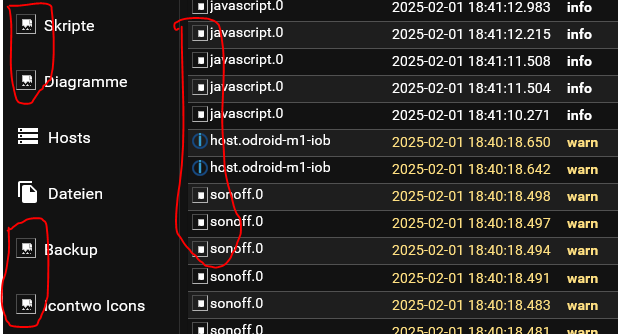
Da fehlt doch definitiv was (Icons).
-
Was ist das? Was odroid-spezifisches?
Hit:6 http://ppa.linuxfactory.or.kr bookworm InRelease
Ja genau. Vom Hersteller.
PS:
Da fehlt doch definitiv was (Icons).
Noch was Neues:
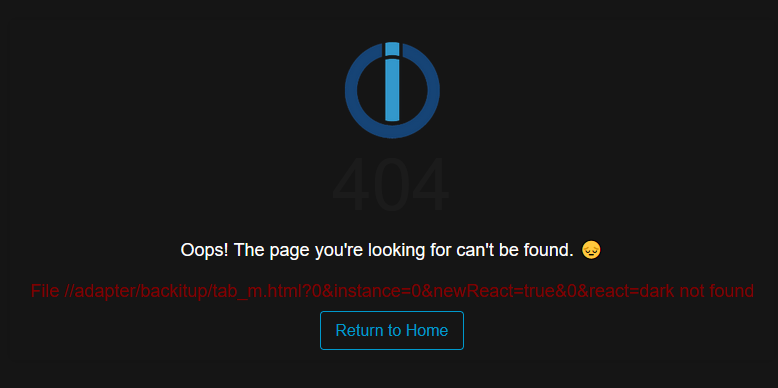
Klicke ich auf Return to Home dann ist plötzlich alles wieder verfügbar.
Also ich kann es mir nicht erklären :-( -
Noch was Neues:
Klicke ich auf Return to Home dann ist plötzlich alles wieder verfügbar.
Also ich kann es mir nicht erklären :-(Ich habe hier seit kurzem ein ähnliches Problem.
Ich will mich an ioBroker anmelden, habe dafür im Firefox ein Lesezeichen, das http://<ip des pi5>:8081 aufruft.
Im Browser see ich dann eine Weiterleitung auf http://<ip des pi5>:8081/login?href=#tab-intro und bekomme dann die Fehlermeldung
404
Oops! The page you're looking for can't be found. 😔
File /login?href= not foundDarunter ein Link "Return to Home", der wieder auf http://<ip des pi5>:8081 verweist. Wenn ich den dann anklicke, läuft die Anmeldung sauber durch und ich lande in der Übersicht.
-
Ich habe hier seit kurzem ein ähnliches Problem.
Ich will mich an ioBroker anmelden, habe dafür im Firefox ein Lesezeichen, das http://<ip des pi5>:8081 aufruft.
Im Browser see ich dann eine Weiterleitung auf http://<ip des pi5>:8081/login?href=#tab-intro und bekomme dann die Fehlermeldung
404
Oops! The page you're looking for can't be found. 😔
File /login?href= not foundDarunter ein Link "Return to Home", der wieder auf http://<ip des pi5>:8081 verweist. Wenn ich den dann anklicke, läuft die Anmeldung sauber durch und ich lande in der Übersicht.
Habe die Ursache meines Problems wohl zufällig gefunden, als ich auf der Suche danach war, warum ich im Log immer wieder "error socket.io [init] Cannot detect user" gefunden habe. Kam wohl mit admin-7.6.3. Mit 7.6.4 scheint das socket.io-Problem behoben zu sein. Aber mit 7.6.3 kam gleichzeitig ein Problem beim Login, wenn man einen Passwort-Manager benutzt (hier Enpass).
Beschrieben ist das Problem hier: [bug]: Login with password manager no longer possible]: https://github.com/ioBroker/ioBroker.admin/issues/3047
Soll mit 7.6.7 behoben sein, habe ich aber noch nicht installiert, momentan kann ich damit leben, muss ich halt das PW über Copy/Paste einfügen... -
Habe die Ursache meines Problems wohl zufällig gefunden, als ich auf der Suche danach war, warum ich im Log immer wieder "error socket.io [init] Cannot detect user" gefunden habe. Kam wohl mit admin-7.6.3. Mit 7.6.4 scheint das socket.io-Problem behoben zu sein. Aber mit 7.6.3 kam gleichzeitig ein Problem beim Login, wenn man einen Passwort-Manager benutzt (hier Enpass).
Beschrieben ist das Problem hier: [bug]: Login with password manager no longer possible]: https://github.com/ioBroker/ioBroker.admin/issues/3047
Soll mit 7.6.7 behoben sein, habe ich aber noch nicht installiert, momentan kann ich damit leben, muss ich halt das PW über Copy/Paste einfügen...@oceanwaves sagte in div. 404 Fehler im IOB (Admin):
muss ich halt das PW über Copy/Paste einfügen
oder alternativ auf die Anmeldung verzichten.
Wenn im Haus keine böswilligen Pupertisten wohnen, kann man ja wohl darauf verzichten. -
@oceanwaves sagte in div. 404 Fehler im IOB (Admin):
muss ich halt das PW über Copy/Paste einfügen
oder alternativ auf die Anmeldung verzichten.
Wenn im Haus keine böswilligen Pupertisten wohnen, kann man ja wohl darauf verzichten.@codierknecht said in div. 404 Fehler im IOB (Admin):
@oceanwaves sagte in div. 404 Fehler im IOB (Admin):
muss ich halt das PW über Copy/Paste einfügen
oder alternativ auf die Anmeldung verzichten.
Wenn im Haus keine böswilligen Pupertisten wohnen, kann man ja wohl darauf verzichten.So oft melde ich mich nicht an. Und an dem Problem mit dem PW-Manager wird ja gearbeitet.
-
@codierknecht said in div. 404 Fehler im IOB (Admin):
@oceanwaves sagte in div. 404 Fehler im IOB (Admin):
muss ich halt das PW über Copy/Paste einfügen
oder alternativ auf die Anmeldung verzichten.
Wenn im Haus keine böswilligen Pupertisten wohnen, kann man ja wohl darauf verzichten.So oft melde ich mich nicht an. Und an dem Problem mit dem PW-Manager wird ja gearbeitet.
@oceanwaves
Da unsere Vögelchen bereits ausgeflogen sind, kann ich auf einen Login verzichten. Eine potenzielle Fehlerquelle weniger ;-)




Hey! Du scheinst an dieser Unterhaltung interessiert zu sein, hast aber noch kein Konto.
Hast du es satt, bei jedem Besuch durch die gleichen Beiträge zu scrollen? Wenn du dich für ein Konto anmeldest, kommst du immer genau dorthin zurück, wo du zuvor warst, und kannst dich über neue Antworten benachrichtigen lassen (entweder per E-Mail oder Push-Benachrichtigung). Du kannst auch Lesezeichen speichern und Beiträge positiv bewerten, um anderen Community-Mitgliedern deine Wertschätzung zu zeigen.
Mit deinem Input könnte dieser Beitrag noch besser werden 💗
Registrieren AnmeldenSupport us
394
Online33.0k
Benutzer83.6k
Themen1.3m
Beiträge