




Bin total überfordert mit Reaktivierung meines Systems
-
Hallo zusammen,
brauche dringend eure Hilfe, komme nicht weiter.
Vorgeschichte: Mein iOBroker lief fehlerlos (auf Raspberry). Durch ein Problem mit meim QNAP-NAS habe ich mich auch längere Zeit nicht darum gekümmet und erst das NAS wieder lauffähig gemacht. Jetzt wieder Fokus auf iOBroker.Als erstes habe ich festgestellt, dass Backuperstellung nicht mehr funktioniert (war bisher auf dem NAS abgelegt, geht aber durch das o.a. NAS-Problem nicht mehr. Wollte also als erstes wieder die Backup-Funktion einrichten. Alle meine Versuche diesbezüglich schlugen fehl.
Dann festgestellt dass der Shelly Adapter nach Update schreit. also angestoßen. Gemäß Hinweis sollte damit dann auch der Node.js upgedatet werden. Sch.... - siehe Sceenshot.
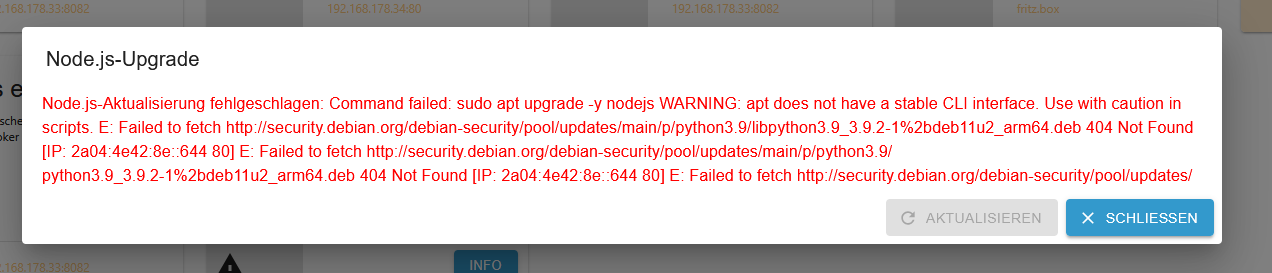
Damit weiß ich dann gar nicht mehr weiter.
Das also zunächst meine erste Frage: Wie bekomme ich das geregelt? Was verlangt das System von mir?Bevor ich größere Aktionen zum Update starte, hätte ich schon gerne zunächst ein Backup gemacht. Damit meine zweite Frage:
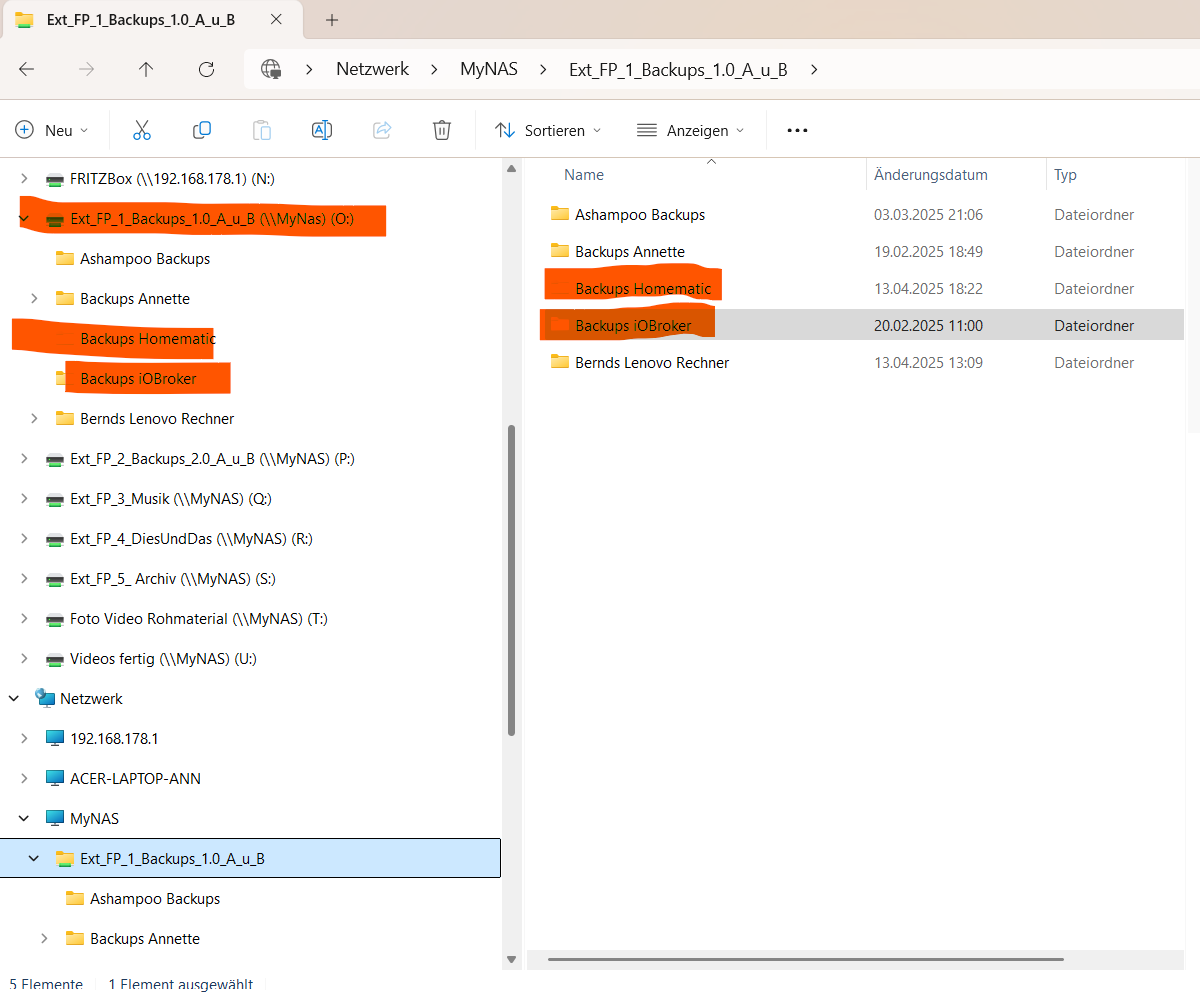
Bei meinen Versuchen zum Backup bin ich alle möglichen Versionen durch. Ich hänge mal Sreenshot vom Windows Explorer an auf dem ersichtlich ist wohin ich sichern möchte, nämlich auf externe Festplatten die an meinem NAS hängen! Alternativ habe ich es auch versucht auf den USB-Speicher an der Fritzbox. Klappt auch nicht.
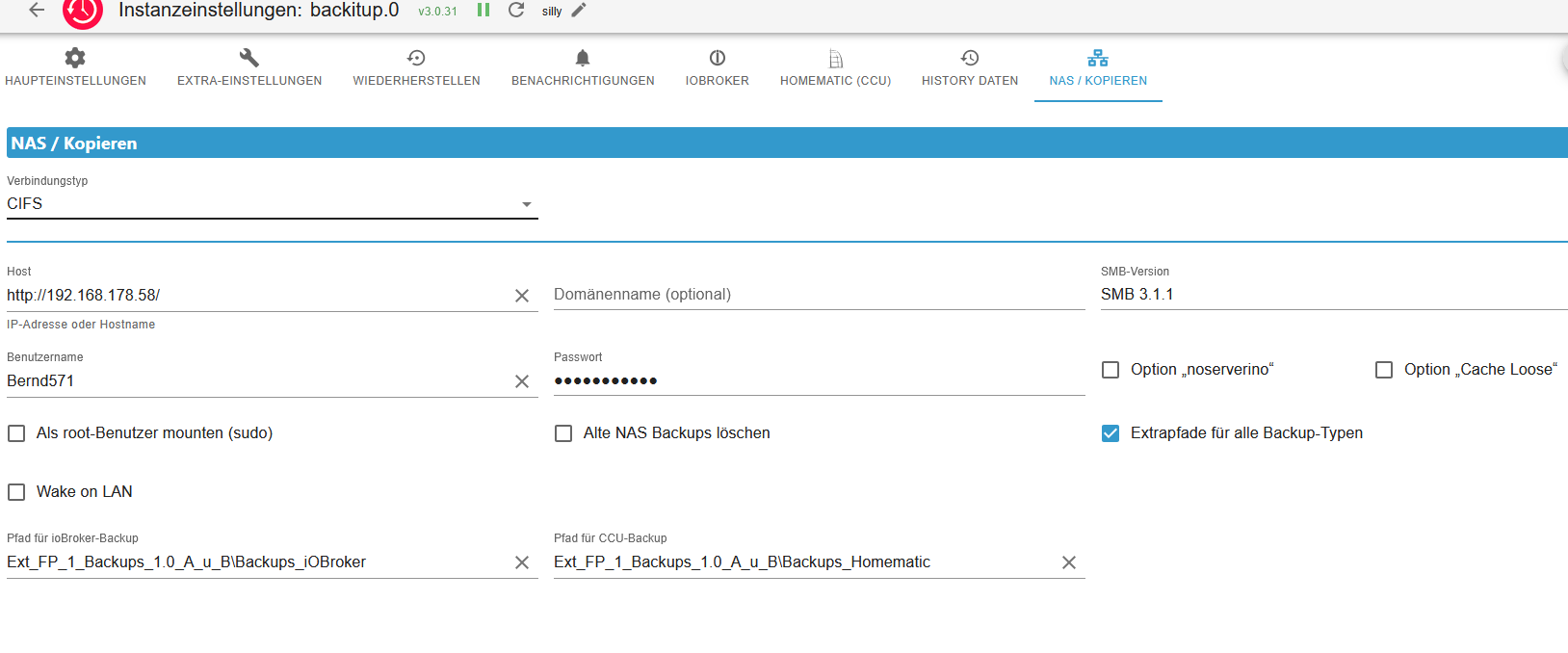
Meine Einstellungen dazu mit CIFS:
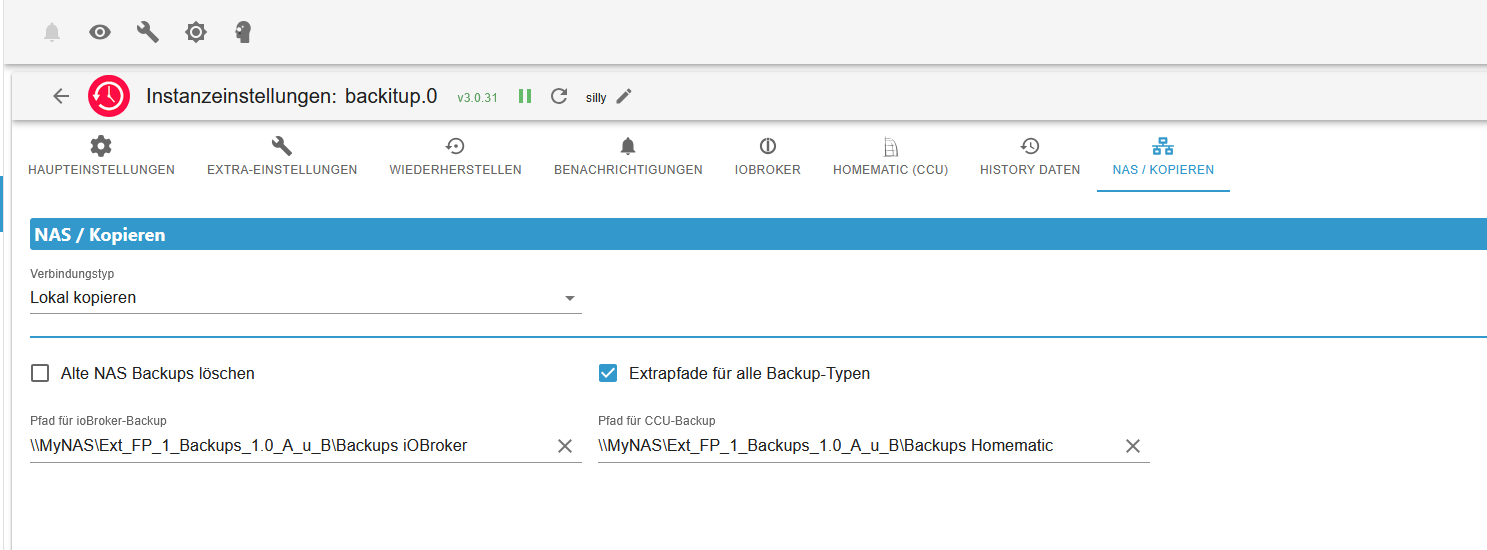
..oder auch mit "Lokal Kopieren":
Fehlermeldungen (es könnte sein dass ich diese durcheinander geschmissen habe), aber funktioniert hat keine Version.

Aber diese Beiden gehören zusammen:
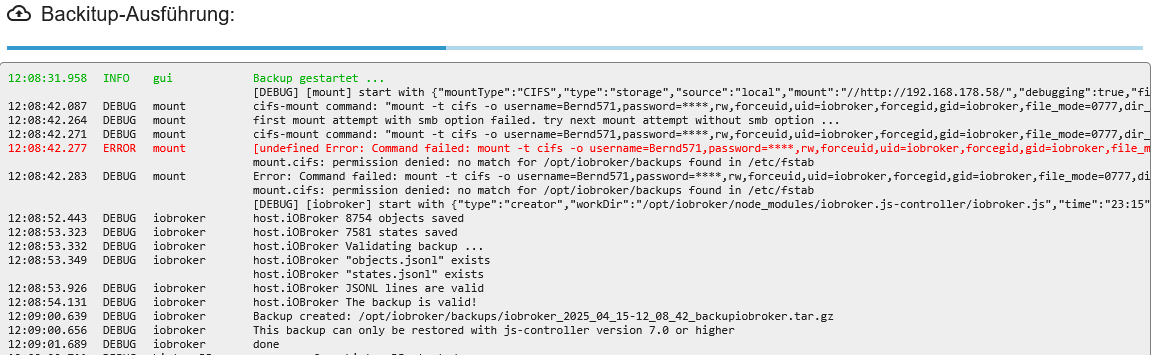
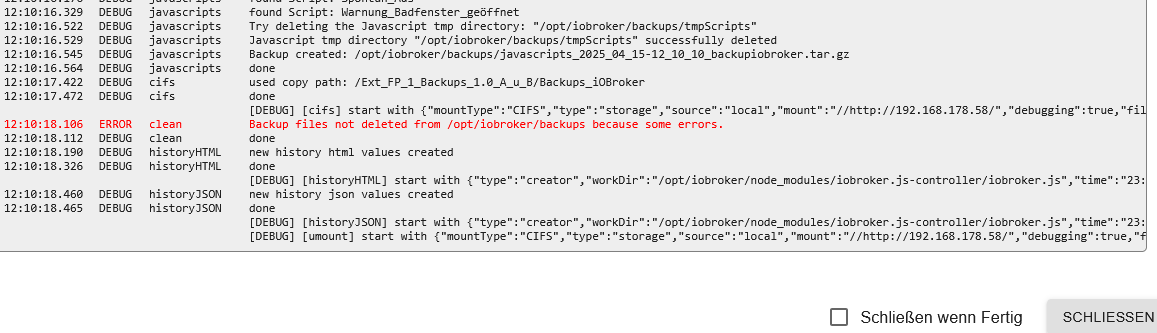
Vielleicht hängen meine beiden Fragen ja auch zusammen?
Ich entschuldige mich vorab für alle fehlenden Informationen, die ich gerne nachreichen werde. Aber bitte nicht gleich killen, bin kein Systemtechniker und leider auch schon in die Jahre gekommen.Bin gespannt auf Eure Tipps!
@bernd-3
Hi, will dich keinesfalls stressen. Aber so zwischen den Zeilen vermute ich dass da noch einige Updates offen sind. Du hast Update node erwähnt. Und wie sieht es mit dem Betriebssyetm aus? Bist du da aschon auf bookworm?Poste doch bitte mal die Langfassung von
iob diagunter code tags

Wenn dein System jetzt laufen sollte, ist der Notfall ja gebannt. Aber anstehende Updates solltes du zeitnahe einplanen damit es nicht irgendwann heißt dass "jetzt" aktualisisertw erden muss und das zu unpassendensten Zeit.
Ist aber jedenfalls deine Entscheidung. Sie es nur als Angebot iob diag zu kommentieren. Ansonsten viel Freude mit ioBroker und frag wenn du Hilfe brauchst
-
@bernd-3
Hi, will dich keinesfalls stressen. Aber so zwischen den Zeilen vermute ich dass da noch einige Updates offen sind. Du hast Update node erwähnt. Und wie sieht es mit dem Betriebssyetm aus? Bist du da aschon auf bookworm?Poste doch bitte mal die Langfassung von
iob diagunter code tags
Wenn dein System jetzt laufen sollte, ist der Notfall ja gebannt. Aber anstehende Updates solltes du zeitnahe einplanen damit es nicht irgendwann heißt dass "jetzt" aktualisisertw erden muss und das zu unpassendensten Zeit.
Ist aber jedenfalls deine Entscheidung. Sie es nur als Angebot iob diag zu kommentieren. Ansonsten viel Freude mit ioBroker und frag wenn du Hilfe brauchst
-
@mcm1957
ich versuche seit ca 24 Stunden hier etwas zu posten. Immer Fehler - Forbitten
Dies ist nur zum Testen -
@mcm1957
ich versuche seit ca 24 Stunden hier etwas zu posten. Immer Fehler - Forbitten
Dies ist nur zum Testen@bernd-3 sagte in Bin total überfordert mit Reaktivierung meines Systems:
Immer Fehler - Forbitten
einfach f5 und nochmal senden
-
@bernd-3
Hi, will dich keinesfalls stressen. Aber so zwischen den Zeilen vermute ich dass da noch einige Updates offen sind. Du hast Update node erwähnt. Und wie sieht es mit dem Betriebssyetm aus? Bist du da aschon auf bookworm?Poste doch bitte mal die Langfassung von
iob diagunter code tags
Wenn dein System jetzt laufen sollte, ist der Notfall ja gebannt. Aber anstehende Updates solltes du zeitnahe einplanen damit es nicht irgendwann heißt dass "jetzt" aktualisisertw erden muss und das zu unpassendensten Zeit.
Ist aber jedenfalls deine Entscheidung. Sie es nur als Angebot iob diag zu kommentieren. Ansonsten viel Freude mit ioBroker und frag wenn du Hilfe brauchst
@mcm1957
So scheinbar funktioniert das Forum ja wieder.Ich glaube die Update Probleme konnte ich selbst lösen. Dennoch hier mein aktuelles Log. Vielleicht findet Ihr ja noch etwas. Mein Backup funktioniert immer noch nicht. Dazu später mehr.
========== Start marking the full check here =========== ```bash Script v.2025-02-23 *** BASE SYSTEM *** Static hostname: iOBroker Icon name: computer Operating System: Debian GNU/Linux 11 (bullseye) Kernel: Linux 6.1.21-v8+ Architecture: arm64 OS is similar to: Model : Raspberry Pi 4 Model B Rev 1.5 Docker : false Virtualization : none Kernel : aarch64 Userland : 64 bit Systemuptime and Load: 12:03:19 up 66 days, 22:35, 1 user, load average: 0.46, 0.48, 0.43 CPU threads: 4 *** LIFE CYCLE STATUS *** Unknown release codenamed 'bullseye'. Please check yourself if the Operating System is actively maintained. *** RASPBERRY THROTTLING *** Current issues: No throttling issues detected. Previously detected issues: No throttling issues detected. *** TIME AND TIMEZONES *** Local time: Wed 2025-04-16 12:03:19 CEST Universal time: Wed 2025-04-16 10:03:19 UTC RTC time: n/a Time zone: Europe/Berlin (CEST, +0200) System clock synchronized: yes NTP service: active RTC in local TZ: no *** Users and Groups *** User that called 'iob diag': Bernd571 HOME=/home/Bernd571 GROUPS=Bernd571 adm dialout cdrom sudo audio video plugdev games users input render netdev gpio i2c spi iobroker User that is running 'js-controller': iobroker HOME=/home/iobroker GROUPS=iobroker tty dialout audio video plugdev bluetooth gpio i2c *** DISPLAY-SERVER SETUP *** Display-Server: false Desktop: Terminal: tty *** MEMORY *** total used free shared buff/cache available Mem: 3.8G 1.5G 294M 1.0M 2.0G 2.2G Swap: 99M 0B 99M Total: 3.9G 1.5G 394M Active iob-Instances: 19 3794 M total memory 1502 M used memory 1629 M active memory 1605 M inactive memory 294 M free memory 73 M buffer memory 1924 M swap cache 99 M total swap 0 M used swap 99 M free swap *** top - Table Of Processes *** top - 12:03:20 up 66 days, 22:35, 1 user, load average: 0.46, 0.48, 0.43 Tasks: 169 total, 1 running, 168 sleeping, 0 stopped, 0 zombie %Cpu(s): 1.5 us, 2.9 sy, 0.0 ni, 95.6 id, 0.0 wa, 0.0 hi, 0.0 si, 0.0 st MiB Mem : 3794.3 total, 293.8 free, 1503.0 used, 1997.5 buff/cache MiB Swap: 100.0 total, 100.0 free, 0.0 used. 2214.9 avail Mem *** FAILED SERVICES *** UNIT LOAD ACTIVE SUB DESCRIPTION 0 loaded units listed. *** DMESG CRITICAL ERRORS *** No critical errors detected *** FILESYSTEM *** Filesystem Type Size Used Avail Use% Mounted on /dev/root ext4 59G 16G 41G 28% / devtmpfs devtmpfs 1.7G 0 1.7G 0% /dev tmpfs tmpfs 1.9G 0 1.9G 0% /dev/shm tmpfs tmpfs 759M 1.1M 758M 1% /run tmpfs tmpfs 5.0M 4.0K 5.0M 1% /run/lock /dev/mmcblk0p1 vfat 255M 31M 225M 13% /boot tmpfs tmpfs 380M 0 380M 0% /run/user/1000 Messages concerning ext4 filesystem in dmesg: [Sat Feb 8 12:28:14 2025] Kernel command line: coherent_pool=1M 8250.nr_uarts=0 snd_bcm2835.enable_headphones=0 snd_bcm2835.enable_headphones=1 snd_bcm2835.enable_hdmi=1 snd_bcm2835.enable_hdmi=0 smsc95xx.macaddr=E4:5F:01:E2:AD:A5 vc_mem.mem_base=0x3ec00000 vc_mem.mem_size=0x40000000 console=ttyS0,115200 console=tty1 root=PARTUUID=fcc6c46d-02 rootfstype=ext4 fsck.repair=yes rootwait [Sat Feb 8 12:28:15 2025] EXT4-fs (mmcblk0p2): INFO: recovery required on readonly filesystem [Sat Feb 8 12:28:15 2025] EXT4-fs (mmcblk0p2): write access will be enabled during recovery [Sat Feb 8 12:28:16 2025] EXT4-fs (mmcblk0p2): orphan cleanup on readonly fs [Sat Feb 8 12:28:16 2025] EXT4-fs (mmcblk0p2): 2 orphan inodes deleted [Sat Feb 8 12:28:16 2025] EXT4-fs (mmcblk0p2): recovery complete [Sat Feb 8 12:28:16 2025] EXT4-fs (mmcblk0p2): mounted filesystem with ordered data mode. Quota mode: none. [Sat Feb 8 12:28:16 2025] VFS: Mounted root (ext4 filesystem) readonly on device 179:2. [Sat Feb 8 12:28:18 2025] EXT4-fs (mmcblk0p2): re-mounted. Quota mode: none. Show mounted filesystems: TARGET SOURCE FSTYPE OPTIONS / /dev/mmcblk0p2 ext4 rw,noatime `-/boot /dev/mmcblk0p1 vfat rw,relatime,fmask=0022,dmask=0022,codepage=437,iocharset=ascii,shortname=mixed,errors=remount-ro Files in neuralgic directories: /var: 1.6G /var/ 1007M /var/log 1001M /var/log/journal/f0afd730650d435998ff424a7140192e 1001M /var/log/journal 382M /var/cache Archived and active journals take up 1000.2M in the file system. /opt/iobroker/backups: 6.6G /opt/iobroker/backups/ /opt/iobroker/iobroker-data: 2.5G /opt/iobroker/iobroker-data/ 1.5G /opt/iobroker/iobroker-data/history 922M /opt/iobroker/iobroker-data/files 617M /opt/iobroker/iobroker-data/files/javascript.admin 560M /opt/iobroker/iobroker-data/files/javascript.admin/static The five largest files in iobroker-data are: 26M /opt/iobroker/iobroker-data/files/echarts/static/js/main.41cee985.js.map 26M /opt/iobroker/iobroker-data/files/echarts.admin/chart/static/js/main.41cee985.js.map 24M /opt/iobroker/iobroker-data/files/echarts.admin/static/js/main.70a15e1f.js.map 20M /opt/iobroker/iobroker-data/objects.jsonl 18M /opt/iobroker/iobroker-data/files/echarts/preview/static/js/main.5fe9c7da.js.map USB-Devices by-id: USB-Sticks - Avoid direct links to /dev/tty* in your adapter setups, please always prefer the links 'by-id': No Devices found 'by-id' Zigbee Network Settings on your coordinator/in nvbackup are: zigbee.X Extended Pan ID: *** MASKED *** Pan ID: *** MASKED *** Channel: *** MASKED *** Network Key: *** MASKED *** To unmask the settings run 'iob diag --unmask' *** NodeJS-Installation *** /usr/bin/nodejs v20.19.0 /usr/bin/node v20.19.0 /usr/bin/npm 10.8.2 /usr/bin/npx 10.8.2 /usr/bin/corepack 0.31.0 nodejs: Installed: 20.19.0-1nodesource1 Candidate: 20.19.0-1nodesource1 Version table: *** 20.19.0-1nodesource1 1001 500 https://deb.nodesource.com/node_20.x nodistro/main arm64 Packages 100 /var/lib/dpkg/status 20.18.3-1nodesource1 1001 500 https://deb.nodesource.com/node_20.x nodistro/main arm64 Packages 20.18.2-1nodesource1 1001 500 https://deb.nodesource.com/node_20.x nodistro/main arm64 Packages 20.18.1-1nodesource1 1001 500 https://deb.nodesource.com/node_20.x nodistro/main arm64 Packages 20.18.0-1nodesource1 1001 500 https://deb.nodesource.com/node_20.x nodistro/main arm64 Packages 20.17.0-1nodesource1 1001 500 https://deb.nodesource.com/node_20.x nodistro/main arm64 Packages 20.16.0-1nodesource1 1001 500 https://deb.nodesource.com/node_20.x nodistro/main arm64 Packages 20.15.1-1nodesource1 1001 500 https://deb.nodesource.com/node_20.x nodistro/main arm64 Packages 20.15.0-1nodesource1 1001 500 https://deb.nodesource.com/node_20.x nodistro/main arm64 Packages 20.14.0-1nodesource1 1001 500 https://deb.nodesource.com/node_20.x nodistro/main arm64 Packages 20.13.1-1nodesource1 1001 500 https://deb.nodesource.com/node_20.x nodistro/main arm64 Packages 20.13.0-1nodesource1 1001 500 https://deb.nodesource.com/node_20.x nodistro/main arm64 Packages 20.12.2-1nodesource1 1001 500 https://deb.nodesource.com/node_20.x nodistro/main arm64 Packages 20.12.1-1nodesource1 1001 500 https://deb.nodesource.com/node_20.x nodistro/main arm64 Packages 20.12.0-1nodesource1 1001 500 https://deb.nodesource.com/node_20.x nodistro/main arm64 Packages 20.11.1-1nodesource1 1001 500 https://deb.nodesource.com/node_20.x nodistro/main arm64 Packages 20.11.0-1nodesource1 1001 500 https://deb.nodesource.com/node_20.x nodistro/main arm64 Packages 20.10.0-1nodesource1 1001 500 https://deb.nodesource.com/node_20.x nodistro/main arm64 Packages 20.9.0-1nodesource1 1001 500 https://deb.nodesource.com/node_20.x nodistro/main arm64 Packages 20.8.1-1nodesource1 1001 500 https://deb.nodesource.com/node_20.x nodistro/main arm64 Packages 20.8.0-1nodesource1 1001 500 https://deb.nodesource.com/node_20.x nodistro/main arm64 Packages 20.7.0-1nodesource1 1001 500 https://deb.nodesource.com/node_20.x nodistro/main arm64 Packages 20.6.1-1nodesource1 1001 500 https://deb.nodesource.com/node_20.x nodistro/main arm64 Packages 20.6.0-1nodesource1 1001 500 https://deb.nodesource.com/node_20.x nodistro/main arm64 Packages 20.5.1-1nodesource1 1001 500 https://deb.nodesource.com/node_20.x nodistro/main arm64 Packages 20.5.0-1nodesource1 1001 500 https://deb.nodesource.com/node_20.x nodistro/main arm64 Packages 20.4.0-1nodesource1 1001 500 https://deb.nodesource.com/node_20.x nodistro/main arm64 Packages 20.3.1-1nodesource1 1001 500 https://deb.nodesource.com/node_20.x nodistro/main arm64 Packages 20.3.0-1nodesource1 1001 500 https://deb.nodesource.com/node_20.x nodistro/main arm64 Packages 20.2.0-1nodesource1 1001 500 https://deb.nodesource.com/node_20.x nodistro/main arm64 Packages 20.1.0-1nodesource1 1001 500 https://deb.nodesource.com/node_20.x nodistro/main arm64 Packages 20.0.0-1nodesource1 1001 500 https://deb.nodesource.com/node_20.x nodistro/main arm64 Packages 12.22.12~dfsg-1~deb11u6 500 500 http://security.debian.org/debian-security bullseye-security/main arm64 Packages 12.22.12~dfsg-1~deb11u4 500 500 http://deb.debian.org/debian bullseye/main arm64 Packages Temp directories causing deletion problem: 0 No problems detected Errors in npm tree: 0 No problems detected *** ioBroker-Installation *** ioBroker Status iobroker is running on this host. Objects type: jsonl States type: jsonl Hosts: iOBroker iOBroker (version: 7.0.6, hostname: iOBroker , alive, uptime: 45399) Core adapters versions js-controller: 7.0.6 admin: 7.6.3 javascript: 8.8.3 nodejs modules from github: 0 Adapter State + system.adapter.admin.0 : admin : iOBroker - enabled, port: 8081, bind: 0.0.0.0, run as: admin + system.adapter.backitup.0 : backitup : iOBroker - enabled system.adapter.broadlink2.0 : broadlink2 : iOBroker - disabled system.adapter.chromecast.0 : chromecast : iOBroker - disabled system.adapter.daswetter.0 : daswetter : iOBroker - enabled system.adapter.daswetter.1 : daswetter : iOBroker - enabled system.adapter.daswetter.2 : daswetter : iOBroker - enabled + system.adapter.discovery.0 : discovery : iOBroker - enabled system.adapter.dwd.0 : dwd : iOBroker - disabled + system.adapter.echarts.0 : echarts : iOBroker - enabled system.adapter.flot.0 : flot : iOBroker - enabled + system.adapter.fritzdect.0 : fritzdect : iOBroker - enabled + system.adapter.history.0 : history : iOBroker - enabled + system.adapter.hm-rega.0 : hm-rega : iOBroker - enabled + system.adapter.hm-rpc.0 : hm-rpc : iOBroker - enabled, port: 18701 + system.adapter.hm-rpc.1 : hm-rpc : iOBroker - enabled, port: 0 + system.adapter.hm-rpc.6 : hm-rpc : iOBroker - enabled, port: 12010 system.adapter.icons-mfd-png.0 : icons-mfd-png : iOBroker - enabled + system.adapter.jarvis.0 : jarvis : iOBroker - enabled + system.adapter.javascript.0 : javascript : iOBroker - enabled + system.adapter.ping.0 : ping : iOBroker - enabled + system.adapter.shelly.0 : shelly : iOBroker - enabled, port: 1882, bind: 0.0.0.0 + system.adapter.tr-064.0 : tr-064 : iOBroker - enabled system.adapter.vis-hqwidgets.0 : vis-hqwidgets : iOBroker - enabled + system.adapter.vis-inventwo.0 : vis-inventwo : iOBroker - enabled system.adapter.vis-jqui-mfd.0 : vis-jqui-mfd : iOBroker - enabled system.adapter.vis-keyboard.0 : vis-keyboard : iOBroker - enabled system.adapter.vis-metro.0 : vis-metro : iOBroker - enabled system.adapter.vis-timeandweather.0 : vis-timeandweather : iOBroker - enabled system.adapter.vis-weather.0 : vis-weather : iOBroker - enabled system.adapter.vis.0 : vis : iOBroker - enabled + system.adapter.web.0 : web : iOBroker - enabled, port: 8082, bind: 0.0.0.0, run as: admin + system.adapter.whatsapp-cmb.0 : whatsapp-cmb : iOBroker - enabled + instance is alive Enabled adapters with bindings + system.adapter.admin.0 : admin : iOBroker - enabled, port: 8081, bind: 0.0.0.0, run as: admin + system.adapter.hm-rpc.0 : hm-rpc : iOBroker - enabled, port: 18701 + system.adapter.hm-rpc.1 : hm-rpc : iOBroker - enabled, port: 0 + system.adapter.hm-rpc.6 : hm-rpc : iOBroker - enabled, port: 12010 + system.adapter.shelly.0 : shelly : iOBroker - enabled, port: 1882, bind: 0.0.0.0 + system.adapter.web.0 : web : iOBroker - enabled, port: 8082, bind: 0.0.0.0, run as: admin ioBroker-Repositories ┌─────────┬──────────┬─────────────────────────────────────────────────────────┬──────────────┐ │ (index) │ name │ url │ auto upgrade │ ├─────────┼──────────┼─────────────────────────────────────────────────────────┼──────────────┤ │ 0 │ 'stable' │ 'http://download.iobroker.net/sources-dist.json' │ true │ │ 1 │ 'beta' │ 'http://download.iobroker.net/sources-dist-latest.json' │ false │ └─────────┴──────────┴─────────────────────────────────────────────────────────┴──────────────┘ Active repo(s): stable Upgrade policy: minor Installed ioBroker-Adapters Used repository: stable Adapter "admin" : 7.6.3 , installed 7.6.3 Adapter "backitup" : 3.0.31 , installed 3.0.31 Adapter "broadlink2" : 2.3.0 , installed 2.3.0 Adapter "chromecast" : 4.0.0 , installed 4.0.0 Adapter "daswetter" : 3.2.3 , installed 3.2.3 Adapter "discovery" : 5.0.0 , installed 5.0.0 Adapter "dwd" : 2.8.5 , installed 2.8.5 Adapter "echarts" : 1.9.2 , installed 1.9.2 Adapter "flot" : 1.12.0 , installed 1.12.0 Adapter "fritzdect" : 2.6.1 , installed 2.6.1 Adapter "history" : 3.0.1 , installed 3.0.1 Adapter "hm-rega" : 5.1.0 , installed 5.1.0 Adapter "hm-rpc" : 2.0.2 , installed 2.0.2 Adapter "icons-mfd-png": 1.2.1 , installed 1.2.1 Adapter "jarvis" : 3.1.8 , installed 3.1.8 Adapter "javascript" : 8.8.3 , installed 8.8.3 Controller "js-controller": 7.0.6 , installed 7.0.6 Adapter "ping" : 1.6.2 , installed 1.6.2 Adapter "shelly" : 9.2.0 , installed 9.2.0 Adapter "socketio" : 6.7.1 , installed 6.7.1 Adapter "tr-064" : 4.3.0 , installed 4.3.0 Adapter "vis" : 1.5.6 , installed 1.5.6 Adapter "vis-hqwidgets": 1.5.1 , installed 1.5.1 Adapter "vis-inventwo" : 3.3.4 , installed 3.3.4 Adapter "vis-jqui-mfd" : 1.1.1 , installed 1.1.1 Adapter "vis-keyboard" : 0.0.2 , installed 0.0.2 Adapter "vis-metro" : 1.2.0 , installed 1.2.0 Adapter "vis-timeandweather": 1.2.2, installed 1.2.2 Adapter "vis-weather" : 2.5.11 , installed 2.5.11 Adapter "web" : 7.0.8 , installed 7.0.8 Adapter "whatsapp-cmb" : 0.3.0 , installed 0.3.0 Adapter "ws" : 2.6.2 , installed 2.6.2 Objects and States Please stand by - This may take a while Objects: 8746 States: 7579 *** OS-Repositories and Updates *** Hit:1 http://security.debian.org/debian-security bullseye-security InRelease Hit:2 http://deb.debian.org/debian bullseye InRelease Hit:3 http://deb.debian.org/debian bullseye-updates InRelease Hit:4 http://archive.raspberrypi.org/debian bullseye InRelease Hit:5 https://deb.nodesource.com/node_20.x nodistro InRelease Reading package lists... Pending Updates: 0 *** Listening Ports *** Active Internet connections (only servers) Proto Recv-Q Send-Q Local Address Foreign Address State User Inode PID/Program name tcp 0 0 0.0.0.0:8400 0.0.0.0:* LISTEN 1001 84905396 2934931/io.jarvis.0 tcp 0 0 0.0.0.0:22 0.0.0.0:* LISTEN 0 84899611 2933384/sshd: /usr/ tcp 0 0 192.168.178.33:18701 0.0.0.0:* LISTEN 1001 85450525 2969921/io.hm-rpc.0 tcp 0 0 192.168.178.33:12010 0.0.0.0:* LISTEN 1001 85451809 2969802/io.hm-rpc.6 tcp 0 0 192.168.178.33:2001 0.0.0.0:* LISTEN 1001 85452861 2969809/io.hm-rpc.1 tcp 0 0 127.0.0.1:9000 0.0.0.0:* LISTEN 1001 84904300 2934602/iobroker.js tcp 0 0 127.0.0.1:9001 0.0.0.0:* LISTEN 1001 84903053 2934602/iobroker.js tcp 0 0 0.0.0.0:1882 0.0.0.0:* LISTEN 1001 84917811 2936869/io.shelly.0 tcp6 0 0 :::22 :::* LISTEN 0 84899613 2933384/sshd: /usr/ tcp6 0 0 :::8081 :::* LISTEN 1001 84905010 2934623/io.admin.0 tcp6 0 0 :::8082 :::* LISTEN 1001 84906286 2934972/io.web.0 udp 0 0 0.0.0.0:53291 0.0.0.0:* 108 84900662 2933491/avahi-daemo udp 0 0 0.0.0.0:68 0.0.0.0:* 0 13697 722/dhcpcd udp 0 0 192.168.178.33:5353 0.0.0.0:* 1001 85487742 2972466/io.tr-064.0 udp 0 0 0.0.0.0:5353 0.0.0.0:* 108 84900660 2933491/avahi-daemo udp6 0 0 :::55109 :::* 108 84900663 2933491/avahi-daemo udp6 0 0 :::546 :::* 0 13710 722/dhcpcd udp6 0 0 :::5353 :::* 108 84900661 2933491/avahi-daemo *** Log File - Last 25 Lines *** 2025-04-16 11:45:34.634 - info: daswetter.0 (2978455) cleaned everything up... 2025-04-16 11:45:34.659 - info: host.iOBroker instance system.adapter.daswetter.0 having pid 2978455 terminated with code 11 (ADAPTER_REQUESTED_TERMINATION) 2025-04-16 11:45:36.742 - info: daswetter.2 (2978475) starting. Version 3.2.3 in /opt/iobroker/node_modules/iobroker.daswetter, node: v20.19.0, js-controller: 7.0.6 2025-04-16 11:45:37.693 - info: daswetter.2 (2978475) Terminated (ADAPTER_REQUESTED_TERMINATION): All data handled, adapter stopped until next scheduled moment 2025-04-16 11:45:38.210 - info: daswetter.2 (2978475) cleaned everything up... 2025-04-16 11:45:38.232 - info: host.iOBroker instance system.adapter.daswetter.2 having pid 2978475 terminated with code 11 (ADAPTER_REQUESTED_TERMINATION) 2025-04-16 11:55:59.519 - info: shelly.0 (2936869) [MQTT] Device with client id "shellyhtg3-ecda3bc0b4cc" connected from 192.168.178.52! 2025-04-16 11:56:00.706 - info: shelly.0 (2936869) [authEnabled] 192.168.178.52 (shellyhtg3 / shellyhtg3-ecda3bc0b4cc / shellyhtg3#ecda3bc0b4cc#1): This device is not protected via restricted login (see adapter documentation for details) 2025-04-16 11:56:03.563 - info: shelly.0 (2936869) [MQTT] Client Close: 192.168.178.52 (shellyhtg3 / shellyhtg3-ecda3bc0b4cc / shellyhtg3#ecda3bc0b4cc#1) (false) 2025-04-16 12:00:06.041 - info: host.iOBroker instance system.adapter.daswetter.1 in version "3.2.3" started with pid 2978886 2025-04-16 12:00:08.775 - info: daswetter.1 (2978886) starting. Version 3.2.3 in /opt/iobroker/node_modules/iobroker.daswetter, node: v20.19.0, js-controller: 7.0.6 2025-04-16 12:00:10.600 - info: web.0 (2934972) ==> Connected system.user.admin from ::ffff:192.168.178.54 2025-04-16 12:00:15.767 - info: daswetter.1 (2978886) Terminated (ADAPTER_REQUESTED_TERMINATION): All data handled, adapter stopped until next scheduled moment 2025-04-16 12:00:16.282 - info: daswetter.1 (2978886) cleaned everything up... 2025-04-16 12:00:16.306 - info: host.iOBroker instance system.adapter.daswetter.1 having pid 2978886 terminated with code 11 (ADAPTER_REQUESTED_TERMINATION) 2025-04-16 12:00:19.035 - info: host.iOBroker instance system.adapter.daswetter.0 in version "3.2.3" started with pid 2978908 2025-04-16 12:00:21.613 - info: daswetter.0 (2978908) starting. Version 3.2.3 in /opt/iobroker/node_modules/iobroker.daswetter, node: v20.19.0, js-controller: 7.0.6 2025-04-16 12:00:33.475 - info: daswetter.0 (2978908) Terminated (ADAPTER_REQUESTED_TERMINATION): All data handled, adapter stopped until next scheduled moment 2025-04-16 12:00:33.992 - info: daswetter.0 (2978908) cleaned everything up... 2025-04-16 12:00:34.035 - info: host.iOBroker instance system.adapter.daswetter.2 in version "3.2.3" started with pid 2978923 2025-04-16 12:00:34.037 - info: host.iOBroker instance system.adapter.daswetter.0 having pid 2978908 terminated with code 11 (ADAPTER_REQUESTED_TERMINATION) 2025-04-16 12:00:36.853 - info: daswetter.2 (2978923) starting. Version 3.2.3 in /opt/iobroker/node_modules/iobroker.daswetter, node: v20.19.0, js-controller: 7.0.6 2025-04-16 12:00:37.819 - info: daswetter.2 (2978923) Terminated (ADAPTER_REQUESTED_TERMINATION): All data handled, adapter stopped until next scheduled moment 2025-04-16 12:00:38.354 - info: daswetter.2 (2978923) cleaned everything up... 2025-04-16 12:00:38.374 - info: host.iOBroker instance system.adapter.daswetter.2 having pid 2978923 terminated with code 11 (ADAPTER_REQUESTED_TERMINATION)============ Mark until here for C&P =============
-
@mcm1957
So scheinbar funktioniert das Forum ja wieder.Ich glaube die Update Probleme konnte ich selbst lösen. Dennoch hier mein aktuelles Log. Vielleicht findet Ihr ja noch etwas. Mein Backup funktioniert immer noch nicht. Dazu später mehr.
========== Start marking the full check here =========== ```bash Script v.2025-02-23 *** BASE SYSTEM *** Static hostname: iOBroker Icon name: computer Operating System: Debian GNU/Linux 11 (bullseye) Kernel: Linux 6.1.21-v8+ Architecture: arm64 OS is similar to: Model : Raspberry Pi 4 Model B Rev 1.5 Docker : false Virtualization : none Kernel : aarch64 Userland : 64 bit Systemuptime and Load: 12:03:19 up 66 days, 22:35, 1 user, load average: 0.46, 0.48, 0.43 CPU threads: 4 *** LIFE CYCLE STATUS *** Unknown release codenamed 'bullseye'. Please check yourself if the Operating System is actively maintained. *** RASPBERRY THROTTLING *** Current issues: No throttling issues detected. Previously detected issues: No throttling issues detected. *** TIME AND TIMEZONES *** Local time: Wed 2025-04-16 12:03:19 CEST Universal time: Wed 2025-04-16 10:03:19 UTC RTC time: n/a Time zone: Europe/Berlin (CEST, +0200) System clock synchronized: yes NTP service: active RTC in local TZ: no *** Users and Groups *** User that called 'iob diag': Bernd571 HOME=/home/Bernd571 GROUPS=Bernd571 adm dialout cdrom sudo audio video plugdev games users input render netdev gpio i2c spi iobroker User that is running 'js-controller': iobroker HOME=/home/iobroker GROUPS=iobroker tty dialout audio video plugdev bluetooth gpio i2c *** DISPLAY-SERVER SETUP *** Display-Server: false Desktop: Terminal: tty *** MEMORY *** total used free shared buff/cache available Mem: 3.8G 1.5G 294M 1.0M 2.0G 2.2G Swap: 99M 0B 99M Total: 3.9G 1.5G 394M Active iob-Instances: 19 3794 M total memory 1502 M used memory 1629 M active memory 1605 M inactive memory 294 M free memory 73 M buffer memory 1924 M swap cache 99 M total swap 0 M used swap 99 M free swap *** top - Table Of Processes *** top - 12:03:20 up 66 days, 22:35, 1 user, load average: 0.46, 0.48, 0.43 Tasks: 169 total, 1 running, 168 sleeping, 0 stopped, 0 zombie %Cpu(s): 1.5 us, 2.9 sy, 0.0 ni, 95.6 id, 0.0 wa, 0.0 hi, 0.0 si, 0.0 st MiB Mem : 3794.3 total, 293.8 free, 1503.0 used, 1997.5 buff/cache MiB Swap: 100.0 total, 100.0 free, 0.0 used. 2214.9 avail Mem *** FAILED SERVICES *** UNIT LOAD ACTIVE SUB DESCRIPTION 0 loaded units listed. *** DMESG CRITICAL ERRORS *** No critical errors detected *** FILESYSTEM *** Filesystem Type Size Used Avail Use% Mounted on /dev/root ext4 59G 16G 41G 28% / devtmpfs devtmpfs 1.7G 0 1.7G 0% /dev tmpfs tmpfs 1.9G 0 1.9G 0% /dev/shm tmpfs tmpfs 759M 1.1M 758M 1% /run tmpfs tmpfs 5.0M 4.0K 5.0M 1% /run/lock /dev/mmcblk0p1 vfat 255M 31M 225M 13% /boot tmpfs tmpfs 380M 0 380M 0% /run/user/1000 Messages concerning ext4 filesystem in dmesg: [Sat Feb 8 12:28:14 2025] Kernel command line: coherent_pool=1M 8250.nr_uarts=0 snd_bcm2835.enable_headphones=0 snd_bcm2835.enable_headphones=1 snd_bcm2835.enable_hdmi=1 snd_bcm2835.enable_hdmi=0 smsc95xx.macaddr=E4:5F:01:E2:AD:A5 vc_mem.mem_base=0x3ec00000 vc_mem.mem_size=0x40000000 console=ttyS0,115200 console=tty1 root=PARTUUID=fcc6c46d-02 rootfstype=ext4 fsck.repair=yes rootwait [Sat Feb 8 12:28:15 2025] EXT4-fs (mmcblk0p2): INFO: recovery required on readonly filesystem [Sat Feb 8 12:28:15 2025] EXT4-fs (mmcblk0p2): write access will be enabled during recovery [Sat Feb 8 12:28:16 2025] EXT4-fs (mmcblk0p2): orphan cleanup on readonly fs [Sat Feb 8 12:28:16 2025] EXT4-fs (mmcblk0p2): 2 orphan inodes deleted [Sat Feb 8 12:28:16 2025] EXT4-fs (mmcblk0p2): recovery complete [Sat Feb 8 12:28:16 2025] EXT4-fs (mmcblk0p2): mounted filesystem with ordered data mode. Quota mode: none. [Sat Feb 8 12:28:16 2025] VFS: Mounted root (ext4 filesystem) readonly on device 179:2. [Sat Feb 8 12:28:18 2025] EXT4-fs (mmcblk0p2): re-mounted. Quota mode: none. Show mounted filesystems: TARGET SOURCE FSTYPE OPTIONS / /dev/mmcblk0p2 ext4 rw,noatime `-/boot /dev/mmcblk0p1 vfat rw,relatime,fmask=0022,dmask=0022,codepage=437,iocharset=ascii,shortname=mixed,errors=remount-ro Files in neuralgic directories: /var: 1.6G /var/ 1007M /var/log 1001M /var/log/journal/f0afd730650d435998ff424a7140192e 1001M /var/log/journal 382M /var/cache Archived and active journals take up 1000.2M in the file system. /opt/iobroker/backups: 6.6G /opt/iobroker/backups/ /opt/iobroker/iobroker-data: 2.5G /opt/iobroker/iobroker-data/ 1.5G /opt/iobroker/iobroker-data/history 922M /opt/iobroker/iobroker-data/files 617M /opt/iobroker/iobroker-data/files/javascript.admin 560M /opt/iobroker/iobroker-data/files/javascript.admin/static The five largest files in iobroker-data are: 26M /opt/iobroker/iobroker-data/files/echarts/static/js/main.41cee985.js.map 26M /opt/iobroker/iobroker-data/files/echarts.admin/chart/static/js/main.41cee985.js.map 24M /opt/iobroker/iobroker-data/files/echarts.admin/static/js/main.70a15e1f.js.map 20M /opt/iobroker/iobroker-data/objects.jsonl 18M /opt/iobroker/iobroker-data/files/echarts/preview/static/js/main.5fe9c7da.js.map USB-Devices by-id: USB-Sticks - Avoid direct links to /dev/tty* in your adapter setups, please always prefer the links 'by-id': No Devices found 'by-id' Zigbee Network Settings on your coordinator/in nvbackup are: zigbee.X Extended Pan ID: *** MASKED *** Pan ID: *** MASKED *** Channel: *** MASKED *** Network Key: *** MASKED *** To unmask the settings run 'iob diag --unmask' *** NodeJS-Installation *** /usr/bin/nodejs v20.19.0 /usr/bin/node v20.19.0 /usr/bin/npm 10.8.2 /usr/bin/npx 10.8.2 /usr/bin/corepack 0.31.0 nodejs: Installed: 20.19.0-1nodesource1 Candidate: 20.19.0-1nodesource1 Version table: *** 20.19.0-1nodesource1 1001 500 https://deb.nodesource.com/node_20.x nodistro/main arm64 Packages 100 /var/lib/dpkg/status 20.18.3-1nodesource1 1001 500 https://deb.nodesource.com/node_20.x nodistro/main arm64 Packages 20.18.2-1nodesource1 1001 500 https://deb.nodesource.com/node_20.x nodistro/main arm64 Packages 20.18.1-1nodesource1 1001 500 https://deb.nodesource.com/node_20.x nodistro/main arm64 Packages 20.18.0-1nodesource1 1001 500 https://deb.nodesource.com/node_20.x nodistro/main arm64 Packages 20.17.0-1nodesource1 1001 500 https://deb.nodesource.com/node_20.x nodistro/main arm64 Packages 20.16.0-1nodesource1 1001 500 https://deb.nodesource.com/node_20.x nodistro/main arm64 Packages 20.15.1-1nodesource1 1001 500 https://deb.nodesource.com/node_20.x nodistro/main arm64 Packages 20.15.0-1nodesource1 1001 500 https://deb.nodesource.com/node_20.x nodistro/main arm64 Packages 20.14.0-1nodesource1 1001 500 https://deb.nodesource.com/node_20.x nodistro/main arm64 Packages 20.13.1-1nodesource1 1001 500 https://deb.nodesource.com/node_20.x nodistro/main arm64 Packages 20.13.0-1nodesource1 1001 500 https://deb.nodesource.com/node_20.x nodistro/main arm64 Packages 20.12.2-1nodesource1 1001 500 https://deb.nodesource.com/node_20.x nodistro/main arm64 Packages 20.12.1-1nodesource1 1001 500 https://deb.nodesource.com/node_20.x nodistro/main arm64 Packages 20.12.0-1nodesource1 1001 500 https://deb.nodesource.com/node_20.x nodistro/main arm64 Packages 20.11.1-1nodesource1 1001 500 https://deb.nodesource.com/node_20.x nodistro/main arm64 Packages 20.11.0-1nodesource1 1001 500 https://deb.nodesource.com/node_20.x nodistro/main arm64 Packages 20.10.0-1nodesource1 1001 500 https://deb.nodesource.com/node_20.x nodistro/main arm64 Packages 20.9.0-1nodesource1 1001 500 https://deb.nodesource.com/node_20.x nodistro/main arm64 Packages 20.8.1-1nodesource1 1001 500 https://deb.nodesource.com/node_20.x nodistro/main arm64 Packages 20.8.0-1nodesource1 1001 500 https://deb.nodesource.com/node_20.x nodistro/main arm64 Packages 20.7.0-1nodesource1 1001 500 https://deb.nodesource.com/node_20.x nodistro/main arm64 Packages 20.6.1-1nodesource1 1001 500 https://deb.nodesource.com/node_20.x nodistro/main arm64 Packages 20.6.0-1nodesource1 1001 500 https://deb.nodesource.com/node_20.x nodistro/main arm64 Packages 20.5.1-1nodesource1 1001 500 https://deb.nodesource.com/node_20.x nodistro/main arm64 Packages 20.5.0-1nodesource1 1001 500 https://deb.nodesource.com/node_20.x nodistro/main arm64 Packages 20.4.0-1nodesource1 1001 500 https://deb.nodesource.com/node_20.x nodistro/main arm64 Packages 20.3.1-1nodesource1 1001 500 https://deb.nodesource.com/node_20.x nodistro/main arm64 Packages 20.3.0-1nodesource1 1001 500 https://deb.nodesource.com/node_20.x nodistro/main arm64 Packages 20.2.0-1nodesource1 1001 500 https://deb.nodesource.com/node_20.x nodistro/main arm64 Packages 20.1.0-1nodesource1 1001 500 https://deb.nodesource.com/node_20.x nodistro/main arm64 Packages 20.0.0-1nodesource1 1001 500 https://deb.nodesource.com/node_20.x nodistro/main arm64 Packages 12.22.12~dfsg-1~deb11u6 500 500 http://security.debian.org/debian-security bullseye-security/main arm64 Packages 12.22.12~dfsg-1~deb11u4 500 500 http://deb.debian.org/debian bullseye/main arm64 Packages Temp directories causing deletion problem: 0 No problems detected Errors in npm tree: 0 No problems detected *** ioBroker-Installation *** ioBroker Status iobroker is running on this host. Objects type: jsonl States type: jsonl Hosts: iOBroker iOBroker (version: 7.0.6, hostname: iOBroker , alive, uptime: 45399) Core adapters versions js-controller: 7.0.6 admin: 7.6.3 javascript: 8.8.3 nodejs modules from github: 0 Adapter State + system.adapter.admin.0 : admin : iOBroker - enabled, port: 8081, bind: 0.0.0.0, run as: admin + system.adapter.backitup.0 : backitup : iOBroker - enabled system.adapter.broadlink2.0 : broadlink2 : iOBroker - disabled system.adapter.chromecast.0 : chromecast : iOBroker - disabled system.adapter.daswetter.0 : daswetter : iOBroker - enabled system.adapter.daswetter.1 : daswetter : iOBroker - enabled system.adapter.daswetter.2 : daswetter : iOBroker - enabled + system.adapter.discovery.0 : discovery : iOBroker - enabled system.adapter.dwd.0 : dwd : iOBroker - disabled + system.adapter.echarts.0 : echarts : iOBroker - enabled system.adapter.flot.0 : flot : iOBroker - enabled + system.adapter.fritzdect.0 : fritzdect : iOBroker - enabled + system.adapter.history.0 : history : iOBroker - enabled + system.adapter.hm-rega.0 : hm-rega : iOBroker - enabled + system.adapter.hm-rpc.0 : hm-rpc : iOBroker - enabled, port: 18701 + system.adapter.hm-rpc.1 : hm-rpc : iOBroker - enabled, port: 0 + system.adapter.hm-rpc.6 : hm-rpc : iOBroker - enabled, port: 12010 system.adapter.icons-mfd-png.0 : icons-mfd-png : iOBroker - enabled + system.adapter.jarvis.0 : jarvis : iOBroker - enabled + system.adapter.javascript.0 : javascript : iOBroker - enabled + system.adapter.ping.0 : ping : iOBroker - enabled + system.adapter.shelly.0 : shelly : iOBroker - enabled, port: 1882, bind: 0.0.0.0 + system.adapter.tr-064.0 : tr-064 : iOBroker - enabled system.adapter.vis-hqwidgets.0 : vis-hqwidgets : iOBroker - enabled + system.adapter.vis-inventwo.0 : vis-inventwo : iOBroker - enabled system.adapter.vis-jqui-mfd.0 : vis-jqui-mfd : iOBroker - enabled system.adapter.vis-keyboard.0 : vis-keyboard : iOBroker - enabled system.adapter.vis-metro.0 : vis-metro : iOBroker - enabled system.adapter.vis-timeandweather.0 : vis-timeandweather : iOBroker - enabled system.adapter.vis-weather.0 : vis-weather : iOBroker - enabled system.adapter.vis.0 : vis : iOBroker - enabled + system.adapter.web.0 : web : iOBroker - enabled, port: 8082, bind: 0.0.0.0, run as: admin + system.adapter.whatsapp-cmb.0 : whatsapp-cmb : iOBroker - enabled + instance is alive Enabled adapters with bindings + system.adapter.admin.0 : admin : iOBroker - enabled, port: 8081, bind: 0.0.0.0, run as: admin + system.adapter.hm-rpc.0 : hm-rpc : iOBroker - enabled, port: 18701 + system.adapter.hm-rpc.1 : hm-rpc : iOBroker - enabled, port: 0 + system.adapter.hm-rpc.6 : hm-rpc : iOBroker - enabled, port: 12010 + system.adapter.shelly.0 : shelly : iOBroker - enabled, port: 1882, bind: 0.0.0.0 + system.adapter.web.0 : web : iOBroker - enabled, port: 8082, bind: 0.0.0.0, run as: admin ioBroker-Repositories ┌─────────┬──────────┬─────────────────────────────────────────────────────────┬──────────────┐ │ (index) │ name │ url │ auto upgrade │ ├─────────┼──────────┼─────────────────────────────────────────────────────────┼──────────────┤ │ 0 │ 'stable' │ 'http://download.iobroker.net/sources-dist.json' │ true │ │ 1 │ 'beta' │ 'http://download.iobroker.net/sources-dist-latest.json' │ false │ └─────────┴──────────┴─────────────────────────────────────────────────────────┴──────────────┘ Active repo(s): stable Upgrade policy: minor Installed ioBroker-Adapters Used repository: stable Adapter "admin" : 7.6.3 , installed 7.6.3 Adapter "backitup" : 3.0.31 , installed 3.0.31 Adapter "broadlink2" : 2.3.0 , installed 2.3.0 Adapter "chromecast" : 4.0.0 , installed 4.0.0 Adapter "daswetter" : 3.2.3 , installed 3.2.3 Adapter "discovery" : 5.0.0 , installed 5.0.0 Adapter "dwd" : 2.8.5 , installed 2.8.5 Adapter "echarts" : 1.9.2 , installed 1.9.2 Adapter "flot" : 1.12.0 , installed 1.12.0 Adapter "fritzdect" : 2.6.1 , installed 2.6.1 Adapter "history" : 3.0.1 , installed 3.0.1 Adapter "hm-rega" : 5.1.0 , installed 5.1.0 Adapter "hm-rpc" : 2.0.2 , installed 2.0.2 Adapter "icons-mfd-png": 1.2.1 , installed 1.2.1 Adapter "jarvis" : 3.1.8 , installed 3.1.8 Adapter "javascript" : 8.8.3 , installed 8.8.3 Controller "js-controller": 7.0.6 , installed 7.0.6 Adapter "ping" : 1.6.2 , installed 1.6.2 Adapter "shelly" : 9.2.0 , installed 9.2.0 Adapter "socketio" : 6.7.1 , installed 6.7.1 Adapter "tr-064" : 4.3.0 , installed 4.3.0 Adapter "vis" : 1.5.6 , installed 1.5.6 Adapter "vis-hqwidgets": 1.5.1 , installed 1.5.1 Adapter "vis-inventwo" : 3.3.4 , installed 3.3.4 Adapter "vis-jqui-mfd" : 1.1.1 , installed 1.1.1 Adapter "vis-keyboard" : 0.0.2 , installed 0.0.2 Adapter "vis-metro" : 1.2.0 , installed 1.2.0 Adapter "vis-timeandweather": 1.2.2, installed 1.2.2 Adapter "vis-weather" : 2.5.11 , installed 2.5.11 Adapter "web" : 7.0.8 , installed 7.0.8 Adapter "whatsapp-cmb" : 0.3.0 , installed 0.3.0 Adapter "ws" : 2.6.2 , installed 2.6.2 Objects and States Please stand by - This may take a while Objects: 8746 States: 7579 *** OS-Repositories and Updates *** Hit:1 http://security.debian.org/debian-security bullseye-security InRelease Hit:2 http://deb.debian.org/debian bullseye InRelease Hit:3 http://deb.debian.org/debian bullseye-updates InRelease Hit:4 http://archive.raspberrypi.org/debian bullseye InRelease Hit:5 https://deb.nodesource.com/node_20.x nodistro InRelease Reading package lists... Pending Updates: 0 *** Listening Ports *** Active Internet connections (only servers) Proto Recv-Q Send-Q Local Address Foreign Address State User Inode PID/Program name tcp 0 0 0.0.0.0:8400 0.0.0.0:* LISTEN 1001 84905396 2934931/io.jarvis.0 tcp 0 0 0.0.0.0:22 0.0.0.0:* LISTEN 0 84899611 2933384/sshd: /usr/ tcp 0 0 192.168.178.33:18701 0.0.0.0:* LISTEN 1001 85450525 2969921/io.hm-rpc.0 tcp 0 0 192.168.178.33:12010 0.0.0.0:* LISTEN 1001 85451809 2969802/io.hm-rpc.6 tcp 0 0 192.168.178.33:2001 0.0.0.0:* LISTEN 1001 85452861 2969809/io.hm-rpc.1 tcp 0 0 127.0.0.1:9000 0.0.0.0:* LISTEN 1001 84904300 2934602/iobroker.js tcp 0 0 127.0.0.1:9001 0.0.0.0:* LISTEN 1001 84903053 2934602/iobroker.js tcp 0 0 0.0.0.0:1882 0.0.0.0:* LISTEN 1001 84917811 2936869/io.shelly.0 tcp6 0 0 :::22 :::* LISTEN 0 84899613 2933384/sshd: /usr/ tcp6 0 0 :::8081 :::* LISTEN 1001 84905010 2934623/io.admin.0 tcp6 0 0 :::8082 :::* LISTEN 1001 84906286 2934972/io.web.0 udp 0 0 0.0.0.0:53291 0.0.0.0:* 108 84900662 2933491/avahi-daemo udp 0 0 0.0.0.0:68 0.0.0.0:* 0 13697 722/dhcpcd udp 0 0 192.168.178.33:5353 0.0.0.0:* 1001 85487742 2972466/io.tr-064.0 udp 0 0 0.0.0.0:5353 0.0.0.0:* 108 84900660 2933491/avahi-daemo udp6 0 0 :::55109 :::* 108 84900663 2933491/avahi-daemo udp6 0 0 :::546 :::* 0 13710 722/dhcpcd udp6 0 0 :::5353 :::* 108 84900661 2933491/avahi-daemo *** Log File - Last 25 Lines *** 2025-04-16 11:45:34.634 - info: daswetter.0 (2978455) cleaned everything up... 2025-04-16 11:45:34.659 - info: host.iOBroker instance system.adapter.daswetter.0 having pid 2978455 terminated with code 11 (ADAPTER_REQUESTED_TERMINATION) 2025-04-16 11:45:36.742 - info: daswetter.2 (2978475) starting. Version 3.2.3 in /opt/iobroker/node_modules/iobroker.daswetter, node: v20.19.0, js-controller: 7.0.6 2025-04-16 11:45:37.693 - info: daswetter.2 (2978475) Terminated (ADAPTER_REQUESTED_TERMINATION): All data handled, adapter stopped until next scheduled moment 2025-04-16 11:45:38.210 - info: daswetter.2 (2978475) cleaned everything up... 2025-04-16 11:45:38.232 - info: host.iOBroker instance system.adapter.daswetter.2 having pid 2978475 terminated with code 11 (ADAPTER_REQUESTED_TERMINATION) 2025-04-16 11:55:59.519 - info: shelly.0 (2936869) [MQTT] Device with client id "shellyhtg3-ecda3bc0b4cc" connected from 192.168.178.52! 2025-04-16 11:56:00.706 - info: shelly.0 (2936869) [authEnabled] 192.168.178.52 (shellyhtg3 / shellyhtg3-ecda3bc0b4cc / shellyhtg3#ecda3bc0b4cc#1): This device is not protected via restricted login (see adapter documentation for details) 2025-04-16 11:56:03.563 - info: shelly.0 (2936869) [MQTT] Client Close: 192.168.178.52 (shellyhtg3 / shellyhtg3-ecda3bc0b4cc / shellyhtg3#ecda3bc0b4cc#1) (false) 2025-04-16 12:00:06.041 - info: host.iOBroker instance system.adapter.daswetter.1 in version "3.2.3" started with pid 2978886 2025-04-16 12:00:08.775 - info: daswetter.1 (2978886) starting. Version 3.2.3 in /opt/iobroker/node_modules/iobroker.daswetter, node: v20.19.0, js-controller: 7.0.6 2025-04-16 12:00:10.600 - info: web.0 (2934972) ==> Connected system.user.admin from ::ffff:192.168.178.54 2025-04-16 12:00:15.767 - info: daswetter.1 (2978886) Terminated (ADAPTER_REQUESTED_TERMINATION): All data handled, adapter stopped until next scheduled moment 2025-04-16 12:00:16.282 - info: daswetter.1 (2978886) cleaned everything up... 2025-04-16 12:00:16.306 - info: host.iOBroker instance system.adapter.daswetter.1 having pid 2978886 terminated with code 11 (ADAPTER_REQUESTED_TERMINATION) 2025-04-16 12:00:19.035 - info: host.iOBroker instance system.adapter.daswetter.0 in version "3.2.3" started with pid 2978908 2025-04-16 12:00:21.613 - info: daswetter.0 (2978908) starting. Version 3.2.3 in /opt/iobroker/node_modules/iobroker.daswetter, node: v20.19.0, js-controller: 7.0.6 2025-04-16 12:00:33.475 - info: daswetter.0 (2978908) Terminated (ADAPTER_REQUESTED_TERMINATION): All data handled, adapter stopped until next scheduled moment 2025-04-16 12:00:33.992 - info: daswetter.0 (2978908) cleaned everything up... 2025-04-16 12:00:34.035 - info: host.iOBroker instance system.adapter.daswetter.2 in version "3.2.3" started with pid 2978923 2025-04-16 12:00:34.037 - info: host.iOBroker instance system.adapter.daswetter.0 having pid 2978908 terminated with code 11 (ADAPTER_REQUESTED_TERMINATION) 2025-04-16 12:00:36.853 - info: daswetter.2 (2978923) starting. Version 3.2.3 in /opt/iobroker/node_modules/iobroker.daswetter, node: v20.19.0, js-controller: 7.0.6 2025-04-16 12:00:37.819 - info: daswetter.2 (2978923) Terminated (ADAPTER_REQUESTED_TERMINATION): All data handled, adapter stopped until next scheduled moment 2025-04-16 12:00:38.354 - info: daswetter.2 (2978923) cleaned everything up... 2025-04-16 12:00:38.374 - info: host.iOBroker instance system.adapter.daswetter.2 having pid 2978923 terminated with code 11 (ADAPTER_REQUESTED_TERMINATION)============ Mark until here for C&P =============
Jag da mal den
iob fixdrüber.
Im Februar hat es auch mal Einschläge im Dateisystem gegeben:
[Sat Feb 8 12:28:16 2025] EXT4-fs (mmcblk0p2): orphan cleanup on readonly fs
[Sat Feb 8 12:28:16 2025] EXT4-fs (mmcblk0p2): 2 orphan inodes deleted
Starte die Kiste mal sauber durch:
iob stop sudo reboot -
@mcm1957
So scheinbar funktioniert das Forum ja wieder.Ich glaube die Update Probleme konnte ich selbst lösen. Dennoch hier mein aktuelles Log. Vielleicht findet Ihr ja noch etwas. Mein Backup funktioniert immer noch nicht. Dazu später mehr.
========== Start marking the full check here =========== ```bash Script v.2025-02-23 *** BASE SYSTEM *** Static hostname: iOBroker Icon name: computer Operating System: Debian GNU/Linux 11 (bullseye) Kernel: Linux 6.1.21-v8+ Architecture: arm64 OS is similar to: Model : Raspberry Pi 4 Model B Rev 1.5 Docker : false Virtualization : none Kernel : aarch64 Userland : 64 bit Systemuptime and Load: 12:03:19 up 66 days, 22:35, 1 user, load average: 0.46, 0.48, 0.43 CPU threads: 4 *** LIFE CYCLE STATUS *** Unknown release codenamed 'bullseye'. Please check yourself if the Operating System is actively maintained. *** RASPBERRY THROTTLING *** Current issues: No throttling issues detected. Previously detected issues: No throttling issues detected. *** TIME AND TIMEZONES *** Local time: Wed 2025-04-16 12:03:19 CEST Universal time: Wed 2025-04-16 10:03:19 UTC RTC time: n/a Time zone: Europe/Berlin (CEST, +0200) System clock synchronized: yes NTP service: active RTC in local TZ: no *** Users and Groups *** User that called 'iob diag': Bernd571 HOME=/home/Bernd571 GROUPS=Bernd571 adm dialout cdrom sudo audio video plugdev games users input render netdev gpio i2c spi iobroker User that is running 'js-controller': iobroker HOME=/home/iobroker GROUPS=iobroker tty dialout audio video plugdev bluetooth gpio i2c *** DISPLAY-SERVER SETUP *** Display-Server: false Desktop: Terminal: tty *** MEMORY *** total used free shared buff/cache available Mem: 3.8G 1.5G 294M 1.0M 2.0G 2.2G Swap: 99M 0B 99M Total: 3.9G 1.5G 394M Active iob-Instances: 19 3794 M total memory 1502 M used memory 1629 M active memory 1605 M inactive memory 294 M free memory 73 M buffer memory 1924 M swap cache 99 M total swap 0 M used swap 99 M free swap *** top - Table Of Processes *** top - 12:03:20 up 66 days, 22:35, 1 user, load average: 0.46, 0.48, 0.43 Tasks: 169 total, 1 running, 168 sleeping, 0 stopped, 0 zombie %Cpu(s): 1.5 us, 2.9 sy, 0.0 ni, 95.6 id, 0.0 wa, 0.0 hi, 0.0 si, 0.0 st MiB Mem : 3794.3 total, 293.8 free, 1503.0 used, 1997.5 buff/cache MiB Swap: 100.0 total, 100.0 free, 0.0 used. 2214.9 avail Mem *** FAILED SERVICES *** UNIT LOAD ACTIVE SUB DESCRIPTION 0 loaded units listed. *** DMESG CRITICAL ERRORS *** No critical errors detected *** FILESYSTEM *** Filesystem Type Size Used Avail Use% Mounted on /dev/root ext4 59G 16G 41G 28% / devtmpfs devtmpfs 1.7G 0 1.7G 0% /dev tmpfs tmpfs 1.9G 0 1.9G 0% /dev/shm tmpfs tmpfs 759M 1.1M 758M 1% /run tmpfs tmpfs 5.0M 4.0K 5.0M 1% /run/lock /dev/mmcblk0p1 vfat 255M 31M 225M 13% /boot tmpfs tmpfs 380M 0 380M 0% /run/user/1000 Messages concerning ext4 filesystem in dmesg: [Sat Feb 8 12:28:14 2025] Kernel command line: coherent_pool=1M 8250.nr_uarts=0 snd_bcm2835.enable_headphones=0 snd_bcm2835.enable_headphones=1 snd_bcm2835.enable_hdmi=1 snd_bcm2835.enable_hdmi=0 smsc95xx.macaddr=E4:5F:01:E2:AD:A5 vc_mem.mem_base=0x3ec00000 vc_mem.mem_size=0x40000000 console=ttyS0,115200 console=tty1 root=PARTUUID=fcc6c46d-02 rootfstype=ext4 fsck.repair=yes rootwait [Sat Feb 8 12:28:15 2025] EXT4-fs (mmcblk0p2): INFO: recovery required on readonly filesystem [Sat Feb 8 12:28:15 2025] EXT4-fs (mmcblk0p2): write access will be enabled during recovery [Sat Feb 8 12:28:16 2025] EXT4-fs (mmcblk0p2): orphan cleanup on readonly fs [Sat Feb 8 12:28:16 2025] EXT4-fs (mmcblk0p2): 2 orphan inodes deleted [Sat Feb 8 12:28:16 2025] EXT4-fs (mmcblk0p2): recovery complete [Sat Feb 8 12:28:16 2025] EXT4-fs (mmcblk0p2): mounted filesystem with ordered data mode. Quota mode: none. [Sat Feb 8 12:28:16 2025] VFS: Mounted root (ext4 filesystem) readonly on device 179:2. [Sat Feb 8 12:28:18 2025] EXT4-fs (mmcblk0p2): re-mounted. Quota mode: none. Show mounted filesystems: TARGET SOURCE FSTYPE OPTIONS / /dev/mmcblk0p2 ext4 rw,noatime `-/boot /dev/mmcblk0p1 vfat rw,relatime,fmask=0022,dmask=0022,codepage=437,iocharset=ascii,shortname=mixed,errors=remount-ro Files in neuralgic directories: /var: 1.6G /var/ 1007M /var/log 1001M /var/log/journal/f0afd730650d435998ff424a7140192e 1001M /var/log/journal 382M /var/cache Archived and active journals take up 1000.2M in the file system. /opt/iobroker/backups: 6.6G /opt/iobroker/backups/ /opt/iobroker/iobroker-data: 2.5G /opt/iobroker/iobroker-data/ 1.5G /opt/iobroker/iobroker-data/history 922M /opt/iobroker/iobroker-data/files 617M /opt/iobroker/iobroker-data/files/javascript.admin 560M /opt/iobroker/iobroker-data/files/javascript.admin/static The five largest files in iobroker-data are: 26M /opt/iobroker/iobroker-data/files/echarts/static/js/main.41cee985.js.map 26M /opt/iobroker/iobroker-data/files/echarts.admin/chart/static/js/main.41cee985.js.map 24M /opt/iobroker/iobroker-data/files/echarts.admin/static/js/main.70a15e1f.js.map 20M /opt/iobroker/iobroker-data/objects.jsonl 18M /opt/iobroker/iobroker-data/files/echarts/preview/static/js/main.5fe9c7da.js.map USB-Devices by-id: USB-Sticks - Avoid direct links to /dev/tty* in your adapter setups, please always prefer the links 'by-id': No Devices found 'by-id' Zigbee Network Settings on your coordinator/in nvbackup are: zigbee.X Extended Pan ID: *** MASKED *** Pan ID: *** MASKED *** Channel: *** MASKED *** Network Key: *** MASKED *** To unmask the settings run 'iob diag --unmask' *** NodeJS-Installation *** /usr/bin/nodejs v20.19.0 /usr/bin/node v20.19.0 /usr/bin/npm 10.8.2 /usr/bin/npx 10.8.2 /usr/bin/corepack 0.31.0 nodejs: Installed: 20.19.0-1nodesource1 Candidate: 20.19.0-1nodesource1 Version table: *** 20.19.0-1nodesource1 1001 500 https://deb.nodesource.com/node_20.x nodistro/main arm64 Packages 100 /var/lib/dpkg/status 20.18.3-1nodesource1 1001 500 https://deb.nodesource.com/node_20.x nodistro/main arm64 Packages 20.18.2-1nodesource1 1001 500 https://deb.nodesource.com/node_20.x nodistro/main arm64 Packages 20.18.1-1nodesource1 1001 500 https://deb.nodesource.com/node_20.x nodistro/main arm64 Packages 20.18.0-1nodesource1 1001 500 https://deb.nodesource.com/node_20.x nodistro/main arm64 Packages 20.17.0-1nodesource1 1001 500 https://deb.nodesource.com/node_20.x nodistro/main arm64 Packages 20.16.0-1nodesource1 1001 500 https://deb.nodesource.com/node_20.x nodistro/main arm64 Packages 20.15.1-1nodesource1 1001 500 https://deb.nodesource.com/node_20.x nodistro/main arm64 Packages 20.15.0-1nodesource1 1001 500 https://deb.nodesource.com/node_20.x nodistro/main arm64 Packages 20.14.0-1nodesource1 1001 500 https://deb.nodesource.com/node_20.x nodistro/main arm64 Packages 20.13.1-1nodesource1 1001 500 https://deb.nodesource.com/node_20.x nodistro/main arm64 Packages 20.13.0-1nodesource1 1001 500 https://deb.nodesource.com/node_20.x nodistro/main arm64 Packages 20.12.2-1nodesource1 1001 500 https://deb.nodesource.com/node_20.x nodistro/main arm64 Packages 20.12.1-1nodesource1 1001 500 https://deb.nodesource.com/node_20.x nodistro/main arm64 Packages 20.12.0-1nodesource1 1001 500 https://deb.nodesource.com/node_20.x nodistro/main arm64 Packages 20.11.1-1nodesource1 1001 500 https://deb.nodesource.com/node_20.x nodistro/main arm64 Packages 20.11.0-1nodesource1 1001 500 https://deb.nodesource.com/node_20.x nodistro/main arm64 Packages 20.10.0-1nodesource1 1001 500 https://deb.nodesource.com/node_20.x nodistro/main arm64 Packages 20.9.0-1nodesource1 1001 500 https://deb.nodesource.com/node_20.x nodistro/main arm64 Packages 20.8.1-1nodesource1 1001 500 https://deb.nodesource.com/node_20.x nodistro/main arm64 Packages 20.8.0-1nodesource1 1001 500 https://deb.nodesource.com/node_20.x nodistro/main arm64 Packages 20.7.0-1nodesource1 1001 500 https://deb.nodesource.com/node_20.x nodistro/main arm64 Packages 20.6.1-1nodesource1 1001 500 https://deb.nodesource.com/node_20.x nodistro/main arm64 Packages 20.6.0-1nodesource1 1001 500 https://deb.nodesource.com/node_20.x nodistro/main arm64 Packages 20.5.1-1nodesource1 1001 500 https://deb.nodesource.com/node_20.x nodistro/main arm64 Packages 20.5.0-1nodesource1 1001 500 https://deb.nodesource.com/node_20.x nodistro/main arm64 Packages 20.4.0-1nodesource1 1001 500 https://deb.nodesource.com/node_20.x nodistro/main arm64 Packages 20.3.1-1nodesource1 1001 500 https://deb.nodesource.com/node_20.x nodistro/main arm64 Packages 20.3.0-1nodesource1 1001 500 https://deb.nodesource.com/node_20.x nodistro/main arm64 Packages 20.2.0-1nodesource1 1001 500 https://deb.nodesource.com/node_20.x nodistro/main arm64 Packages 20.1.0-1nodesource1 1001 500 https://deb.nodesource.com/node_20.x nodistro/main arm64 Packages 20.0.0-1nodesource1 1001 500 https://deb.nodesource.com/node_20.x nodistro/main arm64 Packages 12.22.12~dfsg-1~deb11u6 500 500 http://security.debian.org/debian-security bullseye-security/main arm64 Packages 12.22.12~dfsg-1~deb11u4 500 500 http://deb.debian.org/debian bullseye/main arm64 Packages Temp directories causing deletion problem: 0 No problems detected Errors in npm tree: 0 No problems detected *** ioBroker-Installation *** ioBroker Status iobroker is running on this host. Objects type: jsonl States type: jsonl Hosts: iOBroker iOBroker (version: 7.0.6, hostname: iOBroker , alive, uptime: 45399) Core adapters versions js-controller: 7.0.6 admin: 7.6.3 javascript: 8.8.3 nodejs modules from github: 0 Adapter State + system.adapter.admin.0 : admin : iOBroker - enabled, port: 8081, bind: 0.0.0.0, run as: admin + system.adapter.backitup.0 : backitup : iOBroker - enabled system.adapter.broadlink2.0 : broadlink2 : iOBroker - disabled system.adapter.chromecast.0 : chromecast : iOBroker - disabled system.adapter.daswetter.0 : daswetter : iOBroker - enabled system.adapter.daswetter.1 : daswetter : iOBroker - enabled system.adapter.daswetter.2 : daswetter : iOBroker - enabled + system.adapter.discovery.0 : discovery : iOBroker - enabled system.adapter.dwd.0 : dwd : iOBroker - disabled + system.adapter.echarts.0 : echarts : iOBroker - enabled system.adapter.flot.0 : flot : iOBroker - enabled + system.adapter.fritzdect.0 : fritzdect : iOBroker - enabled + system.adapter.history.0 : history : iOBroker - enabled + system.adapter.hm-rega.0 : hm-rega : iOBroker - enabled + system.adapter.hm-rpc.0 : hm-rpc : iOBroker - enabled, port: 18701 + system.adapter.hm-rpc.1 : hm-rpc : iOBroker - enabled, port: 0 + system.adapter.hm-rpc.6 : hm-rpc : iOBroker - enabled, port: 12010 system.adapter.icons-mfd-png.0 : icons-mfd-png : iOBroker - enabled + system.adapter.jarvis.0 : jarvis : iOBroker - enabled + system.adapter.javascript.0 : javascript : iOBroker - enabled + system.adapter.ping.0 : ping : iOBroker - enabled + system.adapter.shelly.0 : shelly : iOBroker - enabled, port: 1882, bind: 0.0.0.0 + system.adapter.tr-064.0 : tr-064 : iOBroker - enabled system.adapter.vis-hqwidgets.0 : vis-hqwidgets : iOBroker - enabled + system.adapter.vis-inventwo.0 : vis-inventwo : iOBroker - enabled system.adapter.vis-jqui-mfd.0 : vis-jqui-mfd : iOBroker - enabled system.adapter.vis-keyboard.0 : vis-keyboard : iOBroker - enabled system.adapter.vis-metro.0 : vis-metro : iOBroker - enabled system.adapter.vis-timeandweather.0 : vis-timeandweather : iOBroker - enabled system.adapter.vis-weather.0 : vis-weather : iOBroker - enabled system.adapter.vis.0 : vis : iOBroker - enabled + system.adapter.web.0 : web : iOBroker - enabled, port: 8082, bind: 0.0.0.0, run as: admin + system.adapter.whatsapp-cmb.0 : whatsapp-cmb : iOBroker - enabled + instance is alive Enabled adapters with bindings + system.adapter.admin.0 : admin : iOBroker - enabled, port: 8081, bind: 0.0.0.0, run as: admin + system.adapter.hm-rpc.0 : hm-rpc : iOBroker - enabled, port: 18701 + system.adapter.hm-rpc.1 : hm-rpc : iOBroker - enabled, port: 0 + system.adapter.hm-rpc.6 : hm-rpc : iOBroker - enabled, port: 12010 + system.adapter.shelly.0 : shelly : iOBroker - enabled, port: 1882, bind: 0.0.0.0 + system.adapter.web.0 : web : iOBroker - enabled, port: 8082, bind: 0.0.0.0, run as: admin ioBroker-Repositories ┌─────────┬──────────┬─────────────────────────────────────────────────────────┬──────────────┐ │ (index) │ name │ url │ auto upgrade │ ├─────────┼──────────┼─────────────────────────────────────────────────────────┼──────────────┤ │ 0 │ 'stable' │ 'http://download.iobroker.net/sources-dist.json' │ true │ │ 1 │ 'beta' │ 'http://download.iobroker.net/sources-dist-latest.json' │ false │ └─────────┴──────────┴─────────────────────────────────────────────────────────┴──────────────┘ Active repo(s): stable Upgrade policy: minor Installed ioBroker-Adapters Used repository: stable Adapter "admin" : 7.6.3 , installed 7.6.3 Adapter "backitup" : 3.0.31 , installed 3.0.31 Adapter "broadlink2" : 2.3.0 , installed 2.3.0 Adapter "chromecast" : 4.0.0 , installed 4.0.0 Adapter "daswetter" : 3.2.3 , installed 3.2.3 Adapter "discovery" : 5.0.0 , installed 5.0.0 Adapter "dwd" : 2.8.5 , installed 2.8.5 Adapter "echarts" : 1.9.2 , installed 1.9.2 Adapter "flot" : 1.12.0 , installed 1.12.0 Adapter "fritzdect" : 2.6.1 , installed 2.6.1 Adapter "history" : 3.0.1 , installed 3.0.1 Adapter "hm-rega" : 5.1.0 , installed 5.1.0 Adapter "hm-rpc" : 2.0.2 , installed 2.0.2 Adapter "icons-mfd-png": 1.2.1 , installed 1.2.1 Adapter "jarvis" : 3.1.8 , installed 3.1.8 Adapter "javascript" : 8.8.3 , installed 8.8.3 Controller "js-controller": 7.0.6 , installed 7.0.6 Adapter "ping" : 1.6.2 , installed 1.6.2 Adapter "shelly" : 9.2.0 , installed 9.2.0 Adapter "socketio" : 6.7.1 , installed 6.7.1 Adapter "tr-064" : 4.3.0 , installed 4.3.0 Adapter "vis" : 1.5.6 , installed 1.5.6 Adapter "vis-hqwidgets": 1.5.1 , installed 1.5.1 Adapter "vis-inventwo" : 3.3.4 , installed 3.3.4 Adapter "vis-jqui-mfd" : 1.1.1 , installed 1.1.1 Adapter "vis-keyboard" : 0.0.2 , installed 0.0.2 Adapter "vis-metro" : 1.2.0 , installed 1.2.0 Adapter "vis-timeandweather": 1.2.2, installed 1.2.2 Adapter "vis-weather" : 2.5.11 , installed 2.5.11 Adapter "web" : 7.0.8 , installed 7.0.8 Adapter "whatsapp-cmb" : 0.3.0 , installed 0.3.0 Adapter "ws" : 2.6.2 , installed 2.6.2 Objects and States Please stand by - This may take a while Objects: 8746 States: 7579 *** OS-Repositories and Updates *** Hit:1 http://security.debian.org/debian-security bullseye-security InRelease Hit:2 http://deb.debian.org/debian bullseye InRelease Hit:3 http://deb.debian.org/debian bullseye-updates InRelease Hit:4 http://archive.raspberrypi.org/debian bullseye InRelease Hit:5 https://deb.nodesource.com/node_20.x nodistro InRelease Reading package lists... Pending Updates: 0 *** Listening Ports *** Active Internet connections (only servers) Proto Recv-Q Send-Q Local Address Foreign Address State User Inode PID/Program name tcp 0 0 0.0.0.0:8400 0.0.0.0:* LISTEN 1001 84905396 2934931/io.jarvis.0 tcp 0 0 0.0.0.0:22 0.0.0.0:* LISTEN 0 84899611 2933384/sshd: /usr/ tcp 0 0 192.168.178.33:18701 0.0.0.0:* LISTEN 1001 85450525 2969921/io.hm-rpc.0 tcp 0 0 192.168.178.33:12010 0.0.0.0:* LISTEN 1001 85451809 2969802/io.hm-rpc.6 tcp 0 0 192.168.178.33:2001 0.0.0.0:* LISTEN 1001 85452861 2969809/io.hm-rpc.1 tcp 0 0 127.0.0.1:9000 0.0.0.0:* LISTEN 1001 84904300 2934602/iobroker.js tcp 0 0 127.0.0.1:9001 0.0.0.0:* LISTEN 1001 84903053 2934602/iobroker.js tcp 0 0 0.0.0.0:1882 0.0.0.0:* LISTEN 1001 84917811 2936869/io.shelly.0 tcp6 0 0 :::22 :::* LISTEN 0 84899613 2933384/sshd: /usr/ tcp6 0 0 :::8081 :::* LISTEN 1001 84905010 2934623/io.admin.0 tcp6 0 0 :::8082 :::* LISTEN 1001 84906286 2934972/io.web.0 udp 0 0 0.0.0.0:53291 0.0.0.0:* 108 84900662 2933491/avahi-daemo udp 0 0 0.0.0.0:68 0.0.0.0:* 0 13697 722/dhcpcd udp 0 0 192.168.178.33:5353 0.0.0.0:* 1001 85487742 2972466/io.tr-064.0 udp 0 0 0.0.0.0:5353 0.0.0.0:* 108 84900660 2933491/avahi-daemo udp6 0 0 :::55109 :::* 108 84900663 2933491/avahi-daemo udp6 0 0 :::546 :::* 0 13710 722/dhcpcd udp6 0 0 :::5353 :::* 108 84900661 2933491/avahi-daemo *** Log File - Last 25 Lines *** 2025-04-16 11:45:34.634 - info: daswetter.0 (2978455) cleaned everything up... 2025-04-16 11:45:34.659 - info: host.iOBroker instance system.adapter.daswetter.0 having pid 2978455 terminated with code 11 (ADAPTER_REQUESTED_TERMINATION) 2025-04-16 11:45:36.742 - info: daswetter.2 (2978475) starting. Version 3.2.3 in /opt/iobroker/node_modules/iobroker.daswetter, node: v20.19.0, js-controller: 7.0.6 2025-04-16 11:45:37.693 - info: daswetter.2 (2978475) Terminated (ADAPTER_REQUESTED_TERMINATION): All data handled, adapter stopped until next scheduled moment 2025-04-16 11:45:38.210 - info: daswetter.2 (2978475) cleaned everything up... 2025-04-16 11:45:38.232 - info: host.iOBroker instance system.adapter.daswetter.2 having pid 2978475 terminated with code 11 (ADAPTER_REQUESTED_TERMINATION) 2025-04-16 11:55:59.519 - info: shelly.0 (2936869) [MQTT] Device with client id "shellyhtg3-ecda3bc0b4cc" connected from 192.168.178.52! 2025-04-16 11:56:00.706 - info: shelly.0 (2936869) [authEnabled] 192.168.178.52 (shellyhtg3 / shellyhtg3-ecda3bc0b4cc / shellyhtg3#ecda3bc0b4cc#1): This device is not protected via restricted login (see adapter documentation for details) 2025-04-16 11:56:03.563 - info: shelly.0 (2936869) [MQTT] Client Close: 192.168.178.52 (shellyhtg3 / shellyhtg3-ecda3bc0b4cc / shellyhtg3#ecda3bc0b4cc#1) (false) 2025-04-16 12:00:06.041 - info: host.iOBroker instance system.adapter.daswetter.1 in version "3.2.3" started with pid 2978886 2025-04-16 12:00:08.775 - info: daswetter.1 (2978886) starting. Version 3.2.3 in /opt/iobroker/node_modules/iobroker.daswetter, node: v20.19.0, js-controller: 7.0.6 2025-04-16 12:00:10.600 - info: web.0 (2934972) ==> Connected system.user.admin from ::ffff:192.168.178.54 2025-04-16 12:00:15.767 - info: daswetter.1 (2978886) Terminated (ADAPTER_REQUESTED_TERMINATION): All data handled, adapter stopped until next scheduled moment 2025-04-16 12:00:16.282 - info: daswetter.1 (2978886) cleaned everything up... 2025-04-16 12:00:16.306 - info: host.iOBroker instance system.adapter.daswetter.1 having pid 2978886 terminated with code 11 (ADAPTER_REQUESTED_TERMINATION) 2025-04-16 12:00:19.035 - info: host.iOBroker instance system.adapter.daswetter.0 in version "3.2.3" started with pid 2978908 2025-04-16 12:00:21.613 - info: daswetter.0 (2978908) starting. Version 3.2.3 in /opt/iobroker/node_modules/iobroker.daswetter, node: v20.19.0, js-controller: 7.0.6 2025-04-16 12:00:33.475 - info: daswetter.0 (2978908) Terminated (ADAPTER_REQUESTED_TERMINATION): All data handled, adapter stopped until next scheduled moment 2025-04-16 12:00:33.992 - info: daswetter.0 (2978908) cleaned everything up... 2025-04-16 12:00:34.035 - info: host.iOBroker instance system.adapter.daswetter.2 in version "3.2.3" started with pid 2978923 2025-04-16 12:00:34.037 - info: host.iOBroker instance system.adapter.daswetter.0 having pid 2978908 terminated with code 11 (ADAPTER_REQUESTED_TERMINATION) 2025-04-16 12:00:36.853 - info: daswetter.2 (2978923) starting. Version 3.2.3 in /opt/iobroker/node_modules/iobroker.daswetter, node: v20.19.0, js-controller: 7.0.6 2025-04-16 12:00:37.819 - info: daswetter.2 (2978923) Terminated (ADAPTER_REQUESTED_TERMINATION): All data handled, adapter stopped until next scheduled moment 2025-04-16 12:00:38.354 - info: daswetter.2 (2978923) cleaned everything up... 2025-04-16 12:00:38.374 - info: host.iOBroker instance system.adapter.daswetter.2 having pid 2978923 terminated with code 11 (ADAPTER_REQUESTED_TERMINATION)============ Mark until here for C&P =============
@bernd-3 sagte in Bin total überfordert mit Reaktivierung meines Systems:
So scheinbar funktioniert das Forum ja wieder.
Wahrscheinlich hat sich dein Browser an der Session-ID verschluckt.
Kommt vorwiegend bei Firefox, aber auch bei anderen Browsern immer mal vor. -
@mcm1957
So scheinbar funktioniert das Forum ja wieder.Ich glaube die Update Probleme konnte ich selbst lösen. Dennoch hier mein aktuelles Log. Vielleicht findet Ihr ja noch etwas. Mein Backup funktioniert immer noch nicht. Dazu später mehr.
========== Start marking the full check here =========== ```bash Script v.2025-02-23 *** BASE SYSTEM *** Static hostname: iOBroker Icon name: computer Operating System: Debian GNU/Linux 11 (bullseye) Kernel: Linux 6.1.21-v8+ Architecture: arm64 OS is similar to: Model : Raspberry Pi 4 Model B Rev 1.5 Docker : false Virtualization : none Kernel : aarch64 Userland : 64 bit Systemuptime and Load: 12:03:19 up 66 days, 22:35, 1 user, load average: 0.46, 0.48, 0.43 CPU threads: 4 *** LIFE CYCLE STATUS *** Unknown release codenamed 'bullseye'. Please check yourself if the Operating System is actively maintained. *** RASPBERRY THROTTLING *** Current issues: No throttling issues detected. Previously detected issues: No throttling issues detected. *** TIME AND TIMEZONES *** Local time: Wed 2025-04-16 12:03:19 CEST Universal time: Wed 2025-04-16 10:03:19 UTC RTC time: n/a Time zone: Europe/Berlin (CEST, +0200) System clock synchronized: yes NTP service: active RTC in local TZ: no *** Users and Groups *** User that called 'iob diag': Bernd571 HOME=/home/Bernd571 GROUPS=Bernd571 adm dialout cdrom sudo audio video plugdev games users input render netdev gpio i2c spi iobroker User that is running 'js-controller': iobroker HOME=/home/iobroker GROUPS=iobroker tty dialout audio video plugdev bluetooth gpio i2c *** DISPLAY-SERVER SETUP *** Display-Server: false Desktop: Terminal: tty *** MEMORY *** total used free shared buff/cache available Mem: 3.8G 1.5G 294M 1.0M 2.0G 2.2G Swap: 99M 0B 99M Total: 3.9G 1.5G 394M Active iob-Instances: 19 3794 M total memory 1502 M used memory 1629 M active memory 1605 M inactive memory 294 M free memory 73 M buffer memory 1924 M swap cache 99 M total swap 0 M used swap 99 M free swap *** top - Table Of Processes *** top - 12:03:20 up 66 days, 22:35, 1 user, load average: 0.46, 0.48, 0.43 Tasks: 169 total, 1 running, 168 sleeping, 0 stopped, 0 zombie %Cpu(s): 1.5 us, 2.9 sy, 0.0 ni, 95.6 id, 0.0 wa, 0.0 hi, 0.0 si, 0.0 st MiB Mem : 3794.3 total, 293.8 free, 1503.0 used, 1997.5 buff/cache MiB Swap: 100.0 total, 100.0 free, 0.0 used. 2214.9 avail Mem *** FAILED SERVICES *** UNIT LOAD ACTIVE SUB DESCRIPTION 0 loaded units listed. *** DMESG CRITICAL ERRORS *** No critical errors detected *** FILESYSTEM *** Filesystem Type Size Used Avail Use% Mounted on /dev/root ext4 59G 16G 41G 28% / devtmpfs devtmpfs 1.7G 0 1.7G 0% /dev tmpfs tmpfs 1.9G 0 1.9G 0% /dev/shm tmpfs tmpfs 759M 1.1M 758M 1% /run tmpfs tmpfs 5.0M 4.0K 5.0M 1% /run/lock /dev/mmcblk0p1 vfat 255M 31M 225M 13% /boot tmpfs tmpfs 380M 0 380M 0% /run/user/1000 Messages concerning ext4 filesystem in dmesg: [Sat Feb 8 12:28:14 2025] Kernel command line: coherent_pool=1M 8250.nr_uarts=0 snd_bcm2835.enable_headphones=0 snd_bcm2835.enable_headphones=1 snd_bcm2835.enable_hdmi=1 snd_bcm2835.enable_hdmi=0 smsc95xx.macaddr=E4:5F:01:E2:AD:A5 vc_mem.mem_base=0x3ec00000 vc_mem.mem_size=0x40000000 console=ttyS0,115200 console=tty1 root=PARTUUID=fcc6c46d-02 rootfstype=ext4 fsck.repair=yes rootwait [Sat Feb 8 12:28:15 2025] EXT4-fs (mmcblk0p2): INFO: recovery required on readonly filesystem [Sat Feb 8 12:28:15 2025] EXT4-fs (mmcblk0p2): write access will be enabled during recovery [Sat Feb 8 12:28:16 2025] EXT4-fs (mmcblk0p2): orphan cleanup on readonly fs [Sat Feb 8 12:28:16 2025] EXT4-fs (mmcblk0p2): 2 orphan inodes deleted [Sat Feb 8 12:28:16 2025] EXT4-fs (mmcblk0p2): recovery complete [Sat Feb 8 12:28:16 2025] EXT4-fs (mmcblk0p2): mounted filesystem with ordered data mode. Quota mode: none. [Sat Feb 8 12:28:16 2025] VFS: Mounted root (ext4 filesystem) readonly on device 179:2. [Sat Feb 8 12:28:18 2025] EXT4-fs (mmcblk0p2): re-mounted. Quota mode: none. Show mounted filesystems: TARGET SOURCE FSTYPE OPTIONS / /dev/mmcblk0p2 ext4 rw,noatime `-/boot /dev/mmcblk0p1 vfat rw,relatime,fmask=0022,dmask=0022,codepage=437,iocharset=ascii,shortname=mixed,errors=remount-ro Files in neuralgic directories: /var: 1.6G /var/ 1007M /var/log 1001M /var/log/journal/f0afd730650d435998ff424a7140192e 1001M /var/log/journal 382M /var/cache Archived and active journals take up 1000.2M in the file system. /opt/iobroker/backups: 6.6G /opt/iobroker/backups/ /opt/iobroker/iobroker-data: 2.5G /opt/iobroker/iobroker-data/ 1.5G /opt/iobroker/iobroker-data/history 922M /opt/iobroker/iobroker-data/files 617M /opt/iobroker/iobroker-data/files/javascript.admin 560M /opt/iobroker/iobroker-data/files/javascript.admin/static The five largest files in iobroker-data are: 26M /opt/iobroker/iobroker-data/files/echarts/static/js/main.41cee985.js.map 26M /opt/iobroker/iobroker-data/files/echarts.admin/chart/static/js/main.41cee985.js.map 24M /opt/iobroker/iobroker-data/files/echarts.admin/static/js/main.70a15e1f.js.map 20M /opt/iobroker/iobroker-data/objects.jsonl 18M /opt/iobroker/iobroker-data/files/echarts/preview/static/js/main.5fe9c7da.js.map USB-Devices by-id: USB-Sticks - Avoid direct links to /dev/tty* in your adapter setups, please always prefer the links 'by-id': No Devices found 'by-id' Zigbee Network Settings on your coordinator/in nvbackup are: zigbee.X Extended Pan ID: *** MASKED *** Pan ID: *** MASKED *** Channel: *** MASKED *** Network Key: *** MASKED *** To unmask the settings run 'iob diag --unmask' *** NodeJS-Installation *** /usr/bin/nodejs v20.19.0 /usr/bin/node v20.19.0 /usr/bin/npm 10.8.2 /usr/bin/npx 10.8.2 /usr/bin/corepack 0.31.0 nodejs: Installed: 20.19.0-1nodesource1 Candidate: 20.19.0-1nodesource1 Version table: *** 20.19.0-1nodesource1 1001 500 https://deb.nodesource.com/node_20.x nodistro/main arm64 Packages 100 /var/lib/dpkg/status 20.18.3-1nodesource1 1001 500 https://deb.nodesource.com/node_20.x nodistro/main arm64 Packages 20.18.2-1nodesource1 1001 500 https://deb.nodesource.com/node_20.x nodistro/main arm64 Packages 20.18.1-1nodesource1 1001 500 https://deb.nodesource.com/node_20.x nodistro/main arm64 Packages 20.18.0-1nodesource1 1001 500 https://deb.nodesource.com/node_20.x nodistro/main arm64 Packages 20.17.0-1nodesource1 1001 500 https://deb.nodesource.com/node_20.x nodistro/main arm64 Packages 20.16.0-1nodesource1 1001 500 https://deb.nodesource.com/node_20.x nodistro/main arm64 Packages 20.15.1-1nodesource1 1001 500 https://deb.nodesource.com/node_20.x nodistro/main arm64 Packages 20.15.0-1nodesource1 1001 500 https://deb.nodesource.com/node_20.x nodistro/main arm64 Packages 20.14.0-1nodesource1 1001 500 https://deb.nodesource.com/node_20.x nodistro/main arm64 Packages 20.13.1-1nodesource1 1001 500 https://deb.nodesource.com/node_20.x nodistro/main arm64 Packages 20.13.0-1nodesource1 1001 500 https://deb.nodesource.com/node_20.x nodistro/main arm64 Packages 20.12.2-1nodesource1 1001 500 https://deb.nodesource.com/node_20.x nodistro/main arm64 Packages 20.12.1-1nodesource1 1001 500 https://deb.nodesource.com/node_20.x nodistro/main arm64 Packages 20.12.0-1nodesource1 1001 500 https://deb.nodesource.com/node_20.x nodistro/main arm64 Packages 20.11.1-1nodesource1 1001 500 https://deb.nodesource.com/node_20.x nodistro/main arm64 Packages 20.11.0-1nodesource1 1001 500 https://deb.nodesource.com/node_20.x nodistro/main arm64 Packages 20.10.0-1nodesource1 1001 500 https://deb.nodesource.com/node_20.x nodistro/main arm64 Packages 20.9.0-1nodesource1 1001 500 https://deb.nodesource.com/node_20.x nodistro/main arm64 Packages 20.8.1-1nodesource1 1001 500 https://deb.nodesource.com/node_20.x nodistro/main arm64 Packages 20.8.0-1nodesource1 1001 500 https://deb.nodesource.com/node_20.x nodistro/main arm64 Packages 20.7.0-1nodesource1 1001 500 https://deb.nodesource.com/node_20.x nodistro/main arm64 Packages 20.6.1-1nodesource1 1001 500 https://deb.nodesource.com/node_20.x nodistro/main arm64 Packages 20.6.0-1nodesource1 1001 500 https://deb.nodesource.com/node_20.x nodistro/main arm64 Packages 20.5.1-1nodesource1 1001 500 https://deb.nodesource.com/node_20.x nodistro/main arm64 Packages 20.5.0-1nodesource1 1001 500 https://deb.nodesource.com/node_20.x nodistro/main arm64 Packages 20.4.0-1nodesource1 1001 500 https://deb.nodesource.com/node_20.x nodistro/main arm64 Packages 20.3.1-1nodesource1 1001 500 https://deb.nodesource.com/node_20.x nodistro/main arm64 Packages 20.3.0-1nodesource1 1001 500 https://deb.nodesource.com/node_20.x nodistro/main arm64 Packages 20.2.0-1nodesource1 1001 500 https://deb.nodesource.com/node_20.x nodistro/main arm64 Packages 20.1.0-1nodesource1 1001 500 https://deb.nodesource.com/node_20.x nodistro/main arm64 Packages 20.0.0-1nodesource1 1001 500 https://deb.nodesource.com/node_20.x nodistro/main arm64 Packages 12.22.12~dfsg-1~deb11u6 500 500 http://security.debian.org/debian-security bullseye-security/main arm64 Packages 12.22.12~dfsg-1~deb11u4 500 500 http://deb.debian.org/debian bullseye/main arm64 Packages Temp directories causing deletion problem: 0 No problems detected Errors in npm tree: 0 No problems detected *** ioBroker-Installation *** ioBroker Status iobroker is running on this host. Objects type: jsonl States type: jsonl Hosts: iOBroker iOBroker (version: 7.0.6, hostname: iOBroker , alive, uptime: 45399) Core adapters versions js-controller: 7.0.6 admin: 7.6.3 javascript: 8.8.3 nodejs modules from github: 0 Adapter State + system.adapter.admin.0 : admin : iOBroker - enabled, port: 8081, bind: 0.0.0.0, run as: admin + system.adapter.backitup.0 : backitup : iOBroker - enabled system.adapter.broadlink2.0 : broadlink2 : iOBroker - disabled system.adapter.chromecast.0 : chromecast : iOBroker - disabled system.adapter.daswetter.0 : daswetter : iOBroker - enabled system.adapter.daswetter.1 : daswetter : iOBroker - enabled system.adapter.daswetter.2 : daswetter : iOBroker - enabled + system.adapter.discovery.0 : discovery : iOBroker - enabled system.adapter.dwd.0 : dwd : iOBroker - disabled + system.adapter.echarts.0 : echarts : iOBroker - enabled system.adapter.flot.0 : flot : iOBroker - enabled + system.adapter.fritzdect.0 : fritzdect : iOBroker - enabled + system.adapter.history.0 : history : iOBroker - enabled + system.adapter.hm-rega.0 : hm-rega : iOBroker - enabled + system.adapter.hm-rpc.0 : hm-rpc : iOBroker - enabled, port: 18701 + system.adapter.hm-rpc.1 : hm-rpc : iOBroker - enabled, port: 0 + system.adapter.hm-rpc.6 : hm-rpc : iOBroker - enabled, port: 12010 system.adapter.icons-mfd-png.0 : icons-mfd-png : iOBroker - enabled + system.adapter.jarvis.0 : jarvis : iOBroker - enabled + system.adapter.javascript.0 : javascript : iOBroker - enabled + system.adapter.ping.0 : ping : iOBroker - enabled + system.adapter.shelly.0 : shelly : iOBroker - enabled, port: 1882, bind: 0.0.0.0 + system.adapter.tr-064.0 : tr-064 : iOBroker - enabled system.adapter.vis-hqwidgets.0 : vis-hqwidgets : iOBroker - enabled + system.adapter.vis-inventwo.0 : vis-inventwo : iOBroker - enabled system.adapter.vis-jqui-mfd.0 : vis-jqui-mfd : iOBroker - enabled system.adapter.vis-keyboard.0 : vis-keyboard : iOBroker - enabled system.adapter.vis-metro.0 : vis-metro : iOBroker - enabled system.adapter.vis-timeandweather.0 : vis-timeandweather : iOBroker - enabled system.adapter.vis-weather.0 : vis-weather : iOBroker - enabled system.adapter.vis.0 : vis : iOBroker - enabled + system.adapter.web.0 : web : iOBroker - enabled, port: 8082, bind: 0.0.0.0, run as: admin + system.adapter.whatsapp-cmb.0 : whatsapp-cmb : iOBroker - enabled + instance is alive Enabled adapters with bindings + system.adapter.admin.0 : admin : iOBroker - enabled, port: 8081, bind: 0.0.0.0, run as: admin + system.adapter.hm-rpc.0 : hm-rpc : iOBroker - enabled, port: 18701 + system.adapter.hm-rpc.1 : hm-rpc : iOBroker - enabled, port: 0 + system.adapter.hm-rpc.6 : hm-rpc : iOBroker - enabled, port: 12010 + system.adapter.shelly.0 : shelly : iOBroker - enabled, port: 1882, bind: 0.0.0.0 + system.adapter.web.0 : web : iOBroker - enabled, port: 8082, bind: 0.0.0.0, run as: admin ioBroker-Repositories ┌─────────┬──────────┬─────────────────────────────────────────────────────────┬──────────────┐ │ (index) │ name │ url │ auto upgrade │ ├─────────┼──────────┼─────────────────────────────────────────────────────────┼──────────────┤ │ 0 │ 'stable' │ 'http://download.iobroker.net/sources-dist.json' │ true │ │ 1 │ 'beta' │ 'http://download.iobroker.net/sources-dist-latest.json' │ false │ └─────────┴──────────┴─────────────────────────────────────────────────────────┴──────────────┘ Active repo(s): stable Upgrade policy: minor Installed ioBroker-Adapters Used repository: stable Adapter "admin" : 7.6.3 , installed 7.6.3 Adapter "backitup" : 3.0.31 , installed 3.0.31 Adapter "broadlink2" : 2.3.0 , installed 2.3.0 Adapter "chromecast" : 4.0.0 , installed 4.0.0 Adapter "daswetter" : 3.2.3 , installed 3.2.3 Adapter "discovery" : 5.0.0 , installed 5.0.0 Adapter "dwd" : 2.8.5 , installed 2.8.5 Adapter "echarts" : 1.9.2 , installed 1.9.2 Adapter "flot" : 1.12.0 , installed 1.12.0 Adapter "fritzdect" : 2.6.1 , installed 2.6.1 Adapter "history" : 3.0.1 , installed 3.0.1 Adapter "hm-rega" : 5.1.0 , installed 5.1.0 Adapter "hm-rpc" : 2.0.2 , installed 2.0.2 Adapter "icons-mfd-png": 1.2.1 , installed 1.2.1 Adapter "jarvis" : 3.1.8 , installed 3.1.8 Adapter "javascript" : 8.8.3 , installed 8.8.3 Controller "js-controller": 7.0.6 , installed 7.0.6 Adapter "ping" : 1.6.2 , installed 1.6.2 Adapter "shelly" : 9.2.0 , installed 9.2.0 Adapter "socketio" : 6.7.1 , installed 6.7.1 Adapter "tr-064" : 4.3.0 , installed 4.3.0 Adapter "vis" : 1.5.6 , installed 1.5.6 Adapter "vis-hqwidgets": 1.5.1 , installed 1.5.1 Adapter "vis-inventwo" : 3.3.4 , installed 3.3.4 Adapter "vis-jqui-mfd" : 1.1.1 , installed 1.1.1 Adapter "vis-keyboard" : 0.0.2 , installed 0.0.2 Adapter "vis-metro" : 1.2.0 , installed 1.2.0 Adapter "vis-timeandweather": 1.2.2, installed 1.2.2 Adapter "vis-weather" : 2.5.11 , installed 2.5.11 Adapter "web" : 7.0.8 , installed 7.0.8 Adapter "whatsapp-cmb" : 0.3.0 , installed 0.3.0 Adapter "ws" : 2.6.2 , installed 2.6.2 Objects and States Please stand by - This may take a while Objects: 8746 States: 7579 *** OS-Repositories and Updates *** Hit:1 http://security.debian.org/debian-security bullseye-security InRelease Hit:2 http://deb.debian.org/debian bullseye InRelease Hit:3 http://deb.debian.org/debian bullseye-updates InRelease Hit:4 http://archive.raspberrypi.org/debian bullseye InRelease Hit:5 https://deb.nodesource.com/node_20.x nodistro InRelease Reading package lists... Pending Updates: 0 *** Listening Ports *** Active Internet connections (only servers) Proto Recv-Q Send-Q Local Address Foreign Address State User Inode PID/Program name tcp 0 0 0.0.0.0:8400 0.0.0.0:* LISTEN 1001 84905396 2934931/io.jarvis.0 tcp 0 0 0.0.0.0:22 0.0.0.0:* LISTEN 0 84899611 2933384/sshd: /usr/ tcp 0 0 192.168.178.33:18701 0.0.0.0:* LISTEN 1001 85450525 2969921/io.hm-rpc.0 tcp 0 0 192.168.178.33:12010 0.0.0.0:* LISTEN 1001 85451809 2969802/io.hm-rpc.6 tcp 0 0 192.168.178.33:2001 0.0.0.0:* LISTEN 1001 85452861 2969809/io.hm-rpc.1 tcp 0 0 127.0.0.1:9000 0.0.0.0:* LISTEN 1001 84904300 2934602/iobroker.js tcp 0 0 127.0.0.1:9001 0.0.0.0:* LISTEN 1001 84903053 2934602/iobroker.js tcp 0 0 0.0.0.0:1882 0.0.0.0:* LISTEN 1001 84917811 2936869/io.shelly.0 tcp6 0 0 :::22 :::* LISTEN 0 84899613 2933384/sshd: /usr/ tcp6 0 0 :::8081 :::* LISTEN 1001 84905010 2934623/io.admin.0 tcp6 0 0 :::8082 :::* LISTEN 1001 84906286 2934972/io.web.0 udp 0 0 0.0.0.0:53291 0.0.0.0:* 108 84900662 2933491/avahi-daemo udp 0 0 0.0.0.0:68 0.0.0.0:* 0 13697 722/dhcpcd udp 0 0 192.168.178.33:5353 0.0.0.0:* 1001 85487742 2972466/io.tr-064.0 udp 0 0 0.0.0.0:5353 0.0.0.0:* 108 84900660 2933491/avahi-daemo udp6 0 0 :::55109 :::* 108 84900663 2933491/avahi-daemo udp6 0 0 :::546 :::* 0 13710 722/dhcpcd udp6 0 0 :::5353 :::* 108 84900661 2933491/avahi-daemo *** Log File - Last 25 Lines *** 2025-04-16 11:45:34.634 - info: daswetter.0 (2978455) cleaned everything up... 2025-04-16 11:45:34.659 - info: host.iOBroker instance system.adapter.daswetter.0 having pid 2978455 terminated with code 11 (ADAPTER_REQUESTED_TERMINATION) 2025-04-16 11:45:36.742 - info: daswetter.2 (2978475) starting. Version 3.2.3 in /opt/iobroker/node_modules/iobroker.daswetter, node: v20.19.0, js-controller: 7.0.6 2025-04-16 11:45:37.693 - info: daswetter.2 (2978475) Terminated (ADAPTER_REQUESTED_TERMINATION): All data handled, adapter stopped until next scheduled moment 2025-04-16 11:45:38.210 - info: daswetter.2 (2978475) cleaned everything up... 2025-04-16 11:45:38.232 - info: host.iOBroker instance system.adapter.daswetter.2 having pid 2978475 terminated with code 11 (ADAPTER_REQUESTED_TERMINATION) 2025-04-16 11:55:59.519 - info: shelly.0 (2936869) [MQTT] Device with client id "shellyhtg3-ecda3bc0b4cc" connected from 192.168.178.52! 2025-04-16 11:56:00.706 - info: shelly.0 (2936869) [authEnabled] 192.168.178.52 (shellyhtg3 / shellyhtg3-ecda3bc0b4cc / shellyhtg3#ecda3bc0b4cc#1): This device is not protected via restricted login (see adapter documentation for details) 2025-04-16 11:56:03.563 - info: shelly.0 (2936869) [MQTT] Client Close: 192.168.178.52 (shellyhtg3 / shellyhtg3-ecda3bc0b4cc / shellyhtg3#ecda3bc0b4cc#1) (false) 2025-04-16 12:00:06.041 - info: host.iOBroker instance system.adapter.daswetter.1 in version "3.2.3" started with pid 2978886 2025-04-16 12:00:08.775 - info: daswetter.1 (2978886) starting. Version 3.2.3 in /opt/iobroker/node_modules/iobroker.daswetter, node: v20.19.0, js-controller: 7.0.6 2025-04-16 12:00:10.600 - info: web.0 (2934972) ==> Connected system.user.admin from ::ffff:192.168.178.54 2025-04-16 12:00:15.767 - info: daswetter.1 (2978886) Terminated (ADAPTER_REQUESTED_TERMINATION): All data handled, adapter stopped until next scheduled moment 2025-04-16 12:00:16.282 - info: daswetter.1 (2978886) cleaned everything up... 2025-04-16 12:00:16.306 - info: host.iOBroker instance system.adapter.daswetter.1 having pid 2978886 terminated with code 11 (ADAPTER_REQUESTED_TERMINATION) 2025-04-16 12:00:19.035 - info: host.iOBroker instance system.adapter.daswetter.0 in version "3.2.3" started with pid 2978908 2025-04-16 12:00:21.613 - info: daswetter.0 (2978908) starting. Version 3.2.3 in /opt/iobroker/node_modules/iobroker.daswetter, node: v20.19.0, js-controller: 7.0.6 2025-04-16 12:00:33.475 - info: daswetter.0 (2978908) Terminated (ADAPTER_REQUESTED_TERMINATION): All data handled, adapter stopped until next scheduled moment 2025-04-16 12:00:33.992 - info: daswetter.0 (2978908) cleaned everything up... 2025-04-16 12:00:34.035 - info: host.iOBroker instance system.adapter.daswetter.2 in version "3.2.3" started with pid 2978923 2025-04-16 12:00:34.037 - info: host.iOBroker instance system.adapter.daswetter.0 having pid 2978908 terminated with code 11 (ADAPTER_REQUESTED_TERMINATION) 2025-04-16 12:00:36.853 - info: daswetter.2 (2978923) starting. Version 3.2.3 in /opt/iobroker/node_modules/iobroker.daswetter, node: v20.19.0, js-controller: 7.0.6 2025-04-16 12:00:37.819 - info: daswetter.2 (2978923) Terminated (ADAPTER_REQUESTED_TERMINATION): All data handled, adapter stopped until next scheduled moment 2025-04-16 12:00:38.354 - info: daswetter.2 (2978923) cleaned everything up... 2025-04-16 12:00:38.374 - info: host.iOBroker instance system.adapter.daswetter.2 having pid 2978923 terminated with code 11 (ADAPTER_REQUESTED_TERMINATION)============ Mark until here for C&P =============
@bernd-3 sagte in Bin total überfordert mit Reaktivierung meines Systems:
@mcm1957
So scheinbar funktioniert das Forum ja wieder.Ich glaube die Update Probleme konnte ich selbst lösen. Dennoch hier mein aktuelles Log. Vielleicht findet Ihr ja noch etwas. Mein Backup funktioniert immer noch nicht. Dazu später mehr.
Zum Backup: Ich denke alle weiter oben genannten Hinweise berücksichtigt zu haben.
Jedoch zeigt das Backup immer in Fehler und kommt nicht zum Ende.Was mich stutzig macht ist Zeile 15 mit der Meldung. Das Passwort hqbe ich mehrfach überprüft. Auch habe ich mit unteerschiedlichen Nutzernamen - Passwortkombinationen getestet - immer das gleiche.
Was kann ich da noch machen?code_tgui Backup gestartet ... [DEBUG] [mount] start with {"mountType":"CIFS","type":"storage","source":"local","mount":"//192.168.178.58","debugging":true,"fileDir":"/opt/iobroker/iobroker-data/backitup","wakeOnLAN":false,"macAd":"20:DE:20:DE:20:DE","wolTime":"25","wolPort":"9","wolExtra":false,"smb":"vers=3.0","sudo":false,"cifsDomain":"","clientInodes":false,"cacheLoose":false,"deleteOldBackup":false,"ownDir":true,"dir":"Ext_FP_1_Backups_1.0_A_u_B/Backups_iOBroker","dirMinimal":"Ext_FP_1_Backups_1.0_A_u_B/Backups_iOBroker","user":"Bernd571","pass":"****","expertMount":"sudo mount -t cifs -o username=<username>,password=\"<password>\",noserverino,cache=loose,rw,uid=iobroker,gid=iobroker,file_mode=0777,dir_mode=0777,vers=3.1.1 //192.168.0.1/NAS/BACKUP /opt/iobroker/backups","ignoreErrors":false} 12:16:05.363 DEBUG mount cifs-mount command: "mount -t cifs -o username=Bernd571,password=****,rw,forceuid,uid=iobroker,forcegid,gid=iobroker,file_mode=0777,dir_mode=0777,vers=3.0 //192.168.178.58/Ext_FP_1_Backups_1.0_A_u_B/Backups_iOBroker /opt/iobroker/backups" 12:16:05.396 DEBUG mount cifs-mount command: "mount -t cifs -o username=Bernd571,password=****,rw,forceuid,uid=iobroker,forcegid,gid=iobroker,file_mode=0777,dir_mode=0777 //192.168.178.58/Ext_FP_1_Backups_1.0_A_u_B/Backups_iOBroker /opt/iobroker/backups" 12:16:05.515 DEBUG mount Error: Command failed: mount -t cifs -o username=Bernd571,password=****,rw,forceuid,uid=iobroker,forcegid,gid=iobroker,file_mode=0777,dir_mode=0777 //192.168.178.58/Ext_FP_1_Backups_1.0_A_u_B/Backups_iOBroker /opt/iobroker/backups mount.cifs: permission denied: no match for /opt/iobroker/backups found in /etc/fstab [DEBUG] [iobroker] start with {"type":"creator","workDir":"/opt/iobroker/node_modules/iobroker.js-controller/iobroker.js","time":"23:15","cronjob":"00 48 02 */1 * *","ownCron":false,"debugging":true,"slaveBackup":"Single","everyXDays":"1","deleteBackupAfter":0,"cifs":{"enabled":true,"mountType":"CIFS","type":"storage","source":"local","mount":"//192.168.178.58","debugging":true,"fileDir":"/opt/iobroker/iobroker-data/backitup","wakeOnLAN":false,"macAd":"20:DE:20:DE:20:DE","wolTime":"25","wolPort":"9","wolExtra":false,"smb":"vers=3.0","sudo":false,"cifsDomain":"","clientInodes":false,"cacheLoose":false,"deleteOldBackup":false,"ownDir":true,"dir":"/Ext_FP_1_Backups_1.0_A_u_B/Backups_iOBroker","dirMinimal":"Ext_FP_1_Backups_1.0_A_u_B/Backups_iOBroker","user":"Bernd571","pass":"****","expertMount":"sudo mount -t cifs -o username=<username>,password=\"<password>\",noserverino,cache=loose,rw,uid=iobroker,gid=iobroker,file_mode=0777,dir_mode=0777,vers=3.1.1 //192.168.0.1/NAS/BACKUP /opt/iobroker/backups","ignoreErrors":false,"context":{"fileNames":[],"errors":{"mount":{"code":1,"killed":false,"signal":null,"cmd":"mount -t cifs -o username=Bernd571,password=\"Was571serQNA\",rw,forceuid,uid=iobroker,forcegid,gid=iobroker,file_mode=0777,dir_mode=0777 //192.168.178.58/Ext_FP_1_Backups_1.0_A_u_B/Backups_iOBroker /opt/iobroker/backups"}},"done":[],"types":[]},"timestamp":1744798555425,"adapter":null,"influxDBEvents":[],"mySqlEvents":[],"pgSqlEvents":[]},"ignoreErrors":false,"dir":"/opt/iobroker","historyDB":{"enabled":true,"type":"creator","ftp":{"enabled":false,"type":"storage","source":"local","host":"192.168.178.1","debugging":true,"deleteOldBackup":true,"ftpDeleteAfter":10,"advancedDelete":false,"ownDir":true,"dir":"iOBroker","dirMinimal":"iOBroker","user":"Bernd571","pass":"****","port":"21","secure":false,"signedCertificates":true,"ignoreErrors":false},"cifs":{"enabled":true,"mountType":"CIFS","type":"storage","source":"local","mount":"192.168.178.58","debugging":true,"fileDir":"/opt/iobroker/iobroker-data/backitup","wakeOnLAN":false,"macAd":"20:DE:20:DE:20:DE","wolTime":"25","wolPort":"9","wolExtra":false,"smb":"vers=3.0","sudo":false,"cifsDomain":"","clientInodes":false,"cacheLoose":false,"deleteOldBackup":false,"ownDir":true,"dir":"Ext_FP_1_Backups_1.0_A_u_B/Backups_iOBroker","dirMinimal":"Ext_FP_1_Backups_1.0_A_u_B/Backups_iOBroker","user":"Bernd571","pass":"****","expertMount":"sudo mount -t cifs -o username=<username>,password=ext -
@mcm1957
So scheinbar funktioniert das Forum ja wieder.Ich glaube die Update Probleme konnte ich selbst lösen. Dennoch hier mein aktuelles Log. Vielleicht findet Ihr ja noch etwas. Mein Backup funktioniert immer noch nicht. Dazu später mehr.
========== Start marking the full check here =========== ```bash Script v.2025-02-23 *** BASE SYSTEM *** Static hostname: iOBroker Icon name: computer Operating System: Debian GNU/Linux 11 (bullseye) Kernel: Linux 6.1.21-v8+ Architecture: arm64 OS is similar to: Model : Raspberry Pi 4 Model B Rev 1.5 Docker : false Virtualization : none Kernel : aarch64 Userland : 64 bit Systemuptime and Load: 12:03:19 up 66 days, 22:35, 1 user, load average: 0.46, 0.48, 0.43 CPU threads: 4 *** LIFE CYCLE STATUS *** Unknown release codenamed 'bullseye'. Please check yourself if the Operating System is actively maintained. *** RASPBERRY THROTTLING *** Current issues: No throttling issues detected. Previously detected issues: No throttling issues detected. *** TIME AND TIMEZONES *** Local time: Wed 2025-04-16 12:03:19 CEST Universal time: Wed 2025-04-16 10:03:19 UTC RTC time: n/a Time zone: Europe/Berlin (CEST, +0200) System clock synchronized: yes NTP service: active RTC in local TZ: no *** Users and Groups *** User that called 'iob diag': Bernd571 HOME=/home/Bernd571 GROUPS=Bernd571 adm dialout cdrom sudo audio video plugdev games users input render netdev gpio i2c spi iobroker User that is running 'js-controller': iobroker HOME=/home/iobroker GROUPS=iobroker tty dialout audio video plugdev bluetooth gpio i2c *** DISPLAY-SERVER SETUP *** Display-Server: false Desktop: Terminal: tty *** MEMORY *** total used free shared buff/cache available Mem: 3.8G 1.5G 294M 1.0M 2.0G 2.2G Swap: 99M 0B 99M Total: 3.9G 1.5G 394M Active iob-Instances: 19 3794 M total memory 1502 M used memory 1629 M active memory 1605 M inactive memory 294 M free memory 73 M buffer memory 1924 M swap cache 99 M total swap 0 M used swap 99 M free swap *** top - Table Of Processes *** top - 12:03:20 up 66 days, 22:35, 1 user, load average: 0.46, 0.48, 0.43 Tasks: 169 total, 1 running, 168 sleeping, 0 stopped, 0 zombie %Cpu(s): 1.5 us, 2.9 sy, 0.0 ni, 95.6 id, 0.0 wa, 0.0 hi, 0.0 si, 0.0 st MiB Mem : 3794.3 total, 293.8 free, 1503.0 used, 1997.5 buff/cache MiB Swap: 100.0 total, 100.0 free, 0.0 used. 2214.9 avail Mem *** FAILED SERVICES *** UNIT LOAD ACTIVE SUB DESCRIPTION 0 loaded units listed. *** DMESG CRITICAL ERRORS *** No critical errors detected *** FILESYSTEM *** Filesystem Type Size Used Avail Use% Mounted on /dev/root ext4 59G 16G 41G 28% / devtmpfs devtmpfs 1.7G 0 1.7G 0% /dev tmpfs tmpfs 1.9G 0 1.9G 0% /dev/shm tmpfs tmpfs 759M 1.1M 758M 1% /run tmpfs tmpfs 5.0M 4.0K 5.0M 1% /run/lock /dev/mmcblk0p1 vfat 255M 31M 225M 13% /boot tmpfs tmpfs 380M 0 380M 0% /run/user/1000 Messages concerning ext4 filesystem in dmesg: [Sat Feb 8 12:28:14 2025] Kernel command line: coherent_pool=1M 8250.nr_uarts=0 snd_bcm2835.enable_headphones=0 snd_bcm2835.enable_headphones=1 snd_bcm2835.enable_hdmi=1 snd_bcm2835.enable_hdmi=0 smsc95xx.macaddr=E4:5F:01:E2:AD:A5 vc_mem.mem_base=0x3ec00000 vc_mem.mem_size=0x40000000 console=ttyS0,115200 console=tty1 root=PARTUUID=fcc6c46d-02 rootfstype=ext4 fsck.repair=yes rootwait [Sat Feb 8 12:28:15 2025] EXT4-fs (mmcblk0p2): INFO: recovery required on readonly filesystem [Sat Feb 8 12:28:15 2025] EXT4-fs (mmcblk0p2): write access will be enabled during recovery [Sat Feb 8 12:28:16 2025] EXT4-fs (mmcblk0p2): orphan cleanup on readonly fs [Sat Feb 8 12:28:16 2025] EXT4-fs (mmcblk0p2): 2 orphan inodes deleted [Sat Feb 8 12:28:16 2025] EXT4-fs (mmcblk0p2): recovery complete [Sat Feb 8 12:28:16 2025] EXT4-fs (mmcblk0p2): mounted filesystem with ordered data mode. Quota mode: none. [Sat Feb 8 12:28:16 2025] VFS: Mounted root (ext4 filesystem) readonly on device 179:2. [Sat Feb 8 12:28:18 2025] EXT4-fs (mmcblk0p2): re-mounted. Quota mode: none. Show mounted filesystems: TARGET SOURCE FSTYPE OPTIONS / /dev/mmcblk0p2 ext4 rw,noatime `-/boot /dev/mmcblk0p1 vfat rw,relatime,fmask=0022,dmask=0022,codepage=437,iocharset=ascii,shortname=mixed,errors=remount-ro Files in neuralgic directories: /var: 1.6G /var/ 1007M /var/log 1001M /var/log/journal/f0afd730650d435998ff424a7140192e 1001M /var/log/journal 382M /var/cache Archived and active journals take up 1000.2M in the file system. /opt/iobroker/backups: 6.6G /opt/iobroker/backups/ /opt/iobroker/iobroker-data: 2.5G /opt/iobroker/iobroker-data/ 1.5G /opt/iobroker/iobroker-data/history 922M /opt/iobroker/iobroker-data/files 617M /opt/iobroker/iobroker-data/files/javascript.admin 560M /opt/iobroker/iobroker-data/files/javascript.admin/static The five largest files in iobroker-data are: 26M /opt/iobroker/iobroker-data/files/echarts/static/js/main.41cee985.js.map 26M /opt/iobroker/iobroker-data/files/echarts.admin/chart/static/js/main.41cee985.js.map 24M /opt/iobroker/iobroker-data/files/echarts.admin/static/js/main.70a15e1f.js.map 20M /opt/iobroker/iobroker-data/objects.jsonl 18M /opt/iobroker/iobroker-data/files/echarts/preview/static/js/main.5fe9c7da.js.map USB-Devices by-id: USB-Sticks - Avoid direct links to /dev/tty* in your adapter setups, please always prefer the links 'by-id': No Devices found 'by-id' Zigbee Network Settings on your coordinator/in nvbackup are: zigbee.X Extended Pan ID: *** MASKED *** Pan ID: *** MASKED *** Channel: *** MASKED *** Network Key: *** MASKED *** To unmask the settings run 'iob diag --unmask' *** NodeJS-Installation *** /usr/bin/nodejs v20.19.0 /usr/bin/node v20.19.0 /usr/bin/npm 10.8.2 /usr/bin/npx 10.8.2 /usr/bin/corepack 0.31.0 nodejs: Installed: 20.19.0-1nodesource1 Candidate: 20.19.0-1nodesource1 Version table: *** 20.19.0-1nodesource1 1001 500 https://deb.nodesource.com/node_20.x nodistro/main arm64 Packages 100 /var/lib/dpkg/status 20.18.3-1nodesource1 1001 500 https://deb.nodesource.com/node_20.x nodistro/main arm64 Packages 20.18.2-1nodesource1 1001 500 https://deb.nodesource.com/node_20.x nodistro/main arm64 Packages 20.18.1-1nodesource1 1001 500 https://deb.nodesource.com/node_20.x nodistro/main arm64 Packages 20.18.0-1nodesource1 1001 500 https://deb.nodesource.com/node_20.x nodistro/main arm64 Packages 20.17.0-1nodesource1 1001 500 https://deb.nodesource.com/node_20.x nodistro/main arm64 Packages 20.16.0-1nodesource1 1001 500 https://deb.nodesource.com/node_20.x nodistro/main arm64 Packages 20.15.1-1nodesource1 1001 500 https://deb.nodesource.com/node_20.x nodistro/main arm64 Packages 20.15.0-1nodesource1 1001 500 https://deb.nodesource.com/node_20.x nodistro/main arm64 Packages 20.14.0-1nodesource1 1001 500 https://deb.nodesource.com/node_20.x nodistro/main arm64 Packages 20.13.1-1nodesource1 1001 500 https://deb.nodesource.com/node_20.x nodistro/main arm64 Packages 20.13.0-1nodesource1 1001 500 https://deb.nodesource.com/node_20.x nodistro/main arm64 Packages 20.12.2-1nodesource1 1001 500 https://deb.nodesource.com/node_20.x nodistro/main arm64 Packages 20.12.1-1nodesource1 1001 500 https://deb.nodesource.com/node_20.x nodistro/main arm64 Packages 20.12.0-1nodesource1 1001 500 https://deb.nodesource.com/node_20.x nodistro/main arm64 Packages 20.11.1-1nodesource1 1001 500 https://deb.nodesource.com/node_20.x nodistro/main arm64 Packages 20.11.0-1nodesource1 1001 500 https://deb.nodesource.com/node_20.x nodistro/main arm64 Packages 20.10.0-1nodesource1 1001 500 https://deb.nodesource.com/node_20.x nodistro/main arm64 Packages 20.9.0-1nodesource1 1001 500 https://deb.nodesource.com/node_20.x nodistro/main arm64 Packages 20.8.1-1nodesource1 1001 500 https://deb.nodesource.com/node_20.x nodistro/main arm64 Packages 20.8.0-1nodesource1 1001 500 https://deb.nodesource.com/node_20.x nodistro/main arm64 Packages 20.7.0-1nodesource1 1001 500 https://deb.nodesource.com/node_20.x nodistro/main arm64 Packages 20.6.1-1nodesource1 1001 500 https://deb.nodesource.com/node_20.x nodistro/main arm64 Packages 20.6.0-1nodesource1 1001 500 https://deb.nodesource.com/node_20.x nodistro/main arm64 Packages 20.5.1-1nodesource1 1001 500 https://deb.nodesource.com/node_20.x nodistro/main arm64 Packages 20.5.0-1nodesource1 1001 500 https://deb.nodesource.com/node_20.x nodistro/main arm64 Packages 20.4.0-1nodesource1 1001 500 https://deb.nodesource.com/node_20.x nodistro/main arm64 Packages 20.3.1-1nodesource1 1001 500 https://deb.nodesource.com/node_20.x nodistro/main arm64 Packages 20.3.0-1nodesource1 1001 500 https://deb.nodesource.com/node_20.x nodistro/main arm64 Packages 20.2.0-1nodesource1 1001 500 https://deb.nodesource.com/node_20.x nodistro/main arm64 Packages 20.1.0-1nodesource1 1001 500 https://deb.nodesource.com/node_20.x nodistro/main arm64 Packages 20.0.0-1nodesource1 1001 500 https://deb.nodesource.com/node_20.x nodistro/main arm64 Packages 12.22.12~dfsg-1~deb11u6 500 500 http://security.debian.org/debian-security bullseye-security/main arm64 Packages 12.22.12~dfsg-1~deb11u4 500 500 http://deb.debian.org/debian bullseye/main arm64 Packages Temp directories causing deletion problem: 0 No problems detected Errors in npm tree: 0 No problems detected *** ioBroker-Installation *** ioBroker Status iobroker is running on this host. Objects type: jsonl States type: jsonl Hosts: iOBroker iOBroker (version: 7.0.6, hostname: iOBroker , alive, uptime: 45399) Core adapters versions js-controller: 7.0.6 admin: 7.6.3 javascript: 8.8.3 nodejs modules from github: 0 Adapter State + system.adapter.admin.0 : admin : iOBroker - enabled, port: 8081, bind: 0.0.0.0, run as: admin + system.adapter.backitup.0 : backitup : iOBroker - enabled system.adapter.broadlink2.0 : broadlink2 : iOBroker - disabled system.adapter.chromecast.0 : chromecast : iOBroker - disabled system.adapter.daswetter.0 : daswetter : iOBroker - enabled system.adapter.daswetter.1 : daswetter : iOBroker - enabled system.adapter.daswetter.2 : daswetter : iOBroker - enabled + system.adapter.discovery.0 : discovery : iOBroker - enabled system.adapter.dwd.0 : dwd : iOBroker - disabled + system.adapter.echarts.0 : echarts : iOBroker - enabled system.adapter.flot.0 : flot : iOBroker - enabled + system.adapter.fritzdect.0 : fritzdect : iOBroker - enabled + system.adapter.history.0 : history : iOBroker - enabled + system.adapter.hm-rega.0 : hm-rega : iOBroker - enabled + system.adapter.hm-rpc.0 : hm-rpc : iOBroker - enabled, port: 18701 + system.adapter.hm-rpc.1 : hm-rpc : iOBroker - enabled, port: 0 + system.adapter.hm-rpc.6 : hm-rpc : iOBroker - enabled, port: 12010 system.adapter.icons-mfd-png.0 : icons-mfd-png : iOBroker - enabled + system.adapter.jarvis.0 : jarvis : iOBroker - enabled + system.adapter.javascript.0 : javascript : iOBroker - enabled + system.adapter.ping.0 : ping : iOBroker - enabled + system.adapter.shelly.0 : shelly : iOBroker - enabled, port: 1882, bind: 0.0.0.0 + system.adapter.tr-064.0 : tr-064 : iOBroker - enabled system.adapter.vis-hqwidgets.0 : vis-hqwidgets : iOBroker - enabled + system.adapter.vis-inventwo.0 : vis-inventwo : iOBroker - enabled system.adapter.vis-jqui-mfd.0 : vis-jqui-mfd : iOBroker - enabled system.adapter.vis-keyboard.0 : vis-keyboard : iOBroker - enabled system.adapter.vis-metro.0 : vis-metro : iOBroker - enabled system.adapter.vis-timeandweather.0 : vis-timeandweather : iOBroker - enabled system.adapter.vis-weather.0 : vis-weather : iOBroker - enabled system.adapter.vis.0 : vis : iOBroker - enabled + system.adapter.web.0 : web : iOBroker - enabled, port: 8082, bind: 0.0.0.0, run as: admin + system.adapter.whatsapp-cmb.0 : whatsapp-cmb : iOBroker - enabled + instance is alive Enabled adapters with bindings + system.adapter.admin.0 : admin : iOBroker - enabled, port: 8081, bind: 0.0.0.0, run as: admin + system.adapter.hm-rpc.0 : hm-rpc : iOBroker - enabled, port: 18701 + system.adapter.hm-rpc.1 : hm-rpc : iOBroker - enabled, port: 0 + system.adapter.hm-rpc.6 : hm-rpc : iOBroker - enabled, port: 12010 + system.adapter.shelly.0 : shelly : iOBroker - enabled, port: 1882, bind: 0.0.0.0 + system.adapter.web.0 : web : iOBroker - enabled, port: 8082, bind: 0.0.0.0, run as: admin ioBroker-Repositories ┌─────────┬──────────┬─────────────────────────────────────────────────────────┬──────────────┐ │ (index) │ name │ url │ auto upgrade │ ├─────────┼──────────┼─────────────────────────────────────────────────────────┼──────────────┤ │ 0 │ 'stable' │ 'http://download.iobroker.net/sources-dist.json' │ true │ │ 1 │ 'beta' │ 'http://download.iobroker.net/sources-dist-latest.json' │ false │ └─────────┴──────────┴─────────────────────────────────────────────────────────┴──────────────┘ Active repo(s): stable Upgrade policy: minor Installed ioBroker-Adapters Used repository: stable Adapter "admin" : 7.6.3 , installed 7.6.3 Adapter "backitup" : 3.0.31 , installed 3.0.31 Adapter "broadlink2" : 2.3.0 , installed 2.3.0 Adapter "chromecast" : 4.0.0 , installed 4.0.0 Adapter "daswetter" : 3.2.3 , installed 3.2.3 Adapter "discovery" : 5.0.0 , installed 5.0.0 Adapter "dwd" : 2.8.5 , installed 2.8.5 Adapter "echarts" : 1.9.2 , installed 1.9.2 Adapter "flot" : 1.12.0 , installed 1.12.0 Adapter "fritzdect" : 2.6.1 , installed 2.6.1 Adapter "history" : 3.0.1 , installed 3.0.1 Adapter "hm-rega" : 5.1.0 , installed 5.1.0 Adapter "hm-rpc" : 2.0.2 , installed 2.0.2 Adapter "icons-mfd-png": 1.2.1 , installed 1.2.1 Adapter "jarvis" : 3.1.8 , installed 3.1.8 Adapter "javascript" : 8.8.3 , installed 8.8.3 Controller "js-controller": 7.0.6 , installed 7.0.6 Adapter "ping" : 1.6.2 , installed 1.6.2 Adapter "shelly" : 9.2.0 , installed 9.2.0 Adapter "socketio" : 6.7.1 , installed 6.7.1 Adapter "tr-064" : 4.3.0 , installed 4.3.0 Adapter "vis" : 1.5.6 , installed 1.5.6 Adapter "vis-hqwidgets": 1.5.1 , installed 1.5.1 Adapter "vis-inventwo" : 3.3.4 , installed 3.3.4 Adapter "vis-jqui-mfd" : 1.1.1 , installed 1.1.1 Adapter "vis-keyboard" : 0.0.2 , installed 0.0.2 Adapter "vis-metro" : 1.2.0 , installed 1.2.0 Adapter "vis-timeandweather": 1.2.2, installed 1.2.2 Adapter "vis-weather" : 2.5.11 , installed 2.5.11 Adapter "web" : 7.0.8 , installed 7.0.8 Adapter "whatsapp-cmb" : 0.3.0 , installed 0.3.0 Adapter "ws" : 2.6.2 , installed 2.6.2 Objects and States Please stand by - This may take a while Objects: 8746 States: 7579 *** OS-Repositories and Updates *** Hit:1 http://security.debian.org/debian-security bullseye-security InRelease Hit:2 http://deb.debian.org/debian bullseye InRelease Hit:3 http://deb.debian.org/debian bullseye-updates InRelease Hit:4 http://archive.raspberrypi.org/debian bullseye InRelease Hit:5 https://deb.nodesource.com/node_20.x nodistro InRelease Reading package lists... Pending Updates: 0 *** Listening Ports *** Active Internet connections (only servers) Proto Recv-Q Send-Q Local Address Foreign Address State User Inode PID/Program name tcp 0 0 0.0.0.0:8400 0.0.0.0:* LISTEN 1001 84905396 2934931/io.jarvis.0 tcp 0 0 0.0.0.0:22 0.0.0.0:* LISTEN 0 84899611 2933384/sshd: /usr/ tcp 0 0 192.168.178.33:18701 0.0.0.0:* LISTEN 1001 85450525 2969921/io.hm-rpc.0 tcp 0 0 192.168.178.33:12010 0.0.0.0:* LISTEN 1001 85451809 2969802/io.hm-rpc.6 tcp 0 0 192.168.178.33:2001 0.0.0.0:* LISTEN 1001 85452861 2969809/io.hm-rpc.1 tcp 0 0 127.0.0.1:9000 0.0.0.0:* LISTEN 1001 84904300 2934602/iobroker.js tcp 0 0 127.0.0.1:9001 0.0.0.0:* LISTEN 1001 84903053 2934602/iobroker.js tcp 0 0 0.0.0.0:1882 0.0.0.0:* LISTEN 1001 84917811 2936869/io.shelly.0 tcp6 0 0 :::22 :::* LISTEN 0 84899613 2933384/sshd: /usr/ tcp6 0 0 :::8081 :::* LISTEN 1001 84905010 2934623/io.admin.0 tcp6 0 0 :::8082 :::* LISTEN 1001 84906286 2934972/io.web.0 udp 0 0 0.0.0.0:53291 0.0.0.0:* 108 84900662 2933491/avahi-daemo udp 0 0 0.0.0.0:68 0.0.0.0:* 0 13697 722/dhcpcd udp 0 0 192.168.178.33:5353 0.0.0.0:* 1001 85487742 2972466/io.tr-064.0 udp 0 0 0.0.0.0:5353 0.0.0.0:* 108 84900660 2933491/avahi-daemo udp6 0 0 :::55109 :::* 108 84900663 2933491/avahi-daemo udp6 0 0 :::546 :::* 0 13710 722/dhcpcd udp6 0 0 :::5353 :::* 108 84900661 2933491/avahi-daemo *** Log File - Last 25 Lines *** 2025-04-16 11:45:34.634 - info: daswetter.0 (2978455) cleaned everything up... 2025-04-16 11:45:34.659 - info: host.iOBroker instance system.adapter.daswetter.0 having pid 2978455 terminated with code 11 (ADAPTER_REQUESTED_TERMINATION) 2025-04-16 11:45:36.742 - info: daswetter.2 (2978475) starting. Version 3.2.3 in /opt/iobroker/node_modules/iobroker.daswetter, node: v20.19.0, js-controller: 7.0.6 2025-04-16 11:45:37.693 - info: daswetter.2 (2978475) Terminated (ADAPTER_REQUESTED_TERMINATION): All data handled, adapter stopped until next scheduled moment 2025-04-16 11:45:38.210 - info: daswetter.2 (2978475) cleaned everything up... 2025-04-16 11:45:38.232 - info: host.iOBroker instance system.adapter.daswetter.2 having pid 2978475 terminated with code 11 (ADAPTER_REQUESTED_TERMINATION) 2025-04-16 11:55:59.519 - info: shelly.0 (2936869) [MQTT] Device with client id "shellyhtg3-ecda3bc0b4cc" connected from 192.168.178.52! 2025-04-16 11:56:00.706 - info: shelly.0 (2936869) [authEnabled] 192.168.178.52 (shellyhtg3 / shellyhtg3-ecda3bc0b4cc / shellyhtg3#ecda3bc0b4cc#1): This device is not protected via restricted login (see adapter documentation for details) 2025-04-16 11:56:03.563 - info: shelly.0 (2936869) [MQTT] Client Close: 192.168.178.52 (shellyhtg3 / shellyhtg3-ecda3bc0b4cc / shellyhtg3#ecda3bc0b4cc#1) (false) 2025-04-16 12:00:06.041 - info: host.iOBroker instance system.adapter.daswetter.1 in version "3.2.3" started with pid 2978886 2025-04-16 12:00:08.775 - info: daswetter.1 (2978886) starting. Version 3.2.3 in /opt/iobroker/node_modules/iobroker.daswetter, node: v20.19.0, js-controller: 7.0.6 2025-04-16 12:00:10.600 - info: web.0 (2934972) ==> Connected system.user.admin from ::ffff:192.168.178.54 2025-04-16 12:00:15.767 - info: daswetter.1 (2978886) Terminated (ADAPTER_REQUESTED_TERMINATION): All data handled, adapter stopped until next scheduled moment 2025-04-16 12:00:16.282 - info: daswetter.1 (2978886) cleaned everything up... 2025-04-16 12:00:16.306 - info: host.iOBroker instance system.adapter.daswetter.1 having pid 2978886 terminated with code 11 (ADAPTER_REQUESTED_TERMINATION) 2025-04-16 12:00:19.035 - info: host.iOBroker instance system.adapter.daswetter.0 in version "3.2.3" started with pid 2978908 2025-04-16 12:00:21.613 - info: daswetter.0 (2978908) starting. Version 3.2.3 in /opt/iobroker/node_modules/iobroker.daswetter, node: v20.19.0, js-controller: 7.0.6 2025-04-16 12:00:33.475 - info: daswetter.0 (2978908) Terminated (ADAPTER_REQUESTED_TERMINATION): All data handled, adapter stopped until next scheduled moment 2025-04-16 12:00:33.992 - info: daswetter.0 (2978908) cleaned everything up... 2025-04-16 12:00:34.035 - info: host.iOBroker instance system.adapter.daswetter.2 in version "3.2.3" started with pid 2978923 2025-04-16 12:00:34.037 - info: host.iOBroker instance system.adapter.daswetter.0 having pid 2978908 terminated with code 11 (ADAPTER_REQUESTED_TERMINATION) 2025-04-16 12:00:36.853 - info: daswetter.2 (2978923) starting. Version 3.2.3 in /opt/iobroker/node_modules/iobroker.daswetter, node: v20.19.0, js-controller: 7.0.6 2025-04-16 12:00:37.819 - info: daswetter.2 (2978923) Terminated (ADAPTER_REQUESTED_TERMINATION): All data handled, adapter stopped until next scheduled moment 2025-04-16 12:00:38.354 - info: daswetter.2 (2978923) cleaned everything up... 2025-04-16 12:00:38.374 - info: host.iOBroker instance system.adapter.daswetter.2 having pid 2978923 terminated with code 11 (ADAPTER_REQUESTED_TERMINATION)============ Mark until here for C&P =============
@bernd-3 sagte in Bin total überfordert mit Reaktivierung meines Systems:
Sat Feb 8 12:28:16 2025] EXT4-fs (mmcblk0p2): 2 orphan inodes deleted
schlechte Nachricht!
Dein Dateisystem ist wurmstichig!Beim Neuaufsetzen mit bookworm bitte eine neue Karte nehmen.
-
@bernd-3 sagte in Bin total überfordert mit Reaktivierung meines Systems:
@mcm1957
So scheinbar funktioniert das Forum ja wieder.Ich glaube die Update Probleme konnte ich selbst lösen. Dennoch hier mein aktuelles Log. Vielleicht findet Ihr ja noch etwas. Mein Backup funktioniert immer noch nicht. Dazu später mehr.
Zum Backup: Ich denke alle weiter oben genannten Hinweise berücksichtigt zu haben.
Jedoch zeigt das Backup immer in Fehler und kommt nicht zum Ende.Was mich stutzig macht ist Zeile 15 mit der Meldung. Das Passwort hqbe ich mehrfach überprüft. Auch habe ich mit unteerschiedlichen Nutzernamen - Passwortkombinationen getestet - immer das gleiche.
Was kann ich da noch machen?code_tgui Backup gestartet ... [DEBUG] [mount] start with {"mountType":"CIFS","type":"storage","source":"local","mount":"//192.168.178.58","debugging":true,"fileDir":"/opt/iobroker/iobroker-data/backitup","wakeOnLAN":false,"macAd":"20:DE:20:DE:20:DE","wolTime":"25","wolPort":"9","wolExtra":false,"smb":"vers=3.0","sudo":false,"cifsDomain":"","clientInodes":false,"cacheLoose":false,"deleteOldBackup":false,"ownDir":true,"dir":"Ext_FP_1_Backups_1.0_A_u_B/Backups_iOBroker","dirMinimal":"Ext_FP_1_Backups_1.0_A_u_B/Backups_iOBroker","user":"Bernd571","pass":"****","expertMount":"sudo mount -t cifs -o username=<username>,password=\"<password>\",noserverino,cache=loose,rw,uid=iobroker,gid=iobroker,file_mode=0777,dir_mode=0777,vers=3.1.1 //192.168.0.1/NAS/BACKUP /opt/iobroker/backups","ignoreErrors":false} 12:16:05.363 DEBUG mount cifs-mount command: "mount -t cifs -o username=Bernd571,password=****,rw,forceuid,uid=iobroker,forcegid,gid=iobroker,file_mode=0777,dir_mode=0777,vers=3.0 //192.168.178.58/Ext_FP_1_Backups_1.0_A_u_B/Backups_iOBroker /opt/iobroker/backups" 12:16:05.396 DEBUG mount cifs-mount command: "mount -t cifs -o username=Bernd571,password=****,rw,forceuid,uid=iobroker,forcegid,gid=iobroker,file_mode=0777,dir_mode=0777 //192.168.178.58/Ext_FP_1_Backups_1.0_A_u_B/Backups_iOBroker /opt/iobroker/backups" 12:16:05.515 DEBUG mount Error: Command failed: mount -t cifs -o username=Bernd571,password=****,rw,forceuid,uid=iobroker,forcegid,gid=iobroker,file_mode=0777,dir_mode=0777 //192.168.178.58/Ext_FP_1_Backups_1.0_A_u_B/Backups_iOBroker /opt/iobroker/backups mount.cifs: permission denied: no match for /opt/iobroker/backups found in /etc/fstab [DEBUG] [iobroker] start with {"type":"creator","workDir":"/opt/iobroker/node_modules/iobroker.js-controller/iobroker.js","time":"23:15","cronjob":"00 48 02 */1 * *","ownCron":false,"debugging":true,"slaveBackup":"Single","everyXDays":"1","deleteBackupAfter":0,"cifs":{"enabled":true,"mountType":"CIFS","type":"storage","source":"local","mount":"//192.168.178.58","debugging":true,"fileDir":"/opt/iobroker/iobroker-data/backitup","wakeOnLAN":false,"macAd":"20:DE:20:DE:20:DE","wolTime":"25","wolPort":"9","wolExtra":false,"smb":"vers=3.0","sudo":false,"cifsDomain":"","clientInodes":false,"cacheLoose":false,"deleteOldBackup":false,"ownDir":true,"dir":"/Ext_FP_1_Backups_1.0_A_u_B/Backups_iOBroker","dirMinimal":"Ext_FP_1_Backups_1.0_A_u_B/Backups_iOBroker","user":"Bernd571","pass":"****","expertMount":"sudo mount -t cifs -o username=<username>,password=\"<password>\",noserverino,cache=loose,rw,uid=iobroker,gid=iobroker,file_mode=0777,dir_mode=0777,vers=3.1.1 //192.168.0.1/NAS/BACKUP /opt/iobroker/backups","ignoreErrors":false,"context":{"fileNames":[],"errors":{"mount":{"code":1,"killed":false,"signal":null,"cmd":"mount -t cifs -o username=Bernd571,password=\"Was571serQNA\",rw,forceuid,uid=iobroker,forcegid,gid=iobroker,file_mode=0777,dir_mode=0777 //192.168.178.58/Ext_FP_1_Backups_1.0_A_u_B/Backups_iOBroker /opt/iobroker/backups"}},"done":[],"types":[]},"timestamp":1744798555425,"adapter":null,"influxDBEvents":[],"mySqlEvents":[],"pgSqlEvents":[]},"ignoreErrors":false,"dir":"/opt/iobroker","historyDB":{"enabled":true,"type":"creator","ftp":{"enabled":false,"type":"storage","source":"local","host":"192.168.178.1","debugging":true,"deleteOldBackup":true,"ftpDeleteAfter":10,"advancedDelete":false,"ownDir":true,"dir":"iOBroker","dirMinimal":"iOBroker","user":"Bernd571","pass":"****","port":"21","secure":false,"signedCertificates":true,"ignoreErrors":false},"cifs":{"enabled":true,"mountType":"CIFS","type":"storage","source":"local","mount":"192.168.178.58","debugging":true,"fileDir":"/opt/iobroker/iobroker-data/backitup","wakeOnLAN":false,"macAd":"20:DE:20:DE:20:DE","wolTime":"25","wolPort":"9","wolExtra":false,"smb":"vers=3.0","sudo":false,"cifsDomain":"","clientInodes":false,"cacheLoose":false,"deleteOldBackup":false,"ownDir":true,"dir":"Ext_FP_1_Backups_1.0_A_u_B/Backups_iOBroker","dirMinimal":"Ext_FP_1_Backups_1.0_A_u_B/Backups_iOBroker","user":"Bernd571","pass":"****","expertMount":"sudo mount -t cifs -o username=<username>,password=ext@bernd-3 sagte in Bin total überfordert mit Reaktivierung meines Systems:
mount.cifs: permission denied: no match for /opt/iobroker/backups found in /etc/fstab
Hast du da die Experten-Einstellungen aktiv?
Denn soweit ich weiß muss es im Standard in der /etc/fstab keine Einträge geben.Das 'permission denied' bezieht sich auch nicht auf die user/pw - Kombination sondern auf das mounten an sich. Das darf (ohne passende Einstellungen) so nur root.
-
@bernd-3 sagte in Bin total überfordert mit Reaktivierung meines Systems:
mount.cifs: permission denied: no match for /opt/iobroker/backups found in /etc/fstab
Hast du da die Experten-Einstellungen aktiv?
Denn soweit ich weiß muss es im Standard in der /etc/fstab keine Einträge geben.Das 'permission denied' bezieht sich auch nicht auf die user/pw - Kombination sondern auf das mounten an sich. Das darf (ohne passende Einstellungen) so nur root.
@thomas-braun
Experten-Einstellung ist "off (default)" -
@thomas-braun
Experten-Einstellung ist "off (default)"Dann setz in 'Als root mounten' den Haken.
-
@thomas-braun
Experten-Einstellung ist "off (default)"@bernd-3 sagte in Bin total überfordert mit Reaktivierung meines Systems:
@thomas-braun
Experten-Einstellung ist "off (default)"bitte zeigen!
auch die cifs Einstellungen
(ggf. Passwort o.ä. unkenntlich machen) -
Dann setz in 'Als root mounten' den Haken.
@thomas-braun sagte in Bin total überfordert mit Reaktivierung meines Systems:
Dann setz in 'Als root mounten' den Haken.
und wo ist diese Einstellung zu finden?
-
@bernd-3 sagte in Bin total überfordert mit Reaktivierung meines Systems:
@thomas-braun
Experten-Einstellung ist "off (default)"bitte zeigen!
auch die cifs Einstellungen
(ggf. Passwort o.ä. unkenntlich machen)@homoran sagte in Bin total überfordert mit Reaktivierung meines Systems:
@bernd-3 sagte in Bin total überfordert mit Reaktivierung meines Systems:
@thomas-braun
Experten-Einstellung ist "off (default)"bitte zeigen!
auch die cifs Einstellungen
(ggf. Passwort o.ä. unkenntlich machen)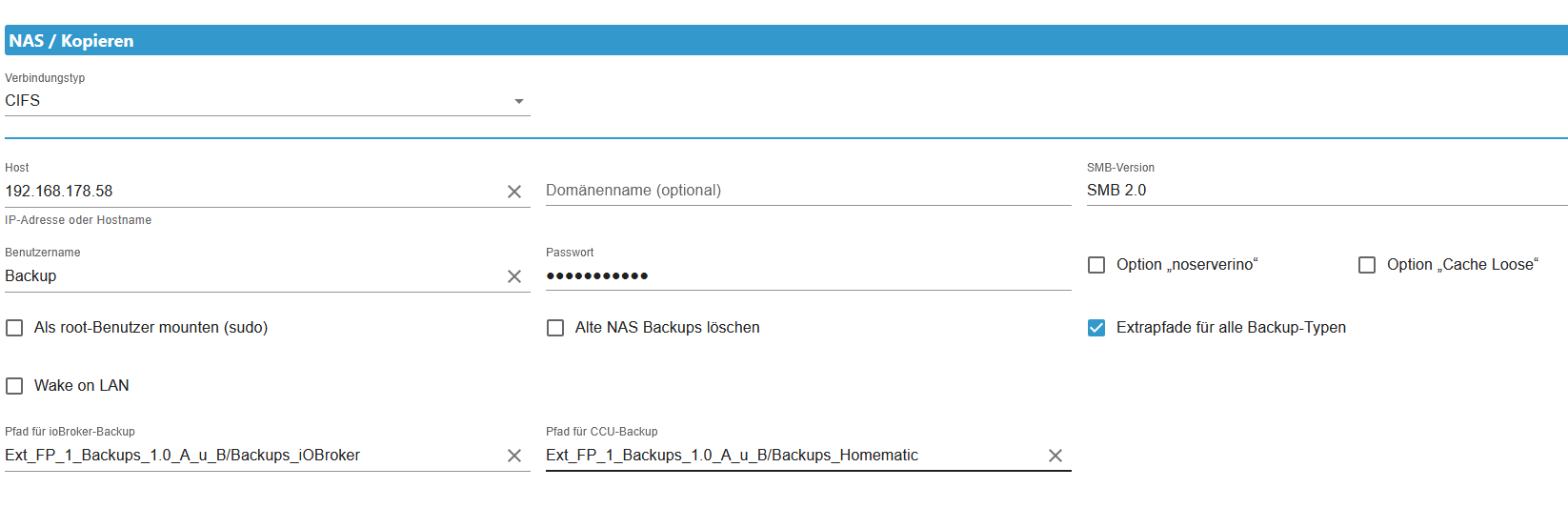
Meinst Du das mit CIFS -Einstellungen?
Hier die Experten-Einstellung OFF
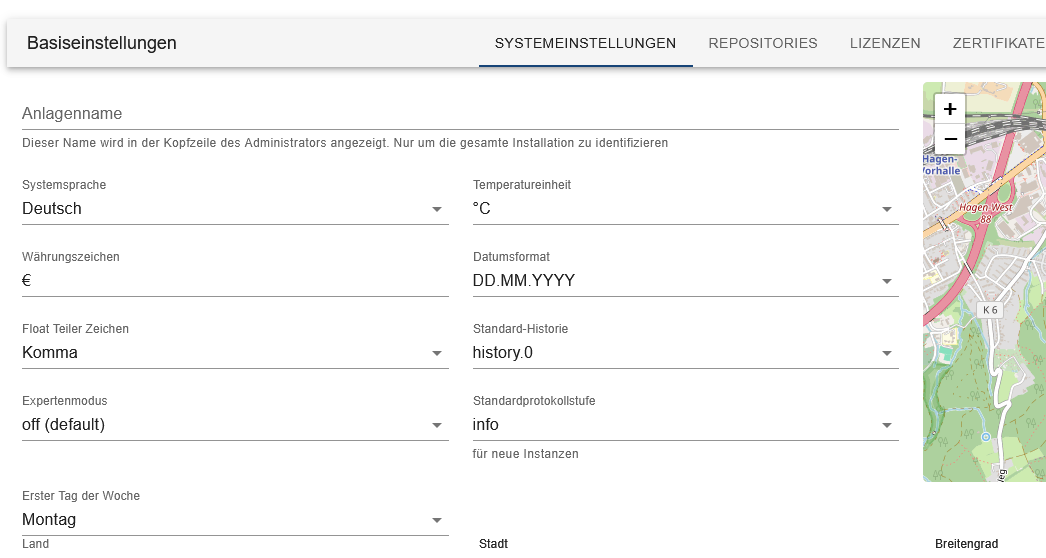
-
@thomas-braun sagte in Bin total überfordert mit Reaktivierung meines Systems:
Dann setz in 'Als root mounten' den Haken.
und wo ist diese Einstellung zu finden?
@bernd-3 sagte in Bin total überfordert mit Reaktivierung meines Systems:
und wo ist diese Einstellung zu finden?
Genau heißt es
'Als root Benutzer mounten (sudo)'Und den SMB-Dialekt würde ich auch so hoch wie möglich einstellen. Sollte 3.1.1 statt 2.0 sein.
-
@homoran sagte in Bin total überfordert mit Reaktivierung meines Systems:
@bernd-3 sagte in Bin total überfordert mit Reaktivierung meines Systems:
@thomas-braun
Experten-Einstellung ist "off (default)"bitte zeigen!
auch die cifs Einstellungen
(ggf. Passwort o.ä. unkenntlich machen)Meinst Du das mit CIFS -Einstellungen?
Hier die Experten-Einstellung OFF
@bernd-3
So in etwa sollte das aussehen:
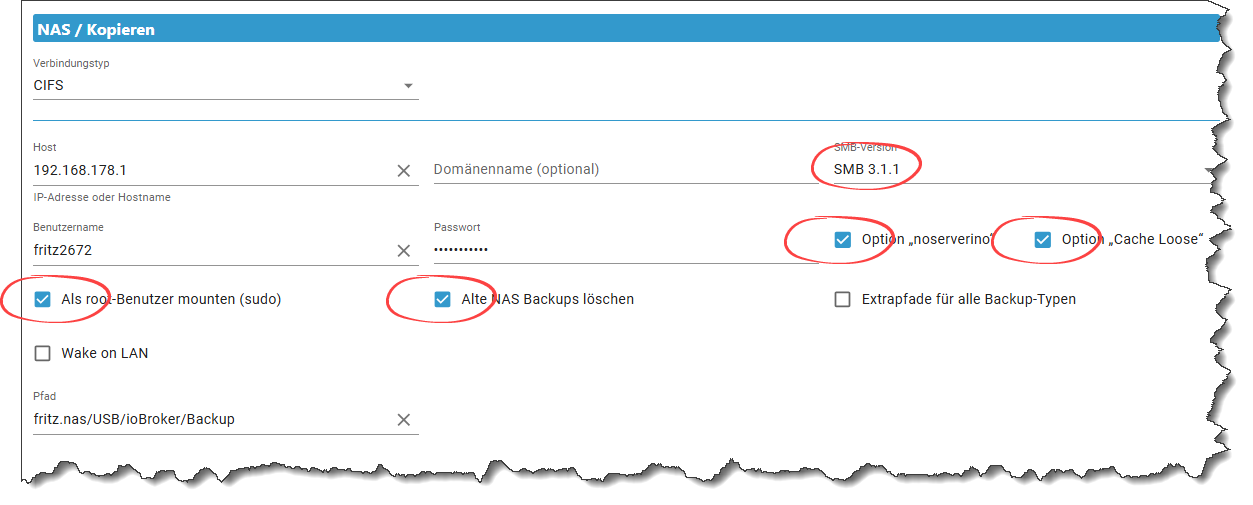
(natürlich mit anderer IP und Pfad)Edit
Hab nochmal den Screenshot geändert und die Einstellungen meines Testsystems genommen.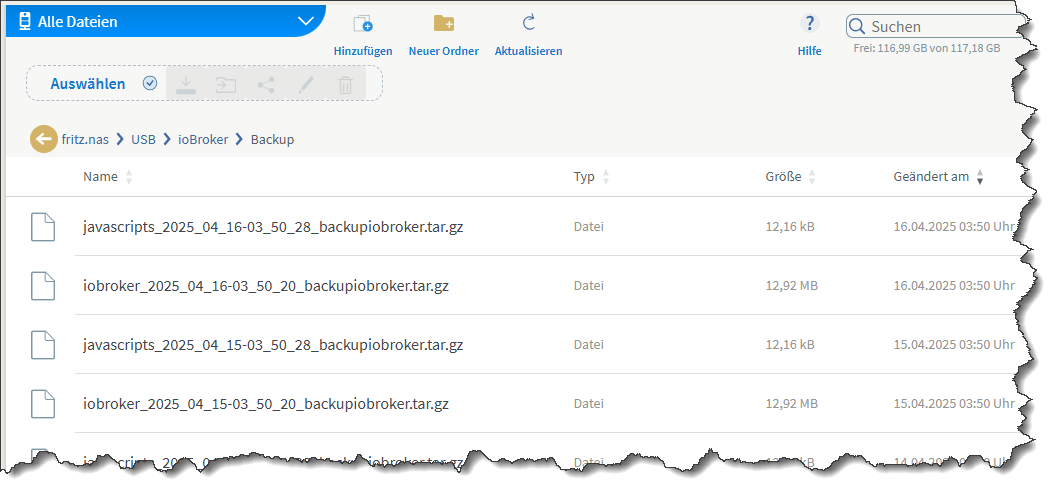
"Any fool can write code that a computer can understand. Good programmers write code that humans can understand." (Martin Fowler, "Refactoring")
Proxmox 9.1.1 LXC|8 GB|Core i7-6700
HmIP|ZigBee|Tasmota|Unifi
Zabbix Certified Specialist
Konnte ich Dir helfen? Dann benutze bitte das Voting unten rechts im Beitrag -
@bernd-3 sagte in Bin total überfordert mit Reaktivierung meines Systems:
und wo ist diese Einstellung zu finden?
Genau heißt es
'Als root Benutzer mounten (sudo)'Und den SMB-Dialekt würde ich auch so hoch wie möglich einstellen. Sollte 3.1.1 statt 2.0 sein.
@thomas-braun sagte in Bin total überfordert mit Reaktivierung meines Systems:
@bernd-3 sagte in Bin total überfordert mit Reaktivierung meines Systems:
und wo ist diese Einstellung zu finden?
Genau heißt es
'Als root Benutzer mounten (sudo)'Und den SMB-Dialekt würde ich auch so hoch wie möglich einstellen. Sollte 3.1.1 statt 2.0 sein.
Okay, SMB-Einstellung sagt mir etwas. Hatte ich aber vorher auch schon mal auf 3.1.1. Versuche ich aber nochmals.
"Als root Benutzer mounten (sudo)" - Kannst Du mir das bitte genauer erklären, für den totalen Newbie oder den im Windoof hängengebliebenen Idioten? Danke! Hat sich erledigt - Codierknecht war schon so frei! Danke
-
@bernd-3
So in etwa sollte das aussehen:
(natürlich mit anderer IP und Pfad)Edit
Hab nochmal den Screenshot geändert und die Einstellungen meines Testsystems genommen.Ja, wobei man die Optionen 'noserverino' und 'cache loose' nur setzen sollte, wenn die unbedingt erforderlich sind. Erstmal ohne probieren.
Beim FritzNAS sind die aber erforderlich. -
Ja, wobei man die Optionen 'noserverino' und 'cache loose' nur setzen sollte, wenn die unbedingt erforderlich sind. Erstmal ohne probieren.
Beim FritzNAS sind die aber erforderlich.@thomas-braun
Es handelt sich um ein QNAP-NAS (mit externen Erweiterungs-Festplatten), kein FritzNAS.
Mit 3.1.1 aber ohne "nosevervino" und ohne "cache loose" getestet:backitup.0 2025-04-16 15:14:31.316 error [iobroker/clean] Backup files not deleted from /opt/iobroker/backups because some errors. backitup.0 2025-04-16 15:13:12.229 error [iobroker/mount] Refer to the mount.cifs(8) manual page (e.g. man mount.cifs) and kernel log messages (dmesg) backitup.0 2025-04-16 15:13:12.229 error [iobroker/mount] mount error(2): No such file or directory backitup.0 2025-04-16 15:13:12.228 error [iobroker/mount] [undefined Error: Command failed: sudo mount -t cifs -o username=Backup,password=****,rw,forceuid,uid=iobroker,forcegid,gid=iobroker,file_mode=0777,dir_mode=0777 //192.168.178.58/Ext_FP_1_Backups_1.0_A_u_B/Backups_iOBroker /opt/iobroker/backups backitup.0 2025-04-16 15:12:21.122 error Error: Command failed: sudo mount -t cifs -o username=Backup,password=****,rw,forceuid,uid=iobroker,forcegid,gid=iobroker,file_mode=0777,dir_mode=0777 //192.168.178.58/Ext_FP_1_Backups_1.0_A_u_B/Backups_iOBroker /opt/iobroker/backupsmount error(2): No such file or directoryRefer to the mount.cifs(8) manual page (e.g. man mount.cifs) and kernel log messages (dmesg) backitup.0 2025-04-16 15:09:35.786 error [iobroker/clean] Backup files not deleted from /opt/iobroker/backups because some errors.Als nächstes versuche ich mit "noserverino" und "cacheloose". Berichte dann



Hey! Du scheinst an dieser Unterhaltung interessiert zu sein, hast aber noch kein Konto.
Hast du es satt, bei jedem Besuch durch die gleichen Beiträge zu scrollen? Wenn du dich für ein Konto anmeldest, kommst du immer genau dorthin zurück, wo du zuvor warst, und kannst dich über neue Antworten benachrichtigen lassen (entweder per E-Mail oder Push-Benachrichtigung). Du kannst auch Lesezeichen speichern und Beiträge positiv bewerten, um anderen Community-Mitgliedern deine Wertschätzung zu zeigen.
Mit deinem Input könnte dieser Beitrag noch besser werden 💗
Registrieren Anmelden444
Online33.0k
Benutzer83.6k
Themen1.3m
Beiträge