




nach update läuft mbus nicht und ... shelly z.T.
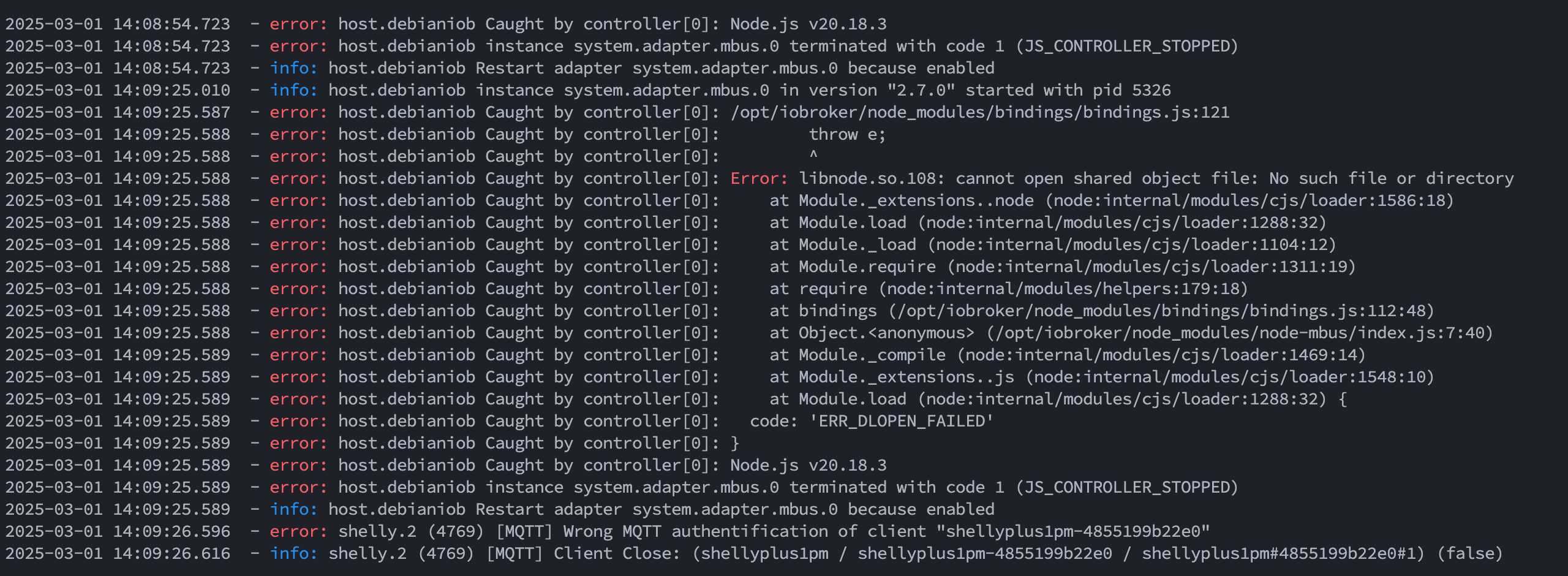
-
... 2 von den Shelly-Adaptern (Gen2.) mqtt
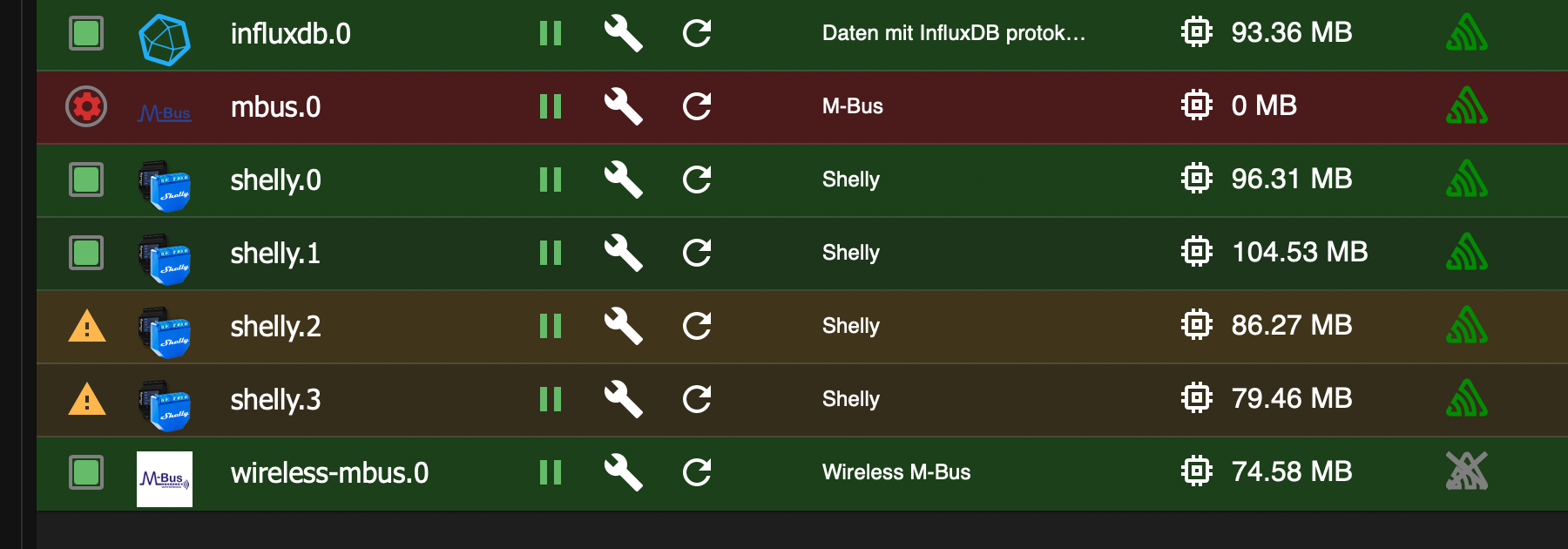
nach update:
shelly.0 ist Gen1 - Shelly 3EM
shelly1 ist Gen2 - Shelly Pro 1PM
shelly2 ist Gen2 - Shelly Pro 1PM
shelly3 ist Gen2 - Shelly Plus 1PMshelly1-3 alle das gleiche adminPW und mqttPW, nur auf verschiedenen Ports
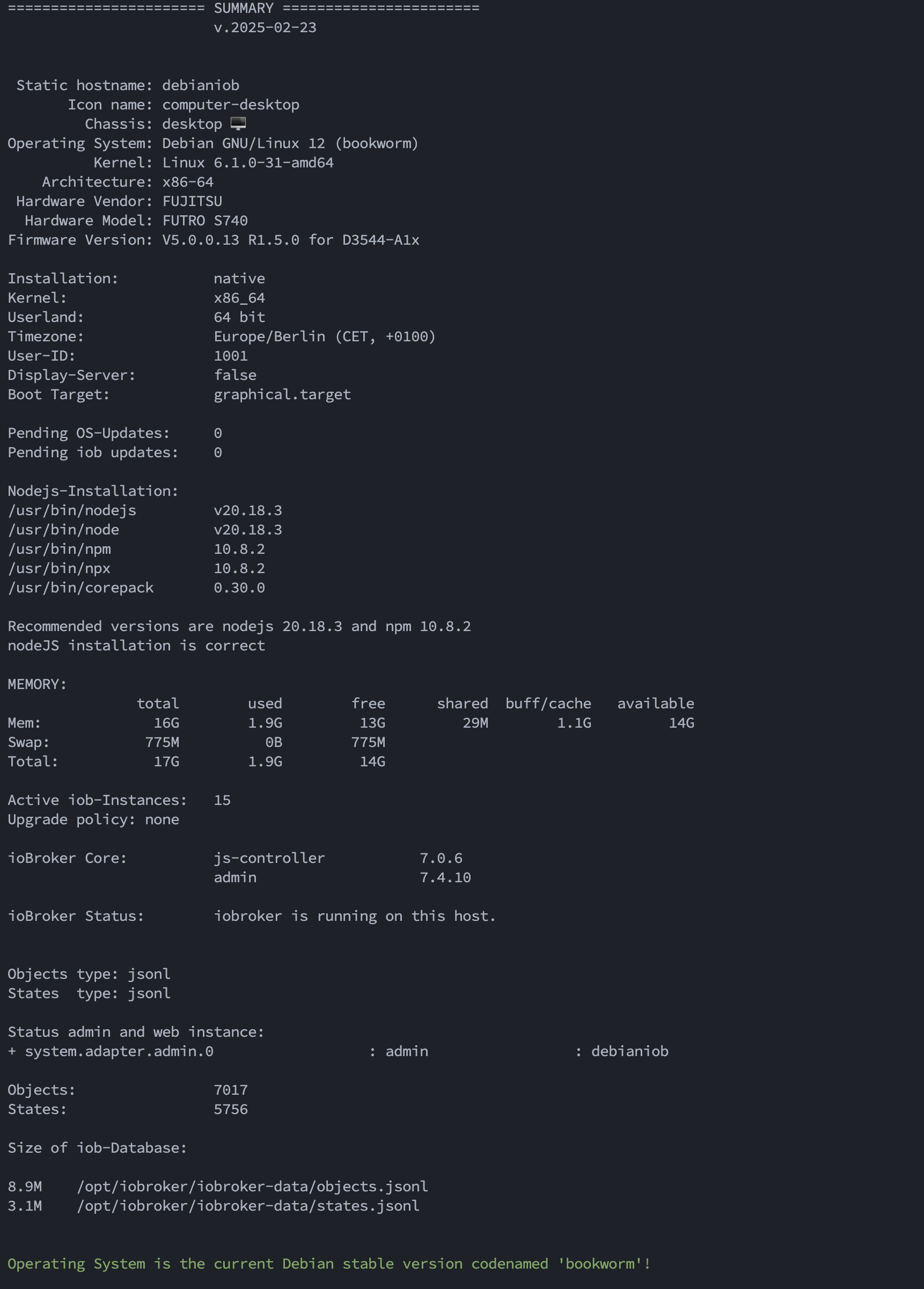
iob diag spuckt unterwegs noch das hier aus:
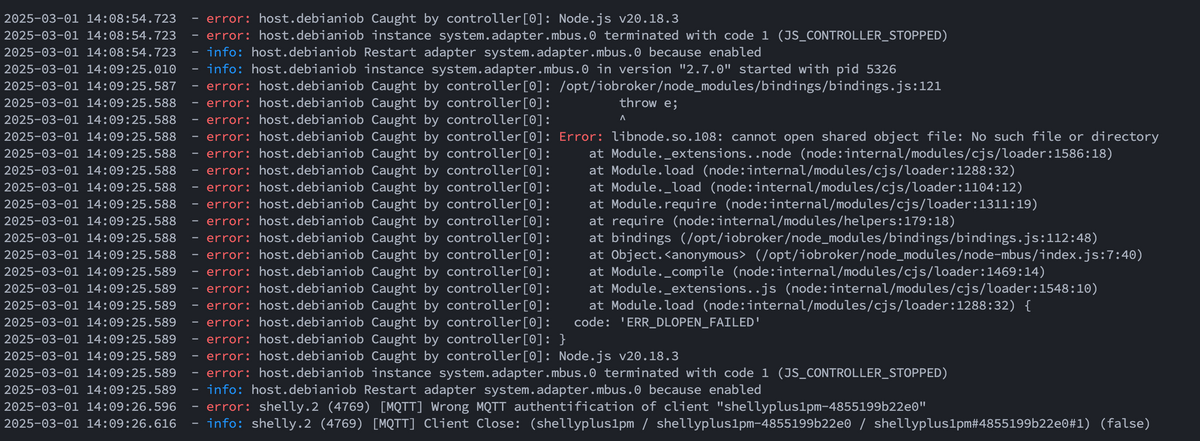
any idea?
-
Könnte eine falsche Installation von nodejs sein. Die Langfassung von
iob diagsagt? Und KEINE Screenshots von Text.
-
Könnte eine falsche Installation von nodejs sein. Die Langfassung von
iob diagsagt? Und KEINE Screenshots von Text.
@thomas-braun
========== Start marking the full check here ===========Script v.2025-02-23 *** BASE SYSTEM *** Static hostname: debianiob Icon name: computer-desktop Chassis: desktop 🖥️ Operating System: Debian GNU/Linux 12 (bookworm) Kernel: Linux 6.1.0-31-amd64 Architecture: x86-64 Hardware Vendor: FUJITSU Hardware Model: FUTRO S740 Firmware Version: V5.0.0.13 R1.5.0 for D3544-A1x OS is similar to: model name : Intel(R) Celeron(R) J4105 CPU @ 1.50GHz Docker : false Virtualization : none Kernel : x86_64 Userland : 64 bit Systemuptime and Load: 23:29:36 up 10:32, 2 users, load average: 0.05, 0.34, 0.27 CPU threads: 4 *** LIFE CYCLE STATUS *** Operating System is the current Debian stable version codenamed 'bookworm'! *** TIME AND TIMEZONES *** Local time: Sat 2025-03-01 23:29:36 CET Universal time: Sat 2025-03-01 22:29:36 UTC RTC time: Sat 2025-03-01 22:29:36 Time zone: Europe/Berlin (CET, +0100) System clock synchronized: yes NTP service: active RTC in local TZ: no *** Users and Groups *** User that called 'iob diag': peter HOME=/home/peter GROUPS=peter sudo iobroker User that is running 'js-controller': iobroker HOME=/home/iobroker GROUPS=iobroker tty dialout audio video plugdev *** DISPLAY-SERVER SETUP *** Display-Server: false Desktop: Terminal: tty *** MEMORY *** total used free shared buff/cache available Mem: 16G 1.9G 13G 31M 1.5G 14G Swap: 775M 0B 775M Total: 17G 1.9G 14G Active iob-Instances: 14 15762 M total memory 1783 M used memory 784 M active memory 1763 M inactive memory 12881 M free memory 459 M buffer memory 977 M swap cache 739 M total swap 0 M used swap 739 M free swap *** top - Table Of Processes *** top - 23:29:37 up 10:32, 2 users, load average: 0.05, 0.34, 0.27 Tasks: 166 total, 1 running, 165 sleeping, 0 stopped, 0 zombie %Cpu(s): 25.0 us, 0.0 sy, 0.0 ni, 75.0 id, 0.0 wa, 0.0 hi, 0.0 si, 0.0 st MiB Mem : 15762.3 total, 12881.5 free, 1783.9 used, 1437.1 buff/cache MiB Swap: 740.0 total, 740.0 free, 0.0 used. 13978.4 avail Mem *** FAILED SERVICES *** UNIT LOAD ACTIVE SUB DESCRIPTION 0 loaded units listed. *** DMESG CRITICAL ERRORS *** No critical errors detected *** FILESYSTEM *** Filesystem Type Size Used Avail Use% Mounted on udev devtmpfs 7.7G 0 7.7G 0% /dev tmpfs tmpfs 1.6G 1.5M 1.6G 1% /run /dev/sda1 ext4 233G 13G 209G 6% / tmpfs tmpfs 7.7G 0 7.7G 0% /dev/shm tmpfs tmpfs 5.0M 8.0K 5.0M 1% /run/lock /dev/sda2 vfat 300M 5.9M 294M 2% /boot/efi tmpfs tmpfs 1.6G 48K 1.6G 1% /run/user/114 tmpfs tmpfs 1.6G 44K 1.6G 1% /run/user/1001 Messages concerning ext4 filesystem in dmesg: [Sat Mar 1 12:57:07 2025] EXT4-fs (sda1): mounted filesystem with ordered data mode. Quota mode: none. [Sat Mar 1 12:57:08 2025] EXT4-fs (sda1): re-mounted. Quota mode: none. Show mounted filesystems: TARGET SOURCE FSTYPE OPTIONS / /dev/sda1 ext4 rw,relatime,errors=remount-ro `-/boot/efi /dev/sda2 vfat rw,relatime,fmask=0077,dmask=0077,codepage=437,iocharset=ascii,shortname=mixed,utf8,errors=remount-ro Files in neuralgic directories: /var: 3.3G /var/ 1.9G /var/cache 1.8G /var/cache/apt/archives 1.8G /var/cache/apt 1.3G /var/log Hint: You are currently not seeing messages from other users and the system. Users in groups 'adm', 'systemd-journal' can see all messages. Pass -q to turn off this notice. Archived and active journals take up 63.8M in the file system. /opt/iobroker/backups: 47M /opt/iobroker/backups/ /opt/iobroker/iobroker-data: 240M /opt/iobroker/iobroker-data/ 181M /opt/iobroker/iobroker-data/files 158M /opt/iobroker/iobroker-data/files/admin.admin 157M /opt/iobroker/iobroker-data/files/admin.admin/custom/static/js 157M /opt/iobroker/iobroker-data/files/admin.admin/custom/static The five largest files in iobroker-data are: 14M /opt/iobroker/iobroker-data/objects.jsonl 7.7M /opt/iobroker/iobroker-data/states.jsonl 7.4M /opt/iobroker/iobroker-data/files/admin.admin/custom/static/js/vendors-node_modules_iobroker_adapter-react-v5_node_modules_mui_icons-material_esm_index_js.d7ed606b.chunk.js.map 7.0M /opt/iobroker/iobroker-data/files/admin.admin/custom/static/js/vendors-node_modules_mui_icons-material_esm_index_js.e5b40573.chunk.js.map 7.0M /opt/iobroker/iobroker-data/files/admin.admin/custom/static/js/vendors-node_modules_mui_icons-material_esm_index_js.8219fdd8.chunk.js.map USB-Devices by-id: USB-Sticks - Avoid direct links to /dev/tty* in your adapter setups, please always prefer the links 'by-id': /dev/serial/by-id/usb-FTDI_FT232R_USB_UART_A50285BI-if00-port0 Zigbee Network Settings on your coordinator/in nvbackup are: zigbee.X Extended Pan ID: *** MASKED *** Pan ID: *** MASKED *** Channel: *** MASKED *** Network Key: *** MASKED *** To unmask the settings run 'iob diag --unmask' *** NodeJS-Installation *** /usr/bin/nodejs v20.18.3 /usr/bin/node v20.18.3 /usr/bin/npm 10.8.2 /usr/bin/npx 10.8.2 /usr/bin/corepack 0.30.0 nodejs: Installed: 20.18.3-1nodesource1 Candidate: 20.18.3-1nodesource1 Version table: *** 20.18.3-1nodesource1 1001 500 https://deb.nodesource.com/node_20.x nodistro/main amd64 Packages 100 /var/lib/dpkg/status 20.18.2-1nodesource1 1001 500 https://deb.nodesource.com/node_20.x nodistro/main amd64 Packages 20.18.1-1nodesource1 1001 500 https://deb.nodesource.com/node_20.x nodistro/main amd64 Packages 20.18.0-1nodesource1 1001 500 https://deb.nodesource.com/node_20.x nodistro/main amd64 Packages 20.17.0-1nodesource1 1001 500 https://deb.nodesource.com/node_20.x nodistro/main amd64 Packages 20.16.0-1nodesource1 1001 500 https://deb.nodesource.com/node_20.x nodistro/main amd64 Packages 20.15.1-1nodesource1 1001 500 https://deb.nodesource.com/node_20.x nodistro/main amd64 Packages 20.15.0-1nodesource1 1001 500 https://deb.nodesource.com/node_20.x nodistro/main amd64 Packages 20.14.0-1nodesource1 1001 500 https://deb.nodesource.com/node_20.x nodistro/main amd64 Packages 20.13.1-1nodesource1 1001 500 https://deb.nodesource.com/node_20.x nodistro/main amd64 Packages 20.13.0-1nodesource1 1001 500 https://deb.nodesource.com/node_20.x nodistro/main amd64 Packages 20.12.2-1nodesource1 1001 500 https://deb.nodesource.com/node_20.x nodistro/main amd64 Packages 20.12.1-1nodesource1 1001 500 https://deb.nodesource.com/node_20.x nodistro/main amd64 Packages 20.12.0-1nodesource1 1001 500 https://deb.nodesource.com/node_20.x nodistro/main amd64 Packages 20.11.1-1nodesource1 1001 500 https://deb.nodesource.com/node_20.x nodistro/main amd64 Packages 20.11.0-1nodesource1 1001 500 https://deb.nodesource.com/node_20.x nodistro/main amd64 Packages 20.10.0-1nodesource1 1001 500 https://deb.nodesource.com/node_20.x nodistro/main amd64 Packages 20.9.0-1nodesource1 1001 500 https://deb.nodesource.com/node_20.x nodistro/main amd64 Packages 20.8.1-1nodesource1 1001 500 https://deb.nodesource.com/node_20.x nodistro/main amd64 Packages 20.8.0-1nodesource1 1001 500 https://deb.nodesource.com/node_20.x nodistro/main amd64 Packages 20.7.0-1nodesource1 1001 500 https://deb.nodesource.com/node_20.x nodistro/main amd64 Packages 20.6.1-1nodesource1 1001 500 https://deb.nodesource.com/node_20.x nodistro/main amd64 Packages 20.6.0-1nodesource1 1001 500 https://deb.nodesource.com/node_20.x nodistro/main amd64 Packages 20.5.1-1nodesource1 1001 500 https://deb.nodesource.com/node_20.x nodistro/main amd64 Packages 20.5.0-1nodesource1 1001 500 https://deb.nodesource.com/node_20.x nodistro/main amd64 Packages 20.4.0-1nodesource1 1001 500 https://deb.nodesource.com/node_20.x nodistro/main amd64 Packages 20.3.1-1nodesource1 1001 500 https://deb.nodesource.com/node_20.x nodistro/main amd64 Packages 20.3.0-1nodesource1 1001 500 https://deb.nodesource.com/node_20.x nodistro/main amd64 Packages 20.2.0-1nodesource1 1001 500 https://deb.nodesource.com/node_20.x nodistro/main amd64 Packages 20.1.0-1nodesource1 1001 500 https://deb.nodesource.com/node_20.x nodistro/main amd64 Packages 20.0.0-1nodesource1 1001 500 https://deb.nodesource.com/node_20.x nodistro/main amd64 Packages 18.19.0+dfsg-6~deb12u2 500 500 http://deb.debian.org/debian bookworm/main amd64 Packages 18.19.0+dfsg-6~deb12u1 500 500 http://security.debian.org/debian-security bookworm-security/main amd64 Packages Temp directories causing deletion problem: 0 No problems detected Errors in npm tree: 0 No problems detected *** ioBroker-Installation *** ioBroker Status iobroker is running on this host. Objects type: jsonl States type: jsonl Hosts: debianiob debianiob (version: 7.0.6, hostname: debianiob , alive, uptime: 18737) Core adapters versions js-controller: 7.0.6 admin: 7.4.10 javascript: "javascript" not found nodejs modules from github: 0 Adapter State + system.adapter.admin.0 : admin : debianiob - enabled, port: 8081, bind: 0.0.0.0, run as: admin + system.adapter.backitup.0 : backitup : debianiob - enabled system.adapter.discovery.0 : discovery : debianiob - disabled + system.adapter.fronius-solarweb.0 : fronius-solarweb : debianiob - enabled + system.adapter.fronius-wattpilot.0 : fronius-wattpilot : debianiob - enabled + system.adapter.fronius.0 : fronius : debianiob - enabled + system.adapter.fronius.1 : fronius : debianiob - enabled + system.adapter.fronius.2 : fronius : debianiob - enabled + system.adapter.fronius.3 : fronius : debianiob - enabled + system.adapter.influxdb.0 : influxdb : debianiob - enabled, port: 8086 system.adapter.mbus.0 : mbus : debianiob - disabled, port: 3493 + system.adapter.shelly.0 : shelly : debianiob - enabled, port: 1882, bind: 0.0.0.0 + system.adapter.shelly.1 : shelly : debianiob - enabled, port: 1883, bind: 0.0.0.0 + system.adapter.shelly.2 : shelly : debianiob - enabled, port: 1882, bind: 0.0.0.0 + system.adapter.shelly.3 : shelly : debianiob - enabled, port: 1884, bind: 0.0.0.0 system.adapter.wireless-mbus.0 : wireless-mbus : debianiob - disabled + instance is alive Enabled adapters with bindings + system.adapter.admin.0 : admin : debianiob - enabled, port: 8081, bind: 0.0.0.0, run as: admin + system.adapter.influxdb.0 : influxdb : debianiob - enabled, port: 8086 + system.adapter.shelly.0 : shelly : debianiob - enabled, port: 1882, bind: 0.0.0.0 + system.adapter.shelly.1 : shelly : debianiob - enabled, port: 1883, bind: 0.0.0.0 + system.adapter.shelly.2 : shelly : debianiob - enabled, port: 1882, bind: 0.0.0.0 + system.adapter.shelly.3 : shelly : debianiob - enabled, port: 1884, bind: 0.0.0.0 ioBroker-Repositories ┌─────────┬──────────┬─────────────────────────────────────────────────────────┬──────────────┐ │ (index) │ name │ url │ auto upgrade │ ├─────────┼──────────┼─────────────────────────────────────────────────────────┼──────────────┤ │ 0 │ 'stable' │ 'http://download.iobroker.net/sources-dist.json' │ false │ │ 1 │ 'beta' │ 'http://download.iobroker.net/sources-dist-latest.json' │ false │ └─────────┴──────────┴─────────────────────────────────────────────────────────┴──────────────┘ Active repo(s): stable Upgrade policy: none Installed ioBroker-Adapters Used repository: stable Adapter "admin" : 7.4.10 , installed 7.4.10 Adapter "backitup" : 3.0.31 , installed 3.0.31 Adapter "discovery" : 5.0.0 , installed 5.0.0 Adapter "fronius" : 2.1.1 , installed 2.1.1 Adapter "fronius-solarweb": 0.0.3 , installed 0.0.3 Adapter "fronius-wattpilot": 4.6.3, installed 4.6.3 Adapter "influxdb" : 4.0.2 , installed 4.0.2 Controller "js-controller": 7.0.6 , installed 7.0.6 Adapter "mbus" : 2.7.0 , installed 2.7.0 Adapter "shelly" : 8.5.1 , installed 8.5.1 Adapter "wireless-mbus": 0.9.4 , installed 0.9.4 Objects and States Please stand by - This may take a while Objects: 7017 States: 5747 *** OS-Repositories and Updates *** W: An error occurred during the signature verification. The repository is not updated and the previous index files will be used. GPG error: https://packages.grafana.com/enterprise/deb stable InRelease: The following signatures couldn't be verified because the public key is not available: NO_PUBKEY 963FA27710458545 W: Failed to fetch https://packages.grafana.com/enterprise/deb/dists/stable/InRelease The following signatures couldn't be verified because the public key is not available: NO_PUBKEY 963FA27710458545 W: Some index files failed to download. They have been ignored, or old ones used instead. Hit:1 http://deb.debian.org/debian bookworm InRelease Hit:2 http://deb.debian.org/debian bookworm-updates InRelease Hit:3 http://security.debian.org/debian-security bookworm-security InRelease Get:4 https://packages.grafana.com/enterprise/deb stable InRelease [7660 B] Hit:5 https://deb.nodesource.com/node_20.x nodistro InRelease Err:4 https://packages.grafana.com/enterprise/deb stable InRelease The following signatures couldn't be verified because the public key is not available: NO_PUBKEY 963FA27710458545 Reading package lists... W: An error occurred during the signature verification. The repository is not updated and the previous index files will be used. GPG error: https://packages.grafana.com/enterprise/deb stable InRelease: The following signatures couldn't be verified because the public key is not available: NO_PUBKEY 963FA27710458545 W: Failed to fetch https://packages.grafana.com/enterprise/deb/dists/stable/InRelease The following signatures couldn't be verified because the public key is not available: NO_PUBKEY 963FA27710458545 W: Some index files failed to download. They have been ignored, or old ones used instead. Pending Updates: 0 *** Listening Ports *** Active Internet connections (only servers) Proto Recv-Q Send-Q Local Address Foreign Address State User Inode PID/Program name tcp 0 0 0.0.0.0:1884 0.0.0.0:* LISTEN 1002 115625 13380/io.shelly.3 tcp 0 0 0.0.0.0:1882 0.0.0.0:* LISTEN 1002 117802 13365/io.shelly.2 tcp 0 0 0.0.0.0:1883 0.0.0.0:* LISTEN 1002 118832 13350/io.shelly.1 tcp 0 0 127.0.0.1:631 0.0.0.0:* LISTEN 0 20995 649/cupsd tcp 0 0 127.0.0.1:9001 0.0.0.0:* LISTEN 1002 116477 13129/iobroker.js-c tcp 0 0 127.0.0.1:9000 0.0.0.0:* LISTEN 1002 116482 13129/iobroker.js-c tcp 0 0 0.0.0.0:22 0.0.0.0:* LISTEN 0 22504 672/sshd: /usr/sbin tcp 0 0 0.0.0.0:111 0.0.0.0:* LISTEN 0 14290 1/init tcp 0 0 127.0.0.1:8088 0.0.0.0:* LISTEN 117 22596 650/influxd tcp6 0 0 ::1:631 :::* LISTEN 0 20994 649/cupsd tcp6 0 0 :::22 :::* LISTEN 0 22506 672/sshd: /usr/sbin tcp6 0 0 :::111 :::* LISTEN 0 919 1/init tcp6 0 0 :::3000 :::* LISTEN 118 24176 1134/grafana tcp6 0 0 :::8086 :::* LISTEN 117 16974 650/influxd tcp6 0 0 :::8081 :::* LISTEN 1002 113446 13147/io.admin.0 udp 0 0 0.0.0.0:5353 0.0.0.0:* 109 20898 572/avahi-daemon: r udp 0 0 0.0.0.0:5683 0.0.0.0:* 1002 116697 13231/io.shelly.0 udp 0 0 0.0.0.0:38742 0.0.0.0:* 109 20900 572/avahi-daemon: r udp 0 0 0.0.0.0:48497 0.0.0.0:* 1002 162344 13231/io.shelly.0 udp 0 0 0.0.0.0:111 0.0.0.0:* 0 918 1/init udp6 0 0 :::5353 :::* 109 20899 572/avahi-daemon: r udp6 0 0 :::111 :::* 0 1721 1/init udp6 0 0 fe80::5b6b:3490:c74:546 :::* 0 129191 608/NetworkManager udp6 0 0 fe80::4e52:62ff:fe1:546 :::* 0 17171 608/NetworkManager udp6 0 0 :::35836 :::* 109 20901 572/avahi-daemon: r *** Log File - Last 25 Lines *** 2025-03-01 18:55:56.231 - info: admin.0 (13147) ==> Connected system.user.admin from ::ffff:192.168.1.74 2025-03-01 18:56:56.242 - info: admin.0 (13147) <== Disconnect system.user.admin from ::ffff:192.168.1.74 admin 2025-03-01 18:57:18.611 - info: admin.0 (13147) ==> Connected system.user.admin from ::ffff:192.168.0.76 2025-03-01 19:16:17.354 - error: fronius-solarweb.0 (13320) refresh token failed 2025-03-01 19:16:17.362 - error: fronius-solarweb.0 (13320) AxiosError: Request failed with status code 400 2025-03-01 19:16:17.362 - error: fronius-solarweb.0 (13320) {"responseError":1120,"responseMessage":"Refresh token invalid."} 2025-03-01 19:16:17.363 - error: fronius-solarweb.0 (13320) Start relogin in 1min 2025-03-01 19:24:37.344 - info: admin.0 (13147) <== Disconnect system.user.admin from ::ffff:192.168.0.76 admin 2025-03-01 19:24:38.598 - info: admin.0 (13147) failed connection to socket.io from ::ffff:192.168.0.76: Passport was not initialized 2025-03-01 20:14:34.830 - error: fronius-solarweb.0 (13320) refresh token failed 2025-03-01 20:14:34.837 - error: fronius-solarweb.0 (13320) AxiosError: Request failed with status code 400 2025-03-01 20:14:34.838 - error: fronius-solarweb.0 (13320) {"responseError":1120,"responseMessage":"Refresh token invalid."} 2025-03-01 20:14:34.838 - error: fronius-solarweb.0 (13320) Start relogin in 1min 2025-03-01 21:12:54.845 - error: fronius-solarweb.0 (13320) refresh token failed 2025-03-01 21:12:54.852 - error: fronius-solarweb.0 (13320) AxiosError: Request failed with status code 400 2025-03-01 21:12:54.853 - error: fronius-solarweb.0 (13320) {"responseError":1120,"responseMessage":"Refresh token invalid."} 2025-03-01 21:12:54.853 - error: fronius-solarweb.0 (13320) Start relogin in 1min 2025-03-01 22:11:14.751 - error: fronius-solarweb.0 (13320) refresh token failed 2025-03-01 22:11:14.759 - error: fronius-solarweb.0 (13320) AxiosError: Request failed with status code 400 2025-03-01 22:11:14.759 - error: fronius-solarweb.0 (13320) {"responseError":1120,"responseMessage":"Refresh token invalid."} 2025-03-01 22:11:14.760 - error: fronius-solarweb.0 (13320) Start relogin in 1min 2025-03-01 23:09:34.750 - error: fronius-solarweb.0 (13320) refresh token failed 2025-03-01 23:09:34.757 - error: fronius-solarweb.0 (13320) AxiosError: Request failed with status code 400 2025-03-01 23:09:34.758 - error: fronius-solarweb.0 (13320) {"responseError":1120,"responseMessage":"Refresh token invalid."} 2025-03-01 23:09:34.759 - error: fronius-solarweb.0 (13320) Start relogin in 1min============ Mark until here for C&P =============
iob diag has finished.
======================= SUMMARY ======================= v.2025-02-23 Static hostname: debianiob Icon name: computer-desktop Chassis: desktop 🖥️ Operating System: Debian GNU/Linux 12 (bookworm) Kernel: Linux 6.1.0-31-amd64 Architecture: x86-64 Hardware Vendor: FUJITSU Hardware Model: FUTRO S740 Firmware Version: V5.0.0.13 R1.5.0 for D3544-A1x Installation: native Kernel: x86_64 Userland: 64 bit Timezone: Europe/Berlin (CET, +0100) User-ID: 1001 Display-Server: false Boot Target: multi-user.target Pending OS-Updates: 0 Pending iob updates: 0 Nodejs-Installation: /usr/bin/nodejs v20.18.3 /usr/bin/node v20.18.3 /usr/bin/npm 10.8.2 /usr/bin/npx 10.8.2 /usr/bin/corepack 0.30.0 Recommended versions are nodejs 20.18.3 and npm 10.8.2 nodeJS installation is correct MEMORY: total used free shared buff/cache available Mem: 16G 1.9G 13G 31M 1.5G 14G Swap: 775M 0B 775M Total: 17G 1.9G 14G Active iob-Instances: 14 Upgrade policy: none ioBroker Core: js-controller 7.0.6 admin 7.4.10 ioBroker Status: iobroker is running on this host. Objects type: jsonl States type: jsonl Status admin and web instance: + system.adapter.admin.0 : admin : debianiob - enabled, port: 8081, bind: 0.0.0.0, run as: admin Objects: 7017 States: 5747 Size of iob-Database: 14M /opt/iobroker/iobroker-data/objects.jsonl 7.8M /opt/iobroker/iobroker-data/states.jsonl Operating System is the current Debian stable version codenamed 'bookworm'! =================== END OF SUMMARY ==================== -
@thomas-braun
========== Start marking the full check here ===========Script v.2025-02-23 *** BASE SYSTEM *** Static hostname: debianiob Icon name: computer-desktop Chassis: desktop 🖥️ Operating System: Debian GNU/Linux 12 (bookworm) Kernel: Linux 6.1.0-31-amd64 Architecture: x86-64 Hardware Vendor: FUJITSU Hardware Model: FUTRO S740 Firmware Version: V5.0.0.13 R1.5.0 for D3544-A1x OS is similar to: model name : Intel(R) Celeron(R) J4105 CPU @ 1.50GHz Docker : false Virtualization : none Kernel : x86_64 Userland : 64 bit Systemuptime and Load: 23:29:36 up 10:32, 2 users, load average: 0.05, 0.34, 0.27 CPU threads: 4 *** LIFE CYCLE STATUS *** Operating System is the current Debian stable version codenamed 'bookworm'! *** TIME AND TIMEZONES *** Local time: Sat 2025-03-01 23:29:36 CET Universal time: Sat 2025-03-01 22:29:36 UTC RTC time: Sat 2025-03-01 22:29:36 Time zone: Europe/Berlin (CET, +0100) System clock synchronized: yes NTP service: active RTC in local TZ: no *** Users and Groups *** User that called 'iob diag': peter HOME=/home/peter GROUPS=peter sudo iobroker User that is running 'js-controller': iobroker HOME=/home/iobroker GROUPS=iobroker tty dialout audio video plugdev *** DISPLAY-SERVER SETUP *** Display-Server: false Desktop: Terminal: tty *** MEMORY *** total used free shared buff/cache available Mem: 16G 1.9G 13G 31M 1.5G 14G Swap: 775M 0B 775M Total: 17G 1.9G 14G Active iob-Instances: 14 15762 M total memory 1783 M used memory 784 M active memory 1763 M inactive memory 12881 M free memory 459 M buffer memory 977 M swap cache 739 M total swap 0 M used swap 739 M free swap *** top - Table Of Processes *** top - 23:29:37 up 10:32, 2 users, load average: 0.05, 0.34, 0.27 Tasks: 166 total, 1 running, 165 sleeping, 0 stopped, 0 zombie %Cpu(s): 25.0 us, 0.0 sy, 0.0 ni, 75.0 id, 0.0 wa, 0.0 hi, 0.0 si, 0.0 st MiB Mem : 15762.3 total, 12881.5 free, 1783.9 used, 1437.1 buff/cache MiB Swap: 740.0 total, 740.0 free, 0.0 used. 13978.4 avail Mem *** FAILED SERVICES *** UNIT LOAD ACTIVE SUB DESCRIPTION 0 loaded units listed. *** DMESG CRITICAL ERRORS *** No critical errors detected *** FILESYSTEM *** Filesystem Type Size Used Avail Use% Mounted on udev devtmpfs 7.7G 0 7.7G 0% /dev tmpfs tmpfs 1.6G 1.5M 1.6G 1% /run /dev/sda1 ext4 233G 13G 209G 6% / tmpfs tmpfs 7.7G 0 7.7G 0% /dev/shm tmpfs tmpfs 5.0M 8.0K 5.0M 1% /run/lock /dev/sda2 vfat 300M 5.9M 294M 2% /boot/efi tmpfs tmpfs 1.6G 48K 1.6G 1% /run/user/114 tmpfs tmpfs 1.6G 44K 1.6G 1% /run/user/1001 Messages concerning ext4 filesystem in dmesg: [Sat Mar 1 12:57:07 2025] EXT4-fs (sda1): mounted filesystem with ordered data mode. Quota mode: none. [Sat Mar 1 12:57:08 2025] EXT4-fs (sda1): re-mounted. Quota mode: none. Show mounted filesystems: TARGET SOURCE FSTYPE OPTIONS / /dev/sda1 ext4 rw,relatime,errors=remount-ro `-/boot/efi /dev/sda2 vfat rw,relatime,fmask=0077,dmask=0077,codepage=437,iocharset=ascii,shortname=mixed,utf8,errors=remount-ro Files in neuralgic directories: /var: 3.3G /var/ 1.9G /var/cache 1.8G /var/cache/apt/archives 1.8G /var/cache/apt 1.3G /var/log Hint: You are currently not seeing messages from other users and the system. Users in groups 'adm', 'systemd-journal' can see all messages. Pass -q to turn off this notice. Archived and active journals take up 63.8M in the file system. /opt/iobroker/backups: 47M /opt/iobroker/backups/ /opt/iobroker/iobroker-data: 240M /opt/iobroker/iobroker-data/ 181M /opt/iobroker/iobroker-data/files 158M /opt/iobroker/iobroker-data/files/admin.admin 157M /opt/iobroker/iobroker-data/files/admin.admin/custom/static/js 157M /opt/iobroker/iobroker-data/files/admin.admin/custom/static The five largest files in iobroker-data are: 14M /opt/iobroker/iobroker-data/objects.jsonl 7.7M /opt/iobroker/iobroker-data/states.jsonl 7.4M /opt/iobroker/iobroker-data/files/admin.admin/custom/static/js/vendors-node_modules_iobroker_adapter-react-v5_node_modules_mui_icons-material_esm_index_js.d7ed606b.chunk.js.map 7.0M /opt/iobroker/iobroker-data/files/admin.admin/custom/static/js/vendors-node_modules_mui_icons-material_esm_index_js.e5b40573.chunk.js.map 7.0M /opt/iobroker/iobroker-data/files/admin.admin/custom/static/js/vendors-node_modules_mui_icons-material_esm_index_js.8219fdd8.chunk.js.map USB-Devices by-id: USB-Sticks - Avoid direct links to /dev/tty* in your adapter setups, please always prefer the links 'by-id': /dev/serial/by-id/usb-FTDI_FT232R_USB_UART_A50285BI-if00-port0 Zigbee Network Settings on your coordinator/in nvbackup are: zigbee.X Extended Pan ID: *** MASKED *** Pan ID: *** MASKED *** Channel: *** MASKED *** Network Key: *** MASKED *** To unmask the settings run 'iob diag --unmask' *** NodeJS-Installation *** /usr/bin/nodejs v20.18.3 /usr/bin/node v20.18.3 /usr/bin/npm 10.8.2 /usr/bin/npx 10.8.2 /usr/bin/corepack 0.30.0 nodejs: Installed: 20.18.3-1nodesource1 Candidate: 20.18.3-1nodesource1 Version table: *** 20.18.3-1nodesource1 1001 500 https://deb.nodesource.com/node_20.x nodistro/main amd64 Packages 100 /var/lib/dpkg/status 20.18.2-1nodesource1 1001 500 https://deb.nodesource.com/node_20.x nodistro/main amd64 Packages 20.18.1-1nodesource1 1001 500 https://deb.nodesource.com/node_20.x nodistro/main amd64 Packages 20.18.0-1nodesource1 1001 500 https://deb.nodesource.com/node_20.x nodistro/main amd64 Packages 20.17.0-1nodesource1 1001 500 https://deb.nodesource.com/node_20.x nodistro/main amd64 Packages 20.16.0-1nodesource1 1001 500 https://deb.nodesource.com/node_20.x nodistro/main amd64 Packages 20.15.1-1nodesource1 1001 500 https://deb.nodesource.com/node_20.x nodistro/main amd64 Packages 20.15.0-1nodesource1 1001 500 https://deb.nodesource.com/node_20.x nodistro/main amd64 Packages 20.14.0-1nodesource1 1001 500 https://deb.nodesource.com/node_20.x nodistro/main amd64 Packages 20.13.1-1nodesource1 1001 500 https://deb.nodesource.com/node_20.x nodistro/main amd64 Packages 20.13.0-1nodesource1 1001 500 https://deb.nodesource.com/node_20.x nodistro/main amd64 Packages 20.12.2-1nodesource1 1001 500 https://deb.nodesource.com/node_20.x nodistro/main amd64 Packages 20.12.1-1nodesource1 1001 500 https://deb.nodesource.com/node_20.x nodistro/main amd64 Packages 20.12.0-1nodesource1 1001 500 https://deb.nodesource.com/node_20.x nodistro/main amd64 Packages 20.11.1-1nodesource1 1001 500 https://deb.nodesource.com/node_20.x nodistro/main amd64 Packages 20.11.0-1nodesource1 1001 500 https://deb.nodesource.com/node_20.x nodistro/main amd64 Packages 20.10.0-1nodesource1 1001 500 https://deb.nodesource.com/node_20.x nodistro/main amd64 Packages 20.9.0-1nodesource1 1001 500 https://deb.nodesource.com/node_20.x nodistro/main amd64 Packages 20.8.1-1nodesource1 1001 500 https://deb.nodesource.com/node_20.x nodistro/main amd64 Packages 20.8.0-1nodesource1 1001 500 https://deb.nodesource.com/node_20.x nodistro/main amd64 Packages 20.7.0-1nodesource1 1001 500 https://deb.nodesource.com/node_20.x nodistro/main amd64 Packages 20.6.1-1nodesource1 1001 500 https://deb.nodesource.com/node_20.x nodistro/main amd64 Packages 20.6.0-1nodesource1 1001 500 https://deb.nodesource.com/node_20.x nodistro/main amd64 Packages 20.5.1-1nodesource1 1001 500 https://deb.nodesource.com/node_20.x nodistro/main amd64 Packages 20.5.0-1nodesource1 1001 500 https://deb.nodesource.com/node_20.x nodistro/main amd64 Packages 20.4.0-1nodesource1 1001 500 https://deb.nodesource.com/node_20.x nodistro/main amd64 Packages 20.3.1-1nodesource1 1001 500 https://deb.nodesource.com/node_20.x nodistro/main amd64 Packages 20.3.0-1nodesource1 1001 500 https://deb.nodesource.com/node_20.x nodistro/main amd64 Packages 20.2.0-1nodesource1 1001 500 https://deb.nodesource.com/node_20.x nodistro/main amd64 Packages 20.1.0-1nodesource1 1001 500 https://deb.nodesource.com/node_20.x nodistro/main amd64 Packages 20.0.0-1nodesource1 1001 500 https://deb.nodesource.com/node_20.x nodistro/main amd64 Packages 18.19.0+dfsg-6~deb12u2 500 500 http://deb.debian.org/debian bookworm/main amd64 Packages 18.19.0+dfsg-6~deb12u1 500 500 http://security.debian.org/debian-security bookworm-security/main amd64 Packages Temp directories causing deletion problem: 0 No problems detected Errors in npm tree: 0 No problems detected *** ioBroker-Installation *** ioBroker Status iobroker is running on this host. Objects type: jsonl States type: jsonl Hosts: debianiob debianiob (version: 7.0.6, hostname: debianiob , alive, uptime: 18737) Core adapters versions js-controller: 7.0.6 admin: 7.4.10 javascript: "javascript" not found nodejs modules from github: 0 Adapter State + system.adapter.admin.0 : admin : debianiob - enabled, port: 8081, bind: 0.0.0.0, run as: admin + system.adapter.backitup.0 : backitup : debianiob - enabled system.adapter.discovery.0 : discovery : debianiob - disabled + system.adapter.fronius-solarweb.0 : fronius-solarweb : debianiob - enabled + system.adapter.fronius-wattpilot.0 : fronius-wattpilot : debianiob - enabled + system.adapter.fronius.0 : fronius : debianiob - enabled + system.adapter.fronius.1 : fronius : debianiob - enabled + system.adapter.fronius.2 : fronius : debianiob - enabled + system.adapter.fronius.3 : fronius : debianiob - enabled + system.adapter.influxdb.0 : influxdb : debianiob - enabled, port: 8086 system.adapter.mbus.0 : mbus : debianiob - disabled, port: 3493 + system.adapter.shelly.0 : shelly : debianiob - enabled, port: 1882, bind: 0.0.0.0 + system.adapter.shelly.1 : shelly : debianiob - enabled, port: 1883, bind: 0.0.0.0 + system.adapter.shelly.2 : shelly : debianiob - enabled, port: 1882, bind: 0.0.0.0 + system.adapter.shelly.3 : shelly : debianiob - enabled, port: 1884, bind: 0.0.0.0 system.adapter.wireless-mbus.0 : wireless-mbus : debianiob - disabled + instance is alive Enabled adapters with bindings + system.adapter.admin.0 : admin : debianiob - enabled, port: 8081, bind: 0.0.0.0, run as: admin + system.adapter.influxdb.0 : influxdb : debianiob - enabled, port: 8086 + system.adapter.shelly.0 : shelly : debianiob - enabled, port: 1882, bind: 0.0.0.0 + system.adapter.shelly.1 : shelly : debianiob - enabled, port: 1883, bind: 0.0.0.0 + system.adapter.shelly.2 : shelly : debianiob - enabled, port: 1882, bind: 0.0.0.0 + system.adapter.shelly.3 : shelly : debianiob - enabled, port: 1884, bind: 0.0.0.0 ioBroker-Repositories ┌─────────┬──────────┬─────────────────────────────────────────────────────────┬──────────────┐ │ (index) │ name │ url │ auto upgrade │ ├─────────┼──────────┼─────────────────────────────────────────────────────────┼──────────────┤ │ 0 │ 'stable' │ 'http://download.iobroker.net/sources-dist.json' │ false │ │ 1 │ 'beta' │ 'http://download.iobroker.net/sources-dist-latest.json' │ false │ └─────────┴──────────┴─────────────────────────────────────────────────────────┴──────────────┘ Active repo(s): stable Upgrade policy: none Installed ioBroker-Adapters Used repository: stable Adapter "admin" : 7.4.10 , installed 7.4.10 Adapter "backitup" : 3.0.31 , installed 3.0.31 Adapter "discovery" : 5.0.0 , installed 5.0.0 Adapter "fronius" : 2.1.1 , installed 2.1.1 Adapter "fronius-solarweb": 0.0.3 , installed 0.0.3 Adapter "fronius-wattpilot": 4.6.3, installed 4.6.3 Adapter "influxdb" : 4.0.2 , installed 4.0.2 Controller "js-controller": 7.0.6 , installed 7.0.6 Adapter "mbus" : 2.7.0 , installed 2.7.0 Adapter "shelly" : 8.5.1 , installed 8.5.1 Adapter "wireless-mbus": 0.9.4 , installed 0.9.4 Objects and States Please stand by - This may take a while Objects: 7017 States: 5747 *** OS-Repositories and Updates *** W: An error occurred during the signature verification. The repository is not updated and the previous index files will be used. GPG error: https://packages.grafana.com/enterprise/deb stable InRelease: The following signatures couldn't be verified because the public key is not available: NO_PUBKEY 963FA27710458545 W: Failed to fetch https://packages.grafana.com/enterprise/deb/dists/stable/InRelease The following signatures couldn't be verified because the public key is not available: NO_PUBKEY 963FA27710458545 W: Some index files failed to download. They have been ignored, or old ones used instead. Hit:1 http://deb.debian.org/debian bookworm InRelease Hit:2 http://deb.debian.org/debian bookworm-updates InRelease Hit:3 http://security.debian.org/debian-security bookworm-security InRelease Get:4 https://packages.grafana.com/enterprise/deb stable InRelease [7660 B] Hit:5 https://deb.nodesource.com/node_20.x nodistro InRelease Err:4 https://packages.grafana.com/enterprise/deb stable InRelease The following signatures couldn't be verified because the public key is not available: NO_PUBKEY 963FA27710458545 Reading package lists... W: An error occurred during the signature verification. The repository is not updated and the previous index files will be used. GPG error: https://packages.grafana.com/enterprise/deb stable InRelease: The following signatures couldn't be verified because the public key is not available: NO_PUBKEY 963FA27710458545 W: Failed to fetch https://packages.grafana.com/enterprise/deb/dists/stable/InRelease The following signatures couldn't be verified because the public key is not available: NO_PUBKEY 963FA27710458545 W: Some index files failed to download. They have been ignored, or old ones used instead. Pending Updates: 0 *** Listening Ports *** Active Internet connections (only servers) Proto Recv-Q Send-Q Local Address Foreign Address State User Inode PID/Program name tcp 0 0 0.0.0.0:1884 0.0.0.0:* LISTEN 1002 115625 13380/io.shelly.3 tcp 0 0 0.0.0.0:1882 0.0.0.0:* LISTEN 1002 117802 13365/io.shelly.2 tcp 0 0 0.0.0.0:1883 0.0.0.0:* LISTEN 1002 118832 13350/io.shelly.1 tcp 0 0 127.0.0.1:631 0.0.0.0:* LISTEN 0 20995 649/cupsd tcp 0 0 127.0.0.1:9001 0.0.0.0:* LISTEN 1002 116477 13129/iobroker.js-c tcp 0 0 127.0.0.1:9000 0.0.0.0:* LISTEN 1002 116482 13129/iobroker.js-c tcp 0 0 0.0.0.0:22 0.0.0.0:* LISTEN 0 22504 672/sshd: /usr/sbin tcp 0 0 0.0.0.0:111 0.0.0.0:* LISTEN 0 14290 1/init tcp 0 0 127.0.0.1:8088 0.0.0.0:* LISTEN 117 22596 650/influxd tcp6 0 0 ::1:631 :::* LISTEN 0 20994 649/cupsd tcp6 0 0 :::22 :::* LISTEN 0 22506 672/sshd: /usr/sbin tcp6 0 0 :::111 :::* LISTEN 0 919 1/init tcp6 0 0 :::3000 :::* LISTEN 118 24176 1134/grafana tcp6 0 0 :::8086 :::* LISTEN 117 16974 650/influxd tcp6 0 0 :::8081 :::* LISTEN 1002 113446 13147/io.admin.0 udp 0 0 0.0.0.0:5353 0.0.0.0:* 109 20898 572/avahi-daemon: r udp 0 0 0.0.0.0:5683 0.0.0.0:* 1002 116697 13231/io.shelly.0 udp 0 0 0.0.0.0:38742 0.0.0.0:* 109 20900 572/avahi-daemon: r udp 0 0 0.0.0.0:48497 0.0.0.0:* 1002 162344 13231/io.shelly.0 udp 0 0 0.0.0.0:111 0.0.0.0:* 0 918 1/init udp6 0 0 :::5353 :::* 109 20899 572/avahi-daemon: r udp6 0 0 :::111 :::* 0 1721 1/init udp6 0 0 fe80::5b6b:3490:c74:546 :::* 0 129191 608/NetworkManager udp6 0 0 fe80::4e52:62ff:fe1:546 :::* 0 17171 608/NetworkManager udp6 0 0 :::35836 :::* 109 20901 572/avahi-daemon: r *** Log File - Last 25 Lines *** 2025-03-01 18:55:56.231 - info: admin.0 (13147) ==> Connected system.user.admin from ::ffff:192.168.1.74 2025-03-01 18:56:56.242 - info: admin.0 (13147) <== Disconnect system.user.admin from ::ffff:192.168.1.74 admin 2025-03-01 18:57:18.611 - info: admin.0 (13147) ==> Connected system.user.admin from ::ffff:192.168.0.76 2025-03-01 19:16:17.354 - error: fronius-solarweb.0 (13320) refresh token failed 2025-03-01 19:16:17.362 - error: fronius-solarweb.0 (13320) AxiosError: Request failed with status code 400 2025-03-01 19:16:17.362 - error: fronius-solarweb.0 (13320) {"responseError":1120,"responseMessage":"Refresh token invalid."} 2025-03-01 19:16:17.363 - error: fronius-solarweb.0 (13320) Start relogin in 1min 2025-03-01 19:24:37.344 - info: admin.0 (13147) <== Disconnect system.user.admin from ::ffff:192.168.0.76 admin 2025-03-01 19:24:38.598 - info: admin.0 (13147) failed connection to socket.io from ::ffff:192.168.0.76: Passport was not initialized 2025-03-01 20:14:34.830 - error: fronius-solarweb.0 (13320) refresh token failed 2025-03-01 20:14:34.837 - error: fronius-solarweb.0 (13320) AxiosError: Request failed with status code 400 2025-03-01 20:14:34.838 - error: fronius-solarweb.0 (13320) {"responseError":1120,"responseMessage":"Refresh token invalid."} 2025-03-01 20:14:34.838 - error: fronius-solarweb.0 (13320) Start relogin in 1min 2025-03-01 21:12:54.845 - error: fronius-solarweb.0 (13320) refresh token failed 2025-03-01 21:12:54.852 - error: fronius-solarweb.0 (13320) AxiosError: Request failed with status code 400 2025-03-01 21:12:54.853 - error: fronius-solarweb.0 (13320) {"responseError":1120,"responseMessage":"Refresh token invalid."} 2025-03-01 21:12:54.853 - error: fronius-solarweb.0 (13320) Start relogin in 1min 2025-03-01 22:11:14.751 - error: fronius-solarweb.0 (13320) refresh token failed 2025-03-01 22:11:14.759 - error: fronius-solarweb.0 (13320) AxiosError: Request failed with status code 400 2025-03-01 22:11:14.759 - error: fronius-solarweb.0 (13320) {"responseError":1120,"responseMessage":"Refresh token invalid."} 2025-03-01 22:11:14.760 - error: fronius-solarweb.0 (13320) Start relogin in 1min 2025-03-01 23:09:34.750 - error: fronius-solarweb.0 (13320) refresh token failed 2025-03-01 23:09:34.757 - error: fronius-solarweb.0 (13320) AxiosError: Request failed with status code 400 2025-03-01 23:09:34.758 - error: fronius-solarweb.0 (13320) {"responseError":1120,"responseMessage":"Refresh token invalid."} 2025-03-01 23:09:34.759 - error: fronius-solarweb.0 (13320) Start relogin in 1min============ Mark until here for C&P =============
iob diag has finished.
======================= SUMMARY ======================= v.2025-02-23 Static hostname: debianiob Icon name: computer-desktop Chassis: desktop 🖥️ Operating System: Debian GNU/Linux 12 (bookworm) Kernel: Linux 6.1.0-31-amd64 Architecture: x86-64 Hardware Vendor: FUJITSU Hardware Model: FUTRO S740 Firmware Version: V5.0.0.13 R1.5.0 for D3544-A1x Installation: native Kernel: x86_64 Userland: 64 bit Timezone: Europe/Berlin (CET, +0100) User-ID: 1001 Display-Server: false Boot Target: multi-user.target Pending OS-Updates: 0 Pending iob updates: 0 Nodejs-Installation: /usr/bin/nodejs v20.18.3 /usr/bin/node v20.18.3 /usr/bin/npm 10.8.2 /usr/bin/npx 10.8.2 /usr/bin/corepack 0.30.0 Recommended versions are nodejs 20.18.3 and npm 10.8.2 nodeJS installation is correct MEMORY: total used free shared buff/cache available Mem: 16G 1.9G 13G 31M 1.5G 14G Swap: 775M 0B 775M Total: 17G 1.9G 14G Active iob-Instances: 14 Upgrade policy: none ioBroker Core: js-controller 7.0.6 admin 7.4.10 ioBroker Status: iobroker is running on this host. Objects type: jsonl States type: jsonl Status admin and web instance: + system.adapter.admin.0 : admin : debianiob - enabled, port: 8081, bind: 0.0.0.0, run as: admin Objects: 7017 States: 5747 Size of iob-Database: 14M /opt/iobroker/iobroker-data/objects.jsonl 7.8M /opt/iobroker/iobroker-data/states.jsonl Operating System is the current Debian stable version codenamed 'bookworm'! =================== END OF SUMMARY ====================@pille0557
so ... iobroker auf einem raspi neu installiert
mbus läuft hier jetzt wiederbzgl. shelly wieder das gleiche Ergebnis:

shelly0 ist Gen2 - Shelly Pro 1PM Port 1882
shelly1 ist Gen2 - Shelly Pro 1PM Port 1883
shelly2 ist Gen2 - Shelly Plus 1PM Port 1884shelly0-2 wieder alle das gleiche adminPW und mqttPW, nur auf verschiedenen Ports
?
-
@pille0557
so ... iobroker auf einem raspi neu installiert
mbus läuft hier jetzt wiederbzgl. shelly wieder das gleiche Ergebnis:
shelly0 ist Gen2 - Shelly Pro 1PM Port 1882
shelly1 ist Gen2 - Shelly Pro 1PM Port 1883
shelly2 ist Gen2 - Shelly Plus 1PM Port 1884shelly0-2 wieder alle das gleiche adminPW und mqttPW, nur auf verschiedenen Ports
?
-
@pille0557
habe mal für shelly.0 und shelly.2 auf dn Geräten einen anderen Port eintragen, das Passwort auch nochmal eingetragen ... und siehe da Instanzen liefen wieder ... ?@pille0557
Hat zwar per se mal nichts mit deinem Problem zu tun aber darf man fragen warum du drei Shelly Instanzen betreibst?Entwicklung u Betreuung: envertech-pv, hoymiles-ms, ns-client, pid, snmp Adapter;
Support Repositoryverwaltung.Wer 'nen Kaffee spendieren will: https://paypal.me
-
@pille0557
Hat zwar per se mal nichts mit deinem Problem zu tun aber darf man fragen warum du drei Shelly Instanzen betreibst? -
@mcm1957
Es sind sogar 4!
Ich brauche doch für jeden Shelly eine Instanz?
1 Shelly3em für WP, Heizstab und Nuos
2 pro1pm für 2 Growatt WR und einen weiteren …@pille0557 sagte in nach update läuft mbus nicht und ... shelly z.T.:
Ich brauche doch für jeden Shelly eine Instanz?
Nein, eine reicht, ausser du hast Gen1 und Gen2 Geräte.
Letztere laufen nur per mqtt, Gen 1 können coloT(coap) und/oder mqtt, jedoch bei mqtt als Protokoll keine cloud Verbindung.
In der Regel 1882 für shelly Geräte.
Steht aber eigentlich alles in der Readme beschriebenumgestiegen von Proxmox auf Unraid
-
@pille0557 sagte in nach update läuft mbus nicht und ... shelly z.T.:
Ich brauche doch für jeden Shelly eine Instanz?
Nein, eine reicht, ausser du hast Gen1 und Gen2 Geräte.
Letztere laufen nur per mqtt, Gen 1 können coloT(coap) und/oder mqtt, jedoch bei mqtt als Protokoll keine cloud Verbindung.
In der Regel 1882 für shelly Geräte.
Steht aber eigentlich alles in der Readme beschrieben -
@mcm1957
Es sind sogar 4!
Ich brauche doch für jeden Shelly eine Instanz?
1 Shelly3em für WP, Heizstab und Nuos
2 pro1pm für 2 Growatt WR und einen weiteren …@pille0557 said in nach update läuft mbus nicht und ... shelly z.T.:
@mcm1957
Es sind sogar 4!
Ich brauche doch für jeden Shelly eine Instanz?
1 Shelly3em für WP, Heizstab und Nuos
2 pro1pm für 2 Growatt WR und einen weiteren …Ne
normaler Weise reichen max 2 Instanzeb
eine mit Einstellung coap für gen 1 Shellies
eine .it Einstellung MQTT für gen 2 und neuere Shellies.Entwicklung u Betreuung: envertech-pv, hoymiles-ms, ns-client, pid, snmp Adapter;
Support Repositoryverwaltung.Wer 'nen Kaffee spendieren will: https://paypal.me
-
@pille0557 said in nach update läuft mbus nicht und ... shelly z.T.:
@mcm1957
Es sind sogar 4!
Ich brauche doch für jeden Shelly eine Instanz?
1 Shelly3em für WP, Heizstab und Nuos
2 pro1pm für 2 Growatt WR und einen weiteren …Ne
normaler Weise reichen max 2 Instanzeb
eine mit Einstellung coap für gen 1 Shellies
eine .it Einstellung MQTT für gen 2 und neuere Shellies.




Hey! Du scheinst an dieser Unterhaltung interessiert zu sein, hast aber noch kein Konto.
Hast du es satt, bei jedem Besuch durch die gleichen Beiträge zu scrollen? Wenn du dich für ein Konto anmeldest, kommst du immer genau dorthin zurück, wo du zuvor warst, und kannst dich über neue Antworten benachrichtigen lassen (entweder per E-Mail oder Push-Benachrichtigung). Du kannst auch Lesezeichen speichern und Beiträge positiv bewerten, um anderen Community-Mitgliedern deine Wertschätzung zu zeigen.
Mit deinem Input könnte dieser Beitrag noch besser werden 💗
Registrieren Anmelden232
Online33.0k
Benutzer83.7k
Themen1.3m
Beiträge