




FLOT nach Neuinstallation & Backup
-
@gukerl sagte in FLOT nach Neuinstallation & Backup:
hat jemand einen Tipp? Kann es am WEB Adapter liegen?
Select in settings of "web"-adapter the instance of installed "socket.io"-instance
@crunchip
sollte doch nach dem Restore aus dem Backup übernommen werden
kein Support per PN! - Fragen im Forum stellen - Benutzt das Voting rechts unten im Beitrag wenn er euch geholfen hat.
Das Forum freut sich über eine Spende. Benutzt dazu den Spendenbutton oben rechts. Danke!
der Installationsfixer: curl -fsL https://iobroker.net/fix.sh | bash - -
@homoran
Ist es aber nicht, ich hab jetzt den alten Raspi 4 wieder aktiv, da läuft es perfekt.@crunchip Im Web Adapter hab ich nichts angehakt, weder im Original noch am Raspi 5. Socket.io Instanz ist integriert.
Flot.admin und flot sieht erstmal identisch aus, im Raspi Verzeichnis.
Edit: Es scheitert schon beim /flot/index.html da lande ich schon im Kreis. Im Index wird
src="../../lib/js/jquery-1.11.2.min.js aufgerufen, kann es daran liegen, Java nicht am Raspberry? NodeJS ist aber aktuell. -
@homoran
Ist es aber nicht, ich hab jetzt den alten Raspi 4 wieder aktiv, da läuft es perfekt.@crunchip Im Web Adapter hab ich nichts angehakt, weder im Original noch am Raspi 5. Socket.io Instanz ist integriert.
Flot.admin und flot sieht erstmal identisch aus, im Raspi Verzeichnis.
Edit: Es scheitert schon beim /flot/index.html da lande ich schon im Kreis. Im Index wird
src="../../lib/js/jquery-1.11.2.min.js aufgerufen, kann es daran liegen, Java nicht am Raspberry? NodeJS ist aber aktuell.@gukerl zeig uns doch bitte erwas, damit wir nicht raten müssen
-
@homoran Wenn ich wüsste was. Ich setze das komplette Teil nochmal neu auf, das mache ich am Wochenende.
Ich werde zuerst manuell FLOT installieren, gucken ob es geht und dann das Backup einspielen. Mal sehen.
@gukerl sagte in FLOT nach Neuinstallation & Backup:
Wenn ich wüsste was.
Die Ausgabe von
iob diagIn der Langfassung
-
@homoran sagte in FLOT nach Neuinstallation & Backup:
sollte
ja, aber weißt doch selbst, manchmal bleibt mal was auf der Strecke, hin und wieder hilft auch ein
iob upload all, weil irgendwas fehlt, oder es ist mal wieder irgendeine git Version installiert und muss selbst Hand anlegen -
@homoran sagte in FLOT nach Neuinstallation & Backup:
sollte
ja, aber weißt doch selbst, manchmal bleibt mal was auf der Strecke, hin und wieder hilft auch ein
iob upload all, weil irgendwas fehlt, oder es ist mal wieder irgendeine git Version installiert und muss selbst Hand anlegen -
@crunchip Leider hat das nichts gebracht.
Vielleicht liegt es am Raspi 5? Es läuft ja am Raspi4 und da solls es nun auch mal bleiben. :)Vielen Dank trotzdem an alle, Andi
@gukerl sagte in FLOT nach Neuinstallation & Backup:
Leider hat das nichts gebracht.
was genau?
Wo hattest du den Output von iob diag gepostet? ich find den nicht
-
@gukerl sagte in FLOT nach Neuinstallation & Backup:
Leider hat das nichts gebracht.
was genau?
Wo hattest du den Output von iob diag gepostet? ich find den nicht
Final kann ich sagen, es geht nicht.
- alles nochmal auf Anfang, komplett frisch
- Raspberry Pi 5 8GB
- letztes OS (Debian Bookworm mit dem Raspi Imager) ohne GUI frisch installiert auf SD (nicht auf nVME)
- alle RaspiUpdates
- -> curl -sLf https://iobroker.net/install.sh | bash -
- Starte iOb und läuft
- kein Backup eingespielt, nackte standard Installation
- Adapter Flot 1.12.0 (gestern mit niedrigen Versionen auch getestet) läuft NICHT
- Resultat siehe Screenshot, egal welchen Browser man von beliebigen Rechnern verwendet:
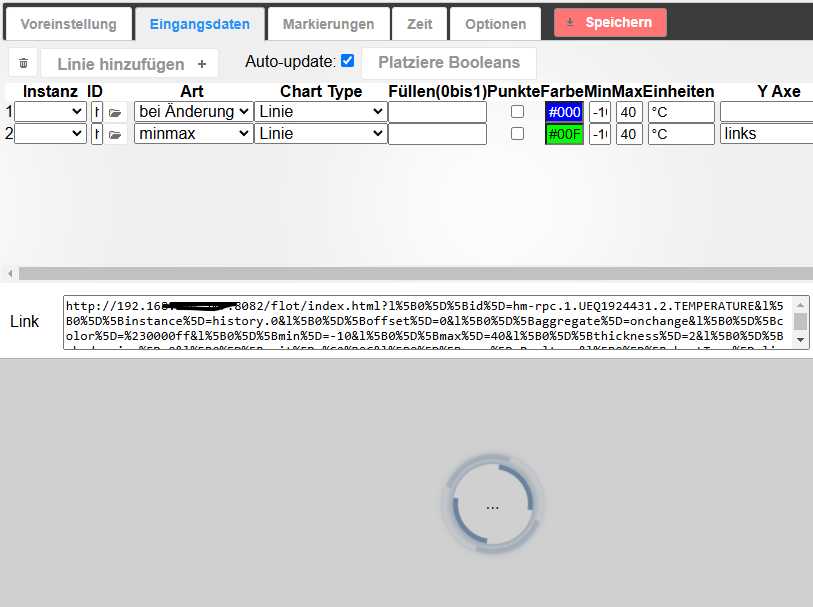
Ich weiss jetzt auch nimmer, was ich tun soll. Da scheint sich ein Bug eingeschlichen zu haben. Ich hab nur diesen einen Pi5, aber vielleicht kann das ja ein Entwickler mal entsprechend debugen.Ich versuche es jetzt mit dem offiziellen Image von der Homepage und gebe Bescheid.
- Edit mit dem Image von https://www.iobroker.net/#de/download geht es auch nicht.
Fazit: da es mit dem Raspi 4 geht und mit dem Raspi 5 nicht, muss es an der Installation vom 5 liegen, Netzwerk udgl kann ich ausschließen.
LG, Andi
-
Final kann ich sagen, es geht nicht.
- alles nochmal auf Anfang, komplett frisch
- Raspberry Pi 5 8GB
- letztes OS (Debian Bookworm mit dem Raspi Imager) ohne GUI frisch installiert auf SD (nicht auf nVME)
- alle RaspiUpdates
- -> curl -sLf https://iobroker.net/install.sh | bash -
- Starte iOb und läuft
- kein Backup eingespielt, nackte standard Installation
- Adapter Flot 1.12.0 (gestern mit niedrigen Versionen auch getestet) läuft NICHT
- Resultat siehe Screenshot, egal welchen Browser man von beliebigen Rechnern verwendet:
Ich weiss jetzt auch nimmer, was ich tun soll. Da scheint sich ein Bug eingeschlichen zu haben. Ich hab nur diesen einen Pi5, aber vielleicht kann das ja ein Entwickler mal entsprechend debugen.Ich versuche es jetzt mit dem offiziellen Image von der Homepage und gebe Bescheid.
- Edit mit dem Image von https://www.iobroker.net/#de/download geht es auch nicht.
Fazit: da es mit dem Raspi 4 geht und mit dem Raspi 5 nicht, muss es an der Installation vom 5 liegen, Netzwerk udgl kann ich ausschließen.
LG, Andi
Fazit: Ohne Näheres von dir (Ausgabe von
iob diagwurde jetzt mehrfach angefragt) kann da keiner was zu sagen oder gar 'debuggen'.
-
Bittesehr.
========== Langfassung ab hier markieren und kopieren ===========

```bash
Skript v.2025-02-23

*** GRUNDSYSTEM ***
 Static hostname: iobroker
       Icon name: computer
Operating System: Debian GNU/Linux 12 (bookworm)
          Kernel: Linux 6.6.51+rpt-rpi-2712
    Architecture: arm64
OS is similar to:

Model           : Raspberry Pi 5 Model B Rev 1.0
Docker          : false
Virtualization  : none
Kernel          : aarch64
Userland        : 64 bit

Systemuptime and Load:
 13:55:13 up 6 min,  2 users,  load average: 0.23, 0.37, 0.21
CPU threads: 4


*** LEBENSZYKLUS STATUS ***
Das Betriebssystem ist das aktuelle, stabile Debian 'bookworm'!

*** RASPBERRY THROTTLING ***
Current issues:
No throttling issues detected.

Previously detected issues:
No throttling issues detected.

*** ZEIT UND ZEITZONEN ***
               Local time: Sat 2025-03-01 13:55:13 CET
           Universal time: Sat 2025-03-01 12:55:13 UTC
                 RTC time: Sat 2025-03-01 12:55:13
                Time zone: Europe/Berlin (CET, +0100)
System clock synchronized: yes
              NTP service: active
          RTC in local TZ: no

*** User und Gruppen ***
User der 'iob diag' aufgerufen hat:
iob
HOME=/home/iob
GROUPS=iob adm dialout cdrom sudo audio video plugdev games users input render netdev gpio i2c spi

User der den 'js-controller' ausführt:
iobroker
HOME=/home/iobroker
GROUPS=iobroker tty dialout audio video plugdev bluetooth gpio i2c

*** DISPLAY-SERVER SETUP ***
Display-Server: false
Desktop:
Terminal:       tty

*** MEMORY ***
               total        used        free      shared  buff/cache   available
Mem:            8.4G        727M        7.2G        5.6M        603M        7.7G
Swap:           209M          0B        209M
Total:          8.7G        727M        7.4G

Active iob-Instances:   7

         8052 M total memory
          692 M used memory
          570 M active memory
          385 M inactive memory
         6878 M free memory
           43 M buffer memory
          531 M swap cache
          199 M total swap
            0 M used swap
          199 M free swap

*** top - Table Of Processes  ***
top - 13:55:13 up 6 min,  2 users,  load average: 0.23, 0.37, 0.21
Tasks: 165 total,   1 running, 164 sleeping,   0 stopped,   0 zombie
%Cpu(s):  0.0 us,  0.0 sy,  0.0 ni,100.0 id,  0.0 wa,  0.0 hi,  0.0 si,  0.0 st
MiB Mem :   8052.3 total,   6878.4 free,    693.5 used,    575.2 buff/cache
MiB Swap:    200.0 total,    200.0 free,      0.0 used.   7358.9 avail Mem

*** FAILED SERVICES ***

  UNIT LOAD ACTIVE SUB DESCRIPTION
0 loaded units listed.


*** DMESG CRITICAL ERRORS ***
Es wurden keine kritischen Fehler gefunden

*** FILESYSTEM ***
Filesystem     Type      Size  Used Avail Use% Mounted on
udev           devtmpfs  3.8G     0  3.8G   0% /dev
tmpfs          tmpfs     806M  5.3M  800M   1% /run
/dev/mmcblk0p2 ext4      6.9G  3.5G  3.1G  54% /
tmpfs          tmpfs     4.0G     0  4.0G   0% /dev/shm
tmpfs          tmpfs     5.0M   48K  5.0M   1% /run/lock
/dev/mmcblk0p1 vfat      510M   64M  447M  13% /boot/firmware
tmpfs          tmpfs     806M     0  806M   0% /run/user/1000

Messages concerning ext4 filesystem in dmesg:
[Sat Mar  1 13:48:44 2025] Kernel command line: reboot=w coherent_pool=1M 8250.nr_uarts=1 pci=pcie_bus_safe  smsc95xx.macaddr=2C:CF:67:8B:AD:12 vc_mem.mem_base=0x3fc00000 vc_mem.mem_size=0x40000000  console=ttyAMA10,115200 console=tty1 root=PARTUUID=918bb801-02 rootfstype=ext4 fsck.repair=yes rootwait cfg80211.ieee80211_regdom=DE
[Sat Mar  1 13:48:47 2025] EXT4-fs (mmcblk0p2): mounted filesystem 3b445224-0aeb-4897-9108-009ed4211fb4 ro with ordered data mode. Quota mode: none.
[Sat Mar  1 13:48:48 2025] EXT4-fs (mmcblk0p2): re-mounted 3b445224-0aeb-4897-9108-009ed4211fb4 r/w. Quota mode: none.

Show mounted filesystems:
TARGET           SOURCE         FSTYPE OPTIONS
/                /dev/mmcblk0p2 ext4   rw,noatime
`-/boot/firmware /dev/mmcblk0p1 vfat   rw,relatime,fmask=0022,dmask=0022,codepage=437,iocharset=ascii,shortname=mixed,errors=remount-ro

Files in neuralgic directories:

/var:
785M    /var/
365M    /var/cache
351M    /var/cache/apt
238M    /var/cache/apt/archives
171M    /var/lib

Archived and active journals take up 47.9M in the file system.

/opt/iobroker/backups:
4.0K    /opt/iobroker/backups/

/opt/iobroker/iobroker-data:
163M    /opt/iobroker/iobroker-data/
153M    /opt/iobroker/iobroker-data/files
36M     /opt/iobroker/iobroker-data/files/wireless-settings.admin/static/js
36M     /opt/iobroker/iobroker-data/files/wireless-settings.admin/static
36M     /opt/iobroker/iobroker-data/files/wireless-settings.admin

The five largest files in iobroker-data are:
25M     /opt/iobroker/iobroker-data/files/wireless-settings.admin/static/js/main.fe851d24.js.map
24M     /opt/iobroker/iobroker-data/files/web.admin/static/js/main.135279a0.js.map
12M     /opt/iobroker/iobroker-data/files/backitup.admin/static/js/main.bd24114f.js
11M     /opt/iobroker/iobroker-data/files/wireless-settings.admin/static/js/main.fe851d24.js
9.8M    /opt/iobroker/iobroker-data/objects.jsonl

USB-Devices by-id:
USB-Sticks -  Avoid direct links to /dev/tty* in your adapter setups, please always prefer the links 'by-id':

No Devices found 'by-id'

Zigbee Network Settings on your coordinator/in nvbackup are:

zigbee.X
Extended Pan ID:
*** MASKED ***
Pan ID:
*** MASKED ***
Channel:
*** MASKED ***
Network Key:
*** MASKED ***

To unmask the settings run 'iob diag --unmask'


*** NodeJS-Installation ***

/usr/bin/nodejs         v20.18.3
/usr/bin/node           v20.18.3
/usr/bin/npm            10.8.2
/usr/bin/npx            10.8.2
/usr/bin/corepack       0.30.0

nodejs:
  Installed: 20.18.3-1nodesource1
  Candidate: 20.18.3-1nodesource1
  Version table:
 *** 20.18.3-1nodesource1 1001
        500 https://deb.nodesource.com/node_20.x nodistro/main arm64 Packages
        100 /var/lib/dpkg/status
     20.18.2-1nodesource1 1001
        500 https://deb.nodesource.com/node_20.x nodistro/main arm64 Packages
     20.18.1-1nodesource1 1001
        500 https://deb.nodesource.com/node_20.x nodistro/main arm64 Packages
     20.18.0-1nodesource1 1001
        500 https://deb.nodesource.com/node_20.x nodistro/main arm64 Packages
     20.17.0-1nodesource1 1001
        500 https://deb.nodesource.com/node_20.x nodistro/main arm64 Packages
     20.16.0-1nodesource1 1001
        500 https://deb.nodesource.com/node_20.x nodistro/main arm64 Packages
     20.15.1-1nodesource1 1001
        500 https://deb.nodesource.com/node_20.x nodistro/main arm64 Packages
     20.15.0-1nodesource1 1001
        500 https://deb.nodesource.com/node_20.x nodistro/main arm64 Packages
     20.14.0-1nodesource1 1001
        500 https://deb.nodesource.com/node_20.x nodistro/main arm64 Packages
     20.13.1-1nodesource1 1001
        500 https://deb.nodesource.com/node_20.x nodistro/main arm64 Packages
     20.13.0-1nodesource1 1001
        500 https://deb.nodesource.com/node_20.x nodistro/main arm64 Packages
     20.12.2-1nodesource1 1001
        500 https://deb.nodesource.com/node_20.x nodistro/main arm64 Packages
     20.12.1-1nodesource1 1001
        500 https://deb.nodesource.com/node_20.x nodistro/main arm64 Packages
     20.12.0-1nodesource1 1001
        500 https://deb.nodesource.com/node_20.x nodistro/main arm64 Packages
     20.11.1-1nodesource1 1001
        500 https://deb.nodesource.com/node_20.x nodistro/main arm64 Packages
     20.11.0-1nodesource1 1001
        500 https://deb.nodesource.com/node_20.x nodistro/main arm64 Packages
     20.10.0-1nodesource1 1001
        500 https://deb.nodesource.com/node_20.x nodistro/main arm64 Packages
     20.9.0-1nodesource1 1001
        500 https://deb.nodesource.com/node_20.x nodistro/main arm64 Packages
     20.8.1-1nodesource1 1001
        500 https://deb.nodesource.com/node_20.x nodistro/main arm64 Packages
     20.8.0-1nodesource1 1001
        500 https://deb.nodesource.com/node_20.x nodistro/main arm64 Packages
     20.7.0-1nodesource1 1001
        500 https://deb.nodesource.com/node_20.x nodistro/main arm64 Packages
     20.6.1-1nodesource1 1001
        500 https://deb.nodesource.com/node_20.x nodistro/main arm64 Packages
     20.6.0-1nodesource1 1001
        500 https://deb.nodesource.com/node_20.x nodistro/main arm64 Packages
     20.5.1-1nodesource1 1001
        500 https://deb.nodesource.com/node_20.x nodistro/main arm64 Packages
     20.5.0-1nodesource1 1001
        500 https://deb.nodesource.com/node_20.x nodistro/main arm64 Packages
     20.4.0-1nodesource1 1001
        500 https://deb.nodesource.com/node_20.x nodistro/main arm64 Packages
     20.3.1-1nodesource1 1001
        500 https://deb.nodesource.com/node_20.x nodistro/main arm64 Packages
     20.3.0-1nodesource1 1001
        500 https://deb.nodesource.com/node_20.x nodistro/main arm64 Packages
     20.2.0-1nodesource1 1001
        500 https://deb.nodesource.com/node_20.x nodistro/main arm64 Packages
     20.1.0-1nodesource1 1001
        500 https://deb.nodesource.com/node_20.x nodistro/main arm64 Packages
     20.0.0-1nodesource1 1001
        500 https://deb.nodesource.com/node_20.x nodistro/main arm64 Packages
     18.19.0+dfsg-6~deb12u2 500
        500 http://deb.debian.org/debian bookworm/main arm64 Packages
     18.19.0+dfsg-6~deb12u1 500
        500 http://deb.debian.org/debian-security bookworm-security/main arm64 Packages

Temp directories causing deletion problem: 0
No problems detected

Errors in npm tree: 0
No problems detected

*** ioBroker-Installation ***

ioBroker Status
iobroker is running on this host.


Objects type: jsonl
States  type: jsonl

Hosts:
iobroker            iobroker (version: 6.0.11, hostname: iobroker      , alive, uptime: 377)

Core adapters versions
js-controller:  6.0.11
admin:          7.1.5
javascript:     "javascript" not found

nodejs modules from github:     0

Adapter State
+ system.adapter.admin.0                  : admin                 : iobroker                                 -  enabled, port: 8081, bind: 0.0.0.0, run as: admin
+ system.adapter.backitup.0               : backitup              : iobroker                                 -  enabled
+ system.adapter.discovery.0              : discovery             : iobroker                                 -  enabled
  system.adapter.flot.0                   : flot                  : iobroker                                 -  enabled
+ system.adapter.web.0                    : web                   : iobroker                                 -  enabled, port: 8082, bind: 0.0.0.0, run as: admin
+ system.adapter.welcome.0                : welcome               : iobroker                                 -  enabled, port: 80, bind: 0.0.0.0, run as: admin
+ system.adapter.wireless-settings.0      : wireless-settings     : iobroker                                 -  enabled

+ instance is alive

Enabled adapters with bindings
+ system.adapter.admin.0                  : admin                 : iobroker                                 -  enabled, port: 8081, bind: 0.0.0.0, run as: admin
+ system.adapter.web.0                    : web                   : iobroker                                 -  enabled, port: 8082, bind: 0.0.0.0, run as: admin
+ system.adapter.welcome.0                : welcome               : iobroker                                 -  enabled, port: 80, bind: 0.0.0.0, run as: admin

ioBroker-Repositories
┌─────────┬──────────┬─────────────────────────────────────────────────────────┬──────────────┐
│ (index) │ name     │ url                                                     │ auto upgrade │
├─────────┼──────────┼─────────────────────────────────────────────────────────┼──────────────┤
│ 0       │ 'stable' │ 'http://download.iobroker.net/sources-dist.json'        │ false        │
│ 1       │ 'beta'   │ 'http://download.iobroker.net/sources-dist-latest.json' │ false        │
└─────────┴──────────┴─────────────────────────────────────────────────────────┴──────────────┘

Active repo(s): stable
Upgrade policy: none

Installed ioBroker-Adapters
Used repository: stable
Adapter    "admin"        : 7.4.10   , installed 7.1.5  [Updatable]
Adapter    "backitup"     : 3.0.31   , installed 3.0.25 [Updatable]
Adapter    "discovery"    : 5.0.0    , installed 5.0.0
Adapter    "flot"         : 1.12.0   , installed 1.12.0
Controller "js-controller": 7.0.6    , installed 6.0.11 [Updatable]
Adapter    "simple-api"   : 2.8.0    , installed 2.8.0
Adapter    "socketio"     : 6.7.1    , installed 6.6.1  [Updatable]
Adapter    "web"          : 6.2.5    , installed 6.2.5
Adapter    "welcome"      : 1.0.2    , installed 1.0.2
Adapter    "wireless-settings": 1.0.2, installed 1.0.2
Adapter    "ws"           : 2.6.2    , installed 2.5.11 [Updatable]

Objects and States
Please stand by - This may take a while


========== Langfassung ab hier markieren und kopieren ===========

```bash
Skript v.2025-02-23

*** GRUNDSYSTEM ***
 Static hostname: iobroker
       Icon name: computer
Operating System: Debian GNU/Linux 12 (bookworm)
          Kernel: Linux 6.6.51+rpt-rpi-2712
    Architecture: arm64
OS is similar to:

Model           : Raspberry Pi 5 Model B Rev 1.0
Docker          : false
Virtualization  : none
Kernel          : aarch64
Userland        : 64 bit

Systemuptime and Load:
 13:55:13 up 6 min,  2 users,  load average: 0.23, 0.37, 0.21
CPU threads: 4


*** LEBENSZYKLUS STATUS ***
Das Betriebssystem ist das aktuelle, stabile Debian 'bookworm'!

*** RASPBERRY THROTTLING ***
Current issues:
No throttling issues detected.

Previously detected issues:
No throttling issues detected.

*** ZEIT UND ZEITZONEN ***
               Local time: Sat 2025-03-01 13:55:13 CET
           Universal time: Sat 2025-03-01 12:55:13 UTC
                 RTC time: Sat 2025-03-01 12:55:13
                Time zone: Europe/Berlin (CET, +0100)
System clock synchronized: yes
              NTP service: active
          RTC in local TZ: no

*** User und Gruppen ***
User der 'iob diag' aufgerufen hat:
iob
HOME=/home/iob
GROUPS=iob adm dialout cdrom sudo audio video plugdev games users input render netdev gpio i2c spi

User der den 'js-controller' ausführt:
iobroker
HOME=/home/iobroker
GROUPS=iobroker tty dialout audio video plugdev bluetooth gpio i2c

*** DISPLAY-SERVER SETUP ***
Display-Server: false
Desktop:
Terminal:       tty

*** MEMORY ***
               total        used        free      shared  buff/cache   available
Mem:            8.4G        727M        7.2G        5.6M        603M        7.7G
Swap:           209M          0B        209M
Total:          8.7G        727M        7.4G

Active iob-Instances:   7

         8052 M total memory
          692 M used memory
          570 M active memory
          385 M inactive memory
         6878 M free memory
           43 M buffer memory
          531 M swap cache
          199 M total swap
            0 M used swap
          199 M free swap

*** top - Table Of Processes  ***
top - 13:55:13 up 6 min,  2 users,  load average: 0.23, 0.37, 0.21
Tasks: 165 total,   1 running, 164 sleeping,   0 stopped,   0 zombie
%Cpu(s):  0.0 us,  0.0 sy,  0.0 ni,100.0 id,  0.0 wa,  0.0 hi,  0.0 si,  0.0 st
MiB Mem :   8052.3 total,   6878.4 free,    693.5 used,    575.2 buff/cache
MiB Swap:    200.0 total,    200.0 free,      0.0 used.   7358.9 avail Mem

*** FAILED SERVICES ***

  UNIT LOAD ACTIVE SUB DESCRIPTION
0 loaded units listed.


*** DMESG CRITICAL ERRORS ***
Es wurden keine kritischen Fehler gefunden

*** FILESYSTEM ***
Filesystem     Type      Size  Used Avail Use% Mounted on
udev           devtmpfs  3.8G     0  3.8G   0% /dev
tmpfs          tmpfs     806M  5.3M  800M   1% /run
/dev/mmcblk0p2 ext4      6.9G  3.5G  3.1G  54% /
tmpfs          tmpfs     4.0G     0  4.0G   0% /dev/shm
tmpfs          tmpfs     5.0M   48K  5.0M   1% /run/lock
/dev/mmcblk0p1 vfat      510M   64M  447M  13% /boot/firmware
tmpfs          tmpfs     806M     0  806M   0% /run/user/1000

Messages concerning ext4 filesystem in dmesg:
[Sat Mar  1 13:48:44 2025] Kernel command line: reboot=w coherent_pool=1M 8250.nr_uarts=1 pci=pcie_bus_safe  smsc95xx.macaddr=2C:CF:67:8B:AD:12 vc_mem.mem_base=0x3fc00000 vc_mem.mem_size=0x40000000  console=ttyAMA10,115200 console=tty1 root=PARTUUID=918bb801-02 rootfstype=ext4 fsck.repair=yes rootwait cfg80211.ieee80211_regdom=DE
[Sat Mar  1 13:48:47 2025] EXT4-fs (mmcblk0p2): mounted filesystem 3b445224-0aeb-4897-9108-009ed4211fb4 ro with ordered data mode. Quota mode: none.
[Sat Mar  1 13:48:48 2025] EXT4-fs (mmcblk0p2): re-mounted 3b445224-0aeb-4897-9108-009ed4211fb4 r/w. Quota mode: none.

Show mounted filesystems:
TARGET           SOURCE         FSTYPE OPTIONS
/                /dev/mmcblk0p2 ext4   rw,noatime
`-/boot/firmware /dev/mmcblk0p1 vfat   rw,relatime,fmask=0022,dmask=0022,codepage=437,iocharset=ascii,shortname=mixed,errors=remount-ro

Files in neuralgic directories:

/var:
785M    /var/
365M    /var/cache
351M    /var/cache/apt
238M    /var/cache/apt/archives
171M    /var/lib

Archived and active journals take up 47.9M in the file system.

/opt/iobroker/backups:
4.0K    /opt/iobroker/backups/

/opt/iobroker/iobroker-data:
163M    /opt/iobroker/iobroker-data/
153M    /opt/iobroker/iobroker-data/files
36M     /opt/iobroker/iobroker-data/files/wireless-settings.admin/static/js
36M     /opt/iobroker/iobroker-data/files/wireless-settings.admin/static
36M     /opt/iobroker/iobroker-data/files/wireless-settings.admin

The five largest files in iobroker-data are:
25M     /opt/iobroker/iobroker-data/files/wireless-settings.admin/static/js/main.fe851d24.js.map
24M     /opt/iobroker/iobroker-data/files/web.admin/static/js/main.135279a0.js.map
12M     /opt/iobroker/iobroker-data/files/backitup.admin/static/js/main.bd24114f.js
11M     /opt/iobroker/iobroker-data/files/wireless-settings.admin/static/js/main.fe851d24.js
9.8M    /opt/iobroker/iobroker-data/objects.jsonl

USB-Devices by-id:
USB-Sticks -  Avoid direct links to /dev/tty* in your adapter setups, please always prefer the links 'by-id':

No Devices found 'by-id'

Zigbee Network Settings on your coordinator/in nvbackup are:

zigbee.X
Extended Pan ID:
*** MASKED ***
Pan ID:
*** MASKED ***
Channel:
*** MASKED ***
Network Key:
*** MASKED ***

To unmask the settings run 'iob diag --unmask'


*** NodeJS-Installation ***

/usr/bin/nodejs         v20.18.3
/usr/bin/node           v20.18.3
/usr/bin/npm            10.8.2
/usr/bin/npx            10.8.2
/usr/bin/corepack       0.30.0

nodejs:
  Installed: 20.18.3-1nodesource1
  Candidate: 20.18.3-1nodesource1
  Version table:
 *** 20.18.3-1nodesource1 1001
        500 https://deb.nodesource.com/node_20.x nodistro/main arm64 Packages
        100 /var/lib/dpkg/status
     20.18.2-1nodesource1 1001
        500 https://deb.nodesource.com/node_20.x nodistro/main arm64 Packages
     20.18.1-1nodesource1 1001
        500 https://deb.nodesource.com/node_20.x nodistro/main arm64 Packages
     20.18.0-1nodesource1 1001
        500 https://deb.nodesource.com/node_20.x nodistro/main arm64 Packages
     20.17.0-1nodesource1 1001
        500 https://deb.nodesource.com/node_20.x nodistro/main arm64 Packages
     20.16.0-1nodesource1 1001
        500 https://deb.nodesource.com/node_20.x nodistro/main arm64 Packages
     20.15.1-1nodesource1 1001
        500 https://deb.nodesource.com/node_20.x nodistro/main arm64 Packages
     20.15.0-1nodesource1 1001
        500 https://deb.nodesource.com/node_20.x nodistro/main arm64 Packages
     20.14.0-1nodesource1 1001
        500 https://deb.nodesource.com/node_20.x nodistro/main arm64 Packages
     20.13.1-1nodesource1 1001
        500 https://deb.nodesource.com/node_20.x nodistro/main arm64 Packages
     20.13.0-1nodesource1 1001
        500 https://deb.nodesource.com/node_20.x nodistro/main arm64 Packages
     20.12.2-1nodesource1 1001
        500 https://deb.nodesource.com/node_20.x nodistro/main arm64 Packages
     20.12.1-1nodesource1 1001
        500 https://deb.nodesource.com/node_20.x nodistro/main arm64 Packages
     20.12.0-1nodesource1 1001
        500 https://deb.nodesource.com/node_20.x nodistro/main arm64 Packages
     20.11.1-1nodesource1 1001
        500 https://deb.nodesource.com/node_20.x nodistro/main arm64 Packages
     20.11.0-1nodesource1 1001
        500 https://deb.nodesource.com/node_20.x nodistro/main arm64 Packages
     20.10.0-1nodesource1 1001
        500 https://deb.nodesource.com/node_20.x nodistro/main arm64 Packages
     20.9.0-1nodesource1 1001
        500 https://deb.nodesource.com/node_20.x nodistro/main arm64 Packages
     20.8.1-1nodesource1 1001
        500 https://deb.nodesource.com/node_20.x nodistro/main arm64 Packages
     20.8.0-1nodesource1 1001
        500 https://deb.nodesource.com/node_20.x nodistro/main arm64 Packages
     20.7.0-1nodesource1 1001
        500 https://deb.nodesource.com/node_20.x nodistro/main arm64 Packages
     20.6.1-1nodesource1 1001
        500 https://deb.nodesource.com/node_20.x nodistro/main arm64 Packages
     20.6.0-1nodesource1 1001
        500 https://deb.nodesource.com/node_20.x nodistro/main arm64 Packages
     20.5.1-1nodesource1 1001
        500 https://deb.nodesource.com/node_20.x nodistro/main arm64 Packages
     20.5.0-1nodesource1 1001
        500 https://deb.nodesource.com/node_20.x nodistro/main arm64 Packages
     20.4.0-1nodesource1 1001
        500 https://deb.nodesource.com/node_20.x nodistro/main arm64 Packages
     20.3.1-1nodesource1 1001
        500 https://deb.nodesource.com/node_20.x nodistro/main arm64 Packages
     20.3.0-1nodesource1 1001
        500 https://deb.nodesource.com/node_20.x nodistro/main arm64 Packages
     20.2.0-1nodesource1 1001
        500 https://deb.nodesource.com/node_20.x nodistro/main arm64 Packages
     20.1.0-1nodesource1 1001
        500 https://deb.nodesource.com/node_20.x nodistro/main arm64 Packages
     20.0.0-1nodesource1 1001
        500 https://deb.nodesource.com/node_20.x nodistro/main arm64 Packages
     18.19.0+dfsg-6~deb12u2 500
        500 http://deb.debian.org/debian bookworm/main arm64 Packages
     18.19.0+dfsg-6~deb12u1 500
        500 http://deb.debian.org/debian-security bookworm-security/main arm64 Packages

Temp directories causing deletion problem: 0
No problems detected

Errors in npm tree: 0
No problems detected

*** ioBroker-Installation ***

ioBroker Status
iobroker is running on this host.


Objects type: jsonl
States  type: jsonl

Hosts:
iobroker            iobroker (version: 6.0.11, hostname: iobroker      , alive, uptime: 377)

Core adapters versions
js-controller:  6.0.11
admin:          7.1.5
javascript:     "javascript" not found

nodejs modules from github:     0

Adapter State
+ system.adapter.admin.0                  : admin                 : iobroker                                 -  enabled, port: 8081, bind: 0.0.0.0, run as: admin
+ system.adapter.backitup.0               : backitup              : iobroker                                 -  enabled
+ system.adapter.discovery.0              : discovery             : iobroker                                 -  enabled
  system.adapter.flot.0                   : flot                  : iobroker                                 -  enabled
+ system.adapter.web.0                    : web                   : iobroker                                 -  enabled, port: 8082, bind: 0.0.0.0, run as: admin
+ system.adapter.welcome.0                : welcome               : iobroker                                 -  enabled, port: 80, bind: 0.0.0.0, run as: admin
+ system.adapter.wireless-settings.0      : wireless-settings     : iobroker                                 -  enabled

+ instance is alive

Enabled adapters with bindings
+ system.adapter.admin.0                  : admin                 : iobroker                                 -  enabled, port: 8081, bind: 0.0.0.0, run as: admin
+ system.adapter.web.0                    : web                   : iobroker                                 -  enabled, port: 8082, bind: 0.0.0.0, run as: admin
+ system.adapter.welcome.0                : welcome               : iobroker                                 -  enabled, port: 80, bind: 0.0.0.0, run as: admin

ioBroker-Repositories
┌─────────┬──────────┬─────────────────────────────────────────────────────────┬──────────────┐
│ (index) │ name     │ url                                                     │ auto upgrade │
├─────────┼──────────┼─────────────────────────────────────────────────────────┼──────────────┤
│ 0       │ 'stable' │ 'http://download.iobroker.net/sources-dist.json'        │ false        │
│ 1       │ 'beta'   │ 'http://download.iobroker.net/sources-dist-latest.json' │ false        │
└─────────┴──────────┴─────────────────────────────────────────────────────────┴──────────────┘

Active repo(s): stable
Upgrade policy: none

Installed ioBroker-Adapters
Used repository: stable
Adapter    "admin"        : 7.4.10   , installed 7.1.5  [Updatable]
Adapter    "backitup"     : 3.0.31   , installed 3.0.25 [Updatable]
Adapter    "discovery"    : 5.0.0    , installed 5.0.0
Adapter    "flot"         : 1.12.0   , installed 1.12.0
Controller "js-controller": 7.0.6    , installed 6.0.11 [Updatable]
Adapter    "simple-api"   : 2.8.0    , installed 2.8.0
Adapter    "socketio"     : 6.7.1    , installed 6.6.1  [Updatable]
Adapter    "web"          : 6.2.5    , installed 6.2.5
Adapter    "welcome"      : 1.0.2    , installed 1.0.2
Adapter    "wireless-settings": 1.0.2, installed 1.0.2
Adapter    "ws"           : 2.6.2    , installed 2.5.11 [Updatable]

Objects and States
Please stand by - This may take a while
Objects:        223
States:         160

*** OS-Repositories and Updates ***
Hit:1 http://deb.debian.org/debian bookworm InRelease
Hit:2 http://deb.debian.org/debian-security bookworm-security InRelease
Hit:3 http://deb.debian.org/debian bookworm-updates InRelease
Hit:4 http://archive.raspberrypi.com/debian bookworm InRelease
Hit:5 https://deb.nodesource.com/node_20.x nodistro InRelease
Reading package lists...
Offene Systemupdates: 0

*** Listening Ports ***
Active Internet connections (only servers)
Proto Recv-Q Send-Q Local Address           Foreign Address         State       User       Inode      PID/Program name
tcp        0      0 0.0.0.0:22              0.0.0.0:*               LISTEN      0          4877       719/sshd: /usr/sbin
tcp        0      0 127.0.0.1:9000          0.0.0.0:*               LISTEN      1001       4894       708/iobroker.js-con
tcp        0      0 127.0.0.1:9001          0.0.0.0:*               LISTEN      1001       4889       708/iobroker.js-con
tcp6       0      0 :::80                   :::*                    LISTEN      1001       6033       873/io.welcome.0
tcp6       0      0 :::22                   :::*                    LISTEN      0          4879       719/sshd: /usr/sbin
tcp6       0      0 :::8082                 :::*                    LISTEN      1001       5061       903/io.web.0
tcp6       0      0 :::8081                 :::*                    LISTEN      1001       5943       753/io.admin.0
udp        0      0 0.0.0.0:5353            0.0.0.0:*                           104        3059       581/avahi-daemon: r
udp        0      0 0.0.0.0:46814           0.0.0.0:*                           104        3061       581/avahi-daemon: r
udp6       0      0 :::5353                 :::*                                104        3060       581/avahi-daemon: r
udp6       0      0 :::49037                :::*                                104        3062       581/avahi-daemon: r
udp6       0      0 fe80::c311:c33f:9bd:546 :::*                                0          6216       674/NetworkManager

*** Log File - Last 25 Lines ***

2025-03-01 13:49:01.734  - info: host.iobroker instance system.adapter.discovery.0 in version "5.0.0" started with pid 858
2025-03-01 13:49:02.469  - info: discovery.0 (858) starting. Version 5.0.0 in /opt/iobroker/node_modules/iobroker.discovery, node: v20.18.3, js-controller: 6.0.11
2025-03-01 13:49:05.754  - info: host.iobroker instance system.adapter.welcome.0 in version "1.0.2" started with pid 873
2025-03-01 13:49:06.544  - info: welcome.0 (873) starting. Version 1.0.2 in /opt/iobroker/node_modules/iobroker.welcome, node: v20.18.3, js-controller: 6.0.11
2025-03-01 13:49:06.590  - info: welcome.0 (873) http server listening on port 80
2025-03-01 13:49:09.736  - info: host.iobroker instance system.adapter.wireless-settings.0 in version "1.0.2" started with pid 888
2025-03-01 13:49:10.374  - info: wireless-settings.0 (888) starting. Version 1.0.2 in /opt/iobroker/node_modules/iobroker.wireless-settings, node: v20.18.3, js-controller: 6.0.11
2025-03-01 13:49:13.762  - info: host.iobroker instance system.adapter.web.0 in version "6.2.5" started with pid 903
2025-03-01 13:49:14.579  - info: web.0 (903) starting. Version 6.2.5 in /opt/iobroker/node_modules/iobroker.web, node: v20.18.3, js-controller: 6.0.11
2025-03-01 13:49:14.712  - info: web.0 (903) socket.io server listening on port 8082
2025-03-01 13:49:14.714  - info: web.0 (903) http server listening on port 8082
2025-03-01 13:49:14.753  - info: web.0 (903) ==> Connected system.user.admin from ::ffff:192.168.224.89
2025-03-01 13:49:15.927  - info: web.0 (903) ==> Connected system.user.admin from ::ffff:192.168.224.89
2025-03-01 13:49:15.945  - info: web.0 (903) ==> Connected system.user.admin from ::ffff:192.168.224.89
2025-03-01 13:49:15.976  - info: web.0 (903) <== Disconnect system.user.admin from ::ffff:192.168.224.89
2025-03-01 13:49:15.984  - info: admin.0 (753) <== Disconnect system.user.admin from ::ffff:192.168.224.89 admin
2025-03-01 13:49:16.039  - info: web.0 (903) ==> Connected system.user.admin from ::ffff:192.168.224.89
2025-03-01 13:49:16.930  - info: web.0 (903) <== Disconnect system.user.admin from ::ffff:192.168.224.89 flot
2025-03-01 13:49:17.006  - info: web.0 (903) ==> Connected system.user.admin from ::ffff:192.168.224.89
2025-03-01 13:52:41.651  - info: admin.0 (753) ==> Connected system.user.admin from ::ffff:192.168.224.89
2025-03-01 13:52:56.656  - info: admin.0 (753) <== Disconnect system.user.admin from ::ffff:192.168.224.89 admin
2025-03-01 13:53:05.645  - info: admin.0 (753) ==> Connected system.user.admin from ::ffff:192.168.224.89
2025-03-01 13:53:20.645  - info: admin.0 (753) <== Disconnect system.user.admin from ::ffff:192.168.224.89 admin
2025-03-01 13:55:05.652  - info: admin.0 (753) ==> Connected system.user.admin from ::ffff:192.168.224.89
2025-03-01 13:55:20.653  - info: admin.0 (753) <== Disconnect system.user.admin from ::ffff:192.168.224.89 admin
============ Langfassung bis hier markieren =============
iob diag hat das System inspiziert.
Beliebige Taste für eine Zusammenfassung drücken
Zusammfassung ab hier markieren und kopieren:
===================== ZUSAMMENFASSUNG =====================
                        v.2025-02-23


 Static hostname: iobroker
       Icon name: computer
Operating System: Debian GNU/Linux 12 (bookworm)
          Kernel: Linux 6.6.51+rpt-rpi-2712
    Architecture: arm64

Installation:           native
Kernel:                 aarch64
Userland:               64 bit
Timezone:               Europe/Berlin (CET, +0100)
User-ID:                1000
Display-Server:         false
Boot Target:            multi-user.target

Offene OS-Updates:      0
Offene iob updates:     5

Nodejs-Installation:
/usr/bin/nodejs         v20.18.3
/usr/bin/node           v20.18.3
/usr/bin/npm            10.8.2
/usr/bin/npx            10.8.2
/usr/bin/corepack       0.30.0

Empfohlene Versionen sind zurzeit nodejs 20.18.3 und npm 10.8.2
nodeJS ist korrekt installiert

MEMORY:
               total        used        free      shared  buff/cache   available
Mem:            8.4G        739M        7.2G        5.6M        603M        7.7G
Swap:           209M          0B        209M
Total:          8.7G        739M        7.4G

Active iob-Instances:   7
Upgrade policy: none

ioBroker Core:          js-controller           6.0.11
                        admin                   7.1.5

ioBroker Status:        iobroker is running on this host.


Objects type: jsonl
States  type: jsonl

Status admin and web instance:
+ system.adapter.admin.0                  : admin                 : iobroker                                 -  enabled, port: 8081, bind: 0.0.0.0, run as: admin
+ system.adapter.web.0                    : web                   : iobroker                                 -  enabled, port: 8082, bind: 0.0.0.0, run as: admin

Objects:                223
States:                 160

Size of iob-Database:

9.8M    /opt/iobroker/iobroker-data/objects.jsonl
460K    /opt/iobroker/iobroker-data/states.jsonl


Das Betriebssystem ist das aktuelle, stabile Debian 'bookworm'!

=================== ENDE DER ZUSAMMENFASSUNG ====================
=== Ausgabe bis hier markieren und kopieren ===
-
Bittesehr.
========== Langfassung ab hier markieren und kopieren ===========

```bash
Skript v.2025-02-23

*** GRUNDSYSTEM ***
 Static hostname: iobroker
       Icon name: computer
Operating System: Debian GNU/Linux 12 (bookworm)
          Kernel: Linux 6.6.51+rpt-rpi-2712
    Architecture: arm64
OS is similar to:

Model           : Raspberry Pi 5 Model B Rev 1.0
Docker          : false
Virtualization  : none
Kernel          : aarch64
Userland        : 64 bit

Systemuptime and Load:
 13:55:13 up 6 min,  2 users,  load average: 0.23, 0.37, 0.21
CPU threads: 4


*** LEBENSZYKLUS STATUS ***
Das Betriebssystem ist das aktuelle, stabile Debian 'bookworm'!

*** RASPBERRY THROTTLING ***
Current issues:
No throttling issues detected.

Previously detected issues:
No throttling issues detected.

*** ZEIT UND ZEITZONEN ***
               Local time: Sat 2025-03-01 13:55:13 CET
           Universal time: Sat 2025-03-01 12:55:13 UTC
                 RTC time: Sat 2025-03-01 12:55:13
                Time zone: Europe/Berlin (CET, +0100)
System clock synchronized: yes
              NTP service: active
          RTC in local TZ: no

*** User und Gruppen ***
User der 'iob diag' aufgerufen hat:
iob
HOME=/home/iob
GROUPS=iob adm dialout cdrom sudo audio video plugdev games users input render netdev gpio i2c spi

User der den 'js-controller' ausführt:
iobroker
HOME=/home/iobroker
GROUPS=iobroker tty dialout audio video plugdev bluetooth gpio i2c

*** DISPLAY-SERVER SETUP ***
Display-Server: false
Desktop:
Terminal:       tty

*** MEMORY ***
               total        used        free      shared  buff/cache   available
Mem:            8.4G        727M        7.2G        5.6M        603M        7.7G
Swap:           209M          0B        209M
Total:          8.7G        727M        7.4G

Active iob-Instances:   7

         8052 M total memory
          692 M used memory
          570 M active memory
          385 M inactive memory
         6878 M free memory
           43 M buffer memory
          531 M swap cache
          199 M total swap
            0 M used swap
          199 M free swap

*** top - Table Of Processes  ***
top - 13:55:13 up 6 min,  2 users,  load average: 0.23, 0.37, 0.21
Tasks: 165 total,   1 running, 164 sleeping,   0 stopped,   0 zombie
%Cpu(s):  0.0 us,  0.0 sy,  0.0 ni,100.0 id,  0.0 wa,  0.0 hi,  0.0 si,  0.0 st
MiB Mem :   8052.3 total,   6878.4 free,    693.5 used,    575.2 buff/cache
MiB Swap:    200.0 total,    200.0 free,      0.0 used.   7358.9 avail Mem

*** FAILED SERVICES ***

  UNIT LOAD ACTIVE SUB DESCRIPTION
0 loaded units listed.


*** DMESG CRITICAL ERRORS ***
Es wurden keine kritischen Fehler gefunden

*** FILESYSTEM ***
Filesystem     Type      Size  Used Avail Use% Mounted on
udev           devtmpfs  3.8G     0  3.8G   0% /dev
tmpfs          tmpfs     806M  5.3M  800M   1% /run
/dev/mmcblk0p2 ext4      6.9G  3.5G  3.1G  54% /
tmpfs          tmpfs     4.0G     0  4.0G   0% /dev/shm
tmpfs          tmpfs     5.0M   48K  5.0M   1% /run/lock
/dev/mmcblk0p1 vfat      510M   64M  447M  13% /boot/firmware
tmpfs          tmpfs     806M     0  806M   0% /run/user/1000

Messages concerning ext4 filesystem in dmesg:
[Sat Mar  1 13:48:44 2025] Kernel command line: reboot=w coherent_pool=1M 8250.nr_uarts=1 pci=pcie_bus_safe  smsc95xx.macaddr=2C:CF:67:8B:AD:12 vc_mem.mem_base=0x3fc00000 vc_mem.mem_size=0x40000000  console=ttyAMA10,115200 console=tty1 root=PARTUUID=918bb801-02 rootfstype=ext4 fsck.repair=yes rootwait cfg80211.ieee80211_regdom=DE
[Sat Mar  1 13:48:47 2025] EXT4-fs (mmcblk0p2): mounted filesystem 3b445224-0aeb-4897-9108-009ed4211fb4 ro with ordered data mode. Quota mode: none.
[Sat Mar  1 13:48:48 2025] EXT4-fs (mmcblk0p2): re-mounted 3b445224-0aeb-4897-9108-009ed4211fb4 r/w. Quota mode: none.

Show mounted filesystems:
TARGET           SOURCE         FSTYPE OPTIONS
/                /dev/mmcblk0p2 ext4   rw,noatime
`-/boot/firmware /dev/mmcblk0p1 vfat   rw,relatime,fmask=0022,dmask=0022,codepage=437,iocharset=ascii,shortname=mixed,errors=remount-ro

Files in neuralgic directories:

/var:
785M    /var/
365M    /var/cache
351M    /var/cache/apt
238M    /var/cache/apt/archives
171M    /var/lib

Archived and active journals take up 47.9M in the file system.

/opt/iobroker/backups:
4.0K    /opt/iobroker/backups/

/opt/iobroker/iobroker-data:
163M    /opt/iobroker/iobroker-data/
153M    /opt/iobroker/iobroker-data/files
36M     /opt/iobroker/iobroker-data/files/wireless-settings.admin/static/js
36M     /opt/iobroker/iobroker-data/files/wireless-settings.admin/static
36M     /opt/iobroker/iobroker-data/files/wireless-settings.admin

The five largest files in iobroker-data are:
25M     /opt/iobroker/iobroker-data/files/wireless-settings.admin/static/js/main.fe851d24.js.map
24M     /opt/iobroker/iobroker-data/files/web.admin/static/js/main.135279a0.js.map
12M     /opt/iobroker/iobroker-data/files/backitup.admin/static/js/main.bd24114f.js
11M     /opt/iobroker/iobroker-data/files/wireless-settings.admin/static/js/main.fe851d24.js
9.8M    /opt/iobroker/iobroker-data/objects.jsonl

USB-Devices by-id:
USB-Sticks -  Avoid direct links to /dev/tty* in your adapter setups, please always prefer the links 'by-id':

No Devices found 'by-id'

Zigbee Network Settings on your coordinator/in nvbackup are:

zigbee.X
Extended Pan ID:
*** MASKED ***
Pan ID:
*** MASKED ***
Channel:
*** MASKED ***
Network Key:
*** MASKED ***

To unmask the settings run 'iob diag --unmask'


*** NodeJS-Installation ***

/usr/bin/nodejs         v20.18.3
/usr/bin/node           v20.18.3
/usr/bin/npm            10.8.2
/usr/bin/npx            10.8.2
/usr/bin/corepack       0.30.0

nodejs:
  Installed: 20.18.3-1nodesource1
  Candidate: 20.18.3-1nodesource1
  Version table:
 *** 20.18.3-1nodesource1 1001
        500 https://deb.nodesource.com/node_20.x nodistro/main arm64 Packages
        100 /var/lib/dpkg/status
     20.18.2-1nodesource1 1001
        500 https://deb.nodesource.com/node_20.x nodistro/main arm64 Packages
     20.18.1-1nodesource1 1001
        500 https://deb.nodesource.com/node_20.x nodistro/main arm64 Packages
     20.18.0-1nodesource1 1001
        500 https://deb.nodesource.com/node_20.x nodistro/main arm64 Packages
     20.17.0-1nodesource1 1001
        500 https://deb.nodesource.com/node_20.x nodistro/main arm64 Packages
     20.16.0-1nodesource1 1001
        500 https://deb.nodesource.com/node_20.x nodistro/main arm64 Packages
     20.15.1-1nodesource1 1001
        500 https://deb.nodesource.com/node_20.x nodistro/main arm64 Packages
     20.15.0-1nodesource1 1001
        500 https://deb.nodesource.com/node_20.x nodistro/main arm64 Packages
     20.14.0-1nodesource1 1001
        500 https://deb.nodesource.com/node_20.x nodistro/main arm64 Packages
     20.13.1-1nodesource1 1001
        500 https://deb.nodesource.com/node_20.x nodistro/main arm64 Packages
     20.13.0-1nodesource1 1001
        500 https://deb.nodesource.com/node_20.x nodistro/main arm64 Packages
     20.12.2-1nodesource1 1001
        500 https://deb.nodesource.com/node_20.x nodistro/main arm64 Packages
     20.12.1-1nodesource1 1001
        500 https://deb.nodesource.com/node_20.x nodistro/main arm64 Packages
     20.12.0-1nodesource1 1001
        500 https://deb.nodesource.com/node_20.x nodistro/main arm64 Packages
     20.11.1-1nodesource1 1001
        500 https://deb.nodesource.com/node_20.x nodistro/main arm64 Packages
     20.11.0-1nodesource1 1001
        500 https://deb.nodesource.com/node_20.x nodistro/main arm64 Packages
     20.10.0-1nodesource1 1001
        500 https://deb.nodesource.com/node_20.x nodistro/main arm64 Packages
     20.9.0-1nodesource1 1001
        500 https://deb.nodesource.com/node_20.x nodistro/main arm64 Packages
     20.8.1-1nodesource1 1001
        500 https://deb.nodesource.com/node_20.x nodistro/main arm64 Packages
     20.8.0-1nodesource1 1001
        500 https://deb.nodesource.com/node_20.x nodistro/main arm64 Packages
     20.7.0-1nodesource1 1001
        500 https://deb.nodesource.com/node_20.x nodistro/main arm64 Packages
     20.6.1-1nodesource1 1001
        500 https://deb.nodesource.com/node_20.x nodistro/main arm64 Packages
     20.6.0-1nodesource1 1001
        500 https://deb.nodesource.com/node_20.x nodistro/main arm64 Packages
     20.5.1-1nodesource1 1001
        500 https://deb.nodesource.com/node_20.x nodistro/main arm64 Packages
     20.5.0-1nodesource1 1001
        500 https://deb.nodesource.com/node_20.x nodistro/main arm64 Packages
     20.4.0-1nodesource1 1001
        500 https://deb.nodesource.com/node_20.x nodistro/main arm64 Packages
     20.3.1-1nodesource1 1001
        500 https://deb.nodesource.com/node_20.x nodistro/main arm64 Packages
     20.3.0-1nodesource1 1001
        500 https://deb.nodesource.com/node_20.x nodistro/main arm64 Packages
     20.2.0-1nodesource1 1001
        500 https://deb.nodesource.com/node_20.x nodistro/main arm64 Packages
     20.1.0-1nodesource1 1001
        500 https://deb.nodesource.com/node_20.x nodistro/main arm64 Packages
     20.0.0-1nodesource1 1001
        500 https://deb.nodesource.com/node_20.x nodistro/main arm64 Packages
     18.19.0+dfsg-6~deb12u2 500
        500 http://deb.debian.org/debian bookworm/main arm64 Packages
     18.19.0+dfsg-6~deb12u1 500
        500 http://deb.debian.org/debian-security bookworm-security/main arm64 Packages

Temp directories causing deletion problem: 0
No problems detected

Errors in npm tree: 0
No problems detected

*** ioBroker-Installation ***

ioBroker Status
iobroker is running on this host.


Objects type: jsonl
States  type: jsonl

Hosts:
iobroker            iobroker (version: 6.0.11, hostname: iobroker      , alive, uptime: 377)

Core adapters versions
js-controller:  6.0.11
admin:          7.1.5
javascript:     "javascript" not found

nodejs modules from github:     0

Adapter State
+ system.adapter.admin.0                  : admin                 : iobroker                                 -  enabled, port: 8081, bind: 0.0.0.0, run as: admin
+ system.adapter.backitup.0               : backitup              : iobroker                                 -  enabled
+ system.adapter.discovery.0              : discovery             : iobroker                                 -  enabled
  system.adapter.flot.0                   : flot                  : iobroker                                 -  enabled
+ system.adapter.web.0                    : web                   : iobroker                                 -  enabled, port: 8082, bind: 0.0.0.0, run as: admin
+ system.adapter.welcome.0                : welcome               : iobroker                                 -  enabled, port: 80, bind: 0.0.0.0, run as: admin
+ system.adapter.wireless-settings.0      : wireless-settings     : iobroker                                 -  enabled

+ instance is alive

Enabled adapters with bindings
+ system.adapter.admin.0                  : admin                 : iobroker                                 -  enabled, port: 8081, bind: 0.0.0.0, run as: admin
+ system.adapter.web.0                    : web                   : iobroker                                 -  enabled, port: 8082, bind: 0.0.0.0, run as: admin
+ system.adapter.welcome.0                : welcome               : iobroker                                 -  enabled, port: 80, bind: 0.0.0.0, run as: admin

ioBroker-Repositories
┌─────────┬──────────┬─────────────────────────────────────────────────────────┬──────────────┐
│ (index) │ name     │ url                                                     │ auto upgrade │
├─────────┼──────────┼─────────────────────────────────────────────────────────┼──────────────┤
│ 0       │ 'stable' │ 'http://download.iobroker.net/sources-dist.json'        │ false        │
│ 1       │ 'beta'   │ 'http://download.iobroker.net/sources-dist-latest.json' │ false        │
└─────────┴──────────┴─────────────────────────────────────────────────────────┴──────────────┘

Active repo(s): stable
Upgrade policy: none

Installed ioBroker-Adapters
Used repository: stable
Adapter    "admin"        : 7.4.10   , installed 7.1.5  [Updatable]
Adapter    "backitup"     : 3.0.31   , installed 3.0.25 [Updatable]
Adapter    "discovery"    : 5.0.0    , installed 5.0.0
Adapter    "flot"         : 1.12.0   , installed 1.12.0
Controller "js-controller": 7.0.6    , installed 6.0.11 [Updatable]
Adapter    "simple-api"   : 2.8.0    , installed 2.8.0
Adapter    "socketio"     : 6.7.1    , installed 6.6.1  [Updatable]
Adapter    "web"          : 6.2.5    , installed 6.2.5
Adapter    "welcome"      : 1.0.2    , installed 1.0.2
Adapter    "wireless-settings": 1.0.2, installed 1.0.2
Adapter    "ws"           : 2.6.2    , installed 2.5.11 [Updatable]

Objects and States
Please stand by - This may take a while


========== Langfassung ab hier markieren und kopieren ===========

```bash
Skript v.2025-02-23

*** GRUNDSYSTEM ***
 Static hostname: iobroker
       Icon name: computer
Operating System: Debian GNU/Linux 12 (bookworm)
          Kernel: Linux 6.6.51+rpt-rpi-2712
    Architecture: arm64
OS is similar to:

Model           : Raspberry Pi 5 Model B Rev 1.0
Docker          : false
Virtualization  : none
Kernel          : aarch64
Userland        : 64 bit

Systemuptime and Load:
 13:55:13 up 6 min,  2 users,  load average: 0.23, 0.37, 0.21
CPU threads: 4


*** LEBENSZYKLUS STATUS ***
Das Betriebssystem ist das aktuelle, stabile Debian 'bookworm'!

*** RASPBERRY THROTTLING ***
Current issues:
No throttling issues detected.

Previously detected issues:
No throttling issues detected.

*** ZEIT UND ZEITZONEN ***
               Local time: Sat 2025-03-01 13:55:13 CET
           Universal time: Sat 2025-03-01 12:55:13 UTC
                 RTC time: Sat 2025-03-01 12:55:13
                Time zone: Europe/Berlin (CET, +0100)
System clock synchronized: yes
              NTP service: active
          RTC in local TZ: no

*** User und Gruppen ***
User der 'iob diag' aufgerufen hat:
iob
HOME=/home/iob
GROUPS=iob adm dialout cdrom sudo audio video plugdev games users input render netdev gpio i2c spi

User der den 'js-controller' ausführt:
iobroker
HOME=/home/iobroker
GROUPS=iobroker tty dialout audio video plugdev bluetooth gpio i2c

*** DISPLAY-SERVER SETUP ***
Display-Server: false
Desktop:
Terminal:       tty

*** MEMORY ***
               total        used        free      shared  buff/cache   available
Mem:            8.4G        727M        7.2G        5.6M        603M        7.7G
Swap:           209M          0B        209M
Total:          8.7G        727M        7.4G

Active iob-Instances:   7

         8052 M total memory
          692 M used memory
          570 M active memory
          385 M inactive memory
         6878 M free memory
           43 M buffer memory
          531 M swap cache
          199 M total swap
            0 M used swap
          199 M free swap

*** top - Table Of Processes  ***
top - 13:55:13 up 6 min,  2 users,  load average: 0.23, 0.37, 0.21
Tasks: 165 total,   1 running, 164 sleeping,   0 stopped,   0 zombie
%Cpu(s):  0.0 us,  0.0 sy,  0.0 ni,100.0 id,  0.0 wa,  0.0 hi,  0.0 si,  0.0 st
MiB Mem :   8052.3 total,   6878.4 free,    693.5 used,    575.2 buff/cache
MiB Swap:    200.0 total,    200.0 free,      0.0 used.   7358.9 avail Mem

*** FAILED SERVICES ***

  UNIT LOAD ACTIVE SUB DESCRIPTION
0 loaded units listed.


*** DMESG CRITICAL ERRORS ***
Es wurden keine kritischen Fehler gefunden

*** FILESYSTEM ***
Filesystem     Type      Size  Used Avail Use% Mounted on
udev           devtmpfs  3.8G     0  3.8G   0% /dev
tmpfs          tmpfs     806M  5.3M  800M   1% /run
/dev/mmcblk0p2 ext4      6.9G  3.5G  3.1G  54% /
tmpfs          tmpfs     4.0G     0  4.0G   0% /dev/shm
tmpfs          tmpfs     5.0M   48K  5.0M   1% /run/lock
/dev/mmcblk0p1 vfat      510M   64M  447M  13% /boot/firmware
tmpfs          tmpfs     806M     0  806M   0% /run/user/1000

Messages concerning ext4 filesystem in dmesg:
[Sat Mar  1 13:48:44 2025] Kernel command line: reboot=w coherent_pool=1M 8250.nr_uarts=1 pci=pcie_bus_safe  smsc95xx.macaddr=2C:CF:67:8B:AD:12 vc_mem.mem_base=0x3fc00000 vc_mem.mem_size=0x40000000  console=ttyAMA10,115200 console=tty1 root=PARTUUID=918bb801-02 rootfstype=ext4 fsck.repair=yes rootwait cfg80211.ieee80211_regdom=DE
[Sat Mar  1 13:48:47 2025] EXT4-fs (mmcblk0p2): mounted filesystem 3b445224-0aeb-4897-9108-009ed4211fb4 ro with ordered data mode. Quota mode: none.
[Sat Mar  1 13:48:48 2025] EXT4-fs (mmcblk0p2): re-mounted 3b445224-0aeb-4897-9108-009ed4211fb4 r/w. Quota mode: none.

Show mounted filesystems:
TARGET           SOURCE         FSTYPE OPTIONS
/                /dev/mmcblk0p2 ext4   rw,noatime
`-/boot/firmware /dev/mmcblk0p1 vfat   rw,relatime,fmask=0022,dmask=0022,codepage=437,iocharset=ascii,shortname=mixed,errors=remount-ro

Files in neuralgic directories:

/var:
785M    /var/
365M    /var/cache
351M    /var/cache/apt
238M    /var/cache/apt/archives
171M    /var/lib

Archived and active journals take up 47.9M in the file system.

/opt/iobroker/backups:
4.0K    /opt/iobroker/backups/

/opt/iobroker/iobroker-data:
163M    /opt/iobroker/iobroker-data/
153M    /opt/iobroker/iobroker-data/files
36M     /opt/iobroker/iobroker-data/files/wireless-settings.admin/static/js
36M     /opt/iobroker/iobroker-data/files/wireless-settings.admin/static
36M     /opt/iobroker/iobroker-data/files/wireless-settings.admin

The five largest files in iobroker-data are:
25M     /opt/iobroker/iobroker-data/files/wireless-settings.admin/static/js/main.fe851d24.js.map
24M     /opt/iobroker/iobroker-data/files/web.admin/static/js/main.135279a0.js.map
12M     /opt/iobroker/iobroker-data/files/backitup.admin/static/js/main.bd24114f.js
11M     /opt/iobroker/iobroker-data/files/wireless-settings.admin/static/js/main.fe851d24.js
9.8M    /opt/iobroker/iobroker-data/objects.jsonl

USB-Devices by-id:
USB-Sticks -  Avoid direct links to /dev/tty* in your adapter setups, please always prefer the links 'by-id':

No Devices found 'by-id'

Zigbee Network Settings on your coordinator/in nvbackup are:

zigbee.X
Extended Pan ID:
*** MASKED ***
Pan ID:
*** MASKED ***
Channel:
*** MASKED ***
Network Key:
*** MASKED ***

To unmask the settings run 'iob diag --unmask'


*** NodeJS-Installation ***

/usr/bin/nodejs         v20.18.3
/usr/bin/node           v20.18.3
/usr/bin/npm            10.8.2
/usr/bin/npx            10.8.2
/usr/bin/corepack       0.30.0

nodejs:
  Installed: 20.18.3-1nodesource1
  Candidate: 20.18.3-1nodesource1
  Version table:
 *** 20.18.3-1nodesource1 1001
        500 https://deb.nodesource.com/node_20.x nodistro/main arm64 Packages
        100 /var/lib/dpkg/status
     20.18.2-1nodesource1 1001
        500 https://deb.nodesource.com/node_20.x nodistro/main arm64 Packages
     20.18.1-1nodesource1 1001
        500 https://deb.nodesource.com/node_20.x nodistro/main arm64 Packages
     20.18.0-1nodesource1 1001
        500 https://deb.nodesource.com/node_20.x nodistro/main arm64 Packages
     20.17.0-1nodesource1 1001
        500 https://deb.nodesource.com/node_20.x nodistro/main arm64 Packages
     20.16.0-1nodesource1 1001
        500 https://deb.nodesource.com/node_20.x nodistro/main arm64 Packages
     20.15.1-1nodesource1 1001
        500 https://deb.nodesource.com/node_20.x nodistro/main arm64 Packages
     20.15.0-1nodesource1 1001
        500 https://deb.nodesource.com/node_20.x nodistro/main arm64 Packages
     20.14.0-1nodesource1 1001
        500 https://deb.nodesource.com/node_20.x nodistro/main arm64 Packages
     20.13.1-1nodesource1 1001
        500 https://deb.nodesource.com/node_20.x nodistro/main arm64 Packages
     20.13.0-1nodesource1 1001
        500 https://deb.nodesource.com/node_20.x nodistro/main arm64 Packages
     20.12.2-1nodesource1 1001
        500 https://deb.nodesource.com/node_20.x nodistro/main arm64 Packages
     20.12.1-1nodesource1 1001
        500 https://deb.nodesource.com/node_20.x nodistro/main arm64 Packages
     20.12.0-1nodesource1 1001
        500 https://deb.nodesource.com/node_20.x nodistro/main arm64 Packages
     20.11.1-1nodesource1 1001
        500 https://deb.nodesource.com/node_20.x nodistro/main arm64 Packages
     20.11.0-1nodesource1 1001
        500 https://deb.nodesource.com/node_20.x nodistro/main arm64 Packages
     20.10.0-1nodesource1 1001
        500 https://deb.nodesource.com/node_20.x nodistro/main arm64 Packages
     20.9.0-1nodesource1 1001
        500 https://deb.nodesource.com/node_20.x nodistro/main arm64 Packages
     20.8.1-1nodesource1 1001
        500 https://deb.nodesource.com/node_20.x nodistro/main arm64 Packages
     20.8.0-1nodesource1 1001
        500 https://deb.nodesource.com/node_20.x nodistro/main arm64 Packages
     20.7.0-1nodesource1 1001
        500 https://deb.nodesource.com/node_20.x nodistro/main arm64 Packages
     20.6.1-1nodesource1 1001
        500 https://deb.nodesource.com/node_20.x nodistro/main arm64 Packages
     20.6.0-1nodesource1 1001
        500 https://deb.nodesource.com/node_20.x nodistro/main arm64 Packages
     20.5.1-1nodesource1 1001
        500 https://deb.nodesource.com/node_20.x nodistro/main arm64 Packages
     20.5.0-1nodesource1 1001
        500 https://deb.nodesource.com/node_20.x nodistro/main arm64 Packages
     20.4.0-1nodesource1 1001
        500 https://deb.nodesource.com/node_20.x nodistro/main arm64 Packages
     20.3.1-1nodesource1 1001
        500 https://deb.nodesource.com/node_20.x nodistro/main arm64 Packages
     20.3.0-1nodesource1 1001
        500 https://deb.nodesource.com/node_20.x nodistro/main arm64 Packages
     20.2.0-1nodesource1 1001
        500 https://deb.nodesource.com/node_20.x nodistro/main arm64 Packages
     20.1.0-1nodesource1 1001
        500 https://deb.nodesource.com/node_20.x nodistro/main arm64 Packages
     20.0.0-1nodesource1 1001
        500 https://deb.nodesource.com/node_20.x nodistro/main arm64 Packages
     18.19.0+dfsg-6~deb12u2 500
        500 http://deb.debian.org/debian bookworm/main arm64 Packages
     18.19.0+dfsg-6~deb12u1 500
        500 http://deb.debian.org/debian-security bookworm-security/main arm64 Packages

Temp directories causing deletion problem: 0
No problems detected

Errors in npm tree: 0
No problems detected

*** ioBroker-Installation ***

ioBroker Status
iobroker is running on this host.


Objects type: jsonl
States  type: jsonl

Hosts:
iobroker            iobroker (version: 6.0.11, hostname: iobroker      , alive, uptime: 377)

Core adapters versions
js-controller:  6.0.11
admin:          7.1.5
javascript:     "javascript" not found

nodejs modules from github:     0

Adapter State
+ system.adapter.admin.0                  : admin                 : iobroker                                 -  enabled, port: 8081, bind: 0.0.0.0, run as: admin
+ system.adapter.backitup.0               : backitup              : iobroker                                 -  enabled
+ system.adapter.discovery.0              : discovery             : iobroker                                 -  enabled
  system.adapter.flot.0                   : flot                  : iobroker                                 -  enabled
+ system.adapter.web.0                    : web                   : iobroker                                 -  enabled, port: 8082, bind: 0.0.0.0, run as: admin
+ system.adapter.welcome.0                : welcome               : iobroker                                 -  enabled, port: 80, bind: 0.0.0.0, run as: admin
+ system.adapter.wireless-settings.0      : wireless-settings     : iobroker                                 -  enabled

+ instance is alive

Enabled adapters with bindings
+ system.adapter.admin.0                  : admin                 : iobroker                                 -  enabled, port: 8081, bind: 0.0.0.0, run as: admin
+ system.adapter.web.0                    : web                   : iobroker                                 -  enabled, port: 8082, bind: 0.0.0.0, run as: admin
+ system.adapter.welcome.0                : welcome               : iobroker                                 -  enabled, port: 80, bind: 0.0.0.0, run as: admin

ioBroker-Repositories
┌─────────┬──────────┬─────────────────────────────────────────────────────────┬──────────────┐
│ (index) │ name     │ url                                                     │ auto upgrade │
├─────────┼──────────┼─────────────────────────────────────────────────────────┼──────────────┤
│ 0       │ 'stable' │ 'http://download.iobroker.net/sources-dist.json'        │ false        │
│ 1       │ 'beta'   │ 'http://download.iobroker.net/sources-dist-latest.json' │ false        │
└─────────┴──────────┴─────────────────────────────────────────────────────────┴──────────────┘

Active repo(s): stable
Upgrade policy: none

Installed ioBroker-Adapters
Used repository: stable
Adapter    "admin"        : 7.4.10   , installed 7.1.5  [Updatable]
Adapter    "backitup"     : 3.0.31   , installed 3.0.25 [Updatable]
Adapter    "discovery"    : 5.0.0    , installed 5.0.0
Adapter    "flot"         : 1.12.0   , installed 1.12.0
Controller "js-controller": 7.0.6    , installed 6.0.11 [Updatable]
Adapter    "simple-api"   : 2.8.0    , installed 2.8.0
Adapter    "socketio"     : 6.7.1    , installed 6.6.1  [Updatable]
Adapter    "web"          : 6.2.5    , installed 6.2.5
Adapter    "welcome"      : 1.0.2    , installed 1.0.2
Adapter    "wireless-settings": 1.0.2, installed 1.0.2
Adapter    "ws"           : 2.6.2    , installed 2.5.11 [Updatable]

Objects and States
Please stand by - This may take a while
Objects:        223
States:         160

*** OS-Repositories and Updates ***
Hit:1 http://deb.debian.org/debian bookworm InRelease
Hit:2 http://deb.debian.org/debian-security bookworm-security InRelease
Hit:3 http://deb.debian.org/debian bookworm-updates InRelease
Hit:4 http://archive.raspberrypi.com/debian bookworm InRelease
Hit:5 https://deb.nodesource.com/node_20.x nodistro InRelease
Reading package lists...
Offene Systemupdates: 0

*** Listening Ports ***
Active Internet connections (only servers)
Proto Recv-Q Send-Q Local Address           Foreign Address         State       User       Inode      PID/Program name
tcp        0      0 0.0.0.0:22              0.0.0.0:*               LISTEN      0          4877       719/sshd: /usr/sbin
tcp        0      0 127.0.0.1:9000          0.0.0.0:*               LISTEN      1001       4894       708/iobroker.js-con
tcp        0      0 127.0.0.1:9001          0.0.0.0:*               LISTEN      1001       4889       708/iobroker.js-con
tcp6       0      0 :::80                   :::*                    LISTEN      1001       6033       873/io.welcome.0
tcp6       0      0 :::22                   :::*                    LISTEN      0          4879       719/sshd: /usr/sbin
tcp6       0      0 :::8082                 :::*                    LISTEN      1001       5061       903/io.web.0
tcp6       0      0 :::8081                 :::*                    LISTEN      1001       5943       753/io.admin.0
udp        0      0 0.0.0.0:5353            0.0.0.0:*                           104        3059       581/avahi-daemon: r
udp        0      0 0.0.0.0:46814           0.0.0.0:*                           104        3061       581/avahi-daemon: r
udp6       0      0 :::5353                 :::*                                104        3060       581/avahi-daemon: r
udp6       0      0 :::49037                :::*                                104        3062       581/avahi-daemon: r
udp6       0      0 fe80::c311:c33f:9bd:546 :::*                                0          6216       674/NetworkManager

*** Log File - Last 25 Lines ***

2025-03-01 13:49:01.734  - info: host.iobroker instance system.adapter.discovery.0 in version "5.0.0" started with pid 858
2025-03-01 13:49:02.469  - info: discovery.0 (858) starting. Version 5.0.0 in /opt/iobroker/node_modules/iobroker.discovery, node: v20.18.3, js-controller: 6.0.11
2025-03-01 13:49:05.754  - info: host.iobroker instance system.adapter.welcome.0 in version "1.0.2" started with pid 873
2025-03-01 13:49:06.544  - info: welcome.0 (873) starting. Version 1.0.2 in /opt/iobroker/node_modules/iobroker.welcome, node: v20.18.3, js-controller: 6.0.11
2025-03-01 13:49:06.590  - info: welcome.0 (873) http server listening on port 80
2025-03-01 13:49:09.736  - info: host.iobroker instance system.adapter.wireless-settings.0 in version "1.0.2" started with pid 888
2025-03-01 13:49:10.374  - info: wireless-settings.0 (888) starting. Version 1.0.2 in /opt/iobroker/node_modules/iobroker.wireless-settings, node: v20.18.3, js-controller: 6.0.11
2025-03-01 13:49:13.762  - info: host.iobroker instance system.adapter.web.0 in version "6.2.5" started with pid 903
2025-03-01 13:49:14.579  - info: web.0 (903) starting. Version 6.2.5 in /opt/iobroker/node_modules/iobroker.web, node: v20.18.3, js-controller: 6.0.11
2025-03-01 13:49:14.712  - info: web.0 (903) socket.io server listening on port 8082
2025-03-01 13:49:14.714  - info: web.0 (903) http server listening on port 8082
2025-03-01 13:49:14.753  - info: web.0 (903) ==> Connected system.user.admin from ::ffff:192.168.224.89
2025-03-01 13:49:15.927  - info: web.0 (903) ==> Connected system.user.admin from ::ffff:192.168.224.89
2025-03-01 13:49:15.945  - info: web.0 (903) ==> Connected system.user.admin from ::ffff:192.168.224.89
2025-03-01 13:49:15.976  - info: web.0 (903) <== Disconnect system.user.admin from ::ffff:192.168.224.89
2025-03-01 13:49:15.984  - info: admin.0 (753) <== Disconnect system.user.admin from ::ffff:192.168.224.89 admin
2025-03-01 13:49:16.039  - info: web.0 (903) ==> Connected system.user.admin from ::ffff:192.168.224.89
2025-03-01 13:49:16.930  - info: web.0 (903) <== Disconnect system.user.admin from ::ffff:192.168.224.89 flot
2025-03-01 13:49:17.006  - info: web.0 (903) ==> Connected system.user.admin from ::ffff:192.168.224.89
2025-03-01 13:52:41.651  - info: admin.0 (753) ==> Connected system.user.admin from ::ffff:192.168.224.89
2025-03-01 13:52:56.656  - info: admin.0 (753) <== Disconnect system.user.admin from ::ffff:192.168.224.89 admin
2025-03-01 13:53:05.645  - info: admin.0 (753) ==> Connected system.user.admin from ::ffff:192.168.224.89
2025-03-01 13:53:20.645  - info: admin.0 (753) <== Disconnect system.user.admin from ::ffff:192.168.224.89 admin
2025-03-01 13:55:05.652  - info: admin.0 (753) ==> Connected system.user.admin from ::ffff:192.168.224.89
2025-03-01 13:55:20.653  - info: admin.0 (753) <== Disconnect system.user.admin from ::ffff:192.168.224.89 admin
============ Langfassung bis hier markieren =============
iob diag hat das System inspiziert.
Beliebige Taste für eine Zusammenfassung drücken
Zusammfassung ab hier markieren und kopieren:
===================== ZUSAMMENFASSUNG =====================
                        v.2025-02-23


 Static hostname: iobroker
       Icon name: computer
Operating System: Debian GNU/Linux 12 (bookworm)
          Kernel: Linux 6.6.51+rpt-rpi-2712
    Architecture: arm64

Installation:           native
Kernel:                 aarch64
Userland:               64 bit
Timezone:               Europe/Berlin (CET, +0100)
User-ID:                1000
Display-Server:         false
Boot Target:            multi-user.target

Offene OS-Updates:      0
Offene iob updates:     5

Nodejs-Installation:
/usr/bin/nodejs         v20.18.3
/usr/bin/node           v20.18.3
/usr/bin/npm            10.8.2
/usr/bin/npx            10.8.2
/usr/bin/corepack       0.30.0

Empfohlene Versionen sind zurzeit nodejs 20.18.3 und npm 10.8.2
nodeJS ist korrekt installiert

MEMORY:
               total        used        free      shared  buff/cache   available
Mem:            8.4G        739M        7.2G        5.6M        603M        7.7G
Swap:           209M          0B        209M
Total:          8.7G        739M        7.4G

Active iob-Instances:   7
Upgrade policy: none

ioBroker Core:          js-controller           6.0.11
                        admin                   7.1.5

ioBroker Status:        iobroker is running on this host.


Objects type: jsonl
States  type: jsonl

Status admin and web instance:
+ system.adapter.admin.0                  : admin                 : iobroker                                 -  enabled, port: 8081, bind: 0.0.0.0, run as: admin
+ system.adapter.web.0                    : web                   : iobroker                                 -  enabled, port: 8082, bind: 0.0.0.0, run as: admin

Objects:                223
States:                 160

Size of iob-Database:

9.8M    /opt/iobroker/iobroker-data/objects.jsonl
460K    /opt/iobroker/iobroker-data/states.jsonl


Das Betriebssystem ist das aktuelle, stabile Debian 'bookworm'!

=================== ENDE DER ZUSAMMENFASSUNG ====================
=== Ausgabe bis hier markieren und kopieren ===
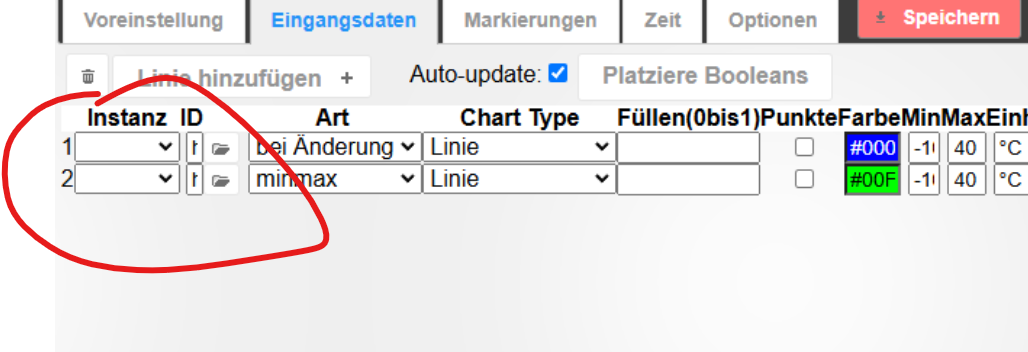
Auf welche Instanz eines History-Adapters soll Flot denn referenzieren?
Die Tatsache, dass das Dropdown leer ist, deutet darauf hin, dass diese noch fehlt. (und im Ergebnis des iob diag erscheint auch keine)
-
@gukerl sagte in FLOT nach Neuinstallation & Backup:
Kann es am WEB Adapter liegen?
ja, auch daran
existiert die eingestellte Datenquelle?
@gukerl sagte in FLOT nach Neuinstallation & Backup:
Backup eingespielt, alle Adapter laufen, alles perfekt
was sagt
iob diagdazu?das hab ich bereits gefragt
@homoran sagte in FLOT nach Neuinstallation & Backup:existiert die eingestellte Datenquelle?
und von @Gukerl auch nicht beantwortet bekommen
-
das hab ich bereits gefragt
@homoran sagte in FLOT nach Neuinstallation & Backup:existiert die eingestellte Datenquelle?
und von @Gukerl auch nicht beantwortet bekommen
Guten Morgen,
in einer Nachtsession habe ich den Raspi komplett neu aufgesetzt, den iOb auf SD auch komplett neu installiert, danach alles auf die nVME transferiert und siehe da, nun klappt es auch mit Flot. Problem auf welche Art und Weise auch immer, gelöst.

Einzig das History Backup, das wollte nicht, das hatte einen Fehler beim Entpacken, WinScp war mein Freund, ich hab den Ordner vom 4er Raspi auf den 5er manuell kopiert.
Danke auf jeden Fall an alle, die mit mir gegrübelt haben und Vorschläge gebracht haben!LG, Andi :)



Hey! Du scheinst an dieser Unterhaltung interessiert zu sein, hast aber noch kein Konto.
Hast du es satt, bei jedem Besuch durch die gleichen Beiträge zu scrollen? Wenn du dich für ein Konto anmeldest, kommst du immer genau dorthin zurück, wo du zuvor warst, und kannst dich über neue Antworten benachrichtigen lassen (entweder per E-Mail oder Push-Benachrichtigung). Du kannst auch Lesezeichen speichern und Beiträge positiv bewerten, um anderen Community-Mitgliedern deine Wertschätzung zu zeigen.
Mit deinem Input könnte dieser Beitrag noch besser werden 💗
Registrieren Anmelden309
Online33.0k
Benutzer83.7k
Themen1.3m
Beiträge