




Z2M-Adapter: Geräte als offline markiert obwohl online
-
Due to request from @arteck : Here's the post.
Problem:
After a fresh start of the z2m-instance, all devices are available and working. After a while most devices now show as
offline, despite being online. Everything works fine though. it's just availability=falseSteps tried so far:
- double-checking config-settings according to documentation.
advanced:
  ota_timeout: 1200
  output: json
  cache_state: false

availability:
  enabled: true
  active:
    timeout: 120
  passive:
    timeout: 1500
[...]
(removing the timeouts doesn't change the behaviour)
- Trying all possible settings in MQTT/Z2M+Z2M-Adapter in desperately trying to fix it.
-Zigbee2mqtt-Adapter 3.0.2
-Zigbee2mqtt v2.0
-MQTT (external server)- js-cont 7.0.6
- admin-adapter: most current
- nodejs 20.10.0
- npm 10.8.2
======================= SUMMARY =======================
                        v.2024-10-19


   Static hostname: iobroker
         Icon name: computer-vm
           Chassis: vm
    Virtualization: kvm
  Operating System: Ubuntu 20.04.6 LTS
            Kernel: Linux 5.4.0-204-generic
      Architecture: x86-64

Installation:           kvm
Kernel:                 x86_64
Userland:               64 bit
Timezone:               Europe/Berlin (CET, +0100)
User-ID:                1000
Display-Server:         false
Boot Target:            multi-user.target

Pending OS-Updates:     12
Pending iob updates:    0

Nodejs-Installation:
/usr/bin/nodejs         v20.18.0
/usr/bin/node           v20.18.0
/usr/bin/npm            10.8.2
/usr/bin/npx            10.8.2
/usr/bin/corepack       0.29.3

Recommended versions are nodejs 20.18.1 and npm 10.8.2
nodeJS installation is correct

MEMORY:
              total        used        free      shared  buff/cache   available
Mem:           9.7G        2.5G        3.9G        1.0M        3.3G        6.9G
Swap:          2.0G          0B        2.0G
Total:          11G        2.5G        5.9G

Active iob-Instances:   25
Upgrade policy: none

ioBroker Core:          js-controller           7.0.6
                        admin                   7.4.14

ioBroker Status:        iobroker is running on this host.


Objects type: jsonl
States  type: jsonl

Status admin and web instance:
+ system.adapter.admin.0                  : admin                 : iobroker                                 -  enabled, port: 8081, bind: 192.168.0.10 (SSL), run as: admin
  system.adapter.admin.1                  : admin                 : iobroker                                 - disabled, port: 8099, bind: 0.0.0.0, run as: admin
+ system.adapter.web.0                    : web                   : iobroker                                 -  enabled, port: 8082, bind: 192.168.0.10 (SSL), run as: admin
+ system.adapter.web.1                    : web                   : iobroker                                 -  enabled, port: 8084, bind: 192.168.0.10, run as: httpuser
+ system.adapter.web.2                    : web                   : iobroker                                 -  enabled, port: 8098, bind: 0.0.0.0 (SSL), run as: httpuser

Objects:                15731
States:                 12426

Size of iob-Database:

29M     /opt/iobroker/iobroker-data/objects.jsonl
15M     /opt/iobroker/iobroker-data/objects.json.migrated
15M     /opt/iobroker/iobroker-data/objects.json.bak.migrated
0       /opt/iobroker/iobroker-data/objects.json.broken
48M     /opt/iobroker/iobroker-data/states.jsonl
2.8M    /opt/iobroker/iobroker-data/states.json.migrated
2.8M    /opt/iobroker/iobroker-data/states.json.bak.migrated
0       /opt/iobroker/iobroker-data/states.json.broken


Operating System codenamed 'focal' is an aging Ubuntu release! Please upgrade to the latest LTS release 'noble' in due time!

=================== END OF SUMMARY ====================
Bitte in der nachfolgenden Übersicht die mit ... bzw x gekennzeichneten Felder ausfüllen und im Anschluss an die Tabelle auf Linux Systemen den Output des Commands iob diag einfügen.
Hinweis: Das Eröffnen eines Issues hier ersetzt NICHT das Anlegen eine Issues im Repository des Adapters. Fehlerbehebungen werden ausschließlich über Issues getrackt.
DANKE
Bitte ausfüllen:
- Adaptername: ...
- Link zu Adapterrepository: www.github.com...
- Adapterversion: ...
- js-controller Version: ...
- Admin Version: ...
- Hardwaresystem: NUC, Pi4 ...
- Arbeitsspeicher: ...xGB
- Festplattenart: SD-Karte, SSD, HDD, ...
- Betriebssystem: ...
- Nodejs-Version: ...
- NPM-Version: ...
- Installationsart: Skript oder Manuell ?
- Image, Docker genutzt: Ja - Nein
- Ort, Name der Imagedatei: ...
Linux User bitte hier den Output von iob diag einfügen.Due to request from @arteck : Here's the post.
Problem:
After a fresh start of the z2m-instance, all devices are available and working. After a while most devices now show as
offline, despite being online. Everything works fine though. it's just availability=falseSteps tried so far:
- double-checking config-settings according to documentation.
advanced:
  ota_timeout: 1200
  output: json
  cache_state: false
[...]
availability:
  enabled: true
  active:
    timeout: 120
  passive:
    timeout: 1500
[...]
(removing the timeouts doesn't change the behaviour)
- Trying all possible settings in MQTT/Z2M+Z2M-Adapter in desperately trying to fix it.
-Zigbee2mqtt-Adapter 3.0.2
-Zigbee2mqtt v2.0
-MQTT (external server)- js-cont 7.0.6
- admin-adapter: most current
- nodejs 20.10.0
- npm 10.8.2
======================= SUMMARY ======================= v.2024-10-19 Static hostname: iobroker Icon name: computer-vm Chassis: vm Virtualization: kvm Operating System: Ubuntu 20.04.6 LTS Kernel: Linux 5.4.0-204-generic Architecture: x86-64 Installation: kvm Kernel: x86_64 Userland: 64 bit Timezone: Europe/Berlin (CET, +0100) User-ID: 1000 Display-Server: false Boot Target: multi-user.target Pending OS-Updates: 12 Pending iob updates: 0 Nodejs-Installation: /usr/bin/nodejs v20.18.0 /usr/bin/node v20.18.0 /usr/bin/npm 10.8.2 /usr/bin/npx 10.8.2 /usr/bin/corepack 0.29.3 Recommended versions are nodejs 20.18.1 and npm 10.8.2 nodeJS installation is correct MEMORY: total used free shared buff/cache available Mem: 9.7G 2.5G 3.9G 1.0M 3.3G 6.9G Swap: 2.0G 0B 2.0G Total: 11G 2.5G 5.9G Active iob-Instances: 25 Upgrade policy: none ioBroker Core: js-controller 7.0.6 admin 7.4.14 ioBroker Status: iobroker is running on this host. Objects type: jsonl States type: jsonl Status admin and web instance: + system.adapter.admin.0 : admin : iobroker - enabled, port: 8081, bind: 192.168.0.10 (SSL), run as: admin system.adapter.admin.1 : admin : iobroker - disabled, port: 8099, bind: 0.0.0.0, run as: admin + system.adapter.web.0 : web : iobroker - enabled, port: 8082, bind: 192.168.0.10 (SSL), run as: admin + system.adapter.web.1 : web : iobroker - enabled, port: 8084, bind: 192.168.0.10, run as: httpuser + system.adapter.web.2 : web : iobroker - enabled, port: 8098, bind: 0.0.0.0 (SSL), run as: httpuser Objects: 15731 States: 12426 Size of iob-Database: 29M /opt/iobroker/iobroker-data/objects.jsonl 15M /opt/iobroker/iobroker-data/objects.json.migrated 15M /opt/iobroker/iobroker-data/objects.json.bak.migrated 0 /opt/iobroker/iobroker-data/objects.json.broken 48M /opt/iobroker/iobroker-data/states.jsonl 2.8M /opt/iobroker/iobroker-data/states.json.migrated 2.8M /opt/iobroker/iobroker-data/states.json.bak.migrated 0 /opt/iobroker/iobroker-data/states.json.broken Operating System codenamed 'focal' is an aging Ubuntu release! Please upgrade to the latest LTS release 'noble' in due time! =================== END OF SUMMARY ==================== -
Due to request from @arteck : Here's the post.
Problem:
After a fresh start of the z2m-instance, all devices are available and working. After a while most devices now show as
offline, despite being online. Everything works fine though. it's just availability=falseSteps tried so far:
- double-checking config-settings according to documentation.
advanced:
  ota_timeout: 1200
  output: json
  cache_state: false

availability:
  enabled: true
  active:
    timeout: 120
  passive:
    timeout: 1500
[...]
(removing the timeouts doesn't change the behaviour)
- Trying all possible settings in MQTT/Z2M+Z2M-Adapter in desperately trying to fix it.
-Zigbee2mqtt-Adapter 3.0.2
-Zigbee2mqtt v2.0
-MQTT (external server)- js-cont 7.0.6
- admin-adapter: most current
- nodejs 20.10.0
- npm 10.8.2
======================= SUMMARY =======================
                        v.2024-10-19


   Static hostname: iobroker
         Icon name: computer-vm
           Chassis: vm
    Virtualization: kvm
  Operating System: Ubuntu 20.04.6 LTS
            Kernel: Linux 5.4.0-204-generic
      Architecture: x86-64

Installation:           kvm
Kernel:                 x86_64
Userland:               64 bit
Timezone:               Europe/Berlin (CET, +0100)
User-ID:                1000
Display-Server:         false
Boot Target:            multi-user.target

Pending OS-Updates:     12
Pending iob updates:    0

Nodejs-Installation:
/usr/bin/nodejs         v20.18.0
/usr/bin/node           v20.18.0
/usr/bin/npm            10.8.2
/usr/bin/npx            10.8.2
/usr/bin/corepack       0.29.3

Recommended versions are nodejs 20.18.1 and npm 10.8.2
nodeJS installation is correct

MEMORY:
              total        used        free      shared  buff/cache   available
Mem:           9.7G        2.5G        3.9G        1.0M        3.3G        6.9G
Swap:          2.0G          0B        2.0G
Total:          11G        2.5G        5.9G

Active iob-Instances:   25
Upgrade policy: none

ioBroker Core:          js-controller           7.0.6
                        admin                   7.4.14

ioBroker Status:        iobroker is running on this host.


Objects type: jsonl
States  type: jsonl

Status admin and web instance:
+ system.adapter.admin.0                  : admin                 : iobroker                                 -  enabled, port: 8081, bind: 192.168.0.10 (SSL), run as: admin
  system.adapter.admin.1                  : admin                 : iobroker                                 - disabled, port: 8099, bind: 0.0.0.0, run as: admin
+ system.adapter.web.0                    : web                   : iobroker                                 -  enabled, port: 8082, bind: 192.168.0.10 (SSL), run as: admin
+ system.adapter.web.1                    : web                   : iobroker                                 -  enabled, port: 8084, bind: 192.168.0.10, run as: httpuser
+ system.adapter.web.2                    : web                   : iobroker                                 -  enabled, port: 8098, bind: 0.0.0.0 (SSL), run as: httpuser

Objects:                15731
States:                 12426

Size of iob-Database:

29M     /opt/iobroker/iobroker-data/objects.jsonl
15M     /opt/iobroker/iobroker-data/objects.json.migrated
15M     /opt/iobroker/iobroker-data/objects.json.bak.migrated
0       /opt/iobroker/iobroker-data/objects.json.broken
48M     /opt/iobroker/iobroker-data/states.jsonl
2.8M    /opt/iobroker/iobroker-data/states.json.migrated
2.8M    /opt/iobroker/iobroker-data/states.json.bak.migrated
0       /opt/iobroker/iobroker-data/states.json.broken


Operating System codenamed 'focal' is an aging Ubuntu release! Please upgrade to the latest LTS release 'noble' in due time!

=================== END OF SUMMARY ====================
Bitte in der nachfolgenden Übersicht die mit ... bzw x gekennzeichneten Felder ausfüllen und im Anschluss an die Tabelle auf Linux Systemen den Output des Commands iob diag einfügen.
Hinweis: Das Eröffnen eines Issues hier ersetzt NICHT das Anlegen eine Issues im Repository des Adapters. Fehlerbehebungen werden ausschließlich über Issues getrackt.
DANKE
Bitte ausfüllen:
- Adaptername: ...
- Link zu Adapterrepository: www.github.com...
- Adapterversion: ...
- js-controller Version: ...
- Admin Version: ...
- Hardwaresystem: NUC, Pi4 ...
- Arbeitsspeicher: ...xGB
- Festplattenart: SD-Karte, SSD, HDD, ...
- Betriebssystem: ...
- Nodejs-Version: ...
- NPM-Version: ...
- Installationsart: Skript oder Manuell ?
- Image, Docker genutzt: Ja - Nein
- Ort, Name der Imagedatei: ...
Linux User bitte hier den Output von iob diag einfügen.Due to request from @arteck : Here's the post.
Problem:
After a fresh start of the z2m-instance, all devices are available and working. After a while most devices now show as
offline, despite being online. Everything works fine though. it's just availability=falseSteps tried so far:
- double-checking config-settings according to documentation.
advanced:
  ota_timeout: 1200
  output: json
  cache_state: false
[...]
availability:
  enabled: true
  active:
    timeout: 120
  passive:
    timeout: 1500
[...]
(removing the timeouts doesn't change the behaviour)
- Trying all possible settings in MQTT/Z2M+Z2M-Adapter in desperately trying to fix it.
-Zigbee2mqtt-Adapter 3.0.2
-Zigbee2mqtt v2.0
-MQTT (external server)- js-cont 7.0.6
- admin-adapter: most current
- nodejs 20.10.0
- npm 10.8.2
======================= SUMMARY ======================= v.2024-10-19 Static hostname: iobroker Icon name: computer-vm Chassis: vm Virtualization: kvm Operating System: Ubuntu 20.04.6 LTS Kernel: Linux 5.4.0-204-generic Architecture: x86-64 Installation: kvm Kernel: x86_64 Userland: 64 bit Timezone: Europe/Berlin (CET, +0100) User-ID: 1000 Display-Server: false Boot Target: multi-user.target Pending OS-Updates: 12 Pending iob updates: 0 Nodejs-Installation: /usr/bin/nodejs v20.18.0 /usr/bin/node v20.18.0 /usr/bin/npm 10.8.2 /usr/bin/npx 10.8.2 /usr/bin/corepack 0.29.3 Recommended versions are nodejs 20.18.1 and npm 10.8.2 nodeJS installation is correct MEMORY: total used free shared buff/cache available Mem: 9.7G 2.5G 3.9G 1.0M 3.3G 6.9G Swap: 2.0G 0B 2.0G Total: 11G 2.5G 5.9G Active iob-Instances: 25 Upgrade policy: none ioBroker Core: js-controller 7.0.6 admin 7.4.14 ioBroker Status: iobroker is running on this host. Objects type: jsonl States type: jsonl Status admin and web instance: + system.adapter.admin.0 : admin : iobroker - enabled, port: 8081, bind: 192.168.0.10 (SSL), run as: admin system.adapter.admin.1 : admin : iobroker - disabled, port: 8099, bind: 0.0.0.0, run as: admin + system.adapter.web.0 : web : iobroker - enabled, port: 8082, bind: 192.168.0.10 (SSL), run as: admin + system.adapter.web.1 : web : iobroker - enabled, port: 8084, bind: 192.168.0.10, run as: httpuser + system.adapter.web.2 : web : iobroker - enabled, port: 8098, bind: 0.0.0.0 (SSL), run as: httpuser Objects: 15731 States: 12426 Size of iob-Database: 29M /opt/iobroker/iobroker-data/objects.jsonl 15M /opt/iobroker/iobroker-data/objects.json.migrated 15M /opt/iobroker/iobroker-data/objects.json.bak.migrated 0 /opt/iobroker/iobroker-data/objects.json.broken 48M /opt/iobroker/iobroker-data/states.jsonl 2.8M /opt/iobroker/iobroker-data/states.json.migrated 2.8M /opt/iobroker/iobroker-data/states.json.bak.migrated 0 /opt/iobroker/iobroker-data/states.json.broken Operating System codenamed 'focal' is an aging Ubuntu release! Please upgrade to the latest LTS release 'noble' in due time! =================== END OF SUMMARY ====================@kodijack sagte in Z2M-Adapter: Devices marked offline despite being online:
active:
timeout: 120
passive:
timeout: 1500hast du die mal ausgeschaltet ?? hat auch nix gebracht ?
und wie war das
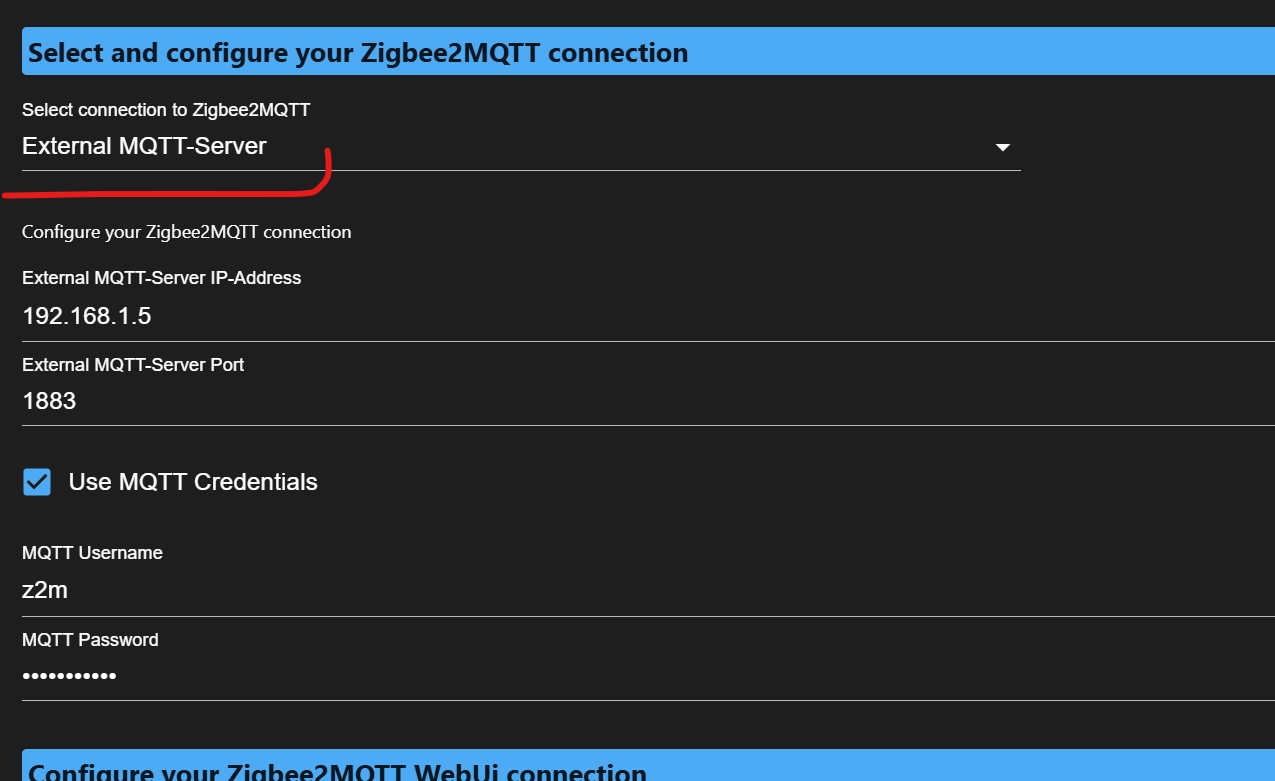
so oder ??
zigbee hab ich, zwave auch, nuc's genauso und HA auch
-
@kodijack sagte in Z2M-Adapter: Devices marked offline despite being online:
active:
timeout: 120
passive:
timeout: 1500hast du die mal ausgeschaltet ?? hat auch nix gebracht ?
und wie war das
so oder ??
@arteck said in Z2M-Adapter: Devices marked offline despite being online:
@kodijack sagte in Z2M-Adapter: Devices marked offline despite being online:
active:
timeout: 120
passive:
timeout: 1500hast du die mal ausgeschaltet ?? hat auch nix gebracht ?
Nein, nix geändert nach Löschung beider Optionen
und wie war das
so oder ??
External, ja.
-
@arteck said in Z2M-Adapter: Devices marked offline despite being online:
@kodijack sagte in Z2M-Adapter: Devices marked offline despite being online:
active:
timeout: 120
passive:
timeout: 1500hast du die mal ausgeschaltet ?? hat auch nix gebracht ?
Nein, nix geändert nach Löschung beider Optionen
und wie war das
so oder ??
External, ja.
@kodijack poste mal bitte nach adapterstart das log.
irgendwas ist bei dir anders.
zigbee hab ich, zwave auch, nuc's genauso und HA auch
-
Hab das mal hier hingeschoben. Ist ja wohl kein Bug von ioBroker.
@Kodijack kannst du bitte den Threadtitel noch auf deutsch ändern!
-
@arteck said in Z2M-Adapter: Devices marked offline despite being online:
@kodijack poste mal bitte nach adapterstart das log.
irgendwas ist bei dir anders.
zigbee2mqtt.0
	2025-01-21 18:28:54.000	info	==================================================================================
zigbee2mqtt.0
	2025-01-21 18:28:54.000	info	|| Network panid 6555 channel: 11 ext_pan_id: 0x5a9b81c29a3de1d1
zigbee2mqtt.0
	2025-01-21 18:28:54.000	info	|| Coordinator type: zStack3x0 Version: 20240710 Serial: tcp://192.168.0.250:6638
zigbee2mqtt.0
	2025-01-21 18:28:54.000	info	|| Zigbee2MQTT Version: 2.0.0
zigbee2mqtt.0
	2025-01-21 18:28:53.999	info	============================ Zigbee2MQTT Information =============================
zigbee2mqtt.0
	2025-01-21 18:28:53.988	info	Connect to Zigbee2MQTT over external mqtt connection.
zigbee2mqtt.0
	2025-01-21 18:28:53.857	info	==================================================================================
zigbee2mqtt.0
	2025-01-21 18:28:53.857	info	|| Coordinator Check Cron : 0 3 * * *
zigbee2mqtt.0
	2025-01-21 18:28:53.857	info	|| Coordinator Check Loglevel: info
zigbee2mqtt.0
	2025-01-21 18:28:53.857	info	|| Use Automatic Coordinator Check: no
zigbee2mqtt.0
	2025-01-21 18:28:53.857	info	|| Use Simple Press/Release State: yes
zigbee2mqtt.0
	2025-01-21 18:28:53.857	info	|| Use Simple Move/Stop State: yes
zigbee2mqtt.0
	2025-01-21 18:28:53.857	info	|| Use Simple Hold/Release State: yes
zigbee2mqtt.0
	2025-01-21 18:28:53.857	info	|| Use Device Icons: yes
zigbee2mqtt.0
	2025-01-21 18:28:53.857	info	|| Use Event In Desc: yes
zigbee2mqtt.0
	2025-01-21 18:28:53.856	info	|| Use BrightnessStep OnOff: no
zigbee2mqtt.0
	2025-01-21 18:28:53.856	info	|| Use BrightnessMove OnOff: no
zigbee2mqtt.0
	2025-01-21 18:28:53.856	info	|| Use ColorTemperature ColorSync: no
zigbee2mqtt.0
	2025-01-21 18:28:53.856	info	|| Use Kelvin: no
zigbee2mqtt.0
	2025-01-21 18:28:53.856	info	|| Proxy Zigbee2MQTT Logs to ioBroker Logs: deactivated
zigbee2mqtt.0
	2025-01-21 18:28:53.856	info	|| Zigbee2MQTT Debug Log: deactivated
zigbee2mqtt.0
	2025-01-21 18:28:53.855	info	|| Zigbee2MQTT Externanl MQTT Credentials: use
zigbee2mqtt.0
	2025-01-21 18:28:53.855	info	|| Zigbee2MQTT Externanl MQTT Port: 1883
zigbee2mqtt.0
	2025-01-21 18:28:53.855	info	|| Zigbee2MQTT Externanl MQTT Server: mosquitto.<redacted domain>
zigbee2mqtt.0
	2025-01-21 18:28:53.855	info	|| Zigbee2MQTT Connection Type: exmqtt
zigbee2mqtt.0
	2025-01-21 18:28:53.855	info	|| Zigbee2MQTT Frontend Port: 8080
zigbee2mqtt.0
	2025-01-21 18:28:53.854	info	|| Zigbee2MQTT Frontend Server:
zigbee2mqtt.0
	2025-01-21 18:28:53.854	info	|| Zigbee2MQTT Frontend Scheme: http
zigbee2mqtt.0
	2025-01-21 18:28:53.854	info	================================= Adapter Config =================================
zigbee2mqtt.0
	2025-01-21 18:28:53.844	info	starting. Version 3.0.2 in /opt/iobroker/node_modules/iobroker.zigbee2mqtt, node: v20.18.0, js-controller: 7.0.6
Irgendwas hilfreiches dabei oder meintest du eher das z2m-log? Soll ich nochmal mit dem forwarded-log zusammen posten?
-
@arteck said in Z2M-Adapter: Devices marked offline despite being online:
@kodijack poste mal bitte nach adapterstart das log.
irgendwas ist bei dir anders.
zigbee2mqtt.0
	2025-01-21 18:28:54.000	info	==================================================================================
zigbee2mqtt.0
	2025-01-21 18:28:54.000	info	|| Network panid 6555 channel: 11 ext_pan_id: 0x5a9b81c29a3de1d1
zigbee2mqtt.0
	2025-01-21 18:28:54.000	info	|| Coordinator type: zStack3x0 Version: 20240710 Serial: tcp://192.168.0.250:6638
zigbee2mqtt.0
	2025-01-21 18:28:54.000	info	|| Zigbee2MQTT Version: 2.0.0
zigbee2mqtt.0
	2025-01-21 18:28:53.999	info	============================ Zigbee2MQTT Information =============================
zigbee2mqtt.0
	2025-01-21 18:28:53.988	info	Connect to Zigbee2MQTT over external mqtt connection.
zigbee2mqtt.0
	2025-01-21 18:28:53.857	info	==================================================================================
zigbee2mqtt.0
	2025-01-21 18:28:53.857	info	|| Coordinator Check Cron : 0 3 * * *
zigbee2mqtt.0
	2025-01-21 18:28:53.857	info	|| Coordinator Check Loglevel: info
zigbee2mqtt.0
	2025-01-21 18:28:53.857	info	|| Use Automatic Coordinator Check: no
zigbee2mqtt.0
	2025-01-21 18:28:53.857	info	|| Use Simple Press/Release State: yes
zigbee2mqtt.0
	2025-01-21 18:28:53.857	info	|| Use Simple Move/Stop State: yes
zigbee2mqtt.0
	2025-01-21 18:28:53.857	info	|| Use Simple Hold/Release State: yes
zigbee2mqtt.0
	2025-01-21 18:28:53.857	info	|| Use Device Icons: yes
zigbee2mqtt.0
	2025-01-21 18:28:53.857	info	|| Use Event In Desc: yes
zigbee2mqtt.0
	2025-01-21 18:28:53.856	info	|| Use BrightnessStep OnOff: no
zigbee2mqtt.0
	2025-01-21 18:28:53.856	info	|| Use BrightnessMove OnOff: no
zigbee2mqtt.0
	2025-01-21 18:28:53.856	info	|| Use ColorTemperature ColorSync: no
zigbee2mqtt.0
	2025-01-21 18:28:53.856	info	|| Use Kelvin: no
zigbee2mqtt.0
	2025-01-21 18:28:53.856	info	|| Proxy Zigbee2MQTT Logs to ioBroker Logs: deactivated
zigbee2mqtt.0
	2025-01-21 18:28:53.856	info	|| Zigbee2MQTT Debug Log: deactivated
zigbee2mqtt.0
	2025-01-21 18:28:53.855	info	|| Zigbee2MQTT Externanl MQTT Credentials: use
zigbee2mqtt.0
	2025-01-21 18:28:53.855	info	|| Zigbee2MQTT Externanl MQTT Port: 1883
zigbee2mqtt.0
	2025-01-21 18:28:53.855	info	|| Zigbee2MQTT Externanl MQTT Server: mosquitto.<redacted domain>
zigbee2mqtt.0
	2025-01-21 18:28:53.855	info	|| Zigbee2MQTT Connection Type: exmqtt
zigbee2mqtt.0
	2025-01-21 18:28:53.855	info	|| Zigbee2MQTT Frontend Port: 8080
zigbee2mqtt.0
	2025-01-21 18:28:53.854	info	|| Zigbee2MQTT Frontend Server:
zigbee2mqtt.0
	2025-01-21 18:28:53.854	info	|| Zigbee2MQTT Frontend Scheme: http
zigbee2mqtt.0
	2025-01-21 18:28:53.854	info	================================= Adapter Config =================================
zigbee2mqtt.0
	2025-01-21 18:28:53.844	info	starting. Version 3.0.2 in /opt/iobroker/node_modules/iobroker.zigbee2mqtt, node: v20.18.0, js-controller: 7.0.6
Irgendwas hilfreiches dabei oder meintest du eher das z2m-log? Soll ich nochmal mit dem forwarded-log zusammen posten?
-
@kodijack direkt nach dem start sind die alle online.. ??
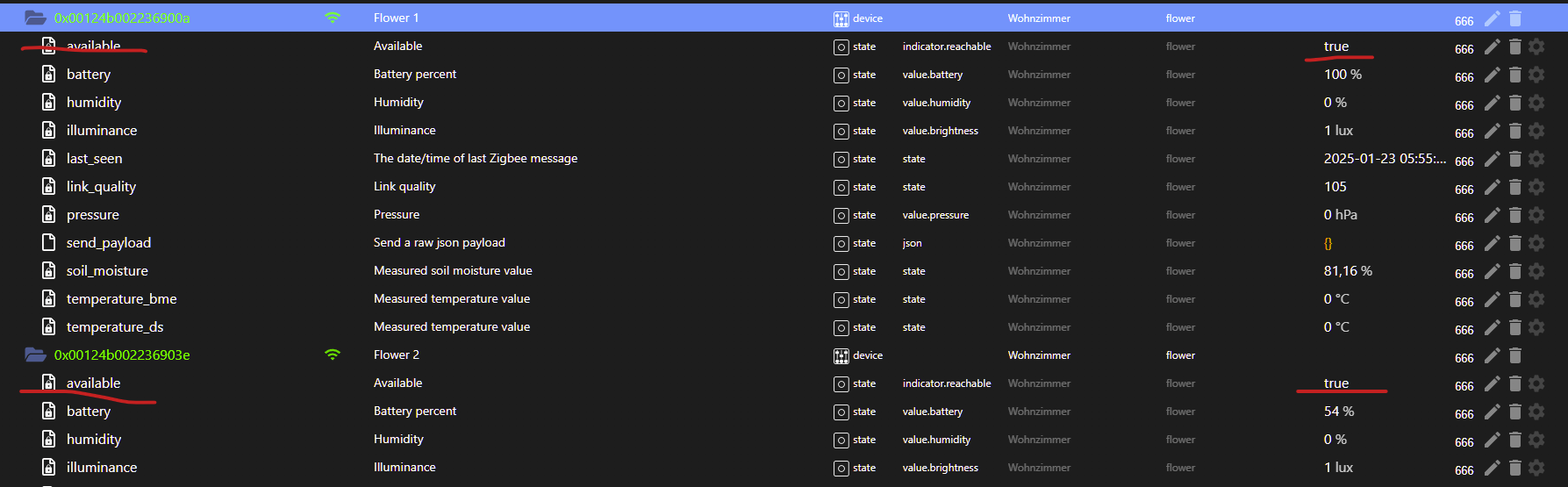
zeigmal ein screenshot von paar objekten
@arteck said in Z2M-Adapter: Geräte als offline markiert obwohl online:
@kodijack direkt nach dem start sind die alle online.. ??
zeigmal ein screenshot von paar objekten
Ja, direkt nach Adapter-Neustart sind alle online (die auch tatsächlich online sind natürlich). Das Gleiche auch wenn ich Z2M selber neustarte, nicht aber den Adapter.
Es dauerte ein paar Stunden bis (fast) alle wieder offline waren.

Die anderen sind auch alle available:false. Änder ich einen state wie "on" im gleichen Gerät, funktioniert es, availability bleibt jedoch offline.
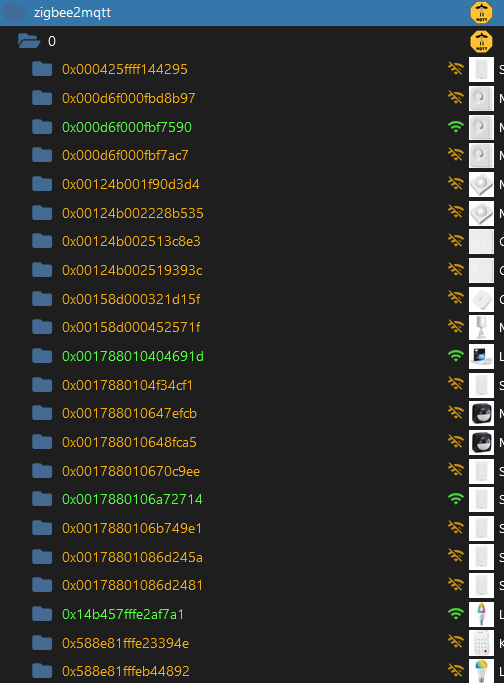
Hier sind ein paar noch online, aber bald auch offline :-)
-
@kodijack sagte in Z2M-Adapter: Geräte als offline markiert obwohl online:
cache_state: false
setzt den mal auf
cache_state: falsezigbee hab ich, zwave auch, nuc's genauso und HA auch
-
@kodijack sagte in Z2M-Adapter: Geräte als offline markiert obwohl online:
cache_state: false
setzt den mal auf
cache_state: false@arteck said in Z2M-Adapter: Geräte als offline markiert obwohl online:
@kodijack sagte in Z2M-Adapter: Geräte als offline markiert obwohl online:
cache_state: false
setzt den mal auf
cache_state: falseÖh. Ist doch schon :-)
-
@arteck said in Z2M-Adapter: Geräte als offline markiert obwohl online:
@kodijack sagte in Z2M-Adapter: Geräte als offline markiert obwohl online:
cache_state: false
setzt den mal auf
cache_state: falseÖh. Ist doch schon :-)
@kodijack jo hast recht....
  cache_state: false
device_options: {}
availability:
  enabled: true
  active:
    timeout: 10
  passive:
    timeout: 1500
das ist meine Einstellung.. kann ja dann nur ean dem timeout liegen
zigbee hab ich, zwave auch, nuc's genauso und HA auch
-
@kodijack jo hast recht....
  cache_state: false
device_options: {}
availability:
  enabled: true
  active:
    timeout: 10
  passive:
    timeout: 1500
das ist meine Einstellung.. kann ja dann nur ean dem timeout liegen
@arteck said in Z2M-Adapter: Geräte als offline markiert obwohl online:
das ist meine Einstellung.. kann ja dann nur ean dem timeout liegen
Den hatte ich ja schon rausgenommen. War deine erste Idee in Tgram.
Deine Version ist ja, glaub ich, der default, 10 und 1500. Werd ich aber auch nochmal explizit so übernehmen, who knows...


Hey! Du scheinst an dieser Unterhaltung interessiert zu sein, hast aber noch kein Konto.
Hast du es satt, bei jedem Besuch durch die gleichen Beiträge zu scrollen? Wenn du dich für ein Konto anmeldest, kommst du immer genau dorthin zurück, wo du zuvor warst, und kannst dich über neue Antworten benachrichtigen lassen (entweder per E-Mail oder Push-Benachrichtigung). Du kannst auch Lesezeichen speichern und Beiträge positiv bewerten, um anderen Community-Mitgliedern deine Wertschätzung zu zeigen.
Mit deinem Input könnte dieser Beitrag noch besser werden 💗
Registrieren Anmelden419
Online33.0k
Benutzer83.7k
Themen1.3m
Beiträge