Skip to content
  • Home
  • Aktuell
  • Tags
  • 0 Ungelesen 0
  • Kategorien
  • Unreplied
  • Beliebt
  • GitHub
  • Docu
  • Hilfe
Skins
  • Light
  • Brite
  • Cerulean
  • Cosmo
  • Flatly
  • Journal
  • Litera
  • Lumen
  • Lux
  • Materia
  • Minty
  • Morph
  • Pulse
  • Sandstone
  • Simplex
  • Sketchy
  • Spacelab
  • United
  • Yeti
  • Zephyr
  • Dark
  • Cyborg
  • Darkly
  • Quartz
  • Slate
  • Solar
  • Superhero
  • Vapor

  • Standard: (Kein Skin)
  • Kein Skin
Einklappen
ioBroker Logo

Community Forum

donate donate
  1. ioBroker Community Home
  2. Deutsch
  3. ioBroker Allgemein
  4. [gelöst]Node.JS lässt sich nicht updaten
NEWS

  • UPDATE 31.10.: Amazon Alexa - ioBroker Skill läuft aus ?
    apollon77A
    apollon77
    48
    3
    8.8k

  • Monatsrückblick – September 2025
    BluefoxB
    Bluefox
    13
    1
    2.2k

  • Neues Video "KI im Smart Home" - ioBroker plus n8n
    BluefoxB
    Bluefox
    16
    1
    3.2k

[gelöst]Node.JS lässt sich nicht updaten

Geplant Angeheftet Gesperrt Verschoben ioBroker Allgemein
54 Beiträge 6 Kommentatoren 4.3k Aufrufe 3 Watching
  • Älteste zuerst
  • Neuste zuerst
  • Meiste Stimmen
Antworten
  • In einem neuen Thema antworten
Anmelden zum Antworten
Dieses Thema wurde gelöscht. Nur Nutzer mit entsprechenden Rechten können es sehen.
  • H Offline
    H Offline
    Holzwurm1976
    schrieb am zuletzt editiert von Holzwurm1976
    #33

    @thomas-braun
    so, jetzt habe ich ein paar Stunden Updates gemacht, und konnte alle Adapter aktualiseren, bis auf diese beiden:

      RPI-Monitor  1.3.2    2.3.0 
      Worx  2.3.4    3.1.1  
    
    Thomas BraunT 1 Antwort Letzte Antwort
    0
    • H Holzwurm1976

      @thomas-braun
      so, jetzt habe ich ein paar Stunden Updates gemacht, und konnte alle Adapter aktualiseren, bis auf diese beiden:

        RPI-Monitor  1.3.2    2.3.0 
        Worx  2.3.4    3.1.1  
      
      Thomas BraunT Online
      Thomas BraunT Online
      Thomas Braun
      Most Active
      schrieb am zuletzt editiert von
      #34

      @holzwurm1976 sagte in Node.JS lässt sich nicht updaten:

      und konnte alle Adapter aktualiseren, bis auf diese beiden:

      Meldungen dazu?

      Linux-Werkzeugkasten:
      https://forum.iobroker.net/topic/42952/der-kleine-iobroker-linux-werkzeugkasten
      NodeJS Fixer Skript:
      https://forum.iobroker.net/topic/68035/iob-node-fix-skript
      iob_diag: curl -sLf -o diag.sh https://iobroker.net/diag.sh && bash diag.sh

      H 1 Antwort Letzte Antwort
      0
      • Thomas BraunT Thomas Braun

        @holzwurm1976 sagte in Node.JS lässt sich nicht updaten:

        und konnte alle Adapter aktualiseren, bis auf diese beiden:

        Meldungen dazu?

        H Offline
        H Offline
        Holzwurm1976
        schrieb am zuletzt editiert von
        #35

        @thomas-braun oh man, irgendwann lerne ich es:

        $ iobroker upgrade worx@3.1.1 --debug
        
        Update worx from @2.3.4 to @3.1.1
        
        NPM version: 10.8.2
        
        Installing iobroker.worx@3.1.1... (System call)
        
        > @abandonware/noble@1.9.2-24 install> node-gyp-build
        
        gyp info it worked if it ends with ok
        
        gyp info using node@18.20.5 | linux | arm
        
        gyp info find Python using Python version 3.7.3 found at "/usr/bin/python3"
        
        gyp info spawn /usr/bin/python3
        
        gyp info spawn args [
        
        gyp info spawn args '/opt/iobroker/node_modules/node-gyp/gyp/gyp_main.py',gyp info spawn args 'binding.gyp',gyp info spawn args '-f',gyp info spawn args 'make',gyp info spawn args '-I',gyp info spawn args '/opt/iobroker/node_modules/@abandonware/noble/build/config.gypi',gyp info spawn args '-I',gyp info spawn args '/opt/iobroker/node_modules/node-gyp/addon.gypi',gyp info spawn args '-I',
        
        gyp info spawn args '/home/iobroker/.cache/node-gyp/18.20.5/include/node/common.gypi',gyp info spawn args '-Dlibrary=shared_library',gyp info spawn args '-Dvisibility=default',gyp info spawn args '-Dnode_root_dir=/home/iobroker/.cache/node-gyp/18.20.5',gyp info spawn args '-Dnode_gyp_dir=/opt/iobroker/node_modules/node-gyp',gyp info spawn args '-Dnode_lib_file=/home/iobroker/.cache/node-gyp/18.20.5/<(target_arch)/node.lib',gyp info spawn args '-Dmodule_root_dir=/opt/iobroker/node_modules/@abandonware/noble',gyp info spawn args '-Dnode_engine=v8',gyp info spawn args '--depth=.',gyp info spawn args '--no-parallel',gyp info spawn args '--generator-output',gyp info spawn args 'build',gyp info spawn args '-Goutput_dir=.'gyp info spawn args ]
        
        Traceback (most recent call last):
        
        File "/opt/iobroker/node_modules/node-gyp/gyp/gyp_main.py", line 42, in <module> import gyp # noqa: E402 File "/opt/iobroker/node_modules/node-gyp/gyp/pylib/gyp/__init__.py", line 9, in <module> import gyp.input File "/opt/iobroker/node_modules/node-gyp/gyp/pylib/gyp/input.py", line 8, in <module> import gyp.common File "/opt/iobroker/node_modules/node-gyp/gyp/pylib/gyp/common.py", line 435 if CC := os.environ.get("CC_target") or os.environ.get("CC"): ^SyntaxError: invalid syntax
        
        gyp ERR! configure error
        
        gyp ERR! stack Error: `gyp` failed with exit code: 1gyp ERR! stack at ChildProcess.<anonymous> (/opt/iobroker/node_modules/node-gyp/lib/configure.js:317:18)gyp ERR! stack at ChildProcess.emit (node:events:517:28)gyp ERR! stack at ChildProcess._handle.onexit (node:internal/child_process:292:12)
        
        gyp ERR! System Linux 5.10.103-v7l+gyp ERR! command "/usr/bin/node" "/opt/iobroker/node_modules/.bin/node-gyp" "rebuild"gyp ERR! cwd /opt/iobroker/node_modules/@abandonware/noblegyp ERR! node -v v18.20.5gyp ERR! node-gyp -v v10.3.1gyp ERR! not ok
        
        > aws-crt@1.21.8 install> node ./scripts/install.js
        
        Could not find tar version 6.2.1
        
        Looking for tar version 6.2.1 as a dependency...
        
        Could not find tar version 6.2.1Could not find tarDownloading tar from npm for build...
        
        npm error code EBADENGINEnpm error engine Unsupported enginenpm error engine Not compatible with your version of node/npm: glob@11.0.0npm error notsup Not compatible with your version of node/npm: glob@11.0.0npm error notsup Required: {"node":"20 || >=22"}npm error notsup Actual: {"npm":"10.8.2","node":"v18.20.5"}npm error A complete log of this run can be found in: /home/iobroker/.npm/_logs/2024-12-30T11_42_03_774Z-debug-0.logERROR - npm could not download tar! tar is required to build the CRTERROR: Could not download tar! Cannot build CRTThis is likely due to being unable to download the package.Please install tar version undefined and then run the aws-crt install script againIf that does not work, ensure that:* you have npm (node package manager) installed* tar version 6.2.1 is available in your node package registry
        
        npm error code 1
        
        npm error path /opt/iobroker/node_modules/aws-crtnpm error command failednpm error command sh -c node ./scripts/install.js
        
        npm error A complete log of this run can be found in: /home/iobroker/.npm/_logs/2024-12-30T11_41_35_974Z-debug-0.log
        
        Updating objects from io-package.json for adapter "worx" with version "2.3.4"
        
        upload [13] worx.admin /opt/iobroker/node_modules/iobroker.worx/admin/i18n/de/translations.json i18n/de/translations.json application/json
        
        upload [12] worx.admin /opt/iobroker/node_modules/iobroker.worx/admin/i18n/en/translations.json i18n/en/translations.json application/json
        
        upload [11] worx.admin /opt/iobroker/node_modules/iobroker.worx/admin/i18n/es/translations.json i18n/es/translations.json application/json
        
        upload [10] worx.admin /opt/iobroker/node_modules/iobroker.worx/admin/i18n/fr/translations.json i18n/fr/translations.json application/json
        
        upload [9] worx.admin /opt/iobroker/node_modules/iobroker.worx/admin/i18n/it/translations.json i18n/it/translations.json application/json
        
        upload [8] worx.admin /opt/iobroker/node_modules/iobroker.worx/admin/i18n/nl/translations.json i18n/nl/translations.json application/json
        
        upload [7] worx.admin /opt/iobroker/node_modules/iobroker.worx/admin/i18n/pl/translations.json i18n/pl/translations.json application/json
        
        upload [6] worx.admin /opt/iobroker/node_modules/iobroker.worx/admin/i18n/pt/translations.json i18n/pt/translations.json application/json
        
        upload [5] worx.admin /opt/iobroker/node_modules/iobroker.worx/admin/i18n/ru/translations.json i18n/ru/translations.json application/json
        
        upload [4] worx.admin /opt/iobroker/node_modules/iobroker.worx/admin/i18n/uk/translations.json i18n/uk/translations.json application/json
        
        upload [3] worx.admin /opt/iobroker/node_modules/iobroker.worx/admin/i18n/zh-cn/translations.json i18n/zh-cn/translations.json application/json
        
        upload [2] worx.admin /opt/iobroker/node_modules/iobroker.worx/admin/index_m.html index_m.html text/html
        
        upload [1] worx.admin /opt/iobroker/node_modules/iobroker.worx/admin/jsonConfig.json jsonConfig.json application/json
        
        upload [0] worx.admin /opt/iobroker/node_modules/iobroker.worx/admin/worx.png worx.png image/png
        
        Process exited with code 0
        
        1 Antwort Letzte Antwort
        0
        • Thomas BraunT Online
          Thomas BraunT Online
          Thomas Braun
          Most Active
          schrieb am zuletzt editiert von Thomas Braun
          #36

          @holzwurm1976 sagte in Node.JS lässt sich nicht updaten:

          System Linux 5.10.103-v7l+gyp

          und nodejs@18 ist veraltet. Installier da NEU ein aktuelles Betriebssystem.
          Diesmal dann in der 64Bit-Lite-Version.

          error notsup Required: {"node":"20 || >=22"}

          Ein der Abhängigkeiten benötigt offenbar node@20.

          Linux-Werkzeugkasten:
          https://forum.iobroker.net/topic/42952/der-kleine-iobroker-linux-werkzeugkasten
          NodeJS Fixer Skript:
          https://forum.iobroker.net/topic/68035/iob-node-fix-skript
          iob_diag: curl -sLf -o diag.sh https://iobroker.net/diag.sh && bash diag.sh

          H 1 Antwort Letzte Antwort
          0
          • Thomas BraunT Thomas Braun

            @holzwurm1976 sagte in Node.JS lässt sich nicht updaten:

            System Linux 5.10.103-v7l+gyp

            und nodejs@18 ist veraltet. Installier da NEU ein aktuelles Betriebssystem.
            Diesmal dann in der 64Bit-Lite-Version.

            error notsup Required: {"node":"20 || >=22"}

            Ein der Abhängigkeiten benötigt offenbar node@20.

            H Offline
            H Offline
            Holzwurm1976
            schrieb am zuletzt editiert von
            #37

            @thomas-braun OK, also setze ich eine neue SD Karte neu auf, installiere ioBroker neu und lade über Backitup das Update neu rein, dann sollte es funktionieren?

            Thomas BraunT 1 Antwort Letzte Antwort
            1
            • H Holzwurm1976

              @thomas-braun OK, also setze ich eine neue SD Karte neu auf, installiere ioBroker neu und lade über Backitup das Update neu rein, dann sollte es funktionieren?

              Thomas BraunT Online
              Thomas BraunT Online
              Thomas Braun
              Most Active
              schrieb am zuletzt editiert von
              #38

              @holzwurm1976 sagte in Node.JS lässt sich nicht updaten:

              dann sollte es funktionieren?

              Jedenfalls sind dann die Chancen besser.

              Linux-Werkzeugkasten:
              https://forum.iobroker.net/topic/42952/der-kleine-iobroker-linux-werkzeugkasten
              NodeJS Fixer Skript:
              https://forum.iobroker.net/topic/68035/iob-node-fix-skript
              iob_diag: curl -sLf -o diag.sh https://iobroker.net/diag.sh && bash diag.sh

              H 1 Antwort Letzte Antwort
              0
              • Thomas BraunT Thomas Braun

                @holzwurm1976 sagte in Node.JS lässt sich nicht updaten:

                dann sollte es funktionieren?

                Jedenfalls sind dann die Chancen besser.

                H Offline
                H Offline
                Holzwurm1976
                schrieb am zuletzt editiert von
                #39

                @thomas-braun

                was wäre sonst die optimale Vorgehensweise, was sollte ich machen?

                Thomas BraunT 1 Antwort Letzte Antwort
                0
                • H Holzwurm1976

                  @thomas-braun

                  was wäre sonst die optimale Vorgehensweise, was sollte ich machen?

                  Thomas BraunT Online
                  Thomas BraunT Online
                  Thomas Braun
                  Most Active
                  schrieb am zuletzt editiert von
                  #40

                  @holzwurm1976 sagte in Node.JS lässt sich nicht updaten:

                  was wäre sonst die optimale Vorgehensweise, was sollte ich machen?

                  Neuinstallieren.

                  Linux-Werkzeugkasten:
                  https://forum.iobroker.net/topic/42952/der-kleine-iobroker-linux-werkzeugkasten
                  NodeJS Fixer Skript:
                  https://forum.iobroker.net/topic/68035/iob-node-fix-skript
                  iob_diag: curl -sLf -o diag.sh https://iobroker.net/diag.sh && bash diag.sh

                  H 2 Antworten Letzte Antwort
                  0
                  • T Nicht stören
                    T Nicht stören
                    ticaki
                    schrieb am zuletzt editiert von ticaki
                    #41

                    Falls noch jemand was ergänzen möchte:

                    https://github.com/iobroker-community-adapters/ioBroker.worx/issues/962

                    @mcm1957 FYI

                    Weather-Warnings Espresense NSPanel-Lovelace-ui Tagesschau

                    Spenden

                    1 Antwort Letzte Antwort
                    0
                    • Thomas BraunT Thomas Braun

                      @holzwurm1976 sagte in Node.JS lässt sich nicht updaten:

                      was wäre sonst die optimale Vorgehensweise, was sollte ich machen?

                      Neuinstallieren.

                      H Offline
                      H Offline
                      Holzwurm1976
                      schrieb am zuletzt editiert von
                      #42

                      @thomas-braun aber das ist doch komplett neu installiert?

                      neue SD
                      neues Betriebssystem
                      ioBoker neu installiert

                      und dann um die Views etc zu behalten das Backup einspielen, oder wie kann ich meine Adapter und Views etc behalten?

                      Thomas BraunT T 2 Antworten Letzte Antwort
                      0
                      • H Holzwurm1976

                        @thomas-braun aber das ist doch komplett neu installiert?

                        neue SD
                        neues Betriebssystem
                        ioBoker neu installiert

                        und dann um die Views etc zu behalten das Backup einspielen, oder wie kann ich meine Adapter und Views etc behalten?

                        Thomas BraunT Online
                        Thomas BraunT Online
                        Thomas Braun
                        Most Active
                        schrieb am zuletzt editiert von
                        #43

                        @holzwurm1976

                        Im Backup ist das drin, was du einstellst.

                        Linux-Werkzeugkasten:
                        https://forum.iobroker.net/topic/42952/der-kleine-iobroker-linux-werkzeugkasten
                        NodeJS Fixer Skript:
                        https://forum.iobroker.net/topic/68035/iob-node-fix-skript
                        iob_diag: curl -sLf -o diag.sh https://iobroker.net/diag.sh && bash diag.sh

                        H 1 Antwort Letzte Antwort
                        0
                        • Thomas BraunT Thomas Braun

                          @holzwurm1976

                          Im Backup ist das drin, was du einstellst.

                          H Offline
                          H Offline
                          Holzwurm1976
                          schrieb am zuletzt editiert von
                          #44

                          @thomas-braun sorry, aber ich verstehe nicht was Du meinst

                          1 Antwort Letzte Antwort
                          0
                          • H Holzwurm1976

                            @thomas-braun aber das ist doch komplett neu installiert?

                            neue SD
                            neues Betriebssystem
                            ioBoker neu installiert

                            und dann um die Views etc zu behalten das Backup einspielen, oder wie kann ich meine Adapter und Views etc behalten?

                            T Nicht stören
                            T Nicht stören
                            ticaki
                            schrieb am zuletzt editiert von
                            #45

                            @holzwurm1976

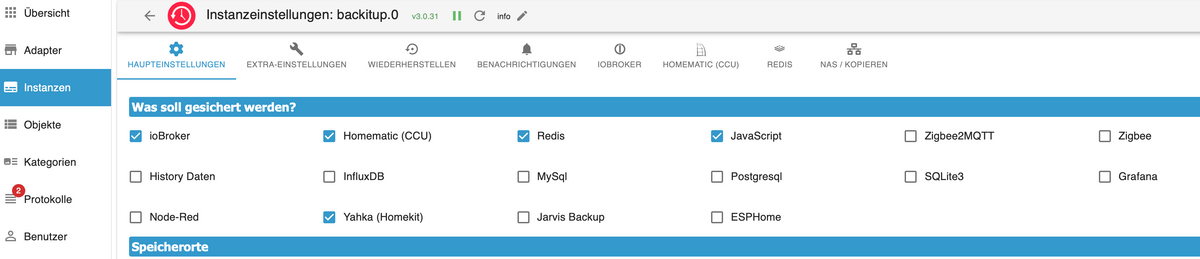
                            und das machst du hier:

                            Bildschirmfoto 2024-12-30 um 14.13.03.png

                            Weather-Warnings Espresense NSPanel-Lovelace-ui Tagesschau

                            Spenden

                            1 Antwort Letzte Antwort
                            0
                            • Thomas BraunT Thomas Braun

                              @holzwurm1976 sagte in Node.JS lässt sich nicht updaten:

                              was wäre sonst die optimale Vorgehensweise, was sollte ich machen?

                              Neuinstallieren.

                              H Offline
                              H Offline
                              Holzwurm1976
                              schrieb am zuletzt editiert von
                              #46

                              @thomas-braun

                              OK, ich habe ioBroker jetzt neu installiert (geht mittlerweile echt schnell und einfach)

                              Bevor ich jetzt mit den Updates wieder den alten schrotten Mist einspiele meine Fragen?

                              • welche Updates kan ich bedenkenlos einspielen
                                wie bekomme ich die visualisierungen der VIS und die Scripte wieder ins System
                              Thomas BraunT 1 Antwort Letzte Antwort
                              0
                              • H Holzwurm1976

                                @thomas-braun

                                OK, ich habe ioBroker jetzt neu installiert (geht mittlerweile echt schnell und einfach)

                                Bevor ich jetzt mit den Updates wieder den alten schrotten Mist einspiele meine Fragen?

                                • welche Updates kan ich bedenkenlos einspielen
                                  wie bekomme ich die visualisierungen der VIS und die Scripte wieder ins System
                                Thomas BraunT Online
                                Thomas BraunT Online
                                Thomas Braun
                                Most Active
                                schrieb am zuletzt editiert von
                                #47

                                @holzwurm1976 sagte in Node.JS lässt sich nicht updaten:

                                welche Updates kan ich bedenkenlos einspielen

                                Dein Backitup-Backup.

                                wie bekomme ich die visualisierungen der VIS und die Scripte wieder ins System

                                Mittels Backitup-Backup.

                                Linux-Werkzeugkasten:
                                https://forum.iobroker.net/topic/42952/der-kleine-iobroker-linux-werkzeugkasten
                                NodeJS Fixer Skript:
                                https://forum.iobroker.net/topic/68035/iob-node-fix-skript
                                iob_diag: curl -sLf -o diag.sh https://iobroker.net/diag.sh && bash diag.sh

                                H 1 Antwort Letzte Antwort
                                0
                                • Thomas BraunT Thomas Braun

                                  @holzwurm1976 sagte in Node.JS lässt sich nicht updaten:

                                  welche Updates kan ich bedenkenlos einspielen

                                  Dein Backitup-Backup.

                                  wie bekomme ich die visualisierungen der VIS und die Scripte wieder ins System

                                  Mittels Backitup-Backup.

                                  H Offline
                                  H Offline
                                  Holzwurm1976
                                  schrieb am zuletzt editiert von
                                  #48

                                  @thomas-braun

                                  OK, ich habe jetzt alles neu installiert und eingespielt, scheint alles zu laufen und die Adapter konnte ich alle aktualisieren!

                                  Vielen Dank für Eure Hilfe.

                                  Wie kann ich den Beitrag jetzt auf "gelöst" stellen?

                                  Samson71S 1 Antwort Letzte Antwort
                                  0
                                  • H Holzwurm1976

                                    @thomas-braun

                                    OK, ich habe jetzt alles neu installiert und eingespielt, scheint alles zu laufen und die Adapter konnte ich alle aktualisieren!

                                    Vielen Dank für Eure Hilfe.

                                    Wie kann ich den Beitrag jetzt auf "gelöst" stellen?

                                    Samson71S Offline
                                    Samson71S Offline
                                    Samson71
                                    Global Moderator
                                    schrieb am zuletzt editiert von
                                    #49

                                    @holzwurm1976 sagte in Node.JS lässt sich nicht updaten:

                                    Wie kann ich den Beitrag jetzt auf "gelöst" stellen?

                                    Den Titel editieren und ein [gelöst] davor setzen.

                                    Markus

                                    Bitte beachten:
                                    Hinweise für gute Forenbeiträge
                                    Maßnahmen zum Schutz des Forums

                                    H 1 Antwort Letzte Antwort
                                    0
                                    • Samson71S Samson71

                                      @holzwurm1976 sagte in Node.JS lässt sich nicht updaten:

                                      Wie kann ich den Beitrag jetzt auf "gelöst" stellen?

                                      Den Titel editieren und ein [gelöst] davor setzen.

                                      H Offline
                                      H Offline
                                      Holzwurm1976
                                      schrieb am zuletzt editiert von
                                      #50

                                      @samson71

                                      Ein Problem ist mir gerade noch aufgefallen:

                                      In den Protokollen bekomme ich eine Warnung, da da lautet:

                                      Cannot read file ("socketio.admin"/"socketio.png"): Not exists
                                      
                                      S 1 Antwort Letzte Antwort
                                      0
                                      • H Holzwurm1976

                                        @samson71

                                        Ein Problem ist mir gerade noch aufgefallen:

                                        In den Protokollen bekomme ich eine Warnung, da da lautet:

                                        Cannot read file ("socketio.admin"/"socketio.png"): Not exists
                                        
                                        S Abwesend
                                        S Abwesend
                                        Shadowhunter23
                                        schrieb am zuletzt editiert von
                                        #51

                                        @holzwurm1976
                                        Mach mal ein:

                                        iob upload all

                                        Proxmox 9 HA-Cluster mit 3x HP prodesk 400 G6 i5
                                        Bei einem downvote bitte melden, es könnte sein, dass dieser ungewollt ist!

                                        H 1 Antwort Letzte Antwort
                                        0
                                        • S Shadowhunter23

                                          @holzwurm1976
                                          Mach mal ein:

                                          iob upload all

                                          H Offline
                                          H Offline
                                          Holzwurm1976
                                          schrieb am zuletzt editiert von Holzwurm1976
                                          #52

                                          @shadowhunter23

                                          das sind zu viele Zeilen, oder mache ich etwas falsch?

                                          S 1 Antwort Letzte Antwort
                                          0
                                          Antworten
                                          • In einem neuen Thema antworten
                                          Anmelden zum Antworten
                                          • Älteste zuerst
                                          • Neuste zuerst
                                          • Meiste Stimmen


                                          Support us

                                          ioBroker
                                          Community Adapters
                                          Donate
                                          FAQ Cloud / IOT
                                          HowTo: Node.js-Update
                                          HowTo: Backup/Restore
                                          Downloads
                                          BLOG

                                          789

                                          Online

                                          32.4k

                                          Benutzer

                                          81.5k

                                          Themen

                                          1.3m

                                          Beiträge
                                          Community
                                          Impressum | Datenschutz-Bestimmungen | Nutzungsbedingungen | Einwilligungseinstellungen
                                          ioBroker Community 2014-2025
                                          logo
                                          • Anmelden

                                          • Du hast noch kein Konto? Registrieren

                                          • Anmelden oder registrieren, um zu suchen
                                          • Erster Beitrag
                                            Letzter Beitrag
                                          0
                                          • Home
                                          • Aktuell
                                          • Tags
                                          • Ungelesen 0
                                          • Kategorien
                                          • Unreplied
                                          • Beliebt
                                          • GitHub
                                          • Docu
                                          • Hilfe