




JS-Adapter (ohne Skript) führt zu 100% CPU Auslastung
-
Hallo.
Ich habe folgendes Problem:
ioB läuft sauber und stabil - solange ich kein JS-Adapter installiere.
Es gibt keine Scripts. Die reine Installation des JS-Adapter V 8.8.3 reicht um
ioB so zu verlangsamen, dass ich fast keinen Zugriff mehr auf "Instanzen" oder "Objekte" habe.
Alles dauert ewig und zwischenzeitlich bekomme ich die Meldungen "time out". Das führt auch dazu, dass andere
Adapter (Shelly, MQTT, usw.) auch Fehler produzieren. htop zeigt es deutlich. iobroker.js-adapter fordert der CPU 100% ab.
Nach Deinstallation des JS-Adapters ist alles wieder OK.
Habe auch mal eine ältere Version (8.0.0) installiert, bleibt aber das selbe.Auf dem Raspberry hab ich node 20.18.0 und npm 10.8.2 drauf.
Diese habe ich auch schon gelöscht und neu installiert. Keine Änderung.Habe auch schon den iobroker.JS-Controller "rebuilden" lassen (iobroker rebuild js-controller)
das hat aber auch keine Änderung gebracht :-(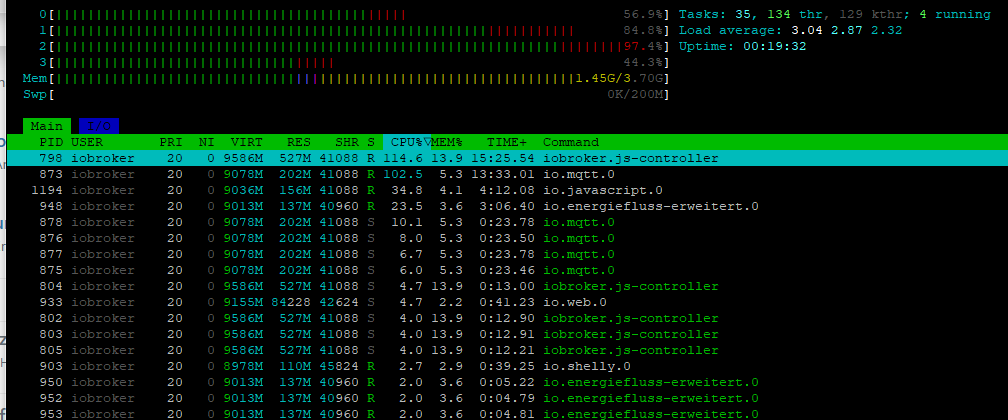
Hat Jemand eine Idee, was ich noch machen kann?
Viele Grüße
-
Hallo.
Ich habe folgendes Problem:
ioB läuft sauber und stabil - solange ich kein JS-Adapter installiere.
Es gibt keine Scripts. Die reine Installation des JS-Adapter V 8.8.3 reicht um
ioB so zu verlangsamen, dass ich fast keinen Zugriff mehr auf "Instanzen" oder "Objekte" habe.
Alles dauert ewig und zwischenzeitlich bekomme ich die Meldungen "time out". Das führt auch dazu, dass andere
Adapter (Shelly, MQTT, usw.) auch Fehler produzieren. htop zeigt es deutlich. iobroker.js-adapter fordert der CPU 100% ab.
Nach Deinstallation des JS-Adapters ist alles wieder OK.
Habe auch mal eine ältere Version (8.0.0) installiert, bleibt aber das selbe.Auf dem Raspberry hab ich node 20.18.0 und npm 10.8.2 drauf.
Diese habe ich auch schon gelöscht und neu installiert. Keine Änderung.Habe auch schon den iobroker.JS-Controller "rebuilden" lassen (iobroker rebuild js-controller)
das hat aber auch keine Änderung gebracht :-(Hat Jemand eine Idee, was ich noch machen kann?
Viele Grüße
@brutus66 erster Anhaltspunkt wäre die Ausgabe von
iob diag -
DAs ganze oder nur die Summary?
======================= SUMMARY ======================= v.2024-10-19 Static hostname: raspberrypi Icon name: computer Operating System: Debian GNU/Linux 12 (bookworm) Kernel: Linux 6.6.51+rpt-rpi-v8 Architecture: arm64 Installation: native Kernel: aarch64 Userland: 64 bit Timezone: Europe/Berlin (CET, +0100) User-ID: 1000 Display-Server: false Boot Target: multi-user.target Pending OS-Updates: 0 Pending iob updates: 0 Nodejs-Installation: /usr/bin/nodejs v20.18.0 /usr/bin/node v20.18.0 /usr/bin/npm 10.8.2 /usr/bin/npx 10.8.2 /usr/bin/corepack 0.29.3 Recommended versions are nodejs 20.18.0 and npm 10.8.2 nodeJS installation is correct MEMORY: total used free shared buff/cache available Mem: 4.0G 1.5G 2.0G 12K 579M 2.5G Swap: 209M 47M 162M Total: 4.2G 1.6G 2.1G Active iob-Instances: 11 Upgrade policy: none ioBroker Core: js-controller 6.0.11 admin 7.1.5 ioBroker Status: iobroker is running on this host. Objects type: jsonl States type: jsonl Status admin and web instance: + system.adapter.admin.0 : admin : raspberrypi - enabled, port: 8081, bind: 0.0.0.0, run as: admin + system.adapter.web.0 : web : raspberrypi - enabled, port: 8082, bind: 0.0.0.0, run as: admin Objects: 851 States: 641 Size of iob-Database: 33M /opt/iobroker/iobroker-data/objects.jsonl 2.4M /opt/iobroker/iobroker-data/states.jsonl Operating System is the current Debian stable version codenamed 'bookworm'! =================== END OF SUMMARY ==================== -
DAs ganze oder nur die Summary?
======================= SUMMARY ======================= v.2024-10-19 Static hostname: raspberrypi Icon name: computer Operating System: Debian GNU/Linux 12 (bookworm) Kernel: Linux 6.6.51+rpt-rpi-v8 Architecture: arm64 Installation: native Kernel: aarch64 Userland: 64 bit Timezone: Europe/Berlin (CET, +0100) User-ID: 1000 Display-Server: false Boot Target: multi-user.target Pending OS-Updates: 0 Pending iob updates: 0 Nodejs-Installation: /usr/bin/nodejs v20.18.0 /usr/bin/node v20.18.0 /usr/bin/npm 10.8.2 /usr/bin/npx 10.8.2 /usr/bin/corepack 0.29.3 Recommended versions are nodejs 20.18.0 and npm 10.8.2 nodeJS installation is correct MEMORY: total used free shared buff/cache available Mem: 4.0G 1.5G 2.0G 12K 579M 2.5G Swap: 209M 47M 162M Total: 4.2G 1.6G 2.1G Active iob-Instances: 11 Upgrade policy: none ioBroker Core: js-controller 6.0.11 admin 7.1.5 ioBroker Status: iobroker is running on this host. Objects type: jsonl States type: jsonl Status admin and web instance: + system.adapter.admin.0 : admin : raspberrypi - enabled, port: 8081, bind: 0.0.0.0, run as: admin + system.adapter.web.0 : web : raspberrypi - enabled, port: 8082, bind: 0.0.0.0, run as: admin Objects: 851 States: 641 Size of iob-Database: 33M /opt/iobroker/iobroker-data/objects.jsonl 2.4M /opt/iobroker/iobroker-data/states.jsonl Operating System is the current Debian stable version codenamed 'bookworm'! =================== END OF SUMMARY ==================== -
Hier das Ganze:
*** BASE SYSTEM ***
Static hostname: raspberrypi
       Icon name: computer
Operating System: Debian GNU/Linux 12 (bookworm)
          Kernel: Linux 6.6.51+rpt-rpi-v8
    Architecture: arm64
OS is similar to:

Model           : Raspberry Pi 4 Model B Rev 1.5
Docker          : false
Virtualization  : none
Kernel          : aarch64
Userland        : 64 bit

Systemuptime and Load:
14:26:27 up  1:54,  2 users,  load average: 3.28, 2.80, 2.73
CPU threads: 4


*** LIFE CYCLE STATUS ***
Operating System is the current Debian stable version codenamed 'bookworm'!

*** RASPBERRY THROTTLING ***
Current issues:
No throttling issues detected.

Previously detected issues:
No throttling issues detected.

*** TIME AND TIMEZONES ***
               Local time: Sat 2024-11-02 14:26:27 CET
           Universal time: Sat 2024-11-02 13:26:27 UTC
                 RTC time: n/a
                Time zone: Europe/Berlin (CET, +0100)
System clock synchronized: yes
              NTP service: active
          RTC in local TZ: no

*** Users and Groups ***
User that called 'iob diag':
gunter
HOME=/home/gunter
GROUPS=gunter adm dialout cdrom sudo audio video plugdev games users input render netdev gpio i2c spi iobroker

User that is running 'js-controller':
iobroker
HOME=/home/iobroker
GROUPS=iobroker tty dialout audio video plugdev bluetooth gpio i2c

*** DISPLAY-SERVER SETUP ***
Display-Server: false
Desktop:
Terminal:       tty

*** MEMORY ***
               total        used        free      shared  buff/cache   available
Mem:            4.0G        1.5G        2.0G         20K        584M        2.5G
Swap:           209M         47M        162M
Total:          4.2G        1.6G        2.1G

Active iob-Instances:   11

         3791 M total memory
         1449 M used memory
          548 M active memory
         1255 M inactive memory
         1860 M free memory
           59 M buffer memory
          498 M swap cache
          199 M total swap
           45 M used swap
          154 M free swap

*** top - Table Of Processes  ***
top - 14:26:27 up  1:54,  2 users,  load average: 3.28, 2.80, 2.73
Tasks: 174 total,   3 running, 171 sleeping,   0 stopped,   0 zombie
%Cpu(s): 62.5 us, 12.5 sy,  0.0 ni, 25.0 id,  0.0 wa,  0.0 hi,  0.0 si,  0.0 st
MiB Mem :   3792.0 total,   1859.8 free,   1450.3 used,    557.6 buff/cache
MiB Swap:    200.0 total,    154.5 free,     45.5 used.   2341.7 avail Mem

*** FAILED SERVICES ***

  UNIT LOAD ACTIVE SUB DESCRIPTION
0 loaded units listed.


*** DMESG CRITICAL ERRORS ***
No critical errors detected

*** FILESYSTEM ***
Filesystem     Type      Size  Used Avail Use% Mounted on
udev           devtmpfs  1.6G     0  1.6G   0% /dev
tmpfs          tmpfs     380M  1.2M  379M   1% /run
/dev/mmcblk0p2 ext4       15G  8.0G  5.4G  60% /
tmpfs          tmpfs     1.9G     0  1.9G   0% /dev/shm
tmpfs          tmpfs     5.0M   16K  5.0M   1% /run/lock
/dev/mmcblk0p1 vfat      510M   64M  447M  13% /boot/firmware
tmpfs          tmpfs     380M     0  380M   0% /run/user/1000

Messages concerning ext4 filesystem in dmesg:
[Sat Nov  2 12:31:39 2024] Kernel command line: coherent_pool=1M 8250.nr_uarts=0 snd_bcm2835.enable_headphones=0 snd_bcm2835.enable_headphones=1 snd_bcm2835.enable_hdmi=1 snd_bcm2835.enable_hdmi=0  smsc95xx.macaddr=2C:CF:67:47:32:5E vc_mem.mem_base=0x3ec00000 vc_mem.mem_size=0x40000000  console=ttyS0,115200 console=tty1 root=PARTUUID=3e8266f8-02 rootfstype=ext4 fsck.repair=yes rootwait cfg80211.ieee80211_regdom=DE
[Sat Nov  2 12:31:42 2024] EXT4-fs (mmcblk0p2): mounted filesystem 56f80fa2-e005-4cca-86e6-19da1069914d ro with ordered data mode. Quota mode: none.
[Sat Nov  2 12:31:43 2024] EXT4-fs (mmcblk0p2): re-mounted 56f80fa2-e005-4cca-86e6-19da1069914d r/w. Quota mode: none.

Show mounted filesystems:
TARGET           SOURCE         FSTYPE OPTIONS
/                /dev/mmcblk0p2 ext4   rw,noatime
`-/boot/firmware /dev/mmcblk0p1 vfat   rw,relatime,fmask=0022,dmask=0022,codepage=437,iocharset=ascii,shortname=mixed,errors=remount-ro

Files in neuralgic directories:

/var:
1.6G    /var/
637M    /var/lib
567M    /var/cache
561M    /var/cache/apt
467M    /var/lib/influxdb/engine

Archived and active journals take up 191.9M in the file system.

/opt/iobroker/backups:
1.2G    /opt/iobroker/backups/
150M    /opt/iobroker/backups/influxDB_2024_10_29-10_31_50_backupiobroker
150M    /opt/iobroker/backups/influxDB_2024_10_29-10_26_33_backupiobroker
150M    /opt/iobroker/backups/influxDB_2024_10_29-10_20_47_backupiobroker
103M    /opt/iobroker/backups/influxDB_2024_10_30-11_36_55_backupiobroker

/opt/iobroker/iobroker-data:
847M    /opt/iobroker/iobroker-data/
729M    /opt/iobroker/iobroker-data/files
617M    /opt/iobroker/iobroker-data/files/javascript.admin
560M    /opt/iobroker/iobroker-data/files/javascript.admin/static
558M    /opt/iobroker/iobroker-data/files/javascript.admin/static/js

The five largest files in iobroker-data are:
33M     /opt/iobroker/iobroker-data/objects.jsonl
24M     /opt/iobroker/iobroker-data/files/web.admin/static/js/main.135279a0.js.map
12M     /opt/iobroker/iobroker-data/files/backitup.admin/static/js/main.bd24114f.js
8.7M    /opt/iobroker/iobroker-data/files/javascript.admin/static/js/838.0aa41cb0.chunk.js.map
8.6M    /opt/iobroker/iobroker-data/files/javascript.admin/static/js/310.89a60ae1.chunk.js.map

USB-Devices by-id:
USB-Sticks -  Avoid direct links to /dev/tty* in your adapter setups, please always prefer the links 'by-id':

No Devices found 'by-id'

*** NodeJS-Installation ***

/usr/bin/nodejs         v20.18.0
/usr/bin/node           v20.18.0
/usr/bin/npm            10.8.2
/usr/bin/npx            10.8.2
/usr/bin/corepack       0.29.3

nodejs:
  Installed: 20.18.0-1nodesource1
  Candidate: 20.18.0-1nodesource1
  Version table:
*** 20.18.0-1nodesource1 1001
        500 https://deb.nodesource.com/node_20.x nodistro/main arm64 Packages
        100 /var/lib/dpkg/status
     20.17.0-1nodesource1 1001
        500 https://deb.nodesource.com/node_20.x nodistro/main arm64 Packages
     20.16.0-1nodesource1 1001
        500 https://deb.nodesource.com/node_20.x nodistro/main arm64 Packages
     20.15.1-1nodesource1 1001
        500 https://deb.nodesource.com/node_20.x nodistro/main arm64 Packages
     20.15.0-1nodesource1 1001
        500 https://deb.nodesource.com/node_20.x nodistro/main arm64 Packages
     20.14.0-1nodesource1 1001
        500 https://deb.nodesource.com/node_20.x nodistro/main arm64 Packages
     20.13.1-1nodesource1 1001
        500 https://deb.nodesource.com/node_20.x nodistro/main arm64 Packages
     20.13.0-1nodesource1 1001
        500 https://deb.nodesource.com/node_20.x nodistro/main arm64 Packages
     20.12.2-1nodesource1 1001
        500 https://deb.nodesource.com/node_20.x nodistro/main arm64 Packages
     20.12.1-1nodesource1 1001
        500 https://deb.nodesource.com/node_20.x nodistro/main arm64 Packages
     20.12.0-1nodesource1 1001
        500 https://deb.nodesource.com/node_20.x nodistro/main arm64 Packages
     20.11.1-1nodesource1 1001
        500 https://deb.nodesource.com/node_20.x nodistro/main arm64 Packages
     20.11.0-1nodesource1 1001
        500 https://deb.nodesource.com/node_20.x nodistro/main arm64 Packages
     20.10.0-1nodesource1 1001
        500 https://deb.nodesource.com/node_20.x nodistro/main arm64 Packages
     20.9.0-1nodesource1 1001
        500 https://deb.nodesource.com/node_20.x nodistro/main arm64 Packages
     20.8.1-1nodesource1 1001
        500 https://deb.nodesource.com/node_20.x nodistro/main arm64 Packages
     20.8.0-1nodesource1 1001
        500 https://deb.nodesource.com/node_20.x nodistro/main arm64 Packages
     20.7.0-1nodesource1 1001
        500 https://deb.nodesource.com/node_20.x nodistro/main arm64 Packages
     20.6.1-1nodesource1 1001
        500 https://deb.nodesource.com/node_20.x nodistro/main arm64 Packages
     20.6.0-1nodesource1 1001
        500 https://deb.nodesource.com/node_20.x nodistro/main arm64 Packages
     20.5.1-1nodesource1 1001
        500 https://deb.nodesource.com/node_20.x nodistro/main arm64 Packages
     20.5.0-1nodesource1 1001
        500 https://deb.nodesource.com/node_20.x nodistro/main arm64 Packages
     20.4.0-1nodesource1 1001
        500 https://deb.nodesource.com/node_20.x nodistro/main arm64 Packages
     20.3.1-1nodesource1 1001
        500 https://deb.nodesource.com/node_20.x nodistro/main arm64 Packages
     20.3.0-1nodesource1 1001
        500 https://deb.nodesource.com/node_20.x nodistro/main arm64 Packages
     20.2.0-1nodesource1 1001
        500 https://deb.nodesource.com/node_20.x nodistro/main arm64 Packages
     20.1.0-1nodesource1 1001
        500 https://deb.nodesource.com/node_20.x nodistro/main arm64 Packages
     20.0.0-1nodesource1 1001
        500 https://deb.nodesource.com/node_20.x nodistro/main arm64 Packages
     18.19.0+dfsg-6~deb12u2 500
        500 http://deb.debian.org/debian bookworm/main arm64 Packages
     18.19.0+dfsg-6~deb12u1 500
        500 http://deb.debian.org/debian-security bookworm-security/main arm64 Packages

Temp directories causing deletion problem: 0
No problems detected

Errors in npm tree: 0
No problems detected

*** ioBroker-Installation ***

ioBroker Status
Cannot read system.config: undefined (OK when migrating or restoring)
/opt/iobroker/node_modules/standard-as-callback/built/index.js:6
        throw e;
        ^

Error: Connection is closed.
    at Redis.sendCommand (/opt/iobroker/node_modules/ioredis/built/redis/index.js:636:24)
    at Redis.scan (/opt/iobroker/node_modules/ioredis/built/commander.js:122:25)
    at ScanStream._read (/opt/iobroker/node_modules/ioredis/built/ScanStream.js:36:41)
    at Readable.read (node:internal/streams/readable:737:12)
    at resume_ (node:internal/streams/readable:1255:12)
    at process.processTicksAndRejections (node:internal/process/task_queues:82:21)
Emitted 'error' event on ScanStream instance at:
    at /opt/iobroker/node_modules/ioredis/built/ScanStream.js:38:22
    at tryCatcher (/opt/iobroker/node_modules/standard-as-callback/built/utils.js:12:23)
    at /opt/iobroker/node_modules/standard-as-callback/built/index.js:33:51
    at process.processTicksAndRejections (node:internal/process/task_queues:95:5)

Node.js v20.18.0

Hosts:
raspberrypi         raspberrypi (version: 6.0.11, hostname: raspberrypi   , alive, uptime: 6890)

Core adapters versions
js-controller:  6.0.11
admin:          7.1.5
javascript:     8.8.3

nodejs modules from github:     0

Adapter State
+ system.adapter.admin.0                  : admin                 : raspberrypi                              -  enabled, port: 8081, bind: 0.0.0.0, run as: admin
  system.adapter.backitup.0               : backitup              : raspberrypi                              - disabled
+ system.adapter.discovery.0              : discovery             : raspberrypi                              -  enabled
+ system.adapter.energiefluss-erweitert.0 : energiefluss-erweitert: raspberrypi                              -  enabled
+ system.adapter.influxdb.0               : influxdb              : raspberrypi                              -  enabled, port: 8086
+ system.adapter.javascript.0             : javascript            : raspberrypi                              -  enabled
+ system.adapter.mqtt.0                   : mqtt                  : raspberrypi                              -  enabled, port: 1883, bind: 0.0.0.0
+ system.adapter.shelly.0                 : shelly                : raspberrypi                              -  enabled, port: 1882, bind: 0.0.0.0
+ system.adapter.sonoff.0                 : sonoff                : raspberrypi                              -  enabled, port: 1884, bind: 0.0.0.0
+ system.adapter.sourceanalytix.0         : sourceanalytix        : raspberrypi                              -  enabled
+ system.adapter.web.0                    : web                   : raspberrypi                              -  enabled, port: 8082, bind: 0.0.0.0, run as: admin

+ instance is alive

Enabled adapters with bindings
+ system.adapter.admin.0                  : admin                 : raspberrypi                              -  enabled, port: 8081, bind: 0.0.0.0, run as: admin
+ system.adapter.influxdb.0               : influxdb              : raspberrypi                              -  enabled, port: 8086
+ system.adapter.mqtt.0                   : mqtt                  : raspberrypi                              -  enabled, port: 1883, bind: 0.0.0.0
+ system.adapter.shelly.0                 : shelly                : raspberrypi                              -  enabled, port: 1882, bind: 0.0.0.0
+ system.adapter.sonoff.0                 : sonoff                : raspberrypi                              -  enabled, port: 1884, bind: 0.0.0.0
+ system.adapter.web.0                    : web                   : raspberrypi                              -  enabled, port: 8082, bind: 0.0.0.0, run as: admin

ioBroker-Repositories
┌──────────────────────────────────────────────────────────────────────────────────────────────
│ (index) │ name     │ url                                                     │ auto upgrade │
├──────────────────────────────────────────────────────────────────────────────────────────────
│ 0       │ 'stable' │ 'http://download.iobroker.net/sources-dist.json'        │ true         │
│ 1       │ 'beta'   │ 'http://download.iobroker.net/sources-dist-latest.json' │ true         │
└──────────────────────────────────────────────────────────────────────────────────────────────

Active repo(s): stable
Upgrade policy: none

Installed ioBroker-Instances
Used repository: stable
Adapter    "admin"        : 7.1.5    , installed 7.1.5
Adapter    "backitup"     : 3.0.25   , installed 3.0.25
Adapter    "discovery"    : 5.0.0    , installed 5.0.0
Adapter    "energiefluss-erweitert": 0.4.1, installed 0.4.1
Adapter    "influxdb"     : 4.0.2    , installed 4.0.2
Adapter    "javascript"   : 8.8.3    , installed 8.8.3
Controller "js-controller": 6.0.11   , installed 6.0.11
Adapter    "mqtt"         : 6.1.2    , installed 6.1.2
Adapter    "shelly"       : 8.2.1    , installed 8.2.1
Adapter    "simple-api"   : 2.8.0    , installed 2.8.0
Adapter    "socketio"     : 6.7.1    , installed 6.7.1
Adapter    "sonoff"       : 3.1.2    , installed 3.1.2
Adapter    "web"          : 6.2.5    , installed 6.2.5
Adapter    "ws"           : 2.6.2    , installed 2.6.2

Objects and States
Please stand by - This may take a while
Objects:        851
States:         641

*** OS-Repositories and Updates ***
Hit:1 http://deb.debian.org/debian bookworm InRelease
Hit:2 http://archive.raspberrypi.com/debian bookworm InRelease
Hit:3 http://deb.debian.org/debian-security bookworm-security InRelease
Hit:4 http://deb.debian.org/debian bookworm-updates InRelease
Hit:5 https://repos.influxdata.com/debian stable InRelease
Hit:6 https://deb.nodesource.com/node_20.x nodistro InRelease
Reading package lists...
Pending Updates: 0

*** Listening Ports ***
Active Internet connections (only servers)
Proto Recv-Q Send-Q Local Address           Foreign Address         State       User       Inode      PID/Program name
tcp        0      0 0.0.0.0:22              0.0.0.0:*               LISTEN      0          5647       673/sshd: /usr/sbin
tcp        0      0 0.0.0.0:1884            0.0.0.0:*               LISTEN      1001       5894       888/io.sonoff.0
tcp        0      0 0.0.0.0:1882            0.0.0.0:*               LISTEN      1001       7575       903/io.shelly.0
tcp        0      0 0.0.0.0:1883            0.0.0.0:*               LISTEN      1001       19455      1274/io.mqtt.0
tcp        0      0 127.0.0.1:9001          0.0.0.0:*               LISTEN      1001       7409       798/iobroker.js-con
tcp        0      0 127.0.0.1:9000          0.0.0.0:*               LISTEN      1001       7414       798/iobroker.js-con
tcp6       0      0 :::22                   :::*                    LISTEN      0          5649       673/sshd: /usr/sbin
tcp6       0      0 :::10123                :::*                    LISTEN      1001       5963       948/io.energiefluss
tcp6       0      0 :::8086                 :::*                    LISTEN      999        6219       714/influxd
tcp6       0      0 :::8082                 :::*                    LISTEN      1001       8541       933/io.web.0
tcp6       0      0 :::8081                 :::*                    LISTEN      1001       8437       818/io.admin.0
udp        0      0 0.0.0.0:5353            0.0.0.0:*                           104        4835       535/avahi-daemon: r
udp        0      0 0.0.0.0:39043           0.0.0.0:*                           104        4837       535/avahi-daemon: r
udp6       0      0 :::5353                 :::*                                104        4836       535/avahi-daemon: r
udp6       0      0 fe80::7d5d:8111:4c7:546 :::*                                0          5735       613/NetworkManager
udp6       0      0 :::42025                :::*                                104        4838       535/avahi-daemon: r

*** Log File - Last 25 Lines ***

2024-11-02 14:25:50.317  - info: mqtt.0 (1274) Client [Victron2MQTT-ADB4FA] publishOnSubscribe
2024-11-02 14:25:56.663  - info: mqtt.0 (1274) Client [Victron2MQTT-ADB4FA] reconnected. Old secret 1730553946831_2590. New secret 1730553956660_8285
2024-11-02 14:25:56.699  - info: mqtt.0 (1274) Client [Victron2MQTT-ADB4FA] subscribes on "mqtt.0.VictronBatt.Remote_Control"
2024-11-02 14:25:56.899  - info: mqtt.0 (1274) Client [Victron2MQTT-ADB4FA] publishOnSubscribe
2024-11-02 14:26:21.845  - info: mqtt.0 (1274) Client [Victron2MQTT-ADB4FA] reconnected. Old secret 1730553956660_8285. New secret 1730553981843_8859
2024-11-02 14:26:21.885  - info: mqtt.0 (1274) Client [Victron2MQTT-ADB4FA] subscribes on "mqtt.0.VictronBatt.Remote_Control"
2024-11-02 14:26:22.086  - info: mqtt.0 (1274) Client [Victron2MQTT-ADB4FA] publishOnSubscribe
2024-11-02 14:26:48.091  - info: mqtt.0 (1274) Client [Victron2MQTT-ADB4FA] reconnected. Old secret 1730553981843_8859. New secret 1730554008076_397
2024-11-02 14:26:48.132  - info: mqtt.0 (1274) Client [Victron2MQTT-ADB4FA] subscribes on "mqtt.0.VictronBatt.Remote_Control"
2024-11-02 14:26:48.331  - info: mqtt.0 (1274) Client [Victron2MQTT-ADB4FA] publishOnSubscribe
2024-11-02 14:27:10.075  - info: mqtt.0 (1274) Client [Victron2MQTT-ADB4FA] reconnected. Old secret 1730554008076_397. New secret 1730554030074_4943
2024-11-02 14:27:10.119  - info: mqtt.0 (1274) Client [Victron2MQTT-ADB4FA] subscribes on "mqtt.0.VictronBatt.Remote_Control"
2024-11-02 14:27:10.319  - info: mqtt.0 (1274) Client [Victron2MQTT-ADB4FA] publishOnSubscribe
2024-11-02 14:27:14.714  - info: mqtt.0 (1274) Client [Victron2MQTT-ADB4FA] reconnected. Old secret 1730554030074_4943. New secret 1730554034713_1207
2024-11-02 14:27:14.741  - info: mqtt.0 (1274) Client [Victron2MQTT-ADB4FA] subscribes on "mqtt.0.VictronBatt.Remote_Control"
2024-11-02 14:27:14.941  - info: mqtt.0 (1274) Client [Victron2MQTT-ADB4FA] publishOnSubscribe
2024-11-02 14:27:32.240  - info: mqtt.0 (1274) Client [Victron2MQTT-ADB4FA] reconnected. Old secret 1730554034713_1207. New secret 1730554052239_9808
2024-11-02 14:27:32.275  - info: mqtt.0 (1274) Client [Victron2MQTT-ADB4FA] subscribes on "mqtt.0.VictronBatt.Remote_Control"
2024-11-02 14:27:32.476  - info: mqtt.0 (1274) Client [Victron2MQTT-ADB4FA] publishOnSubscribe
2024-11-02 14:27:41.209  - info: mqtt.0 (1274) Client [Victron2MQTT-ADB4FA] reconnected. Old secret 1730554052239_9808. New secret 1730554061209_1858
2024-11-02 14:27:41.233  - info: mqtt.0 (1274) Client [Victron2MQTT-ADB4FA] subscribes on "mqtt.0.VictronBatt.Remote_Control"
2024-11-02 14:27:41.434  - info: mqtt.0 (1274) Client [Victron2MQTT-ADB4FA] publishOnSubscribe
2024-11-02 14:27:46.355  - info: mqtt.0 (1274) Client [Victron2MQTT-ADB4FA] reconnected. Old secret 1730554061209_1858. New secret 1730554066355_3844
2024-11-02 14:27:46.379  - info: mqtt.0 (1274) Client [Victron2MQTT-ADB4FA] subscribes on "mqtt.0.VictronBatt.Remote_Control"
2024-11-02 14:27:46.580  - info: mqtt.0 (1274) Client [Victron2MQTT-ADB4FA] publishOnSubscribe
============ Mark until here for C&P =============
-
@brutus66 sagte in JS-Adapter (ohne Skript) führt zu 100% CPU Auslastung:
ioBroker Status Cannot read system.config: undefined
einzige aufffällige
umgestiegen von Proxmox auf Unraid
-
@brutus66 sagte in JS-Adapter (ohne Skript) führt zu 100% CPU Auslastung:
ioBroker Status Cannot read system.config: undefined
einzige aufffällige
Und die hohe Load. Aber das könnte eine Folge von den Problemen mit den Datenbanken sein.
-


Hey! Du scheinst an dieser Unterhaltung interessiert zu sein, hast aber noch kein Konto.
Hast du es satt, bei jedem Besuch durch die gleichen Beiträge zu scrollen? Wenn du dich für ein Konto anmeldest, kommst du immer genau dorthin zurück, wo du zuvor warst, und kannst dich über neue Antworten benachrichtigen lassen (entweder per E-Mail oder Push-Benachrichtigung). Du kannst auch Lesezeichen speichern und Beiträge positiv bewerten, um anderen Community-Mitgliedern deine Wertschätzung zu zeigen.
Mit deinem Input könnte dieser Beitrag noch besser werden 💗
Registrieren AnmeldenSupport us
225
Online33.0k
Benutzer83.5k
Themen1.3m
Beiträge