Skip to content
  • Home
  • Aktuell
  • Tags
  • 0 Ungelesen 0
  • Kategorien
  • Unreplied
  • Beliebt
  • GitHub
  • Docu
  • Hilfe
Skins
  • Light
  • Brite
  • Cerulean
  • Cosmo
  • Flatly
  • Journal
  • Litera
  • Lumen
  • Lux
  • Materia
  • Minty
  • Morph
  • Pulse
  • Sandstone
  • Simplex
  • Sketchy
  • Spacelab
  • United
  • Yeti
  • Zephyr
  • Dark
  • Cyborg
  • Darkly
  • Quartz
  • Slate
  • Solar
  • Superhero
  • Vapor

  • Standard: (Kein Skin)
  • Kein Skin
Einklappen
ioBroker Logo

Community Forum

donate donate
  1. ioBroker Community Home
  2. Deutsch
  3. ioBroker Allgemein
  4. Heidelberg Wallbox Energy Control und wbec

NEWS

  • Jahresrückblick 2025 – unser neuer Blogbeitrag ist online! ✨
    BluefoxB
    Bluefox
    14
    1
    360

  • Neuer Blogbeitrag: Monatsrückblick - Dezember 2025 🎄
    BluefoxB
    Bluefox
    13
    1
    603

  • Weihnachtsangebot 2025! 🎄
    BluefoxB
    Bluefox
    25
    1
    1.8k

Heidelberg Wallbox Energy Control und wbec
Geplant Angeheftet Gesperrt Verschoben ioBroker Allgemein
33 Beiträge 11 Kommentatoren 6.2k Aufrufe 9 Watching
  • Älteste zuerst
  • Neuste zuerst
  • Meiste Stimmen
Antworten
  • In einem neuen Thema antworten
Anmelden zum Antworten
Dieses Thema wurde gelöscht. Nur Nutzer mit entsprechenden Rechten können es sehen.
  • RaspiUserR RaspiUser

    @andreas-friedrich said in Heidelberg Wallbox Energy Control und wbec:

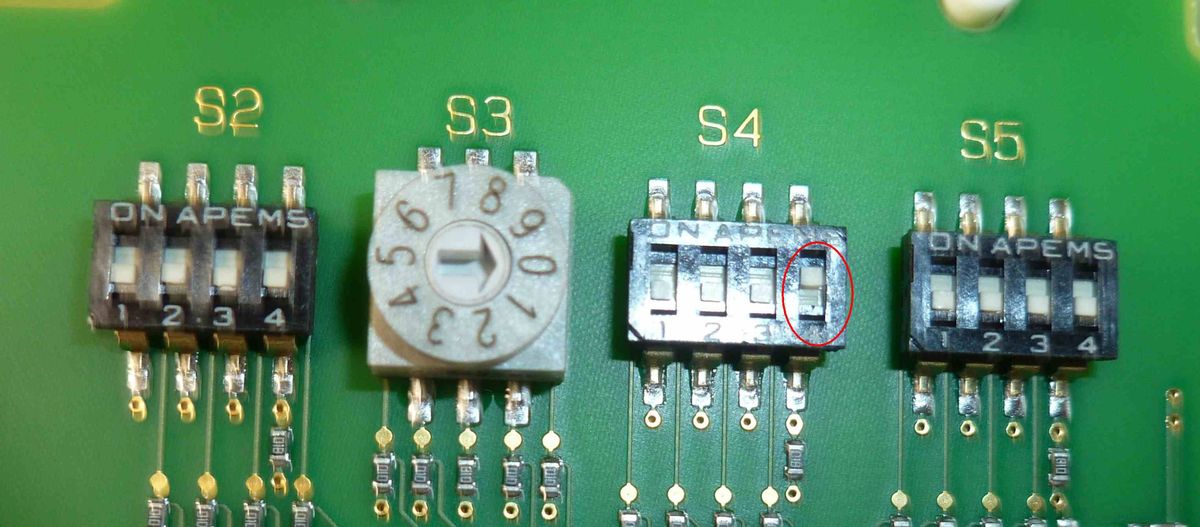
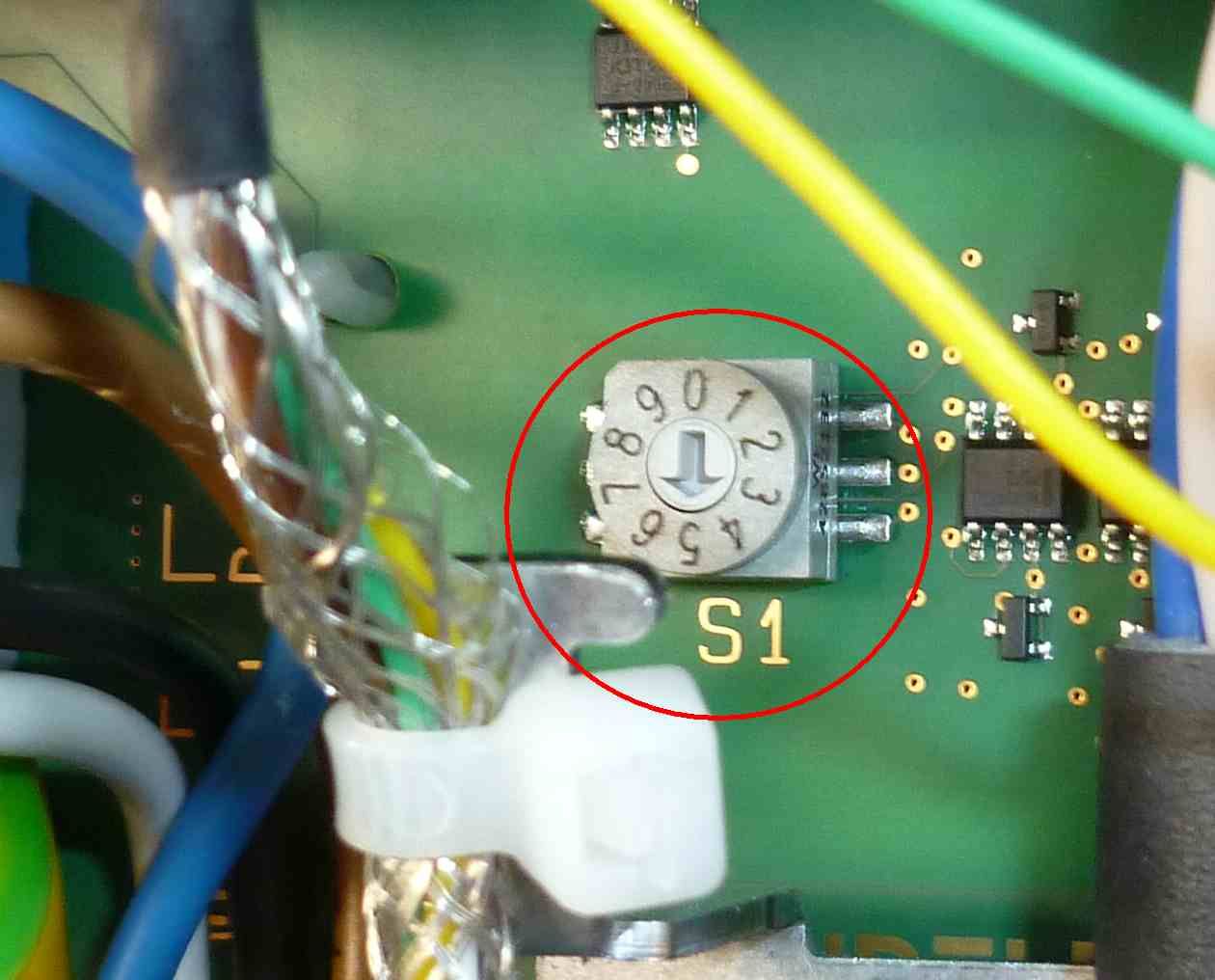
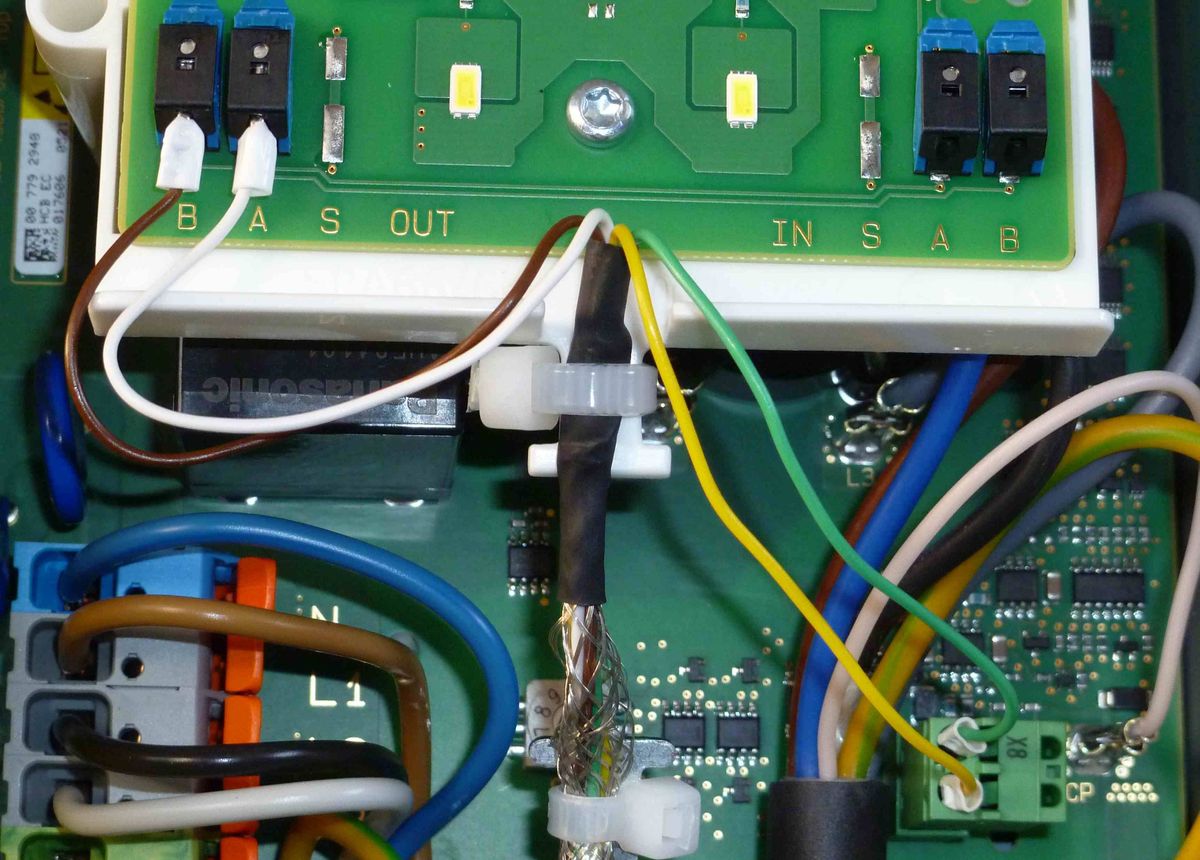
    wie hast du die Dip-Schalter an der Heidelberg Wallbox gesetzt?
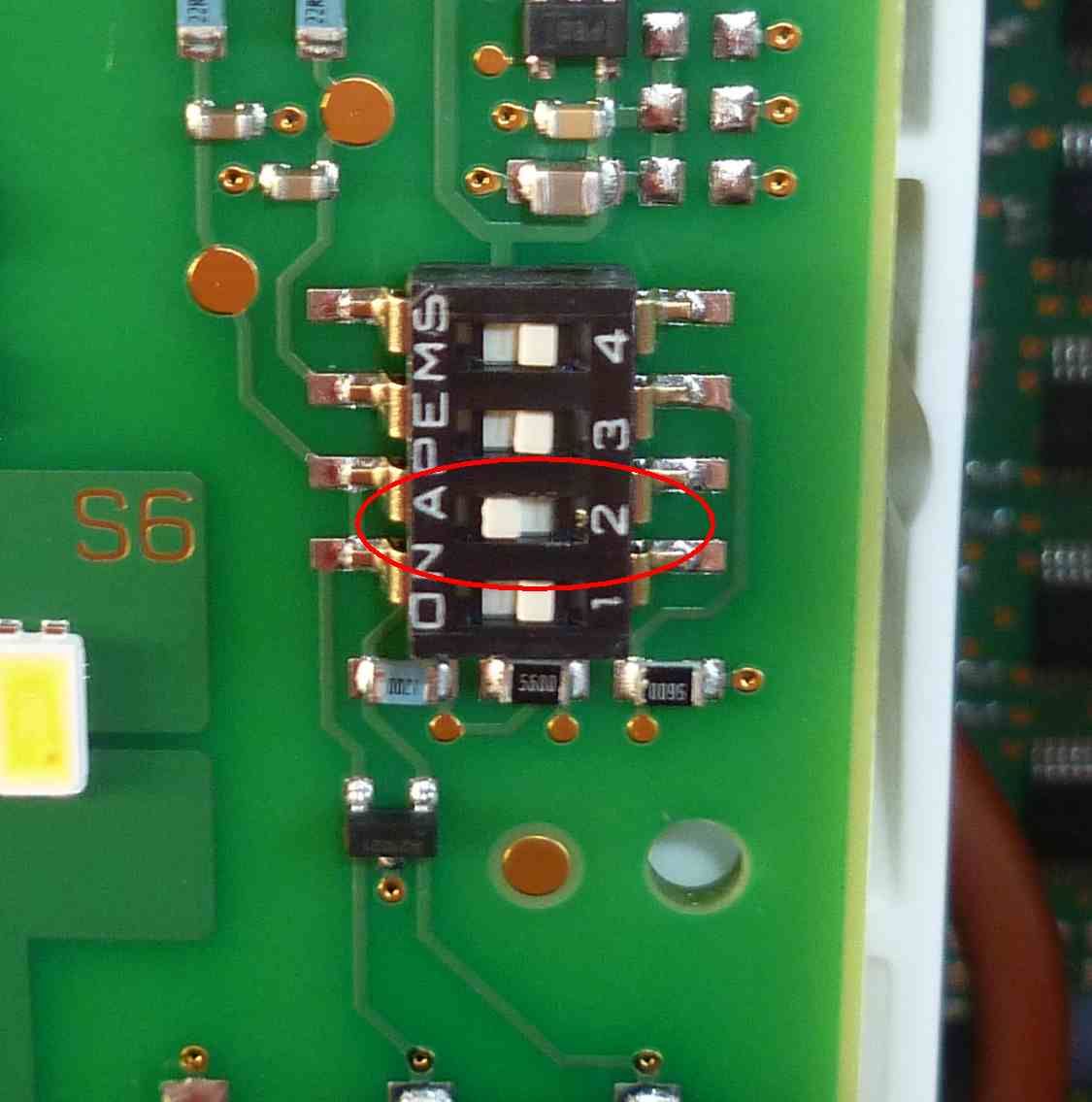
    3. S6.jpg 2. S2 bis S5.jpg 1. S1.jpg Modbus A und B und Schaltkontakt.jpg

    So funktioniert es bei mir ...

    M Offline
    M Offline
    maxpd
    schrieb am zuletzt editiert von maxpd
    #9

    @raspiuser

    • Warum hast du einen Follower aktiviert? Hast du 2 Wallboxen?
    • Das gelbe/grüne Kabel hast du für ein RFID oder Schlüsselsystem angeschlossen?
    • Eventuell dumme Nichtelektrikerfrage: Warum hast du nur 10A Eingang, aber 16A Ausgang?

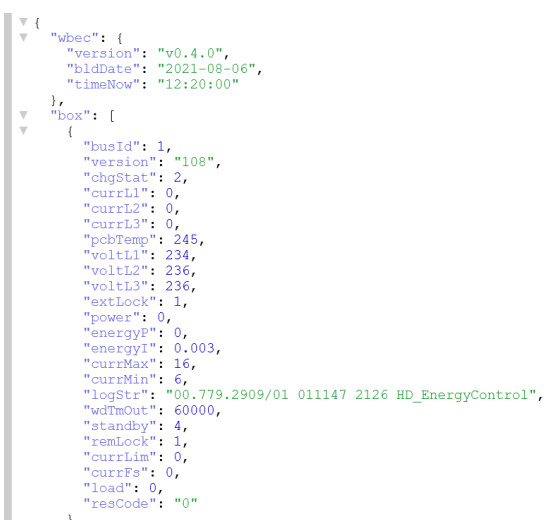
    Nevertheless, ich bekomme auch keine Daten in die JSON. Habe aber auch bei IN aufgelegt, wobei das keinen Unterschied machen sollte, denn die Ein- und Ausgänge sind 1:1 direkt miteinander verbunden. Liegts evtl am verwendeten "Datenkabel"? Habe ein 0,8er aus einem alten Netzteil geholt.

    Gruß
    maxpd

    Raspi 4 8gb | iobroker + pivccu3 | 46 Adapter | 68 Scripte, 120 Devices

    RaspiUserR 1 Antwort Letzte Antwort
    0
    • M maxpd

      @raspiuser

      • Warum hast du einen Follower aktiviert? Hast du 2 Wallboxen?
      • Das gelbe/grüne Kabel hast du für ein RFID oder Schlüsselsystem angeschlossen?
      • Eventuell dumme Nichtelektrikerfrage: Warum hast du nur 10A Eingang, aber 16A Ausgang?

      Nevertheless, ich bekomme auch keine Daten in die JSON. Habe aber auch bei IN aufgelegt, wobei das keinen Unterschied machen sollte, denn die Ein- und Ausgänge sind 1:1 direkt miteinander verbunden. Liegts evtl am verwendeten "Datenkabel"? Habe ein 0,8er aus einem alten Netzteil geholt.

      RaspiUserR Offline
      RaspiUserR Offline
      RaspiUser
      schrieb am zuletzt editiert von
      #10

      @maxpd said in Heidelberg Wallbox Energy Control und wbec:

      Warum hast du einen Follower aktiviert? Hast du 2 Wallboxen?

      Nein, nur 1 Box

      @maxpd said in Heidelberg Wallbox Energy Control und wbec:

      Das gelbe/grüne Kabel hast du für ein RFID oder Schlüsselsystem angeschlossen?

      Ich hatte ein 4-adriges Kabel und da habe ich die Ader einfach angeschlossen, aber letztendlich nicht genutzt, d.h. nur gebrückt.

      @maxpd said in Heidelberg Wallbox Energy Control und wbec:

      Eventuell dumme Nichtelektrikerfrage: Warum hast du nur 10A Eingang, aber 16A Ausgang?

      Da mein Corsa-e nicht wirklich gut mit der Heidelberg bzgl. PC-laden usammengearbeitet hat, habe ich sie verkauft. Ich kann mangels Bedienungsanleitung die DIP Einstellung nicht mehr nachvollziehen, sorry. Aber mit diesen Einstellungen hat alles funktioniert!!

      @maxpd said in Heidelberg Wallbox Energy Control und wbec:

      ich bekomme auch keine Daten in die JSON.

      Wie gesagt ... bei mir kamen mit diesen Einstellungen die JSON Daten an ...

      Heiko TeichmüllerH 1 Antwort Letzte Antwort
      0
      • RaspiUserR RaspiUser

        @maxpd said in Heidelberg Wallbox Energy Control und wbec:

        Warum hast du einen Follower aktiviert? Hast du 2 Wallboxen?

        Nein, nur 1 Box

        @maxpd said in Heidelberg Wallbox Energy Control und wbec:

        Das gelbe/grüne Kabel hast du für ein RFID oder Schlüsselsystem angeschlossen?

        Ich hatte ein 4-adriges Kabel und da habe ich die Ader einfach angeschlossen, aber letztendlich nicht genutzt, d.h. nur gebrückt.

        @maxpd said in Heidelberg Wallbox Energy Control und wbec:

        Eventuell dumme Nichtelektrikerfrage: Warum hast du nur 10A Eingang, aber 16A Ausgang?

        Da mein Corsa-e nicht wirklich gut mit der Heidelberg bzgl. PC-laden usammengearbeitet hat, habe ich sie verkauft. Ich kann mangels Bedienungsanleitung die DIP Einstellung nicht mehr nachvollziehen, sorry. Aber mit diesen Einstellungen hat alles funktioniert!!

        @maxpd said in Heidelberg Wallbox Energy Control und wbec:

        ich bekomme auch keine Daten in die JSON.

        Wie gesagt ... bei mir kamen mit diesen Einstellungen die JSON Daten an ...

        Heiko TeichmüllerH Offline
        Heiko TeichmüllerH Offline
        Heiko Teichmüller
        schrieb am zuletzt editiert von Heiko Teichmüller
        #11

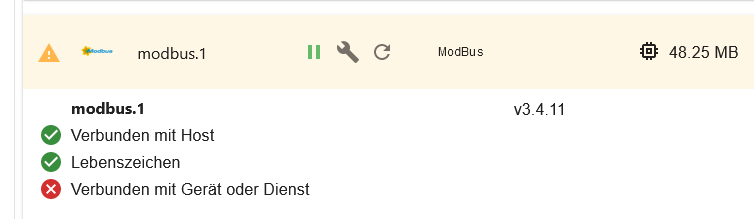
        Ist hier noch jemand, der diese Kombination Heidelberg EC, wbec und iobroker zum Laufen gebracht hat?

        Ich habe diese Kombination. Heidelberg EC und wbec funktionieren problemlos. Daten sind normal abrufbar und auch mit der App Wallbox Steuerung (als Heidelberg EC über wbec) steuerbar.

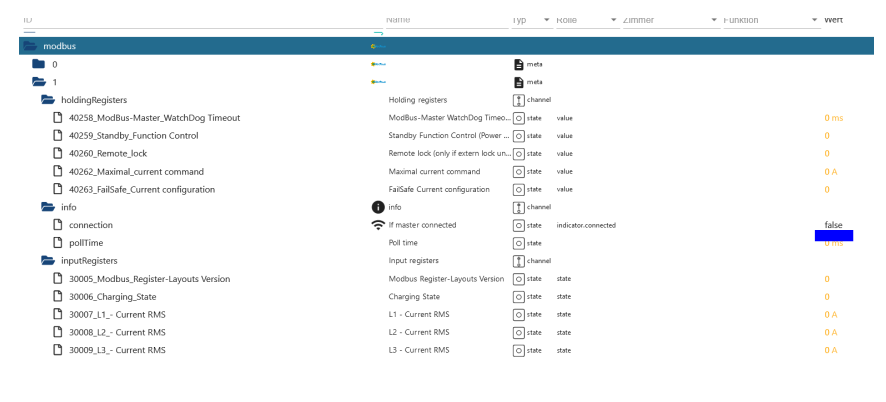
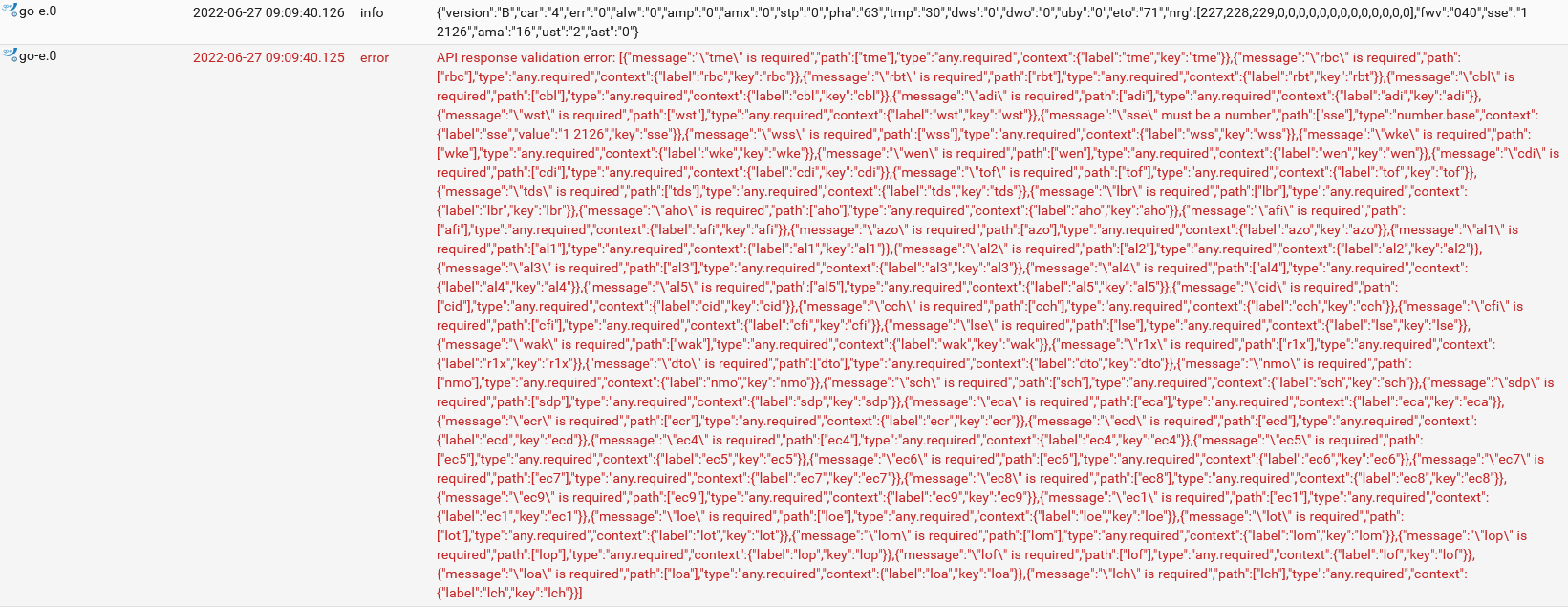
        Nun emuliert ja wbec auch eine Go-eCharger WB. iobroker hat einen Adapter für die GO-E. Die WB wird auch erkannt und es sieht alles normal aus aber Daten kommen in den Objekten nicht an. Scheinbar passt die JSON Antwort nicht.

        Kennt einer das Problem? Wie habt ihr es in iobroker gemacht?!

        So sieht das Log aus:
        screen_20220627_091027.png

        1 Antwort Letzte Antwort
        0
        • J Offline
          J Offline
          jb-io
          schrieb am zuletzt editiert von
          #12

          Falls noch für jemanden Bedarf besteht.
          Ich habe begonnen einen eigenständigen Adapter für den wbec controller zu entwickeln.

          https://github.com/jb-io/ioBroker.wbec

          D mcm1957M 2 Antworten Letzte Antwort
          0
          • J jb-io

            Falls noch für jemanden Bedarf besteht.
            Ich habe begonnen einen eigenständigen Adapter für den wbec controller zu entwickeln.

            https://github.com/jb-io/ioBroker.wbec

            D Offline
            D Offline
            daddy
            schrieb am zuletzt editiert von
            #13

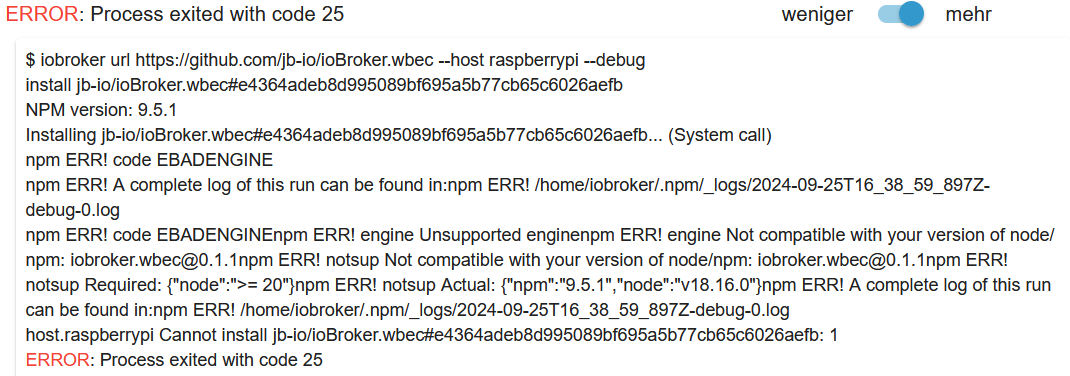
            @jb-io Hallo, ich wollte den Adapter mal testen, aber die Installation wurde mit dieser Fehlermeldung abgebrochen.
            jb-io_ioBroker_wbec_fehlermeldung.png

            NPM-Version nicht kompatibel. Die komplette Log-Datei habe ich mir allerdings noch nicht angesehen.
            Kannst Du mir bitte erklären was hier falsch läuft?
            Danke.

            Thomas BraunT 1 Antwort Letzte Antwort
            0
            • D daddy

              @jb-io Hallo, ich wollte den Adapter mal testen, aber die Installation wurde mit dieser Fehlermeldung abgebrochen.

              jb-io_ioBroker_wbec_fehlermeldung.png

              NPM-Version nicht kompatibel. Die komplette Log-Datei habe ich mir allerdings noch nicht angesehen.
              Kannst Du mir bitte erklären was hier falsch läuft?
              Danke.

              Thomas BraunT Online
              Thomas BraunT Online
              Thomas Braun
              Most Active
              schrieb am zuletzt editiert von Thomas Braun
              #14

              @daddy sagte in Heidelberg Wallbox Energy Control und wbec:

              Kannst Du mir bitte erklären was hier falsch läuft?

              Deine nodejs-Installation ist entweder zu alt oder falsch installiert.
              Schau dir den output von

              iob diag
              

              an.

              iob nodejs-update 20
              

              bringt dein System auf einen aktuellen Stand.

              Linux-Werkzeugkasten:
              https://forum.iobroker.net/topic/42952/der-kleine-iobroker-linux-werkzeugkasten
              NodeJS Fixer Skript:
              https://forum.iobroker.net/topic/68035/iob-node-fix-skript
              iob_diag: curl -sLf -o diag.sh https://iobroker.net/diag.sh && bash diag.sh

              Samson71S D 2 Antworten Letzte Antwort
              0
              • Thomas BraunT Thomas Braun

                @daddy sagte in Heidelberg Wallbox Energy Control und wbec:

                Kannst Du mir bitte erklären was hier falsch läuft?

                Deine nodejs-Installation ist entweder zu alt oder falsch installiert.
                Schau dir den output von

                iob diag
                

                an.

                iob nodejs-update 20
                

                bringt dein System auf einen aktuellen Stand.

                Samson71S Offline
                Samson71S Offline
                Samson71
                Global Moderator
                schrieb am zuletzt editiert von
                #15

                @thomas-braun
                Dann hoffen wir mal, dass da nicht noch nen Debian 10 werkelt. Sonst ist bei nem Update auf 20 das nächste Problem schon sicher.

                Markus

                Bitte beachten:
                Hinweise für gute Forenbeiträge
                Maßnahmen zum Schutz des Forums

                Thomas BraunT D 2 Antworten Letzte Antwort
                0
                • Samson71S Samson71

                  @thomas-braun
                  Dann hoffen wir mal, dass da nicht noch nen Debian 10 werkelt. Sonst ist bei nem Update auf 20 das nächste Problem schon sicher.

                  Thomas BraunT Online
                  Thomas BraunT Online
                  Thomas Braun
                  Most Active
                  schrieb am zuletzt editiert von
                  #16

                  @samson71 sagte in Heidelberg Wallbox Energy Control und wbec:

                  Sonst ist bei nem Update auf 20 das nächste Problem schon sicher.

                  Wenn man denn endlich mal den aktuellen Code hochladen würde...

                  @apollon77

                  Linux-Werkzeugkasten:
                  https://forum.iobroker.net/topic/42952/der-kleine-iobroker-linux-werkzeugkasten
                  NodeJS Fixer Skript:
                  https://forum.iobroker.net/topic/68035/iob-node-fix-skript
                  iob_diag: curl -sLf -o diag.sh https://iobroker.net/diag.sh && bash diag.sh

                  1 Antwort Letzte Antwort
                  0
                  • Thomas BraunT Thomas Braun

                    @daddy sagte in Heidelberg Wallbox Energy Control und wbec:

                    Kannst Du mir bitte erklären was hier falsch läuft?

                    Deine nodejs-Installation ist entweder zu alt oder falsch installiert.
                    Schau dir den output von

                    iob diag
                    

                    an.

                    iob nodejs-update 20
                    

                    bringt dein System auf einen aktuellen Stand.

                    D Offline
                    D Offline
                    daddy
                    schrieb am zuletzt editiert von
                    #17

                    @thomas-braun
                    Danke für den Tip.

                    Recommended versions are nodejs 20.17.0 and npm 10.8.2
                    *** nodejs is NOT correctly installed ***
                    Wrong installation path detected. This needs to be fixed.

                    Thomas BraunT 1 Antwort Letzte Antwort
                    0
                    • D daddy

                      @thomas-braun
                      Danke für den Tip.

                      Recommended versions are nodejs 20.17.0 and npm 10.8.2
                      *** nodejs is NOT correctly installed ***
                      Wrong installation path detected. This needs to be fixed.

                      Thomas BraunT Online
                      Thomas BraunT Online
                      Thomas Braun
                      Most Active
                      schrieb am zuletzt editiert von
                      #18

                      @daddy sagte in Heidelberg Wallbox Energy Control und wbec:

                      *** nodejs is NOT correctly installed ***

                      Dann ist es falsch installiert...

                      Linux-Werkzeugkasten:
                      https://forum.iobroker.net/topic/42952/der-kleine-iobroker-linux-werkzeugkasten
                      NodeJS Fixer Skript:
                      https://forum.iobroker.net/topic/68035/iob-node-fix-skript
                      iob_diag: curl -sLf -o diag.sh https://iobroker.net/diag.sh && bash diag.sh

                      1 Antwort Letzte Antwort
                      0
                      • Samson71S Samson71

                        @thomas-braun
                        Dann hoffen wir mal, dass da nicht noch nen Debian 10 werkelt. Sonst ist bei nem Update auf 20 das nächste Problem schon sicher.

                        D Offline
                        D Offline
                        daddy
                        schrieb am zuletzt editiert von
                        #19

                        @samson71
                        Bei mir werkelt ein Raspberry Pi mit:

                        Operating System: Debian GNU/Linux 11 (bullseye)
                        Kernel: Linux 6.1.19-v8+

                        Ich hoffe das es keine Probleme gibt.

                        Thomas BraunT 1 Antwort Letzte Antwort
                        0
                        • D daddy

                          @samson71
                          Bei mir werkelt ein Raspberry Pi mit:

                          Operating System: Debian GNU/Linux 11 (bullseye)
                          Kernel: Linux 6.1.19-v8+

                          Ich hoffe das es keine Probleme gibt.

                          Thomas BraunT Online
                          Thomas BraunT Online
                          Thomas Braun
                          Most Active
                          schrieb am zuletzt editiert von
                          #20

                          @daddy

                          iob nodejs-update 20
                          

                          fertig.

                          Linux-Werkzeugkasten:
                          https://forum.iobroker.net/topic/42952/der-kleine-iobroker-linux-werkzeugkasten
                          NodeJS Fixer Skript:
                          https://forum.iobroker.net/topic/68035/iob-node-fix-skript
                          iob_diag: curl -sLf -o diag.sh https://iobroker.net/diag.sh && bash diag.sh

                          D 1 Antwort Letzte Antwort
                          0
                          • Thomas BraunT Thomas Braun

                            @daddy

                            iob nodejs-update 20
                            

                            fertig.

                            D Offline
                            D Offline
                            daddy
                            schrieb am zuletzt editiert von
                            #21

                            @thomas-braun
                            Danke. Der erste Versuch ist schon gescheitert.

                            iob diag
                            

                            liefert jetzt

                            Nodejs-Installation:
                            /usr/bin/nodejs         v12.22.12
                            /home/dieter/.config/nvm/versions/node/v20.1.0/bin/node                 v20.1.0
                            /home/dieter/.config/nvm/versions/node/v20.1.0/bin/npm          9.6.6
                            /home/dieter/.config/nvm/versions/node/v20.1.0/bin/npx          9.6.6
                            /home/dieter/.config/nvm/versions/node/v20.1.0/bin/corepack     0.17.2
                            
                            Recommended versions are nodejs 20.17.0 and npm 10.8.2
                            *** nodejs is NOT correctly installed ***
                            Wrong installation path detected. This needs to be fixed.
                            

                            Da wird wohl noch mehr zu tun sein.
                            Die alten Versionen deinstallieren und dann neu installieren?
                            Oder kann man das "reparieren"?

                            Thomas BraunT 2 Antworten Letzte Antwort
                            0
                            • D daddy

                              @thomas-braun
                              Danke. Der erste Versuch ist schon gescheitert.

                              iob diag
                              

                              liefert jetzt

                              Nodejs-Installation:
                              /usr/bin/nodejs         v12.22.12
                              /home/dieter/.config/nvm/versions/node/v20.1.0/bin/node                 v20.1.0
                              /home/dieter/.config/nvm/versions/node/v20.1.0/bin/npm          9.6.6
                              /home/dieter/.config/nvm/versions/node/v20.1.0/bin/npx          9.6.6
                              /home/dieter/.config/nvm/versions/node/v20.1.0/bin/corepack     0.17.2
                              
                              Recommended versions are nodejs 20.17.0 and npm 10.8.2
                              *** nodejs is NOT correctly installed ***
                              Wrong installation path detected. This needs to be fixed.
                              

                              Da wird wohl noch mehr zu tun sein.
                              Die alten Versionen deinstallieren und dann neu installieren?
                              Oder kann man das "reparieren"?

                              Thomas BraunT Online
                              Thomas BraunT Online
                              Thomas Braun
                              Most Active
                              schrieb am zuletzt editiert von
                              #22

                              @daddy sagte in Heidelberg Wallbox Energy Control und wbec:

                              Oder kann man das "reparieren"?

                              Wie kommt man eigentlich auf die Idee nodejs per nvm zu 'installieren?

                              rm -rf /home/dieter/.config/nvm/
                              

                              Lass die Finger von 'nvm', 'n' oder irgendwelchen anderen Tools, die am Paketmanager vorbei agieren.

                              Linux-Werkzeugkasten:
                              https://forum.iobroker.net/topic/42952/der-kleine-iobroker-linux-werkzeugkasten
                              NodeJS Fixer Skript:
                              https://forum.iobroker.net/topic/68035/iob-node-fix-skript
                              iob_diag: curl -sLf -o diag.sh https://iobroker.net/diag.sh && bash diag.sh

                              1 Antwort Letzte Antwort
                              0
                              • D daddy

                                @thomas-braun
                                Danke. Der erste Versuch ist schon gescheitert.

                                iob diag
                                

                                liefert jetzt

                                Nodejs-Installation:
                                /usr/bin/nodejs         v12.22.12
                                /home/dieter/.config/nvm/versions/node/v20.1.0/bin/node                 v20.1.0
                                /home/dieter/.config/nvm/versions/node/v20.1.0/bin/npm          9.6.6
                                /home/dieter/.config/nvm/versions/node/v20.1.0/bin/npx          9.6.6
                                /home/dieter/.config/nvm/versions/node/v20.1.0/bin/corepack     0.17.2
                                
                                Recommended versions are nodejs 20.17.0 and npm 10.8.2
                                *** nodejs is NOT correctly installed ***
                                Wrong installation path detected. This needs to be fixed.
                                

                                Da wird wohl noch mehr zu tun sein.
                                Die alten Versionen deinstallieren und dann neu installieren?
                                Oder kann man das "reparieren"?

                                Thomas BraunT Online
                                Thomas BraunT Online
                                Thomas Braun
                                Most Active
                                schrieb am zuletzt editiert von
                                #23

                                @daddy

                                Zeig mal die Langfassung von

                                iob diag
                                

                                Meist ist dann da noch mehr krumm.

                                Linux-Werkzeugkasten:
                                https://forum.iobroker.net/topic/42952/der-kleine-iobroker-linux-werkzeugkasten
                                NodeJS Fixer Skript:
                                https://forum.iobroker.net/topic/68035/iob-node-fix-skript
                                iob_diag: curl -sLf -o diag.sh https://iobroker.net/diag.sh && bash diag.sh

                                D 3 Antworten Letzte Antwort
                                0
                                • Thomas BraunT Thomas Braun

                                  @daddy

                                  Zeig mal die Langfassung von

                                  iob diag
                                  

                                  Meist ist dann da noch mehr krumm.

                                  D Offline
                                  D Offline
                                  daddy
                                  schrieb am zuletzt editiert von
                                  #24

                                  @thomas-braun
                                  Moment, mache das von Windows aus über die Konsole.

                                  1 Antwort Letzte Antwort
                                  0
                                  • Thomas BraunT Thomas Braun

                                    @daddy

                                    Zeig mal die Langfassung von

                                    iob diag
                                    

                                    Meist ist dann da noch mehr krumm.

                                    D Offline
                                    D Offline
                                    daddy
                                    schrieb am zuletzt editiert von
                                    #25

                                    @thomas-braun

                                    Skript v.2024-05-22
                                    
                                    *** BASE SYSTEM ***
                                       Static hostname: raspberrypi
                                             Icon name: computer
                                      Operating System: Debian GNU/Linux 11 (bullseye)
                                                Kernel: Linux 6.1.19-v8+
                                          Architecture: arm64
                                    
                                    Model           : Raspberry Pi 4 Model B Rev 1.5
                                    Docker          : false
                                    Virtualization  : none
                                    Kernel          : aarch64
                                    Userland        : 64 bit
                                    
                                    Systemuptime and Load:
                                     22:33:54 up 41 min,  3 users,  load average: 1.26, 1.73, 1.54
                                    CPU threads: 4
                                    
                                    
                                    *** RASPBERRY THROTTLING ***
                                    Current issues:
                                    No throttling issues detected.
                                    
                                    Previously detected issues:
                                    ~ Under-voltage has occurred
                                    
                                    *** Time and Time Zones ***
                                                   Local time: Wed 2024-09-25 22:33:54 CEST
                                               Universal time: Wed 2024-09-25 20:33:54 UTC
                                                     RTC time: n/a
                                                    Time zone: Europe/Berlin (CEST, +0200)
                                    System clock synchronized: yes
                                                  NTP service: active
                                              RTC in local TZ: no
                                    
                                    *** Users and Groups ***
                                    User that called 'iob diag':
                                    dieter
                                    HOME=/home/dieter
                                    GROUPS=dieter adm dialout cdrom sudo audio video plugdev games users input render netdev lpadmin gpio i2c spi iobroker
                                    
                                    User that is running 'js-controller':
                                    iobroker
                                    HOME=/home/iobroker
                                    GROUPS=iobroker tty dialout audio video plugdev bluetooth gpio i2c
                                    
                                    *** Display-Server-Setup ***
                                    Display-Server: true
                                    Desktop:
                                    Terminal:       tty
                                    Boot Target:    graphical.target
                                    
                                    *** MEMORY ***
                                                   total        used        free      shared  buff/cache   available
                                    Mem:            3.8G        1.6G        533M         25M        1.6G        2.1G
                                    Swap:            99M          0B         99M
                                    Total:          3.9G        1.6G        633M
                                    
                                    Active iob-Instances:   15
                                    
                                             3793 M total memory
                                             1632 M used memory
                                             1981 M active memory
                                             1041 M inactive memory
                                              533 M free memory
                                               55 M buffer memory
                                             1571 M swap cache
                                               99 M total swap
                                                0 M used swap
                                               99 M free swap
                                    
                                    *** top - Table Of Processes  ***
                                    top - 22:33:54 up 41 min,  3 users,  load average: 1.26, 1.73, 1.54
                                    Tasks: 218 total,   1 running, 217 sleeping,   0 stopped,   0 zombie
                                    %Cpu(s):  1.4 us,  4.2 sy,  0.0 ni, 94.4 id,  0.0 wa,  0.0 hi,  0.0 si,  0.0 st
                                    MiB Mem :   3793.3 total,    533.4 free,   1632.8 used,   1627.2 buff/cache
                                    MiB Swap:    100.0 total,    100.0 free,      0.0 used.   2059.8 avail Mem
                                    
                                    *** FAILED SERVICES ***
                                    
                                      UNIT                           LOAD   ACTIVE SUB    DESCRIPTION
                                    * home-dieter-fritzNAS.automount loaded failed failed home-dieter-fritzNAS.automount
                                    * unattended-upgrades.service    loaded failed failed Unattended Upgrades Shutdown
                                    
                                    LOAD   = Reflects whether the unit definition was properly loaded.
                                    ACTIVE = The high-level unit activation state, i.e. generalization of SUB.
                                    SUB    = The low-level unit activation state, values depend on unit type.
                                    2 loaded units listed.
                                    
                                    *** FILESYSTEM ***
                                    Filesystem                                              Type      Size  Used Avail Use% Mounted on
                                    /dev/root                                               ext4       57G   15G   40G  27% /
                                    devtmpfs                                                devtmpfs  1.7G     0  1.7G   0% /dev
                                    tmpfs                                                   tmpfs     1.9G     0  1.9G   0% /dev/shm
                                    tmpfs                                                   tmpfs     759M  2.9M  756M   1% /run
                                    tmpfs                                                   tmpfs     5.0M  4.0K  5.0M   1% /run/lock
                                    /dev/sda1                                               vfat      255M   31M  225M  13% /boot
                                    tmpfs                                                   tmpfs     380M   24K  380M   1% /run/user/1000
                                    //192.168.178.1/fritz.nas/Seagate_Expansion_Drive/FRITZ cifs      932G  259G  673G  28% /home/dieter/fritzNAS
                                    
                                    Messages concerning ext4 filesystem in dmesg:
                                    [Wed Sep 25 21:52:20 2024] Kernel command line: coherent_pool=1M 8250.nr_uarts=0 snd_bcm2835.enable_headphones=0 snd_bcm2835.enable_headphones=1 snd_bcm2835.enable_hdmi=1 snd_bcm2835.enable_hdmi=0  smsc95xx.macaddr=D8:3A:DD:1B:9C:FF vc_mem.mem_base=0x3eb00000 vc_mem.mem_size=0x3ff00000  console=ttyS0,115200 console=tty1 root=PARTUUID=11a7a5ab-02 rootfstype=ext4 fsck.repair=yes rootwait
                                    [Wed Sep 25 21:52:23 2024] EXT4-fs (sda2): mounted filesystem with ordered data mode. Quota mode: none.
                                    [Wed Sep 25 21:52:23 2024] VFS: Mounted root (ext4 filesystem) readonly on device 8:2.
                                    [Wed Sep 25 21:52:27 2024] EXT4-fs (sda2): re-mounted. Quota mode: none.
                                    [Wed Sep 25 21:52:56 2024] ext4: Unknown parameter 'credentials'
                                    [Wed Sep 25 21:52:56 2024] ext4: Unknown parameter 'credentials'
                                    [Wed Sep 25 21:52:56 2024] ext4: Unknown parameter 'credentials'
                                    [Wed Sep 25 21:52:56 2024] ext4: Unknown parameter 'credentials'
                                    [Wed Sep 25 21:52:56 2024] ext4: Unknown parameter 'credentials'
                                    
                                    Show mounted filesystems:
                                    TARGET                       SOURCE                                                  FSTYPE          OPTIONS
                                    /                            /dev/sda2                                               ext4            rw,noatime
                                    |-/dev                       devtmpfs                                                devtmpfs        rw,relatime,size=1677960k,nr_inodes=419490,mode=755
                                    | |-/dev/shm                 tmpfs                                                   tmpfs           rw,nosuid,nodev
                                    | |-/dev/pts                 devpts                                                  devpts          rw,nosuid,noexec,relatime,gid=5,mode=620,ptmxmode=000
                                    | `-/dev/mqueue              mqueue                                                  mqueue          rw,nosuid,nodev,noexec,relatime
                                    |-/proc                      proc                                                    proc            rw,relatime
                                    | `-/proc/sys/fs/binfmt_misc systemd-1                                               autofs          rw,relatime,fd=29,pgrp=1,timeout=0,minproto=5,maxproto=5,direct
                                    |-/sys                       sysfs                                                   sysfs           rw,nosuid,nodev,noexec,relatime
                                    | |-/sys/kernel/security     securityfs                                              securityfs      rw,nosuid,nodev,noexec,relatime
                                    | |-/sys/fs/cgroup           cgroup2                                                 cgroup2         rw,nosuid,nodev,noexec,relatime,nsdelegate,memory_recursiveprot
                                    | |-/sys/fs/pstore           pstore                                                  pstore          rw,nosuid,nodev,noexec,relatime
                                    | |-/sys/fs/bpf              bpf                                                     bpf             rw,nosuid,nodev,noexec,relatime,mode=700
                                    | |-/sys/kernel/debug        debugfs                                                 debugfs         rw,nosuid,nodev,noexec,relatime
                                    | |-/sys/kernel/tracing      tracefs                                                 tracefs         rw,nosuid,nodev,noexec,relatime
                                    | |-/sys/kernel/config       configfs                                                configfs        rw,nosuid,nodev,noexec,relatime
                                    | `-/sys/fs/fuse/connections fusectl                                                 fusectl         rw,nosuid,nodev,noexec,relatime
                                    |-/run                       tmpfs                                                   tmpfs           rw,nosuid,nodev,size=776876k,nr_inodes=819200,mode=755
                                    | |-/run/lock                tmpfs                                                   tmpfs           rw,nosuid,nodev,noexec,relatime,size=5120k
                                    | |-/run/rpc_pipefs          sunrpc                                                  rpc_pipefs      rw,relatime
                                    | `-/run/user/1000           tmpfs                                                   tmpfs           rw,nosuid,nodev,relatime,size=388436k,nr_inodes=97109,mode=700,uid=1000,gid=1000
                                    |   `-/run/user/1000/gvfs    gvfsd-fuse                                              fuse.gvfsd-fuse rw,nosuid,nodev,relatime,user_id=1000,group_id=1000
                                    |-/home/dieter/fritzNAS      //192.168.178.1/fritz.nas/Seagate_Expansion_Drive/FRITZ cifs            rw,relatime,vers=3.0,cache=strict,username=dieter,uid=1000,noforceuid,gid=1000,noforcegid,addr=192.168.178.1,file_mode=0755,dir_mode=0755,soft,nounix,mapposix,rsize=65536,wsize=65536,bsize=1048576,echo_interval=60,actimeo=1,closetimeo=5
                                    `-/boot                      /dev/sda1                                               vfat            rw,relatime,fmask=0022,dmask=0022,codepage=437,iocharset=ascii,shortname=mixed,errors=remount-ro
                                    
                                    Files in neuralgic directories:
                                    
                                    /var:
                                    1.6G    /var/
                                    1018M   /var/log
                                    1009M   /var/log/journal/30346a16c8bc4adf9aab575fba47f4b7
                                    1009M   /var/log/journal
                                    274M    /var/cache
                                    
                                    Archived and active journals take up 1008.3M in the file system.
                                    
                                    /opt/iobroker/backups:
                                    46M     /opt/iobroker/backups/
                                    
                                    /opt/iobroker/iobroker-data:
                                    1.9G    /opt/iobroker/iobroker-data/
                                    913M    /opt/iobroker/iobroker-data/history
                                    791M    /opt/iobroker/iobroker-data/files
                                    441M    /opt/iobroker/iobroker-data/files/javascript.admin
                                    409M    /opt/iobroker/iobroker-data/files/javascript.admin/static
                                    
                                    The five largest files in iobroker-data are:
                                    45M     /opt/iobroker/iobroker-data/objects.jsonl
                                    24M     /opt/iobroker/iobroker-data/files/web.admin/static/js/main.135279a0.js.map
                                    22M     /opt/iobroker/iobroker-data/files/modbus.admin/static/js/main.18496c94.js.map
                                    19M     /opt/iobroker/iobroker-data/files/vis-2/static/js/main.e7bb655f.js.map
                                    19M     /opt/iobroker/iobroker-data/files/vis-2/static/js/main.368dc292.js.map
                                    
                                    USB-Devices by-id:
                                    USB-Sticks -  Avoid direct links to /dev/tty* in your adapter setups, please always prefer the links 'by-id':
                                    
                                    /dev/serial/by-id/usb-1a86_USB2.0-Ser_-if00-port0


                                    *** NodeJS-Installation ***
                                    
                                    /usr/bin/nodejs         v12.22.12
                                    /usr/local/bin/node             v18.16.0
                                    /usr/local/bin/npm              9.5.1
                                    /usr/local/bin/npx              9.5.1
                                    /usr/local/bin/corepack         0.17.0
                                    *** nodejs is NOT correctly installed ***
                                    
                                    nodejs:
                                      Installed: 12.22.12~dfsg-1~deb11u5
                                      Candidate: 20.17.0-1nodesource1
                                      Version table:
                                         20.17.0-1nodesource1 1001
                                            500 https://deb.nodesource.com/node_20.x nodistro/main arm64 Packages
                                         20.16.0-1nodesource1 1001
                                            500 https://deb.nodesource.com/node_20.x nodistro/main arm64 Packages
                                         20.15.1-1nodesource1 1001
                                            500 https://deb.nodesource.com/node_20.x nodistro/main arm64 Packages
                                         20.15.0-1nodesource1 1001
                                            500 https://deb.nodesource.com/node_20.x nodistro/main arm64 Packages
                                         20.14.0-1nodesource1 1001
                                            500 https://deb.nodesource.com/node_20.x nodistro/main arm64 Packages
                                         20.13.1-1nodesource1 1001
                                            500 https://deb.nodesource.com/node_20.x nodistro/main arm64 Packages
                                         20.13.0-1nodesource1 1001
                                            500 https://deb.nodesource.com/node_20.x nodistro/main arm64 Packages
                                         20.12.2-1nodesource1 1001
                                            500 https://deb.nodesource.com/node_20.x nodistro/main arm64 Packages
                                         20.12.1-1nodesource1 1001
                                            500 https://deb.nodesource.com/node_20.x nodistro/main arm64 Packages
                                         20.12.0-1nodesource1 1001
                                            500 https://deb.nodesource.com/node_20.x nodistro/main arm64 Packages
                                         20.11.1-1nodesource1 1001
                                            500 https://deb.nodesource.com/node_20.x nodistro/main arm64 Packages
                                         20.11.0-1nodesource1 1001
                                            500 https://deb.nodesource.com/node_20.x nodistro/main arm64 Packages
                                         20.10.0-1nodesource1 1001
                                            500 https://deb.nodesource.com/node_20.x nodistro/main arm64 Packages
                                         20.9.0-1nodesource1 1001
                                            500 https://deb.nodesource.com/node_20.x nodistro/main arm64 Packages
                                         20.8.1-1nodesource1 1001
                                            500 https://deb.nodesource.com/node_20.x nodistro/main arm64 Packages
                                         20.8.0-1nodesource1 1001
                                            500 https://deb.nodesource.com/node_20.x nodistro/main arm64 Packages
                                         20.7.0-1nodesource1 1001
                                            500 https://deb.nodesource.com/node_20.x nodistro/main arm64 Packages
                                         20.6.1-1nodesource1 1001
                                            500 https://deb.nodesource.com/node_20.x nodistro/main arm64 Packages
                                         20.6.0-1nodesource1 1001
                                            500 https://deb.nodesource.com/node_20.x nodistro/main arm64 Packages
                                         20.5.1-1nodesource1 1001
                                            500 https://deb.nodesource.com/node_20.x nodistro/main arm64 Packages
                                         20.5.0-1nodesource1 1001
                                            500 https://deb.nodesource.com/node_20.x nodistro/main arm64 Packages
                                         20.4.0-1nodesource1 1001
                                            500 https://deb.nodesource.com/node_20.x nodistro/main arm64 Packages
                                         20.3.1-1nodesource1 1001
                                            500 https://deb.nodesource.com/node_20.x nodistro/main arm64 Packages
                                         20.3.0-1nodesource1 1001
                                            500 https://deb.nodesource.com/node_20.x nodistro/main arm64 Packages
                                         20.2.0-1nodesource1 1001
                                            500 https://deb.nodesource.com/node_20.x nodistro/main arm64 Packages
                                         20.1.0-1nodesource1 1001
                                            500 https://deb.nodesource.com/node_20.x nodistro/main arm64 Packages
                                         20.0.0-1nodesource1 1001
                                            500 https://deb.nodesource.com/node_20.x nodistro/main arm64 Packages
                                     *** 12.22.12~dfsg-1~deb11u5 500
                                            500 http://security.debian.org/debian-security bullseye-security/main arm64 Packages
                                            100 /var/lib/dpkg/status
                                         12.22.12~dfsg-1~deb11u4 500
                                            500 http://deb.debian.org/debian bullseye/main arm64 Packages
                                    
                                    Temp directories causing npm8 problem: 0
                                    No problems detected
                                    
                                    Errors in npm tree:
                                    
                                    *** ioBroker-Installation ***
                                    
                                    ioBroker Status
                                    iobroker is running on this host.
                                    
                                    
                                    Objects type: jsonl
                                    States  type: jsonl
                                    
                                    Core adapters versions
                                    js-controller:  6.0.11
                                    admin:          7.1.2
                                    javascript:     8.7.6
                                    
                                    nodejs modules from github:     1
                                    +-- iobroker.mystrom@0.1.0 (git+ssh://git@github.com/TA2k/ioBroker.mystrom.git#5c82d5d501ae7f423ca7332e3ac42c6b194e9a58)
                                    
                                    Adapter State
                                    + system.adapter.admin.0                  : admin                 : raspberrypi                              -  enabled, compact disabled, port: 8081, bind: 0.0.0.0, run as: admin
                                    + system.adapter.backitup.0               : backitup              : raspberrypi                              -  enabled, compact disabled
                                    + system.adapter.bshb.0                   : bshb                  : raspberrypi                              -  enabled, compact disabled
                                      system.adapter.cloud.0                  : cloud                 : raspberrypi                              - disabled, compact disabled
                                    + system.adapter.discovery.0              : discovery             : raspberrypi                              -  enabled, compact disabled
                                    + system.adapter.email.0                  : email                 : raspberrypi                              -  enabled, compact disabled
                                    + system.adapter.history.0                : history               : raspberrypi                              -  enabled, compact disabled
                                    + system.adapter.javascript.0             : javascript            : raspberrypi                              -  enabled, compact disabled
                                    + system.adapter.modbus.0                 : modbus                : raspberrypi                              -  enabled, compact disabled
                                    + system.adapter.mqtt.0                   : mqtt                  : raspberrypi                              -  enabled, compact disabled, port: 1883, bind: 0.0.0.0
                                    + system.adapter.mystrom.0                : mystrom               : raspberrypi                              -  enabled, compact disabled
                                    + system.adapter.rpi2.0                   : rpi2                  : raspberrypi                              -  enabled
                                    + system.adapter.shelly.0                 : shelly                : raspberrypi                              -  enabled, compact disabled, port: 1882, bind: 0.0.0.0
                                    + system.adapter.web.0                    : web                   : raspberrypi                              -  enabled, compact disabled, port: 8082, bind: 0.0.0.0, run as: admin
                                    + system.adapter.webui.0                  : webui                 : raspberrypi                              -  enabled
                                    
                                    + instance is alive
                                    
                                    Enabled adapters with bindings
                                    + system.adapter.admin.0                  : admin                 : raspberrypi                              -  enabled, compact disabled, port: 8081, bind: 0.0.0.0, run as: admin
                                    + system.adapter.mqtt.0                   : mqtt                  : raspberrypi                              -  enabled, compact disabled, port: 1883, bind: 0.0.0.0
                                    + system.adapter.shelly.0                 : shelly                : raspberrypi                              -  enabled, compact disabled, port: 1882, bind: 0.0.0.0
                                    + system.adapter.web.0                    : web                   : raspberrypi                              -  enabled, compact disabled, port: 8082, bind: 0.0.0.0, run as: admin
                                    
                                    ioBroker-Repositories
                                    ┌─────────┬──────────┬─────────────────────────────────────────────────────────┬──────────────┐
                                    │ (index) │   name   │                           url                           │ auto upgrade │
                                    ├─────────┼──────────┼─────────────────────────────────────────────────────────┼──────────────┤
                                    │    0    │ 'stable' │    'http://download.iobroker.net/sources-dist.json'     │    false     │
                                    │    1    │  'beta'  │ 'http://download.iobroker.net/sources-dist-latest.json' │    false     │
                                    └─────────┴──────────┴─────────────────────────────────────────────────────────┴──────────────┘
                                    
                                    Active repo(s): stable
                                    Upgrade policy: none
                                    
                                    Installed ioBroker-Instances
                                    Used repository: stable
                                    Adapter    "admin"        : 7.1.2    , installed 7.1.2
                                    Adapter    "backitup"     : 3.0.22   , installed 3.0.22
                                    Adapter    "bshb"         : 0.2.8    , installed 0.2.8
                                    Adapter    "cloud"        : 5.0.1    , installed 5.0.1
                                    Adapter    "discovery"    : 5.0.0    , installed 5.0.0
                                    Adapter    "email"        : 1.3.1    , installed 1.3.1
                                    Adapter    "history"      : 3.0.1    , installed 3.0.1
                                    Adapter    "javascript"   : 8.7.6    , installed 8.7.6
                                    Controller "js-controller": 6.0.11   , installed 6.0.11
                                    Adapter    "modbus"       : 6.2.3    , installed 6.2.3
                                    Adapter    "mqtt"         : 5.2.0    , installed 5.2.0
                                    Adapter    "rpi2"         : 1.3.2    , installed 1.3.2
                                    Adapter    "shelly"       : 7.0.0    , installed 7.0.0
                                    Adapter    "simple-api"   : 2.8.0    , installed 2.8.0
                                    Adapter    "socketio"     : 6.7.1    , installed 6.7.1
                                    Adapter    "text2command" : 3.0.3    , installed 3.0.3
                                    Adapter    "web"          : 6.2.5    , installed 6.2.5
                                    Adapter    "webui"        : 1.11.3   , installed 1.11.3
                                    Adapter    "ws"           : 2.6.2    , installed 2.6.2
                                    
                                    Objects and States
                                    Please stand by - This may take a while
                                    Objects:        3454
                                    States:         6061
                                    
                                    *** OS-Repositories and Updates ***
                                    Hit:1 http://security.debian.org/debian-security bullseye-security InRelease
                                    Hit:2 http://deb.debian.org/debian bullseye InRelease
                                    Hit:3 http://deb.debian.org/debian bullseye-updates InRelease
                                    Hit:4 https://apt.grafana.com stable InRelease
                                    Hit:5 https://deb.nodesource.com/node_20.x nodistro InRelease
                                    Reading package lists...
                                    Pending Updates: 0
                                    
                                    *** Listening Ports ***
                                    Active Internet connections (only servers)
                                    Proto Recv-Q Send-Q Local Address           Foreign Address         State       User       Inode      PID/Program name
                                    tcp        0      0 0.0.0.0:22              0.0.0.0:*               LISTEN      0          801        604/sshd: /usr/sbin
                                    tcp        0      0 0.0.0.0:139             0.0.0.0:*               LISTEN      0          16679      1197/smbd
                                    tcp        0      0 0.0.0.0:445             0.0.0.0:*               LISTEN      0          16678      1197/smbd
                                    tcp        0      0 0.0.0.0:1880            0.0.0.0:*               LISTEN      1000       18102      421/node-red
                                    tcp        0      0 0.0.0.0:1883            0.0.0.0:*               LISTEN      117        15363      586/mosquitto
                                    tcp        0      0 127.0.0.1:9000          0.0.0.0:*               LISTEN      1001       27404      3033/iobroker.js-co
                                    tcp        0      0 127.0.0.1:9001          0.0.0.0:*               LISTEN      1001       27397      3033/iobroker.js-co
                                    tcp        0      0 127.0.0.1:631           0.0.0.0:*               LISTEN      0          15429      562/cupsd
                                    tcp6       0      0 ::1:631                 :::*                    LISTEN      0          15428      562/cupsd
                                    tcp6       0      0 :::22                   :::*                    LISTEN      0          803        604/sshd: /usr/sbin
                                    tcp6       0      0 :::80                   :::*                    LISTEN      0          15401      641/apache2
                                    tcp6       0      0 :::139                  :::*                    LISTEN      0          16677      1197/smbd
                                    tcp6       0      0 :::445                  :::*                    LISTEN      0          16676      1197/smbd
                                    tcp6       0      0 :::1883                 :::*                    LISTEN      117        15364      586/mosquitto
                                    tcp6       0      0 :::8086                 :::*                    LISTEN      999        964        574/influxd
                                    tcp6       0      0 :::8081                 :::*                    LISTEN      1001       26530      3060/io.admin.0
                                    tcp6       0      0 :::8082                 :::*                    LISTEN      1001       29964      3312/io.web.0
                                    udp        0      0 0.0.0.0:5353            0.0.0.0:*                           108        14811      407/avahi-daemon: r
                                    udp        0      0 0.0.0.0:5683            0.0.0.0:*                           1001       27645      3228/io.shelly.0
                                    udp        0      0 0.0.0.0:54941           0.0.0.0:*                           108        14813      407/avahi-daemon: r
                                    udp        0      0 0.0.0.0:68              0.0.0.0:*                           0          14976      481/dhcpcd
                                    udp        0      0 192.168.178.255:137     0.0.0.0:*                           0          16621      565/nmbd
                                    udp        0      0 192.168.178.201:137     0.0.0.0:*                           0          16620      565/nmbd
                                    udp        0      0 0.0.0.0:137             0.0.0.0:*                           0          1839       565/nmbd
                                    udp        0      0 192.168.178.255:138     0.0.0.0:*                           0          16623      565/nmbd
                                    udp        0      0 192.168.178.201:138     0.0.0.0:*                           0          16622      565/nmbd
                                    udp        0      0 0.0.0.0:138             0.0.0.0:*                           0          1840       565/nmbd
                                    udp        0      0 0.0.0.0:631             0.0.0.0:*                           0          1850       714/cups-browsed
                                    udp6       0      0 :::5353                 :::*                                108        14812      407/avahi-daemon: r
                                    udp6       0      0 :::53748                :::*                                108        14814      407/avahi-daemon: r
                                    
                                    *** Log File - Last 25 Lines ***
                                    
                                    2024-09-25 22:21:44.589  - info: host.raspberrypi instance system.adapter.discovery.0 in version "5.0.0" started with pid 3242
                                    2024-09-25 22:21:45.029  - info: bshb.0 (3154) Detecting open doors/windows finished
                                    2024-09-25 22:21:45.030  - info: bshb.0 (3154) Start detecting climate schedules...
                                    2024-09-25 22:21:45.514  - info: rpi2.0 (3209) starting. Version 1.3.2 in /opt/iobroker/node_modules/iobroker.rpi2, node: v18.16.0, js-controller: 6.0.11
                                    2024-09-25 22:21:46.046  - info: bshb.0 (3154) Detecting climate schedules finished
                                    2024-09-25 22:21:46.048  - info: bshb.0 (3154) Subscribe to ioBroker states
                                    2024-09-25 22:21:46.052  - info: bshb.0 (3154) Listen to changes
                                    2024-09-25 22:21:47.769  - info: host.raspberrypi instance system.adapter.mystrom.0 in version "0.1.0" (non-npm: TA2k/ioBroker.mystrom#5c82d5d501ae7f423ca7332e3ac42c6b194e9a58) started with pid 3297
                                    2024-09-25 22:21:51.440  - info: shelly.0 (3228) starting. Version 7.0.0 in /opt/iobroker/node_modules/iobroker.shelly, node: v18.16.0, js-controller: 6.0.11
                                    2024-09-25 22:21:51.627  - info: host.raspberrypi instance system.adapter.web.0 in version "6.2.5" started with pid 3312
                                    2024-09-25 22:21:52.114  - info: shelly.0 (3228) [firmwareUpdate] Auto-Update enabled - devices will be updated automatically
                                    2024-09-25 22:21:52.119  - info: shelly.0 (3228) Starting in CoAP mode. Listening on 0.0.0.0:5683
                                    2024-09-25 22:21:52.299  - info: discovery.0 (3242) starting. Version 5.0.0 in /opt/iobroker/node_modules/iobroker.discovery, node: v18.16.0, js-controller: 6.0.11
                                    2024-09-25 22:21:52.583  - info: shelly.0 (3228) [CoAP Server] Listening for packets in the network
                                    2024-09-25 22:21:52.970  - info: mystrom.0 (3297) starting. Version 0.1.0 (non-npm: TA2k/ioBroker.mystrom#5c82d5d501ae7f423ca7332e3ac42c6b194e9a58) in /opt/iobroker/node_modules/iobroker.mystrom, node: v18.16.0, js-controller: 6.0.11
                                    2024-09-25 22:21:56.317  - info: host.raspberrypi instance system.adapter.webui.0 in version "1.11.3" started with pid 3331
                                    2024-09-25 22:21:56.395  - info: mystrom.0 (3297) Set update interval for 083AF2A5B57C to 5
                                    2024-09-25 22:21:56.641  - info: mystrom.0 (3297) Set update interval for 083AF2A5FF28 to 5
                                    2024-09-25 22:21:57.795  - info: web.0 (3312) starting. Version 6.2.5 in /opt/iobroker/node_modules/iobroker.web, node: v18.16.0, js-controller: 6.0.11
                                    2024-09-25 22:21:58.220  - info: web.0 (3312) socket.io server listening on port 8082
                                    2024-09-25 22:21:58.233  - info: web.0 (3312) http server listening on port 8082
                                    2024-09-25 22:21:59.810  - info: webui.0 (3331) starting. Version 1.11.3 in /opt/iobroker/node_modules/iobroker.webui, node: v18.16.0, js-controller: 6.0.11
                                    2024-09-25 22:21:59.845  - info: webui.0 (3331) dirName: /opt/iobroker/node_modules/iobroker.webui
                                    2024-09-25 22:21:59.995  - info: webui.0 (3331) adapter ready
                                    2024-09-25 22:22:00.893  - info: admin.0 (3060) ==> Connected system.user.admin from ::ffff:192.168.178.46
                                    
                                    
                                    Thomas BraunT 1 Antwort Letzte Antwort
                                    0
                                    • Thomas BraunT Thomas Braun

                                      @daddy

                                      Zeig mal die Langfassung von

                                      iob diag
                                      

                                      Meist ist dann da noch mehr krumm.

                                      D Offline
                                      D Offline
                                      daddy
                                      schrieb am zuletzt editiert von
                                      #26

                                      @thomas-braun
                                      Und hier noch die Kurzform

                                      ======================= SUMMARY =======================
                                                              v.2024-05-22
                                      
                                      
                                         Static hostname: raspberrypi
                                               Icon name: computer
                                        Operating System: Debian GNU/Linux 11 (bullseye)
                                                  Kernel: Linux 6.1.19-v8+
                                            Architecture: arm64
                                      
                                      Installation:           native
                                      Kernel:                 aarch64
                                      Userland:               64 bit
                                      Timezone:               Europe/Berlin (CEST, +0200)
                                      User-ID:                1000
                                      Display-Server:         true
                                      Boot Target:            graphical.target
                                      
                                      Pending OS-Updates:     0
                                      Pending iob updates:    0
                                      
                                      Nodejs-Installation:
                                      /usr/bin/nodejs         v12.22.12
                                      /usr/local/bin/node             v18.16.0
                                      /usr/local/bin/npm              9.5.1
                                      /usr/local/bin/npx              9.5.1
                                      /usr/local/bin/corepack         0.17.0
                                      
                                      Recommended versions are nodejs 20.17.0 and npm 10.8.2
                                      *** nodejs is NOT correctly installed ***
                                      Wrong installation path detected. This needs to be fixed.
                                      
                                      Please execute
                                      iobroker nodejs-update
                                      to fix these errors.
                                      
                                      MEMORY:
                                                     total        used        free      shared  buff/cache   available
                                      Mem:            3.8G        1.6G        526M         25M        1.6G        2.1G
                                      Swap:            99M          0B         99M
                                      Total:          3.9G        1.6G        626M
                                      
                                      Active iob-Instances:   15
                                      Upgrade policy: none
                                      
                                      ioBroker Core:          js-controller           6.0.11
                                                              admin                   7.1.2
                                      
                                      ioBroker Status:        iobroker is running on this host.
                                      
                                      
                                      Objects type: jsonl
                                      States  type: jsonl
                                      
                                      Status admin and web instance:
                                      + system.adapter.admin.0                  : admin                 : raspberrypi                              -  enabled, compact disabled, port: 8081, bind: 0.0.0.0, run as: admin
                                      + system.adapter.web.0                    : web                   : raspberrypi                              -  enabled, compact disabled, port: 8082, bind: 0.0.0.0, run as: admin
                                      + system.adapter.webui.0                  : webui                 : raspberrypi                              -  enabled
                                      
                                      Objects:                3454
                                      States:                 6061
                                      
                                      Size of iob-Database:
                                      
                                      45M     /opt/iobroker/iobroker-data/objects.jsonl
                                      8.4M    /opt/iobroker/iobroker-data/states.jsonl


                                      =================== END OF SUMMARY ====================
                                      
                                      1 Antwort Letzte Antwort
                                      0
                                      • D daddy

                                        @thomas-braun

                                        Skript v.2024-05-22
                                        
                                        *** BASE SYSTEM ***
                                           Static hostname: raspberrypi
                                                 Icon name: computer
                                          Operating System: Debian GNU/Linux 11 (bullseye)
                                                    Kernel: Linux 6.1.19-v8+
                                              Architecture: arm64
                                        
                                        Model           : Raspberry Pi 4 Model B Rev 1.5
                                        Docker          : false
                                        Virtualization  : none
                                        Kernel          : aarch64
                                        Userland        : 64 bit
                                        
                                        Systemuptime and Load:
                                         22:33:54 up 41 min,  3 users,  load average: 1.26, 1.73, 1.54
                                        CPU threads: 4
                                        
                                        
                                        *** RASPBERRY THROTTLING ***
                                        Current issues:
                                        No throttling issues detected.
                                        
                                        Previously detected issues:
                                        ~ Under-voltage has occurred
                                        
                                        *** Time and Time Zones ***
                                                       Local time: Wed 2024-09-25 22:33:54 CEST
                                                   Universal time: Wed 2024-09-25 20:33:54 UTC
                                                         RTC time: n/a
                                                        Time zone: Europe/Berlin (CEST, +0200)
                                        System clock synchronized: yes
                                                      NTP service: active
                                                  RTC in local TZ: no
                                        
                                        *** Users and Groups ***
                                        User that called 'iob diag':
                                        dieter
                                        HOME=/home/dieter
                                        GROUPS=dieter adm dialout cdrom sudo audio video plugdev games users input render netdev lpadmin gpio i2c spi iobroker
                                        
                                        User that is running 'js-controller':
                                        iobroker
                                        HOME=/home/iobroker
                                        GROUPS=iobroker tty dialout audio video plugdev bluetooth gpio i2c
                                        
                                        *** Display-Server-Setup ***
                                        Display-Server: true
                                        Desktop:
                                        Terminal:       tty
                                        Boot Target:    graphical.target
                                        
                                        *** MEMORY ***
                                                       total        used        free      shared  buff/cache   available
                                        Mem:            3.8G        1.6G        533M         25M        1.6G        2.1G
                                        Swap:            99M          0B         99M
                                        Total:          3.9G        1.6G        633M
                                        
                                        Active iob-Instances:   15
                                        
                                                 3793 M total memory
                                                 1632 M used memory
                                                 1981 M active memory
                                                 1041 M inactive memory
                                                  533 M free memory
                                                   55 M buffer memory
                                                 1571 M swap cache
                                                   99 M total swap
                                                    0 M used swap
                                                   99 M free swap
                                        
                                        *** top - Table Of Processes  ***
                                        top - 22:33:54 up 41 min,  3 users,  load average: 1.26, 1.73, 1.54
                                        Tasks: 218 total,   1 running, 217 sleeping,   0 stopped,   0 zombie
                                        %Cpu(s):  1.4 us,  4.2 sy,  0.0 ni, 94.4 id,  0.0 wa,  0.0 hi,  0.0 si,  0.0 st
                                        MiB Mem :   3793.3 total,    533.4 free,   1632.8 used,   1627.2 buff/cache
                                        MiB Swap:    100.0 total,    100.0 free,      0.0 used.   2059.8 avail Mem
                                        
                                        *** FAILED SERVICES ***
                                        
                                          UNIT                           LOAD   ACTIVE SUB    DESCRIPTION
                                        * home-dieter-fritzNAS.automount loaded failed failed home-dieter-fritzNAS.automount
                                        * unattended-upgrades.service    loaded failed failed Unattended Upgrades Shutdown
                                        
                                        LOAD   = Reflects whether the unit definition was properly loaded.
                                        ACTIVE = The high-level unit activation state, i.e. generalization of SUB.
                                        SUB    = The low-level unit activation state, values depend on unit type.
                                        2 loaded units listed.
                                        
                                        *** FILESYSTEM ***
                                        Filesystem                                              Type      Size  Used Avail Use% Mounted on
                                        /dev/root                                               ext4       57G   15G   40G  27% /
                                        devtmpfs                                                devtmpfs  1.7G     0  1.7G   0% /dev
                                        tmpfs                                                   tmpfs     1.9G     0  1.9G   0% /dev/shm
                                        tmpfs                                                   tmpfs     759M  2.9M  756M   1% /run
                                        tmpfs                                                   tmpfs     5.0M  4.0K  5.0M   1% /run/lock
                                        /dev/sda1                                               vfat      255M   31M  225M  13% /boot
                                        tmpfs                                                   tmpfs     380M   24K  380M   1% /run/user/1000
                                        //192.168.178.1/fritz.nas/Seagate_Expansion_Drive/FRITZ cifs      932G  259G  673G  28% /home/dieter/fritzNAS
                                        
                                        Messages concerning ext4 filesystem in dmesg:
                                        [Wed Sep 25 21:52:20 2024] Kernel command line: coherent_pool=1M 8250.nr_uarts=0 snd_bcm2835.enable_headphones=0 snd_bcm2835.enable_headphones=1 snd_bcm2835.enable_hdmi=1 snd_bcm2835.enable_hdmi=0  smsc95xx.macaddr=D8:3A:DD:1B:9C:FF vc_mem.mem_base=0x3eb00000 vc_mem.mem_size=0x3ff00000  console=ttyS0,115200 console=tty1 root=PARTUUID=11a7a5ab-02 rootfstype=ext4 fsck.repair=yes rootwait
                                        [Wed Sep 25 21:52:23 2024] EXT4-fs (sda2): mounted filesystem with ordered data mode. Quota mode: none.
                                        [Wed Sep 25 21:52:23 2024] VFS: Mounted root (ext4 filesystem) readonly on device 8:2.
                                        [Wed Sep 25 21:52:27 2024] EXT4-fs (sda2): re-mounted. Quota mode: none.
                                        [Wed Sep 25 21:52:56 2024] ext4: Unknown parameter 'credentials'
                                        [Wed Sep 25 21:52:56 2024] ext4: Unknown parameter 'credentials'
                                        [Wed Sep 25 21:52:56 2024] ext4: Unknown parameter 'credentials'
                                        [Wed Sep 25 21:52:56 2024] ext4: Unknown parameter 'credentials'
                                        [Wed Sep 25 21:52:56 2024] ext4: Unknown parameter 'credentials'
                                        
                                        Show mounted filesystems:
                                        TARGET                       SOURCE                                                  FSTYPE          OPTIONS
                                        /                            /dev/sda2                                               ext4            rw,noatime
                                        |-/dev                       devtmpfs                                                devtmpfs        rw,relatime,size=1677960k,nr_inodes=419490,mode=755
                                        | |-/dev/shm                 tmpfs                                                   tmpfs           rw,nosuid,nodev
                                        | |-/dev/pts                 devpts                                                  devpts          rw,nosuid,noexec,relatime,gid=5,mode=620,ptmxmode=000
                                        | `-/dev/mqueue              mqueue                                                  mqueue          rw,nosuid,nodev,noexec,relatime
                                        |-/proc                      proc                                                    proc            rw,relatime
                                        | `-/proc/sys/fs/binfmt_misc systemd-1                                               autofs          rw,relatime,fd=29,pgrp=1,timeout=0,minproto=5,maxproto=5,direct
                                        |-/sys                       sysfs                                                   sysfs           rw,nosuid,nodev,noexec,relatime
                                        | |-/sys/kernel/security     securityfs                                              securityfs      rw,nosuid,nodev,noexec,relatime
                                        | |-/sys/fs/cgroup           cgroup2                                                 cgroup2         rw,nosuid,nodev,noexec,relatime,nsdelegate,memory_recursiveprot
                                        | |-/sys/fs/pstore           pstore                                                  pstore          rw,nosuid,nodev,noexec,relatime
                                        | |-/sys/fs/bpf              bpf                                                     bpf             rw,nosuid,nodev,noexec,relatime,mode=700
                                        | |-/sys/kernel/debug        debugfs                                                 debugfs         rw,nosuid,nodev,noexec,relatime
                                        | |-/sys/kernel/tracing      tracefs                                                 tracefs         rw,nosuid,nodev,noexec,relatime
                                        | |-/sys/kernel/config       configfs                                                configfs        rw,nosuid,nodev,noexec,relatime
                                        | `-/sys/fs/fuse/connections fusectl                                                 fusectl         rw,nosuid,nodev,noexec,relatime
                                        |-/run                       tmpfs                                                   tmpfs           rw,nosuid,nodev,size=776876k,nr_inodes=819200,mode=755
                                        | |-/run/lock                tmpfs                                                   tmpfs           rw,nosuid,nodev,noexec,relatime,size=5120k
                                        | |-/run/rpc_pipefs          sunrpc                                                  rpc_pipefs      rw,relatime
                                        | `-/run/user/1000           tmpfs                                                   tmpfs           rw,nosuid,nodev,relatime,size=388436k,nr_inodes=97109,mode=700,uid=1000,gid=1000
                                        |   `-/run/user/1000/gvfs    gvfsd-fuse                                              fuse.gvfsd-fuse rw,nosuid,nodev,relatime,user_id=1000,group_id=1000
                                        |-/home/dieter/fritzNAS      //192.168.178.1/fritz.nas/Seagate_Expansion_Drive/FRITZ cifs            rw,relatime,vers=3.0,cache=strict,username=dieter,uid=1000,noforceuid,gid=1000,noforcegid,addr=192.168.178.1,file_mode=0755,dir_mode=0755,soft,nounix,mapposix,rsize=65536,wsize=65536,bsize=1048576,echo_interval=60,actimeo=1,closetimeo=5
                                        `-/boot                      /dev/sda1                                               vfat            rw,relatime,fmask=0022,dmask=0022,codepage=437,iocharset=ascii,shortname=mixed,errors=remount-ro
                                        
                                        Files in neuralgic directories:
                                        
                                        /var:
                                        1.6G    /var/
                                        1018M   /var/log
                                        1009M   /var/log/journal/30346a16c8bc4adf9aab575fba47f4b7
                                        1009M   /var/log/journal
                                        274M    /var/cache
                                        
                                        Archived and active journals take up 1008.3M in the file system.
                                        
                                        /opt/iobroker/backups:
                                        46M     /opt/iobroker/backups/
                                        
                                        /opt/iobroker/iobroker-data:
                                        1.9G    /opt/iobroker/iobroker-data/
                                        913M    /opt/iobroker/iobroker-data/history
                                        791M    /opt/iobroker/iobroker-data/files
                                        441M    /opt/iobroker/iobroker-data/files/javascript.admin
                                        409M    /opt/iobroker/iobroker-data/files/javascript.admin/static
                                        
                                        The five largest files in iobroker-data are:
                                        45M     /opt/iobroker/iobroker-data/objects.jsonl
                                        24M     /opt/iobroker/iobroker-data/files/web.admin/static/js/main.135279a0.js.map
                                        22M     /opt/iobroker/iobroker-data/files/modbus.admin/static/js/main.18496c94.js.map
                                        19M     /opt/iobroker/iobroker-data/files/vis-2/static/js/main.e7bb655f.js.map
                                        19M     /opt/iobroker/iobroker-data/files/vis-2/static/js/main.368dc292.js.map
                                        
                                        USB-Devices by-id:
                                        USB-Sticks -  Avoid direct links to /dev/tty* in your adapter setups, please always prefer the links 'by-id':
                                        
                                        /dev/serial/by-id/usb-1a86_USB2.0-Ser_-if00-port0


                                        *** NodeJS-Installation ***
                                        
                                        /usr/bin/nodejs         v12.22.12
                                        /usr/local/bin/node             v18.16.0
                                        /usr/local/bin/npm              9.5.1
                                        /usr/local/bin/npx              9.5.1
                                        /usr/local/bin/corepack         0.17.0
                                        *** nodejs is NOT correctly installed ***
                                        
                                        nodejs:
                                          Installed: 12.22.12~dfsg-1~deb11u5
                                          Candidate: 20.17.0-1nodesource1
                                          Version table:
                                             20.17.0-1nodesource1 1001
                                                500 https://deb.nodesource.com/node_20.x nodistro/main arm64 Packages
                                             20.16.0-1nodesource1 1001
                                                500 https://deb.nodesource.com/node_20.x nodistro/main arm64 Packages
                                             20.15.1-1nodesource1 1001
                                                500 https://deb.nodesource.com/node_20.x nodistro/main arm64 Packages
                                             20.15.0-1nodesource1 1001
                                                500 https://deb.nodesource.com/node_20.x nodistro/main arm64 Packages
                                             20.14.0-1nodesource1 1001
                                                500 https://deb.nodesource.com/node_20.x nodistro/main arm64 Packages
                                             20.13.1-1nodesource1 1001
                                                500 https://deb.nodesource.com/node_20.x nodistro/main arm64 Packages
                                             20.13.0-1nodesource1 1001
                                                500 https://deb.nodesource.com/node_20.x nodistro/main arm64 Packages
                                             20.12.2-1nodesource1 1001
                                                500 https://deb.nodesource.com/node_20.x nodistro/main arm64 Packages
                                             20.12.1-1nodesource1 1001
                                                500 https://deb.nodesource.com/node_20.x nodistro/main arm64 Packages
                                             20.12.0-1nodesource1 1001
                                                500 https://deb.nodesource.com/node_20.x nodistro/main arm64 Packages
                                             20.11.1-1nodesource1 1001
                                                500 https://deb.nodesource.com/node_20.x nodistro/main arm64 Packages
                                             20.11.0-1nodesource1 1001
                                                500 https://deb.nodesource.com/node_20.x nodistro/main arm64 Packages
                                             20.10.0-1nodesource1 1001
                                                500 https://deb.nodesource.com/node_20.x nodistro/main arm64 Packages
                                             20.9.0-1nodesource1 1001
                                                500 https://deb.nodesource.com/node_20.x nodistro/main arm64 Packages
                                             20.8.1-1nodesource1 1001
                                                500 https://deb.nodesource.com/node_20.x nodistro/main arm64 Packages
                                             20.8.0-1nodesource1 1001
                                                500 https://deb.nodesource.com/node_20.x nodistro/main arm64 Packages
                                             20.7.0-1nodesource1 1001
                                                500 https://deb.nodesource.com/node_20.x nodistro/main arm64 Packages
                                             20.6.1-1nodesource1 1001
                                                500 https://deb.nodesource.com/node_20.x nodistro/main arm64 Packages
                                             20.6.0-1nodesource1 1001
                                                500 https://deb.nodesource.com/node_20.x nodistro/main arm64 Packages
                                             20.5.1-1nodesource1 1001
                                                500 https://deb.nodesource.com/node_20.x nodistro/main arm64 Packages
                                             20.5.0-1nodesource1 1001
                                                500 https://deb.nodesource.com/node_20.x nodistro/main arm64 Packages
                                             20.4.0-1nodesource1 1001
                                                500 https://deb.nodesource.com/node_20.x nodistro/main arm64 Packages
                                             20.3.1-1nodesource1 1001
                                                500 https://deb.nodesource.com/node_20.x nodistro/main arm64 Packages
                                             20.3.0-1nodesource1 1001
                                                500 https://deb.nodesource.com/node_20.x nodistro/main arm64 Packages
                                             20.2.0-1nodesource1 1001
                                                500 https://deb.nodesource.com/node_20.x nodistro/main arm64 Packages
                                             20.1.0-1nodesource1 1001
                                                500 https://deb.nodesource.com/node_20.x nodistro/main arm64 Packages
                                             20.0.0-1nodesource1 1001
                                                500 https://deb.nodesource.com/node_20.x nodistro/main arm64 Packages
                                         *** 12.22.12~dfsg-1~deb11u5 500
                                                500 http://security.debian.org/debian-security bullseye-security/main arm64 Packages
                                                100 /var/lib/dpkg/status
                                             12.22.12~dfsg-1~deb11u4 500
                                                500 http://deb.debian.org/debian bullseye/main arm64 Packages
                                        
                                        Temp directories causing npm8 problem: 0
                                        No problems detected
                                        
                                        Errors in npm tree:
                                        
                                        *** ioBroker-Installation ***
                                        
                                        ioBroker Status
                                        iobroker is running on this host.
                                        
                                        
                                        Objects type: jsonl
                                        States  type: jsonl
                                        
                                        Core adapters versions
                                        js-controller:  6.0.11
                                        admin:          7.1.2
                                        javascript:     8.7.6
                                        
                                        nodejs modules from github:     1
                                        +-- iobroker.mystrom@0.1.0 (git+ssh://git@github.com/TA2k/ioBroker.mystrom.git#5c82d5d501ae7f423ca7332e3ac42c6b194e9a58)
                                        
                                        Adapter State
                                        + system.adapter.admin.0                  : admin                 : raspberrypi                              -  enabled, compact disabled, port: 8081, bind: 0.0.0.0, run as: admin
                                        + system.adapter.backitup.0               : backitup              : raspberrypi                              -  enabled, compact disabled
                                        + system.adapter.bshb.0                   : bshb                  : raspberrypi                              -  enabled, compact disabled
                                          system.adapter.cloud.0                  : cloud                 : raspberrypi                              - disabled, compact disabled
                                        + system.adapter.discovery.0              : discovery             : raspberrypi                              -  enabled, compact disabled
                                        + system.adapter.email.0                  : email                 : raspberrypi                              -  enabled, compact disabled
                                        + system.adapter.history.0                : history               : raspberrypi                              -  enabled, compact disabled
                                        + system.adapter.javascript.0             : javascript            : raspberrypi                              -  enabled, compact disabled
                                        + system.adapter.modbus.0                 : modbus                : raspberrypi                              -  enabled, compact disabled
                                        + system.adapter.mqtt.0                   : mqtt                  : raspberrypi                              -  enabled, compact disabled, port: 1883, bind: 0.0.0.0
                                        + system.adapter.mystrom.0                : mystrom               : raspberrypi                              -  enabled, compact disabled
                                        + system.adapter.rpi2.0                   : rpi2                  : raspberrypi                              -  enabled
                                        + system.adapter.shelly.0                 : shelly                : raspberrypi                              -  enabled, compact disabled, port: 1882, bind: 0.0.0.0
                                        + system.adapter.web.0                    : web                   : raspberrypi                              -  enabled, compact disabled, port: 8082, bind: 0.0.0.0, run as: admin
                                        + system.adapter.webui.0                  : webui                 : raspberrypi                              -  enabled
                                        
                                        + instance is alive
                                        
                                        Enabled adapters with bindings
                                        + system.adapter.admin.0                  : admin                 : raspberrypi                              -  enabled, compact disabled, port: 8081, bind: 0.0.0.0, run as: admin
                                        + system.adapter.mqtt.0                   : mqtt                  : raspberrypi                              -  enabled, compact disabled, port: 1883, bind: 0.0.0.0
                                        + system.adapter.shelly.0                 : shelly                : raspberrypi                              -  enabled, compact disabled, port: 1882, bind: 0.0.0.0
                                        + system.adapter.web.0                    : web                   : raspberrypi                              -  enabled, compact disabled, port: 8082, bind: 0.0.0.0, run as: admin
                                        
                                        ioBroker-Repositories
                                        ┌─────────┬──────────┬─────────────────────────────────────────────────────────┬──────────────┐
                                        │ (index) │   name   │                           url                           │ auto upgrade │
                                        ├─────────┼──────────┼─────────────────────────────────────────────────────────┼──────────────┤
                                        │    0    │ 'stable' │    'http://download.iobroker.net/sources-dist.json'     │    false     │
                                        │    1    │  'beta'  │ 'http://download.iobroker.net/sources-dist-latest.json' │    false     │
                                        └─────────┴──────────┴─────────────────────────────────────────────────────────┴──────────────┘
                                        
                                        Active repo(s): stable
                                        Upgrade policy: none
                                        
                                        Installed ioBroker-Instances
                                        Used repository: stable
                                        Adapter    "admin"        : 7.1.2    , installed 7.1.2
                                        Adapter    "backitup"     : 3.0.22   , installed 3.0.22
                                        Adapter    "bshb"         : 0.2.8    , installed 0.2.8
                                        Adapter    "cloud"        : 5.0.1    , installed 5.0.1
                                        Adapter    "discovery"    : 5.0.0    , installed 5.0.0
                                        Adapter    "email"        : 1.3.1    , installed 1.3.1
                                        Adapter    "history"      : 3.0.1    , installed 3.0.1
                                        Adapter    "javascript"   : 8.7.6    , installed 8.7.6
                                        Controller "js-controller": 6.0.11   , installed 6.0.11
                                        Adapter    "modbus"       : 6.2.3    , installed 6.2.3
                                        Adapter    "mqtt"         : 5.2.0    , installed 5.2.0
                                        Adapter    "rpi2"         : 1.3.2    , installed 1.3.2
                                        Adapter    "shelly"       : 7.0.0    , installed 7.0.0
                                        Adapter    "simple-api"   : 2.8.0    , installed 2.8.0
                                        Adapter    "socketio"     : 6.7.1    , installed 6.7.1
                                        Adapter    "text2command" : 3.0.3    , installed 3.0.3
                                        Adapter    "web"          : 6.2.5    , installed 6.2.5
                                        Adapter    "webui"        : 1.11.3   , installed 1.11.3
                                        Adapter    "ws"           : 2.6.2    , installed 2.6.2
                                        
                                        Objects and States
                                        Please stand by - This may take a while
                                        Objects:        3454
                                        States:         6061
                                        
                                        *** OS-Repositories and Updates ***
                                        Hit:1 http://security.debian.org/debian-security bullseye-security InRelease
                                        Hit:2 http://deb.debian.org/debian bullseye InRelease
                                        Hit:3 http://deb.debian.org/debian bullseye-updates InRelease
                                        Hit:4 https://apt.grafana.com stable InRelease
                                        Hit:5 https://deb.nodesource.com/node_20.x nodistro InRelease
                                        Reading package lists...
                                        Pending Updates: 0
                                        
                                        *** Listening Ports ***
                                        Active Internet connections (only servers)
                                        Proto Recv-Q Send-Q Local Address           Foreign Address         State       User       Inode      PID/Program name
                                        tcp        0      0 0.0.0.0:22              0.0.0.0:*               LISTEN      0          801        604/sshd: /usr/sbin
                                        tcp        0      0 0.0.0.0:139             0.0.0.0:*               LISTEN      0          16679      1197/smbd
                                        tcp        0      0 0.0.0.0:445             0.0.0.0:*               LISTEN      0          16678      1197/smbd
                                        tcp        0      0 0.0.0.0:1880            0.0.0.0:*               LISTEN      1000       18102      421/node-red
                                        tcp        0      0 0.0.0.0:1883            0.0.0.0:*               LISTEN      117        15363      586/mosquitto
                                        tcp        0      0 127.0.0.1:9000          0.0.0.0:*               LISTEN      1001       27404      3033/iobroker.js-co
                                        tcp        0      0 127.0.0.1:9001          0.0.0.0:*               LISTEN      1001       27397      3033/iobroker.js-co
                                        tcp        0      0 127.0.0.1:631           0.0.0.0:*               LISTEN      0          15429      562/cupsd
                                        tcp6       0      0 ::1:631                 :::*                    LISTEN      0          15428      562/cupsd
                                        tcp6       0      0 :::22                   :::*                    LISTEN      0          803        604/sshd: /usr/sbin
                                        tcp6       0      0 :::80                   :::*                    LISTEN      0          15401      641/apache2
                                        tcp6       0      0 :::139                  :::*                    LISTEN      0          16677      1197/smbd
                                        tcp6       0      0 :::445                  :::*                    LISTEN      0          16676      1197/smbd
                                        tcp6       0      0 :::1883                 :::*                    LISTEN      117        15364      586/mosquitto
                                        tcp6       0      0 :::8086                 :::*                    LISTEN      999        964        574/influxd
                                        tcp6       0      0 :::8081                 :::*                    LISTEN      1001       26530      3060/io.admin.0
                                        tcp6       0      0 :::8082                 :::*                    LISTEN      1001       29964      3312/io.web.0
                                        udp        0      0 0.0.0.0:5353            0.0.0.0:*                           108        14811      407/avahi-daemon: r
                                        udp        0      0 0.0.0.0:5683            0.0.0.0:*                           1001       27645      3228/io.shelly.0
                                        udp        0      0 0.0.0.0:54941           0.0.0.0:*                           108        14813      407/avahi-daemon: r
                                        udp        0      0 0.0.0.0:68              0.0.0.0:*                           0          14976      481/dhcpcd
                                        udp        0      0 192.168.178.255:137     0.0.0.0:*                           0          16621      565/nmbd
                                        udp        0      0 192.168.178.201:137     0.0.0.0:*                           0          16620      565/nmbd
                                        udp        0      0 0.0.0.0:137             0.0.0.0:*                           0          1839       565/nmbd
                                        udp        0      0 192.168.178.255:138     0.0.0.0:*                           0          16623      565/nmbd
                                        udp        0      0 192.168.178.201:138     0.0.0.0:*                           0          16622      565/nmbd
                                        udp        0      0 0.0.0.0:138             0.0.0.0:*                           0          1840       565/nmbd
                                        udp        0      0 0.0.0.0:631             0.0.0.0:*                           0          1850       714/cups-browsed
                                        udp6       0      0 :::5353                 :::*                                108        14812      407/avahi-daemon: r
                                        udp6       0      0 :::53748                :::*                                108        14814      407/avahi-daemon: r
                                        
                                        *** Log File - Last 25 Lines ***
                                        
                                        2024-09-25 22:21:44.589  - info: host.raspberrypi instance system.adapter.discovery.0 in version "5.0.0" started with pid 3242
                                        2024-09-25 22:21:45.029  - info: bshb.0 (3154) Detecting open doors/windows finished
                                        2024-09-25 22:21:45.030  - info: bshb.0 (3154) Start detecting climate schedules...
                                        2024-09-25 22:21:45.514  - info: rpi2.0 (3209) starting. Version 1.3.2 in /opt/iobroker/node_modules/iobroker.rpi2, node: v18.16.0, js-controller: 6.0.11
                                        2024-09-25 22:21:46.046  - info: bshb.0 (3154) Detecting climate schedules finished
                                        2024-09-25 22:21:46.048  - info: bshb.0 (3154) Subscribe to ioBroker states
                                        2024-09-25 22:21:46.052  - info: bshb.0 (3154) Listen to changes
                                        2024-09-25 22:21:47.769  - info: host.raspberrypi instance system.adapter.mystrom.0 in version "0.1.0" (non-npm: TA2k/ioBroker.mystrom#5c82d5d501ae7f423ca7332e3ac42c6b194e9a58) started with pid 3297
                                        2024-09-25 22:21:51.440  - info: shelly.0 (3228) starting. Version 7.0.0 in /opt/iobroker/node_modules/iobroker.shelly, node: v18.16.0, js-controller: 6.0.11
                                        2024-09-25 22:21:51.627  - info: host.raspberrypi instance system.adapter.web.0 in version "6.2.5" started with pid 3312
                                        2024-09-25 22:21:52.114  - info: shelly.0 (3228) [firmwareUpdate] Auto-Update enabled - devices will be updated automatically
                                        2024-09-25 22:21:52.119  - info: shelly.0 (3228) Starting in CoAP mode. Listening on 0.0.0.0:5683
                                        2024-09-25 22:21:52.299  - info: discovery.0 (3242) starting. Version 5.0.0 in /opt/iobroker/node_modules/iobroker.discovery, node: v18.16.0, js-controller: 6.0.11
                                        2024-09-25 22:21:52.583  - info: shelly.0 (3228) [CoAP Server] Listening for packets in the network
                                        2024-09-25 22:21:52.970  - info: mystrom.0 (3297) starting. Version 0.1.0 (non-npm: TA2k/ioBroker.mystrom#5c82d5d501ae7f423ca7332e3ac42c6b194e9a58) in /opt/iobroker/node_modules/iobroker.mystrom, node: v18.16.0, js-controller: 6.0.11
                                        2024-09-25 22:21:56.317  - info: host.raspberrypi instance system.adapter.webui.0 in version "1.11.3" started with pid 3331
                                        2024-09-25 22:21:56.395  - info: mystrom.0 (3297) Set update interval for 083AF2A5B57C to 5
                                        2024-09-25 22:21:56.641  - info: mystrom.0 (3297) Set update interval for 083AF2A5FF28 to 5
                                        2024-09-25 22:21:57.795  - info: web.0 (3312) starting. Version 6.2.5 in /opt/iobroker/node_modules/iobroker.web, node: v18.16.0, js-controller: 6.0.11
                                        2024-09-25 22:21:58.220  - info: web.0 (3312) socket.io server listening on port 8082
                                        2024-09-25 22:21:58.233  - info: web.0 (3312) http server listening on port 8082
                                        2024-09-25 22:21:59.810  - info: webui.0 (3331) starting. Version 1.11.3 in /opt/iobroker/node_modules/iobroker.webui, node: v18.16.0, js-controller: 6.0.11
                                        2024-09-25 22:21:59.845  - info: webui.0 (3331) dirName: /opt/iobroker/node_modules/iobroker.webui
                                        2024-09-25 22:21:59.995  - info: webui.0 (3331) adapter ready
                                        2024-09-25 22:22:00.893  - info: admin.0 (3060) ==> Connected system.user.admin from ::ffff:192.168.178.46
                                        
                                        
                                        Thomas BraunT Online
                                        Thomas BraunT Online
                                        Thomas Braun
                                        Most Active
                                        schrieb am zuletzt editiert von
                                        #27

                                        @daddy sagte in Heidelberg Wallbox Energy Control und wbec:

                                        Display-Server: true

                                        Ausschalten.

                                        sudo systemctl set-default multi-user.target
                                        

                                        Was stimmt mit den
                                        *** FAILED SERVICES ***
                                        nicht?

                                        [Wed Sep 25 21:52:56 2024] ext4: Unknown parameter 'credentials'

                                        Offenbar falsche Optionen in der /etc/fstab drin.

                                        *** nodejs is NOT correctly installed ***

                                        Du hast da mindestens drei Installationen von nodejs reingeprügelt.
                                        Führe

                                        ion nodejs-update 20
                                        

                                        aus.

                                        Linux-Werkzeugkasten:
                                        https://forum.iobroker.net/topic/42952/der-kleine-iobroker-linux-werkzeugkasten
                                        NodeJS Fixer Skript:
                                        https://forum.iobroker.net/topic/68035/iob-node-fix-skript
                                        iob_diag: curl -sLf -o diag.sh https://iobroker.net/diag.sh && bash diag.sh

                                        D 3 Antworten Letzte Antwort
                                        0
                                        • Thomas BraunT Thomas Braun

                                          @daddy sagte in Heidelberg Wallbox Energy Control und wbec:

                                          Display-Server: true

                                          Ausschalten.

                                          sudo systemctl set-default multi-user.target
                                          

                                          Was stimmt mit den
                                          *** FAILED SERVICES ***
                                          nicht?

                                          [Wed Sep 25 21:52:56 2024] ext4: Unknown parameter 'credentials'

                                          Offenbar falsche Optionen in der /etc/fstab drin.

                                          *** nodejs is NOT correctly installed ***

                                          Du hast da mindestens drei Installationen von nodejs reingeprügelt.
                                          Führe

                                          ion nodejs-update 20
                                          

                                          aus.

                                          D Offline
                                          D Offline
                                          daddy
                                          schrieb am zuletzt editiert von
                                          #28

                                          @thomas-braun

                                          sudo systemctl set-default multi-user.target
                                          

                                          konnte ich noch absetzen.
                                          Jetzt habe ich auch noch Verbindungsprobleme. Komme weder über SSH noch über GUI rein.
                                          Ich muss erstmal ins andere Gebäude den Raspi neu starten.

                                          Ich will Dich aber nicht um Deinen Abend bringen.

                                          1 Antwort Letzte Antwort
                                          0
                                          Antworten
                                          • In einem neuen Thema antworten
                                          Anmelden zum Antworten
                                          • Älteste zuerst
                                          • Neuste zuerst
                                          • Meiste Stimmen


                                          Support us

                                          ioBroker
                                          Community Adapters
                                          Donate
                                          FAQ Cloud / IOT
                                          HowTo: Node.js-Update
                                          HowTo: Backup/Restore
                                          Downloads
                                          BLOG

                                          749

                                          Online

                                          32.6k

                                          Benutzer

                                          81.9k

                                          Themen

                                          1.3m

                                          Beiträge
                                          Community
                                          Impressum | Datenschutz-Bestimmungen | Nutzungsbedingungen | Einwilligungseinstellungen
                                          ioBroker Community 2014-2025
                                          logo
                                          • Anmelden

                                          • Du hast noch kein Konto? Registrieren

                                          • Anmelden oder registrieren, um zu suchen
                                          • Erster Beitrag
                                            Letzter Beitrag
                                          0
                                          • Home
                                          • Aktuell
                                          • Tags
                                          • Ungelesen 0
                                          • Kategorien
                                          • Unreplied
                                          • Beliebt
                                          • GitHub
                                          • Docu
                                          • Hilfe