




ERLEDIGT: Jimp.read is not a function
-
Nach dem Update meiner ioBroker Umgebung (Update von Admin-Adapter, js-controller, node, JS-Adapter) bekomme ich in einem Script folgende Fehlermeldung:
script.js.common.Automatisierungen.KI_Detection.KFU_Detection_AdapterAxios: TypeError: Jimp.read is not a functionMein Code (reduziert auf ein Beispiel):
var Jimp = require('jimp');

const baseDirectory = "/opt/iobroker/";
var filename = baseDirectory + "/detection.jpg";
var filenameBoundingBox = baseDirectory + "_detection_plate_boundingbox_UWE.jpg";

Jimp.read(filename, (err, lenna) => {
     if (err) throw err;
     lenna
       .resize(256, 256)
       .quality(60)
       .greyscale()
       .write(filenameBoundingBox);
});
Sieht so aus als erwartet die read() eine WEB-URL und nicht einen Filenamen. Frage mich warum dies zuvor funktioniert hatte? Hat hier jemand eine Idee? DANKE Euch!
Alternativ: Ich bin nicht auf Jimp festgelegt. Ggf. gibt es auch eine einfache Alternative? Muss einfach auf einem bestehendem Jpg-Bild (Festplatte) einen Text schreiben und ein paar Rechtecke zeichnen.
-
Im npm ist keine Doku für Jimp hinterlegt
Hast du was?In jimp ist aber ein Objekt angelegt worden?
@oliverio said in TypeError: Jimp.read is not a function:
Im npm ist keine Doku für Jimp hinterlegt
Hast du was?Leider habe ich keine Doku.
In jimp ist aber ein Objekt angelegt worden?
Was meinst Du damit?
Alternativ: Ich bin nicht auf Jimp festgelegt. Ggf. gibt es auch eine einfache Alternative?
-
@oliverio said in TypeError: Jimp.read is not a function:
Im npm ist keine Doku für Jimp hinterlegt
Hast du was?Leider habe ich keine Doku.
In jimp ist aber ein Objekt angelegt worden?
Was meinst Du damit?
Alternativ: Ich bin nicht auf Jimp festgelegt. Ggf. gibt es auch eine einfache Alternative?
-
Inzeile 1 wird mit require die Bibliothek aufgerufen und ein Objekt namens jimp erzeugt.
Wenn das nicht existiert, dann kann es auch keine read funktion geben.log(Jimp);liefert: (sieht also eher gut aus?!)
script.js.common.Automatisierungen.KI_Detection.TestNG: [Module: null prototype] { BlendMode: { SRC_OVER: 'srcOver', DST_OVER: 'dstOver', MULTIPLY: 'multiply', ADD: 'add', SCREEN: 'screen', OVERLAY: 'overlay', DARKEN: 'darken', LIGHTEN: 'lighten', HARD_LIGHT: 'hardLight', DIFFERENCE: 'difference', EXCLUSION: 'exclusion' }, BmpCompression: { '0': 'NONE', '1': 'BI_RLE8', '2': 'BI_RLE4', '3': 'BI_BIT_FIELDS', '6': 'BI_ALPHA_BIT_FIELDS', NONE: 0, BI_RLE8: 1, BI_RLE4: 2, BI_BIT_FIELDS: 3, BI_ALPHA_BIT_FIELDS: 6 }, HorizontalAlign: { '1': 'LEFT', '2': 'CENTER', '4': 'RIGHT', LEFT: 1, CENTER: 2, RIGHT: 4 }, Jimp: [class Jimp], PNGColorType: { '0': 'GRAYSCALE', '2': 'COLOR', '4': 'GRAYSCALE_ALPHA', '6': 'COLOR_ALPHA', GRAYSCALE: 0, COLOR: 2, GRAYSCALE_ALPHA: 4, COLOR_ALPHA: 6 }, PNGFilterType: { '0': 'NONE', '1': 'SUB', '2': 'UP', '3': 'AVERAGE', '4': 'PATH', AUTO: -1, '-1': 'AUTO', NONE: 0, SUB: 1, UP: 2, AVERAGE: 3, PATH: 4 }, ResizeStrategy: { NEAREST_NEIGHBOR: 'nearestNeighbor', BILINEAR: 'bilinearInterpolation', BICUBIC: 'bicubicInterpolation', HERMITE: 'hermiteInterpolation', BEZIER: 'bezierInterpolation' }, VerticalAlign: { '8': 'TOP', '16': 'MIDDLE', '32': 'BOTTOM', TOP: 8, MIDDLE: 16, BOTTOM: 32 }, colorDiff: [Function: colorDiff], compareHashes: [Function: compareHashes], cssColorToHex: [Function: cssColorToHex], defaultFormats: [ [Function: bmp], [Function: msBmp], [Function: gif], [Function: jpeg], [Function: png], [Function: tiff] ], defaultPlugins: [ { blit: [Function: blit] }, { blur: [Function: blur], gaussian: [Function: gaussian] }, { circle: [Function: circle] }, { normalize: [Function: normalize], invert: [Function: invert], brightness: [Function: brightness], contrast: [Function: contrast], posterize: [Function: posterize], greyscale: [Function: greyscale], opacity: [Function: opacity], sepia: [Function: sepia], fade: [Function: fade], convolution: [Function: convolution], opaque: [Function: opaque], pixelate: [Function: pixelate], convolute: [Function: convolute], color: [Function: color] }, { contain: [Function: contain] }, { cover: [Function: cover] }, { crop: [Function: crop], autocrop: [Function: autocrop] }, { displace: [Function: displace] }, { dither: [Function: dither] }, { fisheye: [Function: fisheye] }, { flip: [Function: flip] }, { pHash: [Function: pHash], hash: [Function: hash], distanceFromHash: [Function: distanceFromHash] }, { mask: [Function: mask] }, { print: [Function: print] }, { resize: [Function: resize], scale: [Function: scale], scaleToFit: [Function: scaleToFit] }, { rotate: [Function: rotate] }, { threshold: [Function: threshold] }, { quantize: [Function: quantize] } ], diff: [Function: diff], distance: [Function: distance], intToRGBA: [Function: intToRGBA], limit255: [Function: limit255], loadFont: [AsyncFunction: loadFont], rgbaToInt: [Function: rgbaToInt] } -
log(Jimp);liefert: (sieht also eher gut aus?!)
script.js.common.Automatisierungen.KI_Detection.TestNG: [Module: null prototype] { BlendMode: { SRC_OVER: 'srcOver', DST_OVER: 'dstOver', MULTIPLY: 'multiply', ADD: 'add', SCREEN: 'screen', OVERLAY: 'overlay', DARKEN: 'darken', LIGHTEN: 'lighten', HARD_LIGHT: 'hardLight', DIFFERENCE: 'difference', EXCLUSION: 'exclusion' }, BmpCompression: { '0': 'NONE', '1': 'BI_RLE8', '2': 'BI_RLE4', '3': 'BI_BIT_FIELDS', '6': 'BI_ALPHA_BIT_FIELDS', NONE: 0, BI_RLE8: 1, BI_RLE4: 2, BI_BIT_FIELDS: 3, BI_ALPHA_BIT_FIELDS: 6 }, HorizontalAlign: { '1': 'LEFT', '2': 'CENTER', '4': 'RIGHT', LEFT: 1, CENTER: 2, RIGHT: 4 }, Jimp: [class Jimp], PNGColorType: { '0': 'GRAYSCALE', '2': 'COLOR', '4': 'GRAYSCALE_ALPHA', '6': 'COLOR_ALPHA', GRAYSCALE: 0, COLOR: 2, GRAYSCALE_ALPHA: 4, COLOR_ALPHA: 6 }, PNGFilterType: { '0': 'NONE', '1': 'SUB', '2': 'UP', '3': 'AVERAGE', '4': 'PATH', AUTO: -1, '-1': 'AUTO', NONE: 0, SUB: 1, UP: 2, AVERAGE: 3, PATH: 4 }, ResizeStrategy: { NEAREST_NEIGHBOR: 'nearestNeighbor', BILINEAR: 'bilinearInterpolation', BICUBIC: 'bicubicInterpolation', HERMITE: 'hermiteInterpolation', BEZIER: 'bezierInterpolation' }, VerticalAlign: { '8': 'TOP', '16': 'MIDDLE', '32': 'BOTTOM', TOP: 8, MIDDLE: 16, BOTTOM: 32 }, colorDiff: [Function: colorDiff], compareHashes: [Function: compareHashes], cssColorToHex: [Function: cssColorToHex], defaultFormats: [ [Function: bmp], [Function: msBmp], [Function: gif], [Function: jpeg], [Function: png], [Function: tiff] ], defaultPlugins: [ { blit: [Function: blit] }, { blur: [Function: blur], gaussian: [Function: gaussian] }, { circle: [Function: circle] }, { normalize: [Function: normalize], invert: [Function: invert], brightness: [Function: brightness], contrast: [Function: contrast], posterize: [Function: posterize], greyscale: [Function: greyscale], opacity: [Function: opacity], sepia: [Function: sepia], fade: [Function: fade], convolution: [Function: convolution], opaque: [Function: opaque], pixelate: [Function: pixelate], convolute: [Function: convolute], color: [Function: color] }, { contain: [Function: contain] }, { cover: [Function: cover] }, { crop: [Function: crop], autocrop: [Function: autocrop] }, { displace: [Function: displace] }, { dither: [Function: dither] }, { fisheye: [Function: fisheye] }, { flip: [Function: flip] }, { pHash: [Function: pHash], hash: [Function: hash], distanceFromHash: [Function: distanceFromHash] }, { mask: [Function: mask] }, { print: [Function: print] }, { resize: [Function: resize], scale: [Function: scale], scaleToFit: [Function: scaleToFit] }, { rotate: [Function: rotate] }, { threshold: [Function: threshold] }, { quantize: [Function: quantize] } ], diff: [Function: diff], distance: [Function: distance], intToRGBA: [Function: intToRGBA], limit255: [Function: limit255], loadFont: [AsyncFunction: loadFont], rgbaToInt: [Function: rgbaToInt] }@uwe72 sagte in TypeError: Jimp.read is not a function:
script.js.common.Automatisierungen.KI_Detection.TestNG: [Module: null prototype] { BlendMode: { SRC_OVER: 'srcOver', DST_OVER: 'dstOver', MULTIPLY: 'multiply', ADD: 'add', SCREEN: 'screen', OVERLAY: 'overlay', DARKEN: 'darken', LIGHTEN: 'lighten', HARD_LIGHT: 'hardLight', DIFFERENCE: 'difference', EXCLUSION: 'exclusion' }, BmpCompression: { '0': 'NONE', '1': 'BI_RLE8', '2': 'BI_RLE4', '3': 'BI_BIT_FIELDS', '6': 'BI_ALPHA_BIT_FIELDS', NONE: 0, BI_RLE8: 1, BI_RLE4: 2, BI_BIT_FIELDS: 3, BI_ALPHA_BIT_FIELDS: 6 }, HorizontalAlign: { '1': 'LEFT', '2': 'CENTER', '4': 'RIGHT', LEFT: 1, CENTER: 2, RIGHT: 4 }, Jimp: [class Jimp], PNGColorType: { '0': 'GRAYSCALE', '2': 'COLOR', '4': 'GRAYSCALE_ALPHA', '6': 'COLOR_ALPHA', GRAYSCALE: 0, COLOR: 2, GRAYSCALE_ALPHA: 4, COLOR_ALPHA: 6 }, PNGFilterType: { '0': 'NONE', '1': 'SUB', '2': 'UP', '3': 'AVERAGE', '4': 'PATH', AUTO: -1, '-1': 'AUTO', NONE: 0, SUB: 1, UP: 2, AVERAGE: 3, PATH: 4 }, ResizeStrategy: { NEAREST_NEIGHBOR: 'nearestNeighbor', BILINEAR: 'bilinearInterpolation', BICUBIC: 'bicubicInterpolation', HERMITE: 'hermiteInterpolation', BEZIER: 'bezierInterpolation' }, VerticalAlign: { '8': 'TOP', '16': 'MIDDLE', '32': 'BOTTOM', TOP: 8, MIDDLE: 16, BOTTOM: 32 }, colorDiff: [Function: colorDiff], compareHashes: [Function: compareHashes], cssColorToHex: [Function: cssColorToHex], defaultFormats: [ [Function: bmp], [Function: msBmp], [Function: gif], [Function: jpeg], [Function: png], [Function: tiff] ], defaultPlugins: [ { blit: [Function: blit] }, { blur: [Function: blur], gaussian: [Function: gaussian] }, { circle: [Function: circle] }, { normalize: [Function: normalize], invert: [Function: invert], brightness: [Function: brightness], contrast: [Function: contrast], posterize: [Function: posterize], greyscale: [Function: greyscale], opacity: [Function: opacity], sepia: [Function: sepia], fade: [Function: fade], convolution: [Function: convolution], opaque: [Function: opaque], pixelate: [Function: pixelate], convolute: [Function: convolute], color: [Function: color] }, { contain: [Function: contain] }, { cover: [Function: cover] }, { crop: [Function: crop], autocrop: [Function: autocrop] }, { displace: [Function: displace] }, { dither: [Function: dither] }, { fisheye: [Function: fisheye] }, { flip: [Function: flip] }, { pHash: [Function: pHash], hash: [Function: hash], distanceFromHash: [Function: distanceFromHash] }, { mask: [Function: mask] }, { print: [Function: print] }, { resize: [Function: resize], scale: [Function: scale], scaleToFit: [Function: scaleToFit] }, { rotate: [Function: rotate] }, { threshold: [Function: threshold] }, { quantize: [Function: quantize] } ], diff: [Function: diff], distance: [Function: distance], intToRGBA: [Function: intToRGBA], limit255: [Function: limit255], loadFont: [AsyncFunction: loadFont], rgbaToInt: [Function: rgbaToInt] }
ja objekt existiert, nur gibt es kein read, aber ein weiteres Jimp.
probier malJimp.Jimp.read(Ich konnte es leider nicht probieren, da er bei mir die bibliothek in den javascript einstellungen zwar geladen hat, aber mit require jimp er das modul nicht findet.
ohne doku ist schwierig
evtl könnte auch einvar Jimp = require('jimp').default;helfen
-
@uwe72 sagte in TypeError: Jimp.read is not a function:
script.js.common.Automatisierungen.KI_Detection.TestNG: [Module: null prototype] { BlendMode: { SRC_OVER: 'srcOver', DST_OVER: 'dstOver', MULTIPLY: 'multiply', ADD: 'add', SCREEN: 'screen', OVERLAY: 'overlay', DARKEN: 'darken', LIGHTEN: 'lighten', HARD_LIGHT: 'hardLight', DIFFERENCE: 'difference', EXCLUSION: 'exclusion' }, BmpCompression: { '0': 'NONE', '1': 'BI_RLE8', '2': 'BI_RLE4', '3': 'BI_BIT_FIELDS', '6': 'BI_ALPHA_BIT_FIELDS', NONE: 0, BI_RLE8: 1, BI_RLE4: 2, BI_BIT_FIELDS: 3, BI_ALPHA_BIT_FIELDS: 6 }, HorizontalAlign: { '1': 'LEFT', '2': 'CENTER', '4': 'RIGHT', LEFT: 1, CENTER: 2, RIGHT: 4 }, Jimp: [class Jimp], PNGColorType: { '0': 'GRAYSCALE', '2': 'COLOR', '4': 'GRAYSCALE_ALPHA', '6': 'COLOR_ALPHA', GRAYSCALE: 0, COLOR: 2, GRAYSCALE_ALPHA: 4, COLOR_ALPHA: 6 }, PNGFilterType: { '0': 'NONE', '1': 'SUB', '2': 'UP', '3': 'AVERAGE', '4': 'PATH', AUTO: -1, '-1': 'AUTO', NONE: 0, SUB: 1, UP: 2, AVERAGE: 3, PATH: 4 }, ResizeStrategy: { NEAREST_NEIGHBOR: 'nearestNeighbor', BILINEAR: 'bilinearInterpolation', BICUBIC: 'bicubicInterpolation', HERMITE: 'hermiteInterpolation', BEZIER: 'bezierInterpolation' }, VerticalAlign: { '8': 'TOP', '16': 'MIDDLE', '32': 'BOTTOM', TOP: 8, MIDDLE: 16, BOTTOM: 32 }, colorDiff: [Function: colorDiff], compareHashes: [Function: compareHashes], cssColorToHex: [Function: cssColorToHex], defaultFormats: [ [Function: bmp], [Function: msBmp], [Function: gif], [Function: jpeg], [Function: png], [Function: tiff] ], defaultPlugins: [ { blit: [Function: blit] }, { blur: [Function: blur], gaussian: [Function: gaussian] }, { circle: [Function: circle] }, { normalize: [Function: normalize], invert: [Function: invert], brightness: [Function: brightness], contrast: [Function: contrast], posterize: [Function: posterize], greyscale: [Function: greyscale], opacity: [Function: opacity], sepia: [Function: sepia], fade: [Function: fade], convolution: [Function: convolution], opaque: [Function: opaque], pixelate: [Function: pixelate], convolute: [Function: convolute], color: [Function: color] }, { contain: [Function: contain] }, { cover: [Function: cover] }, { crop: [Function: crop], autocrop: [Function: autocrop] }, { displace: [Function: displace] }, { dither: [Function: dither] }, { fisheye: [Function: fisheye] }, { flip: [Function: flip] }, { pHash: [Function: pHash], hash: [Function: hash], distanceFromHash: [Function: distanceFromHash] }, { mask: [Function: mask] }, { print: [Function: print] }, { resize: [Function: resize], scale: [Function: scale], scaleToFit: [Function: scaleToFit] }, { rotate: [Function: rotate] }, { threshold: [Function: threshold] }, { quantize: [Function: quantize] } ], diff: [Function: diff], distance: [Function: distance], intToRGBA: [Function: intToRGBA], limit255: [Function: limit255], loadFont: [AsyncFunction: loadFont], rgbaToInt: [Function: rgbaToInt] }
ja objekt existiert, nur gibt es kein read, aber ein weiteres Jimp.
probier malJimp.Jimp.read(Ich konnte es leider nicht probieren, da er bei mir die bibliothek in den javascript einstellungen zwar geladen hat, aber mit require jimp er das modul nicht findet.
ohne doku ist schwierig
evtl könnte auch einvar Jimp = require('jimp').default;helfen
-
@oliverio Danke dir. Hat leider beides nicht funktioniert. Bei "Jimp.Jimp.read(" kommt kein Fehler mehr, funktioniert aber auch nicht. Die Variante mit dem "default" wirft einen Fehler.
-
@uwe72 sagte in TypeError: Jimp.read is not a function:
so geht es teilweise, die auskommentierten Funktionen werfen einen Fehlerconst Jimp = require('jimp').Jimp; // let Jimp=Jimp1.Jimp; async function jmpRead() { let a=await Jimp.read('/opt/iobroker/Astro.jpg') log(a) a // .resize(256, 256) // .quality(60) .greyscale() .write('/opt/iobroker/Astro2.jpg'); } jmpRead(); -
@uwe72 sagte in TypeError: Jimp.read is not a function:
so geht es teilweise, die auskommentierten Funktionen werfen einen Fehlerconst Jimp = require('jimp').Jimp; // let Jimp=Jimp1.Jimp; async function jmpRead() { let a=await Jimp.read('/opt/iobroker/Astro.jpg') log(a) a // .resize(256, 256) // .quality(60) .greyscale() .write('/opt/iobroker/Astro2.jpg'); } jmpRead();@fastfoot said in TypeError: Jimp.read is not a function:
@uwe72 sagte in TypeError: Jimp.read is not a function:
so geht es teilweise, die auskommentierten Funktionen werfen einen Fehlerconst Jimp = require('jimp').Jimp; // let Jimp=Jimp1.Jimp; async function jmpRead() { let a=await Jimp.read('/opt/iobroker/Astro.jpg') log(a) a // .resize(256, 256) // .quality(60) .greyscale() .write('/opt/iobroker/Astro2.jpg'); } jmpRead();Danke dir! Ja, funktioniert. Muss schauen, dass ich alles wieder hinbekomme.
-
Hier eine Alternative mit Doku
https://www.npmjs.com/package/sharp@oliverio said in TypeError: Jimp.read is not a function:
Hier eine Alternative mit Doku
https://www.npmjs.com/package/sharpDanke dir! Werde schauen, ob ich es vollends so hinkriege. Falls nicht, versuche ich es mit sharp. Danke und Grüße!
-
@oliverio said in TypeError: Jimp.read is not a function:
Hier eine Alternative mit Doku
https://www.npmjs.com/package/sharpDanke dir! Werde schauen, ob ich es vollends so hinkriege. Falls nicht, versuche ich es mit sharp. Danke und Grüße!
@uwe72 Also wenn es nur die anfangs geposteten Funktionen sind die du brauchst dann geht das so:
const Jimp = require("jimp").Jimp;

Jimp.read("./Astro.jpg").then(image => {
  // console.log(image);
  image
    .resize({ h: 256, w: 256 })
    .greyscale()
    .write("./Astro2.jpg", { quality: 60 });
});
Da ändert sich ständig was, bestimmt kommt auch bald ne Doku. Das hier habe ich dem Source entnommen
-
@uwe72 Also wenn es nur die anfangs geposteten Funktionen sind die du brauchst dann geht das so:
const Jimp = require("jimp").Jimp;

Jimp.read("./Astro.jpg").then(image => {
  // console.log(image);
  image
    .resize({ h: 256, w: 256 })
    .greyscale()
    .write("./Astro2.jpg", { quality: 60 });
});
Da ändert sich ständig was, bestimmt kommt auch bald ne Doku. Das hier habe ich dem Source entnommen
-
@fastfoot Funktioniert prima!
Ich benötige "scan" für das Zeichnen von Linien und "print" für das Schreiben von Text. Das kriege ich auf Anhieb nicht hin. Ich versuche nun auch mal den Sourcecode zu finden.
@uwe72
das geht so:const { Jimp, loadFont } = require("jimp"); const { SANS_32_BLACK } = require("jimp/fonts"); async function test() { const image = await new Jimp({ width: 192, height: 128, color: "00ff00ff" }); const font = await loadFont(SANS_32_BLACK); image .print({ font, x: 0, y: 10, text: "Hello World" }) .scan(0, 64, image.bitmap.width, image.bitmap.height, (x, y, idx) => { if (x < y) { image.bitmap.data[idx + 0] = 255; image.bitmap.data[idx + 1] = 255; image.bitmap.data[idx + 2] = 255; image.bitmap.data[idx + 3] = 255; } }) .write("./Astro2.png", { quality: 60 }); } await test(); -
@uwe72
das geht so:const { Jimp, loadFont } = require("jimp"); const { SANS_32_BLACK } = require("jimp/fonts"); async function test() { const image = await new Jimp({ width: 192, height: 128, color: "00ff00ff" }); const font = await loadFont(SANS_32_BLACK); image .print({ font, x: 0, y: 10, text: "Hello World" }) .scan(0, 64, image.bitmap.width, image.bitmap.height, (x, y, idx) => { if (x < y) { image.bitmap.data[idx + 0] = 255; image.bitmap.data[idx + 1] = 255; image.bitmap.data[idx + 2] = 255; image.bitmap.data[idx + 3] = 255; } }) .write("./Astro2.png", { quality: 60 }); } await test();@fastfoot DANKESCHÖN!!!
javascript.1
2024-09-09 10:29:54.883	error	at processImmediate (node:internal/timers:485:21)
javascript.1
2024-09-09 10:29:54.883	error	at Immediate._onImmediate (/opt/iobroker/node_modules/iobroker.javascript/main.js:1732:17)
javascript.1
2024-09-09 10:29:54.883	error	at /opt/iobroker/node_modules/iobroker.javascript/main.js:2320:17
javascript.1
2024-09-09 10:29:54.883	error	at prepareScript (/opt/iobroker/node_modules/iobroker.javascript/main.js:2222:37)
javascript.1
2024-09-09 10:29:54.883	error	at createVM (/opt/iobroker/node_modules/iobroker.javascript/main.js:1954:21)
javascript.1
2024-09-09 10:29:54.883	error	at new Script (node:vm:116:7)
javascript.1
2024-09-09 10:29:54.883	error	SyntaxError: Cannot use import statement outside a module
javascript.1
2024-09-09 10:29:54.883	error	^^^^^^
javascript.1
2024-09-09 10:29:54.883	error	import { Jimp, loadFont } from "jimp";
javascript.1
2024-09-09 10:29:54.883	error	script.js.common.Automatisierungen.KI_Detection.TEST_JIMP compile failed: at script.js.common.Automatisierungen.KI_Detection.TEST_JIMP:38
Ich kriege es leider noch nicht wirklich hin. Im IoBroker-Script funktioniert dies denke ich nicht mit dem import. Brauche man da das request?
So fit bin ich leider nicht. Danke dir für deine Zeit. Bin dafür sehr dankbar!
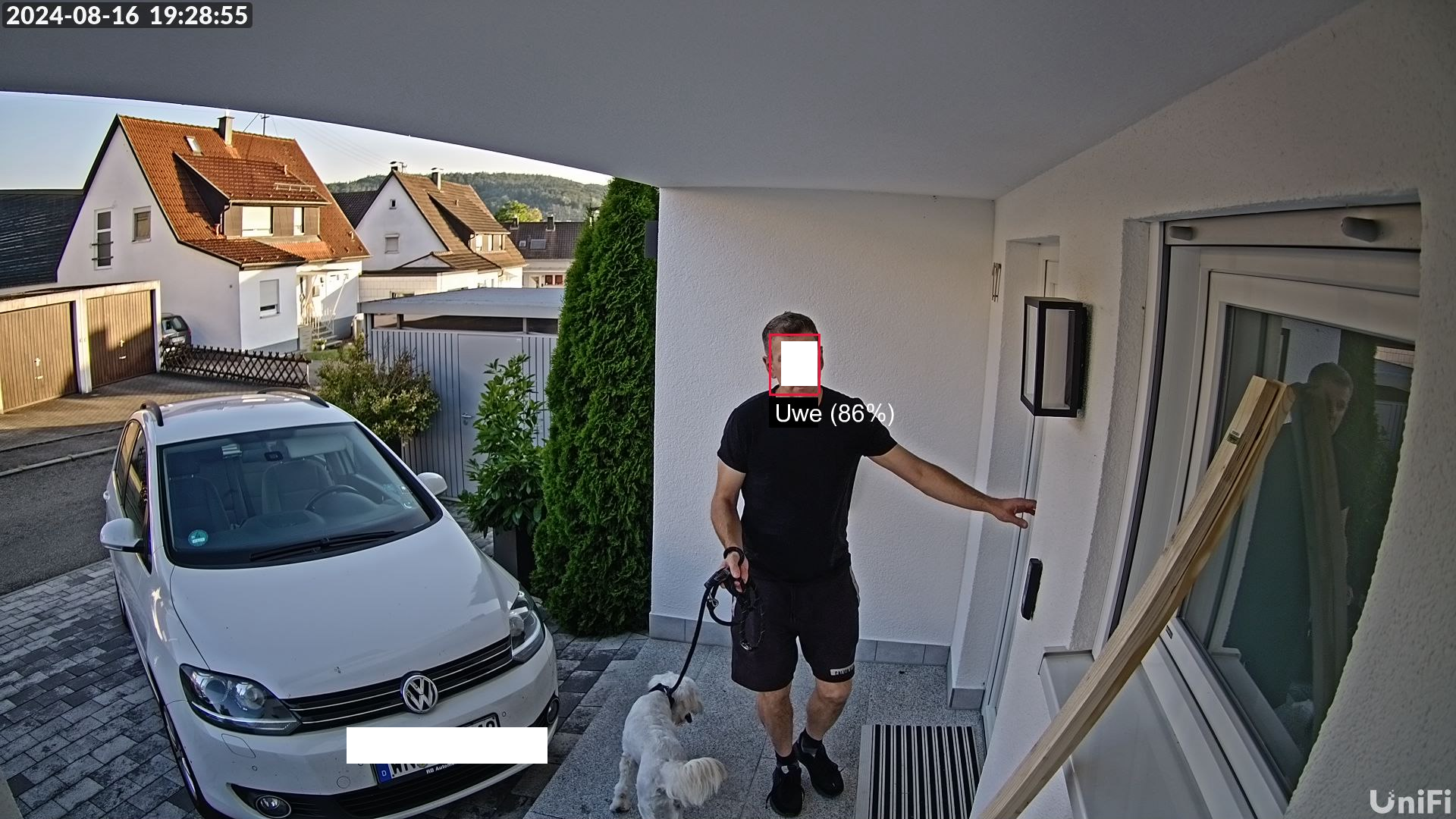
Hintergrund: Ich sende einem AI-Server alle x ms ein Bild von der IP-Kamera. Der AI-Server sendet dann die Info zurück, ob ein Gesicht erkannt wurde und falls ja, welches. Es kommen auch die Koordinaten zurück vom Gesicht. Auf dem Originalbild zeichne ich dann eben über "Jimp" ein Rechteck um das Gesicht und schreibe noch den erkannten Namen dazu und die Prozentzahl. Dieses Bild verarbeite ich dann weiter....Versand nach Telegram....
Zum Beispiel:
-
@fastfoot DANKESCHÖN!!!
javascript.1
2024-09-09 10:29:54.883	error	at processImmediate (node:internal/timers:485:21)
javascript.1
2024-09-09 10:29:54.883	error	at Immediate._onImmediate (/opt/iobroker/node_modules/iobroker.javascript/main.js:1732:17)
javascript.1
2024-09-09 10:29:54.883	error	at /opt/iobroker/node_modules/iobroker.javascript/main.js:2320:17
javascript.1
2024-09-09 10:29:54.883	error	at prepareScript (/opt/iobroker/node_modules/iobroker.javascript/main.js:2222:37)
javascript.1
2024-09-09 10:29:54.883	error	at createVM (/opt/iobroker/node_modules/iobroker.javascript/main.js:1954:21)
javascript.1
2024-09-09 10:29:54.883	error	at new Script (node:vm:116:7)
javascript.1
2024-09-09 10:29:54.883	error	SyntaxError: Cannot use import statement outside a module
javascript.1
2024-09-09 10:29:54.883	error	^^^^^^
javascript.1
2024-09-09 10:29:54.883	error	import { Jimp, loadFont } from "jimp";
javascript.1
2024-09-09 10:29:54.883	error	script.js.common.Automatisierungen.KI_Detection.TEST_JIMP compile failed: at script.js.common.Automatisierungen.KI_Detection.TEST_JIMP:38
Ich kriege es leider noch nicht wirklich hin. Im IoBroker-Script funktioniert dies denke ich nicht mit dem import. Brauche man da das request?
So fit bin ich leider nicht. Danke dir für deine Zeit. Bin dafür sehr dankbar!
Hintergrund: Ich sende einem AI-Server alle x ms ein Bild von der IP-Kamera. Der AI-Server sendet dann die Info zurück, ob ein Gesicht erkannt wurde und falls ja, welches. Es kommen auch die Koordinaten zurück vom Gesicht. Auf dem Originalbild zeichne ich dann eben über "Jimp" ein Rechteck um das Gesicht und schreibe noch den erkannten Namen dazu und die Prozentzahl. Dieses Bild verarbeite ich dann weiter....Versand nach Telegram....
Zum Beispiel:
-
@uwe72 sorry, das kommt davon wenn man nicht unter iobroker entwickelt. Nimm statt import request, iobroker unterstützt ersteres wohl noch nicht
EDIT: Ich habe das Beispiel entsprechend angepasst
@fastfoot DANKE dir!!
Habe dein Beispiel mal angepasst, so dass ich auf einem bestehendem Bild aufsetze und zeichne auf die Schnelle mal einen Text und eine Grafik (scan).
Beim scan ist mir noch nicht ganz klar, wie das konfiguriert wird um ein Rechteck zu erhalten. Auch ist mir nicht klar was die 4 Zeilen machen (z.B. image.bitmap.data[idx + 0] = 255;)
const { Jimp, loadFont } = require("jimp");
const { SANS_32_WHITE } = require("jimp/fonts");

const baseDirectory = "/opt/iobroker/";
var filename = baseDirectory + "/detection.jpg";
var filenameBoundingBox = baseDirectory + "_detection_plate_boundingbox_UWE.jpg";

async function test() {
  const font = await loadFont(SANS_32_WHITE);
  Jimp.read(filename).then(image => {
    image
      .print({ font, x: 200, y: 50, text: "DANKESCHÖN!" })
      .scan(/*x*/ 200, /*y*/ 100, /*width*/ 1000, /*height*/ 3300, (x, y, idx) => {
        if (x < y) {
            image.bitmap.data[idx + 0] = 255;
            image.bitmap.data[idx + 1] = 255;
            image.bitmap.data[idx + 2] = 255;
            image.bitmap.data[idx + 3] = 255;
        }
      })
      .write(filenameBoundingBox, { quality: 100 });
  });
}

await test();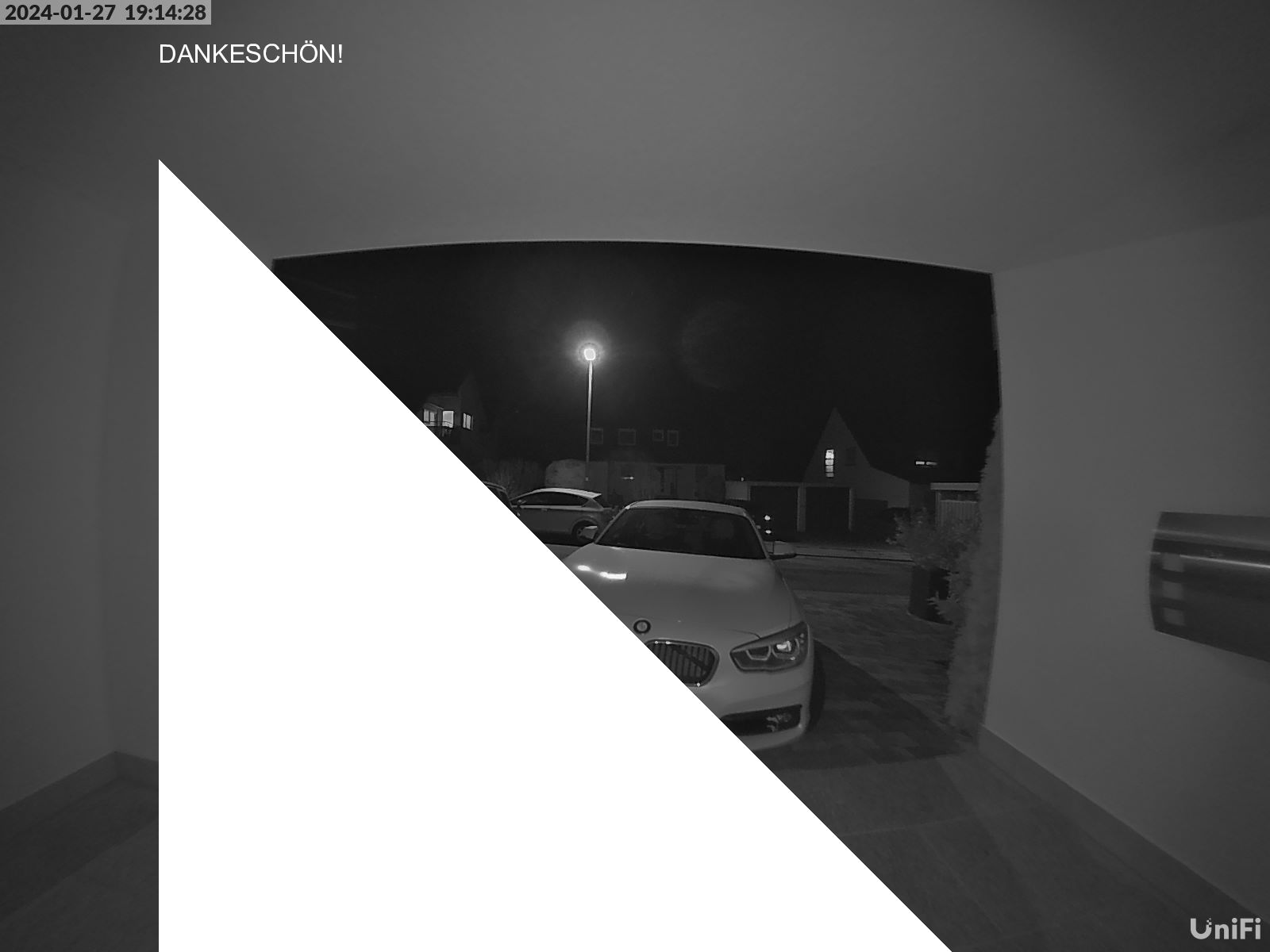
-
@fastfoot DANKE dir!!
Habe dein Beispiel mal angepasst, so dass ich auf einem bestehendem Bild aufsetze und zeichne auf die Schnelle mal einen Text und eine Grafik (scan).
Beim scan ist mir noch nicht ganz klar, wie das konfiguriert wird um ein Rechteck zu erhalten. Auch ist mir nicht klar was die 4 Zeilen machen (z.B. image.bitmap.data[idx + 0] = 255;)
const { Jimp, loadFont } = require("jimp"); const { SANS_32_WHITE } = require("jimp/fonts"); const baseDirectory = "/opt/iobroker/"; var filename = baseDirectory + "/detection.jpg"; var filenameBoundingBox = baseDirectory + "_detection_plate_boundingbox_UWE.jpg"; async function test() { const font = await loadFont(SANS_32_WHITE); Jimp.read(filename).then(image => { image .print({ font, x: 200, y: 50, text: "DANKESCHÖN!" }) .scan(/*x*/ 200, /*y*/ 100, /*width*/ 1000, /*height*/ 3300, (x, y, idx) => { if (x < y) { image.bitmap.data[idx + 0] = 255; image.bitmap.data[idx + 1] = 255; image.bitmap.data[idx + 2] = 255; image.bitmap.data[idx + 3] = 255; } }) .write(filenameBoundingBox, { quality: 100 }); }); } await test();@uwe72 ich hatte da auf dich gehofft, zeig doch mal den bisherigen code. Mit meinem sehr beschränkten Wissen stelle ich mir das schwer vor, wenn auch nicht unmöglich. Was ich bräuchte wären die Koordinaten des Gesichts und was du dann in der scan() Funktion stehen hattest. Das Beispiel hab ich aus der Doku(ältere Versionen haben die noch)
-
@uwe72 ich hatte da auf dich gehofft, zeig doch mal den bisherigen code. Mit meinem sehr beschränkten Wissen stelle ich mir das schwer vor, wenn auch nicht unmöglich. Was ich bräuchte wären die Koordinaten des Gesichts und was du dann in der scan() Funktion stehen hattest. Das Beispiel hab ich aus der Doku(ältere Versionen haben die noch)
@fastfoot Nein, brauchst Du dir nicht anschauen, wenn Du hier auch nicht fit bist. Ich werde mir das in Ruhe anschauen im Laufe der Woche. Das kriege ich schon vollends hin. Wichtigste war dein Input, dass es prinzipiell funktioniert, war eine große Hilfe für mich, danke hierfür!
-
@uwe72 ich hatte da auf dich gehofft, zeig doch mal den bisherigen code. Mit meinem sehr beschränkten Wissen stelle ich mir das schwer vor, wenn auch nicht unmöglich. Was ich bräuchte wären die Koordinaten des Gesichts und was du dann in der scan() Funktion stehen hattest. Das Beispiel hab ich aus der Doku(ältere Versionen haben die noch)
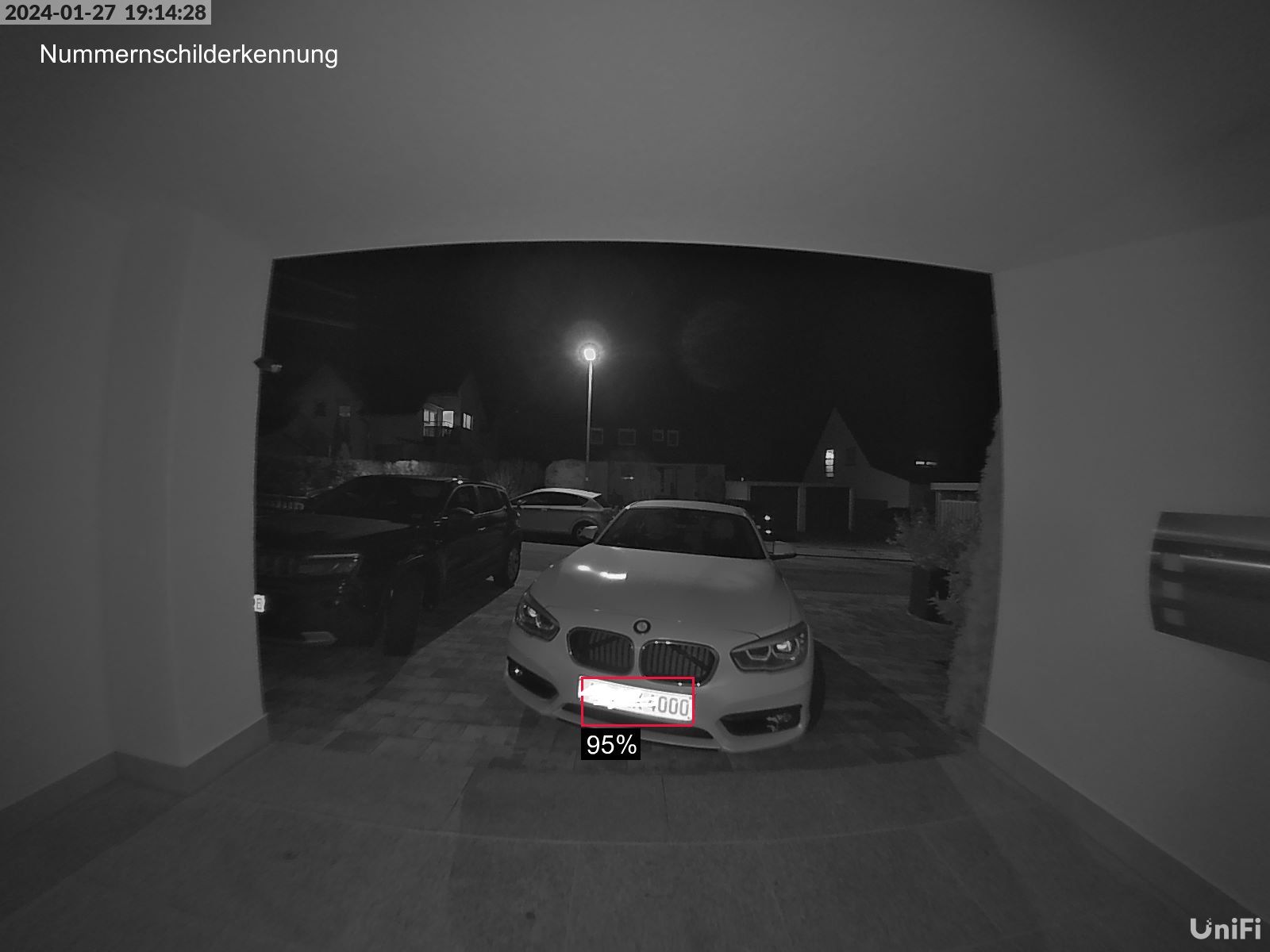
@fastfoot Habs nun umgebaut. DANKE nochmals für deinen Input!
const fillCrimson = makeIteratorThatFillsWithColor(0xED143DFF);

async function appendBoundingBox(response, inputFileName, outputFileName) {
  const font = await loadFont(SANS_32_WHITE);
  Jimp.read(inputFileName).then(image => {
    var imageJimp = image.print({ font, x: 50, y: 50, text: "Nummernschilderkennung" });

        response.data.predictions.forEach(function (prediction) {
            if (prediction.confidence > (minimumConfidencePercent/100)) {

                // Prozentzahl als Text:
                imageJimp.scan(prediction.x_min, prediction.y_max+5, 75, 40, makeIteratorThatFillsWithColor(0x00000040));
                imageJimp.print({ font, x: prediction.x_min+7, y: prediction.y_max+8, text: (prediction.confidence*100).toFixed(0)+"%" });

                // Waagrecht; x1, y1, Länge Strich, Strichbreite (obere waagreche Linie):
                imageJimp.scan(prediction.x_min, prediction.y_min, (prediction.x_max-prediction.x_min), 3, fillCrimson);

                // Waagrecht; x1, y1, Länge Strich, Strichbreite (untere waagreche Linie):
                imageJimp.scan(prediction.x_min, prediction.y_max, (prediction.x_max-prediction.x_min), 3, fillCrimson);

                // Senkrecht; x1, y1, Strichbreite, Länge Strich (linke sekrechte Linie)
                imageJimp.scan(prediction.x_min, prediction.y_min, 3, (prediction.y_max-prediction.y_min), fillCrimson);

                // Senkrecht; x1, y1, Strichbreite, Länge Strich (rechte sekrechte Linie)
                imageJimp.scan(prediction.x_max, prediction.y_min, 3, (prediction.y_max-prediction.y_min), fillCrimson);
            }
        });
        log("Output: " + outputFileName);
      imageJimp.write(outputFileName, { quality: 100 });
  });
}

function makeIteratorThatFillsWithColor(color) {
    return function (x, y, offset) {
        this.bitmap.data.writeUInt32BE(color, offset, true);
    }
};

Hey! Du scheinst an dieser Unterhaltung interessiert zu sein, hast aber noch kein Konto.
Hast du es satt, bei jedem Besuch durch die gleichen Beiträge zu scrollen? Wenn du dich für ein Konto anmeldest, kommst du immer genau dorthin zurück, wo du zuvor warst, und kannst dich über neue Antworten benachrichtigen lassen (entweder per E-Mail oder Push-Benachrichtigung). Du kannst auch Lesezeichen speichern und Beiträge positiv bewerten, um anderen Community-Mitgliedern deine Wertschätzung zu zeigen.
Mit deinem Input könnte dieser Beitrag noch besser werden 💗
Registrieren AnmeldenSupport us
204
Online33.1k
Benutzende83.7k
Themen1.3m
Beiträge