




Vis aktualisiert sich nicht mehr bzw. bleibt hängen
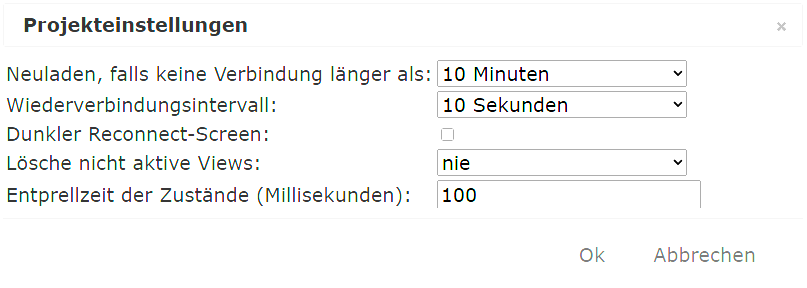
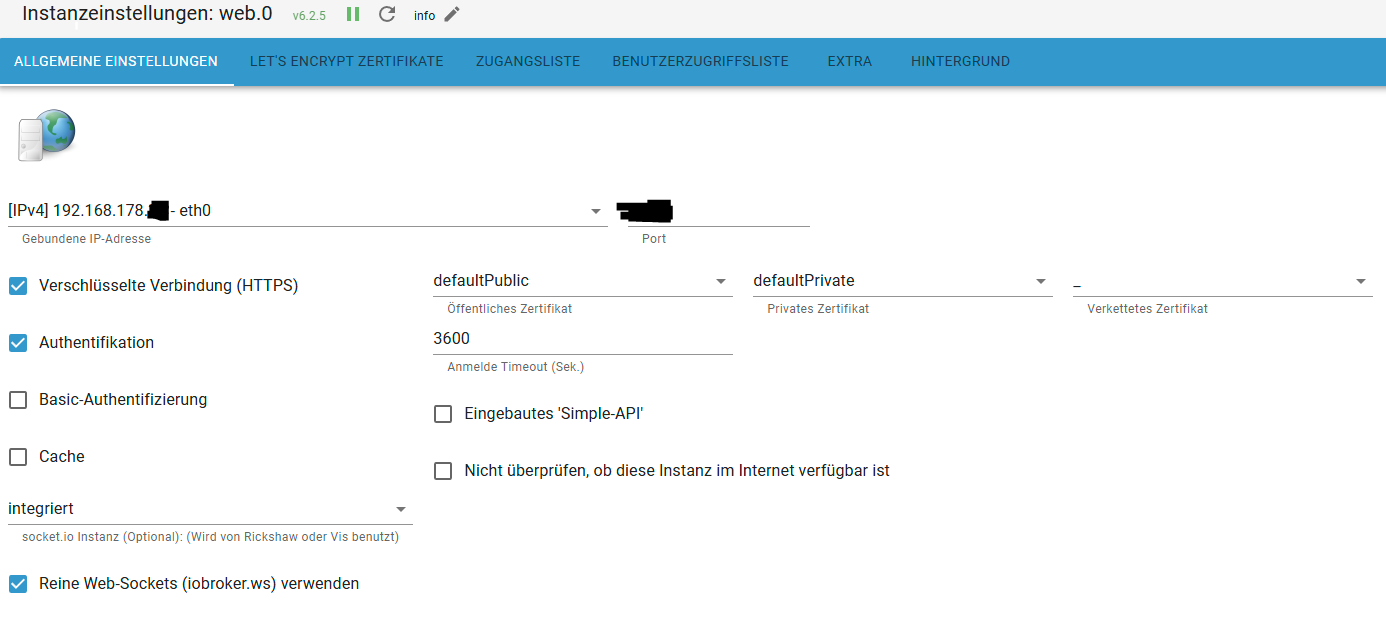
-
Skript v.2024-05-22 *** BASE SYSTEM *** Static hostname: raspi4 Icon name: computer Operating System: Debian GNU/Linux 11 (bullseye) Kernel: Linux 6.1.21-v8+ Architecture: arm64 Model : Raspberry Pi 4 Model B Rev 1.5 Docker : false Virtualization : none Kernel : aarch64 Userland : 64 bit Systemuptime and Load: 13:11:19 up 2:43, 3 users, load average: 0.88, 0.82, 1.00 CPU threads: 4 *** RASPBERRY THROTTLING *** Current issues: No throttling issues detected. Previously detected issues: No throttling issues detected. *** Time and Time Zones *** Local time: Thu 2024-09-05 13:11:19 CEST Universal time: Thu 2024-09-05 11:11:19 UTC RTC time: n/a Time zone: Europe/Berlin (CEST, +0200) System clock synchronized: yes NTP service: active RTC in local TZ: no *** Users and Groups *** User that called 'iob diag': pi HOME=/home/pi GROUPS=pi adm dialout cdrom sudo audio video plugdev games users input render netdev lpadmin gpio i2c spi iobroker User that is running 'js-controller': iobroker HOME=/home/iobroker GROUPS=iobroker tty dialout audio video plugdev bluetooth gpio i2c *** Display-Server-Setup *** Display-Server: true Desktop: Terminal: tty Boot Target: graphical.target *** MEMORY *** total used free shared buff/cache available Mem: 7.8G 3.2G 1.6G 59M 3.0G 4.4G Swap: 99M 0B 99M Total: 7.9G 3.2G 1.7G Active iob-Instances: 29 7761 M total memory 3156 M used memory 5042 M active memory 805 M inactive memory 1595 M free memory 149 M buffer memory 2859 M swap cache 99 M total swap 0 M used swap 99 M free swap *** top - Table Of Processes *** top - 13:11:19 up 2:43, 3 users, load average: 0.88, 0.82, 1.00 Tasks: 230 total, 2 running, 228 sleeping, 0 stopped, 0 zombie %Cpu(s): 5.5 us, 2.7 sy, 0.0 ni, 91.8 id, 0.0 wa, 0.0 hi, 0.0 si, 0.0 st MiB Mem : 7761.4 total, 1595.6 free, 3156.5 used, 3009.3 buff/cache MiB Swap: 100.0 total, 100.0 free, 0.0 used. 4398.5 avail Mem *** FAILED SERVICES *** UNIT LOAD ACTIVE SUB DESCRIPTION 0 loaded units listed. *** FILESYSTEM *** Filesystem Type Size Used Avail Use% Mounted on /dev/root ext4 29G 16G 12G 57% / devtmpfs devtmpfs 3.6G 0 3.6G 0% /dev tmpfs tmpfs 3.8G 28M 3.8G 1% /dev/shm tmpfs tmpfs 1.6G 2.7M 1.6G 1% /run tmpfs tmpfs 5.0M 0 5.0M 0% /run/lock /dev/sda1 vfat 253M 31M 222M 13% /boot tmpfs tmpfs 777M 28K 777M 1% /run/user/1000 192.168.178.32:/volume1/RaspiPi4 nfs 7.0T 5.0T 2.1T 71% /mnt/backups/Synology_NAS 192.168.178.32:/volume1/RaspiPi4/Logfiles nfs 7.0T 5.0T 2.1T 71% /mnt/logfiles Messages concerning ext4 filesystem in dmesg: [Thu Sep 5 10:27:35 2024] Kernel command line: coherent_pool=1M 8250.nr_uarts=1 snd_bcm2835.enable_headphones=0 snd_bcm2835.enable_headphones=0 snd_bcm2835.enable_hdmi=0 video=HDMI-A-1:1024x600M@60D smsc95xx.macaddr=E4:5F:01:98:C9:33 vc_mem.mem_base=0x3eb00000 vc_mem.mem_size=0x3ff00000 console=tty1 root=PARTUUID=3ef2fde4-02 rootfstype=ext4 fsck.repair=yes rootwait [Thu Sep 5 10:27:37 2024] EXT4-fs (sda2): mounted filesystem with ordered data mode. Quota mode: none. [Thu Sep 5 10:27:37 2024] VFS: Mounted root (ext4 filesystem) readonly on device 8:2. [Thu Sep 5 10:27:40 2024] EXT4-fs (sda2): re-mounted. Quota mode: none. Show mounted filesystems: TARGET SOURCE FSTYPE OPTIONS / /dev/sda2 ext4 rw,noatime |-/dev devtmpfs devtmpfs rw,relatime,size=3709620k,nr_inodes=927405,mode=755 | |-/dev/shm tmpfs tmpfs rw,nosuid,nodev | |-/dev/pts devpts devpts rw,nosuid,noexec,relatime,gid=5,mode=620,ptmxmode=000 | `-/dev/mqueue mqueue mqueue rw,nosuid,nodev,noexec,relatime |-/proc proc proc rw,relatime | `-/proc/sys/fs/binfmt_misc systemd-1 autofs rw,relatime,fd=30,pgrp=1,timeout=0,minproto=5,maxproto=5,direct |-/sys sysfs sysfs rw,nosuid,nodev,noexec,relatime | |-/sys/kernel/security securityfs securityfs rw,nosuid,nodev,noexec,relatime | |-/sys/fs/cgroup cgroup2 cgroup2 rw,nosuid,nodev,noexec,relatime,nsdelegate,memory_recursiveprot | |-/sys/fs/pstore pstore pstore rw,nosuid,nodev,noexec,relatime | |-/sys/fs/bpf bpf bpf rw,nosuid,nodev,noexec,relatime,mode=700 | |-/sys/kernel/debug debugfs debugfs rw,nosuid,nodev,noexec,relatime | |-/sys/kernel/tracing tracefs tracefs rw,nosuid,nodev,noexec,relatime | |-/sys/fs/fuse/connections fusectl fusectl rw,nosuid,nodev,noexec,relatime | `-/sys/kernel/config configfs configfs rw,nosuid,nodev,noexec,relatime |-/run tmpfs tmpfs rw,nosuid,nodev,size=1589540k,nr_inodes=819200,mode=755 | |-/run/lock tmpfs tmpfs rw,nosuid,nodev,noexec,relatime,size=5120k | |-/run/rpc_pipefs sunrpc rpc_pipefs rw,relatime | `-/run/user/1000 tmpfs tmpfs rw,nosuid,nodev,relatime,size=794768k,nr_inodes=198692,mode=700,uid=1000,gid=1000 | `-/run/user/1000/gvfs gvfsd-fuse fuse.gvfsd-fuse rw,nosuid,nodev,relatime,user_id=1000,group_id=1000 |-/boot /dev/sda1 vfat rw,relatime,fmask=0022,dmask=0022,codepage=437,iocharset=ascii,shortname=mixed,flush,errors=remount-ro |-/mnt/backups/Synology_NAS 192.168.178.32:/volume1/RaspiPi4 nfs rw,relatime,vers=3,rsize=131072,wsize=131072,namlen=255,hard,proto=tcp,timeo=600,retrans=2,sec=sys,mountaddr=192.168.178.32,mountvers=3,mountport=892,mountproto=udp,local_lock=none,addr=192.168.178.32 `-/mnt/logfiles 192.168.178.32:/volume1/RaspiPi4/Logfiles nfs rw,relatime,vers=3,rsize=131072,wsize=131072,namlen=255,hard,proto=tcp,timeo=600,retrans=2,sec=sys,mountaddr=192.168.178.32,mountvers=3,mountport=892,mountproto=udp,local_lock=none,addr=192.168.178.32 Files in neuralgic directories: /var: 2.3G /var/ 1.3G /var/log/journal/22cbd4efb0754ed7b99f9cfd7ea292ed 1.3G /var/log/journal 1.3G /var/log 799M /var/cache Archived and active journals take up 1.2G in the file system. /opt/iobroker/backups: 64M /opt/iobroker/backups/ /opt/iobroker/iobroker-data: 2.7G /opt/iobroker/iobroker-data/ 1.4G /opt/iobroker/iobroker-data/files 1019M /opt/iobroker/iobroker-data/history 441M /opt/iobroker/iobroker-data/files/javascript.admin 409M /opt/iobroker/iobroker-data/files/javascript.admin/static The five largest files in iobroker-data are: 42M /opt/iobroker/iobroker-data/files/telegram-menu.admin/build/index.js.map 38M /opt/iobroker/iobroker-data/files/iot.admin/static/js/main.d3d286bd.js.map 30M /opt/iobroker/iobroker-data/states.jsonl 27M /opt/iobroker/iobroker-data/files/tankerkoenig.admin/build/index.js.map 24M /opt/iobroker/iobroker-data/files/web.admin/static/js/main.135279a0.js.map USB-Devices by-id: USB-Sticks - Avoid direct links to /dev/tty* in your adapter setups, please always prefer the links 'by-id': /dev/serial/by-id/usb-Silicon_Labs_Sonoff_Zigbee_3.0_USB_Dongle_Plus_0001-if00-port0 HINT: Your zigbee.0 COM-Port is NOT matching 'by-id'. Please check your setting: /dev/ttyUSB0 *** NodeJS-Installation *** /usr/bin/nodejs v18.20.4 /usr/bin/node v18.20.4 /usr/bin/npm 10.7.0 /usr/bin/npx 10.7.0 /usr/bin/corepack 0.28.0 nodejs: Installed: 18.20.4-1nodesource1 Candidate: 18.20.4-1nodesource1 Version table: *** 18.20.4-1nodesource1 600 500 https://deb.nodesource.com/node_18.x nodistro/main arm64 Packages 100 /var/lib/dpkg/status 18.20.3-1nodesource1 600 500 https://deb.nodesource.com/node_18.x nodistro/main arm64 Packages 18.20.2-1nodesource1 600 500 https://deb.nodesource.com/node_18.x nodistro/main arm64 Packages 18.20.1-1nodesource1 600 500 https://deb.nodesource.com/node_18.x nodistro/main arm64 Packages 18.20.0-1nodesource1 600 500 https://deb.nodesource.com/node_18.x nodistro/main arm64 Packages 18.19.1-1nodesource1 600 500 https://deb.nodesource.com/node_18.x nodistro/main arm64 Packages 18.19.0-1nodesource1 600 500 https://deb.nodesource.com/node_18.x nodistro/main arm64 Packages 18.18.2-1nodesource1 600 500 https://deb.nodesource.com/node_18.x nodistro/main arm64 Packages 18.18.1-1nodesource1 600 500 https://deb.nodesource.com/node_18.x nodistro/main arm64 Packages 18.18.0-1nodesource1 600 500 https://deb.nodesource.com/node_18.x nodistro/main arm64 Packages 18.17.1-1nodesource1 600 500 https://deb.nodesource.com/node_18.x nodistro/main arm64 Packages 18.17.0-1nodesource1 600 500 https://deb.nodesource.com/node_18.x nodistro/main arm64 Packages 18.16.1-1nodesource1 600 500 https://deb.nodesource.com/node_18.x nodistro/main arm64 Packages 18.16.0-1nodesource1 600 500 https://deb.nodesource.com/node_18.x nodistro/main arm64 Packages 18.15.0-1nodesource1 600 500 https://deb.nodesource.com/node_18.x nodistro/main arm64 Packages 18.14.2-1nodesource1 600 500 https://deb.nodesource.com/node_18.x nodistro/main arm64 Packages 18.14.1-1nodesource1 600 500 https://deb.nodesource.com/node_18.x nodistro/main arm64 Packages 18.14.0-1nodesource1 600 500 https://deb.nodesource.com/node_18.x nodistro/main arm64 Packages 18.13.0-1nodesource1 600 500 https://deb.nodesource.com/node_18.x nodistro/main arm64 Packages 18.12.0-1nodesource1 600 500 https://deb.nodesource.com/node_18.x nodistro/main arm64 Packages 18.11.0-1nodesource1 600 500 https://deb.nodesource.com/node_18.x nodistro/main arm64 Packages 18.10.0-1nodesource1 600 500 https://deb.nodesource.com/node_18.x nodistro/main arm64 Packages 18.9.1-1nodesource1 600 500 https://deb.nodesource.com/node_18.x nodistro/main arm64 Packages 18.9.0-1nodesource1 600 500 https://deb.nodesource.com/node_18.x nodistro/main arm64 Packages 18.8.0-1nodesource1 600 500 https://deb.nodesource.com/node_18.x nodistro/main arm64 Packages 18.7.0-1nodesource1 600 500 https://deb.nodesource.com/node_18.x nodistro/main arm64 Packages 18.6.0-1nodesource1 600 500 https://deb.nodesource.com/node_18.x nodistro/main arm64 Packages 18.5.0-1nodesource1 600 500 https://deb.nodesource.com/node_18.x nodistro/main arm64 Packages 18.4.0-1nodesource1 600 500 https://deb.nodesource.com/node_18.x nodistro/main arm64 Packages 18.3.0-1nodesource1 600 500 https://deb.nodesource.com/node_18.x nodistro/main arm64 Packages 18.2.0-1nodesource1 600 500 https://deb.nodesource.com/node_18.x nodistro/main arm64 Packages 18.1.0-1nodesource1 600 500 https://deb.nodesource.com/node_18.x nodistro/main arm64 Packages 18.0.0-1nodesource1 600 500 https://deb.nodesource.com/node_18.x nodistro/main arm64 Packages 12.22.12~dfsg-1~deb11u4 500 500 http://deb.debian.org/debian bullseye/main arm64 Packages 500 http://security.debian.org/debian-security bullseye-security/main arm64 Packages Temp directories causing npm8 problem: 0 No problems detected Errors in npm tree: *** ioBroker-Installation *** ioBroker Status iobroker is running on this host. Objects type: jsonl States type: jsonl Core adapters versions js-controller: 6.0.11 admin: 7.0.23 javascript: 8.7.6 nodejs modules from github: 1 +-- iobroker.sourceanalytix@0.4.15-alpha.0 (git+ssh://git@github.com/iobroker-community-adapters/ioBroker.sourceanalytix.git#af88beb902468eb03749e5b120f3e350e60256e1) Adapter State + system.adapter.admin.0 : admin : raspi4 - enabled, port: 8081, bind: 192.168.178.37 (SSL), run as: admin + system.adapter.alexa2.0 : alexa2 : raspi4 - enabled system.adapter.alias-manager.0 : alias-manager : raspi4 - disabled + system.adapter.backitup.0 : backitup : raspi4 - enabled system.adapter.daswetter.0 : daswetter : raspi4 - disabled system.adapter.dwd.0 : dwd : raspi4 - enabled + system.adapter.echarts.0 : echarts : raspi4 - enabled + system.adapter.eventlist.0 : eventlist : raspi4 - enabled system.adapter.feiertage.0 : feiertage : raspi4 - enabled system.adapter.flot.0 : flot : raspi4 - disabled + system.adapter.fullcalendar.0 : fullcalendar : raspi4 - enabled + system.adapter.history.0 : history : raspi4 - enabled + system.adapter.hmip.0 : hmip : raspi4 - enabled system.adapter.ical.0 : ical : raspi4 - enabled system.adapter.icons-addictive-flavour-png.0: icons-addictive-flavour-png: raspi4 - disabled system.adapter.icons-icons8.0 : icons-icons8 : raspi4 - disabled system.adapter.icons-material-png.0 : icons-material-png : raspi4 - disabled system.adapter.icons-material-svg.0 : icons-material-svg : raspi4 - disabled system.adapter.icons-mfd-svg.0 : icons-mfd-svg : raspi4 - disabled system.adapter.icons-open-icon-library-png.0: icons-open-icon-library-png: raspi4 - disabled system.adapter.icons-smarthome.0 : icons-smarthome : raspi4 - disabled system.adapter.icons-ultimate-png.0 : icons-ultimate-png : raspi4 - disabled system.adapter.iot.0 : iot : raspi4 - disabled + system.adapter.iqontrol.0 : iqontrol : raspi4 - enabled + system.adapter.javascript.0 : javascript : raspi4 - enabled system.adapter.linux-control.0 : linux-control : raspi4 - disabled + system.adapter.meross.0 : meross : raspi4 - enabled system.adapter.openweathermap.0 : openweathermap : raspi4 - disabled + system.adapter.ping.0 : ping : raspi4 - enabled system.adapter.pvforecast.0 : pvforecast : raspi4 - disabled system.adapter.radar2.0 : radar2 : raspi4 - disabled system.adapter.rickshaw.0 : rickshaw : raspi4 - disabled + system.adapter.roborock.0 : roborock : raspi4 - enabled system.adapter.rpi2.0 : rpi2 : raspi4 - disabled system.adapter.schoolfree.0 : schoolfree : raspi4 - enabled + system.adapter.shelly.0 : shelly : raspi4 - enabled, port: 1882, bind: 0.0.0.0 + system.adapter.shelly.1 : shelly : raspi4 - enabled, port: 1882, bind: 0.0.0.0 + system.adapter.simple-api.0 : simple-api : raspi4 - enabled, port: 8087, bind: 192.168.178.37, run as: admin system.adapter.socketio.0 : socketio : raspi4 - disabled, port: 8084, bind: 192.168.178.37 (SSL), run as: admin + system.adapter.sonoff.0 : sonoff : raspi4 - enabled, port: 1883, bind: 0.0.0.0 + system.adapter.sourceanalytix.0 : sourceanalytix : raspi4 - enabled system.adapter.sprinklecontrol.0 : sprinklecontrol : raspi4 - disabled + system.adapter.tankerkoenig.0 : tankerkoenig : raspi4 - enabled system.adapter.telegram-menu.0 : telegram-menu : raspi4 - disabled + system.adapter.telegram.0 : telegram : raspi4 - enabled, port: 8443, bind: 0.0.0.0 + system.adapter.telegram.1 : telegram : raspi4 - enabled, port: 8443, bind: 0.0.0.0 system.adapter.text2command.0 : text2command : raspi4 - disabled + system.adapter.tr-064.0 : tr-064 : raspi4 - enabled + system.adapter.trashschedule.0 : trashschedule : raspi4 - enabled + system.adapter.tuya.0 : tuya : raspi4 - enabled system.adapter.vis-2.0 : vis-2 : raspi4 - disabled system.adapter.vis-bars.0 : vis-bars : raspi4 - disabled system.adapter.vis-canvas-gauges.0 : vis-canvas-gauges : raspi4 - disabled system.adapter.vis-fancyswitch.0 : vis-fancyswitch : raspi4 - disabled system.adapter.vis-history.0 : vis-history : raspi4 - disabled system.adapter.vis-hqwidgets.0 : vis-hqwidgets : raspi4 - disabled system.adapter.vis-icontwo.0 : vis-icontwo : raspi4 - disabled + system.adapter.vis-inventwo.0 : vis-inventwo : raspi4 - enabled system.adapter.vis-justgage.0 : vis-justgage : raspi4 - disabled system.adapter.vis-keyboard.0 : vis-keyboard : raspi4 - disabled system.adapter.vis-material-advanced.0 : vis-material-advanced : raspi4 - disabled system.adapter.vis-plumb.0 : vis-plumb : raspi4 - disabled system.adapter.vis-timeandweather.0 : vis-timeandweather : raspi4 - disabled system.adapter.vis-weather.0 : vis-weather : raspi4 - disabled system.adapter.vis.0 : vis : raspi4 - enabled + system.adapter.web.0 : web : raspi4 - enabled, port: 8082, bind: 192.168.178.37 (SSL), run as: mathias + system.adapter.worx.0 : worx : raspi4 - enabled + system.adapter.zigbee.0 : zigbee : raspi4 - enabled, port: /dev/ttyUSB0 + instance is alive Enabled adapters with bindings + system.adapter.admin.0 : admin : raspi4 - enabled, port: 8081, bind: 192.168.178.37 (SSL), run as: admin + system.adapter.shelly.0 : shelly : raspi4 - enabled, port: 1882, bind: 0.0.0.0 + system.adapter.shelly.1 : shelly : raspi4 - enabled, port: 1882, bind: 0.0.0.0 + system.adapter.simple-api.0 : simple-api : raspi4 - enabled, port: 8087, bind: 192.168.178.37, run as: admin + system.adapter.sonoff.0 : sonoff : raspi4 - enabled, port: 1883, bind: 0.0.0.0 + system.adapter.telegram.0 : telegram : raspi4 - enabled, port: 8443, bind: 0.0.0.0 + system.adapter.telegram.1 : telegram : raspi4 - enabled, port: 8443, bind: 0.0.0.0 + system.adapter.web.0 : web : raspi4 - enabled, port: 8082, bind: 192.168.178.37 (SSL), run as: mathias + system.adapter.zigbee.0 : zigbee : raspi4 - enabled, port: /dev/ttyUSB0 ioBroker-Repositories ┌─────────┬──────────┬─────────────────────────────────────────────────────────┬──────────────┐ │ (index) │ name │ url │ auto upgrade │ ├─────────┼──────────┼─────────────────────────────────────────────────────────┼──────────────┤ │ 0 │ 'stable' │ 'http://download.iobroker.net/sources-dist.json' │ false │ │ 1 │ 'beta' │ 'http://download.iobroker.net/sources-dist-latest.json' │ false │ └─────────┴──────────┴─────────────────────────────────────────────────────────┴──────────────┘ Active repo(s): stable Upgrade policy: none Installed ioBroker-Instances Used repository: stable Adapter "admin" : 7.0.23 , installed 7.0.23 Adapter "alexa2" : 3.26.5 , installed 3.26.5 Adapter "alias-manager": 1.2.6 , installed 1.2.6 Adapter "backitup" : 3.0.19 , installed 3.0.19 Adapter "daswetter" : 3.1.15 , installed 3.1.15 Adapter "dwd" : 2.8.5 , installed 2.8.5 Adapter "echarts" : 1.7.2 , installed 1.7.2 Adapter "eventlist" : 2.0.1 , installed 2.0.1 Adapter "feiertage" : 1.2.0 , installed 1.2.0 Adapter "flot" : 1.12.0 , installed 1.12.0 Adapter "fullcalendar" : 2.4.2 , installed 2.4.2 Adapter "history" : 3.0.1 , installed 3.0.1 Adapter "hmip" : 1.23.3 , installed 1.23.3 Adapter "ical" : 1.15.0 , installed 1.15.0 Adapter "icons-addictive-flavour-png": 0.1.0, installed 0.1.0 Adapter "icons-icons8" : 0.0.1 , installed 0.0.1 Adapter "icons-material-png": 0.1.0, installed 0.1.0 Adapter "icons-material-svg": 0.1.0, installed 0.1.0 Adapter "icons-mfd-svg": 1.2.0 , installed 1.2.0 Adapter "icons-open-icon-library-png": 0.1.2, installed 0.1.2 Adapter "icons-smarthome": 1.0.0 , installed 1.0.0 Adapter "icons-ultimate-png": 1.0.1, installed 1.0.1 Adapter "iot" : 3.3.0 , installed 3.3.0 Adapter "iqontrol" : 2.3.0 , installed 2.3.0 Adapter "javascript" : 8.7.6 , installed 8.7.6 Controller "js-controller": 6.0.11 , installed 6.0.11 Adapter "linkeddevices": 1.5.5 , installed 1.5.5 Adapter "linux-control": 1.1.5 , installed 1.1.5 Adapter "meross" : 1.17.0 , installed 1.17.0 Adapter "openweathermap": 1.1.2 , installed 1.1.2 Adapter "ping" : 1.6.2 , installed 1.6.2 Adapter "pvforecast" : 3.0.0 , installed 3.0.0 Adapter "radar2" : 2.2.0 , installed 2.2.0 Adapter "rickshaw" : 1.0.0 , installed 1.0.0 Adapter "roborock" : 0.6.4 , installed 0.6.4 Adapter "rpi2" : 1.3.2 , installed 1.3.2 Adapter "schoolfree" : 1.1.4 , installed 1.1.4 Adapter "shelly" : 7.0.0 , installed 7.0.0 Adapter "simple-api" : 2.8.0 , installed 2.8.0 Adapter "socketio" : 6.7.1 , installed 6.7.1 Adapter "sonoff" : 3.1.0 , installed 3.1.0 Adapter "sprinklecontrol": 0.2.13 , installed 0.2.13 Adapter "tankerkoenig" : 3.4.0 , installed 3.4.0 Adapter "telegram" : 3.9.0 , installed 3.9.0 Adapter "telegram-menu": 2.0.0 , installed 1.7.4 [Updatable] Adapter "text2command" : 3.0.3 , installed 3.0.3 Adapter "tr-064" : 4.3.0 , installed 4.3.0 Adapter "trashschedule": 3.3.0 , installed 3.3.0 Adapter "tuya" : 3.16.0 , installed 3.16.0 Adapter "vis" : 1.5.6 , installed 1.5.6 Adapter "vis-2" : 2.9.32 , installed 2.9.32 Adapter "vis-bars" : 0.1.4 , installed 0.1.4 Adapter "vis-canvas-gauges": 1.0.1, installed 1.0.1 Adapter "vis-fancyswitch": 1.1.0 , installed 1.1.0 Adapter "vis-history" : 1.0.0 , installed 1.0.0 Adapter "vis-hqwidgets": 1.5.1 , installed 1.5.1 Adapter "vis-icontwo" : 1.5.0 , installed 1.5.0 Adapter "vis-inventwo" : 3.3.4 , installed 3.3.4 Adapter "vis-justgage" : 2.1.7 , installed 2.1.7 Adapter "vis-keyboard" : 0.0.2 , installed 0.0.2 Adapter "vis-material-advanced": 1.7.4, installed 1.7.4 Adapter "vis-plumb" : 1.0.2 , installed 1.0.2 Adapter "vis-timeandweather": 1.2.2, installed 1.2.2 Adapter "vis-weather" : 2.5.9 , installed 2.5.9 Adapter "web" : 6.2.5 , installed 6.2.5 Adapter "worx" : 3.0.2 , installed 3.0.2 Adapter "ws" : 2.6.2 , installed 2.6.2 Adapter "zigbee" : 1.10.3 , installed 1.10.3 Objects and States Please stand by - This may take a while Objects: 19965 States: 15668 *** OS-Repositories and Updates *** Hit:1 http://security.debian.org/debian-security bullseye-security InRelease Hit:2 http://deb.debian.org/debian bullseye InRelease Hit:3 http://deb.debian.org/debian bullseye-updates InRelease Hit:4 https://deb.nodesource.com/node_18.x nodistro InRelease Hit:5 http://archive.raspberrypi.org/debian bullseye InRelease Reading package lists... Pending Updates: 55 *** Listening Ports *** Active Internet connections (only servers) Proto Recv-Q Send-Q Local Address Foreign Address State User Inode PID/Program name tcp 0 0 127.0.0.1:45239 0.0.0.0:* LISTEN 1000 19362 2232/chromedriver tcp 0 0 127.0.0.1:9000 0.0.0.0:* LISTEN 1001 18581 576/iobroker.js-con tcp 0 0 127.0.0.1:9001 0.0.0.0:* LISTEN 1001 17479 576/iobroker.js-con tcp 0 0 0.0.0.0:2812 0.0.0.0:* LISTEN 0 25622 558/monit tcp 0 0 0.0.0.0:51833 0.0.0.0:* LISTEN 107 15342 1129/rpc.statd tcp 0 0 127.0.0.1:631 0.0.0.0:* LISTEN 0 15684 573/cupsd tcp 0 0 0.0.0.0:1882 0.0.0.0:* LISTEN 1001 24682 1965/io.shelly.1 tcp 0 0 0.0.0.0:1883 0.0.0.0:* LISTEN 1001 18014 1823/io.sonoff.0 tcp 0 0 0.0.0.0:5900 0.0.0.0:* LISTEN 0 15694 594/vncserver-x11-c tcp 0 0 0.0.0.0:139 0.0.0.0:* LISTEN 0 13149 990/smbd tcp 0 0 0.0.0.0:111 0.0.0.0:* LISTEN 0 16127 1/init tcp 0 0 0.0.0.0:22 0.0.0.0:* LISTEN 0 14607 602/sshd: /usr/sbin tcp 0 0 0.0.0.0:445 0.0.0.0:* LISTEN 0 13148 990/smbd tcp 0 0 127.0.0.1:43557 0.0.0.0:* LISTEN 1000 21617 2244/chromium-brows tcp 0 0 192.168.178.37:8081 0.0.0.0:* LISTEN 1001 18881 1664/io.admin.0 tcp 0 0 192.168.178.37:8082 0.0.0.0:* LISTEN 1001 20143 1777/io.web.0 tcp 0 0 192.168.178.37:8087 0.0.0.0:* LISTEN 1001 18399 2070/io.simple-api. tcp 0 0 0.0.0.0:33603 0.0.0.0:* LISTEN 0 16144 - tcp6 0 0 ::1:45239 :::* LISTEN 1000 19361 2232/chromedriver tcp6 0 0 ::1:631 :::* LISTEN 0 15683 573/cupsd tcp6 0 0 :::2812 :::* LISTEN 0 25623 558/monit tcp6 0 0 :::42221 :::* LISTEN 107 15348 1129/rpc.statd tcp6 0 0 :::42127 :::* LISTEN 0 16146 - tcp6 0 0 :::5900 :::* LISTEN 0 15693 594/vncserver-x11-c tcp6 0 0 :::139 :::* LISTEN 0 13147 990/smbd tcp6 0 0 :::111 :::* LISTEN 0 16131 1/init tcp6 0 0 :::22 :::* LISTEN 0 14618 602/sshd: /usr/sbin tcp6 0 0 :::445 :::* LISTEN 0 13146 990/smbd udp 0 0 0.0.0.0:56245 0.0.0.0:* 107 15340 1129/rpc.statd udp 0 0 0.0.0.0:68 0.0.0.0:* 0 4074 872/dhcpcd udp 0 0 0.0.0.0:111 0.0.0.0:* 0 15311 1/init udp 0 0 192.168.178.255:137 0.0.0.0:* 0 16600 873/nmbd udp 0 0 192.168.178.37:137 0.0.0.0:* 0 16599 873/nmbd udp 0 0 0.0.0.0:137 0.0.0.0:* 0 16583 873/nmbd udp 0 0 192.168.178.255:138 0.0.0.0:* 0 16602 873/nmbd udp 0 0 192.168.178.37:138 0.0.0.0:* 0 16601 873/nmbd udp 0 0 0.0.0.0:138 0.0.0.0:* 0 16584 873/nmbd udp 0 0 0.0.0.0:631 0.0.0.0:* 0 15723 644/cups-browsed udp 0 0 127.0.0.1:881 0.0.0.0:* 0 17169 1129/rpc.statd udp 0 0 224.0.0.251:5353 0.0.0.0:* 1000 24673 2244/chromium-brows udp 0 0 192.168.178.37:5353 0.0.0.0:* 1001 19241 1836/io.tr-064.0 udp 0 0 0.0.0.0:5353 0.0.0.0:* 108 15540 429/avahi-daemon: r udp 0 0 0.0.0.0:5683 0.0.0.0:* 1001 23827 1875/io.shelly.0 udp 0 0 0.0.0.0:55220 0.0.0.0:* 0 16143 - udp 0 0 0.0.0.0:39223 0.0.0.0:* 108 15542 429/avahi-daemon: r udp 0 0 0.0.0.0:6666 0.0.0.0:* 1001 21753 1834/io.tuya.0 udp 0 0 0.0.0.0:6667 0.0.0.0:* 1001 21754 1834/io.tuya.0 udp6 0 0 :::111 :::* 0 15315 1/init udp6 0 0 :::546 :::* 0 4086 872/dhcpcd udp6 0 0 :::5353 :::* 108 15541 429/avahi-daemon: r udp6 0 0 :::58717 :::* 0 16145 - udp6 0 0 :::59171 :::* 107 15345 1129/rpc.statd udp6 0 0 :::39434 :::* 108 15543 429/avahi-daemon: r *** Log File - Last 25 Lines *** 2024-09-05 12:47:29.243 - info: admin.0 (1664) ==> Connected system.user.mathias from 192.168.178.20 2024-09-05 12:52:54.073 - info: admin.0 (1664) <== Disconnect system.user.mathias from 192.168.178.20 admin 2024-09-05 13:00:00.054 - info: host.raspi4 instance system.adapter.ical.0 in version "1.15.0" started with pid 22128 2024-09-05 13:00:00.876 - info: host.raspi4 instance system.adapter.tankerkoenig.0 scheduled normal terminated and will be restarted on schedule. 2024-09-05 13:00:00.876 - info: host.raspi4 Restart adapter system.adapter.tankerkoenig.0 because enabled 2024-09-05 13:00:03.982 - info: host.raspi4 instance system.adapter.tankerkoenig.0 in version "3.4.0" started with pid 22149 2024-09-05 13:00:06.269 - info: sonoff.0 (1823) Client [Tasmota_WemosD1_Pool] connected with secret 1725534006171_561 2024-09-05 13:00:07.177 - info: javascript.0 (1700) script.js.common.ESP_Pool.ESP_Pool_Ereignisprotokoll: Daten erfolgreich in 0_userdata.0.Ereignisprotokolle.ESP_Pool gespeichert. 2024-09-05 13:00:07.181 - info: ical.0 (22128) starting. Version 1.15.0 in /opt/iobroker/node_modules/iobroker.ical, node: v18.20.4, js-controller: 6.0.11 2024-09-05 13:00:07.319 - info: javascript.0 (1700) script.js.common.ESP_Pool.ESP_Pool_Ereignisprotokoll: Daten erfolgreich in 0_userdata.0.Ereignisprotokolle.ESP_Pool gespeichert. 2024-09-05 13:00:07.379 - info: javascript.0 (1700) script.js.common.ESP_Pool.ESP_Pool_Ereignisprotokoll: Daten erfolgreich in 0_userdata.0.Ereignisprotokolle.ESP_Pool gespeichert. 2024-09-05 13:00:07.380 - info: javascript.0 (1700) script.js.common.ESP_Pool.ESP_Pool_Ereignisprotokoll: Daten erfolgreich in 0_userdata.0.Ereignisprotokolle.ESP_Pool gespeichert. 2024-09-05 13:00:08.872 - info: ical.0 (22128) processing URL: Müll BDG https://calendar.google.com/calendar/ical/ahrgg559ijsc0cqfr7ctlv45pc%40group.calendar.google.com/private-e27f1c44041ba633b1fc948367358cfa/basic.ics 2024-09-05 13:00:11.284 - info: javascript.0 (1700) script.js.common.ESP_Pool.ESP_Messwerte_Batterie: Pool Spannung: 4.159 2024-09-05 13:00:11.288 - info: javascript.0 (1700) script.js.common.ESP_Pool.ESP_Messwerte_Batterie: 415.9 2024-09-05 13:00:11.288 - info: javascript.0 (1700) script.js.common.ESP_Pool.ESP_Messwerte_Batterie: Pool Prozent gerundet: 99 2024-09-05 13:00:11.289 - info: javascript.0 (1700) script.js.common.ESP_Pool.ESP_Messwerte_Batterie: Pool Prozent: 99 2024-09-05 13:00:12.899 - info: sonoff.0 (1823) Client [Tasmota_WemosD1_Pool] connection closed: closed 2024-09-05 13:00:14.601 - info: ical.0 (22128) Terminated (NO_ERROR): Without reason 2024-09-05 13:00:15.223 - info: host.raspi4 instance system.adapter.ical.0 having pid 22128 terminated with code 0 (NO_ERROR) 2024-09-05 13:00:59.765 - info: host.raspi4 instance system.adapter.dwd.0 in version "2.8.5" started with pid 22553 2024-09-05 13:01:06.079 - info: dwd.0 (22553) starting. Version 2.8.5 in /opt/iobroker/node_modules/iobroker.dwd, node: v18.20.4, js-controller: 6.0.11 2024-09-05 13:01:07.439 - info: dwd.0 (22553) Terminated (ADAPTER_REQUESTED_TERMINATION): Without reason 2024-09-05 13:01:08.040 - info: host.raspi4 instance system.adapter.dwd.0 having pid 22553 terminated with code 11 (ADAPTER_REQUESTED_TERMINATION) 2024-09-05 13:01:16.504 - info: javascript.0 (1700) script.js.common.Zisterne.Zisterne_Ereignisprotokoll: Daten erfolgreich in 0_userdata.0.Ereignisprotokolle.Zisterne gespeichert.======================= SUMMARY ======================= v.2024-05-22 Static hostname: raspi4 Icon name: computer Operating System: Debian GNU/Linux 11 (bullseye) Kernel: Linux 6.1.21-v8+ Architecture: arm64 Installation: native Kernel: aarch64 Userland: 64 bit Timezone: Europe/Berlin (CEST, +0200) User-ID: 1000 Display-Server: true Boot Target: graphical.target Pending OS-Updates: 55 Pending iob updates: 1 Nodejs-Installation: /usr/bin/nodejs v18.20.4 /usr/bin/node v18.20.4 /usr/bin/npm 10.7.0 /usr/bin/npx 10.7.0 /usr/bin/corepack 0.28.0 Recommended versions are nodejs 20.17.0 and npm 10.8.2 Your nodejs installation is correct MEMORY: total used free shared buff/cache available Mem: 7.8G 3.1G 1.6G 72M 3.0G 4.4G Swap: 99M 0B 99M Total: 7.9G 3.1G 1.7G Active iob-Instances: 29 Upgrade policy: none ioBroker Core: js-controller 6.0.11 admin 7.0.23 ioBroker Status: iobroker is running on this host. Objects type: jsonl States type: jsonl Status admin and web instance: + system.adapter.admin.0 : admin : raspi4 - enabled, port: 8081, bind: 192.168.178.37 (SSL), run as: admin + system.adapter.web.0 : web : raspi4 - enabled, port: 8082, bind: 192.168.178.37 (SSL), run as: mathias Objects: 19965 States: 15668 Size of iob-Database: 22M /opt/iobroker/iobroker-data/objects.jsonl 32M /opt/iobroker/iobroker-data/states.jsonl =================== END OF SUMMARY ==================== -
Skript v.2024-05-22 *** BASE SYSTEM *** Static hostname: raspi4 Icon name: computer Operating System: Debian GNU/Linux 11 (bullseye) Kernel: Linux 6.1.21-v8+ Architecture: arm64 Model : Raspberry Pi 4 Model B Rev 1.5 Docker : false Virtualization : none Kernel : aarch64 Userland : 64 bit Systemuptime and Load: 13:11:19 up 2:43, 3 users, load average: 0.88, 0.82, 1.00 CPU threads: 4 *** RASPBERRY THROTTLING *** Current issues: No throttling issues detected. Previously detected issues: No throttling issues detected. *** Time and Time Zones *** Local time: Thu 2024-09-05 13:11:19 CEST Universal time: Thu 2024-09-05 11:11:19 UTC RTC time: n/a Time zone: Europe/Berlin (CEST, +0200) System clock synchronized: yes NTP service: active RTC in local TZ: no *** Users and Groups *** User that called 'iob diag': pi HOME=/home/pi GROUPS=pi adm dialout cdrom sudo audio video plugdev games users input render netdev lpadmin gpio i2c spi iobroker User that is running 'js-controller': iobroker HOME=/home/iobroker GROUPS=iobroker tty dialout audio video plugdev bluetooth gpio i2c *** Display-Server-Setup *** Display-Server: true Desktop: Terminal: tty Boot Target: graphical.target *** MEMORY *** total used free shared buff/cache available Mem: 7.8G 3.2G 1.6G 59M 3.0G 4.4G Swap: 99M 0B 99M Total: 7.9G 3.2G 1.7G Active iob-Instances: 29 7761 M total memory 3156 M used memory 5042 M active memory 805 M inactive memory 1595 M free memory 149 M buffer memory 2859 M swap cache 99 M total swap 0 M used swap 99 M free swap *** top - Table Of Processes *** top - 13:11:19 up 2:43, 3 users, load average: 0.88, 0.82, 1.00 Tasks: 230 total, 2 running, 228 sleeping, 0 stopped, 0 zombie %Cpu(s): 5.5 us, 2.7 sy, 0.0 ni, 91.8 id, 0.0 wa, 0.0 hi, 0.0 si, 0.0 st MiB Mem : 7761.4 total, 1595.6 free, 3156.5 used, 3009.3 buff/cache MiB Swap: 100.0 total, 100.0 free, 0.0 used. 4398.5 avail Mem *** FAILED SERVICES *** UNIT LOAD ACTIVE SUB DESCRIPTION 0 loaded units listed. *** FILESYSTEM *** Filesystem Type Size Used Avail Use% Mounted on /dev/root ext4 29G 16G 12G 57% / devtmpfs devtmpfs 3.6G 0 3.6G 0% /dev tmpfs tmpfs 3.8G 28M 3.8G 1% /dev/shm tmpfs tmpfs 1.6G 2.7M 1.6G 1% /run tmpfs tmpfs 5.0M 0 5.0M 0% /run/lock /dev/sda1 vfat 253M 31M 222M 13% /boot tmpfs tmpfs 777M 28K 777M 1% /run/user/1000 192.168.178.32:/volume1/RaspiPi4 nfs 7.0T 5.0T 2.1T 71% /mnt/backups/Synology_NAS 192.168.178.32:/volume1/RaspiPi4/Logfiles nfs 7.0T 5.0T 2.1T 71% /mnt/logfiles Messages concerning ext4 filesystem in dmesg: [Thu Sep 5 10:27:35 2024] Kernel command line: coherent_pool=1M 8250.nr_uarts=1 snd_bcm2835.enable_headphones=0 snd_bcm2835.enable_headphones=0 snd_bcm2835.enable_hdmi=0 video=HDMI-A-1:1024x600M@60D smsc95xx.macaddr=E4:5F:01:98:C9:33 vc_mem.mem_base=0x3eb00000 vc_mem.mem_size=0x3ff00000 console=tty1 root=PARTUUID=3ef2fde4-02 rootfstype=ext4 fsck.repair=yes rootwait [Thu Sep 5 10:27:37 2024] EXT4-fs (sda2): mounted filesystem with ordered data mode. Quota mode: none. [Thu Sep 5 10:27:37 2024] VFS: Mounted root (ext4 filesystem) readonly on device 8:2. [Thu Sep 5 10:27:40 2024] EXT4-fs (sda2): re-mounted. Quota mode: none. Show mounted filesystems: TARGET SOURCE FSTYPE OPTIONS / /dev/sda2 ext4 rw,noatime |-/dev devtmpfs devtmpfs rw,relatime,size=3709620k,nr_inodes=927405,mode=755 | |-/dev/shm tmpfs tmpfs rw,nosuid,nodev | |-/dev/pts devpts devpts rw,nosuid,noexec,relatime,gid=5,mode=620,ptmxmode=000 | `-/dev/mqueue mqueue mqueue rw,nosuid,nodev,noexec,relatime |-/proc proc proc rw,relatime | `-/proc/sys/fs/binfmt_misc systemd-1 autofs rw,relatime,fd=30,pgrp=1,timeout=0,minproto=5,maxproto=5,direct |-/sys sysfs sysfs rw,nosuid,nodev,noexec,relatime | |-/sys/kernel/security securityfs securityfs rw,nosuid,nodev,noexec,relatime | |-/sys/fs/cgroup cgroup2 cgroup2 rw,nosuid,nodev,noexec,relatime,nsdelegate,memory_recursiveprot | |-/sys/fs/pstore pstore pstore rw,nosuid,nodev,noexec,relatime | |-/sys/fs/bpf bpf bpf rw,nosuid,nodev,noexec,relatime,mode=700 | |-/sys/kernel/debug debugfs debugfs rw,nosuid,nodev,noexec,relatime | |-/sys/kernel/tracing tracefs tracefs rw,nosuid,nodev,noexec,relatime | |-/sys/fs/fuse/connections fusectl fusectl rw,nosuid,nodev,noexec,relatime | `-/sys/kernel/config configfs configfs rw,nosuid,nodev,noexec,relatime |-/run tmpfs tmpfs rw,nosuid,nodev,size=1589540k,nr_inodes=819200,mode=755 | |-/run/lock tmpfs tmpfs rw,nosuid,nodev,noexec,relatime,size=5120k | |-/run/rpc_pipefs sunrpc rpc_pipefs rw,relatime | `-/run/user/1000 tmpfs tmpfs rw,nosuid,nodev,relatime,size=794768k,nr_inodes=198692,mode=700,uid=1000,gid=1000 | `-/run/user/1000/gvfs gvfsd-fuse fuse.gvfsd-fuse rw,nosuid,nodev,relatime,user_id=1000,group_id=1000 |-/boot /dev/sda1 vfat rw,relatime,fmask=0022,dmask=0022,codepage=437,iocharset=ascii,shortname=mixed,flush,errors=remount-ro |-/mnt/backups/Synology_NAS 192.168.178.32:/volume1/RaspiPi4 nfs rw,relatime,vers=3,rsize=131072,wsize=131072,namlen=255,hard,proto=tcp,timeo=600,retrans=2,sec=sys,mountaddr=192.168.178.32,mountvers=3,mountport=892,mountproto=udp,local_lock=none,addr=192.168.178.32 `-/mnt/logfiles 192.168.178.32:/volume1/RaspiPi4/Logfiles nfs rw,relatime,vers=3,rsize=131072,wsize=131072,namlen=255,hard,proto=tcp,timeo=600,retrans=2,sec=sys,mountaddr=192.168.178.32,mountvers=3,mountport=892,mountproto=udp,local_lock=none,addr=192.168.178.32 Files in neuralgic directories: /var: 2.3G /var/ 1.3G /var/log/journal/22cbd4efb0754ed7b99f9cfd7ea292ed 1.3G /var/log/journal 1.3G /var/log 799M /var/cache Archived and active journals take up 1.2G in the file system. /opt/iobroker/backups: 64M /opt/iobroker/backups/ /opt/iobroker/iobroker-data: 2.7G /opt/iobroker/iobroker-data/ 1.4G /opt/iobroker/iobroker-data/files 1019M /opt/iobroker/iobroker-data/history 441M /opt/iobroker/iobroker-data/files/javascript.admin 409M /opt/iobroker/iobroker-data/files/javascript.admin/static The five largest files in iobroker-data are: 42M /opt/iobroker/iobroker-data/files/telegram-menu.admin/build/index.js.map 38M /opt/iobroker/iobroker-data/files/iot.admin/static/js/main.d3d286bd.js.map 30M /opt/iobroker/iobroker-data/states.jsonl 27M /opt/iobroker/iobroker-data/files/tankerkoenig.admin/build/index.js.map 24M /opt/iobroker/iobroker-data/files/web.admin/static/js/main.135279a0.js.map USB-Devices by-id: USB-Sticks - Avoid direct links to /dev/tty* in your adapter setups, please always prefer the links 'by-id': /dev/serial/by-id/usb-Silicon_Labs_Sonoff_Zigbee_3.0_USB_Dongle_Plus_0001-if00-port0 HINT: Your zigbee.0 COM-Port is NOT matching 'by-id'. Please check your setting: /dev/ttyUSB0 *** NodeJS-Installation *** /usr/bin/nodejs v18.20.4 /usr/bin/node v18.20.4 /usr/bin/npm 10.7.0 /usr/bin/npx 10.7.0 /usr/bin/corepack 0.28.0 nodejs: Installed: 18.20.4-1nodesource1 Candidate: 18.20.4-1nodesource1 Version table: *** 18.20.4-1nodesource1 600 500 https://deb.nodesource.com/node_18.x nodistro/main arm64 Packages 100 /var/lib/dpkg/status 18.20.3-1nodesource1 600 500 https://deb.nodesource.com/node_18.x nodistro/main arm64 Packages 18.20.2-1nodesource1 600 500 https://deb.nodesource.com/node_18.x nodistro/main arm64 Packages 18.20.1-1nodesource1 600 500 https://deb.nodesource.com/node_18.x nodistro/main arm64 Packages 18.20.0-1nodesource1 600 500 https://deb.nodesource.com/node_18.x nodistro/main arm64 Packages 18.19.1-1nodesource1 600 500 https://deb.nodesource.com/node_18.x nodistro/main arm64 Packages 18.19.0-1nodesource1 600 500 https://deb.nodesource.com/node_18.x nodistro/main arm64 Packages 18.18.2-1nodesource1 600 500 https://deb.nodesource.com/node_18.x nodistro/main arm64 Packages 18.18.1-1nodesource1 600 500 https://deb.nodesource.com/node_18.x nodistro/main arm64 Packages 18.18.0-1nodesource1 600 500 https://deb.nodesource.com/node_18.x nodistro/main arm64 Packages 18.17.1-1nodesource1 600 500 https://deb.nodesource.com/node_18.x nodistro/main arm64 Packages 18.17.0-1nodesource1 600 500 https://deb.nodesource.com/node_18.x nodistro/main arm64 Packages 18.16.1-1nodesource1 600 500 https://deb.nodesource.com/node_18.x nodistro/main arm64 Packages 18.16.0-1nodesource1 600 500 https://deb.nodesource.com/node_18.x nodistro/main arm64 Packages 18.15.0-1nodesource1 600 500 https://deb.nodesource.com/node_18.x nodistro/main arm64 Packages 18.14.2-1nodesource1 600 500 https://deb.nodesource.com/node_18.x nodistro/main arm64 Packages 18.14.1-1nodesource1 600 500 https://deb.nodesource.com/node_18.x nodistro/main arm64 Packages 18.14.0-1nodesource1 600 500 https://deb.nodesource.com/node_18.x nodistro/main arm64 Packages 18.13.0-1nodesource1 600 500 https://deb.nodesource.com/node_18.x nodistro/main arm64 Packages 18.12.0-1nodesource1 600 500 https://deb.nodesource.com/node_18.x nodistro/main arm64 Packages 18.11.0-1nodesource1 600 500 https://deb.nodesource.com/node_18.x nodistro/main arm64 Packages 18.10.0-1nodesource1 600 500 https://deb.nodesource.com/node_18.x nodistro/main arm64 Packages 18.9.1-1nodesource1 600 500 https://deb.nodesource.com/node_18.x nodistro/main arm64 Packages 18.9.0-1nodesource1 600 500 https://deb.nodesource.com/node_18.x nodistro/main arm64 Packages 18.8.0-1nodesource1 600 500 https://deb.nodesource.com/node_18.x nodistro/main arm64 Packages 18.7.0-1nodesource1 600 500 https://deb.nodesource.com/node_18.x nodistro/main arm64 Packages 18.6.0-1nodesource1 600 500 https://deb.nodesource.com/node_18.x nodistro/main arm64 Packages 18.5.0-1nodesource1 600 500 https://deb.nodesource.com/node_18.x nodistro/main arm64 Packages 18.4.0-1nodesource1 600 500 https://deb.nodesource.com/node_18.x nodistro/main arm64 Packages 18.3.0-1nodesource1 600 500 https://deb.nodesource.com/node_18.x nodistro/main arm64 Packages 18.2.0-1nodesource1 600 500 https://deb.nodesource.com/node_18.x nodistro/main arm64 Packages 18.1.0-1nodesource1 600 500 https://deb.nodesource.com/node_18.x nodistro/main arm64 Packages 18.0.0-1nodesource1 600 500 https://deb.nodesource.com/node_18.x nodistro/main arm64 Packages 12.22.12~dfsg-1~deb11u4 500 500 http://deb.debian.org/debian bullseye/main arm64 Packages 500 http://security.debian.org/debian-security bullseye-security/main arm64 Packages Temp directories causing npm8 problem: 0 No problems detected Errors in npm tree: *** ioBroker-Installation *** ioBroker Status iobroker is running on this host. Objects type: jsonl States type: jsonl Core adapters versions js-controller: 6.0.11 admin: 7.0.23 javascript: 8.7.6 nodejs modules from github: 1 +-- iobroker.sourceanalytix@0.4.15-alpha.0 (git+ssh://git@github.com/iobroker-community-adapters/ioBroker.sourceanalytix.git#af88beb902468eb03749e5b120f3e350e60256e1) Adapter State + system.adapter.admin.0 : admin : raspi4 - enabled, port: 8081, bind: 192.168.178.37 (SSL), run as: admin + system.adapter.alexa2.0 : alexa2 : raspi4 - enabled system.adapter.alias-manager.0 : alias-manager : raspi4 - disabled + system.adapter.backitup.0 : backitup : raspi4 - enabled system.adapter.daswetter.0 : daswetter : raspi4 - disabled system.adapter.dwd.0 : dwd : raspi4 - enabled + system.adapter.echarts.0 : echarts : raspi4 - enabled + system.adapter.eventlist.0 : eventlist : raspi4 - enabled system.adapter.feiertage.0 : feiertage : raspi4 - enabled system.adapter.flot.0 : flot : raspi4 - disabled + system.adapter.fullcalendar.0 : fullcalendar : raspi4 - enabled + system.adapter.history.0 : history : raspi4 - enabled + system.adapter.hmip.0 : hmip : raspi4 - enabled system.adapter.ical.0 : ical : raspi4 - enabled system.adapter.icons-addictive-flavour-png.0: icons-addictive-flavour-png: raspi4 - disabled system.adapter.icons-icons8.0 : icons-icons8 : raspi4 - disabled system.adapter.icons-material-png.0 : icons-material-png : raspi4 - disabled system.adapter.icons-material-svg.0 : icons-material-svg : raspi4 - disabled system.adapter.icons-mfd-svg.0 : icons-mfd-svg : raspi4 - disabled system.adapter.icons-open-icon-library-png.0: icons-open-icon-library-png: raspi4 - disabled system.adapter.icons-smarthome.0 : icons-smarthome : raspi4 - disabled system.adapter.icons-ultimate-png.0 : icons-ultimate-png : raspi4 - disabled system.adapter.iot.0 : iot : raspi4 - disabled + system.adapter.iqontrol.0 : iqontrol : raspi4 - enabled + system.adapter.javascript.0 : javascript : raspi4 - enabled system.adapter.linux-control.0 : linux-control : raspi4 - disabled + system.adapter.meross.0 : meross : raspi4 - enabled system.adapter.openweathermap.0 : openweathermap : raspi4 - disabled + system.adapter.ping.0 : ping : raspi4 - enabled system.adapter.pvforecast.0 : pvforecast : raspi4 - disabled system.adapter.radar2.0 : radar2 : raspi4 - disabled system.adapter.rickshaw.0 : rickshaw : raspi4 - disabled + system.adapter.roborock.0 : roborock : raspi4 - enabled system.adapter.rpi2.0 : rpi2 : raspi4 - disabled system.adapter.schoolfree.0 : schoolfree : raspi4 - enabled + system.adapter.shelly.0 : shelly : raspi4 - enabled, port: 1882, bind: 0.0.0.0 + system.adapter.shelly.1 : shelly : raspi4 - enabled, port: 1882, bind: 0.0.0.0 + system.adapter.simple-api.0 : simple-api : raspi4 - enabled, port: 8087, bind: 192.168.178.37, run as: admin system.adapter.socketio.0 : socketio : raspi4 - disabled, port: 8084, bind: 192.168.178.37 (SSL), run as: admin + system.adapter.sonoff.0 : sonoff : raspi4 - enabled, port: 1883, bind: 0.0.0.0 + system.adapter.sourceanalytix.0 : sourceanalytix : raspi4 - enabled system.adapter.sprinklecontrol.0 : sprinklecontrol : raspi4 - disabled + system.adapter.tankerkoenig.0 : tankerkoenig : raspi4 - enabled system.adapter.telegram-menu.0 : telegram-menu : raspi4 - disabled + system.adapter.telegram.0 : telegram : raspi4 - enabled, port: 8443, bind: 0.0.0.0 + system.adapter.telegram.1 : telegram : raspi4 - enabled, port: 8443, bind: 0.0.0.0 system.adapter.text2command.0 : text2command : raspi4 - disabled + system.adapter.tr-064.0 : tr-064 : raspi4 - enabled + system.adapter.trashschedule.0 : trashschedule : raspi4 - enabled + system.adapter.tuya.0 : tuya : raspi4 - enabled system.adapter.vis-2.0 : vis-2 : raspi4 - disabled system.adapter.vis-bars.0 : vis-bars : raspi4 - disabled system.adapter.vis-canvas-gauges.0 : vis-canvas-gauges : raspi4 - disabled system.adapter.vis-fancyswitch.0 : vis-fancyswitch : raspi4 - disabled system.adapter.vis-history.0 : vis-history : raspi4 - disabled system.adapter.vis-hqwidgets.0 : vis-hqwidgets : raspi4 - disabled system.adapter.vis-icontwo.0 : vis-icontwo : raspi4 - disabled + system.adapter.vis-inventwo.0 : vis-inventwo : raspi4 - enabled system.adapter.vis-justgage.0 : vis-justgage : raspi4 - disabled system.adapter.vis-keyboard.0 : vis-keyboard : raspi4 - disabled system.adapter.vis-material-advanced.0 : vis-material-advanced : raspi4 - disabled system.adapter.vis-plumb.0 : vis-plumb : raspi4 - disabled system.adapter.vis-timeandweather.0 : vis-timeandweather : raspi4 - disabled system.adapter.vis-weather.0 : vis-weather : raspi4 - disabled system.adapter.vis.0 : vis : raspi4 - enabled + system.adapter.web.0 : web : raspi4 - enabled, port: 8082, bind: 192.168.178.37 (SSL), run as: mathias + system.adapter.worx.0 : worx : raspi4 - enabled + system.adapter.zigbee.0 : zigbee : raspi4 - enabled, port: /dev/ttyUSB0 + instance is alive Enabled adapters with bindings + system.adapter.admin.0 : admin : raspi4 - enabled, port: 8081, bind: 192.168.178.37 (SSL), run as: admin + system.adapter.shelly.0 : shelly : raspi4 - enabled, port: 1882, bind: 0.0.0.0 + system.adapter.shelly.1 : shelly : raspi4 - enabled, port: 1882, bind: 0.0.0.0 + system.adapter.simple-api.0 : simple-api : raspi4 - enabled, port: 8087, bind: 192.168.178.37, run as: admin + system.adapter.sonoff.0 : sonoff : raspi4 - enabled, port: 1883, bind: 0.0.0.0 + system.adapter.telegram.0 : telegram : raspi4 - enabled, port: 8443, bind: 0.0.0.0 + system.adapter.telegram.1 : telegram : raspi4 - enabled, port: 8443, bind: 0.0.0.0 + system.adapter.web.0 : web : raspi4 - enabled, port: 8082, bind: 192.168.178.37 (SSL), run as: mathias + system.adapter.zigbee.0 : zigbee : raspi4 - enabled, port: /dev/ttyUSB0 ioBroker-Repositories ┌─────────┬──────────┬─────────────────────────────────────────────────────────┬──────────────┐ │ (index) │ name │ url │ auto upgrade │ ├─────────┼──────────┼─────────────────────────────────────────────────────────┼──────────────┤ │ 0 │ 'stable' │ 'http://download.iobroker.net/sources-dist.json' │ false │ │ 1 │ 'beta' │ 'http://download.iobroker.net/sources-dist-latest.json' │ false │ └─────────┴──────────┴─────────────────────────────────────────────────────────┴──────────────┘ Active repo(s): stable Upgrade policy: none Installed ioBroker-Instances Used repository: stable Adapter "admin" : 7.0.23 , installed 7.0.23 Adapter "alexa2" : 3.26.5 , installed 3.26.5 Adapter "alias-manager": 1.2.6 , installed 1.2.6 Adapter "backitup" : 3.0.19 , installed 3.0.19 Adapter "daswetter" : 3.1.15 , installed 3.1.15 Adapter "dwd" : 2.8.5 , installed 2.8.5 Adapter "echarts" : 1.7.2 , installed 1.7.2 Adapter "eventlist" : 2.0.1 , installed 2.0.1 Adapter "feiertage" : 1.2.0 , installed 1.2.0 Adapter "flot" : 1.12.0 , installed 1.12.0 Adapter "fullcalendar" : 2.4.2 , installed 2.4.2 Adapter "history" : 3.0.1 , installed 3.0.1 Adapter "hmip" : 1.23.3 , installed 1.23.3 Adapter "ical" : 1.15.0 , installed 1.15.0 Adapter "icons-addictive-flavour-png": 0.1.0, installed 0.1.0 Adapter "icons-icons8" : 0.0.1 , installed 0.0.1 Adapter "icons-material-png": 0.1.0, installed 0.1.0 Adapter "icons-material-svg": 0.1.0, installed 0.1.0 Adapter "icons-mfd-svg": 1.2.0 , installed 1.2.0 Adapter "icons-open-icon-library-png": 0.1.2, installed 0.1.2 Adapter "icons-smarthome": 1.0.0 , installed 1.0.0 Adapter "icons-ultimate-png": 1.0.1, installed 1.0.1 Adapter "iot" : 3.3.0 , installed 3.3.0 Adapter "iqontrol" : 2.3.0 , installed 2.3.0 Adapter "javascript" : 8.7.6 , installed 8.7.6 Controller "js-controller": 6.0.11 , installed 6.0.11 Adapter "linkeddevices": 1.5.5 , installed 1.5.5 Adapter "linux-control": 1.1.5 , installed 1.1.5 Adapter "meross" : 1.17.0 , installed 1.17.0 Adapter "openweathermap": 1.1.2 , installed 1.1.2 Adapter "ping" : 1.6.2 , installed 1.6.2 Adapter "pvforecast" : 3.0.0 , installed 3.0.0 Adapter "radar2" : 2.2.0 , installed 2.2.0 Adapter "rickshaw" : 1.0.0 , installed 1.0.0 Adapter "roborock" : 0.6.4 , installed 0.6.4 Adapter "rpi2" : 1.3.2 , installed 1.3.2 Adapter "schoolfree" : 1.1.4 , installed 1.1.4 Adapter "shelly" : 7.0.0 , installed 7.0.0 Adapter "simple-api" : 2.8.0 , installed 2.8.0 Adapter "socketio" : 6.7.1 , installed 6.7.1 Adapter "sonoff" : 3.1.0 , installed 3.1.0 Adapter "sprinklecontrol": 0.2.13 , installed 0.2.13 Adapter "tankerkoenig" : 3.4.0 , installed 3.4.0 Adapter "telegram" : 3.9.0 , installed 3.9.0 Adapter "telegram-menu": 2.0.0 , installed 1.7.4 [Updatable] Adapter "text2command" : 3.0.3 , installed 3.0.3 Adapter "tr-064" : 4.3.0 , installed 4.3.0 Adapter "trashschedule": 3.3.0 , installed 3.3.0 Adapter "tuya" : 3.16.0 , installed 3.16.0 Adapter "vis" : 1.5.6 , installed 1.5.6 Adapter "vis-2" : 2.9.32 , installed 2.9.32 Adapter "vis-bars" : 0.1.4 , installed 0.1.4 Adapter "vis-canvas-gauges": 1.0.1, installed 1.0.1 Adapter "vis-fancyswitch": 1.1.0 , installed 1.1.0 Adapter "vis-history" : 1.0.0 , installed 1.0.0 Adapter "vis-hqwidgets": 1.5.1 , installed 1.5.1 Adapter "vis-icontwo" : 1.5.0 , installed 1.5.0 Adapter "vis-inventwo" : 3.3.4 , installed 3.3.4 Adapter "vis-justgage" : 2.1.7 , installed 2.1.7 Adapter "vis-keyboard" : 0.0.2 , installed 0.0.2 Adapter "vis-material-advanced": 1.7.4, installed 1.7.4 Adapter "vis-plumb" : 1.0.2 , installed 1.0.2 Adapter "vis-timeandweather": 1.2.2, installed 1.2.2 Adapter "vis-weather" : 2.5.9 , installed 2.5.9 Adapter "web" : 6.2.5 , installed 6.2.5 Adapter "worx" : 3.0.2 , installed 3.0.2 Adapter "ws" : 2.6.2 , installed 2.6.2 Adapter "zigbee" : 1.10.3 , installed 1.10.3 Objects and States Please stand by - This may take a while Objects: 19965 States: 15668 *** OS-Repositories and Updates *** Hit:1 http://security.debian.org/debian-security bullseye-security InRelease Hit:2 http://deb.debian.org/debian bullseye InRelease Hit:3 http://deb.debian.org/debian bullseye-updates InRelease Hit:4 https://deb.nodesource.com/node_18.x nodistro InRelease Hit:5 http://archive.raspberrypi.org/debian bullseye InRelease Reading package lists... Pending Updates: 55 *** Listening Ports *** Active Internet connections (only servers) Proto Recv-Q Send-Q Local Address Foreign Address State User Inode PID/Program name tcp 0 0 127.0.0.1:45239 0.0.0.0:* LISTEN 1000 19362 2232/chromedriver tcp 0 0 127.0.0.1:9000 0.0.0.0:* LISTEN 1001 18581 576/iobroker.js-con tcp 0 0 127.0.0.1:9001 0.0.0.0:* LISTEN 1001 17479 576/iobroker.js-con tcp 0 0 0.0.0.0:2812 0.0.0.0:* LISTEN 0 25622 558/monit tcp 0 0 0.0.0.0:51833 0.0.0.0:* LISTEN 107 15342 1129/rpc.statd tcp 0 0 127.0.0.1:631 0.0.0.0:* LISTEN 0 15684 573/cupsd tcp 0 0 0.0.0.0:1882 0.0.0.0:* LISTEN 1001 24682 1965/io.shelly.1 tcp 0 0 0.0.0.0:1883 0.0.0.0:* LISTEN 1001 18014 1823/io.sonoff.0 tcp 0 0 0.0.0.0:5900 0.0.0.0:* LISTEN 0 15694 594/vncserver-x11-c tcp 0 0 0.0.0.0:139 0.0.0.0:* LISTEN 0 13149 990/smbd tcp 0 0 0.0.0.0:111 0.0.0.0:* LISTEN 0 16127 1/init tcp 0 0 0.0.0.0:22 0.0.0.0:* LISTEN 0 14607 602/sshd: /usr/sbin tcp 0 0 0.0.0.0:445 0.0.0.0:* LISTEN 0 13148 990/smbd tcp 0 0 127.0.0.1:43557 0.0.0.0:* LISTEN 1000 21617 2244/chromium-brows tcp 0 0 192.168.178.37:8081 0.0.0.0:* LISTEN 1001 18881 1664/io.admin.0 tcp 0 0 192.168.178.37:8082 0.0.0.0:* LISTEN 1001 20143 1777/io.web.0 tcp 0 0 192.168.178.37:8087 0.0.0.0:* LISTEN 1001 18399 2070/io.simple-api. tcp 0 0 0.0.0.0:33603 0.0.0.0:* LISTEN 0 16144 - tcp6 0 0 ::1:45239 :::* LISTEN 1000 19361 2232/chromedriver tcp6 0 0 ::1:631 :::* LISTEN 0 15683 573/cupsd tcp6 0 0 :::2812 :::* LISTEN 0 25623 558/monit tcp6 0 0 :::42221 :::* LISTEN 107 15348 1129/rpc.statd tcp6 0 0 :::42127 :::* LISTEN 0 16146 - tcp6 0 0 :::5900 :::* LISTEN 0 15693 594/vncserver-x11-c tcp6 0 0 :::139 :::* LISTEN 0 13147 990/smbd tcp6 0 0 :::111 :::* LISTEN 0 16131 1/init tcp6 0 0 :::22 :::* LISTEN 0 14618 602/sshd: /usr/sbin tcp6 0 0 :::445 :::* LISTEN 0 13146 990/smbd udp 0 0 0.0.0.0:56245 0.0.0.0:* 107 15340 1129/rpc.statd udp 0 0 0.0.0.0:68 0.0.0.0:* 0 4074 872/dhcpcd udp 0 0 0.0.0.0:111 0.0.0.0:* 0 15311 1/init udp 0 0 192.168.178.255:137 0.0.0.0:* 0 16600 873/nmbd udp 0 0 192.168.178.37:137 0.0.0.0:* 0 16599 873/nmbd udp 0 0 0.0.0.0:137 0.0.0.0:* 0 16583 873/nmbd udp 0 0 192.168.178.255:138 0.0.0.0:* 0 16602 873/nmbd udp 0 0 192.168.178.37:138 0.0.0.0:* 0 16601 873/nmbd udp 0 0 0.0.0.0:138 0.0.0.0:* 0 16584 873/nmbd udp 0 0 0.0.0.0:631 0.0.0.0:* 0 15723 644/cups-browsed udp 0 0 127.0.0.1:881 0.0.0.0:* 0 17169 1129/rpc.statd udp 0 0 224.0.0.251:5353 0.0.0.0:* 1000 24673 2244/chromium-brows udp 0 0 192.168.178.37:5353 0.0.0.0:* 1001 19241 1836/io.tr-064.0 udp 0 0 0.0.0.0:5353 0.0.0.0:* 108 15540 429/avahi-daemon: r udp 0 0 0.0.0.0:5683 0.0.0.0:* 1001 23827 1875/io.shelly.0 udp 0 0 0.0.0.0:55220 0.0.0.0:* 0 16143 - udp 0 0 0.0.0.0:39223 0.0.0.0:* 108 15542 429/avahi-daemon: r udp 0 0 0.0.0.0:6666 0.0.0.0:* 1001 21753 1834/io.tuya.0 udp 0 0 0.0.0.0:6667 0.0.0.0:* 1001 21754 1834/io.tuya.0 udp6 0 0 :::111 :::* 0 15315 1/init udp6 0 0 :::546 :::* 0 4086 872/dhcpcd udp6 0 0 :::5353 :::* 108 15541 429/avahi-daemon: r udp6 0 0 :::58717 :::* 0 16145 - udp6 0 0 :::59171 :::* 107 15345 1129/rpc.statd udp6 0 0 :::39434 :::* 108 15543 429/avahi-daemon: r *** Log File - Last 25 Lines *** 2024-09-05 12:47:29.243 - info: admin.0 (1664) ==> Connected system.user.mathias from 192.168.178.20 2024-09-05 12:52:54.073 - info: admin.0 (1664) <== Disconnect system.user.mathias from 192.168.178.20 admin 2024-09-05 13:00:00.054 - info: host.raspi4 instance system.adapter.ical.0 in version "1.15.0" started with pid 22128 2024-09-05 13:00:00.876 - info: host.raspi4 instance system.adapter.tankerkoenig.0 scheduled normal terminated and will be restarted on schedule. 2024-09-05 13:00:00.876 - info: host.raspi4 Restart adapter system.adapter.tankerkoenig.0 because enabled 2024-09-05 13:00:03.982 - info: host.raspi4 instance system.adapter.tankerkoenig.0 in version "3.4.0" started with pid 22149 2024-09-05 13:00:06.269 - info: sonoff.0 (1823) Client [Tasmota_WemosD1_Pool] connected with secret 1725534006171_561 2024-09-05 13:00:07.177 - info: javascript.0 (1700) script.js.common.ESP_Pool.ESP_Pool_Ereignisprotokoll: Daten erfolgreich in 0_userdata.0.Ereignisprotokolle.ESP_Pool gespeichert. 2024-09-05 13:00:07.181 - info: ical.0 (22128) starting. Version 1.15.0 in /opt/iobroker/node_modules/iobroker.ical, node: v18.20.4, js-controller: 6.0.11 2024-09-05 13:00:07.319 - info: javascript.0 (1700) script.js.common.ESP_Pool.ESP_Pool_Ereignisprotokoll: Daten erfolgreich in 0_userdata.0.Ereignisprotokolle.ESP_Pool gespeichert. 2024-09-05 13:00:07.379 - info: javascript.0 (1700) script.js.common.ESP_Pool.ESP_Pool_Ereignisprotokoll: Daten erfolgreich in 0_userdata.0.Ereignisprotokolle.ESP_Pool gespeichert. 2024-09-05 13:00:07.380 - info: javascript.0 (1700) script.js.common.ESP_Pool.ESP_Pool_Ereignisprotokoll: Daten erfolgreich in 0_userdata.0.Ereignisprotokolle.ESP_Pool gespeichert. 2024-09-05 13:00:08.872 - info: ical.0 (22128) processing URL: Müll BDG https://calendar.google.com/calendar/ical/ahrgg559ijsc0cqfr7ctlv45pc%40group.calendar.google.com/private-e27f1c44041ba633b1fc948367358cfa/basic.ics 2024-09-05 13:00:11.284 - info: javascript.0 (1700) script.js.common.ESP_Pool.ESP_Messwerte_Batterie: Pool Spannung: 4.159 2024-09-05 13:00:11.288 - info: javascript.0 (1700) script.js.common.ESP_Pool.ESP_Messwerte_Batterie: 415.9 2024-09-05 13:00:11.288 - info: javascript.0 (1700) script.js.common.ESP_Pool.ESP_Messwerte_Batterie: Pool Prozent gerundet: 99 2024-09-05 13:00:11.289 - info: javascript.0 (1700) script.js.common.ESP_Pool.ESP_Messwerte_Batterie: Pool Prozent: 99 2024-09-05 13:00:12.899 - info: sonoff.0 (1823) Client [Tasmota_WemosD1_Pool] connection closed: closed 2024-09-05 13:00:14.601 - info: ical.0 (22128) Terminated (NO_ERROR): Without reason 2024-09-05 13:00:15.223 - info: host.raspi4 instance system.adapter.ical.0 having pid 22128 terminated with code 0 (NO_ERROR) 2024-09-05 13:00:59.765 - info: host.raspi4 instance system.adapter.dwd.0 in version "2.8.5" started with pid 22553 2024-09-05 13:01:06.079 - info: dwd.0 (22553) starting. Version 2.8.5 in /opt/iobroker/node_modules/iobroker.dwd, node: v18.20.4, js-controller: 6.0.11 2024-09-05 13:01:07.439 - info: dwd.0 (22553) Terminated (ADAPTER_REQUESTED_TERMINATION): Without reason 2024-09-05 13:01:08.040 - info: host.raspi4 instance system.adapter.dwd.0 having pid 22553 terminated with code 11 (ADAPTER_REQUESTED_TERMINATION) 2024-09-05 13:01:16.504 - info: javascript.0 (1700) script.js.common.Zisterne.Zisterne_Ereignisprotokoll: Daten erfolgreich in 0_userdata.0.Ereignisprotokolle.Zisterne gespeichert.======================= SUMMARY ======================= v.2024-05-22 Static hostname: raspi4 Icon name: computer Operating System: Debian GNU/Linux 11 (bullseye) Kernel: Linux 6.1.21-v8+ Architecture: arm64 Installation: native Kernel: aarch64 Userland: 64 bit Timezone: Europe/Berlin (CEST, +0200) User-ID: 1000 Display-Server: true Boot Target: graphical.target Pending OS-Updates: 55 Pending iob updates: 1 Nodejs-Installation: /usr/bin/nodejs v18.20.4 /usr/bin/node v18.20.4 /usr/bin/npm 10.7.0 /usr/bin/npx 10.7.0 /usr/bin/corepack 0.28.0 Recommended versions are nodejs 20.17.0 and npm 10.8.2 Your nodejs installation is correct MEMORY: total used free shared buff/cache available Mem: 7.8G 3.1G 1.6G 72M 3.0G 4.4G Swap: 99M 0B 99M Total: 7.9G 3.1G 1.7G Active iob-Instances: 29 Upgrade policy: none ioBroker Core: js-controller 6.0.11 admin 7.0.23 ioBroker Status: iobroker is running on this host. Objects type: jsonl States type: jsonl Status admin and web instance: + system.adapter.admin.0 : admin : raspi4 - enabled, port: 8081, bind: 192.168.178.37 (SSL), run as: admin + system.adapter.web.0 : web : raspi4 - enabled, port: 8082, bind: 192.168.178.37 (SSL), run as: mathias Objects: 19965 States: 15668 Size of iob-Database: 22M /opt/iobroker/iobroker-data/objects.jsonl 32M /opt/iobroker/iobroker-data/states.jsonl =================== END OF SUMMARY ====================@mathias-winkelmann sagte in Vis aktualisiert sich nicht mehr bzw. bleibt hängen:
Mem: 7.8G 3.2G 1.6G 59M 3.0G 4.4G
Das sieht erstmal (unerwarteterweise) gut aus, wird aber durch
@mathias-winkelmann sagte in Vis aktualisiert sich nicht mehr bzw. bleibt hängen:
top - 13:11:19 up 2:43, 3 users, load average: 0.88, 0.82, 1.00
dahingehend relativiert, dass der Server erst vor 2:45 neu gestartet wurde.
das solltest du beherzigen. ist ein allgemeiner Hinweis.
@mathias-winkelmann sagte in Vis aktualisiert sich nicht mehr bzw. bleibt hängen:
Your zigbee.0 COM-Port is NOT matching 'by-id'. Please check your setting:
@mathias-winkelmann sagte in Vis aktualisiert sich nicht mehr bzw. bleibt hängen:
/usr/bin/nodejs v18.20.4
mit
iob nodejs-updateauf v20 bringen.und das OS
@mathias-winkelmann sagte in Vis aktualisiert sich nicht mehr bzw. bleibt hängen:
Operating System: Debian GNU/Linux 11 (bullseye)
auf Linux 12 (bookworm) durch Neuinstallation.
vorher zuallermindest
@mathias-winkelmann sagte in Vis aktualisiert sich nicht mehr bzw. bleibt hängen:
Pending Updates: 55
Dein bullseye aktualisieren!
-
Skript v.2024-05-22 *** BASE SYSTEM *** Static hostname: raspi4 Icon name: computer Operating System: Debian GNU/Linux 11 (bullseye) Kernel: Linux 6.1.21-v8+ Architecture: arm64 Model : Raspberry Pi 4 Model B Rev 1.5 Docker : false Virtualization : none Kernel : aarch64 Userland : 64 bit Systemuptime and Load: 13:11:19 up 2:43, 3 users, load average: 0.88, 0.82, 1.00 CPU threads: 4 *** RASPBERRY THROTTLING *** Current issues: No throttling issues detected. Previously detected issues: No throttling issues detected. *** Time and Time Zones *** Local time: Thu 2024-09-05 13:11:19 CEST Universal time: Thu 2024-09-05 11:11:19 UTC RTC time: n/a Time zone: Europe/Berlin (CEST, +0200) System clock synchronized: yes NTP service: active RTC in local TZ: no *** Users and Groups *** User that called 'iob diag': pi HOME=/home/pi GROUPS=pi adm dialout cdrom sudo audio video plugdev games users input render netdev lpadmin gpio i2c spi iobroker User that is running 'js-controller': iobroker HOME=/home/iobroker GROUPS=iobroker tty dialout audio video plugdev bluetooth gpio i2c *** Display-Server-Setup *** Display-Server: true Desktop: Terminal: tty Boot Target: graphical.target *** MEMORY *** total used free shared buff/cache available Mem: 7.8G 3.2G 1.6G 59M 3.0G 4.4G Swap: 99M 0B 99M Total: 7.9G 3.2G 1.7G Active iob-Instances: 29 7761 M total memory 3156 M used memory 5042 M active memory 805 M inactive memory 1595 M free memory 149 M buffer memory 2859 M swap cache 99 M total swap 0 M used swap 99 M free swap *** top - Table Of Processes *** top - 13:11:19 up 2:43, 3 users, load average: 0.88, 0.82, 1.00 Tasks: 230 total, 2 running, 228 sleeping, 0 stopped, 0 zombie %Cpu(s): 5.5 us, 2.7 sy, 0.0 ni, 91.8 id, 0.0 wa, 0.0 hi, 0.0 si, 0.0 st MiB Mem : 7761.4 total, 1595.6 free, 3156.5 used, 3009.3 buff/cache MiB Swap: 100.0 total, 100.0 free, 0.0 used. 4398.5 avail Mem *** FAILED SERVICES *** UNIT LOAD ACTIVE SUB DESCRIPTION 0 loaded units listed. *** FILESYSTEM *** Filesystem Type Size Used Avail Use% Mounted on /dev/root ext4 29G 16G 12G 57% / devtmpfs devtmpfs 3.6G 0 3.6G 0% /dev tmpfs tmpfs 3.8G 28M 3.8G 1% /dev/shm tmpfs tmpfs 1.6G 2.7M 1.6G 1% /run tmpfs tmpfs 5.0M 0 5.0M 0% /run/lock /dev/sda1 vfat 253M 31M 222M 13% /boot tmpfs tmpfs 777M 28K 777M 1% /run/user/1000 192.168.178.32:/volume1/RaspiPi4 nfs 7.0T 5.0T 2.1T 71% /mnt/backups/Synology_NAS 192.168.178.32:/volume1/RaspiPi4/Logfiles nfs 7.0T 5.0T 2.1T 71% /mnt/logfiles Messages concerning ext4 filesystem in dmesg: [Thu Sep 5 10:27:35 2024] Kernel command line: coherent_pool=1M 8250.nr_uarts=1 snd_bcm2835.enable_headphones=0 snd_bcm2835.enable_headphones=0 snd_bcm2835.enable_hdmi=0 video=HDMI-A-1:1024x600M@60D smsc95xx.macaddr=E4:5F:01:98:C9:33 vc_mem.mem_base=0x3eb00000 vc_mem.mem_size=0x3ff00000 console=tty1 root=PARTUUID=3ef2fde4-02 rootfstype=ext4 fsck.repair=yes rootwait [Thu Sep 5 10:27:37 2024] EXT4-fs (sda2): mounted filesystem with ordered data mode. Quota mode: none. [Thu Sep 5 10:27:37 2024] VFS: Mounted root (ext4 filesystem) readonly on device 8:2. [Thu Sep 5 10:27:40 2024] EXT4-fs (sda2): re-mounted. Quota mode: none. Show mounted filesystems: TARGET SOURCE FSTYPE OPTIONS / /dev/sda2 ext4 rw,noatime |-/dev devtmpfs devtmpfs rw,relatime,size=3709620k,nr_inodes=927405,mode=755 | |-/dev/shm tmpfs tmpfs rw,nosuid,nodev | |-/dev/pts devpts devpts rw,nosuid,noexec,relatime,gid=5,mode=620,ptmxmode=000 | `-/dev/mqueue mqueue mqueue rw,nosuid,nodev,noexec,relatime |-/proc proc proc rw,relatime | `-/proc/sys/fs/binfmt_misc systemd-1 autofs rw,relatime,fd=30,pgrp=1,timeout=0,minproto=5,maxproto=5,direct |-/sys sysfs sysfs rw,nosuid,nodev,noexec,relatime | |-/sys/kernel/security securityfs securityfs rw,nosuid,nodev,noexec,relatime | |-/sys/fs/cgroup cgroup2 cgroup2 rw,nosuid,nodev,noexec,relatime,nsdelegate,memory_recursiveprot | |-/sys/fs/pstore pstore pstore rw,nosuid,nodev,noexec,relatime | |-/sys/fs/bpf bpf bpf rw,nosuid,nodev,noexec,relatime,mode=700 | |-/sys/kernel/debug debugfs debugfs rw,nosuid,nodev,noexec,relatime | |-/sys/kernel/tracing tracefs tracefs rw,nosuid,nodev,noexec,relatime | |-/sys/fs/fuse/connections fusectl fusectl rw,nosuid,nodev,noexec,relatime | `-/sys/kernel/config configfs configfs rw,nosuid,nodev,noexec,relatime |-/run tmpfs tmpfs rw,nosuid,nodev,size=1589540k,nr_inodes=819200,mode=755 | |-/run/lock tmpfs tmpfs rw,nosuid,nodev,noexec,relatime,size=5120k | |-/run/rpc_pipefs sunrpc rpc_pipefs rw,relatime | `-/run/user/1000 tmpfs tmpfs rw,nosuid,nodev,relatime,size=794768k,nr_inodes=198692,mode=700,uid=1000,gid=1000 | `-/run/user/1000/gvfs gvfsd-fuse fuse.gvfsd-fuse rw,nosuid,nodev,relatime,user_id=1000,group_id=1000 |-/boot /dev/sda1 vfat rw,relatime,fmask=0022,dmask=0022,codepage=437,iocharset=ascii,shortname=mixed,flush,errors=remount-ro |-/mnt/backups/Synology_NAS 192.168.178.32:/volume1/RaspiPi4 nfs rw,relatime,vers=3,rsize=131072,wsize=131072,namlen=255,hard,proto=tcp,timeo=600,retrans=2,sec=sys,mountaddr=192.168.178.32,mountvers=3,mountport=892,mountproto=udp,local_lock=none,addr=192.168.178.32 `-/mnt/logfiles 192.168.178.32:/volume1/RaspiPi4/Logfiles nfs rw,relatime,vers=3,rsize=131072,wsize=131072,namlen=255,hard,proto=tcp,timeo=600,retrans=2,sec=sys,mountaddr=192.168.178.32,mountvers=3,mountport=892,mountproto=udp,local_lock=none,addr=192.168.178.32 Files in neuralgic directories: /var: 2.3G /var/ 1.3G /var/log/journal/22cbd4efb0754ed7b99f9cfd7ea292ed 1.3G /var/log/journal 1.3G /var/log 799M /var/cache Archived and active journals take up 1.2G in the file system. /opt/iobroker/backups: 64M /opt/iobroker/backups/ /opt/iobroker/iobroker-data: 2.7G /opt/iobroker/iobroker-data/ 1.4G /opt/iobroker/iobroker-data/files 1019M /opt/iobroker/iobroker-data/history 441M /opt/iobroker/iobroker-data/files/javascript.admin 409M /opt/iobroker/iobroker-data/files/javascript.admin/static The five largest files in iobroker-data are: 42M /opt/iobroker/iobroker-data/files/telegram-menu.admin/build/index.js.map 38M /opt/iobroker/iobroker-data/files/iot.admin/static/js/main.d3d286bd.js.map 30M /opt/iobroker/iobroker-data/states.jsonl 27M /opt/iobroker/iobroker-data/files/tankerkoenig.admin/build/index.js.map 24M /opt/iobroker/iobroker-data/files/web.admin/static/js/main.135279a0.js.map USB-Devices by-id: USB-Sticks - Avoid direct links to /dev/tty* in your adapter setups, please always prefer the links 'by-id': /dev/serial/by-id/usb-Silicon_Labs_Sonoff_Zigbee_3.0_USB_Dongle_Plus_0001-if00-port0 HINT: Your zigbee.0 COM-Port is NOT matching 'by-id'. Please check your setting: /dev/ttyUSB0 *** NodeJS-Installation *** /usr/bin/nodejs v18.20.4 /usr/bin/node v18.20.4 /usr/bin/npm 10.7.0 /usr/bin/npx 10.7.0 /usr/bin/corepack 0.28.0 nodejs: Installed: 18.20.4-1nodesource1 Candidate: 18.20.4-1nodesource1 Version table: *** 18.20.4-1nodesource1 600 500 https://deb.nodesource.com/node_18.x nodistro/main arm64 Packages 100 /var/lib/dpkg/status 18.20.3-1nodesource1 600 500 https://deb.nodesource.com/node_18.x nodistro/main arm64 Packages 18.20.2-1nodesource1 600 500 https://deb.nodesource.com/node_18.x nodistro/main arm64 Packages 18.20.1-1nodesource1 600 500 https://deb.nodesource.com/node_18.x nodistro/main arm64 Packages 18.20.0-1nodesource1 600 500 https://deb.nodesource.com/node_18.x nodistro/main arm64 Packages 18.19.1-1nodesource1 600 500 https://deb.nodesource.com/node_18.x nodistro/main arm64 Packages 18.19.0-1nodesource1 600 500 https://deb.nodesource.com/node_18.x nodistro/main arm64 Packages 18.18.2-1nodesource1 600 500 https://deb.nodesource.com/node_18.x nodistro/main arm64 Packages 18.18.1-1nodesource1 600 500 https://deb.nodesource.com/node_18.x nodistro/main arm64 Packages 18.18.0-1nodesource1 600 500 https://deb.nodesource.com/node_18.x nodistro/main arm64 Packages 18.17.1-1nodesource1 600 500 https://deb.nodesource.com/node_18.x nodistro/main arm64 Packages 18.17.0-1nodesource1 600 500 https://deb.nodesource.com/node_18.x nodistro/main arm64 Packages 18.16.1-1nodesource1 600 500 https://deb.nodesource.com/node_18.x nodistro/main arm64 Packages 18.16.0-1nodesource1 600 500 https://deb.nodesource.com/node_18.x nodistro/main arm64 Packages 18.15.0-1nodesource1 600 500 https://deb.nodesource.com/node_18.x nodistro/main arm64 Packages 18.14.2-1nodesource1 600 500 https://deb.nodesource.com/node_18.x nodistro/main arm64 Packages 18.14.1-1nodesource1 600 500 https://deb.nodesource.com/node_18.x nodistro/main arm64 Packages 18.14.0-1nodesource1 600 500 https://deb.nodesource.com/node_18.x nodistro/main arm64 Packages 18.13.0-1nodesource1 600 500 https://deb.nodesource.com/node_18.x nodistro/main arm64 Packages 18.12.0-1nodesource1 600 500 https://deb.nodesource.com/node_18.x nodistro/main arm64 Packages 18.11.0-1nodesource1 600 500 https://deb.nodesource.com/node_18.x nodistro/main arm64 Packages 18.10.0-1nodesource1 600 500 https://deb.nodesource.com/node_18.x nodistro/main arm64 Packages 18.9.1-1nodesource1 600 500 https://deb.nodesource.com/node_18.x nodistro/main arm64 Packages 18.9.0-1nodesource1 600 500 https://deb.nodesource.com/node_18.x nodistro/main arm64 Packages 18.8.0-1nodesource1 600 500 https://deb.nodesource.com/node_18.x nodistro/main arm64 Packages 18.7.0-1nodesource1 600 500 https://deb.nodesource.com/node_18.x nodistro/main arm64 Packages 18.6.0-1nodesource1 600 500 https://deb.nodesource.com/node_18.x nodistro/main arm64 Packages 18.5.0-1nodesource1 600 500 https://deb.nodesource.com/node_18.x nodistro/main arm64 Packages 18.4.0-1nodesource1 600 500 https://deb.nodesource.com/node_18.x nodistro/main arm64 Packages 18.3.0-1nodesource1 600 500 https://deb.nodesource.com/node_18.x nodistro/main arm64 Packages 18.2.0-1nodesource1 600 500 https://deb.nodesource.com/node_18.x nodistro/main arm64 Packages 18.1.0-1nodesource1 600 500 https://deb.nodesource.com/node_18.x nodistro/main arm64 Packages 18.0.0-1nodesource1 600 500 https://deb.nodesource.com/node_18.x nodistro/main arm64 Packages 12.22.12~dfsg-1~deb11u4 500 500 http://deb.debian.org/debian bullseye/main arm64 Packages 500 http://security.debian.org/debian-security bullseye-security/main arm64 Packages Temp directories causing npm8 problem: 0 No problems detected Errors in npm tree: *** ioBroker-Installation *** ioBroker Status iobroker is running on this host. Objects type: jsonl States type: jsonl Core adapters versions js-controller: 6.0.11 admin: 7.0.23 javascript: 8.7.6 nodejs modules from github: 1 +-- iobroker.sourceanalytix@0.4.15-alpha.0 (git+ssh://git@github.com/iobroker-community-adapters/ioBroker.sourceanalytix.git#af88beb902468eb03749e5b120f3e350e60256e1) Adapter State + system.adapter.admin.0 : admin : raspi4 - enabled, port: 8081, bind: 192.168.178.37 (SSL), run as: admin + system.adapter.alexa2.0 : alexa2 : raspi4 - enabled system.adapter.alias-manager.0 : alias-manager : raspi4 - disabled + system.adapter.backitup.0 : backitup : raspi4 - enabled system.adapter.daswetter.0 : daswetter : raspi4 - disabled system.adapter.dwd.0 : dwd : raspi4 - enabled + system.adapter.echarts.0 : echarts : raspi4 - enabled + system.adapter.eventlist.0 : eventlist : raspi4 - enabled system.adapter.feiertage.0 : feiertage : raspi4 - enabled system.adapter.flot.0 : flot : raspi4 - disabled + system.adapter.fullcalendar.0 : fullcalendar : raspi4 - enabled + system.adapter.history.0 : history : raspi4 - enabled + system.adapter.hmip.0 : hmip : raspi4 - enabled system.adapter.ical.0 : ical : raspi4 - enabled system.adapter.icons-addictive-flavour-png.0: icons-addictive-flavour-png: raspi4 - disabled system.adapter.icons-icons8.0 : icons-icons8 : raspi4 - disabled system.adapter.icons-material-png.0 : icons-material-png : raspi4 - disabled system.adapter.icons-material-svg.0 : icons-material-svg : raspi4 - disabled system.adapter.icons-mfd-svg.0 : icons-mfd-svg : raspi4 - disabled system.adapter.icons-open-icon-library-png.0: icons-open-icon-library-png: raspi4 - disabled system.adapter.icons-smarthome.0 : icons-smarthome : raspi4 - disabled system.adapter.icons-ultimate-png.0 : icons-ultimate-png : raspi4 - disabled system.adapter.iot.0 : iot : raspi4 - disabled + system.adapter.iqontrol.0 : iqontrol : raspi4 - enabled + system.adapter.javascript.0 : javascript : raspi4 - enabled system.adapter.linux-control.0 : linux-control : raspi4 - disabled + system.adapter.meross.0 : meross : raspi4 - enabled system.adapter.openweathermap.0 : openweathermap : raspi4 - disabled + system.adapter.ping.0 : ping : raspi4 - enabled system.adapter.pvforecast.0 : pvforecast : raspi4 - disabled system.adapter.radar2.0 : radar2 : raspi4 - disabled system.adapter.rickshaw.0 : rickshaw : raspi4 - disabled + system.adapter.roborock.0 : roborock : raspi4 - enabled system.adapter.rpi2.0 : rpi2 : raspi4 - disabled system.adapter.schoolfree.0 : schoolfree : raspi4 - enabled + system.adapter.shelly.0 : shelly : raspi4 - enabled, port: 1882, bind: 0.0.0.0 + system.adapter.shelly.1 : shelly : raspi4 - enabled, port: 1882, bind: 0.0.0.0 + system.adapter.simple-api.0 : simple-api : raspi4 - enabled, port: 8087, bind: 192.168.178.37, run as: admin system.adapter.socketio.0 : socketio : raspi4 - disabled, port: 8084, bind: 192.168.178.37 (SSL), run as: admin + system.adapter.sonoff.0 : sonoff : raspi4 - enabled, port: 1883, bind: 0.0.0.0 + system.adapter.sourceanalytix.0 : sourceanalytix : raspi4 - enabled system.adapter.sprinklecontrol.0 : sprinklecontrol : raspi4 - disabled + system.adapter.tankerkoenig.0 : tankerkoenig : raspi4 - enabled system.adapter.telegram-menu.0 : telegram-menu : raspi4 - disabled + system.adapter.telegram.0 : telegram : raspi4 - enabled, port: 8443, bind: 0.0.0.0 + system.adapter.telegram.1 : telegram : raspi4 - enabled, port: 8443, bind: 0.0.0.0 system.adapter.text2command.0 : text2command : raspi4 - disabled + system.adapter.tr-064.0 : tr-064 : raspi4 - enabled + system.adapter.trashschedule.0 : trashschedule : raspi4 - enabled + system.adapter.tuya.0 : tuya : raspi4 - enabled system.adapter.vis-2.0 : vis-2 : raspi4 - disabled system.adapter.vis-bars.0 : vis-bars : raspi4 - disabled system.adapter.vis-canvas-gauges.0 : vis-canvas-gauges : raspi4 - disabled system.adapter.vis-fancyswitch.0 : vis-fancyswitch : raspi4 - disabled system.adapter.vis-history.0 : vis-history : raspi4 - disabled system.adapter.vis-hqwidgets.0 : vis-hqwidgets : raspi4 - disabled system.adapter.vis-icontwo.0 : vis-icontwo : raspi4 - disabled + system.adapter.vis-inventwo.0 : vis-inventwo : raspi4 - enabled system.adapter.vis-justgage.0 : vis-justgage : raspi4 - disabled system.adapter.vis-keyboard.0 : vis-keyboard : raspi4 - disabled system.adapter.vis-material-advanced.0 : vis-material-advanced : raspi4 - disabled system.adapter.vis-plumb.0 : vis-plumb : raspi4 - disabled system.adapter.vis-timeandweather.0 : vis-timeandweather : raspi4 - disabled system.adapter.vis-weather.0 : vis-weather : raspi4 - disabled system.adapter.vis.0 : vis : raspi4 - enabled + system.adapter.web.0 : web : raspi4 - enabled, port: 8082, bind: 192.168.178.37 (SSL), run as: mathias + system.adapter.worx.0 : worx : raspi4 - enabled + system.adapter.zigbee.0 : zigbee : raspi4 - enabled, port: /dev/ttyUSB0 + instance is alive Enabled adapters with bindings + system.adapter.admin.0 : admin : raspi4 - enabled, port: 8081, bind: 192.168.178.37 (SSL), run as: admin + system.adapter.shelly.0 : shelly : raspi4 - enabled, port: 1882, bind: 0.0.0.0 + system.adapter.shelly.1 : shelly : raspi4 - enabled, port: 1882, bind: 0.0.0.0 + system.adapter.simple-api.0 : simple-api : raspi4 - enabled, port: 8087, bind: 192.168.178.37, run as: admin + system.adapter.sonoff.0 : sonoff : raspi4 - enabled, port: 1883, bind: 0.0.0.0 + system.adapter.telegram.0 : telegram : raspi4 - enabled, port: 8443, bind: 0.0.0.0 + system.adapter.telegram.1 : telegram : raspi4 - enabled, port: 8443, bind: 0.0.0.0 + system.adapter.web.0 : web : raspi4 - enabled, port: 8082, bind: 192.168.178.37 (SSL), run as: mathias + system.adapter.zigbee.0 : zigbee : raspi4 - enabled, port: /dev/ttyUSB0 ioBroker-Repositories ┌─────────┬──────────┬─────────────────────────────────────────────────────────┬──────────────┐ │ (index) │ name │ url │ auto upgrade │ ├─────────┼──────────┼─────────────────────────────────────────────────────────┼──────────────┤ │ 0 │ 'stable' │ 'http://download.iobroker.net/sources-dist.json' │ false │ │ 1 │ 'beta' │ 'http://download.iobroker.net/sources-dist-latest.json' │ false │ └─────────┴──────────┴─────────────────────────────────────────────────────────┴──────────────┘ Active repo(s): stable Upgrade policy: none Installed ioBroker-Instances Used repository: stable Adapter "admin" : 7.0.23 , installed 7.0.23 Adapter "alexa2" : 3.26.5 , installed 3.26.5 Adapter "alias-manager": 1.2.6 , installed 1.2.6 Adapter "backitup" : 3.0.19 , installed 3.0.19 Adapter "daswetter" : 3.1.15 , installed 3.1.15 Adapter "dwd" : 2.8.5 , installed 2.8.5 Adapter "echarts" : 1.7.2 , installed 1.7.2 Adapter "eventlist" : 2.0.1 , installed 2.0.1 Adapter "feiertage" : 1.2.0 , installed 1.2.0 Adapter "flot" : 1.12.0 , installed 1.12.0 Adapter "fullcalendar" : 2.4.2 , installed 2.4.2 Adapter "history" : 3.0.1 , installed 3.0.1 Adapter "hmip" : 1.23.3 , installed 1.23.3 Adapter "ical" : 1.15.0 , installed 1.15.0 Adapter "icons-addictive-flavour-png": 0.1.0, installed 0.1.0 Adapter "icons-icons8" : 0.0.1 , installed 0.0.1 Adapter "icons-material-png": 0.1.0, installed 0.1.0 Adapter "icons-material-svg": 0.1.0, installed 0.1.0 Adapter "icons-mfd-svg": 1.2.0 , installed 1.2.0 Adapter "icons-open-icon-library-png": 0.1.2, installed 0.1.2 Adapter "icons-smarthome": 1.0.0 , installed 1.0.0 Adapter "icons-ultimate-png": 1.0.1, installed 1.0.1 Adapter "iot" : 3.3.0 , installed 3.3.0 Adapter "iqontrol" : 2.3.0 , installed 2.3.0 Adapter "javascript" : 8.7.6 , installed 8.7.6 Controller "js-controller": 6.0.11 , installed 6.0.11 Adapter "linkeddevices": 1.5.5 , installed 1.5.5 Adapter "linux-control": 1.1.5 , installed 1.1.5 Adapter "meross" : 1.17.0 , installed 1.17.0 Adapter "openweathermap": 1.1.2 , installed 1.1.2 Adapter "ping" : 1.6.2 , installed 1.6.2 Adapter "pvforecast" : 3.0.0 , installed 3.0.0 Adapter "radar2" : 2.2.0 , installed 2.2.0 Adapter "rickshaw" : 1.0.0 , installed 1.0.0 Adapter "roborock" : 0.6.4 , installed 0.6.4 Adapter "rpi2" : 1.3.2 , installed 1.3.2 Adapter "schoolfree" : 1.1.4 , installed 1.1.4 Adapter "shelly" : 7.0.0 , installed 7.0.0 Adapter "simple-api" : 2.8.0 , installed 2.8.0 Adapter "socketio" : 6.7.1 , installed 6.7.1 Adapter "sonoff" : 3.1.0 , installed 3.1.0 Adapter "sprinklecontrol": 0.2.13 , installed 0.2.13 Adapter "tankerkoenig" : 3.4.0 , installed 3.4.0 Adapter "telegram" : 3.9.0 , installed 3.9.0 Adapter "telegram-menu": 2.0.0 , installed 1.7.4 [Updatable] Adapter "text2command" : 3.0.3 , installed 3.0.3 Adapter "tr-064" : 4.3.0 , installed 4.3.0 Adapter "trashschedule": 3.3.0 , installed 3.3.0 Adapter "tuya" : 3.16.0 , installed 3.16.0 Adapter "vis" : 1.5.6 , installed 1.5.6 Adapter "vis-2" : 2.9.32 , installed 2.9.32 Adapter "vis-bars" : 0.1.4 , installed 0.1.4 Adapter "vis-canvas-gauges": 1.0.1, installed 1.0.1 Adapter "vis-fancyswitch": 1.1.0 , installed 1.1.0 Adapter "vis-history" : 1.0.0 , installed 1.0.0 Adapter "vis-hqwidgets": 1.5.1 , installed 1.5.1 Adapter "vis-icontwo" : 1.5.0 , installed 1.5.0 Adapter "vis-inventwo" : 3.3.4 , installed 3.3.4 Adapter "vis-justgage" : 2.1.7 , installed 2.1.7 Adapter "vis-keyboard" : 0.0.2 , installed 0.0.2 Adapter "vis-material-advanced": 1.7.4, installed 1.7.4 Adapter "vis-plumb" : 1.0.2 , installed 1.0.2 Adapter "vis-timeandweather": 1.2.2, installed 1.2.2 Adapter "vis-weather" : 2.5.9 , installed 2.5.9 Adapter "web" : 6.2.5 , installed 6.2.5 Adapter "worx" : 3.0.2 , installed 3.0.2 Adapter "ws" : 2.6.2 , installed 2.6.2 Adapter "zigbee" : 1.10.3 , installed 1.10.3 Objects and States Please stand by - This may take a while Objects: 19965 States: 15668 *** OS-Repositories and Updates *** Hit:1 http://security.debian.org/debian-security bullseye-security InRelease Hit:2 http://deb.debian.org/debian bullseye InRelease Hit:3 http://deb.debian.org/debian bullseye-updates InRelease Hit:4 https://deb.nodesource.com/node_18.x nodistro InRelease Hit:5 http://archive.raspberrypi.org/debian bullseye InRelease Reading package lists... Pending Updates: 55 *** Listening Ports *** Active Internet connections (only servers) Proto Recv-Q Send-Q Local Address Foreign Address State User Inode PID/Program name tcp 0 0 127.0.0.1:45239 0.0.0.0:* LISTEN 1000 19362 2232/chromedriver tcp 0 0 127.0.0.1:9000 0.0.0.0:* LISTEN 1001 18581 576/iobroker.js-con tcp 0 0 127.0.0.1:9001 0.0.0.0:* LISTEN 1001 17479 576/iobroker.js-con tcp 0 0 0.0.0.0:2812 0.0.0.0:* LISTEN 0 25622 558/monit tcp 0 0 0.0.0.0:51833 0.0.0.0:* LISTEN 107 15342 1129/rpc.statd tcp 0 0 127.0.0.1:631 0.0.0.0:* LISTEN 0 15684 573/cupsd tcp 0 0 0.0.0.0:1882 0.0.0.0:* LISTEN 1001 24682 1965/io.shelly.1 tcp 0 0 0.0.0.0:1883 0.0.0.0:* LISTEN 1001 18014 1823/io.sonoff.0 tcp 0 0 0.0.0.0:5900 0.0.0.0:* LISTEN 0 15694 594/vncserver-x11-c tcp 0 0 0.0.0.0:139 0.0.0.0:* LISTEN 0 13149 990/smbd tcp 0 0 0.0.0.0:111 0.0.0.0:* LISTEN 0 16127 1/init tcp 0 0 0.0.0.0:22 0.0.0.0:* LISTEN 0 14607 602/sshd: /usr/sbin tcp 0 0 0.0.0.0:445 0.0.0.0:* LISTEN 0 13148 990/smbd tcp 0 0 127.0.0.1:43557 0.0.0.0:* LISTEN 1000 21617 2244/chromium-brows tcp 0 0 192.168.178.37:8081 0.0.0.0:* LISTEN 1001 18881 1664/io.admin.0 tcp 0 0 192.168.178.37:8082 0.0.0.0:* LISTEN 1001 20143 1777/io.web.0 tcp 0 0 192.168.178.37:8087 0.0.0.0:* LISTEN 1001 18399 2070/io.simple-api. tcp 0 0 0.0.0.0:33603 0.0.0.0:* LISTEN 0 16144 - tcp6 0 0 ::1:45239 :::* LISTEN 1000 19361 2232/chromedriver tcp6 0 0 ::1:631 :::* LISTEN 0 15683 573/cupsd tcp6 0 0 :::2812 :::* LISTEN 0 25623 558/monit tcp6 0 0 :::42221 :::* LISTEN 107 15348 1129/rpc.statd tcp6 0 0 :::42127 :::* LISTEN 0 16146 - tcp6 0 0 :::5900 :::* LISTEN 0 15693 594/vncserver-x11-c tcp6 0 0 :::139 :::* LISTEN 0 13147 990/smbd tcp6 0 0 :::111 :::* LISTEN 0 16131 1/init tcp6 0 0 :::22 :::* LISTEN 0 14618 602/sshd: /usr/sbin tcp6 0 0 :::445 :::* LISTEN 0 13146 990/smbd udp 0 0 0.0.0.0:56245 0.0.0.0:* 107 15340 1129/rpc.statd udp 0 0 0.0.0.0:68 0.0.0.0:* 0 4074 872/dhcpcd udp 0 0 0.0.0.0:111 0.0.0.0:* 0 15311 1/init udp 0 0 192.168.178.255:137 0.0.0.0:* 0 16600 873/nmbd udp 0 0 192.168.178.37:137 0.0.0.0:* 0 16599 873/nmbd udp 0 0 0.0.0.0:137 0.0.0.0:* 0 16583 873/nmbd udp 0 0 192.168.178.255:138 0.0.0.0:* 0 16602 873/nmbd udp 0 0 192.168.178.37:138 0.0.0.0:* 0 16601 873/nmbd udp 0 0 0.0.0.0:138 0.0.0.0:* 0 16584 873/nmbd udp 0 0 0.0.0.0:631 0.0.0.0:* 0 15723 644/cups-browsed udp 0 0 127.0.0.1:881 0.0.0.0:* 0 17169 1129/rpc.statd udp 0 0 224.0.0.251:5353 0.0.0.0:* 1000 24673 2244/chromium-brows udp 0 0 192.168.178.37:5353 0.0.0.0:* 1001 19241 1836/io.tr-064.0 udp 0 0 0.0.0.0:5353 0.0.0.0:* 108 15540 429/avahi-daemon: r udp 0 0 0.0.0.0:5683 0.0.0.0:* 1001 23827 1875/io.shelly.0 udp 0 0 0.0.0.0:55220 0.0.0.0:* 0 16143 - udp 0 0 0.0.0.0:39223 0.0.0.0:* 108 15542 429/avahi-daemon: r udp 0 0 0.0.0.0:6666 0.0.0.0:* 1001 21753 1834/io.tuya.0 udp 0 0 0.0.0.0:6667 0.0.0.0:* 1001 21754 1834/io.tuya.0 udp6 0 0 :::111 :::* 0 15315 1/init udp6 0 0 :::546 :::* 0 4086 872/dhcpcd udp6 0 0 :::5353 :::* 108 15541 429/avahi-daemon: r udp6 0 0 :::58717 :::* 0 16145 - udp6 0 0 :::59171 :::* 107 15345 1129/rpc.statd udp6 0 0 :::39434 :::* 108 15543 429/avahi-daemon: r *** Log File - Last 25 Lines *** 2024-09-05 12:47:29.243 - info: admin.0 (1664) ==> Connected system.user.mathias from 192.168.178.20 2024-09-05 12:52:54.073 - info: admin.0 (1664) <== Disconnect system.user.mathias from 192.168.178.20 admin 2024-09-05 13:00:00.054 - info: host.raspi4 instance system.adapter.ical.0 in version "1.15.0" started with pid 22128 2024-09-05 13:00:00.876 - info: host.raspi4 instance system.adapter.tankerkoenig.0 scheduled normal terminated and will be restarted on schedule. 2024-09-05 13:00:00.876 - info: host.raspi4 Restart adapter system.adapter.tankerkoenig.0 because enabled 2024-09-05 13:00:03.982 - info: host.raspi4 instance system.adapter.tankerkoenig.0 in version "3.4.0" started with pid 22149 2024-09-05 13:00:06.269 - info: sonoff.0 (1823) Client [Tasmota_WemosD1_Pool] connected with secret 1725534006171_561 2024-09-05 13:00:07.177 - info: javascript.0 (1700) script.js.common.ESP_Pool.ESP_Pool_Ereignisprotokoll: Daten erfolgreich in 0_userdata.0.Ereignisprotokolle.ESP_Pool gespeichert. 2024-09-05 13:00:07.181 - info: ical.0 (22128) starting. Version 1.15.0 in /opt/iobroker/node_modules/iobroker.ical, node: v18.20.4, js-controller: 6.0.11 2024-09-05 13:00:07.319 - info: javascript.0 (1700) script.js.common.ESP_Pool.ESP_Pool_Ereignisprotokoll: Daten erfolgreich in 0_userdata.0.Ereignisprotokolle.ESP_Pool gespeichert. 2024-09-05 13:00:07.379 - info: javascript.0 (1700) script.js.common.ESP_Pool.ESP_Pool_Ereignisprotokoll: Daten erfolgreich in 0_userdata.0.Ereignisprotokolle.ESP_Pool gespeichert. 2024-09-05 13:00:07.380 - info: javascript.0 (1700) script.js.common.ESP_Pool.ESP_Pool_Ereignisprotokoll: Daten erfolgreich in 0_userdata.0.Ereignisprotokolle.ESP_Pool gespeichert. 2024-09-05 13:00:08.872 - info: ical.0 (22128) processing URL: Müll BDG https://calendar.google.com/calendar/ical/ahrgg559ijsc0cqfr7ctlv45pc%40group.calendar.google.com/private-e27f1c44041ba633b1fc948367358cfa/basic.ics 2024-09-05 13:00:11.284 - info: javascript.0 (1700) script.js.common.ESP_Pool.ESP_Messwerte_Batterie: Pool Spannung: 4.159 2024-09-05 13:00:11.288 - info: javascript.0 (1700) script.js.common.ESP_Pool.ESP_Messwerte_Batterie: 415.9 2024-09-05 13:00:11.288 - info: javascript.0 (1700) script.js.common.ESP_Pool.ESP_Messwerte_Batterie: Pool Prozent gerundet: 99 2024-09-05 13:00:11.289 - info: javascript.0 (1700) script.js.common.ESP_Pool.ESP_Messwerte_Batterie: Pool Prozent: 99 2024-09-05 13:00:12.899 - info: sonoff.0 (1823) Client [Tasmota_WemosD1_Pool] connection closed: closed 2024-09-05 13:00:14.601 - info: ical.0 (22128) Terminated (NO_ERROR): Without reason 2024-09-05 13:00:15.223 - info: host.raspi4 instance system.adapter.ical.0 having pid 22128 terminated with code 0 (NO_ERROR) 2024-09-05 13:00:59.765 - info: host.raspi4 instance system.adapter.dwd.0 in version "2.8.5" started with pid 22553 2024-09-05 13:01:06.079 - info: dwd.0 (22553) starting. Version 2.8.5 in /opt/iobroker/node_modules/iobroker.dwd, node: v18.20.4, js-controller: 6.0.11 2024-09-05 13:01:07.439 - info: dwd.0 (22553) Terminated (ADAPTER_REQUESTED_TERMINATION): Without reason 2024-09-05 13:01:08.040 - info: host.raspi4 instance system.adapter.dwd.0 having pid 22553 terminated with code 11 (ADAPTER_REQUESTED_TERMINATION) 2024-09-05 13:01:16.504 - info: javascript.0 (1700) script.js.common.Zisterne.Zisterne_Ereignisprotokoll: Daten erfolgreich in 0_userdata.0.Ereignisprotokolle.Zisterne gespeichert.======================= SUMMARY ======================= v.2024-05-22 Static hostname: raspi4 Icon name: computer Operating System: Debian GNU/Linux 11 (bullseye) Kernel: Linux 6.1.21-v8+ Architecture: arm64 Installation: native Kernel: aarch64 Userland: 64 bit Timezone: Europe/Berlin (CEST, +0200) User-ID: 1000 Display-Server: true Boot Target: graphical.target Pending OS-Updates: 55 Pending iob updates: 1 Nodejs-Installation: /usr/bin/nodejs v18.20.4 /usr/bin/node v18.20.4 /usr/bin/npm 10.7.0 /usr/bin/npx 10.7.0 /usr/bin/corepack 0.28.0 Recommended versions are nodejs 20.17.0 and npm 10.8.2 Your nodejs installation is correct MEMORY: total used free shared buff/cache available Mem: 7.8G 3.1G 1.6G 72M 3.0G 4.4G Swap: 99M 0B 99M Total: 7.9G 3.1G 1.7G Active iob-Instances: 29 Upgrade policy: none ioBroker Core: js-controller 6.0.11 admin 7.0.23 ioBroker Status: iobroker is running on this host. Objects type: jsonl States type: jsonl Status admin and web instance: + system.adapter.admin.0 : admin : raspi4 - enabled, port: 8081, bind: 192.168.178.37 (SSL), run as: admin + system.adapter.web.0 : web : raspi4 - enabled, port: 8082, bind: 192.168.178.37 (SSL), run as: mathias Objects: 19965 States: 15668 Size of iob-Database: 22M /opt/iobroker/iobroker-data/objects.jsonl 32M /opt/iobroker/iobroker-data/states.jsonl =================== END OF SUMMARY ====================Display-Server: true Boot Target: graphical.targetAuf einem Server hat ein Desktop nix zu suchen
"Any fool can write code that a computer can understand. Good programmers write code that humans can understand." (Martin Fowler, "Refactoring")
Proxmox 9.1.1 LXC|8 GB|Core i7-6700
HmIP|ZigBee|Tasmota|Unifi
Zabbix Certified Specialist
Konnte ich Dir helfen? Dann benutze bitte das Voting unten rechts im Beitrag -
Display-Server: 	true
Boot Target: 		graphical.target
Auf einem Server hat ein Desktop nix zu suchen
@codierknecht wo kommt das denn her?
hat @Mathias-Winkelmann seinen Post editiert?
und das ohne Kennzeichnung?Das Summary stand doch eben noch nicht da
kein Support per PN! - Fragen im Forum stellen - Benutzt das Voting rechts unten im Beitrag wenn er euch geholfen hat.
Das Forum freut sich über eine Spende. Benutzt dazu den Spendenbutton oben rechts. Danke!
der Installationsfixer: curl -fsL https://iobroker.net/fix.sh | bash - -
Display-Server: 	true
Boot Target: 		graphical.target
Auf einem Server hat ein Desktop nix zu suchen
@codierknecht warum server kann ich auch nicht sagen. Hab mir das Debian Bullseye with Raspberry Pi Desktop von der offiziellen Seite gezogen. Das es als Server laufen soll ist mir auch nicht aufgefallen. Wie kann ich das denn einstellen?
@Homoran nodejs v20 hatte ich, aber hat mir Fehler erzeugt
Wenn Zeit ist, dann mache ich eine Neuinstallation auf bookworm
-
@codierknecht wo kommt das denn her?
hat @Mathias-Winkelmann seinen Post editiert?
und das ohne Kennzeichnung?Das Summary stand doch eben noch nicht da
@homoran sorry, ja hatte ich vergessen einzufügen
-
@codierknecht warum server kann ich auch nicht sagen. Hab mir das Debian Bullseye with Raspberry Pi Desktop von der offiziellen Seite gezogen. Das es als Server laufen soll ist mir auch nicht aufgefallen. Wie kann ich das denn einstellen?
@Homoran nodejs v20 hatte ich, aber hat mir Fehler erzeugt
Wenn Zeit ist, dann mache ich eine Neuinstallation auf bookworm
@mathias-winkelmann sagte in Vis aktualisiert sich nicht mehr bzw. bleibt hängen:
warum server kann ich auch nicht sagen.
nicht Server!
da läuft ein DISPLAY-Server und den braucht ein Server nicht@mathias-winkelmann sagte in Vis aktualisiert sich nicht mehr bzw. bleibt hängen:
Das es als Server laufen soll ist mir auch nicht aufgefallen
Der Raspi ist der Server für ioBroker
was für Fehler gab es denn wegen nodejs v20
kein Support per PN! - Fragen im Forum stellen - Benutzt das Voting rechts unten im Beitrag wenn er euch geholfen hat.
Das Forum freut sich über eine Spende. Benutzt dazu den Spendenbutton oben rechts. Danke!
der Installationsfixer: curl -fsL https://iobroker.net/fix.sh | bash - -
@mathias-winkelmann sagte in Vis aktualisiert sich nicht mehr bzw. bleibt hängen:
warum server kann ich auch nicht sagen.
nicht Server!
da läuft ein DISPLAY-Server und den braucht ein Server nicht@mathias-winkelmann sagte in Vis aktualisiert sich nicht mehr bzw. bleibt hängen:
Das es als Server laufen soll ist mir auch nicht aufgefallen
Der Raspi ist der Server für ioBroker
was für Fehler gab es denn wegen nodejs v20
@homoran der Roborock Adapter hat mir viele Fehler erzeugt
-
@mathias-winkelmann sagte in Vis aktualisiert sich nicht mehr bzw. bleibt hängen:
Wie kann ich das denn einstellen?
sudo systemctl set-default multi-user.targethttps://forum.iobroker.net/topic/42952/der-kleine-iobroker-linux-werkzeugkasten
"Any fool can write code that a computer can understand. Good programmers write code that humans can understand." (Martin Fowler, "Refactoring")
Proxmox 9.1.1 LXC|8 GB|Core i7-6700
HmIP|ZigBee|Tasmota|Unifi
Zabbix Certified Specialist
Konnte ich Dir helfen? Dann benutze bitte das Voting unten rechts im Beitrag -
@homoran der Roborock Adapter hat mir viele Fehler erzeugt
@mathias-winkelmann sagte in Vis aktualisiert sich nicht mehr bzw. bleibt hängen:
@homoran der Roborock Adapter hat mir viele Fehler erzeugt
ist jetzt nicht wirklich aussagekräftiger.
Wie lauteten denn die Fehlermeldungen, dass du sie nodejs v20 zuordnen konntest?Wie hattest du nodejs v20 denn installiert?
kein Support per PN! - Fragen im Forum stellen - Benutzt das Voting rechts unten im Beitrag wenn er euch geholfen hat.
Das Forum freut sich über eine Spende. Benutzt dazu den Spendenbutton oben rechts. Danke!
der Installationsfixer: curl -fsL https://iobroker.net/fix.sh | bash - -
@mathias-winkelmann sagte in Vis aktualisiert sich nicht mehr bzw. bleibt hängen:
@homoran der Roborock Adapter hat mir viele Fehler erzeugt
ist jetzt nicht wirklich aussagekräftiger.
Wie lauteten denn die Fehlermeldungen, dass du sie nodejs v20 zuordnen konntest?Wie hattest du nodejs v20 denn installiert?
Aus der roborock Readme:
0.6.6 (2024-07-14)
(copystring) require min node 20 to operate correctly with current dependenciesDer Adapter ist doch gut in Schuss, scheint mir. Der dürfte also mit nodejs@20 einwandfrei funktionieren. Hab auch nichts gegenteiliges gelesen.
-
Aus der roborock Readme:
0.6.6 (2024-07-14)
(copystring) require min node 20 to operate correctly with current dependenciesDer Adapter ist doch gut in Schuss, scheint mir. Der dürfte also mit nodejs@20 einwandfrei funktionieren. Hab auch nichts gegenteiliges gelesen.
@thomas-braun ich teste es heute Abend nochmal mit nodejs 20
curl -sL https://deb.nodesource.com/setup_20.x | sudo -E bash -
sudo apt-get install -y nodejs
ich danke euch schonmal. ihr macht super Arbeit und habt mir schon sehr geholfen!

-
@thomas-braun ich teste es heute Abend nochmal mit nodejs 20
curl -sL https://deb.nodesource.com/setup_20.x | sudo -E bash -
sudo apt-get install -y nodejs
ich danke euch schonmal. ihr macht super Arbeit und habt mir schon sehr geholfen!
@mathias-winkelmann sagte in Vis aktualisiert sich nicht mehr bzw. bleibt hängen:
ich teste es heute Abend nochmal mit nodejs 20
Dann installier es per
iob nodejs-update -
@mathias-winkelmann sagte in Vis aktualisiert sich nicht mehr bzw. bleibt hängen:
Wie kann ich das denn einstellen?
sudo systemctl set-default multi-user.targethttps://forum.iobroker.net/topic/42952/der-kleine-iobroker-linux-werkzeugkasten
@codierknecht bei der Sache mit dem Display-Server fehlt mir das Verständnis. Der Raspi hat ein angeschlossenes Display und startet meine Vis im Kiosk-Modus. Wenn ich den Display-Server abschalte, komme ich dann trotzdem über VNC auf den Server oder nur über die Konsole bzw. welche Konsequenzen hat es für die Visualisierung auf dem angeschlossenen Display?
-
@codierknecht bei der Sache mit dem Display-Server fehlt mir das Verständnis. Der Raspi hat ein angeschlossenes Display und startet meine Vis im Kiosk-Modus. Wenn ich den Display-Server abschalte, komme ich dann trotzdem über VNC auf den Server oder nur über die Konsole bzw. welche Konsequenzen hat es für die Visualisierung auf dem angeschlossenen Display?
@mathias-winkelmann sagte in Vis aktualisiert sich nicht mehr bzw. bleibt hängen:
nur über die Konsole
Was willst du denn mit dem vollständigen Desktop?
Den ioBroker verwendet man ohnehin nur über die Kommandozeile oder über das Webfrontend. Desktop / VNC nicht erforderlich. -
@codierknecht bei der Sache mit dem Display-Server fehlt mir das Verständnis. Der Raspi hat ein angeschlossenes Display und startet meine Vis im Kiosk-Modus. Wenn ich den Display-Server abschalte, komme ich dann trotzdem über VNC auf den Server oder nur über die Konsole bzw. welche Konsequenzen hat es für die Visualisierung auf dem angeschlossenen Display?
@mathias-winkelmann sagte in Vis aktualisiert sich nicht mehr bzw. bleibt hängen:
Visualisierung auf dem angeschlossenen Display?
Das ist der einzige Grund, da einen Display-Server laufen zu haben.
-
@codierknecht bei der Sache mit dem Display-Server fehlt mir das Verständnis. Der Raspi hat ein angeschlossenes Display und startet meine Vis im Kiosk-Modus. Wenn ich den Display-Server abschalte, komme ich dann trotzdem über VNC auf den Server oder nur über die Konsole bzw. welche Konsequenzen hat es für die Visualisierung auf dem angeschlossenen Display?
@mathias-winkelmann sagte in Vis aktualisiert sich nicht mehr bzw. bleibt hängen:
Der Raspi hat ein angeschlossenes Display und startet meine Vis im Kiosk-Modus.
diese Info fehlte bislang
kein Support per PN! - Fragen im Forum stellen - Benutzt das Voting rechts unten im Beitrag wenn er euch geholfen hat.
Das Forum freut sich über eine Spende. Benutzt dazu den Spendenbutton oben rechts. Danke!
der Installationsfixer: curl -fsL https://iobroker.net/fix.sh | bash - -
@mathias-winkelmann sagte in Vis aktualisiert sich nicht mehr bzw. bleibt hängen:
Der Raspi hat ein angeschlossenes Display und startet meine Vis im Kiosk-Modus.
diese Info fehlte bislang
@homoran sagte in Vis aktualisiert sich nicht mehr bzw. bleibt hängen:
@mathias-winkelmann sagte in Vis aktualisiert sich nicht mehr bzw. bleibt hängen:
Der Raspi hat ein angeschlossenes Display und startet meine Vis im Kiosk-Modus.
diese Info fehlte bislang
Stimmt nicht: https://forum.iobroker.net/post/1198015
-
Aus der roborock Readme:
0.6.6 (2024-07-14)
(copystring) require min node 20 to operate correctly with current dependenciesDer Adapter ist doch gut in Schuss, scheint mir. Der dürfte also mit nodejs@20 einwandfrei funktionieren. Hab auch nichts gegenteiliges gelesen.
@thomas-braun ich habe node 20 drauf gespielt mit iob nodejs-update
hier meine logs:
2024-09-06 09:09:03.281 - error: host.raspi4 Caught by controller[0]: node:internal/modules/cjs/loader:1228
2024-09-06 09:09:03.282 - error: host.raspi4 Caught by controller[0]: throw err;
2024-09-06 09:09:03.282 - error: host.raspi4 Caught by controller[0]: ^
2024-09-06 09:09:03.282 - error: host.raspi4 Caught by controller[0]: Error: Cannot find module '../build/Release/canvas.node'
2024-09-06 09:09:03.282 - error: host.raspi4 Caught by controller[0]: Require stack:
2024-09-06 09:09:03.282 - error: host.raspi4 Caught by controller[0]: - /opt/iobroker/node_modules/canvas/lib/bindings.js
2024-09-06 09:09:03.283 - error: host.raspi4 Caught by controller[0]: - /opt/iobroker/node_modules/canvas/lib/canvas.js
2024-09-06 09:09:03.283 - error: host.raspi4 Caught by controller[0]: - /opt/iobroker/node_modules/canvas/index.js
2024-09-06 09:09:03.283 - error: host.raspi4 Caught by controller[0]: - /opt/iobroker/node_modules/iobroker.roborock/lib/mapCreator.js
2024-09-06 09:09:03.296 - error: host.raspi4 Caught by controller[0]: - /opt/iobroker/node_modules/iobroker.roborock/lib/vacuum.js
2024-09-06 09:09:03.296 - error: host.raspi4 Caught by controller[0]: - /opt/iobroker/node_modules/iobroker.roborock/main.js
2024-09-06 09:09:03.296 - error: host.raspi4 Caught by controller[0]: at Module._resolveFilename (node:internal/modules/cjs/loader:1225:15)
2024-09-06 09:09:03.296 - error: host.raspi4 Caught by controller[0]: at Module._load (node:internal/modules/cjs/loader:1051:27)
2024-09-06 09:09:03.296 - error: host.raspi4 Caught by controller[0]: at Module.require (node:internal/modules/cjs/loader:1311:19)
2024-09-06 09:09:03.297 - error: host.raspi4 Caught by controller[0]: at require (node:internal/modules/helpers:179:18)
2024-09-06 09:09:03.297 - error: host.raspi4 Caught by controller[0]: at Object. (/opt/iobroker/node_modules/canvas/lib/bindings.js:3:18)
2024-09-06 09:09:03.297 - error: host.raspi4 Caught by controller[0]: at Module._compile (node:internal/modules/cjs/loader:1469:14)
2024-09-06 09:09:03.297 - error: host.raspi4 Caught by controller[0]: at Module._extensions..js (node:internal/modules/cjs/loader:1548:10)
2024-09-06 09:09:03.297 - error: host.raspi4 Caught by controller[0]: at Module.load (node:internal/modules/cjs/loader:1288:32)
2024-09-06 09:09:03.297 - error: host.raspi4 Caught by controller[0]: at Module._load (node:internal/modules/cjs/loader:1104:12)
2024-09-06 09:09:03.297 - error: host.raspi4 Caught by controller[0]: at Module.require (node:internal/modules/cjs/loader:1311:19) {
2024-09-06 09:09:03.297 - error: host.raspi4 Caught by controller[0]: code: 'MODULE_NOT_FOUND',
2024-09-06 09:09:03.297 - error: host.raspi4 Caught by controller[0]: requireStack: [
2024-09-06 09:09:03.298 - error: host.raspi4 Caught by controller[0]: '/opt/iobroker/node_modules/canvas/lib/bindings.js',
2024-09-06 09:09:03.298 - error: host.raspi4 Caught by controller[0]: '/opt/iobroker/node_modules/canvas/lib/canvas.js',
2024-09-06 09:09:03.298 - error: host.raspi4 Caught by controller[0]: '/opt/iobroker/node_modules/canvas/index.js',
2024-09-06 09:09:03.298 - error: host.raspi4 Caught by controller[0]: '/opt/iobroker/node_modules/iobroker.roborock/lib/mapCreator.js',
2024-09-06 09:09:03.298 - error: host.raspi4 Caught by controller[0]: '/opt/iobroker/node_modules/iobroker.roborock/lib/vacuum.js',
2024-09-06 09:09:03.298 - error: host.raspi4 Caught by controller[0]: '/opt/iobroker/node_modules/iobroker.roborock/main.js'
2024-09-06 09:09:03.298 - error: host.raspi4 Caught by controller[0]: ]
2024-09-06 09:09:03.298 - error: host.raspi4 Caught by controller[0]: }
2024-09-06 09:09:03.299 - error: host.raspi4 Caught by controller[0]: Node.js v20.17.0
2024-09-06 09:09:03.299 - error: host.raspi4 instance system.adapter.roborock.0 terminated with code 1 (JS_CONTROLLER_STOPPED)
2024-09-06 09:09:03.299 - info: host.raspi4 Adapter system.adapter.roborock.0 needs rebuild and will be restarted afterwards.
2024-09-06 09:09:03.299 - info: host.raspi4 system.adapter.roborock.0 will be rebuilt
2024-09-06 09:09:03.299 - warn: host.raspi4 adapter "roborock" seems to be installed for a different version of Node.js. Trying to rebuild it... 2 attempt```
Edit:
type -P nodejs node npm npx && nodejs -v && node -v && npm -v && npx -vergibt:
/usr/bin/nodejs
/usr/bin/node
/usr/bin/npm
/usr/bin/npx
v20.17.0
v20.17.0
10.8.2
10.8.2 -
@mathias-winkelmann und da fällt mir gleich noch was ein.
Wieviele Views hast du? Und wie ist es auf den Views eingestellt? "Immer rendern" aktiv?

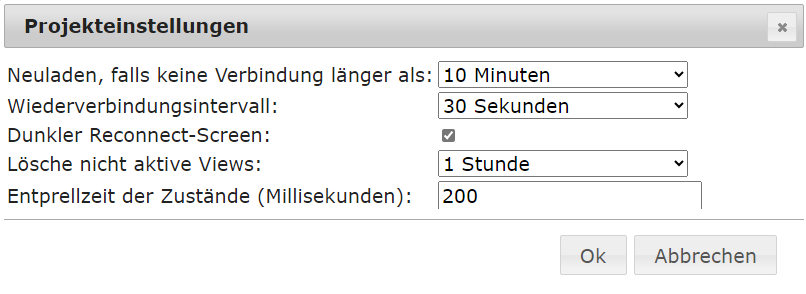
Und "nicht aktive Views" solltes du "löschen lassen". Also nie war/ist bei mir (meine persönliche Feststellung und Überzeugung) kontraproduktiv.
UND wenn die VIS steht, wie sieht da dein Speicher aus, also Verbrauch/Verfügbarkeit von RAM und SWAP.
Ro75.
@ro75 sagte in Vis aktualisiert sich nicht mehr bzw. bleibt hängen:
@mathias-winkelmann und da fällt mir gleich noch was ein.
Wieviele Views hast du? Und wie ist es auf den Views eingestellt? "Immer rendern" aktiv?
Und "nicht aktive Views" solltes du "löschen lassen". Also nie war/ist bei mir (meine persönliche Feststellung und Überzeugung) kontraproduktiv.
UND wenn die VIS steht, wie sieht da dein Speicher aus, also Verbrauch/Verfügbarkeit von RAM und SWAP.
Ro75.
Ich habe die Einstellungen übernommen und tatsächlich war in vielen Views "immer rendern" aktiv. Bisher läuft alles wieder wie geschmiert. Vielen Dank!





Hey! Du scheinst an dieser Unterhaltung interessiert zu sein, hast aber noch kein Konto.
Hast du es satt, bei jedem Besuch durch die gleichen Beiträge zu scrollen? Wenn du dich für ein Konto anmeldest, kommst du immer genau dorthin zurück, wo du zuvor warst, und kannst dich über neue Antworten benachrichtigen lassen (entweder per E-Mail oder Push-Benachrichtigung). Du kannst auch Lesezeichen speichern und Beiträge positiv bewerten, um anderen Community-Mitgliedern deine Wertschätzung zu zeigen.
Mit deinem Input könnte dieser Beitrag noch besser werden 💗
Registrieren AnmeldenSupport us
414
Online33.0k
Benutzer83.6k
Themen1.3m
Beiträge