



Skip to content
  • Home
  • Aktuell
  • Tags
  • 0 Ungelesen 0
  • Kategorien
  • Unreplied
  • Beliebt
  • GitHub
  • Docu
  • Hilfe
Skins
  • Light
  • Brite
  • Cerulean
  • Cosmo
  • Flatly
  • Journal
  • Litera
  • Lumen
  • Lux
  • Materia
  • Minty
  • Morph
  • Pulse
  • Sandstone
  • Simplex
  • Sketchy
  • Spacelab
  • United
  • Yeti
  • Zephyr
  • Dark
  • Cyborg
  • Darkly
  • Quartz
  • Slate
  • Solar
  • Superhero
  • Vapor

  • Standard: (Kein Skin)
  • Kein Skin
Einklappen
ioBroker Logo

Community Forum

donate donate
  1. ioBroker Community Home
  2. Deutsch
  3. Einsteigerfragen
  4. [gelöst]Shelly-Adapter: zweites Gerät per MQTT verbinden?

NEWS

  • Jahresrückblick 2025 – unser neuer Blogbeitrag ist online! ✨
    BluefoxB
    Bluefox
    17
    1
    3.0k

  • Neuer Blogbeitrag: Monatsrückblick - Dezember 2025 🎄
    BluefoxB
    Bluefox
    13
    1
    1.1k

  • Weihnachtsangebot 2025! 🎄
    BluefoxB
    Bluefox
    25
    1
    2.4k

[gelöst]Shelly-Adapter: zweites Gerät per MQTT verbinden?

Geplant Angeheftet Gesperrt Verschoben Einsteigerfragen
32 Beiträge 6 Kommentatoren 2.8k Aufrufe 4 Watching
  • Älteste zuerst
  • Neuste zuerst
  • Meiste Stimmen
Antworten
  • In einem neuen Thema antworten
Anmelden zum Antworten
Dieses Thema wurde gelöscht. Nur Nutzer mit entsprechenden Rechten können es sehen.
  • mcm1957M mcm1957

    @hru said in Shelly-Adapter: zweites Gerät per MQTT verbinden?:

    beim Klick auf die Einstellungen (Schraubenschlüssel) der Instanz vom Shelly-Adapter kommt "Cannot parse json5 config" oder so ähnlich.
    Was heißt das und wie kann ich das wieder reparieren?

    WO kommt diese Fehlermeldung? Im log? Am Schirm?
    Kannst du die Konfig normal öffnen und bearbeiten?

    Kannst du die Fehlermeldung bitte hier mal posten?
    Ich erhalte mit 6.9.0 and 7.0.0 keine solche Meldung.

    Bitte Version des shelly adapters und von admin ebenfalls angeben.

    hruH Offline
    hruH Offline
    hru
    schrieb am zuletzt editiert von
    #13

    @mcm1957 said in Shelly-Adapter: zweites Gerät per MQTT verbinden?:

    @hru said in Shelly-Adapter: zweites Gerät per MQTT verbinden?:

    beim Klick auf die Einstellungen (Schraubenschlüssel) der Instanz vom Shelly-Adapter kommt "Cannot parse json5 config" oder so ähnlich.
    Was heißt das und wie kann ich das wieder reparieren?

    WO kommt diese Fehlermeldung? Im log? Am Schirm?

    Die Meldung wird als kleine schwarze Box kurz angezeigt.

    e59f238b-b2ae-4c38-93ce-66ae2a156611-image.png

    Bitte Version des shelly adapters und von admin ebenfalls angeben.

    Versionen: Shelly v7.0.0, Admin v7.0.22

    PV-Anlage:
    13,5 kWp, WR: Sungrow SH10RT, Speicher: Sungrow SBR128, Heizstab: MyPV AC ELWA2
    Sonstige Geräte:
    ShellyPlusSmoke Rauchwarnmelder, Shelly Gas Warnmelder, Shelly Flood,
    IR-Leseköpfe für Stromzähler

    mcm1957M 1 Antwort Letzte Antwort
    0
    • hruH hru

      @mcm1957 said in Shelly-Adapter: zweites Gerät per MQTT verbinden?:

      @hru said in Shelly-Adapter: zweites Gerät per MQTT verbinden?:

      beim Klick auf die Einstellungen (Schraubenschlüssel) der Instanz vom Shelly-Adapter kommt "Cannot parse json5 config" oder so ähnlich.
      Was heißt das und wie kann ich das wieder reparieren?

      WO kommt diese Fehlermeldung? Im log? Am Schirm?

      Die Meldung wird als kleine schwarze Box kurz angezeigt.
      e59f238b-b2ae-4c38-93ce-66ae2a156611-image.png

      Bitte Version des shelly adapters und von admin ebenfalls angeben.

      Versionen: Shelly v7.0.0, Admin v7.0.22

      mcm1957M Offline
      mcm1957M Offline
      mcm1957
      schrieb am zuletzt editiert von
      #14

      @hru
      OK das ist was anderes faul. Admin kann hier offensichtlich das Configfile nicht lesen.

      Was hast du denn gamcht seit es das letzte Mal ging? Einfach so werden die Dateien ja selten kaputt. Versuch mal ein 'iob upload'. Das ladet die Confihgdatein vom Adapterverzeichis in den Bereich des Admin hoch.

      Entwicklung u Betreuung: envertech-pv, hoymiles-ms, ns-client, pid, snmp Adapter;
      Support Repositoryverwaltung.

      Wer Danke sagen will, kann nen Kaffee spendieren: https://paypal.me/mcm1957atiobroker

      LESEN - gute Forenbeitrage

      hruH 1 Antwort Letzte Antwort
      0
      • Thomas BraunT Thomas Braun

        @hru sagte in Shelly-Adapter: zweites Gerät per MQTT verbinden?:

        Heißt das dass ich aktuell an der Konfiguration des Shelly-Adapters nichts ändern kann?

        Ist der Rest vom Fest auf einem aktuellen Stand?

        hruH Offline
        hruH Offline
        hru
        schrieb am zuletzt editiert von
        #15

        @thomas-braun said in Shelly-Adapter: zweites Gerät per MQTT verbinden?:

        @hru sagte in Shelly-Adapter: zweites Gerät per MQTT verbinden?:

        Heißt das dass ich aktuell an der Konfiguration des Shelly-Adapters nichts ändern kann?

        Ist der Rest vom Fest auf einem aktuellen Stand?

        Ich habe heute die folgenden Befehle

        sudo apt update && sudo apt full-upgrade
        iobroker stop
        iob fix
        iobroker start
        iob nodejs-update
        

        abgesetzt.
        Reicht das für einen aktuellen Stand?
        Soll ich nochmal die Ausgabe von iob diag posten?

        PV-Anlage:
        13,5 kWp, WR: Sungrow SH10RT, Speicher: Sungrow SBR128, Heizstab: MyPV AC ELWA2
        Sonstige Geräte:
        ShellyPlusSmoke Rauchwarnmelder, Shelly Gas Warnmelder, Shelly Flood,
        IR-Leseköpfe für Stromzähler

        Thomas BraunT 1 Antwort Letzte Antwort
        0
        • hruH hru

          @thomas-braun said in Shelly-Adapter: zweites Gerät per MQTT verbinden?:

          @hru sagte in Shelly-Adapter: zweites Gerät per MQTT verbinden?:

          Heißt das dass ich aktuell an der Konfiguration des Shelly-Adapters nichts ändern kann?

          Ist der Rest vom Fest auf einem aktuellen Stand?

          Ich habe heute die folgenden Befehle

          sudo apt update && sudo apt full-upgrade
          iobroker stop
          iob fix
          iobroker start
          iob nodejs-update
          

          abgesetzt.
          Reicht das für einen aktuellen Stand?
          Soll ich nochmal die Ausgabe von iob diag posten?

          Thomas BraunT Online
          Thomas BraunT Online
          Thomas Braun
          Most Active
          schrieb am zuletzt editiert von
          #16

          @hru sagte in Shelly-Adapter: zweites Gerät per MQTT verbinden?:

          Soll ich nochmal die Ausgabe von iob diag posten?

          Ja, da sieht man das immer am besten.

          Linux-Werkzeugkasten:
          https://forum.iobroker.net/topic/42952/der-kleine-iobroker-linux-werkzeugkasten
          NodeJS Fixer Skript:
          https://forum.iobroker.net/topic/68035/iob-node-fix-skript
          iob_diag: curl -sLf -o diag.sh https://iobroker.net/diag.sh && bash diag.sh

          1 Antwort Letzte Antwort
          0
          • mcm1957M mcm1957

            @hru
            OK das ist was anderes faul. Admin kann hier offensichtlich das Configfile nicht lesen.

            Was hast du denn gamcht seit es das letzte Mal ging? Einfach so werden die Dateien ja selten kaputt. Versuch mal ein 'iob upload'. Das ladet die Confihgdatein vom Adapterverzeichis in den Bereich des Admin hoch.

            hruH Offline
            hruH Offline
            hru
            schrieb am zuletzt editiert von
            #17

            @mcm1957 Das hatte ich zwar vorhin schon einmal gemacht (weil es mir bereits empfohlen wurde) , habe es jetzt noch einmal gemacht

            iob upload all
            

            und jetzt komme ich wieder in die Einstellungen des Shelly-Adapters.
            Danke!

            PV-Anlage:
            13,5 kWp, WR: Sungrow SH10RT, Speicher: Sungrow SBR128, Heizstab: MyPV AC ELWA2
            Sonstige Geräte:
            ShellyPlusSmoke Rauchwarnmelder, Shelly Gas Warnmelder, Shelly Flood,
            IR-Leseköpfe für Stromzähler

            1 Antwort Letzte Antwort
            0
            • hruH Offline
              hruH Offline
              hru
              schrieb am zuletzt editiert von
              #18

              jetzt habe ich eine "rote 1" bei Hosts:

              8c1aae5f-187c-47dc-892c-f5c803299282-image.png
              Was ist das jetzt?
              Ich bekomme folgende Meldug
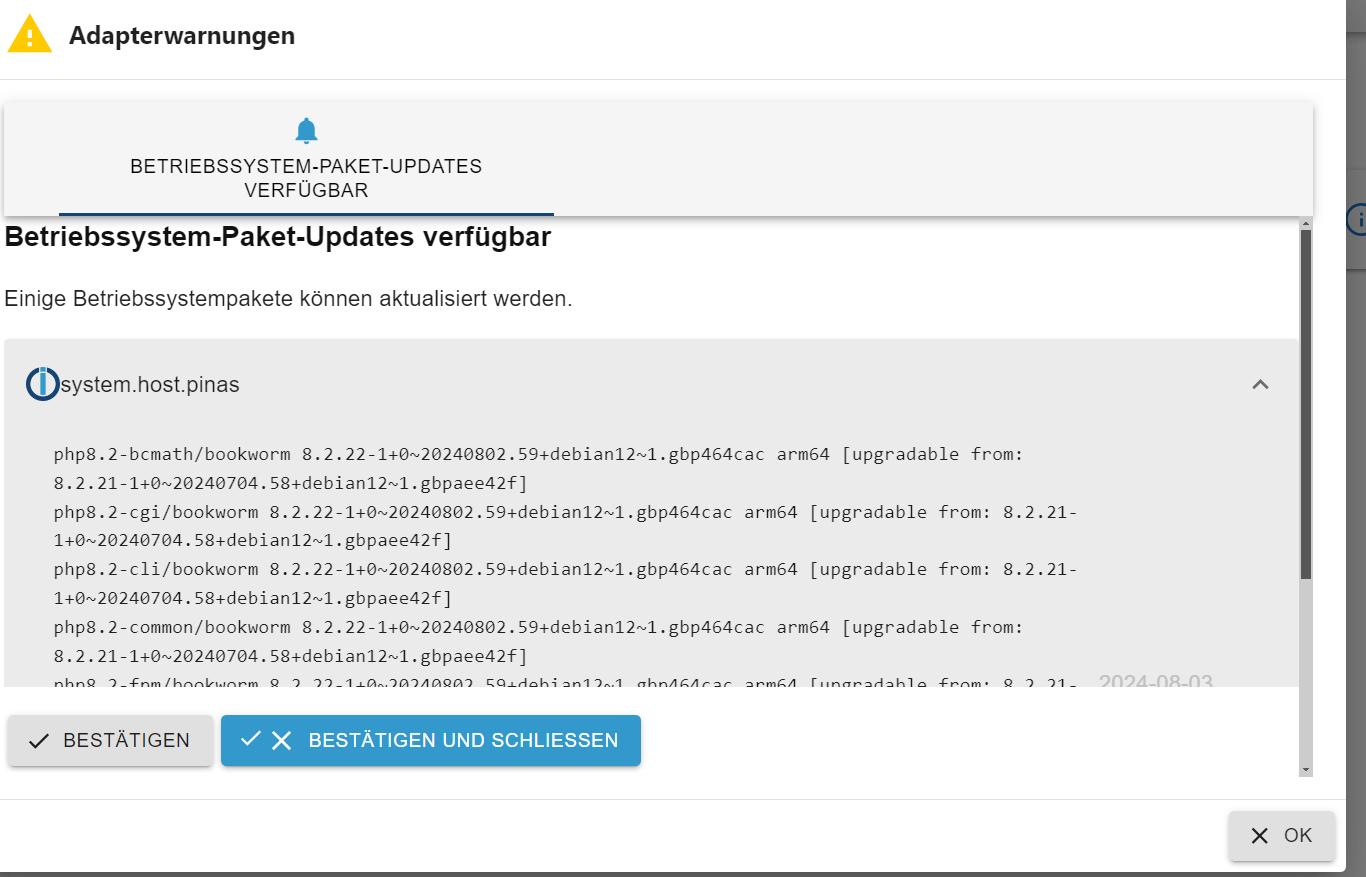
              2348d280-066a-4757-8bc5-ab6d1d70665a-image.png
              Was soll / muss ich da jetzt klicken?

              PV-Anlage:
              13,5 kWp, WR: Sungrow SH10RT, Speicher: Sungrow SBR128, Heizstab: MyPV AC ELWA2
              Sonstige Geräte:
              ShellyPlusSmoke Rauchwarnmelder, Shelly Gas Warnmelder, Shelly Flood,
              IR-Leseköpfe für Stromzähler

              Thomas BraunT 1 Antwort Letzte Antwort
              0
              • hruH hru

                jetzt habe ich eine "rote 1" bei Hosts:
                8c1aae5f-187c-47dc-892c-f5c803299282-image.png
                Was ist das jetzt?
                Ich bekomme folgende Meldug
                2348d280-066a-4757-8bc5-ab6d1d70665a-image.png
                Was soll / muss ich da jetzt klicken?

                Thomas BraunT Online
                Thomas BraunT Online
                Thomas Braun
                Most Active
                schrieb am zuletzt editiert von Thomas Braun
                #19

                @hru sagte in Shelly-Adapter: zweites Gerät per MQTT verbinden?:

                Was soll / muss ich da jetzt klicken?

                Nix klicken...
                Betriebssystem aktualisieren.

                sudo apt update
                sudo apt full-upgrade
                

                Linux-Werkzeugkasten:
                https://forum.iobroker.net/topic/42952/der-kleine-iobroker-linux-werkzeugkasten
                NodeJS Fixer Skript:
                https://forum.iobroker.net/topic/68035/iob-node-fix-skript
                iob_diag: curl -sLf -o diag.sh https://iobroker.net/diag.sh && bash diag.sh

                hruH 1 Antwort Letzte Antwort
                0
                • Thomas BraunT Thomas Braun

                  @hru sagte in Shelly-Adapter: zweites Gerät per MQTT verbinden?:

                  Was soll / muss ich da jetzt klicken?

                  Nix klicken...
                  Betriebssystem aktualisieren.

                  sudo apt update
                  sudo apt full-upgrade
                  
                  hruH Offline
                  hruH Offline
                  hru
                  schrieb am zuletzt editiert von
                  #20

                  @thomas-braun said in Shelly-Adapter: zweites Gerät per MQTT verbinden?:

                  @hru sagte in Shelly-Adapter: zweites Gerät per MQTT verbinden?:

                  Was soll / muss ich da jetzt klicken?

                  Nix klicken...
                  Betriebssystem aktualisieren.

                  sudo apt update
                  sudo apt full-upgrade
                  

                  ok habe ich gemacht.
                  Und einen reboot.
                  Ist aber immer noch da??

                  PV-Anlage:
                  13,5 kWp, WR: Sungrow SH10RT, Speicher: Sungrow SBR128, Heizstab: MyPV AC ELWA2
                  Sonstige Geräte:
                  ShellyPlusSmoke Rauchwarnmelder, Shelly Gas Warnmelder, Shelly Flood,
                  IR-Leseköpfe für Stromzähler

                  Thomas BraunT 1 Antwort Letzte Antwort
                  0
                  • hruH hru

                    @thomas-braun said in Shelly-Adapter: zweites Gerät per MQTT verbinden?:

                    @hru sagte in Shelly-Adapter: zweites Gerät per MQTT verbinden?:

                    Was soll / muss ich da jetzt klicken?

                    Nix klicken...
                    Betriebssystem aktualisieren.

                    sudo apt update
                    sudo apt full-upgrade
                    

                    ok habe ich gemacht.
                    Und einen reboot.
                    Ist aber immer noch da??

                    Thomas BraunT Online
                    Thomas BraunT Online
                    Thomas Braun
                    Most Active
                    schrieb am zuletzt editiert von
                    #21

                    @hru

                    Du musst das 'Bestätigen und Schließen'.
                    Das passiert nicht von alleine.

                    Linux-Werkzeugkasten:
                    https://forum.iobroker.net/topic/42952/der-kleine-iobroker-linux-werkzeugkasten
                    NodeJS Fixer Skript:
                    https://forum.iobroker.net/topic/68035/iob-node-fix-skript
                    iob_diag: curl -sLf -o diag.sh https://iobroker.net/diag.sh && bash diag.sh

                    1 Antwort Letzte Antwort
                    0
                    • hruH Offline
                      hruH Offline
                      hru
                      schrieb am zuletzt editiert von
                      #22

                      ok habe ich auch gemacht,
                      Jetzt ist die "rote 1" und der Dialog weg.
                      Danke!

                      PV-Anlage:
                      13,5 kWp, WR: Sungrow SH10RT, Speicher: Sungrow SBR128, Heizstab: MyPV AC ELWA2
                      Sonstige Geräte:
                      ShellyPlusSmoke Rauchwarnmelder, Shelly Gas Warnmelder, Shelly Flood,
                      IR-Leseköpfe für Stromzähler

                      1 Antwort Letzte Antwort
                      0
                      • hruH Offline
                        hruH Offline
                        hru
                        schrieb am zuletzt editiert von
                        #23

                        Bleibt leider immer noch das Problem, dass im IoBroker / Shelly-Adapter keine Daten vom zweiten ShellyPlusSmoke zu sehen sind.

                        Ich habe die Einstellungen im ShellyPlusSmoke jetzt mehrfach geprüft und das Gerät neu gebootet. Alles ohne Erfolg.

                        Wie kann ich rausfinden, was da klemmt?

                        PV-Anlage:
                        13,5 kWp, WR: Sungrow SH10RT, Speicher: Sungrow SBR128, Heizstab: MyPV AC ELWA2
                        Sonstige Geräte:
                        ShellyPlusSmoke Rauchwarnmelder, Shelly Gas Warnmelder, Shelly Flood,
                        IR-Leseköpfe für Stromzähler

                        Samson71S 1 Antwort Letzte Antwort
                        0
                        • hruH Offline
                          hruH Offline
                          hru
                          schrieb am zuletzt editiert von
                          #24

                          hier die Ausgabe von iob diag

                          Skript v.2024-05-22
                          
                          *** BASE SYSTEM ***
                           Static hostname: pinas
                                 Icon name: computer
                          Operating System: Debian GNU/Linux 12 (bookworm)
                                    Kernel: Linux 6.6.31+rpt-rpi-v8
                              Architecture: arm64
                          
                          Model           : Raspberry Pi 4 Model B Rev 1.4
                          Docker          : false
                          Virtualization  : none
                          Kernel          : aarch64
                          Userland        : 64 bit
                          
                          Systemuptime and Load:
                           17:36:10 up 30 min,  2 users,  load average: 0.17, 0.17, 0.25
                          CPU threads: 4
                          
                          
                          *** RASPBERRY THROTTLING ***
                          Current issues:
                          No throttling issues detected.
                          
                          Previously detected issues:
                          No throttling issues detected.
                          
                          *** Time and Time Zones ***
                                         Local time: Sat 2024-08-03 17:36:10 CEST
                                     Universal time: Sat 2024-08-03 15:36:10 UTC
                                           RTC time: n/a
                                          Time zone: Europe/Berlin (CEST, +0200)
                          System clock synchronized: yes
                                        NTP service: active
                                    RTC in local TZ: no
                          
                          *** Users and Groups ***
                          User that called 'iob diag':
                          hru
                          HOME=/home/hru
                          GROUPS=hru adm dialout cdrom sudo audio video plugdev games users input render netdev _ssh gpio i2c spi iobroker
                          
                          User that is running 'js-controller':
                          iobroker
                          HOME=/home/iobroker
                          GROUPS=iobroker tty dialout audio video plugdev bluetooth gpio i2c
                          
                          *** Display-Server-Setup ***
                          Display-Server: false
                          Desktop:
                          Terminal:       tty
                          Boot Target:    multi-user.target
                          
                          *** MEMORY ***
                                         total        used        free      shared  buff/cache   available
                          Mem:            8.2G        1.4G        5.8G         10M        1.2G        6.8G
                          Swap:           209M          0B        209M
                          Total:          8.4G        1.4G        6.0G
                          
                          Active iob-Instances:   13
                          
                                   7810 M total memory
                                   1324 M used memory
                                   1589 M active memory
                                    551 M inactive memory
                                   5485 M free memory
                                     78 M buffer memory
                                   1047 M swap cache
                                    199 M total swap
                                      0 M used swap
                                    199 M free swap
                          
                          *** top - Table Of Processes  ***
                          top - 17:36:10 up 30 min,  2 users,  load average: 0.17, 0.17, 0.25
                          Tasks: 233 total,   1 running, 231 sleeping,   0 stopped,   1 zombie
                          %Cpu(s): 14.3 us, 14.3 sy,  0.0 ni, 71.4 id,  0.0 wa,  0.0 hi,  0.0 si,  0.0 st
                          MiB Mem :   7810.0 total,   5484.5 free,   1325.6 used,   1125.9 buff/cache
                          MiB Swap:    200.0 total,    200.0 free,      0.0 used.   6484.4 avail Mem
                          
                          *** FAILED SERVICES ***
                          
                            UNIT             LOAD   ACTIVE SUB    DESCRIPTION
                          * lighttpd.service loaded failed failed Lighttpd Daemon
                          
                          LOAD   = Reflects whether the unit definition was properly loaded.
                          ACTIVE = The high-level unit activation state, i.e. generalization of SUB.
                          SUB    = The low-level unit activation state, values depend on unit type.
                          1 loaded units listed.
                          
                          *** FILESYSTEM ***
                          Filesystem     Type      Size  Used Avail Use% Mounted on
                          udev           devtmpfs  3.6G     0  3.6G   0% /dev
                          tmpfs          tmpfs     782M  2.7M  779M   1% /run
                          /dev/mmcblk0p2 ext4       29G   11G   17G  41% /
                          tmpfs          tmpfs     3.9G  8.0K  3.9G   1% /dev/shm
                          tmpfs          tmpfs     5.0M   16K  5.0M   1% /run/lock
                          tmpfs          tmpfs     3.9G     0  3.9G   0% /tmp
                          /dev/mmcblk0p1 vfat      510M   89M  422M  18% /boot/firmware
                          /dev/sda2      btrfs     932G  3.1G  927G   1% /srv/dev-disk-by-uuid-ba59a13b-32bb-4d41-9433-56afa044749a
                          tmpfs          tmpfs     781M   24K  781M   1% /run/user/1000
                          
                          Messages concerning ext4 filesystem in dmesg:
                          [Sat Aug  3 17:05:30 2024] Kernel command line: coherent_pool=1M 8250.nr_uarts=1 snd_bcm2835.enable_headphones=0 snd_bcm2835.enable_headphones=1 snd_bcm2835.enable_hdmi=1 snd_bcm2835.enable_hdmi=0  smsc95xx.macaddr=DC:A6:32:B6:1C:04 vc_mem.mem_base=0x3ec00000 vc_mem.mem_size=0x40000000  console=ttyAMA0,115200 console=tty1 root=PARTUUID=0a7247d3-02 rootfstype=ext4 fsck.repair=yes rootwait
                          [Sat Aug  3 17:05:36 2024] EXT4-fs (mmcblk0p2): mounted filesystem 3b614a3f-4a65-4480-876a-8a998e01ac9b ro with ordered data mode. Quota mode: none.
                          [Sat Aug  3 17:05:39 2024] EXT4-fs (mmcblk0p2): re-mounted 3b614a3f-4a65-4480-876a-8a998e01ac9b r/w. Quota mode: none.
                          
                          Show mounted filesystems:
                          TARGET                                                       SOURCE         FSTYPE      OPTIONS
                          /                                                            /dev/mmcblk0p2 ext4        rw,noatime,nodiratime
                          |-/sys                                                       sysfs          sysfs       rw,nosuid,nodev,noexec,relatime
                          | |-/sys/kernel/security                                     securityfs     securityfs  rw,nosuid,nodev,noexec,relatime
                          | |-/sys/fs/cgroup                                           cgroup2        cgroup2     rw,nosuid,nodev,noexec,relatime,nsdelegate,memory_recursiveprot
                          | |-/sys/fs/pstore                                           pstore         pstore      rw,nosuid,nodev,noexec,relatime
                          | |-/sys/fs/bpf                                              bpf            bpf         rw,nosuid,nodev,noexec,relatime,mode=700
                          | |-/sys/kernel/debug                                        debugfs        debugfs     rw,nosuid,nodev,noexec,relatime
                          | |-/sys/kernel/tracing                                      tracefs        tracefs     rw,nosuid,nodev,noexec,relatime
                          | |-/sys/fs/fuse/connections                                 fusectl        fusectl     rw,nosuid,nodev,noexec,relatime
                          | `-/sys/kernel/config                                       configfs       configfs    rw,nosuid,nodev,noexec,relatime
                          |-/proc                                                      proc           proc        rw,relatime
                          | `-/proc/sys/fs/binfmt_misc                                 systemd-1      autofs      rw,relatime,fd=30,pgrp=1,timeout=0,minproto=5,maxproto=5,direct,pipe_ino=6214
                          |   `-/proc/sys/fs/binfmt_misc                               binfmt_misc    binfmt_misc rw,nosuid,nodev,noexec,relatime
                          |-/dev                                                       udev           devtmpfs    rw,nosuid,relatime,size=3721952k,nr_inodes=930488,mode=755
                          | |-/dev/pts                                                 devpts         devpts      rw,nosuid,noexec,relatime,gid=5,mode=620,ptmxmode=000
                          | |-/dev/shm                                                 tmpfs          tmpfs       rw,nosuid,nodev
                          | `-/dev/mqueue                                              mqueue         mqueue      rw,nosuid,nodev,noexec,relatime
                          |-/run                                                       tmpfs          tmpfs       rw,nosuid,nodev,noexec,relatime,size=799748k,mode=755
                          | |-/run/lock                                                tmpfs          tmpfs       rw,nosuid,nodev,noexec,relatime,size=5120k
                          | |-/run/credentials/systemd-sysctl.service                  ramfs          ramfs       ro,nosuid,nodev,noexec,relatime,mode=700
                          | |-/run/credentials/systemd-sysusers.service                ramfs          ramfs       ro,nosuid,nodev,noexec,relatime,mode=700
                          | |-/run/credentials/systemd-tmpfiles-setup-dev.service      ramfs          ramfs       ro,nosuid,nodev,noexec,relatime,mode=700
                          | |-/run/rpc_pipefs                                          sunrpc         rpc_pipefs  rw,relatime
                          | |-/run/credentials/systemd-tmpfiles-setup.service          ramfs          ramfs       ro,nosuid,nodev,noexec,relatime,mode=700
                          | `-/run/user/1000                                           tmpfs          tmpfs       rw,nosuid,nodev,relatime,size=799744k,nr_inodes=199936,mode=700,uid=1000,gid=1000
                          |-/tmp                                                       tmpfs          tmpfs       rw,relatime
                          |-/boot/firmware                                             /dev/mmcblk0p1 vfat        rw,relatime,fmask=0022,dmask=0022,codepage=437,iocharset=ascii,shortname=mixed,errors=remount-ro
                          `-/srv/dev-disk-by-uuid-ba59a13b-32bb-4d41-9433-56afa044749a /dev/sda2      btrfs       rw,relatime,ssd,space_cache=v2,subvolid=5,subvol=/
                          
                          Files in neuralgic directories:
                          
                          /var:
                          3.7G    /var/
                          2.8G    /var/log/journal/84b8404402f646beb6c9935ffbcaf1f2
                          2.8G    /var/log/journal
                          2.8G    /var/log
                          438M    /var/lib
                          
                          Archived and active journals take up 2.7G in the file system.
                          
                          /opt/iobroker/backups:
                          16M     /opt/iobroker/backups/
                          
                          /opt/iobroker/iobroker-data:
                          555M    /opt/iobroker/iobroker-data/
                          510M    /opt/iobroker/iobroker-data/files
                          441M    /opt/iobroker/iobroker-data/files/javascript.admin
                          409M    /opt/iobroker/iobroker-data/files/javascript.admin/static
                          408M    /opt/iobroker/iobroker-data/files/javascript.admin/static/js
                          
                          The five largest files in iobroker-data are:
                          22M     /opt/iobroker/iobroker-data/files/modbus.admin/static/js/main.18496c94.js.map
                          9.0M    /opt/iobroker/iobroker-data/files/modbus.admin/static/js/main.18496c94.js
                          8.7M    /opt/iobroker/iobroker-data/files/javascript.admin/static/js/838.0aa41cb0.chunk.js.map
                          8.6M    /opt/iobroker/iobroker-data/files/javascript.admin/static/js/310.89a60ae1.chunk.js.map
                          7.0M    /opt/iobroker/iobroker-data/files/javascript.admin/static/js/675.a9c6d34a.chunk.js.map
                          
                          USB-Devices by-id:
                          USB-Sticks -  Avoid direct links to /dev/tty* in your adapter setups, please always prefer the links 'by-id':
                          
                          /dev/serial/by-id/usb-Silicon_Labs_CP2102_USB_to_UART_Bridge_Controller_0014-if00-port0
                          /dev/serial/by-id/usb-Silicon_Labs_CP2102_USB_to_UART_Bridge_Controller_0012-if00-port0


                          *** NodeJS-Installation ***
                          
                          /usr/bin/nodejs         v20.16.0
                          /usr/bin/node           v20.16.0
                          /usr/bin/npm            10.8.1
                          /usr/bin/npx            10.8.1
                          /usr/bin/corepack       0.28.2
                          
                          
                          nodejs:
                            Installed: 20.16.0-1nodesource1
                            Candidate: 20.16.0-1nodesource1
                            Version table:
                           *** 20.16.0-1nodesource1 1001
                                  500 https://deb.nodesource.com/node_20.x nodistro/main arm64 Packages
                                  100 /var/lib/dpkg/status
                               20.15.1-1nodesource1 1001
                                  500 https://deb.nodesource.com/node_20.x nodistro/main arm64 Packages
                               20.15.0-1nodesource1 1001
                                  500 https://deb.nodesource.com/node_20.x nodistro/main arm64 Packages
                               20.14.0-1nodesource1 1001
                                  500 https://deb.nodesource.com/node_20.x nodistro/main arm64 Packages
                               20.13.1-1nodesource1 1001
                                  500 https://deb.nodesource.com/node_20.x nodistro/main arm64 Packages
                               20.13.0-1nodesource1 1001
                                  500 https://deb.nodesource.com/node_20.x nodistro/main arm64 Packages
                               20.12.2-1nodesource1 1001
                                  500 https://deb.nodesource.com/node_20.x nodistro/main arm64 Packages
                               20.12.1-1nodesource1 1001
                                  500 https://deb.nodesource.com/node_20.x nodistro/main arm64 Packages
                               20.12.0-1nodesource1 1001
                                  500 https://deb.nodesource.com/node_20.x nodistro/main arm64 Packages
                               20.11.1-1nodesource1 1001
                                  500 https://deb.nodesource.com/node_20.x nodistro/main arm64 Packages
                               20.11.0-1nodesource1 1001
                                  500 https://deb.nodesource.com/node_20.x nodistro/main arm64 Packages
                               20.10.0-1nodesource1 1001
                                  500 https://deb.nodesource.com/node_20.x nodistro/main arm64 Packages
                               20.9.0-1nodesource1 1001
                                  500 https://deb.nodesource.com/node_20.x nodistro/main arm64 Packages
                               20.8.1-1nodesource1 1001
                                  500 https://deb.nodesource.com/node_20.x nodistro/main arm64 Packages
                               20.8.0-1nodesource1 1001
                                  500 https://deb.nodesource.com/node_20.x nodistro/main arm64 Packages
                               20.7.0-1nodesource1 1001
                                  500 https://deb.nodesource.com/node_20.x nodistro/main arm64 Packages
                               20.6.1-1nodesource1 1001
                                  500 https://deb.nodesource.com/node_20.x nodistro/main arm64 Packages
                               20.6.0-1nodesource1 1001
                                  500 https://deb.nodesource.com/node_20.x nodistro/main arm64 Packages
                               20.5.1-1nodesource1 1001
                                  500 https://deb.nodesource.com/node_20.x nodistro/main arm64 Packages
                               20.5.0-1nodesource1 1001
                                  500 https://deb.nodesource.com/node_20.x nodistro/main arm64 Packages
                               20.4.0-1nodesource1 1001
                                  500 https://deb.nodesource.com/node_20.x nodistro/main arm64 Packages
                               20.3.1-1nodesource1 1001
                                  500 https://deb.nodesource.com/node_20.x nodistro/main arm64 Packages
                               20.3.0-1nodesource1 1001
                                  500 https://deb.nodesource.com/node_20.x nodistro/main arm64 Packages
                               20.2.0-1nodesource1 1001
                                  500 https://deb.nodesource.com/node_20.x nodistro/main arm64 Packages
                               20.1.0-1nodesource1 1001
                                  500 https://deb.nodesource.com/node_20.x nodistro/main arm64 Packages
                               20.0.0-1nodesource1 1001
                                  500 https://deb.nodesource.com/node_20.x nodistro/main arm64 Packages
                               18.19.0+dfsg-6~deb12u2 500
                                  500 http://deb.debian.org/debian bookworm/main arm64 Packages
                               18.19.0+dfsg-6~deb12u1 500
                                  500 http://deb.debian.org/debian-security bookworm-security/main arm64 Packages
                                  500 http://security.debian.org/debian-security bookworm-security/main arm64 Packages
                          
                          Temp directories causing npm8 problem: 0
                          No problems detected
                          
                          Errors in npm tree:
                          
                          *** ioBroker-Installation ***
                          
                          ioBroker Status
                          iobroker is running on this host.
                          
                          
                          Objects type: jsonl
                          States  type: jsonl
                          
                          Core adapters versions
                          js-controller:  6.0.9
                          admin:          7.0.22
                          javascript:     8.7.6
                          
                          nodejs modules from github:     0
                          
                          Adapter State
                          + system.adapter.admin.0                  : admin                 : pinas                                    -  enabled, port: 8081, bind: 0.0.0.0, run as: admin
                          + system.adapter.backitup.0               : backitup              : pinas                                    -  enabled
                          + system.adapter.discovery.0              : discovery             : pinas                                    -  enabled
                          + system.adapter.email.0                  : email                 : pinas                                    -  enabled
                          + system.adapter.influxdb.0               : influxdb              : pinas                                    -  enabled, port: 8086
                          + system.adapter.influxdb.1               : influxdb              : pinas                                    -  enabled, port: 8086
                          + system.adapter.influxdb.2               : influxdb              : pinas                                    -  enabled, port: 8086
                          + system.adapter.javascript.0             : javascript            : pinas                                    -  enabled
                          + system.adapter.modbus.0                 : modbus                : pinas                                    -  enabled
                          + system.adapter.shelly.0                 : shelly                : pinas                                    -  enabled, port: 1882, bind: 0.0.0.0
                          + system.adapter.smartmeter.0             : smartmeter            : pinas                                    -  enabled
                          + system.adapter.smartmeter.1             : smartmeter            : pinas                                    -  enabled
                          
                          + instance is alive
                          
                          Enabled adapters with bindings
                          + system.adapter.admin.0                  : admin                 : pinas                                    -  enabled, port: 8081, bind: 0.0.0.0, run as: admin
                          + system.adapter.influxdb.0               : influxdb              : pinas                                    -  enabled, port: 8086
                          + system.adapter.influxdb.1               : influxdb              : pinas                                    -  enabled, port: 8086
                          + system.adapter.influxdb.2               : influxdb              : pinas                                    -  enabled, port: 8086
                          + system.adapter.shelly.0                 : shelly                : pinas                                    -  enabled, port: 1882, bind: 0.0.0.0
                          
                          ioBroker-Repositories
                          ┌─────────┬──────────┬─────────────────────────────────────────────────────────┬──────────────┐
                          │ (index) │ name     │ url                                                     │ auto upgrade │
                          ├─────────┼──────────┼─────────────────────────────────────────────────────────┼──────────────┤
                          │ 0       │ 'stable' │ 'http://download.iobroker.net/sources-dist.json'        │ false        │
                          │ 1       │ 'beta'   │ 'http://download.iobroker.net/sources-dist-latest.json' │ false        │
                          └─────────┴──────────┴─────────────────────────────────────────────────────────┴──────────────┘
                          
                          Active repo(s): stable
                          Upgrade policy: none
                          
                          Installed ioBroker-Instances
                          Used repository: stable
                          Adapter    "admin"        : 7.0.22   , installed 7.0.22
                          Adapter    "backitup"     : 2.11.0   , installed 2.11.0
                          Adapter    "discovery"    : 4.5.0    , installed 4.5.0
                          Adapter    "email"        : 1.3.1    , installed 1.3.1
                          Adapter    "influxdb"     : 4.0.2    , installed 4.0.2
                          Adapter    "javascript"   : 8.7.6    , installed 8.7.6
                          Controller "js-controller": 6.0.9    , installed 6.0.9
                          Adapter    "modbus"       : 6.2.3    , installed 6.2.3
                          Adapter    "shelly"       : 7.0.0    , installed 7.0.0
                          Adapter    "smartmeter"   : 3.4.0    , installed 3.4.0
                          
                          Objects and States
                          Please stand by - This may take a while
                          Objects:        601
                          States:         435
                          
                          *** OS-Repositories and Updates ***
                          Get:1 file:/var/cache/openmediavault/archives  InRelease
                          Ign:1 file:/var/cache/openmediavault/archives  InRelease
                          Get:2 file:/var/cache/openmediavault/archives  Release
                          Ign:2 file:/var/cache/openmediavault/archives  Release
                          Get:3 file:/var/cache/openmediavault/archives  Packages
                          Ign:3 file:/var/cache/openmediavault/archives  Packages
                          Get:4 file:/var/cache/openmediavault/archives  Translation-en
                          Ign:4 file:/var/cache/openmediavault/archives  Translation-en
                          Get:3 file:/var/cache/openmediavault/archives  Packages
                          Ign:3 file:/var/cache/openmediavault/archives  Packages
                          Get:4 file:/var/cache/openmediavault/archives  Translation-en
                          Ign:4 file:/var/cache/openmediavault/archives  Translation-en
                          Get:3 file:/var/cache/openmediavault/archives  Packages
                          Ign:3 file:/var/cache/openmediavault/archives  Packages
                          Get:4 file:/var/cache/openmediavault/archives  Translation-en
                          Ign:4 file:/var/cache/openmediavault/archives  Translation-en
                          Get:3 file:/var/cache/openmediavault/archives  Packages
                          Ign:3 file:/var/cache/openmediavault/archives  Packages
                          Get:4 file:/var/cache/openmediavault/archives  Translation-en
                          Ign:4 file:/var/cache/openmediavault/archives  Translation-en
                          Get:3 file:/var/cache/openmediavault/archives  Packages
                          Ign:3 file:/var/cache/openmediavault/archives  Packages
                          Get:4 file:/var/cache/openmediavault/archives  Translation-en
                          Ign:4 file:/var/cache/openmediavault/archives  Translation-en
                          Get:3 file:/var/cache/openmediavault/archives  Packages
                          Ign:3 file:/var/cache/openmediavault/archives  Packages
                          Get:4 file:/var/cache/openmediavault/archives  Translation-en
                          Ign:4 file:/var/cache/openmediavault/archives  Translation-en
                          Get:3 file:/var/cache/openmediavault/archives  Packages
                          Get:4 file:/var/cache/openmediavault/archives  Translation-en
                          Ign:4 file:/var/cache/openmediavault/archives  Translation-en
                          Hit:5 http://security.debian.org/debian-security bookworm-security InRelease
                          Hit:6 http://packages.openmediavault.org/public sandworm InRelease
                          Hit:7 http://deb.debian.org/debian bookworm InRelease
                          Hit:8 http://deb.debian.org/debian-security bookworm-security InRelease
                          Hit:9 http://httpredir.debian.org/debian bookworm-backports InRelease
                          Hit:10 http://archive.raspberrypi.com/debian bookworm InRelease
                          Hit:11 http://deb.debian.org/debian bookworm-updates InRelease
                          Hit:12 https://repos.influxdata.com/debian stable InRelease
                          Hit:13 https://apt.grafana.com stable InRelease
                          Get:14 https://openmediavault.github.io/packages sandworm InRelease [12.8 kB]
                          Hit:15 https://packages.microsoft.com/repos/code stable InRelease
                          Hit:16 https://deb.nodesource.com/node_20.x nodistro InRelease
                          Hit:17 https://packages.sury.org/php bookworm InRelease
                          Get:18 https://apt.syncthing.net syncthing InRelease [15.1 kB]
                          Fetched 27.9 kB in 2s (11.7 kB/s)
                          Reading package lists...
                          Pending Updates: 0
                          
                          *** Listening Ports ***
                          Active Internet connections (only servers)
                          Proto Recv-Q Send-Q Local Address           Foreign Address         State       User       Inode      PID/Program name
                          tcp        0      0 127.0.0.1:9000          0.0.0.0:*               LISTEN      1004       25724      3697/iobroker.js-co
                          tcp        0      0 127.0.0.1:9001          0.0.0.0:*               LISTEN      1004       25719      3697/iobroker.js-co
                          tcp        0      0 127.0.0.54:53           0.0.0.0:*               LISTEN      992        4652       567/systemd-resolve
                          tcp        0      0 127.0.0.1:631           0.0.0.0:*               LISTEN      0          8336       853/cupsd
                          tcp        0      0 0.0.0.0:22              0.0.0.0:*               LISTEN      0          8287       883/sshd: /usr/sbin
                          tcp        0      0 0.0.0.0:80              0.0.0.0:*               LISTEN      0          8446       936/nginx: master p
                          tcp        0      0 0.0.0.0:139             0.0.0.0:*               LISTEN      0          8715       1344/smbd
                          tcp        0      0 127.0.0.1:53            0.0.0.0:*               LISTEN      0          8304       768/connmand
                          tcp        0      0 0.0.0.0:445             0.0.0.0:*               LISTEN      0          8714       1344/smbd
                          tcp        0      0 0.0.0.0:1883            0.0.0.0:*               LISTEN      111        6024       870/mosquitto
                          tcp        0      0 0.0.0.0:1882            0.0.0.0:*               LISTEN      1004       25073      3892/io.shelly.0
                          tcp        0      0 0.0.0.0:5355            0.0.0.0:*               LISTEN      992        4638       567/systemd-resolve
                          tcp        0      0 127.0.0.53:53           0.0.0.0:*               LISTEN      992        4650       567/systemd-resolve
                          tcp        0      0 192.168.178.74:8384     0.0.0.0:*               LISTEN      1003       7829       927/syncthing
                          tcp        0      0 192.168.178.24:5357     0.0.0.0:*               LISTEN      64757      8490       905/python3
                          tcp        0      0 127.0.0.1:8088          0.0.0.0:*               LISTEN      993        7796       912/influxd
                          tcp        0      0 192.168.178.74:5357     0.0.0.0:*               LISTEN      64757      8480       905/python3
                          tcp6       0      0 :::22                   :::*                    LISTEN      0          8289       883/sshd: /usr/sbin
                          tcp6       0      0 :::80                   :::*                    LISTEN      0          8447       936/nginx: master p
                          tcp6       0      0 :::139                  :::*                    LISTEN      0          8713       1344/smbd
                          tcp6       0      0 :::445                  :::*                    LISTEN      0          8712       1344/smbd
                          tcp6       0      0 fe80::dea6:32ff:fe:5357 :::*                    LISTEN      64757      8498       905/python3
                          tcp6       0      0 ::1:631                 :::*                    LISTEN      0          8335       853/cupsd
                          tcp6       0      0 :::1883                 :::*                    LISTEN      111        6025       870/mosquitto
                          tcp6       0      0 :::5355                 :::*                    LISTEN      992        4646       567/systemd-resolve
                          tcp6       0      0 ::1:53                  :::*                    LISTEN      0          8308       768/connmand
                          tcp6       0      0 :::22000                :::*                    LISTEN      1003       9385       927/syncthing
                          tcp6       0      0 :::3000                 :::*                    LISTEN      115        9638       1551/grafana
                          tcp6       0      0 :::8086                 :::*                    LISTEN      993        7980       912/influxd
                          tcp6       0      0 :::8081                 :::*                    LISTEN      1004       23549      3715/io.admin.0
                          udp        0      0 192.168.178.24:3702     0.0.0.0:*                           64757      8486       905/python3
                          udp        0      0 239.255.255.250:3702    0.0.0.0:*                           64757      8484       905/python3
                          udp        0      0 192.168.178.74:3702     0.0.0.0:*                           64757      8473       905/python3
                          udp        0      0 239.255.255.250:3702    0.0.0.0:*                           64757      8471       905/python3
                          udp        0      0 0.0.0.0:49143           0.0.0.0:*                           1003       9399       927/syncthing
                          udp        0      0 127.0.0.1:53            0.0.0.0:*                           0          8296       768/connmand
                          udp        0      0 127.0.0.54:53           0.0.0.0:*                           992        4651       567/systemd-resolve
                          udp        0      0 127.0.0.53:53           0.0.0.0:*                           992        4649       567/systemd-resolve
                          udp        0      0 192.168.178.74:68       0.0.0.0:*                           998        6016       367/systemd-network
                          udp        0      0 0.0.0.0:45157           0.0.0.0:*                           64757      8472       905/python3
                          udp        0      0 0.0.0.0:45216           0.0.0.0:*                           0          8362       768/connmand
                          udp        0      0 0.0.0.0:33073           0.0.0.0:*                           64757      8485       905/python3
                          udp        0      0 127.0.0.1:323           0.0.0.0:*                           0          5992       872/chronyd
                          udp        0      0 0.0.0.0:21027           0.0.0.0:*                           1003       9401       927/syncthing
                          udp        0      0 0.0.0.0:631             0.0.0.0:*                           0          6080       891/cups-browsed
                          udp        0      0 0.0.0.0:5353            0.0.0.0:*                           104        4823       653/avahi-daemon: r
                          udp        0      0 0.0.0.0:5355            0.0.0.0:*                           992        4637       567/systemd-resolve
                          udp        0      0 0.0.0.0:50462           0.0.0.0:*                           104        4825       653/avahi-daemon: r
                          udp6       0      0 :::51514                :::*                                104        4826       653/avahi-daemon: r
                          udp6       0      0 :::60542                :::*                                1003       9402       927/syncthing
                          udp6       0      0 fe80::dea6:32ff:fe:3702 :::*                                64757      8494       905/python3
                          udp6       0      0 ff02::c:3702            :::*                                64757      8492       905/python3
                          udp6       0      0 :::48913                :::*                                64757      8493       905/python3
                          udp6       0      0 ::1:53                  :::*                                0          8300       768/connmand
                          udp6       0      0 ::1:323                 :::*                                0          5993       872/chronyd
                          udp6       0      0 :::546                  :::*                                0          9222       768/connmand
                          udp6   60544      0 fe80::dea6:32ff:feb:546 :::*                                998        8462       367/systemd-network
                          udp6       0      0 :::21027                :::*                                1003       9403       927/syncthing
                          udp6       0      0 :::5353                 :::*                                104        4824       653/avahi-daemon: r
                          udp6       0      0 :::5355                 :::*                                992        4645       567/systemd-resolve
                          udp6       0      0 :::22000                :::*                                1003       9379       927/syncthing
                          
                          *** Log File - Last 25 Lines ***
                          
                          2024-08-03 17:10:16.251  - info: influxdb.2 (3801) enabled logging of z3_4__2_8_0_einspeisung_oder_wallbox_tag, Alias=true, 9 points now activated
                          2024-08-03 17:10:16.251  - info: influxdb.2 (3801) enabled logging of z3_4__1_8_0_bezug_haus_tag, Alias=true, 10 points now activated
                          2024-08-03 17:10:16.253  - info: influxdb.2 (3801) enabled logging of diff_z3_z1__2_8_0_einspeisung_wallbox_tag, Alias=true, 11 points now activated
                          2024-08-03 17:10:16.254  - info: influxdb.2 (3801) enabled logging of diff_z1_z3__1_8_0_bezug_wallbox_tag, Alias=true, 12 points now activated
                          2024-08-03 17:10:17.662  - info: host.pinas instance system.adapter.email.0 in version "1.3.1" started with pid 3817
                          2024-08-03 17:10:19.662  - info: email.0 (3817) starting. Version 1.3.1 in /opt/iobroker/node_modules/iobroker.email, node: v20.16.0, js-controller: 6.0.9
                          2024-08-03 17:10:21.682  - info: host.pinas instance system.adapter.backitup.0 in version "2.11.0" started with pid 3832
                          2024-08-03 17:10:23.924  - info: backitup.0 (3832) starting. Version 2.11.0 in /opt/iobroker/node_modules/iobroker.backitup, node: v20.16.0, js-controller: 6.0.9
                          2024-08-03 17:10:24.014  - info: backitup.0 (3832) [iobroker] backup will be activated at 02:48 every 1 day(s)
                          2024-08-03 17:10:25.677  - info: host.pinas instance system.adapter.modbus.0 in version "6.2.3" started with pid 3847
                          2024-08-03 17:10:27.752  - info: modbus.0 (3847) starting. Version 6.2.3 in /opt/iobroker/node_modules/iobroker.modbus, node: v20.16.0, js-controller: 6.0.9
                          2024-08-03 17:10:28.612  - info: modbus.0 (3847) Connected to slave 192.168.178.45
                          2024-08-03 17:10:29.672  - info: host.pinas instance system.adapter.smartmeter.0 in version "3.4.0" started with pid 3862
                          2024-08-03 17:10:32.093  - info: smartmeter.0 (3862) starting. Version 3.4.0 in /opt/iobroker/node_modules/iobroker.smartmeter, node: v20.16.0, js-controller: 6.0.9
                          2024-08-03 17:10:33.675  - info: host.pinas instance system.adapter.smartmeter.1 in version "3.4.0" started with pid 3877
                          2024-08-03 17:10:33.798  - info: smartmeter.0 (3862) Received 26 values, 26 updated
                          2024-08-03 17:10:36.073  - info: smartmeter.1 (3877) starting. Version 3.4.0 in /opt/iobroker/node_modules/iobroker.smartmeter, node: v20.16.0, js-controller: 6.0.9
                          2024-08-03 17:10:37.735  - info: host.pinas instance system.adapter.shelly.0 in version "7.0.0" started with pid 3892
                          2024-08-03 17:10:38.116  - info: smartmeter.1 (3877) Received 26 values, 26 updated
                          2024-08-03 17:10:40.299  - info: shelly.0 (3892) starting. Version 7.0.0 in /opt/iobroker/node_modules/iobroker.shelly, node: v20.16.0, js-controller: 6.0.9
                          2024-08-03 17:10:40.462  - info: shelly.0 (3892) Starting in MQTT mode. Listening on 0.0.0.0:1882 (QoS 0)
                          2024-08-03 17:10:41.672  - info: host.pinas instance system.adapter.discovery.0 in version "4.5.0" started with pid 3911
                          2024-08-03 17:10:43.788  - info: discovery.0 (3911) starting. Version 4.5.0 in /opt/iobroker/node_modules/iobroker.discovery, node: v20.16.0, js-controller: 6.0.9
                          2024-08-03 17:29:34.166  - info: admin.0 (3715) <== Disconnect system.user.admin from ::ffff:192.168.178.40 admin
                          2024-08-03 17:29:35.043  - info: admin.0 (3715) ==> Connected system.user.admin from ::ffff:192.168.178.40


                          PV-Anlage:
                          13,5 kWp, WR: Sungrow SH10RT, Speicher: Sungrow SBR128, Heizstab: MyPV AC ELWA2
                          Sonstige Geräte:
                          ShellyPlusSmoke Rauchwarnmelder, Shelly Gas Warnmelder, Shelly Flood,
                          IR-Leseköpfe für Stromzähler

                          1 Antwort Letzte Antwort
                          0
                          • hruH hru

                            Bleibt leider immer noch das Problem, dass im IoBroker / Shelly-Adapter keine Daten vom zweiten ShellyPlusSmoke zu sehen sind.

                            Ich habe die Einstellungen im ShellyPlusSmoke jetzt mehrfach geprüft und das Gerät neu gebootet. Alles ohne Erfolg.

                            Wie kann ich rausfinden, was da klemmt?

                            Samson71S Offline
                            Samson71S Offline
                            Samson71
                            Global Moderator
                            schrieb am zuletzt editiert von
                            #25

                            @hru sagte in Shelly-Adapter: zweites Gerät per MQTT verbinden?:

                            Ich habe die Einstellungen im ShellyPlusSmoke jetzt mehrfach geprüft und das Gerät neu gebootet.

                            Passiert dabei irgendwas im Log? Ggf. Fehlermeldung vom Adapter?

                            Markus

                            Bitte beachten:
                            Hinweise für gute Forenbeiträge
                            Maßnahmen zum Schutz des Forums

                            hruH 1 Antwort Letzte Antwort
                            0
                            • hruH Offline
                              hruH Offline
                              hru
                              schrieb am zuletzt editiert von
                              #26

                              hier noch das summary von iob diag

                              ======================= SUMMARY =======================
                                                      v.2024-05-22
                              
                              
                               Static hostname: pinas
                                     Icon name: computer
                              Operating System: Debian GNU/Linux 12 (bookworm)
                                        Kernel: Linux 6.6.31+rpt-rpi-v8
                                  Architecture: arm64
                              
                              Installation:           native
                              Kernel:                 aarch64
                              Userland:               64 bit
                              Timezone:               Europe/Berlin (CEST, +0200)
                              User-ID:                1000
                              Display-Server:         false
                              Boot Target:            multi-user.target
                              
                              Pending OS-Updates:     0
                              Pending iob updates:    0
                              
                              Nodejs-Installation:
                              /usr/bin/nodejs         v20.16.0
                              /usr/bin/node           v20.16.0
                              /usr/bin/npm            10.8.1
                              /usr/bin/npx            10.8.1
                              /usr/bin/corepack       0.28.2
                              
                              Recommended versions are nodejs 20.16.0 and npm 10.8.1
                              Your nodejs installation is correct
                              
                              MEMORY:
                                             total        used        free      shared  buff/cache   available
                              Mem:            8.2G        1.3G        5.8G         10M        1.2G        6.9G
                              Swap:           209M          0B        209M
                              Total:          8.4G        1.3G        6.0G
                              
                              Active iob-Instances:   13
                              Upgrade policy: none
                              
                              ioBroker Core:          js-controller           6.0.9
                                                      admin                   7.0.22
                              
                              ioBroker Status:        iobroker is running on this host.
                              
                              
                              Objects type: jsonl
                              States  type: jsonl
                              
                              Status admin and web instance:
                              + system.adapter.admin.0                  : admin                 : pinas                                    -  enabled, port: 8081, bind: 0.0.0.0, run as: admin
                              
                              Objects:                601
                              States:                 435
                              
                              Size of iob-Database:
                              
                              10M     /opt/iobroker/iobroker-data/objects.jsonl
                              992K    /opt/iobroker/iobroker-data/states.jsonl


                              =================== END OF SUMMARY ====================
                              

                              PV-Anlage:
                              13,5 kWp, WR: Sungrow SH10RT, Speicher: Sungrow SBR128, Heizstab: MyPV AC ELWA2
                              Sonstige Geräte:
                              ShellyPlusSmoke Rauchwarnmelder, Shelly Gas Warnmelder, Shelly Flood,
                              IR-Leseköpfe für Stromzähler

                              1 Antwort Letzte Antwort
                              0
                              • Samson71S Samson71

                                @hru sagte in Shelly-Adapter: zweites Gerät per MQTT verbinden?:

                                Ich habe die Einstellungen im ShellyPlusSmoke jetzt mehrfach geprüft und das Gerät neu gebootet.

                                Passiert dabei irgendwas im Log? Ggf. Fehlermeldung vom Adapter?

                                hruH Offline
                                hruH Offline
                                hru
                                schrieb am zuletzt editiert von
                                #27

                                @samson71 said in Shelly-Adapter: zweites Gerät per MQTT verbinden?:

                                @hru sagte in Shelly-Adapter: zweites Gerät per MQTT verbinden?:

                                Ich habe die Einstellungen im ShellyPlusSmoke jetzt mehrfach geprüft und das Gerät neu gebootet.

                                Passiert dabei irgendwas im Log? Ggf. Fehlermeldung vom Adapter?

                                nein keine Warnungen oder Fehler im Log.
                                Die letzte Meldung vom Shelly-Adapter ist diese hier

                                Starting in MQTT mode. Listening on 0.0.0.0:1882 (QoS 0)
                                

                                PV-Anlage:
                                13,5 kWp, WR: Sungrow SH10RT, Speicher: Sungrow SBR128, Heizstab: MyPV AC ELWA2
                                Sonstige Geräte:
                                ShellyPlusSmoke Rauchwarnmelder, Shelly Gas Warnmelder, Shelly Flood,
                                IR-Leseköpfe für Stromzähler

                                mcm1957M 1 Antwort Letzte Antwort
                                0
                                • hruH hru

                                  @samson71 said in Shelly-Adapter: zweites Gerät per MQTT verbinden?:

                                  @hru sagte in Shelly-Adapter: zweites Gerät per MQTT verbinden?:

                                  Ich habe die Einstellungen im ShellyPlusSmoke jetzt mehrfach geprüft und das Gerät neu gebootet.

                                  Passiert dabei irgendwas im Log? Ggf. Fehlermeldung vom Adapter?

                                  nein keine Warnungen oder Fehler im Log.
                                  Die letzte Meldung vom Shelly-Adapter ist diese hier

                                  Starting in MQTT mode. Listening on 0.0.0.0:1882 (QoS 0)
                                  
                                  mcm1957M Offline
                                  mcm1957M Offline
                                  mcm1957
                                  schrieb am zuletzt editiert von mcm1957
                                  #28

                                  @hru

                                  Weil wir das schon an anderer Stelle hatten:

                                  Der Smoke ist ja per WLAN angebunden. Wie gehts von "seinem" WLAN Access weiter zum Router? Hast du eine Fritzbox mit integrierten WLAN? Oder einen Accesspoint der üebr 2 Switches angebunden ist. Oder verwendest du gar einen Shelly Repeater (bzw. einen Shelly im repeatermodus) ? Jedenfalls sollten die MQTT Pakete zum Adapter kommen ...

                                  Wenn das Netzwerk komplexer ist nimm mal einen normalern Shell der im Dauerbetrieb arbeitet und logge den am identen Acesspoint wie den Smoke ein. Oder logge beide Smokes ident ein,

                                  Entwicklung u Betreuung: envertech-pv, hoymiles-ms, ns-client, pid, snmp Adapter;
                                  Support Repositoryverwaltung.

                                  Wer Danke sagen will, kann nen Kaffee spendieren: https://paypal.me/mcm1957atiobroker

                                  LESEN - gute Forenbeitrage

                                  hruH 1 Antwort Letzte Antwort
                                  0
                                  • mcm1957M mcm1957

                                    @hru

                                    Weil wir das schon an anderer Stelle hatten:

                                    Der Smoke ist ja per WLAN angebunden. Wie gehts von "seinem" WLAN Access weiter zum Router? Hast du eine Fritzbox mit integrierten WLAN? Oder einen Accesspoint der üebr 2 Switches angebunden ist. Oder verwendest du gar einen Shelly Repeater (bzw. einen Shelly im repeatermodus) ? Jedenfalls sollten die MQTT Pakete zum Adapter kommen ...

                                    Wenn das Netzwerk komplexer ist nimm mal einen normalern Shell der im Dauerbetrieb arbeitet und logge den am identen Acesspoint wie den Smoke ein. Oder logge beide Smokes ident ein,

                                    hruH Offline
                                    hruH Offline
                                    hru
                                    schrieb am zuletzt editiert von
                                    #29

                                    @mcm1957 said in Shelly-Adapter: zweites Gerät per MQTT verbinden?:

                                    @hru

                                    Weil wir das schon an anderer Stelle hatten:

                                    Der Smoke ist ja per WLAN angebunden. Wie gehts von "seinem" WLAN Access weiter zum Router? Hast du eine Fritzbox mit integrierten WLAN? Oder einen Accesspoint der üebr 2 Switches angebunden ist. Oder verwendest du gar einen Shelly Repeater (bzw. einen Shelly im repeatermodus) ? Jedenfalls sollten die MQTT Pakete zum Adapter kommen ...

                                    Wenn das Netzwerk komplexer ist nimm mal einen normalern Shell der im Dauerbetrieb arbeitet und logge den am identen Acesspoint wie den Smoke ein. Oder logge beide Smokes ident ein,

                                    Hallo,

                                    Infrastruktur:
                                    der ShellyPlusSmoke ist mit einem AVM-Repeater verbunden und dieser ist mit der Fritz!Box verbunden.

                                    Neue Erkenntnisse:

                                    Ich habe den dritten ShellyPlus Smoke (war ein 3er Set) jetzt analog in Betrieb genommen. Dieser erzeugt einen neuen Zweig im ioBroker unter Objekte Shelly\0\shellyplussmoke#<id>.
                                    Das passt.

                                    Vermutlich hat der zweite ShellyPlusSmoke eine Macke?

                                    Gruß Hartmut

                                    PV-Anlage:
                                    13,5 kWp, WR: Sungrow SH10RT, Speicher: Sungrow SBR128, Heizstab: MyPV AC ELWA2
                                    Sonstige Geräte:
                                    ShellyPlusSmoke Rauchwarnmelder, Shelly Gas Warnmelder, Shelly Flood,
                                    IR-Leseköpfe für Stromzähler

                                    mcm1957M 1 Antwort Letzte Antwort
                                    0
                                    • hruH hru

                                      @mcm1957 said in Shelly-Adapter: zweites Gerät per MQTT verbinden?:

                                      @hru

                                      Weil wir das schon an anderer Stelle hatten:

                                      Der Smoke ist ja per WLAN angebunden. Wie gehts von "seinem" WLAN Access weiter zum Router? Hast du eine Fritzbox mit integrierten WLAN? Oder einen Accesspoint der üebr 2 Switches angebunden ist. Oder verwendest du gar einen Shelly Repeater (bzw. einen Shelly im repeatermodus) ? Jedenfalls sollten die MQTT Pakete zum Adapter kommen ...

                                      Wenn das Netzwerk komplexer ist nimm mal einen normalern Shell der im Dauerbetrieb arbeitet und logge den am identen Acesspoint wie den Smoke ein. Oder logge beide Smokes ident ein,

                                      Hallo,

                                      Infrastruktur:
                                      der ShellyPlusSmoke ist mit einem AVM-Repeater verbunden und dieser ist mit der Fritz!Box verbunden.

                                      Neue Erkenntnisse:

                                      Ich habe den dritten ShellyPlus Smoke (war ein 3er Set) jetzt analog in Betrieb genommen. Dieser erzeugt einen neuen Zweig im ioBroker unter Objekte Shelly\0\shellyplussmoke#<id>.
                                      Das passt.

                                      Vermutlich hat der zweite ShellyPlusSmoke eine Macke?

                                      Gruß Hartmut

                                      mcm1957M Offline
                                      mcm1957M Offline
                                      mcm1957
                                      schrieb am zuletzt editiert von
                                      #30

                                      @hru
                                      Check sicherheitshalber nochmal die Einstellungen des zweiten Smoke.
                                      Und auch seine Id. :-)
                                      Und zwing ihn mal auf eine neue IP.
                                      Ansonsten das übliche - check Firmware, reboot, factory reset, ....

                                      Entwicklung u Betreuung: envertech-pv, hoymiles-ms, ns-client, pid, snmp Adapter;
                                      Support Repositoryverwaltung.

                                      Wer Danke sagen will, kann nen Kaffee spendieren: https://paypal.me/mcm1957atiobroker

                                      LESEN - gute Forenbeitrage

                                      1 Antwort Letzte Antwort
                                      0
                                      • hruH Offline
                                        hruH Offline
                                        hru
                                        schrieb am zuletzt editiert von
                                        #31

                                        oh man, was ein Kampf!
                                        Nach Factory Reset und komplett neuer Inbetriebnahme klappt es jetzt auch mit dem zweiten ShellyPlusSmoke.

                                        Keine Ahnung, was da geklemmt hat.

                                        Vielen Dank für Eure Unterstützung und Geduld;-)

                                        PV-Anlage:
                                        13,5 kWp, WR: Sungrow SH10RT, Speicher: Sungrow SBR128, Heizstab: MyPV AC ELWA2
                                        Sonstige Geräte:
                                        ShellyPlusSmoke Rauchwarnmelder, Shelly Gas Warnmelder, Shelly Flood,
                                        IR-Leseköpfe für Stromzähler

                                        mcm1957M 1 Antwort Letzte Antwort
                                        0
                                        • hruH hru

                                          oh man, was ein Kampf!
                                          Nach Factory Reset und komplett neuer Inbetriebnahme klappt es jetzt auch mit dem zweiten ShellyPlusSmoke.

                                          Keine Ahnung, was da geklemmt hat.

                                          Vielen Dank für Eure Unterstützung und Geduld;-)

                                          mcm1957M Offline
                                          mcm1957M Offline
                                          mcm1957
                                          schrieb am zuletzt editiert von
                                          #32

                                          @hru
                                          Danke fürs Feedback.
                                          Und viel Spass mit ioBroker und deinen Smokes - die hoffentlichnie was zu tun kriegen.

                                          Entwicklung u Betreuung: envertech-pv, hoymiles-ms, ns-client, pid, snmp Adapter;
                                          Support Repositoryverwaltung.

                                          Wer Danke sagen will, kann nen Kaffee spendieren: https://paypal.me/mcm1957atiobroker

                                          LESEN - gute Forenbeitrage

                                          1 Antwort Letzte Antwort
                                          0
                                          Antworten
                                          • In einem neuen Thema antworten
                                          Anmelden zum Antworten
                                          • Älteste zuerst
                                          • Neuste zuerst
                                          • Meiste Stimmen


                                          Support us

                                          ioBroker
                                          Community Adapters
                                          Donate

                                          331

                                          Online

                                          32.7k

                                          Benutzer

                                          82.3k

                                          Themen

                                          1.3m

                                          Beiträge
                                          Community
                                          Impressum | Datenschutz-Bestimmungen | Nutzungsbedingungen | Einwilligungseinstellungen
                                          ioBroker Community 2014-2025
                                          logo
                                          • Anmelden

                                          • Du hast noch kein Konto? Registrieren

                                          • Anmelden oder registrieren, um zu suchen
                                          • Erster Beitrag
                                            Letzter Beitrag
                                          0
                                          • Home
                                          • Aktuell
                                          • Tags
                                          • Ungelesen 0
                                          • Kategorien
                                          • Unreplied
                                          • Beliebt
                                          • GitHub
                                          • Docu
                                          • Hilfe
